




node-red fenster nach update auf 2.4.0
-
Hier geht's auch mit ganz 'krummen' Beta-Versionen:
echad@chet:/opt/iobroker $ iobroker add node-red NPM version: 8.1.0 npm install iobroker.node-red@2.4.1 --loglevel error --unsafe-perm --prefix "/opt/iobroker" (System call) host.chet install adapter node-red upload [14] node-red.admin /opt/iobroker/node_modules/iobroker.node-red/admin/words.js words.js application/javascript upload [13] node-red.admin /opt/iobroker/node_modules/iobroker.node-red/admin/node-red.png node-red.png image/png upload [12] node-red.admin /opt/iobroker/node_modules/iobroker.node-red/admin/index_m.html index_m.html text/html upload [11] node-red.admin /opt/iobroker/node_modules/iobroker.node-red/admin/index.html index.html text/html upload [10] node-red.admin /opt/iobroker/node_modules/iobroker.node-red/admin/i18n/zh-cn/translations.json i18n/zh-cn/translations.json application/json upload [9] node-red.admin /opt/iobroker/node_modules/iobroker.node-red/admin/i18n/ru/translations.json i18n/ru/translations.json application/json upload [8] node-red.admin /opt/iobroker/node_modules/iobroker.node-red/admin/i18n/pt/translations.json i18n/pt/translations.json application/json upload [7] node-red.admin /opt/iobroker/node_modules/iobroker.node-red/admin/i18n/pl/translations.json i18n/pl/translations.json application/json upload [6] node-red.admin /opt/iobroker/node_modules/iobroker.node-red/admin/i18n/nl/translations.json i18n/nl/translations.json application/json upload [5] node-red.admin /opt/iobroker/node_modules/iobroker.node-red/admin/i18n/it/translations.json i18n/it/translations.json application/json upload [4] node-red.admin /opt/iobroker/node_modules/iobroker.node-red/admin/i18n/fr/translations.json i18n/fr/translations.json application/json upload [3] node-red.admin /opt/iobroker/node_modules/iobroker.node-red/admin/i18n/es/translations.json i18n/es/translations.json application/json upload [2] node-red.admin /opt/iobroker/node_modules/iobroker.node-red/admin/i18n/en/translations.json i18n/en/translations.json application/json upload [1] node-red.admin /opt/iobroker/node_modules/iobroker.node-red/admin/i18n/de/translations.json i18n/de/translations.json application/json upload [0] node-red.admin /opt/iobroker/node_modules/iobroker.node-red/admin/bcrypt.min.js bcrypt.min.js application/javascript host.chet object system.adapter.node-red created/updated host.chet create instance node-red host.chet object node-red.0 created host.chet object system.adapter.node-red.0.logLevel created host.chet object system.adapter.node-red.0.sigKill created host.chet object system.adapter.node-red.0.eventLoopLag created host.chet object system.adapter.node-red.0.outputCount created host.chet object system.adapter.node-red.0.inputCount created host.chet object system.adapter.node-red.0.uptime created host.chet object system.adapter.node-red.0.memRss created host.chet object system.adapter.node-red.0.memHeapTotal created host.chet object system.adapter.node-red.0.memHeapUsed created host.chet object system.adapter.node-red.0.cputime created host.chet object system.adapter.node-red.0.cpu created host.chet object system.adapter.node-red.0.compactMode created host.chet object system.adapter.node-red.0.connected created host.chet object system.adapter.node-red.0.alive created host.chet object system.adapter.node-red.0 created@thomas-braun Na nur weil ich mal eine Fehlerkorrektur mit eingebracht habe, muss man ja nicht gleich von ganz "krummen" Betaversionen sprechen. ;)

Und wenn es halt gar nicht mehr tut und Dein System sich nur noch merkwürdig verhält - dann mach halt via backitup Adapter ein Backup und mach ein neues OS Image mit bullseye und Node 14 - installiere iobroker neu - das funktioniert bei mir tadellos. Ich mach allerdings auch keine Spielereien mit Anmeldung etc - im internen Netz.
Jeder Flow bzw. jedes Script, das ich hier poste implementiert jeder auf eigene Gefahr. Flows und Scripts können Fehler aufweisen und weder der Seitenbetreiber noch ich persönlich können hierfür haftbar gemacht werden. Das gleiche gilt für Empfehlungen aller Art.
-
Hier geht's auch mit ganz 'krummen' Beta-Versionen:
echad@chet:/opt/iobroker $ iobroker add node-red NPM version: 8.1.0 npm install iobroker.node-red@2.4.1 --loglevel error --unsafe-perm --prefix "/opt/iobroker" (System call) host.chet install adapter node-red upload [14] node-red.admin /opt/iobroker/node_modules/iobroker.node-red/admin/words.js words.js application/javascript upload [13] node-red.admin /opt/iobroker/node_modules/iobroker.node-red/admin/node-red.png node-red.png image/png upload [12] node-red.admin /opt/iobroker/node_modules/iobroker.node-red/admin/index_m.html index_m.html text/html upload [11] node-red.admin /opt/iobroker/node_modules/iobroker.node-red/admin/index.html index.html text/html upload [10] node-red.admin /opt/iobroker/node_modules/iobroker.node-red/admin/i18n/zh-cn/translations.json i18n/zh-cn/translations.json application/json upload [9] node-red.admin /opt/iobroker/node_modules/iobroker.node-red/admin/i18n/ru/translations.json i18n/ru/translations.json application/json upload [8] node-red.admin /opt/iobroker/node_modules/iobroker.node-red/admin/i18n/pt/translations.json i18n/pt/translations.json application/json upload [7] node-red.admin /opt/iobroker/node_modules/iobroker.node-red/admin/i18n/pl/translations.json i18n/pl/translations.json application/json upload [6] node-red.admin /opt/iobroker/node_modules/iobroker.node-red/admin/i18n/nl/translations.json i18n/nl/translations.json application/json upload [5] node-red.admin /opt/iobroker/node_modules/iobroker.node-red/admin/i18n/it/translations.json i18n/it/translations.json application/json upload [4] node-red.admin /opt/iobroker/node_modules/iobroker.node-red/admin/i18n/fr/translations.json i18n/fr/translations.json application/json upload [3] node-red.admin /opt/iobroker/node_modules/iobroker.node-red/admin/i18n/es/translations.json i18n/es/translations.json application/json upload [2] node-red.admin /opt/iobroker/node_modules/iobroker.node-red/admin/i18n/en/translations.json i18n/en/translations.json application/json upload [1] node-red.admin /opt/iobroker/node_modules/iobroker.node-red/admin/i18n/de/translations.json i18n/de/translations.json application/json upload [0] node-red.admin /opt/iobroker/node_modules/iobroker.node-red/admin/bcrypt.min.js bcrypt.min.js application/javascript host.chet object system.adapter.node-red created/updated host.chet create instance node-red host.chet object node-red.0 created host.chet object system.adapter.node-red.0.logLevel created host.chet object system.adapter.node-red.0.sigKill created host.chet object system.adapter.node-red.0.eventLoopLag created host.chet object system.adapter.node-red.0.outputCount created host.chet object system.adapter.node-red.0.inputCount created host.chet object system.adapter.node-red.0.uptime created host.chet object system.adapter.node-red.0.memRss created host.chet object system.adapter.node-red.0.memHeapTotal created host.chet object system.adapter.node-red.0.memHeapUsed created host.chet object system.adapter.node-red.0.cputime created host.chet object system.adapter.node-red.0.cpu created host.chet object system.adapter.node-red.0.compactMode created host.chet object system.adapter.node-red.0.connected created host.chet object system.adapter.node-red.0.alive created host.chet object system.adapter.node-red.0 created@thomas-braun sagte in node-red fenster nach update auf 2.4.0:
NPM version: 8.1.0
Ich glaube er meint die NPM Version :)
-
@thomas-braun sagte in node-red fenster nach update auf 2.4.0:
NPM version: 8.1.0
Ich glaube er meint die NPM Version :)
-
Hier geht's auch mit ganz 'krummen' Beta-Versionen:
echad@chet:/opt/iobroker $ iobroker add node-red NPM version: 8.1.0 npm install iobroker.node-red@2.4.1 --loglevel error --unsafe-perm --prefix "/opt/iobroker" (System call) host.chet install adapter node-red upload [14] node-red.admin /opt/iobroker/node_modules/iobroker.node-red/admin/words.js words.js application/javascript upload [13] node-red.admin /opt/iobroker/node_modules/iobroker.node-red/admin/node-red.png node-red.png image/png upload [12] node-red.admin /opt/iobroker/node_modules/iobroker.node-red/admin/index_m.html index_m.html text/html upload [11] node-red.admin /opt/iobroker/node_modules/iobroker.node-red/admin/index.html index.html text/html upload [10] node-red.admin /opt/iobroker/node_modules/iobroker.node-red/admin/i18n/zh-cn/translations.json i18n/zh-cn/translations.json application/json upload [9] node-red.admin /opt/iobroker/node_modules/iobroker.node-red/admin/i18n/ru/translations.json i18n/ru/translations.json application/json upload [8] node-red.admin /opt/iobroker/node_modules/iobroker.node-red/admin/i18n/pt/translations.json i18n/pt/translations.json application/json upload [7] node-red.admin /opt/iobroker/node_modules/iobroker.node-red/admin/i18n/pl/translations.json i18n/pl/translations.json application/json upload [6] node-red.admin /opt/iobroker/node_modules/iobroker.node-red/admin/i18n/nl/translations.json i18n/nl/translations.json application/json upload [5] node-red.admin /opt/iobroker/node_modules/iobroker.node-red/admin/i18n/it/translations.json i18n/it/translations.json application/json upload [4] node-red.admin /opt/iobroker/node_modules/iobroker.node-red/admin/i18n/fr/translations.json i18n/fr/translations.json application/json upload [3] node-red.admin /opt/iobroker/node_modules/iobroker.node-red/admin/i18n/es/translations.json i18n/es/translations.json application/json upload [2] node-red.admin /opt/iobroker/node_modules/iobroker.node-red/admin/i18n/en/translations.json i18n/en/translations.json application/json upload [1] node-red.admin /opt/iobroker/node_modules/iobroker.node-red/admin/i18n/de/translations.json i18n/de/translations.json application/json upload [0] node-red.admin /opt/iobroker/node_modules/iobroker.node-red/admin/bcrypt.min.js bcrypt.min.js application/javascript host.chet object system.adapter.node-red created/updated host.chet create instance node-red host.chet object node-red.0 created host.chet object system.adapter.node-red.0.logLevel created host.chet object system.adapter.node-red.0.sigKill created host.chet object system.adapter.node-red.0.eventLoopLag created host.chet object system.adapter.node-red.0.outputCount created host.chet object system.adapter.node-red.0.inputCount created host.chet object system.adapter.node-red.0.uptime created host.chet object system.adapter.node-red.0.memRss created host.chet object system.adapter.node-red.0.memHeapTotal created host.chet object system.adapter.node-red.0.memHeapUsed created host.chet object system.adapter.node-red.0.cputime created host.chet object system.adapter.node-red.0.cpu created host.chet object system.adapter.node-red.0.compactMode created host.chet object system.adapter.node-red.0.connected created host.chet object system.adapter.node-red.0.alive created host.chet object system.adapter.node-red.0 created@thomas-braun bei mir kommen immerhin die serialport Meldungen ;-)
Ebenfalls aus dem Installationsfenster kopiert
$ iobroker add node-red --host raspberrypi

NPM version: 6.14.15

npm install iobroker.node-red@2.4.0 --loglevel error --unsafe-perm --prefix "/opt/iobroker" (System call)

node-aead-crypto not needed on this system, since all ciphers are natively supported

../src/linux/BluetoothSerialPort.cc:18:14: error: variable or field ‘InitAll’ declared void

void InitAll(Handle<Object> exports) { ^~~~~~../src/linux/BluetoothSerialPort.cc:18:14: error: ‘Handle’ was not declared in this scope

../src/linux/BluetoothSerialPort.cc:18:14: note: suggested alternative: ‘rand_r’

void InitAll(Handle<Object> exports) { ^~~~~~ rand_r../src/linux/BluetoothSerialPort.cc:18:27: error: expected primary-expression before ‘>’ token void InitAll(Handle<Object> exports) { ^../src/linux/BluetoothSerialPort.cc:18:29: error: ‘exports’ was not declared in this scope void InitAll(Handle<Object> exports) { ^~~~~~~

In file included from ../src/linux/BluetoothSerialPort.cc:12:../src/linux/BluetoothSerialPort.cc:23:34: error: ‘InitAll’ was not declared in this scope NODE_MODULE(BluetoothSerialPort, InitAll) ^~~~~~~

/home/iobroker/.cache/node-gyp/12.22.7/include/node/node.h:736:36: note: in definition of macro ‘NODE_MODULE_X’ (node::addon_register_func) (regfunc), \ ^~~~~~~../src/linux/BluetoothSerialPort.cc:23:1: note: in expansion of macro ‘NODE_MODULE’ NODE_MODULE(BluetoothSerialPort, InitAll) ^~~~~~~~~~~

make: *** [BluetoothSerialPort.target.mk:115: Release/obj.target/BluetoothSerialPort/src/linux/BluetoothSerialPort.o] Fehler 1

gyp ERR! build error

gyp ERR! stack Error: `make` failed with exit code: 2gyp ERR! stack at ChildProcess.onExit (/usr/lib/node_modules/npm/node_modules/node-gyp/lib/build.js:194:23)gyp ERR! stack at ChildProcess.emit (events.js:314:20)gyp ERR! stack at Process.ChildProcess._handle.onexit (internal/child_process.js:276:12)

gyp ERR! System Linux 5.10.63-v7l+gyp ERR! command "/usr/bin/node" "/usr/lib/node_modules/npm/node_modules/node-gyp/bin/node-gyp.js" "configure" "build"gyp ERR! cwd /opt/iobroker/node_modules/node-bluetoothgyp ERR! node -v v12.22.7

gyp ERR! node-gyp -v v5.1.0gyp ERR! not ok

In file included from ../src/bcrypt_node.cc:1:

../node_modules/nan/nan.h: In function ‘void Nan::AsyncQueueWorker(Nan::AsyncWorker*)’:../node_modules/nan/nan.h:2232:62: warning: cast between incompatible function types from ‘void (*)(uv_work_t*)’ {aka ‘void (*)(uv_work_s*)’} to ‘uv_after_work_cb’ {aka ‘void (*)(uv_work_s*, int)’} [-Wcast-function-type] , reinterpret_cast<uv_after_work_cb>(AsyncExecuteComplete) ^

In file included from ../node_modules/nan/nan.h:53,

from ../src/bcrypt_node.cc:1:../src/bcrypt_node.cc: At global scope:/home/iobroker/.cache/node-gyp/12.22.7/include/node/node.h:736:43: warning: cast between incompatible function types from ‘void (*)(Nan::ADDON_REGISTER_FUNCTION_ARGS_TYPE)’ {aka ‘void (*)(v8::Local<v8::Object>)’} to ‘node::addon_register_func’ {aka ‘void (*)(v8::Local<v8::Object>, v8::Local<v8::Value>, void*)’} [-Wcast-function-type] (node::addon_register_func) (regfunc), \ ^/home/iobroker/.cache/node-gyp/12.22.7/include/node/node.h:770:3: note: in expansion of macro ‘NODE_MODULE_X’ NODE_MODULE_X(modname, regfunc, NULL, 0) // NOLINT (readability/null_usage) ^~~~~~~~~~~~~../src/bcrypt_node.cc:378:1: note: in expansion of macro ‘NODE_MODULE’ NODE_MODULE(bcrypt_lib, init); ^~~~~~~~~~~

In file included from ../src/bcrypt_node.cc:1:

../../nan/nan.h: In function ‘void Nan::AsyncQueueWorker(Nan::AsyncWorker*)’:../../nan/nan.h:2298:62: warning: cast between incompatible function types from ‘void (*)(uv_work_t*)’ {aka ‘void (*)(uv_work_s*)’} to ‘uv_after_work_cb’ {aka ‘void (*)(uv_work_s*, int)’} [-Wcast-function-type] , reinterpret_cast<uv_after_work_cb>(AsyncExecuteComplete) ^

In file included from ../../nan/nan.h:54,

from ../src/bcrypt_node.cc:1:../src/bcrypt_node.cc: At global scope:/home/iobroker/.cache/node-gyp/12.22.7/include/node/node.h:736:43: warning: cast between incompatible function types from ‘void (*)(Nan::ADDON_REGISTER_FUNCTION_ARGS_TYPE)’ {aka ‘void (*)(v8::Local<v8::Object>)’} to ‘node::addon_register_func’ {aka ‘void (*)(v8::Local<v8::Object>, v8::Local<v8::Value>, void*)’} [-Wcast-function-type] (node::addon_register_func) (regfunc), \ ^/home/iobroker/.cache/node-gyp/12.22.7/include/node/node.h:770:3: note: in expansion of macro ‘NODE_MODULE_X’ NODE_MODULE_X(modname, regfunc, NULL, 0) // NOLINT (readability/null_usage) ^~~~~~~~~~~~~../src/bcrypt_node.cc:359:1: note: in expansion of macro ‘NODE_MODULE’ NODE_MODULE(bcrypt_lib, init); ^~~~~~~~~~~

host.raspberrypi install adapter node-red

upload [14] node-red.admin /opt/iobroker/node_modules/iobroker.node-red/admin/words.js words.js application/javascript

upload [13] node-red.admin /opt/iobroker/node_modules/iobroker.node-red/admin/node-red.png node-red.png image/png

upload [12] node-red.admin /opt/iobroker/node_modules/iobroker.node-red/admin/index_m.html index_m.html text/html

upload [11] node-red.admin /opt/iobroker/node_modules/iobroker.node-red/admin/index.html index.html text/html

upload [10] node-red.admin /opt/iobroker/node_modules/iobroker.node-red/admin/i18n/zh-cn/translations.json i18n/zh-cn/translations.json application/json

upload [9] node-red.admin /opt/iobroker/node_modules/iobroker.node-red/admin/i18n/ru/translations.json i18n/ru/translations.json application/json

upload [8] node-red.admin /opt/iobroker/node_modules/iobroker.node-red/admin/i18n/pt/translations.json i18n/pt/translations.json application/json

upload [7] node-red.admin /opt/iobroker/node_modules/iobroker.node-red/admin/i18n/pl/translations.json i18n/pl/translations.json application/json

upload [6] node-red.admin /opt/iobroker/node_modules/iobroker.node-red/admin/i18n/nl/translations.json i18n/nl/translations.json application/json

upload [5] node-red.admin /opt/iobroker/node_modules/iobroker.node-red/admin/i18n/it/translations.json i18n/it/translations.json application/json

upload [4] node-red.admin /opt/iobroker/node_modules/iobroker.node-red/admin/i18n/fr/translations.json i18n/fr/translations.json application/json

upload [3] node-red.admin /opt/iobroker/node_modules/iobroker.node-red/admin/i18n/es/translations.json i18n/es/translations.json application/json

upload [2] node-red.admin /opt/iobroker/node_modules/iobroker.node-red/admin/i18n/en/translations.json i18n/en/translations.json application/json

upload [1] node-red.admin /opt/iobroker/node_modules/iobroker.node-red/admin/i18n/de/translations.json i18n/de/translations.json application/json

upload [0] node-red.admin /opt/iobroker/node_modules/iobroker.node-red/admin/bcrypt.min.js bcrypt.min.js application/javascript

host.raspberrypi object system.adapter.node-red created/updated

host.raspberrypi create instance node-red

host.raspberrypi object node-red.0 created

host.raspberrypi object system.adapter.node-red.0.logLevel created

host.raspberrypi object system.adapter.node-red.0.sigKill created

host.raspberrypi object system.adapter.node-red.0.eventLoopLag created

host.raspberrypi object system.adapter.node-red.0.outputCount created

host.raspberrypi object system.adapter.node-red.0.inputCount created

host.raspberrypi object system.adapter.node-red.0.uptime created

host.raspberrypi object system.adapter.node-red.0.memRss created

host.raspberrypi object system.adapter.node-red.0.memHeapTotal created

host.raspberrypi object system.adapter.node-red.0.memHeapUsed created

host.raspberrypi object system.adapter.node-red.0.cputime created

host.raspberrypi object system.adapter.node-red.0.cpu created

host.raspberrypi object system.adapter.node-red.0.compactMode created

host.raspberrypi object system.adapter.node-red.0.connected created

host.raspberrypi object system.adapter.node-red.0.alive created

host.raspberrypi object system.adapter.node-red.0 created

Process exited with code 0
und dann auch die Meldung wie bei @fournierrf5
Das passt dann auch!
also fehlte bei @fournierrf5 doch eine ganze Menge
Die Installation ist also nicht das Problem.
Die ist vollständig installiertkein Support per PN! - Fragen im Forum stellen - Benutzt das Voting rechts unten im Beitrag wenn er euch geholfen hat.
Das Forum freut sich über eine Spende. Benutzt dazu den Spendenbutton oben rechts. Danke!
der Installationsfixer: curl -fsL https://iobroker.net/fix.sh | bash - -
@thomas-braun Na nur weil ich mal eine Fehlerkorrektur mit eingebracht habe, muss man ja nicht gleich von ganz "krummen" Betaversionen sprechen. ;)
Und wenn es halt gar nicht mehr tut und Dein System sich nur noch merkwürdig verhält - dann mach halt via backitup Adapter ein Backup und mach ein neues OS Image mit bullseye und Node 14 - installiere iobroker neu - das funktioniert bei mir tadellos. Ich mach allerdings auch keine Spielereien mit Anmeldung etc - im internen Netz.
@mickym sagte in node-red fenster nach update auf 2.4.0:
Na nur weil ich mal eine Fehlerkorrektur mit eingebracht habe, muss man ja nicht gleich von ganz "krummen" Betaversionen sprechen.
Sorry, das meinte ich nicht. Damit war mein eigenes System gemeint, das im Moment mit nodeJS@17 und npm@8.1.0 läuft.
-
@thomas-braun bei mir kommen immerhin die serialport Meldungen ;-)
Ebenfalls aus dem Installationsfenster kopiert
$ iobroker add node-red --host raspberrypi

NPM version: 6.14.15

npm install iobroker.node-red@2.4.0 --loglevel error --unsafe-perm --prefix "/opt/iobroker" (System call)

node-aead-crypto not needed on this system, since all ciphers are natively supported

../src/linux/BluetoothSerialPort.cc:18:14: error: variable or field ‘InitAll’ declared void

void InitAll(Handle<Object> exports) { ^~~~~~../src/linux/BluetoothSerialPort.cc:18:14: error: ‘Handle’ was not declared in this scope

../src/linux/BluetoothSerialPort.cc:18:14: note: suggested alternative: ‘rand_r’

void InitAll(Handle<Object> exports) { ^~~~~~ rand_r../src/linux/BluetoothSerialPort.cc:18:27: error: expected primary-expression before ‘>’ token void InitAll(Handle<Object> exports) { ^../src/linux/BluetoothSerialPort.cc:18:29: error: ‘exports’ was not declared in this scope void InitAll(Handle<Object> exports) { ^~~~~~~

In file included from ../src/linux/BluetoothSerialPort.cc:12:../src/linux/BluetoothSerialPort.cc:23:34: error: ‘InitAll’ was not declared in this scope NODE_MODULE(BluetoothSerialPort, InitAll) ^~~~~~~

/home/iobroker/.cache/node-gyp/12.22.7/include/node/node.h:736:36: note: in definition of macro ‘NODE_MODULE_X’ (node::addon_register_func) (regfunc), \ ^~~~~~~../src/linux/BluetoothSerialPort.cc:23:1: note: in expansion of macro ‘NODE_MODULE’ NODE_MODULE(BluetoothSerialPort, InitAll) ^~~~~~~~~~~

make: *** [BluetoothSerialPort.target.mk:115: Release/obj.target/BluetoothSerialPort/src/linux/BluetoothSerialPort.o] Fehler 1

gyp ERR! build error

gyp ERR! stack Error: `make` failed with exit code: 2gyp ERR! stack at ChildProcess.onExit (/usr/lib/node_modules/npm/node_modules/node-gyp/lib/build.js:194:23)gyp ERR! stack at ChildProcess.emit (events.js:314:20)gyp ERR! stack at Process.ChildProcess._handle.onexit (internal/child_process.js:276:12)

gyp ERR! System Linux 5.10.63-v7l+gyp ERR! command "/usr/bin/node" "/usr/lib/node_modules/npm/node_modules/node-gyp/bin/node-gyp.js" "configure" "build"gyp ERR! cwd /opt/iobroker/node_modules/node-bluetoothgyp ERR! node -v v12.22.7

gyp ERR! node-gyp -v v5.1.0gyp ERR! not ok

In file included from ../src/bcrypt_node.cc:1:

../node_modules/nan/nan.h: In function ‘void Nan::AsyncQueueWorker(Nan::AsyncWorker*)’:../node_modules/nan/nan.h:2232:62: warning: cast between incompatible function types from ‘void (*)(uv_work_t*)’ {aka ‘void (*)(uv_work_s*)’} to ‘uv_after_work_cb’ {aka ‘void (*)(uv_work_s*, int)’} [-Wcast-function-type] , reinterpret_cast<uv_after_work_cb>(AsyncExecuteComplete) ^

In file included from ../node_modules/nan/nan.h:53,

from ../src/bcrypt_node.cc:1:../src/bcrypt_node.cc: At global scope:/home/iobroker/.cache/node-gyp/12.22.7/include/node/node.h:736:43: warning: cast between incompatible function types from ‘void (*)(Nan::ADDON_REGISTER_FUNCTION_ARGS_TYPE)’ {aka ‘void (*)(v8::Local<v8::Object>)’} to ‘node::addon_register_func’ {aka ‘void (*)(v8::Local<v8::Object>, v8::Local<v8::Value>, void*)’} [-Wcast-function-type] (node::addon_register_func) (regfunc), \ ^/home/iobroker/.cache/node-gyp/12.22.7/include/node/node.h:770:3: note: in expansion of macro ‘NODE_MODULE_X’ NODE_MODULE_X(modname, regfunc, NULL, 0) // NOLINT (readability/null_usage) ^~~~~~~~~~~~~../src/bcrypt_node.cc:378:1: note: in expansion of macro ‘NODE_MODULE’ NODE_MODULE(bcrypt_lib, init); ^~~~~~~~~~~

In file included from ../src/bcrypt_node.cc:1:

../../nan/nan.h: In function ‘void Nan::AsyncQueueWorker(Nan::AsyncWorker*)’:../../nan/nan.h:2298:62: warning: cast between incompatible function types from ‘void (*)(uv_work_t*)’ {aka ‘void (*)(uv_work_s*)’} to ‘uv_after_work_cb’ {aka ‘void (*)(uv_work_s*, int)’} [-Wcast-function-type] , reinterpret_cast<uv_after_work_cb>(AsyncExecuteComplete) ^

In file included from ../../nan/nan.h:54,

from ../src/bcrypt_node.cc:1:../src/bcrypt_node.cc: At global scope:/home/iobroker/.cache/node-gyp/12.22.7/include/node/node.h:736:43: warning: cast between incompatible function types from ‘void (*)(Nan::ADDON_REGISTER_FUNCTION_ARGS_TYPE)’ {aka ‘void (*)(v8::Local<v8::Object>)’} to ‘node::addon_register_func’ {aka ‘void (*)(v8::Local<v8::Object>, v8::Local<v8::Value>, void*)’} [-Wcast-function-type] (node::addon_register_func) (regfunc), \ ^/home/iobroker/.cache/node-gyp/12.22.7/include/node/node.h:770:3: note: in expansion of macro ‘NODE_MODULE_X’ NODE_MODULE_X(modname, regfunc, NULL, 0) // NOLINT (readability/null_usage) ^~~~~~~~~~~~~../src/bcrypt_node.cc:359:1: note: in expansion of macro ‘NODE_MODULE’ NODE_MODULE(bcrypt_lib, init); ^~~~~~~~~~~

host.raspberrypi install adapter node-red

upload [14] node-red.admin /opt/iobroker/node_modules/iobroker.node-red/admin/words.js words.js application/javascript

upload [13] node-red.admin /opt/iobroker/node_modules/iobroker.node-red/admin/node-red.png node-red.png image/png

upload [12] node-red.admin /opt/iobroker/node_modules/iobroker.node-red/admin/index_m.html index_m.html text/html

upload [11] node-red.admin /opt/iobroker/node_modules/iobroker.node-red/admin/index.html index.html text/html

upload [10] node-red.admin /opt/iobroker/node_modules/iobroker.node-red/admin/i18n/zh-cn/translations.json i18n/zh-cn/translations.json application/json

upload [9] node-red.admin /opt/iobroker/node_modules/iobroker.node-red/admin/i18n/ru/translations.json i18n/ru/translations.json application/json

upload [8] node-red.admin /opt/iobroker/node_modules/iobroker.node-red/admin/i18n/pt/translations.json i18n/pt/translations.json application/json

upload [7] node-red.admin /opt/iobroker/node_modules/iobroker.node-red/admin/i18n/pl/translations.json i18n/pl/translations.json application/json

upload [6] node-red.admin /opt/iobroker/node_modules/iobroker.node-red/admin/i18n/nl/translations.json i18n/nl/translations.json application/json

upload [5] node-red.admin /opt/iobroker/node_modules/iobroker.node-red/admin/i18n/it/translations.json i18n/it/translations.json application/json

upload [4] node-red.admin /opt/iobroker/node_modules/iobroker.node-red/admin/i18n/fr/translations.json i18n/fr/translations.json application/json

upload [3] node-red.admin /opt/iobroker/node_modules/iobroker.node-red/admin/i18n/es/translations.json i18n/es/translations.json application/json

upload [2] node-red.admin /opt/iobroker/node_modules/iobroker.node-red/admin/i18n/en/translations.json i18n/en/translations.json application/json

upload [1] node-red.admin /opt/iobroker/node_modules/iobroker.node-red/admin/i18n/de/translations.json i18n/de/translations.json application/json

upload [0] node-red.admin /opt/iobroker/node_modules/iobroker.node-red/admin/bcrypt.min.js bcrypt.min.js application/javascript

host.raspberrypi object system.adapter.node-red created/updated

host.raspberrypi create instance node-red

host.raspberrypi object node-red.0 created

host.raspberrypi object system.adapter.node-red.0.logLevel created

host.raspberrypi object system.adapter.node-red.0.sigKill created

host.raspberrypi object system.adapter.node-red.0.eventLoopLag created

host.raspberrypi object system.adapter.node-red.0.outputCount created

host.raspberrypi object system.adapter.node-red.0.inputCount created

host.raspberrypi object system.adapter.node-red.0.uptime created

host.raspberrypi object system.adapter.node-red.0.memRss created

host.raspberrypi object system.adapter.node-red.0.memHeapTotal created

host.raspberrypi object system.adapter.node-red.0.memHeapUsed created

host.raspberrypi object system.adapter.node-red.0.cputime created

host.raspberrypi object system.adapter.node-red.0.cpu created

host.raspberrypi object system.adapter.node-red.0.compactMode created

host.raspberrypi object system.adapter.node-red.0.connected created

host.raspberrypi object system.adapter.node-red.0.alive created

host.raspberrypi object system.adapter.node-red.0 created

Process exited with code 0
und dann auch die Meldung wie bei @fournierrf5
Das passt dann auch!
also fehlte bei @fournierrf5 doch eine ganze Menge
Die Installation ist also nicht das Problem.
Die ist vollständig installiert@homoran sagte in node-red fenster nach update auf 2.4.0:
und dann auch die Meldung wie bei @fournierrf5
Das passt dann auch!
also fehlte bei @fournierrf5 doch eine ganze MengeVielleicht mal node@14 probieren? Weiter raus würde ich aber nicht rudern.
-
@homoran sagte in node-red fenster nach update auf 2.4.0:
und dann auch die Meldung wie bei @fournierrf5
Das passt dann auch!
also fehlte bei @fournierrf5 doch eine ganze MengeVielleicht mal node@14 probieren? Weiter raus würde ich aber nicht rudern.
@thomas-braun sagte in node-red fenster nach update auf 2.4.0:
Vielleicht mal node@14 probieren? Weiter raus würde ich aber nicht rudern.
Das sollte nicht das Problem sein.
ich tippe inzwischen wie @mickym darauf, dass etwas mit seinen Flows nicht stimmt.Da @fournierrf5 aber zum Glück alle Flows (einzeln???) gesichert hat, wäre es IMHO im Moment das sinnvollste den Rat von @mickym zu befolgen und alle zugehörigen Dateien zu löschen, dann den Adapter neu zu installieren und danach die Flows einzeln nacheinander zu importieren, bzw. externe nodes ebenfalls einzeln zu installieren.
Sobald dann das Problem wieder auftritt weiß man ja an welchem Flow / node es lag.kein Support per PN! - Fragen im Forum stellen - Benutzt das Voting rechts unten im Beitrag wenn er euch geholfen hat.
Das Forum freut sich über eine Spende. Benutzt dazu den Spendenbutton oben rechts. Danke!
der Installationsfixer: curl -fsL https://iobroker.net/fix.sh | bash - -
@thomas-braun sagte in node-red fenster nach update auf 2.4.0:
Vielleicht mal node@14 probieren? Weiter raus würde ich aber nicht rudern.
Das sollte nicht das Problem sein.
ich tippe inzwischen wie @mickym darauf, dass etwas mit seinen Flows nicht stimmt.Da @fournierrf5 aber zum Glück alle Flows (einzeln???) gesichert hat, wäre es IMHO im Moment das sinnvollste den Rat von @mickym zu befolgen und alle zugehörigen Dateien zu löschen, dann den Adapter neu zu installieren und danach die Flows einzeln nacheinander zu importieren, bzw. externe nodes ebenfalls einzeln zu installieren.
Sobald dann das Problem wieder auftritt weiß man ja an welchem Flow / node es lag.@homoran sagte in node-red fenster nach update auf 2.4.0:
Das sollte nicht das Problem sein.
ich tippe inzwischen wie @mickym darauf, dass etwas mit seinen Flows nicht stimmt.Da hab ich keine Ahnung von.
-
@homoran sagte in node-red fenster nach update auf 2.4.0:
Das sollte nicht das Problem sein.
ich tippe inzwischen wie @mickym darauf, dass etwas mit seinen Flows nicht stimmt.Da hab ich keine Ahnung von.
@thomas-braun sagte in node-red fenster nach update auf 2.4.0:
Da hab ich keine Ahnung von.
ich auch nicht so wirklich, ist aber so wie wenn bei vis ein View, oder gar nur ein Widget, krumm ist, dann kann man gar nichts mehr aufrufen
kein Support per PN! - Fragen im Forum stellen - Benutzt das Voting rechts unten im Beitrag wenn er euch geholfen hat.
Das Forum freut sich über eine Spende. Benutzt dazu den Spendenbutton oben rechts. Danke!
der Installationsfixer: curl -fsL https://iobroker.net/fix.sh | bash - -
@thomas-braun sagte in node-red fenster nach update auf 2.4.0:
Da hab ich keine Ahnung von.
ich auch nicht so wirklich, ist aber so wie wenn bei vis ein View, oder gar nur ein Widget, krumm ist, dann kann man gar nichts mehr aufrufen
@homoran Auch wenn er die Flows nicht einzeln hat - Probleme machen ja dann oft auch die nachinstallierten NOdes.
Deshalb war mein Vorschlag - neben dem kompletten neu aufsetzen des Systems und zurückspielen eines Backups - den Adapter erst mal so zu installieren, dass man wenigstens wieder einen funktionierenden Adapter mit einem leeren Flow Fenster hat.
Dann kann man über Node-Red auch die letztes flows.json importieren.
Bei der Wiederinstallation hat man auch die neuesten Nodes. Das Problem was ich allerdings sehe, wenn man nicht den Palettenmanager im Node-Red nutzt (früher war das zwingend) - ab der Version 2 des Adapter kann man es über die Adapterkonfig machen. Dann hat man allerdings den Nachteil, dass man nicht sieht ob neue Versionen der Nodes exisitieren.
Und der apt-Manager erkennt keine Updates für Node-Red Nodes. Ich hab mal gerade bei mir geschaut und gesehen, dass wieder ein paar Updates verfügbar sind, die einem aber so im iobroker nicht angezeigt werden, da dieser die Nodes ja nicht kennt - keine Ahnung ob er die Updates kennt, wenn man nicht den Palettenmanager nutzt.
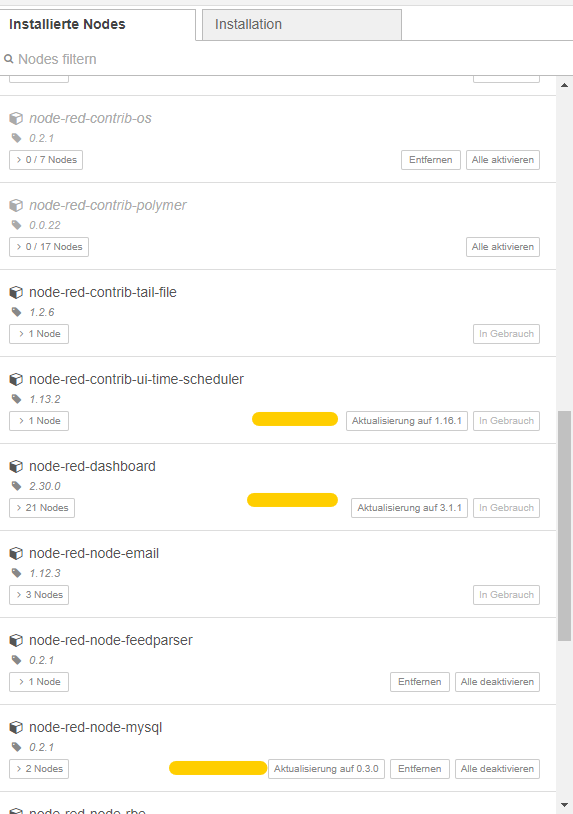
Deswegen sollte man da auch hin und wieder mal reinschauen, damit einem die Systemumgebung nicht wegläuft und man völlig veraltete Nodes verwendet.
Das wäre übrigens überhaupt eine Idee. Du sagst ja unter Node.js 10 funktioniert alles. Dann schau mal, im Palettenmanager ob Du Nodes updaten kannst bevor Du auf Node.js 12 oder 14 gehst.
Ich mache das gerade und im Palettenmanager halt dann auf

Zeige Protokoll klicken, dann siehst Du ob der npm richtig arbeitet:
Wenn dann alles aktualisiert ist:

muss Du den Adapter eh einmal neu starten.
Jeder Flow bzw. jedes Script, das ich hier poste implementiert jeder auf eigene Gefahr. Flows und Scripts können Fehler aufweisen und weder der Seitenbetreiber noch ich persönlich können hierfür haftbar gemacht werden. Das gleiche gilt für Empfehlungen aller Art.
-
@homoran Auch wenn er die Flows nicht einzeln hat - Probleme machen ja dann oft auch die nachinstallierten NOdes.
Deshalb war mein Vorschlag - neben dem kompletten neu aufsetzen des Systems und zurückspielen eines Backups - den Adapter erst mal so zu installieren, dass man wenigstens wieder einen funktionierenden Adapter mit einem leeren Flow Fenster hat.
Dann kann man über Node-Red auch die letztes flows.json importieren.
Bei der Wiederinstallation hat man auch die neuesten Nodes. Das Problem was ich allerdings sehe, wenn man nicht den Palettenmanager im Node-Red nutzt (früher war das zwingend) - ab der Version 2 des Adapter kann man es über die Adapterkonfig machen. Dann hat man allerdings den Nachteil, dass man nicht sieht ob neue Versionen der Nodes exisitieren.
Und der apt-Manager erkennt keine Updates für Node-Red Nodes. Ich hab mal gerade bei mir geschaut und gesehen, dass wieder ein paar Updates verfügbar sind, die einem aber so im iobroker nicht angezeigt werden, da dieser die Nodes ja nicht kennt - keine Ahnung ob er die Updates kennt, wenn man nicht den Palettenmanager nutzt.
Deswegen sollte man da auch hin und wieder mal reinschauen, damit einem die Systemumgebung nicht wegläuft und man völlig veraltete Nodes verwendet.
Das wäre übrigens überhaupt eine Idee. Du sagst ja unter Node.js 10 funktioniert alles. Dann schau mal, im Palettenmanager ob Du Nodes updaten kannst bevor Du auf Node.js 12 oder 14 gehst.
Ich mache das gerade und im Palettenmanager halt dann auf
Zeige Protokoll klicken, dann siehst Du ob der npm richtig arbeitet:
Wenn dann alles aktualisiert ist:
muss Du den Adapter eh einmal neu starten.
@mickym sagte in node-red fenster nach update auf 2.4.0:
Und der apt-Manager erkennt keine Updates für Node-Red Nodes.
Ja, das ist klar. Das sind ja auch keine deb-Pakete direkt vom OS. Das wird dann offenbar über eine Entsprechung (paletten-Manager?) von node-red gemacht. nodeJS-Module kommen ja auch nicht über apt sondern über den npm (node package manager) rein.
-
@thomas-braun sagte in node-red fenster nach update auf 2.4.0:
Vielleicht mal node@14 probieren? Weiter raus würde ich aber nicht rudern.
Das sollte nicht das Problem sein.
ich tippe inzwischen wie @mickym darauf, dass etwas mit seinen Flows nicht stimmt.Da @fournierrf5 aber zum Glück alle Flows (einzeln???) gesichert hat, wäre es IMHO im Moment das sinnvollste den Rat von @mickym zu befolgen und alle zugehörigen Dateien zu löschen, dann den Adapter neu zu installieren und danach die Flows einzeln nacheinander zu importieren, bzw. externe nodes ebenfalls einzeln zu installieren.
Sobald dann das Problem wieder auftritt weiß man ja an welchem Flow / node es lag.Das Problem existiert bereits ohne flows, sobald der adapter installiert wird.
node.js 14.xx hat selben erfolg gebraucht.
Zuletzt hat sich nodered nicht mal mehr deinstallieren lassen, jetzt das ist das backup image neu geflasht und alles läuft wieder wie zu beginn
-
@homoran Auch wenn er die Flows nicht einzeln hat - Probleme machen ja dann oft auch die nachinstallierten NOdes.
Deshalb war mein Vorschlag - neben dem kompletten neu aufsetzen des Systems und zurückspielen eines Backups - den Adapter erst mal so zu installieren, dass man wenigstens wieder einen funktionierenden Adapter mit einem leeren Flow Fenster hat.
Dann kann man über Node-Red auch die letztes flows.json importieren.
Bei der Wiederinstallation hat man auch die neuesten Nodes. Das Problem was ich allerdings sehe, wenn man nicht den Palettenmanager im Node-Red nutzt (früher war das zwingend) - ab der Version 2 des Adapter kann man es über die Adapterkonfig machen. Dann hat man allerdings den Nachteil, dass man nicht sieht ob neue Versionen der Nodes exisitieren.
Und der apt-Manager erkennt keine Updates für Node-Red Nodes. Ich hab mal gerade bei mir geschaut und gesehen, dass wieder ein paar Updates verfügbar sind, die einem aber so im iobroker nicht angezeigt werden, da dieser die Nodes ja nicht kennt - keine Ahnung ob er die Updates kennt, wenn man nicht den Palettenmanager nutzt.
Deswegen sollte man da auch hin und wieder mal reinschauen, damit einem die Systemumgebung nicht wegläuft und man völlig veraltete Nodes verwendet.
Das wäre übrigens überhaupt eine Idee. Du sagst ja unter Node.js 10 funktioniert alles. Dann schau mal, im Palettenmanager ob Du Nodes updaten kannst bevor Du auf Node.js 12 oder 14 gehst.
Ich mache das gerade und im Palettenmanager halt dann auf
Zeige Protokoll klicken, dann siehst Du ob der npm richtig arbeitet:
Wenn dann alles aktualisiert ist:
muss Du den Adapter eh einmal neu starten.
ich benutze ausschliesslich den palettenmanager. es ist und war auch alles aktuell!


Hey! Du scheinst an dieser Unterhaltung interessiert zu sein, hast aber noch kein Konto.
Hast du es satt, bei jedem Besuch durch die gleichen Beiträge zu scrollen? Wenn du dich für ein Konto anmeldest, kommst du immer genau dorthin zurück, wo du zuvor warst, und kannst dich über neue Antworten benachrichtigen lassen (entweder per E-Mail oder Push-Benachrichtigung). Du kannst auch Lesezeichen speichern und Beiträge positiv bewerten, um anderen Community-Mitgliedern deine Wertschätzung zu zeigen.
Mit deinem Input könnte dieser Beitrag noch besser werden 💗
Registrieren AnmeldenSupport us
221
Online33.0k
Benutzer83.6k
Themen1.3m
Beiträge