




Backit-Up Error beim erstellen Grafana, Influx und JS
-
Was ich noch vergessen habe:
Update/upgrade und Fix ausgeführt. Rechte scheinen mir ok, oder?root@Iobroker-Live:/# getfacl /opt/iobroker/backups getfacl: Removing leading '/' from absolute path names # file: opt/iobroker/backups # owner: iobroker # group: iobroker user::rwx group::r-x group:iobroker:rwx mask::rwx other::r-x default:user::rwx default:group::r-x default:group:iobroker:rwx default:mask::rwx default:other::r-x@urs
Man loggt sich nicht als root ein.
'nuff said -
@urs
Man loggt sich nicht als root ein.
'nuff said -
@thomas-braun Ändert das was an meinem Problem?
@urs
Kurzfristig nicht, mittelfristig bis langfristig schon.
Das System lebt gesünder.Da scheinen gleich mehrere Fehleinstellungen und falsche Rechte vorhanden zu sein.
Influx läuft lokal auf dem Rechner auf dem auch der ioBroker läuft? influx-client installiert, falls das bei Ubuntu so gepackt wurde?Bei JS liegt der Spiegel außerhalb von /opt/iobroker ?
Am besten aber einen Teilbereich nach dem anderen abklappern. Immer nur eine Baustelle beackern.
-
@thomas-braun sagte in Backit-Up Error beim erstellen Grafana, Influx und JS:
Influx läuft lokal auf dem Rechner auf dem auch der ioBroker läuft?
Auf dem gleichen NUC, ja, aber in unterschiedliche Proxmox Container (sorry das ich das nicht vorher erwähnt habe). Iobroker lebt an der Adresse192.168.1.10, Influx und Grafana an 192.168.1.16.
Hab jetzt den influx-client nachinstalliert.
Komme offenbar einen Schritt weiter, bin aber noch nicht am Ziel:[DEBUG] [influxDB] - Start InfluxDB Backup ... [DEBUG] [influxDB] - InfluxDB Backup tmp directory created [DEBUG] [influxDB] - Try deleting the InfluxDB tmp directory [DEBUG] [influxDB] - InfluxDB tmp directory was successfully deleted [ERROR] [influxDB] - [IGNORED] Error: Command failed: influxd backup -portable -database iobroker -host 192.168.1.16:8088 "/opt/iobroker/backups/influxDB_2021_04_19-19_23_41_backupiobroker" 2021/04/19 19:23:41 Download shard 0 failed dial tcp 192.168.1.16:8088: connect: connection refused. Waiting 2s and retrying (0)... 2021/04/19 19:23:43 Download shard 0 failed dial tcp 192.168.1.16:8088: connect: connection refused. Waiting 2s and retrying (1)... 2021/04/19 19:23:45 Download shard 0 failed dial tcp 192.168.1.16:8088: connect: connection refused. Waiting 2s and retrying (2)... 2021/04/19 19:23:47 Download shard 0 failed dial tcp 192.168.1.16:8088: connect: connection refused. Waiting 2s and retrying (3)... 2021/04/19 19:23:49 Download shard 0 failed dial tcp 192.168.1.16:8088: connect: connection refused. Waiting 2s and retrying (4)... 2021/04/19 19:23:51 Download shard 0 failed dial tcp 192.168.1.16:8088: connect: connection refused. Waiting 2s and retrying (5)... 2021/04/19 19:23:53 Download shard 0 failed dial tcp 192.168.1.16:8088: connect: connection refused. Waiting 3.01s and retrying (6)... 2021/04/19 19:23:56 Download shard 0 failed dial tcp 192.168.1.16:8088: connect: connection refused. Waiting 11.441s and retrying (7)... 2021/04/19 19:24:07 Download shard 0 failed dial tcp 192.168.1.16:8088: connect: connection refused. Waiting 43.477s and retrying (8)... 2021/04/19 19:24:51 Download shard 0 failed dial tcp 192.168.1.16:8088: connect: connection refused. Waiting 2m45.216s and retrying (9)... backup: dial tcp 192.168.1.16:8088: connect: connection refusedEin Portscanner sieht nur die Ports 22, 3000(Grafana) und 8086, nicht aber den 8088.
in /etc/influxdb/influxdb.conf hab ich testweise bind-adress = "0.0.0.0:8088" eingegeben. Hat aber irgendwie nichts gebracht.
Irgendwelche weitere Ideen?@thomas-braun sagte in Backit-Up Error beim erstellen Grafana, Influx und JS:
Bei JS liegt der Spiegel außerhalb von /opt/iobroker ?
Keine Ahnung . Wie checke ich das?
-
@thomas-braun sagte in Backit-Up Error beim erstellen Grafana, Influx und JS:
Influx läuft lokal auf dem Rechner auf dem auch der ioBroker läuft?
Auf dem gleichen NUC, ja, aber in unterschiedliche Proxmox Container (sorry das ich das nicht vorher erwähnt habe). Iobroker lebt an der Adresse192.168.1.10, Influx und Grafana an 192.168.1.16.
Hab jetzt den influx-client nachinstalliert.
Komme offenbar einen Schritt weiter, bin aber noch nicht am Ziel:[DEBUG] [influxDB] - Start InfluxDB Backup ... [DEBUG] [influxDB] - InfluxDB Backup tmp directory created [DEBUG] [influxDB] - Try deleting the InfluxDB tmp directory [DEBUG] [influxDB] - InfluxDB tmp directory was successfully deleted [ERROR] [influxDB] - [IGNORED] Error: Command failed: influxd backup -portable -database iobroker -host 192.168.1.16:8088 "/opt/iobroker/backups/influxDB_2021_04_19-19_23_41_backupiobroker" 2021/04/19 19:23:41 Download shard 0 failed dial tcp 192.168.1.16:8088: connect: connection refused. Waiting 2s and retrying (0)... 2021/04/19 19:23:43 Download shard 0 failed dial tcp 192.168.1.16:8088: connect: connection refused. Waiting 2s and retrying (1)... 2021/04/19 19:23:45 Download shard 0 failed dial tcp 192.168.1.16:8088: connect: connection refused. Waiting 2s and retrying (2)... 2021/04/19 19:23:47 Download shard 0 failed dial tcp 192.168.1.16:8088: connect: connection refused. Waiting 2s and retrying (3)... 2021/04/19 19:23:49 Download shard 0 failed dial tcp 192.168.1.16:8088: connect: connection refused. Waiting 2s and retrying (4)... 2021/04/19 19:23:51 Download shard 0 failed dial tcp 192.168.1.16:8088: connect: connection refused. Waiting 2s and retrying (5)... 2021/04/19 19:23:53 Download shard 0 failed dial tcp 192.168.1.16:8088: connect: connection refused. Waiting 3.01s and retrying (6)... 2021/04/19 19:23:56 Download shard 0 failed dial tcp 192.168.1.16:8088: connect: connection refused. Waiting 11.441s and retrying (7)... 2021/04/19 19:24:07 Download shard 0 failed dial tcp 192.168.1.16:8088: connect: connection refused. Waiting 43.477s and retrying (8)... 2021/04/19 19:24:51 Download shard 0 failed dial tcp 192.168.1.16:8088: connect: connection refused. Waiting 2m45.216s and retrying (9)... backup: dial tcp 192.168.1.16:8088: connect: connection refusedEin Portscanner sieht nur die Ports 22, 3000(Grafana) und 8086, nicht aber den 8088.
in /etc/influxdb/influxdb.conf hab ich testweise bind-adress = "0.0.0.0:8088" eingegeben. Hat aber irgendwie nichts gebracht.
Irgendwelche weitere Ideen?@thomas-braun sagte in Backit-Up Error beim erstellen Grafana, Influx und JS:
Bei JS liegt der Spiegel außerhalb von /opt/iobroker ?
Keine Ahnung . Wie checke ich das?
@urs Ich weiss garnicht ob der Adapter das kann wenn Influx auf einer anderen Maschine läuft.
Aber warum richtest du nicht für den Ibflux/Grafana Container ein automatisches Backup unter Proxmox ein wenn es eh ein eigener Container ist. Der Adapter würde ja eh nur die DB sichern und du müsstest Influx eh neu installieren wenn der Container abschmiert.
Bitte keine Fragen per PN, die gehören ins Forum!
Benutzt das Voting rechts unten im Beitrag wenn er euch geholfen hat.
-
@urs Ich weiss garnicht ob der Adapter das kann wenn Influx auf einer anderen Maschine läuft.
Aber warum richtest du nicht für den Ibflux/Grafana Container ein automatisches Backup unter Proxmox ein wenn es eh ein eigener Container ist. Der Adapter würde ja eh nur die DB sichern und du müsstest Influx eh neu installieren wenn der Container abschmiert.
@Urs Für Influx Backups auf einem anderen System musst du in Backitup auf Remote stellen und die IP des Influx Servers eintragen
-
@thomas-braun sagte in Backit-Up Error beim erstellen Grafana, Influx und JS:
Influx läuft lokal auf dem Rechner auf dem auch der ioBroker läuft?
Auf dem gleichen NUC, ja, aber in unterschiedliche Proxmox Container (sorry das ich das nicht vorher erwähnt habe). Iobroker lebt an der Adresse192.168.1.10, Influx und Grafana an 192.168.1.16.
Hab jetzt den influx-client nachinstalliert.
Komme offenbar einen Schritt weiter, bin aber noch nicht am Ziel:[DEBUG] [influxDB] - Start InfluxDB Backup ... [DEBUG] [influxDB] - InfluxDB Backup tmp directory created [DEBUG] [influxDB] - Try deleting the InfluxDB tmp directory [DEBUG] [influxDB] - InfluxDB tmp directory was successfully deleted [ERROR] [influxDB] - [IGNORED] Error: Command failed: influxd backup -portable -database iobroker -host 192.168.1.16:8088 "/opt/iobroker/backups/influxDB_2021_04_19-19_23_41_backupiobroker" 2021/04/19 19:23:41 Download shard 0 failed dial tcp 192.168.1.16:8088: connect: connection refused. Waiting 2s and retrying (0)... 2021/04/19 19:23:43 Download shard 0 failed dial tcp 192.168.1.16:8088: connect: connection refused. Waiting 2s and retrying (1)... 2021/04/19 19:23:45 Download shard 0 failed dial tcp 192.168.1.16:8088: connect: connection refused. Waiting 2s and retrying (2)... 2021/04/19 19:23:47 Download shard 0 failed dial tcp 192.168.1.16:8088: connect: connection refused. Waiting 2s and retrying (3)... 2021/04/19 19:23:49 Download shard 0 failed dial tcp 192.168.1.16:8088: connect: connection refused. Waiting 2s and retrying (4)... 2021/04/19 19:23:51 Download shard 0 failed dial tcp 192.168.1.16:8088: connect: connection refused. Waiting 2s and retrying (5)... 2021/04/19 19:23:53 Download shard 0 failed dial tcp 192.168.1.16:8088: connect: connection refused. Waiting 3.01s and retrying (6)... 2021/04/19 19:23:56 Download shard 0 failed dial tcp 192.168.1.16:8088: connect: connection refused. Waiting 11.441s and retrying (7)... 2021/04/19 19:24:07 Download shard 0 failed dial tcp 192.168.1.16:8088: connect: connection refused. Waiting 43.477s and retrying (8)... 2021/04/19 19:24:51 Download shard 0 failed dial tcp 192.168.1.16:8088: connect: connection refused. Waiting 2m45.216s and retrying (9)... backup: dial tcp 192.168.1.16:8088: connect: connection refusedEin Portscanner sieht nur die Ports 22, 3000(Grafana) und 8086, nicht aber den 8088.
in /etc/influxdb/influxdb.conf hab ich testweise bind-adress = "0.0.0.0:8088" eingegeben. Hat aber irgendwie nichts gebracht.
Irgendwelche weitere Ideen?@thomas-braun sagte in Backit-Up Error beim erstellen Grafana, Influx und JS:
Bei JS liegt der Spiegel außerhalb von /opt/iobroker ?
Keine Ahnung . Wie checke ich das?
@urs sagte in Backit-Up Error beim erstellen Grafana, Influx und JS:
Bei JS liegt der Spiegel außerhalb von /opt/iobroker ?
Keine Ahnung . Wie checke ich das?
Zeige mal die Einstellungen vom Spiegelpfad im JavaScript Adapter und die von Backitup
-
@Urs Für Influx Backups auf einem anderen System musst du in Backitup auf Remote stellen und die IP des Influx Servers eintragen
-
@urs Ich weiss garnicht ob der Adapter das kann wenn Influx auf einer anderen Maschine läuft.
Aber warum richtest du nicht für den Ibflux/Grafana Container ein automatisches Backup unter Proxmox ein wenn es eh ein eigener Container ist. Der Adapter würde ja eh nur die DB sichern und du müsstest Influx eh neu installieren wenn der Container abschmiert.
@wendy2702 sagte in Backit-Up Error beim erstellen Grafana, Influx und JS:
Aber warum richtest du nicht für den Ibflux/Grafana Container ein automatisches Backup unter Proxmox ein wenn es eh ein eigener Container ist.
Das ist schon so eingerichtet, aber da ist der Platz begrenzt. Daher kann ich da auch nur maximal 10 Backups vorhalten und wenn der Proxmox verreckt ist alles weg. Wollte ja mal die Backups auf eine externe Platte welche an der Fritzbox hängt auslagern, aber nachdem ich auch nach tagelangem herumgebastel an der Linuxkonsole nicht hinbekommen habe diese unter Proxmox einzubinden hab ich das aufgegeben. Das nächste Problem ist die Dateigrösse. Den ganzen Container zu speichern benötigt 1.7Gb, das geht sicher auch schlanker indem man nur die unersetzlichen Daten speichert.
@simatec sagte in Backit-Up Error beim erstellen Grafana, Influx und JS:
@Urs Für Influx Backups auf einem anderen System musst du in Backitup auf Remote stellen und die IP des Influx Servers eintragen
Das hatte ich gemacht und ich denke das sollte so passen:
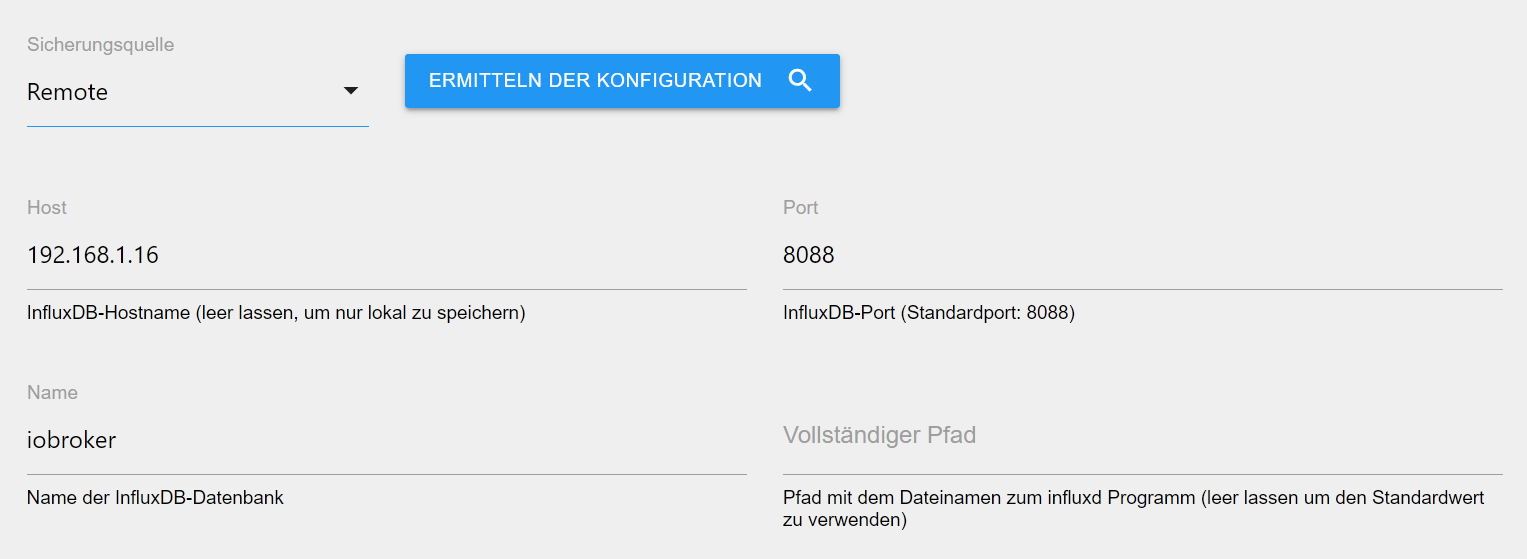
@simatec sagte in Backit-Up Error beim erstellen Grafana, Influx und JS:
@urs sagte in Backit-Up Error beim erstellen Grafana, Influx und JS:
Bei JS liegt der Spiegel außerhalb von /opt/iobroker ?
Keine Ahnung . Wie checke ich das?
Zeige mal die Einstellungen vom Spiegelpfad im JavaScript Adapter und die von Backitup
Meinst Du das?
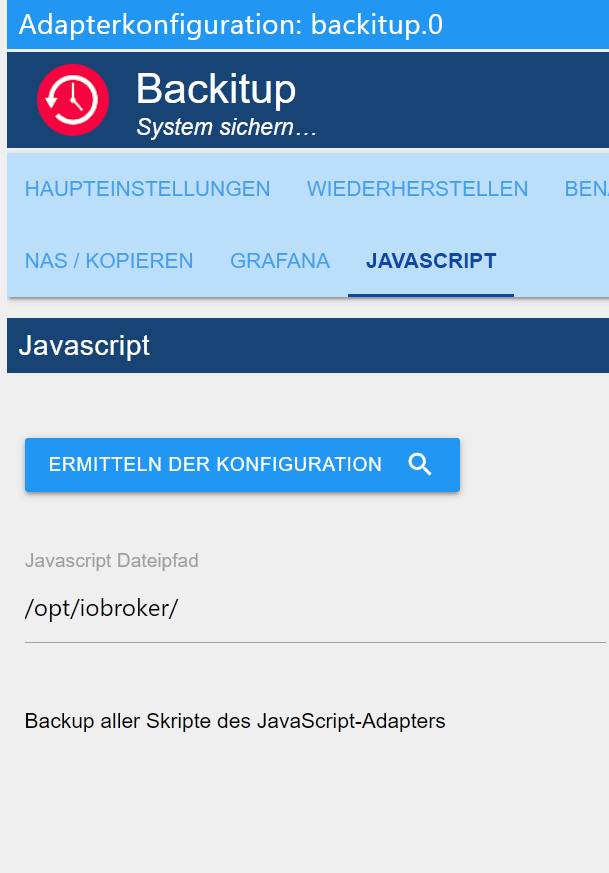
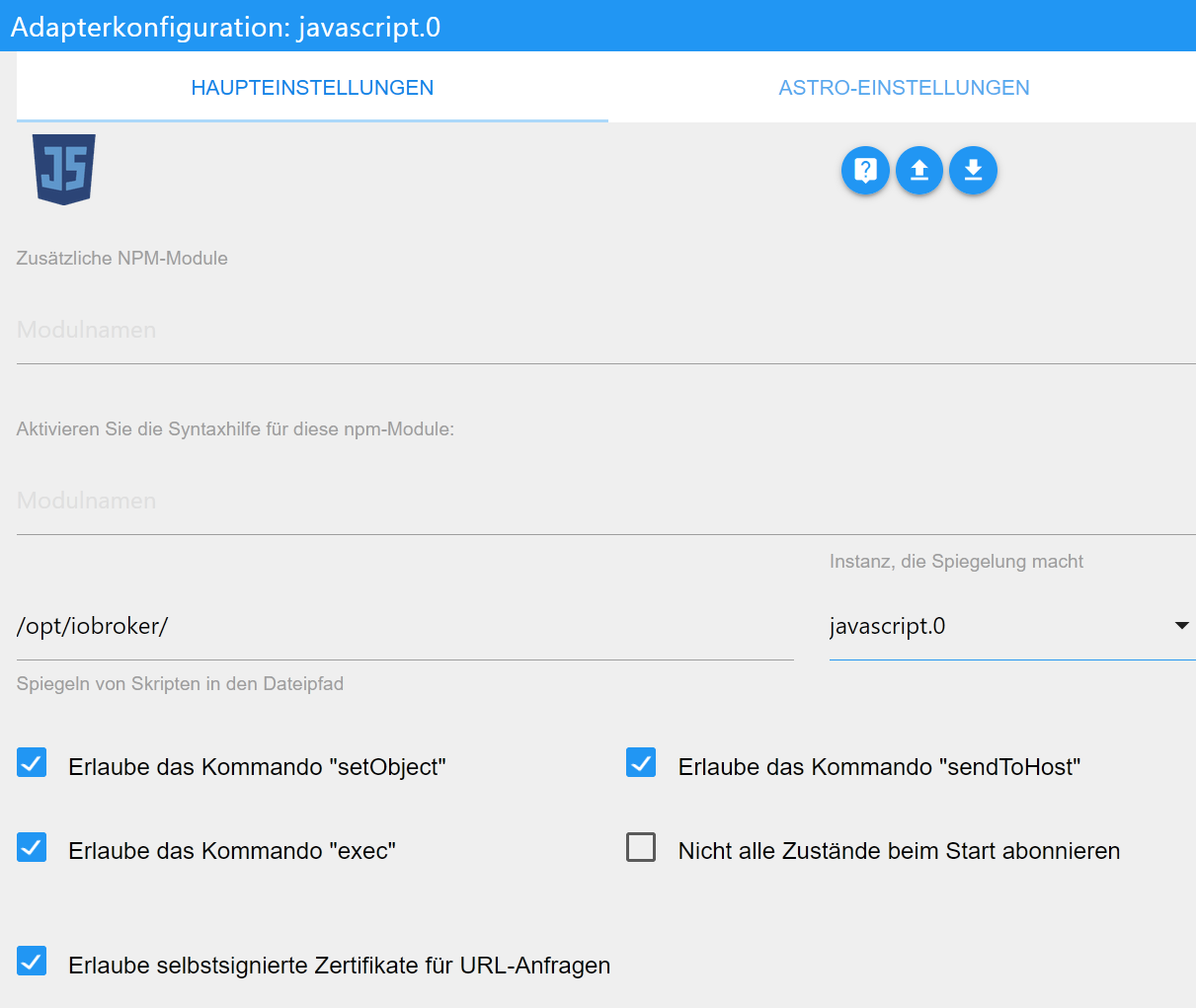
-
@wendy2702 sagte in Backit-Up Error beim erstellen Grafana, Influx und JS:
Aber warum richtest du nicht für den Ibflux/Grafana Container ein automatisches Backup unter Proxmox ein wenn es eh ein eigener Container ist.
Das ist schon so eingerichtet, aber da ist der Platz begrenzt. Daher kann ich da auch nur maximal 10 Backups vorhalten und wenn der Proxmox verreckt ist alles weg. Wollte ja mal die Backups auf eine externe Platte welche an der Fritzbox hängt auslagern, aber nachdem ich auch nach tagelangem herumgebastel an der Linuxkonsole nicht hinbekommen habe diese unter Proxmox einzubinden hab ich das aufgegeben. Das nächste Problem ist die Dateigrösse. Den ganzen Container zu speichern benötigt 1.7Gb, das geht sicher auch schlanker indem man nur die unersetzlichen Daten speichert.
@simatec sagte in Backit-Up Error beim erstellen Grafana, Influx und JS:
@Urs Für Influx Backups auf einem anderen System musst du in Backitup auf Remote stellen und die IP des Influx Servers eintragen
Das hatte ich gemacht und ich denke das sollte so passen:
@simatec sagte in Backit-Up Error beim erstellen Grafana, Influx und JS:
@urs sagte in Backit-Up Error beim erstellen Grafana, Influx und JS:
Bei JS liegt der Spiegel außerhalb von /opt/iobroker ?
Keine Ahnung . Wie checke ich das?
Zeige mal die Einstellungen vom Spiegelpfad im JavaScript Adapter und die von Backitup
Meinst Du das?
@urs sagte in Backit-Up Error beim erstellen Grafana, Influx und JS:
Den ganzen Container zu speichern benötigt 1.7Gb, das geht sicher auch schlanker indem man nur die unersetzlichen Daten speichert.
Ja, geht bestimmt schlanker.
Wobei mir sich bis heute die Frage nach unersetzlichen Daten in einer Smarthome Datenbank stellt. Aber das ist immer eine persönliche Sache und hat nichts mit deinem Problem zu tun.
-
@wendy2702 sagte in Backit-Up Error beim erstellen Grafana, Influx und JS:
Aber warum richtest du nicht für den Ibflux/Grafana Container ein automatisches Backup unter Proxmox ein wenn es eh ein eigener Container ist.
Das ist schon so eingerichtet, aber da ist der Platz begrenzt. Daher kann ich da auch nur maximal 10 Backups vorhalten und wenn der Proxmox verreckt ist alles weg. Wollte ja mal die Backups auf eine externe Platte welche an der Fritzbox hängt auslagern, aber nachdem ich auch nach tagelangem herumgebastel an der Linuxkonsole nicht hinbekommen habe diese unter Proxmox einzubinden hab ich das aufgegeben. Das nächste Problem ist die Dateigrösse. Den ganzen Container zu speichern benötigt 1.7Gb, das geht sicher auch schlanker indem man nur die unersetzlichen Daten speichert.
@simatec sagte in Backit-Up Error beim erstellen Grafana, Influx und JS:
@Urs Für Influx Backups auf einem anderen System musst du in Backitup auf Remote stellen und die IP des Influx Servers eintragen
Das hatte ich gemacht und ich denke das sollte so passen:
@simatec sagte in Backit-Up Error beim erstellen Grafana, Influx und JS:
@urs sagte in Backit-Up Error beim erstellen Grafana, Influx und JS:
Bei JS liegt der Spiegel außerhalb von /opt/iobroker ?
Keine Ahnung . Wie checke ich das?
Zeige mal die Einstellungen vom Spiegelpfad im JavaScript Adapter und die von Backitup
Meinst Du das?
@urs
Hast du influx auch auf deinem System, auf dem iobroker läuft installiert?
Des Weiteren muss influx nach Änderungen in der conf neugestartet werden. Also wenn du bind geändert hast, bitte im Anschluss neustarten.Der Pfad /opt/iobroker ist zum spiegeln sehr schlecht. Nimm einen eigenen Ordner dafür.
Bei mir ist das z.B /opt/iobroker /scripts -
@urs
Hast du influx auch auf deinem System, auf dem iobroker läuft installiert?
Des Weiteren muss influx nach Änderungen in der conf neugestartet werden. Also wenn du bind geändert hast, bitte im Anschluss neustarten.Der Pfad /opt/iobroker ist zum spiegeln sehr schlecht. Nimm einen eigenen Ordner dafür.
Bei mir ist das z.B /opt/iobroker /scripts@simatec sagte in Backit-Up Error beim erstellen Grafana, Influx und JS:
Hast du influx auch auf deinem System, auf dem iobroker läuft installiert?
Eigentlich nicht. Müsste ich das?
@simatec sagte in Backit-Up Error beim erstellen Grafana, Influx und JS:
Der Pfad /opt/iobroker ist zum spiegeln sehr schlecht. Nimm einen eigenen Ordner dafür.
Bei mir ist das z.B /opt/iobroker /scriptsIch meine da hab ich das genommen was der JS-Adapter vorgeschlagen hat. Und der Backitup-Adapter hat sich dann das von dort gekrallt.
Also mal auf /opt/iobroker/scripts umgestellt und siehe da, es werden 18MB Skripte gepackt und auch auf dem Netzlaufwerk gespeichert. Super Danke schonmal dafür.Allerdings ist immer noch das Problem dass InfluxDB keinen Zugriff gewährt. Ich denke da ist der Port schlicht und einfach noch zu...muss ich nochmal anschauen. Und ja, ich hab da jedes mal als ich was geändert habe die Maschine mit dem Influx/Grafana drauf neu gestartet, leider ohne erfolg.
Was mir aber im Moment mehr sorgen macht ist dass der Iobroker selber keine Backups schreibt. Hier das aktuelle Log
backitup.0	2021-04-19 22:11:57.106	debug	(381) system.adapter.admin.0: logging true
backitup.0	2021-04-19 22:11:34.788	debug	(381) [iobroker] exec: done
backitup.0	2021-04-19 22:11:34.637	debug	(381) [iobroker/umount] done
backitup.0	2021-04-19 22:11:34.636	debug	(381) [iobroker/umount] umount successfully completed
backitup.0	2021-04-19 22:11:29.599	debug	(381) [iobroker/umount] mount activ, umount is started ...
backitup.0	2021-04-19 22:11:29.440	debug	(381) [iobroker/historyJSON] done
backitup.0	2021-04-19 22:11:29.440	debug	(381) [iobroker/historyJSON] new history json values created
backitup.0	2021-04-19 22:11:29.027	debug	(381) [iobroker/historyHTML] done
backitup.0	2021-04-19 22:11:29.027	debug	(381) [iobroker/historyHTML] new history html values created
backitup.0	2021-04-19 22:11:28.423	debug	(381) [iobroker/email] done
backitup.0	2021-04-19 22:11:28.423	debug	(381) sendTo "send" to system.adapter.email.0 from system.adapter.backitup.0
backitup.0	2021-04-19 22:11:28.269	debug	(381) [iobroker/clean] done
backitup.0	2021-04-19 22:11:28.269	debug	(381) [iobroker/clean] Backup files not deleted from /opt/iobroker/backups because some errors.
backitup.0	2021-04-19 22:11:27.667	debug	(381) [iobroker/cifs] done
backitup.0	2021-04-19 22:11:27.365	debug	(381) [iobroker/javascripts] done
backitup.0	2021-04-19 22:11:27.362	debug	(381) [iobroker/javascripts] Backup created: /opt/iobroker/backups/javascripts_2021_04_19-22_11_19_backupiobroker.tar.gz
backitup.0	2021-04-19 22:11:24.764	debug	(381) [iobroker/javascripts] Packed 18MB so far...
backitup.0	2021-04-19 22:11:19.290	debug	(381) [iobroker/grafana] done
backitup.0	2021-04-19 22:11:19.290	debug	(381) [iobroker/grafana] cannot found Grafana Backup files
backitup.0	2021-04-19 22:11:19.290	debug	(381) [iobroker/grafana] Grafana tmp directory "/opt/iobroker/backups/grafana_tmp" successfully deleted
backitup.0	2021-04-19 22:11:16.706	debug	(381) [iobroker/grafana] Try deleting the Grafana tmp directory: "/opt/iobroker/backups/grafana_tmp"
backitup.0	2021-04-19 22:11:14.363	debug	(381) [iobroker/grafana] start Grafana backup compress ...
backitup.0	2021-04-19 22:11:14.362	debug	(381) [iobroker/grafana] found Dashboard: proxmox-ve-home
backitup.0	2021-04-19 22:11:14.358	debug	(381) [iobroker/grafana] found Dashboard: proxmox-ve-node
backitup.0	2021-04-19 22:11:14.357	debug	(381) [iobroker/grafana] found Dashboard: proxmox-vm-overview
backitup.0	2021-04-19 22:11:14.353	debug	(381) [iobroker/grafana] found Dashboard: proxmox
backitup.0	2021-04-19 22:11:14.337	debug	(381) [iobroker/grafana] found Dashboard: proxmox-ve-alert
backitup.0	2021-04-19 22:11:14.309	debug	(381) [iobroker/grafana] found Dashboard: proxmox-ve-kvm
backitup.0	2021-04-19 22:11:14.295	debug	(381) [iobroker/grafana] found Dashboard: proxmox-ve-network
backitup.0	2021-04-19 22:11:14.268	debug	(381) [iobroker/grafana] found Dashboard: proxmox-ve-storages
backitup.0	2021-04-19 22:11:14.240	debug	(381) [iobroker/grafana] found Dashboard: new-dashboard-copy
backitup.0	2021-04-19 22:11:14.197	debug	(381) [iobroker/grafana] Error on Grafana Datasource Request
backitup.0	2021-04-19 22:11:14.179	debug	(381) [iobroker/grafana] Grafana is available ... Status: 200
backitup.0	2021-04-19 22:11:14.158	debug	(381) [iobroker/grafana] start Grafana request ...
backitup.0	2021-04-19 22:11:14.139	debug	(381) [iobroker/grafana] Created datasource directory
backitup.0	2021-04-19 22:11:13.605	debug	(381) [iobroker/grafana] Created dashboards_manually_restore directory
backitup.0	2021-04-19 22:11:13.511	debug	(381) [iobroker/grafana] Created dashboard directory
backitup.0	2021-04-19 22:11:13.425	debug	(381) [iobroker/grafana] Created grafana_tmp directory: "/opt/iobroker/backups/grafana_tmp"
backitup.0	2021-04-19 22:11:13.335	debug	(381) [iobroker/grafana] Start Grafana Backup ...
backitup.0	2021-04-19 22:11:12.431	debug	(381) [iobroker/influxDB] backup: dial tcp 192.168.1.16:8088: connect: connection refused
backitup.0	2021-04-19 22:11:12.430	debug	(381) [iobroker/influxDB] 2021/04/19 22:08:27 Download shard 0 failed dial tcp 192.168.1.16:8088: connect: connection refused. Waiting 2m45.216s and retrying (9)...
backitup.0	2021-04-19 22:11:12.430	debug	(381) [iobroker/influxDB] 2021/04/19 22:07:43 Download shard 0 failed dial tcp 192.168.1.16:8088: connect: connection refused. Waiting 43.477s and retrying (8)...
backitup.0	2021-04-19 22:11:12.430	debug	(381) [iobroker/influxDB] 2021/04/19 22:07:32 Download shard 0 failed dial tcp 192.168.1.16:8088: connect: connection refused. Waiting 11.441s and retrying (7)...
backitup.0	2021-04-19 22:11:12.430	debug	(381) [iobroker/influxDB] 2021/04/19 22:07:29 Download shard 0 failed dial tcp 192.168.1.16:8088: connect: connection refused. Waiting 3.01s and retrying (6)...
backitup.0	2021-04-19 22:11:12.430	debug	(381) [iobroker/influxDB] 2021/04/19 22:07:27 Download shard 0 failed dial tcp 192.168.1.16:8088: connect: connection refused. Waiting 2s and retrying (5)...
backitup.0	2021-04-19 22:11:12.430	debug	(381) [iobroker/influxDB] 2021/04/19 22:07:25 Download shard 0 failed dial tcp 192.168.1.16:8088: connect: connection refused. Waiting 2s and retrying (4)...
backitup.0	2021-04-19 22:11:12.430	debug	(381) [iobroker/influxDB] 2021/04/19 22:07:23 Download shard 0 failed dial tcp 192.168.1.16:8088: connect: connection refused. Waiting 2s and retrying (3)...
backitup.0	2021-04-19 22:11:12.430	debug	(381) [iobroker/influxDB] 2021/04/19 22:07:21 Download shard 0 failed dial tcp 192.168.1.16:8088: connect: connection refused. Waiting 2s and retrying (2)...
backitup.0	2021-04-19 22:11:12.430	debug	(381) [iobroker/influxDB] 2021/04/19 22:07:19 Download shard 0 failed dial tcp 192.168.1.16:8088: connect: connection refused. Waiting 2s and retrying (1)...
backitup.0	2021-04-19 22:11:12.430	debug	(381) [iobroker/influxDB] 2021/04/19 22:07:17 Download shard 0 failed dial tcp 192.168.1.16:8088: connect: connection refused. Waiting 2s and retrying (0)...
backitup.0	2021-04-19 22:11:12.430	debug	(381) [iobroker/influxDB] [IGNORED] Error: Command failed: influxd backup -portable -database iobroker -host 192.168.1.16:8088 "/opt/iobroker/backups/influxDB_2021_04_19-22_07_16_backupiobroker"
backitup.0	2021-04-19 22:11:12.429	debug	(381) [iobroker/influxDB] InfluxDB tmp directory was successfully deleted
backitup.0	2021-04-19 22:11:12.251	debug	(381) [iobroker/influxDB] Try deleting the InfluxDB tmp directory
backitup.0	2021-04-19 22:07:16.983	debug	(381) [iobroker/influxDB] InfluxDB Backup tmp directory created
backitup.0	2021-04-19 22:07:16.863	debug	(381) [iobroker/influxDB] Start InfluxDB Backup ...
backitup.0	2021-04-19 22:07:16.712	debug	(381) [iobroker/iobroker] done
backitup.0	2021-04-19 22:07:16.642	debug	(381) [iobroker/iobroker] at processTicksAndRejections (internal/process/task_queues.js:93:5)
backitup.0	2021-04-19 22:07:16.642	debug	(381) [iobroker/iobroker] at /opt/iobroker/node_modules/standard-as-callback/built/index.js:30:51
backitup.0	2021-04-19 22:07:16.642	debug	(381) [iobroker/iobroker] at tryCatcher (/opt/iobroker/node_modules/standard-as-callback/built/utils.js:11:23)
backitup.0	2021-04-19 22:07:16.642	debug	(381) [iobroker/iobroker] at /opt/iobroker/node_modules/ioredis/built/ScanStream.js:38:22
backitup.0	2021-04-19 22:07:16.642	debug	(381) [iobroker/iobroker] Emitted 'error' event on ScanStream instance at:
backitup.0	2021-04-19 22:07:16.642	debug	(381) [iobroker/iobroker] at TCP.<anonymous> (net.js:673:12)
backitup.0	2021-04-19 22:07:16.642	debug	(381) [iobroker/iobroker] at Socket.emit (events.js:315:20)
backitup.0	2021-04-19 22:07:16.642	debug	(381) [iobroker/iobroker] at Object.onceWrapper (events.js:422:26)
backitup.0	2021-04-19 22:07:16.642	debug	(381) [iobroker/iobroker] at Socket.<anonymous> (/opt/iobroker/node_modules/ioredis/built/redis/event_handler.js:146:20)
backitup.0	2021-04-19 22:07:16.642	debug	(381) [iobroker/iobroker] at close (/opt/iobroker/node_modules/ioredis/built/redis/event_handler.js:179:25)
backitup.0	2021-04-19 22:07:16.641	debug	(381) [iobroker/iobroker] Error: Connection is closed.
backitup.0	2021-04-19 22:07:16.641	debug	(381) [iobroker/iobroker] ^
backitup.0	2021-04-19 22:07:16.641	debug	(381) [iobroker/iobroker] throw e;
backitup.0	2021-04-19 22:07:16.641	debug	(381) [iobroker/iobroker] /opt/iobroker/node_modules/standard-as-callback/built/index.js:6
backitup.0	2021-04-19 22:07:16.628	debug	(381) [iobroker/iobroker] at processTicksAndRejections (internal/process/task_queues.js:93:5)
backitup.0	2021-04-19 22:07:16.628	debug	(381) [iobroker/iobroker] at runMicrotasks (<anonymous>)
backitup.0	2021-04-19 22:07:16.628	debug	(381) [iobroker/iobroker] at /opt/iobroker/node_modules/iobroker.js-controller/lib/setup/setupBackup.js:384:79
backitup.0	2021-04-19 22:07:16.628	debug	(381) [iobroker/iobroker] at JSON.stringify (<anonymous>)
backitup.0	2021-04-19 22:07:16.627	debug	(381) [iobroker/iobroker] Uncaught Rejection: RangeError: Invalid string length
backitup.0	2021-04-19 22:07:12.717	debug	(381) [iobroker/iobroker] host.Iobroker-Live 51012 objects saved
backitup.0	2021-04-19 22:07:12.647	debug	(381) [iobroker/iobroker] host.Iobroker-Live 33345 states saved
backitup.0	2021-04-19 22:07:05.043	debug	(381) [iobroker/mount] done
backitup.0	2021-04-19 22:07:05.042	debug	(381) [iobroker/mount] mount successfully completed
backitup.0	2021-04-19 22:06:54.814	debug	(381) Backup has started ...
backitup.0	2021-04-19 22:06:52.747	debug	(381) system.adapter.admin.0: logging false
backitup.0	2021-04-19 22:11:57.106	debug	(381) system.adapter.admin.0: logging true
Das was da um Zeile 75 rum läuft macht mir sorgen.
-
@simatec sagte in Backit-Up Error beim erstellen Grafana, Influx und JS:
Hast du influx auch auf deinem System, auf dem iobroker läuft installiert?
Eigentlich nicht. Müsste ich das?
@simatec sagte in Backit-Up Error beim erstellen Grafana, Influx und JS:
Der Pfad /opt/iobroker ist zum spiegeln sehr schlecht. Nimm einen eigenen Ordner dafür.
Bei mir ist das z.B /opt/iobroker /scriptsIch meine da hab ich das genommen was der JS-Adapter vorgeschlagen hat. Und der Backitup-Adapter hat sich dann das von dort gekrallt.
Also mal auf /opt/iobroker/scripts umgestellt und siehe da, es werden 18MB Skripte gepackt und auch auf dem Netzlaufwerk gespeichert. Super Danke schonmal dafür.Allerdings ist immer noch das Problem dass InfluxDB keinen Zugriff gewährt. Ich denke da ist der Port schlicht und einfach noch zu...muss ich nochmal anschauen. Und ja, ich hab da jedes mal als ich was geändert habe die Maschine mit dem Influx/Grafana drauf neu gestartet, leider ohne erfolg.
Was mir aber im Moment mehr sorgen macht ist dass der Iobroker selber keine Backups schreibt. Hier das aktuelle Log
backitup.0	2021-04-19 22:11:57.106	debug	(381) system.adapter.admin.0: logging true
backitup.0	2021-04-19 22:11:34.788	debug	(381) [iobroker] exec: done
backitup.0	2021-04-19 22:11:34.637	debug	(381) [iobroker/umount] done
backitup.0	2021-04-19 22:11:34.636	debug	(381) [iobroker/umount] umount successfully completed
backitup.0	2021-04-19 22:11:29.599	debug	(381) [iobroker/umount] mount activ, umount is started ...
backitup.0	2021-04-19 22:11:29.440	debug	(381) [iobroker/historyJSON] done
backitup.0	2021-04-19 22:11:29.440	debug	(381) [iobroker/historyJSON] new history json values created
backitup.0	2021-04-19 22:11:29.027	debug	(381) [iobroker/historyHTML] done
backitup.0	2021-04-19 22:11:29.027	debug	(381) [iobroker/historyHTML] new history html values created
backitup.0	2021-04-19 22:11:28.423	debug	(381) [iobroker/email] done
backitup.0	2021-04-19 22:11:28.423	debug	(381) sendTo "send" to system.adapter.email.0 from system.adapter.backitup.0
backitup.0	2021-04-19 22:11:28.269	debug	(381) [iobroker/clean] done
backitup.0	2021-04-19 22:11:28.269	debug	(381) [iobroker/clean] Backup files not deleted from /opt/iobroker/backups because some errors.
backitup.0	2021-04-19 22:11:27.667	debug	(381) [iobroker/cifs] done
backitup.0	2021-04-19 22:11:27.365	debug	(381) [iobroker/javascripts] done
backitup.0	2021-04-19 22:11:27.362	debug	(381) [iobroker/javascripts] Backup created: /opt/iobroker/backups/javascripts_2021_04_19-22_11_19_backupiobroker.tar.gz
backitup.0	2021-04-19 22:11:24.764	debug	(381) [iobroker/javascripts] Packed 18MB so far...
backitup.0	2021-04-19 22:11:19.290	debug	(381) [iobroker/grafana] done
backitup.0	2021-04-19 22:11:19.290	debug	(381) [iobroker/grafana] cannot found Grafana Backup files
backitup.0	2021-04-19 22:11:19.290	debug	(381) [iobroker/grafana] Grafana tmp directory "/opt/iobroker/backups/grafana_tmp" successfully deleted
backitup.0	2021-04-19 22:11:16.706	debug	(381) [iobroker/grafana] Try deleting the Grafana tmp directory: "/opt/iobroker/backups/grafana_tmp"
backitup.0	2021-04-19 22:11:14.363	debug	(381) [iobroker/grafana] start Grafana backup compress ...
backitup.0	2021-04-19 22:11:14.362	debug	(381) [iobroker/grafana] found Dashboard: proxmox-ve-home
backitup.0	2021-04-19 22:11:14.358	debug	(381) [iobroker/grafana] found Dashboard: proxmox-ve-node
backitup.0	2021-04-19 22:11:14.357	debug	(381) [iobroker/grafana] found Dashboard: proxmox-vm-overview
backitup.0	2021-04-19 22:11:14.353	debug	(381) [iobroker/grafana] found Dashboard: proxmox
backitup.0	2021-04-19 22:11:14.337	debug	(381) [iobroker/grafana] found Dashboard: proxmox-ve-alert
backitup.0	2021-04-19 22:11:14.309	debug	(381) [iobroker/grafana] found Dashboard: proxmox-ve-kvm
backitup.0	2021-04-19 22:11:14.295	debug	(381) [iobroker/grafana] found Dashboard: proxmox-ve-network
backitup.0	2021-04-19 22:11:14.268	debug	(381) [iobroker/grafana] found Dashboard: proxmox-ve-storages
backitup.0	2021-04-19 22:11:14.240	debug	(381) [iobroker/grafana] found Dashboard: new-dashboard-copy
backitup.0	2021-04-19 22:11:14.197	debug	(381) [iobroker/grafana] Error on Grafana Datasource Request
backitup.0	2021-04-19 22:11:14.179	debug	(381) [iobroker/grafana] Grafana is available ... Status: 200
backitup.0	2021-04-19 22:11:14.158	debug	(381) [iobroker/grafana] start Grafana request ...
backitup.0	2021-04-19 22:11:14.139	debug	(381) [iobroker/grafana] Created datasource directory
backitup.0	2021-04-19 22:11:13.605	debug	(381) [iobroker/grafana] Created dashboards_manually_restore directory
backitup.0	2021-04-19 22:11:13.511	debug	(381) [iobroker/grafana] Created dashboard directory
backitup.0	2021-04-19 22:11:13.425	debug	(381) [iobroker/grafana] Created grafana_tmp directory: "/opt/iobroker/backups/grafana_tmp"
backitup.0	2021-04-19 22:11:13.335	debug	(381) [iobroker/grafana] Start Grafana Backup ...
backitup.0	2021-04-19 22:11:12.431	debug	(381) [iobroker/influxDB] backup: dial tcp 192.168.1.16:8088: connect: connection refused
backitup.0	2021-04-19 22:11:12.430	debug	(381) [iobroker/influxDB] 2021/04/19 22:08:27 Download shard 0 failed dial tcp 192.168.1.16:8088: connect: connection refused. Waiting 2m45.216s and retrying (9)...
backitup.0	2021-04-19 22:11:12.430	debug	(381) [iobroker/influxDB] 2021/04/19 22:07:43 Download shard 0 failed dial tcp 192.168.1.16:8088: connect: connection refused. Waiting 43.477s and retrying (8)...
backitup.0	2021-04-19 22:11:12.430	debug	(381) [iobroker/influxDB] 2021/04/19 22:07:32 Download shard 0 failed dial tcp 192.168.1.16:8088: connect: connection refused. Waiting 11.441s and retrying (7)...
backitup.0	2021-04-19 22:11:12.430	debug	(381) [iobroker/influxDB] 2021/04/19 22:07:29 Download shard 0 failed dial tcp 192.168.1.16:8088: connect: connection refused. Waiting 3.01s and retrying (6)...
backitup.0	2021-04-19 22:11:12.430	debug	(381) [iobroker/influxDB] 2021/04/19 22:07:27 Download shard 0 failed dial tcp 192.168.1.16:8088: connect: connection refused. Waiting 2s and retrying (5)...
backitup.0	2021-04-19 22:11:12.430	debug	(381) [iobroker/influxDB] 2021/04/19 22:07:25 Download shard 0 failed dial tcp 192.168.1.16:8088: connect: connection refused. Waiting 2s and retrying (4)...
backitup.0	2021-04-19 22:11:12.430	debug	(381) [iobroker/influxDB] 2021/04/19 22:07:23 Download shard 0 failed dial tcp 192.168.1.16:8088: connect: connection refused. Waiting 2s and retrying (3)...
backitup.0	2021-04-19 22:11:12.430	debug	(381) [iobroker/influxDB] 2021/04/19 22:07:21 Download shard 0 failed dial tcp 192.168.1.16:8088: connect: connection refused. Waiting 2s and retrying (2)...
backitup.0	2021-04-19 22:11:12.430	debug	(381) [iobroker/influxDB] 2021/04/19 22:07:19 Download shard 0 failed dial tcp 192.168.1.16:8088: connect: connection refused. Waiting 2s and retrying (1)...
backitup.0	2021-04-19 22:11:12.430	debug	(381) [iobroker/influxDB] 2021/04/19 22:07:17 Download shard 0 failed dial tcp 192.168.1.16:8088: connect: connection refused. Waiting 2s and retrying (0)...
backitup.0	2021-04-19 22:11:12.430	debug	(381) [iobroker/influxDB] [IGNORED] Error: Command failed: influxd backup -portable -database iobroker -host 192.168.1.16:8088 "/opt/iobroker/backups/influxDB_2021_04_19-22_07_16_backupiobroker"
backitup.0	2021-04-19 22:11:12.429	debug	(381) [iobroker/influxDB] InfluxDB tmp directory was successfully deleted
backitup.0	2021-04-19 22:11:12.251	debug	(381) [iobroker/influxDB] Try deleting the InfluxDB tmp directory
backitup.0	2021-04-19 22:07:16.983	debug	(381) [iobroker/influxDB] InfluxDB Backup tmp directory created
backitup.0	2021-04-19 22:07:16.863	debug	(381) [iobroker/influxDB] Start InfluxDB Backup ...
backitup.0	2021-04-19 22:07:16.712	debug	(381) [iobroker/iobroker] done
backitup.0	2021-04-19 22:07:16.642	debug	(381) [iobroker/iobroker] at processTicksAndRejections (internal/process/task_queues.js:93:5)
backitup.0	2021-04-19 22:07:16.642	debug	(381) [iobroker/iobroker] at /opt/iobroker/node_modules/standard-as-callback/built/index.js:30:51
backitup.0	2021-04-19 22:07:16.642	debug	(381) [iobroker/iobroker] at tryCatcher (/opt/iobroker/node_modules/standard-as-callback/built/utils.js:11:23)
backitup.0	2021-04-19 22:07:16.642	debug	(381) [iobroker/iobroker] at /opt/iobroker/node_modules/ioredis/built/ScanStream.js:38:22
backitup.0	2021-04-19 22:07:16.642	debug	(381) [iobroker/iobroker] Emitted 'error' event on ScanStream instance at:
backitup.0	2021-04-19 22:07:16.642	debug	(381) [iobroker/iobroker] at TCP.<anonymous> (net.js:673:12)
backitup.0	2021-04-19 22:07:16.642	debug	(381) [iobroker/iobroker] at Socket.emit (events.js:315:20)
backitup.0	2021-04-19 22:07:16.642	debug	(381) [iobroker/iobroker] at Object.onceWrapper (events.js:422:26)
backitup.0	2021-04-19 22:07:16.642	debug	(381) [iobroker/iobroker] at Socket.<anonymous> (/opt/iobroker/node_modules/ioredis/built/redis/event_handler.js:146:20)
backitup.0	2021-04-19 22:07:16.642	debug	(381) [iobroker/iobroker] at close (/opt/iobroker/node_modules/ioredis/built/redis/event_handler.js:179:25)
backitup.0	2021-04-19 22:07:16.641	debug	(381) [iobroker/iobroker] Error: Connection is closed.
backitup.0	2021-04-19 22:07:16.641	debug	(381) [iobroker/iobroker] ^
backitup.0	2021-04-19 22:07:16.641	debug	(381) [iobroker/iobroker] throw e;
backitup.0	2021-04-19 22:07:16.641	debug	(381) [iobroker/iobroker] /opt/iobroker/node_modules/standard-as-callback/built/index.js:6
backitup.0	2021-04-19 22:07:16.628	debug	(381) [iobroker/iobroker] at processTicksAndRejections (internal/process/task_queues.js:93:5)
backitup.0	2021-04-19 22:07:16.628	debug	(381) [iobroker/iobroker] at runMicrotasks (<anonymous>)
backitup.0	2021-04-19 22:07:16.628	debug	(381) [iobroker/iobroker] at /opt/iobroker/node_modules/iobroker.js-controller/lib/setup/setupBackup.js:384:79
backitup.0	2021-04-19 22:07:16.628	debug	(381) [iobroker/iobroker] at JSON.stringify (<anonymous>)
backitup.0	2021-04-19 22:07:16.627	debug	(381) [iobroker/iobroker] Uncaught Rejection: RangeError: Invalid string length
backitup.0	2021-04-19 22:07:12.717	debug	(381) [iobroker/iobroker] host.Iobroker-Live 51012 objects saved
backitup.0	2021-04-19 22:07:12.647	debug	(381) [iobroker/iobroker] host.Iobroker-Live 33345 states saved
backitup.0	2021-04-19 22:07:05.043	debug	(381) [iobroker/mount] done
backitup.0	2021-04-19 22:07:05.042	debug	(381) [iobroker/mount] mount successfully completed
backitup.0	2021-04-19 22:06:54.814	debug	(381) Backup has started ...
backitup.0	2021-04-19 22:06:52.747	debug	(381) system.adapter.admin.0: logging false
backitup.0	2021-04-19 22:11:57.106	debug	(381) system.adapter.admin.0: logging true
Das was da um Zeile 75 rum läuft macht mir sorgen.
@urs
Schaue mal in die Readme.
https://github.com/simatec/ioBroker.backitup/blob/master/docs/de/backitup.md#InfluxDB-Backup -
@urs
Schaue mal in die Readme.
https://github.com/simatec/ioBroker.backitup/blob/master/docs/de/backitup.md#InfluxDB-Backup@simatec Ja, sorry, wer lesen kann ist klar im Vorteil...vielen Dank.
Werde ich mich dann morgen dran machen.
Da gibt es inzwischen eine v2.x der InfluxDB. Auf der bereits laufenden Maschine habe ich v1.8.x. Läuft Backitup auch mit v2.x und sollte ich dann auch die bereits laufende auf v2.x hoch ziehen oder doch besser erstmal auch auf dem Iobroker-System v1.8.x installieren? -
@simatec Ja, sorry, wer lesen kann ist klar im Vorteil...vielen Dank.
Werde ich mich dann morgen dran machen.
Da gibt es inzwischen eine v2.x der InfluxDB. Auf der bereits laufenden Maschine habe ich v1.8.x. Läuft Backitup auch mit v2.x und sollte ich dann auch die bereits laufende auf v2.x hoch ziehen oder doch besser erstmal auch auf dem Iobroker-System v1.8.x installieren?@urs Ich würde da nur die Version aus dem Paketmanager nehmen. Soweit ich weiß ist das die 1.8
Mit V2 gibt es wohl noch ein wenig Kopfweh. -
@urs Ich würde da nur die Version aus dem Paketmanager nehmen. Soweit ich weiß ist das die 1.8
Mit V2 gibt es wohl noch ein wenig Kopfweh. -
@thomas-braun
Vielen Dankpi@raspberrypi:~ $ apt policy influxdb influxdb: Installiert: (keine) Installationskandidat: 1.8.4-1 Versionstabelle: 1.8.4-1 500 500 https://repos.influxdata.com/debian buster/stable armhf Packages 1.6.4-1+deb10u1 500 500 http://raspbian.raspberrypi.org/raspbian buster/main armhf Packages pi@raspberrypi:~ $ -
pi@raspberrypi:~ $ apt policy influxdb influxdb: Installiert: (keine) Installationskandidat: 1.8.4-1 Versionstabelle: 1.8.4-1 500 500 https://repos.influxdata.com/debian buster/stable armhf Packages 1.6.4-1+deb10u1 500 500 http://raspbian.raspberrypi.org/raspbian buster/main armhf Packages pi@raspberrypi:~ $Die Error so von wegen invalid string length usw von Iobroker aus dem obigen Log hab ich nun auch gelöst. Was die Ursache war weiss ich nicht wirklich. Hab mal eben ein Backup von vor 5 Tagen oder so zurückgespielt und gut ist. Kann nur vermuten dass auch das irgendwie mit Node Red und dem Javascript-Adapter zusammen hängt, denn in den letzten Tagen hab ich mal ein wenig mit node red herumgespielt. Dabei wurde das System extremst träge (trotz NUC mit entsprechend CPU-Leistung und 8GB Ram). Hab dann Node Red wieder runter geschmissen, aber da ist wohl noch sehr viel Datenmüll übrig geblieben, denn das waren noch 51000 Objekte vorhanden, die meisten davon unter Javascript.0 und script.js. Nun nach dem Backup einspielen sind nur noch knapp 20000 Objekte da und das Backup der Javascripts beträgt auch nur noch 17Mb anstatt 64Mb. Also irgendwas ist da massiv schief gelaufen... Aber das nur der Vollständigkeit halber.
Influx und Grafana sichern bin ich noch nicht dazu gekommen, aber wie muss ich das Influx auf dem Iobroker-System aufsetzen? Nur so dass es läuft oder muss es 1:1 dem der die Daten speichert entsprechen? Also wenn ich auf dem Produktiv-Influx z.B 3 Datenbanken drauf hab (iobroker, NUC, NAS), muss ich dann genau die Datenbanken auch im Iobroker-System erstellen? Und die gleichen Login-Daten benutzen?
Danke



Hey! Du scheinst an dieser Unterhaltung interessiert zu sein, hast aber noch kein Konto.
Hast du es satt, bei jedem Besuch durch die gleichen Beiträge zu scrollen? Wenn du dich für ein Konto anmeldest, kommst du immer genau dorthin zurück, wo du zuvor warst, und kannst dich über neue Antworten benachrichtigen lassen (entweder per E-Mail oder Push-Benachrichtigung). Du kannst auch Lesezeichen speichern und Beiträge positiv bewerten, um anderen Community-Mitgliedern deine Wertschätzung zu zeigen.
Mit deinem Input könnte dieser Beitrag noch besser werden 💗
Registrieren AnmeldenSupport us
447
Online33.0k
Benutzer83.6k
Themen1.3m
Beiträge