




Stromausfall: iobroker startet nicht + backup leer?
-
Systemdata Bitte Ausfüllen Hardwaresystem: Windows 10 Arbeitsspeicher: 4GB Festplattenart: HDD Betriebssystem: Windows 10 Node-Version: 10.17.0 Nodejs-Version: 10.x.x NPM-Version: 6.11.3 Installationsart: Win10 installer Image genutzt: Nein Ort/Name der Imagedatei: -- Hallo,
heute Abend hatte ich einen kurzen Stromausfall und der Win10 PC auf dem ioBroker läuft ist dementsprechend nicht sauber heruntergefahren worden. Seitdem läuft ioBroker nicht mehr und lässt sich auch nicht mehr starten.iobroker start
2021-04-03 23:06:14,234 INFO - Starting the service with id 'iobroker(SmartHome)'node node_modules/iobroker.js-controller/controller.js --logs
2021-04-03 23:07:27.718  - info: host.HomeServer(SmartHome) iobroker.js-controller version 3.1.6 js-controller starting
2021-04-03 23:07:27.729  - info: host.HomeServer(SmartHome) Copyright (c) 2014-2020 bluefox, 2014 hobbyquaker
2021-04-03 23:07:27.730  - info: host.HomeServer(SmartHome) hostname: HomeServer(SmartHome), node: v10.17.0
2021-04-03 23:07:27.743  - info: host.HomeServer(SmartHome) ip addresses: 2a02:908:3220:c7a0:a800:f562:9da9:81cf 2a02:908:3220:c7a0:b1a0:7796:fb7a:8414 fe80::a800:f562:9da9:81cf 192.168.178.2
2021-04-03 23:07:27.784  - info: host.HomeServer(SmartHome)  Error inMem-objects listening on port 9001
2021-04-03 23:07:27.887  - info: host.HomeServer(SmartHome)  Error inMem-states listening on port 9000
2021-04-03 23:07:27.923  - info: host.HomeServer(SmartHome) connected to Objects and States
2021-04-03 23:07:28.036  - info: host.HomeServer(SmartHome) Plugin sentry Sentry Plugin disabled for this process because sending of statistic data is disabled for the system
2021-04-03 23:07:28.057  - error: Cannot find view "system"
2021-04-03 23:07:28.063  - error: Cannot find view "system"
2021-04-03 23:07:28.066  - error: Cannot find view "system"
2021-04-03 23:07:28.077  - error: host.HomeServer(SmartHome) Could not collect system.host.HomeServer(SmartHome) states to check for obsolete states: Error: Cannot find view "system"
2021-04-03 23:07:28.083  - error: host.HomeServer(SmartHome) _design/system missing - call node iobroker.js setup
netstat -n -a -p TCP
TCP    127.0.0.1:9000         0.0.0.0:0              ABHÖREN
TCP    127.0.0.1:9001         0.0.0.0:0              ABHÖREN
node node_modules/iobroker.js-controller/controller.js --logs
2021-04-03 23:14:31.454  - info: host.HomeServer(SmartHome) iobroker.js-controller version 3.2.16 js-controller starting
2021-04-03 23:14:31.461  - info: host.HomeServer(SmartHome) Copyright (c) 2014-2021 bluefox, 2014 hobbyquaker
2021-04-03 23:14:31.462  - info: host.HomeServer(SmartHome) hostname: HomeServer(SmartHome), node: v10.17.0
2021-04-03 23:14:31.462  - info: host.HomeServer(SmartHome) ip addresses: 2a02:908:3220:c7a0:a800:f562:9da9:81cf 2a02:908:3220:c7a0:b1a0:7796:fb7a:8414 fe80::a800:f562:9da9:81cf 192.168.178.2
2021-04-03 23:14:31.501  - info: host.HomeServer(SmartHome)-Server  Error inMem-objects listening on port 9001: Error: listen EADDRINUSE: address already in use 127.0.0.1:9001
2021-04-03 23:15:01.490  - error: host.HomeServer(SmartHome) No connection to databases possible, restart
2021-04-03 23:15:01.503  - info: host.HomeServer(SmartHome) iobroker _restart
2021-04-03 23:15:02.181  - info: host.HomeServer(SmartHome) iobroker Starting node restart.js
node -v
10.17.0npm -v
6.11.3=> Versionen nicht identisch so wie hier gefordert: Link
Ist der node.js zerstört? Was kann ich nun tun?
Ich lasse täglich mit backitup Backups anlegen. In der.tar.gz Datei sieht die Struktur wie folgt aus:-files
0_userdata.0
admin.0
synology.0
vis.0
web.0
-backup.jsonIm synology ordner liegt ne Grafikdatei, unter VIS meine Visualisierung. Alle anderen Verzeichnisse sind leer.... Bei allen Backups! Heißt das die wurden gar nicht korrekt erstellt?
-
Systemdata Bitte Ausfüllen Hardwaresystem: Windows 10 Arbeitsspeicher: 4GB Festplattenart: HDD Betriebssystem: Windows 10 Node-Version: 10.17.0 Nodejs-Version: 10.x.x NPM-Version: 6.11.3 Installationsart: Win10 installer Image genutzt: Nein Ort/Name der Imagedatei: -- Hallo,
heute Abend hatte ich einen kurzen Stromausfall und der Win10 PC auf dem ioBroker läuft ist dementsprechend nicht sauber heruntergefahren worden. Seitdem läuft ioBroker nicht mehr und lässt sich auch nicht mehr starten.iobroker start
2021-04-03 23:06:14,234 INFO - Starting the service with id 'iobroker(SmartHome)'node node_modules/iobroker.js-controller/controller.js --logs
2021-04-03 23:07:27.718  - info: host.HomeServer(SmartHome) iobroker.js-controller version 3.1.6 js-controller starting
2021-04-03 23:07:27.729  - info: host.HomeServer(SmartHome) Copyright (c) 2014-2020 bluefox, 2014 hobbyquaker
2021-04-03 23:07:27.730  - info: host.HomeServer(SmartHome) hostname: HomeServer(SmartHome), node: v10.17.0
2021-04-03 23:07:27.743  - info: host.HomeServer(SmartHome) ip addresses: 2a02:908:3220:c7a0:a800:f562:9da9:81cf 2a02:908:3220:c7a0:b1a0:7796:fb7a:8414 fe80::a800:f562:9da9:81cf 192.168.178.2
2021-04-03 23:07:27.784  - info: host.HomeServer(SmartHome)  Error inMem-objects listening on port 9001
2021-04-03 23:07:27.887  - info: host.HomeServer(SmartHome)  Error inMem-states listening on port 9000
2021-04-03 23:07:27.923  - info: host.HomeServer(SmartHome) connected to Objects and States
2021-04-03 23:07:28.036  - info: host.HomeServer(SmartHome) Plugin sentry Sentry Plugin disabled for this process because sending of statistic data is disabled for the system
2021-04-03 23:07:28.057  - error: Cannot find view "system"
2021-04-03 23:07:28.063  - error: Cannot find view "system"
2021-04-03 23:07:28.066  - error: Cannot find view "system"
2021-04-03 23:07:28.077  - error: host.HomeServer(SmartHome) Could not collect system.host.HomeServer(SmartHome) states to check for obsolete states: Error: Cannot find view "system"
2021-04-03 23:07:28.083  - error: host.HomeServer(SmartHome) _design/system missing - call node iobroker.js setup
netstat -n -a -p TCP
TCP    127.0.0.1:9000         0.0.0.0:0              ABHÖREN
TCP    127.0.0.1:9001         0.0.0.0:0              ABHÖREN
node node_modules/iobroker.js-controller/controller.js --logs
2021-04-03 23:14:31.454  - info: host.HomeServer(SmartHome) iobroker.js-controller version 3.2.16 js-controller starting
2021-04-03 23:14:31.461  - info: host.HomeServer(SmartHome) Copyright (c) 2014-2021 bluefox, 2014 hobbyquaker
2021-04-03 23:14:31.462  - info: host.HomeServer(SmartHome) hostname: HomeServer(SmartHome), node: v10.17.0
2021-04-03 23:14:31.462  - info: host.HomeServer(SmartHome) ip addresses: 2a02:908:3220:c7a0:a800:f562:9da9:81cf 2a02:908:3220:c7a0:b1a0:7796:fb7a:8414 fe80::a800:f562:9da9:81cf 192.168.178.2
2021-04-03 23:14:31.501  - info: host.HomeServer(SmartHome)-Server  Error inMem-objects listening on port 9001: Error: listen EADDRINUSE: address already in use 127.0.0.1:9001
2021-04-03 23:15:01.490  - error: host.HomeServer(SmartHome) No connection to databases possible, restart
2021-04-03 23:15:01.503  - info: host.HomeServer(SmartHome) iobroker _restart
2021-04-03 23:15:02.181  - info: host.HomeServer(SmartHome) iobroker Starting node restart.js
node -v
10.17.0npm -v
6.11.3=> Versionen nicht identisch so wie hier gefordert: Link
Ist der node.js zerstört? Was kann ich nun tun?
Ich lasse täglich mit backitup Backups anlegen. In der.tar.gz Datei sieht die Struktur wie folgt aus:-files
0_userdata.0
admin.0
synology.0
vis.0
web.0
-backup.jsonIm synology ordner liegt ne Grafikdatei, unter VIS meine Visualisierung. Alle anderen Verzeichnisse sind leer.... Bei allen Backups! Heißt das die wurden gar nicht korrekt erstellt?
@chhe zum Log schau mal HIER rein da geht es um den Fehler in deinem 2ten Log.
@chhe sagte in Stromausfall: iobroker startet nicht + backup leer?:
Versionen nicht identisch
Node und Nodejs müssen identisch sein, npm kann nicht die selbe Version haben.
-
@chhe zum Log schau mal HIER rein da geht es um den Fehler in deinem 2ten Log.
@chhe sagte in Stromausfall: iobroker startet nicht + backup leer?:
Versionen nicht identisch
Node und Nodejs müssen identisch sein, npm kann nicht die selbe Version haben.
Wenn ich diesen Befehl eingebe:
ls -la /iobroker-data/backup-objects/erhalte ich die Meldung:
Der Befehl "ls" ist entweder falsch geschrieben oder
konnte nicht gefunden werden.
Des Weiteren ist meine iobroker status ausgabe auch verändert (bzw. war von Anfang an anders?):
iobroker status
iobroker is running on this host.


Objects type: file
States  type: file
Habe auch mal versucht den js-controller neuzuinstallieren:
iobroker stop
npm install iobroker.js-controller> iobroker.js-controller@3.2.16 preinstall E:\ioBroker\SmartHome\node_modules\iobroker.js-controller > node lib/preinstallCheck.js NPM version: 6.11.3 > unix-dgram@2.0.3 install E:\ioBroker\SmartHome\node_modules\unix-dgram > node-gyp rebuild E:\ioBroker\SmartHome\node_modules\unix-dgram>if not defined npm_config_node_gyp (node "E:\ioBroker\SmartHome\nodejs\node_modules\npm\node_modules\npm-lifecycle\node-gyp-bin\\..\..\node_modules\node-gyp\bin\node-gyp.js" rebuild ) else (node "E:\ioBroker\SmartHome\nodejs\node_modules\npm\node_modules\node-gyp\bin\node-gyp.js" rebuild ) Die Projekte in dieser Projektmappe werden nacheinander erstellt. Um eine parallele Erstellung zu ermöglichen, müssen Sie den Schalter "/m" hinzufügen. unix_dgram.cc win_delay_load_hook.cc e:\iobroker\smarthome\node_modules\unix-dgram\src\unix_dgram.cc(9): fatal error C1083: Datei (Include) kann nicht geöffnet werden: "unistd.h": No such file or directory [E:\ioBroker\SmartHome\node_modules\unix-dgram\build\unix_dgram.vcx proj] gyp ERR! build error gyp ERR! stack Error: `C:\Program Files (x86)\Microsoft Visual Studio\2017\BuildTools\MSBuild\15.0\Bin\MSBuild.exe` failed with exit code: 1 gyp ERR! stack at ChildProcess.onExit (E:\ioBroker\SmartHome\nodejs\node_modules\npm\node_modules\node-gyp\lib\build.js:193:23) gyp ERR! stack at ChildProcess.emit (events.js:198:13) gyp ERR! stack at Process.ChildProcess._handle.onexit (internal/child_process.js:248:12) gyp ERR! System Windows_NT 10.0.18363 gyp ERR! command "E:\\ioBroker\\SmartHome\\nodejs\\node.exe" "E:\\ioBroker\\SmartHome\\nodejs\\node_modules\\npm\\node_modules\\node-gyp\\bin\\node-gyp.js" "rebuild" gyp ERR! cwd E:\ioBroker\SmartHome\node_modules\unix-dgram gyp ERR! node -v v10.17.0 gyp ERR! node-gyp -v v5.0.3 gyp ERR! not ok > iobroker.js-controller@3.2.16 install E:\ioBroker\SmartHome\node_modules\iobroker.js-controller > node iobroker.js setup first object system.certificates updated object _design/system updated The following notifications happened during sync: - Ignoring Directory "admin.admin" because officially not created as meta object. Please remove directory! - Ignoring Directory "alexa2.admin" because officially not created as meta object. Please remove directory! - Ignoring Directory "backitup.admin" because officially not created as meta object. Please remove directory! - Ignoring Directory "bmw.admin" because officially not created as meta object. Please remove directory! - Ignoring Directory "cloud.admin" because officially not created as meta object. Please remove directory! - Ignoring Directory "coronavirus-statistics.admin" because officially not created as meta object. Please remove directory! - Ignoring Directory "countdown.admin" because officially not created as meta object. Please remove directory! - Ignoring Directory "daswetter.admin" because officially not created as meta object. Please remove directory! - Ignoring Directory "discovery.admin" because officially not created as meta object. Please remove directory! - Ignoring Directory "dwd.admin" because officially not created as meta object. Please remove directory! - Ignoring Directory "ecovacs-deebot.admin" because officially not created as meta object. Please remove directory! - Ignoring Directory "feiertage.admin" because officially not created as meta object. Please remove directory! - Ignoring Directory "flot" because officially not created as meta object. Please remove directory! - Ignoring Directory "flot.admin" because officially not created as meta object. Please remove directory! - Ignoring Directory "fullcalendar.admin" because officially not created as meta object. Please remove directory! - Ignoring Directory "hmip.admin" because officially not created as meta object. Please remove directory! - Ignoring Directory "hue.admin" because officially not created as meta object. Please remove directory! - Ignoring Directory "info.admin" because officially not created as meta object. Please remove directory! - Ignoring Directory "javascript.admin" because officially not created as meta object. Please remove directory! - Ignoring Directory "luftdaten.admin" because officially not created as meta object. Please remove directory! - Ignoring Directory "myq.admin" because officially not created as meta object. Please remove directory! - Ignoring Directory "nina.admin" because officially not created as meta object. Please remove directory! - Ignoring Directory "odl.admin" because officially not created as meta object. Please remove directory! - Ignoring Directory "ping.admin" because officially not created as meta object. Please remove directory! - Ignoring Directory "pushover.admin" because officially not created as meta object. Please remove directory! - Ignoring Directory "simple-api.admin" because officially not created as meta object. Please remove directory! - Ignoring Directory "spotify-premium.admin" because officially not created as meta object. Please remove directory! - Ignoring Directory "sql.admin" because officially not created as meta object. Please remove directory! - Ignoring Directory "statistics.admin" because officially not created as meta object. Please remove directory! - Ignoring Directory "synology" because officially not created as meta object. Please remove directory! - Ignoring Directory "synology.0" because officially not created as meta object. Please remove directory! - Ignoring Directory "synology.admin" because officially not created as meta object. Please remove directory! - Ignoring Directory "tankerkoenig.admin" because officially not created as meta object. Please remove directory! - Ignoring Directory "tvspielfilm.admin" because officially not created as meta object. Please remove directory! - Ignoring Directory "unifi.admin" because officially not created as meta object. Please remove directory! - Ignoring Directory "viessmannapi.admin" because officially not created as meta object. Please remove directory! - Ignoring Directory "vis" because officially not created as meta object. Please remove directory! - Ignoring Directory "vis.0" because officially not created as meta object. Please remove directory! - Ignoring Directory "vis.admin" because officially not created as meta object. Please remove directory! - Ignoring Directory "web" because officially not created as meta object. Please remove directory! - Ignoring Directory "web.admin" because officially not created as meta object. Please remove directory! npm WARN optional SKIPPING OPTIONAL DEPENDENCY: fsevents@~2.3.1 (node_modules\chokidar\node_modules\fsevents): npm WARN notsup SKIPPING OPTIONAL DEPENDENCY: Unsupported platform for fsevents@2.3.2: wanted {"os":"darwin","arch":"any"} (current: {"os":"win32","arch":"x64"}) npm WARN axios-debug-log@0.8.2 requires a peer of axios@>=0.17.0 but none is installed. You must install peer dependencies yourself. npm WARN optional SKIPPING OPTIONAL DEPENDENCY: osx-temperature-sensor@1.0.7 (node_modules\osx-temperature-sensor): npm WARN notsup SKIPPING OPTIONAL DEPENDENCY: Unsupported platform for osx-temperature-sensor@1.0.7: wanted {"os":"darwin","arch":"any"} (current: {"os":"win32","arch":"x64"}) npm WARN optional SKIPPING OPTIONAL DEPENDENCY: unix-dgram@2.0.3 (node_modules\unix-dgram): npm WARN optional SKIPPING OPTIONAL DEPENDENCY: unix-dgram@2.0.3 install: `node-gyp rebuild` npm WARN optional SKIPPING OPTIONAL DEPENDENCY: Exit status 1 + iobroker.js-controller@3.2.16 removed 5 packages, updated 1 package and audited 1009 packages in 31.766s found 11 vulnerabilities (5 low, 1 moderate, 5 high) run `npm audit fix` to fix them, or `npm audit` for detailsnpm audit fix
> unix-dgram@2.0.3 install E:\ioBroker\SmartHome\node_modules\unix-dgram > node-gyp rebuild E:\ioBroker\SmartHome\node_modules\unix-dgram>if not defined npm_config_node_gyp (node "E:\ioBroker\SmartHome\nodejs\node_modules\npm\node_modules\npm-lifecycle\node-gyp-bin\\..\..\node_modules\node-gyp\bin\node-gyp.js" rebuild ) else (node "E:\ioBroker\SmartHome\nodejs\node_modules\npm\node_modules\node-gyp\bin\node-gyp.js" rebuild ) Die Projekte in dieser Projektmappe werden nacheinander erstellt. Um eine parallele Erstellung zu ermöglichen, müssen Sie den Schalter "/m" hinzufügen. unix_dgram.cc win_delay_load_hook.cc e:\iobroker\smarthome\node_modules\unix-dgram\src\unix_dgram.cc(9): fatal error C1083: Datei (Include) kann nicht geöffnet werden: "unistd.h": No such file or directory [E:\ioBroker\SmartHome\node_modules\unix-dgram\build\unix_dgram.vcx proj] gyp ERR! build error gyp ERR! stack Error: `C:\Program Files (x86)\Microsoft Visual Studio\2017\BuildTools\MSBuild\15.0\Bin\MSBuild.exe` failed with exit code: 1 gyp ERR! stack at ChildProcess.onExit (E:\ioBroker\SmartHome\nodejs\node_modules\npm\node_modules\node-gyp\lib\build.js:193:23) gyp ERR! stack at ChildProcess.emit (events.js:198:13) gyp ERR! stack at Process.ChildProcess._handle.onexit (internal/child_process.js:248:12) gyp ERR! System Windows_NT 10.0.18363 gyp ERR! command "E:\\ioBroker\\SmartHome\\nodejs\\node.exe" "E:\\ioBroker\\SmartHome\\nodejs\\node_modules\\npm\\node_modules\\node-gyp\\bin\\node-gyp.js" "rebuild" gyp ERR! cwd E:\ioBroker\SmartHome\node_modules\unix-dgram gyp ERR! node -v v10.17.0 gyp ERR! node-gyp -v v5.0.3 gyp ERR! not ok npm WARN axios-debug-log@0.8.2 requires a peer of axios@>=0.17.0 but none is installed. You must install peer dependencies yourself. npm WARN optional SKIPPING OPTIONAL DEPENDENCY: fsevents@2.3.2 (node_modules\fsevents): npm WARN notsup SKIPPING OPTIONAL DEPENDENCY: Unsupported platform for fsevents@2.3.2: wanted {"os":"darwin","arch":"any"} (current: {"os":"win32","arch":"x64"}) npm WARN optional SKIPPING OPTIONAL DEPENDENCY: osx-temperature-sensor@1.0.7 (node_modules\osx-temperature-sensor): npm WARN notsup SKIPPING OPTIONAL DEPENDENCY: Unsupported platform for osx-temperature-sensor@1.0.7: wanted {"os":"darwin","arch":"any"} (current: {"os":"win32","arch":"x64"}) npm WARN optional SKIPPING OPTIONAL DEPENDENCY: unix-dgram@2.0.3 (node_modules\unix-dgram): npm WARN optional SKIPPING OPTIONAL DEPENDENCY: unix-dgram@2.0.3 install: `node-gyp rebuild` npm WARN optional SKIPPING OPTIONAL DEPENDENCY: Exit status 1 removed 5 packages in 14.882s fixed 0 of 11 vulnerabilities in 1009 scanned packages 10 vulnerabilities required manual review and could not be updated 1 package update for 1 vulnerability involved breaking changes (use `npm audit fix --force` to install breaking changes; or refer to `npm audit` for steps to fix these manually) -
Wenn ich diesen Befehl eingebe:
ls -la /iobroker-data/backup-objects/erhalte ich die Meldung:
Der Befehl "ls" ist entweder falsch geschrieben oder
konnte nicht gefunden werden.
Des Weiteren ist meine iobroker status ausgabe auch verändert (bzw. war von Anfang an anders?):
iobroker status
iobroker is running on this host.


Objects type: file
States  type: file
Habe auch mal versucht den js-controller neuzuinstallieren:
iobroker stop
npm install iobroker.js-controller> iobroker.js-controller@3.2.16 preinstall E:\ioBroker\SmartHome\node_modules\iobroker.js-controller > node lib/preinstallCheck.js NPM version: 6.11.3 > unix-dgram@2.0.3 install E:\ioBroker\SmartHome\node_modules\unix-dgram > node-gyp rebuild E:\ioBroker\SmartHome\node_modules\unix-dgram>if not defined npm_config_node_gyp (node "E:\ioBroker\SmartHome\nodejs\node_modules\npm\node_modules\npm-lifecycle\node-gyp-bin\\..\..\node_modules\node-gyp\bin\node-gyp.js" rebuild ) else (node "E:\ioBroker\SmartHome\nodejs\node_modules\npm\node_modules\node-gyp\bin\node-gyp.js" rebuild ) Die Projekte in dieser Projektmappe werden nacheinander erstellt. Um eine parallele Erstellung zu ermöglichen, müssen Sie den Schalter "/m" hinzufügen. unix_dgram.cc win_delay_load_hook.cc e:\iobroker\smarthome\node_modules\unix-dgram\src\unix_dgram.cc(9): fatal error C1083: Datei (Include) kann nicht geöffnet werden: "unistd.h": No such file or directory [E:\ioBroker\SmartHome\node_modules\unix-dgram\build\unix_dgram.vcx proj] gyp ERR! build error gyp ERR! stack Error: `C:\Program Files (x86)\Microsoft Visual Studio\2017\BuildTools\MSBuild\15.0\Bin\MSBuild.exe` failed with exit code: 1 gyp ERR! stack at ChildProcess.onExit (E:\ioBroker\SmartHome\nodejs\node_modules\npm\node_modules\node-gyp\lib\build.js:193:23) gyp ERR! stack at ChildProcess.emit (events.js:198:13) gyp ERR! stack at Process.ChildProcess._handle.onexit (internal/child_process.js:248:12) gyp ERR! System Windows_NT 10.0.18363 gyp ERR! command "E:\\ioBroker\\SmartHome\\nodejs\\node.exe" "E:\\ioBroker\\SmartHome\\nodejs\\node_modules\\npm\\node_modules\\node-gyp\\bin\\node-gyp.js" "rebuild" gyp ERR! cwd E:\ioBroker\SmartHome\node_modules\unix-dgram gyp ERR! node -v v10.17.0 gyp ERR! node-gyp -v v5.0.3 gyp ERR! not ok > iobroker.js-controller@3.2.16 install E:\ioBroker\SmartHome\node_modules\iobroker.js-controller > node iobroker.js setup first object system.certificates updated object _design/system updated The following notifications happened during sync: - Ignoring Directory "admin.admin" because officially not created as meta object. Please remove directory! - Ignoring Directory "alexa2.admin" because officially not created as meta object. Please remove directory! - Ignoring Directory "backitup.admin" because officially not created as meta object. Please remove directory! - Ignoring Directory "bmw.admin" because officially not created as meta object. Please remove directory! - Ignoring Directory "cloud.admin" because officially not created as meta object. Please remove directory! - Ignoring Directory "coronavirus-statistics.admin" because officially not created as meta object. Please remove directory! - Ignoring Directory "countdown.admin" because officially not created as meta object. Please remove directory! - Ignoring Directory "daswetter.admin" because officially not created as meta object. Please remove directory! - Ignoring Directory "discovery.admin" because officially not created as meta object. Please remove directory! - Ignoring Directory "dwd.admin" because officially not created as meta object. Please remove directory! - Ignoring Directory "ecovacs-deebot.admin" because officially not created as meta object. Please remove directory! - Ignoring Directory "feiertage.admin" because officially not created as meta object. Please remove directory! - Ignoring Directory "flot" because officially not created as meta object. Please remove directory! - Ignoring Directory "flot.admin" because officially not created as meta object. Please remove directory! - Ignoring Directory "fullcalendar.admin" because officially not created as meta object. Please remove directory! - Ignoring Directory "hmip.admin" because officially not created as meta object. Please remove directory! - Ignoring Directory "hue.admin" because officially not created as meta object. Please remove directory! - Ignoring Directory "info.admin" because officially not created as meta object. Please remove directory! - Ignoring Directory "javascript.admin" because officially not created as meta object. Please remove directory! - Ignoring Directory "luftdaten.admin" because officially not created as meta object. Please remove directory! - Ignoring Directory "myq.admin" because officially not created as meta object. Please remove directory! - Ignoring Directory "nina.admin" because officially not created as meta object. Please remove directory! - Ignoring Directory "odl.admin" because officially not created as meta object. Please remove directory! - Ignoring Directory "ping.admin" because officially not created as meta object. Please remove directory! - Ignoring Directory "pushover.admin" because officially not created as meta object. Please remove directory! - Ignoring Directory "simple-api.admin" because officially not created as meta object. Please remove directory! - Ignoring Directory "spotify-premium.admin" because officially not created as meta object. Please remove directory! - Ignoring Directory "sql.admin" because officially not created as meta object. Please remove directory! - Ignoring Directory "statistics.admin" because officially not created as meta object. Please remove directory! - Ignoring Directory "synology" because officially not created as meta object. Please remove directory! - Ignoring Directory "synology.0" because officially not created as meta object. Please remove directory! - Ignoring Directory "synology.admin" because officially not created as meta object. Please remove directory! - Ignoring Directory "tankerkoenig.admin" because officially not created as meta object. Please remove directory! - Ignoring Directory "tvspielfilm.admin" because officially not created as meta object. Please remove directory! - Ignoring Directory "unifi.admin" because officially not created as meta object. Please remove directory! - Ignoring Directory "viessmannapi.admin" because officially not created as meta object. Please remove directory! - Ignoring Directory "vis" because officially not created as meta object. Please remove directory! - Ignoring Directory "vis.0" because officially not created as meta object. Please remove directory! - Ignoring Directory "vis.admin" because officially not created as meta object. Please remove directory! - Ignoring Directory "web" because officially not created as meta object. Please remove directory! - Ignoring Directory "web.admin" because officially not created as meta object. Please remove directory! npm WARN optional SKIPPING OPTIONAL DEPENDENCY: fsevents@~2.3.1 (node_modules\chokidar\node_modules\fsevents): npm WARN notsup SKIPPING OPTIONAL DEPENDENCY: Unsupported platform for fsevents@2.3.2: wanted {"os":"darwin","arch":"any"} (current: {"os":"win32","arch":"x64"}) npm WARN axios-debug-log@0.8.2 requires a peer of axios@>=0.17.0 but none is installed. You must install peer dependencies yourself. npm WARN optional SKIPPING OPTIONAL DEPENDENCY: osx-temperature-sensor@1.0.7 (node_modules\osx-temperature-sensor): npm WARN notsup SKIPPING OPTIONAL DEPENDENCY: Unsupported platform for osx-temperature-sensor@1.0.7: wanted {"os":"darwin","arch":"any"} (current: {"os":"win32","arch":"x64"}) npm WARN optional SKIPPING OPTIONAL DEPENDENCY: unix-dgram@2.0.3 (node_modules\unix-dgram): npm WARN optional SKIPPING OPTIONAL DEPENDENCY: unix-dgram@2.0.3 install: `node-gyp rebuild` npm WARN optional SKIPPING OPTIONAL DEPENDENCY: Exit status 1 + iobroker.js-controller@3.2.16 removed 5 packages, updated 1 package and audited 1009 packages in 31.766s found 11 vulnerabilities (5 low, 1 moderate, 5 high) run `npm audit fix` to fix them, or `npm audit` for detailsnpm audit fix
> unix-dgram@2.0.3 install E:\ioBroker\SmartHome\node_modules\unix-dgram > node-gyp rebuild E:\ioBroker\SmartHome\node_modules\unix-dgram>if not defined npm_config_node_gyp (node "E:\ioBroker\SmartHome\nodejs\node_modules\npm\node_modules\npm-lifecycle\node-gyp-bin\\..\..\node_modules\node-gyp\bin\node-gyp.js" rebuild ) else (node "E:\ioBroker\SmartHome\nodejs\node_modules\npm\node_modules\node-gyp\bin\node-gyp.js" rebuild ) Die Projekte in dieser Projektmappe werden nacheinander erstellt. Um eine parallele Erstellung zu ermöglichen, müssen Sie den Schalter "/m" hinzufügen. unix_dgram.cc win_delay_load_hook.cc e:\iobroker\smarthome\node_modules\unix-dgram\src\unix_dgram.cc(9): fatal error C1083: Datei (Include) kann nicht geöffnet werden: "unistd.h": No such file or directory [E:\ioBroker\SmartHome\node_modules\unix-dgram\build\unix_dgram.vcx proj] gyp ERR! build error gyp ERR! stack Error: `C:\Program Files (x86)\Microsoft Visual Studio\2017\BuildTools\MSBuild\15.0\Bin\MSBuild.exe` failed with exit code: 1 gyp ERR! stack at ChildProcess.onExit (E:\ioBroker\SmartHome\nodejs\node_modules\npm\node_modules\node-gyp\lib\build.js:193:23) gyp ERR! stack at ChildProcess.emit (events.js:198:13) gyp ERR! stack at Process.ChildProcess._handle.onexit (internal/child_process.js:248:12) gyp ERR! System Windows_NT 10.0.18363 gyp ERR! command "E:\\ioBroker\\SmartHome\\nodejs\\node.exe" "E:\\ioBroker\\SmartHome\\nodejs\\node_modules\\npm\\node_modules\\node-gyp\\bin\\node-gyp.js" "rebuild" gyp ERR! cwd E:\ioBroker\SmartHome\node_modules\unix-dgram gyp ERR! node -v v10.17.0 gyp ERR! node-gyp -v v5.0.3 gyp ERR! not ok npm WARN axios-debug-log@0.8.2 requires a peer of axios@>=0.17.0 but none is installed. You must install peer dependencies yourself. npm WARN optional SKIPPING OPTIONAL DEPENDENCY: fsevents@2.3.2 (node_modules\fsevents): npm WARN notsup SKIPPING OPTIONAL DEPENDENCY: Unsupported platform for fsevents@2.3.2: wanted {"os":"darwin","arch":"any"} (current: {"os":"win32","arch":"x64"}) npm WARN optional SKIPPING OPTIONAL DEPENDENCY: osx-temperature-sensor@1.0.7 (node_modules\osx-temperature-sensor): npm WARN notsup SKIPPING OPTIONAL DEPENDENCY: Unsupported platform for osx-temperature-sensor@1.0.7: wanted {"os":"darwin","arch":"any"} (current: {"os":"win32","arch":"x64"}) npm WARN optional SKIPPING OPTIONAL DEPENDENCY: unix-dgram@2.0.3 (node_modules\unix-dgram): npm WARN optional SKIPPING OPTIONAL DEPENDENCY: unix-dgram@2.0.3 install: `node-gyp rebuild` npm WARN optional SKIPPING OPTIONAL DEPENDENCY: Exit status 1 removed 5 packages in 14.882s fixed 0 of 11 vulnerabilities in 1009 scanned packages 10 vulnerabilities required manual review and could not be updated 1 package update for 1 vulnerability involved breaking changes (use `npm audit fix --force` to install breaking changes; or refer to `npm audit` for steps to fix these manually)@chhe sagte in Stromausfall: iobroker startet nicht + backup leer?:
erhalte ich die Meldung:
Der Befehl "ls" ist entweder falsch geschrieben oder
konnte nicht gefunden werden.Logisch, du benutzt Windows und das ist ein Linux Befehl. Keine Ahnung wie das Pendant für Win ist.
So direkt sind in dem Log jetzt keine Fehler das sind alles nur Warnmeldungen, die gyp ERR können fast immer ignoriert werden.
Für mich sieht das soweit in Ordnung aus, auch der Status würde passen.
-
Wenn ich diesen Befehl eingebe:
ls -la /iobroker-data/backup-objects/erhalte ich die Meldung:
Der Befehl "ls" ist entweder falsch geschrieben oder konnte nicht gefunden werden.Des Weiteren ist meine iobroker status ausgabe auch verändert (bzw. war von Anfang an anders?):
iobroker status
iobroker is running on this host.


Objects type: file
States  type: file
Habe auch mal versucht den js-controller neuzuinstallieren:
iobroker stop
npm install iobroker.js-controller> iobroker.js-controller@3.2.16 preinstall E:\ioBroker\SmartHome\node_modules\iobroker.js-controller > node lib/preinstallCheck.js NPM version: 6.11.3 > unix-dgram@2.0.3 install E:\ioBroker\SmartHome\node_modules\unix-dgram > node-gyp rebuild E:\ioBroker\SmartHome\node_modules\unix-dgram>if not defined npm_config_node_gyp (node "E:\ioBroker\SmartHome\nodejs\node_modules\npm\node_modules\npm-lifecycle\node-gyp-bin\\..\..\node_modules\node-gyp\bin\node-gyp.js" rebuild ) else (node "E:\ioBroker\SmartHome\nodejs\node_modules\npm\node_modules\node-gyp\bin\node-gyp.js" rebuild ) Die Projekte in dieser Projektmappe werden nacheinander erstellt. Um eine parallele Erstellung zu ermöglichen, müssen Sie den Schalter "/m" hinzufügen. unix_dgram.cc win_delay_load_hook.cc e:\iobroker\smarthome\node_modules\unix-dgram\src\unix_dgram.cc(9): fatal error C1083: Datei (Include) kann nicht geöffnet werden: "unistd.h": No such file or directory [E:\ioBroker\SmartHome\node_modules\unix-dgram\build\unix_dgram.vcx proj] gyp ERR! build error gyp ERR! stack Error: `C:\Program Files (x86)\Microsoft Visual Studio\2017\BuildTools\MSBuild\15.0\Bin\MSBuild.exe` failed with exit code: 1 gyp ERR! stack at ChildProcess.onExit (E:\ioBroker\SmartHome\nodejs\node_modules\npm\node_modules\node-gyp\lib\build.js:193:23) gyp ERR! stack at ChildProcess.emit (events.js:198:13) gyp ERR! stack at Process.ChildProcess._handle.onexit (internal/child_process.js:248:12) gyp ERR! System Windows_NT 10.0.18363 gyp ERR! command "E:\\ioBroker\\SmartHome\\nodejs\\node.exe" "E:\\ioBroker\\SmartHome\\nodejs\\node_modules\\npm\\node_modules\\node-gyp\\bin\\node-gyp.js" "rebuild" gyp ERR! cwd E:\ioBroker\SmartHome\node_modules\unix-dgram gyp ERR! node -v v10.17.0 gyp ERR! node-gyp -v v5.0.3 gyp ERR! not ok > iobroker.js-controller@3.2.16 install E:\ioBroker\SmartHome\node_modules\iobroker.js-controller > node iobroker.js setup first object system.certificates updated object _design/system updated The following notifications happened during sync: - Ignoring Directory "admin.admin" because officially not created as meta object. Please remove directory! - Ignoring Directory "alexa2.admin" because officially not created as meta object. Please remove directory! - Ignoring Directory "backitup.admin" because officially not created as meta object. Please remove directory! - Ignoring Directory "bmw.admin" because officially not created as meta object. Please remove directory! - Ignoring Directory "cloud.admin" because officially not created as meta object. Please remove directory! - Ignoring Directory "coronavirus-statistics.admin" because officially not created as meta object. Please remove directory! - Ignoring Directory "countdown.admin" because officially not created as meta object. Please remove directory! - Ignoring Directory "daswetter.admin" because officially not created as meta object. Please remove directory! - Ignoring Directory "discovery.admin" because officially not created as meta object. Please remove directory! - Ignoring Directory "dwd.admin" because officially not created as meta object. Please remove directory! - Ignoring Directory "ecovacs-deebot.admin" because officially not created as meta object. Please remove directory! - Ignoring Directory "feiertage.admin" because officially not created as meta object. Please remove directory! - Ignoring Directory "flot" because officially not created as meta object. Please remove directory! - Ignoring Directory "flot.admin" because officially not created as meta object. Please remove directory! - Ignoring Directory "fullcalendar.admin" because officially not created as meta object. Please remove directory! - Ignoring Directory "hmip.admin" because officially not created as meta object. Please remove directory! - Ignoring Directory "hue.admin" because officially not created as meta object. Please remove directory! - Ignoring Directory "info.admin" because officially not created as meta object. Please remove directory! - Ignoring Directory "javascript.admin" because officially not created as meta object. Please remove directory! - Ignoring Directory "luftdaten.admin" because officially not created as meta object. Please remove directory! - Ignoring Directory "myq.admin" because officially not created as meta object. Please remove directory! - Ignoring Directory "nina.admin" because officially not created as meta object. Please remove directory! - Ignoring Directory "odl.admin" because officially not created as meta object. Please remove directory! - Ignoring Directory "ping.admin" because officially not created as meta object. Please remove directory! - Ignoring Directory "pushover.admin" because officially not created as meta object. Please remove directory! - Ignoring Directory "simple-api.admin" because officially not created as meta object. Please remove directory! - Ignoring Directory "spotify-premium.admin" because officially not created as meta object. Please remove directory! - Ignoring Directory "sql.admin" because officially not created as meta object. Please remove directory! - Ignoring Directory "statistics.admin" because officially not created as meta object. Please remove directory! - Ignoring Directory "synology" because officially not created as meta object. Please remove directory! - Ignoring Directory "synology.0" because officially not created as meta object. Please remove directory! - Ignoring Directory "synology.admin" because officially not created as meta object. Please remove directory! - Ignoring Directory "tankerkoenig.admin" because officially not created as meta object. Please remove directory! - Ignoring Directory "tvspielfilm.admin" because officially not created as meta object. Please remove directory! - Ignoring Directory "unifi.admin" because officially not created as meta object. Please remove directory! - Ignoring Directory "viessmannapi.admin" because officially not created as meta object. Please remove directory! - Ignoring Directory "vis" because officially not created as meta object. Please remove directory! - Ignoring Directory "vis.0" because officially not created as meta object. Please remove directory! - Ignoring Directory "vis.admin" because officially not created as meta object. Please remove directory! - Ignoring Directory "web" because officially not created as meta object. Please remove directory! - Ignoring Directory "web.admin" because officially not created as meta object. Please remove directory! npm WARN optional SKIPPING OPTIONAL DEPENDENCY: fsevents@~2.3.1 (node_modules\chokidar\node_modules\fsevents): npm WARN notsup SKIPPING OPTIONAL DEPENDENCY: Unsupported platform for fsevents@2.3.2: wanted {"os":"darwin","arch":"any"} (current: {"os":"win32","arch":"x64"}) npm WARN axios-debug-log@0.8.2 requires a peer of axios@>=0.17.0 but none is installed. You must install peer dependencies yourself. npm WARN optional SKIPPING OPTIONAL DEPENDENCY: osx-temperature-sensor@1.0.7 (node_modules\osx-temperature-sensor): npm WARN notsup SKIPPING OPTIONAL DEPENDENCY: Unsupported platform for osx-temperature-sensor@1.0.7: wanted {"os":"darwin","arch":"any"} (current: {"os":"win32","arch":"x64"}) npm WARN optional SKIPPING OPTIONAL DEPENDENCY: unix-dgram@2.0.3 (node_modules\unix-dgram): npm WARN optional SKIPPING OPTIONAL DEPENDENCY: unix-dgram@2.0.3 install: `node-gyp rebuild` npm WARN optional SKIPPING OPTIONAL DEPENDENCY: Exit status 1 + iobroker.js-controller@3.2.16 removed 5 packages, updated 1 package and audited 1009 packages in 31.766s found 11 vulnerabilities (5 low, 1 moderate, 5 high) run `npm audit fix` to fix them, or `npm audit` for detailsnpm audit fix
> unix-dgram@2.0.3 install E:\ioBroker\SmartHome\node_modules\unix-dgram > node-gyp rebuild E:\ioBroker\SmartHome\node_modules\unix-dgram>if not defined npm_config_node_gyp (node "E:\ioBroker\SmartHome\nodejs\node_modules\npm\node_modules\npm-lifecycle\node-gyp-bin\\..\..\node_modules\node-gyp\bin\node-gyp.js" rebuild ) else (node "E:\ioBroker\SmartHome\nodejs\node_modules\npm\node_modules\node-gyp\bin\node-gyp.js" rebuild ) Die Projekte in dieser Projektmappe werden nacheinander erstellt. Um eine parallele Erstellung zu ermöglichen, müssen Sie den Schalter "/m" hinzufügen. unix_dgram.cc win_delay_load_hook.cc e:\iobroker\smarthome\node_modules\unix-dgram\src\unix_dgram.cc(9): fatal error C1083: Datei (Include) kann nicht geöffnet werden: "unistd.h": No such file or directory [E:\ioBroker\SmartHome\node_modules\unix-dgram\build\unix_dgram.vcx proj] gyp ERR! build error gyp ERR! stack Error: `C:\Program Files (x86)\Microsoft Visual Studio\2017\BuildTools\MSBuild\15.0\Bin\MSBuild.exe` failed with exit code: 1 gyp ERR! stack at ChildProcess.onExit (E:\ioBroker\SmartHome\nodejs\node_modules\npm\node_modules\node-gyp\lib\build.js:193:23) gyp ERR! stack at ChildProcess.emit (events.js:198:13) gyp ERR! stack at Process.ChildProcess._handle.onexit (internal/child_process.js:248:12) gyp ERR! System Windows_NT 10.0.18363 gyp ERR! command "E:\\ioBroker\\SmartHome\\nodejs\\node.exe" "E:\\ioBroker\\SmartHome\\nodejs\\node_modules\\npm\\node_modules\\node-gyp\\bin\\node-gyp.js" "rebuild" gyp ERR! cwd E:\ioBroker\SmartHome\node_modules\unix-dgram gyp ERR! node -v v10.17.0 gyp ERR! node-gyp -v v5.0.3 gyp ERR! not ok npm WARN axios-debug-log@0.8.2 requires a peer of axios@>=0.17.0 but none is installed. You must install peer dependencies yourself. npm WARN optional SKIPPING OPTIONAL DEPENDENCY: fsevents@2.3.2 (node_modules\fsevents): npm WARN notsup SKIPPING OPTIONAL DEPENDENCY: Unsupported platform for fsevents@2.3.2: wanted {"os":"darwin","arch":"any"} (current: {"os":"win32","arch":"x64"}) npm WARN optional SKIPPING OPTIONAL DEPENDENCY: osx-temperature-sensor@1.0.7 (node_modules\osx-temperature-sensor): npm WARN notsup SKIPPING OPTIONAL DEPENDENCY: Unsupported platform for osx-temperature-sensor@1.0.7: wanted {"os":"darwin","arch":"any"} (current: {"os":"win32","arch":"x64"}) npm WARN optional SKIPPING OPTIONAL DEPENDENCY: unix-dgram@2.0.3 (node_modules\unix-dgram): npm WARN optional SKIPPING OPTIONAL DEPENDENCY: unix-dgram@2.0.3 install: `node-gyp rebuild` npm WARN optional SKIPPING OPTIONAL DEPENDENCY: Exit status 1 removed 5 packages in 14.882s fixed 0 of 11 vulnerabilities in 1009 scanned packages 10 vulnerabilities required manual review and could not be updated 1 package update for 1 vulnerability involved breaking changes (use `npm audit fix --force` to install breaking changes; or refer to `npm audit` for steps to fix these manually)@chhe sagte in Stromausfall: iobroker startet nicht + backup leer?:
Wenn ich diesen Befehl eingebe:
ls -la /iobroker-data/backup-objects/dir wäre die Ensprechung. So sieht es bei mir aus:
Und meine ioBroker Ports:
Mit dem 9001 hatte ich mal Probleme wegen eines Intel Graphiktreibers. Habe mir notiert:
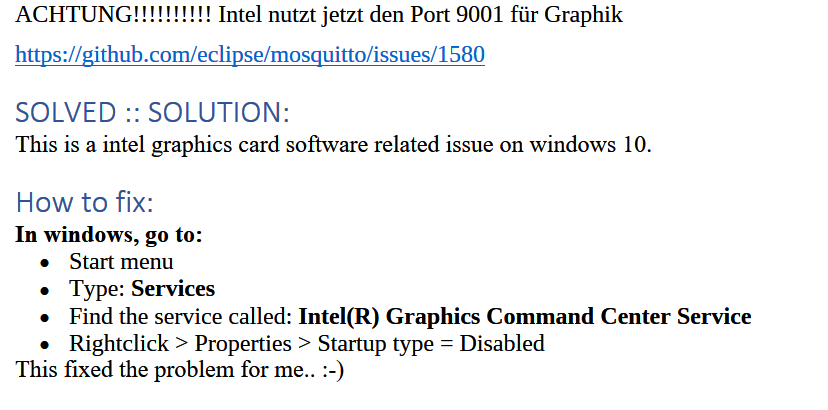 ACHTUNG!!!!!!!!!! Intel nutzt jetzt den Port 9001 für Graphik
https://github.com/eclipse/mosquitto/issues/1580
SOLVED :: SOLUTION:
This is a intel graphics card software related issue on windows 10.
How to fix:
In windows, go to:
· Start menu
· Type: Services
· Find the service called: Intel(R) Graphics Command Center Service
· Rightclick > Properties > Startup type = Disabled
This fixed the problem for me.. :-) -
Systemdata Bitte Ausfüllen Hardwaresystem: Windows 10 Arbeitsspeicher: 4GB Festplattenart: HDD Betriebssystem: Windows 10 Node-Version: 10.17.0 Nodejs-Version: 10.x.x NPM-Version: 6.11.3 Installationsart: Win10 installer Image genutzt: Nein Ort/Name der Imagedatei: -- Hallo,
heute Abend hatte ich einen kurzen Stromausfall und der Win10 PC auf dem ioBroker läuft ist dementsprechend nicht sauber heruntergefahren worden. Seitdem läuft ioBroker nicht mehr und lässt sich auch nicht mehr starten.iobroker start
2021-04-03 23:06:14,234 INFO - Starting the service with id 'iobroker(SmartHome)'node node_modules/iobroker.js-controller/controller.js --logs
2021-04-03 23:07:27.718  - info: host.HomeServer(SmartHome) iobroker.js-controller version 3.1.6 js-controller starting
2021-04-03 23:07:27.729  - info: host.HomeServer(SmartHome) Copyright (c) 2014-2020 bluefox, 2014 hobbyquaker
2021-04-03 23:07:27.730  - info: host.HomeServer(SmartHome) hostname: HomeServer(SmartHome), node: v10.17.0
2021-04-03 23:07:27.743  - info: host.HomeServer(SmartHome) ip addresses: 2a02:908:3220:c7a0:a800:f562:9da9:81cf 2a02:908:3220:c7a0:b1a0:7796:fb7a:8414 fe80::a800:f562:9da9:81cf 192.168.178.2
2021-04-03 23:07:27.784  - info: host.HomeServer(SmartHome)  Error inMem-objects listening on port 9001
2021-04-03 23:07:27.887  - info: host.HomeServer(SmartHome)  Error inMem-states listening on port 9000
2021-04-03 23:07:27.923  - info: host.HomeServer(SmartHome) connected to Objects and States
2021-04-03 23:07:28.036  - info: host.HomeServer(SmartHome) Plugin sentry Sentry Plugin disabled for this process because sending of statistic data is disabled for the system
2021-04-03 23:07:28.057  - error: Cannot find view "system"
2021-04-03 23:07:28.063  - error: Cannot find view "system"
2021-04-03 23:07:28.066  - error: Cannot find view "system"
2021-04-03 23:07:28.077  - error: host.HomeServer(SmartHome) Could not collect system.host.HomeServer(SmartHome) states to check for obsolete states: Error: Cannot find view "system"
2021-04-03 23:07:28.083  - error: host.HomeServer(SmartHome) _design/system missing - call node iobroker.js setup
netstat -n -a -p TCP
TCP    127.0.0.1:9000         0.0.0.0:0              ABHÖREN
TCP    127.0.0.1:9001         0.0.0.0:0              ABHÖREN
node node_modules/iobroker.js-controller/controller.js --logs
2021-04-03 23:14:31.454  - info: host.HomeServer(SmartHome) iobroker.js-controller version 3.2.16 js-controller starting
2021-04-03 23:14:31.461  - info: host.HomeServer(SmartHome) Copyright (c) 2014-2021 bluefox, 2014 hobbyquaker
2021-04-03 23:14:31.462  - info: host.HomeServer(SmartHome) hostname: HomeServer(SmartHome), node: v10.17.0
2021-04-03 23:14:31.462  - info: host.HomeServer(SmartHome) ip addresses: 2a02:908:3220:c7a0:a800:f562:9da9:81cf 2a02:908:3220:c7a0:b1a0:7796:fb7a:8414 fe80::a800:f562:9da9:81cf 192.168.178.2
2021-04-03 23:14:31.501  - info: host.HomeServer(SmartHome)-Server  Error inMem-objects listening on port 9001: Error: listen EADDRINUSE: address already in use 127.0.0.1:9001
2021-04-03 23:15:01.490  - error: host.HomeServer(SmartHome) No connection to databases possible, restart
2021-04-03 23:15:01.503  - info: host.HomeServer(SmartHome) iobroker _restart
2021-04-03 23:15:02.181  - info: host.HomeServer(SmartHome) iobroker Starting node restart.js
node -v
10.17.0npm -v
6.11.3=> Versionen nicht identisch so wie hier gefordert: Link
Ist der node.js zerstört? Was kann ich nun tun?
Ich lasse täglich mit backitup Backups anlegen. In der.tar.gz Datei sieht die Struktur wie folgt aus:-files
0_userdata.0
admin.0
synology.0
vis.0
web.0
-backup.jsonIm synology ordner liegt ne Grafikdatei, unter VIS meine Visualisierung. Alle anderen Verzeichnisse sind leer.... Bei allen Backups! Heißt das die wurden gar nicht korrekt erstellt?
@chhe sagte in Stromausfall: iobroker startet nicht + backup leer?:
node -v
10.17.0npm -v
6.11.3=> Versionen nicht identisch so wie hier gefordert: Link
Äpfel und Birnen ;)
Das eine ist Node und das andere NPM. Die sind in der Regel immer unterschiedlich. Node wird installiert und ist in zwei Verzeichnissen angelegt, die Versionen müssen gleich sein, weil man so sehen kann, ob nicht zwei Node Versionen installiert wurden.
Da Du nur die hälfte von der Ausgabe gepostet hast, sagt das überhaupt nichts aus, wobei ich bei Windows eh nicht weiß, ob das ebenfalls so sein muss.Das einzige was man hier sieht, Du nutz nicht die empfohlene Node Version.
-
@chhe sagte in Stromausfall: iobroker startet nicht + backup leer?:
node -v
10.17.0npm -v
6.11.3=> Versionen nicht identisch so wie hier gefordert: Link
Äpfel und Birnen ;)
Das eine ist Node und das andere NPM. Die sind in der Regel immer unterschiedlich. Node wird installiert und ist in zwei Verzeichnissen angelegt, die Versionen müssen gleich sein, weil man so sehen kann, ob nicht zwei Node Versionen installiert wurden.
Da Du nur die hälfte von der Ausgabe gepostet hast, sagt das überhaupt nichts aus, wobei ich bei Windows eh nicht weiß, ob das ebenfalls so sein muss.Das einzige was man hier sieht, Du nutz nicht die empfohlene Node Version.
@jan1 sagte in Stromausfall: iobroker startet nicht + backup leer?:
wobei ich bei Windows eh nicht weiß, ob das ebenfalls so sein muss.
Bei (m)einem funktionierenden Win System sieht es so aus, wenn diese Info weiter hilft:
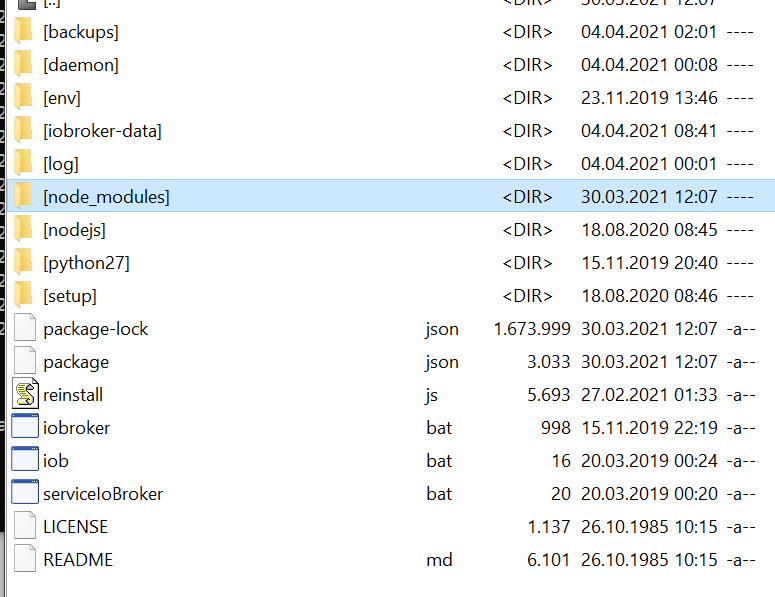
wobei im Ordner nodejs nochmals ein Ordner node_modules steckt
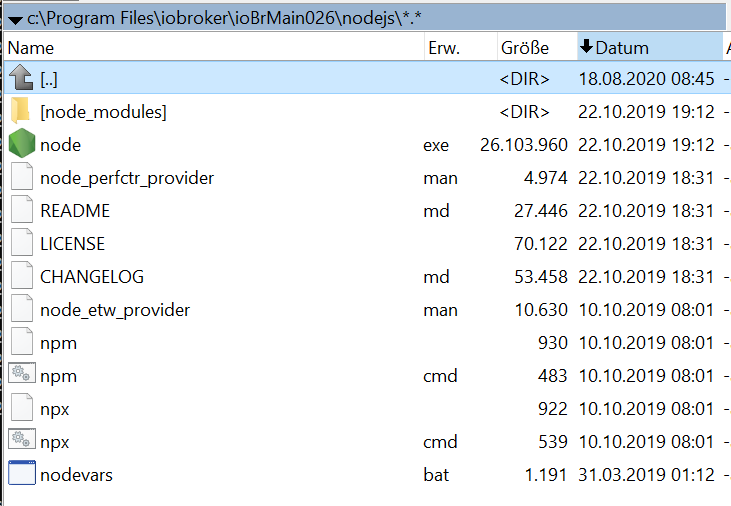
Das einzige was man hier sieht, Du nutz nicht die empfohlene Node Version.
Wobei die 10.17.0 noch gut läuft. Ich habe damit keine Probleme, zumindest nicht mit Adptern vom stable. Mit einem beta-Adapter habe ich probs, die aber auch woanders her kommen können.
Und bei @chhe lief es vorher ja auch mit dieser Version. Also daran sollte es in diesem Fall nicht liegenC:\Program Files\iobroker\ioBrMain026>node -v v10.17.0 -
@jan1 sagte in Stromausfall: iobroker startet nicht + backup leer?:
wobei ich bei Windows eh nicht weiß, ob das ebenfalls so sein muss.
Bei (m)einem funktionierenden Win System sieht es so aus, wenn diese Info weiter hilft:
wobei im Ordner nodejs nochmals ein Ordner node_modules steckt
Das einzige was man hier sieht, Du nutz nicht die empfohlene Node Version.
Wobei die 10.17.0 noch gut läuft. Ich habe damit keine Probleme, zumindest nicht mit Adptern vom stable. Mit einem beta-Adapter habe ich probs, die aber auch woanders her kommen können.
Und bei @chhe lief es vorher ja auch mit dieser Version. Also daran sollte es in diesem Fall nicht liegenC:\Program Files\iobroker\ioBrMain026>node -v v10.17.0@klassisch
Mir brauchst das nicht erklären und die empfohlen Node 12 ist auch kein Muss, wenn alles läuft. Hier gehts wie immer nur drum, bevorstehende Probleme erst gar nicht aufkommen zu lassen wenn Adapter dann mal die 12 voraussetzten ;) -
@klassisch
Mir brauchst das nicht erklären und die empfohlen Node 12 ist auch kein Muss, wenn alles läuft. Hier gehts wie immer nur drum, bevorstehende Probleme erst gar nicht aufkommen zu lassen wenn Adapter dann mal die 12 voraussetzten ;)@jan1 Ja, Node-Updates sind halt so eine Sache. Und wenn man nicht weiß was man da tut (und ich weiß es leider nicht), kann man noch mehr schädigen, fürchte ich. Deshalb bin ich auch noch auf node 10. Ich kann hier leider nur Vergleichswerte von einem funktionierenden System beisteuern. Manchmal hilft das, manchmal auch nicht.
-
@jan1 Ja, Node-Updates sind halt so eine Sache. Und wenn man nicht weiß was man da tut (und ich weiß es leider nicht), kann man noch mehr schädigen, fürchte ich. Deshalb bin ich auch noch auf node 10. Ich kann hier leider nur Vergleichswerte von einem funktionierenden System beisteuern. Manchmal hilft das, manchmal auch nicht.
@klassisch
Bei Linux ist ein Node Update sehr einfach, da man hier einfach in der Source die gewünschte Version einträgt und dann ein System Update startet, fertig und 100% richtig. Bei Windows bin ich raus, da es dort wohl etwas schwerer ist. -
@klassisch
Bei Linux ist ein Node Update sehr einfach, da man hier einfach in der Source die gewünschte Version einträgt und dann ein System Update startet, fertig und 100% richtig. Bei Windows bin ich raus, da es dort wohl etwas schwerer ist.Ich konnte nun über
iobroker add admin --port 8089eine neue Admin Instanz erstellen, die ich auch aufrufen konnte. Damit war es mir möglich über backitup ein Backup von vorgestern einzuspielen. Seitdem läuft wieder alles.
Ein hoch auf Backups.... Schade, dass ioBroker unter Windows so anfällig ist. Die Einschätzung mit der schwierigen Updatesituation unter Windows teile ich. Evtl. ziehe ich den ioBroker doch mal auf den Raspberry um.
-
Ich konnte nun über
iobroker add admin --port 8089eine neue Admin Instanz erstellen, die ich auch aufrufen konnte. Damit war es mir möglich über backitup ein Backup von vorgestern einzuspielen. Seitdem läuft wieder alles.
Ein hoch auf Backups.... Schade, dass ioBroker unter Windows so anfällig ist. Die Einschätzung mit der schwierigen Updatesituation unter Windows teile ich. Evtl. ziehe ich den ioBroker doch mal auf den Raspberry um.
-
Ich konnte nun über
iobroker add admin --port 8089eine neue Admin Instanz erstellen, die ich auch aufrufen konnte. Damit war es mir möglich über backitup ein Backup von vorgestern einzuspielen. Seitdem läuft wieder alles.
Ein hoch auf Backups.... Schade, dass ioBroker unter Windows so anfällig ist. Die Einschätzung mit der schwierigen Updatesituation unter Windows teile ich. Evtl. ziehe ich den ioBroker doch mal auf den Raspberry um.
@chhe sagte in Stromausfall: iobroker startet nicht + backup leer?:
Ich konnte nun über
iobroker add admin --port 8089klasse, kannte ich noch nicht.
Ein hoch auf Backups....
+1
Schade, dass ioBroker unter Windows so anfällig ist.
Nein, das unterschreibe ich nicht. Wenn man nicht gerade js-controller und/oder nodejs updaten muß, läuft das sehr stabil.
Die Einschätzung mit der schwierigen Updatesituation unter Windows teile ich.
für js-controller gibt es den workaround. Bei nodejs bin leider ich noch ratlos
Evtl. ziehe ich den ioBroker doch mal auf den Raspberry um.
da komme ich her und will nicht wieder dorthin.
Lies mal etwas weiter und Du wirst sehen, daß viele mit Raspi 4 Probs haben. Die meisten wohl wegen schlechter Versorgung, andere wegen SD-cards.Mit schlechter Versorgung hatte ich nie Probs, weil ich das immer gelötet hatte und gute Netzteile + fette Elkos verwende. Aber mit den SD-Cards und eben mit meinen mangelhaften Linux-Kenntnissen und den Linux-Kernel Updates.
Bin dann von einem Raspi auf einen Orange Pi +2e (eMMC + USB- SSD) umgezogen. Lief lange sehr stabil, bis zu einem armbian Kernel Update, der einfach mit einem Update kam. Wochenlange Fehlersuche.
Dann kam eine Zeit, die ich als "npm nodejs-Krise" bezeichne. Da die richtigen Versionen zusammenzuhalten war tricky. Keine Ahnung, ob das noch so ist.
Der Windows Installer hatte das für mich gelöst. Da gab es ein funktionierendes Paket. Nachteil ist eben die größere Trägheit bei gewissen Updates.Generell macht eine USV Sinn (schon mal wegen Router und Switches) und ioBroker läuft bei mir auf einem alten Notebook. Auch wenn die Akkus nicht mehr top sein mögen, so hilft das doch etwas weiter.
-
@chhe sagte in Stromausfall: iobroker startet nicht + backup leer?:
Ich konnte nun über
iobroker add admin --port 8089klasse, kannte ich noch nicht.
Ein hoch auf Backups....
+1
Schade, dass ioBroker unter Windows so anfällig ist.
Nein, das unterschreibe ich nicht. Wenn man nicht gerade js-controller und/oder nodejs updaten muß, läuft das sehr stabil.
Die Einschätzung mit der schwierigen Updatesituation unter Windows teile ich.
für js-controller gibt es den workaround. Bei nodejs bin leider ich noch ratlos
Evtl. ziehe ich den ioBroker doch mal auf den Raspberry um.
da komme ich her und will nicht wieder dorthin.
Lies mal etwas weiter und Du wirst sehen, daß viele mit Raspi 4 Probs haben. Die meisten wohl wegen schlechter Versorgung, andere wegen SD-cards.Mit schlechter Versorgung hatte ich nie Probs, weil ich das immer gelötet hatte und gute Netzteile + fette Elkos verwende. Aber mit den SD-Cards und eben mit meinen mangelhaften Linux-Kenntnissen und den Linux-Kernel Updates.
Bin dann von einem Raspi auf einen Orange Pi +2e (eMMC + USB- SSD) umgezogen. Lief lange sehr stabil, bis zu einem armbian Kernel Update, der einfach mit einem Update kam. Wochenlange Fehlersuche.
Dann kam eine Zeit, die ich als "npm nodejs-Krise" bezeichne. Da die richtigen Versionen zusammenzuhalten war tricky. Keine Ahnung, ob das noch so ist.
Der Windows Installer hatte das für mich gelöst. Da gab es ein funktionierendes Paket. Nachteil ist eben die größere Trägheit bei gewissen Updates.Generell macht eine USV Sinn (schon mal wegen Router und Switches) und ioBroker läuft bei mir auf einem alten Notebook. Auch wenn die Akkus nicht mehr top sein mögen, so hilft das doch etwas weiter.
@klassisch sagte in Stromausfall: iobroker startet nicht + backup leer?:
Da die richtigen Versionen zusammenzuhalten war tricky. Keine Ahnung, ob das noch so ist.
Das macht der Paketmanager. Da muss man keine Versionen 'zusammenhalten'.


Hey! Du scheinst an dieser Unterhaltung interessiert zu sein, hast aber noch kein Konto.
Hast du es satt, bei jedem Besuch durch die gleichen Beiträge zu scrollen? Wenn du dich für ein Konto anmeldest, kommst du immer genau dorthin zurück, wo du zuvor warst, und kannst dich über neue Antworten benachrichtigen lassen (entweder per E-Mail oder Push-Benachrichtigung). Du kannst auch Lesezeichen speichern und Beiträge positiv bewerten, um anderen Community-Mitgliedern deine Wertschätzung zu zeigen.
Mit deinem Input könnte dieser Beitrag noch besser werden 💗
Registrieren AnmeldenSupport us
501
Online33.0k
Benutzer83.6k
Themen1.3m
Beiträge