




[solved] MQTT adapter update problems V2.1.14->2.3.4->2.3.5
-
@thomas-braun
OK, danke für die Info - ich bin über diese message Box gestolpert und hab's brav gemacht.

Aber bevor ich noch tiefer in die Materie (und mögliche Fallen) einsteige - ich habe ja Gottseidank noch ein Backup des Images von heute Mittag
Trotzdem vielen Dank nochmal.
Grüße
@willyiobrok
Mach doch einfach ein reinstall von nodejs. Das ist 1000x fixer als da jetzt ein Backup reinzuknallen. -
@willyiobrok
Mach doch einfach ein reinstall von nodejs. Das ist 1000x fixer als da jetzt ein Backup reinzuknallen. -
@thomas-braun
cool - hat geklappt
@willyiobrok
Was gibt dennwhich nodejs && nodejs -v && which node && node -v && which npm && npm -v && apt policy nodejsjetzt aus?
-
@willyiobrok
Was gibt dennwhich nodejs && nodejs -v && which node && node -v && which npm && npm -v && apt policy nodejsjetzt aus?
-
@willyiobrok
Bitte Konsolenoutput künftig als Text in CodeTags einbetten.Passt jetzt wieder, ich würde aber in Kürze auf node12 oder 14 upgraden, 10 wird in wenigen Wochen angekündigt.
-
@willyiobrok
Bitte Konsolenoutput künftig als Text in CodeTags einbetten.Passt jetzt wieder, ich würde aber in Kürze auf node12 oder 14 upgraden, 10 wird in wenigen Wochen angekündigt.
@thomas-braun
ok, alles klar !
Danke -
@thomas-braun
ok, alles klar !
DankeHallo zusammen,
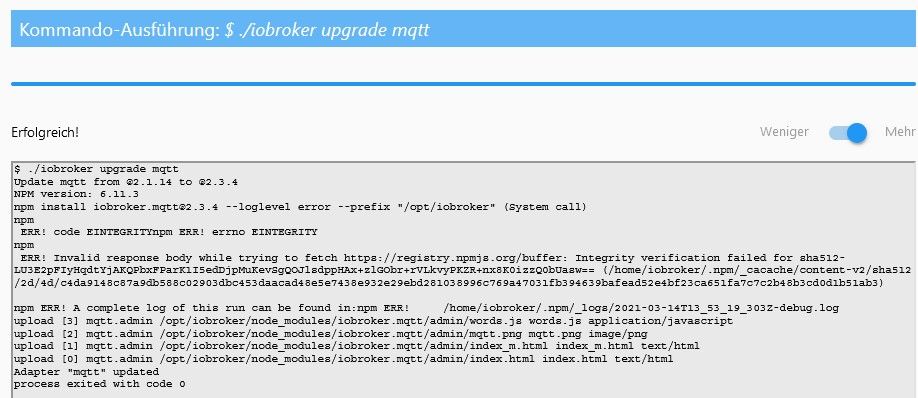
jetzt muß ich mich leider wieder zu diesem Thema melden - jetzt geht das Update von mqtt 2.3.4 auf 2.3.5 nicht!Das Mittel von Thoms Braun:
cd /opt/iobroker
npm cache clear --force
hat zwar letztes Mal gut geholfen, dieses Mal aber leider nicht ...
Fehlermeldung im Log:
host.ioBroker-4	2021-04-02 12:56:49.848	info	iobroker exit 0
host.ioBroker-4	2021-04-02 12:56:48.836	info	iobroker Adapter "mqtt" updated
host.ioBroker-4	2021-04-02 12:56:48.780	info	iobroker upload [0] mqtt.admin /opt/iobroker/node_modules/iobroker.mqtt/admin/index.html index.html text/html
host.ioBroker-4	2021-04-02 12:56:48.724	info	iobroker upload [1] mqtt.admin /opt/iobroker/node_modules/iobroker.mqtt/admin/index_m.html index_m.html text/html
host.ioBroker-4	2021-04-02 12:56:48.667	info	iobroker upload [2] mqtt.admin /opt/iobroker/node_modules/iobroker.mqtt/admin/mqtt.png mqtt.png image/png
host.ioBroker-4	2021-04-02 12:56:48.477	info	iobroker upload [3] mqtt.admin /opt/iobroker/node_modules/iobroker.mqtt/admin/words.js words.js application/javascript
host.ioBroker-4	2021-04-02 12:56:48.366	info	iobroker npm ERR! A complete log of this run can be found in:npm ERR! /home/iobroker/.npm/_logs/2021-04-02T10_56_48_211Z-debug.log
host.ioBroker-4	2021-04-02 12:56:48.199	info	iobroker npm ERR! Invalid response body while trying to fetch https://registry.npmjs.org/buffer: Integrity verification failed for sha512-LU3E2pFIyHqdtYjAKQPbxFParK1I5edDjpMuKevSgQOJlsdppHAx+zlGObr+r
host.ioBroker-4	2021-04-02 12:56:48.193	info	iobroker npm ERR! code EINTEGRITYnpm ERR! errno EINTEGRITY
host.ioBroker-4	2021-04-02 12:56:32.782	info	iobroker npm install iobroker.mqtt@2.3.5 --loglevel error --prefix "/opt/iobroker" (System call)
host.ioBroker-4	2021-04-02 12:56:32.781	info	iobroker NPM version: 6.11.3
host.ioBroker-4	2021-04-02 12:56:32.184	info	iobroker Update mqtt from @2.3.4 to @2.3.5
host.ioBroker-4	2021-04-02 12:56:30.051	info	iobroker upgrade mqtt
Das passiert ausschliesslich beim mqtt-Adapter - Update, alle anderen Adapter lassen sich reibungslos und ohne Probleme updaten.
Was könnte hier helfen ?
Grüße,
WillyIoBrok
-
Hallo zusammen,
jetzt muß ich mich leider wieder zu diesem Thema melden - jetzt geht das Update von mqtt 2.3.4 auf 2.3.5 nicht!Das Mittel von Thoms Braun:
cd /opt/iobroker
npm cache clear --force
hat zwar letztes Mal gut geholfen, dieses Mal aber leider nicht ...
Fehlermeldung im Log:
host.ioBroker-4	2021-04-02 12:56:49.848	info	iobroker exit 0
host.ioBroker-4	2021-04-02 12:56:48.836	info	iobroker Adapter "mqtt" updated
host.ioBroker-4	2021-04-02 12:56:48.780	info	iobroker upload [0] mqtt.admin /opt/iobroker/node_modules/iobroker.mqtt/admin/index.html index.html text/html
host.ioBroker-4	2021-04-02 12:56:48.724	info	iobroker upload [1] mqtt.admin /opt/iobroker/node_modules/iobroker.mqtt/admin/index_m.html index_m.html text/html
host.ioBroker-4	2021-04-02 12:56:48.667	info	iobroker upload [2] mqtt.admin /opt/iobroker/node_modules/iobroker.mqtt/admin/mqtt.png mqtt.png image/png
host.ioBroker-4	2021-04-02 12:56:48.477	info	iobroker upload [3] mqtt.admin /opt/iobroker/node_modules/iobroker.mqtt/admin/words.js words.js application/javascript
host.ioBroker-4	2021-04-02 12:56:48.366	info	iobroker npm ERR! A complete log of this run can be found in:npm ERR! /home/iobroker/.npm/_logs/2021-04-02T10_56_48_211Z-debug.log
host.ioBroker-4	2021-04-02 12:56:48.199	info	iobroker npm ERR! Invalid response body while trying to fetch https://registry.npmjs.org/buffer: Integrity verification failed for sha512-LU3E2pFIyHqdtYjAKQPbxFParK1I5edDjpMuKevSgQOJlsdppHAx+zlGObr+r
host.ioBroker-4	2021-04-02 12:56:48.193	info	iobroker npm ERR! code EINTEGRITYnpm ERR! errno EINTEGRITY
host.ioBroker-4	2021-04-02 12:56:32.782	info	iobroker npm install iobroker.mqtt@2.3.5 --loglevel error --prefix "/opt/iobroker" (System call)
host.ioBroker-4	2021-04-02 12:56:32.781	info	iobroker NPM version: 6.11.3
host.ioBroker-4	2021-04-02 12:56:32.184	info	iobroker Update mqtt from @2.3.4 to @2.3.5
host.ioBroker-4	2021-04-02 12:56:30.051	info	iobroker upgrade mqtt
Das passiert ausschliesslich beim mqtt-Adapter - Update, alle anderen Adapter lassen sich reibungslos und ohne Probleme updaten.
Was könnte hier helfen ?
Grüße,
WillyIoBrok
@willyiobrok sagte in MQTT adapter Update von Version 2.1.14 auf 2.3.4 geht nicht:
iobroker NPM version: 6.11.3
Ziemlich alt.
node sauber installiert?which nodejs && nodejs -v && which node && node -v && which npm && npm -v && apt policy nodejsAktualisier das mal auf node12 oder node14.
-
@willyiobrok sagte in MQTT adapter Update von Version 2.1.14 auf 2.3.4 geht nicht:
iobroker NPM version: 6.11.3
Ziemlich alt.
node sauber installiert?which nodejs && nodejs -v && which node && node -v && which npm && npm -v && apt policy nodejsAktualisier das mal auf node12 oder node14.
@thomas-braun said in MQTT adapter Update von Version 2.1.14 auf 2.3.4 geht nicht:
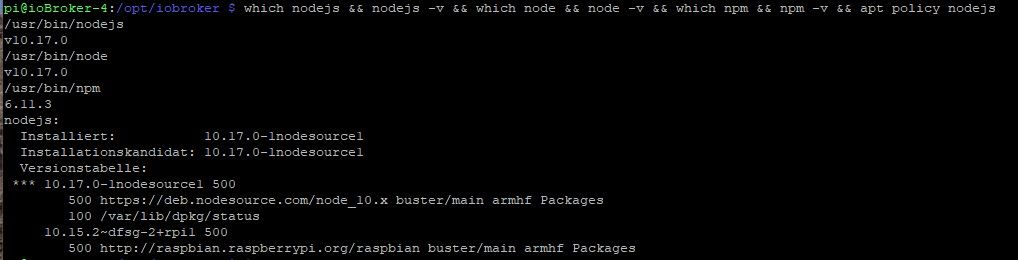
which nodejs && nodejs -v && which node && node -v && which npm && npm -v && apt policy nodejs
which nodejs && nodejs -v && which node && node -v && which npm && npm -v && apt policy nodejs
/usr/bin/nodejs
v10.17.0
/usr/bin/node
v10.17.0
/usr/bin/npm
6.11.3
nodejs:
  Installiert:           10.17.0-1nodesource1
  Installationskandidat: 10.17.0-1nodesource1
  Versionstabelle:
 *** 10.17.0-1nodesource1 500
        500 https://deb.nodesource.com/node_10.x buster/main armhf Packages
        100 /var/lib/dpkg/status
     10.15.2~dfsg-2+rpi1 500
        500 http://raspbian.raspberrypi.org/raspbian buster/main armhf Packages
pi@ioBroker-4:/home/iobroker/.npm/_logs $
OK, dann werde ich mich mal an das Update von nodejs wagen :-)
-
@thomas-braun said in MQTT adapter Update von Version 2.1.14 auf 2.3.4 geht nicht:
which nodejs && nodejs -v && which node && node -v && which npm && npm -v && apt policy nodejs
which nodejs && nodejs -v && which node && node -v && which npm && npm -v && apt policy nodejs
/usr/bin/nodejs
v10.17.0
/usr/bin/node
v10.17.0
/usr/bin/npm
6.11.3
nodejs:
  Installiert:           10.17.0-1nodesource1
  Installationskandidat: 10.17.0-1nodesource1
  Versionstabelle:
 *** 10.17.0-1nodesource1 500
        500 https://deb.nodesource.com/node_10.x buster/main armhf Packages
        100 /var/lib/dpkg/status
     10.15.2~dfsg-2+rpi1 500
        500 http://raspbian.raspberrypi.org/raspbian buster/main armhf Packages
pi@ioBroker-4:/home/iobroker/.npm/_logs $
OK, dann werde ich mich mal an das Update von nodejs wagen :-)
-
@thomas-braun
so, update auf Nodejs 14.16.0 durchgeführt :-)
lief reibungslos durch - danke für die super Anleitung !which nodejs && nodejs -v && which node && node -v && which npm && npm -v && apt policy nodejs /usr/bin/nodejs v14.16.0 /usr/bin/node v14.16.0 /usr/bin/npm 6.14.11 nodejs: Installiert: 14.16.0-1nodesource1 Installationskandidat: 14.16.0-1nodesource1 Versionstabelle: *** 14.16.0-1nodesource1 500 500 https://deb.nodesource.com/node_14.x buster/main armhf Packages 100 /var/lib/dpkg/status 12.22.0-1nodesource1 500 500 https://deb.nodesource.com/node_12.x buster/main armhf Packages 10.24.0-1nodesource1 500 500 https://deb.nodesource.com/node_10.x buster/main armhf Packages 10.24.0~dfsg-1~deb10u1 500 500 http://raspbian.raspberrypi.org/raspbian buster/main armhf PackagesLeider geht der mqtt -Adapter-Update immer noch nicht (auch nach "npm cache clear --force" gehts nicht)
host.ioBroker-4	2021-04-02 14:06:55.934	info	iobroker exit 0
host.ioBroker-4	2021-04-02 14:06:54.911	info	iobroker Adapter "mqtt" updated
host.ioBroker-4	2021-04-02 14:06:54.854	info	iobroker upload [0] mqtt.admin /opt/iobroker/node_modules/iobroker.mqtt/admin/index.html index.html text/html
host.ioBroker-4	2021-04-02 14:06:54.797	info	iobroker upload [1] mqtt.admin /opt/iobroker/node_modules/iobroker.mqtt/admin/index_m.html index_m.html text/html
host.ioBroker-4	2021-04-02 14:06:54.739	info	iobroker upload [2] mqtt.admin /opt/iobroker/node_modules/iobroker.mqtt/admin/mqtt.png mqtt.png image/png
host.ioBroker-4	2021-04-02 14:06:54.559	info	iobroker upload [3] mqtt.admin /opt/iobroker/node_modules/iobroker.mqtt/admin/words.js words.js application/javascript
host.ioBroker-4	2021-04-02 14:06:54.509	info	iobroker npm ERR! A complete log of this run can be found in:npm ERR! /home/iobroker/.npm/_logs/2021-04-02T12_06_54_481Z-debug.log
host.ioBroker-4	2021-04-02 14:06:54.476	info	iobroker npm ERR! Invalid response body while trying to fetch https://registry.npmjs.org/buffer: Integrity verification failed for sha512-LU3E2pFIyHqdtYjAKQPbxFParK1I5edDjpMuKevSgQOJlsdppHAx+zlGObr+r
host.ioBroker-4	2021-04-02 14:06:54.450	info	iobroker ERR! code EINTEGRITYnpm ERR! errno EINTEGRITY
host.ioBroker-4	2021-04-02 14:06:54.447	info	iobroker npm
host.ioBroker-4	2021-04-02 14:06:39.594	info	iobroker npm install iobroker.mqtt@2.3.5 --loglevel error --prefix "/opt/iobroker" (System call)
host.ioBroker-4	2021-04-02 14:06:39.591	info	iobroker NPM version: 6.14.11
host.ioBroker-4	2021-04-02 14:06:38.909	info	iobroker Update mqtt from @2.3.4 to @2.3.5
host.ioBroker-4	2021-04-02 14:06:36.846	info	iobroker upgrade mqtt
host.ioBroker-4	2021-04-02 14:01:57.894	info	iobroker exit 0
was nun ?

-
@thomas-braun
so, update auf Nodejs 14.16.0 durchgeführt :-)
lief reibungslos durch - danke für die super Anleitung !which nodejs && nodejs -v && which node && node -v && which npm && npm -v && apt policy nodejs /usr/bin/nodejs v14.16.0 /usr/bin/node v14.16.0 /usr/bin/npm 6.14.11 nodejs: Installiert: 14.16.0-1nodesource1 Installationskandidat: 14.16.0-1nodesource1 Versionstabelle: *** 14.16.0-1nodesource1 500 500 https://deb.nodesource.com/node_14.x buster/main armhf Packages 100 /var/lib/dpkg/status 12.22.0-1nodesource1 500 500 https://deb.nodesource.com/node_12.x buster/main armhf Packages 10.24.0-1nodesource1 500 500 https://deb.nodesource.com/node_10.x buster/main armhf Packages 10.24.0~dfsg-1~deb10u1 500 500 http://raspbian.raspberrypi.org/raspbian buster/main armhf PackagesLeider geht der mqtt -Adapter-Update immer noch nicht (auch nach "npm cache clear --force" gehts nicht)
host.ioBroker-4	2021-04-02 14:06:55.934	info	iobroker exit 0
host.ioBroker-4	2021-04-02 14:06:54.911	info	iobroker Adapter "mqtt" updated
host.ioBroker-4	2021-04-02 14:06:54.854	info	iobroker upload [0] mqtt.admin /opt/iobroker/node_modules/iobroker.mqtt/admin/index.html index.html text/html
host.ioBroker-4	2021-04-02 14:06:54.797	info	iobroker upload [1] mqtt.admin /opt/iobroker/node_modules/iobroker.mqtt/admin/index_m.html index_m.html text/html
host.ioBroker-4	2021-04-02 14:06:54.739	info	iobroker upload [2] mqtt.admin /opt/iobroker/node_modules/iobroker.mqtt/admin/mqtt.png mqtt.png image/png
host.ioBroker-4	2021-04-02 14:06:54.559	info	iobroker upload [3] mqtt.admin /opt/iobroker/node_modules/iobroker.mqtt/admin/words.js words.js application/javascript
host.ioBroker-4	2021-04-02 14:06:54.509	info	iobroker npm ERR! A complete log of this run can be found in:npm ERR! /home/iobroker/.npm/_logs/2021-04-02T12_06_54_481Z-debug.log
host.ioBroker-4	2021-04-02 14:06:54.476	info	iobroker npm ERR! Invalid response body while trying to fetch https://registry.npmjs.org/buffer: Integrity verification failed for sha512-LU3E2pFIyHqdtYjAKQPbxFParK1I5edDjpMuKevSgQOJlsdppHAx+zlGObr+r
host.ioBroker-4	2021-04-02 14:06:54.450	info	iobroker ERR! code EINTEGRITYnpm ERR! errno EINTEGRITY
host.ioBroker-4	2021-04-02 14:06:54.447	info	iobroker npm
host.ioBroker-4	2021-04-02 14:06:39.594	info	iobroker npm install iobroker.mqtt@2.3.5 --loglevel error --prefix "/opt/iobroker" (System call)
host.ioBroker-4	2021-04-02 14:06:39.591	info	iobroker NPM version: 6.14.11
host.ioBroker-4	2021-04-02 14:06:38.909	info	iobroker Update mqtt from @2.3.4 to @2.3.5
host.ioBroker-4	2021-04-02 14:06:36.846	info	iobroker upgrade mqtt
host.ioBroker-4	2021-04-02 14:01:57.894	info	iobroker exit 0
was nun ?
-
@thomas-braun
OK, also abwarten -
Es lief auch nach dem letzten Versuch nicht durch.
Ich wundere mich jetzt schon, daß nur dieser!!! - mqtt-Adapter solche Zicken beim Update macht.
Es kann deshalb ja wohl kaum am Gesamtsystem ioBroker liegen, die anderen Adapter lassen sich ja auch problemlos updaten, oder ?
Na gut, ich bin nicht auf die neue Version angewiesen, die alte Version läuft für meine Zwecke auch sehr gut.
Vielen Dank für die Hilfe, Frohe Ostern.WillyIoBrok
-
@thomas-braun
OK, also abwarten -
Es lief auch nach dem letzten Versuch nicht durch.
Ich wundere mich jetzt schon, daß nur dieser!!! - mqtt-Adapter solche Zicken beim Update macht.
Es kann deshalb ja wohl kaum am Gesamtsystem ioBroker liegen, die anderen Adapter lassen sich ja auch problemlos updaten, oder ?
Na gut, ich bin nicht auf die neue Version angewiesen, die alte Version läuft für meine Zwecke auch sehr gut.
Vielen Dank für die Hilfe, Frohe Ostern.WillyIoBrok
Gerade mal in meinem System probiert.
Läuft:pi@raspberrypi:/opt/iobroker $ iobroker update pi@raspberrypi:/opt/iobroker $ iobroker add mqtt NPM version: 6.14.12 npm install iobroker.mqtt@2.3.5 --loglevel error --prefix "/opt/iobroker" (System call) host.raspberrypi install adapter mqtt upload [3] mqtt.admin /opt/iobroker/node_modules/iobroker.mqtt/admin/words.js words.js application/javascript upload [2] mqtt.admin /opt/iobroker/node_modules/iobroker.mqtt/admin/mqtt.png mqtt.png image/png upload [1] mqtt.admin /opt/iobroker/node_modules/iobroker.mqtt/admin/index_m.html index_m.html text/html upload [0] mqtt.admin /opt/iobroker/node_modules/iobroker.mqtt/admin/index.html index.html text/html host.raspberrypi object system.adapter.mqtt created/updated host.raspberrypi create instance mqtt host.raspberrypi object mqtt.0.info created host.raspberrypi object system.adapter.mqtt.0.logLevel created host.raspberrypi object system.adapter.mqtt.0.sigKill created host.raspberrypi object system.adapter.mqtt.0.eventLoopLag created host.raspberrypi object system.adapter.mqtt.0.outputCount created host.raspberrypi object system.adapter.mqtt.0.inputCount created host.raspberrypi object system.adapter.mqtt.0.uptime created host.raspberrypi object system.adapter.mqtt.0.memRss created host.raspberrypi object system.adapter.mqtt.0.memHeapTotal created host.raspberrypi object system.adapter.mqtt.0.memHeapUsed created host.raspberrypi object system.adapter.mqtt.0.cputime created host.raspberrypi object system.adapter.mqtt.0.cpu created host.raspberrypi object system.adapter.mqtt.0.compactMode created host.raspberrypi object system.adapter.mqtt.0.connected created host.raspberrypi object system.adapter.mqtt.0.alive created host.raspberrypi object system.adapter.mqtt.0 created -
Gerade mal in meinem System probiert.
Läuft:pi@raspberrypi:/opt/iobroker $ iobroker update pi@raspberrypi:/opt/iobroker $ iobroker add mqtt NPM version: 6.14.12 npm install iobroker.mqtt@2.3.5 --loglevel error --prefix "/opt/iobroker" (System call) host.raspberrypi install adapter mqtt upload [3] mqtt.admin /opt/iobroker/node_modules/iobroker.mqtt/admin/words.js words.js application/javascript upload [2] mqtt.admin /opt/iobroker/node_modules/iobroker.mqtt/admin/mqtt.png mqtt.png image/png upload [1] mqtt.admin /opt/iobroker/node_modules/iobroker.mqtt/admin/index_m.html index_m.html text/html upload [0] mqtt.admin /opt/iobroker/node_modules/iobroker.mqtt/admin/index.html index.html text/html host.raspberrypi object system.adapter.mqtt created/updated host.raspberrypi create instance mqtt host.raspberrypi object mqtt.0.info created host.raspberrypi object system.adapter.mqtt.0.logLevel created host.raspberrypi object system.adapter.mqtt.0.sigKill created host.raspberrypi object system.adapter.mqtt.0.eventLoopLag created host.raspberrypi object system.adapter.mqtt.0.outputCount created host.raspberrypi object system.adapter.mqtt.0.inputCount created host.raspberrypi object system.adapter.mqtt.0.uptime created host.raspberrypi object system.adapter.mqtt.0.memRss created host.raspberrypi object system.adapter.mqtt.0.memHeapTotal created host.raspberrypi object system.adapter.mqtt.0.memHeapUsed created host.raspberrypi object system.adapter.mqtt.0.cputime created host.raspberrypi object system.adapter.mqtt.0.cpu created host.raspberrypi object system.adapter.mqtt.0.compactMode created host.raspberrypi object system.adapter.mqtt.0.connected created host.raspberrypi object system.adapter.mqtt.0.alive created host.raspberrypi object system.adapter.mqtt.0 created@thomas-braun
Oh - vielen Dank für's ausprobieren !Der Unterschied zwischen beiden Tests ist : Bei mir ist's ein update von der Version 2.3.4 ( die schon beim Update von 2.1.14 Schwierigkeiten gemacht hat) auf 2.3.5 - bei Dir war's eine Neu-Installation der 2.3.5, wenn ich das log richtig lese ...
Wie kriege ich jetzt die installierte Version 2.3.4 aus meinem System so komplett raus, daß es auch bei mir eine Neu-Installation wird?
Die Instanz löschen reicht wohl nicht ... habe ich ausprobiert ... glaube ich ? ...
Könnte es sein, daß ein Fehler im Filesystem meiner SD-card irgendetwas "corrupted" hat, das ich später zumindest im Filesystem wieder repariert habe? -
@thomas-braun
Oh - vielen Dank für's ausprobieren !Der Unterschied zwischen beiden Tests ist : Bei mir ist's ein update von der Version 2.3.4 ( die schon beim Update von 2.1.14 Schwierigkeiten gemacht hat) auf 2.3.5 - bei Dir war's eine Neu-Installation der 2.3.5, wenn ich das log richtig lese ...
Wie kriege ich jetzt die installierte Version 2.3.4 aus meinem System so komplett raus, daß es auch bei mir eine Neu-Installation wird?
Die Instanz löschen reicht wohl nicht ... habe ich ausprobiert ... glaube ich ? ...
Könnte es sein, daß ein Fehler im Filesystem meiner SD-card irgendetwas "corrupted" hat, das ich später zumindest im Filesystem wieder repariert habe?Integrity verification failed for sha512deutet eigentlich darauf hin, dass dein Download des Updates nicht i. O. war/ist.
Normalerweise leert man dann den cache und lädt nochmal. Wie oben schon mal gemacht. -
Integrity verification failed for sha512deutet eigentlich darauf hin, dass dein Download des Updates nicht i. O. war/ist.
Normalerweise leert man dann den cache und lädt nochmal. Wie oben schon mal gemacht.@thomas-braun
moin moin. Habe gestern noch ein issue bei mqtt gesetzt und auch prompt (wie erwartet) die Antwort bekommen, daß das nichts mit dem Adapter zu tun hat.
Ich soll das Cache leeren oder warten bis sich das Problem einfach von selbst löst...Deshalb habe ich das jetzt nochmal probiert und prompt unerwartete Fehlermeldungen bekommen:
pi@ioBroker-4:/opt/iobroker $ iobroker stop
pi@ioBroker-4:/opt/iobroker $ npm cache clear --force
npm WARN using --force I sure hope you know what you are doing. (weiss ich leider nicht so genau hihihi)
npm ERR! code ENOTEMPTY
npm ERR! syscall rmdir
npm ERR! path /home/iobroker/.npm/_cacache/index-v5/14/72
npm ERR! errno -39
npm ERR! ENOTEMPTY: directory not empty, rmdir '/home/iobroker/.npm/_cacache/index-v5/14/72'

npm ERR! A complete log of this run can be found in:
npm ERR!     /home/iobroker/.npm/_logs/2021-04-03T07_07_40_405Z-debug.log
pi@ioBroker-4:/opt/iobroker $
vielleicht hilft das ein wenig weiter? Ich schau mir jetzt mal das nicht leere cache-dir an...
Muß man das cache leeren eigentlich bei aktivem oder bei gestoppten ioBroker ausführen ? Ich habe beide Fälle probiert - mit dem gleichen Resultat ...
-
@thomas-braun
moin moin. Habe gestern noch ein issue bei mqtt gesetzt und auch prompt (wie erwartet) die Antwort bekommen, daß das nichts mit dem Adapter zu tun hat.
Ich soll das Cache leeren oder warten bis sich das Problem einfach von selbst löst...Deshalb habe ich das jetzt nochmal probiert und prompt unerwartete Fehlermeldungen bekommen:
pi@ioBroker-4:/opt/iobroker $ iobroker stop
pi@ioBroker-4:/opt/iobroker $ npm cache clear --force
npm WARN using --force I sure hope you know what you are doing. (weiss ich leider nicht so genau hihihi)
npm ERR! code ENOTEMPTY
npm ERR! syscall rmdir
npm ERR! path /home/iobroker/.npm/_cacache/index-v5/14/72
npm ERR! errno -39
npm ERR! ENOTEMPTY: directory not empty, rmdir '/home/iobroker/.npm/_cacache/index-v5/14/72'

npm ERR! A complete log of this run can be found in:
npm ERR!     /home/iobroker/.npm/_logs/2021-04-03T07_07_40_405Z-debug.log
pi@ioBroker-4:/opt/iobroker $
vielleicht hilft das ein wenig weiter? Ich schau mir jetzt mal das nicht leere cache-dir an...
Muß man das cache leeren eigentlich bei aktivem oder bei gestoppten ioBroker ausführen ? Ich habe beide Fälle probiert - mit dem gleichen Resultat ...
@willyiobrok
so, habe in dem o.g. Directory eine Datei mit dem Namen '018e044851804'$'\261''c89a4f39fb29f<592695e73668ea09e1b3f2a10v74d1'$'\341''7'
gefunden und das Ding - was auch immer es ist - mit sudo-Berechtigung gelöscht (durfte ich das? -> auf eigenes Risiko!)
Nachfolgende Installation des mqtt Adapters hat zwar einige Fehlermeldungen geworfen (siehe unten), aber die Installation der mqtt-Version 2.3.5 scheint geklappt zu haben (?). Auf jeden Fall funktioniert der mqtt Adapter V2.3.5 - zmindest auf den ersten Blick. Irgendwelche Kollateralschäden habe ich auch (noch) nicht beobachtet.Vielen Dank für die Hilfe !
Frohe Ostern,
WillyIoBrok
mqtt.0 2021-04-03 09:49:43.181 info (8886) Starting MQTT server on 192.168.27.147:1883 mqtt.0 2021-04-03 09:49:41.651 info (8886) starting. Version 2.3.5 in /opt/iobroker/node_modules/iobroker.mqtt, node: v14.16.0, js-controller: 3.1.6 host.ioBroker-4 2021-04-03 09:49:38.972 info instance system.adapter.mqtt.0 started with pid 8886 host.ioBroker-4 2021-04-03 09:49:37.583 info iobroker exit 0 host.ioBroker-4 2021-04-03 09:49:36.970 info instance system.adapter.mqtt.0 terminated with code 11 (ADAPTER_REQUESTED_TERMINATION) host.ioBroker-4 2021-04-03 09:49:36.933 info stopInstance system.adapter.mqtt.0 killing pid 8824 host.ioBroker-4 2021-04-03 09:49:36.562 info iobroker Adapter "mqtt" updated mqtt.0 2021-04-03 09:49:36.439 info (8824) Terminated (ADAPTER_REQUESTED_TERMINATION): Without reason mqtt.0 2021-04-03 09:49:36.437 info (8824) terminating host.ioBroker-4 2021-04-03 09:49:36.360 info iobroker upload [0] mqtt.admin /opt/iobroker/node_modules/iobroker.mqtt/admin/index.html index.html text/html host.ioBroker-4 2021-04-03 09:49:36.215 info iobroker upload [1] mqtt.admin /opt/iobroker/node_modules/iobroker.mqtt/admin/index_m.html index_m.html text/html host.ioBroker-4 2021-04-03 09:49:36.035 info iobroker upload [2] mqtt.admin /opt/iobroker/node_modules/iobroker.mqtt/admin/mqtt.png mqtt.png image/png mqtt.0 2021-04-03 09:49:35.935 info (8824) Got terminate signal TERMINATE_YOURSELF host.ioBroker-4 2021-04-03 09:49:35.929 info stopInstance system.adapter.mqtt.0 send kill signal host.ioBroker-4 2021-04-03 09:49:35.848 info stopInstance system.adapter.mqtt.0 (force=false, process=true) host.ioBroker-4 2021-04-03 09:49:35.798 info iobroker Update "system.adapter.mqtt.0" host.ioBroker-4 2021-04-03 09:49:35.676 info iobroker upload [3] mqtt.admin /opt/iobroker/node_modules/iobroker.mqtt/admin/words.js words.js application/javascript host.ioBroker-4 2021-04-03 09:49:31.386 info iobroker Please submit a full bug report,with preprocessed source if appropriate.See <file:///usr/share/doc/gcc-8/README.Bugs> for instructions.make: *** [bindings.target.mk:112: Release/obj.target/b host.ioBroker-4 2021-04-03 09:49:31.376 info iobroker g++: internal compiler error: Speicherzugriffsfehler signal terminated program cc1plus -
@willyiobrok
so, habe in dem o.g. Directory eine Datei mit dem Namen '018e044851804'$'\261''c89a4f39fb29f<592695e73668ea09e1b3f2a10v74d1'$'\341''7'
gefunden und das Ding - was auch immer es ist - mit sudo-Berechtigung gelöscht (durfte ich das? -> auf eigenes Risiko!)
Nachfolgende Installation des mqtt Adapters hat zwar einige Fehlermeldungen geworfen (siehe unten), aber die Installation der mqtt-Version 2.3.5 scheint geklappt zu haben (?). Auf jeden Fall funktioniert der mqtt Adapter V2.3.5 - zmindest auf den ersten Blick. Irgendwelche Kollateralschäden habe ich auch (noch) nicht beobachtet.Vielen Dank für die Hilfe !
Frohe Ostern,
WillyIoBrok
mqtt.0 2021-04-03 09:49:43.181 info (8886) Starting MQTT server on 192.168.27.147:1883 mqtt.0 2021-04-03 09:49:41.651 info (8886) starting. Version 2.3.5 in /opt/iobroker/node_modules/iobroker.mqtt, node: v14.16.0, js-controller: 3.1.6 host.ioBroker-4 2021-04-03 09:49:38.972 info instance system.adapter.mqtt.0 started with pid 8886 host.ioBroker-4 2021-04-03 09:49:37.583 info iobroker exit 0 host.ioBroker-4 2021-04-03 09:49:36.970 info instance system.adapter.mqtt.0 terminated with code 11 (ADAPTER_REQUESTED_TERMINATION) host.ioBroker-4 2021-04-03 09:49:36.933 info stopInstance system.adapter.mqtt.0 killing pid 8824 host.ioBroker-4 2021-04-03 09:49:36.562 info iobroker Adapter "mqtt" updated mqtt.0 2021-04-03 09:49:36.439 info (8824) Terminated (ADAPTER_REQUESTED_TERMINATION): Without reason mqtt.0 2021-04-03 09:49:36.437 info (8824) terminating host.ioBroker-4 2021-04-03 09:49:36.360 info iobroker upload [0] mqtt.admin /opt/iobroker/node_modules/iobroker.mqtt/admin/index.html index.html text/html host.ioBroker-4 2021-04-03 09:49:36.215 info iobroker upload [1] mqtt.admin /opt/iobroker/node_modules/iobroker.mqtt/admin/index_m.html index_m.html text/html host.ioBroker-4 2021-04-03 09:49:36.035 info iobroker upload [2] mqtt.admin /opt/iobroker/node_modules/iobroker.mqtt/admin/mqtt.png mqtt.png image/png mqtt.0 2021-04-03 09:49:35.935 info (8824) Got terminate signal TERMINATE_YOURSELF host.ioBroker-4 2021-04-03 09:49:35.929 info stopInstance system.adapter.mqtt.0 send kill signal host.ioBroker-4 2021-04-03 09:49:35.848 info stopInstance system.adapter.mqtt.0 (force=false, process=true) host.ioBroker-4 2021-04-03 09:49:35.798 info iobroker Update "system.adapter.mqtt.0" host.ioBroker-4 2021-04-03 09:49:35.676 info iobroker upload [3] mqtt.admin /opt/iobroker/node_modules/iobroker.mqtt/admin/words.js words.js application/javascript host.ioBroker-4 2021-04-03 09:49:31.386 info iobroker Please submit a full bug report,with preprocessed source if appropriate.See <file:///usr/share/doc/gcc-8/README.Bugs> for instructions.make: *** [bindings.target.mk:112: Release/obj.target/b host.ioBroker-4 2021-04-03 09:49:31.376 info iobroker g++: internal compiler error: Speicherzugriffsfehler signal terminated program cc1plusHätte ich wohl auch so gemacht. Aber beim kompilieren ist der Compiler ausgestiegen. Musst du Mal beobachten was bei anderen Updates passiert
-
Hätte ich wohl auch so gemacht. Aber beim kompilieren ist der Compiler ausgestiegen. Musst du Mal beobachten was bei anderen Updates passiert
Hallo zusammen,
nun habe ich heute wieder ein adapter - update gemacht - diesmal der backitup-adapter.
Vordergründig sieht alles i.O. aus, aber ich habe natürlich genau hingeschaut : der Compiler ist jetzt auch hier ausgestiegen.
Ich bin leider vom Know-How her nicht in der Lage, den gewünschten "full bug report, with preprocessed source" zur Verfügung zu stellen.Aber vielleicht hilft die Veröffentlichung des logs ...
WillyIoBrok
2021-04-05 23:25:32.731	info	iobroker gyp ERR! node -v v14.16.0gyp ERR! node-gyp -v v5.1.0gyp ERR! not ok
2021-04-05 23:25:32.729	info	iobroker at ChildProcess.emit (events.js:315:20)gyp ERR! stack at Process.ChildProcess._handle.onexit (internal/child_process.js:277:12)gyp ERR! System Linux 4.19.75-v7l+gyp ERR! command "/u
2021-04-05 23:25:32.728	info	iobroker gyp ERR! stack Error: `make` failed with exit code: 2gyp ERR! stack at ChildProcess.onExit (/usr/lib/node_modules/npm/node_modules/node-gyp/lib/build.js:194:23)gyp ERR! stack
2021-04-05 23:25:32.726	info	iobroker ERR! build error
2021-04-05 23:25:32.725	info	iobroker gyp
2021-04-05 23:25:32.722	info	iobroker Please submit a full bug report,with preprocessed source if appropriate.See <file:///usr/share/doc/gcc-8/README.Bugs> for instructions.make: *** [bindings.target.mk:112: Release/obj.target/b
2021-04-05 23:25:32.720	info	iobroker g++: internal compiler error: Speicherzugriffsfehler signal terminated program cc1plus
2021-04-05 23:24:58.459	info	iobroker npm install iobroker.backitup@2.1.0 --loglevel error --prefix "/opt/iobroker" (System call)
2021-04-05 23:24:58.456	info	iobroker NPM version: 6.14.11
vollständig:
backitup.0	2021-04-05 23:25:42.908	info	(19509) starting. Version 2.1.0 in /opt/iobroker/node_modules/iobroker.backitup, node: v14.16.0, js-controller: 3.1.6
host.ioBroker-4	2021-04-05 23:25:38.310	info	iobroker exit 0
host.ioBroker-4	2021-04-05 23:25:37.351	info	instance system.adapter.backitup.0 started with pid 19509
host.ioBroker-4	2021-04-05 23:25:37.297	info	"system.adapter.backitup.0" enabled
host.ioBroker-4	2021-04-05 23:25:37.200	info	iobroker Adapter "backitup" updatedhost.ioBroker-4 Adapter "system.adapter.backitup.0" is started
host.ioBroker-4	2021-04-05 23:25:37.138	info	iobroker upload [0] backitup.admin /opt/iobroker/node_modules/iobroker.backitup/admin/adapter-settings.js adapter-settings.js application/javascript
host.ioBroker-4	2021-04-05 23:25:37.080	info	iobroker upload [1] backitup.admin /opt/iobroker/node_modules/iobroker.backitup/admin/backitup.png backitup.png image/png
host.ioBroker-4	2021-04-05 23:25:37.023	info	iobroker upload [2] backitup.admin /opt/iobroker/node_modules/iobroker.backitup/admin/backitup.svg backitup.svg image/svg+xml
host.ioBroker-4	2021-04-05 23:25:36.964	info	iobroker upload [3] backitup.admin /opt/iobroker/node_modules/iobroker.backitup/admin/index.html index.html text/html
host.ioBroker-4	2021-04-05 23:25:36.897	info	iobroker upload [4] backitup.admin /opt/iobroker/node_modules/iobroker.backitup/admin/index_m.html index_m.html text/html
host.ioBroker-4	2021-04-05 23:25:36.839	info	iobroker upload [5] backitup.admin /opt/iobroker/node_modules/iobroker.backitup/admin/index_m.js index_m.js application/javascript
host.ioBroker-4	2021-04-05 23:25:36.783	info	iobroker upload [6] backitup.admin /opt/iobroker/node_modules/iobroker.backitup/admin/style.css style.css text/css
host.ioBroker-4	2021-04-05 23:25:36.726	info	iobroker upload [7] backitup.admin /opt/iobroker/node_modules/iobroker.backitup/admin/tab_m.html tab_m.html text/html
host.ioBroker-4	2021-04-05 23:25:36.667	info	iobroker upload [8] backitup.admin /opt/iobroker/node_modules/iobroker.backitup/admin/tab_m.js tab_m.js application/javascript
host.ioBroker-4	2021-04-05 23:25:36.467	info	iobroker Update "system.adapter.backitup.0"
host.ioBroker-4	2021-04-05 23:25:36.356	info	iobroker upload [9] backitup.admin /opt/iobroker/node_modules/iobroker.backitup/admin/words.js words.js application/javascript
host.ioBroker-4	2021-04-05 23:25:32.731	info	iobroker gyp ERR! node -v v14.16.0gyp ERR! node-gyp -v v5.1.0gyp ERR! not ok
host.ioBroker-4	2021-04-05 23:25:32.729	info	iobroker at ChildProcess.emit (events.js:315:20)gyp ERR! stack at Process.ChildProcess._handle.onexit (internal/child_process.js:277:12)gyp ERR! System Linux 4.19.75-v7l+gyp ERR! command "/u
host.ioBroker-4	2021-04-05 23:25:32.728	info	iobroker gyp ERR! stack Error: `make` failed with exit code: 2gyp ERR! stack at ChildProcess.onExit (/usr/lib/node_modules/npm/node_modules/node-gyp/lib/build.js:194:23)gyp ERR! stack
host.ioBroker-4	2021-04-05 23:25:32.726	info	iobroker ERR! build error
host.ioBroker-4	2021-04-05 23:25:32.725	info	iobroker gyp
host.ioBroker-4	2021-04-05 23:25:32.722	info	iobroker Please submit a full bug report,with preprocessed source if appropriate.See <file:///usr/share/doc/gcc-8/README.Bugs> for instructions.make: *** [bindings.target.mk:112: Release/obj.target/b
host.ioBroker-4	2021-04-05 23:25:32.720	info	iobroker g++: internal compiler error: Speicherzugriffsfehler signal terminated program cc1plus
host.ioBroker-4	2021-04-05 23:24:58.459	info	iobroker npm install iobroker.backitup@2.1.0 --loglevel error --prefix "/opt/iobroker" (System call)
host.ioBroker-4	2021-04-05 23:24:58.456	info	iobroker NPM version: 6.14.11
host.ioBroker-4	2021-04-05 23:24:56.638	info	instance system.adapter.backitup.0 terminated with code 11 (ADAPTER_REQUESTED_TERMINATION)
backitup.0	2021-04-05 23:24:56.104	info	(607) Terminated (ADAPTER_REQUESTED_TERMINATION): Without reason
backitup.0	2021-04-05 23:24:56.101	info	(607) terminating
backitup.0	2021-04-05 23:24:56.100	info	(607) cleaned everything up...
backitup.0	2021-04-05 23:24:56.071	info	(607) Got terminate signal TERMINATE_YOURSELF
host.ioBroker-4	2021-04-05 23:24:56.066	info	stopInstance system.adapter.backitup.0 send kill signal
host.ioBroker-4	2021-04-05 23:24:56.063	info	stopInstance system.adapter.backitup.0 (force=false, process=true)
host.ioBroker-4	2021-04-05 23:24:56.061	info	"system.adapter.backitup.0" disabled
host.ioBroker-4	2021-04-05 23:24:55.886	info	iobroker host.ioBroker-4 Adapter "system.adapter.backitup.0" is stopped.
host.ioBroker-4	2021-04-05 23:24:55.862	info	iobroker Update backitup from @2.0.5 to @2.1.0
host.ioBroker-4	2021-04-05 23:24:53.521	info	iobroker upgrade backitup

Hey! Du scheinst an dieser Unterhaltung interessiert zu sein, hast aber noch kein Konto.
Hast du es satt, bei jedem Besuch durch die gleichen Beiträge zu scrollen? Wenn du dich für ein Konto anmeldest, kommst du immer genau dorthin zurück, wo du zuvor warst, und kannst dich über neue Antworten benachrichtigen lassen (entweder per E-Mail oder Push-Benachrichtigung). Du kannst auch Lesezeichen speichern und Beiträge positiv bewerten, um anderen Community-Mitgliedern deine Wertschätzung zu zeigen.
Mit deinem Input könnte dieser Beitrag noch besser werden 💗
Registrieren AnmeldenSupport us
517
Online33.0k
Benutzer83.6k
Themen1.3m
Beiträge