



Skip to content
  • Home
  • Aktuell
  • Tags
  • 0 Ungelesen 0
  • Kategorien
  • Unreplied
  • Beliebt
  • GitHub
  • Docu
  • Hilfe
Skins
  • Light
  • Brite
  • Cerulean
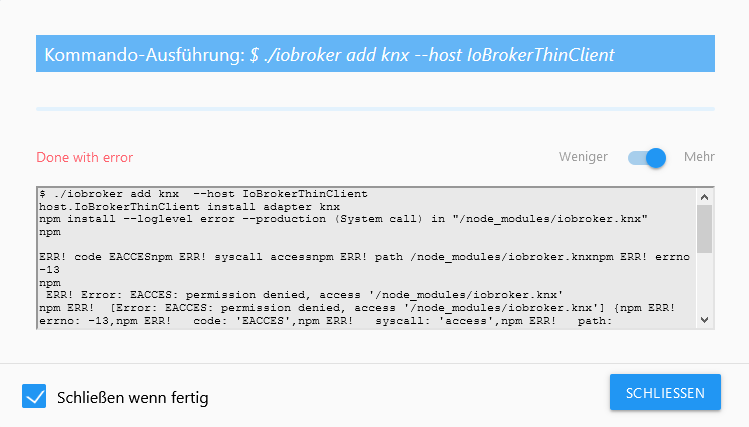
  • Cosmo
  • Flatly
  • Journal
  • Litera
  • Lumen
  • Lux
  • Materia
  • Minty
  • Morph
  • Pulse
  • Sandstone
  • Simplex
  • Sketchy
  • Spacelab
  • United
  • Yeti
  • Zephyr
  • Dark
  • Cyborg
  • Darkly
  • Quartz
  • Slate
  • Solar
  • Superhero
  • Vapor

  • Standard: (Kein Skin)
  • Kein Skin
Einklappen
ioBroker Logo

Community Forum

donate donate
  1. ioBroker Community Home
  2. Deutsch
  3. Error/Bug
  4. Error Installation KNX Adapter Ver. 10.0.39
NEWS

  • Jahresrückblick 2025 – unser neuer Blogbeitrag ist online! ✨
    BluefoxB
    Bluefox
    17
    1
    2.5k

  • Neuer Blogbeitrag: Monatsrückblick - Dezember 2025 🎄
    BluefoxB
    Bluefox
    13
    1
    990

  • Weihnachtsangebot 2025! 🎄
    BluefoxB
    Bluefox
    25
    1
    2.3k

Error Installation KNX Adapter Ver. 10.0.39

Geplant Angeheftet Gesperrt Verschoben Ungelöst Error/Bug
iobroker
71 Beiträge 3 Kommentatoren 5.1k Aufrufe 3 Watching
  • Älteste zuerst
  • Neuste zuerst
  • Meiste Stimmen
Antworten
  • In einem neuen Thema antworten
Anmelden zum Antworten
Dieses Thema wurde gelöscht. Nur Nutzer mit entsprechenden Rechten können es sehen.
  • Thomas BraunT Thomas Braun

    @tobiii1810 sagte in Error Installation KNX Adapter Ver. 10.0.39:

    Node-Version:
    15.0.1

    Nodejs-Version:
    10.23.0

    Warum nur immer wieder...

    which nodejs && nodejs -v && which node && node -v && which npm && npm -v && apt policy nodejs
    

    Und sofort als root abmelden!
    Und keine Module ins /home von root klatschen!

    T Offline
    T Offline
    tobiii1810
    schrieb am zuletzt editiert von
    #3

    @Thomas-Braun

    iobroker@IoBrokerThinClient:~$ which nodejs && nodejs -v && which node && node -v && which npm && npm -v && apt policy nodejs
    /usr/bin/nodejs
    v10.23.0
    /usr/local/bin/node
    v14.15.0
    /usr/local/bin/npm
    6.14.8
    nodejs:
      Installiert:           10.23.0-1nodesource1
      Installationskandidat: 10.23.0-1nodesource1
      Versionstabelle:
     *** 10.23.0-1nodesource1 500
            500 https://deb.nodesource.com/node_10.x buster/main amd64 Packages
            100 /var/lib/dpkg/status
         10.21.0~dfsg-1~deb10u1 500
            500 http://deb.debian.org/debian buster/main amd64 Packages
            500 http://security.debian.org/debian-security buster/updates/main amd64 Packages
    
    
    Thomas BraunT 1 Antwort Letzte Antwort
    0
    • T tobiii1810

      @Thomas-Braun

      iobroker@IoBrokerThinClient:~$ which nodejs && nodejs -v && which node && node -v && which npm && npm -v && apt policy nodejs
      /usr/bin/nodejs
      v10.23.0
      /usr/local/bin/node
      v14.15.0
      /usr/local/bin/npm
      6.14.8
      nodejs:
        Installiert:           10.23.0-1nodesource1
        Installationskandidat: 10.23.0-1nodesource1
        Versionstabelle:
       *** 10.23.0-1nodesource1 500
              500 https://deb.nodesource.com/node_10.x buster/main amd64 Packages
              100 /var/lib/dpkg/status
           10.21.0~dfsg-1~deb10u1 500
              500 http://deb.debian.org/debian buster/main amd64 Packages
              500 http://security.debian.org/debian-security buster/updates/main amd64 Packages
      
      
      Thomas BraunT Online
      Thomas BraunT Online
      Thomas Braun
      Most Active
      schrieb am zuletzt editiert von Thomas Braun
      #4

      @tobiii1810

      Der nächste bitte:

      https://forum.iobroker.net/topic/35090/howto-nodejs-installation-und-upgrades-unter-debian/2

      Node12 sauber installieren.

      Und ich würde mir auch einen eigenen User anlegen, iobroker ist ein Systemuser und sollte nicht als 'normaler' User verwendet werden.

      Linux-Werkzeugkasten:
      https://forum.iobroker.net/topic/42952/der-kleine-iobroker-linux-werkzeugkasten
      NodeJS Fixer Skript:
      https://forum.iobroker.net/topic/68035/iob-node-fix-skript
      iob_diag: curl -sLf -o diag.sh https://iobroker.net/diag.sh && bash diag.sh

      T 1 Antwort Letzte Antwort
      0
      • Thomas BraunT Thomas Braun

        @tobiii1810

        Der nächste bitte:

        https://forum.iobroker.net/topic/35090/howto-nodejs-installation-und-upgrades-unter-debian/2

        Node12 sauber installieren.

        Und ich würde mir auch einen eigenen User anlegen, iobroker ist ein Systemuser und sollte nicht als 'normaler' User verwendet werden.

        T Offline
        T Offline
        tobiii1810
        schrieb am zuletzt editiert von
        #5

        @Thomas-Braun

        Habe Nodejs auf v12.19.0 downgegraded

        iobroker@IoBrokerThinClient:~$ which nodejs && nodejs -v && which node && node -v && which npm && npm -v && apt policy nodejs
        /usr/bin/nodejs
        v12.19.0
        /usr/bin/node
        -bash: /usr/local/bin/node: Datei oder Verzeichnis nicht gefunden


        Da node und npm im Verzeichnis /usr/local/bin lagen haben ich diese per
        rm /Pfad gelöscht so wie in deinem HowTo beschrieben.

        Meine Frage: Wie bekomme ich diese wieder installiert und Node auf die
        gleiche Version wie Nodejs?

        Thomas BraunT 1 Antwort Letzte Antwort
        0
        • T tobiii1810

          @Thomas-Braun

          Habe Nodejs auf v12.19.0 downgegraded

          iobroker@IoBrokerThinClient:~$ which nodejs && nodejs -v && which node && node -v && which npm && npm -v && apt policy nodejs
          /usr/bin/nodejs
          v12.19.0
          /usr/bin/node
          -bash: /usr/local/bin/node: Datei oder Verzeichnis nicht gefunden


          Da node und npm im Verzeichnis /usr/local/bin lagen haben ich diese per
          rm /Pfad gelöscht so wie in deinem HowTo beschrieben.

          Meine Frage: Wie bekomme ich diese wieder installiert und Node auf die
          gleiche Version wie Nodejs?

          Thomas BraunT Online
          Thomas BraunT Online
          Thomas Braun
          Most Active
          schrieb am zuletzt editiert von
          #6

          @tobiii1810 Steht auch in der Anleitung. Im ersten Posting.

          Linux-Werkzeugkasten:
          https://forum.iobroker.net/topic/42952/der-kleine-iobroker-linux-werkzeugkasten
          NodeJS Fixer Skript:
          https://forum.iobroker.net/topic/68035/iob-node-fix-skript
          iob_diag: curl -sLf -o diag.sh https://iobroker.net/diag.sh && bash diag.sh

          T 1 Antwort Letzte Antwort
          0
          • Thomas BraunT Thomas Braun

            @tobiii1810 Steht auch in der Anleitung. Im ersten Posting.

            T Offline
            T Offline
            tobiii1810
            schrieb am zuletzt editiert von
            #7

            @Thomas-Braun

            Ich glaube jetzt sieht es gut aus.

            iobroker@IoBrokerThinClient:~$ which nodejs && nodejs -v && which node && node -v && which npm && npm -v && apt policy nodejs
            /usr/bin/nodejs
            v12.19.0
            /usr/bin/node
            v12.19.0
            /usr/bin/npm
            6.14.8
            nodejs:
              Installiert:           12.19.0-1nodesource1
              Installationskandidat: 12.19.0-1nodesource1
              Versionstabelle:
             *** 12.19.0-1nodesource1 500
                    500 https://deb.nodesource.com/node_12.x buster/main amd64 Packages
                    100 /var/lib/dpkg/status
                 10.21.0~dfsg-1~deb10u1 500
                    500 http://deb.debian.org/debian buster/main amd64 Packages
                    500 http://security.debian.org/debian-security buster/updates/main amd64 Packages
            
            
            Thomas BraunT 1 Antwort Letzte Antwort
            0
            • T tobiii1810

              @Thomas-Braun

              Ich glaube jetzt sieht es gut aus.

              iobroker@IoBrokerThinClient:~$ which nodejs && nodejs -v && which node && node -v && which npm && npm -v && apt policy nodejs
              /usr/bin/nodejs
              v12.19.0
              /usr/bin/node
              v12.19.0
              /usr/bin/npm
              6.14.8
              nodejs:
                Installiert:           12.19.0-1nodesource1
                Installationskandidat: 12.19.0-1nodesource1
                Versionstabelle:
               *** 12.19.0-1nodesource1 500
                      500 https://deb.nodesource.com/node_12.x buster/main amd64 Packages
                      100 /var/lib/dpkg/status
                   10.21.0~dfsg-1~deb10u1 500
                      500 http://deb.debian.org/debian buster/main amd64 Packages
                      500 http://security.debian.org/debian-security buster/updates/main amd64 Packages
              
              
              Thomas BraunT Online
              Thomas BraunT Online
              Thomas Braun
              Most Active
              schrieb am zuletzt editiert von
              #8

              @tobiii1810
              Ja, jetzt ist node richtig installiert.

              Linux-Werkzeugkasten:
              https://forum.iobroker.net/topic/42952/der-kleine-iobroker-linux-werkzeugkasten
              NodeJS Fixer Skript:
              https://forum.iobroker.net/topic/68035/iob-node-fix-skript
              iob_diag: curl -sLf -o diag.sh https://iobroker.net/diag.sh && bash diag.sh

              T 1 Antwort Letzte Antwort
              0
              • Thomas BraunT Thomas Braun

                @tobiii1810
                Ja, jetzt ist node richtig installiert.

                T Offline
                T Offline
                tobiii1810
                schrieb am zuletzt editiert von
                #9

                @Thomas-Braun

                Mein Problem ist, dass es an meinem ursprünglichen Problem in dem Post nichts geändert hat. Bei der Installation des KNX Adapters kommt noch immer die gleiche Fehlermeldung.

                Thomas BraunT 1 Antwort Letzte Antwort
                0
                • T tobiii1810

                  @Thomas-Braun

                  Mein Problem ist, dass es an meinem ursprünglichen Problem in dem Post nichts geändert hat. Bei der Installation des KNX Adapters kommt noch immer die gleiche Fehlermeldung.

                  Thomas BraunT Online
                  Thomas BraunT Online
                  Thomas Braun
                  Most Active
                  schrieb am zuletzt editiert von
                  #10

                  @tobiii1810
                  Da hast du dir vermutlich durch das unnötige root-login die Rechte zerballert.

                  iobroker fix
                  

                  ausführen.

                  Linux-Werkzeugkasten:
                  https://forum.iobroker.net/topic/42952/der-kleine-iobroker-linux-werkzeugkasten
                  NodeJS Fixer Skript:
                  https://forum.iobroker.net/topic/68035/iob-node-fix-skript
                  iob_diag: curl -sLf -o diag.sh https://iobroker.net/diag.sh && bash diag.sh

                  T 2 Antworten Letzte Antwort
                  0
                  • Thomas BraunT Thomas Braun

                    @tobiii1810
                    Da hast du dir vermutlich durch das unnötige root-login die Rechte zerballert.

                    iobroker fix
                    

                    ausführen.

                    T Offline
                    T Offline
                    tobiii1810
                    schrieb am zuletzt editiert von
                    #11

                    @Thomas-Braun

                    Der Fix war erfolgreich, hat aber leider nichts gebracht. Hast du noch eine Idee?

                    Thomas BraunT 1 Antwort Letzte Antwort
                    0
                    • T tobiii1810

                      @Thomas-Braun

                      Der Fix war erfolgreich, hat aber leider nichts gebracht. Hast du noch eine Idee?

                      Thomas BraunT Online
                      Thomas BraunT Online
                      Thomas Braun
                      Most Active
                      schrieb am zuletzt editiert von
                      #12

                      @tobiii1810

                      iobroker add knx
                      

                      Ausgabe posten.

                      Linux-Werkzeugkasten:
                      https://forum.iobroker.net/topic/42952/der-kleine-iobroker-linux-werkzeugkasten
                      NodeJS Fixer Skript:
                      https://forum.iobroker.net/topic/68035/iob-node-fix-skript
                      iob_diag: curl -sLf -o diag.sh https://iobroker.net/diag.sh && bash diag.sh

                      T 1 Antwort Letzte Antwort
                      0
                      • Thomas BraunT Thomas Braun

                        @tobiii1810
                        Da hast du dir vermutlich durch das unnötige root-login die Rechte zerballert.

                        iobroker fix
                        

                        ausführen.

                        T Offline
                        T Offline
                        tobiii1810
                        schrieb am zuletzt editiert von
                        #13

                        @Thomas-Braun

                        Beim Installationsversuch über die Konsole mit folgendem Befehl

                        sudo npm i iobroker.knx 
                        

                        kommt dies hier

                        iobroker@IoBrokerThinClient:~$ sudo npm i iobroker.knx                                      [sudo] Passwort für iobroker:
                        npm WARN saveError ENOENT: no such file or directory, open '/home/iobroker/packa            ge.json'
                        npm WARN enoent ENOENT: no such file or directory, open '/home/iobroker/package.            json'
                        npm WARN iobroker No description
                        npm WARN iobroker No repository field.
                        npm WARN iobroker No README data
                        npm WARN iobroker No license field.
                        
                        + iobroker.knx@1.0.42
                        updated 1 package and audited 53 packages in 3.075s
                        
                        3 packages are looking for funding
                          run `npm fund` for details
                        
                        found 0 vulnerabilities
                        
                        
                        Thomas BraunT 1 Antwort Letzte Antwort
                        0
                        • T tobiii1810

                          @Thomas-Braun

                          Beim Installationsversuch über die Konsole mit folgendem Befehl

                          sudo npm i iobroker.knx 
                          

                          kommt dies hier

                          iobroker@IoBrokerThinClient:~$ sudo npm i iobroker.knx                                      [sudo] Passwort für iobroker:
                          npm WARN saveError ENOENT: no such file or directory, open '/home/iobroker/packa            ge.json'
                          npm WARN enoent ENOENT: no such file or directory, open '/home/iobroker/package.            json'
                          npm WARN iobroker No description
                          npm WARN iobroker No repository field.
                          npm WARN iobroker No README data
                          npm WARN iobroker No license field.
                          
                          + iobroker.knx@1.0.42
                          updated 1 package and audited 53 packages in 3.075s
                          
                          3 packages are looking for funding
                            run `npm fund` for details
                          
                          found 0 vulnerabilities
                          
                          
                          Thomas BraunT Online
                          Thomas BraunT Online
                          Thomas Braun
                          Most Active
                          schrieb am zuletzt editiert von Thomas Braun
                          #14

                          @tobiii1810
                          Mit npm machst du da nix. Insbesondere nicht in Verbindung mit sudo!
                          Zumal das im falschen Verzeichnis ausgeführt wurde.

                          Linux-Werkzeugkasten:
                          https://forum.iobroker.net/topic/42952/der-kleine-iobroker-linux-werkzeugkasten
                          NodeJS Fixer Skript:
                          https://forum.iobroker.net/topic/68035/iob-node-fix-skript
                          iob_diag: curl -sLf -o diag.sh https://iobroker.net/diag.sh && bash diag.sh

                          1 Antwort Letzte Antwort
                          0
                          • Thomas BraunT Thomas Braun

                            @tobiii1810

                            iobroker add knx
                            

                            Ausgabe posten.

                            T Offline
                            T Offline
                            tobiii1810
                            schrieb am zuletzt editiert von
                            #15

                            @Thomas-Braun

                            iobroker@IoBrokerThinClient:~$ iobroker add knx
                            host.IoBrokerThinClient install adapter knx
                            npm install --loglevel error --production (System call) in "/node_modules/iobroker.knx"
                            npm ERR! code EACCES
                            npm ERR! syscall access
                            npm ERR! path /node_modules/iobroker.knx
                            npm ERR! errno -13
                            npm ERR! Error: EACCES: permission denied, access '/node_modules/iobroker.knx'
                            npm ERR!  [Error: EACCES: permission denied, access '/node_modules/iobroker.knx'] {
                            npm ERR!   errno: -13,
                            npm ERR!   code: 'EACCES',
                            npm ERR!   syscall: 'access',
                            npm ERR!   path: '/node_modules/iobroker.knx'
                            npm ERR! }
                            npm ERR!
                            npm ERR! The operation was rejected by your operating system.
                            npm ERR! It is likely you do not have the permissions to access this file as the current user
                            npm ERR!
                            npm ERR! If you believe this might be a permissions issue, please double-check the
                            npm ERR! permissions of the file and its containing directories, or try running
                            npm ERR! the command again as root/Administrator.
                            
                            npm ERR! A complete log of this run can be found in:
                            npm ERR!     /home/iobroker/.npm/_logs/2020-11-02T19_48_30_277Z-debug.log
                            Cannot install iobroker.knx: 243
                            
                            
                            Thomas BraunT 1 Antwort Letzte Antwort
                            0
                            • T tobiii1810

                              @Thomas-Braun

                              iobroker@IoBrokerThinClient:~$ iobroker add knx
                              host.IoBrokerThinClient install adapter knx
                              npm install --loglevel error --production (System call) in "/node_modules/iobroker.knx"
                              npm ERR! code EACCES
                              npm ERR! syscall access
                              npm ERR! path /node_modules/iobroker.knx
                              npm ERR! errno -13
                              npm ERR! Error: EACCES: permission denied, access '/node_modules/iobroker.knx'
                              npm ERR!  [Error: EACCES: permission denied, access '/node_modules/iobroker.knx'] {
                              npm ERR!   errno: -13,
                              npm ERR!   code: 'EACCES',
                              npm ERR!   syscall: 'access',
                              npm ERR!   path: '/node_modules/iobroker.knx'
                              npm ERR! }
                              npm ERR!
                              npm ERR! The operation was rejected by your operating system.
                              npm ERR! It is likely you do not have the permissions to access this file as the current user
                              npm ERR!
                              npm ERR! If you believe this might be a permissions issue, please double-check the
                              npm ERR! permissions of the file and its containing directories, or try running
                              npm ERR! the command again as root/Administrator.
                              
                              npm ERR! A complete log of this run can be found in:
                              npm ERR!     /home/iobroker/.npm/_logs/2020-11-02T19_48_30_277Z-debug.log
                              Cannot install iobroker.knx: 243
                              
                              
                              Thomas BraunT Online
                              Thomas BraunT Online
                              Thomas Braun
                              Most Active
                              schrieb am zuletzt editiert von
                              #16

                              @tobiii1810

                              Da stimmt der prefix offenbar nicht.

                              cd /opt/iobroker
                              iobroker add knx
                              

                              Linux-Werkzeugkasten:
                              https://forum.iobroker.net/topic/42952/der-kleine-iobroker-linux-werkzeugkasten
                              NodeJS Fixer Skript:
                              https://forum.iobroker.net/topic/68035/iob-node-fix-skript
                              iob_diag: curl -sLf -o diag.sh https://iobroker.net/diag.sh && bash diag.sh

                              T GlasfaserG 2 Antworten Letzte Antwort
                              0
                              • Thomas BraunT Thomas Braun

                                @tobiii1810

                                Da stimmt der prefix offenbar nicht.

                                cd /opt/iobroker
                                iobroker add knx
                                
                                T Offline
                                T Offline
                                tobiii1810
                                schrieb am zuletzt editiert von
                                #17

                                @Thomas-Braun

                                Hat leider nichts gebracht

                                iobroker@IoBrokerThinClient:~$ cd /opt/iobroker
                                iobroker@IoBrokerThinClient:/opt/iobroker$ iobroker add knx
                                host.IoBrokerThinClient install adapter knx
                                npm install --loglevel error --production (System call) in "/node_modules/iobroker.knx"
                                npm ERR! code EACCES
                                npm ERR! syscall access
                                npm ERR! path /node_modules/iobroker.knx
                                npm ERR! errno -13
                                npm ERR! Error: EACCES: permission denied, access '/node_modules/iobroker.knx'
                                npm ERR!  [Error: EACCES: permission denied, access '/node_modules/iobroker.knx'] {
                                npm ERR!   errno: -13,
                                npm ERR!   code: 'EACCES',
                                npm ERR!   syscall: 'access',
                                npm ERR!   path: '/node_modules/iobroker.knx'
                                npm ERR! }
                                npm ERR!
                                npm ERR! The operation was rejected by your operating system.
                                npm ERR! It is likely you do not have the permissions to access this file as the current user
                                npm ERR!
                                npm ERR! If you believe this might be a permissions issue, please double-check the
                                npm ERR! permissions of the file and its containing directories, or try running
                                npm ERR! the command again as root/Administrator.
                                
                                npm ERR! A complete log of this run can be found in:
                                npm ERR!     /home/iobroker/.npm/_logs/2020-11-02T19_52_36_875Z-debug.log
                                Cannot install iobroker.knx: 243
                                
                                GlasfaserG 1 Antwort Letzte Antwort
                                0
                                • T tobiii1810

                                  @Thomas-Braun

                                  Hat leider nichts gebracht

                                  iobroker@IoBrokerThinClient:~$ cd /opt/iobroker
                                  iobroker@IoBrokerThinClient:/opt/iobroker$ iobroker add knx
                                  host.IoBrokerThinClient install adapter knx
                                  npm install --loglevel error --production (System call) in "/node_modules/iobroker.knx"
                                  npm ERR! code EACCES
                                  npm ERR! syscall access
                                  npm ERR! path /node_modules/iobroker.knx
                                  npm ERR! errno -13
                                  npm ERR! Error: EACCES: permission denied, access '/node_modules/iobroker.knx'
                                  npm ERR!  [Error: EACCES: permission denied, access '/node_modules/iobroker.knx'] {
                                  npm ERR!   errno: -13,
                                  npm ERR!   code: 'EACCES',
                                  npm ERR!   syscall: 'access',
                                  npm ERR!   path: '/node_modules/iobroker.knx'
                                  npm ERR! }
                                  npm ERR!
                                  npm ERR! The operation was rejected by your operating system.
                                  npm ERR! It is likely you do not have the permissions to access this file as the current user
                                  npm ERR!
                                  npm ERR! If you believe this might be a permissions issue, please double-check the
                                  npm ERR! permissions of the file and its containing directories, or try running
                                  npm ERR! the command again as root/Administrator.
                                  
                                  npm ERR! A complete log of this run can be found in:
                                  npm ERR!     /home/iobroker/.npm/_logs/2020-11-02T19_52_36_875Z-debug.log
                                  Cannot install iobroker.knx: 243
                                  
                                  GlasfaserG Offline
                                  GlasfaserG Offline
                                  Glasfaser
                                  schrieb am zuletzt editiert von
                                  #18

                                  @tobiii1810

                                  iobroker fix
                                  

                                  Synology 918+ 16GB - ioBroker in Docker v9 , VISO auf Trekstor Primebook C13 13,3" , Hikvision Domkameras mit Surveillance Station .. CCU RaspberryMatic in Synology VM .. Zigbee CC2538+CC2592 .. Sonoff .. KNX .. Modbus ..

                                  T 1 Antwort Letzte Antwort
                                  0
                                  • GlasfaserG Glasfaser

                                    @tobiii1810

                                    iobroker fix
                                    
                                    T Offline
                                    T Offline
                                    tobiii1810
                                    schrieb am zuletzt editiert von
                                    #19

                                    @Glasfaser

                                    Hat @Thomas-Braun oben schon geschrieben und wurde auch schon ausgeführt.

                                    1 Antwort Letzte Antwort
                                    0
                                    • Thomas BraunT Thomas Braun

                                      @tobiii1810

                                      Da stimmt der prefix offenbar nicht.

                                      cd /opt/iobroker
                                      iobroker add knx
                                      
                                      GlasfaserG Offline
                                      GlasfaserG Offline
                                      Glasfaser
                                      schrieb am zuletzt editiert von Glasfaser
                                      #20

                                      @Thomas-Braun

                                      ich würde die Kiste mal neu durchstarten lassen .....!?

                                      Synology 918+ 16GB - ioBroker in Docker v9 , VISO auf Trekstor Primebook C13 13,3" , Hikvision Domkameras mit Surveillance Station .. CCU RaspberryMatic in Synology VM .. Zigbee CC2538+CC2592 .. Sonoff .. KNX .. Modbus ..

                                      Thomas BraunT 1 Antwort Letzte Antwort
                                      0
                                      • GlasfaserG Glasfaser

                                        @Thomas-Braun

                                        ich würde die Kiste mal neu durchstarten lassen .....!?

                                        Thomas BraunT Online
                                        Thomas BraunT Online
                                        Thomas Braun
                                        Most Active
                                        schrieb am zuletzt editiert von
                                        #21

                                        @Glasfaser Ja.
                                        @tobiii1810

                                        sudo reboot
                                        

                                        Und ich würde mir auch einen vernünftigen USER anlegen. Da mit dem iobroker rumzumachen ist nicht gerade günstig.

                                        Linux-Werkzeugkasten:
                                        https://forum.iobroker.net/topic/42952/der-kleine-iobroker-linux-werkzeugkasten
                                        NodeJS Fixer Skript:
                                        https://forum.iobroker.net/topic/68035/iob-node-fix-skript
                                        iob_diag: curl -sLf -o diag.sh https://iobroker.net/diag.sh && bash diag.sh

                                        T 1 Antwort Letzte Antwort
                                        0
                                        • Thomas BraunT Thomas Braun

                                          @Glasfaser Ja.
                                          @tobiii1810

                                          sudo reboot
                                          

                                          Und ich würde mir auch einen vernünftigen USER anlegen. Da mit dem iobroker rumzumachen ist nicht gerade günstig.

                                          T Offline
                                          T Offline
                                          tobiii1810
                                          schrieb am zuletzt editiert von
                                          #22

                                          @Thomas-Braun

                                          Auch ein reboot bringt keinen Erfolg. Sollte ich iobroker komplett neu aufsetzten?

                                          Thomas BraunT 1 Antwort Letzte Antwort
                                          0
                                          Antworten
                                          • In einem neuen Thema antworten
                                          Anmelden zum Antworten
                                          • Älteste zuerst
                                          • Neuste zuerst
                                          • Meiste Stimmen


                                          Support us

                                          ioBroker
                                          Community Adapters
                                          Donate

                                          312

                                          Online

                                          32.6k

                                          Benutzer

                                          82.3k

                                          Themen

                                          1.3m

                                          Beiträge
                                          Community
                                          Impressum | Datenschutz-Bestimmungen | Nutzungsbedingungen | Einwilligungseinstellungen
                                          ioBroker Community 2014-2025
                                          logo
                                          • Anmelden

                                          • Du hast noch kein Konto? Registrieren

                                          • Anmelden oder registrieren, um zu suchen
                                          • Erster Beitrag
                                            Letzter Beitrag
                                          0
                                          • Home
                                          • Aktuell
                                          • Tags
                                          • Ungelesen 0
                                          • Kategorien
                                          • Unreplied
                                          • Beliebt
                                          • GitHub
                                          • Docu
                                          • Hilfe
