



Skip to content
  • Home
  • Aktuell
  • Tags
  • 0 Ungelesen 0
  • Kategorien
  • Unreplied
  • Beliebt
  • GitHub
  • Docu
  • Hilfe
Skins
  • Light
  • Brite
  • Cerulean
  • Cosmo
  • Flatly
  • Journal
  • Litera
  • Lumen
  • Lux
  • Materia
  • Minty
  • Morph
  • Pulse
  • Sandstone
  • Simplex
  • Sketchy
  • Spacelab
  • United
  • Yeti
  • Zephyr
  • Dark
  • Cyborg
  • Darkly
  • Quartz
  • Slate
  • Solar
  • Superhero
  • Vapor

  • Standard: (Kein Skin)
  • Kein Skin
Einklappen
ioBroker Logo

Community Forum

donate donate
  1. ioBroker Community Home
  2. Deutsch
  3. Hardware
  4. Kamera + Bewegungsmelder kombinieren für Gartenüberwachung

NEWS

  • Neuer Blogbeitrag: Monatsrückblick - Dezember 2025 🎄
    BluefoxB
    Bluefox
    11
    1
    450

  • Weihnachtsangebot 2025! 🎄
    BluefoxB
    Bluefox
    24
    1
    1.6k

  • UPDATE 31.10.: Amazon Alexa - ioBroker Skill läuft aus ?
    apollon77A
    apollon77
    48
    3
    9.5k

Kamera + Bewegungsmelder kombinieren für Gartenüberwachung

Geplant Angeheftet Gesperrt Verschoben Hardware
überwachungbewegungsmelderkamera
197 Beiträge 11 Kommentatoren 19.5k Aufrufe 13 Watching
  • Älteste zuerst
  • Neuste zuerst
  • Meiste Stimmen
Antworten
  • In einem neuen Thema antworten
Anmelden zum Antworten
Dieses Thema wurde gelöscht. Nur Nutzer mit entsprechenden Rechten können es sehen.
  • wendy2702W wendy2702

    Auf welchem level ist das loggen eingestellt:

    cat /etc/motioneye/motioneye.conf
    

    @smarthome2020 sagte in Kamera + Bewegungsmelder kombinieren für Gartenüberwachung:

    Ich könnte alternativ auch einfach paar JPEG-Bilder schießen lassen. Diese sollten dann nur auch mit Zeitstempel gespeichert werden und aber auch gleich per Telegram verschickt werden.
    Per http-Befehl kann ich ja Bilder erstellen lassen. Nur wie schicke ich diese auch gleich per Telegram? Die haben ja alle andere Zeitstempel :D Ich hab das aktuell so gelöst, dass auf Wunsch immer ein Alarm.jpg erstellt wird und dieses versendet wird. Das ist dann ja nicht mehr praktikabel. Hat da einer eine Idee?

    Ist das Zielführend? Ich würde das als zweite Option sehen, bin der Meinung das eine Kamera voll umfänglich funktionieren sollte.

    Bilder per Telegram mache ich aber z.B. so: (aus dem Forum)

    // -------------------------------------------------------------------------
    // Dieses Script überwaht den Zustand eines Bewegungsmelders und speichert bei
    // Aktivierung ein Bild einer Überwachnungskamera in einem Vereichnis und sendet
    // dieses via Telegram.0-Adapter. Nach 10 Sek wird ein weiteres Bild erstellt und
    // gesendet.
    // Die Speicherung der Bilder erfolgt als "Stack", d.h. das aktuellste Bild bekommt
    // immer den Suffix "0" und es werden n Bilder mit den Suffixen 1..n-1 vorgehalten
    // Uhula 2017.11
    // -------------------------------------------------------------------------
    
    // -------------------------------------------------------------------------
    // Konfiguration
    // -------------------------------------------------------------------------
         // Objekt-ID des Bewegungsmelders
    const oidLichtBewmelderTuer = "hm-rpc.0.PEQ0xxxxx4.1.MOTION";
         // URL zur Kamera umn ein Image (jpg) zu erhalten
    const cam_url = "http://mxe:ix8@192.168.178.211/Streaming/channels/1/picture";
         // Pfadangabe für die Speicherung der Bilder, der Pfad muss existieren
    const dest_path = '/opt/iobroker/iobroker-data/files/_temp/garage_klein/';
         // Anzahl der Bilder, die vorgehalten werden sollen
    const imageCountMax = 8;                
         // Prefix für die Bildnamen
    const imageNamePre = "garage_klein_"; 
    
    // -------------------------------------------------------------------------
    // Scriptteil
    // -------------------------------------------------------------------------
    var request = require('request');
    var fs      = require('fs');
    
    // Bild an telegram schicken 
    function sendImage (path) { 
       try {
           var stats = fs.statSync(path);
           var msg = formatDate(stats.birthtime,"DD.MM.YYYY hh:mm:ss") + " " + path.substring(path.lastIndexOf('/')+1);
           sendTo('telegram.0', {
               text:                   path,
               caption:                msg, 
               disable_notification:   true,
               user: 'Mxo',
           });
           sendTo('telegram.0', {
               text:                   path,
               caption:                msg, 
               disable_notification:   true,
               user: 'Lxn',
           });
       }
       catch(err) { if (err.code != "ENOENT") log(err); }     
    }
    
    // löscht eine Datei synchron (wartet auf das Ergebnis)
    function fsUnlinkSync(path) {
       try {
           var stats = fs.statSync(path);
           try { fs.unlinkSync(path); }
           catch(err) { if (err.code != "ENOENT") log(err); }     
       }
       catch(err) { if (err.code != "ENOENT") log(err); }
    }
    
    // benennt eine Datei synchron um (wartet auf das Ergebnis)
    function fsRenameSync(oldPath, newPath) {
       try {
           var stats = fs.statSync(oldPath);
           try { fs.renameSync(oldPath, newPath); }
           catch(err) { if (err.code != "ENOENT") log(err); }     
       }
       catch(err) { if (err.code != "ENOENT") log(err); }
    }
    
    // Bild speichern und senden
    function saveImage() {
       // Bild imageCountMax-1 löschen
       fsUnlinkSync( dest_path + imageNamePre + (imageCountMax-1) + ".jpg" );
       // Bilder 0..imageCountMax-2 umbenennen
       for (var i=imageCountMax-4; i >= 0; i-- ) { 
           fsRenameSync(dest_path + imageNamePre + i + ".jpg", dest_path + imageNamePre + (i+1) + ".jpg"); 
       }
       // Bild 0 löschen
       var fname = imageNamePre + "0.jpg";
       fsUnlinkSync( fname );
       // Bild holen und speichern
       request.get({url: cam_url, encoding: 'binary'}, function (err, response, body) {
           fs.writeFile(dest_path + fname, body, 'binary', function(err) {
               if (err) {
                   log('Fehler beim Bild speichern: ' + err, 'warn');
               } else {
                   // dem Filesystem 2 Sek Zeit zum Speichern lassen
                   setTimeout(function() { sendImage(dest_path + fname); }, 2000); 
               }
           }); 
       });
    }
    
    // sofort ein Bild senden und nach 3 Sek erneut
    //function onEvent() {
    //    saveImage();
    //    setTimeout(function() { saveImage(); }, 10 * 300); 
    //}
    
    // sofort ein Bild senden und nach 3 Sek erneut
    function onEvent() {
    saveImage();
    setTimeout(function() { saveImage(); }, 3 * 1000);
    setTimeout(function() { saveImage(); }, 6 * 1000);
    setTimeout(function() { saveImage(); }, 9 * 1000);
    }
    
    
    // Ereignisroutine
    //on({id: oidLichtBewmelderTuer, val: true}, function (obj) {
    //    onEvent( obj );
    on({id: 'hm-rpc.0.PEQ0xxxx4.1.MOTION', change: "ne"}, function (obj) {
     var value = obj.state.val;
     var oldValue = obj.oldState.val;
     if (getState("hm-rpc.0.PEQ0xxxx4.1.MOTION").val === true)
     onEvent( obj );
    });
    
    // manuelle Ausführung (Test)
    onEvent();
    

    S Offline
    S Offline
    smarthome2020
    schrieb am zuletzt editiert von smarthome2020
    #164

    @wendy2702
    Ja, denke auch, dass eine Kamera voll funktionieren sollte, wenn man sie schon neu kauft. Bin daher auch nicht zufrieden und schicke sie vllt noch zurück.
    Haber aber noch die Hoffnung, dass noch was zu machen ist. Zumal sie ja nach deinen Hilfestellungen auch paar Tage ohne Probleme lief :(

    # path to the configuration directory (must be writable by motionEye)
    conf_path /etc/motioneye
    
    # path to the directory where pid files go (must be writable by motionEye)
    run_path /var/run
    
    # path to the directory where log files go (must be writable by motionEye)
    log_path /var/log
    
    # default output path for media files (must be writable by motionEye)
    media_path /var/lib/motioneye
    
    # the log level (use quiet, error, warning, info or debug)
    log_level info
    
    # the IP address to listen on
    # (0.0.0.0 for all interfaces, 127.0.0.1 for localhost)
    listen 0.0.0.0
    
    # the TCP port to listen on
    port 8765
    
    # path to the motion binary to use (automatically detected if commented)
    #motion_binary /usr/bin/motion
    
    # whether motion HTTP control interface listens on
    # localhost or on all interfaces
    motion_control_localhost false
    
    # the TCP port that motion HTTP control interface listens on
    motion_control_port 7999
    
    # interval in seconds at which motionEye checks if motion is running
    motion_check_interval 10
    
    # whether to restart the motion daemon when an error occurs while communicating with it
    motion_restart_on_errors false
    
    # interval in seconds at which motionEye checks the SMB mounts
    mount_check_interval 300
    
    # interval in seconds at which the janitor is called
    # to remove old pictures and movies
    cleanup_interval 43200
    
    # timeout in seconds to wait for response from a remote motionEye server
    remote_request_timeout 10
    
    # timeout in seconds to wait for mjpg data from the motion daemon
    mjpg_client_timeout 10
    
    # timeout in seconds after which an idle mjpg client is removed
    # (set to 0 to disable)
    mjpg_client_idle_timeout 10
    
    # enable SMB shares (requires motionEye to run as root)
    smb_shares false
    
    # the directory where the SMB mount points will be created
    smb_mount_root /media
    
    # path to the wpa_supplicant.conf file
    # (enable this to configure wifi settings from the UI)
    #wpa_supplicant_conf /etc/wpa_supplicant.conf
    
    # path to the localtime file
    # (enable this to configure the system time zone from the UI)
    #local_time_file /etc/localtime
    
    # enables shutdown and rebooting after changing system settings
    # (such as wifi settings or time zone)
    enable_reboot false
    
    # timeout in seconds to use when talking to the SMTP server
    smtp_timeout 60
    
    # timeout in seconds to wait for media files list
    list_media_timeout 120
    
    # timeout in seconds to wait for media files list, when sending emails
    list_media_timeout_email 10
    
    # timeout in seconds to wait for zip file creation
    zip_timeout 500
    
    # timeout in seconds to wait for timelapse creation
    timelapse_timeout 500
    
    # enable adding and removing cameras from UI
    add_remove_cameras true
    
    # enables HTTP basic authentication scheme (in addition to, not instead of the signature mechanism)
    http_basic_auth false
    
    # overrides the hostname (useful if motionEye runs behind a reverse proxy)
    # server_name motionEye
    
    
    wendy2702W 1 Antwort Letzte Antwort
    0
    • S smarthome2020

      @wendy2702
      Ja, denke auch, dass eine Kamera voll funktionieren sollte, wenn man sie schon neu kauft. Bin daher auch nicht zufrieden und schicke sie vllt noch zurück.
      Haber aber noch die Hoffnung, dass noch was zu machen ist. Zumal sie ja nach deinen Hilfestellungen auch paar Tage ohne Probleme lief :(

      # path to the configuration directory (must be writable by motionEye)
      conf_path /etc/motioneye
      
      # path to the directory where pid files go (must be writable by motionEye)
      run_path /var/run
      
      # path to the directory where log files go (must be writable by motionEye)
      log_path /var/log
      
      # default output path for media files (must be writable by motionEye)
      media_path /var/lib/motioneye
      
      # the log level (use quiet, error, warning, info or debug)
      log_level info
      
      # the IP address to listen on
      # (0.0.0.0 for all interfaces, 127.0.0.1 for localhost)
      listen 0.0.0.0
      
      # the TCP port to listen on
      port 8765
      
      # path to the motion binary to use (automatically detected if commented)
      #motion_binary /usr/bin/motion
      
      # whether motion HTTP control interface listens on
      # localhost or on all interfaces
      motion_control_localhost false
      
      # the TCP port that motion HTTP control interface listens on
      motion_control_port 7999
      
      # interval in seconds at which motionEye checks if motion is running
      motion_check_interval 10
      
      # whether to restart the motion daemon when an error occurs while communicating with it
      motion_restart_on_errors false
      
      # interval in seconds at which motionEye checks the SMB mounts
      mount_check_interval 300
      
      # interval in seconds at which the janitor is called
      # to remove old pictures and movies
      cleanup_interval 43200
      
      # timeout in seconds to wait for response from a remote motionEye server
      remote_request_timeout 10
      
      # timeout in seconds to wait for mjpg data from the motion daemon
      mjpg_client_timeout 10
      
      # timeout in seconds after which an idle mjpg client is removed
      # (set to 0 to disable)
      mjpg_client_idle_timeout 10
      
      # enable SMB shares (requires motionEye to run as root)
      smb_shares false
      
      # the directory where the SMB mount points will be created
      smb_mount_root /media
      
      # path to the wpa_supplicant.conf file
      # (enable this to configure wifi settings from the UI)
      #wpa_supplicant_conf /etc/wpa_supplicant.conf
      
      # path to the localtime file
      # (enable this to configure the system time zone from the UI)
      #local_time_file /etc/localtime
      
      # enables shutdown and rebooting after changing system settings
      # (such as wifi settings or time zone)
      enable_reboot false
      
      # timeout in seconds to use when talking to the SMTP server
      smtp_timeout 60
      
      # timeout in seconds to wait for media files list
      list_media_timeout 120
      
      # timeout in seconds to wait for media files list, when sending emails
      list_media_timeout_email 10
      
      # timeout in seconds to wait for zip file creation
      zip_timeout 500
      
      # timeout in seconds to wait for timelapse creation
      timelapse_timeout 500
      
      # enable adding and removing cameras from UI
      add_remove_cameras true
      
      # enables HTTP basic authentication scheme (in addition to, not instead of the signature mechanism)
      http_basic_auth false
      
      # overrides the hostname (useful if motionEye runs behind a reverse proxy)
      # server_name motionEye
      
      
      wendy2702W Online
      wendy2702W Online
      wendy2702
      schrieb am zuletzt editiert von
      #165

      @smarthome2020 sagte in Kamera + Bewegungsmelder kombinieren für Gartenüberwachung:

      the log level (use quiet, error, warning, info or debug) log_level info

      Kannst du hier das "info" mal in "debug" ersetzen und motioneye neu starten.

      Dann mal schauen was im log kommt.

      Bitte keine Fragen per PN, die gehören ins Forum!

      Benutzt das Voting rechts unten im Beitrag wenn er euch geholfen hat.

      S 1 Antwort Letzte Antwort
      0
      • wendy2702W wendy2702

        @smarthome2020 sagte in Kamera + Bewegungsmelder kombinieren für Gartenüberwachung:

        the log level (use quiet, error, warning, info or debug) log_level info

        Kannst du hier das "info" mal in "debug" ersetzen und motioneye neu starten.

        Dann mal schauen was im log kommt.

        S Offline
        S Offline
        smarthome2020
        schrieb am zuletzt editiert von
        #166

        @wendy2702

        Apr 17 12:10:58 raspberrypi motion: [1:nc2:Garten_hint] [DBG] [NET] netcam_read_first_header: Received first header ('Date: Fri, 17 Apr 2020 10:10:58 GMT')
        Apr 17 12:10:58 raspberrypi motion: [1:nc2:Garten_hint] [DBG] [NET] netcam_check_content_length: Content-Length -1
        Apr 17 12:10:58 raspberrypi motion: [1:nc2:Garten_hint] [DBG] [NET] netcam_read_first_header: Received first header ('Content-Type: image/jpeg')
        Apr 17 12:10:58 raspberrypi motion: [1:nc2:Garten_hint] [DBG] [NET] netcam_check_content_type: Content-type image/jpeg
        Apr 17 12:10:58 raspberrypi motion: [1:nc2:Garten_hint] [NTC] [NET] netcam_read_first_header: Non-streaming camera (keep-alive not set)
        Apr 17 12:10:58 raspberrypi motion: [1:nc2:Garten_hint] [DBG] [NET] netcam_read_first_header: Received first header ('Content-Length: 559395')
        Apr 17 12:10:58 raspberrypi motion: [1:nc2:Garten_hint] [DBG] [NET] netcam_check_content_length: Content-Length 559395
        Apr 17 12:10:58 raspberrypi motion: [1:nc2:Garten_hint] [NTC] [NET] netcam_read_first_header: Content-length present
        Apr 17 12:10:58 raspberrypi motion: [1:nc2:Garten_hint] [DBG] [NET] netcam_read_first_header: Received first header ('Connection: keep-alive')
        Apr 17 12:10:58 raspberrypi motion: [1:nc2:Garten_hint] [DBG] [NET] netcam_check_content_length: Content-Length -1
        Apr 17 12:10:58 raspberrypi motion: [1:nc2:Garten_hint] [DBG] [NET] netcam_read_first_header: Received first header ('X-Frame-Options: SAMEORIGIN')
        Apr 17 12:10:58 raspberrypi motion: [1:nc2:Garten_hint] [DBG] [NET] netcam_check_content_length: Content-Length -1
        Apr 17 12:10:58 raspberrypi motion: [1:nc2:Garten_hint] [DBG] [NET] netcam_read_first_header: Received first header ('Strict-Transport-Security: max-age=63072000; includeSubdomains; preload')
        Apr 17 12:10:58 raspberrypi motion: [1:nc2:Garten_hint] [DBG] [NET] netcam_check_content_length: Content-Length -1
        Apr 17 12:10:58 raspberrypi motion: [1:nc2:Garten_hint] [DBG] [NET] netcam_read_first_header: Received first header ('X-XSS-Protection: 1; mode=block')
        Apr 17 12:10:58 raspberrypi motion: [1:nc2:Garten_hint] [DBG] [NET] netcam_check_content_length: Content-Length -1
        Apr 17 12:10:58 raspberrypi motion: [1:nc2:Garten_hint] [DBG] [NET] netcam_read_first_header: Received first header ('X-Content-Type-Options: nosniff')
        Apr 17 12:10:58 raspberrypi motion: [1:nc2:Garten_hint] [DBG] [NET] netcam_check_content_length: Content-Length -1
        Apr 17 12:10:58 raspberrypi motion: [1:nc2:Garten_hint] [DBG] [NET] netcam_read_first_header: Received first header ('')
        Apr 17 12:10:58 raspberrypi motion: [1:nc2:Garten_hint] [NTC] [NET] netcam_read_html_jpeg: disconnecting netcam since keep-alive not set.
        Apr 17 12:10:58 raspberrypi motion: [1:ml1:Garten_hint] [DBG] [NET] netcam_init_jpeg: ***new pic delay successful***
        Apr 17 12:10:58 raspberrypi motion: [1:nc2:Garten_hint] [INF] [NET] netcam_connect: disconnecting netcam since keep-alive not set.
        Apr 17 12:10:58 raspberrypi motion: [1:nc2:Garten_hint] [INF] [NET] netcam_connect: with no keepalive, new socket created fd 8
        Apr 17 12:10:58 raspberrypi motion: [1:nc2:Garten_hint] [INF] [NET] netcam_connect: re-using socket 8 since keepalive is set.
        Apr 17 12:10:58 raspberrypi motion: [1:ml1:Garten_hint] [DBG] [NET] netcam_proc_jpeg: processing jpeg image - content length 560688
        Apr 17 12:10:58 raspberrypi motion: [1:nc2:Garten_hint] [DBG] [NET] netcam_read_first_header: Received first header ('HTTP/1.1 200 OK')
        Apr 17 12:10:58 raspberrypi motion: [1:nc2:Garten_hint] [DBG] [NET] netcam_read_first_header: Received first header ('Server: nginx/1.6.2')
        Apr 17 12:10:58 raspberrypi motion: [1:nc2:Garten_hint] [DBG] [NET] netcam_check_content_length: Content-Length -1
        

        Danke dir wieder einmal für deine Hilfe :)

        1 Antwort Letzte Antwort
        0
        • wendy2702W Online
          wendy2702W Online
          wendy2702
          schrieb am zuletzt editiert von
          #167

          Hast du jetzt ein Bild in Motioneye?

          Wenn ja schaue mal ins log wenn es wieder ausfällt bzw. poste es dann hier.

          @smarthome2020 sagte in Kamera + Bewegungsmelder kombinieren für Gartenüberwachung:

          netcam_proc_jpeg: processing jpeg image - content length 560688

          Hast du jetzt den link für Bilder in Motioneye konfiguriert?

          Bitte keine Fragen per PN, die gehören ins Forum!

          Benutzt das Voting rechts unten im Beitrag wenn er euch geholfen hat.

          S 1 Antwort Letzte Antwort
          0
          • wendy2702W wendy2702

            Hast du jetzt ein Bild in Motioneye?

            Wenn ja schaue mal ins log wenn es wieder ausfällt bzw. poste es dann hier.

            @smarthome2020 sagte in Kamera + Bewegungsmelder kombinieren für Gartenüberwachung:

            netcam_proc_jpeg: processing jpeg image - content length 560688

            Hast du jetzt den link für Bilder in Motioneye konfiguriert?

            S Offline
            S Offline
            smarthome2020
            schrieb am zuletzt editiert von smarthome2020
            #168

            @wendy2702

            Aktuell läuft der Stream. Muss eh ganzen Tag am PC arbeiten. Daher lass ich den auf nem weiteren Bildschirm laufen und kann live verfolgen, ob irgendwas aus geht und ob meine Familie hinten im Garten auch fleißig arbeitet :D

            Hab bei motionEye die Storage Root Directory angepasst (/var/lib/motioneye/Garten_hinten) sowie Image File Name geändert (auf "Alarm").
            Oder was meinst du mit Link für die Bilder?

            wendy2702W 1 Antwort Letzte Antwort
            0
            • S smarthome2020

              @wendy2702

              Aktuell läuft der Stream. Muss eh ganzen Tag am PC arbeiten. Daher lass ich den auf nem weiteren Bildschirm laufen und kann live verfolgen, ob irgendwas aus geht und ob meine Familie hinten im Garten auch fleißig arbeitet :D

              Hab bei motionEye die Storage Root Directory angepasst (/var/lib/motioneye/Garten_hinten) sowie Image File Name geändert (auf "Alarm").
              Oder was meinst du mit Link für die Bilder?

              wendy2702W Online
              wendy2702W Online
              wendy2702
              schrieb am zuletzt editiert von
              #169

              @smarthome2020 Wollte wissen welchen Stream du aktuell von der Kamera abgreifst, also was hier steht:
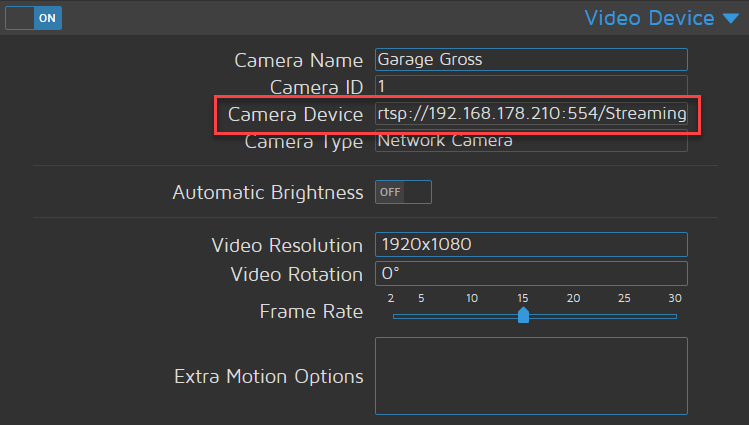
              1195fc94-1eca-44e7-8eea-956f378f95f5-image.png

              Bitte keine Fragen per PN, die gehören ins Forum!

              Benutzt das Voting rechts unten im Beitrag wenn er euch geholfen hat.

              S 1 Antwort Letzte Antwort
              0
              • wendy2702W wendy2702

                @smarthome2020 Wollte wissen welchen Stream du aktuell von der Kamera abgreifst, also was hier steht:

                1195fc94-1eca-44e7-8eea-956f378f95f5-image.png

                S Offline
                S Offline
                smarthome2020
                schrieb am zuletzt editiert von
                #170

                @wendy2702
                Achso, entschuldige:

                http://192.168.xxx.xx/cgi-bin/api.cgi?cmd=Snap&channel=0&rs=wuuPhkmUCeI9WG7C&user=xxxx&password=xxxx
                
                1 Antwort Letzte Antwort
                0
                • wendy2702W Online
                  wendy2702W Online
                  wendy2702
                  schrieb am zuletzt editiert von
                  #171

                  OK.

                  Ist ja der aus dem was ich gepostet habe wenn ich das richtig sehe.

                  Wenn du einen freien Monitor hast dann lasse doch auch Zeitgleich das logfile mit laufen.

                  tail -f /var/log/motion.log
                  

                  Dann siehst du eventuell direkt wenn etwas anfängt zu mucken.

                  Bitte keine Fragen per PN, die gehören ins Forum!

                  Benutzt das Voting rechts unten im Beitrag wenn er euch geholfen hat.

                  S 1 Antwort Letzte Antwort
                  1
                  • wendy2702W wendy2702

                    OK.

                    Ist ja der aus dem was ich gepostet habe wenn ich das richtig sehe.

                    Wenn du einen freien Monitor hast dann lasse doch auch Zeitgleich das logfile mit laufen.

                    tail -f /var/log/motion.log
                    

                    Dann siehst du eventuell direkt wenn etwas anfängt zu mucken.

                    S Offline
                    S Offline
                    smarthome2020
                    schrieb am zuletzt editiert von
                    #172

                    @wendy2702
                    Ja, gute Idee.
                    Die Kamera fällt nur sicher gleich aus, wenn ich zum Mittagessen bin :D

                    wendy2702W 1 Antwort Letzte Antwort
                    0
                    • S smarthome2020

                      @wendy2702
                      Ja, gute Idee.
                      Die Kamera fällt nur sicher gleich aus, wenn ich zum Mittagessen bin :D

                      wendy2702W Online
                      wendy2702W Online
                      wendy2702
                      schrieb am zuletzt editiert von
                      #173

                      @smarthome2020 sagte in Kamera + Bewegungsmelder kombinieren für Gartenüberwachung:

                      Mittagessen

                      Wahrscheinlich!

                      Essen wird eh überbewertet. ;-)

                      Bitte keine Fragen per PN, die gehören ins Forum!

                      Benutzt das Voting rechts unten im Beitrag wenn er euch geholfen hat.

                      S 1 Antwort Letzte Antwort
                      0
                      • wendy2702W wendy2702

                        @smarthome2020 sagte in Kamera + Bewegungsmelder kombinieren für Gartenüberwachung:

                        Mittagessen

                        Wahrscheinlich!

                        Essen wird eh überbewertet. ;-)

                        S Offline
                        S Offline
                        smarthome2020
                        schrieb am zuletzt editiert von
                        #174

                        @wendy2702

                        Also die Kamera lief den ganzen Tag nebenher... keine Abbrüche.
                        Abends hab ich dem PC etwas Auszeit gegeben und da ist die Kamera wieder abgeschmiert.
                        Nachfolgend ist der Übergang aus dem Log (war im Übrigen >1GB :D):

                        [1:nc2:Garten_hint] [DBG] [NET] netcam_read_first_header: Received first header ('Date: Fri, 17 Apr 2020 18:35:18 GMT')
                        [1:nc2:Garten_hint] [DBG] [NET] netcam_check_content_length: Content-Length -1
                        [1:nc2:Garten_hint] [DBG] [NET] netcam_read_first_header: Received first header ('Content-Type: image/jpeg')
                        [1:nc2:Garten_hint] [DBG] [NET] netcam_check_content_type: Content-type image/jpeg
                        [1:nc2:Garten_hint] [NTC] [NET] netcam_read_first_header: Non-streaming camera (keep-alive not set)
                        [1:nc2:Garten_hint] [DBG] [NET] netcam_read_first_header: Received first header ('Content-Length: 480224')
                        [1:nc2:Garten_hint] [DBG] [NET] netcam_check_content_length: Content-Length 480224
                        [1:nc2:Garten_hint] [NTC] [NET] netcam_read_first_header: Content-length present
                        [1:nc2:Garten_hint] [DBG] [NET] netcam_read_first_header: Received first header ('Connection: keep-alive')
                        [1:nc2:Garten_hint] [DBG] [NET] netcam_check_content_length: Content-Length -1
                        [1:nc2:Garten_hint] [DBG] [NET] netcam_read_first_header: Received first header ('X-Frame-Options: SAMEORIGIN')
                        [1:nc2:Garten_hint] [DBG] [NET] netcam_check_content_length: Content-Length -1
                        [1:nc2:Garten_hint] [DBG] [NET] netcam_read_first_header: Received first header ('Strict-Transport-Security: max-age=63072000; includeSubdomains; preload')
                        [1:nc2:Garten_hint] [DBG] [NET] netcam_check_content_length: Content-Length -1
                        [1:nc2:Garten_hint] [DBG] [NET] netcam_read_first_header: Received first header ('X-XSS-Protection: 1; mode=block')
                        [1:nc2:Garten_hint] [DBG] [NET] netcam_check_content_length: Content-Length -1
                        [1:nc2:Garten_hint] [DBG] [NET] netcam_read_first_header: Received first header ('X-Content-Type-Options: nosniff')
                        [1:nc2:Garten_hint] [DBG] [NET] netcam_check_content_length: Content-Length -1
                        [1:nc2:Garten_hint] [DBG] [NET] netcam_read_first_header: Received first header ('')
                        [1:nc2:Garten_hint] [NTC] [NET] netcam_read_html_jpeg: disconnecting netcam since keep-alive not set.
                        [1:ml1:Garten_hint] [DBG] [NET] netcam_init_jpeg: ***new pic delay successful***
                        [1:nc2:Garten_hint] [INF] [NET] netcam_connect: disconnecting netcam since keep-alive not set.
                        [1:nc2:Garten_hint] [INF] [NET] netcam_connect: with no keepalive, new socket created fd 8
                        [1:nc2:Garten_hint] [INF] [NET] netcam_connect: re-using socket 8 since keepalive is set.
                        [1:nc2:Garten_hint] [DBG] [NET] netcam_read_first_header: Received first header ('HTTP/1.1 502 Bad Gateway')
                        [1:nc2:Garten_hint] [DBG] [NET] netcam_read_first_header: HTTP Result code 502
                        [1:nc2:Garten_hint] [ERR] [NET] netcam_handler_loop: Unrecognized image header (502)
                        [1:nc2:Garten_hint] [INF] [NET] netcam_connect: disconnecting netcam since keep-alive not set.
                        [1:nc2:Garten_hint] [INF] [NET] netcam_connect: with no keepalive, new socket created fd 8
                        [1:nc2:Garten_hint] [INF] [NET] netcam_connect: re-using socket 8 since keepalive is set.
                        [1:nc2:Garten_hint] [DBG] [NET] netcam_read_first_header: Received first header ('HTTP/1.1 502 Bad Gateway')
                        
                        1 Antwort Letzte Antwort
                        0
                        • wendy2702W Online
                          wendy2702W Online
                          wendy2702
                          schrieb am zuletzt editiert von
                          #175

                          @smarthome2020 sagte in Kamera + Bewegungsmelder kombinieren für Gartenüberwachung:

                          disconnecting netcam since keep-alive not set.

                          Vielleicht mal in der Motion.conf mit diesem Wert spielen:

                          # The setting for keep-alive of network socket, should improve performance on compatible net cameras.
                          # 1.0:         The historical implementation using HTTP/1.0, closing the socket after each http request.
                          # keep_alive:  Use HTTP/1.0 requests with keep alive header to reuse the same connection.
                          # 1.1:         Use HTTP/1.1 requests that support keep alive as default.
                          # Default: 1.0
                          # CHANGED
                          netcam_http 1.1
                          

                          Bitte keine Fragen per PN, die gehören ins Forum!

                          Benutzt das Voting rechts unten im Beitrag wenn er euch geholfen hat.

                          S 1 Antwort Letzte Antwort
                          0
                          • wendy2702W wendy2702

                            @smarthome2020 sagte in Kamera + Bewegungsmelder kombinieren für Gartenüberwachung:

                            disconnecting netcam since keep-alive not set.

                            Vielleicht mal in der Motion.conf mit diesem Wert spielen:

                            # The setting for keep-alive of network socket, should improve performance on compatible net cameras.
                            # 1.0:         The historical implementation using HTTP/1.0, closing the socket after each http request.
                            # keep_alive:  Use HTTP/1.0 requests with keep alive header to reuse the same connection.
                            # 1.1:         Use HTTP/1.1 requests that support keep alive as default.
                            # Default: 1.0
                            # CHANGED
                            netcam_http 1.1
                            
                            S Offline
                            S Offline
                            smarthome2020
                            schrieb am zuletzt editiert von
                            #176

                            @wendy2702
                            OK. Probiere das nachher. Ist aber interessant, dass sie abschmiert, wenn man den Stream nicht auf nem Monitor laufen hat.

                            S 1 Antwort Letzte Antwort
                            0
                            • S smarthome2020

                              @wendy2702
                              OK. Probiere das nachher. Ist aber interessant, dass sie abschmiert, wenn man den Stream nicht auf nem Monitor laufen hat.

                              S Offline
                              S Offline
                              smarthome2020
                              schrieb am zuletzt editiert von smarthome2020
                              #177

                              @wendy2702
                              Ich finde in keiner motion.conf diese Einstellungsmöglichkeiten. Oder wo hast du die her?

                              Glaube auch nciht, dass es daran liegt. Kann wieder nicht auf die Kamera zugreifen per Browser. "Bad Gateway". Kann die Kamera nicht bei motionEye einrichten "Bad Gateway".
                              WLAN-Steckdose habe ich beim Switch installiert. Die Kamera hierüber aus und angeschaltet und dann gehts wieder mit der Einrichtung.

                              1 Antwort Letzte Antwort
                              0
                              • wendy2702W Online
                                wendy2702W Online
                                wendy2702
                                schrieb am zuletzt editiert von
                                #178

                                https://linuxwiki.de/motion

                                Bitte keine Fragen per PN, die gehören ins Forum!

                                Benutzt das Voting rechts unten im Beitrag wenn er euch geholfen hat.

                                S 1 Antwort Letzte Antwort
                                0
                                • wendy2702W wendy2702

                                  https://linuxwiki.de/motion

                                  S Offline
                                  S Offline
                                  smarthome2020
                                  schrieb am zuletzt editiert von
                                  #179

                                  @wendy2702
                                  Danke. Schau mal im Post von mir drüber. Hatte da noch was geändert. Siehst du es auch so?

                                  1 Antwort Letzte Antwort
                                  0
                                  • wendy2702W Online
                                    wendy2702W Online
                                    wendy2702
                                    schrieb am zuletzt editiert von
                                    #180

                                    Möglich das die ne Macke hat.

                                    Hast du nur die eine?

                                    Bitte keine Fragen per PN, die gehören ins Forum!

                                    Benutzt das Voting rechts unten im Beitrag wenn er euch geholfen hat.

                                    S 1 Antwort Letzte Antwort
                                    0
                                    • wendy2702W wendy2702

                                      Möglich das die ne Macke hat.

                                      Hast du nur die eine?

                                      S Offline
                                      S Offline
                                      smarthome2020
                                      schrieb am zuletzt editiert von
                                      #181

                                      @wendy2702
                                      Ja, hab nur die eine. Kann noch ne Alternative bestellen. Oder gleich ne Hikvision.

                                      1 Antwort Letzte Antwort
                                      0
                                      • wendy2702W Online
                                        wendy2702W Online
                                        wendy2702
                                        schrieb am zuletzt editiert von
                                        #182

                                        Tja....

                                        Da ist guter Rat teuer.

                                        Ich würde die zurück geben und direkt ne HikVision kaufen.

                                        Bitte keine Fragen per PN, die gehören ins Forum!

                                        Benutzt das Voting rechts unten im Beitrag wenn er euch geholfen hat.

                                        S 1 Antwort Letzte Antwort
                                        0
                                        • wendy2702W wendy2702

                                          Tja....

                                          Da ist guter Rat teuer.

                                          Ich würde die zurück geben und direkt ne HikVision kaufen.

                                          S Offline
                                          S Offline
                                          smarthome2020
                                          schrieb am zuletzt editiert von smarthome2020
                                          #183

                                          @wendy2702
                                          Morgen setze ich ne neue SD Karte mal mit einem neuen System auf und schaue, obs stabiler läuft.
                                          Gehe ich aber nicht von aus. Sonst nehme ich ne Hikvision. Die kosten nur doppelt so viel :D
                                          Und ich hab nur nen RPi 4

                                          E 1 Antwort Letzte Antwort
                                          0
                                          Antworten
                                          • In einem neuen Thema antworten
                                          Anmelden zum Antworten
                                          • Älteste zuerst
                                          • Neuste zuerst
                                          • Meiste Stimmen


                                          Support us

                                          ioBroker
                                          Community Adapters
                                          Donate

                                          759

                                          Online

                                          32.5k

                                          Benutzer

                                          81.8k

                                          Themen

                                          1.3m

                                          Beiträge
                                          Community
                                          Impressum | Datenschutz-Bestimmungen | Nutzungsbedingungen | Einwilligungseinstellungen
                                          ioBroker Community 2014-2025
                                          logo
                                          • Anmelden

                                          • Du hast noch kein Konto? Registrieren

                                          • Anmelden oder registrieren, um zu suchen
                                          • Erster Beitrag
                                            Letzter Beitrag
                                          0
                                          • Home
                                          • Aktuell
                                          • Tags
                                          • Ungelesen 0
                                          • Kategorien
                                          • Unreplied
                                          • Beliebt
                                          • GitHub
                                          • Docu
                                          • Hilfe