




deconz api key verbindet sich nixht mit phoscon app
-
Hallo
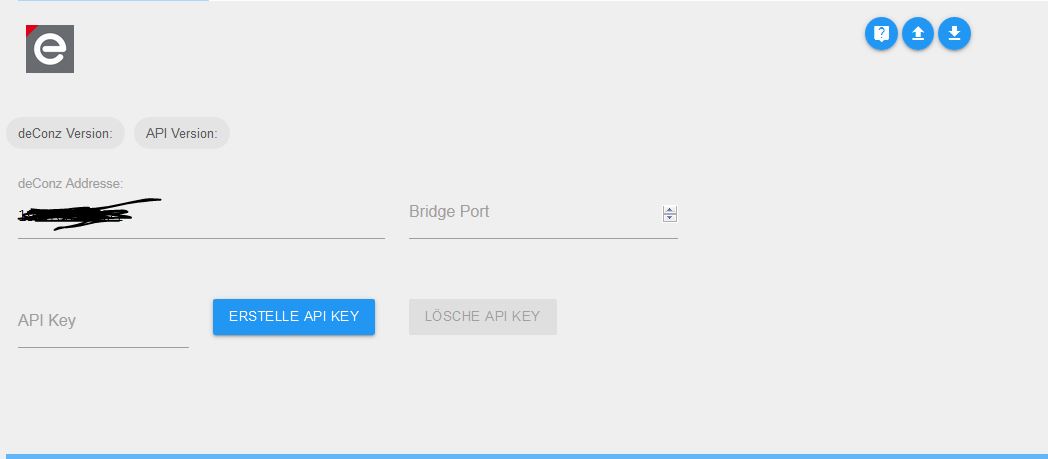
das Problem ist das die phoscon app sich nicht mit dem Deconz Adapter von Iobroker verbinden will -
das steht im log
undefined2019-05-08 15:41:23.899 - info: host.raspberrypi instance system.adapter.deconz.0 started with pid 14524
2019-05-08 15:41:25.394 - error: Caught by controller[0]: /opt/iobroker/node_modules/iobroker.deconz/node_modules/ws/lib/websocket.js:347
2019-05-08 15:41:25.394 - error: Caught by controller[0]: ...options
2019-05-08 15:41:25.395 - error: Caught by controller[0]: ^^^
2019-05-08 15:41:25.395 - error: Caught by controller[0]: SyntaxError: Unexpected token ...
2019-05-08 15:41:25.395 - error: Caught by controller[0]: at createScript (vm.js:56:10)
2019-05-08 15:41:25.395 - error: Caught by controller[0]: at Object.runInThisContext (vm.js:97:10)
2019-05-08 15:41:25.398 - error: Caught by controller[0]: at Module._compile (module.js:549:28)
2019-05-08 15:41:25.399 - error: Caught by controller[0]: at Object.Module._extensions..js (module.js:586:10)
2019-05-08 15:41:25.399 - error: Caught by controller[0]: at Module.load (module.js:494:32)
2019-05-08 15:41:25.399 - error: Caught by controller[0]: at tryModuleLoad (module.js:453:12)
2019-05-08 15:41:25.399 - error: Caught by controller[0]: at Function.Module._load (module.js:445:3)
2019-05-08 15:41:25.399 - error: Caught by controller[0]: at Module.require (module.js:504:17)
2019-05-08 15:41:25.399 - error: Caught by controller[0]: at require (internal/module.js:20:19)
2019-05-08 15:41:25.400 - error: Caught by controller[0]: at Object. (/opt/iobroker/node_modules/iobroker.deconz/node_modules/ws/index.js:3:19)
2019-05-08 15:41:25.400 - error: host.raspberrypi instance system.adapter.deconz.0 terminated with code 1 ()
2019-05-08 15:41:25.400 - info: host.raspberrypi Restart adapter system.adapter.deconz.0 because enabled
2019-05-08 15:41:25.441 - error: hm-rpc.1 init error: Error: response timeout
2019-05-08 15:41:34.274 - error: tr-064.0 Error: read ECONNRESET - {"code":"ECONNRESET","errno":"ECONNRESET","syscall":"read"}
2019-05-08 15:41:34.275 - error: tr-064.0 ~
2019-05-08 15:41:34.276 - error: tr-064.0 ~~ Fatal error. Can not connect to your FritzBox.
2019-05-08 15:41:34.276 - error: tr-064.0 ~~ If configuration, networt, IP address, etc. ok, try to restart your FritzBox
2019-05-08 15:41:34.276 - error: tr-064.0 ~
2019-05-08 15:41:39.321 - error: host.raspberrypi instance system.adapter.tr-064.0 terminated with code 1 ()
2019-05-08 15:41:39.322 - info: host.raspberrypi Restart adapter system.adapter.tr-064.0 because enabled
2019-05-08 15:41:55.414 - info: host.raspberrypi instance system.adapter.deconz.0 started with pid 15975 -
das steht im log
undefined2019-05-08 15:41:23.899 - info: host.raspberrypi instance system.adapter.deconz.0 started with pid 14524
2019-05-08 15:41:25.394 - error: Caught by controller[0]: /opt/iobroker/node_modules/iobroker.deconz/node_modules/ws/lib/websocket.js:347
2019-05-08 15:41:25.394 - error: Caught by controller[0]: ...options
2019-05-08 15:41:25.395 - error: Caught by controller[0]: ^^^
2019-05-08 15:41:25.395 - error: Caught by controller[0]: SyntaxError: Unexpected token ...
2019-05-08 15:41:25.395 - error: Caught by controller[0]: at createScript (vm.js:56:10)
2019-05-08 15:41:25.395 - error: Caught by controller[0]: at Object.runInThisContext (vm.js:97:10)
2019-05-08 15:41:25.398 - error: Caught by controller[0]: at Module._compile (module.js:549:28)
2019-05-08 15:41:25.399 - error: Caught by controller[0]: at Object.Module._extensions..js (module.js:586:10)
2019-05-08 15:41:25.399 - error: Caught by controller[0]: at Module.load (module.js:494:32)
2019-05-08 15:41:25.399 - error: Caught by controller[0]: at tryModuleLoad (module.js:453:12)
2019-05-08 15:41:25.399 - error: Caught by controller[0]: at Function.Module._load (module.js:445:3)
2019-05-08 15:41:25.399 - error: Caught by controller[0]: at Module.require (module.js:504:17)
2019-05-08 15:41:25.399 - error: Caught by controller[0]: at require (internal/module.js:20:19)
2019-05-08 15:41:25.400 - error: Caught by controller[0]: at Object. (/opt/iobroker/node_modules/iobroker.deconz/node_modules/ws/index.js:3:19)
2019-05-08 15:41:25.400 - error: host.raspberrypi instance system.adapter.deconz.0 terminated with code 1 ()
2019-05-08 15:41:25.400 - info: host.raspberrypi Restart adapter system.adapter.deconz.0 because enabled
2019-05-08 15:41:25.441 - error: hm-rpc.1 init error: Error: response timeout
2019-05-08 15:41:34.274 - error: tr-064.0 Error: read ECONNRESET - {"code":"ECONNRESET","errno":"ECONNRESET","syscall":"read"}
2019-05-08 15:41:34.275 - error: tr-064.0 ~
2019-05-08 15:41:34.276 - error: tr-064.0 ~~ Fatal error. Can not connect to your FritzBox.
2019-05-08 15:41:34.276 - error: tr-064.0 ~~ If configuration, networt, IP address, etc. ok, try to restart your FritzBox
2019-05-08 15:41:34.276 - error: tr-064.0 ~
2019-05-08 15:41:39.321 - error: host.raspberrypi instance system.adapter.tr-064.0 terminated with code 1 ()
2019-05-08 15:41:39.322 - info: host.raspberrypi Restart adapter system.adapter.tr-064.0 because enabled
2019-05-08 15:41:55.414 - info: host.raspberrypi instance system.adapter.deconz.0 started with pid 15975@Olli77 anscheinend hat er Probleme mit der websocket Verbindung.
IP stimmt?
Gib bei Port mal 80 ein, anstatt leer.DeConz läuft aber an sich schon?
Geräte damit Verbunden, vll auch mal testweise einen Schalter und eine leuchte in der phoscon app verknüpft?Btw. Stell den Adapter mal auf Debug.
(Instanzen, Expertenmodus, log Level) -
Schon weiter mit deinem Problem?
Schau mal hier: https://forum.iobroker.net/topic/8930/aufruf-deconz-adapter-testen-1-1-0/426?page=22
Welche Adapter Version nutzt du? Nodejs evtl 6? Versuch dann mal die Adapterversion 1.0.1. -
Hallo ne leider stehe ich immer noch vor dem gleichem Problem.
Also ich habe schon folgendes probier:
im Iobroker den deConz adapter mit Port 80 und ohne port 80
->mit Passwort und ohne Passwort
Deconz Version 1.1.1.(im Iobroker zeigt er mit bei den Adaptereinstellungen keine Version an (auch keine API version)
Habe den Deconz adapter schon mehrfach deinstalliert und wieder installiert.Folgendes läuft perfekt:
Deconz auf dem Rasberry
Phoscon app auf dem Rasberry (sensoren auch schon angelernt)Ich bekomme nur die Phoscon APP nicht mit dem Deconzadapter(auf dem IObroker), der auf dem Iobroker läuft, verbunden. Und somit kann ich die Sensoren die ich angelernt habe nicht im Iobroker verwalten.
-
hier noch mal die LOG datei.
undefined2019-05-09 14:11:42.765 - info: host.raspberrypi instance system.adapter.deconz.0 started with pid 6799
2019-05-09 14:11:44.241 - error: Caught by controller[0]: /opt/iobroker/node_modules/iobroker.deconz/node_modules/ws/lib/websocket.js:347
2019-05-09 14:11:44.242 - error: Caught by controller[0]: ...options
2019-05-09 14:11:44.242 - error: Caught by controller[0]: ^^^
2019-05-09 14:11:44.243 - error: Caught by controller[0]: SyntaxError: Unexpected token ...
2019-05-09 14:11:44.243 - error: Caught by controller[0]: at createScript (vm.js:56:10)
2019-05-09 14:11:44.244 - error: Caught by controller[0]: at Object.runInThisContext (vm.js:97:10)
2019-05-09 14:11:44.244 - error: Caught by controller[0]: at Module._compile (module.js:549:28)
2019-05-09 14:11:44.244 - error: Caught by controller[0]: at Object.Module._extensions..js (module.js:586:10)
2019-05-09 14:11:44.244 - error: Caught by controller[0]: at Module.load (module.js:494:32)
2019-05-09 14:11:44.245 - error: Caught by controller[0]: at tryModuleLoad (module.js:453:12)
2019-05-09 14:11:44.245 - error: Caught by controller[0]: at Function.Module._load (module.js:445:3)
2019-05-09 14:11:44.245 - error: Caught by controller[0]: at Module.require (module.js:504:17)
2019-05-09 14:11:44.245 - error: Caught by controller[0]: at require (internal/module.js:20:19)
2019-05-09 14:11:44.245 - error: Caught by controller[0]: at Object. (/opt/iobroker/node_modules/iobroker.deconz/node_modules/ws/index.js:3:19)
2019-05-09 14:11:44.245 - error: host.raspberrypi instance system.adapter.deconz.0 terminated with code 1 ()
2019-05-09 14:11:44.246 - info: host.raspberrypi Restart adapter system.adapter.deconz.0 because enabled
2019-05-09 14:11:50.394 - info: hm-rpc.0 binrpc -> listDevices 0
2019-05-09 14:11:50.404 - info: hm-rpc.0 new CUxD devices/channels after filter: 0
2019-05-09 14:12:14.261 - info: host.raspberrypi instance system.adapter.deconz.0 started with pid 7147
2019-05-09 14:12:15.754 - error: Caught by controller[0]: /opt/iobroker/node_modules/iobroker.deconz/node_modules/ws/lib/websocket.js:347
2019-05-09 14:12:15.755 - error: Caught by controller[0]: ...options
2019-05-09 14:12:15.756 - error: Caught by controller[0]: ^^^
2019-05-09 14:12:15.756 - error: Caught by controller[0]: SyntaxError: Unexpected token ...
2019-05-09 14:12:15.757 - error: Caught by controller[0]: at createScript (vm.js:56:10)
2019-05-09 14:12:15.757 - error: Caught by controller[0]: at Object.runInThisContext (vm.js:97:10)
2019-05-09 14:12:15.757 - error: Caught by controller[0]: at Module._compile (module.js:549:28)
2019-05-09 14:12:15.757 - error: Caught by controller[0]: at Object.Module._extensions..js (module.js:586:10)
2019-05-09 14:12:15.757 - error: Caught by controller[0]: at Module.load (module.js:494:32)
2019-05-09 14:12:15.757 - error: Caught by controller[0]: at tryModuleLoad (module.js:453:12)
2019-05-09 14:12:15.757 - error: Caught by controller[0]: at Function.Module._load (module.js:445:3)
2019-05-09 14:12:15.758 - error: Caught by controller[0]: at Module.require (module.js:504:17)
2019-05-09 14:12:15.758 - error: Caught by controller[0]: at require (internal/module.js:20:19)
2019-05-09 14:12:15.758 - error: Caught by controller[0]: at Object. (/opt/iobroker/node_modules/iobroker.deconz/node_modules/ws/index.js:3:19)
2019-05-09 14:12:15.758 - error: host.raspberrypi instance system.adapter.deconz.0 terminated with code 1 ()
2019-05-09 14:12:15.758 - info: host.raspberrypi Restart adapter system.adapter.deconz.0 because enabled -
@DerS said in deconz api key verbindet sich nixht mit phoscon app:
Schon weiter mit deinem Problem?
Schau mal hier: https://forum.iobroker.net/topic/8930/aufruf-deconz-adapter-testen-1-1-0/426?page=22
Welche Adapter Version nutzt du? Nodejs evtl 6? Versuch dann mal die Adapterversion 1.0.1.Hatte deinen Post überlesen ;-)
Habe nun ein Downgrade auf 1.0.1 gemacht und schwupps es verbindet sich ...
Alles gut nun DANKE

Hey! Du scheinst an dieser Unterhaltung interessiert zu sein, hast aber noch kein Konto.
Hast du es satt, bei jedem Besuch durch die gleichen Beiträge zu scrollen? Wenn du dich für ein Konto anmeldest, kommst du immer genau dorthin zurück, wo du zuvor warst, und kannst dich über neue Antworten benachrichtigen lassen (entweder per E-Mail oder Push-Benachrichtigung). Du kannst auch Lesezeichen speichern und Beiträge positiv bewerten, um anderen Community-Mitgliedern deine Wertschätzung zu zeigen.
Mit deinem Input könnte dieser Beitrag noch besser werden 💗
Registrieren Anmelden272
Online33.0k
Benutzende83.7k
Themen1.3m
Beiträge