




Alle Adapter gleich aktualisieren
-
ist das normal etwas sowas zu bekommen ?
```Available version 1.2.0
Installed version: 1.3.1
Installed instances: 1wie ist das möglich ? die 1.3.1 ist noch nicht available ... :s@Esmax666
es ist alles möglich!Aber ich weiß nicht von welchem Adapter du redest.
Dann könnte ich vielleicht erahnen warum das so ist, wissen müsstest du es.
Gruß
Rainer -
da könntest du sogar inzwischen die 1.3.2 installiert haben ;-)
Wie hattest du denn den Adapter installiert?
Gruß
Rainer -
da könntest du sogar inzwischen die 1.3.2 installiert haben ;-)
Wie hattest du denn den Adapter installiert?
Gruß
Rainer -
@Esmax666
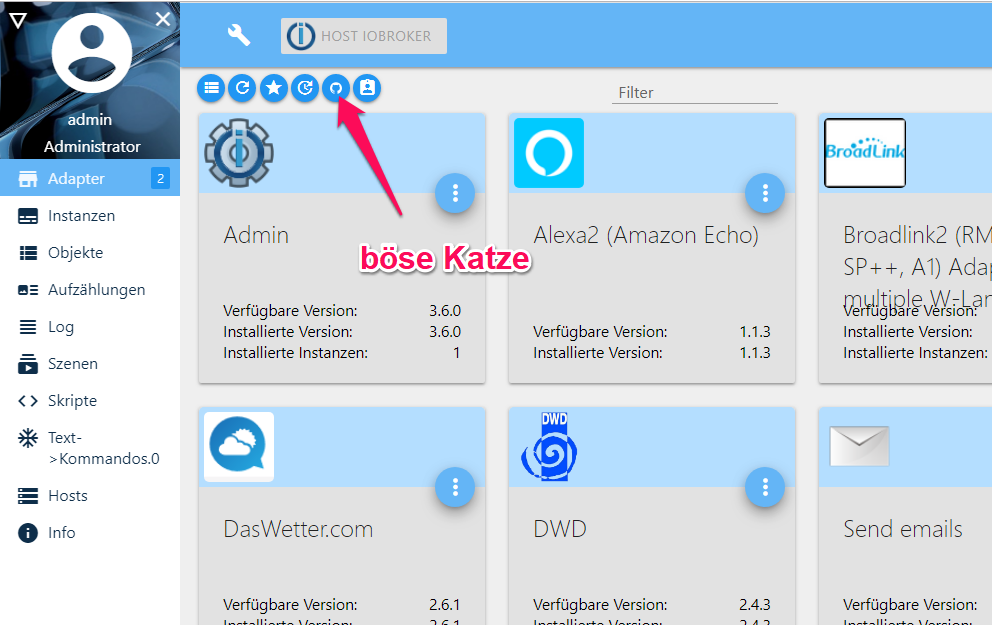
und da wahrscheinlich über die Böse Katze -
Natürlich "geht" die Funktion. Man soll nur unbedingt wissen, was man da tut.
Dafür habe ich dir die Doku dazu verlinkt.Und wenn du sie doch nutzst, passiert halt, was dich wundert:
@Esmax666 said in Alle Adapter gleich aktualisieren:
ist das normal etwas sowas zu bekommen ?
Gruß
Rainer -
@Esmax666 Nein, ich habe mich in deinen Dialog mit Rainer eingemischt.
Wenn Du beispielsweise in deinen Einstellungen "latest" für die Adapter Aktualsierung eingestellt hast, dann bekommst Du aktuell die v.1.3.1 angeboten.
Wenn Du in der Admin-Übersicht allerdings nicht die v.1.3.1 angeboten bekommst, dann wirst Du diese Version voraussichtlich direkt von GitHub installiert haben .... das ist der Weg über die "böse Katze" ;-) -
Tut mir leid, dass mein Deutsch nicht so gut ist.
Zusammenfassend lässt sich sagen, dass ich Z wave über die GUI installiert habe. Ohne Updates (Konsole/GUI) markiert es mich bereits, dass meine aktuelle Version die verfügbare übersteigt.
Ich warte darauf, dass die GUI die Version installiert, von der die GUI sagt, dass sie die letzte online ist.Das macht nicht viel Sinn.
Jedenfalls werde ich die Updates über die Konsole machen:) Wir werden das Ergebnis sehen:)
-
So jetzt die ergbnisse: Viele Errors .
Und keine 1.3.2 für Z Wave :/
pi@ioBroker-RasPi:~ $ sudo iobroker upgrade Adapter "admin" is up to date. Update history from @1.7.3 to @1.8.5 NPM version: 6.4.1 npm install iobroker.history@1.8.5 --production --save --prefix "/opt/iobroker" (System call) prebuild-install WARN install EACCES: permission denied, access '/root/.npm' gyp WARN EACCES user "root" does not have permission to access the dev dir "/root/.node-gyp/8.15.0" gyp WARN EACCES attempting to reinstall using temporary dev dir "/opt/iobroker/node_modules/serialport/.node-gyp" gyp WARN install got an error, rolling back install gyp WARN install got an error, rolling back install gyp ERR! configure error gyp ERR! stack Error: EACCES: permission denied, mkdir '/opt/iobroker/node_modules/serialport/.node-gyp' gyp ERR! System Linux 4.14.79-v7+ gyp ERR! command "/usr/bin/node" "/usr/lib/node_modules/npm/node_modules/node-gyp/bin/node-gyp.js" "rebuild" gyp ERR! cwd /opt/iobroker/node_modules/serialport gyp ERR! node -v v8.15.0 gyp ERR! node-gyp -v v3.8.0 gyp ERR! not ok npm WARN optional SKIPPING OPTIONAL DEPENDENCY: serialport@6.2.2 (node_modules/serialport): npm WARN optional SKIPPING OPTIONAL DEPENDENCY: serialport@6.2.2 install: `prebuild-install || node-gyp rebuild` npm WARN optional SKIPPING OPTIONAL DEPENDENCY: Exit status 1 npm install --production (System call) in "/opt/iobroker/node_modules/iobroker.history" npm WARN deprecated gulp-util@3.0.8: gulp-util is deprecated - replace it, following the guidelines at https://medium.com/gulpjs/gulp-util-ca3b1f9f9ac5 npm WARN deprecated graceful-fs@3.0.11: please upgrade to graceful-fs 4 for compatibility with current and future versions of Node.js npm WARN deprecated minimatch@2.0.10: Please update to minimatch 3.0.2 or higher to avoid a RegExp DoS issue npm WARN deprecated minimatch@0.2.14: Please update to minimatch 3.0.2 or higher to avoid a RegExp DoS issue npm WARN deprecated graceful-fs@1.2.3: please upgrade to graceful-fs 4 for compatibility with current and future versions of Node.js npm notice created a lockfile as package-lock.json. You should commit this file. Update "system.adapter.history.0" got /opt/iobroker/node_modules/iobroker.history/admin upload [5] history.admin /opt/iobroker/node_modules/iobroker.history/admin/words.js words.js application/javascript upload [4] history.admin /opt/iobroker/node_modules/iobroker.history/admin/index_m.html index_m.html text/html upload [3] history.admin /opt/iobroker/node_modules/iobroker.history/admin/index.html index.html text/html upload [2] history.admin /opt/iobroker/node_modules/iobroker.history/admin/history.png history.png image/png upload [1] history.admin /opt/iobroker/node_modules/iobroker.history/admin/custom_m.html custom_m.html text/html upload [0] history.admin /opt/iobroker/node_modules/iobroker.history/admin/custom.html custom.html text/html Adapter "history" updated Update hm-rega from @1.7.0 to @2.1.7 NPM version: 6.4.1 npm install iobroker.hm-rega@2.1.7 --production --save --prefix "/opt/iobroker" (System call) prebuild-install WARN install EACCES: permission denied, access '/root/.npm' gyp WARN EACCES user "root" does not have permission to access the dev dir "/root/.node-gyp/8.15.0" gyp WARN EACCES attempting to reinstall using temporary dev dir "/opt/iobroker/node_modules/serialport/.node-gyp" gyp WARN install got an error, rolling back install gyp WARN install got an error, rolling back install gyp ERR! configure error gyp ERR! stack Error: EACCES: permission denied, mkdir '/opt/iobroker/node_modules/serialport/.node-gyp' gyp ERR! System Linux 4.14.79-v7+ gyp ERR! command "/usr/bin/node" "/usr/lib/node_modules/npm/node_modules/node-gyp/bin/node-gyp.js" "rebuild" gyp ERR! cwd /opt/iobroker/node_modules/serialport gyp ERR! node -v v8.15.0 gyp ERR! node-gyp -v v3.8.0 gyp ERR! not ok npm WARN optional SKIPPING OPTIONAL DEPENDENCY: serialport@6.2.2 (node_modules/serialport): npm WARN optional SKIPPING OPTIONAL DEPENDENCY: serialport@6.2.2 install: `prebuild-install || node-gyp rebuild` npm WARN optional SKIPPING OPTIONAL DEPENDENCY: Exit status 1 npm install --production (System call) in "/opt/iobroker/node_modules/iobroker.hm-rega" npm WARN deprecated circular-json@0.3.3: CircularJSON is in maintenance only, flatted is its successor. npm notice created a lockfile as package-lock.json. You should commit this file. Update "system.adapter.hm-rega.0" got /opt/iobroker/node_modules/iobroker.hm-rega/admin upload [3] hm-rega.admin /opt/iobroker/node_modules/iobroker.hm-rega/admin/words.js words.js application/javascript upload [2] hm-rega.admin /opt/iobroker/node_modules/iobroker.hm-rega/admin/index_m.html index_m.html text/html upload [1] hm-rega.admin /opt/iobroker/node_modules/iobroker.hm-rega/admin/index.html index.html text/html upload [0] hm-rega.admin /opt/iobroker/node_modules/iobroker.hm-rega/admin/homematic.png homematic.png image/png Adapter "hm-rega" updated Update hm-rpc from @1.6.1 to @1.9.2 NPM version: 6.4.1 npm install iobroker.hm-rpc@1.9.2 --production --save --prefix "/opt/iobroker" (System call) prebuild-install WARN install EACCES: permission denied, access '/root/.npm' gyp WARN EACCES user "root" does not have permission to access the dev dir "/root/.node-gyp/8.15.0" gyp WARN EACCES attempting to reinstall using temporary dev dir "/opt/iobroker/node_modules/serialport/.node-gyp" gyp WARN install got an error, rolling back install gyp WARN install got an error, rolling back install gyp ERR! configure error gyp ERR! stack Error: EACCES: permission denied, mkdir '/opt/iobroker/node_modules/serialport/.node-gyp' gyp ERR! System Linux 4.14.79-v7+ gyp ERR! command "/usr/bin/node" "/usr/lib/node_modules/npm/node_modules/node-gyp/bin/node-gyp.js" "rebuild" gyp ERR! cwd /opt/iobroker/node_modules/serialport gyp ERR! node -v v8.15.0 gyp ERR! node-gyp -v v3.8.0 gyp ERR! not ok npm WARN optional SKIPPING OPTIONAL DEPENDENCY: serialport@6.2.2 (node_modules/serialport): npm WARN optional SKIPPING OPTIONAL DEPENDENCY: serialport@6.2.2 install: `prebuild-install || node-gyp rebuild` npm WARN optional SKIPPING OPTIONAL DEPENDENCY: Exit status 1 npm install --production (System call) in "/opt/iobroker/node_modules/iobroker.hm-rpc" npm WARN deprecated circular-json@0.3.3: CircularJSON is in maintenance only, flatted is its successor. npm notice created a lockfile as package-lock.json. You should commit this file. Update "system.adapter.hm-rpc.0" got /opt/iobroker/node_modules/iobroker.hm-rpc/admin upload [200] hm-rpc.admin /opt/iobroker/node_modules/iobroker.hm-rpc/admin/index_m.html index_m.html text/html upload [150] hm-rpc.admin /opt/iobroker/node_modules/iobroker.hm-rpc/admin/icons/75_hm-pb-2-wm55_thumb.png icons/75_hm-pb-2-wm55_thumb.png image/png upload [100] hm-rpc.admin /opt/iobroker/node_modules/iobroker.hm-rpc/admin/icons/27_hmw-lc-bl1-dr_thumb.png icons/27_hmw-lc-bl1-dr_thumb.png image/png upload [90] hm-rpc.admin /opt/iobroker/node_modules/iobroker.hm-rpc/admin/icons/188_hmip-etrv-c_thumb.png icons/188_hmip-etrv-c_thumb.png image/png upload [80] hm-rpc.admin /opt/iobroker/node_modules/iobroker.hm-rpc/admin/icons/179_hmip-swdm-b2_thumb.png icons/179_hmip-swdm-b2_thumb.png image/png upload [70] hm-rpc.admin /opt/iobroker/node_modules/iobroker.hm-rpc/admin/icons/169_hmip-swo-pr_thumb.png icons/169_hmip-swo-pr_thumb.png image/png upload [60] hm-rpc.admin /opt/iobroker/node_modules/iobroker.hm-rpc/admin/icons/150_hm-lc-dw-wm_thumb.png icons/150_hm-lc-dw-wm_thumb.png image/png upload [50] hm-rpc.admin /opt/iobroker/node_modules/iobroker.hm-rpc/admin/icons/140_alpha-ip-rgb_thumb.png icons/140_alpha-ip-rgb_thumb.png image/png upload [40] hm-rpc.admin /opt/iobroker/node_modules/iobroker.hm-rpc/admin/icons/132_hmip-smo_thumb.png icons/132_hmip-smo_thumb.png image/png upload [30] hm-rpc.admin /opt/iobroker/node_modules/iobroker.hm-rpc/admin/icons/121_hmip-wth_thumb.png icons/121_hmip-wth_thumb.png image/png upload [20] hm-rpc.admin /opt/iobroker/node_modules/iobroker.hm-rpc/admin/icons/113_hmip-psm_thumb.png icons/113_hmip-psm_thumb.png image/png upload [19] hm-rpc.admin /opt/iobroker/node_modules/iobroker.hm-rpc/admin/icons/113_hmip-psm-uk_thumb.png icons/113_hmip-psm-uk_thumb.png image/png upload [18] hm-rpc.admin /opt/iobroker/node_modules/iobroker.hm-rpc/admin/icons/113_hmip-psm-pe_thumb.png icons/113_hmip-psm-pe_thumb.png image/png upload [17] hm-rpc.admin /opt/iobroker/node_modules/iobroker.hm-rpc/admin/icons/113_hmip-psm-it_thumb.png icons/113_hmip-psm-it_thumb.png image/png upload [16] hm-rpc.admin /opt/iobroker/node_modules/iobroker.hm-rpc/admin/icons/113_hmip-psm-ch_thumb.png icons/113_hmip-psm-ch_thumb.png image/png upload [15] hm-rpc.admin /opt/iobroker/node_modules/iobroker.hm-rpc/admin/icons/112_hmip-wrc2_thumb.png icons/112_hmip-wrc2_thumb.png image/png upload [14] hm-rpc.admin /opt/iobroker/node_modules/iobroker.hm-rpc/admin/icons/111_hm-lc-rgbw-wm_thumb.png icons/111_hm-lc-rgbw-wm_thumb.png image/png upload [13] hm-rpc.admin /opt/iobroker/node_modules/iobroker.hm-rpc/admin/icons/110_hm-es-pmsw1-dr_thump.png icons/110_hm-es-pmsw1-dr_thump.png image/png upload [12] hm-rpc.admin /opt/iobroker/node_modules/iobroker.hm-rpc/admin/icons/109_hm-lc-sw1-pl-ct_thump.png icons/109_hm-lc-sw1-pl-ct_thump.png image/png upload [11] hm-rpc.admin /opt/iobroker/node_modules/iobroker.hm-rpc/admin/icons/108_hm-rc-dis-h-x-eu_thump.png icons/108_hm-rc-dis-h-x-eu_thump.png image/png upload [10] hm-rpc.admin /opt/iobroker/node_modules/iobroker.hm-rpc/admin/icons/107_hm-es-pmsw1-pl-R5_thumb.png icons/107_hm-es-pmsw1-pl-R5_thumb.png image/png upload [9] hm-rpc.admin /opt/iobroker/node_modules/iobroker.hm-rpc/admin/icons/107_hm-es-pmsw1-pl-R4_thumb.png icons/107_hm-es-pmsw1-pl-R4_thumb.png image/png upload [8] hm-rpc.admin /opt/iobroker/node_modules/iobroker.hm-rpc/admin/icons/107_hm-es-pmsw1-pl-R3_thumb.png icons/107_hm-es-pmsw1-pl-R3_thumb.png image/png upload [7] hm-rpc.admin /opt/iobroker/node_modules/iobroker.hm-rpc/admin/icons/107_hm-es-pmsw1-pl-R2_thumb.png icons/107_hm-es-pmsw1-pl-R2_thumb.png image/png upload [6] hm-rpc.admin /opt/iobroker/node_modules/iobroker.hm-rpc/admin/icons/105_hm-sec-sd-2-team_thumb.png icons/105_hm-sec-sd-2-team_thumb.png image/png upload [5] hm-rpc.admin /opt/iobroker/node_modules/iobroker.hm-rpc/admin/icons/104_hm-sec-sd-2_thumb.png icons/104_hm-sec-sd-2_thumb.png image/png upload [4] hm-rpc.admin /opt/iobroker/node_modules/iobroker.hm-rpc/admin/icons/103_hm-sen-mdir-wm55_thumb.png icons/103_hm-sen-mdir-wm55_thumb.png image/png upload [3] hm-rpc.admin /opt/iobroker/node_modules/iobroker.hm-rpc/admin/icons/102_hm-es-tx-wm_thumb.png icons/102_hm-es-tx-wm_thumb.png image/png upload [2] hm-rpc.admin /opt/iobroker/node_modules/iobroker.hm-rpc/admin/icons/101_hm-sen-db-pcb_thumb.png icons/101_hm-sen-db-pcb_thumb.png image/png upload [1] hm-rpc.admin /opt/iobroker/node_modules/iobroker.hm-rpc/admin/icons/100_hm-rc-8_thumb.png icons/100_hm-rc-8_thumb.png image/png upload [0] hm-rpc.admin /opt/iobroker/node_modules/iobroker.hm-rpc/admin/homematic.png homematic.png image/png Adapter "hm-rpc" updated Adapter "hmip" is not installed. Adapter "homee" is not installed. Adapter "homepilot" is not installed. Adapter "sia" is not installed. Update simple-api from @1.6.2 to @2.0.0 NPM version: 6.4.1 npm install iobroker.simple-api@2.0.0 --production --save --prefix "/opt/iobroker" (System call) prebuild-install WARN install EACCES: permission denied, access '/root/.npm' gyp WARN EACCES user "root" does not have permission to access the dev dir "/root/.node-gyp/8.15.0" gyp WARN EACCES attempting to reinstall using temporary dev dir "/opt/iobroker/node_modules/serialport/.node-gyp" gyp WARN install got an error, rolling back install gyp WARN install got an error, rolling back install gyp ERR! configure error gyp ERR! stack Error: EACCES: permission denied, mkdir '/opt/iobroker/node_modules/serialport/.node-gyp' gyp ERR! System Linux 4.14.79-v7+ gyp ERR! command "/usr/bin/node" "/usr/lib/node_modules/npm/node_modules/node-gyp/bin/node-gyp.js" "rebuild" gyp ERR! cwd /opt/iobroker/node_modules/serialport gyp ERR! node -v v8.15.0 gyp ERR! node-gyp -v v3.8.0 gyp ERR! not ok npm WARN optional SKIPPING OPTIONAL DEPENDENCY: serialport@6.2.2 (node_modules/serialport): npm WARN optional SKIPPING OPTIONAL DEPENDENCY: serialport@6.2.2 install: `prebuild-install || node-gyp rebuild` npm WARN optional SKIPPING OPTIONAL DEPENDENCY: Exit status 1 npm install --production (System call) in "/opt/iobroker/node_modules/iobroker.simple-api" npm WARN deprecated gulp-util@3.0.8: gulp-util is deprecated - replace it, following the guidelines at https://medium.com/gulpjs/gulp-util-ca3b1f9f9ac5 npm WARN deprecated graceful-fs@3.0.11: please upgrade to graceful-fs 4 for compatibility with current and future versions of Node.js npm WARN deprecated minimatch@2.0.10: Please update to minimatch 3.0.2 or higher to avoid a RegExp DoS issue npm WARN deprecated minimatch@0.2.14: Please update to minimatch 3.0.2 or higher to avoid a RegExp DoS issue npm WARN deprecated graceful-fs@1.2.3: please upgrade to graceful-fs 4 for compatibility with current and future versions of Node.js npm notice created a lockfile as package-lock.json. You should commit this file. system.adapter.simple-api does not exist got /opt/iobroker/node_modules/iobroker.simple-api/admin upload [2] simple-api.admin /opt/iobroker/node_modules/iobroker.simple-api/admin/words.js words.js application/javascript upload [1] simple-api.admin /opt/iobroker/node_modules/iobroker.simple-api/admin/simple-api.png simple-api.png image/png upload [0] simple-api.admin /opt/iobroker/node_modules/iobroker.simple-api/admin/index.html index.html text/html Adapter "simple-api" updated Adapter "smappee" is not installed. Adapter "smartmeter" is not installed. Adapter "snips" is not installed. Adapter "snmp" is not installed. Update socketio from @1.8.6 to @2.1.1 host.ioBroker-RasPi Adapter "system.adapter.socketio.0" is stopped. NPM version: 6.4.1 npm install iobroker.socketio@2.1.1 --production --save --prefix "/opt/iobroker" (System call) prebuild-install WARN install EACCES: permission denied, access '/root/.npm' gyp WARN EACCES user "root" does not have permission to access the dev dir "/root/.node-gyp/8.15.0" gyp WARN EACCES attempting to reinstall using temporary dev dir "/opt/iobroker/node_modules/serialport/.node-gyp" gyp WARN install got an error, rolling back install gyp WARN install got an error, rolling back install gyp ERR! configure error gyp ERR! stack Error: EACCES: permission denied, mkdir '/opt/iobroker/node_modules/serialport/.node-gyp' gyp ERR! System Linux 4.14.79-v7+ gyp ERR! command "/usr/bin/node" "/usr/lib/node_modules/npm/node_modules/node-gyp/bin/node-gyp.js" "rebuild" gyp ERR! cwd /opt/iobroker/node_modules/serialport gyp ERR! node -v v8.15.0 gyp ERR! node-gyp -v v3.8.0 gyp ERR! not ok npm WARN optional SKIPPING OPTIONAL DEPENDENCY: serialport@6.2.2 (node_modules/serialport): npm WARN optional SKIPPING OPTIONAL DEPENDENCY: serialport@6.2.2 install: `prebuild-install || node-gyp rebuild` npm WARN optional SKIPPING OPTIONAL DEPENDENCY: Exit status 1 host.ioBroker-RasPi Adapter "system.adapter.socketio.0" is started npm install --production (System call) in "/opt/iobroker/node_modules/iobroker.socketio" npm WARN deprecated gulp-util@3.0.8: gulp-util is deprecated - replace it, following the guidelines at https://medium.com/gulpjs/gulp-util-ca3b1f9f9ac5 npm WARN deprecated graceful-fs@3.0.11: please upgrade to graceful-fs 4 for compatibility with current and future versions of Node.js npm WARN deprecated minimatch@2.0.10: Please update to minimatch 3.0.2 or higher to avoid a RegExp DoS issue npm WARN deprecated minimatch@0.2.14: Please update to minimatch 3.0.2 or higher to avoid a RegExp DoS issue npm WARN deprecated graceful-fs@1.2.3: please upgrade to graceful-fs 4 for compatibility with current and future versions of Node.js npm notice created a lockfile as package-lock.json. You should commit this file. Update "system.adapter.socketio.0" got /opt/iobroker/node_modules/iobroker.socketio/admin upload [3] socketio.admin /opt/iobroker/node_modules/iobroker.socketio/admin/words.js words.js application/javascript upload [2] socketio.admin /opt/iobroker/node_modules/iobroker.socketio/admin/socketio.png socketio.png image/png upload [1] socketio.admin /opt/iobroker/node_modules/iobroker.socketio/admin/index_m.html index_m.html text/html upload [0] socketio.admin /opt/iobroker/node_modules/iobroker.socketio/admin/index.html index.html text/html Adapter "socketio" updated Adapter "solarlog" is not installed. Adapter "solarwetter" is not installed. Adapter "sonnen" is not installed. Adapter "sonoff" is not installed. Adapter "sonos" is not installed. Adapter "sony-bravia" is not installed. Adapter "spotify-premium" is not installed. Adapter "sql" is not installed. Adapter "squeezebox" is not installed. Adapter "starline" is not installed. Adapter "statistics" is not installed. Adapter "stiebel-isg" is not installed. Adapter "systeminfo" is not installed. Adapter "tankerkoenig" is not installed. Adapter "telegram" is not installed. Adapter "terminal" is not installed. Adapter "text2command" is not installed. Adapter "tr-064" is not installed. Adapter "tradfri" is not installed. Adapter "tuya" is not installed. Adapter "tvspielfilm" is not installed. Adapter "unifi" is not installed. Adapter "upnp" is not installed. Adapter "vcard" is not installed. Adapter "viessmann" is not installed. Adapter "vis" is up to date. Adapter "vis-bars" is not installed. Adapter "vis-canvas-gauges" is not installed. Adapter "vis-colorpicker" is not installed. Adapter "vis-fancyswitch" is not installed. Adapter "vis-google-fonts" is not installed. Adapter "vis-history" is not installed. Adapter "vis-hqwidgets" is up to date. Adapter "vis-jqui-mfd" is up to date. Adapter "vis-justgage" is not installed. Adapter "vis-keyboard" is not installed. Adapter "vis-lcars" is not installed. Adapter "vis-map" is not installed. Adapter "vis-metro" is up to date. Adapter "vis-players" is not installed. Adapter "vis-plumb" is not installed. Adapter "vis-rgraph" is not installed. Adapter "vis-timeandweather" is not installed. Adapter "vis-weather" is not installed. Adapter "vr200" is not installed. Adapter "weatherunderground" is not installed. Update web from @2.1.9 to @2.4.1 host.ioBroker-RasPi Adapter "system.adapter.web.0" is stopped. NPM version: 6.4.1 npm install iobroker.web@2.4.1 --production --save --prefix "/opt/iobroker" (System call) prebuild-install WARN install EACCES: permission denied, access '/root/.npm' gyp WARN EACCES user "root" does not have permission to access the dev dir "/root/.node-gyp/8.15.0" gyp WARN EACCES attempting to reinstall using temporary dev dir "/opt/iobroker/node_modules/serialport/.node-gyp" gyp WARN install got an error, rolling back install gyp WARN install got an error, rolling back install gyp ERR! configure error gyp ERR! stack Error: EACCES: permission denied, mkdir '/opt/iobroker/node_modules/serialport/.node-gyp' gyp ERR! System Linux 4.14.79-v7+ gyp ERR! command "/usr/bin/node" "/usr/lib/node_modules/npm/node_modules/node-gyp/bin/node-gyp.js" "rebuild" gyp ERR! cwd /opt/iobroker/node_modules/serialport gyp ERR! node -v v8.15.0 gyp ERR! node-gyp -v v3.8.0 gyp ERR! not ok npm WARN optional SKIPPING OPTIONAL DEPENDENCY: serialport@6.2.2 (node_modules/serialport): npm WARN optional SKIPPING OPTIONAL DEPENDENCY: serialport@6.2.2 install: `prebuild-install || node-gyp rebuild` npm WARN optional SKIPPING OPTIONAL DEPENDENCY: Exit status 1 host.ioBroker-RasPi Adapter "system.adapter.web.0" is started npm install --production (System call) in "/opt/iobroker/node_modules/iobroker.web" npm WARN deprecated gulp-util@3.0.8: gulp-util is deprecated - replace it, following the guidelines at https://medium.com/gulpjs/gulp-util-ca3b1f9f9ac5 npm WARN deprecated graceful-fs@3.0.11: please upgrade to graceful-fs 4 for compatibility with current and future versions of Node.js npm WARN deprecated minimatch@2.0.10: Please update to minimatch 3.0.2 or higher to avoid a RegExp DoS issue npm WARN deprecated minimatch@0.2.14: Please update to minimatch 3.0.2 or higher to avoid a RegExp DoS issue npm WARN deprecated graceful-fs@1.2.3: please upgrade to graceful-fs 4 for compatibility with current and future versions of Node.js npm notice created a lockfile as package-lock.json. You should commit this file. got /opt/iobroker/node_modules/iobroker.web/admin upload [3] web.admin /opt/iobroker/node_modules/iobroker.web/admin/words.js words.js application/javascript got /opt/iobroker/node_modules/iobroker.web/www upload [2] web.admin /opt/iobroker/node_modules/iobroker.web/admin/web.png web.png image/png upload [1] web.admin /opt/iobroker/node_modules/iobroker.web/admin/index_m.html index_m.html text/html upload [0] web.admin /opt/iobroker/node_modules/iobroker.web/admin/index.html index.html text/html upload [350] web /opt/iobroker/node_modules/iobroker.web/www/lib/css/themes/jquery-ui/vader/images/ui-bg_glass_95_fef1ec_1x400.png lib/css/themes/jquery-ui/vader/images/ui-bg_glass_95_fef1ec_1x400.png image/png upload [300] web /opt/iobroker/node_modules/iobroker.web/www/lib/css/themes/jquery-ui/sunny/images/ui-bg_gloss-wave_60_fece2f_500x100.png lib/css/themes/jquery-ui/sunny/images/ui-bg_gloss-wave_60_fece2f_500x100.png image/png upload [250] web /opt/iobroker/node_modules/iobroker.web/www/lib/css/themes/jquery-ui/redmond/images/ui-bg_inset-hard_100_fcfdfd_1x100.png lib/css/themes/jquery-ui/redmond/images/ui-bg_inset-hard_100_fcfdfd_1x100.png image/png upload [200] web /opt/iobroker/node_modules/iobroker.web/www/lib/css/themes/jquery-ui/hot-sneaks/images/ui-icons_88a206_256x240.png lib/css/themes/jquery-ui/hot-sneaks/images/ui-icons_88a206_256x240.png image/png upload [150] web /opt/iobroker/node_modules/iobroker.web/www/lib/css/themes/jquery-ui/eggplant/images/ui-icons_734d99_256x240.png lib/css/themes/jquery-ui/eggplant/images/ui-icons_734d99_256x240.png image/png upload [100] web /opt/iobroker/node_modules/iobroker.web/www/lib/css/themes/jquery-ui/dark-hive/images/ui-bg_highlight-hard_20_0972a5_1x100.png lib/css/themes/jquery-ui/dark-hive/images/ui-bg_highlight-hard_20_0972a5_1x100.png image/png upload [90] web /opt/iobroker/node_modules/iobroker.web/www/lib/css/themes/jquery-ui/custom-light/images/ui-icons_2e83ff_256x240.png lib/css/themes/jquery-ui/custom-light/images/ui-icons_2e83ff_256x240.png image/png upload [80] web /opt/iobroker/node_modules/iobroker.web/www/lib/css/themes/jquery-ui/custom-dark/jquery-ui.min.css lib/css/themes/jquery-ui/custom-dark/jquery-ui.min.css text/css upload [70] web /opt/iobroker/node_modules/iobroker.web/www/lib/css/themes/jquery-ui/custom-dark/images/ui-bg_glass_20_555555_1x400.png lib/css/themes/jquery-ui/custom-dark/images/ui-bg_glass_20_555555_1x400.png image/png upload [60] web /opt/iobroker/node_modules/iobroker.web/www/lib/css/themes/jquery-ui/cupertino/images/ui-bg_highlight-soft_100_deedf7_1x100.png lib/css/themes/jquery-ui/cupertino/images/ui-bg_highlight-soft_100_deedf7_1x100.png image/png upload [50] web /opt/iobroker/node_modules/iobroker.web/www/lib/css/themes/jquery-ui/blitzer/jquery-ui.css lib/css/themes/jquery-ui/blitzer/jquery-ui.css text/css upload [40] web /opt/iobroker/node_modules/iobroker.web/www/lib/css/themes/jquery-ui/blitzer/images/ui-bg_flat_0_333333_40x100.png lib/css/themes/jquery-ui/blitzer/images/ui-bg_flat_0_333333_40x100.png image/png upload [30] web /opt/iobroker/node_modules/iobroker.web/www/lib/css/themes/jquery-ui/black-tie/images/ui-icons_4ca300_256x240.png lib/css/themes/jquery-ui/black-tie/images/ui-icons_4ca300_256x240.png image/png upload [20] web /opt/iobroker/node_modules/iobroker.web/www/lib/css/themes/jquery-ui/black-tie/images/ui-bg_diagonals-thick_8_333333_40x40.png lib/css/themes/jquery-ui/black-tie/images/ui-bg_diagonals-thick_8_333333_40x40.png image/png upload [19] web /opt/iobroker/node_modules/iobroker.web/www/lib/css/style.css lib/css/style.css text/css upload [18] web /opt/iobroker/node_modules/iobroker.web/www/lib/css/materialize.css lib/css/materialize.css text/css upload [17] web /opt/iobroker/node_modules/iobroker.web/www/lib/css/jqGrid/ui.jqgrid-4.5.4.css lib/css/jqGrid/ui.jqgrid-4.5.4.css text/css upload [16] web /opt/iobroker/node_modules/iobroker.web/www/lib/css/jqGrid/ellipsis-xbl.xml lib/css/jqGrid/ellipsis-xbl.xml application/xml upload [15] web /opt/iobroker/node_modules/iobroker.web/www/lib/css/iob/selectID.css.map lib/css/iob/selectID.css.map application/json upload [14] web /opt/iobroker/node_modules/iobroker.web/www/lib/css/iob/selectID.css lib/css/iob/selectID.css text/css upload [13] web /opt/iobroker/node_modules/iobroker.web/www/lib/css/fancytree/ui.fancytree.min.css lib/css/fancytree/ui.fancytree.min.css text/css upload [12] web /opt/iobroker/node_modules/iobroker.web/www/lib/css/fancytree/ui.fancytree.min-win7.css lib/css/fancytree/ui.fancytree.min-win7.css text/css upload [11] web /opt/iobroker/node_modules/iobroker.web/www/lib/css/fancytree/ui.fancytree.jquery.min.css lib/css/fancytree/ui.fancytree.jquery.min.css text/css upload [10] web /opt/iobroker/node_modules/iobroker.web/www/lib/css/fancytree/state.png lib/css/fancytree/state.png image/png upload [9] web /opt/iobroker/node_modules/iobroker.web/www/lib/css/fancytree/state.pdn lib/css/fancytree/state.pdn application/octet-stream upload [8] web /opt/iobroker/node_modules/iobroker.web/www/lib/css/fancytree/loading.gif lib/css/fancytree/loading.gif image/gif upload [7] web /opt/iobroker/node_modules/iobroker.web/www/lib/css/fancytree/icons.gif lib/css/fancytree/icons.gif image/gif upload [6] web /opt/iobroker/node_modules/iobroker.web/www/lib/css/fancytree/device.png lib/css/fancytree/device.png image/png upload [5] web /opt/iobroker/node_modules/iobroker.web/www/lib/css/fancytree/device.pdn lib/css/fancytree/device.pdn application/octet-stream upload [4] web /opt/iobroker/node_modules/iobroker.web/www/lib/css/fancytree/channel.png lib/css/fancytree/channel.png image/png upload [3] web /opt/iobroker/node_modules/iobroker.web/www/lib/css/fancytree/channel.pdn lib/css/fancytree/channel.pdn application/octet-stream upload [2] web /opt/iobroker/node_modules/iobroker.web/www/lib/css/bootstrap.min.css lib/css/bootstrap.min.css text/css upload [1] web /opt/iobroker/node_modules/iobroker.web/www/index.html index.html text/html upload [0] web /opt/iobroker/node_modules/iobroker.web/www/admin/img/admin.png admin/img/admin.png image/png Update "system.adapter.web.0" Adapter "web" updated Adapter "zwave" is up to date. Host "ioBroker-RasPi" is up to date. -
Also eins nach dem anderen:
@Esmax666 said in Alle Adapter gleich aktualisieren:
Tut mir leid, dass mein Deutsch nicht so gut ist.
Doch ist es!
@Esmax666 said in Alle Adapter gleich aktualisieren:
Ich warte darauf, dass die GUI die Version installiert, von der die GUI sagt, dass sie die letzte online ist.
Dazu musst du in der GUI in den Expertenmodus, (wenn du die Kachelansicht hast) dann auf die 3 Punkte und dann das Icon rechts mit dem + anklicken, dann kannst du eine beliebeige Version wählen, u.a. die für dein Repository entsprechende aktuelle.
@Esmax666 said in Alle Adapter gleich aktualisieren:
Jedenfalls werde ich die Updates über die Konsole machen:)
Wenn du weisst was du tust:
iobroker upgrade AdapterName@ver.si.onWobei AdapterName = zwave und die Version 1.2.0 sein müsste.
@Esmax666 said in Alle Adapter gleich aktualisieren:
Viele Errors
Nicht wirklich!
Beim serialport stellt die Installationsroutine nur fest, dass sie nicht in das root-Verzeichnis darf und führt dann die Installation in einem temporären Verzeichnis aus.@Esmax666 said in Alle Adapter gleich aktualisieren:
Und keine 1.3.2 für Z Wave
Die wirst du auch nicht auf diese Weise bekommen, da sie in deinem Repository nicht vorhanden ist.
Das ist eine Entwicklerversion.
Lies bitte dazu in dem Link ganz unten die Abschnitte mit den vielen rot gedruckten Zeilen.
Gruß
Rainer

Hey! Du scheinst an dieser Unterhaltung interessiert zu sein, hast aber noch kein Konto.
Hast du es satt, bei jedem Besuch durch die gleichen Beiträge zu scrollen? Wenn du dich für ein Konto anmeldest, kommst du immer genau dorthin zurück, wo du zuvor warst, und kannst dich über neue Antworten benachrichtigen lassen (entweder per E-Mail oder Push-Benachrichtigung). Du kannst auch Lesezeichen speichern und Beiträge positiv bewerten, um anderen Community-Mitgliedern deine Wertschätzung zu zeigen.
Mit deinem Input könnte dieser Beitrag noch besser werden 💗
Registrieren Anmelden402
Online33.0k
Benutzer83.7k
Themen1.3m
Beiträge