Skip to content
  • Home
  • Aktuell
  • Tags
  • 0 Ungelesen 0
  • Kategorien
  • Unreplied
  • Beliebt
  • GitHub
  • Docu
  • Hilfe
Skins
  • Light
  • Brite
  • Cerulean
  • Cosmo
  • Flatly
  • Journal
  • Litera
  • Lumen
  • Lux
  • Materia
  • Minty
  • Morph
  • Pulse
  • Sandstone
  • Simplex
  • Sketchy
  • Spacelab
  • United
  • Yeti
  • Zephyr
  • Dark
  • Cyborg
  • Darkly
  • Quartz
  • Slate
  • Solar
  • Superhero
  • Vapor

  • Standard: (Kein Skin)
  • Kein Skin
Einklappen
ioBroker Logo

Community Forum

donate donate
  1. ioBroker Community Home
  2. Deutsch
  3. ioBroker Allgemein
  4. [gelöst] Windows 7 Fehler bei Installation von YAHKA
NEWS

  • Monatsrückblick Januar/Februar 2026 ist online!
    BluefoxB
    Bluefox
    17
    1
    597

  • Jahresrückblick 2025 – unser neuer Blogbeitrag ist online! ✨
    BluefoxB
    Bluefox
    17
    1
    5.6k

  • Neuer Blogbeitrag: Monatsrückblick - Dezember 2025 🎄
    BluefoxB
    Bluefox
    13
    1
    1.5k

[gelöst] Windows 7 Fehler bei Installation von YAHKA

Geplant Angeheftet Gesperrt Verschoben ioBroker Allgemein
61 Beiträge 8 Kommentatoren 6.4k Aufrufe 2 Watching
  • Älteste zuerst
  • Neuste zuerst
  • Meiste Stimmen
Antworten
  • In einem neuen Thema antworten
Anmelden zum Antworten
Dieses Thema wurde gelöscht. Nur Nutzer mit entsprechenden Rechten können es sehen.
  • W Offline
    W Offline
    wolfpack57
    schrieb am zuletzt editiert von
    #25

    7652_8.png
    7652_9.png
    7652_10.png

    1 Antwort Letzte Antwort
    0
    • StabilostickS Offline
      StabilostickS Offline
      Stabilostick
      schrieb am zuletzt editiert von
      #26

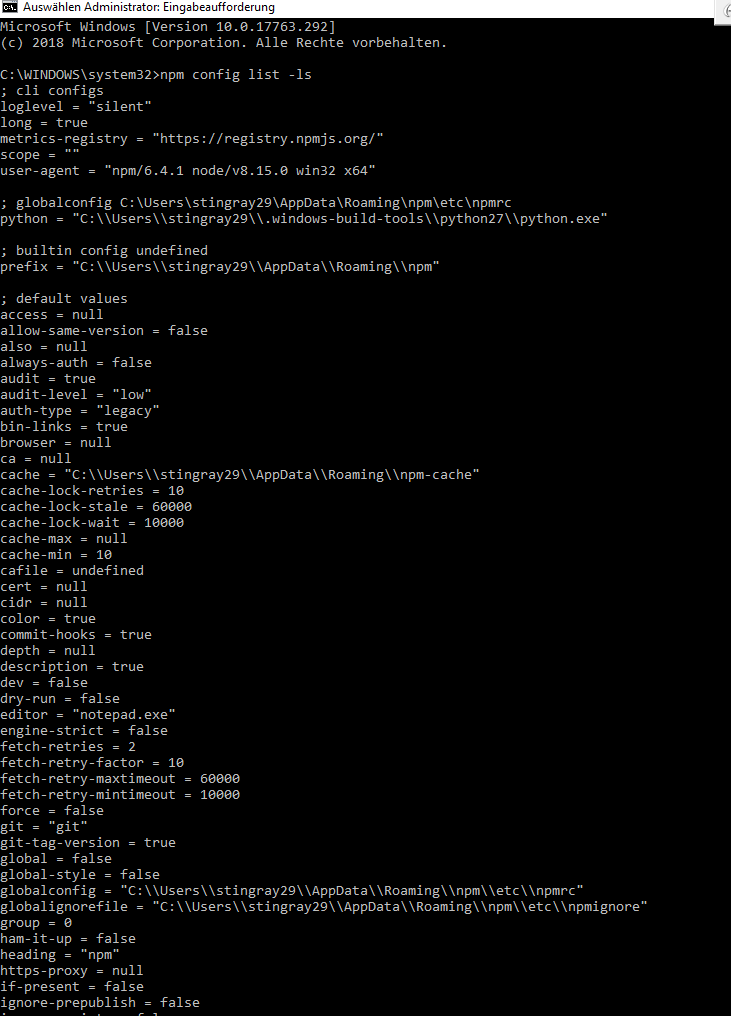
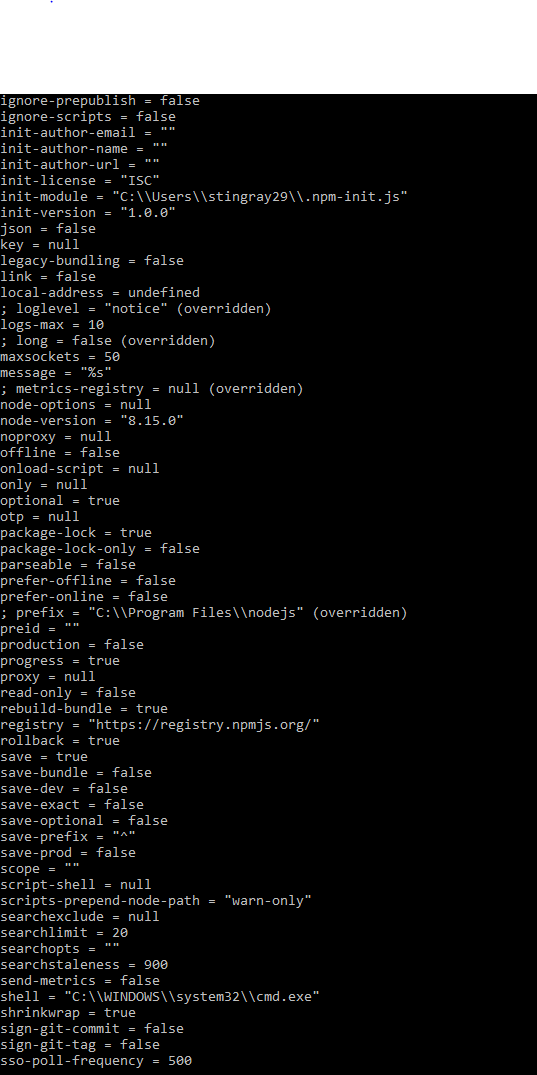
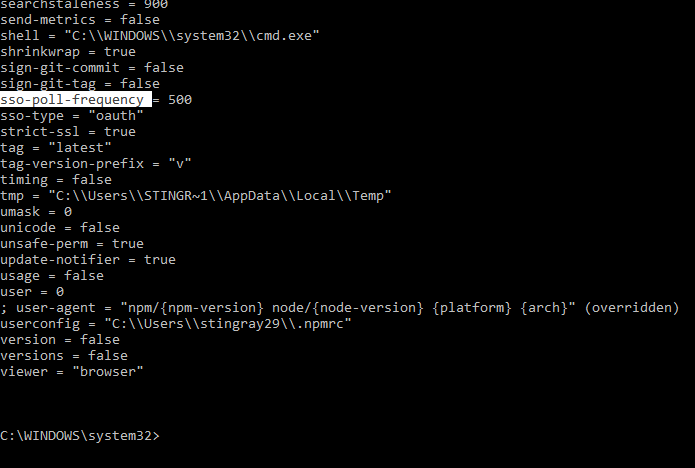
      Öhem, das sieht, obwohl es nicht funktioniert, gut aus. Du hast im npm eine Konfiguration zu Python stehen, die identisch ist mit der Umgebungsvariable….

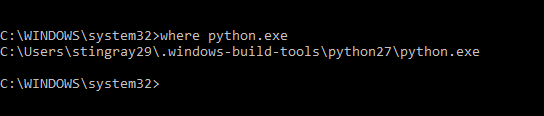
      Was sagt „where python.exe“ in der Kommandozeile?

      Nächster Versuch:

      Stoppe den iobroker-Dienst. Starte in einer neuen administrativen Kommandozeile ioBroker im iobroker-Verzeichnis mit „iobroker start“. Öffnen sich mehrere schwarze Fenster? Mache dann den Admin im Webbrowser auf. Klappt jetzt das hinzufügen von yahka? Kommt wieder die gleiche Fehlermeldung, das Python nicht gefunden werden kann?

      1 Antwort Letzte Antwort
      0
      • W Offline
        W Offline
        wolfpack57
        schrieb am zuletzt editiert von
        #27

        soweit so gut 7652_11.png

        1 Antwort Letzte Antwort
        0
        • StabilostickS Offline
          StabilostickS Offline
          Stabilostick
          schrieb am zuletzt editiert von
          #28

          Passt. Und was macht der von Kommandozeile aus gestartete ioBroker?

          1 Antwort Letzte Antwort
          0
          • W Offline
            W Offline
            wolfpack57
            schrieb am zuletzt editiert von
            #29

            also…

            ich habe über den Task Manager den Dienst gestoppt...

            dann als Administrator das neue Fenster cmd geöffnet und wie folgt neu gestartet...
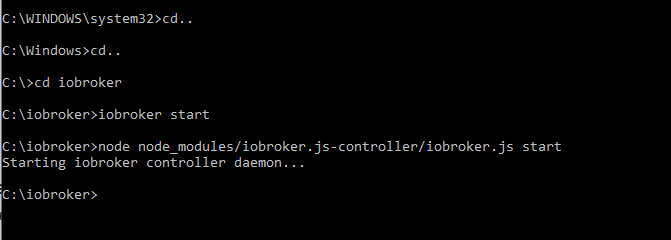
            7652_12.png
            es hat sich dann aber kein weiteres Fenster geöffnet.

            Anschließend den Adapter wieder versucht zu installieren:

            wie immer

            $ ./iobroker add yahka  --host DESKTOP-SK00CCS
            NPM version: 6.4.1
            npm install iobroker.yahka --production --save --prefix "C:/iobroker" (System call)
            gyp
             ERR! configure error gyp ERR! stack Error: Can't find Python executable "python", you can set the PYTHON env variable.
            gyp ERR! stack     at PythonFinder.failNoPython (C:\Program Files\nodejs\node_modules\npm\node_modules\node-gyp\lib\configure.js:484:19)
            gyp ERR! stack     at PythonFinder. <anonymous>(C:\Program Files\nodejs\node_modules\npm\node_modules\node-gyp\lib\configure.js:509:16)
            gyp ERR! stack     at C:\Program Files\nodejs\node_modules\npm\node_modules\graceful-fs\polyfills.js:284:29
            gyp ERR! stack     at FSReqWrap.oncomplete (fs.js:152:21)
            
            gyp 
            ERR! System Windows_NT 10.0.17763gyp ERR! command "C:\\Program Files\\nodejs\\node.exe" "C:\\Program Files\\nodejs\\node_modules\\npm\\node_modules\\node-gyp\\bin\\node-gyp.js" "rebuild"
            gyp ERR! cwd C:\iobroker\node_modules\iobroker.yahka\node_modules\curve25519-n
            gyp ERR! node -v v8.15.0
            gyp ERR!
             node-gyp -v v3.8.0gyp ERR! not ok 
            
            npm
             ERR! code ELIFECYCLEnpm ERR! errno 1
            
            npm
             ERR! curve25519-n@1.4.0 install: `node-gyp rebuild`npm ERR! Exit status 1
            npm ERR! 
            npm ERR!
             Failed at the curve25519-n@1.4.0 install script.npm ERR! This is probably not a problem with npm. There is likely additional logging output above.
            
            npm ERR! A complete log of this run can be found in:npm ERR!     C:\WINDOWS\system32\config\systemprofile\AppData\Roaming\npm-cache\_logs\2019-02-04T15_17_39_048Z-debug.log
            
            host.DESKTOP-SK00CCS install adapter yahka
            NPM version: 6.4.1
            npm install iobroker.yahka --production --save --prefix "C:/iobroker" (System call)
            gyp
             ERR! configure error 
            gyp ERR! stack Error: Can't find Python executable "python", you can set the PYTHON env variable.gyp ERR! stack     at PythonFinder.failNoPython (C:\Program Files\nodejs\node_modules\npm\node_modules\node-gyp\lib\configure.js:484:19)
            gyp ERR! stack     at PythonFinder. <anonymous>(C:\Program Files\nodejs\node_modules\npm\node_modules\node-gyp\lib\configure.js:509:16)
            
            gyp ERR! 
            stack     at C:\Program Files\nodejs\node_modules\npm\node_modules\graceful-fs\polyfills.js:284:29gyp ERR! stack     at FSReqWrap.oncomplete (fs.js:152:21)
            gyp 
            ERR! System Windows_NT 10.0.17763gyp ERR! command
             "C:\\Program Files\\nodejs\\node.exe" "C:\\Program Files\\nodejs\\node_modules\\npm\\node_modules\\node-gyp\\bin\\node-gyp.js" "rebuild"gyp ERR! cwd C:\iobroker\node_modules\iobroker.yahka\node_modules\curve25519-n
            gyp
             ERR! node -v v8.15.0gyp ERR! node-gyp -v v3.8.0
            gyp 
            ERR! not ok 
            npm
             ERR! code ELIFECYCLEnpm ERR! errno 1
            
            npm
             ERR! curve25519-n@1.4.0 install: `node-gyp rebuild`npm ERR! Exit status 1
            npm ERR! 
            npm ERR!
             Failed at the curve25519-n@1.4.0 install script.npm ERR! This is probably not a problem with npm. There is likely additional logging output above.
            
            npm ERR! A complete log of this run can be found in:npm ERR!     C:\WINDOWS\system32\config\systemprofile\AppData\Roaming\npm-cache\_logs\2019-02-04T15_17_47_517Z-debug.log
            
            host.DESKTOP-SK00CCS install adapter yahka
            NPM version: 6.4.1
            npm install iobroker.yahka --production --save --prefix "C:/iobroker" (System call)
            gyp
             ERR! configure error 
            gyp
             ERR! stack Error: Can't find Python executable "python", you can set the PYTHON env variable.gyp ERR! stack     at PythonFinder.failNoPython (C:\Program Files\nodejs\node_modules\npm\node_modules\node-gyp\lib\configure.js:484:19)
            gyp ERR! stack     at PythonFinder. <anonymous>(C:\Program Files\nodejs\node_modules\npm\node_modules\node-gyp\lib\configure.js:509:16)
            gyp ERR! stack     at C:\Program Files\nodejs\node_modules\npm\node_modules\graceful-fs\polyfills.js:284:29
            gyp ERR! stack     at FSReqWrap.oncomplete (fs.js:152:21)
            
            gyp ERR! System Windows_NT 10.0.17763
            gyp ERR! command "C:\\Program Files\\nodejs\\node.exe" "C:\\Program Files\\nodejs\\node_modules\\npm\\node_modules\\node-gyp\\bin\\node-gyp.js" "rebuild"gyp ERR! cwd C:\iobroker\node_modules\iobroker.yahka\node_modules\curve25519-n
            gyp ERR! node -v v8.15.0
            gyp ERR! node-gyp -v v3.8.0
            gyp ERR!
             not ok 
            npm
             ERR! code ELIFECYCLEnpm ERR! errno 1
            
            npm
             ERR! curve25519-n@1.4.0 install: `node-gyp rebuild`npm ERR! Exit status 1
            npm ERR! 
            npm 
            ERR! Failed at the curve25519-n@1.4.0 install script.npm ERR! This is probably not a problem with npm. There is likely additional logging output above.
            
            npm ERR! A complete log of this run can be found in:npm ERR!     C:\WINDOWS\system32\config\systemprofile\AppData\Roaming\npm-cache\_logs\2019-02-04T15_17_57_512Z-debug.log
            
            host.DESKTOP-SK00CCS install adapter yahka
            ERROR: host.DESKTOP-SK00CCS Cannot install yahka
            ERROR: process exited with code 13</anonymous></anonymous></anonymous>
            
            1 Antwort Letzte Antwort
            0
            • StabilostickS Offline
              StabilostickS Offline
              Stabilostick
              schrieb am zuletzt editiert von
              #30

              Ok, dann lasse den ioBroker als Dienst weiter laufen.

              Jetzt in der als Admin gestarteten Kommandozeile den Befehl

              npm install iobroker.yahka --production --save
              

              eingeben. Gleicher Fehler? Bring „echo %python%“ etwas?

              1 Antwort Letzte Antwort
              0
              • W Offline
                W Offline
                wolfpack57
                schrieb am zuletzt editiert von
                #31

                ja,

                erst mal den Dienst wieder gestartet…

                dann die Installation über Deinen Befehl gestartet...

                gibt was rotes am Anfang und am Ende...
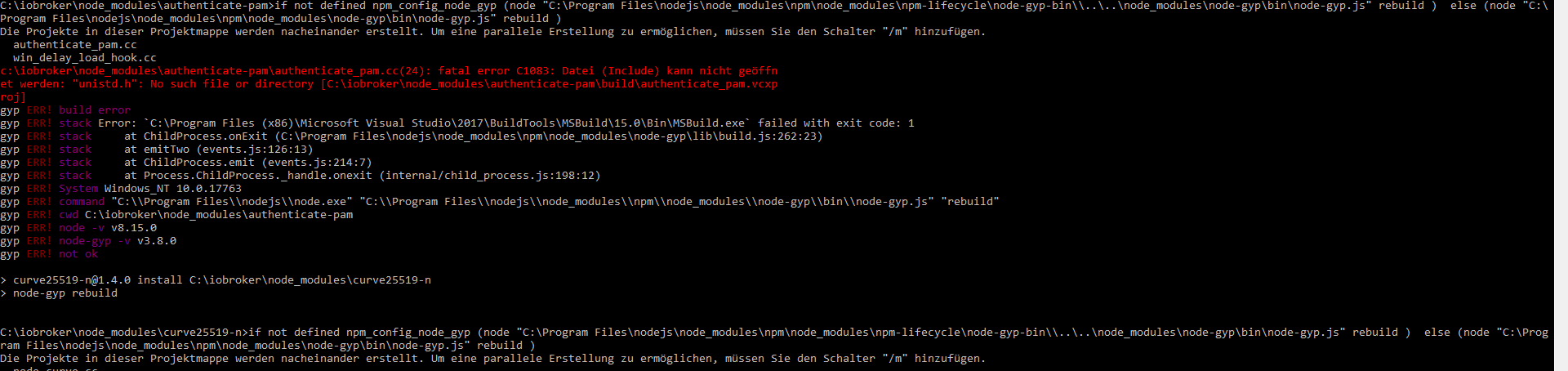
                7652_13.png
                7652_14.png

                1 Antwort Letzte Antwort
                0
                • StabilostickS Offline
                  StabilostickS Offline
                  Stabilostick
                  schrieb am zuletzt editiert von
                  #32

                  Also hier wird Deine Umgebungsvariable PYTHON also gefunden. Wenn npm im Dienst-Kontext läuft aber nicht.

                  gyp läuft also erfolgreich los, findet aber dann Dateien nicht.

                  1 Antwort Letzte Antwort
                  0
                  • W Offline
                    W Offline
                    wolfpack57
                    schrieb am zuletzt editiert von
                    #33

                    ???

                    1 Antwort Letzte Antwort
                    0
                    • StabilostickS Offline
                      StabilostickS Offline
                      Stabilostick
                      schrieb am zuletzt editiert von
                      #34

                      Also zum ersten: Was ist Authenticate PAM?

                      PAM (Pluggable Authentication Modules) is the management layer that sits between Linux applications and the Linux native authentication system. There are many programs in your system that use PAM modules, such as SU, password, SSH, logging in, and other services.

                      Wie soll das unter Windows funktionieren?

                      1 Antwort Letzte Antwort
                      0
                      • StabilostickS Offline
                        StabilostickS Offline
                        Stabilostick
                        schrieb am zuletzt editiert von
                        #35

                        Zum zweiten Punkt:

                        Gibt es unter C:\ bei Dir das Verzeichnis OpenSSL-Win64?

                        Außerdem ist der zweite Fehler eh optional, also gerade Wurst.

                        1 Antwort Letzte Antwort
                        0
                        • W Offline
                          W Offline
                          wolfpack57
                          schrieb am zuletzt editiert von
                          #36

                          …ich hör das zum 1. Mal...

                          1 Antwort Letzte Antwort
                          0
                          • StabilostickS Offline
                            StabilostickS Offline
                            Stabilostick
                            schrieb am zuletzt editiert von
                            #37

                            Ähm, hat er etwa den Adapter jetzt installiert? Schau mal nach im Admin.

                            1 Antwort Letzte Antwort
                            0
                            • W Offline
                              W Offline
                              wolfpack57
                              schrieb am zuletzt editiert von
                              #38

                              das Verzeichnis gibt es nicht

                              1 Antwort Letzte Antwort
                              0
                              • StabilostickS Offline
                                StabilostickS Offline
                                Stabilostick
                                schrieb am zuletzt editiert von
                                #39

                                Wie gesagt, das Modul ist optional, also gerade egal.

                                Was ist jetzt mit dem Adapter?

                                1 Antwort Letzte Antwort
                                0
                                • W Offline
                                  W Offline
                                  wolfpack57
                                  schrieb am zuletzt editiert von
                                  #40

                                  leider nicht,

                                  war nicht installiert

                                  und tut auch jetzt nicht

                                  1 Antwort Letzte Antwort
                                  0
                                  • StabilostickS Offline
                                    StabilostickS Offline
                                    Stabilostick
                                    schrieb am zuletzt editiert von
                                    #41

                                    Ich versuche es bei mir mal.

                                    1 Antwort Letzte Antwort
                                    0
                                    • W Offline
                                      W Offline
                                      wolfpack57
                                      schrieb am zuletzt editiert von
                                      #42

                                      mir ist gerade aufgefallen, dass der Prozess wieder deaktiviert war.

                                      Auch wenn ich Ihn neu aktiviert habe, ging er nach ein paar Sekunden wieder aus.

                                      Nach einem Neustart ist das aber wieder weg…

                                      die Instanz fügt er trotzdem nicht hinzu

                                      1 Antwort Letzte Antwort
                                      0
                                      • StabilostickS Offline
                                        StabilostickS Offline
                                        Stabilostick
                                        schrieb am zuletzt editiert von
                                        #43

                                        Installiere bitte zuerst OpenSSL: http://slproweb.com/products/Win32OpenSSL.html

                                        Bitte exakt die Version v1.0.2j

                                        Nicht "light"!

                                        Bei der Installation alles auf Standard lassen. 64-bit Variante entsprechend Deinem Betriebssystem

                                        Jetzt das Setup von yahka mit npm i … in der Kommandozeile wiederholen.

                                        1 Antwort Letzte Antwort
                                        0
                                        • W Offline
                                          W Offline
                                          wolfpack57
                                          schrieb am zuletzt editiert von
                                          #44

                                          habe ich gemacht…

                                          bei dem Installieren hat er einmal gemeckert, weil auf meinem Rechner während der Installation ein command promt lief.

                                          Kann das Scheitern daran liegen?

                                          Wenn ja, wie kriege ich das aus?

                                          Anschließend Neustart

                                          und über Administrator-cmd:
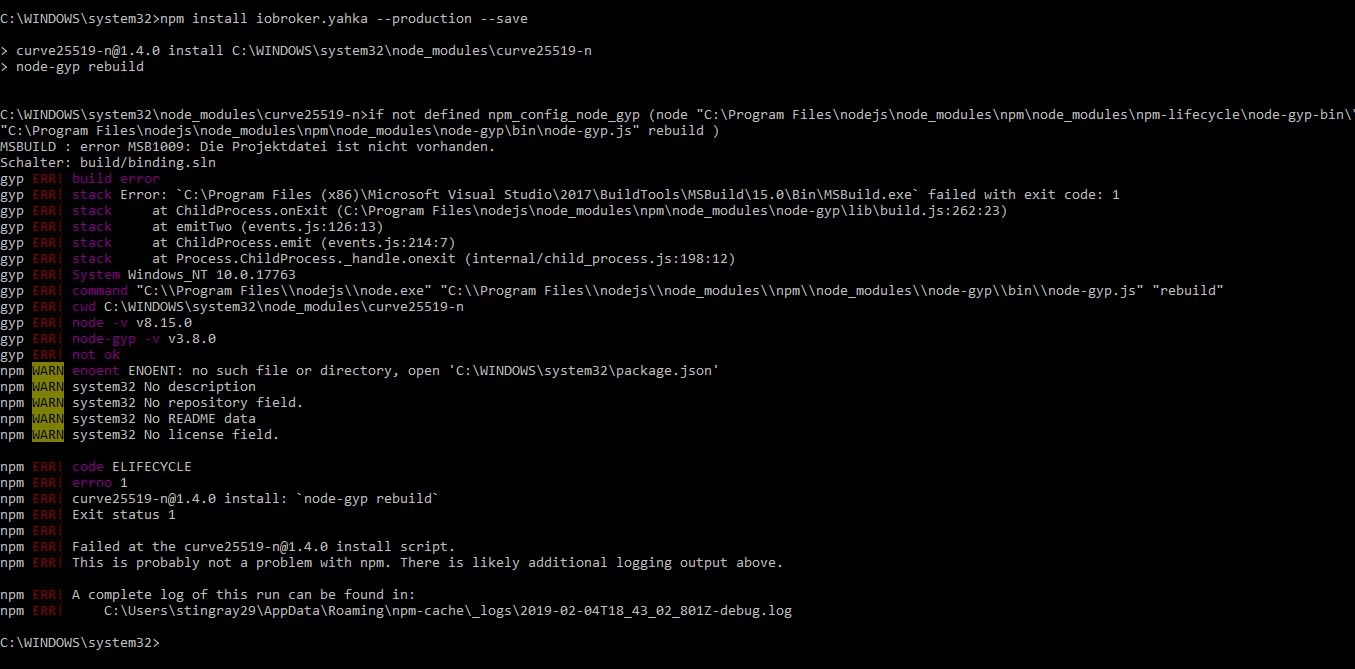
                                          7652_16.png

                                          Ich sag mal so…

                                          für mich als Laien sieht der Fehlercode kürzer aus... :roll:

                                          1 Antwort Letzte Antwort
                                          0
                                          Antworten
                                          • In einem neuen Thema antworten
                                          Anmelden zum Antworten
                                          • Älteste zuerst
                                          • Neuste zuerst
                                          • Meiste Stimmen


                                          Support us

                                          ioBroker
                                          Community Adapters
                                          Donate
                                          FAQ Cloud / IOT
                                          HowTo: Node.js-Update
                                          HowTo: Backup/Restore
                                          Downloads
                                          BLOG

                                          297

                                          Online

                                          32.7k

                                          Benutzer

                                          82.6k

                                          Themen

                                          1.3m

                                          Beiträge
                                          Community
                                          Impressum | Datenschutz-Bestimmungen | Nutzungsbedingungen | Einwilligungseinstellungen
                                          ioBroker Community 2014-2025
                                          logo
                                          • Anmelden

                                          • Du hast noch kein Konto? Registrieren

                                          • Anmelden oder registrieren, um zu suchen
                                          • Erster Beitrag
                                            Letzter Beitrag
                                          0
                                          • Home
                                          • Aktuell
                                          • Tags
                                          • Ungelesen 0
                                          • Kategorien
                                          • Unreplied
                                          • Beliebt
                                          • GitHub
                                          • Docu
                                          • Hilfe