




[gelöst] Windows 7 Fehler bei Installation von YAHKA
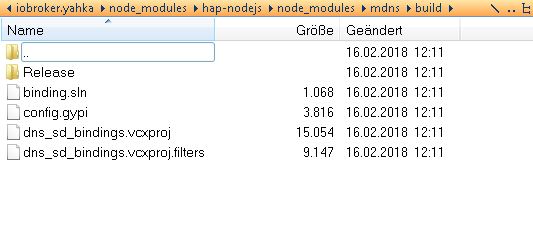
-
also das lief problemlos durch, hat aber beim Installieren von dem Adapter keinen Fortschritt gebracht
npm –add-python-to-path='true' --debug install --global windows-build-tools
dann habe ich versucht Deinen Befehl (set PYTHON=hier/der/Pfad/inkl./der/EXE) mit dem Path zusammenzubringen, aber ich denke da mache ich was falsch. Wenn ich das ausführe kommt eigentlich keine Reaktion...
muss ich mir den Path von den Benutzervariablen holen
C:\Users\stingray29.windows-build-tools\python27\
oder von den Systemvariablen holen?
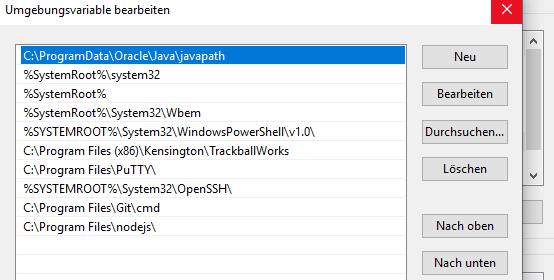
-
Weder noch. Du schaust mit dem Explorer, wo die python.exe liegt und gibst in der administrativen Kommandozeile den entsprechenden set-Befehl ein. Inkl. exe. Und der set Befehl hat (fast) nichts mit der Path-Variablen zu tun.
-
o. k., habe ich gemacht…
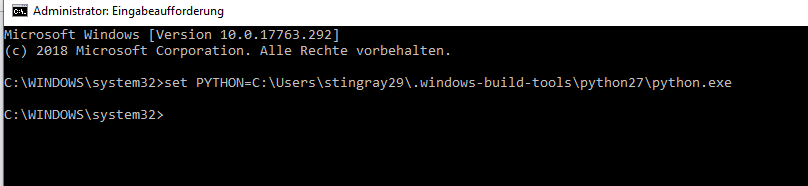
anschließend neu gestartet und die Installation noch mal versucht:
$ ./iobroker add yahka  --host DESKTOP-SK00CCS
NPM version: 6.4.1
npm install iobroker.yahka --production --save --prefix "C:/iobroker" (System call)
gyp
 ERR! configure error gyp ERR! stack Error: Can't find Python executable "python", you can set the PYTHON env variable.
gyp ERR! stack     at PythonFinder.failNoPython (C:\Program Files\nodejs\node_modules\npm\node_modules\node-gyp\lib\configure.js:484:19)
gyp ERR! stack     at PythonFinder. <anonymous>(C:\Program Files\nodejs\node_modules\npm\node_modules\node-gyp\lib\configure.js:509:16)
gyp ERR! stack     at C:\Program Files\nodejs\node_modules\npm\node_modules\graceful-fs\polyfills.js:284:29
gyp ERR! stack     at FSReqWrap.oncomplete (fs.js:152:21)

gyp ERR! System Windows_NT 10.0.17763gyp ERR! command "C:\\Program Files\\nodejs\\node.exe" "C:\\Program Files\\nodejs\\node_modules\\npm\\node_modules\\node-gyp\\bin\\node-gyp.js" "rebuild"
gyp ERR! cwd
 C:\iobroker\node_modules\iobroker.yahka\node_modules\curve25519-ngyp ERR! node -v v8.15.0
gyp ERR! node-gyp -v v3.8.0
gyp
 ERR! not ok
npm ERR! code ELIFECYCLEnpm ERR! errno 1
npm ERR! curve25519-n@1.4.0 install: `node-gyp rebuild`
npm ERR! Exit status 1
npm ERR!
npm ERR! Failed at the curve25519-n@1.4.0 install script.
npm ERR! This is probably not a problem with npm. There is likely additional logging output above.

npm ERR! A complete log of this run can be found in:npm ERR!     C:\WINDOWS\system32\config\systemprofile\AppData\Roaming\npm-cache\_logs\2019-02-04T11_36_49_131Z-debug.log

host.DESKTOP-SK00CCS install adapter yahka
NPM version: 6.4.1
npm install iobroker.yahka --production --save --prefix "C:/iobroker" (System call)
gyp
 ERR! configure error
gyp
 ERR! stack Error: Can't find Python executable "python", you can set the PYTHON env variable.gyp ERR! stack     at PythonFinder.failNoPython (C:\Program Files\nodejs\node_modules\npm\node_modules\node-gyp\lib\configure.js:484:19)
gyp ERR! stack     at PythonFinder. <anonymous>(C:\Program Files\nodejs\node_modules\npm\node_modules\node-gyp\lib\configure.js:509:16)
gyp ERR! stack     at C:\Program Files\nodejs\node_modules\npm\node_modules\graceful-fs\polyfills.js:284:29
gyp ERR! stack     at FSReqWrap.oncomplete (fs.js:152:21)

gyp ERR! System Windows_NT 10.0.17763gyp ERR! command "C:\\Program Files\\nodejs\\node.exe" "C:\\Program Files\\nodejs\\node_modules\\npm\\node_modules\\node-gyp\\bin\\node-gyp.js" "rebuild"

gyp ERR! cwd C:\iobroker\node_modules\iobroker.yahka\node_modules\curve25519-ngyp ERR! node -v v8.15.0
gyp ERR! node-gyp -v v3.8.0
gyp ERR!
 not ok
npm
 ERR! code ELIFECYCLEnpm ERR! errno 1

npm
 ERR! curve25519-n@1.4.0 install: `node-gyp rebuild`npm ERR! Exit status 1
npm ERR!
npm
ERR! Failed at the curve25519-n@1.4.0 install script.npm ERR! This is probably not a problem with npm. There is likely additional logging output above.

npm ERR! A complete log of this run can be found in:npm ERR!     C:\WINDOWS\system32\config\systemprofile\AppData\Roaming\npm-cache\_logs\2019-02-04T11_36_56_685Z-debug.log

host.DESKTOP-SK00CCS install adapter yahka
NPM version: 6.4.1
npm install iobroker.yahka --production --save --prefix "C:/iobroker" (System call)
gyp
 ERR! configure error gyp
ERR! stack Error: Can't find Python executable "python", you can set the PYTHON env variable.gyp ERR! stack     at PythonFinder.failNoPython (C:\Program Files\nodejs\node_modules\npm\node_modules\node-gyp\lib\configure.js:484:19)
gyp ERR! stack     at PythonFinder. <anonymous>(C:\Program Files\nodejs\node_modules\npm\node_modules\node-gyp\lib\configure.js:509:16)
gyp ERR! stack     at C:\Program Files\nodejs\node_modules\npm\node_modules\graceful-fs\polyfills.js:284:29
gyp ERR! stack     at FSReqWrap.oncomplete (fs.js:152:21)
gyp ERR!
 System Windows_NT 10.0.17763gyp ERR! command "C:\\Program Files\\nodejs\\node.exe" "C:\\Program Files\\nodejs\\node_modules\\npm\\node_modules\\node-gyp\\bin\\node-gyp.js" "rebuild"
gyp ERR! cwd C:\iobroker\node_modules\iobroker.yahka\node_modules\curve25519-n
gyp ERR! node -v v8.15.0
gyp ERR! node-gyp -v v3.8.0
gyp ERR! not ok

npm
 ERR! code ELIFECYCLEnpm ERR! errno 1

npm ERR! curve25519-n@1.4.0 install: `node-gyp rebuild`npm ERR! Exit status 1

npm ERR! npm ERR! Failed at the curve25519-n@1.4.0 install script.
npm ERR! This is probably not a problem with npm. There is likely additional logging output above.

npm ERR! A complete log of this run can be found in:npm ERR!     C:\WINDOWS\system32\config\systemprofile\AppData\Roaming\npm-cache\_logs\2019-02-04T11_37_05_651Z-debug.log

host.DESKTOP-SK00CCS install adapter yahka
ERROR: host.DESKTOP-SK00CCS Cannot install yahka
ERROR: process exited with code 13</anonymous></anonymous></anonymous>
Im Log meckert jetzt auch node red…
ich glaube, das war vorher nicht...
iobroker 2019-02-04 12:37:05.675 info exit 13 iobroker 2019-02-04 12:37:05.668 error host.DESKTOP-SK00CCS Cannot install yahka iobroker 2019-02-04 12:37:05.667 info host.DESKTOP-SK00CCS install adapter yahka iobroker 2019-02-04 12:37:05.656 info iobroker 2019-02-04 12:37:05.656 info npm ERR! A complete log of this run can be found in:npm ERR! C:\WINDOWS\system32\config\systemprofile\AppData\Roaming\npm-cache\_logs\2019-02-04T11_37_05_651Z-debug.log iobroker 2019-02-04 12:37:05.656 info iobroker 2019-02-04 12:37:05.646 info iobroker 2019-02-04 12:37:05.646 info npm ERR! This is probably not a problem with npm. There is likely additional logging output above. iobroker 2019-02-04 12:37:05.646 info npm ERR! npm ERR! Failed at the curve25519-n@1.4.0 install script. iobroker 2019-02-04 12:37:05.646 info iobroker 2019-02-04 12:37:05.646 info npm ERR! curve25519-n@1.4.0 install: `node-gyp rebuild`npm ERR! Exit status 1 iobroker 2019-02-04 12:37:05.645 info iobroker 2019-02-04 12:37:05.645 info ERR! code ELIFECYCLEnpm ERR! errno 1 iobroker 2019-02-04 12:37:05.645 info npm iobroker 2019-02-04 12:37:05.524 info iobroker 2019-02-04 12:37:05.524 info gyp ERR! not ok iobroker 2019-02-04 12:37:05.524 info gyp ERR! node-gyp -v v3.8.0 iobroker 2019-02-04 12:37:05.524 info gyp ERR! node -v v8.15.0 iobroker 2019-02-04 12:37:05.524 info gyp ERR! cwd C:\iobroker\node_modules\iobroker.yahka\node_modules\curve25519-n iobroker 2019-02-04 12:37:05.524 info System Windows_NT 10.0.17763gyp ERR! command "C:\\Program Files\\nodejs\\node.exe" "C:\\Program Files\\nodejs\\node_modules\\npm\\node_modules\\node-gyp\\bin\\node-gyp.js" "rebuild" iobroker 2019-02-04 12:37:05.524 info gyp ERR! iobroker 2019-02-04 12:37:05.524 info gyp ERR! stack at FSReqWrap.oncomplete (fs.js:152:21) iobroker 2019-02-04 12:37:05.524 info gyp ERR! stack at C:\Program Files\nodejs\node_modules\npm\node_modules\graceful-fs\polyfills.js:284:29 iobroker 2019-02-04 12:37:05.524 info gyp ERR! stack at PythonFinder. <anonymous>(C:\Program Files\nodejs\node_modules\npm\node_modules\node-gyp\lib\configure.js:509:16) iobroker 2019-02-04 12:37:05.524 info ERR! stack Error: Can't find Python executable "python", you can set the PYTHON env variable.gyp ERR! stack at PythonFinder.failNoPython (C:\Program Files\nodejs\node_modules\npm\node_modules\nod iobroker 2019-02-04 12:37:05.524 info ERR! configure error gyp iobroker 2019-02-04 12:37:05.524 info gyp iobroker 2019-02-04 12:36:57.282 info npm install iobroker.yahka --production --save --prefix "C:/iobroker" (System call) iobroker 2019-02-04 12:36:57.282 info NPM version: 6.4.1 iobroker 2019-02-04 12:36:56.708 info host.DESKTOP-SK00CCS install adapter yahka iobroker 2019-02-04 12:36:56.693 info iobroker 2019-02-04 12:36:56.693 info npm ERR! A complete log of this run can be found in:npm ERR! C:\WINDOWS\system32\config\systemprofile\AppData\Roaming\npm-cache\_logs\2019-02-04T11_36_56_685Z-debug.log iobroker 2019-02-04 12:36:56.693 info iobroker 2019-02-04 12:36:56.684 info iobroker 2019-02-04 12:36:56.684 info ERR! Failed at the curve25519-n@1.4.0 install script.npm ERR! This is probably not a problem with npm. There is likely additional logging output above. iobroker 2019-02-04 12:36:56.684 info npm iobroker 2019-02-04 12:36:56.684 info npm ERR! iobroker 2019-02-04 12:36:56.684 info ERR! curve25519-n@1.4.0 install: `node-gyp rebuild`npm ERR! Exit status 1 iobroker 2019-02-04 12:36:56.684 info npm iobroker 2019-02-04 12:36:56.683 info iobroker 2019-02-04 12:36:56.683 info ERR! code ELIFECYCLEnpm ERR! errno 1 iobroker 2019-02-04 12:36:56.683 info npm iobroker 2019-02-04 12:36:56.573 info not ok iobroker 2019-02-04 12:36:56.573 info gyp ERR! iobroker 2019-02-04 12:36:56.573 info gyp ERR! node-gyp -v v3.8.0 iobroker 2019-02-04 12:36:56.573 info gyp ERR! cwd C:\iobroker\node_modules\iobroker.yahka\node_modules\curve25519-ngyp ERR! node -v v8.15.0 iobroker 2019-02-04 12:36:56.572 info iobroker 2019-02-04 12:36:56.572 info gyp ERR! System Windows_NT 10.0.17763gyp ERR! command "C:\\Program Files\\nodejs\\node.exe" "C:\\Program Files\\nodejs\\node_modules\\npm\\node_modules\\node-gyp\\bin\\node-gyp.js" "rebuild" iobroker 2019-02-04 12:36:56.572 info iobroker 2019-02-04 12:36:56.572 info gyp ERR! stack at FSReqWrap.oncomplete (fs.js:152:21) iobroker 2019-02-04 12:36:56.572 info gyp ERR! stack at C:\Program Files\nodejs\node_modules\npm\node_modules\graceful-fs\polyfills.js:284:29 iobroker 2019-02-04 12:36:56.572 info gyp ERR! stack at PythonFinder. <anonymous>(C:\Program Files\nodejs\node_modules\npm\node_modules\node-gyp\lib\configure.js:509:16) iobroker 2019-02-04 12:36:56.572 info ERR! stack Error: Can't find Python executable "python", you can set the PYTHON env variable.gyp ERR! stack at PythonFinder.failNoPython (C:\Program Files\nodejs\node_modules\npm\node_modules\no iobroker 2019-02-04 12:36:56.572 info gyp iobroker 2019-02-04 12:36:56.571 info ERR! configure error iobroker 2019-02-04 12:36:56.571 info gyp iobroker 2019-02-04 12:36:49.767 info npm install iobroker.yahka --production --save --prefix "C:/iobroker" (System call) iobroker 2019-02-04 12:36:49.766 info NPM version: 6.4.1 iobroker 2019-02-04 12:36:49.172 info host.DESKTOP-SK00CCS install adapter yahka iobroker 2019-02-04 12:36:49.145 info iobroker 2019-02-04 12:36:49.145 info npm ERR! A complete log of this run can be found in:npm ERR! C:\WINDOWS\system32\config\systemprofile\AppData\Roaming\npm-cache\_logs\2019-02-04T11_36_49_131Z-debug.log iobroker 2019-02-04 12:36:49.144 info iobroker 2019-02-04 12:36:49.129 info iobroker 2019-02-04 12:36:49.129 info npm ERR! This is probably not a problem with npm. There is likely additional logging output above. iobroker 2019-02-04 12:36:49.129 info npm ERR! Failed at the curve25519-n@1.4.0 install script. iobroker 2019-02-04 12:36:49.129 info npm ERR! iobroker 2019-02-04 12:36:49.129 info npm ERR! Exit status 1 iobroker 2019-02-04 12:36:49.129 info npm ERR! curve25519-n@1.4.0 install: `node-gyp rebuild` iobroker 2019-02-04 12:36:49.129 info npm ERR! code ELIFECYCLEnpm ERR! errno 1 iobroker 2019-02-04 12:36:49.018 info ERR! not ok iobroker 2019-02-04 12:36:49.017 info gyp iobroker 2019-02-04 12:36:49.017 info gyp ERR! node-gyp -v v3.8.0 iobroker 2019-02-04 12:36:49.017 info C:\iobroker\node_modules\iobroker.yahka\node_modules\curve25519-ngyp ERR! node -v v8.15.0 iobroker 2019-02-04 12:36:49.017 info gyp ERR! cwd iobroker 2019-02-04 12:36:49.017 info gyp ERR! System Windows_NT 10.0.17763gyp ERR! command "C:\\Program Files\\nodejs\\node.exe" "C:\\Program Files\\nodejs\\node_modules\\npm\\node_modules\\node-gyp\\bin\\node-gyp.js" "rebuild" iobroker 2019-02-04 12:36:49.017 info iobroker 2019-02-04 12:36:49.017 info gyp ERR! stack at FSReqWrap.oncomplete (fs.js:152:21) iobroker 2019-02-04 12:36:49.017 info gyp ERR! stack at C:\Program Files\nodejs\node_modules\npm\node_modules\graceful-fs\polyfills.js:284:29 iobroker 2019-02-04 12:36:49.017 info gyp ERR! stack at PythonFinder. <anonymous>(C:\Program Files\nodejs\node_modules\npm\node_modules\node-gyp\lib\configure.js:509:16) iobroker 2019-02-04 12:36:49.017 info gyp ERR! stack at PythonFinder.failNoPython (C:\Program Files\nodejs\node_modules\npm\node_modules\node-gyp\lib\configure.js:484:19) iobroker 2019-02-04 12:36:49.017 info ERR! configure error gyp ERR! stack Error: Can't find Python executable "python", you can set the PYTHON env variable. iobroker 2019-02-04 12:36:49.016 info gyp iobroker 2019-02-04 12:36:40.478 info npm install iobroker.yahka --production --save --prefix "C:/iobroker" (System call) iobroker 2019-02-04 12:36:39.940 info NPM version: 6.4.1 iobroker 2019-02-04 12:36:38.916 info add yahka --host DESKTOP-SK00CCS info.0 2019-02-04 12:36:38.054 info starting. Version 1.0.2 in C:/iobroker/node_modules/iobroker.info, node: v8.15.0 host.DESKTOP-SK00CCS 2019-02-04 12:36:37.686 info instance system.adapter.info.0 started with pid 10824 text2command.1 2019-02-04 12:36:34.122 info starting. Version 1.2.4 in C:/iobroker/node_modules/iobroker.text2command, node: v8.15.0 host.DESKTOP-SK00CCS 2019-02-04 12:36:33.688 info instance system.adapter.text2command.1 started with pid 16096 host.DESKTOP-SK00CCS 2019-02-04 12:36:29.686 info instance scheduled system.adapter.daswetter.1 */15 * * * * iot.0 2019-02-04 12:36:27.542 info Connection changed: connect node-red.0 2019-02-04 12:36:27.441 warn node-red.0 2019-02-04 12:36:27.441 warn 4 Feb 12:36:27 - [warn] Projects disabled : set editorTheme.projects.enabled=true to enable node-red.0 2019-02-04 12:36:27.439 warn node-red.0 2019-02-04 12:36:27.439 warn 4 Feb 12:36:27 - [info] Settings file : C:\iobroker\node_modules\iobroker.node-red\userdata\settings.js node-red.0 2019-02-04 12:36:27.439 warn 4 Feb 12:36:27 - [warn] ------------------------------------------------------ node-red.0 2019-02-04 12:36:27.439 warn 4 Feb 12:36:27 - [warn] [node-red/tail] Not currently supported on Windows. node-red.0 2019-02-04 12:36:27.439 warn node-red.0 2019-02-04 12:36:27.439 warn 4 Feb 12:36:27 - [warn] ------------------------------------------------------ iot.0 2019-02-04 12:36:26.852 info Connecting with a18wym7vjdl22g.iot.eu-west-1.amazonaws.com iot.0 2019-02-04 12:36:26.843 info starting. Version 0.2.2 in C:/iobroker/node_modules/iobroker.iot, node: v8.15.0 node-red.0 2019-02-04 12:36:26.129 warn node-red.0 2019-02-04 12:36:26.129 warn 4 Feb 12:36:26 - [warn] rpi-gpio : Raspberry Pi specific node set inactive</anonymous></anonymous></anonymous> -
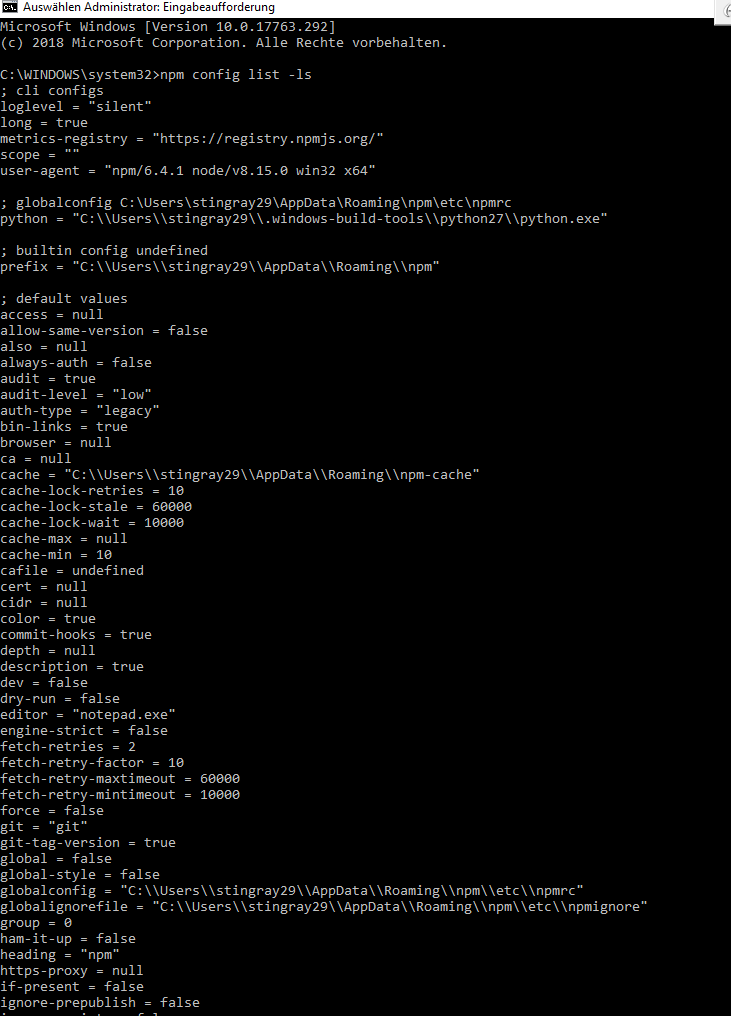
Was sagt
npm config list -ls
?
-
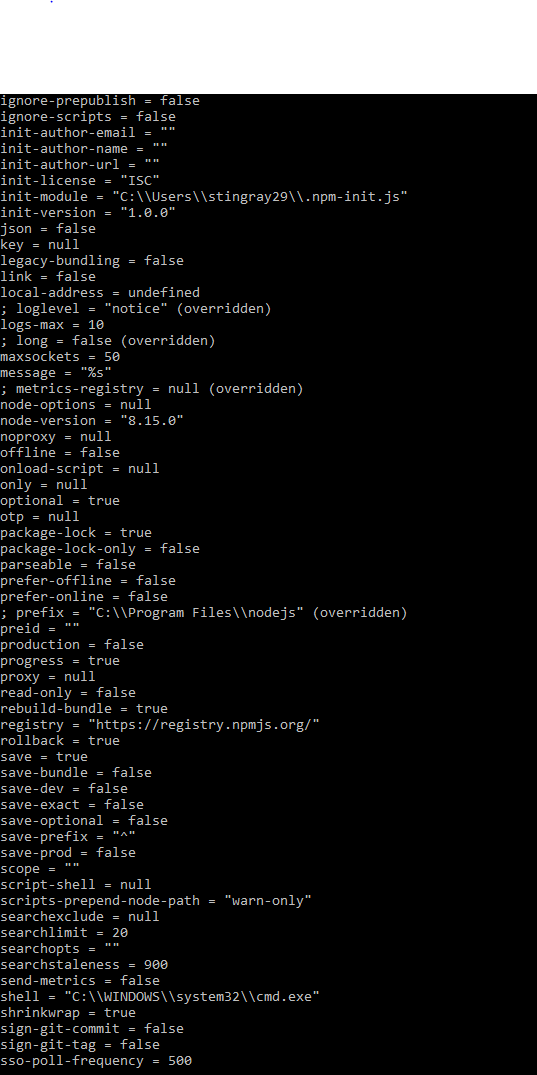
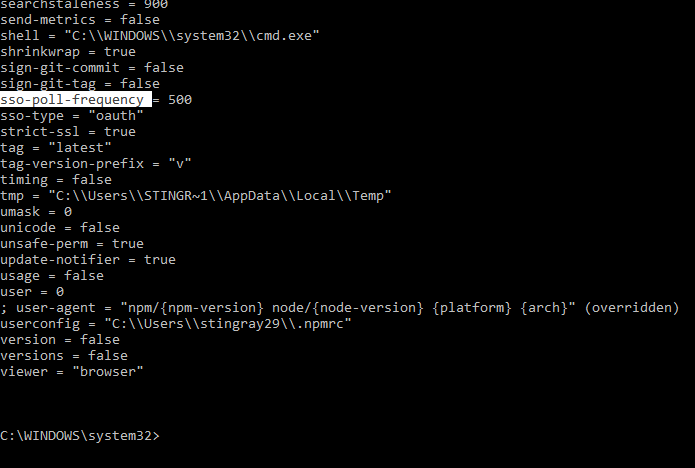
-
Öhem, das sieht, obwohl es nicht funktioniert, gut aus. Du hast im npm eine Konfiguration zu Python stehen, die identisch ist mit der Umgebungsvariable….
Was sagt „where python.exe“ in der Kommandozeile?
Nächster Versuch:
Stoppe den iobroker-Dienst. Starte in einer neuen administrativen Kommandozeile ioBroker im iobroker-Verzeichnis mit „iobroker start“. Öffnen sich mehrere schwarze Fenster? Mache dann den Admin im Webbrowser auf. Klappt jetzt das hinzufügen von yahka? Kommt wieder die gleiche Fehlermeldung, das Python nicht gefunden werden kann?
-
soweit so gut
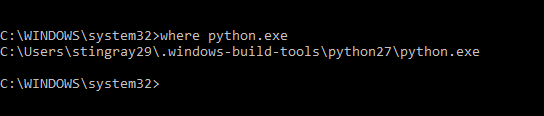
-
Passt. Und was macht der von Kommandozeile aus gestartete ioBroker?
-
also…
ich habe über den Task Manager den Dienst gestoppt...
dann als Administrator das neue Fenster cmd geöffnet und wie folgt neu gestartet...
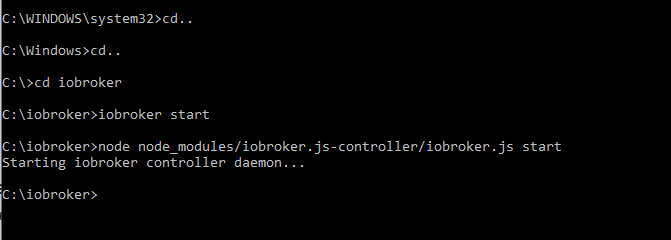
es hat sich dann aber kein weiteres Fenster geöffnet.Anschließend den Adapter wieder versucht zu installieren:
wie immer
$ ./iobroker add yahka --host DESKTOP-SK00CCS NPM version: 6.4.1 npm install iobroker.yahka --production --save --prefix "C:/iobroker" (System call) gyp ERR! configure error gyp ERR! stack Error: Can't find Python executable "python", you can set the PYTHON env variable. gyp ERR! stack at PythonFinder.failNoPython (C:\Program Files\nodejs\node_modules\npm\node_modules\node-gyp\lib\configure.js:484:19) gyp ERR! stack at PythonFinder. <anonymous>(C:\Program Files\nodejs\node_modules\npm\node_modules\node-gyp\lib\configure.js:509:16) gyp ERR! stack at C:\Program Files\nodejs\node_modules\npm\node_modules\graceful-fs\polyfills.js:284:29 gyp ERR! stack at FSReqWrap.oncomplete (fs.js:152:21) gyp ERR! System Windows_NT 10.0.17763gyp ERR! command "C:\\Program Files\\nodejs\\node.exe" "C:\\Program Files\\nodejs\\node_modules\\npm\\node_modules\\node-gyp\\bin\\node-gyp.js" "rebuild" gyp ERR! cwd C:\iobroker\node_modules\iobroker.yahka\node_modules\curve25519-n gyp ERR! node -v v8.15.0 gyp ERR! node-gyp -v v3.8.0gyp ERR! not ok npm ERR! code ELIFECYCLEnpm ERR! errno 1 npm ERR! curve25519-n@1.4.0 install: `node-gyp rebuild`npm ERR! Exit status 1 npm ERR! npm ERR! Failed at the curve25519-n@1.4.0 install script.npm ERR! This is probably not a problem with npm. There is likely additional logging output above. npm ERR! A complete log of this run can be found in:npm ERR! C:\WINDOWS\system32\config\systemprofile\AppData\Roaming\npm-cache\_logs\2019-02-04T15_17_39_048Z-debug.log host.DESKTOP-SK00CCS install adapter yahka NPM version: 6.4.1 npm install iobroker.yahka --production --save --prefix "C:/iobroker" (System call) gyp ERR! configure error gyp ERR! stack Error: Can't find Python executable "python", you can set the PYTHON env variable.gyp ERR! stack at PythonFinder.failNoPython (C:\Program Files\nodejs\node_modules\npm\node_modules\node-gyp\lib\configure.js:484:19) gyp ERR! stack at PythonFinder. <anonymous>(C:\Program Files\nodejs\node_modules\npm\node_modules\node-gyp\lib\configure.js:509:16) gyp ERR! stack at C:\Program Files\nodejs\node_modules\npm\node_modules\graceful-fs\polyfills.js:284:29gyp ERR! stack at FSReqWrap.oncomplete (fs.js:152:21) gyp ERR! System Windows_NT 10.0.17763gyp ERR! command "C:\\Program Files\\nodejs\\node.exe" "C:\\Program Files\\nodejs\\node_modules\\npm\\node_modules\\node-gyp\\bin\\node-gyp.js" "rebuild"gyp ERR! cwd C:\iobroker\node_modules\iobroker.yahka\node_modules\curve25519-n gyp ERR! node -v v8.15.0gyp ERR! node-gyp -v v3.8.0 gyp ERR! not ok npm ERR! code ELIFECYCLEnpm ERR! errno 1 npm ERR! curve25519-n@1.4.0 install: `node-gyp rebuild`npm ERR! Exit status 1 npm ERR! npm ERR! Failed at the curve25519-n@1.4.0 install script.npm ERR! This is probably not a problem with npm. There is likely additional logging output above. npm ERR! A complete log of this run can be found in:npm ERR! C:\WINDOWS\system32\config\systemprofile\AppData\Roaming\npm-cache\_logs\2019-02-04T15_17_47_517Z-debug.log host.DESKTOP-SK00CCS install adapter yahka NPM version: 6.4.1 npm install iobroker.yahka --production --save --prefix "C:/iobroker" (System call) gyp ERR! configure error gyp ERR! stack Error: Can't find Python executable "python", you can set the PYTHON env variable.gyp ERR! stack at PythonFinder.failNoPython (C:\Program Files\nodejs\node_modules\npm\node_modules\node-gyp\lib\configure.js:484:19) gyp ERR! stack at PythonFinder. <anonymous>(C:\Program Files\nodejs\node_modules\npm\node_modules\node-gyp\lib\configure.js:509:16) gyp ERR! stack at C:\Program Files\nodejs\node_modules\npm\node_modules\graceful-fs\polyfills.js:284:29 gyp ERR! stack at FSReqWrap.oncomplete (fs.js:152:21) gyp ERR! System Windows_NT 10.0.17763 gyp ERR! command "C:\\Program Files\\nodejs\\node.exe" "C:\\Program Files\\nodejs\\node_modules\\npm\\node_modules\\node-gyp\\bin\\node-gyp.js" "rebuild"gyp ERR! cwd C:\iobroker\node_modules\iobroker.yahka\node_modules\curve25519-n gyp ERR! node -v v8.15.0 gyp ERR! node-gyp -v v3.8.0 gyp ERR! not ok npm ERR! code ELIFECYCLEnpm ERR! errno 1 npm ERR! curve25519-n@1.4.0 install: `node-gyp rebuild`npm ERR! Exit status 1 npm ERR! npm ERR! Failed at the curve25519-n@1.4.0 install script.npm ERR! This is probably not a problem with npm. There is likely additional logging output above. npm ERR! A complete log of this run can be found in:npm ERR! C:\WINDOWS\system32\config\systemprofile\AppData\Roaming\npm-cache\_logs\2019-02-04T15_17_57_512Z-debug.log host.DESKTOP-SK00CCS install adapter yahka ERROR: host.DESKTOP-SK00CCS Cannot install yahka ERROR: process exited with code 13</anonymous></anonymous></anonymous> -
Ok, dann lasse den ioBroker als Dienst weiter laufen.
Jetzt in der als Admin gestarteten Kommandozeile den Befehl
npm install iobroker.yahka --production --saveeingeben. Gleicher Fehler? Bring „echo %python%“ etwas?
-
ja,
erst mal den Dienst wieder gestartet…
dann die Installation über Deinen Befehl gestartet...
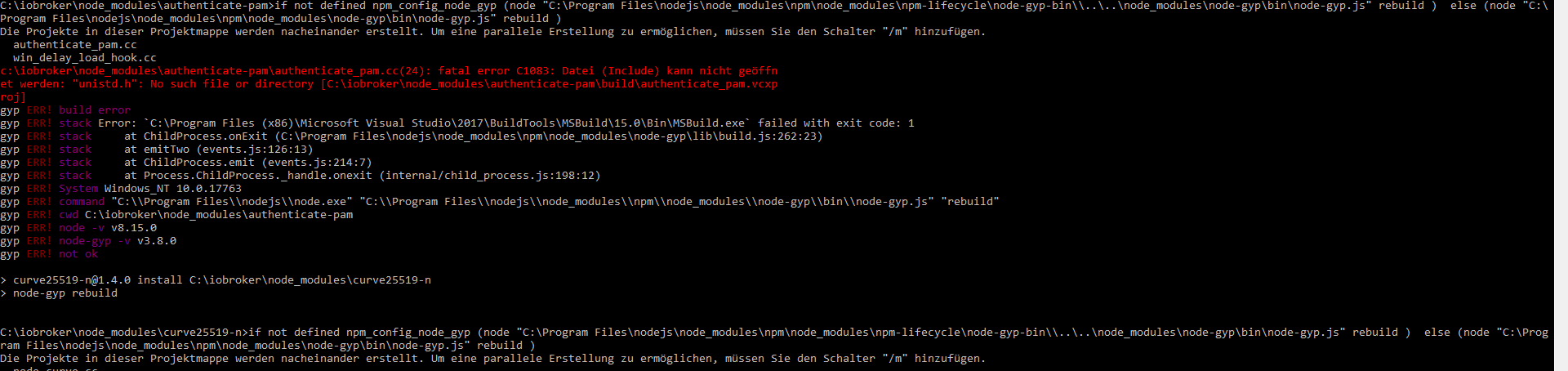
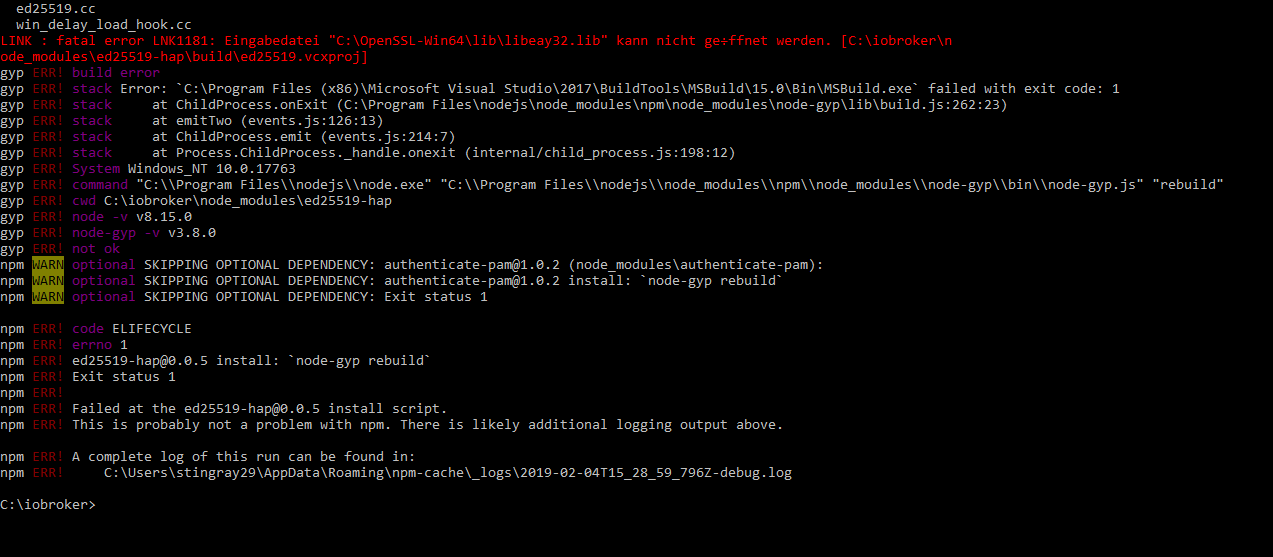
gibt was rotes am Anfang und am Ende...
-
Also hier wird Deine Umgebungsvariable PYTHON also gefunden. Wenn npm im Dienst-Kontext läuft aber nicht.
gyp läuft also erfolgreich los, findet aber dann Dateien nicht.
-
???
-
Also zum ersten: Was ist Authenticate PAM?
PAM (Pluggable Authentication Modules) is the management layer that sits between Linux applications and the Linux native authentication system. There are many programs in your system that use PAM modules, such as SU, password, SSH, logging in, and other services.
Wie soll das unter Windows funktionieren?
-
Zum zweiten Punkt:
Gibt es unter C:\ bei Dir das Verzeichnis OpenSSL-Win64?
Außerdem ist der zweite Fehler eh optional, also gerade Wurst.
-
…ich hör das zum 1. Mal...
-
Ähm, hat er etwa den Adapter jetzt installiert? Schau mal nach im Admin.
-
das Verzeichnis gibt es nicht
-
Wie gesagt, das Modul ist optional, also gerade egal.
Was ist jetzt mit dem Adapter?
-
leider nicht,
war nicht installiert
und tut auch jetzt nicht

Hey! Du scheinst an dieser Unterhaltung interessiert zu sein, hast aber noch kein Konto.
Hast du es satt, bei jedem Besuch durch die gleichen Beiträge zu scrollen? Wenn du dich für ein Konto anmeldest, kommst du immer genau dorthin zurück, wo du zuvor warst, und kannst dich über neue Antworten benachrichtigen lassen (entweder per E-Mail oder Push-Benachrichtigung). Du kannst auch Lesezeichen speichern und Beiträge positiv bewerten, um anderen Community-Mitgliedern deine Wertschätzung zu zeigen.
Mit deinem Input könnte dieser Beitrag noch besser werden 💗
Registrieren Anmelden246
Online33.0k
Benutzer83.7k
Themen1.3m
Beiträge