Skip to content
  • Home
  • Aktuell
  • Tags
  • 0 Ungelesen 0
  • Kategorien
  • Unreplied
  • Beliebt
  • GitHub
  • Docu
  • Hilfe
Skins
  • Light
  • Brite
  • Cerulean
  • Cosmo
  • Flatly
  • Journal
  • Litera
  • Lumen
  • Lux
  • Materia
  • Minty
  • Morph
  • Pulse
  • Sandstone
  • Simplex
  • Sketchy
  • Spacelab
  • United
  • Yeti
  • Zephyr
  • Dark
  • Cyborg
  • Darkly
  • Quartz
  • Slate
  • Solar
  • Superhero
  • Vapor

  • Standard: (Kein Skin)
  • Kein Skin
Einklappen
ioBroker Logo

Community Forum

donate donate
  1. ioBroker Community Home
  2. Deutsch
  3. ioBroker Allgemein
  4. -Gelöst- Problem Downgrad node.js
NEWS

  • UPDATE 31.10.: Amazon Alexa - ioBroker Skill läuft aus ?
    apollon77A
    apollon77
    48
    3
    8.8k

  • Monatsrückblick – September 2025
    BluefoxB
    Bluefox
    13
    1
    2.2k

  • Neues Video "KI im Smart Home" - ioBroker plus n8n
    BluefoxB
    Bluefox
    16
    1
    3.3k

-Gelöst- Problem Downgrad node.js
Geplant Angeheftet Gesperrt Verschoben ioBroker Allgemein
30 Beiträge 6 Kommentatoren 3.2k Aufrufe
  • Älteste zuerst
  • Neuste zuerst
  • Meiste Stimmen
Antworten
  • In einem neuen Thema antworten
Anmelden zum Antworten
Dieses Thema wurde gelöscht. Nur Nutzer mit entsprechenden Rechten können es sehen.
  • wendy2702W Online
    wendy2702W Online
    wendy2702
    schrieb am zuletzt editiert von
    #4

    Nach welcher Anleitung bist du vorgegangen?

    Schau mal hier auf der Seite steht der Downgrade beschrieben und hat soweit ich weiß bisher immer geklappt.

    http://www.iobroker.net/docu/?page_id=8323&lang=de

    Ein Fehler von dir war schon das du am Anfang iobroker stoppen wolltest was aber nicht funktioniert hat und du hast einfach weitergemacht.

    Was kommt wenn du

    ps -ax |grep io
    ````machst?
    
    Wenn da nichts mehr mit io oder iobroker steht läuft er wohl definitiv nicht mehr.
    
    Achja, du kann logs aus Putty kopieren indem du den Text einfach markierst. Der ist dann automatisch im Zwischenspeicher, dann nur noch hier in CodeTags einfügen.

    Bitte keine Fragen per PN, die gehören ins Forum!

    Benutzt das Voting rechts unten im Beitrag wenn er euch geholfen hat.

    1 Antwort Letzte Antwort
    0
    • S Offline
      S Offline
      Shorty2000
      schrieb am zuletzt editiert von
      #5

      Ich bin völliger Neuling deshalb hab ich einfach mal weiter gemacht :-/

      Ich bin noch folgender Anleitung vorgangen:

      http://www.iobroker.net/docu/?page_id=8 … js_und_npm

      Wenn ich deinen Befehl eingebe kommt folgende Meldung:

      pi@raspberrypi:~ $ sudo ps -ax |grep io
          9 ?        S      0:00 [migration/0]
         13 ?        S      0:00 [migration/1]
         18 ?        S      0:00 [migration/2]
         23 ?        S      0:00 [migration/3]
         34 ?        S<     0:00 [bioset]
         38 ?        S<     0:00 [rpciod]
         39 ?        S<     0:00 [xprtiod]
         42 ?        S<     0:00 [nfsiod]
         53 ?        S<     0:00 [bioset]
         54 ?        S<     0:00 [bioset]
         55 ?        S<     0:00 [bioset]
         56 ?        S<     0:00 [bioset]
         57 ?        S<     0:00 [bioset]
         58 ?        S<     0:00 [bioset]
         59 ?        S<     0:00 [bioset]
         60 ?        S<     0:00 [bioset]
         61 ?        S<     0:00 [bioset]
         62 ?        S<     0:00 [bioset]
         63 ?        S<     0:00 [bioset]
         64 ?        S<     0:00 [bioset]
         65 ?        S<     0:00 [bioset]
         66 ?        S<     0:00 [bioset]
         67 ?        S<     0:00 [bioset]
         68 ?        S<     0:00 [bioset]
         69 ?        S<     0:00 [bioset]
         70 ?        S<     0:00 [bioset]
         71 ?        S<     0:00 [bioset]
         72 ?        S<     0:00 [bioset]
         73 ?        S<     0:00 [bioset]
         74 ?        S<     0:00 [bioset]
         75 ?        S<     0:00 [bioset]
         76 ?        S<     0:00 [bioset]
         80 ?        S<     0:00 [DWC Notificatio]
         91 ?        S<     0:00 [bioset]
        370 ?        Ss     0:00 /usr/bin/dbus-daemon --system --address=systemd: --no                                fork --nopidfile --systemd-activation
       1004 ?        Sl     0:45 java -Xmx64m -Dlog4j.configuration=file:///etc/config                                /log4j.xml -Dfile.encoding=ISO-8859-1 -jar /opt/HMServer/HMIPServer.jar /etc/crR                                FD.conf
       2668 pts/1    S+     0:00 grep --color=auto io


      danke für den Tipp mit dem Puttycode viel besser

      1 Antwort Letzte Antwort
      0
      • wendy2702W Online
        wendy2702W Online
        wendy2702
        schrieb am zuletzt editiert von
        #6

        Das heißt du hast in iobroker noch nichts konfiguriert gehabt oder einen Aufwendigen View erstellt?

        Dann würde ich dir vorschlagen das schnell neu aufzusetzen damit du wieder ein sauberes System hast.

        Wenn du das nicht willst bitte die Schritte aus meinem Link zu "Installation Node.js" probieren.

        Bitte keine Fragen per PN, die gehören ins Forum!

        Benutzt das Voting rechts unten im Beitrag wenn er euch geholfen hat.

        1 Antwort Letzte Antwort
        0
        • S Offline
          S Offline
          Shorty2000
          schrieb am zuletzt editiert von
          #7

          Doch ich hatte mehrer laufende views. Außerdem läuft auf dem Raspi eine CCU

          :-/

          1 Antwort Letzte Antwort
          0
          • S Offline
            S Offline
            Shorty2000
            schrieb am zuletzt editiert von
            #8

            So das habe ich jetzt gemacht:

            pi@raspberrypi:~ $ sudo apt-get --purge remove node
            Reading package lists... Done
            Building dependency tree
            Reading state information... Done
            Package 'node' is not installed, so not removed
            0 upgraded, 0 newly installed, 0 to remove and 141 not upgraded.
            pi@raspberrypi:~ $ sudo apt-get --purge remove nodejs
            Reading package lists... Done
            Building dependency tree
            Reading state information... Done
            The following packages were automatically installed and are no longer required:
              libc-ares2 libhttp-parser2.8 libuv1 nodejs-doc
            Use 'sudo apt autoremove' to remove them.
            The following packages will be REMOVED:
              nodejs*
            0 upgraded, 0 newly installed, 1 to remove and 141 not upgraded.
            After this operation, 15.8 MB disk space will be freed.
            Do you want to continue? [Y/n] y
            (Reading database ... 40884 files and directories currently installed.)
            Removing nodejs (8.11.1~dfsg-2~bpo9+1) ...
            Processing triggers for man-db (2.7.6.1-2) ...
            pi@raspberrypi:~ $ sudo apt-get autoremove
            Reading package lists... Done
            Building dependency tree
            Reading state information... Done
            The following packages will be REMOVED:
              libc-ares2 libhttp-parser2.8 libuv1 nodejs-doc
            0 upgraded, 0 newly installed, 4 to remove and 141 not upgraded.
            After this operation, 6,390 kB disk space will be freed.
            Do you want to continue? [Y/n] y
            (Reading database ... 40872 files and directories currently installed.)
            Removing libc-ares2:armhf (1.14.0-1~bpo9+1) ...
            Removing libhttp-parser2.8:armhf (2.8.1-1~bpo9+1) ...
            Removing libuv1:armhf (1.18.0-3~bpo9+1) ...
            Removing nodejs-doc (8.11.1~dfsg-2~bpo9+1) ...
            Processing triggers for libc-bin (2.24-11+deb9u1) ...
            pi@raspberrypi:~ $ sudo reboot


            Dann:

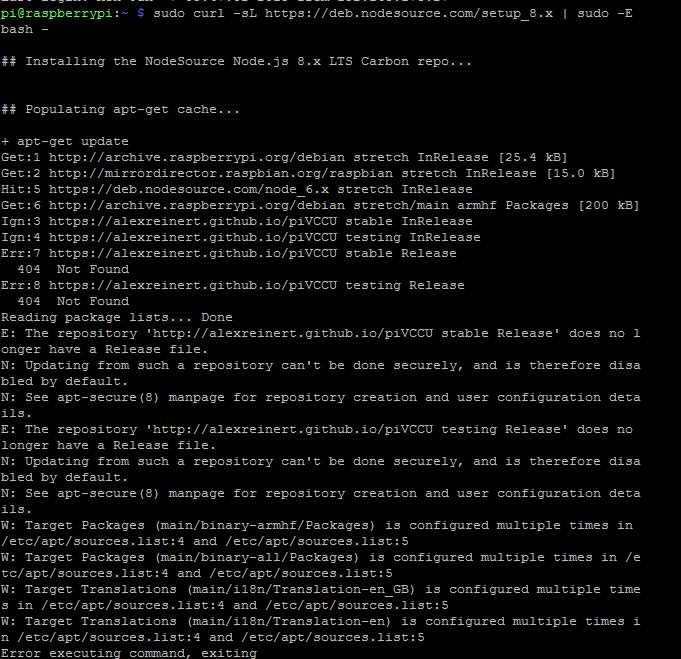
            pi@raspberrypi:~ $ curl -sL https://deb.nodesource.com/setup_8.x | sudo -E bash -
            
            ## Installing the NodeSource Node.js 8.x LTS Carbon repo...
            
            ## Populating apt-get cache...
            
            + apt-get update
            Hit:2 http://mirrordirector.raspbian.org/raspbian stretch InRelease
            Hit:4 http://archive.raspberrypi.org/debian stretch InRelease
            Hit:5 https://deb.nodesource.com/node_6.x stretch InRelease
            Ign:1 https://alexreinert.github.io/piVCCU stable InRelease
            Ign:3 https://alexreinert.github.io/piVCCU testing InRelease
            Err:6 https://alexreinert.github.io/piVCCU stable Release
              404  Not Found
            Err:7 https://alexreinert.github.io/piVCCU testing Release
              404  Not Found
            Reading package lists... Done
            E: The repository 'http://alexreinert.github.io/piVCCU stable Release' does no longer have a Release file.
            N: Updating from such a repository can't be done securely, and is therefore disabled by default.
            N: See apt-secure(8) manpage for repository creation and user configuration details.
            E: The repository 'http://alexreinert.github.io/piVCCU testing Release' does no longer have a Release file.
            N: Updating from such a repository can't be done securely, and is therefore disabled by default.
            N: See apt-secure(8) manpage for repository creation and user configuration details.
            W: Target Packages (main/binary-armhf/Packages) is configured multiple times in /etc/apt/sources.list:4 and /etc/apt/sources.list:5
            W: Target Packages (main/binary-all/Packages) is configured multiple times in /etc/apt/sources.list:4 and /etc/apt/sources.list:5
            W: Target Translations (main/i18n/Translation-en_GB) is configured multiple times in /etc/apt/sources.list:4 and /etc/apt/sources.list:5
            W: Target Translations (main/i18n/Translation-en) is configured multiple times in /etc/apt/sources.list:4 and /etc/apt/sources.list:5
            Error executing command, exiting
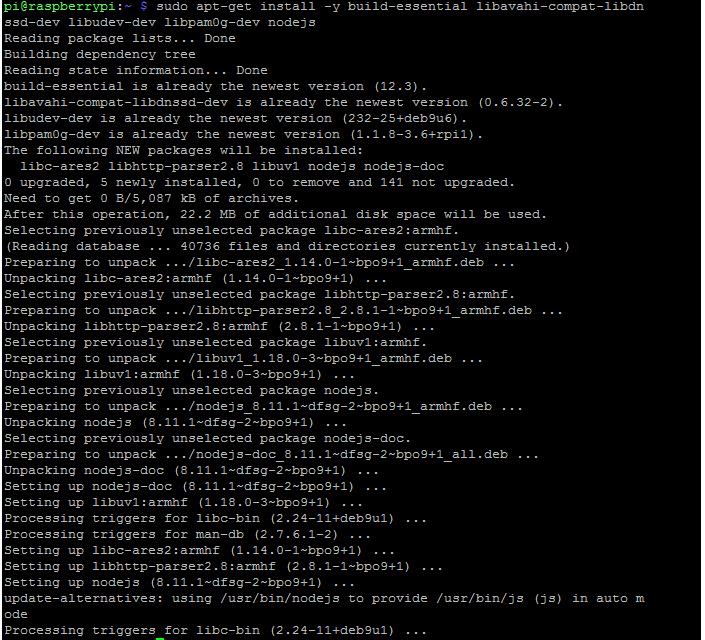
            pi@raspberrypi:~ $ sudo apt-get install -y build-essential libavahi-compat-libdnssd-dev libudev-dev libpam0g-dev nodejs
            Reading package lists... Done
            Building dependency tree
            Reading state information... Done
            build-essential is already the newest version (12.3).
            libavahi-compat-libdnssd-dev is already the newest version (0.6.32-2).
            libudev-dev is already the newest version (232-25+deb9u6).
            libpam0g-dev is already the newest version (1.1.8-3.6+rpi1).
            The following NEW packages will be installed:
              libc-ares2 libhttp-parser2.8 libuv1 nodejs nodejs-doc
            0 upgraded, 5 newly installed, 0 to remove and 141 not upgraded.
            Need to get 0 B/5,087 kB of archives.
            After this operation, 22.2 MB of additional disk space will be used.
            Selecting previously unselected package libc-ares2:armhf.
            (Reading database ... 40736 files and directories currently installed.)
            Preparing to unpack .../libc-ares2_1.14.0-1~bpo9+1_armhf.deb ...
            Unpacking libc-ares2:armhf (1.14.0-1~bpo9+1) ...
            Selecting previously unselected package libhttp-parser2.8:armhf.
            Preparing to unpack .../libhttp-parser2.8_2.8.1-1~bpo9+1_armhf.deb ...
            Unpacking libhttp-parser2.8:armhf (2.8.1-1~bpo9+1) ...
            Selecting previously unselected package libuv1:armhf.
            Preparing to unpack .../libuv1_1.18.0-3~bpo9+1_armhf.deb ...
            Unpacking libuv1:armhf (1.18.0-3~bpo9+1) ...
            Selecting previously unselected package nodejs.
            Preparing to unpack .../nodejs_8.11.1~dfsg-2~bpo9+1_armhf.deb ...
            Unpacking nodejs (8.11.1~dfsg-2~bpo9+1) ...
            Selecting previously unselected package nodejs-doc.
            Preparing to unpack .../nodejs-doc_8.11.1~dfsg-2~bpo9+1_all.deb ...
            Unpacking nodejs-doc (8.11.1~dfsg-2~bpo9+1) ...
            Setting up nodejs-doc (8.11.1~dfsg-2~bpo9+1) ...
            Setting up libuv1:armhf (1.18.0-3~bpo9+1) ...
            Processing triggers for libc-bin (2.24-11+deb9u1) ...
            Processing triggers for man-db (2.7.6.1-2) ...
            Setting up libc-ares2:armhf (1.14.0-1~bpo9+1) ...
            Setting up libhttp-parser2.8:armhf (2.8.1-1~bpo9+1) ...
            Setting up nodejs (8.11.1~dfsg-2~bpo9+1) ...
            update-alternatives: using /usr/bin/nodejs to provide /usr/bin/js (js) in auto mode
            Processing triggers for libc-bin (2.24-11+deb9u1) ...
            pi@raspberrypi:~ $ sudo reboot


            Dann:

            pi@raspberrypi:~ $ node -v
            v11.6.0
            pi@raspberrypi:~ $ nodejs -v
            v8.11.1


            Ich versteh einfach nicht warum er die v11.6.0 immer behält

            was mach ich denn falsch

            1 Antwort Letzte Antwort
            0
            • S Offline
              S Offline
              Shorty2000
              schrieb am zuletzt editiert von
              #9
              pi@raspberrypi:~ $ sudo apt-get --purge remove node
              Reading package lists... Done
              Building dependency tree
              Reading state information... Done
              Package 'node' is not installed, so not removed
              0 upgraded, 0 newly installed, 0 to remove and 141 not upgraded.
              pi@raspberrypi:~ $ node -v
              v11.6.0


              kann es sein, dass bereits hier ein fehler ist und der node gar nicht löscht?

              1 Antwort Letzte Antwort
              0
              • wendy2702W Online
                wendy2702W Online
                wendy2702
                schrieb am zuletzt editiert von
                #10

                Node ist installiert… nur scheinbar nicht im Standart ordner.

                Das hatten wie hier schon... muss mal suchen...

                Bitte keine Fragen per PN, die gehören ins Forum!

                Benutzt das Voting rechts unten im Beitrag wenn er euch geholfen hat.

                1 Antwort Letzte Antwort
                0
                • HomoranH Nicht stören
                  HomoranH Nicht stören
                  Homoran
                  Global Moderator Administrators
                  schrieb am zuletzt editiert von
                  #11

                  which node

                  sonst mal nach Pauls posts suchen

                  kein Support per PN! - Fragen im Forum stellen - es gibt fast nichts, was nicht auch für andere interessant ist.

                  Benutzt das Voting rechts unten im Beitrag wenn er euch geholfen hat.

                  der Installationsfixer: curl -fsL https://iobroker.net/fix.sh | bash -

                  1 Antwort Letzte Antwort
                  0
                  • S Offline
                    S Offline
                    Shorty2000
                    schrieb am zuletzt editiert von
                    #12
                    pi@raspberrypi:~ $ which node
                    /usr/local/bin/node
                    
                    
                    1 Antwort Letzte Antwort
                    0
                    • S Offline
                      S Offline
                      Shorty2000
                      schrieb am zuletzt editiert von
                      #13

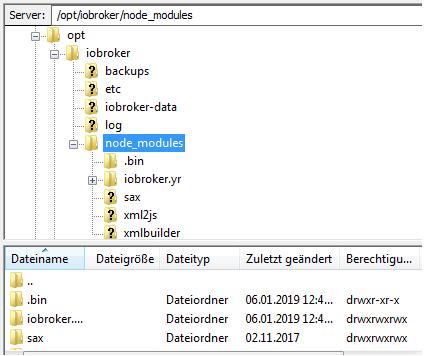
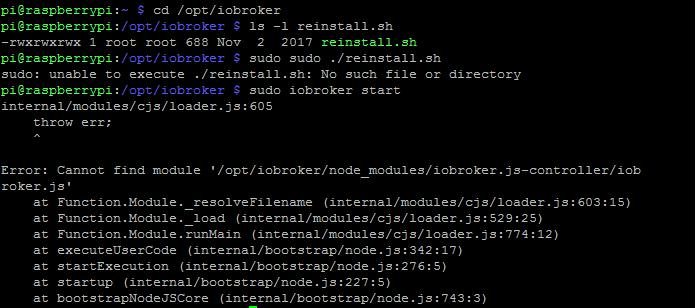
                      Hilft das?

                      6546_node.jpg

                      1 Antwort Letzte Antwort
                      0
                      • wendy2702W Online
                        wendy2702W Online
                        wendy2702
                        schrieb am zuletzt editiert von
                        #14

                        @Shorty2000:

                        pi@raspberrypi:~ $ which node
                        /usr/local/bin/node
                        
                        ```` `  
                        

                        Da liegt glaube ich das Problem.

                        Sollte wenn ich nicht täusche nach````
                        /usr/bin/node

                        
                        Habe jetzt aber leider keine Zeit wegen Arbeit.
                        
                        Suche später mal

                        Bitte keine Fragen per PN, die gehören ins Forum!

                        Benutzt das Voting rechts unten im Beitrag wenn er euch geholfen hat.

                        1 Antwort Letzte Antwort
                        0
                        • S Offline
                          S Offline
                          Shorty2000
                          schrieb am zuletzt editiert von
                          #15

                          Ja klar kein Problem muss auch mal weg.

                          Vielen Dank schonmal für deinen Einsatz wirklich toll

                          1 Antwort Letzte Antwort
                          0
                          • H Offline
                            H Offline
                            hannoi
                            schrieb am zuletzt editiert von
                            #16

                            Das hier sollte der Link sein bzgl. dem Verzeichnis:

                            viewtopic.php?f=17&t=10154&p=212171&hil … de#p212171

                            Grüße

                            1 Antwort Letzte Antwort
                            0
                            • paul53P Offline
                              paul53P Offline
                              paul53
                              schrieb am zuletzt editiert von
                              #17

                              /usr/local/bin/node durch einen https://forum.iobroker.net/viewtopic.php?f=17&t=19463&p=203234#p203234 ersetzen (evtl. sudo vor die Befehle).

                              Bitte verzichtet auf Chat-Nachrichten, denn die Handhabung ist grauenhaft !
                              Produktiv: RPi 2 mit S.USV, HM-MOD-RPI und SLC-USB-Stick mit root fs

                              1 Antwort Letzte Antwort
                              0
                              • wendy2702W Online
                                wendy2702W Online
                                wendy2702
                                schrieb am zuletzt editiert von
                                #18

                                Der Beitrag sollte auch helfen:

                                viewtopic.php?f=17&t=19568&p=209462&hil … de#p209462

                                Bitte keine Fragen per PN, die gehören ins Forum!

                                Benutzt das Voting rechts unten im Beitrag wenn er euch geholfen hat.

                                1 Antwort Letzte Antwort
                                0
                                • S Offline
                                  S Offline
                                  Shorty2000
                                  schrieb am zuletzt editiert von
                                  #19

                                  Danke :-)

                                  pi@raspberrypi:~ $ nodejs -v
                                  v8.11.1
                                  pi@raspberrypi:~ $ npm -v
                                  6.5.0-next.0
                                  pi@raspberrypi:~ $ /usr/local/bin/node -v
                                  v8.11.1
                                  pi@raspberrypi:~ $ /usr/bin/node -v
                                  v8.11.1
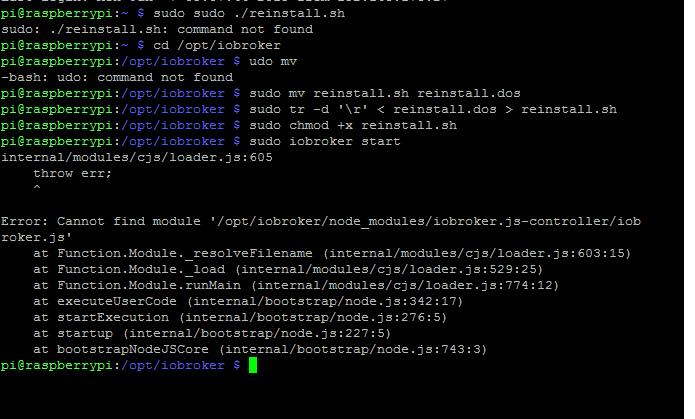
                                  pi@raspberrypi:~ $ sudo iobroker start
                                  module.js:549
                                      throw err;
                                      ^
                                  
                                  Error: Cannot find module '/opt/iobroker/node_modules/iobroker.js-controller/iobroker.js'
                                      at Function.Module._resolveFilename (module.js:547:15)
                                      at Function.Module._load (module.js:474:25)
                                      at Function.Module.runMain (module.js:693:10)
                                      at startup (bootstrap_node.js:188:16)
                                      at bootstrap_node.js:609:3


                                  nodejs stimmt jetzt aber starten tut das dumme ding noch immer nicht

                                  1 Antwort Letzte Antwort
                                  0
                                  • wendy2702W Online
                                    wendy2702W Online
                                    wendy2702
                                    schrieb am zuletzt editiert von
                                    #20
                                    cd /opt/iobroker 
                                    sudo ./reinstall.sh
                                    

                                    Das dauert dann unter Umständen etwas

                                    Bitte keine Fragen per PN, die gehören ins Forum!

                                    Benutzt das Voting rechts unten im Beitrag wenn er euch geholfen hat.

                                    1 Antwort Letzte Antwort
                                    0
                                    • S Offline
                                      S Offline
                                      Shorty2000
                                      schrieb am zuletzt editiert von
                                      #21
                                      pi@raspberrypi:/opt/iobroker $ sudo ./reinstall.sh
                                      module.js:549
                                          throw err;
                                          ^
                                      
                                      Error: Cannot find module '/opt/iobroker/node_modules/iobroker.js-controller/iobroker.js'
                                          at Function.Module._resolveFilename (module.js:547:15)
                                          at Function.Module._load (module.js:474:25)
                                          at Function.Module.runMain (module.js:693:10)
                                          at startup (bootstrap_node.js:188:16)
                                          at bootstrap_node.js:609:3
                                      /opt/iobroker/node_modules
                                      + iobroker.yr@2.0.3
                                      added 4 packages from 50 contributors and audited 4 packages in 4.633s
                                      found 0 vulnerabilities
                                      
                                         ╭───────────────────────────────────────────────────────────────────╮
                                         │                                                                   │
                                         │   New prerelease version of npm available! 6.5.0-next.0 → 6.5.0   │
                                         │     Changelog: https://github.com/npm/cli/releases/tag/v6.5.0     │
                                         │                 Run npm install -g npm to update!                 │
                                         │                                                                   │
                                         ╰───────────────────────────────────────────────────────────────────╯
                                      
                                      DONE iobroker.yr
                                      module.js:549
                                          throw err;
                                          ^
                                      
                                      Error: Cannot find module '/opt/iobroker/node_modules/iobroker.js-controller/iobroker.js'
                                          at Function.Module._resolveFilename (module.js:547:15)
                                          at Function.Module._load (module.js:474:25)
                                          at Function.Module.runMain (module.js:693:10)
                                          at startup (bootstrap_node.js:188:16)
                                          at bootstrap_node.js:609:3
                                      
                                      
                                      1 Antwort Letzte Antwort
                                      0
                                      • S Offline
                                        S Offline
                                        Shorty2000
                                        schrieb am zuletzt editiert von
                                        #22

                                        keine idee mehr?

                                        1 Antwort Letzte Antwort
                                        0
                                        • wendy2702W Online
                                          wendy2702W Online
                                          wendy2702
                                          schrieb am zuletzt editiert von
                                          #23

                                          Ich bin ehrlich: Auf die schnelle nicht.

                                          Gibt es denn die Datei noch auf deinem System:

                                          /opt/iobroker/node_modules/iobroker.js-controller/iobroker.js
                                          

                                          Befürchte das du dir durch deine anfänglichen Versuche etwas zerschossen hast.

                                          Ich gehe mal davon aus das du vorher kein Backup von iobroker und oder der SD-Karte gemacht hast?

                                          Du natürlich auch mal das probieren was dir das log anzeigt:

                                          npm install -g npm to update!  

                                          

                                          Bitte keine Fragen per PN, die gehören ins Forum!

                                          Benutzt das Voting rechts unten im Beitrag wenn er euch geholfen hat.

                                          1 Antwort Letzte Antwort
                                          0
                                          Antworten
                                          • In einem neuen Thema antworten
                                          Anmelden zum Antworten
                                          • Älteste zuerst
                                          • Neuste zuerst
                                          • Meiste Stimmen


                                          Support us

                                          ioBroker
                                          Community Adapters
                                          Donate
                                          FAQ Cloud / IOT
                                          HowTo: Node.js-Update
                                          HowTo: Backup/Restore
                                          Downloads
                                          BLOG

                                          491

                                          Online

                                          32.4k

                                          Benutzer

                                          81.5k

                                          Themen

                                          1.3m

                                          Beiträge
                                          Community
                                          Impressum | Datenschutz-Bestimmungen | Nutzungsbedingungen | Einwilligungseinstellungen
                                          ioBroker Community 2014-2025
                                          logo
                                          • Anmelden

                                          • Du hast noch kein Konto? Registrieren

                                          • Anmelden oder registrieren, um zu suchen
                                          • Erster Beitrag
                                            Letzter Beitrag
                                          0
                                          • Home
                                          • Aktuell
                                          • Tags
                                          • Ungelesen 0
                                          • Kategorien
                                          • Unreplied
                                          • Beliebt
                                          • GitHub
                                          • Docu
                                          • Hilfe