




Raspi Memory geht aus
-
Ich muß mich auch mal einklinken.
Ich habe eine Beebox I5 mit 8GB RAM und 120GB SSD.
Welche Linux-Version haben hier die NUC Besitzer?
Ich hatte vorher Ubuntu Server 16.04 Server LTS. System lief 2 Jahre einwandfrei durch. Nach einem Festplattencrash 18.04 installiert und habe nichts als Probleme.
Gruß, Mathias
Gesendet von meinem MI 8 mit Tapatalk
-
Ok.
Also nochmal mit top. Ich habe nach %MEM sortiert, weil die Anzeige sonst zu dynamsch war.
Also: Webinterface gestartet, ein wenig rumgeklickt und dann eine Weile in Ruhe gelassen:
top - 02:45:47 up 2 days,  1:21,  1 user,  load average: 0,26, 0,19, 0,16
Tasks: 145 total,   1 running, 144 sleeping,   0 stopped,   0 zombie
%Cpu(s):  1,2 us,  0,2 sy,  0,0 ni, 98,7 id,  0,0 wa,  0,0 hi,  0,0 si,  0,0 st

  PID USER      PR  NI    VIRT    RES    SHR S  %CPU %MEM     TIME+ COMMAND
 2103 root      20   0  213292 110160  17292 S   0,0 11,7  10:40.23 iobroker.js-con
 2113 root      20   0  183872  93168  17192 S   0,3  9,9   4:56.65 io.admin.0
 2151 root      20   0  161048  63652  17060 S   0,3  6,7  29:06.92 io.javascript.0
 2385 root      20   0  145892  45220  17888 S   0,0  4,8   2:27.90 io.cloud.0
 2133 root      20   0  134408  42484  17888 S   0,0  4,5   1:49.93 io.vis.0
 2335 root      20   0  143216  41592  27628 S   0,3  4,4   3:08.17 io.amazon-dash.
 2379 root      20   0  141004  41364  17272 S   3,3  4,4  26:06.60 io.hm-rega.0
 2395 root      20   0  141620  40800  17992 S   0,0  4,3   1:55.02 io.alexa2.0
 2120 root      20   0  142220  39616  17148 S   0,0  4,2   2:14.46 io.web.0
 2359 root      20   0  131124  39488  17284 S   0,0  4,2  22:05.29 io.hm-rpc.0
18628 root      20   0  138636  38380  17976 S   0,0  4,1   0:07.32 io.tvspielfilm.
 2286 root      20   0  129744  36936  17920 S   0,0  3,9   1:57.92 io.sayit.0
 2160 root      20   0  122928  32604  17120 S   0,0  3,4   1:47.15 io.socketio.0
 2369 root      20   0  132104  31756  17336 S   0,0  3,4  32:10.83 io.hm-rpc.1
 2309 root      20   0  123124  31648  17144 S   0,0  3,3   2:09.91 io.fritzbox.0
 2238 root      20   0  122620  31300  17148 S   0,0  3,3   1:47.97 io.text2command
 2405 root      20   0  122788  30992  17216 S   0,0  3,3   1:49.29 io.scenes.0
 2349 root      20   0  122056  30616  17216 S   0,0  3,2   1:46.96 io.simple-api.0
  638 redis     20   0   62592  29700   1648 S   0,7  3,1  29:19.87 redis-server
  460 root      20   0   14728   7664   3592 S   0,0  0,8   0:57.95 python
17481 root      20   0   12360   5440   4724 S   0,3  0,6   0:03.23 sshd
17487 root      20   0    6720   4200   2912 S   0,0  0,4   0:00.24 bash
  653 www-data  20   0    7856   3624   2808 S   0,0  0,4   0:06.13 lighttpd
    1 root      20   0   23824   3468   2320 S   0,0  0,4   0:07.43 systemd
  647 root      20   0    7860   3036   2580 S   0,0  0,3   0:00.06 sshd
  352 root      20   0   32140   2956   1868 S   0,0  0,3   0:10.00 rsyslogd
  718 ntp       20   0    5772   2736   2296 S   0,0  0,3   0:18.97 ntpd
17494 root      20   0    5728   2636   2136 R   1,0  0,3   0:25.33 top
  362 message+  20   0    5488   2576   2212 S   0,0  0,3   0:00.23 dbus-daemon
  353 avahi     20   0    4004   2476   2168 S   0,0  0,3   0:31.42 avahi-daemon
  145 root      20   0    9928   2380   2108 S   0,0  0,3   0:45.55 systemd-journal
  385 root      20   0    7124   2252   1888 S   0,0  0,2   0:00.02 cron
  144 root      20   0   11984   2244   1516 S   0,0  0,2   0:00.33 systemd-udevd
 1996 root      20   0    4516   2244   1908 S   0,0  0,2   0:00.05 systemd
  435 root      20   0    7476   2192   1832 S   0,0  0,2   0:00.02 sudo
  360 root      20   0    3848   2188   1940 S   0,0  0,2   0:00.97 systemd-logind
  758 root      20   0    4436   2068   1772 S   0,0  0,2   0:00.45 rpcbind
  356 root      20   0    5572   1948   1724 S   0,0  0,2   0:04.16 cron
  628 root      20   0    2560   1732   1448 S   0,0  0,2   0:04.48 dhcpcd
  442 root      20   0    7152   1540   1120 S   0,0  0,2   0:01.97 wpa_supplicant
  726 root      20   0    4524   1528   1400 S   0,0  0,2   0:00.02 agetty
  708 nobody    20   0    2288   1444   1320 S   0,0  0,2   0:01.58 thd
 1999 root      20   0   25336   1248      0 S   0,0  0,1   0:00.00 (sd-pam)
  748 root      20   0    4808    668    488 S   0,0  0,1   0:00.03 bluetoothd
  430 root      20   0    1908    324    260 S   0,0  0,0   0:00.00 sh
  433 root      20   0    1908    312    248 S   0,0  0,0   0:00.00 sh
  386 avahi     20   0    3872    228      0 S   0,0  0,0   0:00.00 avahi-daemon
  742 root      20   0    2064    116      0 S   0,0  0,0   0:00.00 hciattach
    2 root      20   0       0      0      0 S   0,0  0,0   0:00.13 kthreadd
    3 root      20   0       0      0      0 S   0,0  0,0   0:22.47 ksoftirqd/0
    5 root       0 -20       0      0      0 S   0,0  0,0   0:00.00 kworker/0:0H
    7 root      20   0       0      0      0 S   0,3  0,0   2:54.30 rcu_sched
    8 root      20   0       0      0      0 S   0,0  0,0   0:00.00 rcu_bh
    9 root      rt   0       0      0      0 S   0,0  0,0   0:00.51 migration/0
   10 root       0 -20       0      0      0 S   0,0  0,0   0:00.00 lru-add-drain
   11 root      20   0       0      0      0 S   0,0  0,0   0:00.00 cpuhp/0
   12 root      20   0       0      0      0 S   0,0  0,0   0:00.00 cpuhp/1
   13 root      rt   0       0      0      0 S   0,0  0,0   0:00.51 migration/1
VIS gestartet und ein wenig drin rumgeklickt:
top - 02:47:36 up 2 days,  1:23,  1 user,  load average: 0,12, 0,17, 0,16
Tasks: 144 total,   1 running, 143 sleeping,   0 stopped,   0 zombie
%Cpu(s):  1,6 us,  0,5 sy,  0,0 ni, 97,9 id,  0,0 wa,  0,0 hi,  0,0 si,  0,0 st

  PID USER      PR  NI    VIRT    RES    SHR S  %CPU %MEM     TIME+ COMMAND
 2120 root      20   0  242076 151044  17148 S   1,3 16,0   2:20.85 io.web.0
 2103 root      20   0  179100  78864  17292 S   5,0  8,3  10:46.01 iobroker.js-con
 2113 root      20   0  164312  64236  17192 S   0,0  6,8   4:57.23 io.admin.0
 2151 root      20   0  161048  64180  17060 S   0,7  6,8  29:07.72 io.javascript.0
 2385 root      20   0  145892  44608  17888 S   0,0  4,7   2:27.98 io.cloud.0
 2133 root      20   0  134408  41764  17888 S   0,3  4,4   1:50.00 io.vis.0
 2379 root      20   0  141004  41752  17272 S   0,0  4,4  26:06.95 io.hm-rega.0
 2395 root      20   0  141620  41172  17992 S   0,3  4,4   1:55.09 io.alexa2.0
 2335 root      20   0  143216  41068  27628 S   0,0  4,3   3:08.29 io.amazon-dash.
 2359 root      20   0  131124  40504  17284 S   0,0  4,3  22:06.05 io.hm-rpc.0
 2286 root      20   0  129744  36412  17920 S   0,0  3,9   1:57.99 io.sayit.0
 2369 root      20   0  135176  35464  17336 S   0,0  3,8  32:11.80 io.hm-rpc.1
 2160 root      20   0  122928  32956  17120 S   0,0  3,5   1:47.21 io.socketio.0
 2309 root      20   0  123124  32004  17144 S   0,0  3,4   2:09.97 io.fritzbox.0
 2405 root      20   0  122788  31292  17216 S   0,0  3,3   1:49.35 io.scenes.0
 2349 root      20   0  122056  30980  17216 S   0,0  3,3   1:47.02 io.simple-api.0
 2238 root      20   0  122620  30544  17148 S   0,0  3,2   1:48.03 io.text2command
  638 redis     20   0   62592  29712   1648 S   0,7  3,1  29:20.86 redis-server
  460 root      20   0   14728   7664   3592 S   0,0  0,8   0:57.99 python
17481 root      20   0   12360   5440   4724 S   0,0  0,6   0:03.35 sshd
17487 root      20   0    6720   4200   2912 S   0,0  0,4   0:00.24 bash
  653 www-data  20   0    7856   3624   2808 S   0,0  0,4   0:06.14 lighttpd
    1 root      20   0   23824   3468   2320 S   0,0  0,4   0:07.43 systemd
  647 root      20   0    7860   3036   2580 S   0,0  0,3   0:00.06 sshd
  352 root      20   0   32140   2984   1868 S   0,0  0,3   0:10.00 rsyslogd
  718 ntp       20   0    5772   2736   2296 S   0,0  0,3   0:18.98 ntpd
17494 root      20   0    5728   2636   2136 R   1,0  0,3   0:26.31 top
  362 message+  20   0    5488   2576   2212 S   0,0  0,3   0:00.23 dbus-daemon
  353 avahi     20   0    4004   2476   2168 S   0,0  0,3   0:31.42 avahi-daemon
  145 root      20   0    9928   2392   2120 S   0,0  0,3   0:45.57 systemd-journal
  385 root      20   0    7124   2252   1888 S   0,0  0,2   0:00.02 cron
  144 root      20   0   11984   2244   1516 S   0,0  0,2   0:00.33 systemd-udevd
 1996 root      20   0    4516   2244   1908 S   0,0  0,2   0:00.05 systemd
  435 root      20   0    7476   2192   1832 S   0,0  0,2   0:00.02 sudo
  360 root      20   0    3848   2188   1940 S   0,0  0,2   0:00.97 systemd-logind
  758 root      20   0    4436   2068   1772 S   0,0  0,2   0:00.45 rpcbind
  356 root      20   0    5572   1948   1724 S   0,0  0,2   0:04.16 cron
  628 root      20   0    2560   1732   1448 S   0,0  0,2   0:04.48 dhcpcd
  442 root      20   0    7152   1540   1120 S   0,0  0,2   0:01.97 wpa_supplicant
  726 root      20   0    4524   1528   1400 S   0,0  0,2   0:00.02 agetty
  708 nobody    20   0    2288   1444   1320 S   0,0  0,2   0:01.58 thd
 1999 root      20   0   25336   1248      0 S   0,0  0,1   0:00.00 (sd-pam)
  748 root      20   0    4808    668    488 S   0,0  0,1   0:00.03 bluetoothd
  430 root      20   0    1908    324    260 S   0,0  0,0   0:00.00 sh
  433 root      20   0    1908    312    248 S   0,0  0,0   0:00.00 sh
  386 avahi     20   0    3872    228      0 S   0,0  0,0   0:00.00 avahi-daemon
  742 root      20   0    2064    116      0 S   0,0  0,0   0:00.00 hciattach
    2 root      20   0       0      0      0 S   0,0  0,0   0:00.13 kthreadd
    3 root      20   0       0      0      0 S   0,0  0,0   0:22.48 ksoftirqd/0
    5 root       0 -20       0      0      0 S   0,0  0,0   0:00.00 kworker/0:0H
    7 root      20   0       0      0      0 S   0,3  0,0   2:54.42 rcu_sched
    8 root      20   0       0      0      0 S   0,0  0,0   0:00.00 rcu_bh
    9 root      rt   0       0      0      0 S   0,0  0,0   0:00.51 migration/0
   10 root       0 -20       0      0      0 S   0,0  0,0   0:00.00 lru-add-drain
   11 root      20   0       0      0      0 S   0,0  0,0   0:00.00 cpuhp/0
   12 root      20   0       0      0      0 S   0,0  0,0   0:00.00 cpuhp/1
   13 root      rt   0       0      0      0 S   0,0  0,0   0:00.51 migration/1
   14 root      20   0       0      0      0 S   0,0  0,0   0:01.69 ksoftirqd/1
Dann edit (ging nur als screenshot, da putty aussteigt)
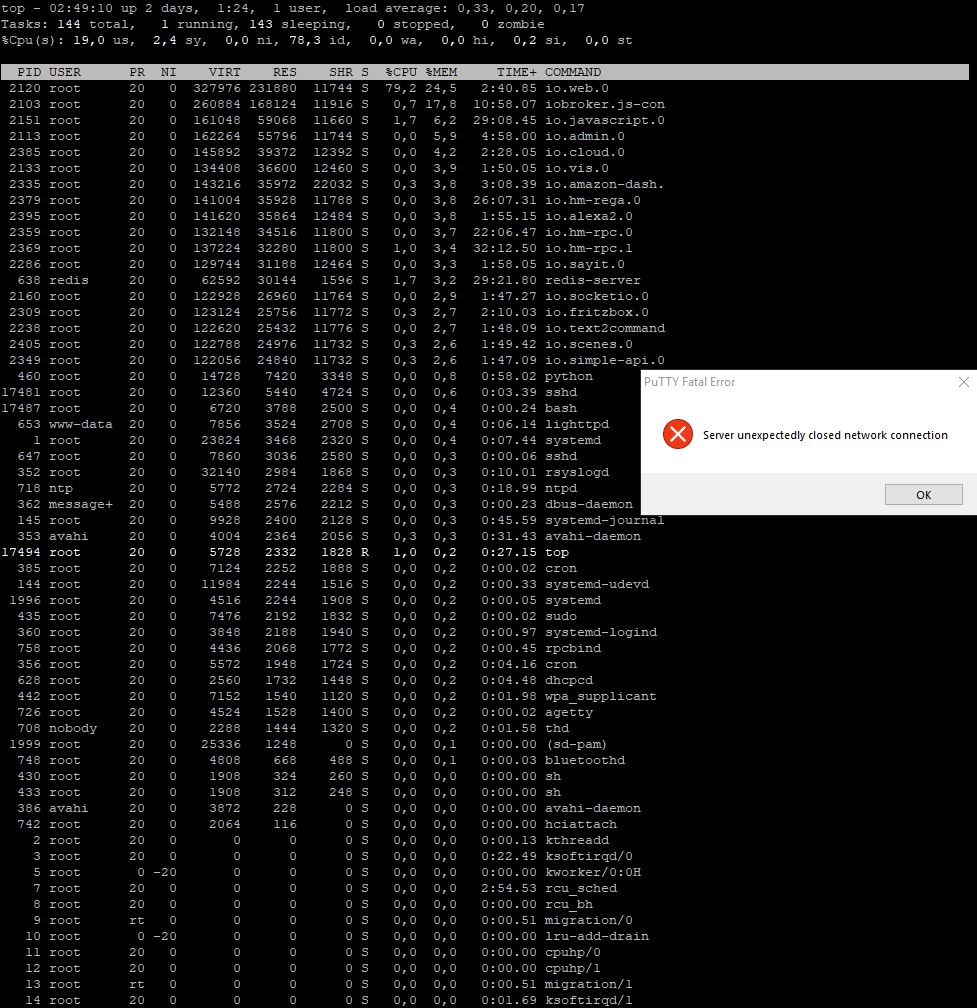
Gruss Ralf
-
Hallo Ralf,
da muss meiner Meinung nach etwas anderes faul sein.
Die %CPU in den Spalten beziehen sich nur auf einen Kern, davon hat der RasPi 4. Dementsprechend siehst du in der Titelzeile (Screenshot) dass nur 19% der CPU belastet und 78,3% idle (ohne Aufgabe) waren.
Auch die Load ist sehr niedrig.
Beim Speicher bin ICH mir nicht sicher.
Habe die einzelenen Werte nicht addiert, aber überschlagsweise könnten es 100% sein. Hier weiß ich aber nicht, ob das die linuxtypische Verteilung incl. Cache ist, oder ob das echte Nutzung ist.
Da muss noch einer etwas zu sagen, der es weiß
Ich weiß jetzt auch nicht, ob es schon gefragt wurde:
Was nutzst du für ein Netzteil?
Gruß
Rainer
-
Hallo
@apollon77:Sonst: welche nodejs Version nutzt du? `
root@ioBroker-Pi2:~# nodejs -vv6.14.2
Wegen dem Netzteil vom Raspi: Das ist ein 220V stecker mit zwei USB Ausgängen. Sowas:https://www.arktis.de/media/image/9d/01 … 00x600.jpg
Habe die einzelenen Werte nicht addiert, aber überschlagsweise könnten es 100% sein. `
Also ich hab die Werte mal addiert und komme auf 108% ;-) Also schon ziemlich voll der Speicher….Was anderes: Ich habe gestern das Tinkerbord bekommen und Hormorans Image auf eine SD Karte gebrannt. Das Tinkerboard gibt aber kein Signal am HDMI aus.
Die rote LED leuchtet dauerhaft, die gebe und grüne blinken hektisch, irgendwann blibkt dann nur noch die gelbe. Und zwar immer kurz, kurz, pause
Image kaputt? Board am A..??
Netzteil ist eines das ich früher am Raspi hatte (1,2 A) . Aber auch mit einem 2A Netzteil von einem Acer Tablet sieht es nicht besser aus.
Könnt ihr Netzteile empfehlen?
Gruss Ralf
-
Das ist ein 220V stecker mit zwei USB Ausgängen. Sowas: `
Dem würde ich nicht trauenAber auch mit einem 2A Netzteil von einem Acer Tablet `
Das solltest du mindestens am RasPi haben.Das Tinker braucht ein sehr gutes Netzteil und ein sehr gutes Kabel.
@derrapf:Das Tinkerboard gibt aber kein Signal am HDMI aus. `
Hab ich nicht getestet, arbeite nur headless per puttyDas Tinkerboard gibt aber kein Signal am HDMI aus.
Die rote LED leuchtet dauerhaft, die gebe und grüne blinken hektisch, irgendwann blibkt dann nur noch die gelbe. Und zwar immer kurz, kurz, pause `
seh ich mir mal bei meinen produktiven anEDIT:
Blinken ist korrekt. HDMI gibt ggf. nur bestimmte Auflösuungen aus. Wie gesagt nicht getestet.
Gruß
Rainer
-
Hallo Rainer
Zum Netzteil des Raspi. Hat bisher keine Sorgen gemacht. Und es sieht ja gemäss top tatsächlich so aus als ob das Memory ausgeht, oder?
Eben auch das Tinkerboard mit dem Image von Asus getestet.
Auch keine Ausgabe an HDMI.
Hier leuchtet die Rote dauerhaft. Aber weder die Grüne noch die Gelbe.
Headless arbeite ich normalerweise auch, aber beim Einrichten hab ich ja noch keine IP (Hab kein LAN Kabel hier) und muss erstmal das WLAN einrichten.
Normalerweise funktioniert das aber doch mit der HDMI Ausgabe. Zumindest hatte ich weder beim Raspi noch beim Bananapi Probleme.
Aber ich check nochmal mit dem Bananapi. Vielleicht hat das Display oder das Kabel einen Hau.
Und dann geh ich mal wo LAN Kabel rumliegen….Man das könnte alles so einfach sein...
Gruss Ralf
-
OK. Also erster Zwischenbericht. Das Image von Asus läuft headless.
Aber immer noch kein HDMI Output. Scheint aber öfter vorzukommen:
https://www.google.com/search?client=fi … dmi+output
Jetzt probiere ich mal das Image von Hormoran. HDMI Output wäe aber schon nicht schlecht….
edit: Hormorans image läuft auch. Aber:
root@ioBroker-Tinker:/opt# du -sh
540M    .
Die Karte hat aber 32GB
Wie kann man den Speicher nochmal erweitern?
Gruss Ralf
-
Hab das Erweitern mit der Anleitung unter viewtopic.php?t=9327 hinbekommen.
Jetzt ist mir aufgefallen dass die /etc/init.d/iobroker.sh fehlt. Damit dürfte IoBroker nach dem Reboot nicht starten. Absicht? Vergessen?
Reicht es die Datei da hin zu kopieren?
Gruss Ralf
-
Oh Menno. Das Ding mag mich nicht.
Was hab ich gemacht.
-
iobroker Verzeichnis von Rainer umbenannt in iobroker.alt
-
IoBroker Verzeichnis vom Raspi nach /opt kopiert
-
iobroker gestartet.
root@ioBroker-Tinker:~# cd /opt/iobroker
root@ioBroker-Tinker:/opt/iobroker# iobroker start
Starting iobroker controller daemon...
iobroker controller daemon started. PID: 3321
root@ioBroker-Tinker:/opt/iobroker# iobroker status
No connection to states 127.0.0.1:6379[redis]
Ok. geht schon mal nicht so einfach.
Iobroker angehalten.
Gesucht im Forum nach obigem Fehler. Ergebnis redis scheint nicht installiert zu sein (obwohl in der Doku steht es wäre)
Also:
root@ioBroker-Tinker:/opt/iobroker# sudo apt-get install redis-server
Paketlisten werden gelesen... Fertig
Abhängigkeitsbaum wird aufgebaut.
Statusinformationen werden eingelesen.... Fertig
The following additional packages will be installed:
  libjemalloc1 redis-tools
Vorgeschlagene Pakete:
  ruby-redis
Die folgenden NEUEN Pakete werden installiert:
  libjemalloc1 redis-server redis-tools
0 aktualisiert, 3 neu installiert, 0 zu entfernen und 0 nicht aktualisiert.
Es müssen 846 kB an Archiven heruntergeladen werden.
Nach dieser Operation werden 1.765 kB Plattenplatz zusätzlich benutzt.
Möchten Sie fortfahren? [Y/n] y
Holen:1 http://cdn-fastly.deb.debian.org/debian stretch/main armhf libjemalloc1                                          armhf 3.6.0-9.1 [82,9 kB]
Holen:2 http://cdn-fastly.deb.debian.org/debian stretch/main armhf redis-tools a                                         rmhf 3:3.2.6-3+deb9u2 [402 kB]
Holen:3 http://cdn-fastly.deb.debian.org/debian stretch/main armhf redis-server                                          armhf 3:3.2.6-3+deb9u2 [361 kB]
Es wurden 846 kB in 5 s geholt (151 kB/s).
Vormals nicht ausgewähltes Paket libjemalloc1 wird gewählt.
(Lese Datenbank ... 35362 Dateien und Verzeichnisse sind derzeit installiert.)
Vorbereitung zum Entpacken von .../libjemalloc1_3.6.0-9.1_armhf.deb ...
Entpacken von libjemalloc1 (3.6.0-9.1) ...
Vormals nicht ausgewähltes Paket redis-tools wird gewählt.
Vorbereitung zum Entpacken von .../redis-tools_3%3a3.2.6-3+deb9u2_armhf.deb ...
Entpacken von redis-tools (3:3.2.6-3+deb9u2) ...
Vormals nicht ausgewähltes Paket redis-server wird gewählt.
Vorbereitung zum Entpacken von .../redis-server_3%3a3.2.6-3+deb9u2_armhf.deb ...
Entpacken von redis-server (3:3.2.6-3+deb9u2) ...
libjemalloc1 (3.6.0-9.1) wird eingerichtet ...
Trigger für libc-bin (2.24-11+deb9u3) werden verarbeitet ...
Trigger für systemd (232-25+deb9u6) werden verarbeitet ...
Trigger für man-db (2.7.6.1-2) werden verarbeitet ...
redis-tools (3:3.2.6-3+deb9u2) wird eingerichtet ...
redis-server (3:3.2.6-3+deb9u2) wird eingerichtet ...
Created symlink /etc/systemd/system/redis.service → /lib/systemd/system/redis-se                                         rver.service.
Created symlink /etc/systemd/system/multi-user.target.wants/redis-server.service                                          → /lib/systemd/system/redis-server.service.
Trigger für systemd (232-25+deb9u6) werden verarbeitet ...
Ok, da scheint was installiert worden zu sein
Nächter Schritt gemäß dem gefundenen Post:
root@ioBroker-Tinker:/opt/iobroker#  sudo iobroker host this
No instances found for host "this".
Hmmm…no instances found klingt ungesund, oder?
Dann:
root@ioBroker-Tinker:/opt/iobroker# sudo iobroker setup custom
Type of objects DB [(f)ile, (c)ouch, (r)edis], default [file]: r
Host / Unix Socket of objects DB(redis), default[127.0.0.1]:
Port of objects DB(redis), default[6379]:
Type of states DB [(f)file, (r)edis], default [redis]:
Host / Unix Socket of states DB (redis), default[127.0.0.1]:
Port of states DB (redis), default[6379]:
Host name of this machine [ioBroker-Tinker]:
creating conf/iobroker.json
Dauemen drücken und neu starten
root@ioBroker-Tinker:/opt/iobroker# iobroker start
Starting iobroker controller daemon...
/opt/iobroker/node_modules/iobroker.js-controller/node_modules/daemonize2/lib/da                                         emonize.js:136
            throw new Error(msg.error);
            ^

Error: ReferenceError: id is not defined
    at checkObjectRights (/opt/iobroker/node_modules/iobroker.js-controller/lib/                                         objects/objectsInRedis.js:990:26)
    at ObjectsInRedis.subscribe (/opt/iobroker/node_modules/iobroker.js-controll                                         er/lib/objects/objectsInRedis.js:1062:13)
    at init (/opt/iobroker/node_modules/iobroker.js-controller/controller.js:257                                         3:13)
    at Object. <anonymous>(/opt/iobroker/node_modules/iobroker.js-controller/con                                         troller.js:2624:1)
    at Module._compile (module.js:653:30)
    at Object.Module._extensions..js (module.js:664:10)
    at Module.load (module.js:566:32)
    at tryModuleLoad (module.js:506:12)
    at Function.Module._load (module.js:498:3)
    at Module.require (module.js:597:17)
    at ChildProcess. <anonymous>(/opt/iobroker/node_modules/iobroker.js-controll                                         er/node_modules/daemonize2/lib/daemonize.js:136:19)
    at emitTwo (events.js:126:13)
    at ChildProcess.emit (events.js:214:7)
    at emit (internal/child_process.js:762:12)
    at _combinedTickCallback (internal/process/next_tick.js:142:11)
    at process._tickCallback (internal/process/next_tick.js:181:9)
root@ioBroker-Tinker:/opt/iobroker#</anonymous></anonymous>
Bäääh. Sch… Hätte ja zur Abwechslung mal funktionieren können.
Was mach ich jetzt?
Gruss Ralf
-
-
Was machst du denn?
No connection to states 127.0.0.1:6379[redis] `
In den neueren Images ist Redis nicht installiert:SD-Image Tinkerboard ioBroker Image -nodejs 8.14.0 - npm 6.4.1 -ioBroker minimal user: root pass: 1234 Armbian Stretch Servernix redis.
obwohl in der Doku steht es wäre `
welche Doku - zum neuen Image gibt es keine :(Welches Image hast du?
Du brauchst auch nit redis zu installieren, stell per````
iobroker setup customBist du sicher, dass deine Kopie des /opt/iobroker Ordners richtig ist? Hast du ein npm reconfigure oder reinstall.sh ausgeführt. Die Pakete sind für einen RasPi kompiliert, das Tinkerboard hat eine ganz andere Hardware. Sicheres Vorgehen ist: - auf dem Pi ein backup - Backup auf PC sichern - Image nehmen - Verzeichnis /opt/iobroker /backups anlegen - gesichertes Backup da rein - iobroker restore 0 ausführen - 2 Stunden Kaffe (oder jetzt eher Bier) trinken gehen - sollte laufen Gruß Rainer Gruß Rainer -
Was machst du denn? `
Kaputt.welche Doku - zum neuen Image gibt es keine :(
Welches Image hast du? `
Die Doku ist von da:
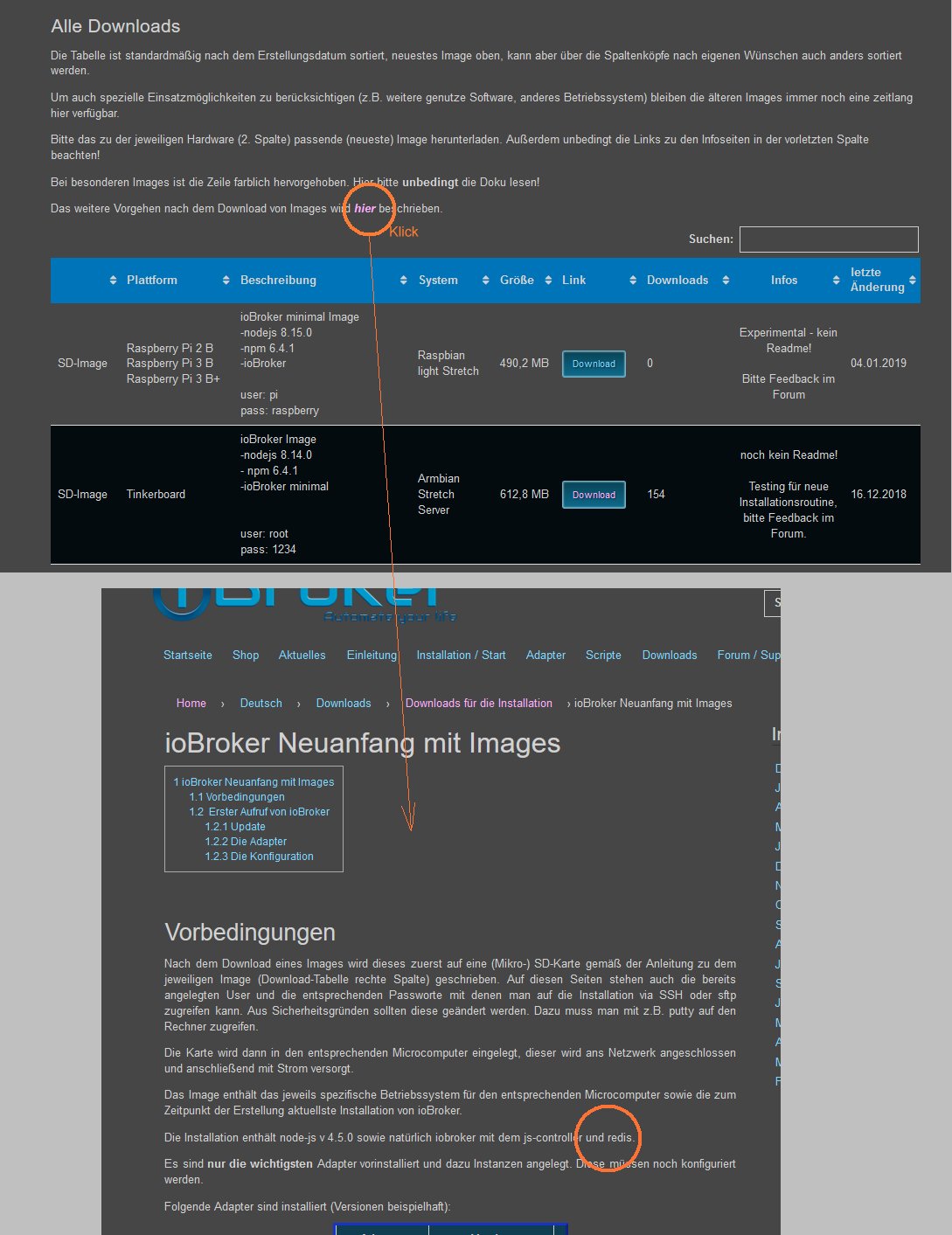
Wenn man von der Seite wo die Images gelistet sind auf die oben gezeigte kommt, dann denkt man natürich das gilt für alle Images.Bist du sicher, dass deine Kopie des /opt/iobroker Ordners richtig ist? `
Das hab ich jetzt auch vermutet. Dass bei der Kopie was schiefgegangen ist. Ich hab also nochmal die Kopie nach /opt kopiert, rebootet
Und siehe da: Es löppt! Juhu!!
Ach nee .. das log ist rot.
Die Pakete sind für einen RasPi kompiliert, das Tinkerboard hat eine ganz andere Hardware. `
Mist, stimmt. Hab ich völlig verdrängt.Ich probier mal Deine Vorgensweise.
Melde mich
Gruss Ralf
-
Die Doku ist von da: `
Danke, muss ich ändern!Ich probier mal Deine Vorgensweise. `
oder reinstall.sh ausführen; dauert etwas (bis zwei Stunden)Viel Glück
Gruß
Rainer
-
Hallo Rainer
Ich habe jetzt in der Reihenfolge folgendes gemacht
-
sudo -i und passwd um dass root password zu ändern
-
/etc/network/interfaces angepasst und statische IP vergeben
-
fstab geändert um mein NAS zu mounten dazu nfs-common installiert
-
SD Karte erweitert gemäß :viewtopic.php?t=9327
-
iobroker.sh nach /etc/init.d kopiert (die hat gefehlt)
-
reboot
-
iobroker übers webinterface getestet. Läuft. iobroker verzeichnis gebackuppt
-
sudo apt-get install redis-server
-
iobroker stop
-
sudo iobroker host this
-
sudo iobroker setup custom hier auf redis umgestellt
-
iobroker start
Ergebnis
root@ioBroker-Tinker:/opt# iobroker start
Starting iobroker controller daemon...
/opt/iobroker/node_modules/daemonize2/lib/daemonize.js:136
            throw new Error(msg.error);
            ^

Error: ReferenceError: id is not defined
    at checkObjectRights (/opt/iobroker/node_modules/iobroker.js-controller/lib/objects/objectsInRedis.js:990:26)
    at ObjectsInRedis.subscribe (/opt/iobroker/node_modules/iobroker.js-controller/lib/objects/objectsInRedis.js:1062:13)
    at init (/opt/iobroker/node_modules/iobroker.js-controller/controller.js:2573:13)
    at Object. <anonymous>(/opt/iobroker/node_modules/iobroker.js-controller/controller.js:2624:1)
    at Module._compile (module.js:653:30)
    at Object.Module._extensions..js (module.js:664:10)
    at Module.load (module.js:566:32)
    at tryModuleLoad (module.js:506:12)
    at Function.Module._load (module.js:498:3)
    at Module.require (module.js:597:17)
    at ChildProcess. <anonymous>(/opt/iobroker/node_modules/daemonize2/lib/daemonize.js:136:19)
    at emitTwo (events.js:126:13)
    at ChildProcess.emit (events.js:214:7)
    at emit (internal/child_process.js:762:12)
    at _combinedTickCallback (internal/process/next_tick.js:142:11)
    at process._tickCallback (internal/process/next_tick.js:181:9)
root@ioBroker-Tinker:/opt#</anonymous></anonymous>
Hab ich irgendwas mit dem redis falsch gemacht?
Wenn ich wieder auf File zurück stelle gehts wieder.
Gruss Ralf
-
-
Sicheres Vorgehen ist:
-
auf dem Pi ein backup
-
Backup auf PC sichern
-
Image nehmen
-
Verzeichnis /opt/iobroker /backups anlegen
-
gesichertes Backup da rein
-
iobroker restore 0 ausführen
-
2 Stunden Kaffe (oder jetzt eher Bier) trinken gehen
-
sollte laufen `
So. Bin grad dabei. Melde mich wieder.
Ist das normal dass das Backup nur files/vis.0 enthält?
Gruss Ralf
-



Hey! Du scheinst an dieser Unterhaltung interessiert zu sein, hast aber noch kein Konto.
Hast du es satt, bei jedem Besuch durch die gleichen Beiträge zu scrollen? Wenn du dich für ein Konto anmeldest, kommst du immer genau dorthin zurück, wo du zuvor warst, und kannst dich über neue Antworten benachrichtigen lassen (entweder per E-Mail oder Push-Benachrichtigung). Du kannst auch Lesezeichen speichern und Beiträge positiv bewerten, um anderen Community-Mitgliedern deine Wertschätzung zu zeigen.
Mit deinem Input könnte dieser Beitrag noch besser werden 💗
Registrieren Anmelden447
Online33.0k
Benutzer83.5k
Themen1.3m
Beiträge