




[iot-Aktion] iot-Adapter verbindet sich nicht bzw Verbindung ist "gelb"
-
Die Warnungen beim install können von install via cloud kommen
Die zweite Meldung weißt für mich auf ein smart gerät hin was keine vollständige Definition hat. Am besten hier GitHub issue beim Iot Adapter anlegen. Sehe ich aber zum ersten Mal.
Zu EAI_AGAIN
EAI_AGAIN is a DNS lookup timed out error, means it is a network connectivity error or proxy related error.
Hat dein lokales System ein DNS Problem? `
Hi apollon,
hab den Adapter nochmal deinstalliert und neuinstalliert. Die erste Meldung tritt nun nicht mehr auf.
Das EAI Again kommt noch immer. Hab mich mal per SSH auf dem ioBroker eingeloggt und ping google.com funktioniert. Wenn ich ein Ping auf a18wym7vjdl22g.iot.eu-west-1.amazonaws.com:8883 mache, kommt nur eine Fehlermeldung, das der Name oder Dienst nicht bekannt ist.
iot.0	2018-12-31 18:40:21.009	info	Connection changed: disconnect
iot.0	2018-12-31 18:40:21.006	error	getaddrinfo EAI_AGAIN a18wym7vjdl22g.iot.eu-west-1.amazonaws.com:8883
iot.0	2018-12-31 18:40:21.006	error	getaddrinfo EAI_AGAIN a18wym7vjdl22g.iot.eu-west-1.amazonaws.com:8883
iot.0	2018-12-31 18:40:00.955	info	Connection changed: disconnect
iot.0	2018-12-31 18:40:00.955	error	getaddrinfo EAI_AGAIN a18wym7vjdl22g.iot.eu-west-1.amazonaws.com:8883
iot.0	2018-12-31 18:40:00.953	error	getaddrinfo EAI_AGAIN a18wym7vjdl22g.iot.eu-west-1.amazonaws.com:8883
iot.0	2018-12-31 18:39:50.924	info	Connection changed: disconnect
iot.0	2018-12-31 18:39:50.924	error	getaddrinfo EAI_AGAIN a18wym7vjdl22g.iot.eu-west-1.amazonaws.com:8883
iot.0	2018-12-31 18:39:50.923	error	getaddrinfo EAI_AGAIN a18wym7vjdl22g.iot.eu-west-1.amazonaws.com:8883
iot.0	2018-12-31 18:39:45.890	info	Connection changed: disconnect
iot.0	2018-12-31 18:39:45.889	error	getaddrinfo EAI_AGAIN a18wym7vjdl22g.iot.eu-west-1.amazonaws.com:8883
iot.0	2018-12-31 18:39:45.887	error	getaddrinfo EAI_AGAIN a18wym7vjdl22g.iot.eu-west-1.amazonaws.com:8883
iot.0	2018-12-31 18:39:43.856	info	Connecting with a18wym7vjdl22g.iot.eu-west-1.amazonaws.com
iot.0	2018-12-31 18:39:43.826	info	starting. Version 0.2.2 in /opt/iobroker/node_modules/iobroker.iot, node: v8.12.0
iot.0	2018-12-31 18:39:43.629	info	States connected to redis: 127.0.0.1:6379
host.ioB-RasPi	2018-12-31 18:39:41.584	info	instance system.adapter.iot.0 started with pid 5167
ping auf iot.eu-west-1.amazonaws.com geht auch.
-
Dann ist das wohl das Problem. Ich kann a18wym7vjdl22g.iot.eu-west-1.amazonaws.com auflösen!!
Was sagt denn dein ioBroker Server wenn du
host a18wym7vjdl22g.iot.eu-west-1.amazonaws.comeingibst
-
Da kommt jetzt
a18wym7vjdl22g.iot.eu-west-1.amazonaws.com is an alias for iotmoonraker.eu-west-                                       1.prod.iot.eu-west-1.amazonaws.com.
iotmoonraker.eu-west-1.prod.iot.eu-west-1.amazonaws.com is an alias for dualstac                                       k.iotmoonraker-e-elb-9q2vvmxp3rir-1271985754.eu-west-1.elb.amazonaws.com.
dualstack.iotmoonraker-e-elb-9q2vvmxp3rir-1271985754.eu-west-1.elb.amazonaws.com                                        has address 52.209.98.184
dualstack.iotmoonraker-e-elb-9q2vvmxp3rir-1271985754.eu-west-1.elb.amazonaws.com                                        has address 52.18.170.86
dualstack.iotmoonraker-e-elb-9q2vvmxp3rir-1271985754.eu-west-1.elb.amazonaws.com                                        has address 52.17.87.69
dualstack.iotmoonraker-e-elb-9q2vvmxp3rir-1271985754.eu-west-1.elb.amazonaws.com                                        has address 52.49.204.86
dualstack.iotmoonraker-e-elb-9q2vvmxp3rir-1271985754.eu-west-1.elb.amazonaws.com                                        has address 52.30.86.222
dualstack.iotmoonraker-e-elb-9q2vvmxp3rir-1271985754.eu-west-1.elb.amazonaws.com                                        has address 54.171.231.6
dualstack.iotmoonraker-e-elb-9q2vvmxp3rir-1271985754.eu-west-1.elb.amazonaws.com                                        has address 52.50.121.37
dualstack.iotmoonraker-e-elb-9q2vvmxp3rir-1271985754.eu-west-1.elb.amazonaws.com                                        has address 54.154.234.121
dualstack.iotmoonraker-e-elb-9q2vvmxp3rir-1271985754.eu-west-1.elb.amazonaws.com                                        has IPv6 address 2a01:578:3::3411:5745
dualstack.iotmoonraker-e-elb-9q2vvmxp3rir-1271985754.eu-west-1.elb.amazonaws.com                                        has IPv6 address 2a01:578:3::36ab:e706
dualstack.iotmoonraker-e-elb-9q2vvmxp3rir-1271985754.eu-west-1.elb.amazonaws.com                                        has IPv6 address 2a01:578:3::3431:cc56
dualstack.iotmoonraker-e-elb-9q2vvmxp3rir-1271985754.eu-west-1.elb.amazonaws.com                                        has IPv6 address 2a01:578:3::369a:ea79
dualstack.iotmoonraker-e-elb-9q2vvmxp3rir-1271985754.eu-west-1.elb.amazonaws.com                                        has IPv6 address 2a01:578:3::341e:56de
dualstack.iotmoonraker-e-elb-9q2vvmxp3rir-1271985754.eu-west-1.elb.amazonaws.com                                        has IPv6 address 2a01:578:3::34d1:62b8
dualstack.iotmoonraker-e-elb-9q2vvmxp3rir-1271985754.eu-west-1.elb.amazonaws.com                                        has IPv6 address 2a01:578:3::3432:7925
dualstack.iotmoonraker-e-elb-9q2vvmxp3rir-1271985754.eu-west-1.elb.amazonaws.com                                        has IPv6 address 2a01:578:3::3412:aa56
Die Ausgabe oben ist nach dem Neustart.
Hab den iot Adapter jetzt nochmal aktiviert. Leider kommt die gleiche Meldung im Log und die Exception taucht auch wieder auf.
Caught 2019-01-01 23:22:31.934 error by controller[1]: (node:723) [DEP0018] DeprecationWarning: Unhandled promise rejections are deprecated. In the future, promise rejections that are not handled will terminate the Node.js process with Caught 2019-01-01 23:22:31.934 error by controller[1]: (node:723) UnhandledPromiseRejectionWarning: Unhandled promise rejection. This error originated either by throwing inside of an async function without a catch block, or by rejecting Caught 2019-01-01 23:22:31.933 error by controller[0]: at <anonymous> Caught 2019-01-01 23:22:31.933 error by controller[0]: at _readObjects.then.data (/opt/iobroker/node_modules/iobroker.iot/lib/GoogleHome.js:355:23) Caught 2019-01-01 23:22:31.932 error by controller[0]: at Array.forEach (<anonymous>) Caught 2019-01-01 23:22:31.932 error by controller[0]: at funcs.forEach.funcId (/opt/iobroker/node_modules/iobroker.iot/lib/GoogleHome.js:368:41) Caught 2019-01-01 23:22:31.932 error by controller[0]: at Array.forEach (<anonymous>) Caught 2019-01-01 23:22:31.931 error by controller[0]: at func.common.members.forEach.id (/opt/iobroker/node_modules/iobroker.iot/lib/GoogleHome.js:369:31) Caught 2019-01-01 23:22:31.931 error by controller[0]: at Array.forEach (<anonymous>) Caught 2019-01-01 23:22:31.931 error by controller[0]: at rooms.forEach.roomId (/opt/iobroker/node_modules/iobroker.iot/lib/GoogleHome.js:389:38) Caught 2019-01-01 23:22:31.930 error by controller[0]: at GoogleHome.processState (/opt/iobroker/node_modules/iobroker.iot/lib/GoogleHome.js:245:33) Caught 2019-01-01 23:22:31.930 error by controller[0]: at GoogleHome.getSmartName (/opt/iobroker/node_modules/iobroker.iot/lib/GoogleHome.js:230:31) Caught 2019-01-01 23:22:31.929 error by controller[0]: (node:723) UnhandledPromiseRejectionWarning: TypeError: Cannot read property 'common' of undefined host.ioB-RasPi 2019-01-01 23:22:31.834 info stopInstance system.adapter.iot.0 killing pid 723 host.ioB-RasPi 2019-01-01 23:22:31.833 info stopInstance system.adapter.iot.0 host.ioB-RasPi 2019-01-01 23:22:31.829 info object change system.adapter.iot.0 iot.0 2019-01-01 23:22:22.352 info Connection changed: disconnect iot.0 2019-01-01 23:22:22.351 error getaddrinfo EAI_AGAIN a18wym7vjdl22g.iot.eu-west-1.amazonaws.com:8883 iot.0 2019-01-01 23:22:22.350 error getaddrinfo EAI_AGAIN a18wym7vjdl22g.iot.eu-west-1.amazonaws.com:8883 iot.0 2019-01-01 23:22:17.315 info Connection changed: disconnect iot.0 2019-01-01 23:22:17.315 error getaddrinfo EAI_AGAIN a18wym7vjdl22g.iot.eu-west-1.amazonaws.com:8883 iot.0 2019-01-01 23:22:17.313 error getaddrinfo EAI_AGAIN a18wym7vjdl22g.iot.eu-west-1.amazonaws.com:8883 iot.0 2019-01-01 23:22:15.259 info Connecting with a18wym7vjdl22g.iot.eu-west-1.amazonaws.com</anonymous></anonymous></anonymous></anonymous> -
Sehe grade, das ich die iot Version 0.2.2 habe und es laut change log die 0.3 gibt. Wird mir aber nicht via admin zum upgrade angeboten
-
0.2.2 sollte passen!
Warum dein nodejs die Domain nicht auflösen kann weiss ich nicht. Das müsste man rausfinden.
Das andere sieht mir nach einem falsch konfigurierten Gerät aus wo komische Daten drin sind. Bitte GitHub issue auf machen das der Fehler abgefangen werden kann
-
Hi,
hab grade im Router mal die DNS Server meines Providers durch 1.1.1.1 ersetzt und jetzt klappt es plötzlich.
ciao
Martin
-
Hallo @all
bei mir ist er zwar grün bekomme aber folgenden fehler :
undefined2019-01-03 12:51:39.914 - info: iot.0 Request devices
2019-01-03 12:51:56.181 - info: iot.0 Request enums
2019-01-03 12:54:28.142 - info: host.ioBroker-Pi object change system.adapter.iot.0
2019-01-03 12:54:28.152 - info: host.ioBroker-Pi stopInstance system.adapter.iot.0
2019-01-03 12:54:28.153 - info: host.ioBroker-Pi stopInstance system.adapter.iot.0 killing pid 21548
2019-01-03 12:54:28.185 - info: iot.0 terminating
2019-01-03 12:54:28.275 - info: host.ioBroker-Pi instance system.adapter.iot.0 terminated with code 0 (OK)
2019-01-03 12:54:30.753 - info: host.ioBroker-Pi instance system.adapter.iot.0 started with pid 22438
2019-01-03 12:54:36.015 - info: iot.0 States connected to redis: 127.0.0.1:6379
2019-01-03 12:54:36.291 - info: iot.0 starting. Version 0.3.0 in /opt/iobroker/node_modules/iobroker.iot, node: v6.12.3
2019-01-03 12:54:36.346 - info: iot.0 Connecting with a18wym7vjdl22g.iot.eu-west-1.amazonaws.com
2019-01-03 12:54:40.366 - info: iot.0 Connection changed: connect
2019-01-03 12:54:43.135 - error: iot.0 Cannot report device state: null
2019-01-03 12:54:43.138 - warn: iot.0 Invalid URL key. Status update is disabled: {"error":{"error":"No license found or license is no more valid"}}
2019-01-03 12:54:45.898 - info: iot.0 Request devices
2019-01-03 12:55:53.866 - info: iot.0 Request devices
2019-01-03 12:56:20.170 - info: host.ioBroker-Pi object change system.adapter.iot.0
2019-01-03 12:56:20.178 - info: host.ioBroker-Pi stopInstance system.adapter.iot.0
2019-01-03 12:56:20.180 - info: host.ioBroker-Pi stopInstance system.adapter.iot.0 killing pid 22438
2019-01-03 12:56:20.194 - info: iot.0 terminating
2019-01-03 12:56:20.260 - info: host.ioBroker-Pi instance system.adapter.iot.0 terminated with code 0 (OK)
2019-01-03 12:56:22.763 - info: host.ioBroker-Pi instance system.adapter.iot.0 started with pid 22539
2019-01-03 12:56:25.807 - info: iot.0 States connected to redis: 127.0.0.1:6379
2019-01-03 12:56:26.068 - info: iot.0 starting. Version 0.3.0 in /opt/iobroker/node_modules/iobroker.iot, node: v6.12.3
2019-01-03 12:56:26.121 - info: iot.0 Connecting with a18wym7vjdl22g.iot.eu-west-1.amazonaws.com
2019-01-03 12:56:32.535 - info: iot.0 Connection changed: connect
2019-01-03 12:56:32.571 - error: iot.0 Cannot report device state: null
2019-01-03 12:56:32.573 - warn: iot.0 Invalid URL key. Status update is disabled: {"error":{"error":"No license found or license is no more valid"}}
Was ist da falsch ?
Danke in voraus
-
Hallo ,hatte Gestern noch bei der Weihnachtsaktion zugeschlagen. Paypal bezahlt und auch Rechnung erhalten. Wenn ich nun den generierten Key von Pro eintrage geht der Button kurz auf Gelb und schaltet sofort wieder aus. Im Log zeigt er mir dann die Fehlermeldung cloud.0 2019-01-07 17:55:08.101 error Please buy remote access to use pro. If you did it, please wait 5 minutes.
Wenn ich wieder für die freie Version den Key eingebe funktioniert wieder alles.
Gruß
Wolfgang
-
iot.0	2019-01-22 13:03:56.521	info	Connection changed: disconnect
iot.0	2019-01-22 13:03:56.520	error	premature close
iot.0	2019-01-22 13:03:26.512	debug	reconnect
iot.0	2019-01-22 13:03:21.503	info	Connection changed: disconnect
iot.0	2019-01-22 13:03:21.501	error	premature close
iot.0	2019-01-22 13:03:21.491	debug	offline
iot.0	2019-01-22 12:03:07.031	debug	system.adapter.admin.0: logging true
iot.0	2019-01-22 12:02:57.504	debug	sendTo "enums" to system.adapter.admin.0 from system.adapter.iot.0
iot.0	2019-01-22 12:02:57.503	debug	Created ALEXA device: test ["turnOn","turnOff"]
iot.0	2019-01-22 12:02:57.473	info	Request enums
iot.0	2019-01-22 12:02:56.863	debug	sendTo "browse" to system.adapter.admin.0 from system.adapter.iot.0
iot.0	2019-01-22 12:02:56.860	debug	Created ALEXA device: test ["turnOn","turnOff"]
iot.0	2019-01-22 12:02:56.800	info	Request devices
iot.0	2019-01-22 12:02:54.863	debug	system.adapter.admin.0: logging false
iot.0	2019-01-22 12:02:52.190	warn	Invalid URL key. Status update is disabled: {"error":{"error":"No license found or license is no more valid"}}
iot.0	2019-01-22 12:02:52.188	error	Cannot report device state: null
iot.0	2019-01-22 12:02:51.326	debug	URL key is {"key":"1efcc810-1e3a-11e9-806c-237f48ccfdf7"}
iot.0	2019-01-22 12:02:51.293	debug	Created ALEXA device: test ["turnOn","turnOff"]
iot.0	2019-01-22 12:02:51.135	info	Connecting with a18wym7vjdl22g.iot.eu-west-1.amazonaws.com
iot.0	2019-01-22 12:02:51.106	info	starting. Version 0.3.1 in /opt/iobroker/node_modules/iobroker.iot, node: v8.15.0
iot.0	2019-01-22 12:02:50.928	debug	statesDB connected
iot.0	2019-01-22 12:02:50.863	debug	objectDB connected
host.raspberrypi	2019-01-22 12:02:48.971	info	instance system.adapter.iot.0 started with pid 3558
host.raspberrypi	2019-01-22 12:02:46.505	info	instance system.adapter.iot.0 terminated with code 0 (OK)
host.raspberrypi	2019-01-22 12:02:46.446	info	stopInstance system.adapter.iot.0 killing pid 3349
host.raspberrypi	2019-01-22 12:02:46.445	info	stopInstance system.adapter.iot.0
Bleibt Gelb…
mit license...
iot.0 2019-01-22 13:12:30.309 info Connection changed: disconnect iot.0 2019-01-22 13:12:30.308 error premature close iot.0 2019-01-22 13:12:00.296 debug reconnect iot.0 2019-01-22 13:11:55.294 info Connection changed: disconnect iot.0 2019-01-22 13:11:55.292 error premature close iot.0 2019-01-22 13:11:55.282 debug offline iot.0 2019-01-22 13:11:25.276 debug URL key is {"key":"1efcc810-1e3a-11e9-806c-237f48ccfdf7"} iot.0 2019-01-22 12:11:23.240 debug Subscribe done iot.0 2019-01-22 12:11:23.239 debug Subscribe 0 states for google home iot.0 2019-01-22 12:11:23.238 debug CHECK URL reported: "{\"result\":\"OK\"}" iot.0 2019-01-22 12:11:22.855 debug Created ALEXA device: test ["turnOn","turnOff"] iot.0 2019-01-22 12:11:22.772 debug Fetching keys... iot.0 2019-01-22 12:11:22.684 info Connecting with a18wym7vjdl22g.iot.eu-west-1.amazonaws.com iot.0 2019-01-22 12:11:22.656 info starting. Version 0.3.1 in /opt/iobroker/node_modules/iobroker.iot, node: v8.15.0 iot.0 2019-01-22 12:11:22.491 debug statesDB connected iot.0 2019-01-22 12:11:22.358 debug objectDB connected host.raspberrypi 2019-01-22 12:11:20.587 info instance system.adapter.iot.0 started with pid 3749 -
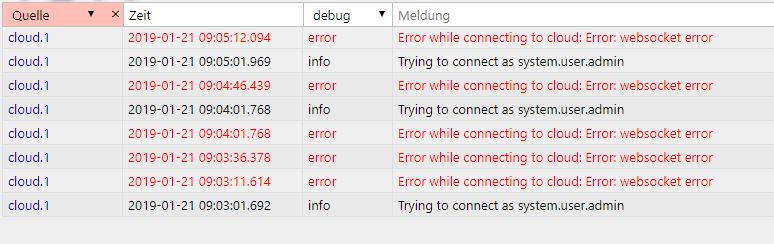
Bei mir kommt täglich diese Meldung
 ~~<link_text text="https://uploads.tapatalk-cdn.com/201901 ... 36f469.jpg">https://uploads.tapatalk-cdn.com/20190124/3f2df4d08dac3f1488bb1d2ecd36f469.jpg</link_text>" />
~~<link_text text="https://uploads.tapatalk-cdn.com/201901 ... 36f469.jpg">https://uploads.tapatalk-cdn.com/20190124/3f2df4d08dac3f1488bb1d2ecd36f469.jpg</link_text>" />Gesendet von meinem SM-G950F mit Tapatalk~~




Hey! Du scheinst an dieser Unterhaltung interessiert zu sein, hast aber noch kein Konto.
Hast du es satt, bei jedem Besuch durch die gleichen Beiträge zu scrollen? Wenn du dich für ein Konto anmeldest, kommst du immer genau dorthin zurück, wo du zuvor warst, und kannst dich über neue Antworten benachrichtigen lassen (entweder per E-Mail oder Push-Benachrichtigung). Du kannst auch Lesezeichen speichern und Beiträge positiv bewerten, um anderen Community-Mitgliedern deine Wertschätzung zu zeigen.
Mit deinem Input könnte dieser Beitrag noch besser werden 💗
Registrieren Anmelden464
Online33.0k
Benutzer83.6k
Themen1.3m
Beiträge