




Installation ioBroker auf Cubietruck
-
Hallo Homoran!
wird ausser in dem Befehl:
…
noch irgendwo von einem User "pi" ausgegangen? `
Nein, nur dort um die Verzeichnisrechte für /opt/iobroker zu setzen. Ich werde das in der Doku auf $USER ändern.
npm ERR! notsup Not compatible with your operating system or architecture: node-windows@0.1.5 `
das Paket müssen wir zu den optionalen Dependencies verschieben *notier ;)
versuch mal bitte das node_modules Verzeichnis zu löschen und noch mal npm install –production auszuführen
Wenn Du nach Doku vorgegangen bist kannst Du iobroker übrigens ganz einfach mit````
git pullGrüße -
versuch mal bitte das node_modules Verzeichnis zu löschen und noch mal npm install –production auszuführen `
habe ich gemacht, ist weitestgehend durchgelaufen, bis auf:> hiredis@0.1.17 install /opt/iobroker/node_modules/hiredis > node-gyp rebuild gyp http GET http://nodejs.org/dist/v0.10.22/node-v0.10.22.tar.gz gyp http 200 http://nodejs.org/dist/v0.10.22/node-v0.10.22.tar.gz gyp ERR! build error gyp ERR! stack Error: not found: make gyp ERR! stack at F (/usr/local/lib/node_modules/npm/node_modules/which/which.js:43:28) gyp ERR! stack at E (/usr/local/lib/node_modules/npm/node_modules/which/which.js:46:29) gyp ERR! stack at /usr/local/lib/node_modules/npm/node_modules/which/which.js:57:16 gyp ERR! stack at Object.oncomplete (fs.js:107:15) gyp ERR! System Linux 3.4.101-sun7i+ gyp ERR! command "node" "/usr/local/lib/node_modules/npm/node_modules/node-gyp/bin/node-gyp.js" "rebuild" gyp ERR! cwd /opt/iobroker/node_modules/hiredis gyp ERR! node -v v0.10.22 gyp ERR! node-gyp -v v0.11.0 gyp ERR! not ok npm http GET https://registry.npmjs.org/assert-plus/0.1.2 npm http 304 https://registry.npmjs.org/assert-plus/0.1.2und
npm http 304 https://registry.npmjs.org/asn1/0.1.11
npm http 304 https://registry.npmjs.org/assert-plus/0.1.2
npm http 304 https://registry.npmjs.org/ctype/0.5.2
npm WARN engine hawk@0.10.2: wanted: {"node":"0.8.x"} (current: {"node":"v0.10.22","npm":"1.3.14"})
npm http GET https://registry.npmjs.org/combined-stream
npm http 304 https://registry.npmjs.org/combined-stream
npm http GET https://registry.npmjs.org/punycode
npm http 304 https://registry.npmjs.org/punycode
npm http GET https://registry.npmjs.org/delayed-stream/0.0.5
npm http GET https://registry.npmjs.org/hoek
npm http GET https://registry.npmjs.org/boom
npm http GET https://registry.npmjs.org/cryptiles
npm http GET https://registry.npmjs.org/sntp
npm http 304 https://registry.npmjs.org/delayed-stream/0.0.5
npm http 304 https://registry.npmjs.org/boom
npm http 304 https://registry.npmjs.org/cryptiles
npm http 304 https://registry.npmjs.org/hoek
npm http 304 https://registry.npmjs.org/sntp
npm http GET https://registry.npmjs.org/hoek/-/hoek-0.7.6.tgz
npm http GET https://registry.npmjs.org/boom/-/boom-0.3.8.tgz
npm http GET https://registry.npmjs.org/cryptiles/-/cryptiles-0.1.3.tgz
npm http GET https://registry.npmjs.org/sntp/-/sntp-0.1.4.tgz
npm http 200 https://registry.npmjs.org/boom/-/boom-0.3.8.tgz
npm http 200 https://registry.npmjs.org/cryptiles/-/cryptiles-0.1.3.tgz
npm http 200 https://registry.npmjs.org/hoek/-/hoek-0.7.6.tgz
npm http 200 https://registry.npmjs.org/sntp/-/sntp-0.1.4.tgz
npm WARN engine cryptiles@0.1.3: wanted: {"node":"0.8.x"} (current: {"node":"v0.10.22","npm":"1.3.14"})
npm WARN engine sntp@0.1.4: wanted: {"node":"0.8.x"} (current: {"node":"v0.10.22","npm":"1.3.14"})
npm WARN engine boom@0.3.8: wanted: {"node":"0.8.x"} (current: {"node":"v0.10.22","npm":"1.3.14"})
npm WARN engine hoek@0.7.6: wanted: {"node":"0.8.x"} (current: {"node":"v0.10.22","npm":"1.3.14"})
npm WARN optional dep failed, continuing hiredis@0.1.17
Mal sehen, wie es jetzt weiter läuft :?:
EDIT:
leider nicht :(
root@cubie:/opt/iobroker# ./iobroker setup
couchdb connection refused
Ich habe mir die preview der Website angesehen, sieht sehr vielversprechend aus. Kleiner Hinweis: unter downloads ist noch ein altees deb.-paket für node. Stryke hat bereits eins für 10_22 erstellt. das ist auch auf der ccu.io website.
Wenn ich irgendetwas testen kann, sagt bitte Bescheid.
Mir steht zur Verfügung:
-
Cubietruck (einer immer)
-
BananaPi (Im Moment auch immer)
-
RaspberryPi (im Moment noch als backup, kann aber Missbraucht werden)
-
Synology DS 1511+ (Intel Atom)
Gruß
Rainer
-
-
root@cubie:/opt/iobroker# ./iobroker setup
couchdb connection refused `
hmm… apt-get install couchdb lief fehlerfrei? Probier mal
> sudo /etc/init.d/couchdb start -
apt-get install couchdb lief fehlerfrei? `
Hab ich da was übersehen?
nach Anleitung habe ich
apt-get install redis-server couchdbgenommen, das hatte ich inzwischen auch nochmal gestartet und bekam die Meldung "alles ok und auf dem neuesten Stand"
/etc/init.d/couchdb start `
Da hatte ich schon Hoffnung:root@cubie:/opt/iobroker# /etc/init.d/couchdb start [ ok ] Starting database server: couchdb.Aber dann wieder:
root@cubie:/opt/iobroker# ./iobroker setup couchdb connection refusedGruß
Rainer
-
lass mal bitte die Ausgabe von````
sudo netstat -tulpen -
lass mal bitte die Ausgabe von
CODE: ALLES AUSWÄHLEN
sudo netstat -tulpen
sehen `
Bitteschön:
root@cubie:/opt/iobroker# netstat -tulpen
Active Internet connections (only servers)
Proto Recv-Q Send-Q Local Address           Foreign Address         State       User       Inode       PID/Program name
tcp        0      0 0.0.0.0:22              0.0.0.0:*               LISTEN      0          4075        2333/sshd
tcp6       0      0 :::22                   :::*                    LISTEN      0          4077        2333/sshd
udp        0      0 0.0.0.0:68              0.0.0.0:*                           0          3190        2285/dhclient
udp        0      0 192.168.xxx.yyy:123       0.0.0.0:*                           101        4081        2068/ntpd
udp        0      0 127.0.0.1:123           0.0.0.0:*                           0          2475        2068/ntpd
udp        0      0 0.0.0.0:123             0.0.0.0:*                           0          3988        2068/ntpd
udp        0      0 0.0.0.0:38665           0.0.0.0:*                           0          3159        2285/dhclient
udp6       0      0 :::52191                :::*                                0          3160        2285/dhclient
udp6       0      0 ::1:123                 :::*                                0          2477        2068/ntpd
udp6       0      0 fe80::f:6ff:fe01:21:123 :::*                                0          2476        2068/ntpd
udp6       0      0 :::123                  :::*                                0          3989        2068/ntpd
xxx.yyy ist korrekt
Gruß
Rainer
48_scripte.gif -
hmm lass mal bitte die /etc/couchdb/default.ini sehen
-
hmm lass mal bitte die /etc/couchdb/default.ini sehen `
Zu deinem vergnügen; Äh Verfügung ;-)
; etc/couchdb/default.ini.tpl. Generated from default.ini.tpl.in by configure. ; Upgrading CouchDB will overwrite this file. [couchdb] database_dir = /var/lib/couchdb/1.2.0 view_index_dir = /var/lib/couchdb/1.2.0 util_driver_dir = /usr/lib/couchdb/erlang/lib/couch-1.2.0/priv/lib max_document_size = 4294967296 ; 4 GB os_process_timeout = 5000 ; 5 seconds. for view and external servers. max_dbs_open = 100 delayed_commits = true ; set this to false to ensure an fsync before 201 Created is returned uri_file = /var/run/couchdb/couch.uri ; Method used to compress everything that is appended to database and view index files, except ; for attachments (see the attachments section). Available methods are: ; ; none - no compression ; snappy - use google snappy, a very fast compressor/decompressor ; deflate_[N] - use zlib's deflate, N is the compression level which ranges from 1 (fastest, ; lowest compression ratio) to 9 (slowest, highest compression ratio) file_compression = snappy [database_compaction] ; larger buffer sizes can originate smaller files doc_buffer_size = 524288 ; value in bytes checkpoint_after = 5242880 ; checkpoint after every N bytes were written [view_compaction] ; larger buffer sizes can originate smaller files keyvalue_buffer_size = 2097152 ; value in bytes [httpd] port = 5984 bind_address = 127.0.0.1 authentication_handlers = {couch_httpd_oauth, oauth_authentication_handler}, {couch_httpd_auth, cookie_authentication_handler}, {couch_httpd_auth, default_authentication_handler} default_handler = {couch_httpd_db, handle_request} secure_rewrites = true vhost_global_handlers = _utils, _uuids, _session, _oauth, _users allow_jsonp = false ; Options for the MochiWeb HTTP server. ;server_options = [{backlog, 128}, {acceptor_pool_size, 16}] ; For more socket options, consult Erlang's module 'inet' man page. ;socket_options = [{recbuf, 262144}, {sndbuf, 262144}, {nodelay, true}] log_max_chunk_size = 1000000 [ssl] port = 6984 [log] file = /var/log/couchdb/couch.log level = info include_sasl = true [couch_httpd_auth] authentication_db = _users authentication_redirect = /_utils/session.html require_valid_user = false timeout = 600 ; number of seconds before automatic logout auth_cache_size = 50 ; size is number of cache entries allow_persistent_cookies = false ; set to true to allow persistent cookies [couch_httpd_oauth] ; If set to 'true', oauth token and consumer secrets will be looked up ; in the authentication database (_users). These secrets are stored in ; a top level property named "oauth" in user documents. Example: ; { ; "_id": "org.couchdb.user:joe", ; "type": "user", ; "name": "joe", ; "password_sha": "fe95df1ca59a9b567bdca5cbaf8412abd6e06121", ; "salt": "4e170ffeb6f34daecfd814dfb4001a73" ; "roles": ["foo", "bar"], ; "oauth": { ; "consumer_keys": { ; "consumerKey1": "key1Secret", ; "consumerKey2": "key2Secret" ; }, ; "tokens": { ; "token1": "token1Secret", ; "token2": "token2Secret" ; } ; } ; } use_users_db = false [query_servers] javascript = /usr/bin/couchjs /usr/share/couchdb/server/main.js coffeescript = /usr/bin/couchjs /usr/share/couchdb/server/main-coffee.js ; Changing reduce_limit to false will disable reduce_limit. ; If you think you're hitting reduce_limit with a "good" reduce function, ; please let us know on the mailing list so we can fine tune the heuristic. [query_server_config] reduce_limit = true os_process_limit = 25 [daemons] view_manager={couch_view, start_link, []} external_manager={couch_external_manager, start_link, []} query_servers={couch_query_servers, start_link, []} vhosts={couch_httpd_vhost, start_link, []} httpd={couch_httpd, start_link, []} stats_aggregator={couch_stats_aggregator, start, []} stats_collector={couch_stats_collector, start, []} uuids={couch_uuids, start, []} auth_cache={couch_auth_cache, start_link, []} replication_manager={couch_replication_manager, start_link, []} os_daemons={couch_os_daemons, start_link, []} compaction_daemon={couch_compaction_daemon, start_link, []} [httpd_global_handlers] / = {couch_httpd_misc_handlers, handle_welcome_req, <<"Welcome">>} favicon.ico = {couch_httpd_misc_handlers, handle_favicon_req, "/usr/share/couchdb/www"} _utils = {couch_httpd_misc_handlers, handle_utils_dir_req, "/usr/share/couchdb/www"} _all_dbs = {couch_httpd_misc_handlers, handle_all_dbs_req} _active_tasks = {couch_httpd_misc_handlers, handle_task_status_req} _config = {couch_httpd_misc_handlers, handle_config_req} _replicate = {couch_httpd_replicator, handle_req} _uuids = {couch_httpd_misc_handlers, handle_uuids_req} _restart = {couch_httpd_misc_handlers, handle_restart_req} _stats = {couch_httpd_stats_handlers, handle_stats_req} _log = {couch_httpd_misc_handlers, handle_log_req} _session = {couch_httpd_auth, handle_session_req} _oauth = {couch_httpd_oauth, handle_oauth_req} [httpd_db_handlers] _view_cleanup = {couch_httpd_db, handle_view_cleanup_req} _compact = {couch_httpd_db, handle_compact_req} _design = {couch_httpd_db, handle_design_req} _temp_view = {couch_httpd_view, handle_temp_view_req} _changes = {couch_httpd_db, handle_changes_req} ; The external module takes an optional argument allowing you to narrow it to a ; single script. Otherwise the script name is inferred from the first path section ; after _external's own path. ; _mypath = {couch_httpd_external, handle_external_req, <<"mykey">>} ; _external = {couch_httpd_external, handle_external_req} [httpd_design_handlers] _view = {couch_httpd_view, handle_view_req} _show = {couch_httpd_show, handle_doc_show_req} _list = {couch_httpd_show, handle_view_list_req} _info = {couch_httpd_db, handle_design_info_req} _rewrite = {couch_httpd_rewrite, handle_rewrite_req} _update = {couch_httpd_show, handle_doc_update_req} ; enable external as an httpd handler, then link it with commands here. ; note, this api is still under consideration. ; [external] ; mykey = /path/to/mycommand ; Here you can setup commands for CouchDB to manage ; while it is alive. It will attempt to keep each command ; alive if it exits. ; [os_daemons] ; some_daemon_name = /path/to/script -with args [uuids] ; Known algorithms: ; random - 128 bits of random awesome ; All awesome, all the time. ; sequential - monotonically increasing ids with random increments ; First 26 hex characters are random. Last 6 increment in ; random amounts until an overflow occurs. On overflow, the ; random prefix is regenerated and the process starts over. ; utc_random - Time since Jan 1, 1970 UTC with microseconds ; First 14 characters are the time in hex. Last 18 are random. algorithm = sequential [stats] ; rate is in milliseconds rate = 1000 ; sample intervals are in seconds samples = [0, 60, 300, 900] [attachments] compression_level = 8 ; from 1 (lowest, fastest) to 9 (highest, slowest), 0 to disable compression compressible_types = text/*, application/javascript, application/json, application/xml [replicator] db = _replicator ; Maximum replicaton retry count can be a non-negative integer or "infinity". max_replication_retry_count = 10 ; More worker processes can give higher network throughput but can also ; imply more disk and network IO. worker_processes = 4 ; With lower batch sizes checkpoints are done more frequently. Lower batch sizes ; also reduce the total amount of used RAM memory. worker_batch_size = 500 ; Maximum number of HTTP connections per replication. http_connections = 20 ; HTTP connection timeout per replication. ; Even for very fast/reliable networks it might need to be increased if a remote ; database is too busy. connection_timeout = 30000 ; If a request fails, the replicator will retry it up to N times. retries_per_request = 10 ; Some socket options that might boost performance in some scenarios: ; {nodelay, boolean()} ; {sndbuf, integer()} ; {recbuf, integer()} ; {priority, integer()} ; See the `inet` Erlang module's man page for the full list of options. socket_options = [{keepalive, true}, {nodelay, false}] ; Path to a file containing the user's certificate. ;cert_file = /full/path/to/server_cert.pem ; Path to file containing user's private PEM encoded key. ;key_file = /full/path/to/server_key.pem ; String containing the user's password. Only used if the private keyfile is password protected. ;password = somepassword ; Set to true to validate peer certificates. verify_ssl_certificates = false ; File containing a list of peer trusted certificates (in the PEM format). ;ssl_trusted_certificates_file = /etc/ssl/certs/ca-certificates.crt ; Maximum peer certificate depth (must be set even if certificate validation is off). ssl_certificate_max_depth = 3 [compaction_daemon] ; The delay, in seconds, between each check for which database and view indexes ; need to be compacted. check_interval = 300 ; If a database or view index file is smaller then this value (in bytes), ; compaction will not happen. Very small files always have a very high ; fragmentation therefore it's not worth to compact them. min_file_size = 131072 [compactions] ; List of compaction rules for the compaction daemon. ; The daemon compacts databases and their respective view groups when all the ; condition parameters are satisfied. Configuration can be per database or ; global, and it has the following format: ; ; database_name = [ {ParamName, ParamValue}, {ParamName, ParamValue}, ... ] ; _default = [ {ParamName, ParamValue}, {ParamName, ParamValue}, ... ] ; ; Possible parameters: ; ; * db_fragmentation - If the ratio (as an integer percentage), of the amount ; of old data (and its supporting metadata) over the database ; file size is equal to or greater then this value, this ; database compaction condition is satisfied. ; This value is computed as: ; ; (file_size - data_size) / file_size * 100 ; ; The data_size and file_size values can be obtained when ; querying a database's information URI (GET /dbname/). ; ; * view_fragmentation - If the ratio (as an integer percentage), of the amount ; of old data (and its supporting metadata) over the view ; index (view group) file size is equal to or greater then ; this value, then this view index compaction condition is ; satisfied. This value is computed as: ; ; (file_size - data_size) / file_size * 100 ; ; The data_size and file_size values can be obtained when ; querying a view group's information URI ; (GET /dbname/_design/groupname/_info). ; ; * from _and_ to - The period for which a database (and its view groups) compaction ; is allowed. The value for these parameters must obey the format: ; ; HH:MM - HH:MM (HH in [0..23], MM in [0..59]) ; ; * strict_window - If a compaction is still running after the end of the allowed ; period, it will be canceled if this parameter is set to 'true'. ; It defaults to 'false' and it's meaningful only if the *period* ; parameter is also specified. ; ; * parallel_view_compaction - If set to 'true', the database and its views are ; compacted in parallel. This is only useful on ; certain setups, like for example when the database ; and view index directories point to different ; disks. It defaults to 'false'. ; ; Before a compaction is triggered, an estimation of how much free disk space is ; needed is computed. This estimation corresponds to 2 times the data size of ; the database or view index. When there's not enough free disk space to compact ; a particular database or view index, a warning message is logged. ; ; Examples: ; ; 1) [{db_fragmentation, "70%"}, {view_fragmentation, "60%"}] ; The `foo` database is compacted if its fragmentation is 70% or more. ; Any view index of this database is compacted only if its fragmentation ; is 60% or more. ; ; 2) [{db_fragmentation, "70%"}, {view_fragmentation, "60%"}, {from, "00:00"}, {to, "04:00"}] ; Similar to the preceding example but a compaction (database or view index) ; is only triggered if the current time is between midnight and 4 AM. ; ; 3) [{db_fragmentation, "70%"}, {view_fragmentation, "60%"}, {from, "00:00"}, {to, "04:00"}, {strict_window, true}] ; Similar to the preceding example - a compaction (database or view index) ; is only triggered if the current time is between midnight and 4 AM. If at ; 4 AM the database or one of its views is still compacting, the compaction ; process will be canceled. ; ; 4) [{db_fragmentation, "70%"}, {view_fragmentation, "60%"}, {from, "00:00"}, {to, "04:00"}, {strict_window, true}, {parallel_view_compaction, true}] ; Similar to the preceding example, but a database and its views can be ; compacted in parallel. ; ;_default = [{db_fragmentation, "70%"}, {view_fragmentation, "60%"}, {from, "23:00"}, {to, "04:00"}] -
ah, ja, da war was:
bind_address = 127.0.0.1Änder die 127.0.0.1 mal auf 0.0.0.0, dann````
sudo /etc/init.d/couchdb restart -
ah, ja, da war was: `
aber wohl noch nicht alles :(
root@cubie:/opt/iobroker# /etc/init.d/couchdb restart
[ ok ] Restarting database server: couchdb.
root@cubie:/opt/iobroker# ./iobroker setup
couchdb connection refused
EDIT:
seltsamerweise lässt sich iobroker.ctrl jetzt starten:
root@cubie:/opt/iobroker# ./iobroker start
Starting iobroker.ctrl daemon...
iobroker.ctrl daemon started. PID: 24262
Gruß
Rainer
nur zur Info:
-
Igor pecovnics Debian Image 2.5
-
installiert auf SD
-
das erste mal mit DHCP
-
-
Ich habe "mal eben" den Cubie platt gemacht, neu aufgesetzt und zwei Änderungen durchgeführt.
1.) beim ersten mal hatte ich kein apt-get update && apt-get upgrade gefahren.
diesmal kamen 3 Pakete, u.a. openssl (!?)
2.) habe dann DIREKT in der /opt/iobroker/package.json die Zeile mit dem node-windows gelöscht
Anschließend erstmalig npm install –production ausgeführt.
Ab hier lief es alles fast störungsfrei.
Lediglich:
....
npm http 200 https://registry.npmjs.org/errs/-/errs-0.2.4.tgz

> hiredis@0.1.17 install /opt/iobroker/node_modules/hiredis
> node-gyp rebuild

gyp http GET http://nodejs.org/dist/v0.10.22/node-v0.10.22.tar.gz
gyp http 200 http://nodejs.org/dist/v0.10.22/node-v0.10.22.tar.gz
gyp ERR! build error
gyp ERR! stack Error: not found: make
gyp ERR! stack     at F (/usr/local/lib/node_modules/npm/node_modules/which/which.js:43:28)
gyp ERR! stack     at E (/usr/local/lib/node_modules/npm/node_modules/which/which.js:46:29)
gyp ERR! stack     at /usr/local/lib/node_modules/npm/node_modules/which/which.js:57:16
gyp ERR! stack     at Object.oncomplete (fs.js:107:15)
gyp ERR! System Linux 3.4.101-sun7i+
gyp ERR! command "node" "/usr/local/lib/node_modules/npm/node_modules/node-gyp/bin/node-gyp.js" "rebuild"
gyp ERR! cwd /opt/iobroker/node_modules/hiredis
gyp ERR! node -v v0.10.22
gyp ERR! node-gyp -v v0.11.0
gyp ERR! not ok
npm http GET https://registry.npmjs.org/combined-stream
...
sowie die Warnung:
...
npm http 304 https://registry.npmjs.org/cryptiles
npm WARN engine hawk@0.10.2: wanted: {"node":"0.8.x"} (current: {"node":"v0.10.22","npm":"1.3.14"})
npm WARN optional dep failed, continuing hiredis@0.1.17
npm http GET https://registry.npmjs.org/combined-stream
npm http 304 https://registry.npmjs.org/combined-stream
npm http GET https://registry.npmjs.org/sntp/-/sntp-0.1.4.tgz
npm http GET https://registry.npmjs.org/hoek/-/hoek-0.7.6.tgz
npm http GET https://registry.npmjs.org/boom/-/boom-0.3.8.tgz
npm http GET https://registry.npmjs.org/cryptiles/-/cryptiles-0.1.3.tgz
npm http 200 https://registry.npmjs.org/sntp/-/sntp-0.1.4.tgz
npm http 200 https://registry.npmjs.org/boom/-/boom-0.3.8.tgz
npm http 200 https://registry.npmjs.org/hoek/-/hoek-0.7.6.tgz
npm http 200 https://registry.npmjs.org/cryptiles/-/cryptiles-0.1.3.tgz
npm WARN engine cryptiles@0.1.3: wanted: {"node":"0.8.x"} (current: {"node":"v0.10.22","npm":"1.3.14"})
npm WARN engine sntp@0.1.4: wanted: {"node":"0.8.x"} (current: {"node":"v0.10.22","npm":"1.3.14"})
npm WARN engine boom@0.3.8: wanted: {"node":"0.8.x"} (current: {"node":"v0.10.22","npm":"1.3.14"})
npm WARN engine hoek@0.7.6: wanted: {"node":"0.8.x"} (current: {"node":"v0.10.22","npm":"1.3.14"})
wake_on_lan@0.0.3 node_modules/wake_on_lan
...
wobei das wohl wieder ein Problem mit der Versionsbezeichnung (0.10 ist ja weniger als 0.8) zu sein scheint
Bei tail -f log/iobroker.log erscheint folgendes:
root@cubie:/opt/iobroker#  tail -f log/iobroker.log
2014-08-08 21:32:11.300  - info: ctrl ip: 192.168.2.183 fe80::f:6ff:fe01:21b0
2014-08-08 21:32:14.089  - info: ctrl 1 instance found
2014-08-08 21:32:14.122  - info: ctrl instance system.adapter.admin.0 started with pid 3916
2014-08-08 21:32:19.884  - info: admin.0 starting
2014-08-08 21:32:19.946  - info: admin.0 requesting all states
2014-08-08 21:32:19.956  - info: admin.0 requesting all objects
2014-08-08 21:32:19.980  - info: admin.0 http server listening on port 8080
2014-08-08 21:32:20.117  - info: admin.0 received all objects
2014-08-08 21:32:20.223  - info: admin.0 received all states
2014-08-08 21:32:30.822  - info: admin.0 Cannot detect user: Cannot detect user"
User?????
Ich habe alles erst einmal als root gemacht - war das das mit dem pi???
letztendlich sieht es so aus:
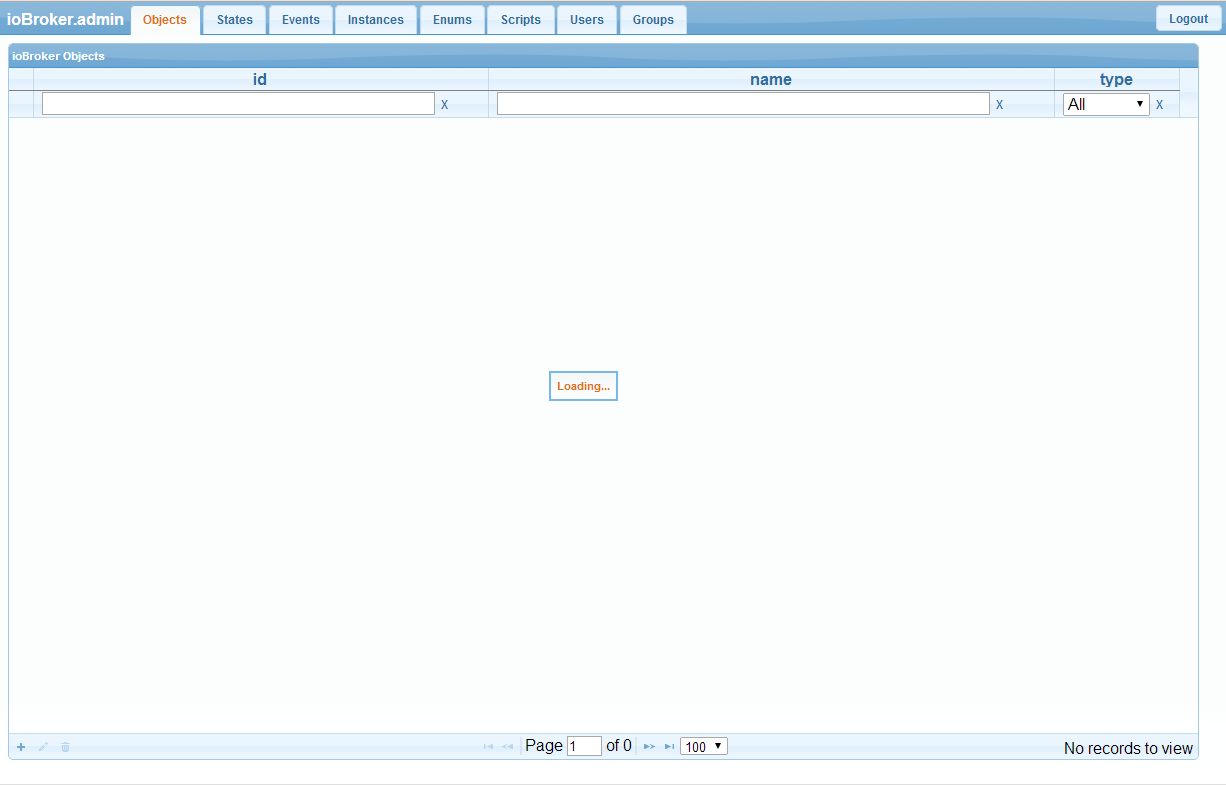
Adapter kann man wohl (noch) nicht über die WebUI hinzufügen und dass da die ganze Zeit Loading steht ist auch normal?
Unter Events wird die Liste immer länger, besteht aber im Prinzip nur aus den Zeilen:
stateChange	system.adapter.admin.0.alive	{"val":true,"ack":true,"ts":1407527105,"lc":1407526340}
stateChange	system.host.cubie.mem	{"val":"76","ack":true,"ts":1407527099,"lc":1407526349}
stateChange	system.host.cubie.load	{"val":"0.45","ack":true,"ts":1407527099,"lc":1407527099}
stateChange	system.host.cubie.alive	{"val":true,"ack":true,"ts":1407527099,"lc":1407526334}
Ich denke, dass ist alles soweit in Ordnung und freue mich schon auf weitere Entwicklungen.
Danke für eure Arbeit
Rainer
-
Hallo nochmal,
ich habe gerade ein Update mit git pull versucht und bekomme folgende Meldung:
root@cubie:/opt/iobroker# git pull
Updating ae52e20..17d3583
error: Your local changes to the following files would be overwritten by merge:
        package.json
Please, commit your changes or stash them before you can merge.
Aborting
Ich nehme an, dass es sich hier um die WIN Parameter handelt und ihr die jetzt ebenfalls geändert habt.
Wie kann ich das überschreiben akzeptieren?
Außerdem habe ich wegen der Fehlermeldung make installiert und den Ordner node_modules gelöscht und anschließend npm install –production gestartet.
jetzt bekomme ich folgende Fehlermeldung:
....
npm http 304 https://registry.npmjs.org/eyes

> hiredis@0.1.17 install /opt/iobroker/node_modules/hiredis
> node-gyp rebuild

make: Entering directory `/opt/iobroker/node_modules/hiredis/build'
  CC(target) Release/obj.target/hiredis/deps/hiredis/hiredis.o
make: cc: Command not found
make: *** [Release/obj.target/hiredis/deps/hiredis/hiredis.o] Error 127
make: Leaving directory `/opt/iobroker/node_modules/hiredis/build'
gyp ERR! build error
gyp ERR! stack Error: `make` failed with exit code: 2
gyp ERR! stack     at ChildProcess.onExit (/usr/local/lib/node_modules/npm/node_modules/node-gyp/lib/build.js:267:23)
gyp ERR! stack     at ChildProcess.EventEmitter.emit (events.js:98:17)
gyp ERR! stack     at Process.ChildProcess._handle.onexit (child_process.js:789:12)
gyp ERR! System Linux 3.4.101-sun7i+
gyp ERR! command "node" "/usr/local/lib/node_modules/npm/node_modules/node-gyp/bin/node-gyp.js" "rebuild"
gyp ERR! cwd /opt/iobroker/node_modules/hiredis
gyp ERR! node -v v0.10.22
gyp ERR! node-gyp -v v0.11.0
gyp ERR! not ok
npm http GET https://registry.npmjs.org/follow
....
Gruß
Rainer
-
Hallo zusammen,
da ihr anscheinend Tag und Nacht an dem Projekt arbeitet :shock: habe ich den CT nochmals neu aufgesetzt.
Folgende Änderungen:
-
User Cubie angelegt und unter diesem gearbeitet
-
make installiert
trotzdem kam bei npm immer noch folgende Fehlermeldung:
...
npm http 200 https://registry.npmjs.org/errs/-/errs-0.2.4.tgz

> hiredis@0.1.17 install /opt/iobroker/node_modules/hiredis
> node-gyp rebuild

gyp http GET http://nodejs.org/dist/v0.10.22/node-v0.10.22.tar.gz
gyp http 200 http://nodejs.org/dist/v0.10.22/node-v0.10.22.tar.gz
make: Entering directory `/opt/iobroker/node_modules/hiredis/build'
  CC(target) Release/obj.target/hiredis/deps/hiredis/hiredis.o
make: cc: Command not found
make: *** [Release/obj.target/hiredis/deps/hiredis/hiredis.o] Error 127
make: Leaving directory `/opt/iobroker/node_modules/hiredis/build'
gyp ERR! build error
gyp ERR! stack Error: `make` failed with exit code: 2
gyp ERR! stack     at ChildProcess.onExit (/usr/local/lib/node_modules/npm/node_modules/node-gyp/lib/build.js:267:23)
gyp ERR! stack     at ChildProcess.EventEmitter.emit (events.js:98:17)
gyp ERR! stack     at Process.ChildProcess._handle.onexit (child_process.js:789:12)
gyp ERR! System Linux 3.4.101-sun7i+
gyp ERR! command "node" "/usr/local/lib/node_modules/npm/node_modules/node-gyp/bin/node-gyp.js" "rebuild"
gyp ERR! cwd /opt/iobroker/node_modules/hiredis
gyp ERR! node -v v0.10.22
gyp ERR! node-gyp -v v0.11.0
gyp ERR! not ok
npm http GET https://registry.npmjs.org/combined-stream
npm http GET https://registry.npmjs.org/mime
...
Lief alles soweit durch, das Webinterface hat jetzt auch Daten, lediglich der nachträglich installierte hm-rega-Adapter war erst nach einem couchdb restart zu sehen.
Dazu kam allerdings im log folgende Fehlermeldung:
cubie@cubie:/opt/iobroker$ tail -f log/iobroker.log
2014-08-10 14:49:28.902  - info: admin.0 requesting all states
2014-08-10 14:49:28.911  - info: admin.0 requesting all objects
2014-08-10 14:49:28.944  - info: admin.0 http server listening on port 8080
2014-08-10 14:49:29.134  - info: admin.0 received all objects
2014-08-10 14:49:29.205  - info: admin.0 received all states
2014-08-10 14:51:49.693  - info: ctrl object change system.adapter.hm-rega.0
2014-08-10 14:51:49.719  - info: ctrl instance system.adapter.hm-rega.0 started with pid 4203
2014-08-10 14:51:55.567  - info: hm-rega.0 starting
2014-08-10 14:51:55.584  - info: hm-rega.0 subscribe hm-rpc.0.BidCoS-RF:50.PRESS_SHORT
2014-08-10 14:53:00.232  - error: hm-rega.0 CCU 172.16.23.3 unreachable
Hier muss wohl die IP-Adresse der CCU rein - aber wie?
Ein Zugriff auf die Datenbank per Futon (http://192.168.xxx.yyy:5984/_utils/) klappt leider nicht.
Ansonsten mal wieder eine Super Arbeit.
Danke
Rainer
-
-
Ein Zugriff auf die Datenbank per Futon (http://192.168.xxx.yyy:5984/_utils/) klappt leider nicht. `
Tausche mal in der Datei /etc/couchdb/local.ini folgende Zeile
;bind_address = 127.0.0.1gegen diese Zeile aus:
bind_address = 0.0.0.0und starte dann CouchDB neu:
sudo /etc/init.d/couchdb restartHier muss wohl die IP-Adresse der CCU rein - aber wie? `
Es gibt noch keine Adapter-Settings Seiten, Du kannst das entweder via Futon im Objekt hm-rpc.0 (am besten in Futon oben rechts View System/Instance auswählen) oder über das Admin-UI im Reiter Instances machen (dort die Adapter-Instanz markieren und dann unten links auf den kleinen bearbeiten-Button)
-
Hallo HQ,
@hobbyquaker:Es gibt noch keine Adapter-Settings Seiten, … `
um Himmels Willen, das war mir doch klar, ich wollte nur eine Erklärung für die fehlermeldung haben :oops:EDIT:
mit der 0.0.0.0 klappt es!
! Das ändern der bind-adress hat leider nicht geholfen :(
! die IP ist doch die des Cubie, oder hat die CouchDB eine eigene IP?Ich hatte beim Versuch des couchDB restart noch den Befehl vom Anlegen des rega-Adapters im Zwischenspeicher - jetzt habe ich 3 davon ;-)
allerdings sieht es unter instances so aus:

Was mir sonst noch aufgefallen ist, ist der Speicherverbrauch:
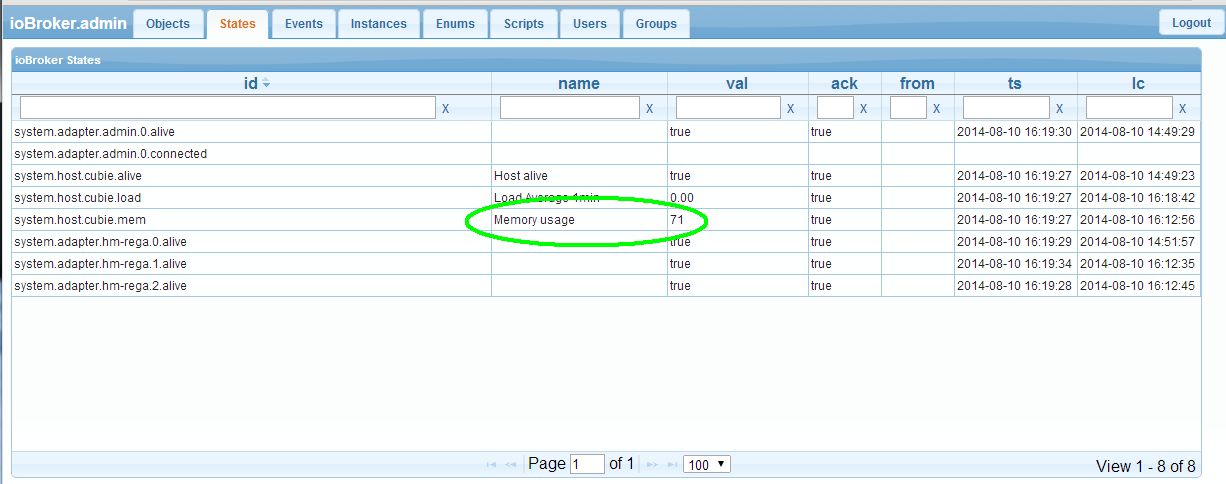
Sind das 71% ? Bei 2 GB Memory vom Cubie ist das aber doch heftig, oder?EDIT2:
Habe eben einen Wert von 84 gehabt, top gibt folgendes aus:
KiB Mem: 2047968 total, 323968 used, 1724000 free, 11604 buffersDas sind etwa 16%; dann sind das wohl 84% free Memory ;-)
Jetzt aber bitte keine operative Hektik, das sind nur Hinweise, keine Kritik!!!
EDIT:
WOWWWW!!!
Habe jetzt alle(?) Datenpunkte von meiner CCU - Wahnsinn; und das mit den mehreren rega-Adaptern deutet ja wohl darauf hin, dass mehrere CCUs abgefragt werden können!
Na da bin ich ja mal gespannt!!! :!: :!:
Gruß
Rainer
-
Hallo HQ, Hallo Bluefox,
Zur Info:
Habe eben mal einen git pull gemacht.
danach einen:
cubie@cubie:/opt/iobroker$ tail -f log/iobroker.log
2014-08-10 20:56:37.857  - info: hm-rega.0 deleted 0 variables
2014-08-10 20:56:57.795  - error: hm-rega.1 CCU 172.16.23.3 unreachable
2014-08-10 20:57:03.234  - error: hm-rega.2 CCU 172.16.23.3 unreachable
2014-08-10 22:36:57.059  - error: hm-rega.0 post request error: connect EHOSTUNREACH
2014-08-10 22:37:09.294  - error: ctrl instance system.adapter.hm-rega.0 terminated with code 8
2014-08-10 22:37:39.337  - info: ctrl instance system.adapter.hm-rega.0 started with pid 2645
2014-08-10 22:37:42.503  - info: hm-rega.0 starting
2014-08-10 22:37:42.519  - info: hm-rega.0 subscribe hm-rpc.0.BidCoS-RF:50.PRESS_SHORT
2014-08-10 22:37:44.001  - info: hm-rega.0 ReGaHSS 192.168.2.166 up
2014-08-10 22:37:44.034  - error: hm-rega.0 post request error: connect ECONNREFUSED
Habe jetzt anscheinend wirklich fast alles unter objects, nachdem da bis jetzt nur die Programme und Variablen waren.
Unter states sind auch jetzt nur Programme und Variablen.
Schlaft ihr eigentlich irgenwann einmal?
Gruß
Rainer
-
Hallo ihr fleißigen Bienchen ;-)
im Moment hacke ich mich ein wenig durch das Programm.
Ich weiß, dass es noch lange nicht fertig ist - das wäre ja auch zu schön, wenn man so etwas in wenigen Wochen hinbekommen könnte.
Wollt ihr trotzdem schon Infos haben, über etwas, was mir auffällt? (muss ja nichts zu bedeuten haben)
Gruß
Rainer
-
Hallo ihr fleißigen Bienchen ;-)
im Moment hacke ich mich ein wenig durch das Programm.
Ich weiß, dass es noch lange nicht fertig ist - das wäre ja auch zu schön, wenn man so etwas in wenigen Wochen hinbekommen könnte.
Wollt ihr trotzdem schon Infos haben, über etwas, was mir auffällt? (muss ja nichts zu bedeuten haben)
Gruß
Rainer `
Natürlich. Roadmap muss auch gepflegt werden :D -
Hallo Bluefox,
wie gesagt, ich weiß nicht, ob es relevant ist.
Nachdem ich erst irrtümlich 3x den rega-Adapter aktiviert habe, habe ich dann den hm.rega.0 mit meinem produktiven cubie verknüpft und den hm.rega.1 mit meinem Test BananaPi (RaspBian 3.0 für BananaPi). Dort habe ich testweise einen neuen Wandthermostat angelernt.
-
Die Variable 0950 wird in beiden Fällen aber unterschiedlich dargestellt:
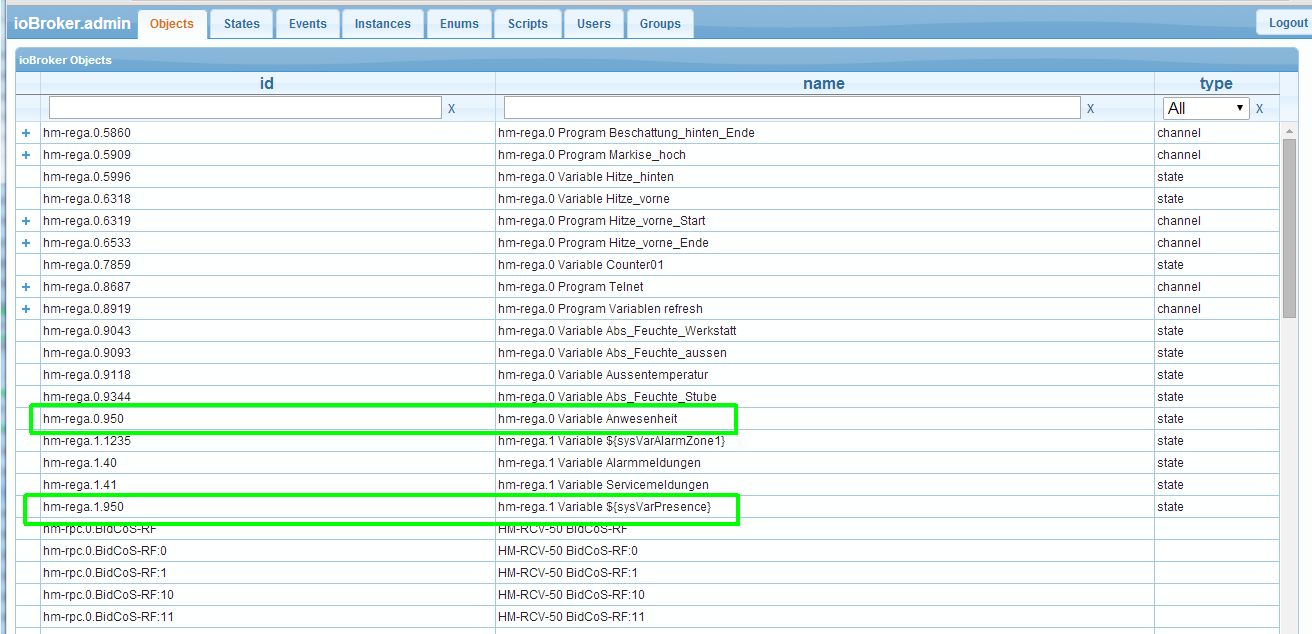
Das gleiche gilt für die var 1235 -
Bei den instances wird bei den apatern hm.rega.1 und hm.rega.2
in der Spalte enabled etwas angezeigt, das m.E da nicht hingehört. -
bei einem reboot des Raspi / Cubie / Banana startet iobroker nicht von selbst
Gruß
Rainer
-
-
Hallo,
ich komme leider nicht weiter .
Beim Setup bekomme ich diese Meldung :
root@cubieez:/opt/iobroker# ./iobroker setup
couchdb connection refused
Per Web kann ich auf die Webseite der couchdb zugreifen.
Die Änderungen von 127.0.0.1 auf 0.0.0.0 habe ich auch durchgeführt.
Starte ich node controller.js kommt auch eine Meldung mit Database connect
root@cubieez:/opt/iobroker# node controller.js
2014-08-16 09:21:47.775 - info: ioBroker.nodejs version 0.0.14
2014-08-16 09:21:47.899 - info: copyright 2014 hobbyquaker, bluefox
2014-08-16 09:21:47.905 - info: io.controller starting
2014-08-16 09:21:47.912 - info: controller ip: 192.168.100.120 2001:XXXX:XXXX:XXXX::120 fe80::1:9ff:fe81:XXXX
2014-08-16 09:21:53.630 - info: controller couchdb connected
2014-08-16 09:21:54.490 - error: controller _design/system missing - call node iobroker.js setup
Vielleicht hat ja jemand einen Tipp für mich.
mfg.
Jürgen

Hey! Du scheinst an dieser Unterhaltung interessiert zu sein, hast aber noch kein Konto.
Hast du es satt, bei jedem Besuch durch die gleichen Beiträge zu scrollen? Wenn du dich für ein Konto anmeldest, kommst du immer genau dorthin zurück, wo du zuvor warst, und kannst dich über neue Antworten benachrichtigen lassen (entweder per E-Mail oder Push-Benachrichtigung). Du kannst auch Lesezeichen speichern und Beiträge positiv bewerten, um anderen Community-Mitgliedern deine Wertschätzung zu zeigen.
Mit deinem Input könnte dieser Beitrag noch besser werden 💗
Registrieren Anmelden394
Online33.0k
Benutzer83.5k
Themen1.3m
Beiträge