




Программа управления компьютером GetAdmin
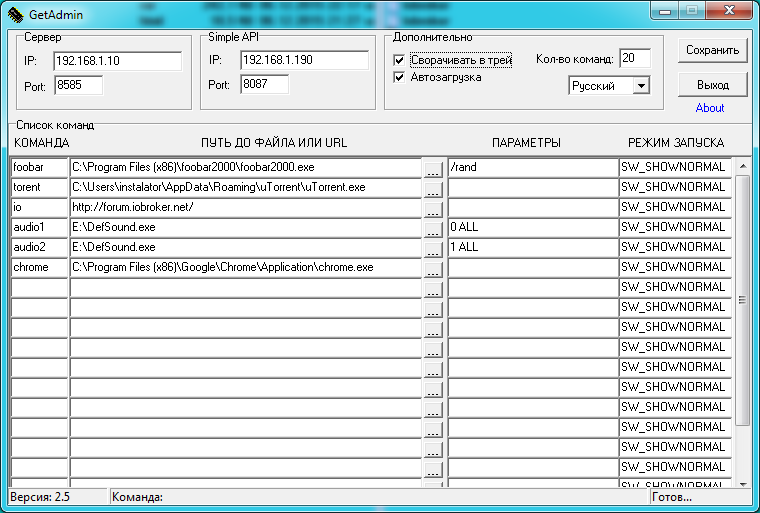
-
В догонку- может есть какие-то параметры запуска, чтобы картинка не висела в трее и/или убрать описание самой программы (about)? `
Ну это если переписать ее что бы как служба запускалась или запаролить настройки, опять же процесс убить можно будет. У меня пока нету времени переписывать программу под единичный случай. На будущее возможно добавлю данный функционал. Пиши пожелания и хотелки. -
Скопипастил ваш скрипт, ругается на отсутствие модуля:
! 12:49:59.342 [info] javascript.0 Stop script script.js.Getadmin2
! 12:50:34.009 [info] javascript.0 Start javascript script.js.Getadmin2
! 12:50:34.012 [error] javascript.0 script.js.Getadmin2: Cannot find module '/opt/iobroker/node_modules/iobroker.javascript/node_modules/ping' at script.js.Getadmin2:14:12
! 12:50:34.012 [info] javascript.0 script.js.Getadmin2: registered 7 subscriptions and 1 schedule
Драйвера установлены
256_io_adapters.jpg -
Нужен скрипт который попингу отследить время включения компа, какой нить таймер, с переменной таймера брать значение и отображать в виз, по окончании отсчета вырубить комп
Пишу с пульта…. `
Эхх… вот скриптописец из меня просто писец ))) -
Скопипастил ваш скрипт, ругается на отсутствие модуля:
! 12:49:59.342 [info] javascript.0 Stop script script.js.Getadmin2
! 12:50:34.009 [info] javascript.0 Start javascript script.js.Getadmin2
! 12:50:34.012 [error] javascript.0 script.js.Getadmin2: Cannot find module '/opt/iobroker/node_modules/iobroker.javascript/node_modules/ping' at script.js.Getadmin2:14:12
! 12:50:34.012 [info] javascript.0 script.js.Getadmin2: registered 7 subscriptions and 1 schedule
Драйвера установлены `
Добавь модуль в настройки драйвера js
266_23424234.png -
Нужен скрипт который попингу отследить время включения компа, какой нить таймер, с переменной таймера брать значение и отображать в виз, по окончании отсчета вырубить комп
Пишу с пульта….
Эхх… вот скриптописец из меня просто писец )))
Тут вариантов много, например так, но это не точный таймер получится.createState('timer', 0); var timer; on({id: 'javascript.0.timer', change: 'any'}, function (obj) { if (obj.newState.val > 0){ timer = setTimeout(function() { setState('javascript.0.timer', obj.newState.val - 1); log('Прошла секунда'); }, 1000); } else { clearTimeout (timer); log('ТУТ ВЫКЛЮЧАЕМ КОМП'); } });Можно через schedule сделать. По крону проверяем каждую минуту например переменную и если она больше нуля то отнимаем и записывае новое значение в переменную. Как нибудь так:
createState('timer', 0); schedule("* * * * *", function () { var timer = getState('javascript.0.timer').val; if (timer > 0){ setState('javascript.0.timer', timer - 1); } else if (timer === 0){ setState('javascript.0.timer', 'Время вышло'); log('ТУТ ВЫКЛЮЧАЕМ КОМП'); } }); -
Hello!
Unfortunately I have found no info about this in English. First of thanks instalator for the great tool, so far shutting down my PC using iobroker is working perfectly. However, is there a way I can let my PC press a specific key (such as Space, Delete, or any other) without opening the browser on the host computer?
This is not my field so maybe I missed the way if its available or I misunderstood something.
Thanks a lot!
-
Hello!
Unfortunately I have found no info about this in English. First of thanks instalator for the great tool, so far shutting down my PC using iobroker is working perfectly. However, is there a way I can let my PC press a specific key (such as Space, Delete, or any other) without opening the browser on the host computer?
This is not my field so maybe I missed the way if its available or I misunderstood something.
Thanks a lot! `
https://blog.instalator.ru/archives/47there under the spoiler list of supported keys
-
Hello!
Unfortunately I have found no info about this in English. First of thanks instalator for the great tool, so far shutting down my PC using iobroker is working perfectly. However, is there a way I can let my PC press a specific key (such as Space, Delete, or any other) without opening the browser on the host computer?
This is not my field so maybe I missed the way if its available or I misunderstood something.
Thanks a lot! `
https://blog.instalator.ru/archives/47there under the spoiler list of supported keys `
Thank you for the answer!
My problem is how do I let windows press that key without using letting my browser open after i send the command over iobroker?
So far everytime i want to send key=Space or volup the browser opens with the link. Is there a way to acoid that?
-
Hi instalator,
So after trying around with the iobroker script I could achieve what I want without getting the browser opened when I want to press (SPACE or VOLUP).
I dont know if what I did makes sense or if it was always the solution but I didnt know it, but here it is:
!
! createState('GetAdmin.cmd', ''); createState('GetAdmin.Host', ''); createState('GetAdmin.Port', ''); var request = require('request'); ! on({id: 'javascript.0.GetAdmin.cmd', change: 'any'}, function (obj) { if(obj.newState.val !== '' || typeof obj.newState.val !== "undefined"){ var host = getState('javascript.0.GetAdmin.Host').val; var port = getState('javascript.0.GetAdmin.Port').val; sendCmdGetAdmin(obj.newState.val,host,port); sendKeyGetAdmin(obj.newState.val,host,port); log('Отправляем команду GetAdmin - cmd: '+ obj.newState.val); log('Отправляем команду GetAdmin - key: '+ obj.newState.val); }else{log('GetAdmin. Не задана команда.');} }); /***************************************************************************************/ function sendCmdGetAdmin(value, host, port){ var options = { url: 'http://'+host+':'+port+'/?cmd='+value }; log('Отправляем команду GetAdmin - ' +options.url); request(options, function (error, response, body) { log('Ответ от сервера - '+response.statusCode); if (!error && response.statusCode == 200) { ! } }); } ! function sendKeyGetAdmin(value, host, port){ var options = { url: 'http://'+host+':'+port+'/?key='+value }; log('Отправляем команду GetAdmin - ' +options.url); request(options, function (error, response, body) { log('Ответ от сервера - '+response.statusCode); if (!error && response.statusCode == 200) { ! } }); } !Line 11 and the function sendKeyGetAdmin are important for this to work. Now you can type SPACE or VOLUP in cmd object and it will do that on my PC without opening the browser.
-
Hi instalator,
So after trying around with the iobroker script I could achieve what I want without getting the browser opened when I want to press (SPACE or VOLUP).
I dont know if what I did makes sense or if it was always the solution but I didnt know it, but here it is:
Line 11 and the function sendKeyGetAdmin are important for this to work. Now you can type SPACE or VOLUP in cmd object and it will do that on my PC without opening the browser. `
!
createState('GetAdmin.cmd', ''); createState('GetAdmin.HotKey', ''); createState('GetAdmin.Host', '192.168.1.10'); //!!!!!!CHANGE NEED createState('GetAdmin.Port', '8585'); //!!!!!!CHANGE NEED var request = require('request'); ! on({id: 'javascript.0.GetAdmin.cmd', change: 'any'}, function (obj) { if(obj.state.val !== '' || typeof obj.state.val !== "undefined"){ var host = getState('javascript.0.GetAdmin.Host').val; var port = getState('javascript.0.GetAdmin.Port').val; sendCmdGetAdmin(obj.state.val,host,port); log('Send to GetAdmin - cmd: '+ obj.state.val); }else{log('GetAdmin. Command not specified');} }); ! on({id: 'javascript.0.GetAdmin.HotKey', change: 'any'}, function (obj) { if(obj.state.val !== '' || typeof obj.state.val !== "undefined"){ var host = getState('javascript.0.GetAdmin.Host').val; var port = getState('javascript.0.GetAdmin.Port').val; sendKeyGetAdmin(obj.state.val,host,port); log('Send to GetAdmin - HotKey: '+ obj.state.val); } else {log('GetAdmin. Command not specified.');} }); /***************************************************************************************/ function sendCmdGetAdmin(value, host, port){ var options = { url: 'http://'+host+':'+port+'/?cmd='+value }; log('Send to GetAdmin - ' + options.url); request(options, function (error, response, body) { log('Response code - '+response.statusCode); if (!error && response.statusCode == 200) { ! } }); } ! function sendKeyGetAdmin(value, host, port){ var options = { url: 'http://'+host+':'+port+'/?key='+value }; log('Send to GetAdmin - ' + options.url); request(options, function (error, response, body) { log('Response code - '+response.statusCode); if (!error && response.statusCode == 200) { ! } }); } !Support hotkey for write in object GetAdmin.HotKey:
! CTRL
! RCTRL
! ALT
! RALT
! SHIFT
! RSHIFT
! WIN
! RWIN
! ESC
! ENT
! DEL
! INS
! VOLUP
! VOLDN
! MUTE
! NEXT
! PREV
! PLAY
! STOP
! BACK
! SPACE
! TAB
! NUMP
! NUMS
! NUMD
! NUM*
! NUMM
! NUML
! CAPS
! END
! HOME
! PGDN
! PGUP
! SCRL
! PRNTSCR
! SLEEP
! DOWN
! UP
! LEFT
! RIGHT
! F1
! F2
! F3
! F4
! F5
! F6
! F7
! F8
! F9
! F10
! F11
! F12
! F13
! F14
! F15
! F16
! F17
! F18
! F19
! F20
! F21
! F22
! F23
! F24
! NUM0
! NUM1
! NUM2
! NUM3
! NUM4
! NUM5
! NUM6
! NUM7
! NUM8
! NUM9
! 0
! 1
! 2
! 3
! 4
! 5
! 6
! 7
! 8
! 9
! A
! B
! C
! D
! E
! F
! G
! H
! I
! J
! K
! L
! M
! N
! O
! P
! Q
! R
! S
! T
! U
! V
! W
! X
! Y
! Z -
Hi instalator,
So after trying around with the iobroker script I could achieve what I want without getting the browser opened when I want to press (SPACE or VOLUP).
I dont know if what I did makes sense or if it was always the solution but I didnt know it, but here it is:
Line 11 and the function sendKeyGetAdmin are important for this to work. Now you can type SPACE or VOLUP in cmd object and it will do that on my PC without opening the browser. `
!
createState('GetAdmin.cmd', ''); createState('GetAdmin.HotKey', ''); createState('GetAdmin.Host', '192.168.1.10'); //!!!!!!CHANGE NEED createState('GetAdmin.Port', '8585'); //!!!!!!CHANGE NEED var request = require('request'); ! on({id: 'javascript.0.GetAdmin.cmd', change: 'any'}, function (obj) { if(obj.state.val !== '' || typeof obj.state.val !== "undefined"){ var host = getState('javascript.0.GetAdmin.Host').val; var port = getState('javascript.0.GetAdmin.Port').val; sendCmdGetAdmin(obj.state.val,host,port); log('Send to GetAdmin - cmd: '+ obj.state.val); }else{log('GetAdmin. Command not specified');} }); ! on({id: 'javascript.0.GetAdmin.HotKey', change: 'any'}, function (obj) { if(obj.state.val !== '' || typeof obj.state.val !== "undefined"){ var host = getState('javascript.0.GetAdmin.Host').val; var port = getState('javascript.0.GetAdmin.Port').val; sendKeyGetAdmin(obj.state.val,host,port); log('Send to GetAdmin - HotKey: '+ obj.state.val); } else {log('GetAdmin. Command not specified.');} }); /***************************************************************************************/ function sendCmdGetAdmin(value, host, port){ var options = { url: 'http://'+host+':'+port+'/?cmd='+value }; log('Send to GetAdmin - ' + options.url); request(options, function (error, response, body) { log('Response code - '+response.statusCode); if (!error && response.statusCode == 200) { ! } }); } ! function sendKeyGetAdmin(value, host, port){ var options = { url: 'http://'+host+':'+port+'/?key='+value }; log('Send to GetAdmin - ' + options.url); request(options, function (error, response, body) { log('Response code - '+response.statusCode); if (!error && response.statusCode == 200) { ! } }); } !Support hotkey for write in object GetAdmin.HotKey:
! CTRL
! RCTRL
! ALT
! RALT
! SHIFT
! RSHIFT
! WIN
! RWIN
! ESC
! ENT
! DEL
! INS
! VOLUP
! VOLDN
! MUTE
! NEXT
! PREV
! PLAY
! STOP
! BACK
! SPACE
! TAB
! NUMP
! NUMS
! NUMD
! NUM*
! NUMM
! NUML
! CAPS
! END
! HOME
! PGDN
! PGUP
! SCRL
! PRNTSCR
! SLEEP
! DOWN
! UP
! LEFT
! RIGHT
! F1
! F2
! F3
! F4
! F5
! F6
! F7
! F8
! F9
! F10
! F11
! F12
! F13
! F14
! F15
! F16
! F17
! F18
! F19
! F20
! F21
! F22
! F23
! F24
! NUM0
! NUM1
! NUM2
! NUM3
! NUM4
! NUM5
! NUM6
! NUM7
! NUM8
! NUM9
! 0
! 1
! 2
! 3
! 4
! 5
! 6
! 7
! 8
! 9
! A
! B
! C
! D
! E
! F
! G
! H
! I
! J
! K
! L
! M
! N
! O
! P
! Q
! R
! S
! T
! U
! V
! W
! X
! Y
! Z `Thank you very much! You could tell programing is not my area of knowledge! Thanks again!
-
Hi instalator,
So after trying around with the iobroker script I could achieve what I want without getting the browser opened when I want to press (SPACE or VOLUP).
I dont know if what I did makes sense or if it was always the solution but I didnt know it, but here it is:
Line 11 and the function sendKeyGetAdmin are important for this to work. Now you can type SPACE or VOLUP in cmd object and it will do that on my PC without opening the browser. `
!
createState('GetAdmin.cmd', ''); createState('GetAdmin.HotKey', ''); createState('GetAdmin.Host', '192.168.1.10'); //!!!!!!CHANGE NEED createState('GetAdmin.Port', '8585'); //!!!!!!CHANGE NEED var request = require('request'); ! on({id: 'javascript.0.GetAdmin.cmd', change: 'any'}, function (obj) { if(obj.state.val !== '' || typeof obj.state.val !== "undefined"){ var host = getState('javascript.0.GetAdmin.Host').val; var port = getState('javascript.0.GetAdmin.Port').val; sendCmdGetAdmin(obj.state.val,host,port); log('Send to GetAdmin - cmd: '+ obj.state.val); }else{log('GetAdmin. Command not specified');} }); ! on({id: 'javascript.0.GetAdmin.HotKey', change: 'any'}, function (obj) { if(obj.state.val !== '' || typeof obj.state.val !== "undefined"){ var host = getState('javascript.0.GetAdmin.Host').val; var port = getState('javascript.0.GetAdmin.Port').val; sendKeyGetAdmin(obj.state.val,host,port); log('Send to GetAdmin - HotKey: '+ obj.state.val); } else {log('GetAdmin. Command not specified.');} }); /***************************************************************************************/ function sendCmdGetAdmin(value, host, port){ var options = { url: 'http://'+host+':'+port+'/?cmd='+value }; log('Send to GetAdmin - ' + options.url); request(options, function (error, response, body) { log('Response code - '+response.statusCode); if (!error && response.statusCode == 200) { ! } }); } ! function sendKeyGetAdmin(value, host, port){ var options = { url: 'http://'+host+':'+port+'/?key='+value }; log('Send to GetAdmin - ' + options.url); request(options, function (error, response, body) { log('Response code - '+response.statusCode); if (!error && response.statusCode == 200) { ! } }); } !Support hotkey for write in object GetAdmin.HotKey:
! CTRL
! RCTRL
! ALT
! RALT
! SHIFT
! RSHIFT
! WIN
! RWIN
! ESC
! ENT
! DEL
! INS
! VOLUP
! VOLDN
! MUTE
! NEXT
! PREV
! PLAY
! STOP
! BACK
! SPACE
! TAB
! NUMP
! NUMS
! NUMD
! NUM*
! NUMM
! NUML
! CAPS
! END
! HOME
! PGDN
! PGUP
! SCRL
! PRNTSCR
! SLEEP
! DOWN
! UP
! LEFT
! RIGHT
! F1
! F2
! F3
! F4
! F5
! F6
! F7
! F8
! F9
! F10
! F11
! F12
! F13
! F14
! F15
! F16
! F17
! F18
! F19
! F20
! F21
! F22
! F23
! F24
! NUM0
! NUM1
! NUM2
! NUM3
! NUM4
! NUM5
! NUM6
! NUM7
! NUM8
! NUM9
! 0
! 1
! 2
! 3
! 4
! 5
! 6
! 7
! 8
! 9
! A
! B
! C
! D
! E
! F
! G
! H
! I
! J
! K
! L
! M
! N
! O
! P
! Q
! R
! S
! T
! U
! V
! W
! X
! Y
! Z `Thank you very much! You could tell programing is not my area of knowledge! Thanks again! `
it's not mine either)
-
Still works perfectly for Windows 10 computers, many thanks!
I am using a slightly different JavaScript for executing the shutdown/hibernate of PCs, but the above script will certainly work as well.
/***************************************************************************************/ /** * Send a command to another PC for shutdown, hibernate, etc. * Source: https://forum.iobroker.net/viewtopic.php?t=1848 and https://blog.instalator.ru/archives/47 * * Software "GetAdmin" muss auf Zielrechner installiert sein: * - oben links: IP-Adresse der Raspberry * - oben links habe ich Standard-Port 8585 genommen * - Kommando für Ruhezustand: bei COMMAND z.B. "m_hibernate", bei PATH OR URL "shutdown", bei PARAMETERS "-h" * - Haken bei Minimize und Startup setzen, damit sie bei jedem Rechnerstart startet und das minimiert **/ // CONFIGURATION var conf_PC_ONE = { "ip": "10.10.0.120", "cmd": "poweroff", // Shut down "state": "javascript.0.m.getadmin-pc-cmds.pc-one-OFF", }; var conf_PC_TWO = { "ip": "10.10.0.130", "cmd": "m_hibernate", // Hibernate "state": "javascript.0.m.getadmin-pc-cmds.pc-two-OFF", }; // Datenpunkte anlegen createState(conf_PC_ONE.state, { "name": "PC 1 ausschalten", "role": "button", "type": "boolean", "read": true, "write": true, "def": false }); createState(conf_PC_TWO.state, { "name": "PC 2 ausschalten", "role": "button", "type": "boolean", "read": true, "write": true, "def": false }); // Trigger on({id: conf_PC_ONE.state, change: "any", val: true}, function() { getAdmin_SendCommand(conf_PC_ONE.ip, conf_PC_ONE.cmd); }); on({id: conf_PC_TWO.state, change: "any", val: true}, function() { getAdmin_SendCommand(conf_PC_TWO.ip, conf_PC_TWO.cmd); }); /* * @strHost - IP-Adresse des Windows-PCs, z.B. 10.10.0.107 * @command - z.B. userspezifischer Command wie "m_hibernate", oder "poweroff" */ function getAdmin_SendCommand(strHost, strCommand){ var request = require('request'); var options = { url: 'http://' + strHost + ':' + '8585' + '/?cmd=' + strCommand }; g_myLog('GetAdmin - send command: ' + options.url); request(options, function (error, response, body) { if (response !== undefined) { g_myLog('GetAdmin - response from ' + strHost + ': ' + response.statusCode); } else { g_myLog('GetAdmin: no response from ' + strHost, "warn"); } }); } -
Update
I have just published an ioBroker adapter which uses GetAdmin tool to control MS Windows devices. Thanks to @instalator for his GetAdmin tool.
Github: https://github.com/Mic-M/ioBroker.windows-control
ioBroker Forum Thread (in German - but please feel free to respond in any language): https://forum.iobroker.net/topic/31485/test-adapter-windows-control-v0-0-x-github


Hey! Du scheinst an dieser Unterhaltung interessiert zu sein, hast aber noch kein Konto.
Hast du es satt, bei jedem Besuch durch die gleichen Beiträge zu scrollen? Wenn du dich für ein Konto anmeldest, kommst du immer genau dorthin zurück, wo du zuvor warst, und kannst dich über neue Antworten benachrichtigen lassen (entweder per E-Mail oder Push-Benachrichtigung). Du kannst auch Lesezeichen speichern und Beiträge positiv bewerten, um anderen Community-Mitgliedern deine Wertschätzung zu zeigen.
Mit deinem Input könnte dieser Beitrag noch besser werden 💗
Registrieren AnmeldenSupport us
358
Online33.1k
Benutzende83.7k
Themen1.3m
Beiträge