




Wir empfehlen: Node.js 22.x
-
npm sollte eigentlich Version v10.9.4 haben.
Hast du da von Hand dran gefummelt?
Denn die 11.12.1 wird nichtmal bei nodejs@25 mit ausgeliefert. Da kommt v11.11.1 mit.Du kannst aber auch da ein Issue eröffnen, falls es noch nix gibt:
@Thomas-Braun sagte in Wir empfehlen: Node.js 22.x:
npm sollte eigentlich Version v10.9.4 haben.
Hast du da von Hand dran gefummelt?
Denn die 11.12.1 wird nichtmal bei nodejs@25 mit ausgeliefert. Da kommt v11.11.1 mit.Nein, habe nix dran rumgefummelt.
Ich bin froh, wenn das alles automatisch läuft.Ist das ein Problem mit NPM: 11.12.1?
$ nodejs -v
node -v
npm -v
npx -v
v22.22.0
v22.22.0
11.12.1
11.12.1
fraenk for friends Code: MATF103
-
@Thomas-Braun sagte in Wir empfehlen: Node.js 22.x:
npm sollte eigentlich Version v10.9.4 haben.
Hast du da von Hand dran gefummelt?
Denn die 11.12.1 wird nichtmal bei nodejs@25 mit ausgeliefert. Da kommt v11.11.1 mit.Nein, habe nix dran rumgefummelt.
Ich bin froh, wenn das alles automatisch läuft.Ist das ein Problem mit NPM: 11.12.1?
$ nodejs -v node -v npm -v npx -v v22.22.0 v22.22.0 11.12.1 11.12.1@meute sagte in Wir empfehlen: Node.js 22.x:
Ist das ein Problem mit NPM: 11.12.1?
Ist jedenfalls nicht die mit nodejs@22 zusammen ausgelieferte Version.
Derzeitig wird npm 11.12.1 eigentlich mit keinem Paket ausgeliefert, das muss man selber in das System schrauben.Schau mal, was nach einem
iobroker nodejs-update 22gemeldet wird. Rückfragen vom Skript mit y beantworten.
-
Thomas, wie kann ich mir denn anzeigen, welche Version apt für node.js und npm installieren würde?
sudo apt update && apt policy nodejsnpm ist (jedenfalls in der Version wie das Paket von nodesource gebaut wird) immer dem Paket 'nodejs' in entsprechender Version beigepackt.
-
@meute sagte in Wir empfehlen: Node.js 22.x:
Ist das ein Problem mit NPM: 11.12.1?
Ist jedenfalls nicht die mit nodejs@22 zusammen ausgelieferte Version.
Derzeitig wird npm 11.12.1 eigentlich mit keinem Paket ausgeliefert, das muss man selber in das System schrauben.Schau mal, was nach einem
iobroker nodejs-update 22gemeldet wird. Rückfragen vom Skript mit y beantworten.
@Thomas-Braun sagte in Wir empfehlen: Node.js 22.x:
Schau mal, was nach einem
iobroker nodejs-update 22gemeldet wird. Rückfragen vom Skript mit y beantworten.
iobroker nodejs-update 22wurde ausgeführt.
Zweimal mitybestätigt.
Danach Linux-Neustart.Ergebnis:
$ nodejs -v
node -v
npm -v
npx -v
v22.22.0
v22.22.0
11.12.1
11.12.1
sudo apt update && apt policy nodejswurde ausgeführt.Ergebnis:
$ sudo apt update && apt policy nodejs
OK:1 http://security.debian.org trixie-security InRelease
OK:2 http://deb.debian.org/debian trixie InRelease
OK:3 http://deb.debian.org/debian trixie-updates InRelease
OK:4 https://deb.nodesource.com/node_22.x nodistro InRelease
Holen:5 https://repos.influxdata.com/debian stable InRelease [6.922 B]
Es wurden 6.922 B in 0 s geholt (21,4 kB/s).
Alle Pakete sind aktuell.
nodejs:
  Installiert:           22.22.0-1nodesource1
  Installationskandidat: 22.22.0-1nodesource1
  Versionstabelle:
 *** 22.22.0-1nodesource1 1001
        500 https://deb.nodesource.com/node_22.x nodistro/main amd64 Packages
        100 /var/lib/dpkg/status
     22.21.0-1nodesource1 1001
        500 https://deb.nodesource.com/node_22.x nodistro/main amd64 Packages
     22.20.0-1nodesource1 1001
        500 https://deb.nodesource.com/node_22.x nodistro/main amd64 Packages
     22.19.0-1nodesource1 1001
        500 https://deb.nodesource.com/node_22.x nodistro/main amd64 Packages
     22.18.0-1nodesource1 1001
        500 https://deb.nodesource.com/node_22.x nodistro/main amd64 Packages
     22.17.1-1nodesource1 1001
        500 https://deb.nodesource.com/node_22.x nodistro/main amd64 Packages
     22.17.0-1nodesource1 1001
        500 https://deb.nodesource.com/node_22.x nodistro/main amd64 Packages
     22.16.0-1nodesource1 1001
        500 https://deb.nodesource.com/node_22.x nodistro/main amd64 Packages
     22.15.1-1nodesource1 1001
        500 https://deb.nodesource.com/node_22.x nodistro/main amd64 Packages
     22.15.0-1nodesource1 1001
        500 https://deb.nodesource.com/node_22.x nodistro/main amd64 Packages
     22.14.0-1nodesource1 1001
        500 https://deb.nodesource.com/node_22.x nodistro/main amd64 Packages
     22.13.1-1nodesource1 1001
        500 https://deb.nodesource.com/node_22.x nodistro/main amd64 Packages
     22.13.0-1nodesource1 1001
        500 https://deb.nodesource.com/node_22.x nodistro/main amd64 Packages
     22.12.0-1nodesource1 1001
        500 https://deb.nodesource.com/node_22.x nodistro/main amd64 Packages
     22.11.0-1nodesource1 1001
        500 https://deb.nodesource.com/node_22.x nodistro/main amd64 Packages
     22.10.0-1nodesource1 1001
        500 https://deb.nodesource.com/node_22.x nodistro/main amd64 Packages
     22.9.0-1nodesource1 1001
        500 https://deb.nodesource.com/node_22.x nodistro/main amd64 Packages
     22.8.0-1nodesource1 1001
        500 https://deb.nodesource.com/node_22.x nodistro/main amd64 Packages
     22.7.0-1nodesource1 1001
        500 https://deb.nodesource.com/node_22.x nodistro/main amd64 Packages
     22.6.0-1nodesource1 1001
        500 https://deb.nodesource.com/node_22.x nodistro/main amd64 Packages
     22.5.1-1nodesource1 1001
        500 https://deb.nodesource.com/node_22.x nodistro/main amd64 Packages
     22.5.0-1nodesource1 1001
        500 https://deb.nodesource.com/node_22.x nodistro/main amd64 Packages
     22.4.1-1nodesource1 1001
        500 https://deb.nodesource.com/node_22.x nodistro/main amd64 Packages
     22.4.0-1nodesource1 1001
        500 https://deb.nodesource.com/node_22.x nodistro/main amd64 Packages
     22.3.0-1nodesource1 1001
        500 https://deb.nodesource.com/node_22.x nodistro/main amd64 Packages
     22.2.0-1nodesource1 1001
        500 https://deb.nodesource.com/node_22.x nodistro/main amd64 Packages
     22.1.0-1nodesource1 1001
        500 https://deb.nodesource.com/node_22.x nodistro/main amd64 Packages
     22.0.0-1nodesource1 1001
        500 https://deb.nodesource.com/node_22.x nodistro/main amd64 Packages
     20.19.2+dfsg-1+deb13u1 500
        500 http://security.debian.org trixie-security/main amd64 Packages
     20.19.2+dfsg-1 500
        500 http://deb.debian.org/debian trixie/main amd64 Packages
fraenk for friends Code: MATF103
-
@Thomas-Braun sagte in Wir empfehlen: Node.js 22.x:
Schau mal, was nach einem
iobroker nodejs-update 22gemeldet wird. Rückfragen vom Skript mit y beantworten.
iobroker nodejs-update 22wurde ausgeführt.
Zweimal mitybestätigt.
Danach Linux-Neustart.Ergebnis:
$ nodejs -v
node -v
npm -v
npx -v
v22.22.0
v22.22.0
11.12.1
11.12.1
sudo apt update && apt policy nodejswurde ausgeführt.Ergebnis:
$ sudo apt update && apt policy nodejs OK:1 http://security.debian.org trixie-security InRelease OK:2 http://deb.debian.org/debian trixie InRelease OK:3 http://deb.debian.org/debian trixie-updates InRelease OK:4 https://deb.nodesource.com/node_22.x nodistro InRelease Holen:5 https://repos.influxdata.com/debian stable InRelease [6.922 B] Es wurden 6.922 B in 0 s geholt (21,4 kB/s). Alle Pakete sind aktuell. nodejs: Installiert: 22.22.0-1nodesource1 Installationskandidat: 22.22.0-1nodesource1 Versionstabelle: *** 22.22.0-1nodesource1 1001 500 https://deb.nodesource.com/node_22.x nodistro/main amd64 Packages 100 /var/lib/dpkg/status 22.21.0-1nodesource1 1001 500 https://deb.nodesource.com/node_22.x nodistro/main amd64 Packages 22.20.0-1nodesource1 1001 500 https://deb.nodesource.com/node_22.x nodistro/main amd64 Packages 22.19.0-1nodesource1 1001 500 https://deb.nodesource.com/node_22.x nodistro/main amd64 Packages 22.18.0-1nodesource1 1001 500 https://deb.nodesource.com/node_22.x nodistro/main amd64 Packages 22.17.1-1nodesource1 1001 500 https://deb.nodesource.com/node_22.x nodistro/main amd64 Packages 22.17.0-1nodesource1 1001 500 https://deb.nodesource.com/node_22.x nodistro/main amd64 Packages 22.16.0-1nodesource1 1001 500 https://deb.nodesource.com/node_22.x nodistro/main amd64 Packages 22.15.1-1nodesource1 1001 500 https://deb.nodesource.com/node_22.x nodistro/main amd64 Packages 22.15.0-1nodesource1 1001 500 https://deb.nodesource.com/node_22.x nodistro/main amd64 Packages 22.14.0-1nodesource1 1001 500 https://deb.nodesource.com/node_22.x nodistro/main amd64 Packages 22.13.1-1nodesource1 1001 500 https://deb.nodesource.com/node_22.x nodistro/main amd64 Packages 22.13.0-1nodesource1 1001 500 https://deb.nodesource.com/node_22.x nodistro/main amd64 Packages 22.12.0-1nodesource1 1001 500 https://deb.nodesource.com/node_22.x nodistro/main amd64 Packages 22.11.0-1nodesource1 1001 500 https://deb.nodesource.com/node_22.x nodistro/main amd64 Packages 22.10.0-1nodesource1 1001 500 https://deb.nodesource.com/node_22.x nodistro/main amd64 Packages 22.9.0-1nodesource1 1001 500 https://deb.nodesource.com/node_22.x nodistro/main amd64 Packages 22.8.0-1nodesource1 1001 500 https://deb.nodesource.com/node_22.x nodistro/main amd64 Packages 22.7.0-1nodesource1 1001 500 https://deb.nodesource.com/node_22.x nodistro/main amd64 Packages 22.6.0-1nodesource1 1001 500 https://deb.nodesource.com/node_22.x nodistro/main amd64 Packages 22.5.1-1nodesource1 1001 500 https://deb.nodesource.com/node_22.x nodistro/main amd64 Packages 22.5.0-1nodesource1 1001 500 https://deb.nodesource.com/node_22.x nodistro/main amd64 Packages 22.4.1-1nodesource1 1001 500 https://deb.nodesource.com/node_22.x nodistro/main amd64 Packages 22.4.0-1nodesource1 1001 500 https://deb.nodesource.com/node_22.x nodistro/main amd64 Packages 22.3.0-1nodesource1 1001 500 https://deb.nodesource.com/node_22.x nodistro/main amd64 Packages 22.2.0-1nodesource1 1001 500 https://deb.nodesource.com/node_22.x nodistro/main amd64 Packages 22.1.0-1nodesource1 1001 500 https://deb.nodesource.com/node_22.x nodistro/main amd64 Packages 22.0.0-1nodesource1 1001 500 https://deb.nodesource.com/node_22.x nodistro/main amd64 Packages 20.19.2+dfsg-1+deb13u1 500 500 http://security.debian.org trixie-security/main amd64 Packages 20.19.2+dfsg-1 500 500 http://deb.debian.org/debian trixie/main amd64 PackagesSchau dir die Ausgabe von
iob diagan. Zumindest die nodejs-Sektion.
Denn auf meiner Kiste kommt es richtig:(Reading database ... 102849 files and directories currently installed.) Preparing to unpack .../nodejs_22.22.0-1nodesource1_arm64.deb ... Detected old npm client, removing... Unpacking nodejs (22.22.0-1nodesource1) over (22.22.1-1nodesource1) ... Setting up nodejs (22.22.0-1nodesource1) ... Processing triggers for man-db (2.13.1-1) ... thomas@testpi:~ $ npm -v 10.9.4 -
Was ist daran "richtig"?
Unpacking nodejs (22.22.0-1nodesource1) over (22.22.1-1nodesource1) ...
Setting up nodejs (22.22.0-1nodesource1.....
Intel(R) Celeron(R) CPU N3000 @1.04GHz 8G RAM 480G SSD * Virtualization : unprivileged lxc container on Proxmox * 6 GByte RAM für den iobroker Container * Remote-Access über Wireguard meiner Fritzbox
-
Was ist daran "richtig"?
Unpacking nodejs (22.22.0-1nodesource1) over (22.22.1-1nodesource1) ... Setting up nodejs (22.22.0-1nodesource1.....@MartinP sagte in Wir empfehlen: Node.js 22.x:
Was ist daran "richtig"?
Alles. Jedenfalls bei Priority 1001 für das nodesource-Repo:
thomas@testpi:~ $ apt policy nodejs
nodejs:
  Installed: 22.22.1-1nodesource1
  Candidate: 22.22.0-1nodesource1
  Version table:
 *** 22.22.1-1nodesource1 100
        100 /var/lib/dpkg/status
     22.22.0-1nodesource1 1001
        500 https://deb.nodesource.com/node_22.x nodistro/main arm64 Packages
Das nodesource-Repo ist so hoch priorisiert, dass apt auch downgrades macht um mit den veröffentlichten Versionständen synchron zu bleiben. Führt dann halt bei zurückgezogenen Versionen zu dem beobachteten Verhalten. Also aus Sicht des Paketmanagers alles richtig und wie gewollt und eingestellt umgesetzt. Warum nodesource (zum wiederholten Mal) da so ein Chaos hat wissen die nur selber.
-
Schau dir die Ausgabe von
iob diagan. Zumindest die nodejs-Sektion.
Denn auf meiner Kiste kommt es richtig:(Reading database ... 102849 files and directories currently installed.) Preparing to unpack .../nodejs_22.22.0-1nodesource1_arm64.deb ... Detected old npm client, removing... Unpacking nodejs (22.22.0-1nodesource1) over (22.22.1-1nodesource1) ... Setting up nodejs (22.22.0-1nodesource1) ... Processing triggers for man-db (2.13.1-1) ... thomas@testpi:~ $ npm -v 10.9.4@Thomas-Braun sagte in Wir empfehlen: Node.js 22.x:
Schau dir die Ausgabe von
iob diagan. Zumindest die nodejs-Sektion.iob diag========== Start marking the full check here ===========
Script v.2026-01-31 *** BASE SYSTEM *** Operating System: Debian GNU/Linux 13 (trixie) Static hostname: iobroker84 Icon name: computer-container Chassis: container ☐ Virtualization: lxc Kernel: Linux 6.17.13-2-pve Architecture: x86-64 OS is similar to: model name : Intel(R) Celeron(R) J4105 CPU @ 1.50GHz Docker : false Virtualization : lxc Kernel : x86_64 Userland : 64 bit Systemuptime and Load: 18:56:55 up 1:38, 1 user, load average: 0.82, 0.69, 0.58 CPU threads: 2 *** LIFE CYCLE STATUS *** Operating System is the current Debian stable version codenamed 'trixie'! *** TIME AND TIMEZONES *** Local time: Fri 2026-03-27 18:56:56 CET Universal time: Fri 2026-03-27 17:56:56 UTC RTC time: n/a Time zone: Europe/Berlin (CET, +0100) System clock synchronized: yes NTP service: inactive RTC in local TZ: no *** Users and Groups *** User that called 'iob diag': mf HOME=/home/mf GROUPS=mf adm sudo users iobroker lxc_shares User that is running 'js-controller': iobroker HOME=/home/iobroker SUDO_HOME=/home/mf GROUPS=iobroker tty dialout audio video plugdev lxc_shares *** DISPLAY-SERVER SETUP *** Display-Server: false Unit display-manager.service could not be found. Display-Manager: Desktop: Session: tty *** MEMORY *** total used free shared buff/cache available Mem: 4.3G 1.4G 2.2G 3.9M 694M 2.8G Swap: 536M 0B 536M Total: 4.8G 1.4G 2.7G Active iob-Instances: 17 4096 M total memory 1382 M used memory 1600 M active memory 355 M inactive memory 2054 M free memory 0 M buffer memory 662 M swap cache 512 M total swap 0 M used swap 512 M free swap *** top - Table Of Processes *** top - 18:56:56 up 1:38, 1 user, load average: 0.82, 0.69, 0.58 Tasks: 54 total, 1 running, 53 sleeping, 0 stopped, 0 zombie %Cpu(s): 50.0 us, 4.5 sy, 0.0 ni, 45.5 id, 0.0 wa, 0.0 hi, 0.0 si, 0.0 st MiB Mem : 4096.0 total, 2052.8 free, 1384.0 used, 662.7 buff/cache MiB Swap: 512.0 total, 512.0 free, 0.0 used. 2712.0 avail Mem *** FAILED SERVICES *** UNIT LOAD ACTIVE SUB DESCRIPTION * run-rpc_pipefs.mount loaded failed failed RPC Pipe File System * sys-kernel-config.mount loaded failed failed Kernel Configuration File System Legend: LOAD -> Reflects whether the unit definition was properly loaded. ACTIVE -> The high-level unit activation state, i.e. generalization of SUB. SUB -> The low-level unit activation state, values depend on unit type. 2 loaded units listed. *** DMESG CRITICAL ERRORS *** dmesg: read kernel buffer failed: Operation not permitted No critical errors detected *** FILESYSTEM *** Filesystem Type Size Used Avail Use% Mounted on /dev/mapper/pve-vm--100--disk--0 ext4 12G 8.0G 3.2G 72% / //192.168.23.8/FRITZ.NAS/CT500MX5-00SSD1-01 cifs 467G 68G 399G 15% /mnt/nas8 none tmpfs 492K 4.0K 488K 1% /dev udev devtmpfs 9.7G 0 9.7G 0% /dev/tty tmpfs tmpfs 9.7G 0 9.7G 0% /dev/shm tmpfs tmpfs 3.9G 3.3M 3.9G 1% /run tmpfs tmpfs 5.0M 0 5.0M 0% /run/lock tmpfs tmpfs 9.7G 480K 9.7G 1% /tmp tmpfs tmpfs 2.0G 8.0K 2.0G 1% /run/user/1000 Messages concerning ext4 filesystem in dmesg: dmesg: read kernel buffer failed: Operation not permitted Show mounted filesystems: TARGET SOURCE FSTYPE OPTIONS / /dev/mapper/pve-vm--100--disk--0 ext4 rw,relatime,stripe=16 `-/mnt/nas8 //192.168.23.8/FRITZ.NAS/CT500MX5-00SSD1-01 cifs rw,relatime,vers=3.0,cache=strict,upcall_target=app,username=fritznas,uid=100000,forceuid,gid=110000,forcegid,addr=192.168.23.8,file_mode=0770,dir_mode=0770,soft,nounix,mapposix,reparse=nfs,nativesocket,symlink=native,rsize=1048576,wsize=1048576,bsize=1048576,retrans=1,echo_interval=60,actimeo=1,closetimeo=1 Files in neuralgic directories: /var: 2.4G /var/ 1.3G /var/log/journal 1.3G /var/log 1.1G /var/log/journal/649cc30af99f46b985202f72e64de40c 878M /var/cache Archived and active journals take up 1G in the file system. /opt/iobroker/backups: 69M /opt/iobroker/backups/ /opt/iobroker/iobroker-data: 347M /opt/iobroker/iobroker-data/ 275M /opt/iobroker/iobroker-data/files 67M /opt/iobroker/iobroker-data/files/echarts.admin 61M /opt/iobroker/iobroker-data/files/echarts 52M /opt/iobroker/iobroker-data/backup-objects The five largest files in iobroker-data are: 26M /opt/iobroker/iobroker-data/files/echarts/static/js/main.41cee985.js.map 26M /opt/iobroker/iobroker-data/files/echarts.admin/chart/static/js/main.41cee985.js.map 24M /opt/iobroker/iobroker-data/files/echarts.admin/static/js/main.70a15e1f.js.map 18M /opt/iobroker/iobroker-data/files/echarts/preview/static/js/main.5fe9c7da.js.map 16M /opt/iobroker/iobroker-data/objects.jsonl USB-Devices by-id: USB-Sticks - Avoid direct links to /dev/tty* in your adapter setups, please always prefer the links 'by-id': No Devices found 'by-id' No nvbackup.json found. *** NodeJS-Installation *** /usr/bin/nodejs v22.22.0 /usr/bin/node v22.22.0 /usr/bin/npm 11.12.1 /usr/bin/npx 11.12.1 ✓ Node.js installation is correct nodejs: Installed: 22.22.0-1nodesource1 Candidate: 22.22.0-1nodesource1 Version table: *** 22.22.0-1nodesource1 1001 500 https://deb.nodesource.com/node_22.x nodistro/main amd64 Packages 100 /var/lib/dpkg/status 22.21.0-1nodesource1 1001 500 https://deb.nodesource.com/node_22.x nodistro/main amd64 Packages 22.20.0-1nodesource1 1001 500 https://deb.nodesource.com/node_22.x nodistro/main amd64 Packages 22.19.0-1nodesource1 1001 500 https://deb.nodesource.com/node_22.x nodistro/main amd64 Packages 22.18.0-1nodesource1 1001 500 https://deb.nodesource.com/node_22.x nodistro/main amd64 Packages 22.17.1-1nodesource1 1001 500 https://deb.nodesource.com/node_22.x nodistro/main amd64 Packages 22.17.0-1nodesource1 1001 500 https://deb.nodesource.com/node_22.x nodistro/main amd64 Packages 22.16.0-1nodesource1 1001 500 https://deb.nodesource.com/node_22.x nodistro/main amd64 Packages 22.15.1-1nodesource1 1001 500 https://deb.nodesource.com/node_22.x nodistro/main amd64 Packages 22.15.0-1nodesource1 1001 500 https://deb.nodesource.com/node_22.x nodistro/main amd64 Packages 22.14.0-1nodesource1 1001 500 https://deb.nodesource.com/node_22.x nodistro/main amd64 Packages 22.13.1-1nodesource1 1001 500 https://deb.nodesource.com/node_22.x nodistro/main amd64 Packages 22.13.0-1nodesource1 1001 500 https://deb.nodesource.com/node_22.x nodistro/main amd64 Packages 22.12.0-1nodesource1 1001 500 https://deb.nodesource.com/node_22.x nodistro/main amd64 Packages 22.11.0-1nodesource1 1001 500 https://deb.nodesource.com/node_22.x nodistro/main amd64 Packages 22.10.0-1nodesource1 1001 500 https://deb.nodesource.com/node_22.x nodistro/main amd64 Packages 22.9.0-1nodesource1 1001 500 https://deb.nodesource.com/node_22.x nodistro/main amd64 Packages 22.8.0-1nodesource1 1001 500 https://deb.nodesource.com/node_22.x nodistro/main amd64 Packages 22.7.0-1nodesource1 1001 500 https://deb.nodesource.com/node_22.x nodistro/main amd64 Packages 22.6.0-1nodesource1 1001 500 https://deb.nodesource.com/node_22.x nodistro/main amd64 Packages 22.5.1-1nodesource1 1001 500 https://deb.nodesource.com/node_22.x nodistro/main amd64 Packages 22.5.0-1nodesource1 1001 500 https://deb.nodesource.com/node_22.x nodistro/main amd64 Packages 22.4.1-1nodesource1 1001 500 https://deb.nodesource.com/node_22.x nodistro/main amd64 Packages 22.4.0-1nodesource1 1001 500 https://deb.nodesource.com/node_22.x nodistro/main amd64 Packages 22.3.0-1nodesource1 1001 500 https://deb.nodesource.com/node_22.x nodistro/main amd64 Packages 22.2.0-1nodesource1 1001 500 https://deb.nodesource.com/node_22.x nodistro/main amd64 Packages 22.1.0-1nodesource1 1001 500 https://deb.nodesource.com/node_22.x nodistro/main amd64 Packages 22.0.0-1nodesource1 1001 500 https://deb.nodesource.com/node_22.x nodistro/main amd64 Packages 20.19.2+dfsg-1+deb13u1 500 500 http://security.debian.org trixie-security/main amd64 Packages 20.19.2+dfsg-1 500 500 http://deb.debian.org/debian trixie/main amd64 Packages Temp directories causing deletion problem: 0 No problems detected Errors in npm tree: 0 No problems detected Checking for nodejs vulnerability: █████ ██ ██ ██████ ██████ ██████ ██████ ██ ██ ██ ██ ██ ██ ██ ██ ██ ██ ██ ██ ██ ██ ███████ ██ ██ ██ ███ ██ ██ ██ ██ ██ ██ ██ ██ ██ ██ ██ ██ ██ ██ ██ ██ ██ ██ ██ ██ ██ ██ ██ ███████ ███████ ██████ ██████ ██████ ██████ ██ *** ioBroker-Installation *** ioBroker Status iobroker is running on this host. Objects type: jsonl States type: jsonl Hosts: iobroker84 iobroker84 (version: 7.0.7, hostname: iobroker84 , alive, uptime: 5898) Core adapters versions js-controller: 7.0.7 admin: 7.7.22 javascript: 9.0.18 nodejs modules from github: 0 Adapter State + system.adapter.admin.0 : admin : iobroker84 - enabled, port: 8081, bind: 0.0.0.0, run as: admin system.adapter.alias-manager.0 : alias-manager : iobroker84 - disabled + system.adapter.backitup.0 : backitup : iobroker84 - enabled + system.adapter.discovery.0 : discovery : iobroker84 - enabled + system.adapter.echarts.0 : echarts : iobroker84 - enabled system.adapter.ical.0 : ical : iobroker84 - enabled + system.adapter.influxdb.0 : influxdb : iobroker84 - enabled, port: 8086 + system.adapter.iqontrol.0 : iqontrol : iobroker84 - enabled + system.adapter.javascript.0 : javascript : iobroker84 - enabled + system.adapter.modbus.0 : modbus : iobroker84 - enabled system.adapter.ping.0 : ping : iobroker84 - disabled + system.adapter.pushover.0 : pushover : iobroker84 - enabled + system.adapter.shelly.0 : shelly : iobroker84 - enabled, port: 1882, bind: 0.0.0.0 + system.adapter.sonoff.0 : sonoff : iobroker84 - enabled, port: 1885, bind: 0.0.0.0 + system.adapter.tr-064.0 : tr-064 : iobroker84 - enabled + system.adapter.trashschedule.0 : trashschedule : iobroker84 - enabled + system.adapter.tuya.0 : tuya : iobroker84 - enabled + system.adapter.web.0 : web : iobroker84 - enabled, port: 8082, bind: 0.0.0.0, run as: admin + system.adapter.whatsapp-cmb.0 : whatsapp-cmb : iobroker84 - enabled + instance is alive Enabled adapters with bindings + system.adapter.admin.0 : admin : iobroker84 - enabled, port: 8081, bind: 0.0.0.0, run as: admin + system.adapter.influxdb.0 : influxdb : iobroker84 - enabled, port: 8086 + system.adapter.shelly.0 : shelly : iobroker84 - enabled, port: 1882, bind: 0.0.0.0 + system.adapter.sonoff.0 : sonoff : iobroker84 - enabled, port: 1885, bind: 0.0.0.0 + system.adapter.web.0 : web : iobroker84 - enabled, port: 8082, bind: 0.0.0.0, run as: admin ioBroker-Repositories ┌─────────┬──────────┬─────────────────────────────────────────────────────────┬──────────────┐ │ (index) │ name │ url │ auto upgrade │ ├─────────┼──────────┼─────────────────────────────────────────────────────────┼──────────────┤ │ 0 │ 'stable' │ 'http://download.iobroker.net/sources-dist.json' │ false │ │ 1 │ 'beta' │ 'http://download.iobroker.net/sources-dist-latest.json' │ false │ └─────────┴──────────┴─────────────────────────────────────────────────────────┴──────────────┘ Active repo(s): stable Upgrade policy: none Installed ioBroker-Adapters Used repository: stable Adapter "admin" : 7.7.22 , installed 7.7.22 Adapter "alias-manager": 2.1.0 , installed 2.1.0 Adapter "backitup" : 3.3.14 , installed 3.3.14 Adapter "discovery" : 5.0.0 , installed 5.0.0 Adapter "echarts" : 3.1.0 , installed 1.9.2 [Updatable] Adapter "ical" : 1.19.7 , installed 1.19.7 Adapter "influxdb" : 4.0.2 , installed 4.0.2 Adapter "iqontrol" : 3.0.0 , installed 3.0.0 Adapter "javascript" : 9.0.18 , installed 9.0.18 Controller "js-controller": 7.0.7 , installed 7.0.7 Adapter "modbus" : 8.0.3 , installed 7.0.6 [Updatable] Adapter "ping" : 1.7.9 , installed 1.7.9 Adapter "pushover" : 4.1.0 , installed 4.1.0 Adapter "shelly" : 10.6.1 , installed 10.6.1 Adapter "simple-api" : 3.0.7 , installed 2.8.0 [Updatable] Adapter "socketio" : 7.0.8 , installed 6.7.1 [Updatable] Adapter "sonoff" : 3.3.0 , installed 3.2.1 [Updatable] Adapter "tr-064" : 4.3.0 , installed 4.3.0 Adapter "trashschedule": 3.3.0 , installed 3.3.0 Adapter "tuya" : 3.16.0 , installed 3.16.0 Adapter "web" : 8.0.0 , installed 7.0.8 [Updatable] Adapter "whatsapp-cmb" : 0.3.0 , installed 0.3.0 Adapter "ws" : 4.0.0 , installed 2.6.2 [Updatable] Objects and States Please stand by - This may take a while Objects: 1468 States: 1161 *** OS-Repositories and Updates *** Hit:1 http://deb.debian.org/debian trixie InRelease Hit:2 http://deb.debian.org/debian trixie-updates InRelease Hit:3 http://security.debian.org trixie-security InRelease Hit:4 https://deb.nodesource.com/node_22.x nodistro InRelease Get:5 https://repos.influxdata.com/debian stable InRelease [6922 B] Fetched 6922 B in 0s (23.7 kB/s) Reading package lists... Pending systemupdates: 0 *** Listening Ports *** Active Internet connections (only servers) Proto Recv-Q Send-Q Local Address Foreign Address State User Inode PID/Program name tcp 0 0 127.0.0.1:9001 0.0.0.0:* LISTEN 1001 664284 264/iobroker.js-con tcp 0 0 127.0.0.1:9000 0.0.0.0:* LISTEN 1001 663355 264/iobroker.js-con tcp 0 0 0.0.0.0:139 0.0.0.0:* LISTEN 0 664130 252/smbd tcp 0 0 0.0.0.0:111 0.0.0.0:* LISTEN 0 661239 1/init tcp 0 0 0.0.0.0:445 0.0.0.0:* LISTEN 0 664129 252/smbd tcp 0 0 0.0.0.0:1885 0.0.0.0:* LISTEN 1001 665989 437/io.sonoff.0 tcp6 0 0 :::8086 :::* LISTEN 999 664140 177/influxd tcp6 0 0 :::8082 :::* LISTEN 1001 667297 527/io.web.0 tcp6 0 0 :::8081 :::* LISTEN 1001 663494 300/io.admin.0 tcp6 0 0 :::139 :::* LISTEN 0 664128 252/smbd tcp6 0 0 :::22 :::* LISTEN 0 663638 1/init tcp6 0 0 :::111 :::* LISTEN 0 661241 1/init tcp6 0 0 :::445 :::* LISTEN 0 664127 252/smbd udp 0 0 192.168.23.84:5353 0.0.0.0:* 1001 667081 482/io.tr-064.0 udp 0 0 0.0.0.0:5683 0.0.0.0:* 1001 665904 417/io.shelly.0 udp 0 0 0.0.0.0:6666 0.0.0.0:* 1001 667130 497/io.tuya.0 udp 0 0 0.0.0.0:6667 0.0.0.0:* 1001 667131 497/io.tuya.0 udp 0 0 0.0.0.0:111 0.0.0.0:* 0 661240 1/init udp 0 0 192.168.23.255:137 0.0.0.0:* 0 662974 207/nmbd udp 0 0 192.168.23.84:137 0.0.0.0:* 0 662973 207/nmbd udp 0 0 0.0.0.0:137 0.0.0.0:* 0 662961 207/nmbd udp 0 0 192.168.23.255:138 0.0.0.0:* 0 662979 207/nmbd udp 0 0 192.168.23.84:138 0.0.0.0:* 0 662978 207/nmbd udp 0 0 0.0.0.0:138 0.0.0.0:* 0 662962 207/nmbd udp6 0 0 :::111 :::* 0 661242 1/init *** Log File - Last 25 Lines *** 2026-03-27 17:19:41.950 - info: trashschedule.0 (617) [onReady] starting with source "ical" -> ical 2026-03-27 17:19:41.955 - info: trashschedule.0 (617) [ical] configured ical preview is 45 days (until 11.05.2026) - increase this value to find more events in the future 2026-03-27 17:19:44.331 - info: host.iobroker84 instance system.adapter.echarts.0 in version "1.9.2" started with pid 632 2026-03-27 17:19:45.603 - info: echarts.0 (632) starting. Version 1.9.2 in /opt/iobroker/node_modules/iobroker.echarts, node: v22.22.0, js-controller: 7.0.7 2026-03-27 17:19:48.330 - info: host.iobroker84 instance system.adapter.pushover.0 in version "4.1.0" started with pid 647 2026-03-27 17:19:49.792 - info: pushover.0 (647) starting. Version 4.1.0 in /opt/iobroker/node_modules/iobroker.pushover, node: v22.22.0, js-controller: 7.0.7 2026-03-27 17:19:51.408 - info: web.0 (527) ==> Connected system.user.admin from ::ffff:192.168.23.27 2026-03-27 17:19:54.906 - info: web.0 (527) <== Disconnect system.user.admin from ::ffff:192.168.23.27 iqontrol.0 2026-03-27 17:19:58.967 - info: admin.0 (300) ==> Connected system.user.admin from ::ffff:192.168.23.27 2026-03-27 17:24:21.591 - info: admin.0 (300) <== Disconnect system.user.admin from ::ffff:192.168.23.27 admin 2026-03-27 17:30:00.023 - info: host.iobroker84 instance system.adapter.ical.0 in version "1.19.7" started with pid 741 2026-03-27 17:30:01.607 - info: ical.0 (741) starting. Version 1.19.7 in /opt/iobroker/node_modules/iobroker.ical, node: v22.22.0, js-controller: 7.0.7 2026-03-27 17:30:02.011 - info: ical.0 (741) processing URL: Abfuhrkalender https://calendar.google.com/calendar/ical/bd0a1fc1997514e89949bb190399d86de9d17b2640e28a28dbf8f1bf391e5f90%40group.calendar.google.com/private-7d7300d8d092a6268253c104d9f3fdf1/basic.ics 2026-03-27 17:30:07.117 - info: ical.0 (741) Terminated (NO_ERROR): Without reason 2026-03-27 17:30:07.641 - info: host.iobroker84 instance system.adapter.ical.0 having pid 741 terminated with code 0 (NO_ERROR) 2026-03-27 18:00:00.019 - info: host.iobroker84 instance system.adapter.ical.0 in version "1.19.7" started with pid 790 2026-03-27 18:00:01.534 - info: ical.0 (790) starting. Version 1.19.7 in /opt/iobroker/node_modules/iobroker.ical, node: v22.22.0, js-controller: 7.0.7 2026-03-27 18:00:01.920 - info: ical.0 (790) processing URL: Abfuhrkalender https://calendar.google.com/calendar/ical/bd0a1fc1997514e89949bb190399d86de9d17b2640e28a28dbf8f1bf391e5f90%40group.calendar.google.com/private-7d7300d8d092a6268253c104d9f3fdf1/basic.ics 2026-03-27 18:00:07.025 - info: ical.0 (790) Terminated (NO_ERROR): Without reason 2026-03-27 18:00:07.549 - info: host.iobroker84 instance system.adapter.ical.0 having pid 790 terminated with code 0 (NO_ERROR) 2026-03-27 18:30:00.020 - info: host.iobroker84 instance system.adapter.ical.0 in version "1.19.7" started with pid 816 2026-03-27 18:30:01.537 - info: ical.0 (816) starting. Version 1.19.7 in /opt/iobroker/node_modules/iobroker.ical, node: v22.22.0, js-controller: 7.0.7 2026-03-27 18:30:01.934 - info: ical.0 (816) processing URL: Abfuhrkalender https://calendar.google.com/calendar/ical/bd0a1fc1997514e89949bb190399d86de9d17b2640e28a28dbf8f1bf391e5f90%40group.calendar.google.com/private-7d7300d8d092a6268253c104d9f3fdf1/basic.ics 2026-03-27 18:30:07.044 - info: ical.0 (816) Terminated (NO_ERROR): Without reason 2026-03-27 18:30:07.567 - info: host.iobroker84 instance system.adapter.ical.0 having pid 816 terminated with code 0 (NO_ERROR)============ Mark until here for C&P =============
fraenk for friends Code: MATF103
-
@Thomas-Braun sagte in Wir empfehlen: Node.js 22.x:
Schau dir die Ausgabe von
iob diagan. Zumindest die nodejs-Sektion.iob diag========== Start marking the full check here ===========
Script v.2026-01-31 *** BASE SYSTEM *** Operating System: Debian GNU/Linux 13 (trixie) Static hostname: iobroker84 Icon name: computer-container Chassis: container ☐ Virtualization: lxc Kernel: Linux 6.17.13-2-pve Architecture: x86-64 OS is similar to: model name : Intel(R) Celeron(R) J4105 CPU @ 1.50GHz Docker : false Virtualization : lxc Kernel : x86_64 Userland : 64 bit Systemuptime and Load: 18:56:55 up 1:38, 1 user, load average: 0.82, 0.69, 0.58 CPU threads: 2 *** LIFE CYCLE STATUS *** Operating System is the current Debian stable version codenamed 'trixie'! *** TIME AND TIMEZONES *** Local time: Fri 2026-03-27 18:56:56 CET Universal time: Fri 2026-03-27 17:56:56 UTC RTC time: n/a Time zone: Europe/Berlin (CET, +0100) System clock synchronized: yes NTP service: inactive RTC in local TZ: no *** Users and Groups *** User that called 'iob diag': mf HOME=/home/mf GROUPS=mf adm sudo users iobroker lxc_shares User that is running 'js-controller': iobroker HOME=/home/iobroker SUDO_HOME=/home/mf GROUPS=iobroker tty dialout audio video plugdev lxc_shares *** DISPLAY-SERVER SETUP *** Display-Server: false Unit display-manager.service could not be found. Display-Manager: Desktop: Session: tty *** MEMORY *** total used free shared buff/cache available Mem: 4.3G 1.4G 2.2G 3.9M 694M 2.8G Swap: 536M 0B 536M Total: 4.8G 1.4G 2.7G Active iob-Instances: 17 4096 M total memory 1382 M used memory 1600 M active memory 355 M inactive memory 2054 M free memory 0 M buffer memory 662 M swap cache 512 M total swap 0 M used swap 512 M free swap *** top - Table Of Processes *** top - 18:56:56 up 1:38, 1 user, load average: 0.82, 0.69, 0.58 Tasks: 54 total, 1 running, 53 sleeping, 0 stopped, 0 zombie %Cpu(s): 50.0 us, 4.5 sy, 0.0 ni, 45.5 id, 0.0 wa, 0.0 hi, 0.0 si, 0.0 st MiB Mem : 4096.0 total, 2052.8 free, 1384.0 used, 662.7 buff/cache MiB Swap: 512.0 total, 512.0 free, 0.0 used. 2712.0 avail Mem *** FAILED SERVICES *** UNIT LOAD ACTIVE SUB DESCRIPTION * run-rpc_pipefs.mount loaded failed failed RPC Pipe File System * sys-kernel-config.mount loaded failed failed Kernel Configuration File System Legend: LOAD -> Reflects whether the unit definition was properly loaded. ACTIVE -> The high-level unit activation state, i.e. generalization of SUB. SUB -> The low-level unit activation state, values depend on unit type. 2 loaded units listed. *** DMESG CRITICAL ERRORS *** dmesg: read kernel buffer failed: Operation not permitted No critical errors detected *** FILESYSTEM *** Filesystem Type Size Used Avail Use% Mounted on /dev/mapper/pve-vm--100--disk--0 ext4 12G 8.0G 3.2G 72% / //192.168.23.8/FRITZ.NAS/CT500MX5-00SSD1-01 cifs 467G 68G 399G 15% /mnt/nas8 none tmpfs 492K 4.0K 488K 1% /dev udev devtmpfs 9.7G 0 9.7G 0% /dev/tty tmpfs tmpfs 9.7G 0 9.7G 0% /dev/shm tmpfs tmpfs 3.9G 3.3M 3.9G 1% /run tmpfs tmpfs 5.0M 0 5.0M 0% /run/lock tmpfs tmpfs 9.7G 480K 9.7G 1% /tmp tmpfs tmpfs 2.0G 8.0K 2.0G 1% /run/user/1000 Messages concerning ext4 filesystem in dmesg: dmesg: read kernel buffer failed: Operation not permitted Show mounted filesystems: TARGET SOURCE FSTYPE OPTIONS / /dev/mapper/pve-vm--100--disk--0 ext4 rw,relatime,stripe=16 `-/mnt/nas8 //192.168.23.8/FRITZ.NAS/CT500MX5-00SSD1-01 cifs rw,relatime,vers=3.0,cache=strict,upcall_target=app,username=fritznas,uid=100000,forceuid,gid=110000,forcegid,addr=192.168.23.8,file_mode=0770,dir_mode=0770,soft,nounix,mapposix,reparse=nfs,nativesocket,symlink=native,rsize=1048576,wsize=1048576,bsize=1048576,retrans=1,echo_interval=60,actimeo=1,closetimeo=1 Files in neuralgic directories: /var: 2.4G /var/ 1.3G /var/log/journal 1.3G /var/log 1.1G /var/log/journal/649cc30af99f46b985202f72e64de40c 878M /var/cache Archived and active journals take up 1G in the file system. /opt/iobroker/backups: 69M /opt/iobroker/backups/ /opt/iobroker/iobroker-data: 347M /opt/iobroker/iobroker-data/ 275M /opt/iobroker/iobroker-data/files 67M /opt/iobroker/iobroker-data/files/echarts.admin 61M /opt/iobroker/iobroker-data/files/echarts 52M /opt/iobroker/iobroker-data/backup-objects The five largest files in iobroker-data are: 26M /opt/iobroker/iobroker-data/files/echarts/static/js/main.41cee985.js.map 26M /opt/iobroker/iobroker-data/files/echarts.admin/chart/static/js/main.41cee985.js.map 24M /opt/iobroker/iobroker-data/files/echarts.admin/static/js/main.70a15e1f.js.map 18M /opt/iobroker/iobroker-data/files/echarts/preview/static/js/main.5fe9c7da.js.map 16M /opt/iobroker/iobroker-data/objects.jsonl USB-Devices by-id: USB-Sticks - Avoid direct links to /dev/tty* in your adapter setups, please always prefer the links 'by-id': No Devices found 'by-id' No nvbackup.json found. *** NodeJS-Installation *** /usr/bin/nodejs v22.22.0 /usr/bin/node v22.22.0 /usr/bin/npm 11.12.1 /usr/bin/npx 11.12.1 ✓ Node.js installation is correct nodejs: Installed: 22.22.0-1nodesource1 Candidate: 22.22.0-1nodesource1 Version table: *** 22.22.0-1nodesource1 1001 500 https://deb.nodesource.com/node_22.x nodistro/main amd64 Packages 100 /var/lib/dpkg/status 22.21.0-1nodesource1 1001 500 https://deb.nodesource.com/node_22.x nodistro/main amd64 Packages 22.20.0-1nodesource1 1001 500 https://deb.nodesource.com/node_22.x nodistro/main amd64 Packages 22.19.0-1nodesource1 1001 500 https://deb.nodesource.com/node_22.x nodistro/main amd64 Packages 22.18.0-1nodesource1 1001 500 https://deb.nodesource.com/node_22.x nodistro/main amd64 Packages 22.17.1-1nodesource1 1001 500 https://deb.nodesource.com/node_22.x nodistro/main amd64 Packages 22.17.0-1nodesource1 1001 500 https://deb.nodesource.com/node_22.x nodistro/main amd64 Packages 22.16.0-1nodesource1 1001 500 https://deb.nodesource.com/node_22.x nodistro/main amd64 Packages 22.15.1-1nodesource1 1001 500 https://deb.nodesource.com/node_22.x nodistro/main amd64 Packages 22.15.0-1nodesource1 1001 500 https://deb.nodesource.com/node_22.x nodistro/main amd64 Packages 22.14.0-1nodesource1 1001 500 https://deb.nodesource.com/node_22.x nodistro/main amd64 Packages 22.13.1-1nodesource1 1001 500 https://deb.nodesource.com/node_22.x nodistro/main amd64 Packages 22.13.0-1nodesource1 1001 500 https://deb.nodesource.com/node_22.x nodistro/main amd64 Packages 22.12.0-1nodesource1 1001 500 https://deb.nodesource.com/node_22.x nodistro/main amd64 Packages 22.11.0-1nodesource1 1001 500 https://deb.nodesource.com/node_22.x nodistro/main amd64 Packages 22.10.0-1nodesource1 1001 500 https://deb.nodesource.com/node_22.x nodistro/main amd64 Packages 22.9.0-1nodesource1 1001 500 https://deb.nodesource.com/node_22.x nodistro/main amd64 Packages 22.8.0-1nodesource1 1001 500 https://deb.nodesource.com/node_22.x nodistro/main amd64 Packages 22.7.0-1nodesource1 1001 500 https://deb.nodesource.com/node_22.x nodistro/main amd64 Packages 22.6.0-1nodesource1 1001 500 https://deb.nodesource.com/node_22.x nodistro/main amd64 Packages 22.5.1-1nodesource1 1001 500 https://deb.nodesource.com/node_22.x nodistro/main amd64 Packages 22.5.0-1nodesource1 1001 500 https://deb.nodesource.com/node_22.x nodistro/main amd64 Packages 22.4.1-1nodesource1 1001 500 https://deb.nodesource.com/node_22.x nodistro/main amd64 Packages 22.4.0-1nodesource1 1001 500 https://deb.nodesource.com/node_22.x nodistro/main amd64 Packages 22.3.0-1nodesource1 1001 500 https://deb.nodesource.com/node_22.x nodistro/main amd64 Packages 22.2.0-1nodesource1 1001 500 https://deb.nodesource.com/node_22.x nodistro/main amd64 Packages 22.1.0-1nodesource1 1001 500 https://deb.nodesource.com/node_22.x nodistro/main amd64 Packages 22.0.0-1nodesource1 1001 500 https://deb.nodesource.com/node_22.x nodistro/main amd64 Packages 20.19.2+dfsg-1+deb13u1 500 500 http://security.debian.org trixie-security/main amd64 Packages 20.19.2+dfsg-1 500 500 http://deb.debian.org/debian trixie/main amd64 Packages Temp directories causing deletion problem: 0 No problems detected Errors in npm tree: 0 No problems detected Checking for nodejs vulnerability: █████ ██ ██ ██████ ██████ ██████ ██████ ██ ██ ██ ██ ██ ██ ██ ██ ██ ██ ██ ██ ██ ██ ███████ ██ ██ ██ ███ ██ ██ ██ ██ ██ ██ ██ ██ ██ ██ ██ ██ ██ ██ ██ ██ ██ ██ ██ ██ ██ ██ ██ ███████ ███████ ██████ ██████ ██████ ██████ ██ *** ioBroker-Installation *** ioBroker Status iobroker is running on this host. Objects type: jsonl States type: jsonl Hosts: iobroker84 iobroker84 (version: 7.0.7, hostname: iobroker84 , alive, uptime: 5898) Core adapters versions js-controller: 7.0.7 admin: 7.7.22 javascript: 9.0.18 nodejs modules from github: 0 Adapter State + system.adapter.admin.0 : admin : iobroker84 - enabled, port: 8081, bind: 0.0.0.0, run as: admin system.adapter.alias-manager.0 : alias-manager : iobroker84 - disabled + system.adapter.backitup.0 : backitup : iobroker84 - enabled + system.adapter.discovery.0 : discovery : iobroker84 - enabled + system.adapter.echarts.0 : echarts : iobroker84 - enabled system.adapter.ical.0 : ical : iobroker84 - enabled + system.adapter.influxdb.0 : influxdb : iobroker84 - enabled, port: 8086 + system.adapter.iqontrol.0 : iqontrol : iobroker84 - enabled + system.adapter.javascript.0 : javascript : iobroker84 - enabled + system.adapter.modbus.0 : modbus : iobroker84 - enabled system.adapter.ping.0 : ping : iobroker84 - disabled + system.adapter.pushover.0 : pushover : iobroker84 - enabled + system.adapter.shelly.0 : shelly : iobroker84 - enabled, port: 1882, bind: 0.0.0.0 + system.adapter.sonoff.0 : sonoff : iobroker84 - enabled, port: 1885, bind: 0.0.0.0 + system.adapter.tr-064.0 : tr-064 : iobroker84 - enabled + system.adapter.trashschedule.0 : trashschedule : iobroker84 - enabled + system.adapter.tuya.0 : tuya : iobroker84 - enabled + system.adapter.web.0 : web : iobroker84 - enabled, port: 8082, bind: 0.0.0.0, run as: admin + system.adapter.whatsapp-cmb.0 : whatsapp-cmb : iobroker84 - enabled + instance is alive Enabled adapters with bindings + system.adapter.admin.0 : admin : iobroker84 - enabled, port: 8081, bind: 0.0.0.0, run as: admin + system.adapter.influxdb.0 : influxdb : iobroker84 - enabled, port: 8086 + system.adapter.shelly.0 : shelly : iobroker84 - enabled, port: 1882, bind: 0.0.0.0 + system.adapter.sonoff.0 : sonoff : iobroker84 - enabled, port: 1885, bind: 0.0.0.0 + system.adapter.web.0 : web : iobroker84 - enabled, port: 8082, bind: 0.0.0.0, run as: admin ioBroker-Repositories ┌─────────┬──────────┬─────────────────────────────────────────────────────────┬──────────────┐ │ (index) │ name │ url │ auto upgrade │ ├─────────┼──────────┼─────────────────────────────────────────────────────────┼──────────────┤ │ 0 │ 'stable' │ 'http://download.iobroker.net/sources-dist.json' │ false │ │ 1 │ 'beta' │ 'http://download.iobroker.net/sources-dist-latest.json' │ false │ └─────────┴──────────┴─────────────────────────────────────────────────────────┴──────────────┘ Active repo(s): stable Upgrade policy: none Installed ioBroker-Adapters Used repository: stable Adapter "admin" : 7.7.22 , installed 7.7.22 Adapter "alias-manager": 2.1.0 , installed 2.1.0 Adapter "backitup" : 3.3.14 , installed 3.3.14 Adapter "discovery" : 5.0.0 , installed 5.0.0 Adapter "echarts" : 3.1.0 , installed 1.9.2 [Updatable] Adapter "ical" : 1.19.7 , installed 1.19.7 Adapter "influxdb" : 4.0.2 , installed 4.0.2 Adapter "iqontrol" : 3.0.0 , installed 3.0.0 Adapter "javascript" : 9.0.18 , installed 9.0.18 Controller "js-controller": 7.0.7 , installed 7.0.7 Adapter "modbus" : 8.0.3 , installed 7.0.6 [Updatable] Adapter "ping" : 1.7.9 , installed 1.7.9 Adapter "pushover" : 4.1.0 , installed 4.1.0 Adapter "shelly" : 10.6.1 , installed 10.6.1 Adapter "simple-api" : 3.0.7 , installed 2.8.0 [Updatable] Adapter "socketio" : 7.0.8 , installed 6.7.1 [Updatable] Adapter "sonoff" : 3.3.0 , installed 3.2.1 [Updatable] Adapter "tr-064" : 4.3.0 , installed 4.3.0 Adapter "trashschedule": 3.3.0 , installed 3.3.0 Adapter "tuya" : 3.16.0 , installed 3.16.0 Adapter "web" : 8.0.0 , installed 7.0.8 [Updatable] Adapter "whatsapp-cmb" : 0.3.0 , installed 0.3.0 Adapter "ws" : 4.0.0 , installed 2.6.2 [Updatable] Objects and States Please stand by - This may take a while Objects: 1468 States: 1161 *** OS-Repositories and Updates *** Hit:1 http://deb.debian.org/debian trixie InRelease Hit:2 http://deb.debian.org/debian trixie-updates InRelease Hit:3 http://security.debian.org trixie-security InRelease Hit:4 https://deb.nodesource.com/node_22.x nodistro InRelease Get:5 https://repos.influxdata.com/debian stable InRelease [6922 B] Fetched 6922 B in 0s (23.7 kB/s) Reading package lists... Pending systemupdates: 0 *** Listening Ports *** Active Internet connections (only servers) Proto Recv-Q Send-Q Local Address Foreign Address State User Inode PID/Program name tcp 0 0 127.0.0.1:9001 0.0.0.0:* LISTEN 1001 664284 264/iobroker.js-con tcp 0 0 127.0.0.1:9000 0.0.0.0:* LISTEN 1001 663355 264/iobroker.js-con tcp 0 0 0.0.0.0:139 0.0.0.0:* LISTEN 0 664130 252/smbd tcp 0 0 0.0.0.0:111 0.0.0.0:* LISTEN 0 661239 1/init tcp 0 0 0.0.0.0:445 0.0.0.0:* LISTEN 0 664129 252/smbd tcp 0 0 0.0.0.0:1885 0.0.0.0:* LISTEN 1001 665989 437/io.sonoff.0 tcp6 0 0 :::8086 :::* LISTEN 999 664140 177/influxd tcp6 0 0 :::8082 :::* LISTEN 1001 667297 527/io.web.0 tcp6 0 0 :::8081 :::* LISTEN 1001 663494 300/io.admin.0 tcp6 0 0 :::139 :::* LISTEN 0 664128 252/smbd tcp6 0 0 :::22 :::* LISTEN 0 663638 1/init tcp6 0 0 :::111 :::* LISTEN 0 661241 1/init tcp6 0 0 :::445 :::* LISTEN 0 664127 252/smbd udp 0 0 192.168.23.84:5353 0.0.0.0:* 1001 667081 482/io.tr-064.0 udp 0 0 0.0.0.0:5683 0.0.0.0:* 1001 665904 417/io.shelly.0 udp 0 0 0.0.0.0:6666 0.0.0.0:* 1001 667130 497/io.tuya.0 udp 0 0 0.0.0.0:6667 0.0.0.0:* 1001 667131 497/io.tuya.0 udp 0 0 0.0.0.0:111 0.0.0.0:* 0 661240 1/init udp 0 0 192.168.23.255:137 0.0.0.0:* 0 662974 207/nmbd udp 0 0 192.168.23.84:137 0.0.0.0:* 0 662973 207/nmbd udp 0 0 0.0.0.0:137 0.0.0.0:* 0 662961 207/nmbd udp 0 0 192.168.23.255:138 0.0.0.0:* 0 662979 207/nmbd udp 0 0 192.168.23.84:138 0.0.0.0:* 0 662978 207/nmbd udp 0 0 0.0.0.0:138 0.0.0.0:* 0 662962 207/nmbd udp6 0 0 :::111 :::* 0 661242 1/init *** Log File - Last 25 Lines *** 2026-03-27 17:19:41.950 - info: trashschedule.0 (617) [onReady] starting with source "ical" -> ical 2026-03-27 17:19:41.955 - info: trashschedule.0 (617) [ical] configured ical preview is 45 days (until 11.05.2026) - increase this value to find more events in the future 2026-03-27 17:19:44.331 - info: host.iobroker84 instance system.adapter.echarts.0 in version "1.9.2" started with pid 632 2026-03-27 17:19:45.603 - info: echarts.0 (632) starting. Version 1.9.2 in /opt/iobroker/node_modules/iobroker.echarts, node: v22.22.0, js-controller: 7.0.7 2026-03-27 17:19:48.330 - info: host.iobroker84 instance system.adapter.pushover.0 in version "4.1.0" started with pid 647 2026-03-27 17:19:49.792 - info: pushover.0 (647) starting. Version 4.1.0 in /opt/iobroker/node_modules/iobroker.pushover, node: v22.22.0, js-controller: 7.0.7 2026-03-27 17:19:51.408 - info: web.0 (527) ==> Connected system.user.admin from ::ffff:192.168.23.27 2026-03-27 17:19:54.906 - info: web.0 (527) <== Disconnect system.user.admin from ::ffff:192.168.23.27 iqontrol.0 2026-03-27 17:19:58.967 - info: admin.0 (300) ==> Connected system.user.admin from ::ffff:192.168.23.27 2026-03-27 17:24:21.591 - info: admin.0 (300) <== Disconnect system.user.admin from ::ffff:192.168.23.27 admin 2026-03-27 17:30:00.023 - info: host.iobroker84 instance system.adapter.ical.0 in version "1.19.7" started with pid 741 2026-03-27 17:30:01.607 - info: ical.0 (741) starting. Version 1.19.7 in /opt/iobroker/node_modules/iobroker.ical, node: v22.22.0, js-controller: 7.0.7 2026-03-27 17:30:02.011 - info: ical.0 (741) processing URL: Abfuhrkalender https://calendar.google.com/calendar/ical/bd0a1fc1997514e89949bb190399d86de9d17b2640e28a28dbf8f1bf391e5f90%40group.calendar.google.com/private-7d7300d8d092a6268253c104d9f3fdf1/basic.ics 2026-03-27 17:30:07.117 - info: ical.0 (741) Terminated (NO_ERROR): Without reason 2026-03-27 17:30:07.641 - info: host.iobroker84 instance system.adapter.ical.0 having pid 741 terminated with code 0 (NO_ERROR) 2026-03-27 18:00:00.019 - info: host.iobroker84 instance system.adapter.ical.0 in version "1.19.7" started with pid 790 2026-03-27 18:00:01.534 - info: ical.0 (790) starting. Version 1.19.7 in /opt/iobroker/node_modules/iobroker.ical, node: v22.22.0, js-controller: 7.0.7 2026-03-27 18:00:01.920 - info: ical.0 (790) processing URL: Abfuhrkalender https://calendar.google.com/calendar/ical/bd0a1fc1997514e89949bb190399d86de9d17b2640e28a28dbf8f1bf391e5f90%40group.calendar.google.com/private-7d7300d8d092a6268253c104d9f3fdf1/basic.ics 2026-03-27 18:00:07.025 - info: ical.0 (790) Terminated (NO_ERROR): Without reason 2026-03-27 18:00:07.549 - info: host.iobroker84 instance system.adapter.ical.0 having pid 790 terminated with code 0 (NO_ERROR) 2026-03-27 18:30:00.020 - info: host.iobroker84 instance system.adapter.ical.0 in version "1.19.7" started with pid 816 2026-03-27 18:30:01.537 - info: ical.0 (816) starting. Version 1.19.7 in /opt/iobroker/node_modules/iobroker.ical, node: v22.22.0, js-controller: 7.0.7 2026-03-27 18:30:01.934 - info: ical.0 (816) processing URL: Abfuhrkalender https://calendar.google.com/calendar/ical/bd0a1fc1997514e89949bb190399d86de9d17b2640e28a28dbf8f1bf391e5f90%40group.calendar.google.com/private-7d7300d8d092a6268253c104d9f3fdf1/basic.ics 2026-03-27 18:30:07.044 - info: ical.0 (816) Terminated (NO_ERROR): Without reason 2026-03-27 18:30:07.567 - info: host.iobroker84 instance system.adapter.ical.0 having pid 816 terminated with code 0 (NO_ERROR)============ Mark until here for C&P =============
@meute sagte in Wir empfehlen: Node.js 22.x:
sudo apt install --reinstall nodejs=22.22.0-1nodesource1Und bring deine Adapter auf Stand.
-
@meute sagte in Wir empfehlen: Node.js 22.x:
sudo apt install --reinstall nodejs=22.22.0-1nodesource1Und bring deine Adapter auf Stand.
@Thomas-Braun sagte in Wir empfehlen: Node.js 22.x:
@meute sagte in Wir empfehlen: Node.js 22.x:
sudo apt install --reinstall nodejs=22.22.0-1nodesource1$ sudo apt install --reinstall nodejs=22.22.0-1nodesource1 Zusammenfassung: Aktualisiere: 0, Installiere: 0, Installiere erneut: 1, Entferne: 0, Aktualisiere nicht: 0 Herunterlade-Größe: 0 B / 37,6 MB Benötigter Platz: 0 B / 3.372 MB verfügbar (Lese Datenbank ... 47580 Dateien und Verzeichnisse sind derzeit installiert.) Vorbereitung zum Entpacken von .../nodejs_22.22.0-1nodesource1_amd64.deb ... Detected old npm client, removing... Entpacken von nodejs (22.22.0-1nodesource1) über (22.22.0-1nodesource1) ... nodejs (22.22.0-1nodesource1) wird eingerichtet ... Trigger für man-db (2.13.1-1) werden verarbeitet ...$ nodejs -v node -v npm -v npx -v v22.22.0 v22.22.0 10.9.4 10.9.4Und wenn ich jetzt wieder mit ein Update mit
aptmache, habe ich vermutlich wieder NPM v11.12.1 drauf.
Ich trau mich gar nicht:sudo apt update sudo apt upgradefraenk for friends Code: MATF103
-
@meute sagte in Wir empfehlen: Node.js 22.x:
sudo apt install --reinstall nodejs=22.22.0-1nodesource1Und bring deine Adapter auf Stand.
@Thomas-Braun sagte in Wir empfehlen: Node.js 22.x:
Und bring deine Adapter auf Stand.
Das frag ich mich auch, warum plötzlich 7 Adapter nicht mehr aktuell sind.
Die 7 Updates können ja nicht erst heute gekommen sein.fraenk for friends Code: MATF103
-
@Thomas-Braun sagte in Wir empfehlen: Node.js 22.x:
@meute sagte in Wir empfehlen: Node.js 22.x:
sudo apt install --reinstall nodejs=22.22.0-1nodesource1$ sudo apt install --reinstall nodejs=22.22.0-1nodesource1 Zusammenfassung: Aktualisiere: 0, Installiere: 0, Installiere erneut: 1, Entferne: 0, Aktualisiere nicht: 0 Herunterlade-Größe: 0 B / 37,6 MB Benötigter Platz: 0 B / 3.372 MB verfügbar (Lese Datenbank ... 47580 Dateien und Verzeichnisse sind derzeit installiert.) Vorbereitung zum Entpacken von .../nodejs_22.22.0-1nodesource1_amd64.deb ... Detected old npm client, removing... Entpacken von nodejs (22.22.0-1nodesource1) über (22.22.0-1nodesource1) ... nodejs (22.22.0-1nodesource1) wird eingerichtet ... Trigger für man-db (2.13.1-1) werden verarbeitet ...$ nodejs -v node -v npm -v npx -v v22.22.0 v22.22.0 10.9.4 10.9.4Und wenn ich jetzt wieder mit ein Update mit
aptmache, habe ich vermutlich wieder NPM v11.12.1 drauf.
Ich trau mich gar nicht:sudo apt update sudo apt upgrade@meute sagte in Wir empfehlen: Node.js 22.x:
habe ich vermutlich wieder NPM v11.12.1 drauf.
Wo soll das denn herkommen? Das Paket '22.22.0-1nodesource1' schleppt ja vollkommen richtig npm 10.9.4 mit.
-
@meute sagte in Wir empfehlen: Node.js 22.x:
habe ich vermutlich wieder NPM v11.12.1 drauf.
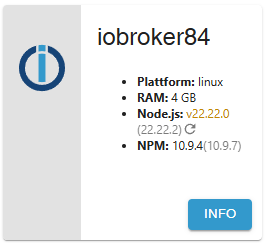
Wo soll das denn herkommen? Das Paket '22.22.0-1nodesource1' schleppt ja vollkommen richtig npm 10.9.4 mit.
Jetzt zeigt ioBroker das an:
fraenk for friends Code: MATF103
-
@meute
Ja, richtig. -
@Thomas-Braun sagte in Wir empfehlen: Node.js 22.x:
Und bring deine Adapter auf Stand.
Das frag ich mich auch, warum plötzlich 7 Adapter nicht mehr aktuell sind.
Die 7 Updates können ja nicht erst heute gekommen sein.@meute sagte in Wir empfehlen: Node.js 22.x:
Das frag ich mich auch, warum plötzlich 7 Adapter nicht mehr aktuell sind.
Die 7 Updates können ja nicht erst heute gekommen sein.doch!
bei mir waren es heute 11kein Support per PN! - Fragen im Forum stellen - Benutzt das Voting rechts unten im Beitrag wenn er euch geholfen hat.
Das Forum freut sich über eine Spende. Benutzt dazu den Spendenbutton oben rechts. Danke!
der Installationsfixer: curl -fsL https://iobroker.net/fix.sh | bash - -
Bei mir immerhin 9. Was mich besonders freut, der iot-Adapter lief bei mir nicht mit der 5.0.6 und 5.0.7, jetzt mit der 5.0.12 alles paletti und grün. 😀 Danke von mir an dieser Stelle an alle die dieses Projekt weiter vorantreiben.
-
Ich glaube, hier ist immer noch unklar, welche Rolle nodejs.org und nodesource einnehmen.
nodejs.org ist der Hersteller von nodejs. Der kann natürlich eine neue Version seines Produktes bekannt machen und lautstark eine neue Versionsnummer veröffentlichen. Nennt man dann 'upstream'.Nur wenn der 'Verkäufer' nodesource das nicht in sein Regal legt kannst du es auch nicht in den Einkaufswagen legen, egal wie laut die Werbung des Herstellers ist. Der Vertriebsweg im 'downstream' zu den Usern klemmt gerade.
-
@Thomas-Braun sagte in Wir empfehlen: Node.js 22.x:
Und bring deine Adapter auf Stand.
Das frag ich mich auch, warum plötzlich 7 Adapter nicht mehr aktuell sind.
Die 7 Updates können ja nicht erst heute gekommen sein.sagte in Wir empfehlen: Node.js 22.x:
Das frag ich mich auch, warum plötzlich 7 Adapter nicht mehr aktuell sind.
Die 7 Updates können ja nicht erst heute gekommen sein.Nach den Adapter-Updates aktualisiert der Sonoff-Adapter die Werte in den Objekten nicht mehr. Oh man...
fraenk for friends Code: MATF103
-
sagte in Wir empfehlen: Node.js 22.x:
Das frag ich mich auch, warum plötzlich 7 Adapter nicht mehr aktuell sind.
Die 7 Updates können ja nicht erst heute gekommen sein.Nach den Adapter-Updates aktualisiert der Sonoff-Adapter die Werte in den Objekten nicht mehr. Oh man...
@meute sagte in Wir empfehlen: Node.js 22.x:
Nach den Adapter-Updates aktualisiert der Sonoff-Adapter die Werte in den Objekten nicht mehr. Oh man...
...und im debug-log steht nstürlich wieder nichts 😉
kein Support per PN! - Fragen im Forum stellen - Benutzt das Voting rechts unten im Beitrag wenn er euch geholfen hat.
Das Forum freut sich über eine Spende. Benutzt dazu den Spendenbutton oben rechts. Danke!
der Installationsfixer: curl -fsL https://iobroker.net/fix.sh | bash -







Hey! Du scheinst an dieser Unterhaltung interessiert zu sein, hast aber noch kein Konto.
Hast du es satt, bei jedem Besuch durch die gleichen Beiträge zu scrollen? Wenn du dich für ein Konto anmeldest, kommst du immer genau dorthin zurück, wo du zuvor warst, und kannst dich über neue Antworten benachrichtigen lassen (entweder per E-Mail oder Push-Benachrichtigung). Du kannst auch Lesezeichen speichern und Beiträge positiv bewerten, um anderen Community-Mitgliedern deine Wertschätzung zu zeigen.
Mit deinem Input könnte dieser Beitrag noch besser werden 💗
Registrieren Anmelden453
Online33.0k
Benutzer83.6k
Themen1.3m
Beiträge