




[erledigt] Problem: Fronius Wattpilot Adapter installieren
-
Würde ich nicht machen.
Unbeobachtete Updates schreien immer nach Ärger. Das Skript würde ich höchstens bewusst selber ausführen.@Thomas-Braun sagte in [Problem] Fronius Wattpilot Adapter installieren
@HomoranHallo ihr zwei!
Die heutige 2. Neuinstallation auf eine neue SD-Karte ist erledigt. Soweit läuft alles gut, außer dem Fronius Wattpilot Adapter :
fronius-wattpilot.0 4742	2026-01-03 22:23:47.444	info	WebSocket connection closed. Code: 1006, Reason:
fronius-wattpilot.0 4742	2026-01-03 22:23:47.444	error	WebSocket error: connect EHOSTUNREACH 192.168.0.29:80.
fronius-wattpilot.0 4742	2026-01-03 22:23:44.371	info	Creating WebSocket connection to ws://192.168.0.29/ws
fronius-wattpilot.0 4742	2026-01-03 22:23:44.370	warn	No message received for over 2.5 minutes. Attempting to reconnect.
fronius-wattpilot.0 4742	2026-01-03 22:23:44.370	debug	Checking Wattpilot connection uptime...
Ich bin ratlos. Gottseidank habe ich noch die gut funktionierende Keba P30 Wallbox, sonst könnte ich mein e-Auto in der Garage stehen lassen.
Smart-Home-Automation unter IOB auf RASPI5, 16GB RAM, 50GB SSD, MariaSQL, VIS-2.
Anfang 2025 war ich Newbie in Sachen RaspBerry, Linux und IOB.
Jetzt läuft alles konstant gut und ich gebe gern meine Erfahrungen und mein Wissen an die Forums-User/Innen weiter.
Großes Danke an alle tatkräftigen Helfer im Forum! -
@Thomas-Braun sagte in [Problem] Fronius Wattpilot Adapter installieren
@HomoranHallo ihr zwei!
Die heutige 2. Neuinstallation auf eine neue SD-Karte ist erledigt. Soweit läuft alles gut, außer dem Fronius Wattpilot Adapter :
fronius-wattpilot.0 4742	2026-01-03 22:23:47.444	info	WebSocket connection closed. Code: 1006, Reason:
fronius-wattpilot.0 4742	2026-01-03 22:23:47.444	error	WebSocket error: connect EHOSTUNREACH 192.168.0.29:80.
fronius-wattpilot.0 4742	2026-01-03 22:23:44.371	info	Creating WebSocket connection to ws://192.168.0.29/ws
fronius-wattpilot.0 4742	2026-01-03 22:23:44.370	warn	No message received for over 2.5 minutes. Attempting to reconnect.
fronius-wattpilot.0 4742	2026-01-03 22:23:44.370	debug	Checking Wattpilot connection uptime...
Ich bin ratlos. Gottseidank habe ich noch die gut funktionierende Keba P30 Wallbox, sonst könnte ich mein e-Auto in der Garage stehen lassen.
@fuzzy1955 sagte in [Problem] Fronius Wattpilot Adapter installieren:
192.168.0.29:80
wer ist das?
@fuzzy1955 sagte in [Problem] Fronius Wattpilot Adapter installieren:
EHOSTUNREACH
kein Support per PN! - Fragen im Forum stellen - Benutzt das Voting rechts unten im Beitrag wenn er euch geholfen hat.
Das Forum freut sich über eine Spende. Benutzt dazu den Spendenbutton oben rechts. Danke!
der Installationsfixer: curl -fsL https://iobroker.net/fix.sh | bash - -
@fuzzy1955 sagte in [Problem] Fronius Wattpilot Adapter installieren:
192.168.0.29:80
wer ist das?
@fuzzy1955 sagte in [Problem] Fronius Wattpilot Adapter installieren:
EHOSTUNREACH
@Homoran sagte in [Problem] Fronius Wattpilot Adapter installieren:
wer ist das?
Das ist der Übeltäter (fronius-wattpilot).
Smart-Home-Automation unter IOB auf RASPI5, 16GB RAM, 50GB SSD, MariaSQL, VIS-2.
Anfang 2025 war ich Newbie in Sachen RaspBerry, Linux und IOB.
Jetzt läuft alles konstant gut und ich gebe gern meine Erfahrungen und mein Wissen an die Forums-User/Innen weiter.
Großes Danke an alle tatkräftigen Helfer im Forum! -
@Homoran sagte in [Problem] Fronius Wattpilot Adapter installieren:
wer ist das?
Das ist der Übeltäter (fronius-wattpilot).
@fuzzy1955 sagte in [Problem] Fronius Wattpilot Adapter installieren:
Das ist der Übeltäter (fronius-wattpilot).
stimmt die ip?
und der Port?so ist er nicht erreichbar!
@fuzzy1955 sagte in [Problem] Fronius Wattpilot Adapter installieren:
läuft alles gut, außer dem Fronius Wattpilot Adapter :
doch, der läuft
kein Support per PN! - Fragen im Forum stellen - Benutzt das Voting rechts unten im Beitrag wenn er euch geholfen hat.
Das Forum freut sich über eine Spende. Benutzt dazu den Spendenbutton oben rechts. Danke!
der Installationsfixer: curl -fsL https://iobroker.net/fix.sh | bash - -
@fuzzy1955 sagte in [Problem] Fronius Wattpilot Adapter installieren:
Das ist der Übeltäter (fronius-wattpilot).
stimmt die ip?
und der Port?so ist er nicht erreichbar!
@fuzzy1955 sagte in [Problem] Fronius Wattpilot Adapter installieren:
läuft alles gut, außer dem Fronius Wattpilot Adapter :
doch, der läuft
@Homoran sagte in [Problem] Fronius Wattpilot Adapter installieren:
stimmt die ip? und der Port?
Ja, klar. Der Adapter hat ja schon 1 Jahr funktioniert. Über IP ist er nicht erreichbar (typisch Fronius).
Smart-Home-Automation unter IOB auf RASPI5, 16GB RAM, 50GB SSD, MariaSQL, VIS-2.
Anfang 2025 war ich Newbie in Sachen RaspBerry, Linux und IOB.
Jetzt läuft alles konstant gut und ich gebe gern meine Erfahrungen und mein Wissen an die Forums-User/Innen weiter.
Großes Danke an alle tatkräftigen Helfer im Forum! -
@Homoran sagte in [Problem] Fronius Wattpilot Adapter installieren:
stimmt die ip? und der Port?
Ja, klar. Der Adapter hat ja schon 1 Jahr funktioniert. Über IP ist er nicht erreichbar (typisch Fronius).
@fuzzy1955 sagte in [Problem] Fronius Wattpilot Adapter installieren:
Über IP ist er nicht erreichbar
auch nicht im Browser?
was sagt denn das Fronius Display? edit ist ja ein go-e, also was sagt die App?mal neu gestartet?
kein Support per PN! - Fragen im Forum stellen - Benutzt das Voting rechts unten im Beitrag wenn er euch geholfen hat.
Das Forum freut sich über eine Spende. Benutzt dazu den Spendenbutton oben rechts. Danke!
der Installationsfixer: curl -fsL https://iobroker.net/fix.sh | bash - -
@fuzzy1955 sagte in [Problem] Fronius Wattpilot Adapter installieren:
Über IP ist er nicht erreichbar
auch nicht im Browser?
was sagt denn das Fronius Display? edit ist ja ein go-e, also was sagt die App?mal neu gestartet?
@Homoran sagte in [Problem] Fronius Wattpilot Adapter installieren:
was sagt denn das Fronius Display? edit ist ja ein go-e, also was sagt die App?
mal neu gestartet?
Über die App klappt die Verbindung und es funktioniert alles (Der Autoakku ist jetzt voll).
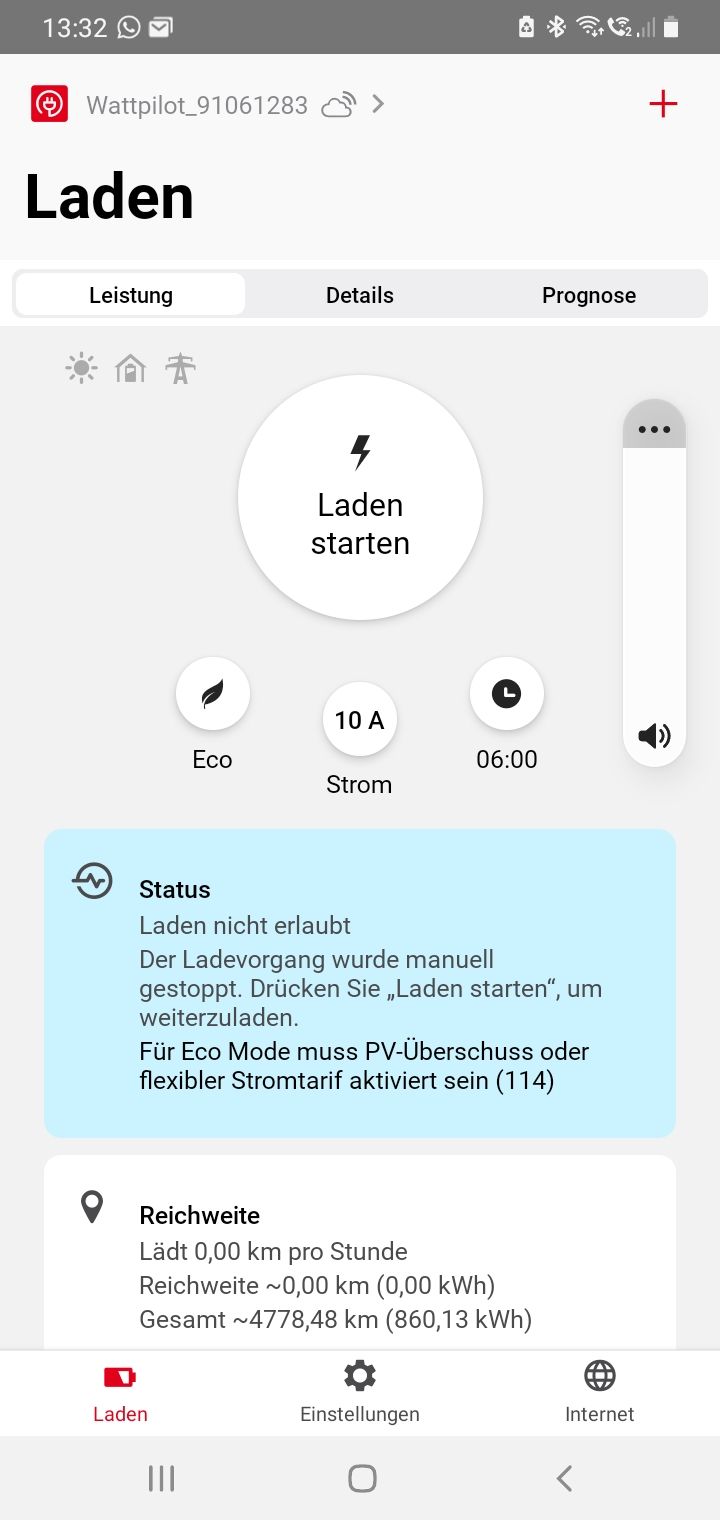
[Edit] Natürlich hab ich die Wall ein paar mal gestartet.
Smart-Home-Automation unter IOB auf RASPI5, 16GB RAM, 50GB SSD, MariaSQL, VIS-2.
Anfang 2025 war ich Newbie in Sachen RaspBerry, Linux und IOB.
Jetzt läuft alles konstant gut und ich gebe gern meine Erfahrungen und mein Wissen an die Forums-User/Innen weiter.
Großes Danke an alle tatkräftigen Helfer im Forum! -
@Homoran sagte in [Problem] Fronius Wattpilot Adapter installieren:
was sagt denn das Fronius Display? edit ist ja ein go-e, also was sagt die App?
mal neu gestartet?
Über die App klappt die Verbindung und es funktioniert alles (Der Autoakku ist jetzt voll).
[Edit] Natürlich hab ich die Wall ein paar mal gestartet.
@fuzzy1955 sagte in [Problem] Fronius Wattpilot Adapter installieren:
Über die App klappt die Verbindung
über den Zugangspunkt oder über die selbe IP?
wie sehen die WLAN Einstellungen aus?
keine Zugangsdaten zeigen!ist sie im Router zu sehen?
kein Support per PN! - Fragen im Forum stellen - Benutzt das Voting rechts unten im Beitrag wenn er euch geholfen hat.
Das Forum freut sich über eine Spende. Benutzt dazu den Spendenbutton oben rechts. Danke!
der Installationsfixer: curl -fsL https://iobroker.net/fix.sh | bash - -
@Thomas-Braun sagte in [Problem] Fronius Wattpilot Adapter installieren
@HomoranHallo ihr zwei!
Die heutige 2. Neuinstallation auf eine neue SD-Karte ist erledigt. Soweit läuft alles gut, außer dem Fronius Wattpilot Adapter :
fronius-wattpilot.0 4742	2026-01-03 22:23:47.444	info	WebSocket connection closed. Code: 1006, Reason:
fronius-wattpilot.0 4742	2026-01-03 22:23:47.444	error	WebSocket error: connect EHOSTUNREACH 192.168.0.29:80.
fronius-wattpilot.0 4742	2026-01-03 22:23:44.371	info	Creating WebSocket connection to ws://192.168.0.29/ws
fronius-wattpilot.0 4742	2026-01-03 22:23:44.370	warn	No message received for over 2.5 minutes. Attempting to reconnect.
fronius-wattpilot.0 4742	2026-01-03 22:23:44.370	debug	Checking Wattpilot connection uptime...
Ich bin ratlos. Gottseidank habe ich noch die gut funktionierende Keba P30 Wallbox, sonst könnte ich mein e-Auto in der Garage stehen lassen.
@fuzzy1955 sagte in [Problem] Fronius Wattpilot Adapter installieren:
Creating WebSocket connection to ws://192.168.0.29/ws
wie sehen die Einstellungen in den Adaptern ws und wattpilot aus?
auch hier keine Zugangsdaten zeigen! -
@fuzzy1955 sagte in [Problem] Fronius Wattpilot Adapter installieren:
Über die App klappt die Verbindung
über den Zugangspunkt oder über die selbe IP?
wie sehen die WLAN Einstellungen aus?
keine Zugangsdaten zeigen!ist sie im Router zu sehen?
@Homoran sagte in [Problem] Fronius Wattpilot Adapter installieren:
über den Zugangspunkt
Die IP sehe ich in der App leider nicht. Nur dass die App mit meinem WLAN verbunden ist.
Aaah ... das Ding hat die IP auf 192.168.0.28 gewechselt, obwohl ich im Router einen fixe IP (192.168.0.29) eingestellt habe! Nun ist der Fehler weg und ich habe aus dem IOB eine Verbindung.

@Thomas-Braun
Danke euch beiden für die unermüdliche Unterstützung!!Smart-Home-Automation unter IOB auf RASPI5, 16GB RAM, 50GB SSD, MariaSQL, VIS-2.
Anfang 2025 war ich Newbie in Sachen RaspBerry, Linux und IOB.
Jetzt läuft alles konstant gut und ich gebe gern meine Erfahrungen und mein Wissen an die Forums-User/Innen weiter.
Großes Danke an alle tatkräftigen Helfer im Forum! -
@Homoran sagte in [Problem] Fronius Wattpilot Adapter installieren:
über den Zugangspunkt
Die IP sehe ich in der App leider nicht. Nur dass die App mit meinem WLAN verbunden ist.
Aaah ... das Ding hat die IP auf 192.168.0.28 gewechselt, obwohl ich im Router einen fixe IP (192.168.0.29) eingestellt habe! Nun ist der Fehler weg und ich habe aus dem IOB eine Verbindung.
@Thomas-Braun
Danke euch beiden für die unermüdliche Unterstützung!!@fuzzy1955 sagte in [Problem] Fronius Wattpilot Adapter installieren:
Aaah ... das Ding hat die IP auf 192.168.0.28 gewechselt, obwohl ich im Router einen fixe IP (192.168.0.29) eingestellt habe!
Ich würde das Ding ja auch nicht über (vermeintlich fixe) IPs ansprechen sondern über den hostname.
-
@fuzzy1955 sagte in [Problem] Fronius Wattpilot Adapter installieren:
Aaah ... das Ding hat die IP auf 192.168.0.28 gewechselt, obwohl ich im Router einen fixe IP (192.168.0.29) eingestellt habe!
Ich würde das Ding ja auch nicht über (vermeintlich fixe) IPs ansprechen sondern über den hostname.
@Thomas-Braun sagte in [erledigt] Problem: Fronius Wattpilot Adapter installieren:
das Ding ja auch nicht über (vermeintlich fixe) IPs ansprechen sondern über den hostname
Ja, danke! Das werde ich umstellen.
-
@Homoran sagte in [Problem] Fronius Wattpilot Adapter installieren:
über den Zugangspunkt
Die IP sehe ich in der App leider nicht. Nur dass die App mit meinem WLAN verbunden ist.
Aaah ... das Ding hat die IP auf 192.168.0.28 gewechselt, obwohl ich im Router einen fixe IP (192.168.0.29) eingestellt habe! Nun ist der Fehler weg und ich habe aus dem IOB eine Verbindung.
@Thomas-Braun
Danke euch beiden für die unermüdliche Unterstützung!!@fuzzy1955 sagte in [erledigt] Problem: Fronius Wattpilot Adapter installieren:
das Ding hat die IP auf 192.168.0.28 gewechselt
hmmmm
@fuzzy1955 sagte in [erledigt] Problem: Fronius Wattpilot Adapter installieren:
stimmt die ip? und der Port?
Ja, klar.
hmmmmm


Hey! Du scheinst an dieser Unterhaltung interessiert zu sein, hast aber noch kein Konto.
Hast du es satt, bei jedem Besuch durch die gleichen Beiträge zu scrollen? Wenn du dich für ein Konto anmeldest, kommst du immer genau dorthin zurück, wo du zuvor warst, und kannst dich über neue Antworten benachrichtigen lassen (entweder per E-Mail oder Push-Benachrichtigung). Du kannst auch Lesezeichen speichern und Beiträge positiv bewerten, um anderen Community-Mitgliedern deine Wertschätzung zu zeigen.
Mit deinem Input könnte dieser Beitrag noch besser werden 💗
Registrieren AnmeldenSupport us
407
Online33.0k
Benutzer83.6k
Themen1.3m
Beiträge