




Alexa2 - Adapter / "Die Webseite ist nicht erreichbar"
-
Hi zusammen,
ein frohes Neues Jahr euch allen.
Ich wollte heute meinen Alexa-Adapter neu installieren, um die ganzen alten Geräte mal loszuwerden, komme aber überhaupt nicht weiter - auch nicht mit google und der Suchfunktion hier drin. Ich vermute, dass es nicht am Adapter liegt, daher habe ich den allgemeinen Kanal gewählt, ich hoffe, das war richtig.
Konfiguration:
iobroker - admin v.7.7.19
Raspberry Pi 5 als Master
Raspberry Pi 4 als Slave
Beide mit Debian "trixie", NPM 10.9.4 und Node.js 22.21.0
Fritz!Box 7590
Mac OS 26.2 (25C56) "Tahoe"
Problem tritt mit Chrome und auch Safari aufProblem:
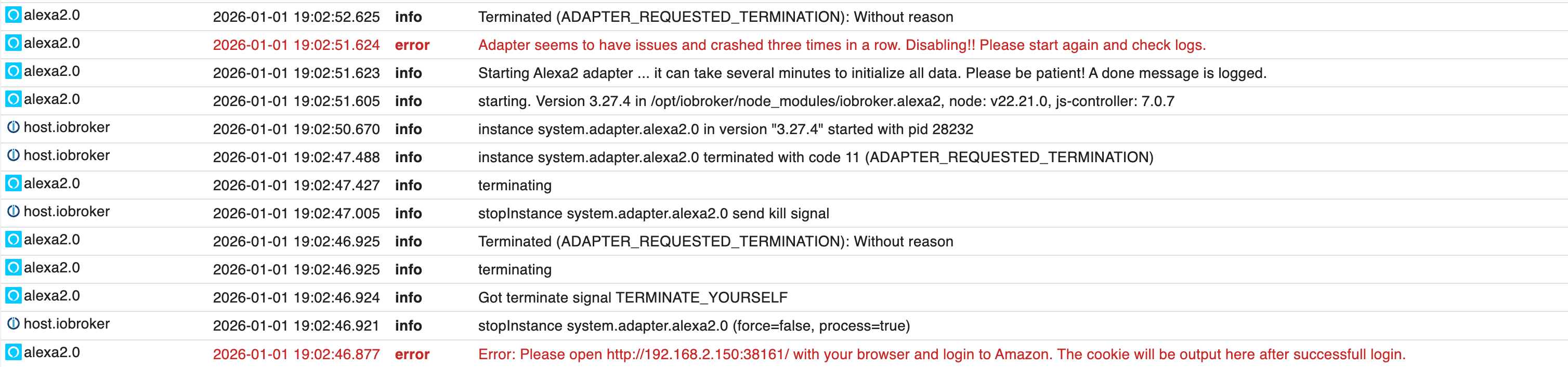
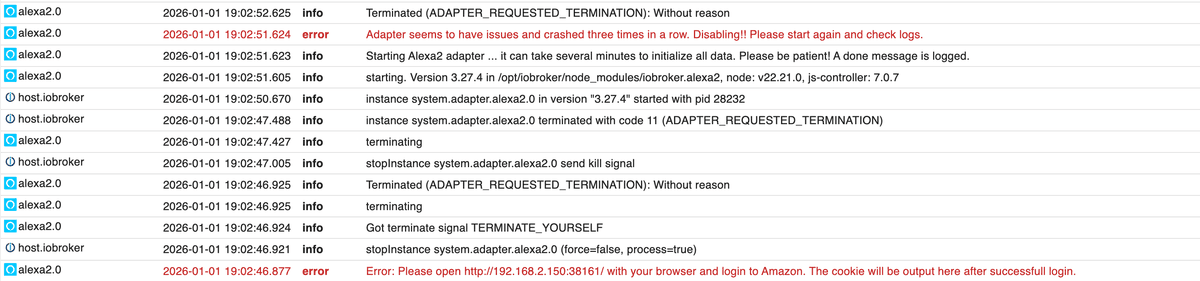
Nach der Installation des Alexa2 Adapters (3.27.4) versucht der Adapter sich zu verbinden und scheitert:
Ich habe versucht parallel einen weiteren Tab zu öffnen, in dem ich dann die gewünschte Seite eigentlich öffnen will, aber folgende Fehlermeldung erhalte:
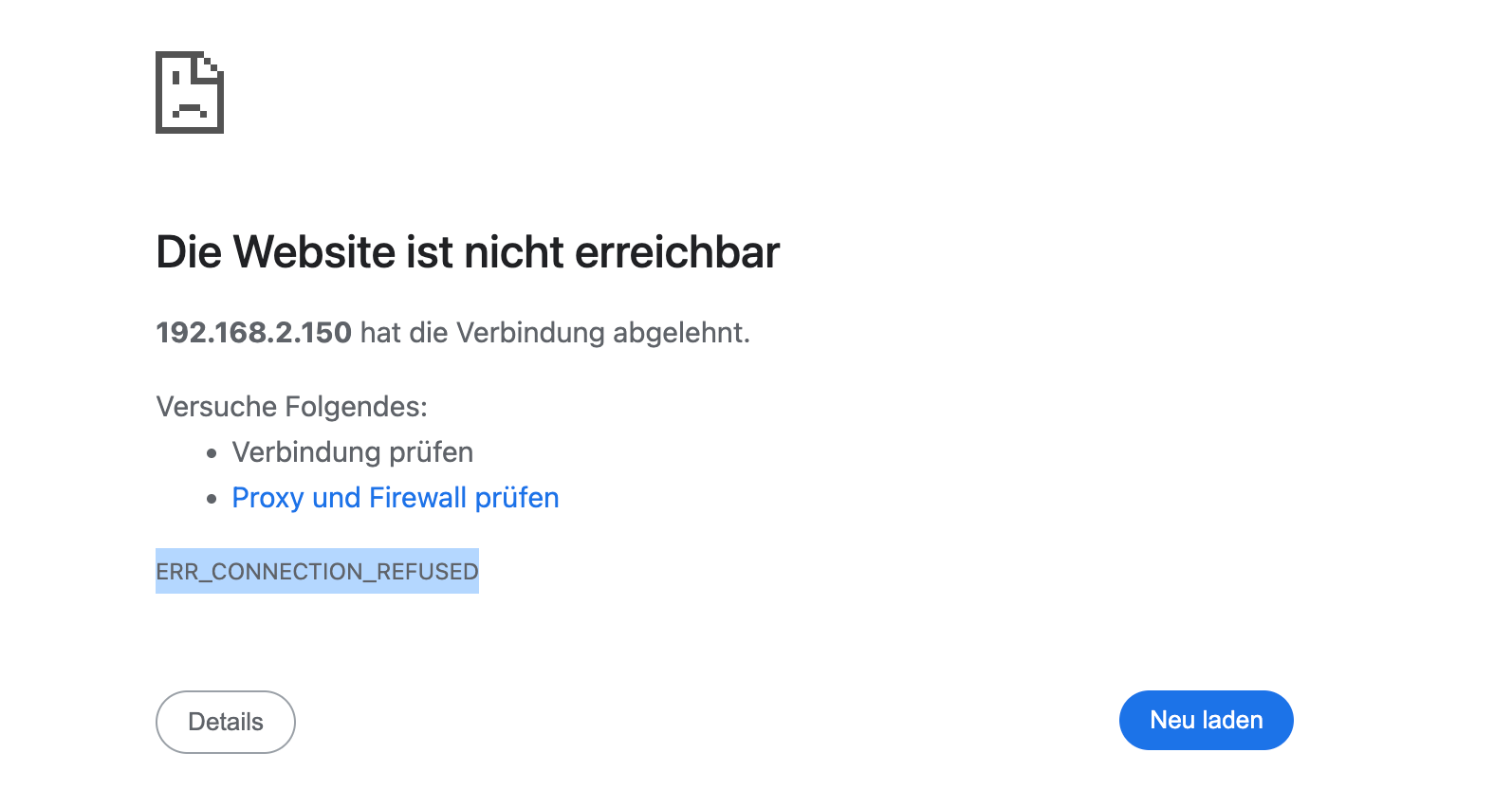
Ich deute, dass die Verbindung nicht aufgebaut werden kann. Ich hatte vermutet, dass ich bei der Fritz!Box den Port freigeben muss, aber auch danach hat es nicht funktioniert. Vielleicht liegt es auch daran, dass der Adapter so verdammt schnell dreimal neu gestartet wird und dann gekillt wird.
Danke vorab für eure Antworten,
Thomas -
Hi zusammen,
ein frohes Neues Jahr euch allen.
Ich wollte heute meinen Alexa-Adapter neu installieren, um die ganzen alten Geräte mal loszuwerden, komme aber überhaupt nicht weiter - auch nicht mit google und der Suchfunktion hier drin. Ich vermute, dass es nicht am Adapter liegt, daher habe ich den allgemeinen Kanal gewählt, ich hoffe, das war richtig.
Konfiguration:
iobroker - admin v.7.7.19
Raspberry Pi 5 als Master
Raspberry Pi 4 als Slave
Beide mit Debian "trixie", NPM 10.9.4 und Node.js 22.21.0
Fritz!Box 7590
Mac OS 26.2 (25C56) "Tahoe"
Problem tritt mit Chrome und auch Safari aufProblem:
Nach der Installation des Alexa2 Adapters (3.27.4) versucht der Adapter sich zu verbinden und scheitert:
Ich habe versucht parallel einen weiteren Tab zu öffnen, in dem ich dann die gewünschte Seite eigentlich öffnen will, aber folgende Fehlermeldung erhalte:
Ich deute, dass die Verbindung nicht aufgebaut werden kann. Ich hatte vermutet, dass ich bei der Fritz!Box den Port freigeben muss, aber auch danach hat es nicht funktioniert. Vielleicht liegt es auch daran, dass der Adapter so verdammt schnell dreimal neu gestartet wird und dann gekillt wird.
Danke vorab für eure Antworten,
Thomas@samoht0403 sagte in Alexa2 - Adapter / "Die Webseite ist nicht erreichbar":
Ich hatte vermutet, dass ich bei der Fritz!Box den Port freigeben mus
mach den SOFORT wieder zu!
kein Support per PN! - Fragen im Forum stellen - Benutzt das Voting rechts unten im Beitrag wenn er euch geholfen hat.
Das Forum freut sich über eine Spende. Benutzt dazu den Spendenbutton oben rechts. Danke!
der Installationsfixer: curl -fsL https://iobroker.net/fix.sh | bash - -
Hi zusammen,
ein frohes Neues Jahr euch allen.
Ich wollte heute meinen Alexa-Adapter neu installieren, um die ganzen alten Geräte mal loszuwerden, komme aber überhaupt nicht weiter - auch nicht mit google und der Suchfunktion hier drin. Ich vermute, dass es nicht am Adapter liegt, daher habe ich den allgemeinen Kanal gewählt, ich hoffe, das war richtig.
Konfiguration:
iobroker - admin v.7.7.19
Raspberry Pi 5 als Master
Raspberry Pi 4 als Slave
Beide mit Debian "trixie", NPM 10.9.4 und Node.js 22.21.0
Fritz!Box 7590
Mac OS 26.2 (25C56) "Tahoe"
Problem tritt mit Chrome und auch Safari aufProblem:
Nach der Installation des Alexa2 Adapters (3.27.4) versucht der Adapter sich zu verbinden und scheitert:
Ich habe versucht parallel einen weiteren Tab zu öffnen, in dem ich dann die gewünschte Seite eigentlich öffnen will, aber folgende Fehlermeldung erhalte:
Ich deute, dass die Verbindung nicht aufgebaut werden kann. Ich hatte vermutet, dass ich bei der Fritz!Box den Port freigeben muss, aber auch danach hat es nicht funktioniert. Vielleicht liegt es auch daran, dass der Adapter so verdammt schnell dreimal neu gestartet wird und dann gekillt wird.
Danke vorab für eure Antworten,
Thomas@samoht0403 sagte in Alexa2 - Adapter / "Die Webseite ist nicht erreichbar":
und scheitert:
der scheitert nicht nur, der wird deaktiviert!
in der Ausgabe von
iob diagwirst du das spätestens sehen.@samoht0403 sagte in Alexa2 - Adapter / "Die Webseite ist nicht erreichbar":
Ich habe versucht parallel einen weiteren Tab zu öffnen
was wahrscheinlich nicht geht weil die Instanz nicht läuft.
-
@samoht0403 sagte in Alexa2 - Adapter / "Die Webseite ist nicht erreichbar":
Ich hatte vermutet, dass ich bei der Fritz!Box den Port freigeben mus
mach den SOFORT wieder zu!
@Homoran: hatte ich schon vorm Post gemacht. Aber Du hast Recht, hätte ich noch schreiben sollen.
-
Hallo @homoran: Hier der Output von iob diag:
Script v.2025-08-09 *** BASE SYSTEM *** Operating System: Debian GNU/Linux 13 (trixie) Static hostname: iobroker Icon name: computer Kernel: Linux 6.12.47+rpt-rpi-2712 Architecture: arm64 OS is similar to: Model : Raspberry Pi 5 Model B Rev 1.0 Docker : false Virtualization : none Kernel : aarch64 Userland : 64 bit Systemuptime and Load: 10:33:39 up 1 day, 20:16, 2 users, load average: 0.34, 0.29, 0.27 CPU threads: 4 *** LIFE CYCLE STATUS *** Operating System is the current Debian stable version codenamed 'trixie'! *** RASPBERRY THROTTLING *** Current issues: No throttling issues detected. Previously detected issues: No throttling issues detected. *** TIME AND TIMEZONES *** Local time: Sat 2026-01-03 10:33:39 CET Universal time: Sat 2026-01-03 09:33:39 UTC RTC time: Sat 2026-01-03 09:33:39 Time zone: Europe/Berlin (CET, +0100) System clock synchronized: yes NTP service: active RTC in local TZ: no *** Users and Groups *** User that called 'iob diag': pi HOME=/home/pi GROUPS=pi adm dialout cdrom sudo audio video plugdev games users netdev lpadmin gpio i2c spi render input iobroker User that is running 'js-controller': iobroker HOME=/home/iobroker SUDO_HOME=/home/pi GROUPS=iobroker tty dialout audio video plugdev bluetooth gpio i2c *** DISPLAY-SERVER SETUP *** Display-Server: true Display-Manager: * lightdm.service - Light Display Manager Desktop: Session: tty *** MEMORY *** total used free shared buff/cache available Mem: 8.5G 3.1G 2.9G 92M 2.6G 5.3G Swap: 2.1G 0B 2.1G Total: 10G 3.1G 5.0G Active iob-Instances: 26 8063 M total memory 2987 M used memory 2931 M active memory 1825 M inactive memory 2765 M free memory 196 M buffer memory 2289 M swap cache 2047 M total swap 0 M used swap 2047 M free swap *** top - Table Of Processes *** top - 10:33:39 up 1 day, 20:16, 2 users, load average: 0.34, 0.29, 0.27 Tasks: 238 total, 1 running, 237 sleeping, 0 stopped, 0 zombie %Cpu(s): 2.4 us, 0.0 sy, 0.0 ni, 97.6 id, 0.0 wa, 0.0 hi, 0.0 si, 0.0 st MiB Mem : 8063.0 total, 2763.7 free, 2988.7 used, 2485.9 buff/cache MiB Swap: 2048.0 total, 2048.0 free, 0.0 used. 5074.3 avail Mem *** FAILED SERVICES *** UNIT LOAD ACTIVE SUB DESCRIPTION * deconz-init.service loaded failed failed deCONZ: ZigBee gateway -- Initialisation Legend: LOAD -> Reflects whether the unit definition was properly loaded. ACTIVE -> The high-level unit activation state, i.e. generalization of SUB. SUB -> The low-level unit activation state, values depend on unit type. 1 loaded units listed. *** DMESG CRITICAL ERRORS *** No critical errors detected *** FILESYSTEM *** Filesystem Type Size Used Avail Use% Mounted on udev devtmpfs 3.9G 0 3.9G 0% /dev tmpfs tmpfs 1.6G 59M 1.6G 4% /run /dev/sda2 ext4 469G 8.9G 441G 2% / tmpfs tmpfs 4.0G 384K 4.0G 1% /dev/shm tmpfs tmpfs 5.0M 48K 5.0M 1% /run/lock tmpfs tmpfs 1.0M 0 1.0M 0% /run/credentials/systemd-journald.service tmpfs tmpfs 4.0G 9.7M 4.0G 1% /tmp /dev/sda1 vfat 510M 79M 432M 16% /boot/firmware tmpfs tmpfs 807M 240K 807M 1% /run/user/105 tmpfs tmpfs 1.0M 0 1.0M 0% /run/credentials/getty@tty1.service tmpfs tmpfs 807M 224K 807M 1% /run/user/1000 Messages concerning ext4 filesystem in dmesg: [Thu Jan 1 14:17:03 2026] Kernel command line: reboot=w coherent_pool=1M 8250.nr_uarts=1 pci=pcie_bus_safe cgroup_disable=memory numa_policy=interleave nvme.max_host_mem_size_mb=0 numa=fake=8 system_heap.max_order=0 iommu_dma_numa_policy=interleave smsc95xx.macaddr=2C:CF:67:2F:BC:E7 vc_mem.mem_base=0x3fc00000 vc_mem.mem_size=0x40000000 console=tty1 root=PARTUUID=23bc0d5f-02 rootfstype=ext4 fsck.repair=yes rootwait quiet splash plymouth.ignore-serial-consoles [Thu Jan 1 14:17:05 2026] EXT4-fs (sda2): orphan cleanup on readonly fs [Thu Jan 1 14:17:05 2026] EXT4-fs (sda2): mounted filesystem 37d2cb52-513e-40e1-b90f-213aa6096cba ro with ordered data mode. Quota mode: none. [Thu Jan 1 14:17:06 2026] EXT4-fs (sda2): re-mounted 37d2cb52-513e-40e1-b90f-213aa6096cba r/w. Show mounted filesystems: TARGET SOURCE FSTYPE OPTIONS / /dev/sda2 ext4 rw,noatime `-/boot/firmware /dev/sda1 vfat rw,relatime,fmask=0022,dmask=0022,codepage=437,iocharset=ascii,shortname=mixed,errors=remount-ro Files in neuralgic directories: /var: 2.5G /var/ 216M /var/lib 216M /var/cache 203M /var/cache/apt 144M /var/lib/apt/lists Archived and active journals take up 51.8M in the file system. /opt/iobroker/backups: 4.0K /opt/iobroker/backups/ /opt/iobroker/iobroker-data: 239M /opt/iobroker/iobroker-data/ 146M /opt/iobroker/iobroker-data/files 75M /opt/iobroker/iobroker-data/backup-objects 47M /opt/iobroker/iobroker-data/files/admin.admin 46M /opt/iobroker/iobroker-data/files/admin.admin/custom/assets The five largest files in iobroker-data are: 16M /opt/iobroker/iobroker-data/objects.jsonl 8.1M /opt/iobroker/iobroker-data/files/backitup.admin/assets/index-C_W7K-9p.js 4.6M /opt/iobroker/iobroker-data/files/javascript.admin/vs/language/typescript/tsWorker.js 4.4M /opt/iobroker/iobroker-data/files/yahka.admin/yahka.admin.js.map 3.8M /opt/iobroker/iobroker-data/files/yahka.admin/yahka.admin.js USB-Devices by-id: USB-Sticks - Avoid direct links to /dev/tty* in your adapter setups, please always prefer the links 'by-id': No Devices found 'by-id' Zigbee Network Settings on your coordinator/in nvbackup are: zigbee.X Extended Pan ID: *** MASKED *** Pan ID: *** MASKED *** Channel: *** MASKED *** Network Key: *** MASKED *** To unmask the settings run 'iob diag --unmask' *** NodeJS-Installation *** /usr/bin/nodejs v22.21.0 /usr/bin/node v22.21.0 /usr/bin/npm 10.9.4 /usr/bin/npx 10.9.4 /usr/bin/corepack 0.34.0 nodejs: Installed: 22.21.0-1nodesource1 Candidate: 22.21.0-1nodesource1 Version table: *** 22.21.0-1nodesource1 1001 500 https://deb.nodesource.com/node_22.x nodistro/main arm64 Packages 100 /var/lib/dpkg/status 22.20.0-1nodesource1 1001 500 https://deb.nodesource.com/node_22.x nodistro/main arm64 Packages 22.19.0-1nodesource1 1001 500 https://deb.nodesource.com/node_22.x nodistro/main arm64 Packages 22.18.0-1nodesource1 1001 500 https://deb.nodesource.com/node_22.x nodistro/main arm64 Packages 22.17.1-1nodesource1 1001 500 https://deb.nodesource.com/node_22.x nodistro/main arm64 Packages 22.17.0-1nodesource1 1001 500 https://deb.nodesource.com/node_22.x nodistro/main arm64 Packages 22.16.0-1nodesource1 1001 500 https://deb.nodesource.com/node_22.x nodistro/main arm64 Packages 22.15.1-1nodesource1 1001 500 https://deb.nodesource.com/node_22.x nodistro/main arm64 Packages 22.15.0-1nodesource1 1001 500 https://deb.nodesource.com/node_22.x nodistro/main arm64 Packages 22.14.0-1nodesource1 1001 500 https://deb.nodesource.com/node_22.x nodistro/main arm64 Packages 22.13.1-1nodesource1 1001 500 https://deb.nodesource.com/node_22.x nodistro/main arm64 Packages 22.13.0-1nodesource1 1001 500 https://deb.nodesource.com/node_22.x nodistro/main arm64 Packages 22.12.0-1nodesource1 1001 500 https://deb.nodesource.com/node_22.x nodistro/main arm64 Packages 22.11.0-1nodesource1 1001 500 https://deb.nodesource.com/node_22.x nodistro/main arm64 Packages 22.10.0-1nodesource1 1001 500 https://deb.nodesource.com/node_22.x nodistro/main arm64 Packages 22.9.0-1nodesource1 1001 500 https://deb.nodesource.com/node_22.x nodistro/main arm64 Packages 22.8.0-1nodesource1 1001 500 https://deb.nodesource.com/node_22.x nodistro/main arm64 Packages 22.7.0-1nodesource1 1001 500 https://deb.nodesource.com/node_22.x nodistro/main arm64 Packages 22.6.0-1nodesource1 1001 500 https://deb.nodesource.com/node_22.x nodistro/main arm64 Packages 22.5.1-1nodesource1 1001 500 https://deb.nodesource.com/node_22.x nodistro/main arm64 Packages 22.5.0-1nodesource1 1001 500 https://deb.nodesource.com/node_22.x nodistro/main arm64 Packages 22.4.1-1nodesource1 1001 500 https://deb.nodesource.com/node_22.x nodistro/main arm64 Packages 22.4.0-1nodesource1 1001 500 https://deb.nodesource.com/node_22.x nodistro/main arm64 Packages 22.3.0-1nodesource1 1001 500 https://deb.nodesource.com/node_22.x nodistro/main arm64 Packages 22.2.0-1nodesource1 1001 500 https://deb.nodesource.com/node_22.x nodistro/main arm64 Packages 22.1.0-1nodesource1 1001 500 https://deb.nodesource.com/node_22.x nodistro/main arm64 Packages 22.0.0-1nodesource1 1001 500 https://deb.nodesource.com/node_22.x nodistro/main arm64 Packages 20.19.2+dfsg-1 500 500 http://deb.debian.org/debian trixie/main arm64 Packages Temp directories causing deletion problem: 0 No problems detected Errors in npm tree: 0 No problems detected Checking for nodejs vulnerability: █████ ██ ██ ██████ ██████ ██████ ██████ ██ ██ ██ ██ ██ ██ ██ ██ ██ ██ ██ ██ ██ ██ ███████ ██ ██ ██ ███ ██ ██ ██ ██ ██ ██ ██ ██ ██ ██ ██ ██ ██ ██ ██ ██ ██ ██ ██ ██ ██ ██ ██ ███████ ███████ ██████ ██████ ██████ ██████ ██ *** ioBroker-Installation *** ioBroker Status iobroker is running on this host. Objects type: jsonl States type: jsonl Hosts: ioBrokerslave ioBrokerslave (version: 7.0.7, hostname: ioBrokerslave , alive, uptime: 524924) iobroker iobroker (version: 7.0.7, hostname: iobroker , alive, uptime: 95422) Core adapters versions js-controller: 7.0.7 admin: 7.7.19 javascript: 9.0.11 nodejs modules from github: 1 | +-- syno@3.0.0 (git+https://git@github.com/MeisterTR/syno.git#0104a973d33fe332aa6b1ab5be7fe8c57d3c68b0) Adapter State + system.adapter.admin.0 : admin : iobroker - enabled, port: 8081, bind: 0.0.0.0 (SSL), run as: admin + system.adapter.admin.1 : admin : iobroker - enabled, port: 8083, bind: 0.0.0.0, run as: admin system.adapter.alexa2.0 : alexa2 : iobroker - enabled + system.adapter.backitup.0 : backitup : iobroker - enabled + system.adapter.broadlink2.0 : broadlink2 : iobroker - enabled system.adapter.daswetter.0 : daswetter : iobroker - enabled + system.adapter.deconz.0 : deconz : iobroker - enabled, port: 80 system.adapter.devices.0 : devices : iobroker - disabled + system.adapter.discovery.0 : discovery : iobroker - enabled + system.adapter.hm-rpc.0 : hm-rpc : iobroker - enabled, port: 0 + system.adapter.iot.0 : iot : iobroker - enabled + system.adapter.javascript.0 : javascript : iobroker - enabled + system.adapter.kecontact.0 : kecontact : iobroker - enabled + system.adapter.melcloud.0 : melcloud : iobroker - enabled + system.adapter.nuki.0 : nuki : iobroker - enabled + system.adapter.pushover.0 : pushover : iobroker - enabled + system.adapter.rainbird.0 : rainbird : iobroker - enabled system.adapter.schoolfree.0 : schoolfree : iobroker - enabled + system.adapter.senec.0 : senec : iobroker - enabled + system.adapter.shelly.0 : shelly : iobroker - enabled, port: 1882, bind: 0.0.0.0 + system.adapter.shelly.1 : shelly : iobroker - enabled, port: 1882, bind: 0.0.0.0 + system.adapter.simple-api.0 : simple-api : iobroker - enabled, port: 8087, bind: 0.0.0.0, run as: admin + system.adapter.smartgarden.0 : smartgarden : iobroker - enabled system.adapter.sonoff.0 : sonoff : iobroker - disabled, port: 1883, bind: 0.0.0.0 + system.adapter.sonos.0 : sonos : iobroker - enabled + system.adapter.synology.0 : synology : iobroker - enabled, port: 5000 + system.adapter.tr-064.0 : tr-064 : iobroker - enabled system.adapter.tuya.0 : tuya : iobroker - disabled + system.adapter.web.0 : web : iobroker - enabled, port: 8084, bind: 0.0.0.0, run as: admin + system.adapter.yahka.0 : yahka : iobroker - enabled + system.adapter.zwave2.0 : zwave2 : ioBrokerslave - enabled + instance is alive Enabled adapters with bindings + system.adapter.admin.0 : admin : iobroker - enabled, port: 8081, bind: 0.0.0.0 (SSL), run as: admin + system.adapter.admin.1 : admin : iobroker - enabled, port: 8083, bind: 0.0.0.0, run as: admin + system.adapter.deconz.0 : deconz : iobroker - enabled, port: 80 + system.adapter.hm-rpc.0 : hm-rpc : iobroker - enabled, port: 0 + system.adapter.shelly.0 : shelly : iobroker - enabled, port: 1882, bind: 0.0.0.0 + system.adapter.shelly.1 : shelly : iobroker - enabled, port: 1882, bind: 0.0.0.0 + system.adapter.simple-api.0 : simple-api : iobroker - enabled, port: 8087, bind: 0.0.0.0, run as: admin + system.adapter.synology.0 : synology : iobroker - enabled, port: 5000 + system.adapter.web.0 : web : iobroker - enabled, port: 8084, bind: 0.0.0.0, run as: admin ioBroker-Repositories ┌─────────┬──────────┬──────────────────────────────────────────────────┬──────────────┐ │ (index) │ name │ url │ auto upgrade │ ├─────────┼──────────┼──────────────────────────────────────────────────┼──────────────┤ │ 0 │ 'stable' │ 'http://download.iobroker.net/sources-dist.json' │ true │ └─────────┴──────────┴──────────────────────────────────────────────────┴──────────────┘ Active repo(s): stable Upgrade policy: none Installed ioBroker-Adapters Used repository: stable Adapter "admin" : 7.7.19 , installed 7.7.19 Adapter "alexa2" : 3.27.4 , installed 3.27.4 Adapter "backitup" : 3.3.10 , installed 3.3.10 Adapter "broadlink2" : 2.3.0 , installed 2.3.0 Adapter "daswetter" : 3.2.8 , installed 3.2.8 Adapter "deconz" : 1.6.4 , installed 1.6.4 Adapter "devices" : 1.2.8 , installed 1.2.8 Adapter "discovery" : 5.0.0 , installed 5.0.0 Adapter "hm-rpc" : 2.0.2 , installed 2.0.2 Adapter "iot" : 5.0.7 , installed 5.0.7 Adapter "javascript" : 9.0.11 , installed 9.0.11 Controller "js-controller": 7.0.7 , installed 7.0.7 Adapter "kecontact" : 3.3.0 , installed 3.3.0 Adapter "melcloud" : 3.0.1 , installed 3.0.1 Adapter "nuki" : 2.0.0 , installed 2.0.0 Adapter "pushover" : 4.1.0 , installed 4.1.0 Adapter "rainbird" : 2.0.2 , installed 2.0.2 Adapter "schoolfree" : 1.1.13 , installed 1.1.13 Adapter "senec" : 1.6.17 , installed 1.6.17 Adapter "shelly" : 10.4.1 , installed 10.4.1 Adapter "simple-api" : 2.8.0 , installed 2.8.0 Adapter "smartgarden" : 2.0.1 , installed 2.0.1 Adapter "socketio" : 6.7.1 , installed 7.0.8 Adapter "sonoff" : 3.2.1 , installed 3.2.1 Adapter "sonos" : 3.0.0 , installed 3.0.0 Adapter "synology" : 3.1.0 , installed 3.1.0 Adapter "tr-064" : 4.3.0 , installed 4.3.0 Adapter "tuya" : 3.16.0 , installed 3.16.0 Adapter "web" : 7.0.8 , installed 7.0.8 Adapter "ws" : 2.6.2 , installed 3.0.19 Adapter "yahka" : 1.1.5 , installed 1.1.5 Objects and States Please stand by - This may take a while Objects: 13335 States: 11757 *** OS-Repositories and Updates *** W: https://deb.nodesource.com/node_22.x/dists/nodistro/InRelease: Policy will reject signature within a year, see --audit for details Hit:1 http://deb.debian.org/debian trixie InRelease Hit:2 http://deb.debian.org/debian trixie-updates InRelease Hit:3 http://deb.debian.org/debian-security trixie-security InRelease Hit:4 http://phoscon.de/apt/deconz generic-beta InRelease Hit:5 http://archive.raspberrypi.com/debian trixie InRelease Hit:6 https://deb.nodesource.com/node_22.x nodistro InRelease Reading package lists... W: https://deb.nodesource.com/node_22.x/dists/nodistro/InRelease: Policy will reject signature within a year, see --audit for details Pending Updates: 0 *** Listening Ports *** Active Internet connections (only servers) Proto Recv-Q Send-Q Local Address Foreign Address State User Inode PID/Program name tcp 0 0 0.0.0.0:111 0.0.0.0:* LISTEN 0 5254 1/init tcp 0 0 0.0.0.0:22 0.0.0.0:* LISTEN 0 10035 1102/sshd: /usr/sbi tcp 0 0 0.0.0.0:9000 0.0.0.0:* LISTEN 1001 1132018 100914/iobroker.js- tcp 0 0 0.0.0.0:9001 0.0.0.0:* LISTEN 1001 1132013 100914/iobroker.js- tcp 0 0 0.0.0.0:42010 0.0.0.0:* LISTEN 1001 1132305 101188/io.hm-rpc.0 tcp 0 0 0.0.0.0:1882 0.0.0.0:* LISTEN 1001 1132392 101324/io.shelly.1 tcp 0 0 127.0.0.1:631 0.0.0.0:* LISTEN 0 2135994 189266/cupsd tcp 0 0 127.0.0.1:35865 0.0.0.0:* LISTEN 1001 1138922 101384/io.yahka.0 tcp6 0 0 :::111 :::* LISTEN 0 1600 1/init tcp6 0 0 :::22 :::* LISTEN 0 10037 1102/sshd: /usr/sbi tcp6 0 0 :::38391 :::* LISTEN 1001 1135000 101384/io.yahka.0 tcp6 0 0 ::1:631 :::* LISTEN 0 2135993 189266/cupsd tcp6 0 0 :::3500 :::* LISTEN 1001 1135700 101339/io.sonos.0 tcp6 0 0 :::8087 :::* LISTEN 1001 1134243 101487/io.simple-ap tcp6 0 0 :::8084 :::* LISTEN 1001 1136189 101528/io.web.0 tcp6 0 0 :::8083 :::* LISTEN 1001 1131065 100981/io.admin.1 tcp6 0 0 :::8081 :::* LISTEN 1001 1130985 100932/io.admin.0 udp 0 0 192.168.2.150:5353 0.0.0.0:* 1001 1135826 101369/io.tr-064.0 udp 0 0 0.0.0.0:5353 0.0.0.0:* 101 8349 721/avahi-daemon: r udp 0 0 0.0.0.0:58855 0.0.0.0:* 1001 2709455 101119/io.broadlink udp 0 0 0.0.0.0:5683 0.0.0.0:* 1001 1134775 101309/io.shelly.0 udp 0 0 0.0.0.0:1900 0.0.0.0:* 1001 1131399 101138/io.deconz.0 udp 0 0 0.0.0.0:47166 0.0.0.0:* 101 8351 721/avahi-daemon: r udp 0 0 0.0.0.0:35229 0.0.0.0:* 1001 1133511 101208/io.kecontact udp 0 0 0.0.0.0:15001 0.0.0.0:* 1001 1132271 101119/io.broadlink udp 0 0 0.0.0.0:7090 0.0.0.0:* 1001 1133509 101208/io.kecontact udp 0 0 0.0.0.0:7092 0.0.0.0:* 1001 1133510 101208/io.kecontact udp 0 0 0.0.0.0:111 0.0.0.0:* 0 432 1/init udp6 0 0 :::5353 :::* 101 8350 721/avahi-daemon: r udp6 0 0 :::1900 :::* 1001 1131402 101138/io.deconz.0 udp6 0 0 :::1900 :::* 1001 1131401 101138/io.deconz.0 udp6 0 0 :::1900 :::* 1001 1131400 101138/io.deconz.0 udp6 0 0 :::39629 :::* 101 8352 721/avahi-daemon: r udp6 0 0 :::111 :::* 0 433 1/init udp6 0 0 fe80::b90e:b39d:961:546 :::* 0 10953 970/NetworkManager *** Log File - Last 25 Lines *** 2026-01-03 10:30:07.658 - debug: alexa2.0 (243951) Alexa-Cookie: Headers: {""} 2026-01-03 10:30:07.662 - debug: alexa2.0 (243951) Router: /favicon.ico / GET / {"host":"192.168.2.150:35691","connection":"keep-alive","user-agent":"Mozilla/5.0 (Macintosh; Intel Mac OS X 10_15_7) AppleWebKit/537.36 (KHTML, like Gecko) Chrome/143.0.0.0 Safari/537.36","accept":"image/avif,image/webp,image/apng,image/svg+xml,image/*,*/*;q=0.8","referer":"http://192.168.2.150:35691/","accept-encoding":"gzip, code 11 (ADAPTER_REQUESTED_TERMINATION) 2026-01-03 10:30:10.955 - info: host.iobroker instance system.adapter.alexa2.0 in version "3.27.4" started with pid 243966 2026-01-03 10:30:11.564 - debug: alexa2.0 (243966) Redis Objects: Use Redis connection: 0.0.0.0:9001 2026-01-03 10:30:11.586 - debug: alexa2.0 (243966) Objects client ready ... initialize now 2026-01-03 10:30:11.587 - debug: alexa2.0 (243966) Objects create System PubSub Client 2026-01-03 10:30:11.587 - debug: alexa2.0 (243966) Objects create User PubSub Client 2026-01-03 10:30:11.629 - debug: alexa2.0 (243966) Objects client initialize lua scripts 2026-01-03 10:30:11.632 - debug: alexa2.0 (243966) Objects connected to redis: 0.0.0.0:9001 2026-01-03 10:30:11.655 - debug: alexa2.0 (243966) Redis States: Use Redis connection: 0.0.0.0:9000 2026-01-03 10:30:11.668 - debug: alexa2.0 (243966) States create System PubSub Client 2026-01-03 10:30:11.669 - debug: alexa2.0 (243966) States create User PubSub Client 2026-01-03 10:30:11.735 - debug: alexa2.0 (243966) States connected to redis: 0.0.0.0:9000 2026-01-03 10:30:11.758 - debug: alexa2.0 (243966) Plugin sentry Initialize Plugin (enabled=true) 2026-01-03 10:30:11.908 - info: alexa2.0 (243966) starting. Version 3.27.4 in /opt/iobroker/node_modules/iobroker.alexa2, node: v22.21.0, js-controller: 7.0.7 2026-01-03 10:30:11.927 - info: alexa2.0 (243966) Starting Alexa2 adapter ... it can take several minutes to initialize all data. Please be patient! A done message is logged. 2026-01-03 10:30:11.928 - error: alexa2.0 (243966) Adapter seems to have issues and crashed three times in a row. Disabling!! Please start again and check logs. 2026-01-03 10:30:12.930 - debug: alexa2.0 (243966) Plugin sentry destroyed 2026-01-03 10:30:12.930 - info: alexa2.0 (243966) Terminated (ADAPTER_REQUESTED_TERMINATION): Without reason 2026-01-03 10:30:13.026 - info: host.iobroker instance system.adapter.daswetter.0 in version "3.2.8" started with pid 243981 2026-01-03 10:30:13.521 - info: host.iobroker instance system.adapter.alexa2.0 terminated by request of the instance itself and will not be restarted, before user restarts it. 2026-01-03 10:30:13.521 - info: host.iobroker Do not restart adapter system.adapter.alexa2.0 because desired by instance 2026-01-03 10:30:20.569 - info: host.iobroker instance system.adapter.daswetter.0 having pid 243981 terminated with code 11 (ADAPTER_REQUESTED_TERMINATION)Ich habe es, weil ich schnell war zumindest auf die Seite geschafft, aber bevor ich meine credentials eingeben kann, aber dann killt sich der Adapter schon wieder.
Kannst Du was damit anfangen oder gehört die Frage dann doch zum Adapter?
Danke vorab,
Thomas -
Hallo @homoran: Hier der Output von iob diag:
Script v.2025-08-09 *** BASE SYSTEM *** Operating System: Debian GNU/Linux 13 (trixie) Static hostname: iobroker Icon name: computer Kernel: Linux 6.12.47+rpt-rpi-2712 Architecture: arm64 OS is similar to: Model : Raspberry Pi 5 Model B Rev 1.0 Docker : false Virtualization : none Kernel : aarch64 Userland : 64 bit Systemuptime and Load: 10:33:39 up 1 day, 20:16, 2 users, load average: 0.34, 0.29, 0.27 CPU threads: 4 *** LIFE CYCLE STATUS *** Operating System is the current Debian stable version codenamed 'trixie'! *** RASPBERRY THROTTLING *** Current issues: No throttling issues detected. Previously detected issues: No throttling issues detected. *** TIME AND TIMEZONES *** Local time: Sat 2026-01-03 10:33:39 CET Universal time: Sat 2026-01-03 09:33:39 UTC RTC time: Sat 2026-01-03 09:33:39 Time zone: Europe/Berlin (CET, +0100) System clock synchronized: yes NTP service: active RTC in local TZ: no *** Users and Groups *** User that called 'iob diag': pi HOME=/home/pi GROUPS=pi adm dialout cdrom sudo audio video plugdev games users netdev lpadmin gpio i2c spi render input iobroker User that is running 'js-controller': iobroker HOME=/home/iobroker SUDO_HOME=/home/pi GROUPS=iobroker tty dialout audio video plugdev bluetooth gpio i2c *** DISPLAY-SERVER SETUP *** Display-Server: true Display-Manager: * lightdm.service - Light Display Manager Desktop: Session: tty *** MEMORY *** total used free shared buff/cache available Mem: 8.5G 3.1G 2.9G 92M 2.6G 5.3G Swap: 2.1G 0B 2.1G Total: 10G 3.1G 5.0G Active iob-Instances: 26 8063 M total memory 2987 M used memory 2931 M active memory 1825 M inactive memory 2765 M free memory 196 M buffer memory 2289 M swap cache 2047 M total swap 0 M used swap 2047 M free swap *** top - Table Of Processes *** top - 10:33:39 up 1 day, 20:16, 2 users, load average: 0.34, 0.29, 0.27 Tasks: 238 total, 1 running, 237 sleeping, 0 stopped, 0 zombie %Cpu(s): 2.4 us, 0.0 sy, 0.0 ni, 97.6 id, 0.0 wa, 0.0 hi, 0.0 si, 0.0 st MiB Mem : 8063.0 total, 2763.7 free, 2988.7 used, 2485.9 buff/cache MiB Swap: 2048.0 total, 2048.0 free, 0.0 used. 5074.3 avail Mem *** FAILED SERVICES *** UNIT LOAD ACTIVE SUB DESCRIPTION * deconz-init.service loaded failed failed deCONZ: ZigBee gateway -- Initialisation Legend: LOAD -> Reflects whether the unit definition was properly loaded. ACTIVE -> The high-level unit activation state, i.e. generalization of SUB. SUB -> The low-level unit activation state, values depend on unit type. 1 loaded units listed. *** DMESG CRITICAL ERRORS *** No critical errors detected *** FILESYSTEM *** Filesystem Type Size Used Avail Use% Mounted on udev devtmpfs 3.9G 0 3.9G 0% /dev tmpfs tmpfs 1.6G 59M 1.6G 4% /run /dev/sda2 ext4 469G 8.9G 441G 2% / tmpfs tmpfs 4.0G 384K 4.0G 1% /dev/shm tmpfs tmpfs 5.0M 48K 5.0M 1% /run/lock tmpfs tmpfs 1.0M 0 1.0M 0% /run/credentials/systemd-journald.service tmpfs tmpfs 4.0G 9.7M 4.0G 1% /tmp /dev/sda1 vfat 510M 79M 432M 16% /boot/firmware tmpfs tmpfs 807M 240K 807M 1% /run/user/105 tmpfs tmpfs 1.0M 0 1.0M 0% /run/credentials/getty@tty1.service tmpfs tmpfs 807M 224K 807M 1% /run/user/1000 Messages concerning ext4 filesystem in dmesg: [Thu Jan 1 14:17:03 2026] Kernel command line: reboot=w coherent_pool=1M 8250.nr_uarts=1 pci=pcie_bus_safe cgroup_disable=memory numa_policy=interleave nvme.max_host_mem_size_mb=0 numa=fake=8 system_heap.max_order=0 iommu_dma_numa_policy=interleave smsc95xx.macaddr=2C:CF:67:2F:BC:E7 vc_mem.mem_base=0x3fc00000 vc_mem.mem_size=0x40000000 console=tty1 root=PARTUUID=23bc0d5f-02 rootfstype=ext4 fsck.repair=yes rootwait quiet splash plymouth.ignore-serial-consoles [Thu Jan 1 14:17:05 2026] EXT4-fs (sda2): orphan cleanup on readonly fs [Thu Jan 1 14:17:05 2026] EXT4-fs (sda2): mounted filesystem 37d2cb52-513e-40e1-b90f-213aa6096cba ro with ordered data mode. Quota mode: none. [Thu Jan 1 14:17:06 2026] EXT4-fs (sda2): re-mounted 37d2cb52-513e-40e1-b90f-213aa6096cba r/w. Show mounted filesystems: TARGET SOURCE FSTYPE OPTIONS / /dev/sda2 ext4 rw,noatime `-/boot/firmware /dev/sda1 vfat rw,relatime,fmask=0022,dmask=0022,codepage=437,iocharset=ascii,shortname=mixed,errors=remount-ro Files in neuralgic directories: /var: 2.5G /var/ 216M /var/lib 216M /var/cache 203M /var/cache/apt 144M /var/lib/apt/lists Archived and active journals take up 51.8M in the file system. /opt/iobroker/backups: 4.0K /opt/iobroker/backups/ /opt/iobroker/iobroker-data: 239M /opt/iobroker/iobroker-data/ 146M /opt/iobroker/iobroker-data/files 75M /opt/iobroker/iobroker-data/backup-objects 47M /opt/iobroker/iobroker-data/files/admin.admin 46M /opt/iobroker/iobroker-data/files/admin.admin/custom/assets The five largest files in iobroker-data are: 16M /opt/iobroker/iobroker-data/objects.jsonl 8.1M /opt/iobroker/iobroker-data/files/backitup.admin/assets/index-C_W7K-9p.js 4.6M /opt/iobroker/iobroker-data/files/javascript.admin/vs/language/typescript/tsWorker.js 4.4M /opt/iobroker/iobroker-data/files/yahka.admin/yahka.admin.js.map 3.8M /opt/iobroker/iobroker-data/files/yahka.admin/yahka.admin.js USB-Devices by-id: USB-Sticks - Avoid direct links to /dev/tty* in your adapter setups, please always prefer the links 'by-id': No Devices found 'by-id' Zigbee Network Settings on your coordinator/in nvbackup are: zigbee.X Extended Pan ID: *** MASKED *** Pan ID: *** MASKED *** Channel: *** MASKED *** Network Key: *** MASKED *** To unmask the settings run 'iob diag --unmask' *** NodeJS-Installation *** /usr/bin/nodejs v22.21.0 /usr/bin/node v22.21.0 /usr/bin/npm 10.9.4 /usr/bin/npx 10.9.4 /usr/bin/corepack 0.34.0 nodejs: Installed: 22.21.0-1nodesource1 Candidate: 22.21.0-1nodesource1 Version table: *** 22.21.0-1nodesource1 1001 500 https://deb.nodesource.com/node_22.x nodistro/main arm64 Packages 100 /var/lib/dpkg/status 22.20.0-1nodesource1 1001 500 https://deb.nodesource.com/node_22.x nodistro/main arm64 Packages 22.19.0-1nodesource1 1001 500 https://deb.nodesource.com/node_22.x nodistro/main arm64 Packages 22.18.0-1nodesource1 1001 500 https://deb.nodesource.com/node_22.x nodistro/main arm64 Packages 22.17.1-1nodesource1 1001 500 https://deb.nodesource.com/node_22.x nodistro/main arm64 Packages 22.17.0-1nodesource1 1001 500 https://deb.nodesource.com/node_22.x nodistro/main arm64 Packages 22.16.0-1nodesource1 1001 500 https://deb.nodesource.com/node_22.x nodistro/main arm64 Packages 22.15.1-1nodesource1 1001 500 https://deb.nodesource.com/node_22.x nodistro/main arm64 Packages 22.15.0-1nodesource1 1001 500 https://deb.nodesource.com/node_22.x nodistro/main arm64 Packages 22.14.0-1nodesource1 1001 500 https://deb.nodesource.com/node_22.x nodistro/main arm64 Packages 22.13.1-1nodesource1 1001 500 https://deb.nodesource.com/node_22.x nodistro/main arm64 Packages 22.13.0-1nodesource1 1001 500 https://deb.nodesource.com/node_22.x nodistro/main arm64 Packages 22.12.0-1nodesource1 1001 500 https://deb.nodesource.com/node_22.x nodistro/main arm64 Packages 22.11.0-1nodesource1 1001 500 https://deb.nodesource.com/node_22.x nodistro/main arm64 Packages 22.10.0-1nodesource1 1001 500 https://deb.nodesource.com/node_22.x nodistro/main arm64 Packages 22.9.0-1nodesource1 1001 500 https://deb.nodesource.com/node_22.x nodistro/main arm64 Packages 22.8.0-1nodesource1 1001 500 https://deb.nodesource.com/node_22.x nodistro/main arm64 Packages 22.7.0-1nodesource1 1001 500 https://deb.nodesource.com/node_22.x nodistro/main arm64 Packages 22.6.0-1nodesource1 1001 500 https://deb.nodesource.com/node_22.x nodistro/main arm64 Packages 22.5.1-1nodesource1 1001 500 https://deb.nodesource.com/node_22.x nodistro/main arm64 Packages 22.5.0-1nodesource1 1001 500 https://deb.nodesource.com/node_22.x nodistro/main arm64 Packages 22.4.1-1nodesource1 1001 500 https://deb.nodesource.com/node_22.x nodistro/main arm64 Packages 22.4.0-1nodesource1 1001 500 https://deb.nodesource.com/node_22.x nodistro/main arm64 Packages 22.3.0-1nodesource1 1001 500 https://deb.nodesource.com/node_22.x nodistro/main arm64 Packages 22.2.0-1nodesource1 1001 500 https://deb.nodesource.com/node_22.x nodistro/main arm64 Packages 22.1.0-1nodesource1 1001 500 https://deb.nodesource.com/node_22.x nodistro/main arm64 Packages 22.0.0-1nodesource1 1001 500 https://deb.nodesource.com/node_22.x nodistro/main arm64 Packages 20.19.2+dfsg-1 500 500 http://deb.debian.org/debian trixie/main arm64 Packages Temp directories causing deletion problem: 0 No problems detected Errors in npm tree: 0 No problems detected Checking for nodejs vulnerability: █████ ██ ██ ██████ ██████ ██████ ██████ ██ ██ ██ ██ ██ ██ ██ ██ ██ ██ ██ ██ ██ ██ ███████ ██ ██ ██ ███ ██ ██ ██ ██ ██ ██ ██ ██ ██ ██ ██ ██ ██ ██ ██ ██ ██ ██ ██ ██ ██ ██ ██ ███████ ███████ ██████ ██████ ██████ ██████ ██ *** ioBroker-Installation *** ioBroker Status iobroker is running on this host. Objects type: jsonl States type: jsonl Hosts: ioBrokerslave ioBrokerslave (version: 7.0.7, hostname: ioBrokerslave , alive, uptime: 524924) iobroker iobroker (version: 7.0.7, hostname: iobroker , alive, uptime: 95422) Core adapters versions js-controller: 7.0.7 admin: 7.7.19 javascript: 9.0.11 nodejs modules from github: 1 | +-- syno@3.0.0 (git+https://git@github.com/MeisterTR/syno.git#0104a973d33fe332aa6b1ab5be7fe8c57d3c68b0) Adapter State + system.adapter.admin.0 : admin : iobroker - enabled, port: 8081, bind: 0.0.0.0 (SSL), run as: admin + system.adapter.admin.1 : admin : iobroker - enabled, port: 8083, bind: 0.0.0.0, run as: admin system.adapter.alexa2.0 : alexa2 : iobroker - enabled + system.adapter.backitup.0 : backitup : iobroker - enabled + system.adapter.broadlink2.0 : broadlink2 : iobroker - enabled system.adapter.daswetter.0 : daswetter : iobroker - enabled + system.adapter.deconz.0 : deconz : iobroker - enabled, port: 80 system.adapter.devices.0 : devices : iobroker - disabled + system.adapter.discovery.0 : discovery : iobroker - enabled + system.adapter.hm-rpc.0 : hm-rpc : iobroker - enabled, port: 0 + system.adapter.iot.0 : iot : iobroker - enabled + system.adapter.javascript.0 : javascript : iobroker - enabled + system.adapter.kecontact.0 : kecontact : iobroker - enabled + system.adapter.melcloud.0 : melcloud : iobroker - enabled + system.adapter.nuki.0 : nuki : iobroker - enabled + system.adapter.pushover.0 : pushover : iobroker - enabled + system.adapter.rainbird.0 : rainbird : iobroker - enabled system.adapter.schoolfree.0 : schoolfree : iobroker - enabled + system.adapter.senec.0 : senec : iobroker - enabled + system.adapter.shelly.0 : shelly : iobroker - enabled, port: 1882, bind: 0.0.0.0 + system.adapter.shelly.1 : shelly : iobroker - enabled, port: 1882, bind: 0.0.0.0 + system.adapter.simple-api.0 : simple-api : iobroker - enabled, port: 8087, bind: 0.0.0.0, run as: admin + system.adapter.smartgarden.0 : smartgarden : iobroker - enabled system.adapter.sonoff.0 : sonoff : iobroker - disabled, port: 1883, bind: 0.0.0.0 + system.adapter.sonos.0 : sonos : iobroker - enabled + system.adapter.synology.0 : synology : iobroker - enabled, port: 5000 + system.adapter.tr-064.0 : tr-064 : iobroker - enabled system.adapter.tuya.0 : tuya : iobroker - disabled + system.adapter.web.0 : web : iobroker - enabled, port: 8084, bind: 0.0.0.0, run as: admin + system.adapter.yahka.0 : yahka : iobroker - enabled + system.adapter.zwave2.0 : zwave2 : ioBrokerslave - enabled + instance is alive Enabled adapters with bindings + system.adapter.admin.0 : admin : iobroker - enabled, port: 8081, bind: 0.0.0.0 (SSL), run as: admin + system.adapter.admin.1 : admin : iobroker - enabled, port: 8083, bind: 0.0.0.0, run as: admin + system.adapter.deconz.0 : deconz : iobroker - enabled, port: 80 + system.adapter.hm-rpc.0 : hm-rpc : iobroker - enabled, port: 0 + system.adapter.shelly.0 : shelly : iobroker - enabled, port: 1882, bind: 0.0.0.0 + system.adapter.shelly.1 : shelly : iobroker - enabled, port: 1882, bind: 0.0.0.0 + system.adapter.simple-api.0 : simple-api : iobroker - enabled, port: 8087, bind: 0.0.0.0, run as: admin + system.adapter.synology.0 : synology : iobroker - enabled, port: 5000 + system.adapter.web.0 : web : iobroker - enabled, port: 8084, bind: 0.0.0.0, run as: admin ioBroker-Repositories ┌─────────┬──────────┬──────────────────────────────────────────────────┬──────────────┐ │ (index) │ name │ url │ auto upgrade │ ├─────────┼──────────┼──────────────────────────────────────────────────┼──────────────┤ │ 0 │ 'stable' │ 'http://download.iobroker.net/sources-dist.json' │ true │ └─────────┴──────────┴──────────────────────────────────────────────────┴──────────────┘ Active repo(s): stable Upgrade policy: none Installed ioBroker-Adapters Used repository: stable Adapter "admin" : 7.7.19 , installed 7.7.19 Adapter "alexa2" : 3.27.4 , installed 3.27.4 Adapter "backitup" : 3.3.10 , installed 3.3.10 Adapter "broadlink2" : 2.3.0 , installed 2.3.0 Adapter "daswetter" : 3.2.8 , installed 3.2.8 Adapter "deconz" : 1.6.4 , installed 1.6.4 Adapter "devices" : 1.2.8 , installed 1.2.8 Adapter "discovery" : 5.0.0 , installed 5.0.0 Adapter "hm-rpc" : 2.0.2 , installed 2.0.2 Adapter "iot" : 5.0.7 , installed 5.0.7 Adapter "javascript" : 9.0.11 , installed 9.0.11 Controller "js-controller": 7.0.7 , installed 7.0.7 Adapter "kecontact" : 3.3.0 , installed 3.3.0 Adapter "melcloud" : 3.0.1 , installed 3.0.1 Adapter "nuki" : 2.0.0 , installed 2.0.0 Adapter "pushover" : 4.1.0 , installed 4.1.0 Adapter "rainbird" : 2.0.2 , installed 2.0.2 Adapter "schoolfree" : 1.1.13 , installed 1.1.13 Adapter "senec" : 1.6.17 , installed 1.6.17 Adapter "shelly" : 10.4.1 , installed 10.4.1 Adapter "simple-api" : 2.8.0 , installed 2.8.0 Adapter "smartgarden" : 2.0.1 , installed 2.0.1 Adapter "socketio" : 6.7.1 , installed 7.0.8 Adapter "sonoff" : 3.2.1 , installed 3.2.1 Adapter "sonos" : 3.0.0 , installed 3.0.0 Adapter "synology" : 3.1.0 , installed 3.1.0 Adapter "tr-064" : 4.3.0 , installed 4.3.0 Adapter "tuya" : 3.16.0 , installed 3.16.0 Adapter "web" : 7.0.8 , installed 7.0.8 Adapter "ws" : 2.6.2 , installed 3.0.19 Adapter "yahka" : 1.1.5 , installed 1.1.5 Objects and States Please stand by - This may take a while Objects: 13335 States: 11757 *** OS-Repositories and Updates *** W: https://deb.nodesource.com/node_22.x/dists/nodistro/InRelease: Policy will reject signature within a year, see --audit for details Hit:1 http://deb.debian.org/debian trixie InRelease Hit:2 http://deb.debian.org/debian trixie-updates InRelease Hit:3 http://deb.debian.org/debian-security trixie-security InRelease Hit:4 http://phoscon.de/apt/deconz generic-beta InRelease Hit:5 http://archive.raspberrypi.com/debian trixie InRelease Hit:6 https://deb.nodesource.com/node_22.x nodistro InRelease Reading package lists... W: https://deb.nodesource.com/node_22.x/dists/nodistro/InRelease: Policy will reject signature within a year, see --audit for details Pending Updates: 0 *** Listening Ports *** Active Internet connections (only servers) Proto Recv-Q Send-Q Local Address Foreign Address State User Inode PID/Program name tcp 0 0 0.0.0.0:111 0.0.0.0:* LISTEN 0 5254 1/init tcp 0 0 0.0.0.0:22 0.0.0.0:* LISTEN 0 10035 1102/sshd: /usr/sbi tcp 0 0 0.0.0.0:9000 0.0.0.0:* LISTEN 1001 1132018 100914/iobroker.js- tcp 0 0 0.0.0.0:9001 0.0.0.0:* LISTEN 1001 1132013 100914/iobroker.js- tcp 0 0 0.0.0.0:42010 0.0.0.0:* LISTEN 1001 1132305 101188/io.hm-rpc.0 tcp 0 0 0.0.0.0:1882 0.0.0.0:* LISTEN 1001 1132392 101324/io.shelly.1 tcp 0 0 127.0.0.1:631 0.0.0.0:* LISTEN 0 2135994 189266/cupsd tcp 0 0 127.0.0.1:35865 0.0.0.0:* LISTEN 1001 1138922 101384/io.yahka.0 tcp6 0 0 :::111 :::* LISTEN 0 1600 1/init tcp6 0 0 :::22 :::* LISTEN 0 10037 1102/sshd: /usr/sbi tcp6 0 0 :::38391 :::* LISTEN 1001 1135000 101384/io.yahka.0 tcp6 0 0 ::1:631 :::* LISTEN 0 2135993 189266/cupsd tcp6 0 0 :::3500 :::* LISTEN 1001 1135700 101339/io.sonos.0 tcp6 0 0 :::8087 :::* LISTEN 1001 1134243 101487/io.simple-ap tcp6 0 0 :::8084 :::* LISTEN 1001 1136189 101528/io.web.0 tcp6 0 0 :::8083 :::* LISTEN 1001 1131065 100981/io.admin.1 tcp6 0 0 :::8081 :::* LISTEN 1001 1130985 100932/io.admin.0 udp 0 0 192.168.2.150:5353 0.0.0.0:* 1001 1135826 101369/io.tr-064.0 udp 0 0 0.0.0.0:5353 0.0.0.0:* 101 8349 721/avahi-daemon: r udp 0 0 0.0.0.0:58855 0.0.0.0:* 1001 2709455 101119/io.broadlink udp 0 0 0.0.0.0:5683 0.0.0.0:* 1001 1134775 101309/io.shelly.0 udp 0 0 0.0.0.0:1900 0.0.0.0:* 1001 1131399 101138/io.deconz.0 udp 0 0 0.0.0.0:47166 0.0.0.0:* 101 8351 721/avahi-daemon: r udp 0 0 0.0.0.0:35229 0.0.0.0:* 1001 1133511 101208/io.kecontact udp 0 0 0.0.0.0:15001 0.0.0.0:* 1001 1132271 101119/io.broadlink udp 0 0 0.0.0.0:7090 0.0.0.0:* 1001 1133509 101208/io.kecontact udp 0 0 0.0.0.0:7092 0.0.0.0:* 1001 1133510 101208/io.kecontact udp 0 0 0.0.0.0:111 0.0.0.0:* 0 432 1/init udp6 0 0 :::5353 :::* 101 8350 721/avahi-daemon: r udp6 0 0 :::1900 :::* 1001 1131402 101138/io.deconz.0 udp6 0 0 :::1900 :::* 1001 1131401 101138/io.deconz.0 udp6 0 0 :::1900 :::* 1001 1131400 101138/io.deconz.0 udp6 0 0 :::39629 :::* 101 8352 721/avahi-daemon: r udp6 0 0 :::111 :::* 0 433 1/init udp6 0 0 fe80::b90e:b39d:961:546 :::* 0 10953 970/NetworkManager *** Log File - Last 25 Lines *** 2026-01-03 10:30:07.658 - debug: alexa2.0 (243951) Alexa-Cookie: Headers: {""} 2026-01-03 10:30:07.662 - debug: alexa2.0 (243951) Router: /favicon.ico / GET / {"host":"192.168.2.150:35691","connection":"keep-alive","user-agent":"Mozilla/5.0 (Macintosh; Intel Mac OS X 10_15_7) AppleWebKit/537.36 (KHTML, like Gecko) Chrome/143.0.0.0 Safari/537.36","accept":"image/avif,image/webp,image/apng,image/svg+xml,image/*,*/*;q=0.8","referer":"http://192.168.2.150:35691/","accept-encoding":"gzip, code 11 (ADAPTER_REQUESTED_TERMINATION) 2026-01-03 10:30:10.955 - info: host.iobroker instance system.adapter.alexa2.0 in version "3.27.4" started with pid 243966 2026-01-03 10:30:11.564 - debug: alexa2.0 (243966) Redis Objects: Use Redis connection: 0.0.0.0:9001 2026-01-03 10:30:11.586 - debug: alexa2.0 (243966) Objects client ready ... initialize now 2026-01-03 10:30:11.587 - debug: alexa2.0 (243966) Objects create System PubSub Client 2026-01-03 10:30:11.587 - debug: alexa2.0 (243966) Objects create User PubSub Client 2026-01-03 10:30:11.629 - debug: alexa2.0 (243966) Objects client initialize lua scripts 2026-01-03 10:30:11.632 - debug: alexa2.0 (243966) Objects connected to redis: 0.0.0.0:9001 2026-01-03 10:30:11.655 - debug: alexa2.0 (243966) Redis States: Use Redis connection: 0.0.0.0:9000 2026-01-03 10:30:11.668 - debug: alexa2.0 (243966) States create System PubSub Client 2026-01-03 10:30:11.669 - debug: alexa2.0 (243966) States create User PubSub Client 2026-01-03 10:30:11.735 - debug: alexa2.0 (243966) States connected to redis: 0.0.0.0:9000 2026-01-03 10:30:11.758 - debug: alexa2.0 (243966) Plugin sentry Initialize Plugin (enabled=true) 2026-01-03 10:30:11.908 - info: alexa2.0 (243966) starting. Version 3.27.4 in /opt/iobroker/node_modules/iobroker.alexa2, node: v22.21.0, js-controller: 7.0.7 2026-01-03 10:30:11.927 - info: alexa2.0 (243966) Starting Alexa2 adapter ... it can take several minutes to initialize all data. Please be patient! A done message is logged. 2026-01-03 10:30:11.928 - error: alexa2.0 (243966) Adapter seems to have issues and crashed three times in a row. Disabling!! Please start again and check logs. 2026-01-03 10:30:12.930 - debug: alexa2.0 (243966) Plugin sentry destroyed 2026-01-03 10:30:12.930 - info: alexa2.0 (243966) Terminated (ADAPTER_REQUESTED_TERMINATION): Without reason 2026-01-03 10:30:13.026 - info: host.iobroker instance system.adapter.daswetter.0 in version "3.2.8" started with pid 243981 2026-01-03 10:30:13.521 - info: host.iobroker instance system.adapter.alexa2.0 terminated by request of the instance itself and will not be restarted, before user restarts it. 2026-01-03 10:30:13.521 - info: host.iobroker Do not restart adapter system.adapter.alexa2.0 because desired by instance 2026-01-03 10:30:20.569 - info: host.iobroker instance system.adapter.daswetter.0 having pid 243981 terminated with code 11 (ADAPTER_REQUESTED_TERMINATION)Ich habe es, weil ich schnell war zumindest auf die Seite geschafft, aber bevor ich meine credentials eingeben kann, aber dann killt sich der Adapter schon wieder.
Kannst Du was damit anfangen oder gehört die Frage dann doch zum Adapter?
Danke vorab,
Thomas@samoht0403 sagte in Alexa2 - Adapter / "Die Webseite ist nicht erreichbar":
killt sich der Adapter schon wieder.
ja!
@samoht0403 sagte in Alexa2 - Adapter / "Die Webseite ist nicht erreichbar":
system.adapter.alexa2.0 : alexa2 : iobroker
da fehlt das
+davor, der Adapter läuft nicht!bitte logs nochmal nach privaten Daten durchsuchen und duese löschen, falls ich am Handy was übersehen habe
-
@homoran: auf debug gestellt und das log aus dem iobroker hier als Code eingefügt:
Log-Größe: 17.0 KB
gelöscht
-
@homoran: auf debug gestellt und das log aus dem iobroker hier als Code eingefügt:
Log-Größe: 17.0 KB
gelöscht
-
@homoran: auf debug gestellt und das log aus dem iobroker hier als Code eingefügt:
Log-Größe: 17.0 KB
gelöscht
@samoht0403
Da waren wieder deine Zugangsdaten drin!@Thomas-Braun sagte in Alexa2 - Adapter / "Die Webseite ist nicht erreichbar":
Nimm bitte das gescheite Log
und
sagte in Alexa2 - Adapter / "Die Webseite ist nicht erreichbar":
nach privaten Daten durchsuchen und diese löschen
!!!
-
@homoran: ich sitze hier seit Minuten und schaue das log durch und sehe es nicht, was als private Information gilt :-( Ich sehe weder Kennwort noch Mail oder sonstwas in die Richtung. Ist damit auch die IP gemeint (die doch eigentlich lokal sein müsste)? Ich schicke mal vorher das Log nicht ab.
-
@homoran: ich sitze hier seit Minuten und schaue das log durch und sehe es nicht, was als private Information gilt :-( Ich sehe weder Kennwort noch Mail oder sonstwas in die Richtung. Ist damit auch die IP gemeint (die doch eigentlich lokal sein müsste)? Ich schicke mal vorher das Log nicht ab.
@samoht0403 sagte in Alexa2 - Adapter / "Die Webseite ist nicht erreichbar":
sonstwas in die Richtung
aber die
session-id
mit allem was dazugehört
-
Danke, das wusste ich nicht.
Hoffe, dass es dann so passt:
2026-01-03 11:27:06.438 - info: host.iobroker instance system.adapter.alexa2.0 in version "3.27.4" started with pid xxxx 2026-01-03 11:27:07.028 - debug: alexa2.0 (249760) Redis Objects: Use Redis connection: 0.0.0.0:9001 2026-01-03 11:27:07.056 - debug: alexa2.0 (249760) Objects client ready ... initialize now 2026-01-03 11:27:07.058 - debug: alexa2.0 (249760) Objects create System PubSub Client 2026-01-03 11:27:07.058 - debug: alexa2.0 (249760) Objects create User PubSub Client 2026-01-03 11:27:07.100 - debug: alexa2.0 (249760) Objects client initialize lua scripts 2026-01-03 11:27:07.103 - debug: alexa2.0 (249760) Objects connected to redis: 0.0.0.0:9001 2026-01-03 11:27:07.127 - debug: alexa2.0 (249760) Redis States: Use Redis connection: 0.0.0.0:9000 2026-01-03 11:27:07.140 - debug: alexa2.0 (249760) States create System PubSub Client 2026-01-03 11:27:07.141 - debug: alexa2.0 (249760) States create User PubSub Client 2026-01-03 11:27:07.211 - debug: alexa2.0 (249760) States connected to redis: 0.0.0.0:9000 2026-01-03 11:27:07.242 - debug: alexa2.0 (249760) Plugin sentry Initialize Plugin (enabled=true) 2026-01-03 11:27:07.521 - info: alexa2.0 (249760) starting. Version 3.27.4 in /opt/iobroker/node_modules/iobroker.alexa2, node: v22.21.0, js-controller: 7.0.7 2026-01-03 11:27:07.541 - info: alexa2.0 (249760) Starting Alexa2 adapter ... it can take several minutes to initialize all data. Please be patient! A done message is logged. 2026-01-03 11:27:07.542 - debug: alexa2.0 (249760) Update History Interval: 300s 2026-01-03 11:27:07.542 - debug: alexa2.0 (249760) Update Device State Interval: 306s 2026-01-03 11:27:07.542 - debug: alexa2.0 (249760) Update Devices Configuration Interval: 3605s 2026-01-03 11:27:07.543 - debug: alexa2.0 (249760) Alexa-Remote: Use as User-Agent: Chrome/103.0.0.0 2026-01-03 11:27:07.543 - debug: alexa2.0 (249760) Alexa-Remote: Use as API User-Agent Postfix: iBrokAlxa2/3.27.4 2026-01-03 11:27:07.543 - debug: alexa2.0 (249760) Alexa-Remote: Use as Login-Amazon-URL: amazon.de 2026-01-03 11:27:07.543 - debug: alexa2.0 (249760) Alexa-Remote: Use as Base-URL: alexa.amazon.de 2026-01-03 11:27:07.543 - debug: alexa2.0 (249760) Alexa-Remote: No cookie given, generate one 2026-01-03 11:27:07.615 - debug: alexa2.0 (249760) Alexa-Cookie: Use as Login-Amazon-URL: amazon.de 2026-01-03 11:27:07.615 - debug: alexa2.0 (249760) Alexa-Cookie: Use as Base-Amazon-URL: amazon.com 2026-01-03 11:27:07.616 - debug: alexa2.0 (249760) Alexa-Cookie: Use as Device-App-Name: ioBroker Alexa2 2026-01-03 11:27:07.616 - debug: alexa2.0 (249760) Alexa-Cookie: Use as User-Agent: Chrome/103.0.0.0 2026-01-03 11:27:07.616 - debug: alexa2.0 (249760) Alexa-Cookie: Use as Accept-Language: de-DE 2026-01-03 11:27:07.616 - debug: alexa2.0 (249760) Alexa-Cookie: Proxy-Mode enabled if needed: 192.168.2.150:xxxxx to listen on 192.168.2.150 2026-01-03 11:27:07.627 - debug: alexa2.0 (249760) Alexa-Cookie: Proxy-Server listening on port xxxxx 2026-01-03 11:27:07.627 - debug: alexa2.0 (249760) Alexa-Remote: Error from retrieving cookies 2026-01-03 11:27:07.628 - debug: alexa2.0 (249760) Error from Alexa init: Please open http://192.168.2.150:xxxxx/ with your browser and login to Amazon. The cookie will be output here after successfull login. 2026-01-03 11:27:07.628 - error: alexa2.0 (249760) Error: 2026-01-03 11:27:07.628 - error: alexa2.0 (249760) Error: Please open http://192.168.2.150:xxxxx/ with your browser and login to Amazon. The cookie will be output here after successfull login. 2026-01-03 11:27:07.678 - info: host.iobroker stopInstance system.adapter.alexa2.0 (force=false, process=true) 2026-01-03 11:27:07.681 - info: alexa2.0 (249760) Got terminate signal TERMINATE_YOURSELF 2026-01-03 11:27:07.682 - info: alexa2.0 (249760) terminating 2026-01-03 11:27:07.683 - debug: alexa2.0 (249760) Plugin sentry destroyed 2026-01-03 11:27:07.684 - info: alexa2.0 (249760) Terminated (ADAPTER_REQUESTED_TERMINATION): Without reason 2026-01-03 11:27:07.748 - debug: alexa2.0 (249760) Router: / / GET / {"host":"192.168.2.150:xxxxx","connection":"keep-alive","upgrade-insecure-requests":"1",xxx 2026-01-03 11:27:07.748 - debug: alexa2.0 (249760) Alexa-Cookie: Initial Page Request: https://www.amazon.com/ap/xxx 2026-01-03 11:27:07.773 - debug: alexa2.0 (249760) Alexa-Cookie: Proxy-Request: GET / 2026-01-03 11:27:07.773 - debug: alexa2.0 (249760) Alexa-Cookie: Headers: {"cookie":xxx} 2026-01-03 11:27:07.774 - debug: alexa2.0 (249760) Alexa-Cookie: Headers: {"cookie":xxx} 2026-01-03 11:27:07.780 - info: host.iobroker stopInstance system.adapter.alexa2.0 send kill signal 2026-01-03 11:27:07.964 - debug: alexa2.0 (249760) Alexa-Cookie: Proxy Response from Host: www.amazon.com 2026-01-03 11:27:07.965 - debug: alexa2.0 (249760) Alexa-Cookie: Cookies handled: xxx 2026-01-03 11:27:07.986 - debug: alexa2.0 (249760) Alexa-Cookie: MODIFIED Response Body to rewrite URLs 2026-01-03 11:27:07.986 - debug: alexa2.0 (249760) 2026-01-03 11:27:07.987 - debug: alexa2.0 (249760) 2026-01-03 11:27:07.987 - debug: alexa2.0 (249760) 2026-01-03 11:27:08.151 - debug: alexa2.0 (249760) Router: /uedata/uedata?l xxx} 2026-01-03 11:27:08.153 - debug: alexa2.0 (249760) Alexa-Cookie: Headers: {"cookie":xxx} 2026-01-03 11:27:08.184 - info: alexa2.0 (249760) terminating 2026-01-03 11:27:08.228 - info: host.iobroker instance system.adapter.alexa2.0 terminated with code 11 (ADAPTER_REQUESTED_TERMINATION) 2026-01-03 11:27:11.499 - info: host.iobroker instance system.adapter.alexa2.0 in version "3.27.4" started with pid xxxxx 2026-01-03 11:27:12.121 - debug: alexa2.0 (249919) Redis Objects: Use Redis connection: 0.0.0.0:9001 2026-01-03 11:27:12.150 - debug: alexa2.0 (249919) Objects client ready ... initialize now 2026-01-03 11:27:12.151 - debug: alexa2.0 (249919) Objects create System PubSub Client 2026-01-03 11:27:12.152 - debug: alexa2.0 (249919) Objects create User PubSub Client 2026-01-03 11:27:12.195 - debug: alexa2.0 (249919) Objects client initialize lua scripts 2026-01-03 11:27:12.198 - debug: alexa2.0 (249919) Objects connected to redis: 0.0.0.0:9001 2026-01-03 11:27:12.222 - debug: alexa2.0 (249919) Redis States: Use Redis connection: 0.0.0.0:9000 2026-01-03 11:27:12.279 - debug: alexa2.0 (249919) States create System PubSub Client 2026-01-03 11:27:12.280 - debug: alexa2.0 (249919) States create User PubSub Client 2026-01-03 11:27:12.363 - debug: alexa2.0 (249919) States connected to redis: 0.0.0.0:9000 2026-01-03 11:27:12.385 - debug: alexa2.0 (249919) Plugin sentry Initialize Plugin (enabled=true) 2026-01-03 11:27:12.529 - info: alexa2.0 (249919) starting. Version 3.27.4 in /opt/iobroker/node_modules/iobroker.alexa2, node: v22.21.0, js-controller: 7.0.7 2026-01-03 11:27:12.544 - info: alexa2.0 (249919) Starting Alexa2 adapter ... it can take several minutes to initialize all data. Please be patient! A done message is logged. 2026-01-03 11:27:12.545 - error: alexa2.0 (249919) Adapter seems to have issues and crashed three times in a row. Disabling!! Please start again and check logs. 2026-01-03 11:27:13.545 - debug: alexa2.0 (249919) Plugin sentry destroyed 2026-01-03 11:27:13.546 - info: alexa2.0 (249919) Terminated (ADAPTER_REQUESTED_TERMINATION): Without reason 2026-01-03 11:27:14.089 - info: host.iobroker instance system.adapter.alexa2.0 terminated by request of the instance itself and will not be restarted, before user restarts it. 2026-01-03 11:27:14.089 - info: host.iobroker Do not restart adapter system.adapter.alexa2.0 because desired by instance -
Danke, das wusste ich nicht.
Hoffe, dass es dann so passt:
2026-01-03 11:27:06.438 - info: host.iobroker instance system.adapter.alexa2.0 in version "3.27.4" started with pid xxxx 2026-01-03 11:27:07.028 - debug: alexa2.0 (249760) Redis Objects: Use Redis connection: 0.0.0.0:9001 2026-01-03 11:27:07.056 - debug: alexa2.0 (249760) Objects client ready ... initialize now 2026-01-03 11:27:07.058 - debug: alexa2.0 (249760) Objects create System PubSub Client 2026-01-03 11:27:07.058 - debug: alexa2.0 (249760) Objects create User PubSub Client 2026-01-03 11:27:07.100 - debug: alexa2.0 (249760) Objects client initialize lua scripts 2026-01-03 11:27:07.103 - debug: alexa2.0 (249760) Objects connected to redis: 0.0.0.0:9001 2026-01-03 11:27:07.127 - debug: alexa2.0 (249760) Redis States: Use Redis connection: 0.0.0.0:9000 2026-01-03 11:27:07.140 - debug: alexa2.0 (249760) States create System PubSub Client 2026-01-03 11:27:07.141 - debug: alexa2.0 (249760) States create User PubSub Client 2026-01-03 11:27:07.211 - debug: alexa2.0 (249760) States connected to redis: 0.0.0.0:9000 2026-01-03 11:27:07.242 - debug: alexa2.0 (249760) Plugin sentry Initialize Plugin (enabled=true) 2026-01-03 11:27:07.521 - info: alexa2.0 (249760) starting. Version 3.27.4 in /opt/iobroker/node_modules/iobroker.alexa2, node: v22.21.0, js-controller: 7.0.7 2026-01-03 11:27:07.541 - info: alexa2.0 (249760) Starting Alexa2 adapter ... it can take several minutes to initialize all data. Please be patient! A done message is logged. 2026-01-03 11:27:07.542 - debug: alexa2.0 (249760) Update History Interval: 300s 2026-01-03 11:27:07.542 - debug: alexa2.0 (249760) Update Device State Interval: 306s 2026-01-03 11:27:07.542 - debug: alexa2.0 (249760) Update Devices Configuration Interval: 3605s 2026-01-03 11:27:07.543 - debug: alexa2.0 (249760) Alexa-Remote: Use as User-Agent: Chrome/103.0.0.0 2026-01-03 11:27:07.543 - debug: alexa2.0 (249760) Alexa-Remote: Use as API User-Agent Postfix: iBrokAlxa2/3.27.4 2026-01-03 11:27:07.543 - debug: alexa2.0 (249760) Alexa-Remote: Use as Login-Amazon-URL: amazon.de 2026-01-03 11:27:07.543 - debug: alexa2.0 (249760) Alexa-Remote: Use as Base-URL: alexa.amazon.de 2026-01-03 11:27:07.543 - debug: alexa2.0 (249760) Alexa-Remote: No cookie given, generate one 2026-01-03 11:27:07.615 - debug: alexa2.0 (249760) Alexa-Cookie: Use as Login-Amazon-URL: amazon.de 2026-01-03 11:27:07.615 - debug: alexa2.0 (249760) Alexa-Cookie: Use as Base-Amazon-URL: amazon.com 2026-01-03 11:27:07.616 - debug: alexa2.0 (249760) Alexa-Cookie: Use as Device-App-Name: ioBroker Alexa2 2026-01-03 11:27:07.616 - debug: alexa2.0 (249760) Alexa-Cookie: Use as User-Agent: Chrome/103.0.0.0 2026-01-03 11:27:07.616 - debug: alexa2.0 (249760) Alexa-Cookie: Use as Accept-Language: de-DE 2026-01-03 11:27:07.616 - debug: alexa2.0 (249760) Alexa-Cookie: Proxy-Mode enabled if needed: 192.168.2.150:xxxxx to listen on 192.168.2.150 2026-01-03 11:27:07.627 - debug: alexa2.0 (249760) Alexa-Cookie: Proxy-Server listening on port xxxxx 2026-01-03 11:27:07.627 - debug: alexa2.0 (249760) Alexa-Remote: Error from retrieving cookies 2026-01-03 11:27:07.628 - debug: alexa2.0 (249760) Error from Alexa init: Please open http://192.168.2.150:xxxxx/ with your browser and login to Amazon. The cookie will be output here after successfull login. 2026-01-03 11:27:07.628 - error: alexa2.0 (249760) Error: 2026-01-03 11:27:07.628 - error: alexa2.0 (249760) Error: Please open http://192.168.2.150:xxxxx/ with your browser and login to Amazon. The cookie will be output here after successfull login. 2026-01-03 11:27:07.678 - info: host.iobroker stopInstance system.adapter.alexa2.0 (force=false, process=true) 2026-01-03 11:27:07.681 - info: alexa2.0 (249760) Got terminate signal TERMINATE_YOURSELF 2026-01-03 11:27:07.682 - info: alexa2.0 (249760) terminating 2026-01-03 11:27:07.683 - debug: alexa2.0 (249760) Plugin sentry destroyed 2026-01-03 11:27:07.684 - info: alexa2.0 (249760) Terminated (ADAPTER_REQUESTED_TERMINATION): Without reason 2026-01-03 11:27:07.748 - debug: alexa2.0 (249760) Router: / / GET / {"host":"192.168.2.150:xxxxx","connection":"keep-alive","upgrade-insecure-requests":"1",xxx 2026-01-03 11:27:07.748 - debug: alexa2.0 (249760) Alexa-Cookie: Initial Page Request: https://www.amazon.com/ap/xxx 2026-01-03 11:27:07.773 - debug: alexa2.0 (249760) Alexa-Cookie: Proxy-Request: GET / 2026-01-03 11:27:07.773 - debug: alexa2.0 (249760) Alexa-Cookie: Headers: {"cookie":xxx} 2026-01-03 11:27:07.774 - debug: alexa2.0 (249760) Alexa-Cookie: Headers: {"cookie":xxx} 2026-01-03 11:27:07.780 - info: host.iobroker stopInstance system.adapter.alexa2.0 send kill signal 2026-01-03 11:27:07.964 - debug: alexa2.0 (249760) Alexa-Cookie: Proxy Response from Host: www.amazon.com 2026-01-03 11:27:07.965 - debug: alexa2.0 (249760) Alexa-Cookie: Cookies handled: xxx 2026-01-03 11:27:07.986 - debug: alexa2.0 (249760) Alexa-Cookie: MODIFIED Response Body to rewrite URLs 2026-01-03 11:27:07.986 - debug: alexa2.0 (249760) 2026-01-03 11:27:07.987 - debug: alexa2.0 (249760) 2026-01-03 11:27:07.987 - debug: alexa2.0 (249760) 2026-01-03 11:27:08.151 - debug: alexa2.0 (249760) Router: /uedata/uedata?l xxx} 2026-01-03 11:27:08.153 - debug: alexa2.0 (249760) Alexa-Cookie: Headers: {"cookie":xxx} 2026-01-03 11:27:08.184 - info: alexa2.0 (249760) terminating 2026-01-03 11:27:08.228 - info: host.iobroker instance system.adapter.alexa2.0 terminated with code 11 (ADAPTER_REQUESTED_TERMINATION) 2026-01-03 11:27:11.499 - info: host.iobroker instance system.adapter.alexa2.0 in version "3.27.4" started with pid xxxxx 2026-01-03 11:27:12.121 - debug: alexa2.0 (249919) Redis Objects: Use Redis connection: 0.0.0.0:9001 2026-01-03 11:27:12.150 - debug: alexa2.0 (249919) Objects client ready ... initialize now 2026-01-03 11:27:12.151 - debug: alexa2.0 (249919) Objects create System PubSub Client 2026-01-03 11:27:12.152 - debug: alexa2.0 (249919) Objects create User PubSub Client 2026-01-03 11:27:12.195 - debug: alexa2.0 (249919) Objects client initialize lua scripts 2026-01-03 11:27:12.198 - debug: alexa2.0 (249919) Objects connected to redis: 0.0.0.0:9001 2026-01-03 11:27:12.222 - debug: alexa2.0 (249919) Redis States: Use Redis connection: 0.0.0.0:9000 2026-01-03 11:27:12.279 - debug: alexa2.0 (249919) States create System PubSub Client 2026-01-03 11:27:12.280 - debug: alexa2.0 (249919) States create User PubSub Client 2026-01-03 11:27:12.363 - debug: alexa2.0 (249919) States connected to redis: 0.0.0.0:9000 2026-01-03 11:27:12.385 - debug: alexa2.0 (249919) Plugin sentry Initialize Plugin (enabled=true) 2026-01-03 11:27:12.529 - info: alexa2.0 (249919) starting. Version 3.27.4 in /opt/iobroker/node_modules/iobroker.alexa2, node: v22.21.0, js-controller: 7.0.7 2026-01-03 11:27:12.544 - info: alexa2.0 (249919) Starting Alexa2 adapter ... it can take several minutes to initialize all data. Please be patient! A done message is logged. 2026-01-03 11:27:12.545 - error: alexa2.0 (249919) Adapter seems to have issues and crashed three times in a row. Disabling!! Please start again and check logs. 2026-01-03 11:27:13.545 - debug: alexa2.0 (249919) Plugin sentry destroyed 2026-01-03 11:27:13.546 - info: alexa2.0 (249919) Terminated (ADAPTER_REQUESTED_TERMINATION): Without reason 2026-01-03 11:27:14.089 - info: host.iobroker instance system.adapter.alexa2.0 terminated by request of the instance itself and will not be restarted, before user restarts it. 2026-01-03 11:27:14.089 - info: host.iobroker Do not restart adapter system.adapter.alexa2.0 because desired by instance@samoht0403 sagte in Alexa2 - Adapter / "Die Webseite ist nicht erreichbar":
Hoffe, dass es dann so passt:
ich auch! 😉
bin jetzt aber raus, weil ich sooo tief nicht drinstecke.
Vielleicht kann @apollon77 oder jemand anders weiterhelfen -
Ich danke Dir trotzdem wirklich - auch für das "auf die Finger hauen" :-)
-
@homoran: was sagst Du, soll der Beitrag hier bleiben, wollt ihr ihn verschieben oder soll ich ihn neu eröffnen (ohne persönliche Daten ;-)) als bug beim Adapter?
-
Wer sagt denn das das ein Bug und keine Fehlkonfiguration ist?
die 3.27.4
github:	3.27.4 for 50 days
latest:	3.27.4 for 59 days
stable:	3.27.4 for 59 days
ist bereits so lange verfügbar, und du meldest es jetzt erst.
oder hast du von github installiert?
-
Es sagt niemand, dass das keine Fehlkonfiguration ist, aber wir (ich) wissen nicht, warum der Abruf des Cookies nicht klappt. Ich habe nicht von GitHub installiert, habe extra nochmal nachgeschaut. Warum ich das Problem erst jetzt melde: weil ich es erst jetzt habe (seit 01.01.2026). Wenn es keine Lösung gibt, spiele ich vielleicht nochmal ein Backup vom letzten Jahr auf, auch wenn ich dann paar Sachen nochmal nacharbeiten muss.
-
Es sagt niemand, dass das keine Fehlkonfiguration ist, aber wir (ich) wissen nicht, warum der Abruf des Cookies nicht klappt. Ich habe nicht von GitHub installiert, habe extra nochmal nachgeschaut. Warum ich das Problem erst jetzt melde: weil ich es erst jetzt habe (seit 01.01.2026). Wenn es keine Lösung gibt, spiele ich vielleicht nochmal ein Backup vom letzten Jahr auf, auch wenn ich dann paar Sachen nochmal nacharbeiten muss.
@samoht0403 sagte in Alexa2 - Adapter / "Die Webseite ist nicht erreichbar":
Warum ich das Problem erst jetzt melde
Missverständnis!!
Aussage war: Die Version ist bereits seit 59 Tagen in den Repos. Bei einem Bug hätte es längst Gemecker geben müssen.
@samoht0403 sagte in Alexa2 - Adapter / "Die Webseite ist nicht erreichbar":
Ich habe nicht von GitHub installiert
gut! Da wäre möglicherweise ein neuer Code drauf gewesen, der noch nicht getestet wurde.
@samoht0403 sagte in Alexa2 - Adapter / "Die Webseite ist nicht erreichbar":
Wenn es keine Lösung gibt
Dazu müsste jemand, der tiefer im System sitzt s7ch deine restlichen relevanten Komponenten und de7ne Konfigurationen mal näher ansehen.
Aber ds geht nicht unbedingt in 12h
-
ok, das verstehe und teile ich. Ich habe nur bei den Rezensionen gesehen, dass es da Ende 2025 zwei 1 Sterne - Bewertungen bei der 3.27.4 gab mit der Begründung "Anmeldung geht nicht" und bei 3.27.3 auch (die wurden aber mit 3.27.4. gefixt). Ich warte mal, ob jemand mit aufspringt auf diesen Beitrag.
-
@homoran und vielleicht auch interessant für @apollon77 und weitere Lesende: das Problem hat sich erledigt, als ich einen Windows-11-Rechner zum Einrichten des Adapters genutzt habe. Damit kam das Cookie über die im log angegebene URL


Hey! Du scheinst an dieser Unterhaltung interessiert zu sein, hast aber noch kein Konto.
Hast du es satt, bei jedem Besuch durch die gleichen Beiträge zu scrollen? Wenn du dich für ein Konto anmeldest, kommst du immer genau dorthin zurück, wo du zuvor warst, und kannst dich über neue Antworten benachrichtigen lassen (entweder per E-Mail oder Push-Benachrichtigung). Du kannst auch Lesezeichen speichern und Beiträge positiv bewerten, um anderen Community-Mitgliedern deine Wertschätzung zu zeigen.
Mit deinem Input könnte dieser Beitrag noch besser werden 💗
Registrieren Anmelden306
Online33.0k
Benutzer83.6k
Themen1.3m
Beiträge