




Kein Anmelden am Alexa Adapter mehr möglich
-
@balkonfarmer sagte in Kein Anmelden am Alexa Adapter mehr möglich:
Das habe ich nun getan, aber nachdem ich das Backup wiederhergestellt habe, komme ich nicht mehr auf die Oberfläche von IoBroker.
Kann eine Stunde dauern, kann aber im logfile beobachtet werden
iob logs --watchWenn das dann da ruhig ist kommst du auch wieder auf den Admin, sonst ggfls den Admin von Hand starten, wenn alle Stricke reißen per
iob diagden Zustand prüfen.
@thomas-braun sagte in Kein Anmelden am Alexa Adapter mehr möglich:
iob logs --watch
Der sagt im Log immer das gleiche
2025-07-09 17:37:21.843 - error: host.PiHole No connection to databases possibl e, restart 2025-07-09 17:37:21.863 - info: host.PiHole iobroker _restart 2025-07-09 17:37:28.057 - info: host.PiHole iobroker.js-controller version 7.0. 6 js-controller starting 2025-07-09 17:37:28.063 - info: host.PiHole Copyright (c) 2014-2024 bluefox, 20 14 hobbyquaker 2025-07-09 17:37:28.065 - info: host.PiHole hostname: PiHole, node: v20.19.3 2025-07-09 17:37:28.066 - info: host.PiHole ip addresses: 192.168.178.78 2001:9 e8:f0b3:8a00:e85d:c197:a829:228f fdd0:3d3:253b:0:d911:b3c0:c7c0:2034 fe80::3033: 88cb:66e6:9b32 2025-07-09 17:37:58.080 - error: host.PiHole No connection to databases possibl e, restart 2025-07-09 17:37:58.101 - info: host.PiHole iobroker _restart 2025-07-09 17:38:04.320 - info: host.PiHole iobroker.js-controller version 7.0. 6 js-controller starting 2025-07-09 17:38:04.328 - info: host.PiHole Copyright (c) 2014-2024 bluefox, 20 14 hobbyquaker 2025-07-09 17:38:04.329 - info: host.PiHole hostname: PiHole, node: v20.19.3 2025-07-09 17:38:04.331 - info: host.PiHole ip addresses: 192.168.178.78 2001:9 e8:f0b3:8a00:e85d:c197:a829:228f fdd0:3d3:253b:0:d911:b3c0:c7c0:2034 fe80::3033: 88cb:66e6:9b32 -
@balkonfarmer sagte in Kein Anmelden am Alexa Adapter mehr möglich:
Das habe ich nun getan, aber nachdem ich das Backup wiederhergestellt habe, komme ich nicht mehr auf die Oberfläche von IoBroker.
Kann eine Stunde dauern, kann aber im logfile beobachtet werden
iob logs --watchWenn das dann da ruhig ist kommst du auch wieder auf den Admin, sonst ggfls den Admin von Hand starten, wenn alle Stricke reißen per
iob diagden Zustand prüfen.
Ich mach das jetzt nochmal neu.
-
@balkonfarmer sagte in Kein Anmelden am Alexa Adapter mehr möglich:
Das habe ich nun getan, aber nachdem ich das Backup wiederhergestellt habe, komme ich nicht mehr auf die Oberfläche von IoBroker.
Kann eine Stunde dauern, kann aber im logfile beobachtet werden
iob logs --watchWenn das dann da ruhig ist kommst du auch wieder auf den Admin, sonst ggfls den Admin von Hand starten, wenn alle Stricke reißen per
iob diagden Zustand prüfen.
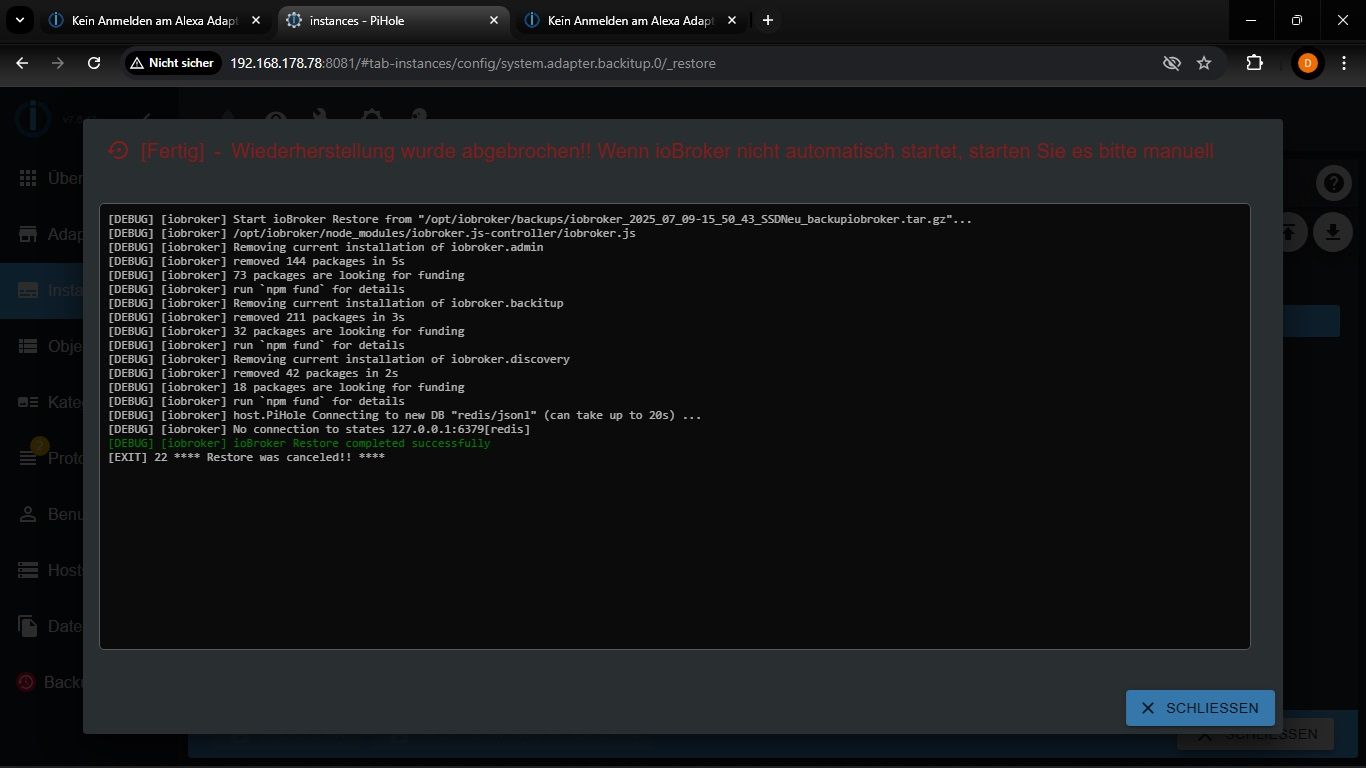
Den roten Text habe ich beim ersten Mal nicht gesehen. Jetzt habe ich IoBroker nochmal neu installiert. Im Log steht weiterhin das, was ich schon beim letzten Mal gepostet habe.
-
Den roten Text habe ich beim ersten Mal nicht gesehen. Jetzt habe ich IoBroker nochmal neu installiert. Im Log steht weiterhin das, was ich schon beim letzten Mal gepostet habe.
@balkonfarmer hast du eine Stunde gewartet, bevor du irgend etwas versucht hast zu öffnen oder zu starten? Die Meldung besagt nur, dass die Wiederherstellung der gespeicherten "Parameter" abgeschlossen ist. Danach beginnt der Download und die Einrichtung der Adapter. Genau dieser Vorgang dauert... Warten... Wenn du da rein "stürmst", wird es immer wieder in die Hose gehen.
Ro75.
-
@balkonfarmer hast du eine Stunde gewartet, bevor du irgend etwas versucht hast zu öffnen oder zu starten? Die Meldung besagt nur, dass die Wiederherstellung der gespeicherten "Parameter" abgeschlossen ist. Danach beginnt der Download und die Einrichtung der Adapter. Genau dieser Vorgang dauert... Warten... Wenn du da rein "stürmst", wird es immer wieder in die Hose gehen.
Ro75.
@ro75
Ich habe nur in den Log geschaut und nichts weiter gemacht. -
@ro75
Ich habe nur in den Log geschaut und nichts weiter gemacht.Also ich habe jetzt 2 Stunden gewartet und es tut sich immer noch nichts.
Log sagt:
2025-07-09 20:52:28.396  - error: host.PiHole No connection to databases possible, restart
2025-07-09 20:52:28.417  - info: host.PiHole iobroker _restart
2025-07-09 20:52:34.614  - info: host.PiHole iobroker.js-controller version 7.0.6 js-controller starting
2025-07-09 20:52:34.622  - info: host.PiHole Copyright (c) 2014-2024 bluefox, 2014 hobbyquaker
2025-07-09 20:52:34.623  - info: host.PiHole hostname: PiHole, node: v20.19.3
2025-07-09 20:52:34.624  - info: host.PiHole ip addresses: 192.168.178.78 2001:9e8:f0b3:8a00:a18a:abdf:24fb:c54a fdd0:3d3:253b:0:e385:e5ac:14a4:3829 fe80::523d:8bd6:ead9:fd82
iob diag sagt:
/usr/bin/iob: line 21: /home/iobroker/iob_diag.log: Permission denied -
Also ich habe jetzt 2 Stunden gewartet und es tut sich immer noch nichts.
Log sagt:
2025-07-09 20:52:28.396  - error: host.PiHole No connection to databases possible, restart
2025-07-09 20:52:28.417  - info: host.PiHole iobroker _restart
2025-07-09 20:52:34.614  - info: host.PiHole iobroker.js-controller version 7.0.6 js-controller starting
2025-07-09 20:52:34.622  - info: host.PiHole Copyright (c) 2014-2024 bluefox, 2014 hobbyquaker
2025-07-09 20:52:34.623  - info: host.PiHole hostname: PiHole, node: v20.19.3
2025-07-09 20:52:34.624  - info: host.PiHole ip addresses: 192.168.178.78 2001:9e8:f0b3:8a00:a18a:abdf:24fb:c54a fdd0:3d3:253b:0:e385:e5ac:14a4:3829 fe80::523d:8bd6:ead9:fd82
iob diag sagt:
/usr/bin/iob: line 21: /home/iobroker/iob_diag.log: Permission deniedDu musst nach einer frischen Installation als erstes den
iob fixausführen. Steht auch in einer entsprechenden Meldung drin.
-
Du musst nach einer frischen Installation als erstes den
iob fixausführen. Steht auch in einer entsprechenden Meldung drin.
Hab ich jetzt gemacht.
jetzt steht das drin:========== Start marking the full check here =========== ```bash Script v.2025-03-08 *** BASE SYSTEM *** Static hostname: PiHole Icon name: computer Operating System: Debian GNU/Linux 12 (bookworm) Kernel: Linux 6.12.34+rpt-rpi-v8 Architecture: arm64 OS is similar to: Model : Raspberry Pi 4 Model B Rev 1.1 Docker : false Virtualization : none Kernel : aarch64 Userland : 64 bit Systemuptime and Load: 21:04:58 up 2:52, 2 users, load average: 0.61, 0.52, 0.37 CPU threads: 4 *** LIFE CYCLE STATUS *** Operating System is the current Debian stable version codenamed 'bookworm'! *** RASPBERRY THROTTLING *** Current issues: No throttling issues detected. Previously detected issues: No throttling issues detected. *** TIME AND TIMEZONES *** Local time: Wed 2025-07-09 21:04:58 CEST Universal time: Wed 2025-07-09 19:04:58 UTC RTC time: n/a Time zone: Europe/Berlin (CEST, +0200) System clock synchronized: yes NTP service: active RTC in local TZ: no *** Users and Groups *** User that called 'iob diag': pi HOME=/home/pi GROUPS=pi adm dialout cdrom sudo audio video plugdev games users input render netdev gpio i2c spi iobroker User that is running 'js-controller': iobroker HOME=/home/iobroker GROUPS=iobroker tty dialout audio video plugdev bluetooth gpio i2c *** DISPLAY-SERVER SETUP *** Display-Server: false Desktop: Terminal: tty *** MEMORY *** total used free shared buff/cache available Mem: 4.0G 303M 3.2G 8.5M 565M 3.7G Swap: 536M 0B 536M Total: 4.5G 303M 3.7G Active iob-Instances: 0 3795 M total memory 289 M used memory 252 M active memory 352 M inactive memory 3043 M free memory 48 M buffer memory 490 M swap cache 511 M total swap 0 M used swap 511 M free swap *** top - Table Of Processes *** top - 21:04:59 up 2:52, 2 users, load average: 0.61, 0.52, 0.37 Tasks: 177 total, 1 running, 176 sleeping, 0 stopped, 0 zombie %Cpu(s): 20.0 us, 0.0 sy, 0.0 ni, 80.0 id, 0.0 wa, 0.0 hi, 0.0 si, 0.0 st MiB Mem : 3795.9 total, 3043.2 free, 290.0 used, 539.3 buff/cache MiB Swap: 512.0 total, 512.0 free, 0.0 used. 3505.9 avail Mem *** FAILED SERVICES *** UNIT LOAD ACTIVE SUB DESCRIPTION 0 loaded units listed. *** DMESG CRITICAL ERRORS *** No critical errors detected *** FILESYSTEM *** Filesystem Type Size Used Avail Use% Mounted on udev devtmpfs 1.6G 0 1.6G 0% /dev tmpfs tmpfs 380M 8.1M 372M 3% /run /dev/sda2 ext4 14G 3.2G 11G 25% / tmpfs tmpfs 1.9G 0 1.9G 0% /dev/shm tmpfs tmpfs 5.0M 16K 5.0M 1% /run/lock /dev/sda1 vfat 510M 57M 454M 11% /boot/firmware tmpfs tmpfs 380M 0 380M 0% /run/user/1000 Messages concerning ext4 filesystem in dmesg: [Wed Jul 9 18:12:26 2025] Kernel command line: coherent_pool=1M 8250.nr_uarts=0 snd_bcm2835.enable_headphones=0 cgroup_disable=memory numa_policy=interleave nvme.max_host_mem_size_mb=0 snd_bcm2835.enable_headphones=1 snd_bcm2835.enable_hdmi=1 snd_bcm2835.enable_hdmi=0 numa=fake=2 system_heap.max_order=0 smsc95xx.macaddr=DC:A6:32:17:D0:59 vc_mem.mem_base=0x3eb00000 vc_mem.mem_size=0x3ff00000 console=ttyS0,115200 console=tty1 root=PARTUUID=f11aec40-02 rootfstype=ext4 fsck.repair=yes rootwait cfg80211.ieee80211_regdom=GE [Wed Jul 9 18:12:30 2025] EXT4-fs (sda2): mounted filesystem d4cc7d63-da78-48ad-9bdd-64ffbba449a8 ro with ordered data mode. Quota mode: none. [Wed Jul 9 18:12:32 2025] EXT4-fs (sda2): re-mounted d4cc7d63-da78-48ad-9bdd-64ffbba449a8 r/w. Show mounted filesystems: TARGET SOURCE FSTYPE OPTIONS / /dev/sda2 ext4 rw,noatime `-/boot/firmware /dev/sda1 vfat rw,relatime,fmask=0022,dmask=0022,codepage=437,iocharset=ascii,shortname=mixed,errors=remount-ro Files in neuralgic directories: /var: 885M /var/ 205M /var/cache 199M /var/cache/apt 168M /var/lib 135M /var/lib/apt/lists Archived and active journals take up 6.9M in the file system. /opt/iobroker/backups: 2.8M /opt/iobroker/backups/ /opt/iobroker/iobroker-data: 69M /opt/iobroker/iobroker-data/ 63M /opt/iobroker/iobroker-data/files 47M /opt/iobroker/iobroker-data/files/admin.admin 46M /opt/iobroker/iobroker-data/files/admin.admin/custom/assets 46M /opt/iobroker/iobroker-data/files/admin.admin/custom The five largest files in iobroker-data are: 8.1M /opt/iobroker/iobroker-data/files/backitup.admin/assets/index-BFvcOIQE.js 5.3M /opt/iobroker/iobroker-data/objects.jsonl 3.7M /opt/iobroker/iobroker-data/files/backitup.admin/custom/assets/index-CyIqcfMJ.js 3.7M /opt/iobroker/iobroker-data/files/admin.admin/custom/assets/index-ZPb95xPG.js 3.7M /opt/iobroker/iobroker-data/files/admin.admin/custom/assets/index-IIKn7Ixx.js USB-Devices by-id: USB-Sticks - Avoid direct links to /dev/tty* in your adapter setups, please always prefer the links 'by-id': No Devices found 'by-id' Zigbee Network Settings on your coordinator/in nvbackup are: zigbee.X Extended Pan ID: *** MASKED *** Pan ID: *** MASKED *** Channel: *** MASKED *** Network Key: *** MASKED *** To unmask the settings run 'iob diag --unmask' *** NodeJS-Installation *** /usr/bin/nodejs v20.19.3 /usr/bin/node v20.19.3 /usr/bin/npm 10.8.2 /usr/bin/npx 10.8.2 /usr/bin/corepack 0.32.0 nodejs: Installed: 20.19.3-1nodesource1 Candidate: 20.19.3-1nodesource1 Version table: *** 20.19.3-1nodesource1 1001 500 https://deb.nodesource.com/node_20.x nodistro/main arm64 Packages 100 /var/lib/dpkg/status 20.19.2-1nodesource1 1001 500 https://deb.nodesource.com/node_20.x nodistro/main arm64 Packages 20.19.1-1nodesource1 1001 500 https://deb.nodesource.com/node_20.x nodistro/main arm64 Packages 20.19.0-1nodesource1 1001 500 https://deb.nodesource.com/node_20.x nodistro/main arm64 Packages 20.18.3-1nodesource1 1001 500 https://deb.nodesource.com/node_20.x nodistro/main arm64 Packages 20.18.2-1nodesource1 1001 500 https://deb.nodesource.com/node_20.x nodistro/main arm64 Packages 20.18.1-1nodesource1 1001 500 https://deb.nodesource.com/node_20.x nodistro/main arm64 Packages 20.18.0-1nodesource1 1001 500 https://deb.nodesource.com/node_20.x nodistro/main arm64 Packages 20.17.0-1nodesource1 1001 500 https://deb.nodesource.com/node_20.x nodistro/main arm64 Packages 20.16.0-1nodesource1 1001 500 https://deb.nodesource.com/node_20.x nodistro/main arm64 Packages 20.15.1-1nodesource1 1001 500 https://deb.nodesource.com/node_20.x nodistro/main arm64 Packages 20.15.0-1nodesource1 1001 500 https://deb.nodesource.com/node_20.x nodistro/main arm64 Packages 20.14.0-1nodesource1 1001 500 https://deb.nodesource.com/node_20.x nodistro/main arm64 Packages 20.13.1-1nodesource1 1001 500 https://deb.nodesource.com/node_20.x nodistro/main arm64 Packages 20.13.0-1nodesource1 1001 500 https://deb.nodesource.com/node_20.x nodistro/main arm64 Packages 20.12.2-1nodesource1 1001 500 https://deb.nodesource.com/node_20.x nodistro/main arm64 Packages 20.12.1-1nodesource1 1001 500 https://deb.nodesource.com/node_20.x nodistro/main arm64 Packages 20.12.0-1nodesource1 1001 500 https://deb.nodesource.com/node_20.x nodistro/main arm64 Packages 20.11.1-1nodesource1 1001 500 https://deb.nodesource.com/node_20.x nodistro/main arm64 Packages 20.11.0-1nodesource1 1001 500 https://deb.nodesource.com/node_20.x nodistro/main arm64 Packages 20.10.0-1nodesource1 1001 500 https://deb.nodesource.com/node_20.x nodistro/main arm64 Packages 20.9.0-1nodesource1 1001 500 https://deb.nodesource.com/node_20.x nodistro/main arm64 Packages 20.8.1-1nodesource1 1001 500 https://deb.nodesource.com/node_20.x nodistro/main arm64 Packages 20.8.0-1nodesource1 1001 500 https://deb.nodesource.com/node_20.x nodistro/main arm64 Packages 20.7.0-1nodesource1 1001 500 https://deb.nodesource.com/node_20.x nodistro/main arm64 Packages 20.6.1-1nodesource1 1001 500 https://deb.nodesource.com/node_20.x nodistro/main arm64 Packages 20.6.0-1nodesource1 1001 500 https://deb.nodesource.com/node_20.x nodistro/main arm64 Packages 20.5.1-1nodesource1 1001 500 https://deb.nodesource.com/node_20.x nodistro/main arm64 Packages 20.5.0-1nodesource1 1001 500 https://deb.nodesource.com/node_20.x nodistro/main arm64 Packages 20.4.0-1nodesource1 1001 500 https://deb.nodesource.com/node_20.x nodistro/main arm64 Packages 20.3.1-1nodesource1 1001 500 https://deb.nodesource.com/node_20.x nodistro/main arm64 Packages 20.3.0-1nodesource1 1001 500 https://deb.nodesource.com/node_20.x nodistro/main arm64 Packages 20.2.0-1nodesource1 1001 500 https://deb.nodesource.com/node_20.x nodistro/main arm64 Packages 20.1.0-1nodesource1 1001 500 https://deb.nodesource.com/node_20.x nodistro/main arm64 Packages 20.0.0-1nodesource1 1001 500 https://deb.nodesource.com/node_20.x nodistro/main arm64 Packages 18.19.0+dfsg-6~deb12u2 500 500 http://deb.debian.org/debian bookworm/main arm64 Packages 18.19.0+dfsg-6~deb12u1 500 500 http://deb.debian.org/debian-security bookworm-security/main arm64 Packages Temp directories causing deletion problem: 0 No problems detected Errors in npm tree: 0 No problems detected *** ioBroker-Installation *** ioBroker Status No connection to states 127.0.0.1:6379[redis] Hosts: No connection to states 127.0.0.1:6379[redis] Core adapters versions js-controller: 7.0.6 admin: "admin" not found javascript: "javascript" not found nodejs modules from github: 0 Adapter State No connection to states 127.0.0.1:6379[redis] Enabled adapters with bindings ioBroker-Repositories No connection to states 127.0.0.1:6379[redis] Installed ioBroker-Adapters No connection to states 127.0.0.1:6379[redis] Objects and States Please stand by - This may take a while Objects: 2 States: 1 *** OS-Repositories and Updates *** Hit:1 http://deb.debian.org/debian bookworm InRelease Hit:2 http://deb.debian.org/debian-security bookworm-security InRelease Hit:3 http://archive.raspberrypi.com/debian bookworm InRelease Hit:4 http://deb.debian.org/debian bookworm-updates InRelease Hit:5 https://deb.nodesource.com/node_20.x nodistro InRelease Reading package lists... Pending Updates: 0 *** Listening Ports *** Active Internet connections (only servers) Proto Recv-Q Send-Q Local Address Foreign Address State User Inode PID/Program name tcp 0 0 0.0.0.0:22 0.0.0.0:* LISTEN 0 4527 621/sshd: /usr/sbin tcp6 0 0 :::22 :::* LISTEN 0 4529 621/sshd: /usr/sbin udp 0 0 0.0.0.0:5353 0.0.0.0:* 104 2646 478/avahi-daemon: r udp 0 0 0.0.0.0:48814 0.0.0.0:* 104 2648 478/avahi-daemon: r udp6 0 0 :::5353 :::* 104 2647 478/avahi-daemon: r udp6 0 0 :::47074 :::* 104 2649 478/avahi-daemon: r udp6 0 0 fe80::523d:8bd6:ead:546 :::* 0 5567 558/NetworkManager *** Log File - Last 25 Lines *** 2025-07-09 21:04:15.162 - info: host.PiHole iobroker _restart 2025-07-09 21:04:21.369 - info: host.PiHole iobroker.js-controller version 7.0.6 js-controller starting 2025-07-09 21:04:21.375 - info: host.PiHole Copyright (c) 2014-2024 bluefox, 2014 hobbyquaker 2025-07-09 21:04:21.376 - info: host.PiHole hostname: PiHole, node: v20.19.3 2025-07-09 21:04:21.378 - info: host.PiHole ip addresses: 192.168.178.78 2001:9e8:f0b3:8a00:a18a:abdf:24fb:c54a fdd0:3d3:253b:0:e385:e5ac:14a4:3829 fe80::523d:8bd6:ead9:fd82 2025-07-09 21:04:51.393 - error: host.PiHole No connection to databases possible, restart 2025-07-09 21:04:51.409 - info: host.PiHole iobroker _restart 2025-07-09 21:04:57.617 - info: host.PiHole iobroker.js-controller version 7.0.6 js-controller starting 2025-07-09 21:04:57.623 - info: host.PiHole Copyright (c) 2014-2024 bluefox, 2014 hobbyquaker 2025-07-09 21:04:57.625 - info: host.PiHole hostname: PiHole, node: v20.19.3 2025-07-09 21:04:57.626 - info: host.PiHole ip addresses: 192.168.178.78 2001:9e8:f0b3:8a00:a18a:abdf:24fb:c54a fdd0:3d3:253b:0:e385:e5ac:14a4:3829 fe80::523d:8bd6:ead9:fd82 2025-07-09 21:05:27.642 - error: host.PiHole No connection to databases possible, restart 2025-07-09 21:05:27.650 - info: host.PiHole iobroker _restart 2025-07-09 21:05:34.095 - info: host.PiHole iobroker.js-controller version 7.0.6 js-controller starting 2025-07-09 21:05:34.103 - info: host.PiHole Copyright (c) 2014-2024 bluefox, 2014 hobbyquaker 2025-07-09 21:05:34.104 - info: host.PiHole hostname: PiHole, node: v20.19.3 2025-07-09 21:05:34.106 - info: host.PiHole ip addresses: 192.168.178.78 2001:9e8:f0b3:8a00:a18a:abdf:24fb:c54a fdd0:3d3:253b:0:e385:e5ac:14a4:3829 fe80::523d:8bd6:ead9:fd82 2025-07-09 21:06:04.121 - error: host.PiHole No connection to databases possible, restart 2025-07-09 21:06:04.129 - info: host.PiHole iobroker _restart 2025-07-09 21:06:10.367 - info: host.PiHole iobroker.js-controller version 7.0.6 js-controller starting 2025-07-09 21:06:10.374 - info: host.PiHole Copyright (c) 2014-2024 bluefox, 2014 hobbyquaker 2025-07-09 21:06:10.375 - info: host.PiHole hostname: PiHole, node: v20.19.3 2025-07-09 21:06:10.376 - info: host.PiHole ip addresses: 192.168.178.78 2001:9e8:f0b3:8a00:a18a:abdf:24fb:c54a fdd0:3d3:253b:0:e385:e5ac:14a4:3829 fe80::523d:8bd6:ead9:fd82 2025-07-09 21:06:40.404 - error: host.PiHole No connection to databases possible, restart 2025-07-09 21:06:40.413 - info: host.PiHole iobroker _restart============ Mark until here for C&P =============
iob diag has finished.
kann man da noch etwas retten? -
Hab ich jetzt gemacht.
jetzt steht das drin:========== Start marking the full check here =========== ```bash Script v.2025-03-08 *** BASE SYSTEM *** Static hostname: PiHole Icon name: computer Operating System: Debian GNU/Linux 12 (bookworm) Kernel: Linux 6.12.34+rpt-rpi-v8 Architecture: arm64 OS is similar to: Model : Raspberry Pi 4 Model B Rev 1.1 Docker : false Virtualization : none Kernel : aarch64 Userland : 64 bit Systemuptime and Load: 21:04:58 up 2:52, 2 users, load average: 0.61, 0.52, 0.37 CPU threads: 4 *** LIFE CYCLE STATUS *** Operating System is the current Debian stable version codenamed 'bookworm'! *** RASPBERRY THROTTLING *** Current issues: No throttling issues detected. Previously detected issues: No throttling issues detected. *** TIME AND TIMEZONES *** Local time: Wed 2025-07-09 21:04:58 CEST Universal time: Wed 2025-07-09 19:04:58 UTC RTC time: n/a Time zone: Europe/Berlin (CEST, +0200) System clock synchronized: yes NTP service: active RTC in local TZ: no *** Users and Groups *** User that called 'iob diag': pi HOME=/home/pi GROUPS=pi adm dialout cdrom sudo audio video plugdev games users input render netdev gpio i2c spi iobroker User that is running 'js-controller': iobroker HOME=/home/iobroker GROUPS=iobroker tty dialout audio video plugdev bluetooth gpio i2c *** DISPLAY-SERVER SETUP *** Display-Server: false Desktop: Terminal: tty *** MEMORY *** total used free shared buff/cache available Mem: 4.0G 303M 3.2G 8.5M 565M 3.7G Swap: 536M 0B 536M Total: 4.5G 303M 3.7G Active iob-Instances: 0 3795 M total memory 289 M used memory 252 M active memory 352 M inactive memory 3043 M free memory 48 M buffer memory 490 M swap cache 511 M total swap 0 M used swap 511 M free swap *** top - Table Of Processes *** top - 21:04:59 up 2:52, 2 users, load average: 0.61, 0.52, 0.37 Tasks: 177 total, 1 running, 176 sleeping, 0 stopped, 0 zombie %Cpu(s): 20.0 us, 0.0 sy, 0.0 ni, 80.0 id, 0.0 wa, 0.0 hi, 0.0 si, 0.0 st MiB Mem : 3795.9 total, 3043.2 free, 290.0 used, 539.3 buff/cache MiB Swap: 512.0 total, 512.0 free, 0.0 used. 3505.9 avail Mem *** FAILED SERVICES *** UNIT LOAD ACTIVE SUB DESCRIPTION 0 loaded units listed. *** DMESG CRITICAL ERRORS *** No critical errors detected *** FILESYSTEM *** Filesystem Type Size Used Avail Use% Mounted on udev devtmpfs 1.6G 0 1.6G 0% /dev tmpfs tmpfs 380M 8.1M 372M 3% /run /dev/sda2 ext4 14G 3.2G 11G 25% / tmpfs tmpfs 1.9G 0 1.9G 0% /dev/shm tmpfs tmpfs 5.0M 16K 5.0M 1% /run/lock /dev/sda1 vfat 510M 57M 454M 11% /boot/firmware tmpfs tmpfs 380M 0 380M 0% /run/user/1000 Messages concerning ext4 filesystem in dmesg: [Wed Jul 9 18:12:26 2025] Kernel command line: coherent_pool=1M 8250.nr_uarts=0 snd_bcm2835.enable_headphones=0 cgroup_disable=memory numa_policy=interleave nvme.max_host_mem_size_mb=0 snd_bcm2835.enable_headphones=1 snd_bcm2835.enable_hdmi=1 snd_bcm2835.enable_hdmi=0 numa=fake=2 system_heap.max_order=0 smsc95xx.macaddr=DC:A6:32:17:D0:59 vc_mem.mem_base=0x3eb00000 vc_mem.mem_size=0x3ff00000 console=ttyS0,115200 console=tty1 root=PARTUUID=f11aec40-02 rootfstype=ext4 fsck.repair=yes rootwait cfg80211.ieee80211_regdom=GE [Wed Jul 9 18:12:30 2025] EXT4-fs (sda2): mounted filesystem d4cc7d63-da78-48ad-9bdd-64ffbba449a8 ro with ordered data mode. Quota mode: none. [Wed Jul 9 18:12:32 2025] EXT4-fs (sda2): re-mounted d4cc7d63-da78-48ad-9bdd-64ffbba449a8 r/w. Show mounted filesystems: TARGET SOURCE FSTYPE OPTIONS / /dev/sda2 ext4 rw,noatime `-/boot/firmware /dev/sda1 vfat rw,relatime,fmask=0022,dmask=0022,codepage=437,iocharset=ascii,shortname=mixed,errors=remount-ro Files in neuralgic directories: /var: 885M /var/ 205M /var/cache 199M /var/cache/apt 168M /var/lib 135M /var/lib/apt/lists Archived and active journals take up 6.9M in the file system. /opt/iobroker/backups: 2.8M /opt/iobroker/backups/ /opt/iobroker/iobroker-data: 69M /opt/iobroker/iobroker-data/ 63M /opt/iobroker/iobroker-data/files 47M /opt/iobroker/iobroker-data/files/admin.admin 46M /opt/iobroker/iobroker-data/files/admin.admin/custom/assets 46M /opt/iobroker/iobroker-data/files/admin.admin/custom The five largest files in iobroker-data are: 8.1M /opt/iobroker/iobroker-data/files/backitup.admin/assets/index-BFvcOIQE.js 5.3M /opt/iobroker/iobroker-data/objects.jsonl 3.7M /opt/iobroker/iobroker-data/files/backitup.admin/custom/assets/index-CyIqcfMJ.js 3.7M /opt/iobroker/iobroker-data/files/admin.admin/custom/assets/index-ZPb95xPG.js 3.7M /opt/iobroker/iobroker-data/files/admin.admin/custom/assets/index-IIKn7Ixx.js USB-Devices by-id: USB-Sticks - Avoid direct links to /dev/tty* in your adapter setups, please always prefer the links 'by-id': No Devices found 'by-id' Zigbee Network Settings on your coordinator/in nvbackup are: zigbee.X Extended Pan ID: *** MASKED *** Pan ID: *** MASKED *** Channel: *** MASKED *** Network Key: *** MASKED *** To unmask the settings run 'iob diag --unmask' *** NodeJS-Installation *** /usr/bin/nodejs v20.19.3 /usr/bin/node v20.19.3 /usr/bin/npm 10.8.2 /usr/bin/npx 10.8.2 /usr/bin/corepack 0.32.0 nodejs: Installed: 20.19.3-1nodesource1 Candidate: 20.19.3-1nodesource1 Version table: *** 20.19.3-1nodesource1 1001 500 https://deb.nodesource.com/node_20.x nodistro/main arm64 Packages 100 /var/lib/dpkg/status 20.19.2-1nodesource1 1001 500 https://deb.nodesource.com/node_20.x nodistro/main arm64 Packages 20.19.1-1nodesource1 1001 500 https://deb.nodesource.com/node_20.x nodistro/main arm64 Packages 20.19.0-1nodesource1 1001 500 https://deb.nodesource.com/node_20.x nodistro/main arm64 Packages 20.18.3-1nodesource1 1001 500 https://deb.nodesource.com/node_20.x nodistro/main arm64 Packages 20.18.2-1nodesource1 1001 500 https://deb.nodesource.com/node_20.x nodistro/main arm64 Packages 20.18.1-1nodesource1 1001 500 https://deb.nodesource.com/node_20.x nodistro/main arm64 Packages 20.18.0-1nodesource1 1001 500 https://deb.nodesource.com/node_20.x nodistro/main arm64 Packages 20.17.0-1nodesource1 1001 500 https://deb.nodesource.com/node_20.x nodistro/main arm64 Packages 20.16.0-1nodesource1 1001 500 https://deb.nodesource.com/node_20.x nodistro/main arm64 Packages 20.15.1-1nodesource1 1001 500 https://deb.nodesource.com/node_20.x nodistro/main arm64 Packages 20.15.0-1nodesource1 1001 500 https://deb.nodesource.com/node_20.x nodistro/main arm64 Packages 20.14.0-1nodesource1 1001 500 https://deb.nodesource.com/node_20.x nodistro/main arm64 Packages 20.13.1-1nodesource1 1001 500 https://deb.nodesource.com/node_20.x nodistro/main arm64 Packages 20.13.0-1nodesource1 1001 500 https://deb.nodesource.com/node_20.x nodistro/main arm64 Packages 20.12.2-1nodesource1 1001 500 https://deb.nodesource.com/node_20.x nodistro/main arm64 Packages 20.12.1-1nodesource1 1001 500 https://deb.nodesource.com/node_20.x nodistro/main arm64 Packages 20.12.0-1nodesource1 1001 500 https://deb.nodesource.com/node_20.x nodistro/main arm64 Packages 20.11.1-1nodesource1 1001 500 https://deb.nodesource.com/node_20.x nodistro/main arm64 Packages 20.11.0-1nodesource1 1001 500 https://deb.nodesource.com/node_20.x nodistro/main arm64 Packages 20.10.0-1nodesource1 1001 500 https://deb.nodesource.com/node_20.x nodistro/main arm64 Packages 20.9.0-1nodesource1 1001 500 https://deb.nodesource.com/node_20.x nodistro/main arm64 Packages 20.8.1-1nodesource1 1001 500 https://deb.nodesource.com/node_20.x nodistro/main arm64 Packages 20.8.0-1nodesource1 1001 500 https://deb.nodesource.com/node_20.x nodistro/main arm64 Packages 20.7.0-1nodesource1 1001 500 https://deb.nodesource.com/node_20.x nodistro/main arm64 Packages 20.6.1-1nodesource1 1001 500 https://deb.nodesource.com/node_20.x nodistro/main arm64 Packages 20.6.0-1nodesource1 1001 500 https://deb.nodesource.com/node_20.x nodistro/main arm64 Packages 20.5.1-1nodesource1 1001 500 https://deb.nodesource.com/node_20.x nodistro/main arm64 Packages 20.5.0-1nodesource1 1001 500 https://deb.nodesource.com/node_20.x nodistro/main arm64 Packages 20.4.0-1nodesource1 1001 500 https://deb.nodesource.com/node_20.x nodistro/main arm64 Packages 20.3.1-1nodesource1 1001 500 https://deb.nodesource.com/node_20.x nodistro/main arm64 Packages 20.3.0-1nodesource1 1001 500 https://deb.nodesource.com/node_20.x nodistro/main arm64 Packages 20.2.0-1nodesource1 1001 500 https://deb.nodesource.com/node_20.x nodistro/main arm64 Packages 20.1.0-1nodesource1 1001 500 https://deb.nodesource.com/node_20.x nodistro/main arm64 Packages 20.0.0-1nodesource1 1001 500 https://deb.nodesource.com/node_20.x nodistro/main arm64 Packages 18.19.0+dfsg-6~deb12u2 500 500 http://deb.debian.org/debian bookworm/main arm64 Packages 18.19.0+dfsg-6~deb12u1 500 500 http://deb.debian.org/debian-security bookworm-security/main arm64 Packages Temp directories causing deletion problem: 0 No problems detected Errors in npm tree: 0 No problems detected *** ioBroker-Installation *** ioBroker Status No connection to states 127.0.0.1:6379[redis] Hosts: No connection to states 127.0.0.1:6379[redis] Core adapters versions js-controller: 7.0.6 admin: "admin" not found javascript: "javascript" not found nodejs modules from github: 0 Adapter State No connection to states 127.0.0.1:6379[redis] Enabled adapters with bindings ioBroker-Repositories No connection to states 127.0.0.1:6379[redis] Installed ioBroker-Adapters No connection to states 127.0.0.1:6379[redis] Objects and States Please stand by - This may take a while Objects: 2 States: 1 *** OS-Repositories and Updates *** Hit:1 http://deb.debian.org/debian bookworm InRelease Hit:2 http://deb.debian.org/debian-security bookworm-security InRelease Hit:3 http://archive.raspberrypi.com/debian bookworm InRelease Hit:4 http://deb.debian.org/debian bookworm-updates InRelease Hit:5 https://deb.nodesource.com/node_20.x nodistro InRelease Reading package lists... Pending Updates: 0 *** Listening Ports *** Active Internet connections (only servers) Proto Recv-Q Send-Q Local Address Foreign Address State User Inode PID/Program name tcp 0 0 0.0.0.0:22 0.0.0.0:* LISTEN 0 4527 621/sshd: /usr/sbin tcp6 0 0 :::22 :::* LISTEN 0 4529 621/sshd: /usr/sbin udp 0 0 0.0.0.0:5353 0.0.0.0:* 104 2646 478/avahi-daemon: r udp 0 0 0.0.0.0:48814 0.0.0.0:* 104 2648 478/avahi-daemon: r udp6 0 0 :::5353 :::* 104 2647 478/avahi-daemon: r udp6 0 0 :::47074 :::* 104 2649 478/avahi-daemon: r udp6 0 0 fe80::523d:8bd6:ead:546 :::* 0 5567 558/NetworkManager *** Log File - Last 25 Lines *** 2025-07-09 21:04:15.162 - info: host.PiHole iobroker _restart 2025-07-09 21:04:21.369 - info: host.PiHole iobroker.js-controller version 7.0.6 js-controller starting 2025-07-09 21:04:21.375 - info: host.PiHole Copyright (c) 2014-2024 bluefox, 2014 hobbyquaker 2025-07-09 21:04:21.376 - info: host.PiHole hostname: PiHole, node: v20.19.3 2025-07-09 21:04:21.378 - info: host.PiHole ip addresses: 192.168.178.78 2001:9e8:f0b3:8a00:a18a:abdf:24fb:c54a fdd0:3d3:253b:0:e385:e5ac:14a4:3829 fe80::523d:8bd6:ead9:fd82 2025-07-09 21:04:51.393 - error: host.PiHole No connection to databases possible, restart 2025-07-09 21:04:51.409 - info: host.PiHole iobroker _restart 2025-07-09 21:04:57.617 - info: host.PiHole iobroker.js-controller version 7.0.6 js-controller starting 2025-07-09 21:04:57.623 - info: host.PiHole Copyright (c) 2014-2024 bluefox, 2014 hobbyquaker 2025-07-09 21:04:57.625 - info: host.PiHole hostname: PiHole, node: v20.19.3 2025-07-09 21:04:57.626 - info: host.PiHole ip addresses: 192.168.178.78 2001:9e8:f0b3:8a00:a18a:abdf:24fb:c54a fdd0:3d3:253b:0:e385:e5ac:14a4:3829 fe80::523d:8bd6:ead9:fd82 2025-07-09 21:05:27.642 - error: host.PiHole No connection to databases possible, restart 2025-07-09 21:05:27.650 - info: host.PiHole iobroker _restart 2025-07-09 21:05:34.095 - info: host.PiHole iobroker.js-controller version 7.0.6 js-controller starting 2025-07-09 21:05:34.103 - info: host.PiHole Copyright (c) 2014-2024 bluefox, 2014 hobbyquaker 2025-07-09 21:05:34.104 - info: host.PiHole hostname: PiHole, node: v20.19.3 2025-07-09 21:05:34.106 - info: host.PiHole ip addresses: 192.168.178.78 2001:9e8:f0b3:8a00:a18a:abdf:24fb:c54a fdd0:3d3:253b:0:e385:e5ac:14a4:3829 fe80::523d:8bd6:ead9:fd82 2025-07-09 21:06:04.121 - error: host.PiHole No connection to databases possible, restart 2025-07-09 21:06:04.129 - info: host.PiHole iobroker _restart 2025-07-09 21:06:10.367 - info: host.PiHole iobroker.js-controller version 7.0.6 js-controller starting 2025-07-09 21:06:10.374 - info: host.PiHole Copyright (c) 2014-2024 bluefox, 2014 hobbyquaker 2025-07-09 21:06:10.375 - info: host.PiHole hostname: PiHole, node: v20.19.3 2025-07-09 21:06:10.376 - info: host.PiHole ip addresses: 192.168.178.78 2001:9e8:f0b3:8a00:a18a:abdf:24fb:c54a fdd0:3d3:253b:0:e385:e5ac:14a4:3829 fe80::523d:8bd6:ead9:fd82 2025-07-09 21:06:40.404 - error: host.PiHole No connection to databases possible, restart 2025-07-09 21:06:40.413 - info: host.PiHole iobroker _restart============ Mark until here for C&P =============
iob diag has finished.
kann man da noch etwas retten?Hast du auch zuvor 'redis' installiert?
Die alte Installation lief wohl offenbar darauf.sudo apt update apt policy redis -
Hast du auch zuvor 'redis' installiert?
Die alte Installation lief wohl offenbar darauf.sudo apt update apt policy redisachso, muss ich das jetzt immer installieren, wenn ich eine Wiederherstellung mache?
-
achso, muss ich das jetzt immer installieren, wenn ich eine Wiederherstellung mache?
Wenn DU das zuvor installiert hattest...
Ist jedenfalls nicht die Voreinstellung, hast du selber mal auf redis umgestellt. -
Wenn DU das zuvor installiert hattest...
Ist jedenfalls nicht die Voreinstellung, hast du selber mal auf redis umgestellt.das kann sein. ich hab IoBroker ja schon seit mehreren Jahren. Hab das früher alles nach Anleitung eines Youtubers (teilweise auch mit seinen Skripten) installiert. Kann man das dann irgendwie wieder umstellen?
-
das kann sein. ich hab IoBroker ja schon seit mehreren Jahren. Hab das früher alles nach Anleitung eines Youtubers (teilweise auch mit seinen Skripten) installiert. Kann man das dann irgendwie wieder umstellen?
Ich würde das jetzt wieder auf redis setzen, damit dein Backup da wieder drauf läuft.
sudo apt install redisund dann das Backup da reinjubeln.
-
Ich würde das jetzt wieder auf redis setzen, damit dein Backup da wieder drauf läuft.
sudo apt install redisund dann das Backup da reinjubeln.
@thomas-braun sagte in Kein Anmelden am Alexa Adapter mehr möglich:
Ich bekomme bei den apt Commandos nur das angezeigt
pi@PiHole:/ $ sudo apt update WARNING: apt does not have a stable CLI interface. Use with caution in scripts. pi@PiHole:/ $ apt policy redis WARNING: apt does not have a stable CLI interface. Use with caution in scripts. pi@PiHole:/ $ sudo apt install redis WARNING: apt does not have a stable CLI interface. Use with caution in scripts. -
@thomas-braun sagte in Kein Anmelden am Alexa Adapter mehr möglich:
Ich bekomme bei den apt Commandos nur das angezeigt
pi@PiHole:/ $ sudo apt update WARNING: apt does not have a stable CLI interface. Use with caution in scripts. pi@PiHole:/ $ apt policy redis WARNING: apt does not have a stable CLI interface. Use with caution in scripts. pi@PiHole:/ $ sudo apt install redis WARNING: apt does not have a stable CLI interface. Use with caution in scripts.@balkonfarmer Warum stehst du da im root herum?
cd -
@balkonfarmer Warum stehst du da im root herum?
cdIch habe nun ein neues Problem:
Gestern konnte ich mit dem Laptop und dem Raspberry Pi Imager noch ein OS auf die SSD flashen, aber seit heute habe ich nach dem Flashen keinen Zugriff mehr. Obwohl ich die Wifi-Settings etc alle korrekt eingegeben habe, verbindet sich der Raspi nicht mehr mit dem Wifi. Jetzt kann ich kein frisches OS mehr nutzen. Am Raspi kann es nicht liegen, denn mit einer anderen SSD (gestern geflasht) funktioniert es. Es ist echt zum Verzweifeln. -
Ich habe nun ein neues Problem:
Gestern konnte ich mit dem Laptop und dem Raspberry Pi Imager noch ein OS auf die SSD flashen, aber seit heute habe ich nach dem Flashen keinen Zugriff mehr. Obwohl ich die Wifi-Settings etc alle korrekt eingegeben habe, verbindet sich der Raspi nicht mehr mit dem Wifi. Jetzt kann ich kein frisches OS mehr nutzen. Am Raspi kann es nicht liegen, denn mit einer anderen SSD (gestern geflasht) funktioniert es. Es ist echt zum Verzweifeln.@balkonfarmer sagte in Kein Anmelden am Alexa Adapter mehr möglich:
denn mit einer anderen SSD (gestern geflasht) funktioniert es.
Dann verwende die?
-
@balkonfarmer sagte in Kein Anmelden am Alexa Adapter mehr möglich:
denn mit einer anderen SSD (gestern geflasht) funktioniert es.
Dann verwende die?
Da ist aber die fehlerhafte Installation von IoBroker drauf, wo nichts mehr funktioniert. Ich möchte lieber mit einem sauberen OS weitermachen. Hab das Problem jetzt mal in einer Raspi-Gruppe geschildert und warte dort auf Antwort. Es muss doch irgendwie machbar sein.
-
Da ist aber die fehlerhafte Installation von IoBroker drauf, wo nichts mehr funktioniert. Ich möchte lieber mit einem sauberen OS weitermachen. Hab das Problem jetzt mal in einer Raspi-Gruppe geschildert und warte dort auf Antwort. Es muss doch irgendwie machbar sein.
@balkonfarmer du hast aber eine neue, frische SD-Karte genommen?
Ro75.
-
Ich habe nun ein neues Problem:
Gestern konnte ich mit dem Laptop und dem Raspberry Pi Imager noch ein OS auf die SSD flashen, aber seit heute habe ich nach dem Flashen keinen Zugriff mehr. Obwohl ich die Wifi-Settings etc alle korrekt eingegeben habe, verbindet sich der Raspi nicht mehr mit dem Wifi. Jetzt kann ich kein frisches OS mehr nutzen. Am Raspi kann es nicht liegen, denn mit einer anderen SSD (gestern geflasht) funktioniert es. Es ist echt zum Verzweifeln.@balkonfarmer sagte in Kein Anmelden am Alexa Adapter mehr möglich:
denn mit einer anderen SSD (gestern geflasht) funktioniert es.
Wie kann denn auf einem frischen Flash eine krumme Installation drauf sein?
Also irgendwie verstehe ich überhaupt nicht was du da genau veranstaltest.


Hey! Du scheinst an dieser Unterhaltung interessiert zu sein, hast aber noch kein Konto.
Hast du es satt, bei jedem Besuch durch die gleichen Beiträge zu scrollen? Wenn du dich für ein Konto anmeldest, kommst du immer genau dorthin zurück, wo du zuvor warst, und kannst dich über neue Antworten benachrichtigen lassen (entweder per E-Mail oder Push-Benachrichtigung). Du kannst auch Lesezeichen speichern und Beiträge positiv bewerten, um anderen Community-Mitgliedern deine Wertschätzung zu zeigen.
Mit deinem Input könnte dieser Beitrag noch besser werden 💗
Registrieren Anmelden412
Online33.0k
Benutzer83.6k
Themen1.3m
Beiträge