



Test Adapter Midea Geräten v1.x.x


-
Hallo, vielen Dank für die Anleitung.
ich versuche meine Klimananlage mit folgendem Befehl zu steuern.msmart-ng control --account meineEmail --password meinPasswort --auto -d 192.168.1.34 power_state=falseFunktioniert aber leider nicht, es kommt folgender Error
ERROR:msmart.discover:Failed to login to cloud. Error: Code: 3102, Message: Account or password incorrect, please re-enter
ERROR:msmart.discover:Could not establish cloud connection.
Mit dem Befehler "discover" erhalte ich diese Rückmeldung
(python-venv) jolly@iobroker:~$ msmart-ng discover
INFO:msmart.cli:Discovering all devices on local network.
INFO:msmart.cloud:Using Midea cloud server: https://mp-prod.appsmb.com (China: False).
ERROR:msmart.discover:Failed to login to cloud. Error: Code: 3102, Message: Account or password incorrect, please re-enter
ERROR:msmart.discover:Could not establish cloud connection.
INFO:msmart.cli:Found 1 devices.
INFO:msmart.cli:Found device:
{'ip': '192.168.1.34', 'port': 6444, 'id': 152832117239990, 'online': False, 'supported': False, 'type': <DeviceType.AIR_CONDITIONER: 172>, 'name': 'net_ac_2190', 'sn': '000000P0000000Q1C084FF7421900000', 'key': None, 'token': None}
Bedeutet das meine Klimaanlage ist nicht unterstützt? Weil ich die Rückmeldung 'supported': 'False' bekomme.
Oder an was könnte es sonst liegen? Benutzername und Passwort sind zu 100% richtig, selbes nutze ich auch für die Midea Air bzw. NetHome Plus App.Vielen Dank
-
Hallo, vielen Dank für die Anleitung.
ich versuche meine Klimananlage mit folgendem Befehl zu steuern.msmart-ng control --account meineEmail --password meinPasswort --auto -d 192.168.1.34 power_state=falseFunktioniert aber leider nicht, es kommt folgender Error
ERROR:msmart.discover:Failed to login to cloud. Error: Code: 3102, Message: Account or password incorrect, please re-enter
ERROR:msmart.discover:Could not establish cloud connection.
Mit dem Befehler "discover" erhalte ich diese Rückmeldung
(python-venv) jolly@iobroker:~$ msmart-ng discover
INFO:msmart.cli:Discovering all devices on local network.
INFO:msmart.cloud:Using Midea cloud server: https://mp-prod.appsmb.com (China: False).
ERROR:msmart.discover:Failed to login to cloud. Error: Code: 3102, Message: Account or password incorrect, please re-enter
ERROR:msmart.discover:Could not establish cloud connection.
INFO:msmart.cli:Found 1 devices.
INFO:msmart.cli:Found device:
{'ip': '192.168.1.34', 'port': 6444, 'id': 152832117239990, 'online': False, 'supported': False, 'type': <DeviceType.AIR_CONDITIONER: 172>, 'name': 'net_ac_2190', 'sn': '000000P0000000Q1C084FF7421900000', 'key': None, 'token': None}
Bedeutet das meine Klimaanlage ist nicht unterstützt? Weil ich die Rückmeldung 'supported': 'False' bekomme.
Oder an was könnte es sonst liegen? Benutzername und Passwort sind zu 100% richtig, selbes nutze ich auch für die Midea Air bzw. NetHome Plus App.Vielen Dank
@jolly
Die "Midea cloud" ist bei mir gesperrt, also ohne email & pw (war nur zum WLAN einrichten nötig).
Ich habe es so gemacht:
msmart-ng query --region DE --auto 192.168.1.34dann bekommst du ein token, key und id
mit diesen dann control aufrufen:
msmart-ng control --region DE --token abcabcabcc05bab57aad3833ce247729d2f880e6fd5b8e1d2ca0eec82395d7edb85cf70d339faf7d0c8baf3b8275d86b183d430347bae6eba4a009cb38d1147f --key abcabcabcd854aa6ba7b200174327ed7fc9fb0fd0032407992403b9e4104c1d3 --id 999832117233304 192.168.1.34 power_state=False
Gruß Uwe
-
Hallo, vielen Dank für die Anleitung.
ich versuche meine Klimananlage mit folgendem Befehl zu steuern.msmart-ng control --account meineEmail --password meinPasswort --auto -d 192.168.1.34 power_state=falseFunktioniert aber leider nicht, es kommt folgender Error
ERROR:msmart.discover:Failed to login to cloud. Error: Code: 3102, Message: Account or password incorrect, please re-enter
ERROR:msmart.discover:Could not establish cloud connection.
Mit dem Befehler "discover" erhalte ich diese Rückmeldung
(python-venv) jolly@iobroker:~$ msmart-ng discover
INFO:msmart.cli:Discovering all devices on local network.
INFO:msmart.cloud:Using Midea cloud server: https://mp-prod.appsmb.com (China: False).
ERROR:msmart.discover:Failed to login to cloud. Error: Code: 3102, Message: Account or password incorrect, please re-enter
ERROR:msmart.discover:Could not establish cloud connection.
INFO:msmart.cli:Found 1 devices.
INFO:msmart.cli:Found device:
{'ip': '192.168.1.34', 'port': 6444, 'id': 152832117239990, 'online': False, 'supported': False, 'type': <DeviceType.AIR_CONDITIONER: 172>, 'name': 'net_ac_2190', 'sn': '000000P0000000Q1C084FF7421900000', 'key': None, 'token': None}
Bedeutet das meine Klimaanlage ist nicht unterstützt? Weil ich die Rückmeldung 'supported': 'False' bekomme.
Oder an was könnte es sonst liegen? Benutzername und Passwort sind zu 100% richtig, selbes nutze ich auch für die Midea Air bzw. NetHome Plus App.Vielen Dank
@bananajoe
mit der neuen Version von
msmart-ng -v
Ausgabe: msmart-ng version: 2025.7.0
werden auch die Energiewerte im ioBroker gefüllt.
Hier die neue Version des JavaScripts (vorher die alten midea-Objekte, den ganzen Baum, löschen):/* Version 06.07.2025 Add option to CLI to request energy information ID & Token & Key for msmart-ng are automatically determined Steuert eine Midea-Klimaanlage direkt über das Python-Programm 'msmart-ng' (siehe unten Installation 'msmart-ng') lokal im WLAN. Das Gerät wurde einmalig mit der Android-App in das WLAN integriert. Anschließend wurde der Internetzugang für diese Gerät über die FritzBox deaktiviert, um eine Fremdsteuerung zu unterbinden. Keine Cloud erforderlich für dieses JavaScript! Dieses JavaScript übernimmt folgende Funktionen: - Es liest die aktuellen Werte des Geräts im lokalen Netzwerk ab, siehe dazu Variable 'mideaPortaSplit'. IP in Variable 'mideaPortaSplit' muss entsprechend geändert werden. ID + Token + Key werden über 'msmart-ng query --region DE --auto <ip>' automatisch ermittelt. - Es erstellt eigenständig die passenden Objekte in ioBroker (unter javascript.0.midea.*). - Wird ein schreibbares Objekt geändert, so schreibt das JavaScript die Änderung direkt ins Gerät, indem es die Befehle über 'msmart-ng' sendet. Gültige Werte für FanSpeed / OperationalMode / SwingMode / SwingAngle / RateSelect / BreezeMode / AuxHeatMode siehe Variable 'AirConditioner'. - Der Loglevel (javascript.0.media.loglevel) kann während der Laufzeit des Skripts angepasst werden. Mögliche Werte sind 0=aus, 1=minimal, 2=alles. Idee abgeleitet aus den Beitrag: https://forum.iobroker.net/topic/33198/test-adapter-midea-dimstal-klimaanlagen-v0-0-x/346?lang=de Installation 'msmart-ng': ========================= Zum Benutzer ioBroker wechseln: sudo -u iobroker /usr/bin/bash In das Home-Verzeichnis des Benutzers ioBroker wechseln cd ~ Python Environment anlegen (falls noch nicht vorhanden): python3 -m venv python-venv und in die Umgebung wechseln: source python-venv/bin/activate Jetzt kann man per pip das Modul installieren pip install msmart-ng und dann Version anzeigen: msmart-ng -v Ausgabe: msmart-ng version: 2025.7.0 Vor der Nutzung muss dann aber immer erst das Envirtonment geladen werden. Intelligenter weise wird das in den nachinstallierten Python-Modulen gleich richtig hinterlegt: which msmart-ng Ausgabe: /home/iobroker/python-venv/bin/msmart-ng Inhalt: cat /home/iobroker/python-venv/bin/msmart-ng Die erste Zeile ist #!/home/iobroker/python-venv/bin/python3 Womit die richtige Umgebung genutzt wird. In ioBroker Skripten den ganzen Pfad aufrufen: /home/iobroker/python-venv/bin/msmart-ng */ // id + token + key ermittelbar über 'msmart-ng query --region DE --auto 192.168.178.205' const mideaPortaSplit = { ip: '192.168.178.205', id: null, // Temporary storage, ID for msmart-ng is automatically determined token: null, // Temporary storage, token for msmart-ng is automatically determined key: null, // Temporary storage, key for msmart-ng is automatically determined controlSettings: [], // Temporary storage for all modifiable objects, used in on({id: mideaPortaSplit.controlSettings, change: 'any'}... }; let controlListener; const basePath = 'javascript.0.midea'; // Base object path var LOGLEVEL = 2; // 0=off, 1=minimal, 2=all const msmartLoglevel = basePath + '.loglevel'; const region = 'DE'; // --region {DE,KR,US} const msmart_ng = '/home/iobroker/python-venv/bin/msmart-ng'; // Enums see https://github.com/mill1000/midea-msmart/blob/main/msmart/device/AC/device.py // Note: The above link is for reference; it contains enum definitions for the device. class AirConditioner { static FanSpeed = { AUTO: 102, MAX: 100, HIGH: 80, MEDIUM: 60, LOW: 40, SILENT: 20, DEFAULT: 102 }; static OperationalMode = { AUTO: 1, COOL: 2, DRY: 3, HEAT: 4, FAN_ONLY: 5, SMART_DRY: 6, DEFAULT: 5 }; static SwingMode = { OFF: 0, VERTICAL: 12, HORIZONTAL: 3, BOTH: 15, DEFAULT: 0 }; static SwingAngle = { OFF: 0, POS_1: 1, POS_2: 25, POS_3: 50, POS_4: 75, POS_5: 100, DEFAULT: 0 }; static RateSelect = { OFF: 100, GEAR_50: 50, GEAR_75: 75, LEVEL_1: 1, LEVEL_2: 20, LEVEL_3: 40, LEVEL_4: 60, LEVEL_5: 80, DEFAULT: 100 }; static BreezeMode = { OFF: 1, BREEZE_AWAY: 2, BREEZE_MILD: 3, BREEZELESS: 4, DEFAULT: 1 }; static AuxHeatMode = { OFF: 0, AUX_HEAT: 1, AUX_ONLY: 2, DEFAULT: 0 }; } function convertToValidJSON(str) { return str .replace(/<[^>]*:\s*(\d+)>/g, '$1') // Remove everything in <...>, keep number after : .replace(/\bNone\b/g, 'null') // Replace 'None' with null .replace(/'/g, '"') // Optional: replace single quotes with double quotes .replace(/\bTrue\b/g, 'true').replace(/\bFalse\b/g, 'false') // Convert True/False to true/false .replace('"power"', '"power_state"') // name correction for power control .replace('"mode"', '"operational_mode"'); // name correction for operational mode control } function extractJsonFromLine(line) { const index = line.indexOf('{'); if (index !== -1) { try { const jsonStr = convertToValidJSON(line.substring(index)); if (LOGLEVEL > 1) log(jsonStr); return JSON.parse(jsonStr); } catch (e) { console.error(`Could not parse JSON ${e}`); return null; } } return null; } // msmart-ng query // usage: msmart-ng query [-h] [-d] [--region {DE,KR,US}] [--account ACCOUNT] [--password PASSWORD] [--capabilities] // [--auto] [--energy] // [--id DEVICE_ID] [--token TOKEN] [--key KEY] // host function queryDevice(device) { const auto = (device.token == null); // query with --auto is slow, login with token,key&id it is faster const login = auto ? ' --auto' : ` --region ${region}` + ` --token ${device.token}` + ` --key ${device.key}` + ` --id ${device.id}`; const queryMsmart = msmart_ng + ' query' + login + ' --energy' + ` ${device.ip}`; if (LOGLEVEL > 1) log(queryMsmart); const devicePath = `${basePath}.${device.id}`; exec(queryMsmart, (error, stdout, stderr) => { if (error) { var s = `${error}`; if (s.includes('Connect failed') || s.includes('Connect timeout')) { if (getState(`${devicePath}.online`).val) { log(`${devicePath}.online=false`); setState(`${devicePath}.online`, false, true); } } else { console.error(`Error executing query: ${error}`); } return; } // Function to search for JSON in output [stdout, stderr].forEach(output => { const lines = output.split('\n'); for (let line of lines) { if (line.includes('INFO:msmart.cli:')) { const data = extractJsonFromLine(line); if (data) { handleData(device, data); break; // only the first found JSON line } } } }); }); } /* const stateName = [ {control: true, key: 'eco', name: 'Energy Saving Mode'}, {control: true, key: 'power_save', name: 'Power Saving'}, {control: true, key: 'swing_mode', name: 'Airflow Direction'}, {control: true, key: 'fan_speed', name: 'Fan Speed'}, {control: true, key: 'operational_mode', name: 'Operating Mode'}, {control: true, key: 'power_state', name: 'On/Off'}, {control: false, key: 'indoor_temperature', name: 'Indoor Temperature'}, {control: false, key: 'outdoor_temperature', name: 'Outdoor Temperature'}, {control: true, key: 'target_temperature', name: 'Target Temperature'}, {control: true, key: 'fahrenheit', name: 'Temperature Unit'}, {control: true, key: 'target_humidity', name: 'Target Humidity'}, {control: true, key: 'horizontal_swing_angle', name: 'Horizontal Swing Angle'}, {control: false, key: 'indoor_humidity', name: 'Indoor Humidity'}, {control: true, key: 'vertical_swing_angle', name: 'Vertical Swing Angle'}, {control: true, key: 'turbo', name: 'Turbo Mode'}, {control: true, key: 'freeze_protection', name: 'Frost Protection'}, {control: true, key: 'sleep', name: 'Sleep Mode'}, {control: true, key: 'display_on', name: 'Display On/Off'}, {control: true, key: 'beep', name: 'Beep Sound'}, {control: false, key: 'filter_alert', name: 'Filter Warning'}, {control: true, key: 'follow_me', name: 'Follow Me'}, {control: true, key: 'purifier', name: 'Air Purifier'}, {control: true, key: 'self_clean', name: 'Self-Cleaning'}, {control: false, key: 'total_energy_usage', name: 'Total Energy Usage'}, {control: false, key: 'current_energy_usage', name: 'Current Energy Usage'}, {control: false, key: 'real_time_power_usage', name: 'Real-Time Power Usage'}, {control: true, key: 'rate_select', name: 'Performance Level'}, {control: true, key: 'aux_mode', name: 'Auxiliary Mode'}, {control: false, key: 'ip', name: 'IP Address'}, {control: false, key: 'name', name: 'Device Name'}, {control: false, key: 'supported', name: 'Supported Features'}, {control: false, key: 'type', name: 'Device Type'}, {control: false, key: 'online', name: 'Connection Status'}, {control: false, key: 'port', name: 'Port'}, {control: false, key: 'cascade_mode', name: 'Cascade Control'}, {control: false, key: 'sn', name: 'Serial Number'}, ]; */ const stateName = [ {control: true, key: 'eco', name: 'Energiesparmodus'}, {control: true, key: 'power_save', name: 'Energiesparen'}, {control: true, key: 'swing_mode', name: 'Luftstromrichtung'}, {control: true, key: 'fan_speed', name: 'Lüftergeschwindigkeit'}, {control: true, key: 'operational_mode', name: 'Betriebsmodus'}, {control: true, key: 'power_state', name: 'Ein/Aus'}, {control: false, key: 'indoor_temperature', name: 'Innentemperatur'}, {control: false, key: 'outdoor_temperature', name: 'Außentemperatur'}, {control: true, key: 'target_temperature', name: 'Zieltemperatur'}, {control: true, key: 'fahrenheit', name: 'Temperatureinheit'}, {control: true, key: 'target_humidity', name: 'Zielfeuchtigkeit'}, {control: true, key: 'horizontal_swing_angle', name: 'Horizontaler Schwenkwinkel'}, {control: false, key: 'indoor_humidity', name: 'Raumluftfeuchtigkeit'}, {control: true, key: 'vertical_swing_angle', name: 'Vertikaler Schwenkwinkel'}, {control: true, key: 'turbo', name: 'Turbomodus'}, {control: true, key: 'freeze_protection', name: 'Frostschutz'}, {control: true, key: 'sleep', name: 'Schlafmodus'}, {control: true, key: 'display_on', name: 'Display Ein/Aus'}, {control: true, key: 'beep', name: 'Signalton'}, {control: false, key: 'filter_alert', name: 'Filterwarnung'}, {control: true, key: 'follow_me', name: 'Follow Me'}, {control: true, key: 'purifier', name: 'Luftreiniger'}, {control: true, key: 'self_clean', name: 'Selbstreinigung'}, {control: false, key: 'total_energy_usage', name: 'Gesamtenergieverbrauch'}, {control: false, key: 'current_energy_usage', name: 'Aktueller Energieverbrauch'}, {control: false, key: 'real_time_power_usage', name: 'Echtzeitleistung'}, {control: true, key: 'rate_select', name: 'Leistungsstufe'}, {control: true, key: 'aux_mode', name: 'Zusatzmodus'}, {control: false, key: 'ip', name: 'IP-Adresse'}, {control: false, key: 'name', name: 'Gerätename'}, {control: false, key: 'supported', name: 'Unterstützt'}, {control: false, key: 'type', name: 'Gerätetyp'}, {control: false, key: 'online', name: 'Verbindungsstatus'}, {control: false, key: 'port', name: 'Port'}, {control: false, key: 'cascade_mode', name: 'Kaskadensteuerung'}, {control: false, key: 'sn', name: 'Seriennummer'}, ]; function initControlSettings(device) { device.controlSettings = []; const devicePath = `${basePath}.${device.id}`; const controlStates = stateName.filter(state => state.control); controlStates.forEach(state => { const statePath = `${devicePath}.${state.key}`; device.controlSettings.push(statePath); }); log('initControlSettings() device.controlSettings.length=' + device.controlSettings.length); } function handleData(device, data) { const id = data.id ? data.id.toString() : 'device'; const devicePath = `${basePath}.${id}`; Object.keys(data).forEach(key => { const value = data[key]; var keyL = key.toLowerCase(); if (keyL === 'id') { if (device.id == null) device.id = value; return; } else if (keyL === 'key') { if (device.key == null) device.key = value; return; } else if (keyL === 'token') { if (device.token == null) device.token = value; return; } if (['sn', 'name'].includes(keyL) && (value == null)) { return; } const statePath = `${devicePath}.${key}`; // Configuration for createState const stateOptions = { type: typeof value, name: stateName.find(item => item.key === keyL)?.name || key, write: stateName.find(item => item.key === keyL)?.control || false, read: true, }; if (value != null) stateOptions.def = value; // Additional properties based on the key if (typeof value !== 'boolean') { if (keyL.includes('temperature')) { stateOptions.unit = '°C'; stateOptions.role = 'value.temperature'; stateOptions.type = 'number'; } else if (keyL.includes('humidity')) { stateOptions.unit = '%'; stateOptions.role = 'value.humidity'; stateOptions.min = 0; stateOptions.max = 100; stateOptions.type = 'number'; } else if (keyL.includes('energy')) { stateOptions.unit = 'Wh'; stateOptions.min = 0; stateOptions.max = 999999999; stateOptions.type = 'number'; } else if (keyL.includes('power')) { stateOptions.unit = 'W'; stateOptions.role = 'value.power'; stateOptions.min = 0; stateOptions.max = 4000; stateOptions.type = 'number'; } } // Create state if it does not exist createState(statePath, stateOptions, () => { // After creation, get the value and update if necessary getState(statePath, (err, state) => { if (err || !state) { setState(statePath, value, true); } else { if (state.val !== value) { if (LOGLEVEL > 1) log(`Updating ${statePath} to ${value}`); setState(statePath, value, true); } } }); }); }); if ((device.controlSettings.length == 0) && (device.id != null)) { initControlSettings(device); if (controlListener && typeof controlListener === 'function') controlListener(); // remove old listener controlListener = on({id: mideaPortaSplit.controlSettings, change: 'any'}, function (obj) { var parts = obj.id.split('.'); var setting = parts[4]; if ((setting == 'online') && obj.state.val) powerStateOnRepeat = -1; if (obj.state.ack) return; // change was made by script, ignore if (LOGLEVEL > 0) log(`Changed ${obj.id} to ${obj.state.val}`); controlDevice(mideaPortaSplit, setting ,obj.state.val); }); } } // msmart-ng control // usage: msmart-ng control [-h] [-d] [--region {DE,KR,US}] [--account ACCOUNT] [--password PASSWORD] // [--capabilities] // [--auto] // [--id DEVICE_ID] [--token TOKEN] [--key KEY] // host setting=value [setting=value ...] var powerStateOnRepeat = -1; function controlDevice(device, setting, value) { if (LOGLEVEL) log(`Controlling device ${device.id}, setting ${setting}=${value}`); const stateEntry = stateName.find(entry => entry.key === setting); if (!stateEntry || stateEntry.control === false) { if (LOGLEVEL > 1) log(`${setting} is not controllable!`); return; } if ((setting == 'power_state') && (value == false)) { powerStateOnRepeat = -1; setTimeout(function () { queryDevice(device); setTimeout(function () { queryDevice(device); }, 30 * 1000); }, 30 * 1000); } var pyValue = value; if (typeof pyValue == 'boolean') { pyValue = value == true ? 'True':'False'; } const controlMsmart = msmart_ng + ' control' + ` --region ${region}` + ` --token ${device.token}` + ` --key ${device.key}` + ` --id ${device.id}` + ` ${device.ip}` + ` ${setting}=${pyValue}`; if (LOGLEVEL > 1) log(controlMsmart); const devicePath = `${basePath}.${device.id}`; exec(controlMsmart, (error, stdout, stderr) => { if (error) { var s = `${error}`; if (s.includes('Connect failed') || s.includes('Connect timeout')) { if (getState(`${devicePath}.online`).val) { log(`${devicePath}.online=false`); setState(`${devicePath}.online`, false, true); } if ((setting == 'power_state') && (powerStateOnRepeat < (25 * 1000))) { setTimeout(function () { log('Repeating control: power_state=True'); controlDevice(device, setting, value); powerStateOnRepeat += 2 * 1000; }, 2 * 1000); } } else { console.error(`Error executing control: ${error}`); } return; } powerStateOnRepeat = -1; // Funktion, um nach JSON zu suchen [stdout, stderr].forEach(output => { if (output.length) { if (output.includes('ERROR:')) { console.error(`Error during execution: ${output}`); if (getState(`${devicePath}.online`).val) setState(`${devicePath}.online`, false, true); } else { if (LOGLEVEL > 1) log(output); if (getState(`${devicePath}.online`).val == false) setState(`${devicePath}.online`, true, true); } } }); }); } function initVar() { createState(msmartLoglevel, undefined, false, { name: 'Loglevel', type: 'number', def: LOGLEVEL, role: 'state' }); LOGLEVEL = getState(msmartLoglevel).val; } // Main: initVar(); queryDevice(mideaPortaSplit); schedule("*/2 * * * *", function () { // every 2 minutes queryDevice(mideaPortaSplit); }); // Events: on({id: msmartLoglevel, change: 'any'}, function (obj) { // Log level changed log(`msmartLoglevel is now ${obj.state.val}`); LOGLEVEL = obj.state.val; });Die generierten Objekte im ioBroker sehen dann so aus:
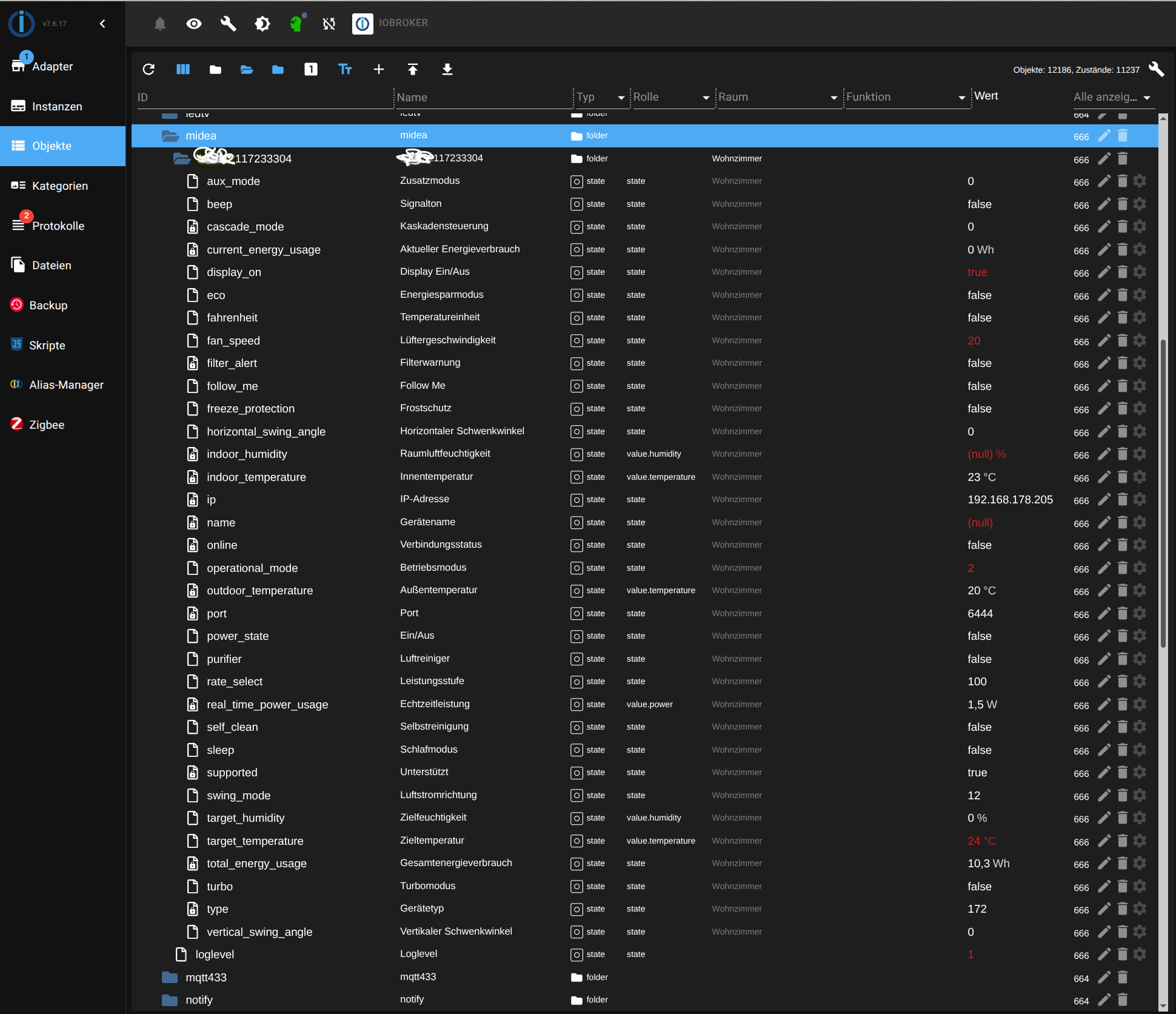
Und in meiner smartVisu (ja, ich benutze smartVisu!) sieht das so aus:
Handy:
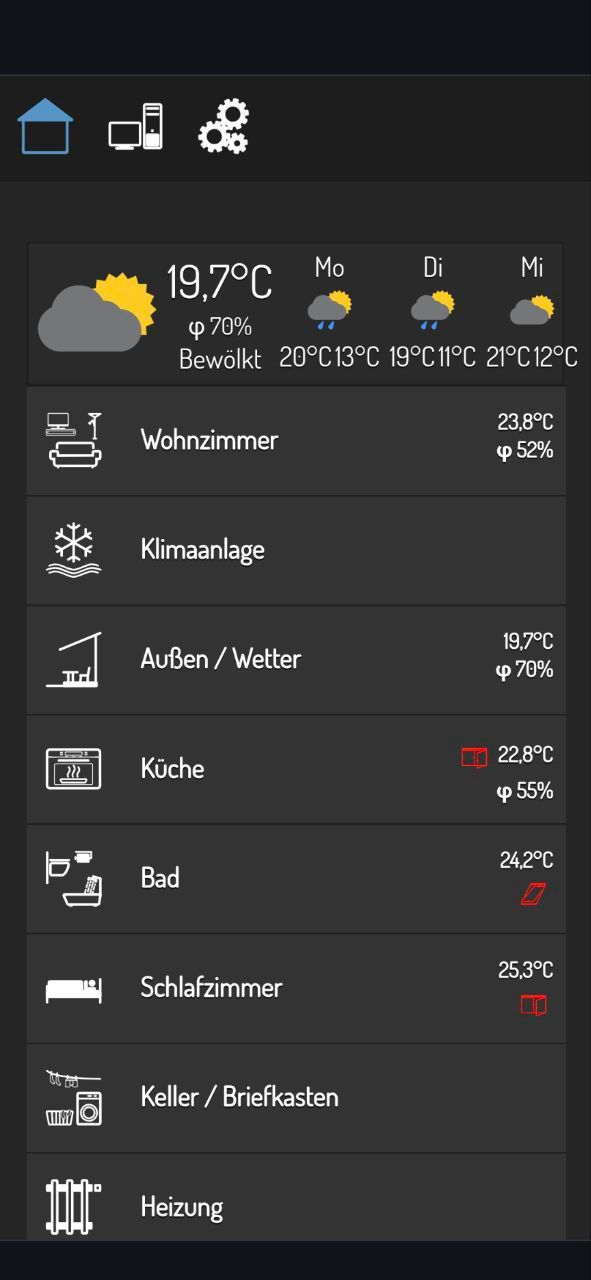
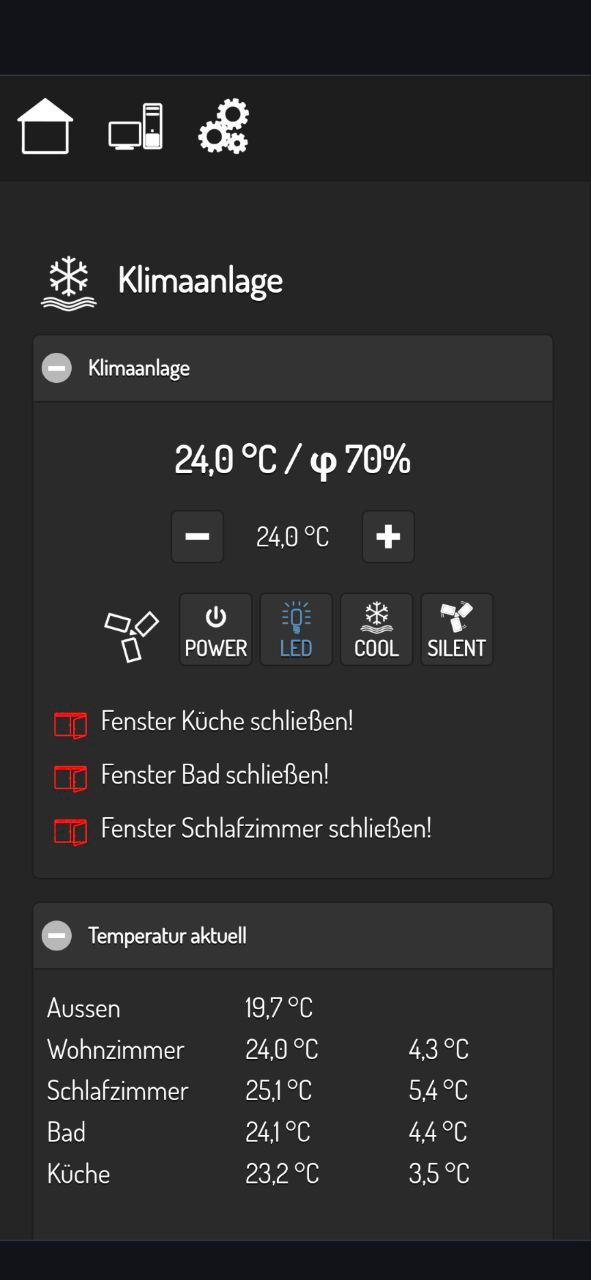
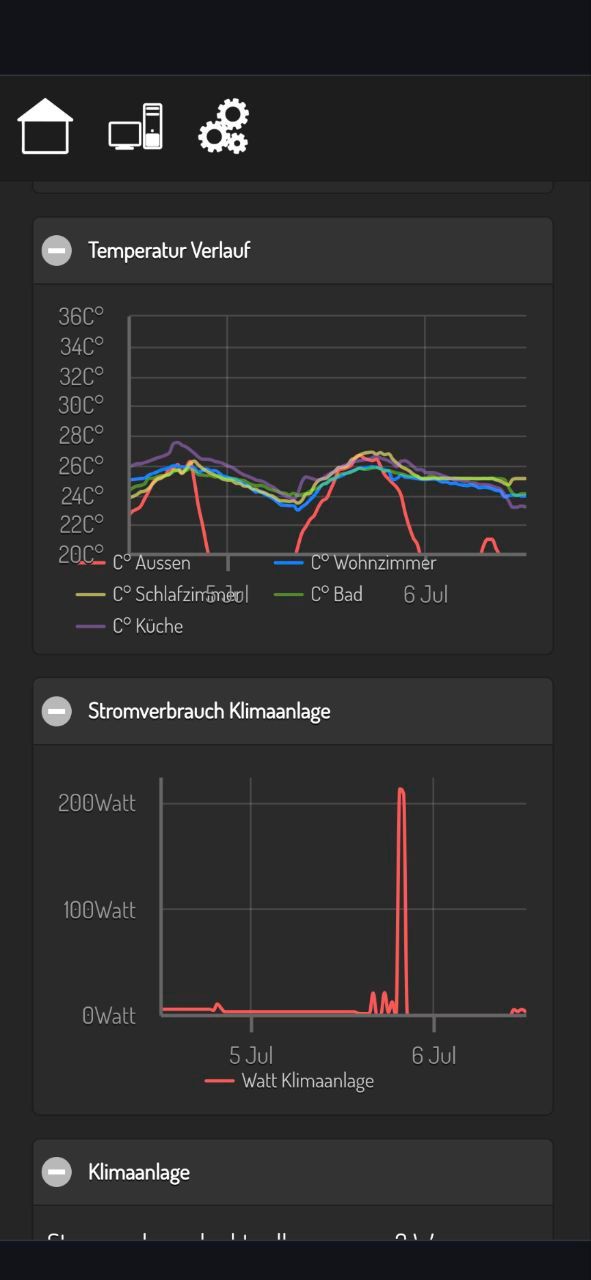
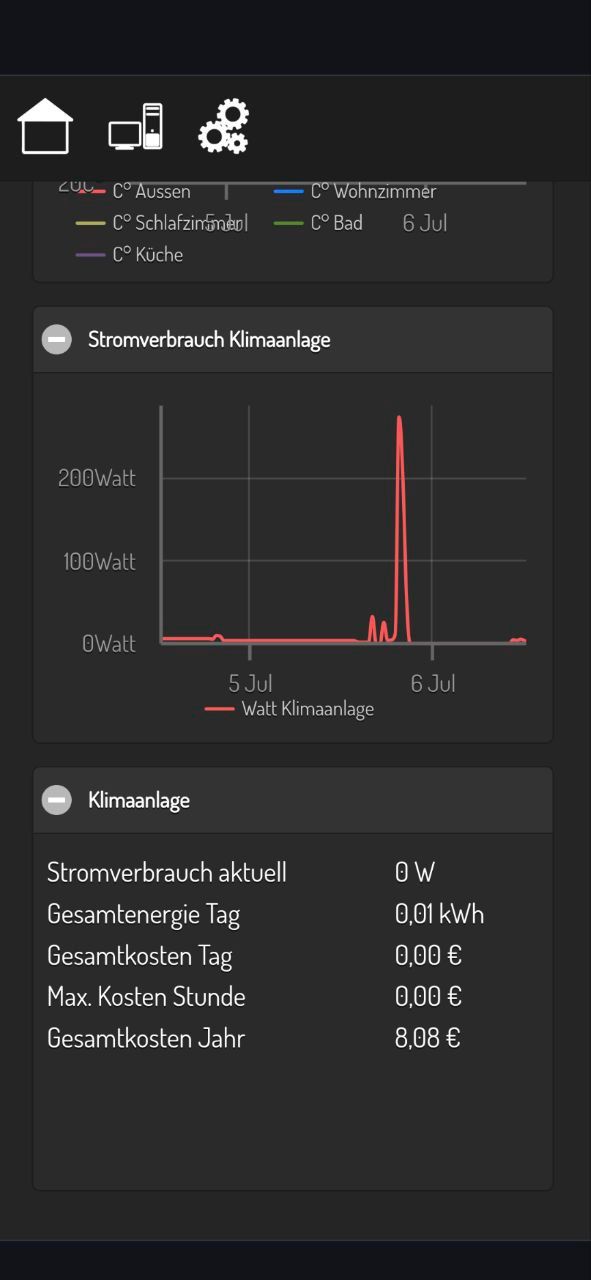
Tablet:
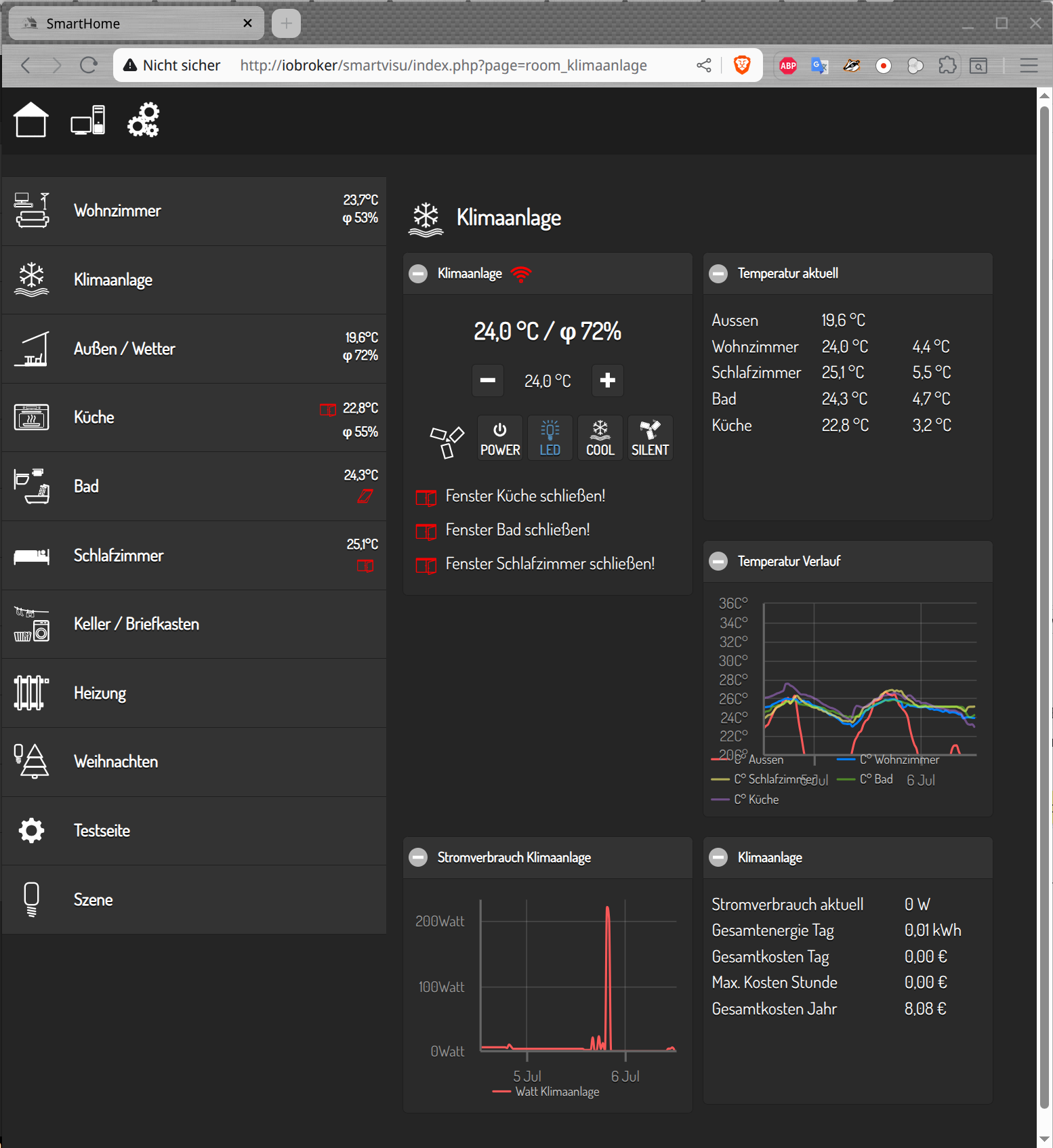
-
@bananajoe
mit der neuen Version von
msmart-ng -v
Ausgabe: msmart-ng version: 2025.7.0
werden auch die Energiewerte im ioBroker gefüllt.
Hier die neue Version des JavaScripts (vorher die alten midea-Objekte, den ganzen Baum, löschen):/* Version 06.07.2025 Add option to CLI to request energy information ID & Token & Key for msmart-ng are automatically determined Steuert eine Midea-Klimaanlage direkt über das Python-Programm 'msmart-ng' (siehe unten Installation 'msmart-ng') lokal im WLAN. Das Gerät wurde einmalig mit der Android-App in das WLAN integriert. Anschließend wurde der Internetzugang für diese Gerät über die FritzBox deaktiviert, um eine Fremdsteuerung zu unterbinden. Keine Cloud erforderlich für dieses JavaScript! Dieses JavaScript übernimmt folgende Funktionen: - Es liest die aktuellen Werte des Geräts im lokalen Netzwerk ab, siehe dazu Variable 'mideaPortaSplit'. IP in Variable 'mideaPortaSplit' muss entsprechend geändert werden. ID + Token + Key werden über 'msmart-ng query --region DE --auto <ip>' automatisch ermittelt. - Es erstellt eigenständig die passenden Objekte in ioBroker (unter javascript.0.midea.*). - Wird ein schreibbares Objekt geändert, so schreibt das JavaScript die Änderung direkt ins Gerät, indem es die Befehle über 'msmart-ng' sendet. Gültige Werte für FanSpeed / OperationalMode / SwingMode / SwingAngle / RateSelect / BreezeMode / AuxHeatMode siehe Variable 'AirConditioner'. - Der Loglevel (javascript.0.media.loglevel) kann während der Laufzeit des Skripts angepasst werden. Mögliche Werte sind 0=aus, 1=minimal, 2=alles. Idee abgeleitet aus den Beitrag: https://forum.iobroker.net/topic/33198/test-adapter-midea-dimstal-klimaanlagen-v0-0-x/346?lang=de Installation 'msmart-ng': ========================= Zum Benutzer ioBroker wechseln: sudo -u iobroker /usr/bin/bash In das Home-Verzeichnis des Benutzers ioBroker wechseln cd ~ Python Environment anlegen (falls noch nicht vorhanden): python3 -m venv python-venv und in die Umgebung wechseln: source python-venv/bin/activate Jetzt kann man per pip das Modul installieren pip install msmart-ng und dann Version anzeigen: msmart-ng -v Ausgabe: msmart-ng version: 2025.7.0 Vor der Nutzung muss dann aber immer erst das Envirtonment geladen werden. Intelligenter weise wird das in den nachinstallierten Python-Modulen gleich richtig hinterlegt: which msmart-ng Ausgabe: /home/iobroker/python-venv/bin/msmart-ng Inhalt: cat /home/iobroker/python-venv/bin/msmart-ng Die erste Zeile ist #!/home/iobroker/python-venv/bin/python3 Womit die richtige Umgebung genutzt wird. In ioBroker Skripten den ganzen Pfad aufrufen: /home/iobroker/python-venv/bin/msmart-ng */ // id + token + key ermittelbar über 'msmart-ng query --region DE --auto 192.168.178.205' const mideaPortaSplit = { ip: '192.168.178.205', id: null, // Temporary storage, ID for msmart-ng is automatically determined token: null, // Temporary storage, token for msmart-ng is automatically determined key: null, // Temporary storage, key for msmart-ng is automatically determined controlSettings: [], // Temporary storage for all modifiable objects, used in on({id: mideaPortaSplit.controlSettings, change: 'any'}... }; let controlListener; const basePath = 'javascript.0.midea'; // Base object path var LOGLEVEL = 2; // 0=off, 1=minimal, 2=all const msmartLoglevel = basePath + '.loglevel'; const region = 'DE'; // --region {DE,KR,US} const msmart_ng = '/home/iobroker/python-venv/bin/msmart-ng'; // Enums see https://github.com/mill1000/midea-msmart/blob/main/msmart/device/AC/device.py // Note: The above link is for reference; it contains enum definitions for the device. class AirConditioner { static FanSpeed = { AUTO: 102, MAX: 100, HIGH: 80, MEDIUM: 60, LOW: 40, SILENT: 20, DEFAULT: 102 }; static OperationalMode = { AUTO: 1, COOL: 2, DRY: 3, HEAT: 4, FAN_ONLY: 5, SMART_DRY: 6, DEFAULT: 5 }; static SwingMode = { OFF: 0, VERTICAL: 12, HORIZONTAL: 3, BOTH: 15, DEFAULT: 0 }; static SwingAngle = { OFF: 0, POS_1: 1, POS_2: 25, POS_3: 50, POS_4: 75, POS_5: 100, DEFAULT: 0 }; static RateSelect = { OFF: 100, GEAR_50: 50, GEAR_75: 75, LEVEL_1: 1, LEVEL_2: 20, LEVEL_3: 40, LEVEL_4: 60, LEVEL_5: 80, DEFAULT: 100 }; static BreezeMode = { OFF: 1, BREEZE_AWAY: 2, BREEZE_MILD: 3, BREEZELESS: 4, DEFAULT: 1 }; static AuxHeatMode = { OFF: 0, AUX_HEAT: 1, AUX_ONLY: 2, DEFAULT: 0 }; } function convertToValidJSON(str) { return str .replace(/<[^>]*:\s*(\d+)>/g, '$1') // Remove everything in <...>, keep number after : .replace(/\bNone\b/g, 'null') // Replace 'None' with null .replace(/'/g, '"') // Optional: replace single quotes with double quotes .replace(/\bTrue\b/g, 'true').replace(/\bFalse\b/g, 'false') // Convert True/False to true/false .replace('"power"', '"power_state"') // name correction for power control .replace('"mode"', '"operational_mode"'); // name correction for operational mode control } function extractJsonFromLine(line) { const index = line.indexOf('{'); if (index !== -1) { try { const jsonStr = convertToValidJSON(line.substring(index)); if (LOGLEVEL > 1) log(jsonStr); return JSON.parse(jsonStr); } catch (e) { console.error(`Could not parse JSON ${e}`); return null; } } return null; } // msmart-ng query // usage: msmart-ng query [-h] [-d] [--region {DE,KR,US}] [--account ACCOUNT] [--password PASSWORD] [--capabilities] // [--auto] [--energy] // [--id DEVICE_ID] [--token TOKEN] [--key KEY] // host function queryDevice(device) { const auto = (device.token == null); // query with --auto is slow, login with token,key&id it is faster const login = auto ? ' --auto' : ` --region ${region}` + ` --token ${device.token}` + ` --key ${device.key}` + ` --id ${device.id}`; const queryMsmart = msmart_ng + ' query' + login + ' --energy' + ` ${device.ip}`; if (LOGLEVEL > 1) log(queryMsmart); const devicePath = `${basePath}.${device.id}`; exec(queryMsmart, (error, stdout, stderr) => { if (error) { var s = `${error}`; if (s.includes('Connect failed') || s.includes('Connect timeout')) { if (getState(`${devicePath}.online`).val) { log(`${devicePath}.online=false`); setState(`${devicePath}.online`, false, true); } } else { console.error(`Error executing query: ${error}`); } return; } // Function to search for JSON in output [stdout, stderr].forEach(output => { const lines = output.split('\n'); for (let line of lines) { if (line.includes('INFO:msmart.cli:')) { const data = extractJsonFromLine(line); if (data) { handleData(device, data); break; // only the first found JSON line } } } }); }); } /* const stateName = [ {control: true, key: 'eco', name: 'Energy Saving Mode'}, {control: true, key: 'power_save', name: 'Power Saving'}, {control: true, key: 'swing_mode', name: 'Airflow Direction'}, {control: true, key: 'fan_speed', name: 'Fan Speed'}, {control: true, key: 'operational_mode', name: 'Operating Mode'}, {control: true, key: 'power_state', name: 'On/Off'}, {control: false, key: 'indoor_temperature', name: 'Indoor Temperature'}, {control: false, key: 'outdoor_temperature', name: 'Outdoor Temperature'}, {control: true, key: 'target_temperature', name: 'Target Temperature'}, {control: true, key: 'fahrenheit', name: 'Temperature Unit'}, {control: true, key: 'target_humidity', name: 'Target Humidity'}, {control: true, key: 'horizontal_swing_angle', name: 'Horizontal Swing Angle'}, {control: false, key: 'indoor_humidity', name: 'Indoor Humidity'}, {control: true, key: 'vertical_swing_angle', name: 'Vertical Swing Angle'}, {control: true, key: 'turbo', name: 'Turbo Mode'}, {control: true, key: 'freeze_protection', name: 'Frost Protection'}, {control: true, key: 'sleep', name: 'Sleep Mode'}, {control: true, key: 'display_on', name: 'Display On/Off'}, {control: true, key: 'beep', name: 'Beep Sound'}, {control: false, key: 'filter_alert', name: 'Filter Warning'}, {control: true, key: 'follow_me', name: 'Follow Me'}, {control: true, key: 'purifier', name: 'Air Purifier'}, {control: true, key: 'self_clean', name: 'Self-Cleaning'}, {control: false, key: 'total_energy_usage', name: 'Total Energy Usage'}, {control: false, key: 'current_energy_usage', name: 'Current Energy Usage'}, {control: false, key: 'real_time_power_usage', name: 'Real-Time Power Usage'}, {control: true, key: 'rate_select', name: 'Performance Level'}, {control: true, key: 'aux_mode', name: 'Auxiliary Mode'}, {control: false, key: 'ip', name: 'IP Address'}, {control: false, key: 'name', name: 'Device Name'}, {control: false, key: 'supported', name: 'Supported Features'}, {control: false, key: 'type', name: 'Device Type'}, {control: false, key: 'online', name: 'Connection Status'}, {control: false, key: 'port', name: 'Port'}, {control: false, key: 'cascade_mode', name: 'Cascade Control'}, {control: false, key: 'sn', name: 'Serial Number'}, ]; */ const stateName = [ {control: true, key: 'eco', name: 'Energiesparmodus'}, {control: true, key: 'power_save', name: 'Energiesparen'}, {control: true, key: 'swing_mode', name: 'Luftstromrichtung'}, {control: true, key: 'fan_speed', name: 'Lüftergeschwindigkeit'}, {control: true, key: 'operational_mode', name: 'Betriebsmodus'}, {control: true, key: 'power_state', name: 'Ein/Aus'}, {control: false, key: 'indoor_temperature', name: 'Innentemperatur'}, {control: false, key: 'outdoor_temperature', name: 'Außentemperatur'}, {control: true, key: 'target_temperature', name: 'Zieltemperatur'}, {control: true, key: 'fahrenheit', name: 'Temperatureinheit'}, {control: true, key: 'target_humidity', name: 'Zielfeuchtigkeit'}, {control: true, key: 'horizontal_swing_angle', name: 'Horizontaler Schwenkwinkel'}, {control: false, key: 'indoor_humidity', name: 'Raumluftfeuchtigkeit'}, {control: true, key: 'vertical_swing_angle', name: 'Vertikaler Schwenkwinkel'}, {control: true, key: 'turbo', name: 'Turbomodus'}, {control: true, key: 'freeze_protection', name: 'Frostschutz'}, {control: true, key: 'sleep', name: 'Schlafmodus'}, {control: true, key: 'display_on', name: 'Display Ein/Aus'}, {control: true, key: 'beep', name: 'Signalton'}, {control: false, key: 'filter_alert', name: 'Filterwarnung'}, {control: true, key: 'follow_me', name: 'Follow Me'}, {control: true, key: 'purifier', name: 'Luftreiniger'}, {control: true, key: 'self_clean', name: 'Selbstreinigung'}, {control: false, key: 'total_energy_usage', name: 'Gesamtenergieverbrauch'}, {control: false, key: 'current_energy_usage', name: 'Aktueller Energieverbrauch'}, {control: false, key: 'real_time_power_usage', name: 'Echtzeitleistung'}, {control: true, key: 'rate_select', name: 'Leistungsstufe'}, {control: true, key: 'aux_mode', name: 'Zusatzmodus'}, {control: false, key: 'ip', name: 'IP-Adresse'}, {control: false, key: 'name', name: 'Gerätename'}, {control: false, key: 'supported', name: 'Unterstützt'}, {control: false, key: 'type', name: 'Gerätetyp'}, {control: false, key: 'online', name: 'Verbindungsstatus'}, {control: false, key: 'port', name: 'Port'}, {control: false, key: 'cascade_mode', name: 'Kaskadensteuerung'}, {control: false, key: 'sn', name: 'Seriennummer'}, ]; function initControlSettings(device) { device.controlSettings = []; const devicePath = `${basePath}.${device.id}`; const controlStates = stateName.filter(state => state.control); controlStates.forEach(state => { const statePath = `${devicePath}.${state.key}`; device.controlSettings.push(statePath); }); log('initControlSettings() device.controlSettings.length=' + device.controlSettings.length); } function handleData(device, data) { const id = data.id ? data.id.toString() : 'device'; const devicePath = `${basePath}.${id}`; Object.keys(data).forEach(key => { const value = data[key]; var keyL = key.toLowerCase(); if (keyL === 'id') { if (device.id == null) device.id = value; return; } else if (keyL === 'key') { if (device.key == null) device.key = value; return; } else if (keyL === 'token') { if (device.token == null) device.token = value; return; } if (['sn', 'name'].includes(keyL) && (value == null)) { return; } const statePath = `${devicePath}.${key}`; // Configuration for createState const stateOptions = { type: typeof value, name: stateName.find(item => item.key === keyL)?.name || key, write: stateName.find(item => item.key === keyL)?.control || false, read: true, }; if (value != null) stateOptions.def = value; // Additional properties based on the key if (typeof value !== 'boolean') { if (keyL.includes('temperature')) { stateOptions.unit = '°C'; stateOptions.role = 'value.temperature'; stateOptions.type = 'number'; } else if (keyL.includes('humidity')) { stateOptions.unit = '%'; stateOptions.role = 'value.humidity'; stateOptions.min = 0; stateOptions.max = 100; stateOptions.type = 'number'; } else if (keyL.includes('energy')) { stateOptions.unit = 'Wh'; stateOptions.min = 0; stateOptions.max = 999999999; stateOptions.type = 'number'; } else if (keyL.includes('power')) { stateOptions.unit = 'W'; stateOptions.role = 'value.power'; stateOptions.min = 0; stateOptions.max = 4000; stateOptions.type = 'number'; } } // Create state if it does not exist createState(statePath, stateOptions, () => { // After creation, get the value and update if necessary getState(statePath, (err, state) => { if (err || !state) { setState(statePath, value, true); } else { if (state.val !== value) { if (LOGLEVEL > 1) log(`Updating ${statePath} to ${value}`); setState(statePath, value, true); } } }); }); }); if ((device.controlSettings.length == 0) && (device.id != null)) { initControlSettings(device); if (controlListener && typeof controlListener === 'function') controlListener(); // remove old listener controlListener = on({id: mideaPortaSplit.controlSettings, change: 'any'}, function (obj) { var parts = obj.id.split('.'); var setting = parts[4]; if ((setting == 'online') && obj.state.val) powerStateOnRepeat = -1; if (obj.state.ack) return; // change was made by script, ignore if (LOGLEVEL > 0) log(`Changed ${obj.id} to ${obj.state.val}`); controlDevice(mideaPortaSplit, setting ,obj.state.val); }); } } // msmart-ng control // usage: msmart-ng control [-h] [-d] [--region {DE,KR,US}] [--account ACCOUNT] [--password PASSWORD] // [--capabilities] // [--auto] // [--id DEVICE_ID] [--token TOKEN] [--key KEY] // host setting=value [setting=value ...] var powerStateOnRepeat = -1; function controlDevice(device, setting, value) { if (LOGLEVEL) log(`Controlling device ${device.id}, setting ${setting}=${value}`); const stateEntry = stateName.find(entry => entry.key === setting); if (!stateEntry || stateEntry.control === false) { if (LOGLEVEL > 1) log(`${setting} is not controllable!`); return; } if ((setting == 'power_state') && (value == false)) { powerStateOnRepeat = -1; setTimeout(function () { queryDevice(device); setTimeout(function () { queryDevice(device); }, 30 * 1000); }, 30 * 1000); } var pyValue = value; if (typeof pyValue == 'boolean') { pyValue = value == true ? 'True':'False'; } const controlMsmart = msmart_ng + ' control' + ` --region ${region}` + ` --token ${device.token}` + ` --key ${device.key}` + ` --id ${device.id}` + ` ${device.ip}` + ` ${setting}=${pyValue}`; if (LOGLEVEL > 1) log(controlMsmart); const devicePath = `${basePath}.${device.id}`; exec(controlMsmart, (error, stdout, stderr) => { if (error) { var s = `${error}`; if (s.includes('Connect failed') || s.includes('Connect timeout')) { if (getState(`${devicePath}.online`).val) { log(`${devicePath}.online=false`); setState(`${devicePath}.online`, false, true); } if ((setting == 'power_state') && (powerStateOnRepeat < (25 * 1000))) { setTimeout(function () { log('Repeating control: power_state=True'); controlDevice(device, setting, value); powerStateOnRepeat += 2 * 1000; }, 2 * 1000); } } else { console.error(`Error executing control: ${error}`); } return; } powerStateOnRepeat = -1; // Funktion, um nach JSON zu suchen [stdout, stderr].forEach(output => { if (output.length) { if (output.includes('ERROR:')) { console.error(`Error during execution: ${output}`); if (getState(`${devicePath}.online`).val) setState(`${devicePath}.online`, false, true); } else { if (LOGLEVEL > 1) log(output); if (getState(`${devicePath}.online`).val == false) setState(`${devicePath}.online`, true, true); } } }); }); } function initVar() { createState(msmartLoglevel, undefined, false, { name: 'Loglevel', type: 'number', def: LOGLEVEL, role: 'state' }); LOGLEVEL = getState(msmartLoglevel).val; } // Main: initVar(); queryDevice(mideaPortaSplit); schedule("*/2 * * * *", function () { // every 2 minutes queryDevice(mideaPortaSplit); }); // Events: on({id: msmartLoglevel, change: 'any'}, function (obj) { // Log level changed log(`msmartLoglevel is now ${obj.state.val}`); LOGLEVEL = obj.state.val; });Die generierten Objekte im ioBroker sehen dann so aus:
Und in meiner smartVisu (ja, ich benutze smartVisu!) sieht das so aus:
Handy:
Tablet:
@uweabc cool, unterstützt mein Modell leider nicht, hier die Query-Abfrage (Tokens, Ids etc sind geändert)
{'ip': '192.168.1.29', 'port': 6444, 'id': 133402613440365, 'online': True, 'supported': True, 'type': <DeviceType.AIR_CONDITIONER: 172>, 'name': None, 'sn': None, 'key': 'a5409a86c04b3d1834ed59ead3e083349fa8b6537878443d0ac794351b818a4f', 'token': '86389f141a1fe5188cad648496607d0e1ca032530a74c267909fff5f3237e73c77cf363c2bf6d4509cd0bb5ec9173ee7e479136f8667ef8a0563ae1bd894c712', 'power': False, 'mode': <OperationalMode.COOL: 2>, 'fan_speed': <FanSpeed.AUTO: 102>, 'swing_mode': <SwingMode.BOTH: 15>, 'horizontal_swing_angle': <SwingAngle.OFF: 0>, 'vertical_swing_angle': <SwingAngle.OFF: 0>, 'cascade_mode': <CascadeMode.OFF: 0>, 'target_temperature': 22.0, 'indoor_temperature': 26.3, 'outdoor_temperature': 26.0, 'target_humidity': 0, 'indoor_humidity': None, 'eco': False, 'turbo': False, 'freeze_protection': False, 'sleep': False, 'display_on': True, 'beep': False, 'fahrenheit': False, 'filter_alert': False, 'follow_me': False, 'purifier': False, 'self_clean': False, 'total_energy_usage': None, 'current_energy_usage': None, 'real_time_power_usage': None, 'rate_select': <RateSelect.OFF: 100>, 'aux_mode': <AuxHeatMode.OFF: 0>} -
@jolly
Die "Midea cloud" ist bei mir gesperrt, also ohne email & pw (war nur zum WLAN einrichten nötig).
Ich habe es so gemacht:
msmart-ng query --region DE --auto 192.168.1.34dann bekommst du ein token, key und id
mit diesen dann control aufrufen:
msmart-ng control --region DE --token abcabcabcc05bab57aad3833ce247729d2f880e6fd5b8e1d2ca0eec82395d7edb85cf70d339faf7d0c8baf3b8275d86b183d430347bae6eba4a009cb38d1147f --key abcabcabcd854aa6ba7b200174327ed7fc9fb0fd0032407992403b9e4104c1d3 --id 999832117233304 192.168.1.34 power_state=False
Gruß Uwe
danke für die Antwort.
Leider kommt auf den von dir vorgeschlagenen Befehle folgende Rückmeldungjolly@iobroker:~$ msmart-ng query --region DE --auto 192.168.1.34 usage: msmart-ng [-h] [-v] {discover,query,control,download} ... msmart-ng: error: unrecognized arguments: --region 192.168.1.34 -
danke für die Antwort.
Leider kommt auf den von dir vorgeschlagenen Befehle folgende Rückmeldungjolly@iobroker:~$ msmart-ng query --region DE --auto 192.168.1.34 usage: msmart-ng [-h] [-v] {discover,query,control,download} ... msmart-ng: error: unrecognized arguments: --region 192.168.1.34 -
@uweabc cool, unterstützt mein Modell leider nicht, hier die Query-Abfrage (Tokens, Ids etc sind geändert)
{'ip': '192.168.1.29', 'port': 6444, 'id': 133402613440365, 'online': True, 'supported': True, 'type': <DeviceType.AIR_CONDITIONER: 172>, 'name': None, 'sn': None, 'key': 'a5409a86c04b3d1834ed59ead3e083349fa8b6537878443d0ac794351b818a4f', 'token': '86389f141a1fe5188cad648496607d0e1ca032530a74c267909fff5f3237e73c77cf363c2bf6d4509cd0bb5ec9173ee7e479136f8667ef8a0563ae1bd894c712', 'power': False, 'mode': <OperationalMode.COOL: 2>, 'fan_speed': <FanSpeed.AUTO: 102>, 'swing_mode': <SwingMode.BOTH: 15>, 'horizontal_swing_angle': <SwingAngle.OFF: 0>, 'vertical_swing_angle': <SwingAngle.OFF: 0>, 'cascade_mode': <CascadeMode.OFF: 0>, 'target_temperature': 22.0, 'indoor_temperature': 26.3, 'outdoor_temperature': 26.0, 'target_humidity': 0, 'indoor_humidity': None, 'eco': False, 'turbo': False, 'freeze_protection': False, 'sleep': False, 'display_on': True, 'beep': False, 'fahrenheit': False, 'filter_alert': False, 'follow_me': False, 'purifier': False, 'self_clean': False, 'total_energy_usage': None, 'current_energy_usage': None, 'real_time_power_usage': None, 'rate_select': <RateSelect.OFF: 100>, 'aux_mode': <AuxHeatMode.OFF: 0>}@bananajoe
Bei den neuen msmart-ng 2025.7.0 mit --energy angegeben, z.B. so?
msmart-ng query --region DE --auto --energy 192.168.1.29
oder auch mit id token und key anstatt --auto -
@jolly
Sollte schon gehen, evtl. altes msmart-ng, mach mal
msmart-ng -v
Ausgabe: msmart-ng version: 2025.7.0@uweabc
Du hast recht ich habe noch die Version 2024.9.0
Blöde frage, aber wie kann ich das updaten.
Habe es so versucht.jolly@iobroker:~$ pip install --upgrade msmart-ng Requirement already up-to-date: msmart-ng in ./.local/lib/python3.8/site-packages (2024.9.0) -
@uweabc
Du hast recht ich habe noch die Version 2024.9.0
Blöde frage, aber wie kann ich das updaten.
Habe es so versucht.jolly@iobroker:~$ pip install --upgrade msmart-ng Requirement already up-to-date: msmart-ng in ./.local/lib/python3.8/site-packages (2024.9.0) -
@uweabc
Du hast recht ich habe noch die Version 2024.9.0
Blöde frage, aber wie kann ich das updaten.
Habe es so versucht.jolly@iobroker:~$ pip install --upgrade msmart-ng Requirement already up-to-date: msmart-ng in ./.local/lib/python3.8/site-packages (2024.9.0)pip install msmart-ng --upgradehat bei mir funktioniert und auf die aktuelle Version gehoben
ioBroker@Ubuntu 24.04 LTS (Proxmox VM) für: >260 Geräte, 6 Switche, 7 AP, 10 IP-Cam, 1 NAS 42TB, 1 Proxmox 128GB 15TB, 2 Proxmox 32GB 1TB, 1 Hyper-V 52GB 42TB, 14 x Echo, 5x FireTV, 5 x Tablett/Handy VIS || >=160 Tasmota/Shelly || >=95 ZigBee || PV 8.1kW / Akku 14kWh || 2x USV APC 750W kaskadiert || Kobra S1 Max
-
pip install msmart-ng --upgradehat bei mir funktioniert und auf die aktuelle Version gehoben
@bananajoe Ich habe eure Unterhaltung mit sehr viel interesse gelesen und verzweifle gerade.
Ich bin zwar fit im IOBroker, aber das war es dann auch schon.Ich möchte gerne meine Dimstal Klimaanlage mit 3 Inneneinheiten steuern.
Abfrage der Werte klappt super über den Midea Adapter (Inneneinheiten per WLAN USB Stick angeschlossen). Jedoch kann ich nichts steuern.Kann mir da jemand helfen?
Gruß Stefan Hantschel
-
@bananajoe Ich habe eure Unterhaltung mit sehr viel interesse gelesen und verzweifle gerade.
Ich bin zwar fit im IOBroker, aber das war es dann auch schon.Ich möchte gerne meine Dimstal Klimaanlage mit 3 Inneneinheiten steuern.
Abfrage der Werte klappt super über den Midea Adapter (Inneneinheiten per WLAN USB Stick angeschlossen). Jedoch kann ich nichts steuern.Kann mir da jemand helfen?
Gruß Stefan Hantschel
@hantschel sagte in Test Adapter Midea Dimstal Klimaanlagen v0.0.x:
Kann mir da jemand helfen?
Wie weit bist du denn? Weiter oben werden ja verschiedene Methoden beschrieben,
das aktuellste per Skript ab hier https://forum.iobroker.net/post/1277642Auf https://pypi.org/project/msmart-ng/ weiter unter bei Usage werden die CLI-Befehle beschrieben,
mitmsmart-ng discoversollte er alle 3 Geräte finden mit den notwendigen Daten mit denen du dann das Gerät schalten kannst.
Du könntest https://forum.iobroker.net/post/1281163 das Skript übernehmen (dann 3 mal für jede Anlage separat).Alternativ: Falls du schon Alexa im Einsatz hast, den Skill installieren (Midea?), dann kannst du die Anlagen per Sprachbefehl und Textbefehl über den Adapter steuern (über den Command-Datenpunkt eines Echos),
Die Daten selbst bekommst du ja über den Midea AdapterioBroker@Ubuntu 24.04 LTS (Proxmox VM) für: >260 Geräte, 6 Switche, 7 AP, 10 IP-Cam, 1 NAS 42TB, 1 Proxmox 128GB 15TB, 2 Proxmox 32GB 1TB, 1 Hyper-V 52GB 42TB, 14 x Echo, 5x FireTV, 5 x Tablett/Handy VIS || >=160 Tasmota/Shelly || >=95 ZigBee || PV 8.1kW / Akku 14kWh || 2x USV APC 750W kaskadiert || Kobra S1 Max
-
@hantschel sagte in Test Adapter Midea Dimstal Klimaanlagen v0.0.x:
Kann mir da jemand helfen?
Wie weit bist du denn? Weiter oben werden ja verschiedene Methoden beschrieben,
das aktuellste per Skript ab hier https://forum.iobroker.net/post/1277642Auf https://pypi.org/project/msmart-ng/ weiter unter bei Usage werden die CLI-Befehle beschrieben,
mitmsmart-ng discoversollte er alle 3 Geräte finden mit den notwendigen Daten mit denen du dann das Gerät schalten kannst.
Du könntest https://forum.iobroker.net/post/1281163 das Skript übernehmen (dann 3 mal für jede Anlage separat).Alternativ: Falls du schon Alexa im Einsatz hast, den Skill installieren (Midea?), dann kannst du die Anlagen per Sprachbefehl und Textbefehl über den Adapter steuern (über den Command-Datenpunkt eines Echos),
Die Daten selbst bekommst du ja über den Midea AdapterHi, ich wollte nur meine Erfahrungen einbringen.
Habe mir jetzt einen Slwf01pro zugelegt um meine Dimstal (midea-clon) ohne Cloud zu steuern.
Esphome ist vorinstalliert für Homeassistent.
Ich nutze aber den Mqtt Adapter im Iobroker.
Alle wichtigen Funktionen funktionieren ohne Probleme.
Man muss vom Hersteller des USB Stick die Yaml - Datei runterladen, da die "Platform" esp8266 ändern, die Zeilen für Mqtt einfügen und wieder mit "Esphome Dashboard" auf den Stick Flashen.
! Geht nicht im Gerät über WLAN. Ich hab's am PC geflasht, da muss beim gesamten Flashen der Knopf am SLWF gedrückt werden. (Beim Kompilieren noch nicht).
Das gleiche ist zwar weiter oben mit einer angepassten .Yaml beschrieben, da ging aber bei mir nichts. -
@uweabc
@BananaJoe
Wirklich ganz großes Kino hier!
Ich habe es so eingerichtet wie beschrieben und es funktioniert mit meiner Midea Portasplit auf Anhieb! Vielen Dank!
Jetzt fehlt nur noch eine vernünftige vis(2), die ich mir noch bastel und der Sommer
-
Hi, ich wollte nur meine Erfahrungen einbringen.
Habe mir jetzt einen Slwf01pro zugelegt um meine Dimstal (midea-clon) ohne Cloud zu steuern.
Esphome ist vorinstalliert für Homeassistent.
Ich nutze aber den Mqtt Adapter im Iobroker.
Alle wichtigen Funktionen funktionieren ohne Probleme.
Man muss vom Hersteller des USB Stick die Yaml - Datei runterladen, da die "Platform" esp8266 ändern, die Zeilen für Mqtt einfügen und wieder mit "Esphome Dashboard" auf den Stick Flashen.
! Geht nicht im Gerät über WLAN. Ich hab's am PC geflasht, da muss beim gesamten Flashen der Knopf am SLWF gedrückt werden. (Beim Kompilieren noch nicht).
Das gleiche ist zwar weiter oben mit einer angepassten .Yaml beschrieben, da ging aber bei mir nichts.@tom10web Die Info behalte ich mal im Hinterkopf. Ich hab bisher leider keinerlei Erfahrung mit dem flashen von den ESP Dingern ;) Daher steuere ich das via HA Dashboard per Hand oder via ioBroker und hass Adapter in meinem Automationen. Das funktioniert für mich aktuell auch gut, wobei natürlich eine native Steuerung direkt via ioBroker zu bevorzugen wäre. Aber, und das ist neben dem lokalen Zugriff am wichtigsten, es läuft vom ersten Tag an stabil!
-
 H Homoran verschob dieses Thema von Tester am
-
H Homoran verschob dieses Thema von ...nicht in offiziellem Repo am
-
hallo, ich versuche den Midea-Adapter zu installieren. Bekomme dann die Meldung, das ich Python 3.8 installieren soll. Wie installiert mal Python, und vor allem wo. Ich ahbe schon ein paar Versuche hinter mit und bekomme es nicht hin.
$ iobroker url TA2k/ioBroker.midea --host raspberry --debug

install TA2k/ioBroker.midea

NPM version: 10.9.7

Installing TA2k/ioBroker.midea... (System call)

npm error code 1

npm error git dep preparation failed

npm error command /usr/bin/node /usr/lib/node_modules/npm/bin/npm-cli.js install --force --cache=/home/iobroker/.npm --prefer-offline=false --prefer-online=false --offline=false --no-progress --no-save --no-audit --include=dev --include=peer --include=optional --no-package-lock-only --no-dry-runnpm error > esbuild@0.11.23 postinstallnpm error > node install.jsnpm errornpm errornpm error > iobroker.midea@0.1.0 postinstallnpm error > node ./pythonPackages.jsnpm errornpm errornpm error Start Python package installationnpm errornpm error Python 3 not found. Please install minimum python 3.8npm error npm warn using --force Recommended protections disabled.npm error npm warn deprecated @humanwhocodes/config-array@0.13.0: Use @eslint/config-array insteadnpm error npm warn deprecated @humanwhocodes/object-schema@2.0.3: Use @eslint/object-schema insteadnpm error npm warn deprecated glob@10.5.0: Old versions of glob are not supported, and contain widely publicized security vulnerabilities, which have been fixed in the current version. Please update. Support for old versions may be purchased (at exorbitant rates) by contacting i@izs.menpm error npm warn deprecated eslint@8.57.1: This version is no longer supported. Please see https://eslint.org/version-support for other options.npm error /bin/sh: 1: python3: not foundnpm error npm error code 1npm error npm error path /home/iobroker/.npm/_cacache/tmp/git-clonei3tMNdnpm error npm error command failednpm error npm error command sh -c node ./pythonPackages.jsnpm error npm error A complete log of this run can be found in: /home/iobroker/.npm/_logs/2026-05-18T18_18_38_166Z-debug-0.log

host.raspberry Cannot install TA2k/ioBroker.midea: 1

ERROR: Process exited with code 25
MOD-EDIT: Code in code-tags gesetzt!
-
hallo, ich versuche den Midea-Adapter zu installieren. Bekomme dann die Meldung, das ich Python 3.8 installieren soll. Wie installiert mal Python, und vor allem wo. Ich ahbe schon ein paar Versuche hinter mit und bekomme es nicht hin.
$ iobroker url TA2k/ioBroker.midea --host raspberry --debug

install TA2k/ioBroker.midea

NPM version: 10.9.7

Installing TA2k/ioBroker.midea... (System call)

npm error code 1

npm error git dep preparation failed

npm error command /usr/bin/node /usr/lib/node_modules/npm/bin/npm-cli.js install --force --cache=/home/iobroker/.npm --prefer-offline=false --prefer-online=false --offline=false --no-progress --no-save --no-audit --include=dev --include=peer --include=optional --no-package-lock-only --no-dry-runnpm error > esbuild@0.11.23 postinstallnpm error > node install.jsnpm errornpm errornpm error > iobroker.midea@0.1.0 postinstallnpm error > node ./pythonPackages.jsnpm errornpm errornpm error Start Python package installationnpm errornpm error Python 3 not found. Please install minimum python 3.8npm error npm warn using --force Recommended protections disabled.npm error npm warn deprecated @humanwhocodes/config-array@0.13.0: Use @eslint/config-array insteadnpm error npm warn deprecated @humanwhocodes/object-schema@2.0.3: Use @eslint/object-schema insteadnpm error npm warn deprecated glob@10.5.0: Old versions of glob are not supported, and contain widely publicized security vulnerabilities, which have been fixed in the current version. Please update. Support for old versions may be purchased (at exorbitant rates) by contacting i@izs.menpm error npm warn deprecated eslint@8.57.1: This version is no longer supported. Please see https://eslint.org/version-support for other options.npm error /bin/sh: 1: python3: not foundnpm error npm error code 1npm error npm error path /home/iobroker/.npm/_cacache/tmp/git-clonei3tMNdnpm error npm error command failednpm error npm error command sh -c node ./pythonPackages.jsnpm error npm error A complete log of this run can be found in: /home/iobroker/.npm/_logs/2026-05-18T18_18_38_166Z-debug-0.log

host.raspberry Cannot install TA2k/ioBroker.midea: 1

ERROR: Process exited with code 25
MOD-EDIT: Code in code-tags gesetzt!
npm error /bin/sh: 1: python3: not found
Hast du python3 installiert?
apt policy python3sagt?
-
npm error /bin/sh: 1: python3: not found
Hast du python3 installiert?
apt policy python3sagt?
python3:
Installed: 3.8.2-0ubuntu2
Candidate: 3.8.2-0ubuntu2
Version table:
*** 3.8.2-0ubuntu2 500
500 http://de.archive.ubuntu.com/ubuntu focal/main
amd64 Packages
100 /var/lib/dpkg/statusscheint also da zu sein, ich weis aber nicht ob es am richtigen Ort ist
-
python3:
Installed: 3.8.2-0ubuntu2
Candidate: 3.8.2-0ubuntu2
Version table:
*** 3.8.2-0ubuntu2 500
500 http://de.archive.ubuntu.com/ubuntu focal/main
amd64 Packages
100 /var/lib/dpkg/statusscheint also da zu sein, ich weis aber nicht ob es am richtigen Ort ist
focal
Zu alt. Installier da was noch lebendes.
-
focal
Zu alt. Installier da was noch lebendes.
was ist zu alt, mein Ubuntu oder das Python






Hey! Du scheinst an dieser Unterhaltung interessiert zu sein, hast aber noch kein Konto.
Hast du es satt, bei jedem Besuch durch die gleichen Beiträge zu scrollen? Wenn du dich für ein Konto anmeldest, kommst du immer genau dorthin zurück, wo du zuvor warst, und kannst dich über neue Antworten benachrichtigen lassen (entweder per E-Mail oder Push-Benachrichtigung). Du kannst auch Lesezeichen speichern und Beiträge positiv bewerten, um anderen Community-Mitgliedern deine Wertschätzung zu zeigen.
Mit deinem Input könnte dieser Beitrag noch besser werden 💗
Registrieren AnmeldenSupport us
481
Online33.0k
Benutzer83.6k
Themen1.3m
Beiträge