




Speicherplatz des Proxmox voll - aber womit?
-
@thomas-braun 32G
-
@guitardoc Nein, das ist normal. Weiter oben habe ich geschrieben, wo ich gucken würde.
-
@guitardoc Nein, das ist normal. Weiter oben habe ich geschrieben, wo ich gucken würde.
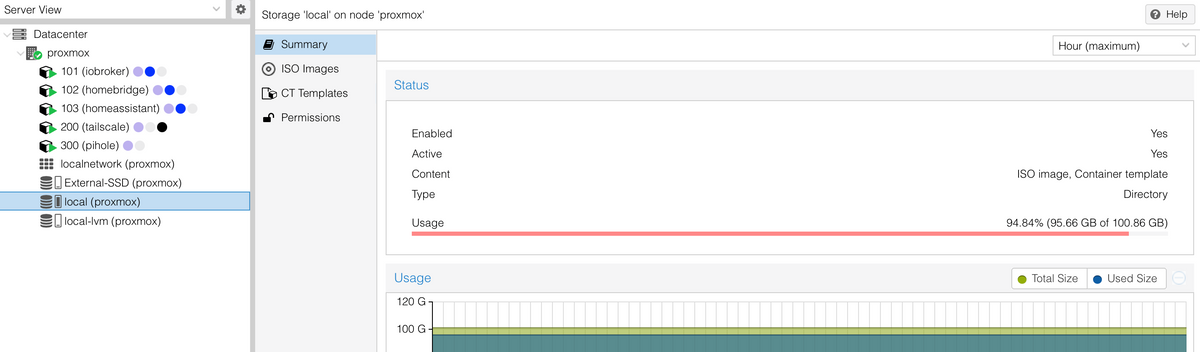
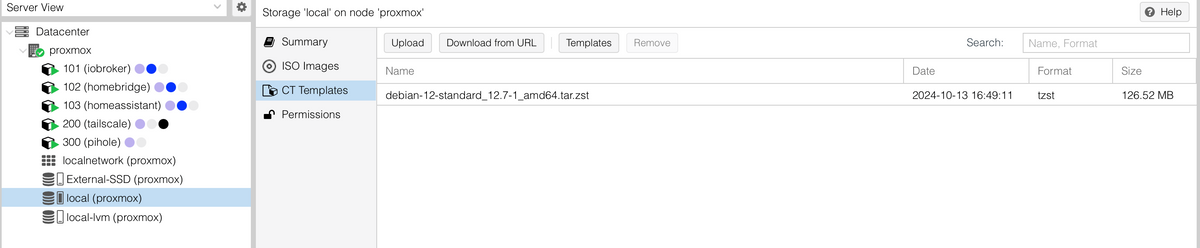
@peterfido Da ist alles recht leer:

-
@peterfido Da ist alles recht leer:
Aber ich habe eine Vermutung. Möglicherweise wurden Backups nicht auf die externe Platte gespeichert, sondern auf local (das hatte ich schon mal, warum auch immer hab ich nie herausgefunden). Ich hab doch die externe Platte entfernt und dann in Storage wieder hinzugefügt. Damit sind die Verweise auf Backups jetzt auf die externe Platte gerichtet und die, welche vielleicht auf local liegen, an die komme ich nicht mehr ran. Hmm. Wie könnte man das prüfen?
-
Aber ich habe eine Vermutung. Möglicherweise wurden Backups nicht auf die externe Platte gespeichert, sondern auf local (das hatte ich schon mal, warum auch immer hab ich nie herausgefunden). Ich hab doch die externe Platte entfernt und dann in Storage wieder hinzugefügt. Damit sind die Verweise auf Backups jetzt auf die externe Platte gerichtet und die, welche vielleicht auf local liegen, an die komme ich nicht mehr ran. Hmm. Wie könnte man das prüfen?
@guitardoc sagte in Speicherplatz des Proxmox voll - aber womit?:
Wie könnte man das prüfen?
ls -lh /opt/iobroker/backupsanschauen. Jedenfalls wenn du Backups vom ioBroker meinst.
-
@guitardoc sagte in Speicherplatz des Proxmox voll - aber womit?:
Wie könnte man das prüfen?
ls -lh /opt/iobroker/backupsanschauen. Jedenfalls wenn du Backups vom ioBroker meinst.
@thomas-braun Nein, ich meinte die Backups vom Proxmox. Die beinhalten ja alle vzdump im Dateinamen. Kann man den Proxmox auf Dateiebene nicht mal durchsuchen, ob da solche Dateien irgendwo liegen? Ich hab da aber keine Idee wie...
-
@thomas-braun Nein, ich meinte die Backups vom Proxmox. Die beinhalten ja alle vzdump im Dateinamen. Kann man den Proxmox auf Dateiebene nicht mal durchsuchen, ob da solche Dateien irgendwo liegen? Ich hab da aber keine Idee wie...
Da bin ich raus. Keine Ahnung von Proxmox.
-
@thomas-braun Nein, ich meinte die Backups vom Proxmox. Die beinhalten ja alle vzdump im Dateinamen. Kann man den Proxmox auf Dateiebene nicht mal durchsuchen, ob da solche Dateien irgendwo liegen? Ich hab da aber keine Idee wie...
-
@thomas-braun Nein, ich meinte die Backups vom Proxmox. Die beinhalten ja alle vzdump im Dateinamen. Kann man den Proxmox auf Dateiebene nicht mal durchsuchen, ob da solche Dateien irgendwo liegen? Ich hab da aber keine Idee wie...
@guitardoc Backups lasse ich auf Netzlaufwerke ablegen.
-
@guitardoc Backups lasse ich auf Netzlaufwerke ablegen.
@peterfido said in Speicherplatz des Proxmox voll - aber womit?:
@guitardoc Backups lasse ich auf Netzlaufwerke ablegen.
Ja, aber das nützt auch nichts, wenn der Proxmox entscheidet, dass es das Laufwerk gerade mal nicht gibt. Und das war hier wieder mal der Fall, denn ich habe die Übeltäter gefunden:
mn@proxmox:~$ ls -l /mnt
total 8
drwxr-xr-x 7 root root 4096 Jun  4 17:41 sda
drwxr-xr-x 2 root root 4096 Oct 23  2023 vzsnap0
mn@proxmox:~$ ls -l /mnt/vzsnap0
total 0
mn@proxmox:~$ ls -l /mnt/sda
total 20
drwxr-xr-x 2 root root 4096 Jun 10 02:30 dump
drwxr-xr-x 2 root root 4096 Jun  4 17:41 images
drwxr-xr-x 2 root root 4096 Jun  4 17:41 private
drwxr-xr-x 2 root root 4096 Jun  4 17:41 snippets
drwxr-xr-x 4 root root 4096 Jun  4 17:41 template
mn@proxmox:~$ ls -l /mnt/sda/dump
total 84355876
-rw-r--r-- 1 root root         900 Jun  5 02:31 vzdump-lxc-101-2025_06_05-02_30_03.log
-rw-r--r-- 1 root root 11244814311 Jun  5 02:31 vzdump-lxc-101-2025_06_05-02_30_03.tar.zst
-rw-r--r-- 1 root root           8 Jun  5 02:31 vzdump-lxc-101-2025_06_05-02_30_03.tar.zst.notes
-rw-r--r-- 1 root root         900 Jun  6 02:32 vzdump-lxc-101-2025_06_06-02_30_00.log
-rw-r--r-- 1 root root 11279122146 Jun  6 02:32 vzdump-lxc-101-2025_06_06-02_30_00.tar.zst
-rw-r--r-- 1 root root           8 Jun  6 02:32 vzdump-lxc-101-2025_06_06-02_30_00.tar.zst.notes
-rw-r--r-- 1 root root         900 Jun  7 02:31 vzdump-lxc-101-2025_06_07-02_30_03.log
-rw-r--r-- 1 root root 11324898258 Jun  7 02:31 vzdump-lxc-101-2025_06_07-02_30_03.tar.zst
-rw-r--r-- 1 root root           8 Jun  7 02:31 vzdump-lxc-101-2025_06_07-02_30_03.tar.zst.notes
-rw-r--r-- 1 root root         900 Jun  8 02:31 vzdump-lxc-101-2025_06_08-02_30_00.log
-rw-r--r-- 1 root root 11371813356 Jun  8 02:31 vzdump-lxc-101-2025_06_08-02_30_00.tar.zst
-rw-r--r-- 1 root root           8 Jun  8 02:31 vzdump-lxc-101-2025_06_08-02_30_00.tar.zst.notes
-rw-r--r-- 1 root root        1391 Jun  9 02:30 vzdump-lxc-101-2025_06_09-02_30_03.log
-rw-r--r-- 1 root root         185 Jun 10 02:30 vzdump-lxc-101-2025_06_10-02_30_04.log
-rw-r--r-- 1 root root         901 Jun  5 02:32 vzdump-lxc-102-2025_06_05-02_31_54.log
-rw-r--r-- 1 root root  5420945476 Jun  5 02:32 vzdump-lxc-102-2025_06_05-02_31_54.tar.zst
-rw-r--r-- 1 root root          10 Jun  5 02:32 vzdump-lxc-102-2025_06_05-02_31_54.tar.zst.notes
-rw-r--r-- 1 root root         901 Jun  6 02:33 vzdump-lxc-102-2025_06_06-02_32_20.log
-rw-r--r-- 1 root root  5421785412 Jun  6 02:33 vzdump-lxc-102-2025_06_06-02_32_20.tar.zst
-rw-r--r-- 1 root root          10 Jun  6 02:33 vzdump-lxc-102-2025_06_06-02_32_20.tar.zst.notes
-rw-r--r-- 1 root root         901 Jun  7 02:32 vzdump-lxc-102-2025_06_07-02_31_58.log
-rw-r--r-- 1 root root  5421383275 Jun  7 02:32 vzdump-lxc-102-2025_06_07-02_31_58.tar.zst
-rw-r--r-- 1 root root          10 Jun  7 02:32 vzdump-lxc-102-2025_06_07-02_31_58.tar.zst.notes
-rw-r--r-- 1 root root         901 Jun  8 02:32 vzdump-lxc-102-2025_06_08-02_31_54.log
-rw-r--r-- 1 root root  5421496245 Jun  8 02:32 vzdump-lxc-102-2025_06_08-02_31_54.tar.zst
-rw-r--r-- 1 root root          10 Jun  8 02:32 vzdump-lxc-102-2025_06_08-02_31_54.tar.zst.notes
-rw-r--r-- 1 root root        1393 Jun  9 02:31 vzdump-lxc-102-2025_06_09-02_30_37.log
-rw-r--r-- 1 root root         185 Jun 10 02:30 vzdump-lxc-102-2025_06_10-02_30_04.log
-rw-r--r-- 1 root root         903 Jun  5 02:33 vzdump-lxc-103-2025_06_05-02_32_43.log
-rw-r--r-- 1 root root  2240440960 Jun  5 02:33 vzdump-lxc-103-2025_06_05-02_32_43.tar.zst
-rw-r--r-- 1 root root          13 Jun  5 02:33 vzdump-lxc-103-2025_06_05-02_32_43.tar.zst.notes
-rw-r--r-- 1 root root         903 Jun  6 02:34 vzdump-lxc-103-2025_06_06-02_33_10.log
-rw-r--r-- 1 root root  2240729006 Jun  6 02:34 vzdump-lxc-103-2025_06_06-02_33_10.tar.zst
-rw-r--r-- 1 root root          13 Jun  6 02:34 vzdump-lxc-103-2025_06_06-02_33_10.tar.zst.notes
-rw-r--r-- 1 root root         903 Jun  7 02:33 vzdump-lxc-103-2025_06_07-02_32_46.log
-rw-r--r-- 1 root root  2240936539 Jun  7 02:33 vzdump-lxc-103-2025_06_07-02_32_46.tar.zst
-rw-r--r-- 1 root root          13 Jun  7 02:33 vzdump-lxc-103-2025_06_07-02_32_46.tar.zst.notes
-rw-r--r-- 1 root root         903 Jun  8 02:33 vzdump-lxc-103-2025_06_08-02_32_42.log
-rw-r--r-- 1 root root  2241369262 Jun  8 02:33 vzdump-lxc-103-2025_06_08-02_32_42.tar.zst
-rw-r--r-- 1 root root          13 Jun  8 02:33 vzdump-lxc-103-2025_06_08-02_32_42.tar.zst.notes
-rw-r--r-- 1 root root        1338 Jun  9 02:31 vzdump-lxc-103-2025_06_09-02_31_02.log
-rw-r--r-- 1 root root         185 Jun 10 02:30 vzdump-lxc-103-2025_06_10-02_30_04.log
-rw-r--r-- 1 root root         900 Jun  5 02:33 vzdump-lxc-200-2025_06_05-02_33_40.log
-rw-r--r-- 1 root root  1238712165 Jun  5 02:33 vzdump-lxc-200-2025_06_05-02_33_40.tar.zst
-rw-r--r-- 1 root root           9 Jun  5 02:33 vzdump-lxc-200-2025_06_05-02_33_40.tar.zst.notes
-rw-r--r-- 1 root root         900 Jun  6 02:34 vzdump-lxc-200-2025_06_06-02_34_07.log
-rw-r--r-- 1 root root  1238726654 Jun  6 02:34 vzdump-lxc-200-2025_06_06-02_34_07.tar.zst
-rw-r--r-- 1 root root           9 Jun  6 02:34 vzdump-lxc-200-2025_06_06-02_34_07.tar.zst.notes
-rw-r--r-- 1 root root         900 Jun  7 02:33 vzdump-lxc-200-2025_06_07-02_33_43.log
-rw-r--r-- 1 root root  1238678524 Jun  7 02:33 vzdump-lxc-200-2025_06_07-02_33_43.tar.zst
-rw-r--r-- 1 root root           9 Jun  7 02:33 vzdump-lxc-200-2025_06_07-02_33_43.tar.zst.notes
-rw-r--r-- 1 root root         900 Jun  8 02:33 vzdump-lxc-200-2025_06_08-02_33_40.log
-rw-r--r-- 1 root root  1238680395 Jun  8 02:33 vzdump-lxc-200-2025_06_08-02_33_40.tar.zst
-rw-r--r-- 1 root root           9 Jun  8 02:33 vzdump-lxc-200-2025_06_08-02_33_40.tar.zst.notes
-rw-r--r-- 1 root root         900 Jun  9 02:32 vzdump-lxc-200-2025_06_09-02_31_59.log
-rw-r--r-- 1 root root  1238698569 Jun  9 02:32 vzdump-lxc-200-2025_06_09-02_31_59.tar.zst
-rw-r--r-- 1 root root           9 Jun  9 02:32 vzdump-lxc-200-2025_06_09-02_31_59.tar.zst.notes
-rw-r--r-- 1 root root        1392 Jun 10 02:30 vzdump-lxc-200-2025_06_10-02_30_04.log
-rw-r--r-- 1 root root         897 Jun  5 02:34 vzdump-lxc-300-2025_06_05-02_33_54.log
-rw-r--r-- 1 root root  1078996976 Jun  5 02:34 vzdump-lxc-300-2025_06_05-02_33_54.tar.zst
-rw-r--r-- 1 root root           6 Jun  5 02:34 vzdump-lxc-300-2025_06_05-02_33_54.tar.zst.notes
-rw-r--r-- 1 root root         896 Jun  6 02:35 vzdump-lxc-300-2025_06_06-02_34_21.log
-rw-r--r-- 1 root root  1079332788 Jun  6 02:35 vzdump-lxc-300-2025_06_06-02_34_21.tar.zst
-rw-r--r-- 1 root root           6 Jun  6 02:35 vzdump-lxc-300-2025_06_06-02_34_21.tar.zst.notes
-rw-r--r-- 1 root root         897 Jun  7 02:34 vzdump-lxc-300-2025_06_07-02_33_57.log
-rw-r--r-- 1 root root  1079552147 Jun  7 02:34 vzdump-lxc-300-2025_06_07-02_33_57.tar.zst
-rw-r--r-- 1 root root           6 Jun  7 02:34 vzdump-lxc-300-2025_06_07-02_33_57.tar.zst.notes
-rw-r--r-- 1 root root         897 Jun  8 02:34 vzdump-lxc-300-2025_06_08-02_33_53.log
-rw-r--r-- 1 root root  1078827870 Jun  8 02:34 vzdump-lxc-300-2025_06_08-02_33_53.tar.zst
-rw-r--r-- 1 root root           6 Jun  8 02:34 vzdump-lxc-300-2025_06_08-02_33_53.tar.zst.notes
-rw-r--r-- 1 root root        1389 Jun  9 02:32 vzdump-lxc-300-2025_06_09-02_32_13.log
-rw-r--r-- 1 root root         185 Jun 10 02:30 vzdump-lxc-300-2025_06_10-02_30_11.log
mn@proxmox:~$ ls -l /mnt/sda/images
total 0
mn@proxmox:~$ ls -l /mnt/sda/private
total 0
mn@proxmox:~$ ls -l /mnt/sda/snippets
total 0
mn@proxmox:~$ ls -l /mnt/sda/template
total 8
drwxr-xr-x 2 root root 4096 Jun  4 17:41 cache
drwxr-xr-x 2 root root 4096 Jun  4 17:41 iso
mn@proxmox:~$ ls -l /mnt/sda/template/cache
total 0
mn@proxmox:~$ ls -l /mnt/sda/template/iso
total 0
Es gibt da aber wohl eine Einstellung, wo man dem System sagen kann, dass das eine physisch gemountete Platte ist und er nicht ins Rootverzeichnis schreiben soll, wenn er die nicht findet. Hab da mal irgendwo was dazu gelesen, muss ich mal nachforschen.
Aber zum Thema - wie bekomme ich diese Dateien jetzt weg ohne irgendwas anderes mit in den Abgrund zu reißen?
-
@peterfido said in Speicherplatz des Proxmox voll - aber womit?:
@guitardoc Backups lasse ich auf Netzlaufwerke ablegen.
Ja, aber das nützt auch nichts, wenn der Proxmox entscheidet, dass es das Laufwerk gerade mal nicht gibt. Und das war hier wieder mal der Fall, denn ich habe die Übeltäter gefunden:
mn@proxmox:~$ ls -l /mnt
total 8
drwxr-xr-x 7 root root 4096 Jun  4 17:41 sda
drwxr-xr-x 2 root root 4096 Oct 23  2023 vzsnap0
mn@proxmox:~$ ls -l /mnt/vzsnap0
total 0
mn@proxmox:~$ ls -l /mnt/sda
total 20
drwxr-xr-x 2 root root 4096 Jun 10 02:30 dump
drwxr-xr-x 2 root root 4096 Jun  4 17:41 images
drwxr-xr-x 2 root root 4096 Jun  4 17:41 private
drwxr-xr-x 2 root root 4096 Jun  4 17:41 snippets
drwxr-xr-x 4 root root 4096 Jun  4 17:41 template
mn@proxmox:~$ ls -l /mnt/sda/dump
total 84355876
-rw-r--r-- 1 root root         900 Jun  5 02:31 vzdump-lxc-101-2025_06_05-02_30_03.log
-rw-r--r-- 1 root root 11244814311 Jun  5 02:31 vzdump-lxc-101-2025_06_05-02_30_03.tar.zst
-rw-r--r-- 1 root root           8 Jun  5 02:31 vzdump-lxc-101-2025_06_05-02_30_03.tar.zst.notes
-rw-r--r-- 1 root root         900 Jun  6 02:32 vzdump-lxc-101-2025_06_06-02_30_00.log
-rw-r--r-- 1 root root 11279122146 Jun  6 02:32 vzdump-lxc-101-2025_06_06-02_30_00.tar.zst
-rw-r--r-- 1 root root           8 Jun  6 02:32 vzdump-lxc-101-2025_06_06-02_30_00.tar.zst.notes
-rw-r--r-- 1 root root         900 Jun  7 02:31 vzdump-lxc-101-2025_06_07-02_30_03.log
-rw-r--r-- 1 root root 11324898258 Jun  7 02:31 vzdump-lxc-101-2025_06_07-02_30_03.tar.zst
-rw-r--r-- 1 root root           8 Jun  7 02:31 vzdump-lxc-101-2025_06_07-02_30_03.tar.zst.notes
-rw-r--r-- 1 root root         900 Jun  8 02:31 vzdump-lxc-101-2025_06_08-02_30_00.log
-rw-r--r-- 1 root root 11371813356 Jun  8 02:31 vzdump-lxc-101-2025_06_08-02_30_00.tar.zst
-rw-r--r-- 1 root root           8 Jun  8 02:31 vzdump-lxc-101-2025_06_08-02_30_00.tar.zst.notes
-rw-r--r-- 1 root root        1391 Jun  9 02:30 vzdump-lxc-101-2025_06_09-02_30_03.log
-rw-r--r-- 1 root root         185 Jun 10 02:30 vzdump-lxc-101-2025_06_10-02_30_04.log
-rw-r--r-- 1 root root         901 Jun  5 02:32 vzdump-lxc-102-2025_06_05-02_31_54.log
-rw-r--r-- 1 root root  5420945476 Jun  5 02:32 vzdump-lxc-102-2025_06_05-02_31_54.tar.zst
-rw-r--r-- 1 root root          10 Jun  5 02:32 vzdump-lxc-102-2025_06_05-02_31_54.tar.zst.notes
-rw-r--r-- 1 root root         901 Jun  6 02:33 vzdump-lxc-102-2025_06_06-02_32_20.log
-rw-r--r-- 1 root root  5421785412 Jun  6 02:33 vzdump-lxc-102-2025_06_06-02_32_20.tar.zst
-rw-r--r-- 1 root root          10 Jun  6 02:33 vzdump-lxc-102-2025_06_06-02_32_20.tar.zst.notes
-rw-r--r-- 1 root root         901 Jun  7 02:32 vzdump-lxc-102-2025_06_07-02_31_58.log
-rw-r--r-- 1 root root  5421383275 Jun  7 02:32 vzdump-lxc-102-2025_06_07-02_31_58.tar.zst
-rw-r--r-- 1 root root          10 Jun  7 02:32 vzdump-lxc-102-2025_06_07-02_31_58.tar.zst.notes
-rw-r--r-- 1 root root         901 Jun  8 02:32 vzdump-lxc-102-2025_06_08-02_31_54.log
-rw-r--r-- 1 root root  5421496245 Jun  8 02:32 vzdump-lxc-102-2025_06_08-02_31_54.tar.zst
-rw-r--r-- 1 root root          10 Jun  8 02:32 vzdump-lxc-102-2025_06_08-02_31_54.tar.zst.notes
-rw-r--r-- 1 root root        1393 Jun  9 02:31 vzdump-lxc-102-2025_06_09-02_30_37.log
-rw-r--r-- 1 root root         185 Jun 10 02:30 vzdump-lxc-102-2025_06_10-02_30_04.log
-rw-r--r-- 1 root root         903 Jun  5 02:33 vzdump-lxc-103-2025_06_05-02_32_43.log
-rw-r--r-- 1 root root  2240440960 Jun  5 02:33 vzdump-lxc-103-2025_06_05-02_32_43.tar.zst
-rw-r--r-- 1 root root          13 Jun  5 02:33 vzdump-lxc-103-2025_06_05-02_32_43.tar.zst.notes
-rw-r--r-- 1 root root         903 Jun  6 02:34 vzdump-lxc-103-2025_06_06-02_33_10.log
-rw-r--r-- 1 root root  2240729006 Jun  6 02:34 vzdump-lxc-103-2025_06_06-02_33_10.tar.zst
-rw-r--r-- 1 root root          13 Jun  6 02:34 vzdump-lxc-103-2025_06_06-02_33_10.tar.zst.notes
-rw-r--r-- 1 root root         903 Jun  7 02:33 vzdump-lxc-103-2025_06_07-02_32_46.log
-rw-r--r-- 1 root root  2240936539 Jun  7 02:33 vzdump-lxc-103-2025_06_07-02_32_46.tar.zst
-rw-r--r-- 1 root root          13 Jun  7 02:33 vzdump-lxc-103-2025_06_07-02_32_46.tar.zst.notes
-rw-r--r-- 1 root root         903 Jun  8 02:33 vzdump-lxc-103-2025_06_08-02_32_42.log
-rw-r--r-- 1 root root  2241369262 Jun  8 02:33 vzdump-lxc-103-2025_06_08-02_32_42.tar.zst
-rw-r--r-- 1 root root          13 Jun  8 02:33 vzdump-lxc-103-2025_06_08-02_32_42.tar.zst.notes
-rw-r--r-- 1 root root        1338 Jun  9 02:31 vzdump-lxc-103-2025_06_09-02_31_02.log
-rw-r--r-- 1 root root         185 Jun 10 02:30 vzdump-lxc-103-2025_06_10-02_30_04.log
-rw-r--r-- 1 root root         900 Jun  5 02:33 vzdump-lxc-200-2025_06_05-02_33_40.log
-rw-r--r-- 1 root root  1238712165 Jun  5 02:33 vzdump-lxc-200-2025_06_05-02_33_40.tar.zst
-rw-r--r-- 1 root root           9 Jun  5 02:33 vzdump-lxc-200-2025_06_05-02_33_40.tar.zst.notes
-rw-r--r-- 1 root root         900 Jun  6 02:34 vzdump-lxc-200-2025_06_06-02_34_07.log
-rw-r--r-- 1 root root  1238726654 Jun  6 02:34 vzdump-lxc-200-2025_06_06-02_34_07.tar.zst
-rw-r--r-- 1 root root           9 Jun  6 02:34 vzdump-lxc-200-2025_06_06-02_34_07.tar.zst.notes
-rw-r--r-- 1 root root         900 Jun  7 02:33 vzdump-lxc-200-2025_06_07-02_33_43.log
-rw-r--r-- 1 root root  1238678524 Jun  7 02:33 vzdump-lxc-200-2025_06_07-02_33_43.tar.zst
-rw-r--r-- 1 root root           9 Jun  7 02:33 vzdump-lxc-200-2025_06_07-02_33_43.tar.zst.notes
-rw-r--r-- 1 root root         900 Jun  8 02:33 vzdump-lxc-200-2025_06_08-02_33_40.log
-rw-r--r-- 1 root root  1238680395 Jun  8 02:33 vzdump-lxc-200-2025_06_08-02_33_40.tar.zst
-rw-r--r-- 1 root root           9 Jun  8 02:33 vzdump-lxc-200-2025_06_08-02_33_40.tar.zst.notes
-rw-r--r-- 1 root root         900 Jun  9 02:32 vzdump-lxc-200-2025_06_09-02_31_59.log
-rw-r--r-- 1 root root  1238698569 Jun  9 02:32 vzdump-lxc-200-2025_06_09-02_31_59.tar.zst
-rw-r--r-- 1 root root           9 Jun  9 02:32 vzdump-lxc-200-2025_06_09-02_31_59.tar.zst.notes
-rw-r--r-- 1 root root        1392 Jun 10 02:30 vzdump-lxc-200-2025_06_10-02_30_04.log
-rw-r--r-- 1 root root         897 Jun  5 02:34 vzdump-lxc-300-2025_06_05-02_33_54.log
-rw-r--r-- 1 root root  1078996976 Jun  5 02:34 vzdump-lxc-300-2025_06_05-02_33_54.tar.zst
-rw-r--r-- 1 root root           6 Jun  5 02:34 vzdump-lxc-300-2025_06_05-02_33_54.tar.zst.notes
-rw-r--r-- 1 root root         896 Jun  6 02:35 vzdump-lxc-300-2025_06_06-02_34_21.log
-rw-r--r-- 1 root root  1079332788 Jun  6 02:35 vzdump-lxc-300-2025_06_06-02_34_21.tar.zst
-rw-r--r-- 1 root root           6 Jun  6 02:35 vzdump-lxc-300-2025_06_06-02_34_21.tar.zst.notes
-rw-r--r-- 1 root root         897 Jun  7 02:34 vzdump-lxc-300-2025_06_07-02_33_57.log
-rw-r--r-- 1 root root  1079552147 Jun  7 02:34 vzdump-lxc-300-2025_06_07-02_33_57.tar.zst
-rw-r--r-- 1 root root           6 Jun  7 02:34 vzdump-lxc-300-2025_06_07-02_33_57.tar.zst.notes
-rw-r--r-- 1 root root         897 Jun  8 02:34 vzdump-lxc-300-2025_06_08-02_33_53.log
-rw-r--r-- 1 root root  1078827870 Jun  8 02:34 vzdump-lxc-300-2025_06_08-02_33_53.tar.zst
-rw-r--r-- 1 root root           6 Jun  8 02:34 vzdump-lxc-300-2025_06_08-02_33_53.tar.zst.notes
-rw-r--r-- 1 root root        1389 Jun  9 02:32 vzdump-lxc-300-2025_06_09-02_32_13.log
-rw-r--r-- 1 root root         185 Jun 10 02:30 vzdump-lxc-300-2025_06_10-02_30_11.log
mn@proxmox:~$ ls -l /mnt/sda/images
total 0
mn@proxmox:~$ ls -l /mnt/sda/private
total 0
mn@proxmox:~$ ls -l /mnt/sda/snippets
total 0
mn@proxmox:~$ ls -l /mnt/sda/template
total 8
drwxr-xr-x 2 root root 4096 Jun  4 17:41 cache
drwxr-xr-x 2 root root 4096 Jun  4 17:41 iso
mn@proxmox:~$ ls -l /mnt/sda/template/cache
total 0
mn@proxmox:~$ ls -l /mnt/sda/template/iso
total 0
Es gibt da aber wohl eine Einstellung, wo man dem System sagen kann, dass das eine physisch gemountete Platte ist und er nicht ins Rootverzeichnis schreiben soll, wenn er die nicht findet. Hab da mal irgendwo was dazu gelesen, muss ich mal nachforschen.
Aber zum Thema - wie bekomme ich diese Dateien jetzt weg ohne irgendwas anderes mit in den Abgrund zu reißen?
@guitardoc Wenn er die jetzt nicht im PVE unter dem Pfad anzeigt, dann im dump-Ordner
rm vzdump*nerven die Nachfragen, dann
rm -f vzdump* -
@guitardoc Wenn er die jetzt nicht im PVE unter dem Pfad anzeigt, dann im dump-Ordner
rm vzdump*nerven die Nachfragen, dann
rm -f vzdump*@peterfido Yepp, das hat gefunzt! Jetzt ist die Platte wieder frei. Was für ein Theater... :-)
Vielen Dank für die Hilfe, die Idee mit dem Abziehen der externen Platte war Gold wert!Das hier ist übrigens der Befehl den Mountpoint festzumachen:
chattr +i <mountpoint>Damit sollte das dann nicht mehr passieren, dass der Proxmox einfach die Dateien ins Rootverzeichnis schreibt.
-
@peterfido said in Speicherplatz des Proxmox voll - aber womit?:
@guitardoc Backups lasse ich auf Netzlaufwerke ablegen.
Ja, aber das nützt auch nichts, wenn der Proxmox entscheidet, dass es das Laufwerk gerade mal nicht gibt. Und das war hier wieder mal der Fall, denn ich habe die Übeltäter gefunden:
mn@proxmox:~$ ls -l /mnt
total 8
drwxr-xr-x 7 root root 4096 Jun  4 17:41 sda
drwxr-xr-x 2 root root 4096 Oct 23  2023 vzsnap0
mn@proxmox:~$ ls -l /mnt/vzsnap0
total 0
mn@proxmox:~$ ls -l /mnt/sda
total 20
drwxr-xr-x 2 root root 4096 Jun 10 02:30 dump
drwxr-xr-x 2 root root 4096 Jun  4 17:41 images
drwxr-xr-x 2 root root 4096 Jun  4 17:41 private
drwxr-xr-x 2 root root 4096 Jun  4 17:41 snippets
drwxr-xr-x 4 root root 4096 Jun  4 17:41 template
mn@proxmox:~$ ls -l /mnt/sda/dump
total 84355876
-rw-r--r-- 1 root root         900 Jun  5 02:31 vzdump-lxc-101-2025_06_05-02_30_03.log
-rw-r--r-- 1 root root 11244814311 Jun  5 02:31 vzdump-lxc-101-2025_06_05-02_30_03.tar.zst
-rw-r--r-- 1 root root           8 Jun  5 02:31 vzdump-lxc-101-2025_06_05-02_30_03.tar.zst.notes
-rw-r--r-- 1 root root         900 Jun  6 02:32 vzdump-lxc-101-2025_06_06-02_30_00.log
-rw-r--r-- 1 root root 11279122146 Jun  6 02:32 vzdump-lxc-101-2025_06_06-02_30_00.tar.zst
-rw-r--r-- 1 root root           8 Jun  6 02:32 vzdump-lxc-101-2025_06_06-02_30_00.tar.zst.notes
-rw-r--r-- 1 root root         900 Jun  7 02:31 vzdump-lxc-101-2025_06_07-02_30_03.log
-rw-r--r-- 1 root root 11324898258 Jun  7 02:31 vzdump-lxc-101-2025_06_07-02_30_03.tar.zst
-rw-r--r-- 1 root root           8 Jun  7 02:31 vzdump-lxc-101-2025_06_07-02_30_03.tar.zst.notes
-rw-r--r-- 1 root root         900 Jun  8 02:31 vzdump-lxc-101-2025_06_08-02_30_00.log
-rw-r--r-- 1 root root 11371813356 Jun  8 02:31 vzdump-lxc-101-2025_06_08-02_30_00.tar.zst
-rw-r--r-- 1 root root           8 Jun  8 02:31 vzdump-lxc-101-2025_06_08-02_30_00.tar.zst.notes
-rw-r--r-- 1 root root        1391 Jun  9 02:30 vzdump-lxc-101-2025_06_09-02_30_03.log
-rw-r--r-- 1 root root         185 Jun 10 02:30 vzdump-lxc-101-2025_06_10-02_30_04.log
-rw-r--r-- 1 root root         901 Jun  5 02:32 vzdump-lxc-102-2025_06_05-02_31_54.log
-rw-r--r-- 1 root root  5420945476 Jun  5 02:32 vzdump-lxc-102-2025_06_05-02_31_54.tar.zst
-rw-r--r-- 1 root root          10 Jun  5 02:32 vzdump-lxc-102-2025_06_05-02_31_54.tar.zst.notes
-rw-r--r-- 1 root root         901 Jun  6 02:33 vzdump-lxc-102-2025_06_06-02_32_20.log
-rw-r--r-- 1 root root  5421785412 Jun  6 02:33 vzdump-lxc-102-2025_06_06-02_32_20.tar.zst
-rw-r--r-- 1 root root          10 Jun  6 02:33 vzdump-lxc-102-2025_06_06-02_32_20.tar.zst.notes
-rw-r--r-- 1 root root         901 Jun  7 02:32 vzdump-lxc-102-2025_06_07-02_31_58.log
-rw-r--r-- 1 root root  5421383275 Jun  7 02:32 vzdump-lxc-102-2025_06_07-02_31_58.tar.zst
-rw-r--r-- 1 root root          10 Jun  7 02:32 vzdump-lxc-102-2025_06_07-02_31_58.tar.zst.notes
-rw-r--r-- 1 root root         901 Jun  8 02:32 vzdump-lxc-102-2025_06_08-02_31_54.log
-rw-r--r-- 1 root root  5421496245 Jun  8 02:32 vzdump-lxc-102-2025_06_08-02_31_54.tar.zst
-rw-r--r-- 1 root root          10 Jun  8 02:32 vzdump-lxc-102-2025_06_08-02_31_54.tar.zst.notes
-rw-r--r-- 1 root root        1393 Jun  9 02:31 vzdump-lxc-102-2025_06_09-02_30_37.log
-rw-r--r-- 1 root root         185 Jun 10 02:30 vzdump-lxc-102-2025_06_10-02_30_04.log
-rw-r--r-- 1 root root         903 Jun  5 02:33 vzdump-lxc-103-2025_06_05-02_32_43.log
-rw-r--r-- 1 root root  2240440960 Jun  5 02:33 vzdump-lxc-103-2025_06_05-02_32_43.tar.zst
-rw-r--r-- 1 root root          13 Jun  5 02:33 vzdump-lxc-103-2025_06_05-02_32_43.tar.zst.notes
-rw-r--r-- 1 root root         903 Jun  6 02:34 vzdump-lxc-103-2025_06_06-02_33_10.log
-rw-r--r-- 1 root root  2240729006 Jun  6 02:34 vzdump-lxc-103-2025_06_06-02_33_10.tar.zst
-rw-r--r-- 1 root root          13 Jun  6 02:34 vzdump-lxc-103-2025_06_06-02_33_10.tar.zst.notes
-rw-r--r-- 1 root root         903 Jun  7 02:33 vzdump-lxc-103-2025_06_07-02_32_46.log
-rw-r--r-- 1 root root  2240936539 Jun  7 02:33 vzdump-lxc-103-2025_06_07-02_32_46.tar.zst
-rw-r--r-- 1 root root          13 Jun  7 02:33 vzdump-lxc-103-2025_06_07-02_32_46.tar.zst.notes
-rw-r--r-- 1 root root         903 Jun  8 02:33 vzdump-lxc-103-2025_06_08-02_32_42.log
-rw-r--r-- 1 root root  2241369262 Jun  8 02:33 vzdump-lxc-103-2025_06_08-02_32_42.tar.zst
-rw-r--r-- 1 root root          13 Jun  8 02:33 vzdump-lxc-103-2025_06_08-02_32_42.tar.zst.notes
-rw-r--r-- 1 root root        1338 Jun  9 02:31 vzdump-lxc-103-2025_06_09-02_31_02.log
-rw-r--r-- 1 root root         185 Jun 10 02:30 vzdump-lxc-103-2025_06_10-02_30_04.log
-rw-r--r-- 1 root root         900 Jun  5 02:33 vzdump-lxc-200-2025_06_05-02_33_40.log
-rw-r--r-- 1 root root  1238712165 Jun  5 02:33 vzdump-lxc-200-2025_06_05-02_33_40.tar.zst
-rw-r--r-- 1 root root           9 Jun  5 02:33 vzdump-lxc-200-2025_06_05-02_33_40.tar.zst.notes
-rw-r--r-- 1 root root         900 Jun  6 02:34 vzdump-lxc-200-2025_06_06-02_34_07.log
-rw-r--r-- 1 root root  1238726654 Jun  6 02:34 vzdump-lxc-200-2025_06_06-02_34_07.tar.zst
-rw-r--r-- 1 root root           9 Jun  6 02:34 vzdump-lxc-200-2025_06_06-02_34_07.tar.zst.notes
-rw-r--r-- 1 root root         900 Jun  7 02:33 vzdump-lxc-200-2025_06_07-02_33_43.log
-rw-r--r-- 1 root root  1238678524 Jun  7 02:33 vzdump-lxc-200-2025_06_07-02_33_43.tar.zst
-rw-r--r-- 1 root root           9 Jun  7 02:33 vzdump-lxc-200-2025_06_07-02_33_43.tar.zst.notes
-rw-r--r-- 1 root root         900 Jun  8 02:33 vzdump-lxc-200-2025_06_08-02_33_40.log
-rw-r--r-- 1 root root  1238680395 Jun  8 02:33 vzdump-lxc-200-2025_06_08-02_33_40.tar.zst
-rw-r--r-- 1 root root           9 Jun  8 02:33 vzdump-lxc-200-2025_06_08-02_33_40.tar.zst.notes
-rw-r--r-- 1 root root         900 Jun  9 02:32 vzdump-lxc-200-2025_06_09-02_31_59.log
-rw-r--r-- 1 root root  1238698569 Jun  9 02:32 vzdump-lxc-200-2025_06_09-02_31_59.tar.zst
-rw-r--r-- 1 root root           9 Jun  9 02:32 vzdump-lxc-200-2025_06_09-02_31_59.tar.zst.notes
-rw-r--r-- 1 root root        1392 Jun 10 02:30 vzdump-lxc-200-2025_06_10-02_30_04.log
-rw-r--r-- 1 root root         897 Jun  5 02:34 vzdump-lxc-300-2025_06_05-02_33_54.log
-rw-r--r-- 1 root root  1078996976 Jun  5 02:34 vzdump-lxc-300-2025_06_05-02_33_54.tar.zst
-rw-r--r-- 1 root root           6 Jun  5 02:34 vzdump-lxc-300-2025_06_05-02_33_54.tar.zst.notes
-rw-r--r-- 1 root root         896 Jun  6 02:35 vzdump-lxc-300-2025_06_06-02_34_21.log
-rw-r--r-- 1 root root  1079332788 Jun  6 02:35 vzdump-lxc-300-2025_06_06-02_34_21.tar.zst
-rw-r--r-- 1 root root           6 Jun  6 02:35 vzdump-lxc-300-2025_06_06-02_34_21.tar.zst.notes
-rw-r--r-- 1 root root         897 Jun  7 02:34 vzdump-lxc-300-2025_06_07-02_33_57.log
-rw-r--r-- 1 root root  1079552147 Jun  7 02:34 vzdump-lxc-300-2025_06_07-02_33_57.tar.zst
-rw-r--r-- 1 root root           6 Jun  7 02:34 vzdump-lxc-300-2025_06_07-02_33_57.tar.zst.notes
-rw-r--r-- 1 root root         897 Jun  8 02:34 vzdump-lxc-300-2025_06_08-02_33_53.log
-rw-r--r-- 1 root root  1078827870 Jun  8 02:34 vzdump-lxc-300-2025_06_08-02_33_53.tar.zst
-rw-r--r-- 1 root root           6 Jun  8 02:34 vzdump-lxc-300-2025_06_08-02_33_53.tar.zst.notes
-rw-r--r-- 1 root root        1389 Jun  9 02:32 vzdump-lxc-300-2025_06_09-02_32_13.log
-rw-r--r-- 1 root root         185 Jun 10 02:30 vzdump-lxc-300-2025_06_10-02_30_11.log
mn@proxmox:~$ ls -l /mnt/sda/images
total 0
mn@proxmox:~$ ls -l /mnt/sda/private
total 0
mn@proxmox:~$ ls -l /mnt/sda/snippets
total 0
mn@proxmox:~$ ls -l /mnt/sda/template
total 8
drwxr-xr-x 2 root root 4096 Jun  4 17:41 cache
drwxr-xr-x 2 root root 4096 Jun  4 17:41 iso
mn@proxmox:~$ ls -l /mnt/sda/template/cache
total 0
mn@proxmox:~$ ls -l /mnt/sda/template/iso
total 0
Es gibt da aber wohl eine Einstellung, wo man dem System sagen kann, dass das eine physisch gemountete Platte ist und er nicht ins Rootverzeichnis schreiben soll, wenn er die nicht findet. Hab da mal irgendwo was dazu gelesen, muss ich mal nachforschen.
Aber zum Thema - wie bekomme ich diese Dateien jetzt weg ohne irgendwas anderes mit in den Abgrund zu reißen?
@guitardoc sagte in Speicherplatz des Proxmox voll - aber womit?:
Es gibt da aber wohl eine Einstellung, wo man dem System sagen kann, dass das eine physisch gemountete Platte ist und er nicht ins Rootverzeichnis schreiben soll, wenn er die nicht findet.
Macht er ja nicht. Die Backups werden in den angegebenen Ordner geschrieben. Wenn da nichts gemountet ist, liegt der Ordner eben lokal. Da müsste man nur kontrollieren ob der Mount durchgeführt wurde. Die Frage die du dir stellen solltest ist aber, warum die Platte nicht gemountet wurde und diesen Fehler beheben.
-
@guitardoc sagte in Speicherplatz des Proxmox voll - aber womit?:
Es gibt da aber wohl eine Einstellung, wo man dem System sagen kann, dass das eine physisch gemountete Platte ist und er nicht ins Rootverzeichnis schreiben soll, wenn er die nicht findet.
Macht er ja nicht. Die Backups werden in den angegebenen Ordner geschrieben. Wenn da nichts gemountet ist, liegt der Ordner eben lokal. Da müsste man nur kontrollieren ob der Mount durchgeführt wurde. Die Frage die du dir stellen solltest ist aber, warum die Platte nicht gemountet wurde und diesen Fehler beheben.
-
@dr-bakterius Tja, das ist eben die Frage. Die Platte ist per USB angeschlossen. Vielleicht ist eine USB-Verbindung nicht so stabil? Keine Ahnung.
Dafür gibt es logfiles. Auch im Proxmox. Bin ich mir ziemlich sicher.
-
Dafür gibt es logfiles. Auch im Proxmox. Bin ich mir ziemlich sicher.
-
@thomas-braun Hmm, aber wo finde ich die? Weiß das jemand?
-
Ich hab das Journal mal durchgesehen. Wann der Fehler aufgetreten ist, das bekomme ich jetzt nicht mehr raus, denn ich weiß nicht mehr, wann damals die letzte funktionierende Sicherung gelaufen ist.
Aber was mir aufgefallen ist - ich bekomme täglich diese Meldungen um 02:30 Uhr (für alle LXCs). Das ist auch die Zeit, wo Proxmox die Sicherungen der einzelnen LXCs durchführt:
May 15 02:30:04 proxmox pvescheduler[196503]: INFO: Starting Backup of VM 101 (lxc)
May 15 02:30:04 proxmox dmeventd[399]: No longer monitoring thin pool pve-data-tpool.
May 15 02:30:04 proxmox dmeventd[399]: Monitoring thin pool pve-data-tpool.
May 15 02:30:05 proxmox kernel: EXT4-fs (dm-11): write access unavailable, skipping orphan cleanup
May 15 02:30:05 proxmox kernel: EXT4-fs (dm-11): mounted filesystem c93db5f6-65b2-4e73-9cf0-b933d3bae8e5>
May 15 02:34:19 proxmox kernel: EXT4-fs (dm-11): unmounting filesystem c93db5f6-65b2-4e73-9cf0-b933d3bae>
May 15 02:34:20 proxmox pvescheduler[196503]: INFO: Finished Backup of VM 101 (00:04:17)
Write access unavailable wird dabei in Rot ausgegeben. Die Sicherungen wurden aber die letzten Tage richtig auf die externe Platte geschrieben. Aber vielleicht hat das auch gar nichts zu sagen und ist richtig so?
-
Ich hab das Journal mal durchgesehen. Wann der Fehler aufgetreten ist, das bekomme ich jetzt nicht mehr raus, denn ich weiß nicht mehr, wann damals die letzte funktionierende Sicherung gelaufen ist.
Aber was mir aufgefallen ist - ich bekomme täglich diese Meldungen um 02:30 Uhr (für alle LXCs). Das ist auch die Zeit, wo Proxmox die Sicherungen der einzelnen LXCs durchführt:
May 15 02:30:04 proxmox pvescheduler[196503]: INFO: Starting Backup of VM 101 (lxc)
May 15 02:30:04 proxmox dmeventd[399]: No longer monitoring thin pool pve-data-tpool.
May 15 02:30:04 proxmox dmeventd[399]: Monitoring thin pool pve-data-tpool.
May 15 02:30:05 proxmox kernel: EXT4-fs (dm-11): write access unavailable, skipping orphan cleanup
May 15 02:30:05 proxmox kernel: EXT4-fs (dm-11): mounted filesystem c93db5f6-65b2-4e73-9cf0-b933d3bae8e5>
May 15 02:34:19 proxmox kernel: EXT4-fs (dm-11): unmounting filesystem c93db5f6-65b2-4e73-9cf0-b933d3bae>
May 15 02:34:20 proxmox pvescheduler[196503]: INFO: Finished Backup of VM 101 (00:04:17)
Write access unavailable wird dabei in Rot ausgegeben. Die Sicherungen wurden aber die letzten Tage richtig auf die externe Platte geschrieben. Aber vielleicht hat das auch gar nichts zu sagen und ist richtig so?
@guitardoc sagte in Speicherplatz des Proxmox voll - aber womit?:
EXT4-fs (dm-11): write access unavailable, skipping orphan cleanup
Ist denn EXT4-fs (dm-11) das externe Dateisystem?
Ich würde das mal einemfsck.ext4unterziehen.
-
@guitardoc sagte in Speicherplatz des Proxmox voll - aber womit?:
EXT4-fs (dm-11): write access unavailable, skipping orphan cleanup
Ist denn EXT4-fs (dm-11) das externe Dateisystem?
Ich würde das mal einemfsck.ext4unterziehen.
@thomas-braun Ich habe mal auf Bad Blocks untersucht:
root@proxmox:~# fsck.ext4 [-c]
e2fsck 1.47.0 (5-Feb-2023)
fsck.ext4: No such file or directory while trying to open [-c]
Possibly non-existent device?
Scheinbar ist das nicht das externe Dateisystem. Aber was ist es dann? Für mich als Linux-Laie ist das alles sehr kryptisch...


Hey! Du scheinst an dieser Unterhaltung interessiert zu sein, hast aber noch kein Konto.
Hast du es satt, bei jedem Besuch durch die gleichen Beiträge zu scrollen? Wenn du dich für ein Konto anmeldest, kommst du immer genau dorthin zurück, wo du zuvor warst, und kannst dich über neue Antworten benachrichtigen lassen (entweder per E-Mail oder Push-Benachrichtigung). Du kannst auch Lesezeichen speichern und Beiträge positiv bewerten, um anderen Community-Mitgliedern deine Wertschätzung zu zeigen.
Mit deinem Input könnte dieser Beitrag noch besser werden 💗
Registrieren AnmeldenSupport us
307
Online33.0k
Benutzer83.4k
Themen1.3m
Beiträge