Skip to content
  • Home
  • Aktuell
  • Tags
  • 0 Ungelesen 0
  • Kategorien
  • Unreplied
  • Beliebt
  • GitHub
  • Docu
  • Hilfe
Skins
  • Light
  • Brite
  • Cerulean
  • Cosmo
  • Flatly
  • Journal
  • Litera
  • Lumen
  • Lux
  • Materia
  • Minty
  • Morph
  • Pulse
  • Sandstone
  • Simplex
  • Sketchy
  • Spacelab
  • United
  • Yeti
  • Zephyr
  • Dark
  • Cyborg
  • Darkly
  • Quartz
  • Slate
  • Solar
  • Superhero
  • Vapor

  • Standard: (Kein Skin)
  • Kein Skin
Einklappen
ioBroker Logo

Community Forum

donate donate
  1. ioBroker Community Home
  2. Deutsch
  3. Off Topic
  4. Proxmox
  5. Speicherplatz des Proxmox voll - aber womit?

NEWS

  • Weihnachtsangebot 2025! 🎄
    BluefoxB
    Bluefox
    22
    1
    992

  • UPDATE 31.10.: Amazon Alexa - ioBroker Skill läuft aus ?
    apollon77A
    apollon77
    48
    3
    9.1k

  • Monatsrückblick – September 2025
    BluefoxB
    Bluefox
    14
    1
    2.4k

Speicherplatz des Proxmox voll - aber womit?

Geplant Angeheftet Gesperrt Verschoben Proxmox
60 Beiträge 6 Kommentatoren 5.3k Aufrufe 6 Watching
  • Älteste zuerst
  • Neuste zuerst
  • Meiste Stimmen
Antworten
  • In einem neuen Thema antworten
Anmelden zum Antworten
Dieses Thema wurde gelöscht. Nur Nutzer mit entsprechenden Rechten können es sehen.
  • G guitardoc

    Ich habe wieder ein Problem dass die Platte voll ist... :-( Ich brauche bitte noch mal Hilfe:

    mn@proxmox:~$ df
    Filesystem           1K-blocks     Used Available Use% Mounted on
    udev                  32816204        0  32816204   0% /dev
    tmpfs                  6570036     1656   6568380   1% /run
    /dev/mapper/pve-root  98497780 93414108     34124 100% /
    tmpfs                 32850160    34320  32815840   1% /dev/shm
    tmpfs                     5120        0      5120   0% /run/lock
    efivarfs                   256       40       212  16% /sys/firmware/efi/efivars
    /dev/nvme0n1p2         1046512      344   1046168   1% /boot/efi
    /dev/sda             245024372 20917948 211587088   9% /mnt/sda
    /dev/fuse               131072       24    131048   1% /etc/pve
    tmpfs                  6570032        0   6570032   0% /run/user/1000
    mn@proxmox:~$ 
    
    mn@proxmox:~$ sudo du /* -sh
    0	/bin
    415M	/boot
    34M	/dev
    9.7M	/etc
    36K	/home
    0	/lib
    0	/lib64
    16K	/lost+found
    4.0K	/media
    20G	/mnt
    4.0K	/opt
    du: cannot access '/proc/34061/task/34061/fd/4': No such file or directory
    du: cannot access '/proc/34061/task/34061/fdinfo/4': No such file or directory
    du: cannot access '/proc/34061/fd/3': No such file or directory
    du: cannot access '/proc/34061/fdinfo/3': No such file or directory
    0	/proc
    68K	/root
    1.7M	/run
    0	/sbin
    4.0K	/srv
    0	/sys
    36K	/tmp
    4.7G	/usr
    3.6G	/var
    mn@proxmox:~$ 
    

    Die 20G liegen auf einer externen Platte, hab ich gerade geprüft. Local hat 100G Gesamtspeicher - aber womit sind die voll und wie bekomme ich den wieder frei? Und was ist das für eine seltsame Ausgabe dass es die files nicht gibt? Kann mir da bitte jemand helfen?

    Thomas BraunT Online
    Thomas BraunT Online
    Thomas Braun
    Most Active
    schrieb am zuletzt editiert von Thomas Braun
    #4

    @guitardoc

    Schau dir das besser per

    df -h | sort
    

    an. /proc ist ein virtuelles Dateisystem, das spielt keine Rolle bei der tatsächlichen Auslastung der physischen Datenträger.
    Edit: Siehe
    https://www.linux-praxis.de/das-proc-dateisystem

    Dich interessieren nur die unter /dev angelegten Geräte.
    Ich hangel mich gerne per

    ncdu /
    

    durch die Dateisysteme und schaue wo die dicken Hunde liegen.

    Linux-Werkzeugkasten:
    https://forum.iobroker.net/topic/42952/der-kleine-iobroker-linux-werkzeugkasten
    NodeJS Fixer Skript:
    https://forum.iobroker.net/topic/68035/iob-node-fix-skript
    iob_diag: curl -sLf -o diag.sh https://iobroker.net/diag.sh && bash diag.sh

    G 1 Antwort Letzte Antwort
    1
    • HomoranH Homoran

      @guitardoc

      und was ist mit

      @guitardoc sagte in Speicherplatz des Proxmox voll - aber womit?:

      Die externe Platte hab ich schon aus dem Directory entfernt und auch

      rm -rf /mnt/sda/*

      hab ich ausgeführt. Aber jetzt gehts nicht weiter:

      root@proxmox:~# mount /mnt/sda
      mount: /mnt/sda: /dev/sda already mounted on /mnt/sda.
             dmesg(1) may have more information after failed mount system call.
      
      G Online
      G Online
      guitardoc
      schrieb am zuletzt editiert von
      #5

      @homoran Da dachte ich, dass es das gleiche Problem war, was ich schon mal hatte, wo die externe Platte plötzlich nicht richtig gemounted war und die Backups auf local gesichert wurden.

      Ich denke aber, dass es diesmal ein anderes Problem ist, denn ich habe die Platte wieder nach mnt/sda gemounted und auch ein Backup durchlaufen lassen, das hat funktioniert (das sind die 20G).

      1 Antwort Letzte Antwort
      0
      • Thomas BraunT Thomas Braun

        @guitardoc

        Schau dir das besser per

        df -h | sort
        

        an. /proc ist ein virtuelles Dateisystem, das spielt keine Rolle bei der tatsächlichen Auslastung der physischen Datenträger.
        Edit: Siehe
        https://www.linux-praxis.de/das-proc-dateisystem

        Dich interessieren nur die unter /dev angelegten Geräte.
        Ich hangel mich gerne per

        ncdu /
        

        durch die Dateisysteme und schaue wo die dicken Hunde liegen.

        G Online
        G Online
        guitardoc
        schrieb am zuletzt editiert von
        #6

        @thomas-braun said in Speicherplatz des Proxmox voll - aber womit?:

        Dich interessieren nur die unter /dev angelegten Geräte.
        Ich hangel mich gerne per
        ncdu /

        durch die Dateisysteme und schaue wo die dicken Hunde liegen.

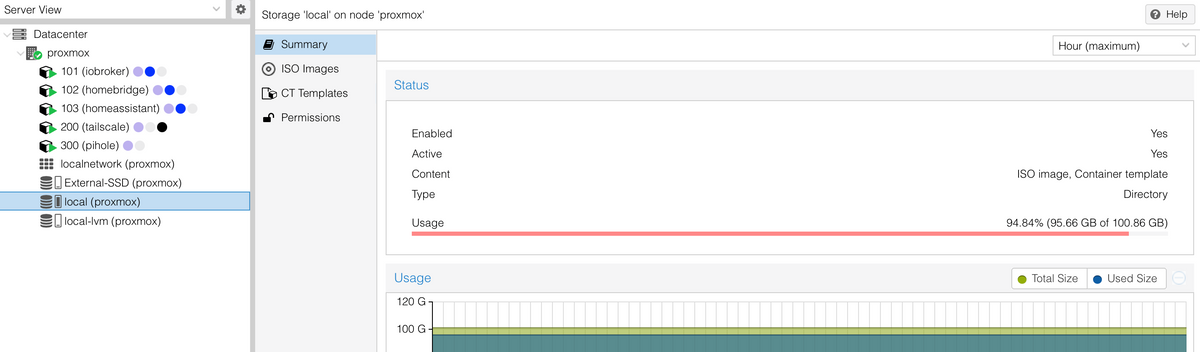
        Das ist ja das was ich nicht verstehe - da ist nix drauf und trotzdem ist die Platte anscheinend voll:
        301aa5d3-6c3a-49b7-b4b9-2bcf9090a52f-image.png

        Thomas BraunT 1 Antwort Letzte Antwort
        0
        • G guitardoc

          @thomas-braun said in Speicherplatz des Proxmox voll - aber womit?:

          Dich interessieren nur die unter /dev angelegten Geräte.
          Ich hangel mich gerne per
          ncdu /

          durch die Dateisysteme und schaue wo die dicken Hunde liegen.

          Das ist ja das was ich nicht verstehe - da ist nix drauf und trotzdem ist die Platte anscheinend voll:

          301aa5d3-6c3a-49b7-b4b9-2bcf9090a52f-image.png

          Thomas BraunT Online
          Thomas BraunT Online
          Thomas Braun
          Most Active
          schrieb am zuletzt editiert von
          #7

          @guitardoc

          /dev/mapper/pve-root  98497780 93414108     34124 100% /
          /dev/sda             245024372 20917948 211587088   9% /mnt/sda
          

          Das Gerät /dev/sda ist nur zu 9% voll.
          Dein Problem liegt also in /dev/mapper/pve-root , das ist der Host.

          Linux-Werkzeugkasten:
          https://forum.iobroker.net/topic/42952/der-kleine-iobroker-linux-werkzeugkasten
          NodeJS Fixer Skript:
          https://forum.iobroker.net/topic/68035/iob-node-fix-skript
          iob_diag: curl -sLf -o diag.sh https://iobroker.net/diag.sh && bash diag.sh

          G 1 Antwort Letzte Antwort
          1
          • Thomas BraunT Thomas Braun

            @guitardoc

            /dev/mapper/pve-root  98497780 93414108     34124 100% /
            /dev/sda             245024372 20917948 211587088   9% /mnt/sda
            

            Das Gerät /dev/sda ist nur zu 9% voll.
            Dein Problem liegt also in /dev/mapper/pve-root , das ist der Host.

            G Online
            G Online
            guitardoc
            schrieb am zuletzt editiert von
            #8

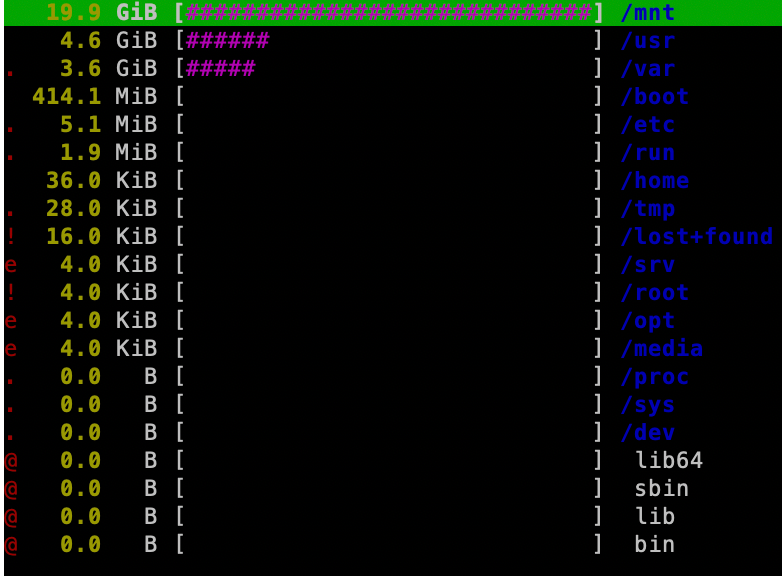
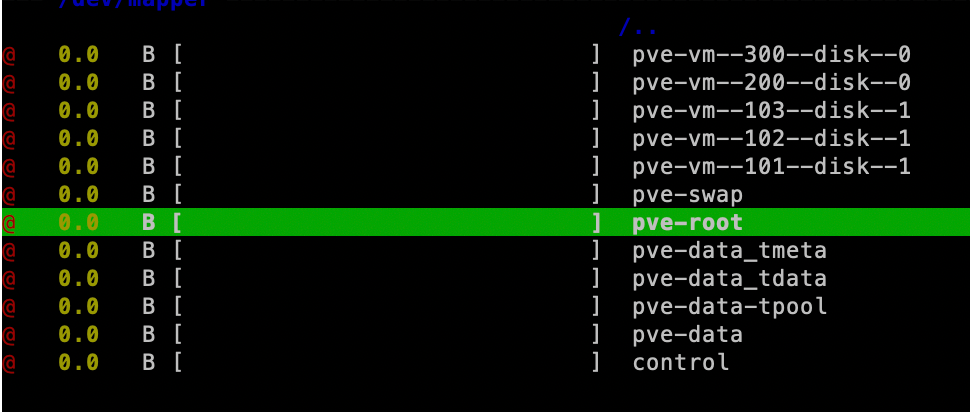
            @thomas-braun Hmm, aber wie komme ich da ran? ncdu / lässt mich da nicht zugreifen:
            1562fd7d-ccf8-49cf-847f-7b2f7fe1eb32-image.png

            Thomas BraunT 1 Antwort Letzte Antwort
            0
            • G guitardoc

              @thomas-braun Hmm, aber wie komme ich da ran? ncdu / lässt mich da nicht zugreifen:

              1562fd7d-ccf8-49cf-847f-7b2f7fe1eb32-image.png

              Thomas BraunT Online
              Thomas BraunT Online
              Thomas Braun
              Most Active
              schrieb am zuletzt editiert von
              #9

              @guitardoc

              Da wirst du 'von außen' dran müssen. Wie groß hast du denn im Proxmox den Container angelegt?
              Ich hab aber von Proxmox weiter keine Ahnung, muss dir jemand anders mit den Details helfen.

              Linux-Werkzeugkasten:
              https://forum.iobroker.net/topic/42952/der-kleine-iobroker-linux-werkzeugkasten
              NodeJS Fixer Skript:
              https://forum.iobroker.net/topic/68035/iob-node-fix-skript
              iob_diag: curl -sLf -o diag.sh https://iobroker.net/diag.sh && bash diag.sh

              G 1 Antwort Letzte Antwort
              1
              • Thomas BraunT Thomas Braun

                @guitardoc

                Da wirst du 'von außen' dran müssen. Wie groß hast du denn im Proxmox den Container angelegt?
                Ich hab aber von Proxmox weiter keine Ahnung, muss dir jemand anders mit den Details helfen.

                G Online
                G Online
                guitardoc
                schrieb am zuletzt editiert von guitardoc
                #10

                @thomas-braun Es sind 5 Container:
                32G
                12G
                8G
                4G
                4G

                EDIT: Möglicherweise hat es aber doch was mit den Backups zu tun. Ich hab gerade gesehen, dass irgendwelche Snapshots erstellt wurden und dann die Container (LXCs) gesperrt worden sind. Hab die Container entsperrt

                pct unlock 101
                

                und die Snapshots gelöscht

                pct delsnapshot 101 vzdump
                

                und das für alle fünf Container. Vielleicht ist da was übrig geblieben?

                Thomas BraunT 1 Antwort Letzte Antwort
                0
                • G guitardoc

                  @thomas-braun Es sind 5 Container:
                  32G
                  12G
                  8G
                  4G
                  4G

                  EDIT: Möglicherweise hat es aber doch was mit den Backups zu tun. Ich hab gerade gesehen, dass irgendwelche Snapshots erstellt wurden und dann die Container (LXCs) gesperrt worden sind. Hab die Container entsperrt

                  pct unlock 101
                  

                  und die Snapshots gelöscht

                  pct delsnapshot 101 vzdump
                  

                  und das für alle fünf Container. Vielleicht ist da was übrig geblieben?

                  Thomas BraunT Online
                  Thomas BraunT Online
                  Thomas Braun
                  Most Active
                  schrieb am zuletzt editiert von
                  #11

                  @guitardoc

                  Und in welchem haust der iobroker?

                  Linux-Werkzeugkasten:
                  https://forum.iobroker.net/topic/42952/der-kleine-iobroker-linux-werkzeugkasten
                  NodeJS Fixer Skript:
                  https://forum.iobroker.net/topic/68035/iob-node-fix-skript
                  iob_diag: curl -sLf -o diag.sh https://iobroker.net/diag.sh && bash diag.sh

                  G 1 Antwort Letzte Antwort
                  1
                  • Thomas BraunT Thomas Braun

                    @guitardoc

                    Und in welchem haust der iobroker?

                    G Online
                    G Online
                    guitardoc
                    schrieb am zuletzt editiert von
                    #12

                    @thomas-braun 32G

                    G 1 Antwort Letzte Antwort
                    0
                    • G guitardoc

                      @thomas-braun 32G

                      G Online
                      G Online
                      guitardoc
                      schrieb am zuletzt editiert von
                      #13

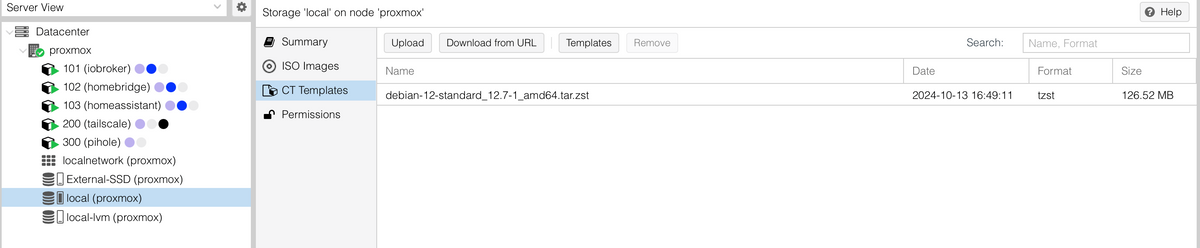
                      Hab hier noch was entdeckt - vielleicht hilft das weiter:

                      e6e4296f-8433-428d-aa45-15058fc8999a-image.png

                      P 1 Antwort Letzte Antwort
                      0
                      • G guitardoc

                        Hab hier noch was entdeckt - vielleicht hilft das weiter:

                        e6e4296f-8433-428d-aa45-15058fc8999a-image.png

                        P Offline
                        P Offline
                        peterfido
                        schrieb am zuletzt editiert von
                        #14

                        @guitardoc Nein, das ist normal. Weiter oben habe ich geschrieben, wo ich gucken würde.

                        Gruß

                        Peterfido


                        Proxmox auf Intel NUC12WSHi5
                        ioBroker: Debian (VM)
                        CCU: Debmatic (VM)
                        Influx: Debian (VM)
                        Grafana: Debian (VM)
                        eBus: Debian (VM)
                        Zigbee: Debian (VM) mit zigbee2mqtt

                        G 1 Antwort Letzte Antwort
                        1
                        • P peterfido

                          @guitardoc Nein, das ist normal. Weiter oben habe ich geschrieben, wo ich gucken würde.

                          G Online
                          G Online
                          guitardoc
                          schrieb am zuletzt editiert von
                          #15

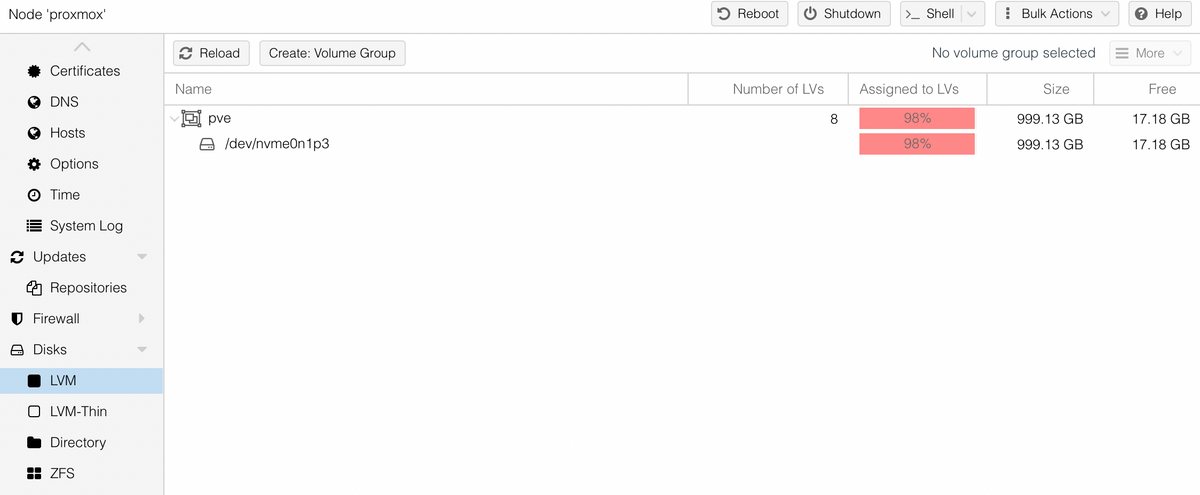
                          @peterfido Da ist alles recht leer:
                          535b7e04-ac3f-4e1c-b8ac-7636c0a6b37d-image.png
                          5f94490d-c313-492c-a994-00d1f909c4b5-image.png
                          3453968b-7eb4-49d2-8f25-ca2046d82c3e-image.png

                          G 1 Antwort Letzte Antwort
                          0
                          • G guitardoc

                            @peterfido Da ist alles recht leer:
                            535b7e04-ac3f-4e1c-b8ac-7636c0a6b37d-image.png
                            5f94490d-c313-492c-a994-00d1f909c4b5-image.png
                            3453968b-7eb4-49d2-8f25-ca2046d82c3e-image.png

                            G Online
                            G Online
                            guitardoc
                            schrieb am zuletzt editiert von
                            #16

                            Aber ich habe eine Vermutung. Möglicherweise wurden Backups nicht auf die externe Platte gespeichert, sondern auf local (das hatte ich schon mal, warum auch immer hab ich nie herausgefunden). Ich hab doch die externe Platte entfernt und dann in Storage wieder hinzugefügt. Damit sind die Verweise auf Backups jetzt auf die externe Platte gerichtet und die, welche vielleicht auf local liegen, an die komme ich nicht mehr ran. Hmm. Wie könnte man das prüfen?

                            Thomas BraunT 1 Antwort Letzte Antwort
                            0
                            • G guitardoc

                              Aber ich habe eine Vermutung. Möglicherweise wurden Backups nicht auf die externe Platte gespeichert, sondern auf local (das hatte ich schon mal, warum auch immer hab ich nie herausgefunden). Ich hab doch die externe Platte entfernt und dann in Storage wieder hinzugefügt. Damit sind die Verweise auf Backups jetzt auf die externe Platte gerichtet und die, welche vielleicht auf local liegen, an die komme ich nicht mehr ran. Hmm. Wie könnte man das prüfen?

                              Thomas BraunT Online
                              Thomas BraunT Online
                              Thomas Braun
                              Most Active
                              schrieb am zuletzt editiert von Thomas Braun
                              #17

                              @guitardoc sagte in Speicherplatz des Proxmox voll - aber womit?:

                              Wie könnte man das prüfen?

                              ls -lh /opt/iobroker/backups
                              

                              anschauen. Jedenfalls wenn du Backups vom ioBroker meinst.

                              Linux-Werkzeugkasten:
                              https://forum.iobroker.net/topic/42952/der-kleine-iobroker-linux-werkzeugkasten
                              NodeJS Fixer Skript:
                              https://forum.iobroker.net/topic/68035/iob-node-fix-skript
                              iob_diag: curl -sLf -o diag.sh https://iobroker.net/diag.sh && bash diag.sh

                              G 1 Antwort Letzte Antwort
                              0
                              • Thomas BraunT Thomas Braun

                                @guitardoc sagte in Speicherplatz des Proxmox voll - aber womit?:

                                Wie könnte man das prüfen?

                                ls -lh /opt/iobroker/backups
                                

                                anschauen. Jedenfalls wenn du Backups vom ioBroker meinst.

                                G Online
                                G Online
                                guitardoc
                                schrieb am zuletzt editiert von guitardoc
                                #18

                                @thomas-braun Nein, ich meinte die Backups vom Proxmox. Die beinhalten ja alle vzdump im Dateinamen. Kann man den Proxmox auf Dateiebene nicht mal durchsuchen, ob da solche Dateien irgendwo liegen? Ich hab da aber keine Idee wie...

                                Thomas BraunT P 3 Antworten Letzte Antwort
                                0
                                • G guitardoc

                                  @thomas-braun Nein, ich meinte die Backups vom Proxmox. Die beinhalten ja alle vzdump im Dateinamen. Kann man den Proxmox auf Dateiebene nicht mal durchsuchen, ob da solche Dateien irgendwo liegen? Ich hab da aber keine Idee wie...

                                  Thomas BraunT Online
                                  Thomas BraunT Online
                                  Thomas Braun
                                  Most Active
                                  schrieb am zuletzt editiert von
                                  #19

                                  @guitardoc

                                  Da bin ich raus. Keine Ahnung von Proxmox.

                                  Linux-Werkzeugkasten:
                                  https://forum.iobroker.net/topic/42952/der-kleine-iobroker-linux-werkzeugkasten
                                  NodeJS Fixer Skript:
                                  https://forum.iobroker.net/topic/68035/iob-node-fix-skript
                                  iob_diag: curl -sLf -o diag.sh https://iobroker.net/diag.sh && bash diag.sh

                                  1 Antwort Letzte Antwort
                                  0
                                  • G guitardoc

                                    @thomas-braun Nein, ich meinte die Backups vom Proxmox. Die beinhalten ja alle vzdump im Dateinamen. Kann man den Proxmox auf Dateiebene nicht mal durchsuchen, ob da solche Dateien irgendwo liegen? Ich hab da aber keine Idee wie...

                                    P Offline
                                    P Offline
                                    peterfido
                                    schrieb am zuletzt editiert von
                                    #20

                                    @guitardoc externe Platte abziehen, und unter

                                    ls- l /mnt
                                    

                                    durchhangeln.

                                    Gruß

                                    Peterfido


                                    Proxmox auf Intel NUC12WSHi5
                                    ioBroker: Debian (VM)
                                    CCU: Debmatic (VM)
                                    Influx: Debian (VM)
                                    Grafana: Debian (VM)
                                    eBus: Debian (VM)
                                    Zigbee: Debian (VM) mit zigbee2mqtt

                                    1 Antwort Letzte Antwort
                                    1
                                    • G guitardoc

                                      @thomas-braun Nein, ich meinte die Backups vom Proxmox. Die beinhalten ja alle vzdump im Dateinamen. Kann man den Proxmox auf Dateiebene nicht mal durchsuchen, ob da solche Dateien irgendwo liegen? Ich hab da aber keine Idee wie...

                                      P Offline
                                      P Offline
                                      peterfido
                                      schrieb am zuletzt editiert von
                                      #21

                                      @guitardoc Backups lasse ich auf Netzlaufwerke ablegen.

                                      Gruß

                                      Peterfido


                                      Proxmox auf Intel NUC12WSHi5
                                      ioBroker: Debian (VM)
                                      CCU: Debmatic (VM)
                                      Influx: Debian (VM)
                                      Grafana: Debian (VM)
                                      eBus: Debian (VM)
                                      Zigbee: Debian (VM) mit zigbee2mqtt

                                      G 1 Antwort Letzte Antwort
                                      1
                                      • P peterfido

                                        @guitardoc Backups lasse ich auf Netzlaufwerke ablegen.

                                        G Online
                                        G Online
                                        guitardoc
                                        schrieb am zuletzt editiert von
                                        #22

                                        @peterfido said in Speicherplatz des Proxmox voll - aber womit?:

                                        @guitardoc Backups lasse ich auf Netzlaufwerke ablegen.

                                        Ja, aber das nützt auch nichts, wenn der Proxmox entscheidet, dass es das Laufwerk gerade mal nicht gibt. Und das war hier wieder mal der Fall, denn ich habe die Übeltäter gefunden:

                                        mn@proxmox:~$ ls -l /mnt
                                        total 8
                                        drwxr-xr-x 7 root root 4096 Jun  4 17:41 sda
                                        drwxr-xr-x 2 root root 4096 Oct 23  2023 vzsnap0
                                        mn@proxmox:~$ ls -l /mnt/vzsnap0
                                        total 0
                                        mn@proxmox:~$ ls -l /mnt/sda
                                        total 20
                                        drwxr-xr-x 2 root root 4096 Jun 10 02:30 dump
                                        drwxr-xr-x 2 root root 4096 Jun  4 17:41 images
                                        drwxr-xr-x 2 root root 4096 Jun  4 17:41 private
                                        drwxr-xr-x 2 root root 4096 Jun  4 17:41 snippets
                                        drwxr-xr-x 4 root root 4096 Jun  4 17:41 template
                                        mn@proxmox:~$ ls -l /mnt/sda/dump
                                        total 84355876
                                        -rw-r--r-- 1 root root         900 Jun  5 02:31 vzdump-lxc-101-2025_06_05-02_30_03.log
                                        -rw-r--r-- 1 root root 11244814311 Jun  5 02:31 vzdump-lxc-101-2025_06_05-02_30_03.tar.zst
                                        -rw-r--r-- 1 root root           8 Jun  5 02:31 vzdump-lxc-101-2025_06_05-02_30_03.tar.zst.notes
                                        -rw-r--r-- 1 root root         900 Jun  6 02:32 vzdump-lxc-101-2025_06_06-02_30_00.log
                                        -rw-r--r-- 1 root root 11279122146 Jun  6 02:32 vzdump-lxc-101-2025_06_06-02_30_00.tar.zst
                                        -rw-r--r-- 1 root root           8 Jun  6 02:32 vzdump-lxc-101-2025_06_06-02_30_00.tar.zst.notes
                                        -rw-r--r-- 1 root root         900 Jun  7 02:31 vzdump-lxc-101-2025_06_07-02_30_03.log
                                        -rw-r--r-- 1 root root 11324898258 Jun  7 02:31 vzdump-lxc-101-2025_06_07-02_30_03.tar.zst
                                        -rw-r--r-- 1 root root           8 Jun  7 02:31 vzdump-lxc-101-2025_06_07-02_30_03.tar.zst.notes
                                        -rw-r--r-- 1 root root         900 Jun  8 02:31 vzdump-lxc-101-2025_06_08-02_30_00.log
                                        -rw-r--r-- 1 root root 11371813356 Jun  8 02:31 vzdump-lxc-101-2025_06_08-02_30_00.tar.zst
                                        -rw-r--r-- 1 root root           8 Jun  8 02:31 vzdump-lxc-101-2025_06_08-02_30_00.tar.zst.notes
                                        -rw-r--r-- 1 root root        1391 Jun  9 02:30 vzdump-lxc-101-2025_06_09-02_30_03.log
                                        -rw-r--r-- 1 root root         185 Jun 10 02:30 vzdump-lxc-101-2025_06_10-02_30_04.log
                                        -rw-r--r-- 1 root root         901 Jun  5 02:32 vzdump-lxc-102-2025_06_05-02_31_54.log
                                        -rw-r--r-- 1 root root  5420945476 Jun  5 02:32 vzdump-lxc-102-2025_06_05-02_31_54.tar.zst
                                        -rw-r--r-- 1 root root          10 Jun  5 02:32 vzdump-lxc-102-2025_06_05-02_31_54.tar.zst.notes
                                        -rw-r--r-- 1 root root         901 Jun  6 02:33 vzdump-lxc-102-2025_06_06-02_32_20.log
                                        -rw-r--r-- 1 root root  5421785412 Jun  6 02:33 vzdump-lxc-102-2025_06_06-02_32_20.tar.zst
                                        -rw-r--r-- 1 root root          10 Jun  6 02:33 vzdump-lxc-102-2025_06_06-02_32_20.tar.zst.notes
                                        -rw-r--r-- 1 root root         901 Jun  7 02:32 vzdump-lxc-102-2025_06_07-02_31_58.log
                                        -rw-r--r-- 1 root root  5421383275 Jun  7 02:32 vzdump-lxc-102-2025_06_07-02_31_58.tar.zst
                                        -rw-r--r-- 1 root root          10 Jun  7 02:32 vzdump-lxc-102-2025_06_07-02_31_58.tar.zst.notes
                                        -rw-r--r-- 1 root root         901 Jun  8 02:32 vzdump-lxc-102-2025_06_08-02_31_54.log
                                        -rw-r--r-- 1 root root  5421496245 Jun  8 02:32 vzdump-lxc-102-2025_06_08-02_31_54.tar.zst
                                        -rw-r--r-- 1 root root          10 Jun  8 02:32 vzdump-lxc-102-2025_06_08-02_31_54.tar.zst.notes
                                        -rw-r--r-- 1 root root        1393 Jun  9 02:31 vzdump-lxc-102-2025_06_09-02_30_37.log
                                        -rw-r--r-- 1 root root         185 Jun 10 02:30 vzdump-lxc-102-2025_06_10-02_30_04.log
                                        -rw-r--r-- 1 root root         903 Jun  5 02:33 vzdump-lxc-103-2025_06_05-02_32_43.log
                                        -rw-r--r-- 1 root root  2240440960 Jun  5 02:33 vzdump-lxc-103-2025_06_05-02_32_43.tar.zst
                                        -rw-r--r-- 1 root root          13 Jun  5 02:33 vzdump-lxc-103-2025_06_05-02_32_43.tar.zst.notes
                                        -rw-r--r-- 1 root root         903 Jun  6 02:34 vzdump-lxc-103-2025_06_06-02_33_10.log
                                        -rw-r--r-- 1 root root  2240729006 Jun  6 02:34 vzdump-lxc-103-2025_06_06-02_33_10.tar.zst
                                        -rw-r--r-- 1 root root          13 Jun  6 02:34 vzdump-lxc-103-2025_06_06-02_33_10.tar.zst.notes
                                        -rw-r--r-- 1 root root         903 Jun  7 02:33 vzdump-lxc-103-2025_06_07-02_32_46.log
                                        -rw-r--r-- 1 root root  2240936539 Jun  7 02:33 vzdump-lxc-103-2025_06_07-02_32_46.tar.zst
                                        -rw-r--r-- 1 root root          13 Jun  7 02:33 vzdump-lxc-103-2025_06_07-02_32_46.tar.zst.notes
                                        -rw-r--r-- 1 root root         903 Jun  8 02:33 vzdump-lxc-103-2025_06_08-02_32_42.log
                                        -rw-r--r-- 1 root root  2241369262 Jun  8 02:33 vzdump-lxc-103-2025_06_08-02_32_42.tar.zst
                                        -rw-r--r-- 1 root root          13 Jun  8 02:33 vzdump-lxc-103-2025_06_08-02_32_42.tar.zst.notes
                                        -rw-r--r-- 1 root root        1338 Jun  9 02:31 vzdump-lxc-103-2025_06_09-02_31_02.log
                                        -rw-r--r-- 1 root root         185 Jun 10 02:30 vzdump-lxc-103-2025_06_10-02_30_04.log
                                        -rw-r--r-- 1 root root         900 Jun  5 02:33 vzdump-lxc-200-2025_06_05-02_33_40.log
                                        -rw-r--r-- 1 root root  1238712165 Jun  5 02:33 vzdump-lxc-200-2025_06_05-02_33_40.tar.zst
                                        -rw-r--r-- 1 root root           9 Jun  5 02:33 vzdump-lxc-200-2025_06_05-02_33_40.tar.zst.notes
                                        -rw-r--r-- 1 root root         900 Jun  6 02:34 vzdump-lxc-200-2025_06_06-02_34_07.log
                                        -rw-r--r-- 1 root root  1238726654 Jun  6 02:34 vzdump-lxc-200-2025_06_06-02_34_07.tar.zst
                                        -rw-r--r-- 1 root root           9 Jun  6 02:34 vzdump-lxc-200-2025_06_06-02_34_07.tar.zst.notes
                                        -rw-r--r-- 1 root root         900 Jun  7 02:33 vzdump-lxc-200-2025_06_07-02_33_43.log
                                        -rw-r--r-- 1 root root  1238678524 Jun  7 02:33 vzdump-lxc-200-2025_06_07-02_33_43.tar.zst
                                        -rw-r--r-- 1 root root           9 Jun  7 02:33 vzdump-lxc-200-2025_06_07-02_33_43.tar.zst.notes
                                        -rw-r--r-- 1 root root         900 Jun  8 02:33 vzdump-lxc-200-2025_06_08-02_33_40.log
                                        -rw-r--r-- 1 root root  1238680395 Jun  8 02:33 vzdump-lxc-200-2025_06_08-02_33_40.tar.zst
                                        -rw-r--r-- 1 root root           9 Jun  8 02:33 vzdump-lxc-200-2025_06_08-02_33_40.tar.zst.notes
                                        -rw-r--r-- 1 root root         900 Jun  9 02:32 vzdump-lxc-200-2025_06_09-02_31_59.log
                                        -rw-r--r-- 1 root root  1238698569 Jun  9 02:32 vzdump-lxc-200-2025_06_09-02_31_59.tar.zst
                                        -rw-r--r-- 1 root root           9 Jun  9 02:32 vzdump-lxc-200-2025_06_09-02_31_59.tar.zst.notes
                                        -rw-r--r-- 1 root root        1392 Jun 10 02:30 vzdump-lxc-200-2025_06_10-02_30_04.log
                                        -rw-r--r-- 1 root root         897 Jun  5 02:34 vzdump-lxc-300-2025_06_05-02_33_54.log
                                        -rw-r--r-- 1 root root  1078996976 Jun  5 02:34 vzdump-lxc-300-2025_06_05-02_33_54.tar.zst
                                        -rw-r--r-- 1 root root           6 Jun  5 02:34 vzdump-lxc-300-2025_06_05-02_33_54.tar.zst.notes
                                        -rw-r--r-- 1 root root         896 Jun  6 02:35 vzdump-lxc-300-2025_06_06-02_34_21.log
                                        -rw-r--r-- 1 root root  1079332788 Jun  6 02:35 vzdump-lxc-300-2025_06_06-02_34_21.tar.zst
                                        -rw-r--r-- 1 root root           6 Jun  6 02:35 vzdump-lxc-300-2025_06_06-02_34_21.tar.zst.notes
                                        -rw-r--r-- 1 root root         897 Jun  7 02:34 vzdump-lxc-300-2025_06_07-02_33_57.log
                                        -rw-r--r-- 1 root root  1079552147 Jun  7 02:34 vzdump-lxc-300-2025_06_07-02_33_57.tar.zst
                                        -rw-r--r-- 1 root root           6 Jun  7 02:34 vzdump-lxc-300-2025_06_07-02_33_57.tar.zst.notes
                                        -rw-r--r-- 1 root root         897 Jun  8 02:34 vzdump-lxc-300-2025_06_08-02_33_53.log
                                        -rw-r--r-- 1 root root  1078827870 Jun  8 02:34 vzdump-lxc-300-2025_06_08-02_33_53.tar.zst
                                        -rw-r--r-- 1 root root           6 Jun  8 02:34 vzdump-lxc-300-2025_06_08-02_33_53.tar.zst.notes
                                        -rw-r--r-- 1 root root        1389 Jun  9 02:32 vzdump-lxc-300-2025_06_09-02_32_13.log
                                        -rw-r--r-- 1 root root         185 Jun 10 02:30 vzdump-lxc-300-2025_06_10-02_30_11.log
                                        mn@proxmox:~$ ls -l /mnt/sda/images
                                        total 0
                                        mn@proxmox:~$ ls -l /mnt/sda/private
                                        total 0
                                        mn@proxmox:~$ ls -l /mnt/sda/snippets
                                        total 0
                                        mn@proxmox:~$ ls -l /mnt/sda/template
                                        total 8
                                        drwxr-xr-x 2 root root 4096 Jun  4 17:41 cache
                                        drwxr-xr-x 2 root root 4096 Jun  4 17:41 iso
                                        mn@proxmox:~$ ls -l /mnt/sda/template/cache
                                        total 0
                                        mn@proxmox:~$ ls -l /mnt/sda/template/iso
                                        total 0
                                        

                                        Es gibt da aber wohl eine Einstellung, wo man dem System sagen kann, dass das eine physisch gemountete Platte ist und er nicht ins Rootverzeichnis schreiben soll, wenn er die nicht findet. Hab da mal irgendwo was dazu gelesen, muss ich mal nachforschen.

                                        Aber zum Thema - wie bekomme ich diese Dateien jetzt weg ohne irgendwas anderes mit in den Abgrund zu reißen?

                                        P Dr. BakteriusD 2 Antworten Letzte Antwort
                                        0
                                        • G guitardoc

                                          @peterfido said in Speicherplatz des Proxmox voll - aber womit?:

                                          @guitardoc Backups lasse ich auf Netzlaufwerke ablegen.

                                          Ja, aber das nützt auch nichts, wenn der Proxmox entscheidet, dass es das Laufwerk gerade mal nicht gibt. Und das war hier wieder mal der Fall, denn ich habe die Übeltäter gefunden:

                                          mn@proxmox:~$ ls -l /mnt
                                          total 8
                                          drwxr-xr-x 7 root root 4096 Jun  4 17:41 sda
                                          drwxr-xr-x 2 root root 4096 Oct 23  2023 vzsnap0
                                          mn@proxmox:~$ ls -l /mnt/vzsnap0
                                          total 0
                                          mn@proxmox:~$ ls -l /mnt/sda
                                          total 20
                                          drwxr-xr-x 2 root root 4096 Jun 10 02:30 dump
                                          drwxr-xr-x 2 root root 4096 Jun  4 17:41 images
                                          drwxr-xr-x 2 root root 4096 Jun  4 17:41 private
                                          drwxr-xr-x 2 root root 4096 Jun  4 17:41 snippets
                                          drwxr-xr-x 4 root root 4096 Jun  4 17:41 template
                                          mn@proxmox:~$ ls -l /mnt/sda/dump
                                          total 84355876
                                          -rw-r--r-- 1 root root         900 Jun  5 02:31 vzdump-lxc-101-2025_06_05-02_30_03.log
                                          -rw-r--r-- 1 root root 11244814311 Jun  5 02:31 vzdump-lxc-101-2025_06_05-02_30_03.tar.zst
                                          -rw-r--r-- 1 root root           8 Jun  5 02:31 vzdump-lxc-101-2025_06_05-02_30_03.tar.zst.notes
                                          -rw-r--r-- 1 root root         900 Jun  6 02:32 vzdump-lxc-101-2025_06_06-02_30_00.log
                                          -rw-r--r-- 1 root root 11279122146 Jun  6 02:32 vzdump-lxc-101-2025_06_06-02_30_00.tar.zst
                                          -rw-r--r-- 1 root root           8 Jun  6 02:32 vzdump-lxc-101-2025_06_06-02_30_00.tar.zst.notes
                                          -rw-r--r-- 1 root root         900 Jun  7 02:31 vzdump-lxc-101-2025_06_07-02_30_03.log
                                          -rw-r--r-- 1 root root 11324898258 Jun  7 02:31 vzdump-lxc-101-2025_06_07-02_30_03.tar.zst
                                          -rw-r--r-- 1 root root           8 Jun  7 02:31 vzdump-lxc-101-2025_06_07-02_30_03.tar.zst.notes
                                          -rw-r--r-- 1 root root         900 Jun  8 02:31 vzdump-lxc-101-2025_06_08-02_30_00.log
                                          -rw-r--r-- 1 root root 11371813356 Jun  8 02:31 vzdump-lxc-101-2025_06_08-02_30_00.tar.zst
                                          -rw-r--r-- 1 root root           8 Jun  8 02:31 vzdump-lxc-101-2025_06_08-02_30_00.tar.zst.notes
                                          -rw-r--r-- 1 root root        1391 Jun  9 02:30 vzdump-lxc-101-2025_06_09-02_30_03.log
                                          -rw-r--r-- 1 root root         185 Jun 10 02:30 vzdump-lxc-101-2025_06_10-02_30_04.log
                                          -rw-r--r-- 1 root root         901 Jun  5 02:32 vzdump-lxc-102-2025_06_05-02_31_54.log
                                          -rw-r--r-- 1 root root  5420945476 Jun  5 02:32 vzdump-lxc-102-2025_06_05-02_31_54.tar.zst
                                          -rw-r--r-- 1 root root          10 Jun  5 02:32 vzdump-lxc-102-2025_06_05-02_31_54.tar.zst.notes
                                          -rw-r--r-- 1 root root         901 Jun  6 02:33 vzdump-lxc-102-2025_06_06-02_32_20.log
                                          -rw-r--r-- 1 root root  5421785412 Jun  6 02:33 vzdump-lxc-102-2025_06_06-02_32_20.tar.zst
                                          -rw-r--r-- 1 root root          10 Jun  6 02:33 vzdump-lxc-102-2025_06_06-02_32_20.tar.zst.notes
                                          -rw-r--r-- 1 root root         901 Jun  7 02:32 vzdump-lxc-102-2025_06_07-02_31_58.log
                                          -rw-r--r-- 1 root root  5421383275 Jun  7 02:32 vzdump-lxc-102-2025_06_07-02_31_58.tar.zst
                                          -rw-r--r-- 1 root root          10 Jun  7 02:32 vzdump-lxc-102-2025_06_07-02_31_58.tar.zst.notes
                                          -rw-r--r-- 1 root root         901 Jun  8 02:32 vzdump-lxc-102-2025_06_08-02_31_54.log
                                          -rw-r--r-- 1 root root  5421496245 Jun  8 02:32 vzdump-lxc-102-2025_06_08-02_31_54.tar.zst
                                          -rw-r--r-- 1 root root          10 Jun  8 02:32 vzdump-lxc-102-2025_06_08-02_31_54.tar.zst.notes
                                          -rw-r--r-- 1 root root        1393 Jun  9 02:31 vzdump-lxc-102-2025_06_09-02_30_37.log
                                          -rw-r--r-- 1 root root         185 Jun 10 02:30 vzdump-lxc-102-2025_06_10-02_30_04.log
                                          -rw-r--r-- 1 root root         903 Jun  5 02:33 vzdump-lxc-103-2025_06_05-02_32_43.log
                                          -rw-r--r-- 1 root root  2240440960 Jun  5 02:33 vzdump-lxc-103-2025_06_05-02_32_43.tar.zst
                                          -rw-r--r-- 1 root root          13 Jun  5 02:33 vzdump-lxc-103-2025_06_05-02_32_43.tar.zst.notes
                                          -rw-r--r-- 1 root root         903 Jun  6 02:34 vzdump-lxc-103-2025_06_06-02_33_10.log
                                          -rw-r--r-- 1 root root  2240729006 Jun  6 02:34 vzdump-lxc-103-2025_06_06-02_33_10.tar.zst
                                          -rw-r--r-- 1 root root          13 Jun  6 02:34 vzdump-lxc-103-2025_06_06-02_33_10.tar.zst.notes
                                          -rw-r--r-- 1 root root         903 Jun  7 02:33 vzdump-lxc-103-2025_06_07-02_32_46.log
                                          -rw-r--r-- 1 root root  2240936539 Jun  7 02:33 vzdump-lxc-103-2025_06_07-02_32_46.tar.zst
                                          -rw-r--r-- 1 root root          13 Jun  7 02:33 vzdump-lxc-103-2025_06_07-02_32_46.tar.zst.notes
                                          -rw-r--r-- 1 root root         903 Jun  8 02:33 vzdump-lxc-103-2025_06_08-02_32_42.log
                                          -rw-r--r-- 1 root root  2241369262 Jun  8 02:33 vzdump-lxc-103-2025_06_08-02_32_42.tar.zst
                                          -rw-r--r-- 1 root root          13 Jun  8 02:33 vzdump-lxc-103-2025_06_08-02_32_42.tar.zst.notes
                                          -rw-r--r-- 1 root root        1338 Jun  9 02:31 vzdump-lxc-103-2025_06_09-02_31_02.log
                                          -rw-r--r-- 1 root root         185 Jun 10 02:30 vzdump-lxc-103-2025_06_10-02_30_04.log
                                          -rw-r--r-- 1 root root         900 Jun  5 02:33 vzdump-lxc-200-2025_06_05-02_33_40.log
                                          -rw-r--r-- 1 root root  1238712165 Jun  5 02:33 vzdump-lxc-200-2025_06_05-02_33_40.tar.zst
                                          -rw-r--r-- 1 root root           9 Jun  5 02:33 vzdump-lxc-200-2025_06_05-02_33_40.tar.zst.notes
                                          -rw-r--r-- 1 root root         900 Jun  6 02:34 vzdump-lxc-200-2025_06_06-02_34_07.log
                                          -rw-r--r-- 1 root root  1238726654 Jun  6 02:34 vzdump-lxc-200-2025_06_06-02_34_07.tar.zst
                                          -rw-r--r-- 1 root root           9 Jun  6 02:34 vzdump-lxc-200-2025_06_06-02_34_07.tar.zst.notes
                                          -rw-r--r-- 1 root root         900 Jun  7 02:33 vzdump-lxc-200-2025_06_07-02_33_43.log
                                          -rw-r--r-- 1 root root  1238678524 Jun  7 02:33 vzdump-lxc-200-2025_06_07-02_33_43.tar.zst
                                          -rw-r--r-- 1 root root           9 Jun  7 02:33 vzdump-lxc-200-2025_06_07-02_33_43.tar.zst.notes
                                          -rw-r--r-- 1 root root         900 Jun  8 02:33 vzdump-lxc-200-2025_06_08-02_33_40.log
                                          -rw-r--r-- 1 root root  1238680395 Jun  8 02:33 vzdump-lxc-200-2025_06_08-02_33_40.tar.zst
                                          -rw-r--r-- 1 root root           9 Jun  8 02:33 vzdump-lxc-200-2025_06_08-02_33_40.tar.zst.notes
                                          -rw-r--r-- 1 root root         900 Jun  9 02:32 vzdump-lxc-200-2025_06_09-02_31_59.log
                                          -rw-r--r-- 1 root root  1238698569 Jun  9 02:32 vzdump-lxc-200-2025_06_09-02_31_59.tar.zst
                                          -rw-r--r-- 1 root root           9 Jun  9 02:32 vzdump-lxc-200-2025_06_09-02_31_59.tar.zst.notes
                                          -rw-r--r-- 1 root root        1392 Jun 10 02:30 vzdump-lxc-200-2025_06_10-02_30_04.log
                                          -rw-r--r-- 1 root root         897 Jun  5 02:34 vzdump-lxc-300-2025_06_05-02_33_54.log
                                          -rw-r--r-- 1 root root  1078996976 Jun  5 02:34 vzdump-lxc-300-2025_06_05-02_33_54.tar.zst
                                          -rw-r--r-- 1 root root           6 Jun  5 02:34 vzdump-lxc-300-2025_06_05-02_33_54.tar.zst.notes
                                          -rw-r--r-- 1 root root         896 Jun  6 02:35 vzdump-lxc-300-2025_06_06-02_34_21.log
                                          -rw-r--r-- 1 root root  1079332788 Jun  6 02:35 vzdump-lxc-300-2025_06_06-02_34_21.tar.zst
                                          -rw-r--r-- 1 root root           6 Jun  6 02:35 vzdump-lxc-300-2025_06_06-02_34_21.tar.zst.notes
                                          -rw-r--r-- 1 root root         897 Jun  7 02:34 vzdump-lxc-300-2025_06_07-02_33_57.log
                                          -rw-r--r-- 1 root root  1079552147 Jun  7 02:34 vzdump-lxc-300-2025_06_07-02_33_57.tar.zst
                                          -rw-r--r-- 1 root root           6 Jun  7 02:34 vzdump-lxc-300-2025_06_07-02_33_57.tar.zst.notes
                                          -rw-r--r-- 1 root root         897 Jun  8 02:34 vzdump-lxc-300-2025_06_08-02_33_53.log
                                          -rw-r--r-- 1 root root  1078827870 Jun  8 02:34 vzdump-lxc-300-2025_06_08-02_33_53.tar.zst
                                          -rw-r--r-- 1 root root           6 Jun  8 02:34 vzdump-lxc-300-2025_06_08-02_33_53.tar.zst.notes
                                          -rw-r--r-- 1 root root        1389 Jun  9 02:32 vzdump-lxc-300-2025_06_09-02_32_13.log
                                          -rw-r--r-- 1 root root         185 Jun 10 02:30 vzdump-lxc-300-2025_06_10-02_30_11.log
                                          mn@proxmox:~$ ls -l /mnt/sda/images
                                          total 0
                                          mn@proxmox:~$ ls -l /mnt/sda/private
                                          total 0
                                          mn@proxmox:~$ ls -l /mnt/sda/snippets
                                          total 0
                                          mn@proxmox:~$ ls -l /mnt/sda/template
                                          total 8
                                          drwxr-xr-x 2 root root 4096 Jun  4 17:41 cache
                                          drwxr-xr-x 2 root root 4096 Jun  4 17:41 iso
                                          mn@proxmox:~$ ls -l /mnt/sda/template/cache
                                          total 0
                                          mn@proxmox:~$ ls -l /mnt/sda/template/iso
                                          total 0
                                          

                                          Es gibt da aber wohl eine Einstellung, wo man dem System sagen kann, dass das eine physisch gemountete Platte ist und er nicht ins Rootverzeichnis schreiben soll, wenn er die nicht findet. Hab da mal irgendwo was dazu gelesen, muss ich mal nachforschen.

                                          Aber zum Thema - wie bekomme ich diese Dateien jetzt weg ohne irgendwas anderes mit in den Abgrund zu reißen?

                                          P Offline
                                          P Offline
                                          peterfido
                                          schrieb am zuletzt editiert von
                                          #23

                                          @guitardoc Wenn er die jetzt nicht im PVE unter dem Pfad anzeigt, dann im dump-Ordner

                                          rm vzdump*
                                          

                                          nerven die Nachfragen, dann

                                          rm -f vzdump*
                                          

                                          Gruß

                                          Peterfido


                                          Proxmox auf Intel NUC12WSHi5
                                          ioBroker: Debian (VM)
                                          CCU: Debmatic (VM)
                                          Influx: Debian (VM)
                                          Grafana: Debian (VM)
                                          eBus: Debian (VM)
                                          Zigbee: Debian (VM) mit zigbee2mqtt

                                          G 1 Antwort Letzte Antwort
                                          1
                                          Antworten
                                          • In einem neuen Thema antworten
                                          Anmelden zum Antworten
                                          • Älteste zuerst
                                          • Neuste zuerst
                                          • Meiste Stimmen


                                          Support us

                                          ioBroker
                                          Community Adapters
                                          Donate

                                          747

                                          Online

                                          32.5k

                                          Benutzer

                                          81.6k

                                          Themen

                                          1.3m

                                          Beiträge
                                          Community
                                          Impressum | Datenschutz-Bestimmungen | Nutzungsbedingungen | Einwilligungseinstellungen
                                          ioBroker Community 2014-2025
                                          logo
                                          • Anmelden

                                          • Du hast noch kein Konto? Registrieren

                                          • Anmelden oder registrieren, um zu suchen
                                          • Erster Beitrag
                                            Letzter Beitrag
                                          0
                                          • Home
                                          • Aktuell
                                          • Tags
                                          • Ungelesen 0
                                          • Kategorien
                                          • Unreplied
                                          • Beliebt
                                          • GitHub
                                          • Docu
                                          • Hilfe