




piVCCU3 funktioniert plötzlich nicht mehr
-
pi@raspberrypi:~ $ sudo apt update
Hit:1 http://deb.debian.org/debian bullseye InRelease
Get:2 http://deb.debian.org/debian bullseye-updates InRelease [44.1 kB]
Get:3 http://security.debian.org/debian-security bullseye-security InRelease [27                         .1 kB]
Get:4 http://archive.raspberrypi.org/debian bullseye InRelease [39.0 kB]
Get:5 https://apt.grafana.com stable InRelease [7661 B]
Get:6 https://repos.influxdata.com/debian stable InRelease [6907 B]
Hit:7 https://deb.nodesource.com/node_18.x nodistro InRelease
Get:8 http://security.debian.org/debian-security bullseye-security/main arm64 Pa                         ckages [366 kB]
Get:9 http://security.debian.org/debian-security bullseye-security/main armhf Pa                         ckages [363 kB]
Get:10 http://security.debian.org/debian-security bullseye-security/main Transla                         tion-en [245 kB]
Get:11 http://archive.raspberrypi.org/debian bullseye/main armhf Packages [330 k                         B]
Get:12 http://archive.raspberrypi.org/debian bullseye/main arm64 Packages [323 k                         B]
Get:13 https://repos.influxdata.com/debian stable/main arm64 Packages [16.4 kB]
Err:14 https://apt.pivccu.de/piVCCU stable InRelease
  Could not connect to apt.pivccu.de:443 (2a01:4f8:10b:2e4d:6::8), connection ti                         med out Could not connect to apt.pivccu.de:443 (94.130.64.242), connection timed                          out
Fetched 1769 kB in 31s (57.3 kB/s)
Reading package lists... Done
Building dependency tree... Done
Reading state information... Done
13 packages can be upgraded. Run 'apt list --upgradable' to see them.
W: Failed to fetch https://apt.pivccu.de/piVCCU/dists/stable/InRelease  Could no                         t connect to apt.pivccu.de:443 (2a01:4f8:10b:2e4d:6::8), connection timed out Co                         uld not connect to apt.pivccu.de:443 (94.130.64.242), connection timed out
W: Some index files failed to download. They have been ignored, or old ones used                          instead.
pi@raspberrypi:~ $
pi@raspberrypi:~ $ sudo apt upgrade Reading package lists... Done Building dependency tree... Done Reading state information... Done Calculating upgrade... Done The following packages will be upgraded: grafana libc-bin libc-dev-bin libc-devtools libc-l10n libc6 libc6-dbg libc6-dev locales nodejs pivccu-modules-dkms pivccu3 python3-pkg-resources 13 upgraded, 0 newly installed, 0 to remove and 0 not upgraded. 1 not fully installed or removed. Need to get 375 MB of archives. After this operation, 109 MB of additional disk space will be used. Do you want to continue? [Y/n] Y Get:1 http://archive.raspberrypi.org/debian bullseye/main arm64 libc6-dbg arm64 2.31-13+rpt2+rpi1+deb11u12 [6746 kB] Get:2 http://security.debian.org/debian-security bullseye-security/main arm64 python3-pkg-resources all 52.0.0-4+deb11u2 [190 kB] Get:3 https://deb.nodesource.com/node_18.x nodistro/main arm64 nodejs arm64 18.20.8-1nodesource1 [28.9 MB] Get:4 http://archive.raspberrypi.org/debian bullseye/main arm64 libc-devtools arm64 2.31-13+rpt2+rpi1+deb11u12 [246 kB] Get:5 http://archive.raspberrypi.org/debian bullseye/main arm64 libc6-dev arm64 2.31-13+rpt2+rpi1+deb11u12 [2031 kB] Get:6 http://archive.raspberrypi.org/debian bullseye/main arm64 libc-dev-bin arm64 2.31-13+rpt2+rpi1+deb11u12 [273 kB] Get:7 http://archive.raspberrypi.org/debian bullseye/main arm64 libc6 arm64 2.31-13+rpt2+rpi1+deb11u12 [2458 kB] Get:8 http://archive.raspberrypi.org/debian bullseye/main arm64 libc-bin arm64 2.31-13+rpt2+rpi1+deb11u12 [743 kB] Get:9 http://archive.raspberrypi.org/debian bullseye/main arm64 libc-l10n all 2.31-13+rpt2+rpi1+deb11u12 [865 kB] Get:10 http://archive.raspberrypi.org/debian bullseye/main arm64 locales all 2.31-13+rpt2+rpi1+deb11u12 [4086 kB] Get:11 https://apt.grafana.com stable/main arm64 grafana arm64 12.0.1 [168 MB] Ign:12 https://apt.pivccu.de/piVCCU stable/main arm64 pivccu-modules-dkms all 1.0.85 Err:13 https://apt.pivccu.de/piVCCU stable/main arm64 pivccu3 arm64 3.81.5-94 Unable to connect to apt.pivccu.de:https: Err:12 https://apt.pivccu.de/piVCCU stable/main arm64 pivccu-modules-dkms all 1.0.85 Could not connect to apt.pivccu.de:443 (2a01:4f8:10b:2e4d:6::8), connection timed out Could not connect to apt.pivccu.de:443 (94.130.64.242), connection timed out Fetched 215 MB in 33s (6524 kB/s) E: Failed to fetch https://apt.pivccu.de/piVCCU/pool/main/p/pivccu-modules-dkms/pivccu-modules-dkms-1.0.85.deb Could not connect to apt.pivccu.de:443 (2a01:4f8:10b:2e4d:6::8), connection timed out Could not connect to apt.pivccu.de:443 (94.130.64.242), connection timed out E: Failed to fetch https://apt.pivccu.de/piVCCU/pool/main/p/pivccu3/pivccu3-3.81.5-94-arm64.deb Unable to connect to apt.pivccu.de:https: E: Unable to fetch some archives, maybe run apt-get update or try with --fix-missing? pi@raspberrypi:~ $Offenbar ist die Seite apt.pivccu.de nicht mehr erreichbar.
Wurde der Betrieb eingestellt oder gab es einen Angriff?Kommuniziert meine piVCCU3 heimlich mit dieser Seite????
Wo ein Wille ist, ist auch ein LAN!
-
pi@raspberrypi:~ $ sudo apt update
Hit:1 http://deb.debian.org/debian bullseye InRelease
Get:2 http://deb.debian.org/debian bullseye-updates InRelease [44.1 kB]
Get:3 http://security.debian.org/debian-security bullseye-security InRelease [27                         .1 kB]
Get:4 http://archive.raspberrypi.org/debian bullseye InRelease [39.0 kB]
Get:5 https://apt.grafana.com stable InRelease [7661 B]
Get:6 https://repos.influxdata.com/debian stable InRelease [6907 B]
Hit:7 https://deb.nodesource.com/node_18.x nodistro InRelease
Get:8 http://security.debian.org/debian-security bullseye-security/main arm64 Pa                         ckages [366 kB]
Get:9 http://security.debian.org/debian-security bullseye-security/main armhf Pa                         ckages [363 kB]
Get:10 http://security.debian.org/debian-security bullseye-security/main Transla                         tion-en [245 kB]
Get:11 http://archive.raspberrypi.org/debian bullseye/main armhf Packages [330 k                         B]
Get:12 http://archive.raspberrypi.org/debian bullseye/main arm64 Packages [323 k                         B]
Get:13 https://repos.influxdata.com/debian stable/main arm64 Packages [16.4 kB]
Err:14 https://apt.pivccu.de/piVCCU stable InRelease
  Could not connect to apt.pivccu.de:443 (2a01:4f8:10b:2e4d:6::8), connection ti                         med out Could not connect to apt.pivccu.de:443 (94.130.64.242), connection timed                          out
Fetched 1769 kB in 31s (57.3 kB/s)
Reading package lists... Done
Building dependency tree... Done
Reading state information... Done
13 packages can be upgraded. Run 'apt list --upgradable' to see them.
W: Failed to fetch https://apt.pivccu.de/piVCCU/dists/stable/InRelease  Could no                         t connect to apt.pivccu.de:443 (2a01:4f8:10b:2e4d:6::8), connection timed out Co                         uld not connect to apt.pivccu.de:443 (94.130.64.242), connection timed out
W: Some index files failed to download. They have been ignored, or old ones used                          instead.
pi@raspberrypi:~ $
pi@raspberrypi:~ $ sudo apt upgrade Reading package lists... Done Building dependency tree... Done Reading state information... Done Calculating upgrade... Done The following packages will be upgraded: grafana libc-bin libc-dev-bin libc-devtools libc-l10n libc6 libc6-dbg libc6-dev locales nodejs pivccu-modules-dkms pivccu3 python3-pkg-resources 13 upgraded, 0 newly installed, 0 to remove and 0 not upgraded. 1 not fully installed or removed. Need to get 375 MB of archives. After this operation, 109 MB of additional disk space will be used. Do you want to continue? [Y/n] Y Get:1 http://archive.raspberrypi.org/debian bullseye/main arm64 libc6-dbg arm64 2.31-13+rpt2+rpi1+deb11u12 [6746 kB] Get:2 http://security.debian.org/debian-security bullseye-security/main arm64 python3-pkg-resources all 52.0.0-4+deb11u2 [190 kB] Get:3 https://deb.nodesource.com/node_18.x nodistro/main arm64 nodejs arm64 18.20.8-1nodesource1 [28.9 MB] Get:4 http://archive.raspberrypi.org/debian bullseye/main arm64 libc-devtools arm64 2.31-13+rpt2+rpi1+deb11u12 [246 kB] Get:5 http://archive.raspberrypi.org/debian bullseye/main arm64 libc6-dev arm64 2.31-13+rpt2+rpi1+deb11u12 [2031 kB] Get:6 http://archive.raspberrypi.org/debian bullseye/main arm64 libc-dev-bin arm64 2.31-13+rpt2+rpi1+deb11u12 [273 kB] Get:7 http://archive.raspberrypi.org/debian bullseye/main arm64 libc6 arm64 2.31-13+rpt2+rpi1+deb11u12 [2458 kB] Get:8 http://archive.raspberrypi.org/debian bullseye/main arm64 libc-bin arm64 2.31-13+rpt2+rpi1+deb11u12 [743 kB] Get:9 http://archive.raspberrypi.org/debian bullseye/main arm64 libc-l10n all 2.31-13+rpt2+rpi1+deb11u12 [865 kB] Get:10 http://archive.raspberrypi.org/debian bullseye/main arm64 locales all 2.31-13+rpt2+rpi1+deb11u12 [4086 kB] Get:11 https://apt.grafana.com stable/main arm64 grafana arm64 12.0.1 [168 MB] Ign:12 https://apt.pivccu.de/piVCCU stable/main arm64 pivccu-modules-dkms all 1.0.85 Err:13 https://apt.pivccu.de/piVCCU stable/main arm64 pivccu3 arm64 3.81.5-94 Unable to connect to apt.pivccu.de:https: Err:12 https://apt.pivccu.de/piVCCU stable/main arm64 pivccu-modules-dkms all 1.0.85 Could not connect to apt.pivccu.de:443 (2a01:4f8:10b:2e4d:6::8), connection timed out Could not connect to apt.pivccu.de:443 (94.130.64.242), connection timed out Fetched 215 MB in 33s (6524 kB/s) E: Failed to fetch https://apt.pivccu.de/piVCCU/pool/main/p/pivccu-modules-dkms/pivccu-modules-dkms-1.0.85.deb Could not connect to apt.pivccu.de:443 (2a01:4f8:10b:2e4d:6::8), connection timed out Could not connect to apt.pivccu.de:443 (94.130.64.242), connection timed out E: Failed to fetch https://apt.pivccu.de/piVCCU/pool/main/p/pivccu3/pivccu3-3.81.5-94-arm64.deb Unable to connect to apt.pivccu.de:https: E: Unable to fetch some archives, maybe run apt-get update or try with --fix-missing? pi@raspberrypi:~ $Offenbar ist die Seite apt.pivccu.de nicht mehr erreichbar.
Wurde der Betrieb eingestellt oder gab es einen Angriff?Kommuniziert meine piVCCU3 heimlich mit dieser Seite????
@herrfrodo sagte in piVCCU3 funktioniert plötzlich nicht mehr:
Could not connect to apt.pivccu.de:443 (2a01:4f8:10b:2e4d:6::8), connection timed out Could not connect to apt.pivccu.de:443 (94.130.64.242), connection timed out
Der Server kann halt momentan nicht erreicht werden. Musst du mal bei pivccu schauen, ob da was bekannt ist.
Kommuniziert meine piVCCU3 heimlich mit dieser Seite????
Von dort holt sich ganz unheimlich dein System die entsprechenden Updates.
Anhand der weiteren Paketquellen kann ich dir aber schon mal sagen, dass dir die Kiste gerade absäuft.
Bring das auf RaspberryOS 12 'Bookworm' (per Neuinstallation) und aktualisiere auch dein nodejs auf Version 20. -
pi@raspberrypi:~ $ sudo apt update
Hit:1 http://deb.debian.org/debian bullseye InRelease
Get:2 http://deb.debian.org/debian bullseye-updates InRelease [44.1 kB]
Get:3 http://security.debian.org/debian-security bullseye-security InRelease [27                         .1 kB]
Get:4 http://archive.raspberrypi.org/debian bullseye InRelease [39.0 kB]
Get:5 https://apt.grafana.com stable InRelease [7661 B]
Get:6 https://repos.influxdata.com/debian stable InRelease [6907 B]
Hit:7 https://deb.nodesource.com/node_18.x nodistro InRelease
Get:8 http://security.debian.org/debian-security bullseye-security/main arm64 Pa                         ckages [366 kB]
Get:9 http://security.debian.org/debian-security bullseye-security/main armhf Pa                         ckages [363 kB]
Get:10 http://security.debian.org/debian-security bullseye-security/main Transla                         tion-en [245 kB]
Get:11 http://archive.raspberrypi.org/debian bullseye/main armhf Packages [330 k                         B]
Get:12 http://archive.raspberrypi.org/debian bullseye/main arm64 Packages [323 k                         B]
Get:13 https://repos.influxdata.com/debian stable/main arm64 Packages [16.4 kB]
Err:14 https://apt.pivccu.de/piVCCU stable InRelease
  Could not connect to apt.pivccu.de:443 (2a01:4f8:10b:2e4d:6::8), connection ti                         med out Could not connect to apt.pivccu.de:443 (94.130.64.242), connection timed                          out
Fetched 1769 kB in 31s (57.3 kB/s)
Reading package lists... Done
Building dependency tree... Done
Reading state information... Done
13 packages can be upgraded. Run 'apt list --upgradable' to see them.
W: Failed to fetch https://apt.pivccu.de/piVCCU/dists/stable/InRelease  Could no                         t connect to apt.pivccu.de:443 (2a01:4f8:10b:2e4d:6::8), connection timed out Co                         uld not connect to apt.pivccu.de:443 (94.130.64.242), connection timed out
W: Some index files failed to download. They have been ignored, or old ones used                          instead.
pi@raspberrypi:~ $
pi@raspberrypi:~ $ sudo apt upgrade Reading package lists... Done Building dependency tree... Done Reading state information... Done Calculating upgrade... Done The following packages will be upgraded: grafana libc-bin libc-dev-bin libc-devtools libc-l10n libc6 libc6-dbg libc6-dev locales nodejs pivccu-modules-dkms pivccu3 python3-pkg-resources 13 upgraded, 0 newly installed, 0 to remove and 0 not upgraded. 1 not fully installed or removed. Need to get 375 MB of archives. After this operation, 109 MB of additional disk space will be used. Do you want to continue? [Y/n] Y Get:1 http://archive.raspberrypi.org/debian bullseye/main arm64 libc6-dbg arm64 2.31-13+rpt2+rpi1+deb11u12 [6746 kB] Get:2 http://security.debian.org/debian-security bullseye-security/main arm64 python3-pkg-resources all 52.0.0-4+deb11u2 [190 kB] Get:3 https://deb.nodesource.com/node_18.x nodistro/main arm64 nodejs arm64 18.20.8-1nodesource1 [28.9 MB] Get:4 http://archive.raspberrypi.org/debian bullseye/main arm64 libc-devtools arm64 2.31-13+rpt2+rpi1+deb11u12 [246 kB] Get:5 http://archive.raspberrypi.org/debian bullseye/main arm64 libc6-dev arm64 2.31-13+rpt2+rpi1+deb11u12 [2031 kB] Get:6 http://archive.raspberrypi.org/debian bullseye/main arm64 libc-dev-bin arm64 2.31-13+rpt2+rpi1+deb11u12 [273 kB] Get:7 http://archive.raspberrypi.org/debian bullseye/main arm64 libc6 arm64 2.31-13+rpt2+rpi1+deb11u12 [2458 kB] Get:8 http://archive.raspberrypi.org/debian bullseye/main arm64 libc-bin arm64 2.31-13+rpt2+rpi1+deb11u12 [743 kB] Get:9 http://archive.raspberrypi.org/debian bullseye/main arm64 libc-l10n all 2.31-13+rpt2+rpi1+deb11u12 [865 kB] Get:10 http://archive.raspberrypi.org/debian bullseye/main arm64 locales all 2.31-13+rpt2+rpi1+deb11u12 [4086 kB] Get:11 https://apt.grafana.com stable/main arm64 grafana arm64 12.0.1 [168 MB] Ign:12 https://apt.pivccu.de/piVCCU stable/main arm64 pivccu-modules-dkms all 1.0.85 Err:13 https://apt.pivccu.de/piVCCU stable/main arm64 pivccu3 arm64 3.81.5-94 Unable to connect to apt.pivccu.de:https: Err:12 https://apt.pivccu.de/piVCCU stable/main arm64 pivccu-modules-dkms all 1.0.85 Could not connect to apt.pivccu.de:443 (2a01:4f8:10b:2e4d:6::8), connection timed out Could not connect to apt.pivccu.de:443 (94.130.64.242), connection timed out Fetched 215 MB in 33s (6524 kB/s) E: Failed to fetch https://apt.pivccu.de/piVCCU/pool/main/p/pivccu-modules-dkms/pivccu-modules-dkms-1.0.85.deb Could not connect to apt.pivccu.de:443 (2a01:4f8:10b:2e4d:6::8), connection timed out Could not connect to apt.pivccu.de:443 (94.130.64.242), connection timed out E: Failed to fetch https://apt.pivccu.de/piVCCU/pool/main/p/pivccu3/pivccu3-3.81.5-94-arm64.deb Unable to connect to apt.pivccu.de:https: E: Unable to fetch some archives, maybe run apt-get update or try with --fix-missing? pi@raspberrypi:~ $Offenbar ist die Seite apt.pivccu.de nicht mehr erreichbar.
Wurde der Betrieb eingestellt oder gab es einen Angriff?Kommuniziert meine piVCCU3 heimlich mit dieser Seite????
@herrfrodo sagte in piVCCU3 funktioniert plötzlich nicht mehr:
Kommuniziert meine piVCCU3 heimlich mit dieser Seite????
nein!
auf dieser Seite liegen die Installationsquellen
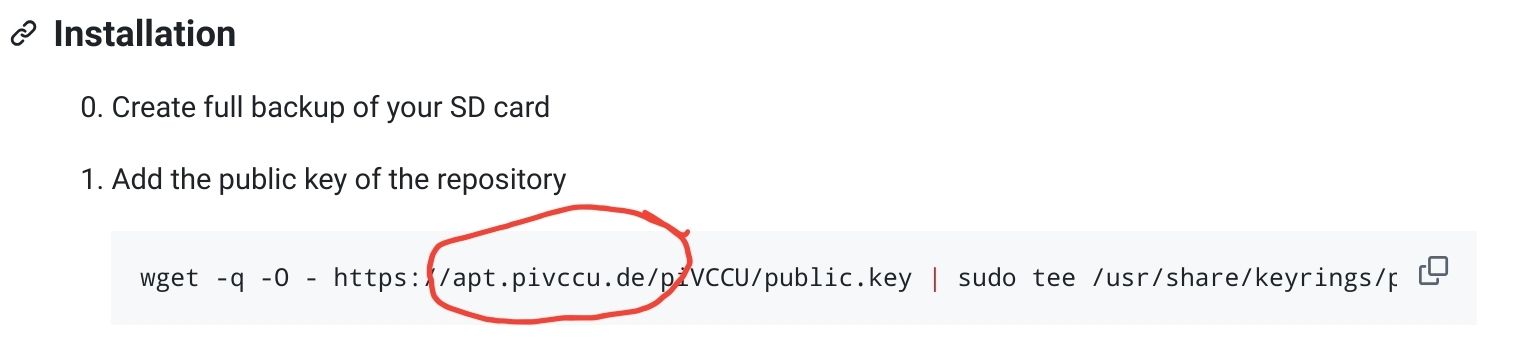
Die ist korrekt.
aber vielleicht nicht erreichbar.
müsstest du mal mit ping oder traceroute testen.Hat aber nichts mit dem laufenden Betrieb zu tun.
-
@Homoran & @Thomas-Braun
Es ist nur sehr seltsam, dass so ganz plötzlich "ohne Updates und upgrades" die piVCCU3 nicht mehr funktioniert.Das fragst du aber besser in einem Forum für pivccu.
Hier geht es um den ioBroker und der funktioniert ja offenbar. -
Das fragst du aber besser in einem Forum für pivccu.
Hier geht es um den ioBroker und der funktioniert ja offenbar.@thomas-braun
ioBroker funktioniert gut.
Ich dachte nur ihr hättet einen Tip, warum die piVCCU3 so plötzlich nicht mehr funktioniert und selbst mit einem tagealten Backup nicht (zu einem Zeitpunkt als noch alles ging)
GrüßeWo ein Wille ist, ist auch ein LAN!
-
@thomas-braun
ioBroker funktioniert gut.
Ich dachte nur ihr hättet einen Tip, warum die piVCCU3 so plötzlich nicht mehr funktioniert und selbst mit einem tagealten Backup nicht (zu einem Zeitpunkt als noch alles ging)
Grüße@herrfrodo sagte in piVCCU3 funktioniert plötzlich nicht mehr:
warum die piVCCU3 so plötzlich nicht mehr funktioniert
defekt?
Die haben so etwas sn sich, dass die plötzlich auftreten.Hast du mal geprüft warum apt.pivccu nicht erreichbar ist?
kein Support per PN! - Fragen im Forum stellen - Benutzt das Voting rechts unten im Beitrag wenn er euch geholfen hat.
Das Forum freut sich über eine Spende. Benutzt dazu den Spendenbutton oben rechts. Danke!
der Installationsfixer: curl -fsL https://iobroker.net/fix.sh | bash - -
@herrfrodo sagte in piVCCU3 funktioniert plötzlich nicht mehr:
warum die piVCCU3 so plötzlich nicht mehr funktioniert
defekt?
Die haben so etwas sn sich, dass die plötzlich auftreten.Hast du mal geprüft warum apt.pivccu nicht erreichbar ist?
@homoran sagte in piVCCU3 funktioniert plötzlich nicht mehr:
@herrfrodo sagte in piVCCU3 funktioniert plötzlich nicht mehr:
warum die piVCCU3 so plötzlich nicht mehr funktioniert
Hast du mal geprüft warum apt.pivccu nicht erreichbar ist?
Nein, aber offenbar antwortet Herr Reinert schon seit geraumer Zeit auch in Git nicht auf Issues. Vielleicht wurde einfach alles abgeschaltet..... wie sollte ich das prüfen?
Wo ein Wille ist, ist auch ein LAN!
-
@herrfrodo sagte in piVCCU3 funktioniert plötzlich nicht mehr:
warum die piVCCU3 so plötzlich nicht mehr funktioniert
defekt?
Die haben so etwas sn sich, dass die plötzlich auftreten.Hast du mal geprüft warum apt.pivccu nicht erreichbar ist?
@homoran sagte in piVCCU3 funktioniert plötzlich nicht mehr:
Hast du mal geprüft warum apt.pivccu nicht erreichbar ist?
Es gibt keinen auflösbaren Eintrag mehr im DNS und das Routing kann nicht funktionieren:
[thomas@roamer ~]$ nslookup pivccu.de
Server:         192.168.178.1
Address:        192.168.178.1#53

Non-authoritative answer:
*** Can't find pivccu.de: No answer
Da muss sich pivccu drum kümmern.
-
@homoran sagte in piVCCU3 funktioniert plötzlich nicht mehr:
@herrfrodo sagte in piVCCU3 funktioniert plötzlich nicht mehr:
warum die piVCCU3 so plötzlich nicht mehr funktioniert
Hast du mal geprüft warum apt.pivccu nicht erreichbar ist?
Nein, aber offenbar antwortet Herr Reinert schon seit geraumer Zeit auch in Git nicht auf Issues. Vielleicht wurde einfach alles abgeschaltet..... wie sollte ich das prüfen?
@herrfrodo sagte in piVCCU3 funktioniert plötzlich nicht mehr:
offenbar antwortet Herr Reinert schon seit geraumer Zeit auch in Git nicht auf Issues
so schlimm ist es ja nicht
vor 3 Wochen hat er noch issues bearbeitet! -
@Thomas-Braun
Wenn ich mit Backitup einen Backup von IOBroker mache, kann ich den nach Neuinstallation einspielen und alle Adapter und Instanzen etc. sind noch vorhanden?
So wie es aussieht muss ich auf die Debmatic umsteigen....und sinnvoll wäre eine Neuinstallation für den Raspi.Wo ein Wille ist, ist auch ein LAN!
-
@Thomas-Braun
Wenn ich mit Backitup einen Backup von IOBroker mache, kann ich den nach Neuinstallation einspielen und alle Adapter und Instanzen etc. sind noch vorhanden?
So wie es aussieht muss ich auf die Debmatic umsteigen....und sinnvoll wäre eine Neuinstallation für den Raspi.@herrfrodo sagte in piVCCU3 funktioniert plötzlich nicht mehr:
Wenn ich mit Backitup einen Backup von IOBroker mache, kann ich den nach Neuinstallation einspielen und alle Adapter und Instanzen etc. sind noch vorhanden?
Das ist der Sinn und Zweck von Backups.
-
@Homoran & @Thomas-Braun
debmatic ist auch nicht erreichbar.....krasspi@raspberrypi:~ $ sudo apt install debmatic Reading package lists... Done Building dependency tree... Done Reading state information... Done E: Unable to locate package debmatic pi@raspberrypi:~ $ ^C pi@raspberrypi:~ $ wget -qO - https://debmatic.debian.net/debmatic/public.key | sudo apt-key add - echo "deb https://debmatic.debian.net/debmatic stable main" | sudo tee /etc/apt/sources.list.d/debmatic.list Warning: apt-key is deprecated. Manage keyring files in trusted.gpg.d instead (see apt-key(8)). gpg: no valid OpenPGP data found. deb https://debmatic.debian.net/debmatic stable main pi@raspberrypi:~ $ ^C pi@raspberrypi:~ $ curl -fsSL https://debmatic.debian.net/debmatic/public.key | gpg --dearmor | sudo tee /usr/share/keyrings/debmatic-archive-keyring.gpg > /dev/null curl: (6) Could not resolve host: debmatic.debian.net gpg: no valid OpenPGP data found.Wo ein Wille ist, ist auch ein LAN!
-
@Homoran & @Thomas-Braun
debmatic ist auch nicht erreichbar.....krasspi@raspberrypi:~ $ sudo apt install debmatic Reading package lists... Done Building dependency tree... Done Reading state information... Done E: Unable to locate package debmatic pi@raspberrypi:~ $ ^C pi@raspberrypi:~ $ wget -qO - https://debmatic.debian.net/debmatic/public.key | sudo apt-key add - echo "deb https://debmatic.debian.net/debmatic stable main" | sudo tee /etc/apt/sources.list.d/debmatic.list Warning: apt-key is deprecated. Manage keyring files in trusted.gpg.d instead (see apt-key(8)). gpg: no valid OpenPGP data found. deb https://debmatic.debian.net/debmatic stable main pi@raspberrypi:~ $ ^C pi@raspberrypi:~ $ curl -fsSL https://debmatic.debian.net/debmatic/public.key | gpg --dearmor | sudo tee /usr/share/keyrings/debmatic-archive-keyring.gpg > /dev/null curl: (6) Could not resolve host: debmatic.debian.net gpg: no valid OpenPGP data found.Keine Ahnung wo du die Befehle für das Repo her hast, auf
https://github.com/alexreinert/debmatic/blob/master/docs/setup/raspberrypi.md
steht jedenfalls was anderes...Nutzt dir aber im Moment nichts, denn:
echad@chet:~ $ nslookup debmatic.de
Server:         100.100.100.100
Address:        100.100.100.100#53

Non-authoritative answer:
*** Can't find debmatic.de: No answer

echad@chet:~ $
debmatic.de ist also auch nicht erreichbar.
-
@HerrFrodo Es scheint, als hätte es die Server von Alex Reinert mal wieder vom Netz gebröselt, deshalb ist PiVCCU und Debmatic nicht erreichbar. Kommt bzw. kam immer wieder mal vor. Er hat das dann meistens zeitnah wieder repariert.
Wenn es Dir arg brisant ist und Du kein Backup mehr hast, in dem Du PiVCCU lauffähig hast, bleibt Dir für eine Neuinstallation momentan eben noch Raspberrymatic. ist im Prinzip alles das Gleiche, nur halt ein wenig anders.Ansonsten warten, bis PiVCCU oder Debmatic wieder online ist.
Gruss, Jürgen
-
@HerrFrodo Es scheint, als hätte es die Server von Alex Reinert mal wieder vom Netz gebröselt, deshalb ist PiVCCU und Debmatic nicht erreichbar. Kommt bzw. kam immer wieder mal vor. Er hat das dann meistens zeitnah wieder repariert.
Wenn es Dir arg brisant ist und Du kein Backup mehr hast, in dem Du PiVCCU lauffähig hast, bleibt Dir für eine Neuinstallation momentan eben noch Raspberrymatic. ist im Prinzip alles das Gleiche, nur halt ein wenig anders.Ansonsten warten, bis PiVCCU oder Debmatic wieder online ist.
Gruss, Jürgen
@wildbill
Seltsam ist, dass ich von jedem Tag einen Backup habe, wie z.B. von Vorgestern und die piVCCU3 läuft nicht. Irgendwie funkt die nach Hause und findet nichts.....jedenfalls wurden keine updates oder upgrades gemacht.
Ich habe nun auf einem 2. P4 Raspberrymatic installiert und einen Backup von Backitup eingespielt und alles schein super zu funktionieren.
Das waren nun 10h Ärger am Vatertag und ich konnte diese Zeit nicht mit meinen Kindern verbringen.
ioBroker bleibt nun auf dem einen Pi4 und Raspberrymatic auf dem anderen Pi4.Wo ein Wille ist, ist auch ein LAN!
-
@wildbill
Seltsam ist, dass ich von jedem Tag einen Backup habe, wie z.B. von Vorgestern und die piVCCU3 läuft nicht. Irgendwie funkt die nach Hause und findet nichts.....jedenfalls wurden keine updates oder upgrades gemacht.
Ich habe nun auf einem 2. P4 Raspberrymatic installiert und einen Backup von Backitup eingespielt und alles schein super zu funktionieren.
Das waren nun 10h Ärger am Vatertag und ich konnte diese Zeit nicht mit meinen Kindern verbringen.
ioBroker bleibt nun auf dem einen Pi4 und Raspberrymatic auf dem anderen Pi4.@herrfrodo sagte in piVCCU3 funktioniert plötzlich nicht mehr:
Das waren nun 10h Ärger am Vatertag und ich konnte diese Zeit nicht mit meinen Kindern verbringen.
was willst du uns damit sagen?
-
@wildbill
Seltsam ist, dass ich von jedem Tag einen Backup habe, wie z.B. von Vorgestern und die piVCCU3 läuft nicht. Irgendwie funkt die nach Hause und findet nichts.....jedenfalls wurden keine updates oder upgrades gemacht.
Ich habe nun auf einem 2. P4 Raspberrymatic installiert und einen Backup von Backitup eingespielt und alles schein super zu funktionieren.
Das waren nun 10h Ärger am Vatertag und ich konnte diese Zeit nicht mit meinen Kindern verbringen.
ioBroker bleibt nun auf dem einen Pi4 und Raspberrymatic auf dem anderen Pi4.@herrfrodo Die PiVCCU läuft auch ohne Zugriff auf apt.pivccu.de, da das gar nicht aufgerufen wird. Meine PiVCCU3 hat heute beim allmonatlichen Update leider auch nicht updaten können, weil der Zugriff beim apt-Befehl eben ins Leere lief. Aber die restlichen Dinge vom Betriebssystem sind wieder auf Stand und nach einem Neustart ist sie ganz normal hochgefahren. Da wird allenfalls im Hintergrund mal geschaut, ob es eine neue Version gibt und die dann auf der Startseite eben angezeigt. Aber wenn das nicht läuft, funktioniert PiVCCU trotzdem.
Hat es Dir vielleicht hardwaremäßig was verbogen? Beim Schauen, warum es nicht läuft den Raspi zu stark bewegt, das USB-Kabel gelockert, oder das Modul etwas vom Header gerutscht?
Was kommt, wenn Du nach Einspielen des Backup malsudo systemctl status pivccuoder
sudo systemctl status pivccu3falls es eine PivCCU3 ist eingibst? Lässt sie sich evetl mit
sudo systemctl start pivccu3starten?
Gruss, Jürgen
-
@herrfrodo Die PiVCCU läuft auch ohne Zugriff auf apt.pivccu.de, da das gar nicht aufgerufen wird. Meine PiVCCU3 hat heute beim allmonatlichen Update leider auch nicht updaten können, weil der Zugriff beim apt-Befehl eben ins Leere lief. Aber die restlichen Dinge vom Betriebssystem sind wieder auf Stand und nach einem Neustart ist sie ganz normal hochgefahren. Da wird allenfalls im Hintergrund mal geschaut, ob es eine neue Version gibt und die dann auf der Startseite eben angezeigt. Aber wenn das nicht läuft, funktioniert PiVCCU trotzdem.
Hat es Dir vielleicht hardwaremäßig was verbogen? Beim Schauen, warum es nicht läuft den Raspi zu stark bewegt, das USB-Kabel gelockert, oder das Modul etwas vom Header gerutscht?
Was kommt, wenn Du nach Einspielen des Backup malsudo systemctl status pivccuoder
sudo systemctl status pivccu3falls es eine PivCCU3 ist eingibst? Lässt sie sich evetl mit
sudo systemctl start pivccu3starten?
Gruss, Jürgen
@wildbill Für alle, die hier mitlesen und auch das Problem haben sollten, dass PiVCCU stark verzögert startet, wenn apt.pivccu.de mal nicht erreichbar ist. Hier bei Github steht ein Lösungsvorschlag.
Gruss, Jürgen

Hey! Du scheinst an dieser Unterhaltung interessiert zu sein, hast aber noch kein Konto.
Hast du es satt, bei jedem Besuch durch die gleichen Beiträge zu scrollen? Wenn du dich für ein Konto anmeldest, kommst du immer genau dorthin zurück, wo du zuvor warst, und kannst dich über neue Antworten benachrichtigen lassen (entweder per E-Mail oder Push-Benachrichtigung). Du kannst auch Lesezeichen speichern und Beiträge positiv bewerten, um anderen Community-Mitgliedern deine Wertschätzung zu zeigen.
Mit deinem Input könnte dieser Beitrag noch besser werden 💗
Registrieren AnmeldenSupport us
475
Online33.0k
Benutzer83.6k
Themen1.3m
Beiträge