




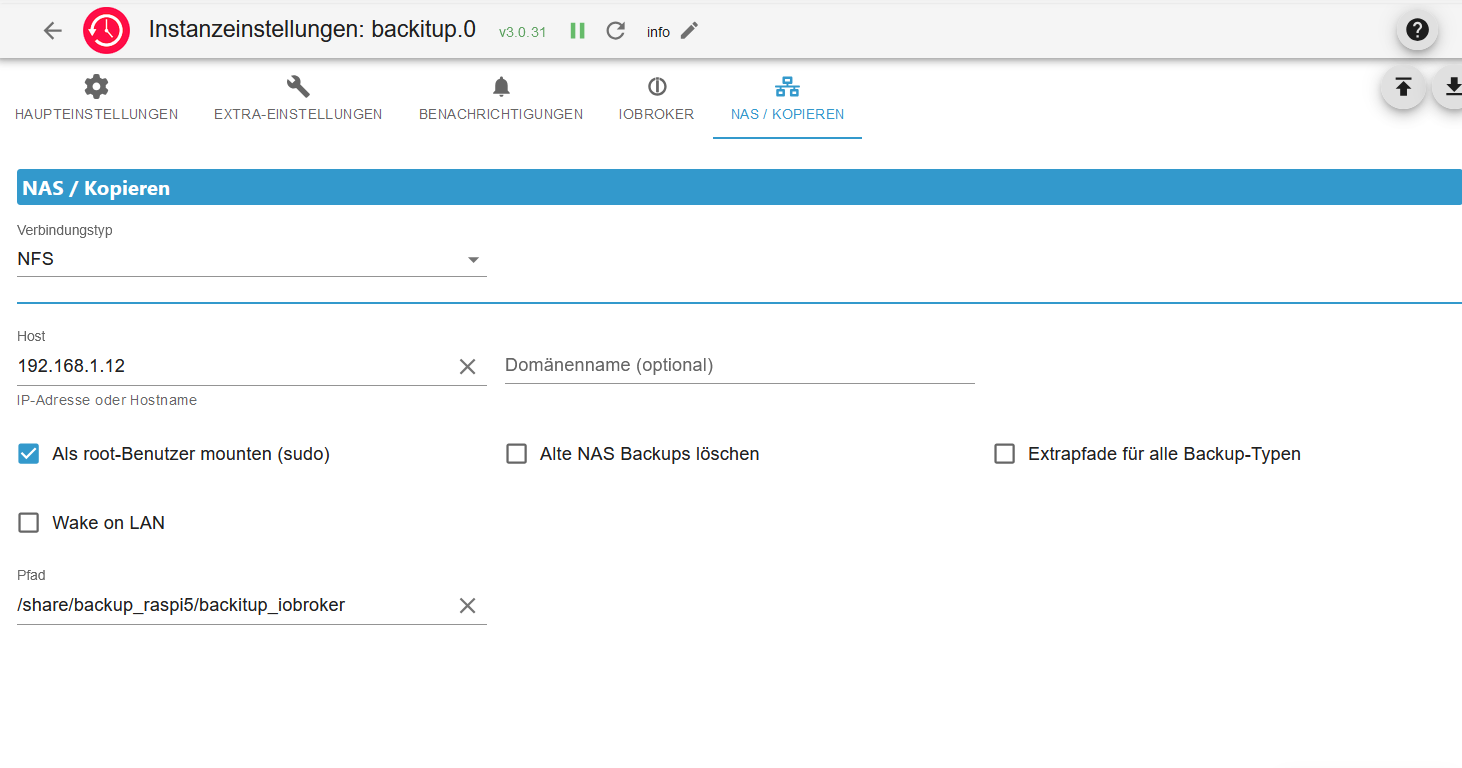
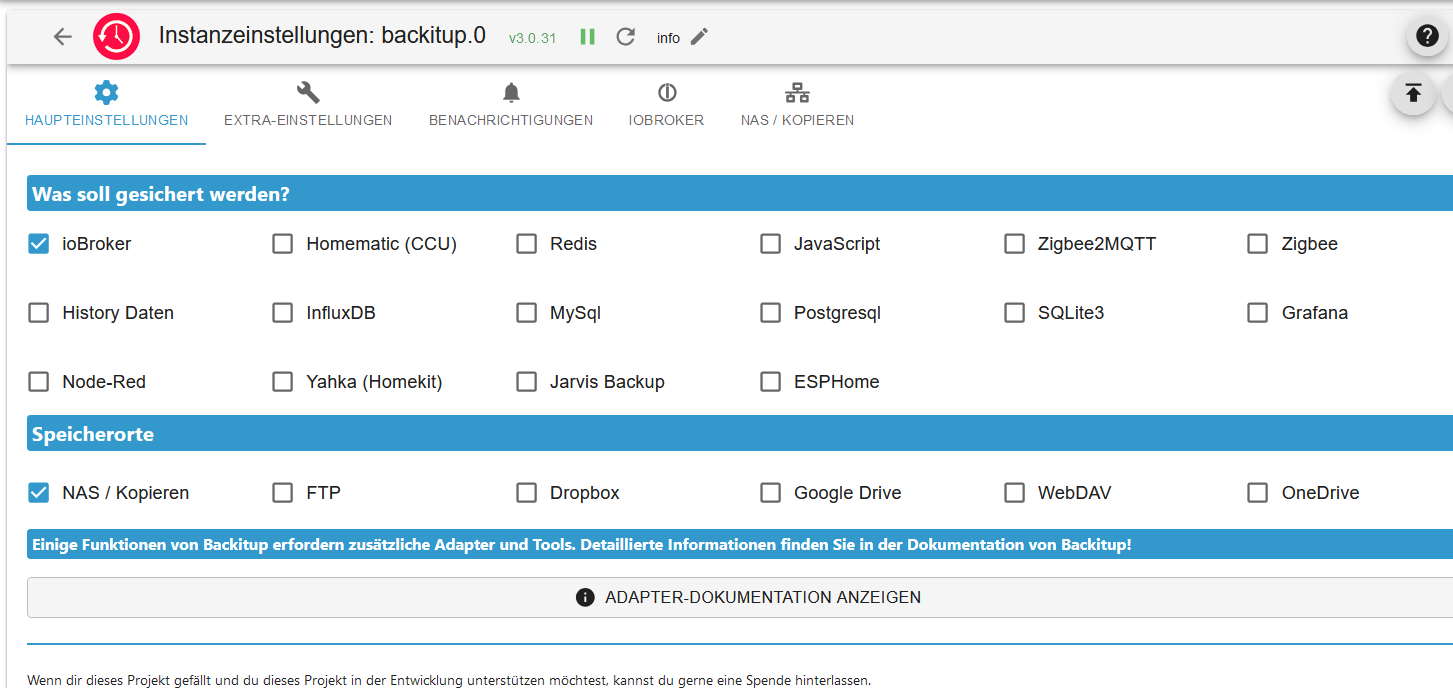
[HOW-TO] backitup Konfiguration mit nfs
-
Hallo,
obwohl backitup durchläuft, habe ich jedesmal eine Fehlermeldung:

========== Start marking the full check here ===========

```bash
Script v.2024-12-09 Raspbian+zigbee diag+masking

*** BASE SYSTEM ***
 Static hostname: raspi5
       Icon name: computer
Operating System: Debian GNU/Linux 12 (bookworm)
          Kernel: Linux 6.6.62+rpt-rpi-2712
    Architecture: arm64
OS is similar to:

Model           : Raspberry Pi 5 Model B Rev 1.0
Docker          : false
Virtualization  : none
Kernel          : aarch64
Userland        : 64 bit

Systemuptime and Load:
 07:42:33 up 14:38,  3 users,  load average: 0.37, 0.98, 0.86
CPU threads: 4


*** LIFE CYCLE STATUS ***
Operating System is the current Debian stable version codenamed 'bookworm'!

*** RASPBERRY THROTTLING ***
Current issues:
No throttling issues detected.

Previously detected issues:
No throttling issues detected.

*** TIME AND TIMEZONES ***
               Local time: Wed 2025-01-15 07:42:33 CET
           Universal time: Wed 2025-01-15 06:42:33 UTC
                 RTC time: Wed 2025-01-15 06:42:33
                Time zone: Europe/Berlin (CET, +0100)
System clock synchronized: yes
              NTP service: active
          RTC in local TZ: no

*** Users and Groups ***
User that called 'iob diag':
pi
HOME=/home/pi
GROUPS=pi adm dialout cdrom sudo audio video plugdev games users input render netdev lpadmin gpio i2c spi iobroker

User that is running 'js-controller':
iobroker
HOME=/home/iobroker
GROUPS=iobroker tty dialout audio video plugdev bluetooth gpio i2c

*** DISPLAY-SERVER SETUP ***
Display-Server: false
Desktop:
Terminal:       tty

System is booting into 'graphical.target'. Usually a server is running in 'multi-user.target'. Please set BootTarget to 'multi-user.target' or run 'iobroker fix'

*** MEMORY ***
               total        used        free      shared  buff/cache   available
Mem:            8.4G        2.1G        4.9G         40M        1.5G        6.3G
Swap:           536M          0B        536M
Total:          9.0G        2.1G        5.4G

Active iob-Instances:   0

         8052 M total memory
         2042 M used memory
         2333 M active memory
          718 M inactive memory
         4682 M free memory
          137 M buffer memory
         1325 M swap cache
          511 M total swap
            0 M used swap
          511 M free swap

*** top - Table Of Processes  ***
top - 07:42:33 up 14:38,  3 users,  load average: 0.37, 0.98, 0.86
Tasks: 236 total,   1 running, 235 sleeping,   0 stopped,   0 zombie
%Cpu(s): 25.0 us, 25.0 sy,  0.0 ni, 25.0 id, 25.0 wa,  0.0 hi,  0.0 si,  0.0 st
MiB Mem :   8052.2 total,   4682.4 free,   2042.1 used,   1463.0 buff/cache
MiB Swap:    512.0 total,    512.0 free,      0.0 used.   6010.1 avail Mem

*** FAILED SERVICES ***

  UNIT LOAD ACTIVE SUB DESCRIPTION
0 loaded units listed.


*** DMESG CRITICAL ERRORS ***
No critical errors detected

*** FILESYSTEM ***
Filesystem                            Type      Size  Used Avail Use% Mounted on
udev                                  devtmpfs  3.9G     0  3.9G   0% /dev
tmpfs                                 tmpfs     806M  6.2M  800M   1% /run
/dev/sda2                             ext4       29G   10G   18G  37% /
tmpfs                                 tmpfs     4.0G  4.2M  4.0G   1% /dev/shm
tmpfs                                 tmpfs     5.0M   48K  5.0M   1% /run/lock
/dev/sda1                             vfat      510M   67M  444M  14% /boot/firmware
192.168.1.12:/share/backup_raspi5     nfs       5.4T  3.0T  2.4T  56% /opt/iobroker/backups
192.168.1.12:/share/backup_raspberry5 nfs       5.4T  3.0T  2.4T  56% /backup
tmpfs                                 tmpfs     806M  192K  806M   1% /run/user/1000

Messages concerning ext4 filesystem in dmesg:

Show mounted filesystems:
TARGET                  SOURCE                            FSTYPE      OPTIONS
/                       /dev/sda2                         ext4        rw,noatime
|-/run/user/1000/doc    portal                            fuse.portal rw,nosuid,nodev,relatime,user_id=1000,group_id=1000
|-/boot/firmware        /dev/sda1                         vfat        rw,relatime,fmask=0022,dmask=0022,codepage=437,iocharset=ascii,shortname=mixed,errors=remount-ro
|-/opt/iobroker/backups 192.168.1.12:/share/backup_raspi5 nfs         rw,nosuid,nodev,noexec,relatime,sync,vers=3,rsize=1048576,wsize=1048576,namlen=255,hard,nolock,proto=tcp,timeo=600,retr
`-/backup               192.168.1.12:/share/backup_raspberry5
                                                          nfs         rw,nosuid,nodev,noexec,relatime,sync,vers=3,rsize=1048576,wsize=1048576,namlen=255,hard,nolock,proto=tcp,timeo=600,retr

Files in neuralgic directories:

/var:
1.6G    /var/
483M    /var/cache
476M    /var/cache/apt
361M    /var/cache/apt/archives
345M    /var/log

Archived and active journals take up 324.6M in the file system.

/opt/iobroker/backups:
51M     /opt/iobroker/backups/
16K     /opt/iobroker/backups/.@__thumb
12K     /opt/iobroker/backups/@Recycle
8.0K    /opt/iobroker/backups/raspi5

/opt/iobroker/iobroker-data:
1.2G    /opt/iobroker/iobroker-data/
1007M   /opt/iobroker/iobroker-data/files
617M    /opt/iobroker/iobroker-data/files/javascript.admin
560M    /opt/iobroker/iobroker-data/files/javascript.admin/static
558M    /opt/iobroker/iobroker-data/files/javascript.admin/static/js

The five largest files in iobroker-data are:
30M     /opt/iobroker/iobroker-data/objects.jsonl
24M     /opt/iobroker/iobroker-data/files/web.admin/static/js/main.135279a0.js.map
24M     /opt/iobroker/iobroker-data/files/vis-2/static/js/main.f305bc29.js.map
24M     /opt/iobroker/iobroker-data/files/vis-2/static/js/main.8e80ccb0.js.map
24M     /opt/iobroker/iobroker-data/files/vis-2/customWidgets.js.map

USB-Devices by-id:
USB-Sticks -  Avoid direct links to /dev/tty* in your adapter setups, please always prefer the links 'by-id':

No Devices found 'by-id'

Zigbee Network Settings on your coordinator/in nvbackup are:

zigbee.X
Extended Pan ID:
*** MASKED ***
Pan ID:
*** MASKED ***
Channel:
*** MASKED ***
Network Key:
*** MASKED ***

To unmask the settings run 'iob diag --unmask'


*** NodeJS-Installation ***

/usr/bin/nodejs         v20.18.1
/usr/bin/node           v20.18.1
/usr/bin/npm            10.8.2
/usr/bin/npx            10.8.2
/usr/bin/corepack       0.29.4

nodejs:
  Installed: 20.18.1-1nodesource1
  Candidate: 20.18.1-1nodesource1
  Version table:
 *** 20.18.1-1nodesource1 1001
        500 https://deb.nodesource.com/node_20.x nodistro/main arm64 Packages
        100 /var/lib/dpkg/status
     20.18.0-1nodesource1 1001
        500 https://deb.nodesource.com/node_20.x nodistro/main arm64 Packages
     20.17.0-1nodesource1 1001
        500 https://deb.nodesource.com/node_20.x nodistro/main arm64 Packages
     20.16.0-1nodesource1 1001
        500 https://deb.nodesource.com/node_20.x nodistro/main arm64 Packages
     20.15.1-1nodesource1 1001
        500 https://deb.nodesource.com/node_20.x nodistro/main arm64 Packages
     20.15.0-1nodesource1 1001
        500 https://deb.nodesource.com/node_20.x nodistro/main arm64 Packages
     20.14.0-1nodesource1 1001
        500 https://deb.nodesource.com/node_20.x nodistro/main arm64 Packages
     20.13.1-1nodesource1 1001
        500 https://deb.nodesource.com/node_20.x nodistro/main arm64 Packages
     20.13.0-1nodesource1 1001
        500 https://deb.nodesource.com/node_20.x nodistro/main arm64 Packages
     20.12.2-1nodesource1 1001
        500 https://deb.nodesource.com/node_20.x nodistro/main arm64 Packages
     20.12.1-1nodesource1 1001
        500 https://deb.nodesource.com/node_20.x nodistro/main arm64 Packages
     20.12.0-1nodesource1 1001
        500 https://deb.nodesource.com/node_20.x nodistro/main arm64 Packages
     20.11.1-1nodesource1 1001
        500 https://deb.nodesource.com/node_20.x nodistro/main arm64 Packages
     20.11.0-1nodesource1 1001
        500 https://deb.nodesource.com/node_20.x nodistro/main arm64 Packages
     20.10.0-1nodesource1 1001
        500 https://deb.nodesource.com/node_20.x nodistro/main arm64 Packages
     20.9.0-1nodesource1 1001
        500 https://deb.nodesource.com/node_20.x nodistro/main arm64 Packages
     20.8.1-1nodesource1 1001
        500 https://deb.nodesource.com/node_20.x nodistro/main arm64 Packages
     20.8.0-1nodesource1 1001
        500 https://deb.nodesource.com/node_20.x nodistro/main arm64 Packages
     20.7.0-1nodesource1 1001
        500 https://deb.nodesource.com/node_20.x nodistro/main arm64 Packages
     20.6.1-1nodesource1 1001
        500 https://deb.nodesource.com/node_20.x nodistro/main arm64 Packages
     20.6.0-1nodesource1 1001
        500 https://deb.nodesource.com/node_20.x nodistro/main arm64 Packages
     20.5.1-1nodesource1 1001
        500 https://deb.nodesource.com/node_20.x nodistro/main arm64 Packages
     20.5.0-1nodesource1 1001
        500 https://deb.nodesource.com/node_20.x nodistro/main arm64 Packages
     20.4.0-1nodesource1 1001
        500 https://deb.nodesource.com/node_20.x nodistro/main arm64 Packages
     20.3.1-1nodesource1 1001
        500 https://deb.nodesource.com/node_20.x nodistro/main arm64 Packages
     20.3.0-1nodesource1 1001
        500 https://deb.nodesource.com/node_20.x nodistro/main arm64 Packages
     20.2.0-1nodesource1 1001
        500 https://deb.nodesource.com/node_20.x nodistro/main arm64 Packages
     20.1.0-1nodesource1 1001
        500 https://deb.nodesource.com/node_20.x nodistro/main arm64 Packages
     20.0.0-1nodesource1 1001
        500 https://deb.nodesource.com/node_20.x nodistro/main arm64 Packages
     18.19.0+dfsg-6~deb12u2 500
        500 http://deb.debian.org/debian bookworm/main arm64 Packages
     18.19.0+dfsg-6~deb12u1 500
        500 http://deb.debian.org/debian-security bookworm-security/main arm64 Packages

Temp directories causing deletion problem: 0
No problems detected

Errors in npm tree: 0
No problems detected

*** ioBroker-Installation ***

ioBroker Status
./iob_diag.sh: line 879: iob: command not found

Hosts:
./iob_diag.sh: line 881: iob: command not found

Core adapters versions
./iob_diag.sh: line 887: iob: command not found
js-controller:
./iob_diag.sh: line 888: iob: command not found
admin:
./iob_diag.sh: line 889: iob: command not found
javascript:

nodejs modules from github:     0

Adapter State


Enabled adapters with bindings

ioBroker-Repositories
./iob_diag.sh: line 901: iob: command not found

Installed ioBroker-Instances
./iob_diag.sh: line 904: iob: command not found

Objects and States
Please stand by - This may take a while
Objects:        0
States:         0

*** OS-Repositories and Updates ***
Hit:1 http://deb.debian.org/debian bookworm InRelease
Hit:2 http://deb.debian.org/debian-security bookworm-security InRelease
Hit:3 http://deb.debian.org/debian bookworm-updates InRelease
Hit:4 https://repos.influxdata.com/debian stable InRelease
Hit:5 http://archive.raspberrypi.com/debian bookworm InRelease
Hit:6 https://apt.grafana.com stable InRelease
Hit:7 https://deb.nodesource.com/node_20.x nodistro InRelease
Reading package lists... Done
Pending Updates: 75

*** Listening Ports ***
Active Internet connections (only servers)
Proto Recv-Q Send-Q Local Address           Foreign Address         State       User       Inode      PID/Program name
tcp        0      0 127.0.0.1:3493          0.0.0.0:*               LISTEN      0          6673       876/upsd
tcp        0      0 192.168.1.6:3493        0.0.0.0:*               LISTEN      0          6672       876/upsd
tcp        0      0 192.168.1.6:2001        0.0.0.0:*               LISTEN      1001       12040      2467/io.hm-rpc.0
tcp        0      0 192.168.1.6:2010        0.0.0.0:*               LISTEN      1001       12042      2492/io.hm-rpc.1
tcp        0      0 127.0.0.1:5335          0.0.0.0:*               LISTEN      0          7300       825/unbound
tcp        0      0 0.0.0.0:80              0.0.0.0:*               LISTEN      0          7581       977/lighttpd
tcp        0      0 0.0.0.0:22              0.0.0.0:*               LISTEN      0          2973       822/sshd: /usr/sbin
tcp        0      0 0.0.0.0:53              0.0.0.0:*               LISTEN      999        9289       922/pihole-FTL
tcp        0      0 127.0.0.1:631           0.0.0.0:*               LISTEN      0          88226      17640/cupsd
tcp        0      0 127.0.0.1:4711          0.0.0.0:*               LISTEN      999        9295       922/pihole-FTL
tcp        0      0 127.0.0.1:9000          0.0.0.0:*               LISTEN      1001       9162       1220/iobroker.js-co
tcp        0      0 127.0.0.1:9001          0.0.0.0:*               LISTEN      1001       9152       1220/iobroker.js-co
tcp6       0      0 :::3000                 :::*                    LISTEN      113        9916       1219/grafana
tcp6       0      0 :::8081                 :::*                    LISTEN      1001       11807      1698/io.admin.0
tcp6       0      0 :::8082                 :::*                    LISTEN      1001       15031      2526/io.web.0
tcp6       0      0 :::8086                 :::*                    LISTEN      995        9504       891/influxd
tcp6       0      0 ::1:631                 :::*                    LISTEN      0          88225      17640/cupsd
tcp6       0      0 ::1:4711                :::*                    LISTEN      999        9296       922/pihole-FTL
tcp6       0      0 :::80                   :::*                    LISTEN      0          7580       977/lighttpd
tcp6       0      0 :::22                   :::*                    LISTEN      0          2975       822/sshd: /usr/sbin
tcp6       0      0 :::53                   :::*                    LISTEN      999        9291       922/pihole-FTL
udp        0      0 0.0.0.0:53              0.0.0.0:*                           999        9288       922/pihole-FTL
udp        0      0 0.0.0.0:49669           0.0.0.0:*                           1001       14561      2397/io.snmp.0
udp        0      0 127.0.0.1:5335          0.0.0.0:*                           0          7299       825/unbound
udp        0      0 0.0.0.0:5353            0.0.0.0:*                           104        6558       562/avahi-daemon: r
udp        0      0 0.0.0.0:34034           0.0.0.0:*                           1001       12835      2415/io.snmp.1
udp        0      0 0.0.0.0:39364           0.0.0.0:*                           104        6560       562/avahi-daemon: r
udp6       0      0 :::53                   :::*                                999        9290       922/pihole-FTL
udp6       0      0 fe80::f0ae:1c2a:23c:546 :::*                                0          7356       780/NetworkManager
udp6       0      0 :::5353                 :::*                                104        6559       562/avahi-daemon: r
udp6       0      0 :::51537                :::*                                104        6561       562/avahi-daemon: r

*** Log File - Last 25 Lines ***

2025-01-15 07:37:47.267  - debug: hm-rpc.0 (2467) xml multicall <event>: raspi5:hm-rpc.0:a6f04f6e3cdc89967739550158ac1a19,CENTRAL,PONG,raspi5:hm-rpc.0:a6f04f6e3cdc89967739550158ac1a19
2025-01-15 07:37:47.267  - debug: hm-rpc.0 (2467) xmlrpc <- event ["raspi5:hm-rpc.0:a6f04f6e3cdc89967739550158ac1a19","CENTRAL","PONG","raspi5:hm-rpc.0:a6f04f6e3cdc89967739550158ac1a19"]
2025-01-15 07:37:47.267  - debug: hm-rpc.0 (2467) xmlrpc <- event: hm-rpc.0.CENTRAL.PONG:raspi5:hm-rpc.0:a6f04f6e3cdc89967739550158ac1a19 discarded, no matching device
2025-01-15 07:39:17.263  - debug: hm-rpc.0 (2467) [KEEPALIVE] Check if connection is alive
2025-01-15 07:39:17.263  - debug: hm-rpc.0 (2467) Send PING...
2025-01-15 07:39:17.267  - debug: hm-rpc.0 (2467) PING ok
2025-01-15 07:39:17.268  - debug: hm-rpc.0 (2467) xml multicall <event>: raspi5:hm-rpc.0:a6f04f6e3cdc89967739550158ac1a19,CENTRAL,PONG,raspi5:hm-rpc.0:a6f04f6e3cdc89967739550158ac1a19
2025-01-15 07:39:17.268  - debug: hm-rpc.0 (2467) xmlrpc <- event ["raspi5:hm-rpc.0:a6f04f6e3cdc89967739550158ac1a19","CENTRAL","PONG","raspi5:hm-rpc.0:a6f04f6e3cdc89967739550158ac1a19"]
2025-01-15 07:39:17.268  - debug: hm-rpc.0 (2467) xmlrpc <- event: hm-rpc.0.CENTRAL.PONG:raspi5:hm-rpc.0:a6f04f6e3cdc89967739550158ac1a19 discarded, no matching device
2025-01-15 07:40:32.011  - info: host.raspi5 instance system.adapter.dwd.0 in version "2.8.5" started with pid 26300
2025-01-15 07:40:32.764  - info: dwd.0 (26300) starting. Version 2.8.5 in /opt/iobroker/node_modules/iobroker.dwd, node: v20.18.1, js-controller: 7.0.6
2025-01-15 07:40:33.665  - info: dwd.0 (26300) Terminated (ADAPTER_REQUESTED_TERMINATION): Without reason
2025-01-15 07:40:34.174  - info: host.raspi5 instance system.adapter.dwd.0 having pid 26300 terminated with code 11 (ADAPTER_REQUESTED_TERMINATION)
2025-01-15 07:40:47.264  - debug: hm-rpc.0 (2467) [KEEPALIVE] Check if connection is alive
2025-01-15 07:40:47.264  - debug: hm-rpc.0 (2467) Send PING...
2025-01-15 07:40:47.268  - debug: hm-rpc.0 (2467) PING ok
2025-01-15 07:40:47.269  - debug: hm-rpc.0 (2467) xml multicall <event>: raspi5:hm-rpc.0:a6f04f6e3cdc89967739550158ac1a19,CENTRAL,PONG,raspi5:hm-rpc.0:a6f04f6e3cdc89967739550158ac1a19
2025-01-15 07:40:47.269  - debug: hm-rpc.0 (2467) xmlrpc <- event ["raspi5:hm-rpc.0:a6f04f6e3cdc89967739550158ac1a19","CENTRAL","PONG","raspi5:hm-rpc.0:a6f04f6e3cdc89967739550158ac1a19"]
2025-01-15 07:40:47.269  - debug: hm-rpc.0 (2467) xmlrpc <- event: hm-rpc.0.CENTRAL.PONG:raspi5:hm-rpc.0:a6f04f6e3cdc89967739550158ac1a19 discarded, no matching device
2025-01-15 07:42:17.264  - debug: hm-rpc.0 (2467) [KEEPALIVE] Check if connection is alive
2025-01-15 07:42:17.264  - debug: hm-rpc.0 (2467) Send PING...
2025-01-15 07:42:17.271  - debug: hm-rpc.0 (2467) PING ok
2025-01-15 07:42:17.275  - debug: hm-rpc.0 (2467) xml multicall <event>: raspi5:hm-rpc.0:a6f04f6e3cdc89967739550158ac1a19,CENTRAL,PONG,raspi5:hm-rpc.0:a6f04f6e3cdc89967739550158ac1a19
2025-01-15 07:42:17.275  - debug: hm-rpc.0 (2467) xmlrpc <- event ["raspi5:hm-rpc.0:a6f04f6e3cdc89967739550158ac1a19","CENTRAL","PONG","raspi5:hm-rpc.0:a6f04f6e3cdc89967739550158ac1a19"]
2025-01-15 07:42:17.275  - debug: hm-rpc.0 (2467) xmlrpc <- event: hm-rpc.0.CENTRAL.PONG:raspi5:hm-rpc.0:a6f04f6e3cdc89967739550158ac1a19 discarded, no matching device
Hier jetzt der output von iob diag. Siehst Du, wo es hakt?
============ Mark until here for C&P =============
Da sind aber auch noch andere Kinken drin.
-
Fehlermeldungen bitte nie als Screenshot, immer als Text.
@thomas-braun
Sorry. Mein Fehler. Hier der log2025-01-15 08:18:17.284 - debug: hm-rpc.0 (2467) [KEEPALIVE] Check if connection is alive 2025-01-15 08:18:17.284 - debug: hm-rpc.0 (2467) Send PING... 2025-01-15 08:18:17.289 - debug: hm-rpc.0 (2467) PING ok 2025-01-15 08:18:17.291 - debug: hm-rpc.0 (2467) xml multicall : raspi5:hm-rpc.0:a6f04f6e3cdc89967739550158ac1a19,CENTRAL,PONG,raspi5:hm-rpc.0:a6f04f6e3cdc89967739550158ac1a19 2025-01-15 08:18:17.291 - debug: hm-rpc.0 (2467) xmlrpc <- event ["raspi5:hm-rpc.0:a6f04f6e3cdc89967739550158ac1a19","CENTRAL","PONG","raspi5:hm-rpc.0:a6f04f6e3cdc89967739550158ac1a19"] 2025-01-15 08:18:17.291 - debug: hm-rpc.0 (2467) xmlrpc <- event: hm-rpc.0.CENTRAL.PONG:raspi5:hm-rpc.0:a6f04f6e3cdc89967739550158ac1a19 discarded, no matching device 2025-01-15 08:18:19.949 - info: admin.0 (1698) ==> Connected system.user.admin from ::ffff:192.168.1.209 2025-01-15 08:18:25.734 - error: backitup.0 (2452) [iobroker] chmod for Backup directory could not be completed: Error: EPERM: operation not permitted, chmod '/opt/iobroker/backups' Please run "iobroker fix"!! 2025-01-15 08:18:28.313 - info: admin.0 (1698) <== Disconnect system.user.admin from ::ffff:192.168.1.209 backitup 2025-01-15 08:18:35.066 - warn: backitup.0 (2452) [iobroker/clean] No older backup files are deleted, because this backup was started manually -
Da sind aber auch noch andere Kinken drin.
@thomas-braun Ich gebe Dir ein Königreich wenn Du mir hilfst.
-
@thomas-braun Ich gebe Dir ein Königreich wenn Du mir hilfst.
Solange
ioBroker Status
./iob_diag.sh: line 879: iob: command not foundvorliegt brauchst du dir um ein Backup keinen Kopf machen. Da ist schon auf tieferer Ebene was schief.
-
Solange
ioBroker Status
./iob_diag.sh: line 879: iob: command not foundvorliegt brauchst du dir um ein Backup keinen Kopf machen. Da ist schon auf tieferer Ebene was schief.
@thomas-braun said in [HOW-TO] backitup Konfiguration mit nfs:
Da ist schon auf tieferer Ebene was schief.
Nur was? Da hänge ich als hoch motivierter Laie schon Tage dran und es geht nicht voran. Ich habe viel gelesen, viel probiert, komme aber nicht ohne Experte weiter. Es ist ein Frust! Kann nur auf Hilfe hoffen.
-
@thomas-braun said in [HOW-TO] backitup Konfiguration mit nfs:
Da ist schon auf tieferer Ebene was schief.
Nur was? Da hänge ich als hoch motivierter Laie schon Tage dran und es geht nicht voran. Ich habe viel gelesen, viel probiert, komme aber nicht ohne Experte weiter. Es ist ein Frust! Kann nur auf Hilfe hoffen.
-
@thomas-braun said in [HOW-TO] backitup Konfiguration mit nfs:
systemctl status iobroker
pi@raspi5:~ $ iobroker start -bash: iobroker: command not found pi@raspi5:~ $ systemctl status iobroker ● iobroker.service - ioBroker Server Loaded: loaded (/lib/systemd/system/iobroker.service; enabled; preset: enabled) Active: active (running) since Tue 2025-01-14 17:05:13 CET; 15h ago Docs: http://iobroker.net Main PID: 1220 (iobroker.js-con) Tasks: 220 (limit: 9564) CPU: 1h 27min 5.187s CGroup: /system.slice/iobroker.service ├─1220 iobroker.js-controller ├─1698 io.admin.0 ├─1739 io.javascript.0 ├─2336 io.nut.0 ├─2397 io.snmp.0 ├─2415 io.snmp.1 ├─2433 io.tr-064.0 ├─2452 io.backitup.0 ├─2467 io.hm-rpc.0 ├─2474 io.hm-rega.0 ├─2492 io.hm-rpc.1 ├─2515 io.discovery.0 ├─2526 io.web.0 ├─2541 io.fronius-solarweb.0 ├─2552 io.trashschedule.0 ├─2559 io.pi-hole.0 ├─2569 io.energiefluss-erweitert.0 ├─2664 io.vis-2.0 ├─3519 io.pushover.0 └─3546 io.fronius-wattpilot.0 Jan 15 07:12:13 raspi5 sudo[22204]: iobroker : PWD=/ ; USER=root ; COMMAND=/usr/bin/apt list --upgradeable Jan 15 07:12:13 raspi5 sudo[22204]: pam_unix(sudo:session): session opened for user root(uid=0) by (uid=1001) Jan 15 07:12:14 raspi5 sudo[22204]: pam_unix(sudo:session): session closed for user root Jan 15 08:17:14 raspi5 bash[1220]: Send diag info: {"uuid":"6314d3b3-71c3-1ccc-c873-938803957853","language":"de","country":"Germany","hosts":[{"version":"7.0.6","platform":"Javascript/Nod> Jan 15 08:17:14 raspi5 sudo[29199]: iobroker : PWD=/ ; USER=root ; COMMAND=/usr/bin/apt -v Jan 15 08:17:14 raspi5 sudo[29199]: pam_unix(sudo:session): session opened for user root(uid=0) by (uid=1001) Jan 15 08:17:14 raspi5 sudo[29199]: pam_unix(sudo:session): session closed for user root Jan 15 08:17:14 raspi5 sudo[29204]: iobroker : PWD=/ ; USER=root ; COMMAND=/usr/bin/apt list --upgradeable Jan 15 08:17:14 raspi5 sudo[29204]: pam_unix(sudo:session): session opened for user root(uid=0) by (uid=1001) Jan 15 08:17:15 raspi5 sudo[29204]: pam_unix(sudo:session): session closed for user root -
@thomas-braun said in [HOW-TO] backitup Konfiguration mit nfs:
systemctl status iobroker
pi@raspi5:~ $ iobroker start -bash: iobroker: command not found pi@raspi5:~ $ systemctl status iobroker ● iobroker.service - ioBroker Server Loaded: loaded (/lib/systemd/system/iobroker.service; enabled; preset: enabled) Active: active (running) since Tue 2025-01-14 17:05:13 CET; 15h ago Docs: http://iobroker.net Main PID: 1220 (iobroker.js-con) Tasks: 220 (limit: 9564) CPU: 1h 27min 5.187s CGroup: /system.slice/iobroker.service ├─1220 iobroker.js-controller ├─1698 io.admin.0 ├─1739 io.javascript.0 ├─2336 io.nut.0 ├─2397 io.snmp.0 ├─2415 io.snmp.1 ├─2433 io.tr-064.0 ├─2452 io.backitup.0 ├─2467 io.hm-rpc.0 ├─2474 io.hm-rega.0 ├─2492 io.hm-rpc.1 ├─2515 io.discovery.0 ├─2526 io.web.0 ├─2541 io.fronius-solarweb.0 ├─2552 io.trashschedule.0 ├─2559 io.pi-hole.0 ├─2569 io.energiefluss-erweitert.0 ├─2664 io.vis-2.0 ├─3519 io.pushover.0 └─3546 io.fronius-wattpilot.0 Jan 15 07:12:13 raspi5 sudo[22204]: iobroker : PWD=/ ; USER=root ; COMMAND=/usr/bin/apt list --upgradeable Jan 15 07:12:13 raspi5 sudo[22204]: pam_unix(sudo:session): session opened for user root(uid=0) by (uid=1001) Jan 15 07:12:14 raspi5 sudo[22204]: pam_unix(sudo:session): session closed for user root Jan 15 08:17:14 raspi5 bash[1220]: Send diag info: {"uuid":"6314d3b3-71c3-1ccc-c873-938803957853","language":"de","country":"Germany","hosts":[{"version":"7.0.6","platform":"Javascript/Nod> Jan 15 08:17:14 raspi5 sudo[29199]: iobroker : PWD=/ ; USER=root ; COMMAND=/usr/bin/apt -v Jan 15 08:17:14 raspi5 sudo[29199]: pam_unix(sudo:session): session opened for user root(uid=0) by (uid=1001) Jan 15 08:17:14 raspi5 sudo[29199]: pam_unix(sudo:session): session closed for user root Jan 15 08:17:14 raspi5 sudo[29204]: iobroker : PWD=/ ; USER=root ; COMMAND=/usr/bin/apt list --upgradeable Jan 15 08:17:14 raspi5 sudo[29204]: pam_unix(sudo:session): session opened for user root(uid=0) by (uid=1001) Jan 15 08:17:15 raspi5 sudo[29204]: pam_unix(sudo:session): session closed for user rootJag den Fixer mal über das System. Musst du aber wohl dann direkt aus dem Netz ziehen, wenn 'iobroker' und 'iob' nicht direkt aufrufbar sind.
Ich meine @Homoran hat den Befehl dazu in der Signatur. -
Jag den Fixer mal über das System. Musst du aber wohl dann direkt aus dem Netz ziehen, wenn 'iobroker' und 'iob' nicht direkt aufrufbar sind.
Ich meine @Homoran hat den Befehl dazu in der Signatur.@thomas-braun sagte in [HOW-TO] backitup Konfiguration mit nfs:
Ich meine @Homoran hat den Befehl dazu in der Signatur.
hat er!
wenn der noch passt
-
Jag den Fixer mal über das System. Musst du aber wohl dann direkt aus dem Netz ziehen, wenn 'iobroker' und 'iob' nicht direkt aufrufbar sind.
Ich meine @Homoran hat den Befehl dazu in der Signatur.@thomas-braun said in [HOW-TO] backitup Konfiguration mit nfs:
Jag den Fixer mal über das System. Musst du aber wohl dann direkt aus dem Netz ziehen, wenn 'iobroker' und 'iob' nicht direkt aufrufbar sind.
Ich meine @Homoran hat den Befehl dazu in der Signatur.pi@raspi5:~ $ curl -fsL https://iobroker.net/fix.sh | bash - Your system is booting into 'graphical.target', which means that a user interface or desktop is available. Usually a server is running without a desktop to have more RAM available. Do you want to switch to 'multi-user.target'? (y/N) library: loaded Library version=2024-10-22 ioBroker or some processes are still running: 1220 iobroker.js-con 1698 io.admin.0 1739 io.javascript.0 2336 io.nut.0 2397 io.snmp.0 2415 io.snmp.1 2433 io.tr-064.0 2452 io.backitup.0 2467 io.hm-rpc.0 2474 io.hm-rega.0 2492 io.hm-rpc.1 2515 io.discovery.0 2526 io.web.0 2541 io.fronius-sola 2552 io.trashschedul 2559 io.pi-hole.0 2569 io.energiefluss 2664 io.vis-2.0 3519 io.pushover.0 3546 io.fronius-watt Please stop them first and try again! pi@raspi5:~ $ ^C pi@raspi5:~ $Wie stoppe ich das alles? Alle iob Instanzen anhalten, oder wie?
-
@thomas-braun said in [HOW-TO] backitup Konfiguration mit nfs:
Jag den Fixer mal über das System. Musst du aber wohl dann direkt aus dem Netz ziehen, wenn 'iobroker' und 'iob' nicht direkt aufrufbar sind.
Ich meine @Homoran hat den Befehl dazu in der Signatur.pi@raspi5:~ $ curl -fsL https://iobroker.net/fix.sh | bash - Your system is booting into 'graphical.target', which means that a user interface or desktop is available. Usually a server is running without a desktop to have more RAM available. Do you want to switch to 'multi-user.target'? (y/N) library: loaded Library version=2024-10-22 ioBroker or some processes are still running: 1220 iobroker.js-con 1698 io.admin.0 1739 io.javascript.0 2336 io.nut.0 2397 io.snmp.0 2415 io.snmp.1 2433 io.tr-064.0 2452 io.backitup.0 2467 io.hm-rpc.0 2474 io.hm-rega.0 2492 io.hm-rpc.1 2515 io.discovery.0 2526 io.web.0 2541 io.fronius-sola 2552 io.trashschedul 2559 io.pi-hole.0 2569 io.energiefluss 2664 io.vis-2.0 3519 io.pushover.0 3546 io.fronius-watt Please stop them first and try again! pi@raspi5:~ $ ^C pi@raspi5:~ $Wie stoppe ich das alles? Alle iob Instanzen anhalten, oder wie?
@norbert999 sagte in [HOW-TO] backitup Konfiguration mit nfs:
Wie stoppe ich das alles
iob stopin der Konsole -
@norbert999 sagte in [HOW-TO] backitup Konfiguration mit nfs:
Wie stoppe ich das alles
iob stopin der Konsole@homoran said in [HOW-TO] backitup Konfiguration mit nfs:
iob stop in der Konsole
pi@raspi5:~ $ sudo iob stop
sudo: iob: command not found
pi@raspi5:~ $
Geht nicht.
-
@homoran said in [HOW-TO] backitup Konfiguration mit nfs:
iob stop in der Konsole
pi@raspi5:~ $ sudo iob stop
sudo: iob: command not found
pi@raspi5:~ $
Geht nicht.
@norbert999 wer hat was von sudo gesagt?
Niemals Befehle mitiob...mit sudo anfassen -
@norbert999 wer hat was von sudo gesagt?
Niemals Befehle mitiob...mit sudo anfassen -
@homoran Verstanden. Aber auch ohne sudo dasgleiche Resultat.
@norbert999 sagte in [HOW-TO] backitup Konfiguration mit nfs:
@homoran Verstanden. Aber auch ohne sudo dasgleiche Resultat.
Dann ist da richtig was faul
was sagt
iob status? -
@norbert999 sagte in [HOW-TO] backitup Konfiguration mit nfs:
@homoran Verstanden. Aber auch ohne sudo dasgleiche Resultat.
Dann ist da richtig was faul
was sagt
iob status?@homoran said in [HOW-TO] backitup Konfiguration mit nfs:
was sagt iob status?
pi@raspi5:~ $ iob status -bash: iob: command not found pi@raspi5:~ $ -
@homoran said in [HOW-TO] backitup Konfiguration mit nfs:
was sagt iob status?
pi@raspi5:~ $ iob status -bash: iob: command not found pi@raspi5:~ $@norbert999 du bist wirklich auf dem pi, auf dem iob installiert ist?
-
dann müsste dir @Thomas-Braun mal die richtige Syntax von
sudo systemctl status iobrokersagen.
ich weiß nicht ob das so passt -
@norbert999 du bist wirklich auf dem pi, auf dem iob installiert ist?
@homoran said in [HOW-TO] backitup Konfiguration mit nfs:
du bist wirklich auf dem pi, auf dem iob installiert ist?
Ganz sicher!
pi@raspi5:~ $ iob status
-bash: iob: command not found
pi@raspi5:~ $ systemctl status iobroker ● iobroker.service - ioBroker Server Loaded: loaded (/lib/systemd/system/iobroker.service; enabled; preset: ena> Active: active (running) since Wed 2025-01-15 09:40:52 CET; 2min 14s ago Docs: http://iobroker.net Main PID: 1261 (iobroker.js-con) Tasks: 220 (limit: 9564) CPU: 1min 2.054s CGroup: /system.slice/iobroker.service ├─1261 iobroker.js-controller ├─1741 io.admin.0 ├─2271 io.javascript.0 ├─2411 io.nut.0 ├─2432 io.snmp.0 ├─2447 io.snmp.1 ├─2462 io.tr-064.0 ├─2469 io.backitup.0 ├─2496 io.hm-rpc.0 ├─2514 io.hm-rega.0 ├─2529 io.hm-rpc.1 ├─2544 io.discovery.0 ├─2559 io.web.0 ├─2566 io.fronius-solarweb.0 ├─2585 io.trashschedule.0 lines 1-23 -
@homoran said in [HOW-TO] backitup Konfiguration mit nfs:
du bist wirklich auf dem pi, auf dem iob installiert ist?
Ganz sicher!
pi@raspi5:~ $ iob status
-bash: iob: command not found
pi@raspi5:~ $ systemctl status iobroker ● iobroker.service - ioBroker Server Loaded: loaded (/lib/systemd/system/iobroker.service; enabled; preset: ena> Active: active (running) since Wed 2025-01-15 09:40:52 CET; 2min 14s ago Docs: http://iobroker.net Main PID: 1261 (iobroker.js-con) Tasks: 220 (limit: 9564) CPU: 1min 2.054s CGroup: /system.slice/iobroker.service ├─1261 iobroker.js-controller ├─1741 io.admin.0 ├─2271 io.javascript.0 ├─2411 io.nut.0 ├─2432 io.snmp.0 ├─2447 io.snmp.1 ├─2462 io.tr-064.0 ├─2469 io.backitup.0 ├─2496 io.hm-rpc.0 ├─2514 io.hm-rega.0 ├─2529 io.hm-rpc.1 ├─2544 io.discovery.0 ├─2559 io.web.0 ├─2566 io.fronius-solarweb.0 ├─2585 io.trashschedule.0 lines 1-23@norbert999 wenn der staus klappt, dann mach
sudo systemctl stop iobroker

Hey! Du scheinst an dieser Unterhaltung interessiert zu sein, hast aber noch kein Konto.
Hast du es satt, bei jedem Besuch durch die gleichen Beiträge zu scrollen? Wenn du dich für ein Konto anmeldest, kommst du immer genau dorthin zurück, wo du zuvor warst, und kannst dich über neue Antworten benachrichtigen lassen (entweder per E-Mail oder Push-Benachrichtigung). Du kannst auch Lesezeichen speichern und Beiträge positiv bewerten, um anderen Community-Mitgliedern deine Wertschätzung zu zeigen.
Mit deinem Input könnte dieser Beitrag noch besser werden 💗
Registrieren Anmelden381
Online33.0k
Benutzer83.7k
Themen1.3m
Beiträge