




Upgrade von JS-Controller @3.1.6 mit Debian Buster
-
Hallo zusammen,
VORAB: Ja ich weiss, "never change a runing system" ist überhaupt nicht zu empfehlen.
Ausgangsbasis:
Debian buster Installation auf einem Orange Pi +2e mit
JS-Controller 3.1.6
node.js v12.18.3
npm: 6.14.6Ziel ist auf Debian bookworm alle neu zu installeren.
Ein Backup kann ich ja nicht nehmen, weil ich ja mindeste JS-Controller 5.x brauche.
Wollte das uralte System von 3.1.6 => 3.3.x => 4.0.x => 5.0.x bringen.
Dann ein Backup machen und auf ein neues System zurückspielen.Ich scheitere allerdings schon beim upgrade auf 3.3.x. Node.js =>14.x wird benötigt.
Das wiederrum lässt sich nicht installieren weil es wohl schon EOL ist. Hier der Log dazu...
pi@orangepiplus2e:~$ curl -sL https://deb.nodesource.com/setup_14.x | sudo -E bash -
[sudo] Passwort für pi:
Das hat nicht funktioniert, bitte nochmal probieren.
[sudo] Passwort für pi:

================================================================================
================================================================================

                              DEPRECATION WARNING

  Node.js 14.x is no longer actively supported!

  You will not receive security or critical stability updates for this version.

  You should migrate to a supported version of Node.js as soon as possible.
  Use the installation script that corresponds to the version of Node.js you
  wish to install. e.g.

   * https://deb.nodesource.com/setup_16.x — Node.js 16 "Gallium"
   * https://deb.nodesource.com/setup_18.x — Node.js 18 LTS "Hydrogen" (recommended)
   * https://deb.nodesource.com/setup_19.x — Node.js 19 "Nineteen"
   * https://deb.nodesource.com/setup_20.x — Node.js 20 "Iron" (current)

  Please see https://github.com/nodejs/Release for details about which
  version may be appropriate for you.

  The NodeSource Node.js distributions repository contains
  information both about supported versions of Node.js and supported Linux
  distributions. To learn more about usage, see the repository:
    https://github.com/nodesource/distributions

================================================================================
================================================================================

Continuing in 20 seconds ...


================================================================================
▓▓▓▓▓▓▓▓▓▓▓▓▓▓▓▓▓▓▓▓▓▓▓▓▓▓▓▓▓▓▓▓▓▓▓▓▓▓▓▓▓▓▓▓▓▓▓▓▓▓▓▓▓▓▓▓▓▓▓▓▓▓▓▓▓▓▓▓▓▓▓▓▓▓▓▓▓▓▓▓
================================================================================

                           SCRIPT DEPRECATION WARNING


  This script, located at https://deb.nodesource.com/setup_X, used to
  install Node.js is deprecated now and will eventually be made inactive.

  Please visit the NodeSource distributions Github and follow the
  instructions to migrate your repo.
  https://github.com/nodesource/distributions

  The NodeSource Node.js Linux distributions GitHub repository contains
  information about which versions of Node.js and which Linux distributions
  are supported and how to install it.
  https://github.com/nodesource/distributions


                          SCRIPT DEPRECATION WARNING

================================================================================
▓▓▓▓▓▓▓▓▓▓▓▓▓▓▓▓▓▓▓▓▓▓▓▓▓▓▓▓▓▓▓▓▓▓▓▓▓▓▓▓▓▓▓▓▓▓▓▓▓▓▓▓▓▓▓▓▓▓▓▓▓▓▓▓▓▓▓▓▓▓▓▓▓▓▓▓▓▓▓▓
================================================================================

TO AVOID THIS WAIT MIGRATE THE SCRIPT
Continuing in 60 seconds (press Ctrl-C to abort) ...


## Installing the NodeSource Node.js 14.x repo...


## Populating apt-get cache...

+ apt-get update
Holen:1 http://security.debian.org buster/updates InRelease [34,8 kB]
Holen:2 http://deb.debian.org/debian buster InRelease [122 kB]
Holen:3 http://deb.debian.org/debian buster-updates InRelease [56,6 kB]
Ign:4 http://deb.debian.org/debian buster-backports InRelease
OK:5 https://deb.nodesource.com/node_12.x buster InRelease
Fehl:6 http://deb.debian.org/debian buster-backports Release
  404  Not Found [IP: 146.75.118.132 80]
OK:7 http://mirrors.xtom.de/armbian buster InRelease
Paketlisten werden gelesen... Fertig
E: Das Depot »http://deb.debian.org/debian buster-backports Release« enthält keine Release-Datei mehr.
N: Eine Aktualisierung von solch einem Depot kann nicht auf eine sichere Art durchgeführt werden, daher ist es standardmäßig deaktiviert.
N: Weitere Details zur Erzeugung von Paketdepots sowie zu deren Benutzerkonfiguration finden Sie in der Handbuchseite apt-secure(8).
E: Für das Depot »http://security.debian.org buster/updates InRelease« wurde der »Suite«-Wert von »stable« in »oldoldstable« geändert.
N: Sie müssen dies explizit bestätigen, bevor Aktualisierungen von diesem Depot angewendet werden können. Lesen Sie die apt-secure(8)-Handbuchseite, wenn Sie weitere Informationen benötigen.
N: Für das Depot »http://deb.debian.org/debian buster InRelease« wurde der »Version«-Wert von »10.5« in »10.13« geändert.
E: Für das Depot »http://deb.debian.org/debian buster InRelease« wurde der »Suite«-Wert von »stable« in »oldoldstable« geändert.
N: Sie müssen dies explizit bestätigen, bevor Aktualisierungen von diesem Depot angewendet werden können. Lesen Sie die apt-secure(8)-Handbuchseite, wenn Sie weitere Informationen benötigen.
E: Für das Depot »http://deb.debian.org/debian buster-updates InRelease« wurde der »Suite«-Wert von »stable-updates« in »oldoldstable-updates« geändert.
N: Sie müssen dies explizit bestätigen, bevor Aktualisierungen von diesem Depot angewendet werden können. Lesen Sie die apt-secure(8)-Handbuchseite, wenn Sie weitere Informationen benötigen.
Error executing command, exiting
pi@orangepiplus2e:~$
Was ist jetzt der beste Weg?
Mfg slonnet
@slonnet sagte in Upgrade von JS-Controller @3.1.6 mit Debian Buster:
Ein Backup kann ich ja nicht nehmen, weil ich ja mindeste JS-Controller 5.x brauche.
Doch, aber....
Also jetzt so writ wie möglich updaten
Backup ziehen
Bookworm auf neuer Karte installieren (Armbian!?)
iobroker installieren
Downgrade des Controllers auf letzte 4.x
Restore des Backups
Alles aktualisieren!Feddisch
...wenn dir da nicht noch paar alte Leichen in die Suppe spucken.
-
Hallo zusammen,
VORAB: Ja ich weiss, "never change a runing system" ist überhaupt nicht zu empfehlen.
Ausgangsbasis:
Debian buster Installation auf einem Orange Pi +2e mit
JS-Controller 3.1.6
node.js v12.18.3
npm: 6.14.6Ziel ist auf Debian bookworm alle neu zu installeren.
Ein Backup kann ich ja nicht nehmen, weil ich ja mindeste JS-Controller 5.x brauche.
Wollte das uralte System von 3.1.6 => 3.3.x => 4.0.x => 5.0.x bringen.
Dann ein Backup machen und auf ein neues System zurückspielen.Ich scheitere allerdings schon beim upgrade auf 3.3.x. Node.js =>14.x wird benötigt.
Das wiederrum lässt sich nicht installieren weil es wohl schon EOL ist. Hier der Log dazu...
pi@orangepiplus2e:~$ curl -sL https://deb.nodesource.com/setup_14.x | sudo -E bash -
[sudo] Passwort für pi:
Das hat nicht funktioniert, bitte nochmal probieren.
[sudo] Passwort für pi:

================================================================================
================================================================================

                              DEPRECATION WARNING

  Node.js 14.x is no longer actively supported!

  You will not receive security or critical stability updates for this version.

  You should migrate to a supported version of Node.js as soon as possible.
  Use the installation script that corresponds to the version of Node.js you
  wish to install. e.g.

   * https://deb.nodesource.com/setup_16.x — Node.js 16 "Gallium"
   * https://deb.nodesource.com/setup_18.x — Node.js 18 LTS "Hydrogen" (recommended)
   * https://deb.nodesource.com/setup_19.x — Node.js 19 "Nineteen"
   * https://deb.nodesource.com/setup_20.x — Node.js 20 "Iron" (current)

  Please see https://github.com/nodejs/Release for details about which
  version may be appropriate for you.

  The NodeSource Node.js distributions repository contains
  information both about supported versions of Node.js and supported Linux
  distributions. To learn more about usage, see the repository:
    https://github.com/nodesource/distributions

================================================================================
================================================================================

Continuing in 20 seconds ...


================================================================================
▓▓▓▓▓▓▓▓▓▓▓▓▓▓▓▓▓▓▓▓▓▓▓▓▓▓▓▓▓▓▓▓▓▓▓▓▓▓▓▓▓▓▓▓▓▓▓▓▓▓▓▓▓▓▓▓▓▓▓▓▓▓▓▓▓▓▓▓▓▓▓▓▓▓▓▓▓▓▓▓
================================================================================

                           SCRIPT DEPRECATION WARNING


  This script, located at https://deb.nodesource.com/setup_X, used to
  install Node.js is deprecated now and will eventually be made inactive.

  Please visit the NodeSource distributions Github and follow the
  instructions to migrate your repo.
  https://github.com/nodesource/distributions

  The NodeSource Node.js Linux distributions GitHub repository contains
  information about which versions of Node.js and which Linux distributions
  are supported and how to install it.
  https://github.com/nodesource/distributions


                          SCRIPT DEPRECATION WARNING

================================================================================
▓▓▓▓▓▓▓▓▓▓▓▓▓▓▓▓▓▓▓▓▓▓▓▓▓▓▓▓▓▓▓▓▓▓▓▓▓▓▓▓▓▓▓▓▓▓▓▓▓▓▓▓▓▓▓▓▓▓▓▓▓▓▓▓▓▓▓▓▓▓▓▓▓▓▓▓▓▓▓▓
================================================================================

TO AVOID THIS WAIT MIGRATE THE SCRIPT
Continuing in 60 seconds (press Ctrl-C to abort) ...


## Installing the NodeSource Node.js 14.x repo...


## Populating apt-get cache...

+ apt-get update
Holen:1 http://security.debian.org buster/updates InRelease [34,8 kB]
Holen:2 http://deb.debian.org/debian buster InRelease [122 kB]
Holen:3 http://deb.debian.org/debian buster-updates InRelease [56,6 kB]
Ign:4 http://deb.debian.org/debian buster-backports InRelease
OK:5 https://deb.nodesource.com/node_12.x buster InRelease
Fehl:6 http://deb.debian.org/debian buster-backports Release
  404  Not Found [IP: 146.75.118.132 80]
OK:7 http://mirrors.xtom.de/armbian buster InRelease
Paketlisten werden gelesen... Fertig
E: Das Depot »http://deb.debian.org/debian buster-backports Release« enthält keine Release-Datei mehr.
N: Eine Aktualisierung von solch einem Depot kann nicht auf eine sichere Art durchgeführt werden, daher ist es standardmäßig deaktiviert.
N: Weitere Details zur Erzeugung von Paketdepots sowie zu deren Benutzerkonfiguration finden Sie in der Handbuchseite apt-secure(8).
E: Für das Depot »http://security.debian.org buster/updates InRelease« wurde der »Suite«-Wert von »stable« in »oldoldstable« geändert.
N: Sie müssen dies explizit bestätigen, bevor Aktualisierungen von diesem Depot angewendet werden können. Lesen Sie die apt-secure(8)-Handbuchseite, wenn Sie weitere Informationen benötigen.
N: Für das Depot »http://deb.debian.org/debian buster InRelease« wurde der »Version«-Wert von »10.5« in »10.13« geändert.
E: Für das Depot »http://deb.debian.org/debian buster InRelease« wurde der »Suite«-Wert von »stable« in »oldoldstable« geändert.
N: Sie müssen dies explizit bestätigen, bevor Aktualisierungen von diesem Depot angewendet werden können. Lesen Sie die apt-secure(8)-Handbuchseite, wenn Sie weitere Informationen benötigen.
E: Für das Depot »http://deb.debian.org/debian buster-updates InRelease« wurde der »Suite«-Wert von »stable-updates« in »oldoldstable-updates« geändert.
N: Sie müssen dies explizit bestätigen, bevor Aktualisierungen von diesem Depot angewendet werden können. Lesen Sie die apt-secure(8)-Handbuchseite, wenn Sie weitere Informationen benötigen.
Error executing command, exiting
pi@orangepiplus2e:~$
Was ist jetzt der beste Weg?
Mfg slonnet
Versuch mit
iob fix
iob nodejs-update 18
Auf den aktuellstmöglichen Stand zu springen. Von dort aus geht auch der Rest einfacher.
-
Versuch mit
iob fix
iob nodejs-update 18
Auf den aktuellstmöglichen Stand zu springen. Von dort aus geht auch der Rest einfacher.
kurze Rückmeldung:
update auf nodejs 18.x hat geklappt.Habe das alte Buster System jetzt bis js-controller v6.0.11 gebraucht. (Seid heute gibt es ja schon 7.0.3
 )
)
Habe jetzt ein Backup angefertig und mache jetzt auf dem neuen Bookworm System weiter.Hier habe ich allerdings auch noch ein paar Problem.
Das System ist frisch installiert und es wurde nur der iobroker installer ausgefühlt.Der admin adapter schmeisst mir bei jedem Start eine Warung: "Cannot update news: ETIMEDOUT"
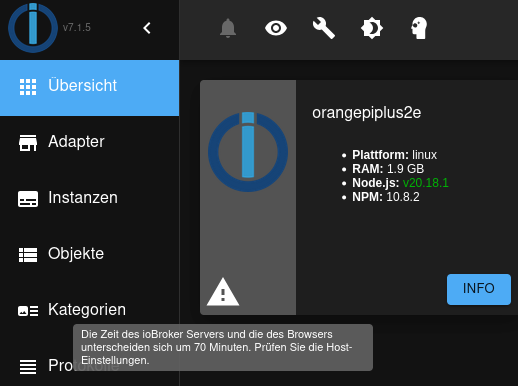
Irgendwas scheint mit der Systemzeit nicht zu passen.
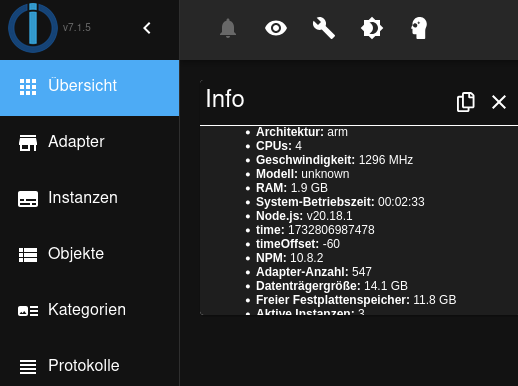
Bei Time steht die Zeit scheinbar auch als UTC in Millisekunnden. Ist das so richtig?
-
kurze Rückmeldung:
update auf nodejs 18.x hat geklappt.Habe das alte Buster System jetzt bis js-controller v6.0.11 gebraucht. (Seid heute gibt es ja schon 7.0.3
)
Habe jetzt ein Backup angefertig und mache jetzt auf dem neuen Bookworm System weiter.Hier habe ich allerdings auch noch ein paar Problem.
Das System ist frisch installiert und es wurde nur der iobroker installer ausgefühlt.Der admin adapter schmeisst mir bei jedem Start eine Warung: "Cannot update news: ETIMEDOUT"
Irgendwas scheint mit der Systemzeit nicht zu passen.
Bei Time steht die Zeit scheinbar auch als UTC in Millisekunnden. Ist das so richtig?
@slonnet sagte in Upgrade von JS-Controller @3.1.6 mit Debian Buster:
bei jedem Start eine Warung: "Cannot update news: ETIMEDOUT"
da steht bestimmt noch mehr im log!
kommst du ins Internet?@slonnet sagte in Upgrade von JS-Controller @3.1.6 mit Debian Buster:
Ist das so richtig?
Da steht auch time offset -60 (Minuten)
-
kurze Rückmeldung:
update auf nodejs 18.x hat geklappt.Habe das alte Buster System jetzt bis js-controller v6.0.11 gebraucht. (Seid heute gibt es ja schon 7.0.3
)
Habe jetzt ein Backup angefertig und mache jetzt auf dem neuen Bookworm System weiter.Hier habe ich allerdings auch noch ein paar Problem.
Das System ist frisch installiert und es wurde nur der iobroker installer ausgefühlt.Der admin adapter schmeisst mir bei jedem Start eine Warung: "Cannot update news: ETIMEDOUT"
Irgendwas scheint mit der Systemzeit nicht zu passen.
Bei Time steht die Zeit scheinbar auch als UTC in Millisekunnden. Ist das so richtig?
@slonnet sagte in Upgrade von JS-Controller @3.1.6 mit Debian Buster:
Irgendwas scheint mit der Systemzeit nicht zu passen.
Dazu steht z B. in
iob diagwas drin.
-
@slonnet sagte in Upgrade von JS-Controller @3.1.6 mit Debian Buster:
bei jedem Start eine Warung: "Cannot update news: ETIMEDOUT"
da steht bestimmt noch mehr im log!
kommst du ins Internet?@slonnet sagte in Upgrade von JS-Controller @3.1.6 mit Debian Buster:
Ist das so richtig?
Da steht auch time offset -60 (Minuten)
@homoran sagte in Upgrade von JS-Controller @3.1.6 mit Debian Buster:
@slonnet sagte in Upgrade von JS-Controller @3.1.6 mit Debian Buster:
bei jedem Start eine Warung: "Cannot update news: ETIMEDOUT"
da steht bestimmt noch mehr im log!
kommst du ins Internet?@slonnet sagte in Upgrade von JS-Controller @3.1.6 mit Debian Buster:
Ist das so richtig?
Da steht auch time offset -60 (Minuten)
admin. 02024-11-28 19:52:11.596 debug Search can't be optimized because wildcard not at the end, fallback to keys!: function(doc) { if (doc.type === 'state') emit(doc._id, doc) }Und ja, komme ins Internet... Hat ja schliesslich auch bei dem Install geklappt
-
@slonnet sagte in Upgrade von JS-Controller @3.1.6 mit Debian Buster:
Irgendwas scheint mit der Systemzeit nicht zu passen.
Dazu steht z B. in
iob diagwas drin.
@thomas-braun sagte in Upgrade von JS-Controller @3.1.6 mit Debian Buster:
@slonnet sagte in Upgrade von JS-Controller @3.1.6 mit Debian Buster:
Irgendwas scheint mit der Systemzeit nicht zu passen.
Dazu steht z B. in
iob diagwas drin.
```bash Script v.2024-10-19 *** BASE SYSTEM *** Static hostname: orangepiplus2e Icon name: computer Operating System: Armbian 25.2.0-trunk.96 bookworm Kernel: Linux 6.1.104-legacy-sunxi Architecture: arm OS is similar to: model name : ARMv7 Processor rev 5 (v7l) Docker : false Virtualization : none Kernel : armv7l Userland : 32 bit Systemuptime and Load: 20:02:24 up 11 min, 2 users, load average: 0.30, 1.04, 0.77 CPU threads: 4 *** LIFE CYCLE STATUS *** Operating System is the current Debian stable version codenamed 'bookworm'! *** TIME AND TIMEZONES *** Local time: Thu 2024-11-28 20:02:24 CET Universal time: Thu 2024-11-28 19:02:24 UTC RTC time: Thu 2024-11-28 19:02:30 Time zone: Europe/Berlin (CET, +0100) System clock synchronized: yes NTP service: active RTC in local TZ: no *** Users and Groups *** User that called 'iob diag': pi HOME=/home/pi GROUPS=pi tty disk dialout sudo audio video plugdev games users input render netdev systemd-journal iobroker User that is running 'js-controller': js-controller is not running *** DISPLAY-SERVER SETUP *** Display-Server: false Desktop: Terminal: tty *** MEMORY *** total used free shared buff/cache available Mem: 2.1G 143M 1.8G 3.5M 266M 2.0G Swap: 1.1G 0B 1.1G Total: 3.2G 143M 2.8G Active iob-Instances: 1 2010 M total memory 136 M used memory 156 M active memory 97 M inactive memory 1684 M free memory 18 M buffer memory 235 M swap cache 1005 M total swap 0 M used swap 1005 M free swap *** top - Table Of Processes *** top - 20:02:25 up 11 min, 2 users, load average: 0.30, 1.04, 0.77 Tasks: 120 total, 1 running, 119 sleeping, 0 stopped, 0 zombie %Cpu(s): 11.1 us, 22.2 sy, 0.0 ni, 66.7 id, 0.0 wa, 0.0 hi, 0.0 si, 0.0 st MiB Mem : 2010.9 total, 1682.5 free, 138.8 used, 254.2 buff/cache MiB Swap: 1005.5 total, 1005.5 free, 0.0 used. 1872.1 avail Mem *** FAILED SERVICES *** UNIT LOAD ACTIVE SUB DESCRIPTION * console-setup.service loaded failed failed Set console font and keymap * iobroker.service loaded failed failed ioBroker Server LOAD = Reflects whether the unit definition was properly loaded. ACTIVE = The high-level unit activation state, i.e. generalization of SUB. SUB = The low-level unit activation state, values depend on unit type. 2 loaded units listed. *** DMESG CRITICAL ERRORS *** No critical errors detected *** FILESYSTEM *** Filesystem Type Size Used Avail Use% Mounted on udev devtmpfs 937M 0 937M 0% /dev tmpfs tmpfs 202M 3.3M 198M 2% /run /dev/mmcblk2p1 ext4 15G 2.3G 12G 17% / tmpfs tmpfs 1006M 0 1006M 0% /dev/shm tmpfs tmpfs 5.0M 0 5.0M 0% /run/lock tmpfs tmpfs 1006M 0 1006M 0% /tmp /dev/zram1 ext4 47M 2.1M 42M 5% /var/log tmpfs tmpfs 202M 0 202M 0% /run/user/1000 Messages concerning ext4 filesystem in dmesg: [Thu Nov 28 19:51:17 2024] Kernel command line: root=UUID=0d61dd11-16f9-48cc-ab90-c09322f8e5fd rootwait rootfstype=ext4 splash=verbose console=ttyS0,115200 console=tty1 hdmi.audio=EDID:0 disp.screen0_output_mode=1920x1080p60 consoleblank=0 loglevel=1 ubootpart= ubootsource=mmc usb-storage.quirks=0x2537:0x1066:u,0x2537:0x1068:u sunxi_ve_mem_reserve=0 sunxi_g2d_mem_reserve=0 sunxi_fb_mem_reserve=16 cgroup_enable=memory [Thu Nov 28 19:51:19 2024] EXT4-fs (mmcblk2p1): mounted filesystem with ordered data mode. Quota mode: none. [Thu Nov 28 19:51:21 2024] EXT4-fs (mmcblk2p1): re-mounted. Quota mode: none. [Thu Nov 28 19:51:24 2024] EXT4-fs (zram1): mounted filesystem without journal. Quota mode: none. Show mounted filesystems: TARGET SOURCE FSTYPE OPTIONS / /dev/mmcblk2p1 ext4 rw,noatime,errors=remount-ro,commit=120 |-/var/log.hdd /dev/mmcblk2p1[/var/log] ext4 rw,noatime,errors=remount-ro,commit=120 `-/var/log /dev/zram1 ext4 rw,nosuid,nodev,noexec,relatime,discard Files in neuralgic directories: /var: 299M /var/ 217M /var/cache 212M /var/cache/apt 143M /var/cache/apt/archives 70M /var/lib Archived and active journals take up 10.1M in the file system. /opt/iobroker/backups: 4.0K /opt/iobroker/backups/ /opt/iobroker/iobroker-data: 77M /opt/iobroker/iobroker-data/ 60M /opt/iobroker/iobroker-data/files 31M /opt/iobroker/iobroker-data/files/admin.admin/custom/static/js 31M /opt/iobroker/iobroker-data/files/admin.admin/custom/static 31M /opt/iobroker/iobroker-data/files/admin.admin/custom The five largest files in iobroker-data are: 12M /opt/iobroker/iobroker-data/files/backitup.admin/static/js/main.bd24114f.js 11M /opt/iobroker/iobroker-data/objects.jsonl 7.0M /opt/iobroker/iobroker-data/files/admin.admin/custom/static/js/vendors-node_modules_mui_icons-material_esm_index_js.0c96b194.chunk.js.map 5.6M /opt/iobroker/iobroker-data/files/backitup.admin/custom/static/js/vendors-node_modules_file-saver_dist_FileSaver_min_js-node_modules_react-icons_di_index_mjs-n-f0ed96.6c33ff1f.chunk.js 5.5M /opt/iobroker/iobroker-data/files/admin.admin/custom/static/js/vendors-node_modules_iobroker_adapter-react-v5_assets_devices_parseNames_d_ts-node_modules_io-2d33e4.42bb0640.chunk.js.map USB-Devices by-id: USB-Sticks - Avoid direct links to /dev/tty* in your adapter setups, please always prefer the links 'by-id': No Devices found 'by-id' *** NodeJS-Installation *** /usr/bin/nodejs v20.18.1 /usr/bin/node v20.18.1 /usr/bin/npm 10.8.2 /usr/bin/npx 10.8.2 /usr/bin/corepack 0.29.4 nodejs: Installed: 20.18.1-1nodesource1 Candidate: 20.18.1-1nodesource1 Version table: *** 20.18.1-1nodesource1 1001 500 https://deb.nodesource.com/node_20.x nodistro/main armhf Packages 100 /var/lib/dpkg/status 20.18.0-1nodesource1 1001 500 https://deb.nodesource.com/node_20.x nodistro/main armhf Packages 20.17.0-1nodesource1 1001 500 https://deb.nodesource.com/node_20.x nodistro/main armhf Packages 20.16.0-1nodesource1 1001 500 https://deb.nodesource.com/node_20.x nodistro/main armhf Packages 20.15.1-1nodesource1 1001 500 https://deb.nodesource.com/node_20.x nodistro/main armhf Packages 20.15.0-1nodesource1 1001 500 https://deb.nodesource.com/node_20.x nodistro/main armhf Packages 20.14.0-1nodesource1 1001 500 https://deb.nodesource.com/node_20.x nodistro/main armhf Packages 20.13.1-1nodesource1 1001 500 https://deb.nodesource.com/node_20.x nodistro/main armhf Packages 20.13.0-1nodesource1 1001 500 https://deb.nodesource.com/node_20.x nodistro/main armhf Packages 20.12.2-1nodesource1 1001 500 https://deb.nodesource.com/node_20.x nodistro/main armhf Packages 20.12.1-1nodesource1 1001 500 https://deb.nodesource.com/node_20.x nodistro/main armhf Packages 20.12.0-1nodesource1 1001 500 https://deb.nodesource.com/node_20.x nodistro/main armhf Packages 20.11.1-1nodesource1 1001 500 https://deb.nodesource.com/node_20.x nodistro/main armhf Packages 20.11.0-1nodesource1 1001 500 https://deb.nodesource.com/node_20.x nodistro/main armhf Packages 20.10.0-1nodesource1 1001 500 https://deb.nodesource.com/node_20.x nodistro/main armhf Packages 20.9.0-1nodesource1 1001 500 https://deb.nodesource.com/node_20.x nodistro/main armhf Packages 20.8.1-1nodesource1 1001 500 https://deb.nodesource.com/node_20.x nodistro/main armhf Packages 20.8.0-1nodesource1 1001 500 https://deb.nodesource.com/node_20.x nodistro/main armhf Packages 20.7.0-1nodesource1 1001 500 https://deb.nodesource.com/node_20.x nodistro/main armhf Packages 20.6.1-1nodesource1 1001 500 https://deb.nodesource.com/node_20.x nodistro/main armhf Packages 20.6.0-1nodesource1 1001 500 https://deb.nodesource.com/node_20.x nodistro/main armhf Packages 20.5.1-1nodesource1 1001 500 https://deb.nodesource.com/node_20.x nodistro/main armhf Packages 20.5.0-1nodesource1 1001 500 https://deb.nodesource.com/node_20.x nodistro/main armhf Packages 20.4.0-1nodesource1 1001 500 https://deb.nodesource.com/node_20.x nodistro/main armhf Packages 20.3.1-1nodesource1 1001 500 https://deb.nodesource.com/node_20.x nodistro/main armhf Packages 20.3.0-1nodesource1 1001 500 https://deb.nodesource.com/node_20.x nodistro/main armhf Packages 20.2.0-1nodesource1 1001 500 https://deb.nodesource.com/node_20.x nodistro/main armhf Packages 20.1.0-1nodesource1 1001 500 https://deb.nodesource.com/node_20.x nodistro/main armhf Packages 20.0.0-1nodesource1 1001 500 https://deb.nodesource.com/node_20.x nodistro/main armhf Packages 18.19.0+dfsg-6~deb12u2 500 500 http://deb.debian.org/debian bookworm/main armhf Packages 18.19.0+dfsg-6~deb12u1 500 500 http://security.debian.org bookworm-security/main armhf Packages Temp directories causing deletion problem: 0 No problems detected Errors in npm tree: 0 No problems detected *** ioBroker-Installation *** ioBroker Status iobroker is not running on this host. Objects type: jsonl States type: jsonl Hosts: orangepiplus2e orangepiplus2e (version: 7.0.3, hostname: orangepiplus2e, alive, uptime: 53) Core adapters versions js-controller: 7.0.3 admin: 7.1.5 javascript: "javascript" not found nodejs modules from github: 0 Adapter State system.adapter.admin.0 : admin : orangepiplus2e - enabled, port: 8081, bind: 0.0.0.0, run as: admin system.adapter.backitup.0 : backitup : orangepiplus2e - enabled system.adapter.discovery.0 : discovery : orangepiplus2e - enabled + instance is alive Enabled adapters with bindings system.adapter.admin.0 : admin : orangepiplus2e - enabled, port: 8081, bind: 0.0.0.0, run as: admin ioBroker-Repositories ┌─────────┬──────────┬─────────────────────────────────────────────────────────┬──────────────┐ │ (index) │ name │ url │ auto upgrade │ ├─────────┼──────────┼─────────────────────────────────────────────────────────┼──────────────┤ │ 0 │ 'stable' │ 'http://download.iobroker.net/sources-dist.json' │ false │ │ 1 │ 'beta' │ 'http://download.iobroker.net/sources-dist-latest.json' │ false │ └─────────┴──────────┴─────────────────────────────────────────────────────────┴──────────────┘ Active repo(s): stable Upgrade policy: none Installed ioBroker-Instances Used repository: stable Adapter "admin" : 7.1.5 , installed 7.1.5 Adapter "backitup" : 3.0.25 , installed 3.0.25 Adapter "discovery" : 5.0.0 , installed 5.0.0 Controller "js-controller": 7.0.3 , installed 7.0.3 Objects and States Please stand by - This may take a while Objects: 148 States: 78 *** OS-Repositories and Updates *** Hit:1 http://deb.debian.org/debian bookworm InRelease Hit:2 http://deb.debian.org/debian bookworm-updates InRelease Hit:3 http://deb.debian.org/debian bookworm-backports InRelease Hit:4 http://security.debian.org bookworm-security InRelease Hit:5 https://github.armbian.com/configng stable InRelease Hit:6 https://deb.nodesource.com/node_20.x nodistro InRelease Hit:7 http://netcup.armbian.com/beta bookworm InRelease Reading package lists... Pending Updates: 7 *** Listening Ports *** Active Internet connections (only servers) Proto Recv-Q Send-Q Local Address Foreign Address State User Inode PID/Program name tcp 0 0 127.0.0.53:53 0.0.0.0:* LISTEN 997 10839 563/systemd-resolve tcp 0 0 0.0.0.0:111 0.0.0.0:* LISTEN 0 1274 1/init tcp 0 0 0.0.0.0:22 0.0.0.0:* LISTEN 0 10997 748/sshd: /usr/sbin tcp 0 0 0.0.0.0:5355 0.0.0.0:* LISTEN 997 10829 563/systemd-resolve tcp 0 0 127.0.0.54:53 0.0.0.0:* LISTEN 997 10841 563/systemd-resolve tcp6 0 0 :::111 :::* LISTEN 0 8419 1/init tcp6 0 0 :::22 :::* LISTEN 0 10999 748/sshd: /usr/sbin udp 0 0 0.0.0.0:5355 0.0.0.0:* 997 10828 563/systemd-resolve udp 0 0 127.0.0.54:53 0.0.0.0:* 997 10840 563/systemd-resolve udp 0 0 127.0.0.53:53 0.0.0.0:* 997 10838 563/systemd-resolve udp 0 0 0.0.0.0:111 0.0.0.0:* 0 8418 1/init udp6 0 0 :::5355 :::* 997 11020 563/systemd-resolve udp6 0 0 :::111 :::* 0 1275 1/init *** Log File - Last 25 Lines *** 2024-11-28 19:59:15.356 - info: host.orangepiplus2e stopInstance system.adapter.admin.0 send kill signal 2024-11-28 19:59:15.357 - debug: admin.0 (1837) Plugin sentry destroyed 2024-11-28 19:59:15.359 - info: admin.0 (1837) Terminated (NO_ERROR): Without reason 2024-11-28 19:59:15.364 - silly: admin.0 (1837) States system redis pmessage io.log.system.adapter.admin.0/io.log.system.adapter.admin.0:{"severity":"info","ts":1732820355338,"message":"discovery.0 (1856) Got terminate signal TERMINATE_YOURSELF","from":"discovery.0","_id":75436289} 2024-11-28 19:59:15.359 - info: backitup.0 (1844) Terminated (NO_ERROR): Without reason 2024-11-28 19:59:15.361 - info: discovery.0 (1856) Terminated (NO_ERROR): Without reason 2024-11-28 19:59:15.368 - info: host.orangepiplus2e stopInstance system.adapter.backitup.0 send kill signal 2024-11-28 19:59:15.370 - info: host.orangepiplus2e stopInstance system.adapter.discovery.0 send kill signal 2024-11-28 19:59:15.376 - silly: admin.0 (1837) States system redis pmessage io.log.system.adapter.admin.0/io.log.system.adapter.admin.0:{"severity":"info","ts":1732820355356,"message":"host.orangepiplus2e stopInstance system.adapter.admin.0 send kill signal","from":"host.orangepiplus2e","_id":96880692} 2024-11-28 19:59:15.379 - silly: admin.0 (1837) States system redis pmessage io.log.system.adapter.admin.0/io.log.system.adapter.admin.0:{"severity":"info","ts":1732820355368,"message":"host.orangepiplus2e stopInstance system.adapter.backitup.0 send kill signal","from":"host.orangepiplus2e","_id":96880693} 2024-11-28 19:59:15.382 - silly: admin.0 (1837) States system redis pmessage io.log.system.adapter.admin.0/io.log.system.adapter.admin.0:{"severity":"info","ts":1732820355370,"message":"host.orangepiplus2e stopInstance system.adapter.discovery.0 send kill signal","from":"host.orangepiplus2e","_id":96880694} 2024-11-28 19:59:15.385 - silly: admin.0 (1837) States system redis pmessage io.log.system.adapter.admin.0/io.log.system.adapter.admin.0:{"severity":"info","ts":1732820355352,"message":"backitup.0 (1844) terminating","from":"backitup.0","_id":72283540} 2024-11-28 19:59:15.387 - silly: admin.0 (1837) States system redis pmessage io.log.system.adapter.admin.0/io.log.system.adapter.admin.0:{"severity":"info","ts":1732820355359,"message":"backitup.0 (1844) Terminated (NO_ERROR): Without reason","from":"backitup.0","_id":72283541} 2024-11-28 19:59:15.391 - silly: admin.0 (1837) States system redis pmessage io.log.system.adapter.admin.0/io.log.system.adapter.admin.0:{"severity":"info","ts":1732820355352,"message":"discovery.0 (1856) terminating","from":"discovery.0","_id":75436290} 2024-11-28 19:59:15.393 - silly: admin.0 (1837) States system redis pmessage io.log.system.adapter.admin.0/io.log.system.adapter.admin.0:{"severity":"info","ts":1732820355361,"message":"discovery.0 (1856) Terminated (NO_ERROR): Without reason","from":"discovery.0","_id":75436291} 2024-11-28 19:59:15.774 - info: discovery.0 (1856) terminating 2024-11-28 19:59:15.780 - silly: admin.0 (1837) States system redis pmessage io.log.system.adapter.admin.0/io.log.system.adapter.admin.0:{"severity":"info","ts":1732820355774,"message":"discovery.0 (1856) terminating","from":"discovery.0","_id":75436292} 2024-11-28 19:59:15.794 - info: admin.0 (1837) terminating 2024-11-28 19:59:15.794 - info: backitup.0 (1844) terminating 2024-11-28 19:59:15.801 - silly: admin.0 (1837) States system redis pmessage io.log.system.adapter.admin.0/io.log.system.adapter.admin.0:{"severity":"info","ts":1732820355794,"message":"backitup.0 (1844) terminating","from":"backitup.0","_id":72283542} 2024-11-28 19:59:16.048 - info: host.orangepiplus2e instance system.adapter.backitup.0 terminated with code 0 (NO_ERROR) 2024-11-28 19:59:16.086 - info: host.orangepiplus2e instance system.adapter.admin.0 terminated with code 0 (NO_ERROR) 2024-11-28 19:59:16.125 - info: host.orangepiplus2e instance system.adapter.discovery.0 terminated with code 0 (NO_ERROR) 2024-11-28 19:59:16.127 - info: host.orangepiplus2e All instances are stopped. 2024-11-28 19:59:16.357 - info: host.orangepiplus2e terminated ```bash ======================= SUMMARY ======================= v.2024-10-19 Static hostname: orangepiplus2e Icon name: computer Operating System: Armbian 25.2.0-trunk.96 bookworm Kernel: Linux 6.1.104-legacy-sunxi Architecture: arm Installation: native Kernel: armv7l Userland: 32 bit Timezone: Europe/Berlin (CET, +0100) User-ID: 1000 Display-Server: false Boot Target: multi-user.target Pending OS-Updates: 7 Pending iob updates: 0 Nodejs-Installation: /usr/bin/nodejs v20.18.1 /usr/bin/node v20.18.1 /usr/bin/npm 10.8.2 /usr/bin/npx 10.8.2 /usr/bin/corepack 0.29.4 Recommended versions are nodejs 20.18.1 and npm 10.8.2 nodeJS installation is correct MEMORY: total used free shared buff/cache available Mem: 2.1G 142M 1.7G 3.5M 372M 2.0G Swap: 1.1G 0B 1.1G Total: 3.2G 142M 2.7G Active iob-Instances: 1 Upgrade policy: none ioBroker Core: js-controller 7.0.3 admin 7.1.5 ioBroker Status: iobroker is not running on this host. Objects type: jsonl States type: jsonl Status admin and web instance: system.adapter.admin.0 : admin : orangepiplus2e - enabled, port: 8081, bind: 0.0.0.0, run as: admin Objects: 148 States: 78 Size of iob-Database: 16M /opt/iobroker/iobroker-data/objects.jsonl 2.8M /opt/iobroker/iobroker-data/states.jsonl Operating System is the current Debian stable version codenamed 'bookworm'! =================== END OF SUMMARY ==================== -
@thomas-braun sagte in Upgrade von JS-Controller @3.1.6 mit Debian Buster:
@slonnet sagte in Upgrade von JS-Controller @3.1.6 mit Debian Buster:
Irgendwas scheint mit der Systemzeit nicht zu passen.
Dazu steht z B. in
iob diagwas drin.
```bash Script v.2024-10-19 *** BASE SYSTEM *** Static hostname: orangepiplus2e Icon name: computer Operating System: Armbian 25.2.0-trunk.96 bookworm Kernel: Linux 6.1.104-legacy-sunxi Architecture: arm OS is similar to: model name : ARMv7 Processor rev 5 (v7l) Docker : false Virtualization : none Kernel : armv7l Userland : 32 bit Systemuptime and Load: 20:02:24 up 11 min, 2 users, load average: 0.30, 1.04, 0.77 CPU threads: 4 *** LIFE CYCLE STATUS *** Operating System is the current Debian stable version codenamed 'bookworm'! *** TIME AND TIMEZONES *** Local time: Thu 2024-11-28 20:02:24 CET Universal time: Thu 2024-11-28 19:02:24 UTC RTC time: Thu 2024-11-28 19:02:30 Time zone: Europe/Berlin (CET, +0100) System clock synchronized: yes NTP service: active RTC in local TZ: no *** Users and Groups *** User that called 'iob diag': pi HOME=/home/pi GROUPS=pi tty disk dialout sudo audio video plugdev games users input render netdev systemd-journal iobroker User that is running 'js-controller': js-controller is not running *** DISPLAY-SERVER SETUP *** Display-Server: false Desktop: Terminal: tty *** MEMORY *** total used free shared buff/cache available Mem: 2.1G 143M 1.8G 3.5M 266M 2.0G Swap: 1.1G 0B 1.1G Total: 3.2G 143M 2.8G Active iob-Instances: 1 2010 M total memory 136 M used memory 156 M active memory 97 M inactive memory 1684 M free memory 18 M buffer memory 235 M swap cache 1005 M total swap 0 M used swap 1005 M free swap *** top - Table Of Processes *** top - 20:02:25 up 11 min, 2 users, load average: 0.30, 1.04, 0.77 Tasks: 120 total, 1 running, 119 sleeping, 0 stopped, 0 zombie %Cpu(s): 11.1 us, 22.2 sy, 0.0 ni, 66.7 id, 0.0 wa, 0.0 hi, 0.0 si, 0.0 st MiB Mem : 2010.9 total, 1682.5 free, 138.8 used, 254.2 buff/cache MiB Swap: 1005.5 total, 1005.5 free, 0.0 used. 1872.1 avail Mem *** FAILED SERVICES *** UNIT LOAD ACTIVE SUB DESCRIPTION * console-setup.service loaded failed failed Set console font and keymap * iobroker.service loaded failed failed ioBroker Server LOAD = Reflects whether the unit definition was properly loaded. ACTIVE = The high-level unit activation state, i.e. generalization of SUB. SUB = The low-level unit activation state, values depend on unit type. 2 loaded units listed. *** DMESG CRITICAL ERRORS *** No critical errors detected *** FILESYSTEM *** Filesystem Type Size Used Avail Use% Mounted on udev devtmpfs 937M 0 937M 0% /dev tmpfs tmpfs 202M 3.3M 198M 2% /run /dev/mmcblk2p1 ext4 15G 2.3G 12G 17% / tmpfs tmpfs 1006M 0 1006M 0% /dev/shm tmpfs tmpfs 5.0M 0 5.0M 0% /run/lock tmpfs tmpfs 1006M 0 1006M 0% /tmp /dev/zram1 ext4 47M 2.1M 42M 5% /var/log tmpfs tmpfs 202M 0 202M 0% /run/user/1000 Messages concerning ext4 filesystem in dmesg: [Thu Nov 28 19:51:17 2024] Kernel command line: root=UUID=0d61dd11-16f9-48cc-ab90-c09322f8e5fd rootwait rootfstype=ext4 splash=verbose console=ttyS0,115200 console=tty1 hdmi.audio=EDID:0 disp.screen0_output_mode=1920x1080p60 consoleblank=0 loglevel=1 ubootpart= ubootsource=mmc usb-storage.quirks=0x2537:0x1066:u,0x2537:0x1068:u sunxi_ve_mem_reserve=0 sunxi_g2d_mem_reserve=0 sunxi_fb_mem_reserve=16 cgroup_enable=memory [Thu Nov 28 19:51:19 2024] EXT4-fs (mmcblk2p1): mounted filesystem with ordered data mode. Quota mode: none. [Thu Nov 28 19:51:21 2024] EXT4-fs (mmcblk2p1): re-mounted. Quota mode: none. [Thu Nov 28 19:51:24 2024] EXT4-fs (zram1): mounted filesystem without journal. Quota mode: none. Show mounted filesystems: TARGET SOURCE FSTYPE OPTIONS / /dev/mmcblk2p1 ext4 rw,noatime,errors=remount-ro,commit=120 |-/var/log.hdd /dev/mmcblk2p1[/var/log] ext4 rw,noatime,errors=remount-ro,commit=120 `-/var/log /dev/zram1 ext4 rw,nosuid,nodev,noexec,relatime,discard Files in neuralgic directories: /var: 299M /var/ 217M /var/cache 212M /var/cache/apt 143M /var/cache/apt/archives 70M /var/lib Archived and active journals take up 10.1M in the file system. /opt/iobroker/backups: 4.0K /opt/iobroker/backups/ /opt/iobroker/iobroker-data: 77M /opt/iobroker/iobroker-data/ 60M /opt/iobroker/iobroker-data/files 31M /opt/iobroker/iobroker-data/files/admin.admin/custom/static/js 31M /opt/iobroker/iobroker-data/files/admin.admin/custom/static 31M /opt/iobroker/iobroker-data/files/admin.admin/custom The five largest files in iobroker-data are: 12M /opt/iobroker/iobroker-data/files/backitup.admin/static/js/main.bd24114f.js 11M /opt/iobroker/iobroker-data/objects.jsonl 7.0M /opt/iobroker/iobroker-data/files/admin.admin/custom/static/js/vendors-node_modules_mui_icons-material_esm_index_js.0c96b194.chunk.js.map 5.6M /opt/iobroker/iobroker-data/files/backitup.admin/custom/static/js/vendors-node_modules_file-saver_dist_FileSaver_min_js-node_modules_react-icons_di_index_mjs-n-f0ed96.6c33ff1f.chunk.js 5.5M /opt/iobroker/iobroker-data/files/admin.admin/custom/static/js/vendors-node_modules_iobroker_adapter-react-v5_assets_devices_parseNames_d_ts-node_modules_io-2d33e4.42bb0640.chunk.js.map USB-Devices by-id: USB-Sticks - Avoid direct links to /dev/tty* in your adapter setups, please always prefer the links 'by-id': No Devices found 'by-id' *** NodeJS-Installation *** /usr/bin/nodejs v20.18.1 /usr/bin/node v20.18.1 /usr/bin/npm 10.8.2 /usr/bin/npx 10.8.2 /usr/bin/corepack 0.29.4 nodejs: Installed: 20.18.1-1nodesource1 Candidate: 20.18.1-1nodesource1 Version table: *** 20.18.1-1nodesource1 1001 500 https://deb.nodesource.com/node_20.x nodistro/main armhf Packages 100 /var/lib/dpkg/status 20.18.0-1nodesource1 1001 500 https://deb.nodesource.com/node_20.x nodistro/main armhf Packages 20.17.0-1nodesource1 1001 500 https://deb.nodesource.com/node_20.x nodistro/main armhf Packages 20.16.0-1nodesource1 1001 500 https://deb.nodesource.com/node_20.x nodistro/main armhf Packages 20.15.1-1nodesource1 1001 500 https://deb.nodesource.com/node_20.x nodistro/main armhf Packages 20.15.0-1nodesource1 1001 500 https://deb.nodesource.com/node_20.x nodistro/main armhf Packages 20.14.0-1nodesource1 1001 500 https://deb.nodesource.com/node_20.x nodistro/main armhf Packages 20.13.1-1nodesource1 1001 500 https://deb.nodesource.com/node_20.x nodistro/main armhf Packages 20.13.0-1nodesource1 1001 500 https://deb.nodesource.com/node_20.x nodistro/main armhf Packages 20.12.2-1nodesource1 1001 500 https://deb.nodesource.com/node_20.x nodistro/main armhf Packages 20.12.1-1nodesource1 1001 500 https://deb.nodesource.com/node_20.x nodistro/main armhf Packages 20.12.0-1nodesource1 1001 500 https://deb.nodesource.com/node_20.x nodistro/main armhf Packages 20.11.1-1nodesource1 1001 500 https://deb.nodesource.com/node_20.x nodistro/main armhf Packages 20.11.0-1nodesource1 1001 500 https://deb.nodesource.com/node_20.x nodistro/main armhf Packages 20.10.0-1nodesource1 1001 500 https://deb.nodesource.com/node_20.x nodistro/main armhf Packages 20.9.0-1nodesource1 1001 500 https://deb.nodesource.com/node_20.x nodistro/main armhf Packages 20.8.1-1nodesource1 1001 500 https://deb.nodesource.com/node_20.x nodistro/main armhf Packages 20.8.0-1nodesource1 1001 500 https://deb.nodesource.com/node_20.x nodistro/main armhf Packages 20.7.0-1nodesource1 1001 500 https://deb.nodesource.com/node_20.x nodistro/main armhf Packages 20.6.1-1nodesource1 1001 500 https://deb.nodesource.com/node_20.x nodistro/main armhf Packages 20.6.0-1nodesource1 1001 500 https://deb.nodesource.com/node_20.x nodistro/main armhf Packages 20.5.1-1nodesource1 1001 500 https://deb.nodesource.com/node_20.x nodistro/main armhf Packages 20.5.0-1nodesource1 1001 500 https://deb.nodesource.com/node_20.x nodistro/main armhf Packages 20.4.0-1nodesource1 1001 500 https://deb.nodesource.com/node_20.x nodistro/main armhf Packages 20.3.1-1nodesource1 1001 500 https://deb.nodesource.com/node_20.x nodistro/main armhf Packages 20.3.0-1nodesource1 1001 500 https://deb.nodesource.com/node_20.x nodistro/main armhf Packages 20.2.0-1nodesource1 1001 500 https://deb.nodesource.com/node_20.x nodistro/main armhf Packages 20.1.0-1nodesource1 1001 500 https://deb.nodesource.com/node_20.x nodistro/main armhf Packages 20.0.0-1nodesource1 1001 500 https://deb.nodesource.com/node_20.x nodistro/main armhf Packages 18.19.0+dfsg-6~deb12u2 500 500 http://deb.debian.org/debian bookworm/main armhf Packages 18.19.0+dfsg-6~deb12u1 500 500 http://security.debian.org bookworm-security/main armhf Packages Temp directories causing deletion problem: 0 No problems detected Errors in npm tree: 0 No problems detected *** ioBroker-Installation *** ioBroker Status iobroker is not running on this host. Objects type: jsonl States type: jsonl Hosts: orangepiplus2e orangepiplus2e (version: 7.0.3, hostname: orangepiplus2e, alive, uptime: 53) Core adapters versions js-controller: 7.0.3 admin: 7.1.5 javascript: "javascript" not found nodejs modules from github: 0 Adapter State system.adapter.admin.0 : admin : orangepiplus2e - enabled, port: 8081, bind: 0.0.0.0, run as: admin system.adapter.backitup.0 : backitup : orangepiplus2e - enabled system.adapter.discovery.0 : discovery : orangepiplus2e - enabled + instance is alive Enabled adapters with bindings system.adapter.admin.0 : admin : orangepiplus2e - enabled, port: 8081, bind: 0.0.0.0, run as: admin ioBroker-Repositories ┌─────────┬──────────┬─────────────────────────────────────────────────────────┬──────────────┐ │ (index) │ name │ url │ auto upgrade │ ├─────────┼──────────┼─────────────────────────────────────────────────────────┼──────────────┤ │ 0 │ 'stable' │ 'http://download.iobroker.net/sources-dist.json' │ false │ │ 1 │ 'beta' │ 'http://download.iobroker.net/sources-dist-latest.json' │ false │ └─────────┴──────────┴─────────────────────────────────────────────────────────┴──────────────┘ Active repo(s): stable Upgrade policy: none Installed ioBroker-Instances Used repository: stable Adapter "admin" : 7.1.5 , installed 7.1.5 Adapter "backitup" : 3.0.25 , installed 3.0.25 Adapter "discovery" : 5.0.0 , installed 5.0.0 Controller "js-controller": 7.0.3 , installed 7.0.3 Objects and States Please stand by - This may take a while Objects: 148 States: 78 *** OS-Repositories and Updates *** Hit:1 http://deb.debian.org/debian bookworm InRelease Hit:2 http://deb.debian.org/debian bookworm-updates InRelease Hit:3 http://deb.debian.org/debian bookworm-backports InRelease Hit:4 http://security.debian.org bookworm-security InRelease Hit:5 https://github.armbian.com/configng stable InRelease Hit:6 https://deb.nodesource.com/node_20.x nodistro InRelease Hit:7 http://netcup.armbian.com/beta bookworm InRelease Reading package lists... Pending Updates: 7 *** Listening Ports *** Active Internet connections (only servers) Proto Recv-Q Send-Q Local Address Foreign Address State User Inode PID/Program name tcp 0 0 127.0.0.53:53 0.0.0.0:* LISTEN 997 10839 563/systemd-resolve tcp 0 0 0.0.0.0:111 0.0.0.0:* LISTEN 0 1274 1/init tcp 0 0 0.0.0.0:22 0.0.0.0:* LISTEN 0 10997 748/sshd: /usr/sbin tcp 0 0 0.0.0.0:5355 0.0.0.0:* LISTEN 997 10829 563/systemd-resolve tcp 0 0 127.0.0.54:53 0.0.0.0:* LISTEN 997 10841 563/systemd-resolve tcp6 0 0 :::111 :::* LISTEN 0 8419 1/init tcp6 0 0 :::22 :::* LISTEN 0 10999 748/sshd: /usr/sbin udp 0 0 0.0.0.0:5355 0.0.0.0:* 997 10828 563/systemd-resolve udp 0 0 127.0.0.54:53 0.0.0.0:* 997 10840 563/systemd-resolve udp 0 0 127.0.0.53:53 0.0.0.0:* 997 10838 563/systemd-resolve udp 0 0 0.0.0.0:111 0.0.0.0:* 0 8418 1/init udp6 0 0 :::5355 :::* 997 11020 563/systemd-resolve udp6 0 0 :::111 :::* 0 1275 1/init *** Log File - Last 25 Lines *** 2024-11-28 19:59:15.356 - info: host.orangepiplus2e stopInstance system.adapter.admin.0 send kill signal 2024-11-28 19:59:15.357 - debug: admin.0 (1837) Plugin sentry destroyed 2024-11-28 19:59:15.359 - info: admin.0 (1837) Terminated (NO_ERROR): Without reason 2024-11-28 19:59:15.364 - silly: admin.0 (1837) States system redis pmessage io.log.system.adapter.admin.0/io.log.system.adapter.admin.0:{"severity":"info","ts":1732820355338,"message":"discovery.0 (1856) Got terminate signal TERMINATE_YOURSELF","from":"discovery.0","_id":75436289} 2024-11-28 19:59:15.359 - info: backitup.0 (1844) Terminated (NO_ERROR): Without reason 2024-11-28 19:59:15.361 - info: discovery.0 (1856) Terminated (NO_ERROR): Without reason 2024-11-28 19:59:15.368 - info: host.orangepiplus2e stopInstance system.adapter.backitup.0 send kill signal 2024-11-28 19:59:15.370 - info: host.orangepiplus2e stopInstance system.adapter.discovery.0 send kill signal 2024-11-28 19:59:15.376 - silly: admin.0 (1837) States system redis pmessage io.log.system.adapter.admin.0/io.log.system.adapter.admin.0:{"severity":"info","ts":1732820355356,"message":"host.orangepiplus2e stopInstance system.adapter.admin.0 send kill signal","from":"host.orangepiplus2e","_id":96880692} 2024-11-28 19:59:15.379 - silly: admin.0 (1837) States system redis pmessage io.log.system.adapter.admin.0/io.log.system.adapter.admin.0:{"severity":"info","ts":1732820355368,"message":"host.orangepiplus2e stopInstance system.adapter.backitup.0 send kill signal","from":"host.orangepiplus2e","_id":96880693} 2024-11-28 19:59:15.382 - silly: admin.0 (1837) States system redis pmessage io.log.system.adapter.admin.0/io.log.system.adapter.admin.0:{"severity":"info","ts":1732820355370,"message":"host.orangepiplus2e stopInstance system.adapter.discovery.0 send kill signal","from":"host.orangepiplus2e","_id":96880694} 2024-11-28 19:59:15.385 - silly: admin.0 (1837) States system redis pmessage io.log.system.adapter.admin.0/io.log.system.adapter.admin.0:{"severity":"info","ts":1732820355352,"message":"backitup.0 (1844) terminating","from":"backitup.0","_id":72283540} 2024-11-28 19:59:15.387 - silly: admin.0 (1837) States system redis pmessage io.log.system.adapter.admin.0/io.log.system.adapter.admin.0:{"severity":"info","ts":1732820355359,"message":"backitup.0 (1844) Terminated (NO_ERROR): Without reason","from":"backitup.0","_id":72283541} 2024-11-28 19:59:15.391 - silly: admin.0 (1837) States system redis pmessage io.log.system.adapter.admin.0/io.log.system.adapter.admin.0:{"severity":"info","ts":1732820355352,"message":"discovery.0 (1856) terminating","from":"discovery.0","_id":75436290} 2024-11-28 19:59:15.393 - silly: admin.0 (1837) States system redis pmessage io.log.system.adapter.admin.0/io.log.system.adapter.admin.0:{"severity":"info","ts":1732820355361,"message":"discovery.0 (1856) Terminated (NO_ERROR): Without reason","from":"discovery.0","_id":75436291} 2024-11-28 19:59:15.774 - info: discovery.0 (1856) terminating 2024-11-28 19:59:15.780 - silly: admin.0 (1837) States system redis pmessage io.log.system.adapter.admin.0/io.log.system.adapter.admin.0:{"severity":"info","ts":1732820355774,"message":"discovery.0 (1856) terminating","from":"discovery.0","_id":75436292} 2024-11-28 19:59:15.794 - info: admin.0 (1837) terminating 2024-11-28 19:59:15.794 - info: backitup.0 (1844) terminating 2024-11-28 19:59:15.801 - silly: admin.0 (1837) States system redis pmessage io.log.system.adapter.admin.0/io.log.system.adapter.admin.0:{"severity":"info","ts":1732820355794,"message":"backitup.0 (1844) terminating","from":"backitup.0","_id":72283542} 2024-11-28 19:59:16.048 - info: host.orangepiplus2e instance system.adapter.backitup.0 terminated with code 0 (NO_ERROR) 2024-11-28 19:59:16.086 - info: host.orangepiplus2e instance system.adapter.admin.0 terminated with code 0 (NO_ERROR) 2024-11-28 19:59:16.125 - info: host.orangepiplus2e instance system.adapter.discovery.0 terminated with code 0 (NO_ERROR) 2024-11-28 19:59:16.127 - info: host.orangepiplus2e All instances are stopped. 2024-11-28 19:59:16.357 - info: host.orangepiplus2e terminated ```bash ======================= SUMMARY ======================= v.2024-10-19 Static hostname: orangepiplus2e Icon name: computer Operating System: Armbian 25.2.0-trunk.96 bookworm Kernel: Linux 6.1.104-legacy-sunxi Architecture: arm Installation: native Kernel: armv7l Userland: 32 bit Timezone: Europe/Berlin (CET, +0100) User-ID: 1000 Display-Server: false Boot Target: multi-user.target Pending OS-Updates: 7 Pending iob updates: 0 Nodejs-Installation: /usr/bin/nodejs v20.18.1 /usr/bin/node v20.18.1 /usr/bin/npm 10.8.2 /usr/bin/npx 10.8.2 /usr/bin/corepack 0.29.4 Recommended versions are nodejs 20.18.1 and npm 10.8.2 nodeJS installation is correct MEMORY: total used free shared buff/cache available Mem: 2.1G 142M 1.7G 3.5M 372M 2.0G Swap: 1.1G 0B 1.1G Total: 3.2G 142M 2.7G Active iob-Instances: 1 Upgrade policy: none ioBroker Core: js-controller 7.0.3 admin 7.1.5 ioBroker Status: iobroker is not running on this host. Objects type: jsonl States type: jsonl Status admin and web instance: system.adapter.admin.0 : admin : orangepiplus2e - enabled, port: 8081, bind: 0.0.0.0, run as: admin Objects: 148 States: 78 Size of iob-Database: 16M /opt/iobroker/iobroker-data/objects.jsonl 2.8M /opt/iobroker/iobroker-data/states.jsonl Operating System is the current Debian stable version codenamed 'bookworm'! =================== END OF SUMMARY ====================@slonnet sagte in Upgrade von JS-Controller @3.1.6 mit Debian Buster:
*** FAILED SERVICES ***
UNIT LOAD ACTIVE SUB DESCRIPTION
- console-setup.service loaded failed failed Set console font and keymap
- iobroker.service loaded failed failed ioBroker Server
Da wird/ist der iobroker nicht gestartet.
Schau mal per
systemctl status iobroker.servicedanach.
Schmeiß die 7 Updates rein
-
@thomas-braun sagte in Upgrade von JS-Controller @3.1.6 mit Debian Buster:
@slonnet sagte in Upgrade von JS-Controller @3.1.6 mit Debian Buster:
*** FAILED SERVICES ***
UNIT LOAD ACTIVE SUB DESCRIPTION
- console-setup.service loaded failed failed Set console font and keymap
- iobroker.service loaded failed failed ioBroker Server
Da wird/ist der iobroker nicht gestartet.
Schau mal per
systemctl status iobroker.servicedanach.
Schmeiß die 7 Updates rein
Ja richtig, habe den iobroker gestoppt, weil es mit Laufendem das ganze System lahm gelegt hat!
iob diag hat mehreren Minuten nichts ausgegeben.Habe dann über htop gesehen das der js-controller@7.0.3 das ganze System blockiert.
Die OS Updates sind mittlerweile alle gemacht.
Habe dann aus der Not ein Downgrade von js-controller auf die Version 6.0.11 gemacht.
Damit läuft das System so wie ich es erwarten würde. (flüssig ohne eine Verzögerung bei durchklicken)Es kommt immer noch die Meldung vom admin Adapter:
Cannot update news: ETIMEDOUTund die Zeit steht immer noch in Millisekunden da (kann das vllt so bleiben?)
Zuletzt habe ich wieder den js-controller@7.0.3 installiert. Komischerweise habe ich jetzt auch hier keine Performance Probleme mehr, aber noch die obigen Auffälligkeiten. Hier dazu die Ausgabe von iob diag, jetzt mit laufenden iobroker:
Script v.2024-10-19

*** BASE SYSTEM ***
 Static hostname: orangepiplus2e
       Icon name: computer
Operating System: Armbian 25.2.0-trunk.102 bookworm
          Kernel: Linux 6.1.104-legacy-sunxi
    Architecture: arm
OS is similar to:

model name      : ARMv7 Processor rev 5 (v7l)
Docker          : false
Virtualization  : none
Kernel          : armv7l
Userland        : 32 bit

Systemuptime and Load:
 09:52:15 up 12 min,  2 users,  load average: 0.08, 0.11, 0.12
CPU threads: 4


*** LIFE CYCLE STATUS ***
Operating System is the current Debian stable version codenamed 'bookworm'!

*** TIME AND TIMEZONES ***
               Local time: Fri 2024-11-29 09:52:15 CET
           Universal time: Fri 2024-11-29 08:52:15 UTC
                 RTC time: Fri 2024-11-29 08:52:16
                Time zone: Europe/Berlin (CET, +0100)
System clock synchronized: yes
              NTP service: active
          RTC in local TZ: no

*** Users and Groups ***
User that called 'iob diag':
pi
HOME=/home/pi
GROUPS=pi tty disk dialout sudo audio video plugdev games users input render netdev systemd-journal iobroker

User that is running 'js-controller':
iobroker
HOME=/home/iobroker
GROUPS=iobroker tty dialout audio video plugdev

*** DISPLAY-SERVER SETUP ***
Display-Server: false
Desktop:
Terminal:       tty

*** MEMORY ***
               total        used        free      shared  buff/cache   available
Mem:            2.1G        337M        1.6G        3.5M        238M        1.8G
Swap:           1.1G          0B        1.1G
Total:          3.2G        337M        2.7G

Active iob-Instances:   4

         2010 M total memory
          321 M used memory
          132 M active memory
          277 M inactive memory
         1526 M free memory
           18 M buffer memory
          208 M swap cache
         1005 M total swap
            0 M used swap
         1005 M free swap

*** top - Table Of Processes  ***
top - 09:52:16 up 12 min,  2 users,  load average: 0.08, 0.11, 0.12
Tasks: 118 total,   1 running, 117 sleeping,   0 stopped,   0 zombie
%Cpu(s): 11.1 us, 11.1 sy,  0.0 ni, 77.8 id,  0.0 wa,  0.0 hi,  0.0 si,  0.0 st
MiB Mem :   2010.9 total,   1523.9 free,    324.1 used,    227.4 buff/cache
MiB Swap:   1005.5 total,   1005.5 free,      0.0 used.   1686.8 avail Mem

*** FAILED SERVICES ***

  UNIT                  LOAD   ACTIVE SUB    DESCRIPTION
* console-setup.service loaded failed failed Set console font and keymap

LOAD   = Reflects whether the unit definition was properly loaded.
ACTIVE = The high-level unit activation state, i.e. generalization of SUB.
SUB    = The low-level unit activation state, values depend on unit type.
1 loaded units listed.


*** DMESG CRITICAL ERRORS ***
No critical errors detected

*** FILESYSTEM ***
Filesystem     Type      Size  Used Avail Use% Mounted on
udev           devtmpfs  937M     0  937M   0% /dev
tmpfs          tmpfs     202M  3.4M  198M   2% /run
/dev/mmcblk2p1 ext4       15G  2.3G   12G  18% /
tmpfs          tmpfs    1006M     0 1006M   0% /dev/shm
tmpfs          tmpfs     5.0M     0  5.0M   0% /run/lock
tmpfs          tmpfs    1006M     0 1006M   0% /tmp
/dev/zram1     ext4       47M  2.8M   41M   7% /var/log
tmpfs          tmpfs     202M     0  202M   0% /run/user/1000

Messages concerning ext4 filesystem in dmesg:
[Fri Nov 29 09:39:59 2024] Kernel command line: root=UUID=0d61dd11-16f9-48cc-ab90-c09322f8e5fd rootwait rootfstype=ext4 splash=verbose console=ttyS0,115200 console=tty1 hdmi.audio=EDID:0 disp.screen0_output_mode=1920x1080p60 consoleblank=0 loglevel=1 ubootpart= ubootsource=mmc usb-storage.quirks=0x2537:0x1066:u,0x2537:0x1068:u   sunxi_ve_mem_reserve=0 sunxi_g2d_mem_reserve=0 sunxi_fb_mem_reserve=16 cgroup_enable=memory
[Fri Nov 29 09:40:01 2024] EXT4-fs (mmcblk2p1): mounted filesystem with ordered data mode. Quota mode: none.
[Fri Nov 29 09:40:03 2024] EXT4-fs (mmcblk2p1): re-mounted. Quota mode: none.
[Fri Nov 29 09:40:06 2024] EXT4-fs (zram1): mounted filesystem without journal. Quota mode: none.

Show mounted filesystems:
TARGET         SOURCE                   FSTYPE OPTIONS
/              /dev/mmcblk2p1           ext4   rw,noatime,errors=remount-ro,commit=120
|-/var/log.hdd /dev/mmcblk2p1[/var/log] ext4   rw,noatime,errors=remount-ro,commit=120
`-/var/log     /dev/zram1               ext4   rw,nosuid,nodev,noexec,relatime,discard

Files in neuralgic directories:

/var:
304M    /var/
217M    /var/cache
212M    /var/cache/apt
143M    /var/cache/apt/archives
70M     /var/lib

Archived and active journals take up 13.1M in the file system.

/opt/iobroker/backups:
1.6M    /opt/iobroker/backups/

/opt/iobroker/iobroker-data:
93M     /opt/iobroker/iobroker-data/
60M     /opt/iobroker/iobroker-data/files
31M     /opt/iobroker/iobroker-data/files/admin.admin/custom/static/js
31M     /opt/iobroker/iobroker-data/files/admin.admin/custom/static
31M     /opt/iobroker/iobroker-data/files/admin.admin/custom

The five largest files in iobroker-data are:
21M     /opt/iobroker/iobroker-data/objects.jsonl
12M     /opt/iobroker/iobroker-data/files/backitup.admin/static/js/main.bd24114f.js
7.0M    /opt/iobroker/iobroker-data/files/admin.admin/custom/static/js/vendors-node_modules_mui_icons-material_esm_index_js.0c96b194.chunk.js.map
5.6M    /opt/iobroker/iobroker-data/files/backitup.admin/custom/static/js/vendors-node_modules_file-saver_dist_FileSaver_min_js-node_modules_react-icons_di_index_mjs-n-f0ed96.6c33ff1f.chunk.js
5.5M    /opt/iobroker/iobroker-data/files/admin.admin/custom/static/js/vendors-node_modules_iobroker_adapter-react-v5_assets_devices_parseNames_d_ts-node_modules_io-2d33e4.42bb0640.chunk.js.map

USB-Devices by-id:
USB-Sticks -  Avoid direct links to /dev/tty* in your adapter setups, please always prefer the links 'by-id':

No Devices found 'by-id'

*** NodeJS-Installation ***

/usr/bin/nodejs         v20.18.1
/usr/bin/node           v20.18.1
/usr/bin/npm            10.8.2
/usr/bin/npx            10.8.2
/usr/bin/corepack       0.29.4

nodejs:
  Installed: 20.18.1-1nodesource1
  Candidate: 20.18.1-1nodesource1
  Version table:
 *** 20.18.1-1nodesource1 1001
        500 https://deb.nodesource.com/node_20.x nodistro/main armhf Packages
        100 /var/lib/dpkg/status
     20.18.0-1nodesource1 1001
        500 https://deb.nodesource.com/node_20.x nodistro/main armhf Packages
     20.17.0-1nodesource1 1001
        500 https://deb.nodesource.com/node_20.x nodistro/main armhf Packages
     20.16.0-1nodesource1 1001
        500 https://deb.nodesource.com/node_20.x nodistro/main armhf Packages
     20.15.1-1nodesource1 1001
        500 https://deb.nodesource.com/node_20.x nodistro/main armhf Packages
     20.15.0-1nodesource1 1001
        500 https://deb.nodesource.com/node_20.x nodistro/main armhf Packages
     20.14.0-1nodesource1 1001
        500 https://deb.nodesource.com/node_20.x nodistro/main armhf Packages
     20.13.1-1nodesource1 1001
        500 https://deb.nodesource.com/node_20.x nodistro/main armhf Packages
     20.13.0-1nodesource1 1001
        500 https://deb.nodesource.com/node_20.x nodistro/main armhf Packages
     20.12.2-1nodesource1 1001
        500 https://deb.nodesource.com/node_20.x nodistro/main armhf Packages
     20.12.1-1nodesource1 1001
        500 https://deb.nodesource.com/node_20.x nodistro/main armhf Packages
     20.12.0-1nodesource1 1001
        500 https://deb.nodesource.com/node_20.x nodistro/main armhf Packages
     20.11.1-1nodesource1 1001
        500 https://deb.nodesource.com/node_20.x nodistro/main armhf Packages
     20.11.0-1nodesource1 1001
        500 https://deb.nodesource.com/node_20.x nodistro/main armhf Packages
     20.10.0-1nodesource1 1001
        500 https://deb.nodesource.com/node_20.x nodistro/main armhf Packages
     20.9.0-1nodesource1 1001
        500 https://deb.nodesource.com/node_20.x nodistro/main armhf Packages
     20.8.1-1nodesource1 1001
        500 https://deb.nodesource.com/node_20.x nodistro/main armhf Packages
     20.8.0-1nodesource1 1001
        500 https://deb.nodesource.com/node_20.x nodistro/main armhf Packages
     20.7.0-1nodesource1 1001
        500 https://deb.nodesource.com/node_20.x nodistro/main armhf Packages
     20.6.1-1nodesource1 1001
        500 https://deb.nodesource.com/node_20.x nodistro/main armhf Packages
     20.6.0-1nodesource1 1001
        500 https://deb.nodesource.com/node_20.x nodistro/main armhf Packages
     20.5.1-1nodesource1 1001
        500 https://deb.nodesource.com/node_20.x nodistro/main armhf Packages
     20.5.0-1nodesource1 1001
        500 https://deb.nodesource.com/node_20.x nodistro/main armhf Packages
     20.4.0-1nodesource1 1001
        500 https://deb.nodesource.com/node_20.x nodistro/main armhf Packages
     20.3.1-1nodesource1 1001
        500 https://deb.nodesource.com/node_20.x nodistro/main armhf Packages
     20.3.0-1nodesource1 1001
        500 https://deb.nodesource.com/node_20.x nodistro/main armhf Packages
     20.2.0-1nodesource1 1001
        500 https://deb.nodesource.com/node_20.x nodistro/main armhf Packages
     20.1.0-1nodesource1 1001
        500 https://deb.nodesource.com/node_20.x nodistro/main armhf Packages
     20.0.0-1nodesource1 1001
        500 https://deb.nodesource.com/node_20.x nodistro/main armhf Packages
     18.19.0+dfsg-6~deb12u2 500
        500 http://deb.debian.org/debian bookworm/main armhf Packages
     18.19.0+dfsg-6~deb12u1 500
        500 http://security.debian.org bookworm-security/main armhf Packages

Temp directories causing deletion problem: 0
No problems detected

Errors in npm tree: 0
No problems detected

*** ioBroker-Installation ***

ioBroker Status
iobroker is running on this host.


Objects type: jsonl
States  type: jsonl

Hosts:
orangepiplus2e      orangepiplus2e (version: 7.0.3, hostname: orangepiplus2e, alive, uptime: 732)

Core adapters versions
js-controller:  7.0.3
admin:          7.1.5
javascript:     "javascript" not found

nodejs modules from github:     0

Adapter State
+ system.adapter.admin.0                  : admin                 : orangepiplus2e                           -  enabled, port: 8081, bind: 0.0.0.0, run as: admin
+ system.adapter.backitup.0               : backitup              : orangepiplus2e                           -  enabled
+ system.adapter.discovery.0              : discovery             : orangepiplus2e                           -  enabled

+ instance is alive

Enabled adapters with bindings
+ system.adapter.admin.0                  : admin                 : orangepiplus2e                           -  enabled, port: 8081, bind: 0.0.0.0, run as: admin

ioBroker-Repositories
┌─────────┬──────────┬─────────────────────────────────────────────────────────┬──────────────┐
│ (index) │ name     │ url                                                     │ auto upgrade │
├─────────┼──────────┼─────────────────────────────────────────────────────────┼──────────────┤
│ 0       │ 'stable' │ 'http://download.iobroker.net/sources-dist.json'        │ false        │
│ 1       │ 'beta'   │ 'http://download.iobroker.net/sources-dist-latest.json' │ false        │
└─────────┴──────────┴─────────────────────────────────────────────────────────┴──────────────┘

Active repo(s): stable
Upgrade policy: none

Installed ioBroker-Instances
Used repository: stable
Adapter    "admin"        : 7.1.5    , installed 7.1.5
Adapter    "backitup"     : 3.0.25   , installed 3.0.25
Adapter    "discovery"    : 5.0.0    , installed 5.0.0
Controller "js-controller": 7.0.3    , installed 7.0.3

Objects and States
Please stand by - This may take a while
Objects:        148
States:         106

*** OS-Repositories and Updates ***
Hit:1 http://deb.debian.org/debian bookworm InRelease
Hit:2 http://deb.debian.org/debian bookworm-updates InRelease
Hit:3 http://deb.debian.org/debian bookworm-backports InRelease
Hit:4 http://security.debian.org bookworm-security InRelease
Hit:5 https://github.armbian.com/configng stable InRelease
Hit:7 https://deb.nodesource.com/node_20.x nodistro InRelease
Hit:6 http://fi.mirror.armbian.de/beta bookworm InRelease
Reading package lists...
Pending Updates: 0

*** Listening Ports ***
Active Internet connections (only servers)
Proto Recv-Q Send-Q Local Address           Foreign Address         State       User       Inode      PID/Program name
tcp        0      0 127.0.0.1:9000          0.0.0.0:*               LISTEN      1001       13009      717/iobroker.js-con
tcp        0      0 127.0.0.1:9001          0.0.0.0:*               LISTEN      1001       14071      717/iobroker.js-con
tcp        0      0 127.0.0.53:53           0.0.0.0:*               LISTEN      997        14656      563/systemd-resolve
tcp        0      0 0.0.0.0:5355            0.0.0.0:*               LISTEN      997        14646      563/systemd-resolve
tcp        0      0 127.0.0.54:53           0.0.0.0:*               LISTEN      997        14658      563/systemd-resolve
tcp        0      0 0.0.0.0:111             0.0.0.0:*               LISTEN      0          9377       1/init
tcp        0      0 0.0.0.0:22              0.0.0.0:*               LISTEN      0          14024      762/sshd: /usr/sbin
tcp6       0      0 :::8081                 :::*                    LISTEN      1001       15503      1119/io.admin.0
tcp6       0      0 :::111                  :::*                    LISTEN      0          9378       1/init
tcp6       0      0 :::22                   :::*                    LISTEN      0          14026      762/sshd: /usr/sbin
udp        0      0 0.0.0.0:111             0.0.0.0:*                           0          11597      1/init
udp        0      0 0.0.0.0:5355            0.0.0.0:*                           997        14645      563/systemd-resolve
udp        0      0 127.0.0.54:53           0.0.0.0:*                           997        14657      563/systemd-resolve
udp        0      0 127.0.0.53:53           0.0.0.0:*                           997        14655      563/systemd-resolve
udp6       0      0 :::111                  :::*                                0          11598      1/init
udp6       0      0 :::5355                 :::*                                997        12911      563/systemd-resolve

*** Log File - Last 25 Lines ***

2024-11-29 09:40:22.660  - info: host.orangepiplus2e connected to Objects and States
2024-11-29 09:40:22.751  - info: host.orangepiplus2e added notifications configuration of host
2024-11-29 09:40:23.117  - info: host.orangepiplus2e 3 instances found
2024-11-29 09:40:23.139  - info: host.orangepiplus2e starting 3 instances
2024-11-29 09:40:23.997  - info: host.orangepiplus2e Delete state "system.host.orangepiplus2e.versions.nodeCurrent"
2024-11-29 09:40:24.134  - info: host.orangepiplus2e instance system.adapter.admin.0 in version "7.1.5" started with pid 1119
2024-11-29 09:40:24.140  - info: host.orangepiplus2e Delete state "system.host.orangepiplus2e.versions.nodeNewest"
2024-11-29 09:40:24.169  - info: host.orangepiplus2e Delete state "system.host.orangepiplus2e.versions.nodeNewestNext"
2024-11-29 09:40:24.230  - info: host.orangepiplus2e Delete state "system.host.orangepiplus2e.versions.npmCurrent"
2024-11-29 09:40:24.252  - info: host.orangepiplus2e Delete state "system.host.orangepiplus2e.versions.npmNewest"
2024-11-29 09:40:24.274  - info: host.orangepiplus2e Delete state "system.host.orangepiplus2e.versions.npmNewestNext"
2024-11-29 09:40:24.295  - info: host.orangepiplus2e Some obsolete host states deleted.
2024-11-29 09:40:28.091  - info: host.orangepiplus2e instance system.adapter.backitup.0 in version "3.0.25" started with pid 1127
2024-11-29 09:40:32.167  - info: host.orangepiplus2e instance system.adapter.discovery.0 in version "5.0.0" started with pid 1139
2024-11-29 09:40:33.874  - info: admin.0 (1119) starting. Version 7.1.5 in /opt/iobroker/node_modules/iobroker.admin, node: v20.18.1, js-controller: 7.0.3
2024-11-29 09:40:34.127  - info: admin.0 (1119) requesting all objects
2024-11-29 09:40:36.681  - info: admin.0 (1119) received all objects
2024-11-29 09:40:37.879  - warn: admin.0 (1119) Cannot update news: ETIMEDOUT
2024-11-29 09:40:37.977  - info: admin.0 (1119) socket.io server listening on port 8081
2024-11-29 09:40:37.997  - info: admin.0 (1119) http server listening on port 8081
2024-11-29 09:40:37.999  - info: admin.0 (1119) Use link "http://127.0.0.1:8081" to configure.
2024-11-29 09:40:38.994  - info: backitup.0 (1127) starting. Version 3.0.25 in /opt/iobroker/node_modules/iobroker.backitup, node: v20.18.1, js-controller: 7.0.3
2024-11-29 09:40:39.372  - info: backitup.0 (1127) [iobroker] backup will be activated at 02:48 every 1 day(s)
2024-11-29 09:40:44.112  - info: discovery.0 (1139) starting. Version 5.0.0 in /opt/iobroker/node_modules/iobroker.discovery, node: v20.18.1, js-controller: 7.0.3
2024-11-29 09:44:13.723  - info: admin.0 (1119) ==> Connected system.user.admin from ::ffff:192.168.1.130
Copy text starting here:

```bash
======================= SUMMARY =======================
                        v.2024-10-19


 Static hostname: orangepiplus2e
       Icon name: computer
Operating System: Armbian 25.2.0-trunk.102 bookworm
          Kernel: Linux 6.1.104-legacy-sunxi
    Architecture: arm

Installation:           native
Kernel:                 armv7l
Userland:               32 bit
Timezone:               Europe/Berlin (CET, +0100)
User-ID:                1000
Display-Server:         false
Boot Target:            multi-user.target

Pending OS-Updates:     0
Pending iob updates:    0

Nodejs-Installation:
/usr/bin/nodejs         v20.18.1
/usr/bin/node           v20.18.1
/usr/bin/npm            10.8.2
/usr/bin/npx            10.8.2
/usr/bin/corepack       0.29.4

Recommended versions are nodejs 20.18.1 and npm 10.8.2
nodeJS installation is correct

MEMORY:
               total        used        free      shared  buff/cache   available
Mem:            2.1G        362M        1.5G        3.5M        339M        1.7G
Swap:           1.1G          0B        1.1G
Total:          3.2G        362M        2.5G

Active iob-Instances:   4
Upgrade policy: none

ioBroker Core:          js-controller           7.0.3
                        admin                   7.1.5

ioBroker Status:        iobroker is running on this host.


Objects type: jsonl
States  type: jsonl

Status admin and web instance:
+ system.adapter.admin.0                  : admin                 : orangepiplus2e                           -  enabled, port: 8081, bind: 0.0.0.0, run as: admin

Objects:                148
States:                 106

Size of iob-Database:

21M     /opt/iobroker/iobroker-data/objects.jsonl
1.4M    /opt/iobroker/iobroker-data/states.jsonl


Operating System is the current Debian stable version codenamed 'bookworm'!

=================== END OF SUMMARY ====================
Noch zwei Fragen zur weitern Vorgehenweisse:
Im alten System hatte ich den States Type "redis". Muss ich im neues System das jetzt auch erst noch umstellen bevor ich das Backup einspiele?
Muss ich weiterhin die locale anpassen wie hier beschrieben?
-
@thomas-braun sagte in Upgrade von JS-Controller @3.1.6 mit Debian Buster:
@slonnet sagte in Upgrade von JS-Controller @3.1.6 mit Debian Buster:
*** FAILED SERVICES ***
UNIT LOAD ACTIVE SUB DESCRIPTION
- console-setup.service loaded failed failed Set console font and keymap
- iobroker.service loaded failed failed ioBroker Server
Da wird/ist der iobroker nicht gestartet.
Schau mal per
systemctl status iobroker.servicedanach.
Schmeiß die 7 Updates rein
Ja richtig, habe den iobroker gestoppt, weil es mit Laufendem das ganze System lahm gelegt hat!
iob diag hat mehreren Minuten nichts ausgegeben.Habe dann über htop gesehen das der js-controller@7.0.3 das ganze System blockiert.
Die OS Updates sind mittlerweile alle gemacht.
Habe dann aus der Not ein Downgrade von js-controller auf die Version 6.0.11 gemacht.
Damit läuft das System so wie ich es erwarten würde. (flüssig ohne eine Verzögerung bei durchklicken)Es kommt immer noch die Meldung vom admin Adapter:
Cannot update news: ETIMEDOUTund die Zeit steht immer noch in Millisekunden da (kann das vllt so bleiben?)
Zuletzt habe ich wieder den js-controller@7.0.3 installiert. Komischerweise habe ich jetzt auch hier keine Performance Probleme mehr, aber noch die obigen Auffälligkeiten. Hier dazu die Ausgabe von iob diag, jetzt mit laufenden iobroker:
Script v.2024-10-19

*** BASE SYSTEM ***
 Static hostname: orangepiplus2e
       Icon name: computer
Operating System: Armbian 25.2.0-trunk.102 bookworm
          Kernel: Linux 6.1.104-legacy-sunxi
    Architecture: arm
OS is similar to:

model name      : ARMv7 Processor rev 5 (v7l)
Docker          : false
Virtualization  : none
Kernel          : armv7l
Userland        : 32 bit

Systemuptime and Load:
 09:52:15 up 12 min,  2 users,  load average: 0.08, 0.11, 0.12
CPU threads: 4


*** LIFE CYCLE STATUS ***
Operating System is the current Debian stable version codenamed 'bookworm'!

*** TIME AND TIMEZONES ***
               Local time: Fri 2024-11-29 09:52:15 CET
           Universal time: Fri 2024-11-29 08:52:15 UTC
                 RTC time: Fri 2024-11-29 08:52:16
                Time zone: Europe/Berlin (CET, +0100)
System clock synchronized: yes
              NTP service: active
          RTC in local TZ: no

*** Users and Groups ***
User that called 'iob diag':
pi
HOME=/home/pi
GROUPS=pi tty disk dialout sudo audio video plugdev games users input render netdev systemd-journal iobroker

User that is running 'js-controller':
iobroker
HOME=/home/iobroker
GROUPS=iobroker tty dialout audio video plugdev

*** DISPLAY-SERVER SETUP ***
Display-Server: false
Desktop:
Terminal:       tty

*** MEMORY ***
               total        used        free      shared  buff/cache   available
Mem:            2.1G        337M        1.6G        3.5M        238M        1.8G
Swap:           1.1G          0B        1.1G
Total:          3.2G        337M        2.7G

Active iob-Instances:   4

         2010 M total memory
          321 M used memory
          132 M active memory
          277 M inactive memory
         1526 M free memory
           18 M buffer memory
          208 M swap cache
         1005 M total swap
            0 M used swap
         1005 M free swap

*** top - Table Of Processes  ***
top - 09:52:16 up 12 min,  2 users,  load average: 0.08, 0.11, 0.12
Tasks: 118 total,   1 running, 117 sleeping,   0 stopped,   0 zombie
%Cpu(s): 11.1 us, 11.1 sy,  0.0 ni, 77.8 id,  0.0 wa,  0.0 hi,  0.0 si,  0.0 st
MiB Mem :   2010.9 total,   1523.9 free,    324.1 used,    227.4 buff/cache
MiB Swap:   1005.5 total,   1005.5 free,      0.0 used.   1686.8 avail Mem

*** FAILED SERVICES ***

  UNIT                  LOAD   ACTIVE SUB    DESCRIPTION
* console-setup.service loaded failed failed Set console font and keymap

LOAD   = Reflects whether the unit definition was properly loaded.
ACTIVE = The high-level unit activation state, i.e. generalization of SUB.
SUB    = The low-level unit activation state, values depend on unit type.
1 loaded units listed.


*** DMESG CRITICAL ERRORS ***
No critical errors detected

*** FILESYSTEM ***
Filesystem     Type      Size  Used Avail Use% Mounted on
udev           devtmpfs  937M     0  937M   0% /dev
tmpfs          tmpfs     202M  3.4M  198M   2% /run
/dev/mmcblk2p1 ext4       15G  2.3G   12G  18% /
tmpfs          tmpfs    1006M     0 1006M   0% /dev/shm
tmpfs          tmpfs     5.0M     0  5.0M   0% /run/lock
tmpfs          tmpfs    1006M     0 1006M   0% /tmp
/dev/zram1     ext4       47M  2.8M   41M   7% /var/log
tmpfs          tmpfs     202M     0  202M   0% /run/user/1000

Messages concerning ext4 filesystem in dmesg:
[Fri Nov 29 09:39:59 2024] Kernel command line: root=UUID=0d61dd11-16f9-48cc-ab90-c09322f8e5fd rootwait rootfstype=ext4 splash=verbose console=ttyS0,115200 console=tty1 hdmi.audio=EDID:0 disp.screen0_output_mode=1920x1080p60 consoleblank=0 loglevel=1 ubootpart= ubootsource=mmc usb-storage.quirks=0x2537:0x1066:u,0x2537:0x1068:u   sunxi_ve_mem_reserve=0 sunxi_g2d_mem_reserve=0 sunxi_fb_mem_reserve=16 cgroup_enable=memory
[Fri Nov 29 09:40:01 2024] EXT4-fs (mmcblk2p1): mounted filesystem with ordered data mode. Quota mode: none.
[Fri Nov 29 09:40:03 2024] EXT4-fs (mmcblk2p1): re-mounted. Quota mode: none.
[Fri Nov 29 09:40:06 2024] EXT4-fs (zram1): mounted filesystem without journal. Quota mode: none.

Show mounted filesystems:
TARGET         SOURCE                   FSTYPE OPTIONS
/              /dev/mmcblk2p1           ext4   rw,noatime,errors=remount-ro,commit=120
|-/var/log.hdd /dev/mmcblk2p1[/var/log] ext4   rw,noatime,errors=remount-ro,commit=120
`-/var/log     /dev/zram1               ext4   rw,nosuid,nodev,noexec,relatime,discard

Files in neuralgic directories:

/var:
304M    /var/
217M    /var/cache
212M    /var/cache/apt
143M    /var/cache/apt/archives
70M     /var/lib

Archived and active journals take up 13.1M in the file system.

/opt/iobroker/backups:
1.6M    /opt/iobroker/backups/

/opt/iobroker/iobroker-data:
93M     /opt/iobroker/iobroker-data/
60M     /opt/iobroker/iobroker-data/files
31M     /opt/iobroker/iobroker-data/files/admin.admin/custom/static/js
31M     /opt/iobroker/iobroker-data/files/admin.admin/custom/static
31M     /opt/iobroker/iobroker-data/files/admin.admin/custom

The five largest files in iobroker-data are:
21M     /opt/iobroker/iobroker-data/objects.jsonl
12M     /opt/iobroker/iobroker-data/files/backitup.admin/static/js/main.bd24114f.js
7.0M    /opt/iobroker/iobroker-data/files/admin.admin/custom/static/js/vendors-node_modules_mui_icons-material_esm_index_js.0c96b194.chunk.js.map
5.6M    /opt/iobroker/iobroker-data/files/backitup.admin/custom/static/js/vendors-node_modules_file-saver_dist_FileSaver_min_js-node_modules_react-icons_di_index_mjs-n-f0ed96.6c33ff1f.chunk.js
5.5M    /opt/iobroker/iobroker-data/files/admin.admin/custom/static/js/vendors-node_modules_iobroker_adapter-react-v5_assets_devices_parseNames_d_ts-node_modules_io-2d33e4.42bb0640.chunk.js.map

USB-Devices by-id:
USB-Sticks -  Avoid direct links to /dev/tty* in your adapter setups, please always prefer the links 'by-id':

No Devices found 'by-id'

*** NodeJS-Installation ***

/usr/bin/nodejs         v20.18.1
/usr/bin/node           v20.18.1
/usr/bin/npm            10.8.2
/usr/bin/npx            10.8.2
/usr/bin/corepack       0.29.4

nodejs:
  Installed: 20.18.1-1nodesource1
  Candidate: 20.18.1-1nodesource1
  Version table:
 *** 20.18.1-1nodesource1 1001
        500 https://deb.nodesource.com/node_20.x nodistro/main armhf Packages
        100 /var/lib/dpkg/status
     20.18.0-1nodesource1 1001
        500 https://deb.nodesource.com/node_20.x nodistro/main armhf Packages
     20.17.0-1nodesource1 1001
        500 https://deb.nodesource.com/node_20.x nodistro/main armhf Packages
     20.16.0-1nodesource1 1001
        500 https://deb.nodesource.com/node_20.x nodistro/main armhf Packages
     20.15.1-1nodesource1 1001
        500 https://deb.nodesource.com/node_20.x nodistro/main armhf Packages
     20.15.0-1nodesource1 1001
        500 https://deb.nodesource.com/node_20.x nodistro/main armhf Packages
     20.14.0-1nodesource1 1001
        500 https://deb.nodesource.com/node_20.x nodistro/main armhf Packages
     20.13.1-1nodesource1 1001
        500 https://deb.nodesource.com/node_20.x nodistro/main armhf Packages
     20.13.0-1nodesource1 1001
        500 https://deb.nodesource.com/node_20.x nodistro/main armhf Packages
     20.12.2-1nodesource1 1001
        500 https://deb.nodesource.com/node_20.x nodistro/main armhf Packages
     20.12.1-1nodesource1 1001
        500 https://deb.nodesource.com/node_20.x nodistro/main armhf Packages
     20.12.0-1nodesource1 1001
        500 https://deb.nodesource.com/node_20.x nodistro/main armhf Packages
     20.11.1-1nodesource1 1001
        500 https://deb.nodesource.com/node_20.x nodistro/main armhf Packages
     20.11.0-1nodesource1 1001
        500 https://deb.nodesource.com/node_20.x nodistro/main armhf Packages
     20.10.0-1nodesource1 1001
        500 https://deb.nodesource.com/node_20.x nodistro/main armhf Packages
     20.9.0-1nodesource1 1001
        500 https://deb.nodesource.com/node_20.x nodistro/main armhf Packages
     20.8.1-1nodesource1 1001
        500 https://deb.nodesource.com/node_20.x nodistro/main armhf Packages
     20.8.0-1nodesource1 1001
        500 https://deb.nodesource.com/node_20.x nodistro/main armhf Packages
     20.7.0-1nodesource1 1001
        500 https://deb.nodesource.com/node_20.x nodistro/main armhf Packages
     20.6.1-1nodesource1 1001
        500 https://deb.nodesource.com/node_20.x nodistro/main armhf Packages
     20.6.0-1nodesource1 1001
        500 https://deb.nodesource.com/node_20.x nodistro/main armhf Packages
     20.5.1-1nodesource1 1001
        500 https://deb.nodesource.com/node_20.x nodistro/main armhf Packages
     20.5.0-1nodesource1 1001
        500 https://deb.nodesource.com/node_20.x nodistro/main armhf Packages
     20.4.0-1nodesource1 1001
        500 https://deb.nodesource.com/node_20.x nodistro/main armhf Packages
     20.3.1-1nodesource1 1001
        500 https://deb.nodesource.com/node_20.x nodistro/main armhf Packages
     20.3.0-1nodesource1 1001
        500 https://deb.nodesource.com/node_20.x nodistro/main armhf Packages
     20.2.0-1nodesource1 1001
        500 https://deb.nodesource.com/node_20.x nodistro/main armhf Packages
     20.1.0-1nodesource1 1001
        500 https://deb.nodesource.com/node_20.x nodistro/main armhf Packages
     20.0.0-1nodesource1 1001
        500 https://deb.nodesource.com/node_20.x nodistro/main armhf Packages
     18.19.0+dfsg-6~deb12u2 500
        500 http://deb.debian.org/debian bookworm/main armhf Packages
     18.19.0+dfsg-6~deb12u1 500
        500 http://security.debian.org bookworm-security/main armhf Packages

Temp directories causing deletion problem: 0
No problems detected

Errors in npm tree: 0
No problems detected

*** ioBroker-Installation ***

ioBroker Status
iobroker is running on this host.


Objects type: jsonl
States  type: jsonl

Hosts:
orangepiplus2e      orangepiplus2e (version: 7.0.3, hostname: orangepiplus2e, alive, uptime: 732)

Core adapters versions
js-controller:  7.0.3
admin:          7.1.5
javascript:     "javascript" not found

nodejs modules from github:     0

Adapter State
+ system.adapter.admin.0                  : admin                 : orangepiplus2e                           -  enabled, port: 8081, bind: 0.0.0.0, run as: admin
+ system.adapter.backitup.0               : backitup              : orangepiplus2e                           -  enabled
+ system.adapter.discovery.0              : discovery             : orangepiplus2e                           -  enabled

+ instance is alive

Enabled adapters with bindings
+ system.adapter.admin.0                  : admin                 : orangepiplus2e                           -  enabled, port: 8081, bind: 0.0.0.0, run as: admin

ioBroker-Repositories
┌─────────┬──────────┬─────────────────────────────────────────────────────────┬──────────────┐
│ (index) │ name     │ url                                                     │ auto upgrade │
├─────────┼──────────┼─────────────────────────────────────────────────────────┼──────────────┤
│ 0       │ 'stable' │ 'http://download.iobroker.net/sources-dist.json'        │ false        │
│ 1       │ 'beta'   │ 'http://download.iobroker.net/sources-dist-latest.json' │ false        │
└─────────┴──────────┴─────────────────────────────────────────────────────────┴──────────────┘

Active repo(s): stable
Upgrade policy: none

Installed ioBroker-Instances
Used repository: stable
Adapter    "admin"        : 7.1.5    , installed 7.1.5
Adapter    "backitup"     : 3.0.25   , installed 3.0.25
Adapter    "discovery"    : 5.0.0    , installed 5.0.0
Controller "js-controller": 7.0.3    , installed 7.0.3

Objects and States
Please stand by - This may take a while
Objects:        148
States:         106

*** OS-Repositories and Updates ***
Hit:1 http://deb.debian.org/debian bookworm InRelease
Hit:2 http://deb.debian.org/debian bookworm-updates InRelease
Hit:3 http://deb.debian.org/debian bookworm-backports InRelease
Hit:4 http://security.debian.org bookworm-security InRelease
Hit:5 https://github.armbian.com/configng stable InRelease
Hit:7 https://deb.nodesource.com/node_20.x nodistro InRelease
Hit:6 http://fi.mirror.armbian.de/beta bookworm InRelease
Reading package lists...
Pending Updates: 0

*** Listening Ports ***
Active Internet connections (only servers)
Proto Recv-Q Send-Q Local Address           Foreign Address         State       User       Inode      PID/Program name
tcp        0      0 127.0.0.1:9000          0.0.0.0:*               LISTEN      1001       13009      717/iobroker.js-con
tcp        0      0 127.0.0.1:9001          0.0.0.0:*               LISTEN      1001       14071      717/iobroker.js-con
tcp        0      0 127.0.0.53:53           0.0.0.0:*               LISTEN      997        14656      563/systemd-resolve
tcp        0      0 0.0.0.0:5355            0.0.0.0:*               LISTEN      997        14646      563/systemd-resolve
tcp        0      0 127.0.0.54:53           0.0.0.0:*               LISTEN      997        14658      563/systemd-resolve
tcp        0      0 0.0.0.0:111             0.0.0.0:*               LISTEN      0          9377       1/init
tcp        0      0 0.0.0.0:22              0.0.0.0:*               LISTEN      0          14024      762/sshd: /usr/sbin
tcp6       0      0 :::8081                 :::*                    LISTEN      1001       15503      1119/io.admin.0
tcp6       0      0 :::111                  :::*                    LISTEN      0          9378       1/init
tcp6       0      0 :::22                   :::*                    LISTEN      0          14026      762/sshd: /usr/sbin
udp        0      0 0.0.0.0:111             0.0.0.0:*                           0          11597      1/init
udp        0      0 0.0.0.0:5355            0.0.0.0:*                           997        14645      563/systemd-resolve
udp        0      0 127.0.0.54:53           0.0.0.0:*                           997        14657      563/systemd-resolve
udp        0      0 127.0.0.53:53           0.0.0.0:*                           997        14655      563/systemd-resolve
udp6       0      0 :::111                  :::*                                0          11598      1/init
udp6       0      0 :::5355                 :::*                                997        12911      563/systemd-resolve

*** Log File - Last 25 Lines ***

2024-11-29 09:40:22.660  - info: host.orangepiplus2e connected to Objects and States
2024-11-29 09:40:22.751  - info: host.orangepiplus2e added notifications configuration of host
2024-11-29 09:40:23.117  - info: host.orangepiplus2e 3 instances found
2024-11-29 09:40:23.139  - info: host.orangepiplus2e starting 3 instances
2024-11-29 09:40:23.997  - info: host.orangepiplus2e Delete state "system.host.orangepiplus2e.versions.nodeCurrent"
2024-11-29 09:40:24.134  - info: host.orangepiplus2e instance system.adapter.admin.0 in version "7.1.5" started with pid 1119
2024-11-29 09:40:24.140  - info: host.orangepiplus2e Delete state "system.host.orangepiplus2e.versions.nodeNewest"
2024-11-29 09:40:24.169  - info: host.orangepiplus2e Delete state "system.host.orangepiplus2e.versions.nodeNewestNext"
2024-11-29 09:40:24.230  - info: host.orangepiplus2e Delete state "system.host.orangepiplus2e.versions.npmCurrent"
2024-11-29 09:40:24.252  - info: host.orangepiplus2e Delete state "system.host.orangepiplus2e.versions.npmNewest"
2024-11-29 09:40:24.274  - info: host.orangepiplus2e Delete state "system.host.orangepiplus2e.versions.npmNewestNext"
2024-11-29 09:40:24.295  - info: host.orangepiplus2e Some obsolete host states deleted.
2024-11-29 09:40:28.091  - info: host.orangepiplus2e instance system.adapter.backitup.0 in version "3.0.25" started with pid 1127
2024-11-29 09:40:32.167  - info: host.orangepiplus2e instance system.adapter.discovery.0 in version "5.0.0" started with pid 1139
2024-11-29 09:40:33.874  - info: admin.0 (1119) starting. Version 7.1.5 in /opt/iobroker/node_modules/iobroker.admin, node: v20.18.1, js-controller: 7.0.3
2024-11-29 09:40:34.127  - info: admin.0 (1119) requesting all objects
2024-11-29 09:40:36.681  - info: admin.0 (1119) received all objects
2024-11-29 09:40:37.879  - warn: admin.0 (1119) Cannot update news: ETIMEDOUT
2024-11-29 09:40:37.977  - info: admin.0 (1119) socket.io server listening on port 8081
2024-11-29 09:40:37.997  - info: admin.0 (1119) http server listening on port 8081
2024-11-29 09:40:37.999  - info: admin.0 (1119) Use link "http://127.0.0.1:8081" to configure.
2024-11-29 09:40:38.994  - info: backitup.0 (1127) starting. Version 3.0.25 in /opt/iobroker/node_modules/iobroker.backitup, node: v20.18.1, js-controller: 7.0.3
2024-11-29 09:40:39.372  - info: backitup.0 (1127) [iobroker] backup will be activated at 02:48 every 1 day(s)
2024-11-29 09:40:44.112  - info: discovery.0 (1139) starting. Version 5.0.0 in /opt/iobroker/node_modules/iobroker.discovery, node: v20.18.1, js-controller: 7.0.3
2024-11-29 09:44:13.723  - info: admin.0 (1119) ==> Connected system.user.admin from ::ffff:192.168.1.130
Copy text starting here:

```bash
======================= SUMMARY =======================
                        v.2024-10-19


 Static hostname: orangepiplus2e
       Icon name: computer
Operating System: Armbian 25.2.0-trunk.102 bookworm
          Kernel: Linux 6.1.104-legacy-sunxi
    Architecture: arm

Installation:           native
Kernel:                 armv7l
Userland:               32 bit
Timezone:               Europe/Berlin (CET, +0100)
User-ID:                1000
Display-Server:         false
Boot Target:            multi-user.target

Pending OS-Updates:     0
Pending iob updates:    0

Nodejs-Installation:
/usr/bin/nodejs         v20.18.1
/usr/bin/node           v20.18.1
/usr/bin/npm            10.8.2
/usr/bin/npx            10.8.2
/usr/bin/corepack       0.29.4

Recommended versions are nodejs 20.18.1 and npm 10.8.2
nodeJS installation is correct

MEMORY:
               total        used        free      shared  buff/cache   available
Mem:            2.1G        362M        1.5G        3.5M        339M        1.7G
Swap:           1.1G          0B        1.1G
Total:          3.2G        362M        2.5G

Active iob-Instances:   4
Upgrade policy: none

ioBroker Core:          js-controller           7.0.3
                        admin                   7.1.5

ioBroker Status:        iobroker is running on this host.


Objects type: jsonl
States  type: jsonl

Status admin and web instance:
+ system.adapter.admin.0                  : admin                 : orangepiplus2e                           -  enabled, port: 8081, bind: 0.0.0.0, run as: admin

Objects:                148
States:                 106

Size of iob-Database:

21M     /opt/iobroker/iobroker-data/objects.jsonl
1.4M    /opt/iobroker/iobroker-data/states.jsonl


Operating System is the current Debian stable version codenamed 'bookworm'!

=================== END OF SUMMARY ====================
Noch zwei Fragen zur weitern Vorgehenweisse:
Im alten System hatte ich den States Type "redis". Muss ich im neues System das jetzt auch erst noch umstellen bevor ich das Backup einspiele?
Muss ich weiterhin die locale anpassen wie hier beschrieben?
@slonnet sagte in Upgrade von JS-Controller @3.1.6 mit Debian Buster:
iob diag hat mehreren Minuten nichts ausgegeben.
Laufen lassen. Das läuft irgendwann in timeouts.
redis muss natürlich installiert sein, wenn die Datenbank darin laufen soll.

Hey! Du scheinst an dieser Unterhaltung interessiert zu sein, hast aber noch kein Konto.
Hast du es satt, bei jedem Besuch durch die gleichen Beiträge zu scrollen? Wenn du dich für ein Konto anmeldest, kommst du immer genau dorthin zurück, wo du zuvor warst, und kannst dich über neue Antworten benachrichtigen lassen (entweder per E-Mail oder Push-Benachrichtigung). Du kannst auch Lesezeichen speichern und Beiträge positiv bewerten, um anderen Community-Mitgliedern deine Wertschätzung zu zeigen.
Mit deinem Input könnte dieser Beitrag noch besser werden 💗
Registrieren AnmeldenSupport us
485
Online33.0k
Benutzer83.6k
Themen1.3m
Beiträge