




ioBroker/Adapter Update
-
Hallo zusammen,
seit paar Jahren läuft bei mir ioBroker auf dem Raspberry 4 (4Gb) problemlos.
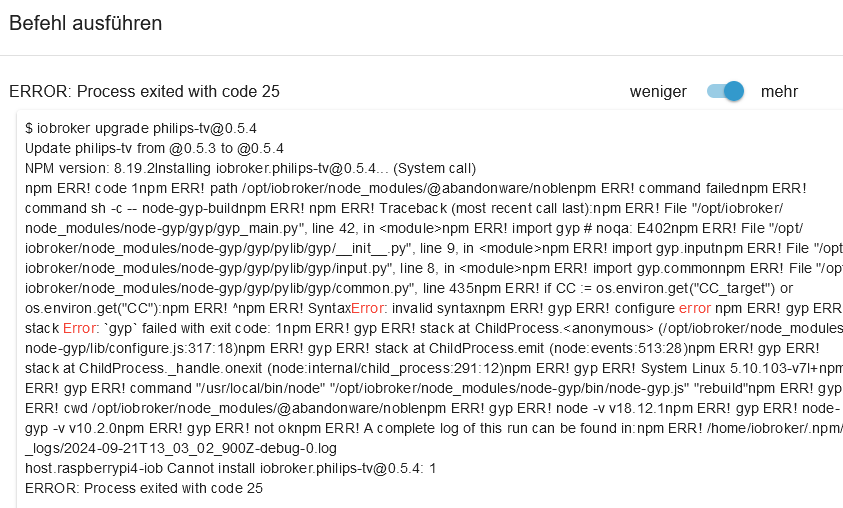
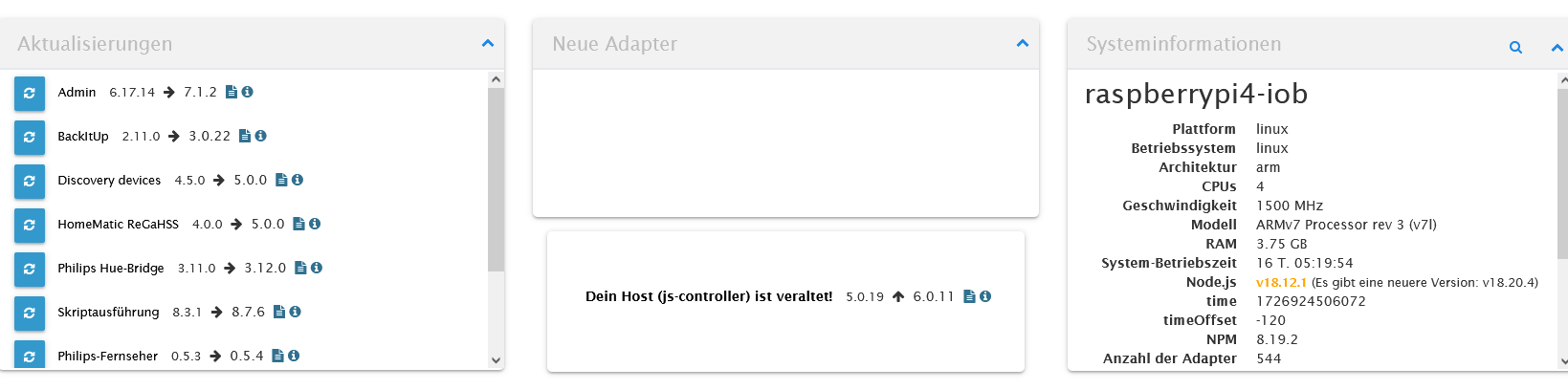
Jetzt wollte ich die Adapter updaten, leider ohne Erfolg.
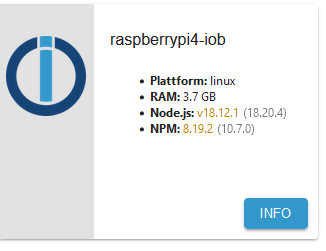
Kommt immer eine Fehlermeldung (siehe Fotos)
Sollte wahrscheinlich zuerst den NPM updaten, oder?
Mit den Befehlen, die ich gefunden habe, gelingt es nicht.
Vielleicht muss ich ganz woanders anfangen. Für eure Hilfe bin ich sehr dankbar.
Gruß
Leon

@leon111 sagte in ioBroker/Adapter Update:
Vielleicht muss ich ganz woanders anfangen.
Ja, ganz unten im Softwarestack.
iob stop
iob fix
iob start
und dann die Langfassung von
iob diaghier posten.
Aber ich sehe jetzt schon, dass dein nodejs falsch installiert ist und das du wesentlich zu selten das System updatest. -
@thomas-braun said in ioBroker/Adapter Update:
iob diag
Danke Thomas für die schnelle Antwort.
Der fix ist durchgelaufen, und die Diagnostik:Copy text starting here:
======================= SUMMARY =======================
                        v.2024-05-22


   Static hostname: raspberrypi4-iob
         Icon name: computer
  Operating System: Raspbian GNU/Linux 10 (buster)
            Kernel: Linux 5.10.103-v7l+
      Architecture: arm

Installation:           native
Kernel:                 armv7l
Userland:               32 bit
Timezone:               Europe/Berlin (CEST, +0200)
User-ID:                1000
Display-Server:         false
Boot Target:            graphical.target

Pending OS-Updates:     0
Pending iob updates:    10

Nodejs-Installation:
/usr/bin/nodejs         v18.20.4
/usr/local/bin/node             v18.12.1
/usr/local/bin/npm              8.19.2
/usr/local/bin/npx              8.19.2
/usr/local/bin/corepack         0.14.2

Recommended versions are nodejs 18.20.4 and npm 10.7.0
*** nodejs is NOT correctly installed ***
Wrong installation path detected. This needs to be fixed.

Please execute
iobroker nodejs-update
to fix these errors.

MEMORY:
              total        used        free      shared  buff/cache   available
Mem:           3.8G        912M        2.1G        8.0M        792M        2.8G
Swap:           99M          0B         99M
Total:         3.9G        912M        2.2G

Active iob-Instances:   21
Active repo(s): stable

ioBroker Core:          js-controller           5.0.19
                        admin                   6.17.14

ioBroker Status:        iobroker is running on this host.


Objects type: jsonl
States  type: jsonl

Status admin and web instance:
+ system.adapter.admin.0                  : admin                 : raspberrypi4-iob                         -  enabled, port: 8081, bind: 0.0.0.0, run as: admin
+ system.adapter.web.0                    : web                   : raspberrypi4-iob                         -  enabled, port: 8082, bind: 0.0.0.0, run as: admin

Objects:                4287
States:                 4031

Size of iob-Database:

12M     /opt/iobroker/iobroker-data/objects.jsonl
6.2M    /opt/iobroker/iobroker-data/objects.json.migrated
6.2M    /opt/iobroker/iobroker-data/objects.json.bak.migrated
1.8M    /opt/iobroker/iobroker-data/states.jsonl
932K    /opt/iobroker/iobroker-data/states.json.migrated
932K    /opt/iobroker/iobroker-data/states.json.bak.migrated
0       /opt/iobroker/iobroker-data/states.json.broken


=================== END OF SUMMARY ====================
=== Mark text until here for copying ===
pi@raspberrypi4-iob:~ $ Copy text starting here:======================= SUMMARY ======================= v.2024-05-22 Static hostname: raspberrypi4-iob Icon name: computer Operating System: Raspbian GNU/Linux 10 (buster) Kernel: Linux 5.10.103-v7l+ Architecture: arm Installation: native Kernel: armv7l Userland: 32 bit Timezone: Europe/Berlin (CEST, +0200) User-ID: 1000 Display-Server: false Boot Target: graphical.target Pending OS-Updates: 0 Pending iob updates: 10 Nodejs-Installation: /usr/bin/nodejs v18.20.4 /usr/local/bin/node v18.12.1 /usr/local/bin/npm 8.19.2 /usr/local/bin/npx 8.19.2 /usr/local/bin/corepack 0.14.2 Recommended versions are nodejs 18.20.4 and npm 10.7.0 *** nodejs is NOT c-bash: Copy: Kommando nicht gefunden. orrectly installed *** Wrong installation path detected. This needs to be fixed. Please execute iobroker nodejs-update to fix these errors. MEMORY: total used free shared buff/cache available Mem: 3.8G 912M 2.1G 8.0M 792M 2.8G Swap: 99M 0B 99M Total: 3.9G 912M 2.2G Active iob-Instances: 21 Active repo(s): stable ioBroker Core: js-controller 5.0.19 admin 6.17.14 ioBroker Status: iobroker is running on this host. Objects type: jsonl States type: jsonl Status admin and web instance: + system.adapter.admin.0 : admin : raspberrypi4-iob - enabled, port: 8081, bind: 0.0.0.0, run as: admin + system.adapter.web.0 : web : raspberrypi4-iob - enabled, port: 8082, bind: 0.0.0.0, run as: admin Objects: 4287 States: 4031 Size of iob-Database: 12M /opt/iobroker/iobroker-data/objects.jsonl 6.2M /opt/iobroker/iobroker-data/objects.json.migrated 6.2M /opt/iobroker/iobroker-data/objects.json.bak.migrated 1.8M /opt/iobroker/iobroker-data/states.jsonl 932K /opt/iobroker/iobroker-data/states.json.migrated 932K /opt/iobroker/iobroker-data/states.json.bak.migrated 0 /opt/iobroker/iobroker-data/states.json.broken =================== END OF SUMMARY ======================= Mark text until here for copying ===
pi@raspberrypi4-iob:~ $
pi@raspberrypi4-iob:~ $
pi@raspberrypi4-iob:~ $> ======================= SUMMARY ======================= > v.2024-05-22 > > > Static hostname: raspberrypi4-iob > Icon name: computer > Operating System: Raspbian GNU/Linux 10 (buster) > Kernel: Linux 5.10.103-v7l+ > Architecture: arm > > Installation: native > Kernel: armv7l > Userland: 32 bit > Timezone: Europe/Berlin (CEST, +0200) > User-ID: 1000 > Display-Server: false > Boot Target: graphical.target > > Pending OS-Updates: 0 > Pending iob updates: 10 > > Nodejs-Installation: > /usr/bin/nodejs v18.20.4 > /usr/local/bin/node v18.12.1 > /usr/local/bin/npm 8.19.2 > /usr/local/bin/npx 8.19.2 > /usr/local/bin/corepack 0.14.2 > > Recommended versions are nodejs 18.20.4 and npm 10.7.0 > *** nodejs is NOT correctly installed *** > Wrong installation path detected. This needs to be fixed. > > Please execute > iobroker nodejs-update > to fix these errors. > > MEMORY: > total used free shared buff/cache available > Mem: 3.8G 912M 2.1G 8.0M 792M 2.8G > Swap: 99M 0B 99M > Total: 3.9G 912M 2.2G > > Active iob-Instances: 21 > Active repo(s): stable > > ioBroker Core: js-controller 5.0.19 > admin 6.17.14 > > ioBroker Status: iobroker is running on this host. > > > Objects type: jsonl > States type: jsonl > > Status admin and web instance: > + system.adapter.admin.0 : admin : raspberrypi4-iob - enabled, port: 8081, bind: 0.0.0.0, run as: admin > + system.adapter.web.0 : web : raspberrypi4-iob - enabled, port: 8082, bind: 0.0.0.0, run as: admin > > Objects: 4287 > States: 4031 > > Size of iob-Database: > > 12M /opt/iobroker/iobroker-data/objects.jsonl > 6.2M /opt/iobroker/iobroker-data/objects.json.migrated > 6.2M /opt/iobroker/iobroker-data/objects.json.bak.migrated > 1.8M /opt/iobroker/iobroker-data/states.jsonl > 932K /opt/iobroker/iobroker-data/states.json.migrated > 932K /opt/iobroker/iobroker-data/states.json.bak.migrated > 0 /opt/iobroker/iobroker-data/states.json.broken > > > > =================== END OF SUMMARY ==================== >-bash: =======================: Kommando nicht gefunden. -bash: v.2024-05-22: Kommando nicht gefunden. -bash: Static: Kommando nicht gefunden. -bash: Icon: Kommando nicht gefunden. -bash: command substitution: Zeile 8: Syntaxfehler beim unerwarteten Wort `(' -bash: command substitution: Zeile 8: ` Operating System: Raspbian GNU/Linux 10 (buster)' pi@raspberrypi4-iob:~ $ pi@raspberrypi4-iob:~ $ === Mark text until here for copying === -bash: ===: Kommando nicht gefunden. pi@raspberrypi4-iob:~ $ pi@raspberrypi4-iob:~ $ -bash: pi@raspberrypi4-iob:~: Kommando nicht gefunden. pi@raspberrypi4-iob:~ $das ist das was am Ende kamm. Das frühere war dann schon weg. Soll ich es nochmal machen und auch hier posten?
Vielen Dank erstmal für die Mühe.Leon
-
======== Start marking the full check here =========
Skript v.2024-05-22 *** BASE SYSTEM *** Static hostname: raspberrypi4-iob Icon name: computer Operating System: Raspbian GNU/Linux 10 (buster) Kernel: Linux 5.10.103-v7l+ Architecture: arm Model : Raspberry Pi 4 Model B Rev 1.1 Docker : false Virtualization : none Kernel : armv7l Userland : 32 bit Systemuptime and Load: 16:26:26 up 20 min, 1 user, load average: 0.44, 0.76, 0.91 CPU threads: 4 *** RASPBERRY THROTTLING *** Current issues: No throttling issues detected. Previously detected issues: No throttling issues detected. *** Time and Time Zones *** Local time: Sat 2024-09-21 16:26:27 CEST Universal time: Sat 2024-09-21 14:26:27 UTC RTC time: n/a Time zone: Europe/Berlin (CEST, +0200) System clock synchronized: yes NTP service: active RTC in local TZ: no *** Users and Groups *** User that called 'iob diag': pi HOME=/home/pi GROUPS=pi adm dialout cdrom sudo audio video plugdev games users input netdev gpio i2c spi iobroker User that is running 'js-controller': iobroker HOME=/home/iobroker GROUPS=iobroker tty dialout audio video plugdev bluetooth gpio i2c *** Display-Server-Setup *** Display-Server: false Desktop: Terminal: tty Boot Target: graphical.target *** MEMORY *** total used free shared buff/cache available Mem: 3.8G 898M 2.1G 8.0M 793M 2.8G Swap: 99M 0B 99M Total: 3.9G 898M 2.2G Active iob-Instances: 21 3838 M total memory 898 M used memory 498 M active memory 972 M inactive memory 2146 M free memory 249 M buffer memory 543 M swap cache 99 M total swap 0 M used swap 99 M free swap *** top - Table Of Processes *** top - 16:26:27 up 20 min, 1 user, load average: 0.44, 0.76, 0.91 Tasks: 148 total, 1 running, 147 sleeping, 0 stopped, 0 zombie %Cpu(s): 2.7 us, 4.1 sy, 0.0 ni, 93.2 id, 0.0 wa, 0.0 hi, 0.0 si, 0.0 st MiB Mem : 3838.7 total, 2146.4 free, 898.7 used, 793.6 buff/cache MiB Swap: 100.0 total, 100.0 free, 0.0 used. 2775.0 avail Mem *** FAILED SERVICES *** 0 loaded units listed. Pass --all to see loaded but inactive units, too. To show all installed unit files use 'systemctl list-unit-files'. *** FILESYSTEM *** Filesystem Type Size Used Avail Use% Mounted on /dev/root ext4 59G 13G 44G 23% / devtmpfs devtmpfs 1.8G 0 1.8G 0% /dev tmpfs tmpfs 1.9G 0 1.9G 0% /dev/shm tmpfs tmpfs 1.9G 8.5M 1.9G 1% /run tmpfs tmpfs 5.0M 4.0K 5.0M 1% /run/lock tmpfs tmpfs 1.9G 0 1.9G 0% /sys/fs/cgroup /dev/mmcblk0p1 vfat 253M 49M 204M 20% /boot tmpfs tmpfs 384M 0 384M 0% /run/user/1000 Messages concerning ext4 filesystem in dmesg: [Sat Sep 21 16:06:07 2024] Kernel command line: coherent_pool=1M 8250.nr_uarts=0 snd_bcm2835.enable_compat_alsa=0 snd_bcm2835.enable_hdmi=1 smsc95xx.macaddr=DC:A6:32:36:29:4C vc_mem.mem_base=0x3ec00000 vc_mem.mem_size=0x40000000 console=ttyS0,115200 console=tty1 root=PARTUUID=6c586e13-02 rootfstype=ext4 elevator=deadline fsck.repair=yes rootwait [Sat Sep 21 16:06:08 2024] EXT4-fs (mmcblk0p2): mounted filesystem with ordered data mode. Opts: (null) [Sat Sep 21 16:06:08 2024] VFS: Mounted root (ext4 filesystem) readonly on device 179:2. [Sat Sep 21 16:06:10 2024] EXT4-fs (mmcblk0p2): re-mounted. Opts: (null) Show mounted filesystems: TARGET SOURCE FSTYPE OPTIONS / /dev/mmcblk0p2 ext4 rw,noatime |-/dev devtmpfs devtmpfs rw,relatime,size=1800568k,nr_inodes=84157,mode=755 | |-/dev/shm tmpfs tmpfs rw,nosuid,nodev | |-/dev/pts devpts devpts rw,nosuid,noexec,relatime,gid=5,mode=620,ptmxmode=000 | `-/dev/mqueue mqueue mqueue rw,relatime |-/sys sysfs sysfs rw,nosuid,nodev,noexec,relatime | |-/sys/kernel/security securityfs securityfs rw,nosuid,nodev,noexec,relatime | |-/sys/fs/cgroup tmpfs tmpfs ro,nosuid,nodev,noexec,mode=755 | | |-/sys/fs/cgroup/unified cgroup2 cgroup2 rw,nosuid,nodev,noexec,relatime,nsdelegate | | |-/sys/fs/cgroup/systemd cgroup cgroup rw,nosuid,nodev,noexec,relatime,xattr,name=systemd | | |-/sys/fs/cgroup/cpu,cpuacct cgroup cgroup rw,nosuid,nodev,noexec,relatime,cpu,cpuacct | | |-/sys/fs/cgroup/cpuset cgroup cgroup rw,nosuid,nodev,noexec,relatime,cpuset | | |-/sys/fs/cgroup/net_cls,net_prio cgroup cgroup rw,nosuid,nodev,noexec,relatime,net_cls,net_prio | | |-/sys/fs/cgroup/blkio cgroup cgroup rw,nosuid,nodev,noexec,relatime,blkio | | |-/sys/fs/cgroup/devices cgroup cgroup rw,nosuid,nodev,noexec,relatime,devices | | |-/sys/fs/cgroup/perf_event cgroup cgroup rw,nosuid,nodev,noexec,relatime,perf_event | | |-/sys/fs/cgroup/freezer cgroup cgroup rw,nosuid,nodev,noexec,relatime,freezer | | `-/sys/fs/cgroup/pids cgroup cgroup rw,nosuid,nodev,noexec,relatime,pids | |-/sys/fs/bpf none bpf rw,nosuid,nodev,noexec,relatime,mode=700 | |-/sys/kernel/debug debugfs debugfs rw,relatime | `-/sys/kernel/config configfs configfs rw,relatime |-/proc proc proc rw,relatime | `-/proc/sys/fs/binfmt_misc systemd-1 autofs rw,relatime,fd=32,pgrp=1,timeout=0,minproto=5,maxproto=5,direct |-/run tmpfs tmpfs rw,nosuid,nodev,mode=755 | |-/run/lock tmpfs tmpfs rw,nosuid,nodev,noexec,relatime,size=5120k | |-/run/rpc_pipefs sunrpc rpc_pipefs rw,relatime | `-/run/user/1000 tmpfs tmpfs rw,nosuid,nodev,relatime,size=393084k,mode=700,uid=1000,gid=1000 `-/boot /dev/mmcblk0p1 vfat rw,relatime,fmask=0022,dmask=0022,codepage=437,iocharset=ascii,shortname=mixed,errors=remount-ro Files in neuralgic directories: /var: 1.4G /var/ 1.2G /var/cache/apt/archives 1.2G /var/cache/apt 1.2G /var/cache 93M /var/lib Archived and active journals take up 8.0M in the file system. /opt/iobroker/backups: 134M /opt/iobroker/backups/ /opt/iobroker/iobroker-data: 516M /opt/iobroker/iobroker-data/ 369M /opt/iobroker/iobroker-data/files 139M /opt/iobroker/iobroker-data/files/javascript.admin 119M /opt/iobroker/iobroker-data/backup-objects 118M /opt/iobroker/iobroker-data/files/javascript.admin/static The five largest files in iobroker-data are: 24M /opt/iobroker/iobroker-data/files/web.admin/static/js/main.135279a0.js.map 12M /opt/iobroker/iobroker-data/objects.jsonl 8.5M /opt/iobroker/iobroker-data/files/web.admin/static/js/main.135279a0.js 7.0M /opt/iobroker/iobroker-data/files/javascript.admin/static/js/675.a9c6d34a.chunk.js.map 7.0M /opt/iobroker/iobroker-data/files/javascript.admin/static/js/61.54b23816.chunk.js.map USB-Devices by-id: USB-Sticks - Avoid direct links to /dev/tty* in your adapter setups, please always prefer the links 'by-id': /dev/serial/by-id/usb-Texas_Instruments_CC2538_USB_CDC-if00 HINT: Your zigbee.0 COM-Port is NOT matching 'by-id'. Please check your setting: /dev/ttyACM0 *** NodeJS-Installation *** /usr/bin/nodejs v18.20.4 /usr/local/bin/node v18.12.1 /usr/local/bin/npm 8.19.2 /usr/local/bin/npx 8.19.2 /usr/local/bin/corepack 0.14.2 *** nodejs is NOT correctly installed *** nodejs: Installed: 18.20.4-1nodesource1 Candidate: 18.20.4-1nodesource1 Version table: *** 18.20.4-1nodesource1 600 500 https://deb.nodesource.com/node_18.x nodistro/main armhf Packages 100 /var/lib/dpkg/status 18.20.3-1nodesource1 600 500 https://deb.nodesource.com/node_18.x nodistro/main armhf Packages 18.20.2-1nodesource1 600 500 https://deb.nodesource.com/node_18.x nodistro/main armhf Packages 18.20.1-1nodesource1 600 500 https://deb.nodesource.com/node_18.x nodistro/main armhf Packages 18.20.0-1nodesource1 600 500 https://deb.nodesource.com/node_18.x nodistro/main armhf Packages 18.19.1-1nodesource1 600 500 https://deb.nodesource.com/node_18.x nodistro/main armhf Packages 18.19.0-1nodesource1 600 500 https://deb.nodesource.com/node_18.x nodistro/main armhf Packages 18.18.2-1nodesource1 600 500 https://deb.nodesource.com/node_18.x nodistro/main armhf Packages 18.18.1-1nodesource1 600 500 https://deb.nodesource.com/node_18.x nodistro/main armhf Packages 18.18.0-1nodesource1 600 500 https://deb.nodesource.com/node_18.x nodistro/main armhf Packages 18.17.1-1nodesource1 600 500 https://deb.nodesource.com/node_18.x nodistro/main armhf Packages 18.17.0-1nodesource1 600 500 https://deb.nodesource.com/node_18.x nodistro/main armhf Packages 18.16.1-1nodesource1 600 500 https://deb.nodesource.com/node_18.x nodistro/main armhf Packages 18.16.0-1nodesource1 600 500 https://deb.nodesource.com/node_18.x nodistro/main armhf Packages 18.15.0-1nodesource1 600 500 https://deb.nodesource.com/node_18.x nodistro/main armhf Packages 18.14.2-1nodesource1 600 500 https://deb.nodesource.com/node_18.x nodistro/main armhf Packages 18.14.1-1nodesource1 600 500 https://deb.nodesource.com/node_18.x nodistro/main armhf Packages 18.14.0-1nodesource1 600 500 https://deb.nodesource.com/node_18.x nodistro/main armhf Packages 18.13.0-1nodesource1 600 500 https://deb.nodesource.com/node_18.x nodistro/main armhf Packages 18.12.0-1nodesource1 600 500 https://deb.nodesource.com/node_18.x nodistro/main armhf Packages 18.11.0-1nodesource1 600 500 https://deb.nodesource.com/node_18.x nodistro/main armhf Packages 18.10.0-1nodesource1 600 500 https://deb.nodesource.com/node_18.x nodistro/main armhf Packages 18.9.1-1nodesource1 600 500 https://deb.nodesource.com/node_18.x nodistro/main armhf Packages 18.9.0-1nodesource1 600 500 https://deb.nodesource.com/node_18.x nodistro/main armhf Packages 18.8.0-1nodesource1 600 500 https://deb.nodesource.com/node_18.x nodistro/main armhf Packages 18.7.0-1nodesource1 600 500 https://deb.nodesource.com/node_18.x nodistro/main armhf Packages 18.6.0-1nodesource1 600 500 https://deb.nodesource.com/node_18.x nodistro/main armhf Packages 18.5.0-1nodesource1 600 500 https://deb.nodesource.com/node_18.x nodistro/main armhf Packages 18.4.0-1nodesource1 600 500 https://deb.nodesource.com/node_18.x nodistro/main armhf Packages 18.3.0-1nodesource1 600 500 https://deb.nodesource.com/node_18.x nodistro/main armhf Packages 18.2.0-1nodesource1 600 500 https://deb.nodesource.com/node_18.x nodistro/main armhf Packages 18.1.0-1nodesource1 600 500 https://deb.nodesource.com/node_18.x nodistro/main armhf Packages 18.0.0-1nodesource1 600 500 https://deb.nodesource.com/node_18.x nodistro/main armhf Packages 10.24.0~dfsg-1~deb10u3 500 500 http://raspbian.raspberrypi.org/raspbian buster/main armhf Packages Temp directories causing npm8 problem: 0 No problems detected Errors in npm tree: *** ioBroker-Installation *** ioBroker Status iobroker is running on this host. Objects type: jsonl States type: jsonl Core adapters versions js-controller: 5.0.19 admin: 6.17.14 javascript: 8.3.1 nodejs modules from github: 3 | `-- xmlbuilder@0.4.2 invalid: "https://github.com/hobbyquaker/xmlbuilder-js/tarball/29fe5030dc6852007dc8d1bfd5109d75f8da58d5" from node_modules/homematic-xmlrpc +-- iobroker.icons-open-icon-library-png@0.1.3 invalid: "https://github.com/ioBroker/ioBroker.icons-open-icon-library-png/tarball/master" from the root project | `-- philips-tv-api@0.0.1 invalid: "https://github.com/foxriver76/philipsandroidtv/tarball/d90e61de1ebf5cf07ab3b90c87d11afe02231025" from node_modules/iobroker.philips-tv Adapter State + system.adapter.admin.0 : admin : raspberrypi4-iob - enabled, port: 8081, bind: 0.0.0.0, run as: admin system.adapter.backitup.0 : backitup : raspberrypi4-iob - disabled + system.adapter.ble.0 : ble : raspberrypi4-iob - enabled system.adapter.cloud.0 : cloud : raspberrypi4-iob - disabled + system.adapter.discovery.0 : discovery : raspberrypi4-iob - enabled + system.adapter.email.0 : email : raspberrypi4-iob - enabled + system.adapter.hm-rega.0 : hm-rega : raspberrypi4-iob - enabled + system.adapter.hm-rpc.0 : hm-rpc : raspberrypi4-iob - enabled, port: 0 + system.adapter.hm-rpc.1 : hm-rpc : raspberrypi4-iob - enabled, port: 0 + system.adapter.hm-rpc.2 : hm-rpc : raspberrypi4-iob - enabled, port: 0 + system.adapter.hue.0 : hue : raspberrypi4-iob - enabled, port: 443 system.adapter.icons-addictive-flavour-png.0: icons-addictive-flavour-png: raspberrypi4-iob - enabled system.adapter.icons-icons8.0 : icons-icons8 : raspberrypi4-iob - enabled system.adapter.icons-mfd-png.0 : icons-mfd-png : raspberrypi4-iob - enabled system.adapter.icons-open-icon-library-png.0: icons-open-icon-library-png: raspberrypi4-iob - enabled + system.adapter.info.0 : info : raspberrypi4-iob - enabled + system.adapter.javascript.0 : javascript : raspberrypi4-iob - enabled system.adapter.mihome.0 : mihome : raspberrypi4-iob - disabled, port: 9898, bind: 0.0.0.0 system.adapter.mobile.0 : mobile : raspberrypi4-iob - enabled system.adapter.mqtt.0 : mqtt : raspberrypi4-iob - disabled, port: 1500, bind: 0.0.0.0 + system.adapter.philips-tv.0 : philips-tv : raspberrypi4-iob - enabled + system.adapter.rpi2.0 : rpi2 : raspberrypi4-iob - enabled + system.adapter.sonoff.0 : sonoff : raspberrypi4-iob - enabled, port: 1883, bind: 192.168.178.54 system.adapter.squeezebox.0 : squeezebox : raspberrypi4-iob - disabled, port: 9090 + system.adapter.terminal.0 : terminal : raspberrypi4-iob - enabled, port: 8088, bind: 0.0.0.0, run as: admin + system.adapter.tr-064.0 : tr-064 : raspberrypi4-iob - enabled system.adapter.vis-bars.0 : vis-bars : raspberrypi4-iob - enabled system.adapter.vis-canvas-gauges.0 : vis-canvas-gauges : raspberrypi4-iob - enabled system.adapter.vis-colorpicker.0 : vis-colorpicker : raspberrypi4-iob - enabled system.adapter.vis-fancyswitch.0 : vis-fancyswitch : raspberrypi4-iob - enabled system.adapter.vis-hqwidgets.0 : vis-hqwidgets : raspberrypi4-iob - enabled + system.adapter.vis-inventwo.0 : vis-inventwo : raspberrypi4-iob - enabled system.adapter.vis-justgage.0 : vis-justgage : raspberrypi4-iob - enabled system.adapter.vis-material.0 : vis-material : raspberrypi4-iob - enabled system.adapter.vis-materialdesign.0 : vis-materialdesign : raspberrypi4-iob - enabled system.adapter.vis-metro.0 : vis-metro : raspberrypi4-iob - enabled system.adapter.vis-players.0 : vis-players : raspberrypi4-iob - enabled system.adapter.vis-timeandweather.0 : vis-timeandweather : raspberrypi4-iob - enabled system.adapter.vis-weather.0 : vis-weather : raspberrypi4-iob - enabled system.adapter.vis.0 : vis : raspberrypi4-iob - enabled system.adapter.weatherunderground.0 : weatherunderground : raspberrypi4-iob - enabled + system.adapter.web.0 : web : raspberrypi4-iob - enabled, port: 8082, bind: 0.0.0.0, run as: admin + system.adapter.yeelight-2.0 : yeelight-2 : raspberrypi4-iob - enabled + system.adapter.zigbee.0 : zigbee : raspberrypi4-iob - enabled, port: /dev/ttyACM0 + instance is alive Enabled adapters with bindings + system.adapter.admin.0 : admin : raspberrypi4-iob - enabled, port: 8081, bind: 0.0.0.0, run as: admin + system.adapter.hm-rpc.0 : hm-rpc : raspberrypi4-iob - enabled, port: 0 + system.adapter.hm-rpc.1 : hm-rpc : raspberrypi4-iob - enabled, port: 0 + system.adapter.hm-rpc.2 : hm-rpc : raspberrypi4-iob - enabled, port: 0 + system.adapter.hue.0 : hue : raspberrypi4-iob - enabled, port: 443 + system.adapter.sonoff.0 : sonoff : raspberrypi4-iob - enabled, port: 1883, bind: 192.168.178.54 + system.adapter.terminal.0 : terminal : raspberrypi4-iob - enabled, port: 8088, bind: 0.0.0.0, run as: admin + system.adapter.web.0 : web : raspberrypi4-iob - enabled, port: 8082, bind: 0.0.0.0, run as: admin + system.adapter.zigbee.0 : zigbee : raspberrypi4-iob - enabled, port: /dev/ttyACM0 ioBroker-Repositories stable : http://download.iobroker.net/sources-dist.json beta : http://download.iobroker.net/sources-dist-latest.json Active repo(s): stable Installed ioBroker-Instances Used repository: stable Adapter "admin" : 7.1.2 , installed 6.17.14 [Updatable] Adapter "backitup" : 3.0.22 , installed 2.11.0 [Updatable] Adapter "ble" : 0.14.0 , installed 0.14.0 Adapter "cloud" : 5.0.1 , installed 5.0.1 Adapter "discovery" : 5.0.0 , installed 4.5.0 [Updatable] Adapter "email" : 1.3.1 , installed 1.3.1 Adapter "hm-rega" : 5.0.0 , installed 4.0.0 [Updatable] Adapter "hm-rpc" : 1.17.0 , installed 1.17.0 Adapter "hue" : 3.12.0 , installed 3.11.0 [Updatable] Adapter "icons-addictive-flavour-png": 0.1.0, installed 0.1.0 Adapter "icons-icons8" : 0.0.1 , installed 0.0.1 Adapter "icons-mfd-png": 1.2.1 , installed 1.2.1 Adapter "icons-open-icon-library-png": 0.1.2, installed 0.1.3 Adapter "javascript" : 8.7.6 , installed 8.3.1 [Updatable] Controller "js-controller": 6.0.11 , installed 5.0.19 [Updatable] Adapter "mihome" : 1.4.0 , installed 1.4.0 Adapter "mobile" : 1.0.1 , installed 1.0.1 Adapter "mqtt" : 5.2.0 , installed 5.2.0 Adapter "philips-tv" : 0.5.4 , installed 0.5.3 [Updatable] Adapter "rpi2" : 1.3.2 , installed 1.3.2 Adapter "simple-api" : 2.8.0 , installed 2.8.0 Adapter "socketio" : 6.7.1 , installed 6.7.0 [Updatable] Adapter "sonoff" : 3.1.0 , installed 3.1.0 Adapter "terminal" : 1.0.0 , installed 1.0.0 Adapter "tr-064" : 4.3.0 , installed 4.3.0 Adapter "vis" : 1.5.6 , installed 1.5.6 Adapter "vis-bars" : 0.1.4 , installed 0.1.4 Adapter "vis-canvas-gauges": 1.0.1, installed 1.0.1 Adapter "vis-colorpicker": 2.0.3 , installed 2.0.3 Adapter "vis-fancyswitch": 1.1.0 , installed 1.1.0 Adapter "vis-hqwidgets": 1.5.1 , installed 1.5.1 Adapter "vis-inventwo" : 3.3.4 , installed 3.3.4 Adapter "vis-justgage" : 2.1.7 , installed 2.1.7 Adapter "vis-material" : 0.1.3 , installed 0.1.3 Adapter "vis-materialdesign": 0.5.9, installed 0.5.9 Adapter "vis-metro" : 1.2.0 , installed 1.2.0 Adapter "vis-players" : 0.1.6 , installed 0.1.6 Adapter "vis-timeandweather": 1.2.2, installed 1.2.2 Adapter "vis-weather" : 2.5.9 , installed 2.5.9 Adapter "weatherunderground": 3.7.0, installed 3.7.0 Adapter "web" : 6.2.5 , installed 6.2.5 Adapter "ws" : 2.6.2 , installed 2.6.1 [Updatable] Adapter "yeelight-2" : 1.4.0 , installed 1.4.0 Adapter "zigbee" : 1.10.3 , installed 1.10.3 Objects and States Please stand by - This may take a while Objects: 4287 States: 4031 *** OS-Repositories and Updates *** Hit:1 http://archive.raspberrypi.org/debian buster InRelease Hit:2 http://raspbian.raspberrypi.org/raspbian buster InRelease Hit:3 https://deb.nodesource.com/node_18.x nodistro InRelease Reading package lists... Pending Updates: 0 *** Listening Ports *** Active Internet connections (only servers) Proto Recv-Q Send-Q Local Address Foreign Address State User Inode PID/Program name tcp 0 0 192.168.178.54:2001 0.0.0.0:* LISTEN 1001 36675 5612/io.hm-rpc.0 tcp 0 0 0.0.0.0:22 0.0.0.0:* LISTEN 0 14317 619/sshd tcp 0 0 192.168.178.54:2010 0.0.0.0:* LISTEN 1001 37144 5627/io.hm-rpc.1 tcp 0 0 192.168.178.54:1883 0.0.0.0:* LISTEN 1001 37901 5712/io.sonoff.0 tcp 0 0 192.168.178.54:8701 0.0.0.0:* LISTEN 1001 34500 5646/io.hm-rpc.2 tcp 0 0 127.0.0.1:9000 0.0.0.0:* LISTEN 1001 36984 5526/iobroker.js-co tcp 0 0 127.0.0.1:9001 0.0.0.0:* LISTEN 1001 36977 5526/iobroker.js-co tcp6 0 0 :::8081 :::* LISTEN 1001 37029 5544/io.admin.0 tcp6 0 0 :::8082 :::* LISTEN 1001 40405 6281/io.web.0 tcp6 0 0 :::22 :::* LISTEN 0 14319 619/sshd tcp6 0 0 :::8088 :::* LISTEN 1001 34736 5841/io.terminal.0 udp 0 0 0.0.0.0:68 0.0.0.0:* 0 14089 611/dhcpcd udp 0 0 0.0.0.0:5353 0.0.0.0:* 108 11205 371/avahi-daemon: r udp 0 0 0.0.0.0:60251 0.0.0.0:* 108 11207 371/avahi-daemon: r udp6 0 0 :::546 :::* 0 14100 611/dhcpcd udp6 0 0 :::44640 :::* 108 11208 371/avahi-daemon: r udp6 0 0 :::5353 :::* 108 11206 371/avahi-daemon: r *** Log File - Last 25 Lines *** 2024-09-21 16:25:26.672 - info: weatherunderground.0 (22296) State value to set for "weatherunderground.0.forecastHourly.24h.precipitation" has to be type "value.precipitation" but received type "number" 2024-09-21 16:25:26.769 - info: weatherunderground.0 (22296) State value to set for "weatherunderground.0.forecastHourly.25h.precipitation" has to be type "value.precipitation" but received type "number" 2024-09-21 16:25:26.817 - info: weatherunderground.0 (22296) State value to set for "weatherunderground.0.forecastHourly.26h.precipitation" has to be type "value.precipitation" but received type "number" 2024-09-21 16:25:26.908 - info: weatherunderground.0 (22296) State value to set for "weatherunderground.0.forecastHourly.27h.precipitation" has to be type "value.precipitation" but received type "number" 2024-09-21 16:25:26.968 - info: weatherunderground.0 (22296) State value to set for "weatherunderground.0.forecastHourly.28h.precipitation" has to be type "value.precipitation" but received type "number" 2024-09-21 16:25:27.071 - info: weatherunderground.0 (22296) State value to set for "weatherunderground.0.forecastHourly.29h.precipitation" has to be type "value.precipitation" but received type "number" 2024-09-21 16:25:27.142 - info: weatherunderground.0 (22296) State value to set for "weatherunderground.0.forecastHourly.30h.precipitation" has to be type "value.precipitation" but received type "number" 2024-09-21 16:25:27.240 - info: weatherunderground.0 (22296) State value to set for "weatherunderground.0.forecastHourly.31h.precipitation" has to be type "value.precipitation" but received type "number" 2024-09-21 16:25:27.327 - info: weatherunderground.0 (22296) State value to set for "weatherunderground.0.forecastHourly.32h.precipitation" has to be type "value.precipitation" but received type "number" 2024-09-21 16:25:27.374 - info: weatherunderground.0 (22296) State value to set for "weatherunderground.0.forecastHourly.33h.precipitation" has to be type "value.precipitation" but received type "number" 2024-09-21 16:25:27.421 - info: weatherunderground.0 (22296) State value to set for "weatherunderground.0.forecastHourly.34h.precipitation" has to be type "value.precipitation" but received type "number" 2024-09-21 16:25:27.515 - info: weatherunderground.0 (22296) State value to set for "weatherunderground.0.forecastHourly.35h.precipitation" has to be type "value.precipitation" but received type "number" 2024-09-21 16:25:29.585 - info: weatherunderground.0 (22296) Terminated (NO_ERROR): Without reason 2024-09-21 16:25:30.150 - info: host.raspberrypi4-iob instance system.adapter.weatherunderground.0 terminated with code 0 (NO_ERROR) 2024-09-21 16:25:30.674 - info: tr-064.0 (5773) forEachConfiguredDevice: in GetSpecificHostEntry 3(Marcel/AA:33:01:1A:D5:B1) device seems offline but we never saw it since adapter was started:Error: sendSOAPActionRequest Error action=GetSpecificHostEntry serviceType=urn:dslforum-org:service:Hosts:1: 500 - {"code":500} 2024-09-21 16:25:41.605 - info: tr-064.0 (5773) forEachConfiguredDevice: in GetSpecificHostEntry 3(Marcel/AA:33:01:1A:D5:B1) device seems offline but we never saw it since adapter was started:Error: sendSOAPActionRequest Error action=GetSpecificHostEntry serviceType=urn:dslforum-org:service:Hosts:1: 500 - {"code":500} 2024-09-21 16:25:52.641 - info: tr-064.0 (5773) forEachConfiguredDevice: in GetSpecificHostEntry 3(Marcel/AA:33:01:1A:D5:B1) device seems offline but we never saw it since adapter was started:Error: sendSOAPActionRequest Error action=GetSpecificHostEntry serviceType=urn:dslforum-org:service:Hosts:1: 500 - {"code":500} 2024-09-21 16:26:03.835 - info: tr-064.0 (5773) forEachConfiguredDevice: in GetSpecificHostEntry 3(Marcel/AA:33:01:1A:D5:B1) device seems offline but we never saw it since adapter was started:Error: sendSOAPActionRequest Error action=GetSpecificHostEntry serviceType=urn:dslforum-org:service:Hosts:1: 500 - {"code":500} 2024-09-21 16:26:15.024 - info: tr-064.0 (5773) forEachConfiguredDevice: in GetSpecificHostEntry 3(Marcel/AA:33:01:1A:D5:B1) device seems offline but we never saw it since adapter was started:Error: sendSOAPActionRequest Error action=GetSpecificHostEntry serviceType=urn:dslforum-org:service:Hosts:1: 500 - {"code":500} 2024-09-21 16:26:26.041 - info: tr-064.0 (5773) forEachConfiguredDevice: in GetSpecificHostEntry 3(Marcel/AA:33:01:1A:D5:B1) device seems offline but we never saw it since adapter was started:Error: sendSOAPActionRequest Error action=GetSpecificHostEntry serviceType=urn:dslforum-org:service:Hosts:1: 500 - {"code":500} 2024-09-21 16:26:37.369 - info: tr-064.0 (5773) forEachConfiguredDevice: in GetSpecificHostEntry 3(Marcel/AA:33:01:1A:D5:B1) device seems offline but we never saw it since adapter was started:Error: sendSOAPActionRequest Error action=GetSpecificHostEntry serviceType=urn:dslforum-org:service:Hosts:1: 500 - {"code":500} 2024-09-21 16:26:48.554 - info: tr-064.0 (5773) forEachConfiguredDevice: in GetSpecificHostEntry 3(Marcel/AA:33:01:1A:D5:B1) device seems offline but we never saw it since adapter was started:Error: sendSOAPActionRequest Error action=GetSpecificHostEntry serviceType=urn:dslforum-org:service:Hosts:1: 500 - {"code":500} 2024-09-21 16:26:59.694 - info: tr-064.0 (5773) forEachConfiguredDevice: in GetSpecificHostEntry 3(Marcel/AA:33:01:1A:D5:B1) device seems offline but we never saw it since adapter was started:Error: sendSOAPActionRequest Error action=GetSpecificHostEntry serviceType=urn:dslforum-org:service:Hosts:1: 500 - {"code":500} 2024-09-21 16:27:11.100 - info: tr-064.0 (5773) forEachConfiguredDevice: in GetSpecificHostEntry 3(Marcel/AA:33:01:1A:D5:B1) device seems offline but we never saw it since adapter was started:Error: sendSOAPActionRequest Error action=GetSpecificHostEntry serviceType=urn:dslforum-org:service:Hosts:1: 500 - {"code":500} 2024-09-21 16:27:22.172 - info: tr-064.0 (5773) forEachConfiguredDevice: in GetSpecificHostEntry 3(Marcel/AA:33:01:1A:D5:B1) device seems offline but we never saw it since adapter was started:Error: sendSOAPActionRequest Error action=GetSpecificHostEntry serviceType=urn:dslforum-org:service:Hosts:1: 500 - {"code":500}============ Mark until here for C&P =============
iob diag has finished.
Press any key for a summary
Das hier ist der Anfang von der Diagnose
-
@thomas-braun said in ioBroker/Adapter Update:
iob diag
Danke Thomas für die schnelle Antwort.
Der fix ist durchgelaufen, und die Diagnostik:Copy text starting here:
======================= SUMMARY =======================
                        v.2024-05-22


   Static hostname: raspberrypi4-iob
         Icon name: computer
  Operating System: Raspbian GNU/Linux 10 (buster)
            Kernel: Linux 5.10.103-v7l+
      Architecture: arm

Installation:           native
Kernel:                 armv7l
Userland:               32 bit
Timezone:               Europe/Berlin (CEST, +0200)
User-ID:                1000
Display-Server:         false
Boot Target:            graphical.target

Pending OS-Updates:     0
Pending iob updates:    10

Nodejs-Installation:
/usr/bin/nodejs         v18.20.4
/usr/local/bin/node             v18.12.1
/usr/local/bin/npm              8.19.2
/usr/local/bin/npx              8.19.2
/usr/local/bin/corepack         0.14.2

Recommended versions are nodejs 18.20.4 and npm 10.7.0
*** nodejs is NOT correctly installed ***
Wrong installation path detected. This needs to be fixed.

Please execute
iobroker nodejs-update
to fix these errors.

MEMORY:
              total        used        free      shared  buff/cache   available
Mem:           3.8G        912M        2.1G        8.0M        792M        2.8G
Swap:           99M          0B         99M
Total:         3.9G        912M        2.2G

Active iob-Instances:   21
Active repo(s): stable

ioBroker Core:          js-controller           5.0.19
                        admin                   6.17.14

ioBroker Status:        iobroker is running on this host.


Objects type: jsonl
States  type: jsonl

Status admin and web instance:
+ system.adapter.admin.0                  : admin                 : raspberrypi4-iob                         -  enabled, port: 8081, bind: 0.0.0.0, run as: admin
+ system.adapter.web.0                    : web                   : raspberrypi4-iob                         -  enabled, port: 8082, bind: 0.0.0.0, run as: admin

Objects:                4287
States:                 4031

Size of iob-Database:

12M     /opt/iobroker/iobroker-data/objects.jsonl
6.2M    /opt/iobroker/iobroker-data/objects.json.migrated
6.2M    /opt/iobroker/iobroker-data/objects.json.bak.migrated
1.8M    /opt/iobroker/iobroker-data/states.jsonl
932K    /opt/iobroker/iobroker-data/states.json.migrated
932K    /opt/iobroker/iobroker-data/states.json.bak.migrated
0       /opt/iobroker/iobroker-data/states.json.broken


=================== END OF SUMMARY ====================
=== Mark text until here for copying ===
pi@raspberrypi4-iob:~ $ Copy text starting here:======================= SUMMARY ======================= v.2024-05-22 Static hostname: raspberrypi4-iob Icon name: computer Operating System: Raspbian GNU/Linux 10 (buster) Kernel: Linux 5.10.103-v7l+ Architecture: arm Installation: native Kernel: armv7l Userland: 32 bit Timezone: Europe/Berlin (CEST, +0200) User-ID: 1000 Display-Server: false Boot Target: graphical.target Pending OS-Updates: 0 Pending iob updates: 10 Nodejs-Installation: /usr/bin/nodejs v18.20.4 /usr/local/bin/node v18.12.1 /usr/local/bin/npm 8.19.2 /usr/local/bin/npx 8.19.2 /usr/local/bin/corepack 0.14.2 Recommended versions are nodejs 18.20.4 and npm 10.7.0 *** nodejs is NOT c-bash: Copy: Kommando nicht gefunden. orrectly installed *** Wrong installation path detected. This needs to be fixed. Please execute iobroker nodejs-update to fix these errors. MEMORY: total used free shared buff/cache available Mem: 3.8G 912M 2.1G 8.0M 792M 2.8G Swap: 99M 0B 99M Total: 3.9G 912M 2.2G Active iob-Instances: 21 Active repo(s): stable ioBroker Core: js-controller 5.0.19 admin 6.17.14 ioBroker Status: iobroker is running on this host. Objects type: jsonl States type: jsonl Status admin and web instance: + system.adapter.admin.0 : admin : raspberrypi4-iob - enabled, port: 8081, bind: 0.0.0.0, run as: admin + system.adapter.web.0 : web : raspberrypi4-iob - enabled, port: 8082, bind: 0.0.0.0, run as: admin Objects: 4287 States: 4031 Size of iob-Database: 12M /opt/iobroker/iobroker-data/objects.jsonl 6.2M /opt/iobroker/iobroker-data/objects.json.migrated 6.2M /opt/iobroker/iobroker-data/objects.json.bak.migrated 1.8M /opt/iobroker/iobroker-data/states.jsonl 932K /opt/iobroker/iobroker-data/states.json.migrated 932K /opt/iobroker/iobroker-data/states.json.bak.migrated 0 /opt/iobroker/iobroker-data/states.json.broken =================== END OF SUMMARY ======================= Mark text until here for copying ===
pi@raspberrypi4-iob:~ $
pi@raspberrypi4-iob:~ $
pi@raspberrypi4-iob:~ $> ======================= SUMMARY ======================= > v.2024-05-22 > > > Static hostname: raspberrypi4-iob > Icon name: computer > Operating System: Raspbian GNU/Linux 10 (buster) > Kernel: Linux 5.10.103-v7l+ > Architecture: arm > > Installation: native > Kernel: armv7l > Userland: 32 bit > Timezone: Europe/Berlin (CEST, +0200) > User-ID: 1000 > Display-Server: false > Boot Target: graphical.target > > Pending OS-Updates: 0 > Pending iob updates: 10 > > Nodejs-Installation: > /usr/bin/nodejs v18.20.4 > /usr/local/bin/node v18.12.1 > /usr/local/bin/npm 8.19.2 > /usr/local/bin/npx 8.19.2 > /usr/local/bin/corepack 0.14.2 > > Recommended versions are nodejs 18.20.4 and npm 10.7.0 > *** nodejs is NOT correctly installed *** > Wrong installation path detected. This needs to be fixed. > > Please execute > iobroker nodejs-update > to fix these errors. > > MEMORY: > total used free shared buff/cache available > Mem: 3.8G 912M 2.1G 8.0M 792M 2.8G > Swap: 99M 0B 99M > Total: 3.9G 912M 2.2G > > Active iob-Instances: 21 > Active repo(s): stable > > ioBroker Core: js-controller 5.0.19 > admin 6.17.14 > > ioBroker Status: iobroker is running on this host. > > > Objects type: jsonl > States type: jsonl > > Status admin and web instance: > + system.adapter.admin.0 : admin : raspberrypi4-iob - enabled, port: 8081, bind: 0.0.0.0, run as: admin > + system.adapter.web.0 : web : raspberrypi4-iob - enabled, port: 8082, bind: 0.0.0.0, run as: admin > > Objects: 4287 > States: 4031 > > Size of iob-Database: > > 12M /opt/iobroker/iobroker-data/objects.jsonl > 6.2M /opt/iobroker/iobroker-data/objects.json.migrated > 6.2M /opt/iobroker/iobroker-data/objects.json.bak.migrated > 1.8M /opt/iobroker/iobroker-data/states.jsonl > 932K /opt/iobroker/iobroker-data/states.json.migrated > 932K /opt/iobroker/iobroker-data/states.json.bak.migrated > 0 /opt/iobroker/iobroker-data/states.json.broken > > > > =================== END OF SUMMARY ==================== >-bash: =======================: Kommando nicht gefunden. -bash: v.2024-05-22: Kommando nicht gefunden. -bash: Static: Kommando nicht gefunden. -bash: Icon: Kommando nicht gefunden. -bash: command substitution: Zeile 8: Syntaxfehler beim unerwarteten Wort `(' -bash: command substitution: Zeile 8: ` Operating System: Raspbian GNU/Linux 10 (buster)' pi@raspberrypi4-iob:~ $ pi@raspberrypi4-iob:~ $ === Mark text until here for copying === -bash: ===: Kommando nicht gefunden. pi@raspberrypi4-iob:~ $ pi@raspberrypi4-iob:~ $ -bash: pi@raspberrypi4-iob:~: Kommando nicht gefunden. pi@raspberrypi4-iob:~ $das ist das was am Ende kamm. Das frühere war dann schon weg. Soll ich es nochmal machen und auch hier posten?
Vielen Dank erstmal für die Mühe.Leon
@leon111 sagte in ioBroker/Adapter Update:
buster
Einmal komplett neu aufsetzen.
Buster ist abgekündigt.https://forum.iobroker.net/topic/51869/installation-auf-raspi-einfacher-geht-s-nicht
Diesmal dann in den er 64Bit-Version ohne Desktop.
Das frühere war dann schon weg. Soll ich es nochmal machen und auch hier posten?
Nein, nicht notwendig, du wirst das eh neumachen müssen.
iob nodejs-update 18
iob update
iob upgrade all
iob stop
iob upgrade self
iob start
Dann davon ein Backup ziehen und damit auf die Neuinstallation umziehen.
-
@thomas-braun said in ioBroker/Adapter Update:
Backup
Danke dafür. Wenn ich ein Backup erstelle ( mit dem Backitup-Adapter ?)bleiben dann alle Adapter ( instalierte Instanzen) mit den Einstellungen erhalten?
Soll ich die SD-Karte vorher rausnehmen und formatieren? Wie gehe ich am besten vor.:- Raspberry updaten:
iob nodejs-update 18
iob update
iob upgrade all
iob stop
iob upgrade self
iob start
- Backup erstellen
- ioBroker neuausetzen ( was heist "ohne Desktop"?)
- Backup wieder einspielen
Gruß
Leon
-
@thomas-braun said in ioBroker/Adapter Update:
Backup
Danke dafür. Wenn ich ein Backup erstelle ( mit dem Backitup-Adapter ?)bleiben dann alle Adapter ( instalierte Instanzen) mit den Einstellungen erhalten?
Soll ich die SD-Karte vorher rausnehmen und formatieren? Wie gehe ich am besten vor.:- Raspberry updaten:
iob nodejs-update 18
iob update
iob upgrade all
iob stop
iob upgrade self
iob start
- Backup erstellen
- ioBroker neuausetzen ( was heist "ohne Desktop"?)
- Backup wieder einspielen
Gruß
Leon
@leon111 sagte in ioBroker/Adapter Update:
Danke dafür. Wenn ich ein Backup erstelle ( mit dem Backitup-Adapter ?)bleiben dann alle Adapter ( instalierte Instanzen) mit den Einstellungen erhalten?
Das ist Sinn und Zweck eines Backups. Verwende den Backitup-Adapter dafür.
ioBroker neuausetzen ( was heist "ohne Desktop"?)
Das heißt, du installierst ein 64Bit-Raspberry OS 'Lite' mittels Raspberry Imager.
-
@leon111 sagte in ioBroker/Adapter Update:
Soll ich die SD-Karte vorher rausnehmen und formatieren? Wie gehe ich am besten vor.:
nimm eine neue sd karte.
dann hast du die alte noch zum spickeln falls was nicht richtig funktioniert beim übertragen, -
OK, keine schlechte Idee
Ich werde mir es erstmal alles angucken und durchlesen, SD-Karte vorbereiten, Backup erstellen und dann losfahren mit dem Neuafsetzen. Dafür brauche ich allerdings ruhige Minute bzw. Stunden.
Erstmal vielen Dank für die Antworten und ich melde mich bestimmt wieder.Schönes Wochenende noch
Leon
-
OK, keine schlechte Idee
Ich werde mir es erstmal alles angucken und durchlesen, SD-Karte vorbereiten, Backup erstellen und dann losfahren mit dem Neuafsetzen. Dafür brauche ich allerdings ruhige Minute bzw. Stunden.
Erstmal vielen Dank für die Antworten und ich melde mich bestimmt wieder.Schönes Wochenende noch
Leon
Zumindest die Fixes und Updates solltest du zeitnah ausführen.
Aber auch die Neuinstallation nicht auf die lange Bank schieben. -
Hallo an alle,
ich habe die Neuinstalation durchgeführt und das Backup wieder draugespielt.
Es funktioniert alles. Auch die Updates werden erfolgreich.PlatformBetriebssystem:linux
Architektur:arm64
CPUs:4
Geschwindigkeit:1500 MHz
Modell:Cortex-A72
RAM:3.7 GB
System-Betriebszeit:4 T. 07:03:03
Node.js:v20.18.0
time:1728486040780
timeOffset:-120
NPM:10.8.2
Adapter-Anzahl:543
Datenträgergröße:58.0 GB
Freier Festplattenspeicher:51.6 GB
Aktive Instanzen:20
Pfad:/opt/iobroker/
Betriebszeit:4 T. 07:03:06
aktiv:true
_nodeCurrent:20.18.0
_nodeNewest:20.18.0
_nodeNewestNext:20.18.0
_npmCurrent:10.8.2
_npmNewest:10.8.2
_npmNewestNext:10.8.2Vielen Dank noch eimal an die Profis
-
Hallo an alle,
ich habe die Neuinstalation durchgeführt und das Backup wieder draugespielt.
Es funktioniert alles. Auch die Updates werden erfolgreich.PlatformBetriebssystem:linux
Architektur:arm64
CPUs:4
Geschwindigkeit:1500 MHz
Modell:Cortex-A72
RAM:3.7 GB
System-Betriebszeit:4 T. 07:03:03
Node.js:v20.18.0
time:1728486040780
timeOffset:-120
NPM:10.8.2
Adapter-Anzahl:543
Datenträgergröße:58.0 GB
Freier Festplattenspeicher:51.6 GB
Aktive Instanzen:20
Pfad:/opt/iobroker/
Betriebszeit:4 T. 07:03:06
aktiv:true
_nodeCurrent:20.18.0
_nodeNewest:20.18.0
_nodeNewestNext:20.18.0
_npmCurrent:10.8.2
_npmNewest:10.8.2
_npmNewestNext:10.8.2Vielen Dank noch eimal an die Profis


Hey! Du scheinst an dieser Unterhaltung interessiert zu sein, hast aber noch kein Konto.
Hast du es satt, bei jedem Besuch durch die gleichen Beiträge zu scrollen? Wenn du dich für ein Konto anmeldest, kommst du immer genau dorthin zurück, wo du zuvor warst, und kannst dich über neue Antworten benachrichtigen lassen (entweder per E-Mail oder Push-Benachrichtigung). Du kannst auch Lesezeichen speichern und Beiträge positiv bewerten, um anderen Community-Mitgliedern deine Wertschätzung zu zeigen.
Mit deinem Input könnte dieser Beitrag noch besser werden 💗
Registrieren Anmelden377
Online33.0k
Benutzende83.7k
Themen1.3m
Beiträge