




Gelöst: TR-064 external IP wird nicht aktualisiert
-
santa@ubuntuserver:/opt/iobroker$ npm ls @iobroker/types npm error code ELSPROBLEMS npm error invalid: @iobroker/types@6.0.0 /opt/iobroker/node_modules/iobroker.admin/node_modules/@iobroker/types iobroker.inst@3.0.0 /opt/iobroker ├─┬ iobroker.admin@6.17.14 │ ├─┬ @iobroker/adapter-core@3.1.4 │ │ └── @iobroker/types@6.0.0 deduped invalid: "^5.0.11" from node_modules/iobroker.admin/node_modules/@iobroker/adapter-core │ ├─┬ @iobroker/socket-classes@1.5.0 │ │ └─┬ @iobroker/adapter-core@3.0.4 │ │ └── @iobroker/types@5.0.11 deduped │ └── @iobroker/types@6.0.0 invalid: "^5.0.11" from node_modules/iobroker.admin/node_modules/@iobroker/adapter-core ├─┬ iobroker.backitup@3.0.2 │ └─┬ @iobroker/adapter-core@3.1.6 │ └── @iobroker/types@6.0.0 ├─┬ iobroker.bosesoundtouch@0.11.1 │ └─┬ @iobroker/adapter-core@3.0.6 │ └── @iobroker/types@5.0.11 ├─┬ iobroker.deconz@1.4.1 │ └─┬ @iobroker/adapter-core@3.1.4 │ └── @iobroker/types@5.0.11 deduped ├─┬ iobroker.device-reminder@3.1.2 │ └─┬ @iobroker/adapter-core@3.0.4 │ └── @iobroker/types@5.0.11 deduped ├─┬ iobroker.discord@2.3.0 │ └─┬ @iobroker/adapter-core@3.1.4 │ └── @iobroker/types@5.0.11 deduped ├─┬ iobroker.esphome@0.5.0-beta.8 │ └─┬ @iobroker/adapter-core@3.0.4 │ └── @iobroker/types@5.0.11 deduped ├─┬ iobroker.fb-checkpresence@1.2.4 │ └─┬ @iobroker/adapter-core@3.1.6 │ └── @iobroker/types@6.0.0 ├─┬ iobroker.frontier_silicon@0.2.0 │ └─┬ @iobroker/adapter-core@3.0.4 │ └── @iobroker/types@5.0.11 deduped ├─┬ iobroker.hiob@0.1.4 │ └─┬ @iobroker/adapter-core@3.1.4 │ └── @iobroker/types@5.0.11 deduped ├─┬ iobroker.homeconnect@1.4.0 │ └─┬ @iobroker/adapter-core@3.1.4 │ └── @iobroker/types@5.0.11 deduped ├─┬ iobroker.influxdb@4.0.2 │ └─┬ @iobroker/adapter-core@3.0.4 │ └── @iobroker/types@5.0.11 deduped ├─┬ iobroker.javascript@8.5.0 │ └─┬ @iobroker/adapter-core@3.1.6 │ └── @iobroker/types@6.0.0 ├─┬ iobroker.samsung_tizen@1.1.0 │ └─┬ @iobroker/adapter-core@3.1.4 │ └── @iobroker/types@5.0.11 deduped ├─┬ iobroker.samsung@0.6.0 │ └─┬ @iobroker/adapter-core@3.1.4 │ └── @iobroker/types@5.0.11 deduped ├─┬ iobroker.shelly@7.0.0 │ └─┬ @iobroker/adapter-core@3.1.4 │ └── @iobroker/types@5.0.11 deduped ├─┬ iobroker.simple-api@2.8.0 │ └─┬ @iobroker/adapter-core@3.1.4 │ └── @iobroker/types@5.0.11 deduped ├─┬ iobroker.socketio@6.7.0 │ └─┬ @iobroker/adapter-core@3.1.4 │ └── @iobroker/types@5.0.11 deduped ├─┬ iobroker.solarlog@2.3.0 │ └─┬ @iobroker/adapter-core@3.1.4 │ └── @iobroker/types@5.0.11 deduped ├─┬ iobroker.statistics@2.4.0 │ └─┬ @iobroker/adapter-core@3.0.4 │ └── @iobroker/types@5.0.11 deduped ├─┬ iobroker.synology@3.1.0 │ └─┬ @iobroker/adapter-core@3.0.6 │ └── @iobroker/types@5.0.11 deduped ├─┬ iobroker.tr-064@4.3.0 │ └─┬ @iobroker/adapter-core@3.1.6 │ └── @iobroker/types@6.0.0 ├─┬ iobroker.weatherunderground@3.7.0 │ └─┬ @iobroker/adapter-core@3.0.6 │ └── @iobroker/types@5.0.11 deduped ├─┬ iobroker.web@6.2.6 │ └─┬ @iobroker/adapter-core@3.1.4 │ └── @iobroker/types@5.0.11 deduped ├─┬ iobroker.wled@0.7.3-beta.0 │ └─┬ @iobroker/adapter-core@3.0.4 │ └── @iobroker/types@5.0.11 deduped └─┬ iobroker.ws@2.6.1 └─┬ @iobroker/adapter-core@3.1.4 └── @iobroker/types@5.0.11 deduped npm error A complete log of this run can be found in: /home/iobroker/.npm/_logs/2024-06-09T19_33_56_303Z-debug-0.log@e-s sagte in TR-064 external IP wird nicht aktualisiert:
Der Admin sieht bei mir anders aus:
iobroker.inst@3.0.0 /opt/iobroker ├─┬ iobroker.admin@6.17.14 │ ├─┬ @iobroker/adapter-core@3.1.6 │ │ └── @iobroker/types@6.0.0 deduped │ ├─┬ @iobroker/socket-classes@1.5.0 │ │ └─┬ @iobroker/adapter-core@3.1.4 │ │ └── @iobroker/types@5.0.19 deduped │ └── @iobroker/types@6.0.0 -
@e-s sagte in TR-064 external IP wird nicht aktualisiert:
Der Admin sieht bei mir anders aus:
iobroker.inst@3.0.0 /opt/iobroker ├─┬ iobroker.admin@6.17.14 │ ├─┬ @iobroker/adapter-core@3.1.6 │ │ └── @iobroker/types@6.0.0 deduped │ ├─┬ @iobroker/socket-classes@1.5.0 │ │ └─┬ @iobroker/adapter-core@3.1.4 │ │ └── @iobroker/types@5.0.19 deduped │ └── @iobroker/types@6.0.0 -
@thomas-braun
kann mich ein update auf node.js20 weiter bringen?@e-s sagte in TR-064 external IP wird nicht aktualisiert:
kann mich ein update auf node.js20 weiter bringen?
Da solltest du eh machen, nodejs@20 ist die derzeitige Empfehlung für den ioBroker.
iob nodejs-update 20bringt dich hin.
-
@e-s sagte in TR-064 external IP wird nicht aktualisiert:
kann mich ein update auf node.js20 weiter bringen?
Da solltest du eh machen, nodejs@20 ist die derzeitige Empfehlung für den ioBroker.
iob nodejs-update 20bringt dich hin.
-
@thomas-braun
kein Unterschied nach Update. Ausgaben bleiben alle identisch.
Hast du noch eine Idee?Bügel den admin noch mal rein.
iob upgrade iobroker.admin@6.17.14 --omit=devVielleicht auch zuvor mal deinstallieren:
iob del admin -
Bügel den admin noch mal rein.
iob upgrade iobroker.admin@6.17.14 --omit=devVielleicht auch zuvor mal deinstallieren:
iob del admin@thomas-braun
Leider auch nicht, eventuell muss ich backitup doch auch kurz deinstallieren.======== Start marking the full check here ========= Skript v.2024-05-22 *** BASE SYSTEM *** Static hostname: ubuntuserver Icon name: computer-desktop Chassis: desktop Operating System: Ubuntu 22.04.4 LTS Kernel: Linux 5.15.0-112-generic Architecture: x86-64 Hardware Vendor: HP Hardware Model: ProLiant MicroServer model name : AMD Turion(tm) II Neo N40L Dual-Core Processor Docker : false Virtualization : none Kernel : x86_64 Userland : 64 bit Systemuptime and Load: 21:55:22 up 2 days, 3:05, 2 users, load average: 1.46, 1.82, 1.53 CPU threads: 2 *** Time and Time Zones *** Local time: Sun 2024-06-09 21:55:22 CEST Universal time: Sun 2024-06-09 19:55:22 UTC RTC time: Sun 2024-06-09 19:55:22 Time zone: Europe/Berlin (CEST, +0200) System clock synchronized: yes NTP service: active RTC in local TZ: no *** Users and Groups *** User that called 'iob diag': santa HOME=/home/santa GROUPS=santa adm dialout cdrom sudo dip plugdev lxd docker iobroker User that is running 'js-controller': iobroker HOME=/home/iobroker GROUPS=iobroker tty dialout audio video plugdev redis *** Display-Server-Setup *** Display-Server: false Desktop: Terminal: tty Boot Target: multi-user.target *** MEMORY *** total used free shared buff/cache available Mem: 3.8G 1.7G 585M 24M 1.5G 1.8G Swap: 3.8G 557M 3.3G Total: 7.6G 2.3G 3.8G Active iob-Instances: 23 3785 M total memory 1735 M used memory 883 M active memory 1851 M inactive memory 585 M free memory 693 M buffer memory 771 M swap cache 3808 M total swap 557 M used swap 3251 M free swap *** top - Table Of Processes *** top - 21:55:22 up 2 days, 3:05, 2 users, load average: 1.46, 1.82, 1.53 Tasks: 196 total, 1 running, 195 sleeping, 0 stopped, 0 zombie %Cpu(s): 9.1 us, 6.1 sy, 0.0 ni, 81.8 id, 0.0 wa, 0.0 hi, 3.0 si, 0.0 st MiB Mem : 3785.9 total, 585.6 free, 1735.0 used, 1465.3 buff/cache MiB Swap: 3809.0 total, 3251.4 free, 557.6 used. 1800.3 avail Mem *** FAILED SERVICES *** UNIT LOAD ACTIVE SUB DESCRIPTION 0 loaded units listed. *** FILESYSTEM *** Filesystem Type Size Used Avail Use% Mounted on tmpfs tmpfs 379M 2.9M 376M 1% /run /dev/mapper/ubuntu--vg-ubuntu--lv ext4 58G 35G 21G 63% / tmpfs tmpfs 1.9G 0 1.9G 0% /dev/shm tmpfs tmpfs 5.0M 0 5.0M 0% /run/lock /dev/sda2 ext4 974M 253M 654M 28% /boot /dev/md0 ext4 917G 849G 22G 98% /media/HDD /dev/sdd1 ext4 1.4T 943G 364G 73% /media/HDD/Videos tmpfs tmpfs 379M 4.0K 379M 1% /run/user/1000 Messages concerning ext4 filesystem in dmesg: [Fri Jun 7 18:49:52 2024] EXT4-fs (dm-0): mounted filesystem with ordered data mode. Opts: (null). Quota mode: none. [Fri Jun 7 18:49:54 2024] EXT4-fs (dm-0): re-mounted. Opts: (null). Quota mode: none. [Fri Jun 7 18:49:57 2024] EXT4-fs (sda2): mounted filesystem with ordered data mode. Opts: (null). Quota mode: none. [Fri Jun 7 18:49:57 2024] EXT4-fs (md0): mounted filesystem with ordered data mode. Opts: usrquota,grpquota. Quota mode: writeback. [Fri Jun 7 18:50:12 2024] EXT4-fs (sdd1): mounted filesystem with ordered data mode. Opts: usrquota,grpquota. Quota mode: writeback. Show mounted filesystems: TARGET SOURCE FSTYPE OPTIONS / /dev/mapper/ubuntu--vg-ubuntu--lv ext4 rw,relatime |-/sys sysfs sysfs rw,nosuid,nodev,noexec,relatime | |-/sys/kernel/security securityfs securityfs rw,nosuid,nodev,noexec,relatime | |-/sys/fs/cgroup cgroup2 cgroup2 rw,nosuid,nodev,noexec,relatime,nsdelegate,memory_recursiveprot | |-/sys/fs/pstore pstore pstore rw,nosuid,nodev,noexec,relatime | |-/sys/fs/bpf bpf bpf rw,nosuid,nodev,noexec,relatime,mode=700 | |-/sys/kernel/debug debugfs debugfs rw,nosuid,nodev,noexec,relatime | |-/sys/kernel/tracing tracefs tracefs rw,nosuid,nodev,noexec,relatime | |-/sys/fs/fuse/connections fusectl fusectl rw,nosuid,nodev,noexec,relatime | `-/sys/kernel/config configfs configfs rw,nosuid,nodev,noexec,relatime |-/proc proc proc rw,nosuid,nodev,noexec,relatime | |-/proc/sys/fs/binfmt_misc systemd-1 autofs rw,relatime,fd=29,pgrp=1,timeout=0,minproto=5,maxproto=5,direct,pipe_ino=18784 | | `-/proc/sys/fs/binfmt_misc binfmt_misc binfmt_misc rw,nosuid,nodev,noexec,relatime | `-/proc/fs/nfsd nfsd nfsd rw,relatime |-/dev udev devtmpfs rw,nosuid,relatime,size=1846848k,nr_inodes=461712,mode=755,inode64 | |-/dev/pts devpts devpts rw,nosuid,noexec,relatime,gid=5,mode=620,ptmxmode=000 | |-/dev/shm tmpfs tmpfs rw,nosuid,nodev,inode64 | |-/dev/hugepages hugetlbfs hugetlbfs rw,relatime,pagesize=2M | `-/dev/mqueue mqueue mqueue rw,nosuid,nodev,noexec,relatime |-/run tmpfs tmpfs rw,nosuid,nodev,noexec,relatime,size=387676k,mode=755,inode64 | |-/run/lock tmpfs tmpfs rw,nosuid,nodev,noexec,relatime,size=5120k,inode64 | |-/run/credentials/systemd-sysusers.service none ramfs ro,nosuid,nodev,noexec,relatime,mode=700 | |-/run/rpc_pipefs sunrpc rpc_pipefs rw,relatime | |-/run/snapd/ns tmpfs[/snapd/ns] tmpfs rw,nosuid,nodev,noexec,relatime,size=387676k,mode=755,inode64 | | |-/run/snapd/ns/lxd.mnt nsfs[mnt:[4026532309]] nsfs rw | | `-/run/snapd/ns/canonical-livepatch.mnt nsfs[mnt:[4026532310]] nsfs rw | `-/run/user/1000 tmpfs tmpfs rw,nosuid,nodev,relatime,size=387672k,nr_inodes=96918,mode=700,uid=1000,gid=1000,inode64 |-/snap/canonical-livepatch/264 /dev/loop0 squashfs ro,nodev,relatime,errors=continue |-/snap/canonical-livepatch/278 /dev/loop1 squashfs ro,nodev,relatime,errors=continue |-/snap/certbot/3700 /dev/loop2 squashfs ro,nodev,relatime,errors=continue |-/snap/certbot/3834 /dev/loop3 squashfs ro,nodev,relatime,errors=continue |-/snap/core/16574 /dev/loop4 squashfs ro,nodev,relatime,errors=continue |-/snap/core/16928 /dev/loop5 squashfs ro,nodev,relatime,errors=continue |-/snap/core18/2812 /dev/loop6 squashfs ro,nodev,relatime,errors=continue |-/snap/core18/2823 /dev/loop7 squashfs ro,nodev,relatime,errors=continue |-/snap/core20/2318 /dev/loop9 squashfs ro,nodev,relatime,errors=continue |-/snap/core20/2264 /dev/loop8 squashfs ro,nodev,relatime,errors=continue |-/snap/core22/1122 /dev/loop10 squashfs ro,nodev,relatime,errors=continue |-/snap/core22/1380 /dev/loop11 squashfs ro,nodev,relatime,errors=continue |-/snap/lxd/23991 /dev/loop12 squashfs ro,nodev,relatime,errors=continue |-/snap/lxd/24061 /dev/loop13 squashfs ro,nodev,relatime,errors=continue |-/snap/snapd/21465 /dev/loop14 squashfs ro,nodev,relatime,errors=continue |-/snap/snapd/21759 /dev/loop15 squashfs ro,nodev,relatime,errors=continue |-/boot /dev/sda2 ext4 rw,relatime `-/media/HDD /dev/md0 ext4 rw,relatime,quota,usrquota,grpquota `-/media/HDD/Videos /dev/sdd1 ext4 rw,nosuid,nodev,noexec,relatime,quota,usrquota,grpquota Files in neuralgic directories: /var: 10G /var/ 4.1G /var/log 4.0G /var/log/journal/a4cf029863be491d9b4015eb9e07f827 4.0G /var/log/journal 3.7G /var/lib Archived and active journals take up 3.9G in the file system. /opt/iobroker/backups: 27M /opt/iobroker/backups/ /opt/iobroker/iobroker-data: 774M /opt/iobroker/iobroker-data/ 618M /opt/iobroker/iobroker-data/files 281M /opt/iobroker/iobroker-data/files/javascript.admin 247M /opt/iobroker/iobroker-data/files/javascript.admin/static 245M /opt/iobroker/iobroker-data/files/javascript.admin/static/js The five largest files in iobroker-data are: 35M /opt/iobroker/iobroker-data/files/devices.admin/static/js/main.24f2bb56.js.map 29M /opt/iobroker/iobroker-data/files/backitup.admin/static/js/main.7253116f.js.map 24M /opt/iobroker/iobroker-data/files/web.admin/static/js/main.4ff93037.js.map 24M /opt/iobroker/iobroker-data/files/echarts/static/js/main.2b7495c2.js.map 24M /opt/iobroker/iobroker-data/files/echarts.admin/chart/static/js/main.2b7495c2.js.map USB-Devices by-id: USB-Sticks - Avoid direct links to /dev/tty* in your adapter setups, please always prefer the links 'by-id': /dev/serial/by-id/usb-dresden_elektronik_ingenieurtechnik_GmbH_ConBee_II_DE2119138-if00 *** NodeJS-Installation *** /usr/bin/nodejs v20.14.0 /usr/bin/node v20.14.0 /usr/bin/npm 10.7.0 /usr/bin/npx 10.7.0 /usr/bin/corepack 0.28.1 nodejs: Installed: 20.14.0-1nodesource1 Candidate: 20.14.0-1nodesource1 Version table: *** 20.14.0-1nodesource1 1001 500 https://deb.nodesource.com/node_20.x nodistro/main amd64 Packages 100 /var/lib/dpkg/status 20.13.1-1nodesource1 1001 500 https://deb.nodesource.com/node_20.x nodistro/main amd64 Packages 20.13.0-1nodesource1 1001 500 https://deb.nodesource.com/node_20.x nodistro/main amd64 Packages 20.12.2-1nodesource1 1001 500 https://deb.nodesource.com/node_20.x nodistro/main amd64 Packages 20.12.1-1nodesource1 1001 500 https://deb.nodesource.com/node_20.x nodistro/main amd64 Packages 20.12.0-1nodesource1 1001 500 https://deb.nodesource.com/node_20.x nodistro/main amd64 Packages 20.11.1-1nodesource1 1001 500 https://deb.nodesource.com/node_20.x nodistro/main amd64 Packages 20.11.0-1nodesource1 1001 500 https://deb.nodesource.com/node_20.x nodistro/main amd64 Packages 20.10.0-1nodesource1 1001 500 https://deb.nodesource.com/node_20.x nodistro/main amd64 Packages 20.9.0-1nodesource1 1001 500 https://deb.nodesource.com/node_20.x nodistro/main amd64 Packages 20.8.1-1nodesource1 1001 500 https://deb.nodesource.com/node_20.x nodistro/main amd64 Packages 20.8.0-1nodesource1 1001 500 https://deb.nodesource.com/node_20.x nodistro/main amd64 Packages 20.7.0-1nodesource1 1001 500 https://deb.nodesource.com/node_20.x nodistro/main amd64 Packages 20.6.1-1nodesource1 1001 500 https://deb.nodesource.com/node_20.x nodistro/main amd64 Packages 20.6.0-1nodesource1 1001 500 https://deb.nodesource.com/node_20.x nodistro/main amd64 Packages 20.5.1-1nodesource1 1001 500 https://deb.nodesource.com/node_20.x nodistro/main amd64 Packages 20.5.0-1nodesource1 1001 500 https://deb.nodesource.com/node_20.x nodistro/main amd64 Packages 20.4.0-1nodesource1 1001 500 https://deb.nodesource.com/node_20.x nodistro/main amd64 Packages 20.3.1-1nodesource1 1001 500 https://deb.nodesource.com/node_20.x nodistro/main amd64 Packages 20.3.0-1nodesource1 1001 500 https://deb.nodesource.com/node_20.x nodistro/main amd64 Packages 20.2.0-1nodesource1 1001 500 https://deb.nodesource.com/node_20.x nodistro/main amd64 Packages 20.1.0-1nodesource1 1001 500 https://deb.nodesource.com/node_20.x nodistro/main amd64 Packages 20.0.0-1nodesource1 1001 500 https://deb.nodesource.com/node_20.x nodistro/main amd64 Packages 12.22.9~dfsg-1ubuntu3.5 500 500 http://de.archive.ubuntu.com/ubuntu jammy-updates/universe amd64 Packages 500 http://de.archive.ubuntu.com/ubuntu jammy-security/universe amd64 Packages 12.22.9~dfsg-1ubuntu3 500 500 http://de.archive.ubuntu.com/ubuntu jammy/universe amd64 Packages Temp directories causing npm8 problem: 0 No problems detected Errors in npm tree: *** ioBroker-Installation *** ioBroker Status iobroker is running on this host. Objects type: jsonl States type: jsonl Core adapters versions js-controller: 5.0.19 admin: 6.17.14 javascript: 8.5.0 nodejs modules from github: 2 | +-- samsungtv@0.0.0 (git+https://git@github.com/luca-saggese/samsungtv.git#7fc20107455414e2afb94022682e0787e8635550) | +-- syno@3.0.0 (git+ssh://git@github.com/MeisterTR/syno.git#0104a973d33fe332aa6b1ab5be7fe8c57d3c68b0) Adapter State + system.adapter.admin.0 : admin : ubuntuserver - enabled, port: 8081, bind: 192.168.2.222, run as: admin system.adapter.alias-manager.0 : alias-manager : ubuntuserver - enabled + system.adapter.backitup.0 : backitup : ubuntuserver - enabled + system.adapter.bosesoundtouch.0 : bosesoundtouch : ubuntuserver - enabled + system.adapter.deconz.0 : deconz : ubuntuserver - enabled, port: 8080 system.adapter.device-reminder.0 : device-reminder : ubuntuserver - disabled system.adapter.devices.0 : devices : ubuntuserver - enabled + system.adapter.discord.0 : discord : ubuntuserver - enabled + system.adapter.echarts.0 : echarts : ubuntuserver - enabled + system.adapter.esphome.0 : esphome : ubuntuserver - enabled + system.adapter.fb-checkpresence.0 : fb-checkpresence : ubuntuserver - enabled + system.adapter.frontier_silicon.0 : frontier_silicon : ubuntuserver - enabled + system.adapter.hiob.0 : hiob : ubuntuserver - enabled, port: 8096 + system.adapter.homeconnect.0 : homeconnect : ubuntuserver - enabled + system.adapter.influxdb.0 : influxdb : ubuntuserver - enabled, port: 8086 + system.adapter.javascript.0 : javascript : ubuntuserver - enabled + system.adapter.linkeddevices.0 : linkeddevices : ubuntuserver - enabled system.adapter.samsung.0 : samsung : ubuntuserver - disabled + system.adapter.samsung_tizen.0 : samsung_tizen : ubuntuserver - enabled, port: 8002 + system.adapter.shelly.0 : shelly : ubuntuserver - enabled, port: 1885, bind: 192.168.2.222 + system.adapter.simple-api.0 : simple-api : ubuntuserver - enabled, port: 8087, bind: 0.0.0.0, run as: admin + system.adapter.socketio.0 : socketio : ubuntuserver - enabled, port: 8084, bind: 0.0.0.0, run as: admin system.adapter.solarlog.0 : solarlog : ubuntuserver - disabled, port: 80 system.adapter.statistics.0 : statistics : ubuntuserver - disabled + system.adapter.synology.0 : synology : ubuntuserver - enabled, port: 5001 + system.adapter.tr-064.0 : tr-064 : ubuntuserver - enabled system.adapter.weatherunderground.0 : weatherunderground : ubuntuserver - disabled system.adapter.web.0 : web : ubuntuserver - disabled, port: 8082, bind: 0.0.0.0, run as: admin + system.adapter.wiffi-wz.0 : wiffi-wz : ubuntuserver - enabled + system.adapter.wled.0 : wled : ubuntuserver - enabled + instance is alive Enabled adapters with bindings + system.adapter.admin.0 : admin : ubuntuserver - enabled, port: 8081, bind: 192.168.2.222, run as: admin + system.adapter.deconz.0 : deconz : ubuntuserver - enabled, port: 8080 + system.adapter.hiob.0 : hiob : ubuntuserver - enabled, port: 8096 + system.adapter.influxdb.0 : influxdb : ubuntuserver - enabled, port: 8086 + system.adapter.samsung_tizen.0 : samsung_tizen : ubuntuserver - enabled, port: 8002 + system.adapter.shelly.0 : shelly : ubuntuserver - enabled, port: 1885, bind: 192.168.2.222 + system.adapter.simple-api.0 : simple-api : ubuntuserver - enabled, port: 8087, bind: 0.0.0.0, run as: admin + system.adapter.socketio.0 : socketio : ubuntuserver - enabled, port: 8084, bind: 0.0.0.0, run as: admin + system.adapter.synology.0 : synology : ubuntuserver - enabled, port: 5001 ioBroker-Repositories beta : http://download.iobroker.net/sources-dist-latest.json Active repo(s): beta Installed ioBroker-Instances Used repository: beta Adapter "admin" : 6.17.14 , installed 6.17.14 Adapter "alias-manager": 1.2.6 , installed 1.2.6 Adapter "backitup" : 3.0.2 , installed 3.0.2 Adapter "bosesoundtouch": 0.11.1 , installed 0.11.1 Adapter "deconz" : 1.4.1 , installed 1.4.1 Adapter "device-reminder": 3.1.2 , installed 3.1.2 Adapter "devices" : 1.1.5 , installed 1.1.5 Adapter "discord" : 2.3.0 , installed 2.3.0 Adapter "echarts" : 1.7.2 , installed 1.7.2 Adapter "esphome" : 0.5.0-beta.8, installed 0.5.0-beta.8 Adapter "fb-checkpresence": 1.2.4 , installed 1.2.4 Adapter "frontier_silicon": 0.2.0 , installed 0.2.0 Adapter "hiob" : 0.1.4 , installed 0.1.4 Adapter "homeconnect" : 1.4.0 , installed 1.4.0 Adapter "influxdb" : 4.0.2 , installed 4.0.2 Adapter "javascript" : 8.5.0 , installed 8.5.0 Controller "js-controller": 5.0.19 , installed 5.0.19 Adapter "linkeddevices": 1.5.5 , installed 1.5.5 Adapter "samsung" : 0.6.0 , installed 0.6.0 Adapter "samsung_tizen": 1.1.0 , installed 1.1.0 Adapter "shelly" : 7.0.0 , installed 7.0.0 Adapter "simple-api" : 2.8.0 , installed 2.8.0 Adapter "socketio" : 6.7.0 , installed 6.7.0 Adapter "solarlog" : 2.3.0 , installed 2.3.0 Adapter "statistics" : 2.4.0 , installed 2.4.0 Adapter "synology" : 3.1.0 , installed 3.1.0 Adapter "tr-064" : 4.3.0 , installed 4.3.0 Adapter "weatherunderground": 3.7.0, installed 3.7.0 Adapter "web" : 6.2.6 , installed 6.2.6 Adapter "wiffi-wz" : 2.2.1 , installed 2.2.1 Adapter "wled" : 0.7.3-beta.0, installed 0.7.3-beta.0 Adapter "ws" : 2.6.1 , installed 2.6.1 Objects and States Please stand by - This may take a while Objects: 8594 States: 7873 *** OS-Repositories and Updates *** Hit:1 http://phoscon.de/apt/deconz jammy-beta InRelease Hit:2 http://de.archive.ubuntu.com/ubuntu jammy InRelease Hit:3 http://de.archive.ubuntu.com/ubuntu jammy-updates InRelease Hit:4 http://de.archive.ubuntu.com/ubuntu jammy-backports InRelease Hit:5 http://de.archive.ubuntu.com/ubuntu jammy-security InRelease Hit:6 https://download.docker.com/linux/ubuntu jammy InRelease Hit:7 https://deb.nodesource.com/node_20.x nodistro InRelease Hit:8 https://esm.ubuntu.com/apps/ubuntu jammy-apps-security InRelease Hit:9 https://esm.ubuntu.com/apps/ubuntu jammy-apps-updates InRelease Hit:10 https://esm.ubuntu.com/infra/ubuntu jammy-infra-security InRelease Hit:11 https://esm.ubuntu.com/infra/ubuntu jammy-infra-updates InRelease Reading package lists... Pending Updates: 0 *** Listening Ports *** Active Internet connections (only servers) Proto Recv-Q Send-Q Local Address Foreign Address State User Inode PID/Program name tcp 0 0 0.0.0.0:37221 0.0.0.0:* LISTEN 0 25703 846/rpc.mountd tcp 0 0 0.0.0.0:445 0.0.0.0:* LISTEN 0 26515 1075/smbd tcp 0 0 0.0.0.0:20877 0.0.0.0:* LISTEN 1000 26870 857/deCONZ tcp 0 0 0.0.0.0:33247 0.0.0.0:* LISTEN 114 25754 849/rpc.statd tcp 0 0 0.0.0.0:22 0.0.0.0:* LISTEN 0 25336 910/sshd: /usr/sbin tcp 0 0 0.0.0.0:2049 0.0.0.0:* LISTEN 0 26091 - tcp 0 0 0.0.0.0:111 0.0.0.0:* LISTEN 0 19746 1/init tcp 0 0 127.0.0.1:9000 0.0.0.0:* LISTEN 1001 2047882 410638/iobroker.js- tcp 0 0 127.0.0.1:9001 0.0.0.0:* LISTEN 1001 2049555 410638/iobroker.js- tcp 0 0 0.0.0.0:139 0.0.0.0:* LISTEN 0 26516 1075/smbd tcp 0 0 127.0.0.1:6379 0.0.0.0:* LISTEN 116 26347 884/redis-server 12 tcp 0 0 0.0.0.0:56265 0.0.0.0:* LISTEN 0 25685 846/rpc.mountd tcp 0 0 127.0.0.1:33060 0.0.0.0:* LISTEN 115 27345 1104/mysqld tcp 0 0 192.168.2.222:8081 0.0.0.0:* LISTEN 1001 2052571 411557/io.admin.0 tcp 0 0 192.168.2.222:8181 0.0.0.0:* LISTEN 1001 2050813 411162/io.wiffi-wz. tcp 0 0 0.0.0.0:19828 0.0.0.0:* LISTEN 0 25315 892/oscam tcp 0 0 127.0.0.1:8088 0.0.0.0:* LISTEN 997 26675 921/influxd tcp 0 0 0.0.0.0:10000 0.0.0.0:* LISTEN 0 26909 1227/perl tcp 0 0 0.0.0.0:59137 0.0.0.0:* LISTEN 0 25695 846/rpc.mountd tcp 0 0 0.0.0.0:6052 0.0.0.0:* LISTEN 1000 1816103 364963/python3 tcp 0 0 0.0.0.0:8080 0.0.0.0:* LISTEN 1000 26438 857/deCONZ tcp 0 0 127.0.0.1:3306 0.0.0.0:* LISTEN 115 28922 1104/mysqld tcp 0 0 127.0.0.53:53 0.0.0.0:* LISTEN 101 25053 834/systemd-resolve tcp 0 0 0.0.0.0:36399 0.0.0.0:* LISTEN 0 26152 - tcp6 0 0 :::57625 :::* LISTEN 0 25699 846/rpc.mountd tcp6 0 0 :::445 :::* LISTEN 0 26513 1075/smbd tcp6 0 0 :::443 :::* LISTEN 0 25561 1081/apache2 tcp6 0 0 :::43069 :::* LISTEN 0 25707 846/rpc.mountd tcp6 0 0 :::21 :::* LISTEN 0 25287 911/vsftpd tcp6 0 0 :::22 :::* LISTEN 0 25338 910/sshd: /usr/sbin tcp6 0 0 :::2049 :::* LISTEN 0 26127 - tcp6 0 0 :::111 :::* LISTEN 0 19748 1/init tcp6 0 0 :::80 :::* LISTEN 0 25557 1081/apache2 tcp6 0 0 :::139 :::* LISTEN 0 26514 1075/smbd tcp6 0 0 ::1:6379 :::* LISTEN 116 26348 884/redis-server 12 tcp6 0 0 :::42125 :::* LISTEN 0 26154 - tcp6 0 0 :::8096 :::* LISTEN 1001 2051218 410961/io.hiob.0 tcp6 0 0 :::8084 :::* LISTEN 1001 2051523 411138/io.socketio. tcp6 0 0 :::8086 :::* LISTEN 997 29320 921/influxd tcp6 0 0 :::8087 :::* LISTEN 1001 2051511 411117/io.simple-ap tcp6 0 0 :::52769 :::* LISTEN 114 25760 849/rpc.statd tcp6 0 0 :::40569 :::* LISTEN 0 25691 846/rpc.mountd udp 0 0 0.0.0.0:5353 0.0.0.0:* 1001 2051538 411200/io.wled.0 udp 0 0 0.0.0.0:5353 0.0.0.0:* 1001 2050743 411057/io.esphome.0 udp 0 0 192.168.2.222:5353 0.0.0.0:* 1001 2051173 410917/io.tr-064.0 udp 0 0 172.18.0.1:5353 0.0.0.0:* 1000 1816113 364963/python3 udp 0 0 127.0.0.1:5353 0.0.0.0:* 1000 1816112 364963/python3 udp 0 0 192.168.2.222:5353 0.0.0.0:* 1000 1816111 364963/python3 udp 0 0 172.17.0.1:5353 0.0.0.0:* 1000 1816110 364963/python3 udp 0 0 0.0.0.0:5353 0.0.0.0:* 1000 1816104 364963/python3 udp 0 0 0.0.0.0:42362 0.0.0.0:* 0 25693 846/rpc.mountd udp 0 0 0.0.0.0:5683 0.0.0.0:* 1001 2050323 410894/io.shelly.0 udp 0 0 0.0.0.0:56887 0.0.0.0:* 0 25701 846/rpc.mountd udp 0 0 0.0.0.0:10000 0.0.0.0:* 0 26910 1227/perl udp 0 0 0.0.0.0:1900 0.0.0.0:* 1001 2050227 410848/io.deconz.0 udp 0 0 0.0.0.0:1900 0.0.0.0:* 1000 27695 857/deCONZ udp 0 0 127.0.0.53:53 0.0.0.0:* 101 25052 834/systemd-resolve udp 0 0 192.168.2.222:68 0.0.0.0:* 100 669432 832/systemd-network udp 0 0 0.0.0.0:111 0.0.0.0:* 0 19747 1/init udp 0 0 192.168.2.255:137 0.0.0.0:* 0 670380 880/nmbd udp 0 0 192.168.2.222:137 0.0.0.0:* 0 670379 880/nmbd udp 0 0 172.18.255.255:137 0.0.0.0:* 0 33107 880/nmbd udp 0 0 172.18.0.1:137 0.0.0.0:* 0 33106 880/nmbd udp 0 0 172.17.255.255:137 0.0.0.0:* 0 33103 880/nmbd udp 0 0 172.17.0.1:137 0.0.0.0:* 0 33102 880/nmbd udp 0 0 0.0.0.0:137 0.0.0.0:* 0 25482 880/nmbd udp 0 0 192.168.2.255:138 0.0.0.0:* 0 670382 880/nmbd udp 0 0 192.168.2.222:138 0.0.0.0:* 0 670381 880/nmbd udp 0 0 172.18.255.255:138 0.0.0.0:* 0 33109 880/nmbd udp 0 0 172.18.0.1:138 0.0.0.0:* 0 33108 880/nmbd udp 0 0 172.17.255.255:138 0.0.0.0:* 0 33105 880/nmbd udp 0 0 172.17.0.1:138 0.0.0.0:* 0 33104 880/nmbd udp 0 0 0.0.0.0:138 0.0.0.0:* 0 25483 880/nmbd udp 0 0 0.0.0.0:51528 0.0.0.0:* 0 26151 - udp 0 0 0.0.0.0:51576 0.0.0.0:* 0 25682 846/rpc.mountd udp 0 0 0.0.0.0:55745 0.0.0.0:* 114 25751 849/rpc.statd udp 0 0 127.0.0.1:601 0.0.0.0:* 0 25746 849/rpc.statd udp 0 0 0.0.0.0:55932 0.0.0.0:* 1001 2064213 - udp6 0 0 :::50327 :::* 114 25757 849/rpc.statd udp6 0 0 :::42287 :::* 0 25688 846/rpc.mountd udp6 0 0 :::54724 :::* 0 26153 - udp6 0 0 :::50719 :::* 0 25697 846/rpc.mountd udp6 0 0 :::1900 :::* 1001 2050230 410848/io.deconz.0 udp6 0 0 :::1900 :::* 1001 2050229 410848/io.deconz.0 udp6 0 0 :::1900 :::* 1001 2050228 410848/io.deconz.0 udp6 0 0 :::111 :::* 0 19749 1/init udp6 0 0 :::49322 :::* 0 25705 846/rpc.mountd udp6 0 0 fe80::461e:a1ff:fe3:546 :::* 100 669407 832/systemd-network *** Log File - Last 25 Lines *** 2024-06-09 21:52:40.114 - info: admin.0 (410669) terminating 2024-06-09 21:52:40.411 - info: host.ubuntuserver stopInstance system.adapter.admin.0 killing pid 410669 2024-06-09 21:52:40.581 - warn: admin.0 (410669) redis get simple-api.0.info.extension, error - Connection is closed. 2024-06-09 21:52:40.584 - warn: admin.0 (410669) Cannot get view: Connection is closed. 2024-06-09 21:52:40.883 - info: host.ubuntuserver instance system.adapter.admin.0 terminated with code 11 (ADAPTER_REQUESTED_TERMINATION) 2024-06-09 21:52:50.856 - info: host.ubuntuserver "system.adapter.admin.0" enabled 2024-06-09 21:52:50.976 - info: host.ubuntuserver instance system.adapter.admin.0 started with pid 411557 2024-06-09 21:52:55.472 - info: admin.0 (411557) starting. Version 6.17.14 in /opt/iobroker/node_modules/iobroker.admin, node: v20.14.0, js-controller: 5.0.19 2024-06-09 21:52:55.537 - info: admin.0 (411557) requesting all objects 2024-06-09 21:52:57.634 - info: admin.0 (411557) received all objects 2024-06-09 21:52:58.151 - info: admin.0 (411557) socket.io server listening on port 8081 2024-06-09 21:52:58.154 - info: admin.0 (411557) http server listening on port 8081 2024-06-09 21:52:58.154 - info: admin.0 (411557) Use link "http://127.0.0.1:8081" to configure. 2024-06-09 21:52:58.228 - info: admin.0 (411557) ==> Connected system.user.admin from 192.168.2.9 2024-06-09 21:52:58.237 - info: admin.0 (411557) <== Disconnect system.user.admin from 192.168.2.9 admin 2024-06-09 21:52:58.241 - info: admin.0 (411557) ==> Connected system.user.admin from 192.168.2.9 2024-06-09 21:52:58.259 - info: admin.0 (411557) ==> Connected system.user.admin from 192.168.2.9 2024-06-09 21:52:58.274 - info: admin.0 (411557) ==> Connected system.user.admin from 192.168.2.9 2024-06-09 21:52:58.285 - info: admin.0 (411557) ==> Connected system.user.admin from 192.168.2.9 2024-06-09 21:52:58.294 - info: admin.0 (411557) ==> Connected system.user.admin from 192.168.2.9 2024-06-09 21:52:58.304 - info: admin.0 (411557) ==> Connected system.user.admin from 192.168.2.9 2024-06-09 21:52:58.326 - info: admin.0 (411557) ==> Connected system.user.admin from 192.168.2.9 2024-06-09 21:52:58.338 - info: admin.0 (411557) ==> Connected system.user.admin from 192.168.2.9 2024-06-09 21:52:58.354 - info: admin.0 (411557) ==> Connected system.user.admin from 192.168.2.9 2024-06-09 21:53:02.227 - info: admin.0 (411557) ==> Connected system.user.admin from 192.168.2.9 ============ Mark until here for C&P ==================================== SUMMARY ======================= v.2024-05-22 Static hostname: ubuntuserver Icon name: computer-desktop Chassis: desktop Operating System: Ubuntu 22.04.4 LTS Kernel: Linux 5.15.0-112-generic Architecture: x86-64 Hardware Vendor: HP Hardware Model: ProLiant MicroServer Installation: native Kernel: x86_64 Userland: 64 bit Timezone: Europe/Berlin (CEST, +0200) User-ID: 1000 Display-Server: false Boot Target: multi-user.target Pending OS-Updates: 0 Pending iob updates: 0 Nodejs-Installation: /usr/bin/nodejs v20.14.0 /usr/bin/node v20.14.0 /usr/bin/npm 10.7.0 /usr/bin/npx 10.7.0 /usr/bin/corepack 0.28.1 Recommended versions are nodejs 18.20.3 and npm 10.7.0 Your nodejs installation is correct MEMORY: total used free shared buff/cache available Mem: 3.8G 1.8G 189M 24M 1.8G 1.7G Swap: 3.8G 557M 3.3G Total: 7.6G 2.4G 3.4G Active iob-Instances: 23 Active repo(s): beta ioBroker Core: js-controller 5.0.19 admin 6.17.14 ioBroker Status: iobroker is running on this host. Objects type: jsonl States type: jsonl Status admin and web instance: + system.adapter.admin.0 : admin : ubuntuserver - enabled, port: 8081, bind: 192.168.2.222, run as: admin system.adapter.web.0 : web : ubuntuserver - disabled, port: 8082, bind: 0.0.0.0, run as: admin Objects: 8594 States: 7873 Size of iob-Database: 22M /opt/iobroker/iobroker-data/objects.jsonl 9.7M /opt/iobroker/iobroker-data/objects.json.migrated 9.7M /opt/iobroker/iobroker-data/objects.json.bak.migrated 6.5M /opt/iobroker/iobroker-data/states.jsonl 2.5M /opt/iobroker/iobroker-data/states.json.migrated 2.5M /opt/iobroker/iobroker-data/states.json.bak.migrated =================== END OF SUMMARY ====================santa@ubuntuserver:/opt/iobroker$ iob del admin Delete adapter "admin" host.ubuntuserver Counted 1 instances of admin Cannot remove adapter "admin", because instance "backitup" depends on it!santa@ubuntuserver:/opt/iobroker$ iob upgrade iobroker.admin@6.17.14 --omit=dev Would you like to reinstall version 6.17.14 of admin now? [(y)es, (n)o]: y Update admin from @6.17.14 to @6.17.14 host.ubuntuserver Adapter "system.adapter.admin.0" is stopped. NPM version: 10.7.0 Installing iobroker.admin@6.17.14... (System call) up to date in 8s 107 packages are looking for funding run `npm fund` for details upload [53] admin.admin /opt/iobroker/node_modules/iobroker.admin/admin/admin.png admin.png image/png upload [50] admin.admin /opt/iobroker/node_modules/iobroker.admin/admin/custom/i18n/de.json custom/i18n/de.json application/json upload [40] admin.admin /opt/iobroker/node_modules/iobroker.admin/admin/custom/static/js/main.681927cc.js custom/static/js/main.681927cc.js application/javascript upload [30] admin.admin /opt/iobroker/node_modules/iobroker.admin/admin/custom/static/js/node_modules_react_index_js.bdd08e35.chunk.js custom/static/js/node_modules_react_index_js.bdd08e35.chunk.js application/javascript upload [20] admin.admin /opt/iobroker/node_modules/iobroker.admin/admin/custom/static/js/vendors-node_modules_mui_material_index_js.40e01f69.chunk.js custom/static/js/vendors-node_modules_mui_material_index_js.40e01f69.chunk.js application/javascript upload [19] admin.admin /opt/iobroker/node_modules/iobroker.admin/admin/custom/static/js/vendors-node_modules_mui_material_index_js.40e01f69.chunk.js.map custom/static/js/vendors-node_modules_mui_material_index_js.40e01f69.chunk.js.map application/json upload [18] admin.admin /opt/iobroker/node_modules/iobroker.admin/admin/custom/static/js/vendors-node_modules_mui_styles_index_js-node_modules_mui_utils_esm_capitalize_js-node_module-19fe07.82575832.chunk.js custom/static/js/vendors-node_modules_mui_styles_index_js-node_modules_mui_utils_esm_capitalize_js-node_module-19fe07.82575832.chunk.js application/javascript upload [17] admin.admin /opt/iobroker/node_modules/iobroker.admin/admin/custom/static/js/vendors-node_modules_mui_styles_index_js-node_modules_mui_utils_esm_capitalize_js-node_module-19fe07.82575832.chunk.js.map custom/static/js/vendors-node_modules_mui_styles_index_js-node_modules_mui_utils_esm_capitalize_js-node_module-19fe07.82575832.chunk.js.map application/json upload [16] admin.admin /opt/iobroker/node_modules/iobroker.admin/admin/custom/static/js/vendors-node_modules_mui_styles_withStyles_withStyles_js.6d998ff2.chunk.js custom/static/js/vendors-node_modules_mui_styles_withStyles_withStyles_js.6d998ff2.chunk.js application/javascript upload [15] admin.admin /opt/iobroker/node_modules/iobroker.admin/admin/custom/static/js/vendors-node_modules_mui_styles_withStyles_withStyles_js.6d998ff2.chunk.js.map custom/static/js/vendors-node_modules_mui_styles_withStyles_withStyles_js.6d998ff2.chunk.js.map application/json upload [14] admin.admin /opt/iobroker/node_modules/iobroker.admin/admin/custom/static/js/vendors-node_modules_react-dom_index_js.51544235.chunk.js custom/static/js/vendors-node_modules_react-dom_index_js.51544235.chunk.js application/javascript upload [13] admin.admin /opt/iobroker/node_modules/iobroker.admin/admin/custom/static/js/vendors-node_modules_react-dom_index_js.51544235.chunk.js.map custom/static/js/vendors-node_modules_react-dom_index_js.51544235.chunk.js.map application/json upload [12] admin.admin /opt/iobroker/node_modules/iobroker.admin/admin/favicon.ico favicon.ico image/vnd.microsoft.icon upload [11] admin.admin /opt/iobroker/node_modules/iobroker.admin/admin/i18n/de/translations.json i18n/de/translations.json application/json upload [10] admin.admin /opt/iobroker/node_modules/iobroker.admin/admin/i18n/en/translations.json i18n/en/translations.json application/json upload [9] admin.admin /opt/iobroker/node_modules/iobroker.admin/admin/i18n/es/translations.json i18n/es/translations.json application/json upload [8] admin.admin /opt/iobroker/node_modules/iobroker.admin/admin/i18n/fr/translations.json i18n/fr/translations.json application/json upload [7] admin.admin /opt/iobroker/node_modules/iobroker.admin/admin/i18n/it/translations.json i18n/it/translations.json application/json upload [6] admin.admin /opt/iobroker/node_modules/iobroker.admin/admin/i18n/nl/translations.json i18n/nl/translations.json application/json upload [5] admin.admin /opt/iobroker/node_modules/iobroker.admin/admin/i18n/pl/translations.json i18n/pl/translations.json application/json upload [4] admin.admin /opt/iobroker/node_modules/iobroker.admin/admin/i18n/pt/translations.json i18n/pt/translations.json application/json upload [3] admin.admin /opt/iobroker/node_modules/iobroker.admin/admin/i18n/ru/translations.json i18n/ru/translations.json application/json upload [2] admin.admin /opt/iobroker/node_modules/iobroker.admin/admin/i18n/uk/translations.json i18n/uk/translations.json application/json upload [1] admin.admin /opt/iobroker/node_modules/iobroker.admin/admin/i18n/zh-cn/translations.json i18n/zh-cn/translations.json application/json upload [0] admin.admin /opt/iobroker/node_modules/iobroker.admin/admin/jsonConfig.json5 jsonConfig.json5 application/json5 host.ubuntuserver Adapter "system.adapter.admin.0" is startedsanta@ubuntuserver:/opt/iobroker$ npm ls @iobroker/types npm error code ELSPROBLEMS npm error invalid: @iobroker/types@6.0.0 /opt/iobroker/node_modules/iobroker.admin/node_modules/@iobroker/types iobroker.inst@3.0.0 /opt/iobroker ├─┬ iobroker.admin@6.17.14 │ ├─┬ @iobroker/adapter-core@3.1.4 │ │ └── @iobroker/types@6.0.0 deduped invalid: "^5.0.11" from node_modules/iobroker.admin/node_modules/@iobroker/adapter-core │ ├─┬ @iobroker/socket-classes@1.5.0 │ │ └─┬ @iobroker/adapter-core@3.0.4 │ │ └── @iobroker/types@5.0.11 deduped │ └── @iobroker/types@6.0.0 invalid: "^5.0.11" from node_modules/iobroker.admin/node_modules/@iobroker/adapter-core ├─┬ iobroker.backitup@3.0.2 │ └─┬ @iobroker/adapter-core@3.1.6 │ └── @iobroker/types@6.0.0 ├─┬ iobroker.bosesoundtouch@0.11.1 │ └─┬ @iobroker/adapter-core@3.0.6 │ └── @iobroker/types@5.0.11 -
@thomas-braun
Leider auch nicht, eventuell muss ich backitup doch auch kurz deinstallieren.======== Start marking the full check here ========= Skript v.2024-05-22 *** BASE SYSTEM *** Static hostname: ubuntuserver Icon name: computer-desktop Chassis: desktop Operating System: Ubuntu 22.04.4 LTS Kernel: Linux 5.15.0-112-generic Architecture: x86-64 Hardware Vendor: HP Hardware Model: ProLiant MicroServer model name : AMD Turion(tm) II Neo N40L Dual-Core Processor Docker : false Virtualization : none Kernel : x86_64 Userland : 64 bit Systemuptime and Load: 21:55:22 up 2 days, 3:05, 2 users, load average: 1.46, 1.82, 1.53 CPU threads: 2 *** Time and Time Zones *** Local time: Sun 2024-06-09 21:55:22 CEST Universal time: Sun 2024-06-09 19:55:22 UTC RTC time: Sun 2024-06-09 19:55:22 Time zone: Europe/Berlin (CEST, +0200) System clock synchronized: yes NTP service: active RTC in local TZ: no *** Users and Groups *** User that called 'iob diag': santa HOME=/home/santa GROUPS=santa adm dialout cdrom sudo dip plugdev lxd docker iobroker User that is running 'js-controller': iobroker HOME=/home/iobroker GROUPS=iobroker tty dialout audio video plugdev redis *** Display-Server-Setup *** Display-Server: false Desktop: Terminal: tty Boot Target: multi-user.target *** MEMORY *** total used free shared buff/cache available Mem: 3.8G 1.7G 585M 24M 1.5G 1.8G Swap: 3.8G 557M 3.3G Total: 7.6G 2.3G 3.8G Active iob-Instances: 23 3785 M total memory 1735 M used memory 883 M active memory 1851 M inactive memory 585 M free memory 693 M buffer memory 771 M swap cache 3808 M total swap 557 M used swap 3251 M free swap *** top - Table Of Processes *** top - 21:55:22 up 2 days, 3:05, 2 users, load average: 1.46, 1.82, 1.53 Tasks: 196 total, 1 running, 195 sleeping, 0 stopped, 0 zombie %Cpu(s): 9.1 us, 6.1 sy, 0.0 ni, 81.8 id, 0.0 wa, 0.0 hi, 3.0 si, 0.0 st MiB Mem : 3785.9 total, 585.6 free, 1735.0 used, 1465.3 buff/cache MiB Swap: 3809.0 total, 3251.4 free, 557.6 used. 1800.3 avail Mem *** FAILED SERVICES *** UNIT LOAD ACTIVE SUB DESCRIPTION 0 loaded units listed. *** FILESYSTEM *** Filesystem Type Size Used Avail Use% Mounted on tmpfs tmpfs 379M 2.9M 376M 1% /run /dev/mapper/ubuntu--vg-ubuntu--lv ext4 58G 35G 21G 63% / tmpfs tmpfs 1.9G 0 1.9G 0% /dev/shm tmpfs tmpfs 5.0M 0 5.0M 0% /run/lock /dev/sda2 ext4 974M 253M 654M 28% /boot /dev/md0 ext4 917G 849G 22G 98% /media/HDD /dev/sdd1 ext4 1.4T 943G 364G 73% /media/HDD/Videos tmpfs tmpfs 379M 4.0K 379M 1% /run/user/1000 Messages concerning ext4 filesystem in dmesg: [Fri Jun 7 18:49:52 2024] EXT4-fs (dm-0): mounted filesystem with ordered data mode. Opts: (null). Quota mode: none. [Fri Jun 7 18:49:54 2024] EXT4-fs (dm-0): re-mounted. Opts: (null). Quota mode: none. [Fri Jun 7 18:49:57 2024] EXT4-fs (sda2): mounted filesystem with ordered data mode. Opts: (null). Quota mode: none. [Fri Jun 7 18:49:57 2024] EXT4-fs (md0): mounted filesystem with ordered data mode. Opts: usrquota,grpquota. Quota mode: writeback. [Fri Jun 7 18:50:12 2024] EXT4-fs (sdd1): mounted filesystem with ordered data mode. Opts: usrquota,grpquota. Quota mode: writeback. Show mounted filesystems: TARGET SOURCE FSTYPE OPTIONS / /dev/mapper/ubuntu--vg-ubuntu--lv ext4 rw,relatime |-/sys sysfs sysfs rw,nosuid,nodev,noexec,relatime | |-/sys/kernel/security securityfs securityfs rw,nosuid,nodev,noexec,relatime | |-/sys/fs/cgroup cgroup2 cgroup2 rw,nosuid,nodev,noexec,relatime,nsdelegate,memory_recursiveprot | |-/sys/fs/pstore pstore pstore rw,nosuid,nodev,noexec,relatime | |-/sys/fs/bpf bpf bpf rw,nosuid,nodev,noexec,relatime,mode=700 | |-/sys/kernel/debug debugfs debugfs rw,nosuid,nodev,noexec,relatime | |-/sys/kernel/tracing tracefs tracefs rw,nosuid,nodev,noexec,relatime | |-/sys/fs/fuse/connections fusectl fusectl rw,nosuid,nodev,noexec,relatime | `-/sys/kernel/config configfs configfs rw,nosuid,nodev,noexec,relatime |-/proc proc proc rw,nosuid,nodev,noexec,relatime | |-/proc/sys/fs/binfmt_misc systemd-1 autofs rw,relatime,fd=29,pgrp=1,timeout=0,minproto=5,maxproto=5,direct,pipe_ino=18784 | | `-/proc/sys/fs/binfmt_misc binfmt_misc binfmt_misc rw,nosuid,nodev,noexec,relatime | `-/proc/fs/nfsd nfsd nfsd rw,relatime |-/dev udev devtmpfs rw,nosuid,relatime,size=1846848k,nr_inodes=461712,mode=755,inode64 | |-/dev/pts devpts devpts rw,nosuid,noexec,relatime,gid=5,mode=620,ptmxmode=000 | |-/dev/shm tmpfs tmpfs rw,nosuid,nodev,inode64 | |-/dev/hugepages hugetlbfs hugetlbfs rw,relatime,pagesize=2M | `-/dev/mqueue mqueue mqueue rw,nosuid,nodev,noexec,relatime |-/run tmpfs tmpfs rw,nosuid,nodev,noexec,relatime,size=387676k,mode=755,inode64 | |-/run/lock tmpfs tmpfs rw,nosuid,nodev,noexec,relatime,size=5120k,inode64 | |-/run/credentials/systemd-sysusers.service none ramfs ro,nosuid,nodev,noexec,relatime,mode=700 | |-/run/rpc_pipefs sunrpc rpc_pipefs rw,relatime | |-/run/snapd/ns tmpfs[/snapd/ns] tmpfs rw,nosuid,nodev,noexec,relatime,size=387676k,mode=755,inode64 | | |-/run/snapd/ns/lxd.mnt nsfs[mnt:[4026532309]] nsfs rw | | `-/run/snapd/ns/canonical-livepatch.mnt nsfs[mnt:[4026532310]] nsfs rw | `-/run/user/1000 tmpfs tmpfs rw,nosuid,nodev,relatime,size=387672k,nr_inodes=96918,mode=700,uid=1000,gid=1000,inode64 |-/snap/canonical-livepatch/264 /dev/loop0 squashfs ro,nodev,relatime,errors=continue |-/snap/canonical-livepatch/278 /dev/loop1 squashfs ro,nodev,relatime,errors=continue |-/snap/certbot/3700 /dev/loop2 squashfs ro,nodev,relatime,errors=continue |-/snap/certbot/3834 /dev/loop3 squashfs ro,nodev,relatime,errors=continue |-/snap/core/16574 /dev/loop4 squashfs ro,nodev,relatime,errors=continue |-/snap/core/16928 /dev/loop5 squashfs ro,nodev,relatime,errors=continue |-/snap/core18/2812 /dev/loop6 squashfs ro,nodev,relatime,errors=continue |-/snap/core18/2823 /dev/loop7 squashfs ro,nodev,relatime,errors=continue |-/snap/core20/2318 /dev/loop9 squashfs ro,nodev,relatime,errors=continue |-/snap/core20/2264 /dev/loop8 squashfs ro,nodev,relatime,errors=continue |-/snap/core22/1122 /dev/loop10 squashfs ro,nodev,relatime,errors=continue |-/snap/core22/1380 /dev/loop11 squashfs ro,nodev,relatime,errors=continue |-/snap/lxd/23991 /dev/loop12 squashfs ro,nodev,relatime,errors=continue |-/snap/lxd/24061 /dev/loop13 squashfs ro,nodev,relatime,errors=continue |-/snap/snapd/21465 /dev/loop14 squashfs ro,nodev,relatime,errors=continue |-/snap/snapd/21759 /dev/loop15 squashfs ro,nodev,relatime,errors=continue |-/boot /dev/sda2 ext4 rw,relatime `-/media/HDD /dev/md0 ext4 rw,relatime,quota,usrquota,grpquota `-/media/HDD/Videos /dev/sdd1 ext4 rw,nosuid,nodev,noexec,relatime,quota,usrquota,grpquota Files in neuralgic directories: /var: 10G /var/ 4.1G /var/log 4.0G /var/log/journal/a4cf029863be491d9b4015eb9e07f827 4.0G /var/log/journal 3.7G /var/lib Archived and active journals take up 3.9G in the file system. /opt/iobroker/backups: 27M /opt/iobroker/backups/ /opt/iobroker/iobroker-data: 774M /opt/iobroker/iobroker-data/ 618M /opt/iobroker/iobroker-data/files 281M /opt/iobroker/iobroker-data/files/javascript.admin 247M /opt/iobroker/iobroker-data/files/javascript.admin/static 245M /opt/iobroker/iobroker-data/files/javascript.admin/static/js The five largest files in iobroker-data are: 35M /opt/iobroker/iobroker-data/files/devices.admin/static/js/main.24f2bb56.js.map 29M /opt/iobroker/iobroker-data/files/backitup.admin/static/js/main.7253116f.js.map 24M /opt/iobroker/iobroker-data/files/web.admin/static/js/main.4ff93037.js.map 24M /opt/iobroker/iobroker-data/files/echarts/static/js/main.2b7495c2.js.map 24M /opt/iobroker/iobroker-data/files/echarts.admin/chart/static/js/main.2b7495c2.js.map USB-Devices by-id: USB-Sticks - Avoid direct links to /dev/tty* in your adapter setups, please always prefer the links 'by-id': /dev/serial/by-id/usb-dresden_elektronik_ingenieurtechnik_GmbH_ConBee_II_DE2119138-if00 *** NodeJS-Installation *** /usr/bin/nodejs v20.14.0 /usr/bin/node v20.14.0 /usr/bin/npm 10.7.0 /usr/bin/npx 10.7.0 /usr/bin/corepack 0.28.1 nodejs: Installed: 20.14.0-1nodesource1 Candidate: 20.14.0-1nodesource1 Version table: *** 20.14.0-1nodesource1 1001 500 https://deb.nodesource.com/node_20.x nodistro/main amd64 Packages 100 /var/lib/dpkg/status 20.13.1-1nodesource1 1001 500 https://deb.nodesource.com/node_20.x nodistro/main amd64 Packages 20.13.0-1nodesource1 1001 500 https://deb.nodesource.com/node_20.x nodistro/main amd64 Packages 20.12.2-1nodesource1 1001 500 https://deb.nodesource.com/node_20.x nodistro/main amd64 Packages 20.12.1-1nodesource1 1001 500 https://deb.nodesource.com/node_20.x nodistro/main amd64 Packages 20.12.0-1nodesource1 1001 500 https://deb.nodesource.com/node_20.x nodistro/main amd64 Packages 20.11.1-1nodesource1 1001 500 https://deb.nodesource.com/node_20.x nodistro/main amd64 Packages 20.11.0-1nodesource1 1001 500 https://deb.nodesource.com/node_20.x nodistro/main amd64 Packages 20.10.0-1nodesource1 1001 500 https://deb.nodesource.com/node_20.x nodistro/main amd64 Packages 20.9.0-1nodesource1 1001 500 https://deb.nodesource.com/node_20.x nodistro/main amd64 Packages 20.8.1-1nodesource1 1001 500 https://deb.nodesource.com/node_20.x nodistro/main amd64 Packages 20.8.0-1nodesource1 1001 500 https://deb.nodesource.com/node_20.x nodistro/main amd64 Packages 20.7.0-1nodesource1 1001 500 https://deb.nodesource.com/node_20.x nodistro/main amd64 Packages 20.6.1-1nodesource1 1001 500 https://deb.nodesource.com/node_20.x nodistro/main amd64 Packages 20.6.0-1nodesource1 1001 500 https://deb.nodesource.com/node_20.x nodistro/main amd64 Packages 20.5.1-1nodesource1 1001 500 https://deb.nodesource.com/node_20.x nodistro/main amd64 Packages 20.5.0-1nodesource1 1001 500 https://deb.nodesource.com/node_20.x nodistro/main amd64 Packages 20.4.0-1nodesource1 1001 500 https://deb.nodesource.com/node_20.x nodistro/main amd64 Packages 20.3.1-1nodesource1 1001 500 https://deb.nodesource.com/node_20.x nodistro/main amd64 Packages 20.3.0-1nodesource1 1001 500 https://deb.nodesource.com/node_20.x nodistro/main amd64 Packages 20.2.0-1nodesource1 1001 500 https://deb.nodesource.com/node_20.x nodistro/main amd64 Packages 20.1.0-1nodesource1 1001 500 https://deb.nodesource.com/node_20.x nodistro/main amd64 Packages 20.0.0-1nodesource1 1001 500 https://deb.nodesource.com/node_20.x nodistro/main amd64 Packages 12.22.9~dfsg-1ubuntu3.5 500 500 http://de.archive.ubuntu.com/ubuntu jammy-updates/universe amd64 Packages 500 http://de.archive.ubuntu.com/ubuntu jammy-security/universe amd64 Packages 12.22.9~dfsg-1ubuntu3 500 500 http://de.archive.ubuntu.com/ubuntu jammy/universe amd64 Packages Temp directories causing npm8 problem: 0 No problems detected Errors in npm tree: *** ioBroker-Installation *** ioBroker Status iobroker is running on this host. Objects type: jsonl States type: jsonl Core adapters versions js-controller: 5.0.19 admin: 6.17.14 javascript: 8.5.0 nodejs modules from github: 2 | +-- samsungtv@0.0.0 (git+https://git@github.com/luca-saggese/samsungtv.git#7fc20107455414e2afb94022682e0787e8635550) | +-- syno@3.0.0 (git+ssh://git@github.com/MeisterTR/syno.git#0104a973d33fe332aa6b1ab5be7fe8c57d3c68b0) Adapter State + system.adapter.admin.0 : admin : ubuntuserver - enabled, port: 8081, bind: 192.168.2.222, run as: admin system.adapter.alias-manager.0 : alias-manager : ubuntuserver - enabled + system.adapter.backitup.0 : backitup : ubuntuserver - enabled + system.adapter.bosesoundtouch.0 : bosesoundtouch : ubuntuserver - enabled + system.adapter.deconz.0 : deconz : ubuntuserver - enabled, port: 8080 system.adapter.device-reminder.0 : device-reminder : ubuntuserver - disabled system.adapter.devices.0 : devices : ubuntuserver - enabled + system.adapter.discord.0 : discord : ubuntuserver - enabled + system.adapter.echarts.0 : echarts : ubuntuserver - enabled + system.adapter.esphome.0 : esphome : ubuntuserver - enabled + system.adapter.fb-checkpresence.0 : fb-checkpresence : ubuntuserver - enabled + system.adapter.frontier_silicon.0 : frontier_silicon : ubuntuserver - enabled + system.adapter.hiob.0 : hiob : ubuntuserver - enabled, port: 8096 + system.adapter.homeconnect.0 : homeconnect : ubuntuserver - enabled + system.adapter.influxdb.0 : influxdb : ubuntuserver - enabled, port: 8086 + system.adapter.javascript.0 : javascript : ubuntuserver - enabled + system.adapter.linkeddevices.0 : linkeddevices : ubuntuserver - enabled system.adapter.samsung.0 : samsung : ubuntuserver - disabled + system.adapter.samsung_tizen.0 : samsung_tizen : ubuntuserver - enabled, port: 8002 + system.adapter.shelly.0 : shelly : ubuntuserver - enabled, port: 1885, bind: 192.168.2.222 + system.adapter.simple-api.0 : simple-api : ubuntuserver - enabled, port: 8087, bind: 0.0.0.0, run as: admin + system.adapter.socketio.0 : socketio : ubuntuserver - enabled, port: 8084, bind: 0.0.0.0, run as: admin system.adapter.solarlog.0 : solarlog : ubuntuserver - disabled, port: 80 system.adapter.statistics.0 : statistics : ubuntuserver - disabled + system.adapter.synology.0 : synology : ubuntuserver - enabled, port: 5001 + system.adapter.tr-064.0 : tr-064 : ubuntuserver - enabled system.adapter.weatherunderground.0 : weatherunderground : ubuntuserver - disabled system.adapter.web.0 : web : ubuntuserver - disabled, port: 8082, bind: 0.0.0.0, run as: admin + system.adapter.wiffi-wz.0 : wiffi-wz : ubuntuserver - enabled + system.adapter.wled.0 : wled : ubuntuserver - enabled + instance is alive Enabled adapters with bindings + system.adapter.admin.0 : admin : ubuntuserver - enabled, port: 8081, bind: 192.168.2.222, run as: admin + system.adapter.deconz.0 : deconz : ubuntuserver - enabled, port: 8080 + system.adapter.hiob.0 : hiob : ubuntuserver - enabled, port: 8096 + system.adapter.influxdb.0 : influxdb : ubuntuserver - enabled, port: 8086 + system.adapter.samsung_tizen.0 : samsung_tizen : ubuntuserver - enabled, port: 8002 + system.adapter.shelly.0 : shelly : ubuntuserver - enabled, port: 1885, bind: 192.168.2.222 + system.adapter.simple-api.0 : simple-api : ubuntuserver - enabled, port: 8087, bind: 0.0.0.0, run as: admin + system.adapter.socketio.0 : socketio : ubuntuserver - enabled, port: 8084, bind: 0.0.0.0, run as: admin + system.adapter.synology.0 : synology : ubuntuserver - enabled, port: 5001 ioBroker-Repositories beta : http://download.iobroker.net/sources-dist-latest.json Active repo(s): beta Installed ioBroker-Instances Used repository: beta Adapter "admin" : 6.17.14 , installed 6.17.14 Adapter "alias-manager": 1.2.6 , installed 1.2.6 Adapter "backitup" : 3.0.2 , installed 3.0.2 Adapter "bosesoundtouch": 0.11.1 , installed 0.11.1 Adapter "deconz" : 1.4.1 , installed 1.4.1 Adapter "device-reminder": 3.1.2 , installed 3.1.2 Adapter "devices" : 1.1.5 , installed 1.1.5 Adapter "discord" : 2.3.0 , installed 2.3.0 Adapter "echarts" : 1.7.2 , installed 1.7.2 Adapter "esphome" : 0.5.0-beta.8, installed 0.5.0-beta.8 Adapter "fb-checkpresence": 1.2.4 , installed 1.2.4 Adapter "frontier_silicon": 0.2.0 , installed 0.2.0 Adapter "hiob" : 0.1.4 , installed 0.1.4 Adapter "homeconnect" : 1.4.0 , installed 1.4.0 Adapter "influxdb" : 4.0.2 , installed 4.0.2 Adapter "javascript" : 8.5.0 , installed 8.5.0 Controller "js-controller": 5.0.19 , installed 5.0.19 Adapter "linkeddevices": 1.5.5 , installed 1.5.5 Adapter "samsung" : 0.6.0 , installed 0.6.0 Adapter "samsung_tizen": 1.1.0 , installed 1.1.0 Adapter "shelly" : 7.0.0 , installed 7.0.0 Adapter "simple-api" : 2.8.0 , installed 2.8.0 Adapter "socketio" : 6.7.0 , installed 6.7.0 Adapter "solarlog" : 2.3.0 , installed 2.3.0 Adapter "statistics" : 2.4.0 , installed 2.4.0 Adapter "synology" : 3.1.0 , installed 3.1.0 Adapter "tr-064" : 4.3.0 , installed 4.3.0 Adapter "weatherunderground": 3.7.0, installed 3.7.0 Adapter "web" : 6.2.6 , installed 6.2.6 Adapter "wiffi-wz" : 2.2.1 , installed 2.2.1 Adapter "wled" : 0.7.3-beta.0, installed 0.7.3-beta.0 Adapter "ws" : 2.6.1 , installed 2.6.1 Objects and States Please stand by - This may take a while Objects: 8594 States: 7873 *** OS-Repositories and Updates *** Hit:1 http://phoscon.de/apt/deconz jammy-beta InRelease Hit:2 http://de.archive.ubuntu.com/ubuntu jammy InRelease Hit:3 http://de.archive.ubuntu.com/ubuntu jammy-updates InRelease Hit:4 http://de.archive.ubuntu.com/ubuntu jammy-backports InRelease Hit:5 http://de.archive.ubuntu.com/ubuntu jammy-security InRelease Hit:6 https://download.docker.com/linux/ubuntu jammy InRelease Hit:7 https://deb.nodesource.com/node_20.x nodistro InRelease Hit:8 https://esm.ubuntu.com/apps/ubuntu jammy-apps-security InRelease Hit:9 https://esm.ubuntu.com/apps/ubuntu jammy-apps-updates InRelease Hit:10 https://esm.ubuntu.com/infra/ubuntu jammy-infra-security InRelease Hit:11 https://esm.ubuntu.com/infra/ubuntu jammy-infra-updates InRelease Reading package lists... Pending Updates: 0 *** Listening Ports *** Active Internet connections (only servers) Proto Recv-Q Send-Q Local Address Foreign Address State User Inode PID/Program name tcp 0 0 0.0.0.0:37221 0.0.0.0:* LISTEN 0 25703 846/rpc.mountd tcp 0 0 0.0.0.0:445 0.0.0.0:* LISTEN 0 26515 1075/smbd tcp 0 0 0.0.0.0:20877 0.0.0.0:* LISTEN 1000 26870 857/deCONZ tcp 0 0 0.0.0.0:33247 0.0.0.0:* LISTEN 114 25754 849/rpc.statd tcp 0 0 0.0.0.0:22 0.0.0.0:* LISTEN 0 25336 910/sshd: /usr/sbin tcp 0 0 0.0.0.0:2049 0.0.0.0:* LISTEN 0 26091 - tcp 0 0 0.0.0.0:111 0.0.0.0:* LISTEN 0 19746 1/init tcp 0 0 127.0.0.1:9000 0.0.0.0:* LISTEN 1001 2047882 410638/iobroker.js- tcp 0 0 127.0.0.1:9001 0.0.0.0:* LISTEN 1001 2049555 410638/iobroker.js- tcp 0 0 0.0.0.0:139 0.0.0.0:* LISTEN 0 26516 1075/smbd tcp 0 0 127.0.0.1:6379 0.0.0.0:* LISTEN 116 26347 884/redis-server 12 tcp 0 0 0.0.0.0:56265 0.0.0.0:* LISTEN 0 25685 846/rpc.mountd tcp 0 0 127.0.0.1:33060 0.0.0.0:* LISTEN 115 27345 1104/mysqld tcp 0 0 192.168.2.222:8081 0.0.0.0:* LISTEN 1001 2052571 411557/io.admin.0 tcp 0 0 192.168.2.222:8181 0.0.0.0:* LISTEN 1001 2050813 411162/io.wiffi-wz. tcp 0 0 0.0.0.0:19828 0.0.0.0:* LISTEN 0 25315 892/oscam tcp 0 0 127.0.0.1:8088 0.0.0.0:* LISTEN 997 26675 921/influxd tcp 0 0 0.0.0.0:10000 0.0.0.0:* LISTEN 0 26909 1227/perl tcp 0 0 0.0.0.0:59137 0.0.0.0:* LISTEN 0 25695 846/rpc.mountd tcp 0 0 0.0.0.0:6052 0.0.0.0:* LISTEN 1000 1816103 364963/python3 tcp 0 0 0.0.0.0:8080 0.0.0.0:* LISTEN 1000 26438 857/deCONZ tcp 0 0 127.0.0.1:3306 0.0.0.0:* LISTEN 115 28922 1104/mysqld tcp 0 0 127.0.0.53:53 0.0.0.0:* LISTEN 101 25053 834/systemd-resolve tcp 0 0 0.0.0.0:36399 0.0.0.0:* LISTEN 0 26152 - tcp6 0 0 :::57625 :::* LISTEN 0 25699 846/rpc.mountd tcp6 0 0 :::445 :::* LISTEN 0 26513 1075/smbd tcp6 0 0 :::443 :::* LISTEN 0 25561 1081/apache2 tcp6 0 0 :::43069 :::* LISTEN 0 25707 846/rpc.mountd tcp6 0 0 :::21 :::* LISTEN 0 25287 911/vsftpd tcp6 0 0 :::22 :::* LISTEN 0 25338 910/sshd: /usr/sbin tcp6 0 0 :::2049 :::* LISTEN 0 26127 - tcp6 0 0 :::111 :::* LISTEN 0 19748 1/init tcp6 0 0 :::80 :::* LISTEN 0 25557 1081/apache2 tcp6 0 0 :::139 :::* LISTEN 0 26514 1075/smbd tcp6 0 0 ::1:6379 :::* LISTEN 116 26348 884/redis-server 12 tcp6 0 0 :::42125 :::* LISTEN 0 26154 - tcp6 0 0 :::8096 :::* LISTEN 1001 2051218 410961/io.hiob.0 tcp6 0 0 :::8084 :::* LISTEN 1001 2051523 411138/io.socketio. tcp6 0 0 :::8086 :::* LISTEN 997 29320 921/influxd tcp6 0 0 :::8087 :::* LISTEN 1001 2051511 411117/io.simple-ap tcp6 0 0 :::52769 :::* LISTEN 114 25760 849/rpc.statd tcp6 0 0 :::40569 :::* LISTEN 0 25691 846/rpc.mountd udp 0 0 0.0.0.0:5353 0.0.0.0:* 1001 2051538 411200/io.wled.0 udp 0 0 0.0.0.0:5353 0.0.0.0:* 1001 2050743 411057/io.esphome.0 udp 0 0 192.168.2.222:5353 0.0.0.0:* 1001 2051173 410917/io.tr-064.0 udp 0 0 172.18.0.1:5353 0.0.0.0:* 1000 1816113 364963/python3 udp 0 0 127.0.0.1:5353 0.0.0.0:* 1000 1816112 364963/python3 udp 0 0 192.168.2.222:5353 0.0.0.0:* 1000 1816111 364963/python3 udp 0 0 172.17.0.1:5353 0.0.0.0:* 1000 1816110 364963/python3 udp 0 0 0.0.0.0:5353 0.0.0.0:* 1000 1816104 364963/python3 udp 0 0 0.0.0.0:42362 0.0.0.0:* 0 25693 846/rpc.mountd udp 0 0 0.0.0.0:5683 0.0.0.0:* 1001 2050323 410894/io.shelly.0 udp 0 0 0.0.0.0:56887 0.0.0.0:* 0 25701 846/rpc.mountd udp 0 0 0.0.0.0:10000 0.0.0.0:* 0 26910 1227/perl udp 0 0 0.0.0.0:1900 0.0.0.0:* 1001 2050227 410848/io.deconz.0 udp 0 0 0.0.0.0:1900 0.0.0.0:* 1000 27695 857/deCONZ udp 0 0 127.0.0.53:53 0.0.0.0:* 101 25052 834/systemd-resolve udp 0 0 192.168.2.222:68 0.0.0.0:* 100 669432 832/systemd-network udp 0 0 0.0.0.0:111 0.0.0.0:* 0 19747 1/init udp 0 0 192.168.2.255:137 0.0.0.0:* 0 670380 880/nmbd udp 0 0 192.168.2.222:137 0.0.0.0:* 0 670379 880/nmbd udp 0 0 172.18.255.255:137 0.0.0.0:* 0 33107 880/nmbd udp 0 0 172.18.0.1:137 0.0.0.0:* 0 33106 880/nmbd udp 0 0 172.17.255.255:137 0.0.0.0:* 0 33103 880/nmbd udp 0 0 172.17.0.1:137 0.0.0.0:* 0 33102 880/nmbd udp 0 0 0.0.0.0:137 0.0.0.0:* 0 25482 880/nmbd udp 0 0 192.168.2.255:138 0.0.0.0:* 0 670382 880/nmbd udp 0 0 192.168.2.222:138 0.0.0.0:* 0 670381 880/nmbd udp 0 0 172.18.255.255:138 0.0.0.0:* 0 33109 880/nmbd udp 0 0 172.18.0.1:138 0.0.0.0:* 0 33108 880/nmbd udp 0 0 172.17.255.255:138 0.0.0.0:* 0 33105 880/nmbd udp 0 0 172.17.0.1:138 0.0.0.0:* 0 33104 880/nmbd udp 0 0 0.0.0.0:138 0.0.0.0:* 0 25483 880/nmbd udp 0 0 0.0.0.0:51528 0.0.0.0:* 0 26151 - udp 0 0 0.0.0.0:51576 0.0.0.0:* 0 25682 846/rpc.mountd udp 0 0 0.0.0.0:55745 0.0.0.0:* 114 25751 849/rpc.statd udp 0 0 127.0.0.1:601 0.0.0.0:* 0 25746 849/rpc.statd udp 0 0 0.0.0.0:55932 0.0.0.0:* 1001 2064213 - udp6 0 0 :::50327 :::* 114 25757 849/rpc.statd udp6 0 0 :::42287 :::* 0 25688 846/rpc.mountd udp6 0 0 :::54724 :::* 0 26153 - udp6 0 0 :::50719 :::* 0 25697 846/rpc.mountd udp6 0 0 :::1900 :::* 1001 2050230 410848/io.deconz.0 udp6 0 0 :::1900 :::* 1001 2050229 410848/io.deconz.0 udp6 0 0 :::1900 :::* 1001 2050228 410848/io.deconz.0 udp6 0 0 :::111 :::* 0 19749 1/init udp6 0 0 :::49322 :::* 0 25705 846/rpc.mountd udp6 0 0 fe80::461e:a1ff:fe3:546 :::* 100 669407 832/systemd-network *** Log File - Last 25 Lines *** 2024-06-09 21:52:40.114 - info: admin.0 (410669) terminating 2024-06-09 21:52:40.411 - info: host.ubuntuserver stopInstance system.adapter.admin.0 killing pid 410669 2024-06-09 21:52:40.581 - warn: admin.0 (410669) redis get simple-api.0.info.extension, error - Connection is closed. 2024-06-09 21:52:40.584 - warn: admin.0 (410669) Cannot get view: Connection is closed. 2024-06-09 21:52:40.883 - info: host.ubuntuserver instance system.adapter.admin.0 terminated with code 11 (ADAPTER_REQUESTED_TERMINATION) 2024-06-09 21:52:50.856 - info: host.ubuntuserver "system.adapter.admin.0" enabled 2024-06-09 21:52:50.976 - info: host.ubuntuserver instance system.adapter.admin.0 started with pid 411557 2024-06-09 21:52:55.472 - info: admin.0 (411557) starting. Version 6.17.14 in /opt/iobroker/node_modules/iobroker.admin, node: v20.14.0, js-controller: 5.0.19 2024-06-09 21:52:55.537 - info: admin.0 (411557) requesting all objects 2024-06-09 21:52:57.634 - info: admin.0 (411557) received all objects 2024-06-09 21:52:58.151 - info: admin.0 (411557) socket.io server listening on port 8081 2024-06-09 21:52:58.154 - info: admin.0 (411557) http server listening on port 8081 2024-06-09 21:52:58.154 - info: admin.0 (411557) Use link "http://127.0.0.1:8081" to configure. 2024-06-09 21:52:58.228 - info: admin.0 (411557) ==> Connected system.user.admin from 192.168.2.9 2024-06-09 21:52:58.237 - info: admin.0 (411557) <== Disconnect system.user.admin from 192.168.2.9 admin 2024-06-09 21:52:58.241 - info: admin.0 (411557) ==> Connected system.user.admin from 192.168.2.9 2024-06-09 21:52:58.259 - info: admin.0 (411557) ==> Connected system.user.admin from 192.168.2.9 2024-06-09 21:52:58.274 - info: admin.0 (411557) ==> Connected system.user.admin from 192.168.2.9 2024-06-09 21:52:58.285 - info: admin.0 (411557) ==> Connected system.user.admin from 192.168.2.9 2024-06-09 21:52:58.294 - info: admin.0 (411557) ==> Connected system.user.admin from 192.168.2.9 2024-06-09 21:52:58.304 - info: admin.0 (411557) ==> Connected system.user.admin from 192.168.2.9 2024-06-09 21:52:58.326 - info: admin.0 (411557) ==> Connected system.user.admin from 192.168.2.9 2024-06-09 21:52:58.338 - info: admin.0 (411557) ==> Connected system.user.admin from 192.168.2.9 2024-06-09 21:52:58.354 - info: admin.0 (411557) ==> Connected system.user.admin from 192.168.2.9 2024-06-09 21:53:02.227 - info: admin.0 (411557) ==> Connected system.user.admin from 192.168.2.9 ============ Mark until here for C&P ==================================== SUMMARY ======================= v.2024-05-22 Static hostname: ubuntuserver Icon name: computer-desktop Chassis: desktop Operating System: Ubuntu 22.04.4 LTS Kernel: Linux 5.15.0-112-generic Architecture: x86-64 Hardware Vendor: HP Hardware Model: ProLiant MicroServer Installation: native Kernel: x86_64 Userland: 64 bit Timezone: Europe/Berlin (CEST, +0200) User-ID: 1000 Display-Server: false Boot Target: multi-user.target Pending OS-Updates: 0 Pending iob updates: 0 Nodejs-Installation: /usr/bin/nodejs v20.14.0 /usr/bin/node v20.14.0 /usr/bin/npm 10.7.0 /usr/bin/npx 10.7.0 /usr/bin/corepack 0.28.1 Recommended versions are nodejs 18.20.3 and npm 10.7.0 Your nodejs installation is correct MEMORY: total used free shared buff/cache available Mem: 3.8G 1.8G 189M 24M 1.8G 1.7G Swap: 3.8G 557M 3.3G Total: 7.6G 2.4G 3.4G Active iob-Instances: 23 Active repo(s): beta ioBroker Core: js-controller 5.0.19 admin 6.17.14 ioBroker Status: iobroker is running on this host. Objects type: jsonl States type: jsonl Status admin and web instance: + system.adapter.admin.0 : admin : ubuntuserver - enabled, port: 8081, bind: 192.168.2.222, run as: admin system.adapter.web.0 : web : ubuntuserver - disabled, port: 8082, bind: 0.0.0.0, run as: admin Objects: 8594 States: 7873 Size of iob-Database: 22M /opt/iobroker/iobroker-data/objects.jsonl 9.7M /opt/iobroker/iobroker-data/objects.json.migrated 9.7M /opt/iobroker/iobroker-data/objects.json.bak.migrated 6.5M /opt/iobroker/iobroker-data/states.jsonl 2.5M /opt/iobroker/iobroker-data/states.json.migrated 2.5M /opt/iobroker/iobroker-data/states.json.bak.migrated =================== END OF SUMMARY ====================santa@ubuntuserver:/opt/iobroker$ iob del admin Delete adapter "admin" host.ubuntuserver Counted 1 instances of admin Cannot remove adapter "admin", because instance "backitup" depends on it!santa@ubuntuserver:/opt/iobroker$ iob upgrade iobroker.admin@6.17.14 --omit=dev Would you like to reinstall version 6.17.14 of admin now? [(y)es, (n)o]: y Update admin from @6.17.14 to @6.17.14 host.ubuntuserver Adapter "system.adapter.admin.0" is stopped. NPM version: 10.7.0 Installing iobroker.admin@6.17.14... (System call) up to date in 8s 107 packages are looking for funding run `npm fund` for details upload [53] admin.admin /opt/iobroker/node_modules/iobroker.admin/admin/admin.png admin.png image/png upload [50] admin.admin /opt/iobroker/node_modules/iobroker.admin/admin/custom/i18n/de.json custom/i18n/de.json application/json upload [40] admin.admin /opt/iobroker/node_modules/iobroker.admin/admin/custom/static/js/main.681927cc.js custom/static/js/main.681927cc.js application/javascript upload [30] admin.admin /opt/iobroker/node_modules/iobroker.admin/admin/custom/static/js/node_modules_react_index_js.bdd08e35.chunk.js custom/static/js/node_modules_react_index_js.bdd08e35.chunk.js application/javascript upload [20] admin.admin /opt/iobroker/node_modules/iobroker.admin/admin/custom/static/js/vendors-node_modules_mui_material_index_js.40e01f69.chunk.js custom/static/js/vendors-node_modules_mui_material_index_js.40e01f69.chunk.js application/javascript upload [19] admin.admin /opt/iobroker/node_modules/iobroker.admin/admin/custom/static/js/vendors-node_modules_mui_material_index_js.40e01f69.chunk.js.map custom/static/js/vendors-node_modules_mui_material_index_js.40e01f69.chunk.js.map application/json upload [18] admin.admin /opt/iobroker/node_modules/iobroker.admin/admin/custom/static/js/vendors-node_modules_mui_styles_index_js-node_modules_mui_utils_esm_capitalize_js-node_module-19fe07.82575832.chunk.js custom/static/js/vendors-node_modules_mui_styles_index_js-node_modules_mui_utils_esm_capitalize_js-node_module-19fe07.82575832.chunk.js application/javascript upload [17] admin.admin /opt/iobroker/node_modules/iobroker.admin/admin/custom/static/js/vendors-node_modules_mui_styles_index_js-node_modules_mui_utils_esm_capitalize_js-node_module-19fe07.82575832.chunk.js.map custom/static/js/vendors-node_modules_mui_styles_index_js-node_modules_mui_utils_esm_capitalize_js-node_module-19fe07.82575832.chunk.js.map application/json upload [16] admin.admin /opt/iobroker/node_modules/iobroker.admin/admin/custom/static/js/vendors-node_modules_mui_styles_withStyles_withStyles_js.6d998ff2.chunk.js custom/static/js/vendors-node_modules_mui_styles_withStyles_withStyles_js.6d998ff2.chunk.js application/javascript upload [15] admin.admin /opt/iobroker/node_modules/iobroker.admin/admin/custom/static/js/vendors-node_modules_mui_styles_withStyles_withStyles_js.6d998ff2.chunk.js.map custom/static/js/vendors-node_modules_mui_styles_withStyles_withStyles_js.6d998ff2.chunk.js.map application/json upload [14] admin.admin /opt/iobroker/node_modules/iobroker.admin/admin/custom/static/js/vendors-node_modules_react-dom_index_js.51544235.chunk.js custom/static/js/vendors-node_modules_react-dom_index_js.51544235.chunk.js application/javascript upload [13] admin.admin /opt/iobroker/node_modules/iobroker.admin/admin/custom/static/js/vendors-node_modules_react-dom_index_js.51544235.chunk.js.map custom/static/js/vendors-node_modules_react-dom_index_js.51544235.chunk.js.map application/json upload [12] admin.admin /opt/iobroker/node_modules/iobroker.admin/admin/favicon.ico favicon.ico image/vnd.microsoft.icon upload [11] admin.admin /opt/iobroker/node_modules/iobroker.admin/admin/i18n/de/translations.json i18n/de/translations.json application/json upload [10] admin.admin /opt/iobroker/node_modules/iobroker.admin/admin/i18n/en/translations.json i18n/en/translations.json application/json upload [9] admin.admin /opt/iobroker/node_modules/iobroker.admin/admin/i18n/es/translations.json i18n/es/translations.json application/json upload [8] admin.admin /opt/iobroker/node_modules/iobroker.admin/admin/i18n/fr/translations.json i18n/fr/translations.json application/json upload [7] admin.admin /opt/iobroker/node_modules/iobroker.admin/admin/i18n/it/translations.json i18n/it/translations.json application/json upload [6] admin.admin /opt/iobroker/node_modules/iobroker.admin/admin/i18n/nl/translations.json i18n/nl/translations.json application/json upload [5] admin.admin /opt/iobroker/node_modules/iobroker.admin/admin/i18n/pl/translations.json i18n/pl/translations.json application/json upload [4] admin.admin /opt/iobroker/node_modules/iobroker.admin/admin/i18n/pt/translations.json i18n/pt/translations.json application/json upload [3] admin.admin /opt/iobroker/node_modules/iobroker.admin/admin/i18n/ru/translations.json i18n/ru/translations.json application/json upload [2] admin.admin /opt/iobroker/node_modules/iobroker.admin/admin/i18n/uk/translations.json i18n/uk/translations.json application/json upload [1] admin.admin /opt/iobroker/node_modules/iobroker.admin/admin/i18n/zh-cn/translations.json i18n/zh-cn/translations.json application/json upload [0] admin.admin /opt/iobroker/node_modules/iobroker.admin/admin/jsonConfig.json5 jsonConfig.json5 application/json5 host.ubuntuserver Adapter "system.adapter.admin.0" is startedsanta@ubuntuserver:/opt/iobroker$ npm ls @iobroker/types npm error code ELSPROBLEMS npm error invalid: @iobroker/types@6.0.0 /opt/iobroker/node_modules/iobroker.admin/node_modules/@iobroker/types iobroker.inst@3.0.0 /opt/iobroker ├─┬ iobroker.admin@6.17.14 │ ├─┬ @iobroker/adapter-core@3.1.4 │ │ └── @iobroker/types@6.0.0 deduped invalid: "^5.0.11" from node_modules/iobroker.admin/node_modules/@iobroker/adapter-core │ ├─┬ @iobroker/socket-classes@1.5.0 │ │ └─┬ @iobroker/adapter-core@3.0.4 │ │ └── @iobroker/types@5.0.11 deduped │ └── @iobroker/types@6.0.0 invalid: "^5.0.11" from node_modules/iobroker.admin/node_modules/@iobroker/adapter-core ├─┬ iobroker.backitup@3.0.2 │ └─┬ @iobroker/adapter-core@3.1.6 │ └── @iobroker/types@6.0.0 ├─┬ iobroker.bosesoundtouch@0.11.1 │ └─┬ @iobroker/adapter-core@3.0.6 │ └── @iobroker/types@5.0.11@Thomas-Braun
So, der Fehler im Admin NPM ist mit JS 6.0.1 und Admin 7.0.1 weg.santa@ubuntuserver:/opt/iobroker$ iobroker upgrade tr-064@4.3.0 --debug Would you like to reinstall version 4.3.0 of tr-064 now? [(y)es, (n)o]: y Update tr-064 from @4.3.0 to @4.3.0 Uninstall npm packet "iobroker.tr-064" for a clean re-installation removed 8 packages in 7s 107 packages are looking for funding run `npm fund` for details NPM version: 10.7.0 Installing iobroker.tr-064@4.3.0... (System call) npm warn deprecated dgram@1.0.1: npm is holding this package for security reasons. As it's a core Node module, we will not transfer it over to other users. You may safely remove the package from your dependencies. added 8 packages in 9s 107 packages are looking for funding run `npm fund` for details upload [2] tr-064.admin /opt/iobroker/node_modules/iobroker.tr-064/admin/index_m.html index_m.html text/html upload [1] tr-064.admin /opt/iobroker/node_modules/iobroker.tr-064/admin/tr-064.png tr-064.png image/png upload [0] tr-064.admin /opt/iobroker/node_modules/iobroker.tr-064/admin/words.js words.js application/javascriptAber wie du schon vermutet hattest, hatte das nichts mit meinem eigentlichen Fehler zu tun. Weiterhin werden die Objekte nicht befüllt. Alles andere funktioniert.
Hast du noch eine Idee, oder jemand anderes?
-
@Thomas-Braun
So, der Fehler im Admin NPM ist mit JS 6.0.1 und Admin 7.0.1 weg.santa@ubuntuserver:/opt/iobroker$ iobroker upgrade tr-064@4.3.0 --debug Would you like to reinstall version 4.3.0 of tr-064 now? [(y)es, (n)o]: y Update tr-064 from @4.3.0 to @4.3.0 Uninstall npm packet "iobroker.tr-064" for a clean re-installation removed 8 packages in 7s 107 packages are looking for funding run `npm fund` for details NPM version: 10.7.0 Installing iobroker.tr-064@4.3.0... (System call) npm warn deprecated dgram@1.0.1: npm is holding this package for security reasons. As it's a core Node module, we will not transfer it over to other users. You may safely remove the package from your dependencies. added 8 packages in 9s 107 packages are looking for funding run `npm fund` for details upload [2] tr-064.admin /opt/iobroker/node_modules/iobroker.tr-064/admin/index_m.html index_m.html text/html upload [1] tr-064.admin /opt/iobroker/node_modules/iobroker.tr-064/admin/tr-064.png tr-064.png image/png upload [0] tr-064.admin /opt/iobroker/node_modules/iobroker.tr-064/admin/words.js words.js application/javascriptAber wie du schon vermutet hattest, hatte das nichts mit meinem eigentlichen Fehler zu tun. Weiterhin werden die Objekte nicht befüllt. Alles andere funktioniert.
Hast du noch eine Idee, oder jemand anderes?
@Thomas-Braun @amg_666 @haselchen
Habe jetzt dem Adapter und somit die Instanz gelöscht und neu installiert.
Zusätzlich den User auf der FB auch neu angelegt, aber ohne Erfolg.
Ich habe nun keine Idee mehr.Könnt ihr mir einen Gefallen tun und eventuell eine neue Instanz anlegen? Vielleicht wird beim Anlegen der States jetzt etwas falsch gemacht.
Oder hat jemand noch eine Idee, wen ich sonst fragen könnte oder was ich testen könnte?
-
@Thomas-Braun @amg_666 @haselchen
Habe jetzt dem Adapter und somit die Instanz gelöscht und neu installiert.
Zusätzlich den User auf der FB auch neu angelegt, aber ohne Erfolg.
Ich habe nun keine Idee mehr.Könnt ihr mir einen Gefallen tun und eventuell eine neue Instanz anlegen? Vielleicht wird beim Anlegen der States jetzt etwas falsch gemacht.
Oder hat jemand noch eine Idee, wen ich sonst fragen könnte oder was ich testen könnte?
@e-s sagte in TR-064 external IP wird nicht aktualisiert:
Gefallen tun und eventuell eine neue Instanz anlegen? Vielleicht wird beim Anlegen
Alte Instanz angehalten und neue Instanz anglegt:
tr-064.3
	2024-06-12 18:11:50.703	info	starting. Version 4.3.0 in /opt/iobroker/node_modules/iobroker.tr-064, node: v18.20.3, js-controller: 6.0.2
host.iobroker
	2024-06-12 18:11:47.554	info	instance system.adapter.tr-064.3 started with pid 305350
host.iobroker
	2024-06-12 18:11:44.282	info	instance system.adapter.tr-064.3 terminated with code 11 (ADAPTER_REQUESTED_TERMINATION)
admin.0
	2024-06-12 18:11:44.113	info	<== Disconnect system.user.admin from ::ffff:192.168.1.3
tr-064.3
	2024-06-12 18:11:43.541	info	Terminated (ADAPTER_REQUESTED_TERMINATION): Without reason
tr-064.3
	2024-06-12 18:11:43.537	info	terminating
tr-064.3
	2024-06-12 18:11:43.534	info	Got terminate signal TERMINATE_YOURSELF
host.iobroker
	2024-06-12 18:11:43.533	info	stopInstance system.adapter.tr-064.3 send kill signal
host.iobroker
	2024-06-12 18:11:44.282	info	instance system.adapter.tr-064.3 terminated with code 11 (ADAPTER_REQUESTED_TERMINATION)
admin.0
	2024-06-12 18:11:44.113	info	<== Disconnect system.user.admin from ::ffff:192.168.1.3
tr-064.3
	2024-06-12 18:11:44.043	info	terminating
tr-064.3
	2024-06-12 18:11:43.541	info	Terminated (ADAPTER_REQUESTED_TERMINATION): Without reason
tr-064.3
	2024-06-12 18:11:43.537	info	terminating
Instanz ist "grün"
und im DP tr-064.3.states.externalIP steht meine korrekte externe IP Adresse...Edit: Zur Sicherheit noch die Einstellungen des Adapters
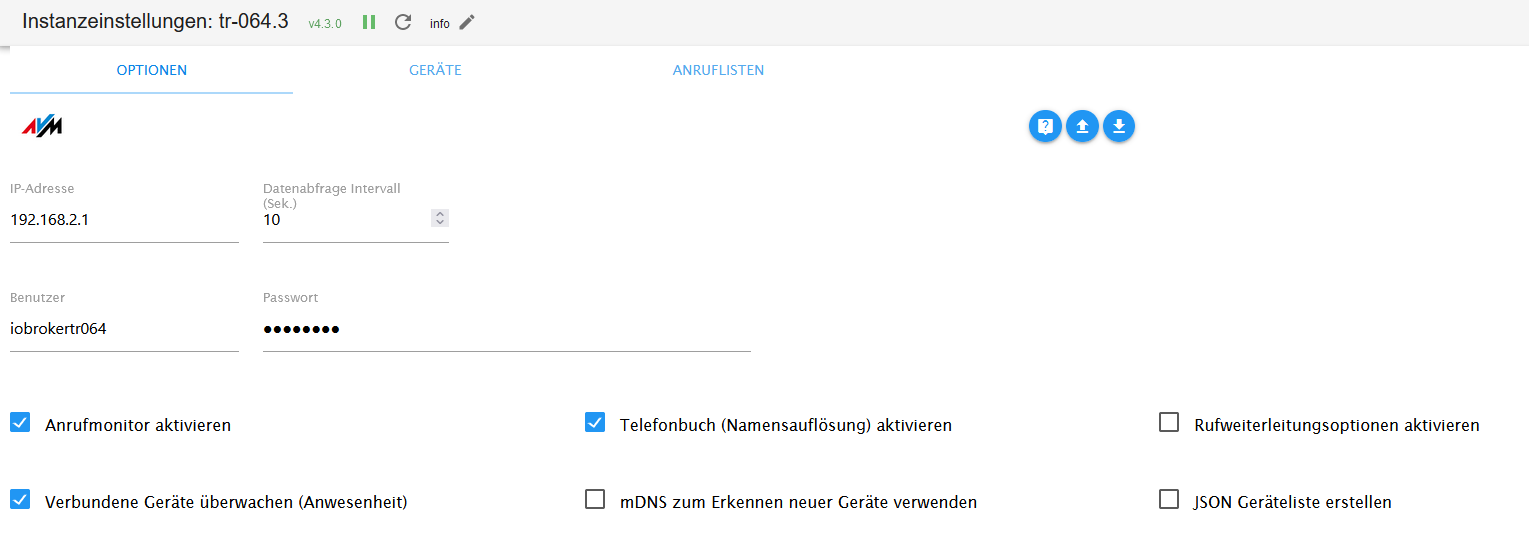
-
@e-s sagte in TR-064 external IP wird nicht aktualisiert:
Gefallen tun und eventuell eine neue Instanz anlegen? Vielleicht wird beim Anlegen
Alte Instanz angehalten und neue Instanz anglegt:
tr-064.3
	2024-06-12 18:11:50.703	info	starting. Version 4.3.0 in /opt/iobroker/node_modules/iobroker.tr-064, node: v18.20.3, js-controller: 6.0.2
host.iobroker
	2024-06-12 18:11:47.554	info	instance system.adapter.tr-064.3 started with pid 305350
host.iobroker
	2024-06-12 18:11:44.282	info	instance system.adapter.tr-064.3 terminated with code 11 (ADAPTER_REQUESTED_TERMINATION)
admin.0
	2024-06-12 18:11:44.113	info	<== Disconnect system.user.admin from ::ffff:192.168.1.3
tr-064.3
	2024-06-12 18:11:43.541	info	Terminated (ADAPTER_REQUESTED_TERMINATION): Without reason
tr-064.3
	2024-06-12 18:11:43.537	info	terminating
tr-064.3
	2024-06-12 18:11:43.534	info	Got terminate signal TERMINATE_YOURSELF
host.iobroker
	2024-06-12 18:11:43.533	info	stopInstance system.adapter.tr-064.3 send kill signal
host.iobroker
	2024-06-12 18:11:44.282	info	instance system.adapter.tr-064.3 terminated with code 11 (ADAPTER_REQUESTED_TERMINATION)
admin.0
	2024-06-12 18:11:44.113	info	<== Disconnect system.user.admin from ::ffff:192.168.1.3
tr-064.3
	2024-06-12 18:11:44.043	info	terminating
tr-064.3
	2024-06-12 18:11:43.541	info	Terminated (ADAPTER_REQUESTED_TERMINATION): Without reason
tr-064.3
	2024-06-12 18:11:43.537	info	terminating
Instanz ist "grün"
und im DP tr-064.3.states.externalIP steht meine korrekte externe IP Adresse...Edit: Zur Sicherheit noch die Einstellungen des Adapters
@amg_666
Danke, jetzt gehen mir langsam wirklich die Ideen aus.
Alles andere funktioniert und der FB-checkpresence Adapter kann die IP auslesen.
Will eigentlich ungern beide Adapter laufen lassen.
In den Einstellungen habe ich noch mDNS und JSON aktiv, das sollte damit nichts zu tun haben. -
@e-s ich hab die neue Instanz wieder gelöscht und die alte gestartet, bei der ist auch mDNS und JSON aktiv, das sollte also kein Thema sein.
Was ist denn jetzt das Problem: Dass der DP "External IP" nicht aktualisiert wird oder dass alle DP des tr-064 Adapters nicht aktualisiert werden? Bei letzterem hätte ich auf falschen user/falsches Passwort getippt.
Welche Berechtigungen hat der User in der Fritzbox?
Bei mir ist das im Menu System-Fritz!Box-Benutzer:Zugang aus dem Internet FRITZ!Box-Einstellungen Sprachnachrichten, Faxnachrichten, FRITZ!App Fon und Anrufliste Smart HomeMindestens die ersten beiden solltest du auch eingerichtet haben
-
@e-s ich hab die neue Instanz wieder gelöscht und die alte gestartet, bei der ist auch mDNS und JSON aktiv, das sollte also kein Thema sein.
Was ist denn jetzt das Problem: Dass der DP "External IP" nicht aktualisiert wird oder dass alle DP des tr-064 Adapters nicht aktualisiert werden? Bei letzterem hätte ich auf falschen user/falsches Passwort getippt.
Welche Berechtigungen hat der User in der Fritzbox?
Bei mir ist das im Menu System-Fritz!Box-Benutzer:Zugang aus dem Internet FRITZ!Box-Einstellungen Sprachnachrichten, Faxnachrichten, FRITZ!App Fon und Anrufliste Smart HomeMindestens die ersten beiden solltest du auch eingerichtet haben
@amg_666
Devices und anruflisten funktionieren einwandfrei und auch immer sofort.Nur eben die states zu ip bleiben komplett leer.
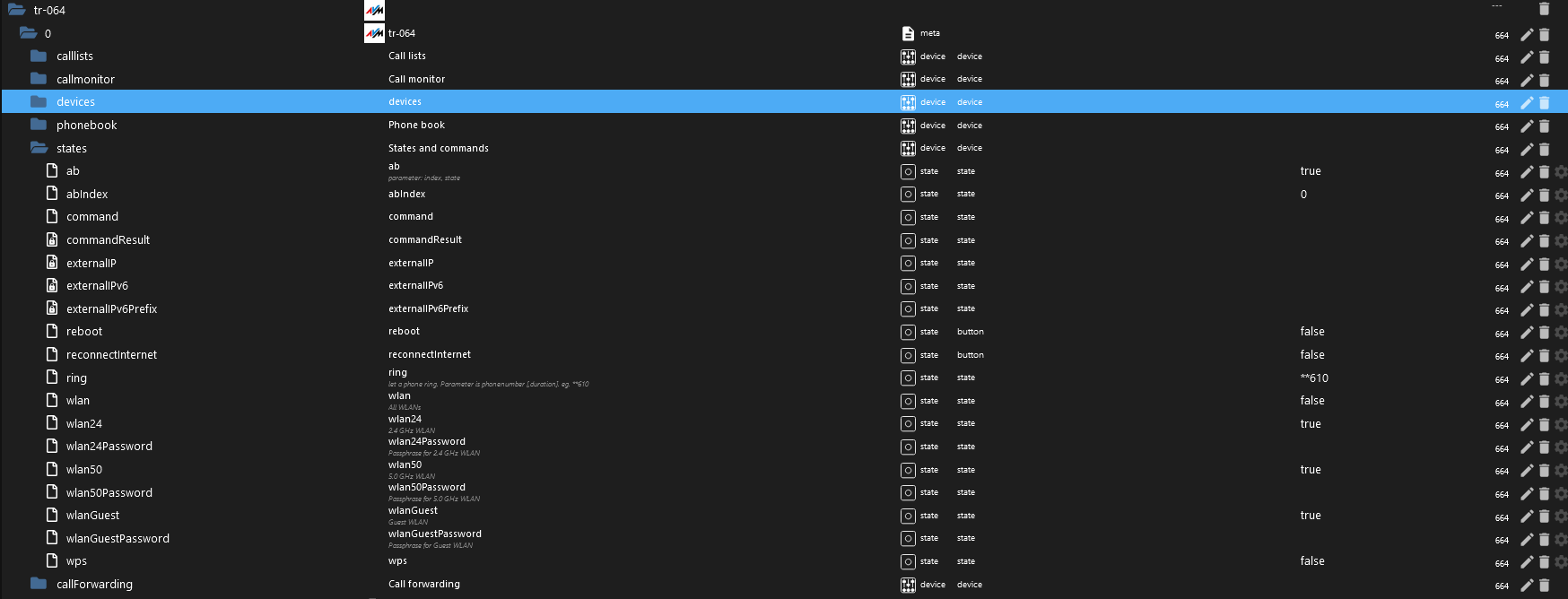
Deswegen bin ich ja so verwundert.Berechtigungen sind auch so vorhanden.
Edit:
FRITZ!Box-Einstellungen Sprachnachrichten, Faxnachrichten, FRITZ!App Fon und Anrufliste Smart Home -
@amg_666
Devices und anruflisten funktionieren einwandfrei und auch immer sofort.Nur eben die states zu ip bleiben komplett leer.
Deswegen bin ich ja so verwundert.Berechtigungen sind auch so vorhanden.
Edit:
FRITZ!Box-Einstellungen Sprachnachrichten, Faxnachrichten, FRITZ!App Fon und Anrufliste Smart Home -
@djmarc75 @amg_666 @crunchip @Thomas-Braun @haselchen
Habe eben nochmal google befragt und konnte den "Fehler" beheben.
Ich habe vor längerer Zeit über hacking Zugriffe über UPnP gelesen und diese Funktion an der fritzbox deaktiviert. Ist unter heimnetz netzwerk netzwerkeinstellungen.
Als ich es eben wieder aktiviert habe, war die IP Adresse sofort wieder angezeigt.
Fazit: tr064 liest die Adresse über upnp aus und fb-checkpresence irgendwie anders.
Danke für eure Antworten, sonst wäre ich da nie wieder drauf gekommen.
-
@djmarc75 @amg_666 @crunchip @Thomas-Braun @haselchen
Habe eben nochmal google befragt und konnte den "Fehler" beheben.
Ich habe vor längerer Zeit über hacking Zugriffe über UPnP gelesen und diese Funktion an der fritzbox deaktiviert. Ist unter heimnetz netzwerk netzwerkeinstellungen.
Als ich es eben wieder aktiviert habe, war die IP Adresse sofort wieder angezeigt.
Fazit: tr064 liest die Adresse über upnp aus und fb-checkpresence irgendwie anders.
Danke für eure Antworten, sonst wäre ich da nie wieder drauf gekommen.
Du meinst das:
Statusinformationen über UPnP übertragen
Über Universal Plug & Play (UPnP) werden im Heimnetz Statusinformationen der FRITZ!Box zum Netzwerkstatus und zu Portfreigaben bereitgestellt. Die Funktion hat keinen Einfluss auf Sicherheitseinstellungen der FRITZ!Box.
-
@djmarc75 @amg_666 @crunchip @Thomas-Braun @haselchen
Habe eben nochmal google befragt und konnte den "Fehler" beheben.
Ich habe vor längerer Zeit über hacking Zugriffe über UPnP gelesen und diese Funktion an der fritzbox deaktiviert. Ist unter heimnetz netzwerk netzwerkeinstellungen.
Als ich es eben wieder aktiviert habe, war die IP Adresse sofort wieder angezeigt.
Fazit: tr064 liest die Adresse über upnp aus und fb-checkpresence irgendwie anders.
Danke für eure Antworten, sonst wäre ich da nie wieder drauf gekommen.
-
Du meinst das:
Statusinformationen über UPnP übertragen
Über Universal Plug & Play (UPnP) werden im Heimnetz Statusinformationen der FRITZ!Box zum Netzwerkstatus und zu Portfreigaben bereitgestellt. Die Funktion hat keinen Einfluss auf Sicherheitseinstellungen der FRITZ!Box.
@thomas-braun
Genau



Hey! Du scheinst an dieser Unterhaltung interessiert zu sein, hast aber noch kein Konto.
Hast du es satt, bei jedem Besuch durch die gleichen Beiträge zu scrollen? Wenn du dich für ein Konto anmeldest, kommst du immer genau dorthin zurück, wo du zuvor warst, und kannst dich über neue Antworten benachrichtigen lassen (entweder per E-Mail oder Push-Benachrichtigung). Du kannst auch Lesezeichen speichern und Beiträge positiv bewerten, um anderen Community-Mitgliedern deine Wertschätzung zu zeigen.
Mit deinem Input könnte dieser Beitrag noch besser werden 💗
Registrieren AnmeldenSupport us
295
Online33.0k
Benutzer83.6k
Themen1.3m
Beiträge