




keine Adapter mehr installieren /Updaten
-
Servus
wollte jetzt den iobroker komplett neu aufziehen und ein Backup einspielen. aber leider
bekomme ich beim Backuperstellen einen FehlerParsing error on getStates("io.undefined"), returning "null" for "undefined": Unexpected token u in JSON at position 0 host.iobroker 36380 states saved host.iobroker 37080 objects saved Backup created: /opt/iobroker/backups/2024_04_18-17_08_05_backupiobroker.tar.gz This backup can only be restored with js-controller version up from 4.1beim wiedereinspielen kommt dann:
root@iobroker:/opt/iobroker# iobroker restore 2024_04_18-17_08_05_backupiobroker.tar.gz iobroker controller daemon is not running host.iobroker OK. Removing current installation of iobroker.admin removed 43 packages in 1s 56 packages are looking for funding run `npm fund` for details Removing current installation of iobroker.backitup removed 170 packages in 914ms 29 packages are looking for funding run `npm fund` for details Removing current installation of iobroker.discovery removed 44 packages in 2s 15 packages are looking for funding run `npm fund` for details host.iobroker Connecting to new DB "redis/jsonl" (can take up to 20s) ... No connection to states 127.0.0.1:6379[redis]@farmer-cb sagte in keine Adapter mehr installieren /Updaten:
root@iobroker
Nicht als root herumhampeln...
-
@farmer-cb sagte in keine Adapter mehr installieren /Updaten:
root@iobroker
Nicht als root herumhampeln...
@thomas-braun
hab ich verschlafen... jetzt umgestelltiob diag sagt:
iob diag (neues system) sagt folgendes:Skript v.2023-10-10 *** BASE SYSTEM *** Static hostname: iobroker Icon name: computer-container Chassis: container ☐ Virtualization: lxc Operating System: Debian GNU/Linux 12 (bookworm) Kernel: Linux 5.15.131-2-pve Architecture: x86-64 model name : Intel(R) Core(TM) i5-6500T CPU @ 2.50GHz Docker : false Virtualization : lxc Kernel : x86_64 Userland : amd64 Systemuptime and Load: 17:33:28 up 31 min, 2 users, load average: 0.41, 0.53, 0.70 CPU threads: 4 *** Time and Time Zones *** Local time: Thu 2024-04-18 17:33:28 CEST Universal time: Thu 2024-04-18 15:33:28 UTC RTC time: n/a Time zone: Europe/Berlin (CEST, +0200) System clock synchronized: yes NTP service: inactive RTC in local TZ: no *** User and Groups *** Farmer /home/Farmer Farmer sudo users *** X-Server-Setup *** X-Server: false Desktop: Terminal: Boot Target: graphical.target *** MEMORY *** total used free shared buff/cache available Mem: 4.3G 105M 3.5G 139K 733M 4.2G Swap: 4.3G 106K 4.3G Total: 8.6G 105M 7.8G 4096 M total memory 100 M used memory 266 M active memory 458 M inactive memory 3295 M free memory 0 M buffer memory 699 M swap cache 4096 M total swap 0 M used swap 4095 M free swap *** FAILED SERVICES *** UNIT LOAD ACTIVE SUB DESCRIPTION * run-rpc_pipefs.mount loaded failed failed RPC Pipe File System * sys-kernel-config.mount loaded failed failed Kernel Configuration File System * iobroker.service loaded failed failed ioBroker Server LOAD = Reflects whether the unit definition was properly loaded. ACTIVE = The high-level unit activation state, i.e. generalization of SUB. SUB = The low-level unit activation state, values depend on unit type. 3 loaded units listed. *** FILESYSTEM *** Filesystem Type Size Used Avail Use% Mounted on /dev/mapper/pve-vm--101--disk--0 ext4 16G 2.1G 13G 14% / none tmpfs 492K 4.0K 488K 1% /dev udev devtmpfs 3.8G 0 3.8G 0% /dev/tty tmpfs tmpfs 3.9G 0 3.9G 0% /dev/shm tmpfs tmpfs 1.6G 136K 1.6G 1% /run tmpfs tmpfs 5.0M 0 5.0M 0% /run/lock tmpfs tmpfs 782M 0 782M 0% /run/user/0 Messages concerning ext4 filesystem in dmesg: dmesg: read kernel buffer failed: Operation not permitted Show mounted filesystems \(real ones only\): TARGET SOURCE FSTYPE OPTIONS / /dev/mapper/pve-vm--101--disk--0 ext4 rw,relatime,stripe=16 Files in neuralgic directories: /var: 479M /var/ 250M /var/cache 246M /var/cache/apt 197M /var/lib 170M /var/cache/apt/archives Hint: You are currently not seeing messages from other users and the system. Users in groups 'adm', 'systemd-journal' can see all messages. Pass -q to turn off this notice. Archived and active journals take up 8.0M in the file system. /opt/iobroker/backups: 22M /opt/iobroker/backups/ /opt/iobroker/iobroker-data: 15M /opt/iobroker/iobroker-data/files 15M /opt/iobroker/iobroker-data/ 13M /opt/iobroker/iobroker-data/files/admin.admin/custom/static/js 13M /opt/iobroker/iobroker-data/files/admin.admin/custom/static 13M /opt/iobroker/iobroker-data/files/admin.admin/custom The five largest files in iobroker-data are: 6.3M /opt/iobroker/iobroker-data/files/admin.admin/custom/static/js/vendors-node_modules_iobroker_adapter-react-v5_assets_devices_parseNames_js-node_modules_iobr-99c23e.847b8ad9.chunk.js.map 2.8M /opt/iobroker/iobroker-data/files/admin.admin/custom/static/js/vendors-node_modules_iobroker_adapter-react-v5_assets_devices_parseNames_js-node_modules_iobr-99c23e.847b8ad9.chunk.js 1.6M /opt/iobroker/iobroker-data/files/admin.admin/custom/static/js/vendors-node_modules_mui_material_Accordion_index_js-node_modules_mui_material_AccordionDetai-57e02d.0886b730.chunk.js.map 652K /opt/iobroker/iobroker-data/files/admin.admin/custom/static/js/vendors-node_modules_mui_material_index_js.40e01f69.chunk.js.map 384K /opt/iobroker/iobroker-data/files/admin.admin/custom/static/js/vendors-node_modules_mui_material_Accordion_index_js-node_modules_mui_material_AccordionDetai-57e02d.0886b730.chunk.js USB-Devices by-id: USB-Sticks - Avoid direct links to /dev/* in your adapter setups, please always prefer the links 'by-id': find: '/dev/serial/by-id/': No such file or directory *** NodeJS-Installation *** /usr/bin/nodejs v18.20.2 /usr/bin/node v18.20.2 /usr/bin/npm 10.5.0 /usr/bin/npx 10.5.0 /usr/bin/corepack 0.25.2 nodejs: Installed: 18.20.2-1nodesource1 Candidate: 18.20.2-1nodesource1 Version table: *** 18.20.2-1nodesource1 1001 500 https://deb.nodesource.com/node_18.x nodistro/main amd64 Packages 100 /var/lib/dpkg/status 18.20.1-1nodesource1 1001 500 https://deb.nodesource.com/node_18.x nodistro/main amd64 Packages 18.20.0-1nodesource1 1001 500 https://deb.nodesource.com/node_18.x nodistro/main amd64 Packages 18.19.1-1nodesource1 1001 500 https://deb.nodesource.com/node_18.x nodistro/main amd64 Packages 18.19.0+dfsg-6~deb12u1 500 500 http://security.debian.org/debian-security stable-security/main amd64 Packages 18.19.0-1nodesource1 1001 500 https://deb.nodesource.com/node_18.x nodistro/main amd64 Packages 18.18.2-1nodesource1 1001 500 https://deb.nodesource.com/node_18.x nodistro/main amd64 Packages 18.18.1-1nodesource1 1001 500 https://deb.nodesource.com/node_18.x nodistro/main amd64 Packages 18.18.0-1nodesource1 1001 500 https://deb.nodesource.com/node_18.x nodistro/main amd64 Packages 18.17.1-1nodesource1 1001 500 https://deb.nodesource.com/node_18.x nodistro/main amd64 Packages 18.17.0-1nodesource1 1001 500 https://deb.nodesource.com/node_18.x nodistro/main amd64 Packages 18.16.1-1nodesource1 1001 500 https://deb.nodesource.com/node_18.x nodistro/main amd64 Packages 18.16.0-1nodesource1 1001 500 https://deb.nodesource.com/node_18.x nodistro/main amd64 Packages 18.15.0-1nodesource1 1001 500 https://deb.nodesource.com/node_18.x nodistro/main amd64 Packages 18.14.2-1nodesource1 1001 500 https://deb.nodesource.com/node_18.x nodistro/main amd64 Packages 18.14.1-1nodesource1 1001 500 https://deb.nodesource.com/node_18.x nodistro/main amd64 Packages 18.14.0-1nodesource1 1001 500 https://deb.nodesource.com/node_18.x nodistro/main amd64 Packages 18.13.0+dfsg1-1 500 500 http://deb.debian.org/debian stable/main amd64 Packages 18.13.0-1nodesource1 1001 500 https://deb.nodesource.com/node_18.x nodistro/main amd64 Packages 18.12.0-1nodesource1 1001 500 https://deb.nodesource.com/node_18.x nodistro/main amd64 Packages 18.11.0-1nodesource1 1001 500 https://deb.nodesource.com/node_18.x nodistro/main amd64 Packages 18.10.0-1nodesource1 1001 500 https://deb.nodesource.com/node_18.x nodistro/main amd64 Packages 18.9.1-1nodesource1 1001 500 https://deb.nodesource.com/node_18.x nodistro/main amd64 Packages 18.9.0-1nodesource1 1001 500 https://deb.nodesource.com/node_18.x nodistro/main amd64 Packages 18.8.0-1nodesource1 1001 500 https://deb.nodesource.com/node_18.x nodistro/main amd64 Packages 18.7.0-1nodesource1 1001 500 https://deb.nodesource.com/node_18.x nodistro/main amd64 Packages 18.6.0-1nodesource1 1001 500 https://deb.nodesource.com/node_18.x nodistro/main amd64 Packages 18.5.0-1nodesource1 1001 500 https://deb.nodesource.com/node_18.x nodistro/main amd64 Packages 18.4.0-1nodesource1 1001 500 https://deb.nodesource.com/node_18.x nodistro/main amd64 Packages 18.3.0-1nodesource1 1001 500 https://deb.nodesource.com/node_18.x nodistro/main amd64 Packages 18.2.0-1nodesource1 1001 500 https://deb.nodesource.com/node_18.x nodistro/main amd64 Packages 18.1.0-1nodesource1 1001 500 https://deb.nodesource.com/node_18.x nodistro/main amd64 Packages 18.0.0-1nodesource1 1001 500 https://deb.nodesource.com/node_18.x nodistro/main amd64 Packages Temp directories causing npm8 problem: 0 No problems detected Errors in npm tree: *** ioBroker-Installation *** ioBroker Status iobroker is not running on this host. Objects type: jsonl States type: jsonl Core adapters versions js-controller: 5.0.19 admin: "admin" not found javascript: "javascript" not found Adapters from github: 0 Adapter State system.adapter.admin.0 : admin : iobroker - enabled, port: 8081, bind: 0.0.0.0, run as: admin system.adapter.backitup.0 : backitup : iobroker - enabled system.adapter.discovery.0 : discovery : iobroker - enabled + instance is alive Enabled adapters with bindings system.adapter.admin.0 : admin : iobroker - enabled, port: 8081, bind: 0.0.0.0, run as: admin ioBroker-Repositories stable : http://download.iobroker.net/sources-dist.json beta : http://download.iobroker.net/sources-dist-latest.json Active repo(s): stable Installed ioBroker-Instances Used repository: stable Controller "js-controller": 5.0.19 , installed 5.0.19 Objects and States Please stand by - This may take a while Objects: 142 States: 76 *** OS-Repositories and Updates *** Hit:1 http://security.debian.org/debian-security stable-security InRelease Hit:2 http://deb.debian.org/debian stable InRelease Hit:3 https://deb.nodesource.com/node_18.x nodistro InRelease Reading package lists... Pending Updates: 0 *** Listening Ports *** Active Internet connections (only servers) Proto Recv-Q Send-Q Local Address Foreign Address State User Inode PID/Program name tcp 0 0 127.0.0.1:25 0.0.0.0:* LISTEN 0 626469319 300/master tcp 0 0 0.0.0.0:111 0.0.0.0:* LISTEN 0 626541046 1/init tcp6 0 0 :::111 :::* LISTEN 0 626541048 1/init tcp6 0 0 :::22 :::* LISTEN 0 626467646 1/init tcp6 0 0 ::1:25 :::* LISTEN 0 626469320 300/master udp 0 0 0.0.0.0:68 0.0.0.0:* 0 626466679 92/dhclient udp 0 0 0.0.0.0:111 0.0.0.0:* 0 626541047 1/init udp6 0 0 :::111 :::* 0 626541049 1/init *** Log File - Last 25 Lines *** 2024-04-18 17:14:10.977 - info: host.iobroker received SIGTERM 2024-04-18 17:14:10.977 - info: admin.0 (8788) terminating http server on port 8081 2024-04-18 17:14:10.978 - info: host.iobroker stopInstance system.adapter.admin.0 (force=false, process=true) 2024-04-18 17:14:10.979 - info: host.iobroker stopInstance system.adapter.backitup.0 (force=false, process=true) 2024-04-18 17:14:10.979 - info: host.iobroker stopInstance system.adapter.discovery.0 (force=false, process=true) 2024-04-18 17:14:10.982 - info: backitup.0 (8815) Got terminate signal TERMINATE_YOURSELF 2024-04-18 17:14:10.981 - info: admin.0 (8788) Got terminate signal TERMINATE_YOURSELF 2024-04-18 17:14:10.982 - info: discovery.0 (8830) Got terminate signal TERMINATE_YOURSELF 2024-04-18 17:14:10.983 - info: host.iobroker stopInstance system.adapter.admin.0 send kill signal 2024-04-18 17:14:10.983 - info: discovery.0 (8830) terminating 2024-04-18 17:14:10.983 - info: admin.0 (8788) terminating 2024-04-18 17:14:10.983 - info: backitup.0 (8815) terminating 2024-04-18 17:14:10.984 - info: admin.0 (8788) Terminated (NO_ERROR): Without reason 2024-04-18 17:14:10.983 - info: discovery.0 (8830) Terminated (NO_ERROR): Without reason 2024-04-18 17:14:10.984 - info: backitup.0 (8815) Terminated (NO_ERROR): Without reason 2024-04-18 17:14:11.029 - info: host.iobroker stopInstance system.adapter.backitup.0 send kill signal 2024-04-18 17:14:11.029 - info: host.iobroker stopInstance system.adapter.discovery.0 send kill signal 2024-04-18 17:14:11.479 - info: discovery.0 (8830) terminating 2024-04-18 17:14:11.481 - info: backitup.0 (8815) terminating 2024-04-18 17:14:11.481 - info: admin.0 (8788) terminating 2024-04-18 17:14:11.528 - info: host.iobroker instance system.adapter.backitup.0 terminated with code 0 (NO_ERROR) 2024-04-18 17:14:11.533 - info: host.iobroker instance system.adapter.admin.0 terminated with code 0 (NO_ERROR) 2024-04-18 17:14:11.537 - info: host.iobroker instance system.adapter.discovery.0 terminated with code 0 (NO_ERROR) 2024-04-18 17:14:11.537 - info: host.iobroker All instances are stopped. 2024-04-18 17:14:11.650 - info: host.iobroker terminated======================= SUMMARY ======================= v.2023-10-10 Static hostname: iobroker Icon name: computer-container Chassis: container ☐ Virtualization: lxc Operating System: Debian GNU/Linux 12 (bookworm) Kernel: Linux 5.15.131-2-pve Architecture: x86-64 Installation: lxc Kernel: x86_64 Userland: amd64 Timezone: Europe/Berlin (CEST, +0200) User-ID: 1001 X-Server: false Boot Target: graphical.target Pending OS-Updates: 0 Pending iob updates: 0 Nodejs-Installation: /usr/bin/nodejs v18.20.2 /usr/bin/node v18.20.2 /usr/bin/npm 10.5.0 /usr/bin/npx 10.5.0 /usr/bin/corepack 0.25.2 Recommended versions are nodejs 18.20.2 and npm 10.5.0 Your nodejs installation is correct MEMORY: total used free shared buff/cache available Mem: 4.3G 107M 3.4G 139K 740M 4.2G Swap: 4.3G 106K 4.3G Total: 8.6G 107M 7.7G Active iob-Instances: 1 Active repo(s): stable ioBroker Core: js-controller 5.0.19 admin "admin" not found ioBroker Status: iobroker is not running on this host. Objects type: jsonl States type: jsonl Status admin and web instance: system.adapter.admin.0 : admin : iobroker - enabled, port: 8081, bind: 0.0.0.0, run as: admin Objects: 142 States: 76 Size of iob-Database: 4.5M /opt/iobroker/iobroker-data/objects.jsonl 28K /opt/iobroker/iobroker-data/states.jsonl =================== END OF SUMMARY ==================== -
@farmer-cb sagte in keine Adapter mehr installieren /Updaten:
*** FAILED SERVICES ***
UNIT LOAD ACTIVE SUB DESCRIPTION
- run-rpc_pipefs.mount loaded failed failed RPC Pipe File System
- sys-kernel-config.mount loaded failed failed Kernel Configuration File System
- iobroker.service loaded failed failed ioBroker Server
Eher ungünstig, wenn der Service nicht gestartet ist.
sudo systemctl start iobroker.servicesagt?
-
@farmer-cb sagte in keine Adapter mehr installieren /Updaten:
*** FAILED SERVICES ***
UNIT LOAD ACTIVE SUB DESCRIPTION
- run-rpc_pipefs.mount loaded failed failed RPC Pipe File System
- sys-kernel-config.mount loaded failed failed Kernel Configuration File System
- iobroker.service loaded failed failed ioBroker Server
Eher ungünstig, wenn der Service nicht gestartet ist.
sudo systemctl start iobroker.servicesagt?
@thomas-braun
als normaler user darf ich das nicht, muss ich den user in einer besonderen gruppe eintragemeldung:
Farmer@iobroker:/opt/iobroker$ sudo systemctl start iobroker.service
[sudo] password for Farmer:
Sorry, user Farmer is not allowed to execute '/usr/bin/systemctl start iobroker.service' as root on iobroker
smartes Haus durch Digitalstrom, enocean, SPS S7-1215, Homematik, Shelly, Alexa, iobroker auf einem HP-mini mit Proxmox
-
@thomas-braun
als normaler user darf ich das nicht, muss ich den user in einer besonderen gruppe eintragemeldung:
Farmer@iobroker:/opt/iobroker$ sudo systemctl start iobroker.service [sudo] password for Farmer: Sorry, user Farmer is not allowed to execute '/usr/bin/systemctl start iobroker.service' as root on iobrokerDas muss der Farmer (am Rande: Besser usernames in Kleinschreibung) aber können:
*** User and Groups ***
Farmer
/home/Farmer
Farmer sudo users
Hast du den Farmer mal aus- und wieder eingeloggt? Gruppenrechte werden nur beim einloggen neugelesen.
-
Das muss der Farmer (am Rande: Besser usernames in Kleinschreibung) aber können:
*** User and Groups ***
Farmer
/home/Farmer
Farmer sudo users
Hast du den Farmer mal aus- und wieder eingeloggt? Gruppenrechte werden nur beim einloggen neugelesen.
habs hinbekommen.
sudo systemctl start iobroker.service erzeugt keine Meldung.
Aber:Farmer@iobroker:~$ sudo systemctl status iobroker.service * iobroker.service - ioBroker Server Loaded: loaded (/lib/systemd/system/iobroker.service; enabled; preset: enabled) Active: active (running) since Thu 2024-04-18 18:02:51 CEST; 31s ago Docs: http://iobroker.net Main PID: 1117 (iobroker.js-con) Tasks: 18 (limit: 9301) Memory: 67.8M CPU: 1.134s CGroup: /system.slice/iobroker.service |-1117 iobroker.js-controller `-1130 /usr/bin/node /opt/iobroker/node_modules/iobroker.js-controller/iobroker.js _restart Apr 18 18:02:51 iobroker systemd[1]: Started iobroker.service - ioBroker Server. Farmer@iobroker:~$ iobroker status No connection to states 127.0.0.1:6379[redis] Farmer@iobroker:~$smartes Haus durch Digitalstrom, enocean, SPS S7-1215, Homematik, Shelly, Alexa, iobroker auf einem HP-mini mit Proxmox
-
habs hinbekommen.
sudo systemctl start iobroker.service erzeugt keine Meldung.
Aber:Farmer@iobroker:~$ sudo systemctl status iobroker.service * iobroker.service - ioBroker Server Loaded: loaded (/lib/systemd/system/iobroker.service; enabled; preset: enabled) Active: active (running) since Thu 2024-04-18 18:02:51 CEST; 31s ago Docs: http://iobroker.net Main PID: 1117 (iobroker.js-con) Tasks: 18 (limit: 9301) Memory: 67.8M CPU: 1.134s CGroup: /system.slice/iobroker.service |-1117 iobroker.js-controller `-1130 /usr/bin/node /opt/iobroker/node_modules/iobroker.js-controller/iobroker.js _restart Apr 18 18:02:51 iobroker systemd[1]: Started iobroker.service - ioBroker Server. Farmer@iobroker:~$ iobroker status No connection to states 127.0.0.1:6379[redis] Farmer@iobroker:~$ -
@thomas-braun
installiert sich das nicht automatisch bei einer iobroker neuinstallationFarmer@iobroker:/opt/iobroker$ sudo apt update Hit:1 http://security.debian.org/debian-security stable-security InRelease Hit:2 https://deb.nodesource.com/node_18.x nodistro InRelease Hit:3 http://deb.debian.org/debian stable InRelease Reading package lists... Done Building dependency tree... Done Reading state information... Done All packages are up to date. Farmer@iobroker:/opt/iobroker$ apt policy redis redis: Installed: (none) Candidate: 5:7.0.15-1~deb12u1 Version table: 5:7.0.15-1~deb12u1 500 500 http://deb.debian.org/debian stable/main amd64 Packages 500 http://security.debian.org/debian-security stable-security/main amd64 Packages Farmer@iobroker:/opt/iobroker$smartes Haus durch Digitalstrom, enocean, SPS S7-1215, Homematik, Shelly, Alexa, iobroker auf einem HP-mini mit Proxmox
-
@thomas-braun
installiert sich das nicht automatisch bei einer iobroker neuinstallationFarmer@iobroker:/opt/iobroker$ sudo apt update Hit:1 http://security.debian.org/debian-security stable-security InRelease Hit:2 https://deb.nodesource.com/node_18.x nodistro InRelease Hit:3 http://deb.debian.org/debian stable InRelease Reading package lists... Done Building dependency tree... Done Reading state information... Done All packages are up to date. Farmer@iobroker:/opt/iobroker$ apt policy redis redis: Installed: (none) Candidate: 5:7.0.15-1~deb12u1 Version table: 5:7.0.15-1~deb12u1 500 500 http://deb.debian.org/debian stable/main amd64 Packages 500 http://security.debian.org/debian-security stable-security/main amd64 Packages Farmer@iobroker:/opt/iobroker$@farmer-cb sagte in keine Adapter mehr installieren /Updaten:
installiert sich das nicht automatisch bei einer iobroker neuinstallation
Nein. Wie du siehst nicht. Ist ein Ding vom Betriebssystem und muss vom Administrator manuell hinzugefügt werden. Der ioBroker läuft ja auch in der Voreinstellung nicht mittels redis.
Also jetzt
sudo apt install redis -
@farmer-cb sagte in keine Adapter mehr installieren /Updaten:
installiert sich das nicht automatisch bei einer iobroker neuinstallation
Nein. Wie du siehst nicht. Ist ein Ding vom Betriebssystem und muss vom Administrator manuell hinzugefügt werden. Der ioBroker läuft ja auch in der Voreinstellung nicht mittels redis.
Also jetzt
sudo apt install redis -
@thomas-braun
was ist eigentlich besser, json/redis.....hab redis installiert und restore läuft gerade
@farmer-cb sagte in keine Adapter mehr installieren /Updaten:
was ist eigentlich besser, json/redis.....
Hängt von deinem Setup ab.
redis braucht viel RAM, ist aber bei einer großen Zahl von States/Objects schneller als jsonl oder file. -
@farmer-cb sagte in keine Adapter mehr installieren /Updaten:
was ist eigentlich besser, json/redis.....
Hängt von deinem Setup ab.
redis braucht viel RAM, ist aber bei einer großen Zahl von States/Objects schneller als jsonl oder file.Guten Morgen
Erst einmal vielen vielen Dank für die Unterstützung, jetzt :man-running: der iobroker wieder wie

nun zu:
@Thomas-BraunHängt von deinem Setup ab.
redis braucht viel RAM, ist aber bei einer großen Zahl von States/Objects schneller als jsonl oder file.
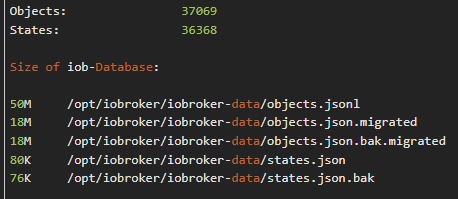
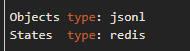
sollte ich hier Objects auch auf redis umstellen???

Hey! Du scheinst an dieser Unterhaltung interessiert zu sein, hast aber noch kein Konto.
Hast du es satt, bei jedem Besuch durch die gleichen Beiträge zu scrollen? Wenn du dich für ein Konto anmeldest, kommst du immer genau dorthin zurück, wo du zuvor warst, und kannst dich über neue Antworten benachrichtigen lassen (entweder per E-Mail oder Push-Benachrichtigung). Du kannst auch Lesezeichen speichern und Beiträge positiv bewerten, um anderen Community-Mitgliedern deine Wertschätzung zu zeigen.
Mit deinem Input könnte dieser Beitrag noch besser werden 💗
Registrieren AnmeldenSupport us
186
Online33.0k
Benutzer83.6k
Themen1.3m
Beiträge