




Multihost Einrichtung, Slave findet Master nicht.
-
Der Master hat die 192.168.178.122, die habe ich doch beim "custom setup 2x eingetragen.
Die IP des Slave ist die 192.168.178.145.@ronrich beide Hosts neu gestartet?
-
Ich betreibe eine IoBroker Installation in einem LXC Container auf Proxmox.
Jetzt habe ich auf der selben Proxmox Maschine eine VM mit Debian 12 erstellt und darin den IoBroker installiert.
Ich möchte den bestehenden IoBroker im LXC Container als Master laufen lassen und den neuen IoBroker in der VM als Slave. ( Der Hintergrund dieser Aktion ist dass ich es nicht hinbekomme einen USB CAN Bus Adapter an den LXC durchzureichen, in der VM klappt es ohne Probleme. Hierzu gibt es schon einen anderen Beitrag https://forum.iobroker.net/topic/73817/hilfe-beim-durchreichen-usb2can-an-proxmox-lxc-container/11?_=1713113804825).Ich habe versucht die Multihost Kopplung nach der hier im Forum durchzuführen.
Auf dem Master ausführen von - iob multihost enable - vergabe von Passwort und denn - iob restart -Wenn ich dann auf dem Slave - iob multihost connect eingebe bekomme ich immer die folgende Meldung:
canbus@canbus:~$ iob multihost connect
No Multihost server found. Make sure iobroker is running on the host where you enabled multihost discovery (and it is not this host)!
canbus@canbus:~$
ein iob diag auf dem Master ergibt:
Skript v.2023-10-10 *** BASE SYSTEM *** Static hostname: iobroker Icon name: computer-container Chassis: container Virtualization: lxc Operating System: Ubuntu 22.04.4 LTS Kernel: Linux 6.5.13-3-pve Architecture: x86-64 model name : Intel(R) Pentium(R) CPU G4400T @ 2.90GHz Docker : false Virtualization : lxc Kernel : x86_64 Userland : amd64 Systemuptime and Load: 19:07:45 up 54 min, 2 users, load average: 0.30, 0.29, 0.35 CPU threads: 2 *** Time and Time Zones *** Local time: Sun 2024-04-14 19:07:46 CEST Universal time: Sun 2024-04-14 17:07:46 UTC RTC time: n/a Time zone: Europe/Berlin (CEST, +0200) System clock synchronized: yes NTP service: inactive RTC in local TZ: no *** User and Groups *** ronald /home/ronald ronald sudo iobroker *** X-Server-Setup *** X-Server: false Desktop: Terminal: Boot Target: graphical.target *** MEMORY *** total used free shared buff/cache available Mem: 4.1G 1.7G 1.7G 0.0K 683M 2.4G Swap: 2.0G 106M 1.9G Total: 6.1G 1.9G 3.6G 4096 M total memory 1743 M used memory 919 M active memory 1353 M inactive memory 1669 M free memory 0 M buffer memory 683 M swap cache 2048 M total swap 106 M used swap 1941 M free swap *** FAILED SERVICES *** UNIT LOAD ACTIVE SUB DESCRIPTION * run-rpc_pipefs.mount loaded failed failed RPC Pipe File System LOAD = Reflects whether the unit definition was properly loaded. ACTIVE = The high-level unit activation state, i.e. generalization of SUB. SUB = The low-level unit activation state, values depend on unit type. 1 loaded units listed. *** FILESYSTEM *** Filesystem Type Size Used Avail Use% Mounted on /dev/mapper/pve-vm--1122--disk--1 ext4 22G 9.4G 12G 46% / none tmpfs 492K 4.0K 488K 1% /dev tmpfs tmpfs 3.9G 0 3.9G 0% /dev/shm tmpfs tmpfs 1.6G 132K 1.6G 1% /run tmpfs tmpfs 5.0M 0 5.0M 0% /run/lock Messages concerning ext4 filesystem in dmesg: dmesg: read kernel buffer failed: Operation not permitted Show mounted filesystems \(real ones only\): TARGET SOURCE FSTYPE OPTIONS / /dev/mapper/pve-vm--1122--disk--1 ext4 rw,relatime,stripe=16 Files in neuralgic directories: /var: 1.6G /var/ 1.0G /var/lib 730M /var/lib/influxdb 358M /var/lib/influxdb/data 355M /var/lib/influxdb/.influxdbv2/engine Hint: You are currently not seeing messages from other users and the system. Users in groups 'adm', 'systemd-journal' can see all messages. Pass -q to turn off this notice. Archived and active journals take up 16.0M in the file system. /opt/iobroker/backups: 2.4G /opt/iobroker/backups/ /opt/iobroker/iobroker-data: 1019M /opt/iobroker/iobroker-data/ 479M /opt/iobroker/iobroker-data/files 400M /opt/iobroker/iobroker-data/history 143M /opt/iobroker/iobroker-data/files/vis-2 100M /opt/iobroker/iobroker-data/backup-objects The five largest files in iobroker-data are: 37M /opt/iobroker/iobroker-data/objects.jsonl 24M /opt/iobroker/iobroker-data/files/web.admin/static/js/main.135279a0.js.map 24M /opt/iobroker/iobroker-data/files/echarts/static/js/main.2b7495c2.js.map 24M /opt/iobroker/iobroker-data/files/echarts.admin/chart/static/js/main.2b7495c2.js.map 23M /opt/iobroker/iobroker-data/files/echarts.admin/static/js/main.245b61c0.js.map USB-Devices by-id: USB-Sticks - Avoid direct links to /dev/* in your adapter setups, please always prefer the links 'by-id': /dev/serial/by-id/usb-Texas_Instruments_XDS110__03.00.00.19__Embed_with_CMSIS-DAP_L43003E1-if00 *** NodeJS-Installation *** /usr/bin/nodejs v18.20.0 /usr/bin/node v18.20.0 /usr/bin/npm 10.5.0 /usr/bin/npx 10.5.0 /usr/bin/corepack 0.25.2 nodejs: Installed: 18.20.0-1nodesource1 Candidate: 18.20.2-1nodesource1 Version table: 18.20.2-1nodesource1 1001 500 https://deb.nodesource.com/node_18.x nodistro/main amd64 Packages 18.20.1-1nodesource1 1001 500 https://deb.nodesource.com/node_18.x nodistro/main amd64 Packages *** 18.20.0-1nodesource1 1001 500 https://deb.nodesource.com/node_18.x nodistro/main amd64 Packages 100 /var/lib/dpkg/status 18.19.1-1nodesource1 1001 500 https://deb.nodesource.com/node_18.x nodistro/main amd64 Packages 18.19.0-1nodesource1 1001 500 https://deb.nodesource.com/node_18.x nodistro/main amd64 Packages 18.18.2-1nodesource1 1001 500 https://deb.nodesource.com/node_18.x nodistro/main amd64 Packages 18.18.1-1nodesource1 1001 500 https://deb.nodesource.com/node_18.x nodistro/main amd64 Packages 18.18.0-1nodesource1 1001 500 https://deb.nodesource.com/node_18.x nodistro/main amd64 Packages 18.17.1-1nodesource1 1001 500 https://deb.nodesource.com/node_18.x nodistro/main amd64 Packages 18.17.0-1nodesource1 1001 500 https://deb.nodesource.com/node_18.x nodistro/main amd64 Packages 18.16.1-1nodesource1 1001 500 https://deb.nodesource.com/node_18.x nodistro/main amd64 Packages 18.16.0-1nodesource1 1001 500 https://deb.nodesource.com/node_18.x nodistro/main amd64 Packages 18.15.0-1nodesource1 1001 500 https://deb.nodesource.com/node_18.x nodistro/main amd64 Packages 18.14.2-1nodesource1 1001 500 https://deb.nodesource.com/node_18.x nodistro/main amd64 Packages 18.14.1-1nodesource1 1001 500 https://deb.nodesource.com/node_18.x nodistro/main amd64 Packages 18.14.0-1nodesource1 1001 500 https://deb.nodesource.com/node_18.x nodistro/main amd64 Packages 18.13.0-1nodesource1 1001 500 https://deb.nodesource.com/node_18.x nodistro/main amd64 Packages 18.12.0-1nodesource1 1001 500 https://deb.nodesource.com/node_18.x nodistro/main amd64 Packages 18.11.0-1nodesource1 1001 500 https://deb.nodesource.com/node_18.x nodistro/main amd64 Packages 18.10.0-1nodesource1 1001 500 https://deb.nodesource.com/node_18.x nodistro/main amd64 Packages 18.9.1-1nodesource1 1001 500 https://deb.nodesource.com/node_18.x nodistro/main amd64 Packages 18.9.0-1nodesource1 1001 500 https://deb.nodesource.com/node_18.x nodistro/main amd64 Packages 18.8.0-1nodesource1 1001 500 https://deb.nodesource.com/node_18.x nodistro/main amd64 Packages 18.7.0-1nodesource1 1001 500 https://deb.nodesource.com/node_18.x nodistro/main amd64 Packages 18.6.0-1nodesource1 1001 500 https://deb.nodesource.com/node_18.x nodistro/main amd64 Packages 18.5.0-1nodesource1 1001 500 https://deb.nodesource.com/node_18.x nodistro/main amd64 Packages 18.4.0-1nodesource1 1001 500 https://deb.nodesource.com/node_18.x nodistro/main amd64 Packages 18.3.0-1nodesource1 1001 500 https://deb.nodesource.com/node_18.x nodistro/main amd64 Packages 18.2.0-1nodesource1 1001 500 https://deb.nodesource.com/node_18.x nodistro/main amd64 Packages 18.1.0-1nodesource1 1001 500 https://deb.nodesource.com/node_18.x nodistro/main amd64 Packages 18.0.0-1nodesource1 1001 500 https://deb.nodesource.com/node_18.x nodistro/main amd64 Packages 12.22.9~dfsg-1ubuntu3.4 500 500 http://archive.ubuntu.com/ubuntu jammy-updates/universe amd64 Packages 500 http://archive.ubuntu.com/ubuntu jammy-security/universe amd64 Packages 12.22.9~dfsg-1ubuntu3 500 500 http://archive.ubuntu.com/ubuntu jammy/universe amd64 Packages Temp directories causing npm8 problem: 0 No problems detected Errors in npm tree: *** ioBroker-Installation *** ioBroker Status iobroker is running on this host. Objects type: jsonl States type: jsonl Core adapters versions js-controller: 5.0.19 admin: 6.13.16 javascript: 7.8.0 Adapters from github: 1 Adapter State system.adapter.acme.0 : acme : iobroker - disabled + system.adapter.admin.0 : admin : iobroker - enabled, port: 8081, bind: 0.0.0.0 (SSL), run as: admin system.adapter.awattar.0 : awattar : iobroker - disabled + system.adapter.backitup.0 : backitup : iobroker - enabled + system.adapter.cloud.0 : cloud : iobroker - enabled system.adapter.discovery.0 : discovery : iobroker - disabled system.adapter.dwd.0 : dwd : iobroker - disabled + system.adapter.echarts.0 : echarts : iobroker - enabled system.adapter.flot.0 : flot : iobroker - disabled + system.adapter.fritzdect.0 : fritzdect : iobroker - enabled + system.adapter.history.0 : history : iobroker - enabled + system.adapter.influxdb.0 : influxdb : iobroker - enabled, port: 8086 + system.adapter.influxdb.1 : influxdb : iobroker - enabled, port: 8086 + system.adapter.info.0 : info : iobroker - enabled + system.adapter.iqontrol.0 : iqontrol : iobroker - enabled + system.adapter.javascript.0 : javascript : iobroker - enabled + system.adapter.javascript.1 : javascript : iobroker - enabled system.adapter.luftdaten.1 : luftdaten : iobroker - enabled + system.adapter.mqtt.0 : mqtt : iobroker - enabled, port: 1886, bind: 0.0.0.0 + system.adapter.operating-hours.0 : operating-hours : iobroker - enabled + system.adapter.ping.0 : ping : iobroker - enabled + system.adapter.socketio.0 : socketio : iobroker - enabled, port: 8084, bind: 0.0.0.0 (SSL), run as: admin + system.adapter.sonoff.0 : sonoff : iobroker - enabled, port: 1883, bind: 0.0.0.0 + system.adapter.telegram.0 : telegram : iobroker - enabled, port: 8443, bind: 0.0.0.0 + system.adapter.text2command.0 : text2command : iobroker - enabled system.adapter.tr-064.0 : tr-064 : iobroker - disabled system.adapter.viessmannapi.0 : viessmannapi : iobroker - disabled system.adapter.vis-2.0 : vis-2 : iobroker - disabled system.adapter.vis.0 : vis : iobroker - disabled system.adapter.weatherunderground.0 : weatherunderground : iobroker - disabled + system.adapter.web.0 : web : iobroker - enabled, port: 8082, bind: 0.0.0.0 (SSL), run as: admin + system.adapter.web.1 : web : iobroker - enabled, port: 8090, bind: 0.0.0.0, run as: admin system.adapter.whatsapp-cmb.0 : whatsapp-cmb : iobroker - disabled + system.adapter.zigbee.0 : zigbee : iobroker - enabled, port: /dev/ttyACM0 + instance is alive Enabled adapters with bindings + system.adapter.admin.0 : admin : iobroker - enabled, port: 8081, bind: 0.0.0.0 (SSL), run as: admin + system.adapter.influxdb.0 : influxdb : iobroker - enabled, port: 8086 + system.adapter.influxdb.1 : influxdb : iobroker - enabled, port: 8086 + system.adapter.mqtt.0 : mqtt : iobroker - enabled, port: 1886, bind: 0.0.0.0 + system.adapter.socketio.0 : socketio : iobroker - enabled, port: 8084, bind: 0.0.0.0 (SSL), run as: admin + system.adapter.sonoff.0 : sonoff : iobroker - enabled, port: 1883, bind: 0.0.0.0 + system.adapter.telegram.0 : telegram : iobroker - enabled, port: 8443, bind: 0.0.0.0 + system.adapter.web.0 : web : iobroker - enabled, port: 8082, bind: 0.0.0.0 (SSL), run as: admin + system.adapter.web.1 : web : iobroker - enabled, port: 8090, bind: 0.0.0.0, run as: admin + system.adapter.zigbee.0 : zigbee : iobroker - enabled, port: /dev/ttyACM0 ioBroker-Repositories stable : http://download.iobroker.net/sources-dist.json beta : http://download.iobroker.net/sources-dist-latest.json Active repo(s): stable Installed ioBroker-Instances Used repository: stable Adapter "acme" : 0.1.2 , installed 0.1.2 Adapter "admin" : 6.13.16 , installed 6.13.16 Adapter "awattar" : 1.0.6 , installed 1.0.6 Adapter "backitup" : 2.10.11 , installed 2.10.11 Adapter "cloud" : 5.0.1 , installed 5.0.1 Adapter "discovery" : 4.4.0 , installed 4.4.0 Adapter "dwd" : 2.8.5 , installed 2.8.5 Adapter "echarts" : 1.7.2 , installed 1.7.2 Adapter "flot" : 1.12.0 , installed 1.12.0 Adapter "fritzdect" : 2.5.9 , installed 2.5.9 Adapter "history" : 3.0.1 , installed 3.0.1 Adapter "influxdb" : 4.0.2 , installed 4.0.2 Adapter "iqontrol" : 2.3.0 , installed 2.3.0 Adapter "javascript" : 7.8.0 , installed 7.8.0 Controller "js-controller": 5.0.19 , installed 5.0.19 Adapter "luftdaten" : 3.1.0 , installed 3.1.0 Adapter "mqtt" : 5.2.0 , installed 5.2.0 Adapter "operating-hours": 1.0.6 , installed 1.0.6 Adapter "ping" : 1.6.2 , installed 1.6.2 Adapter "simple-api" : 2.7.2 , installed 2.7.2 Adapter "socketio" : 6.6.1 , installed 6.6.1 Adapter "sonoff" : 3.0.3 , installed 3.0.3 Adapter "sql" : 2.2.0 , installed 2.2.0 Adapter "telegram" : 3.1.0 , installed 3.1.0 Adapter "text2command" : 3.0.3 , installed 3.0.3 Adapter "tr-064" : 4.2.18 , installed 4.2.18 Adapter "viessmannapi" : 2.3.0 , installed 2.3.0 Adapter "vis" : 1.5.4 , installed 1.5.4 Adapter "vis-2" : 2.9.32 , installed 2.9.32 Adapter "weatherunderground": 3.6.0, installed 3.6.0 Adapter "web" : 6.2.5 , installed 6.2.5 Adapter "whatsapp-cmb" : 0.2.3 , installed 0.2.3 Adapter "ws" : 2.5.11 , installed 2.5.11 Adapter "zigbee" : 1.10.1 , installed 1.10.1 Objects and States Please stand by - This may take a while Objects: 15624 States: 11684 *** OS-Repositories and Updates *** Hit:1 https://repos.influxdata.com/debian stable InRelease Hit:2 https://deb.nodesource.com/node_18.x nodistro InRelease Hit:3 http://archive.ubuntu.com/ubuntu jammy InRelease Hit:4 https://apt.grafana.com stable InRelease Hit:5 http://archive.ubuntu.com/ubuntu jammy-updates InRelease Hit:6 http://archive.ubuntu.com/ubuntu jammy-security InRelease Reading package lists... Pending Updates: 8 *** Listening Ports *** Active Internet connections (only servers) Proto Recv-Q Send-Q Local Address Foreign Address State User Inode PID/Program name tcp 0 0 127.0.0.53:53 0.0.0.0:* LISTEN 106 27757 96/systemd-resolved tcp 0 0 127.0.0.1:25 0.0.0.0:* LISTEN 0 31358 321/master tcp 0 0 0.0.0.0:1887 0.0.0.0:* LISTEN 1000 40825 487/io.mqtt.0 tcp 0 0 0.0.0.0:1886 0.0.0.0:* LISTEN 1000 40824 487/io.mqtt.0 tcp 0 0 0.0.0.0:1883 0.0.0.0:* LISTEN 1000 40866 502/io.sonoff.0 tcp 0 0 0.0.0.0:111 0.0.0.0:* LISTEN 0 26728 1/init tcp 0 0 0.0.0.0:9001 0.0.0.0:* LISTEN 1000 33160 257/iobroker.js-con tcp 0 0 0.0.0.0:9000 0.0.0.0:* LISTEN 1000 32225 257/iobroker.js-con tcp6 0 0 :::8084 :::* LISTEN 1000 44556 1060/io.socketio.0 tcp6 0 0 :::8086 :::* LISTEN 999 28222 135/influxd tcp6 0 0 :::8081 :::* LISTEN 1000 37460 352/io.admin.0 tcp6 0 0 :::8082 :::* LISTEN 1000 45012 1213/io.web.0 tcp6 0 0 :::8090 :::* LISTEN 1000 46393 1270/io.web.1 tcp6 0 0 ::1:25 :::* LISTEN 0 31359 321/master tcp6 0 0 :::3000 :::* LISTEN 112 29984 253/grafana tcp6 0 0 :::22 :::* LISTEN 0 27616 1/init tcp6 0 0 :::111 :::* LISTEN 0 26730 1/init udp 0 0 127.0.0.53:53 0.0.0.0:* 106 27756 96/systemd-resolved udp 0 0 0.0.0.0:111 0.0.0.0:* 0 26729 1/init udp6 0 0 :::111 :::* 0 26731 1/init *** Log File - Last 25 Lines *** 2024-04-14 19:07:36.053 - silly: telegram.0 (427) Objects user redis pmessage */cfg.o.system.host.iobroker.plugins.sentry.enabled:{"type":"state","common":{"name":"Plugin - enabled","type":"boolean","read":true,"write":true,"role":"value"},"native":{},"_id":"system.host.iobroker.plugins.sentry.enabled","acl":{"object":1636,"state":1636,"owner":"system.user.admin","ownerGroup":"system.group.administrator"}} 2024-04-14 19:07:37.801 - silly: telegram.0 (427) Objects user redis pmessage */cfg.o.system.host.iobroker.plugins.sentry:{"type":"folder","common":{"name":"Plugin States"},"native":{},"_id":"system.host.iobroker.plugins.sentry","acl":{"object":1636,"owner":"system.user.admin","ownerGroup":"system.group.administrator"}} 2024-04-14 19:07:37.807 - silly: telegram.0 (427) Objects user redis pmessage */cfg.o.system.host.iobroker.plugins.sentry.enabled:{"type":"state","common":{"name":"Plugin - enabled","type":"boolean","read":true,"write":true,"role":"value"},"native":{},"_id":"system.host.iobroker.plugins.sentry.enabled","acl":{"object":1636,"state":1636,"owner":"system.user.admin","ownerGroup":"system.group.administrator"}} 2024-04-14 19:07:39.496 - silly: telegram.0 (427) Objects user redis pmessage */cfg.o.system.host.iobroker.plugins.sentry:{"type":"folder","common":{"name":"Plugin States"},"native":{},"_id":"system.host.iobroker.plugins.sentry","acl":{"object":1636,"owner":"system.user.admin","ownerGroup":"system.group.administrator"}} 2024-04-14 19:07:39.502 - silly: telegram.0 (427) Objects user redis pmessage */cfg.o.system.host.iobroker.plugins.sentry.enabled:{"type":"state","common":{"name":"Plugin - enabled","type":"boolean","read":true,"write":true,"role":"value"},"native":{},"_id":"system.host.iobroker.plugins.sentry.enabled","acl":{"object":1636,"state":1636,"owner":"system.user.admin","ownerGroup":"system.group.administrator"}} 2024-04-14 19:07:48.708 - info: javascript.0 (389) script.js.SML-Energiezaehler.Zisterne: Durchgang Zähler : 1 2024-04-14 19:07:48.708 - info: javascript.0 (389) script.js.SML-Energiezaehler.Zisterne: Entfernung cm = 103.8 2024-04-14 19:07:48.708 - info: javascript.0 (389) script.js.SML-Energiezaehler.Zisterne: Wasserstand in Liter = 4929 2024-04-14 19:07:50.640 - silly: telegram.0 (427) Objects user redis pmessage */cfg.o.system.host.iobroker.plugins.sentry:{"type":"folder","common":{"name":"Plugin States"},"native":{},"_id":"system.host.iobroker.plugins.sentry","acl":{"object":1636,"owner":"system.user.admin","ownerGroup":"system.group.administrator"}} 2024-04-14 19:07:50.645 - silly: telegram.0 (427) Objects user redis pmessage */cfg.o.system.host.iobroker.plugins.sentry.enabled:{"type":"state","common":{"name":"Plugin - enabled","type":"boolean","read":true,"write":true,"role":"value"},"native":{},"_id":"system.host.iobroker.plugins.sentry.enabled","acl":{"object":1636,"state":1636,"owner":"system.user.admin","ownerGroup":"system.group.administrator"}} 2024-04-14 19:07:58.357 - silly: telegram.0 (427) Objects user redis pmessage */cfg.o.system.host.iobroker.plugins.sentry:{"type":"folder","common":{"name":"Plugin States"},"native":{},"_id":"system.host.iobroker.plugins.sentry","acl":{"object":1636,"owner":"system.user.admin","ownerGroup":"system.group.administrator"}} 2024-04-14 19:07:58.362 - silly: telegram.0 (427) Objects user redis pmessage */cfg.o.system.host.iobroker.plugins.sentry.enabled:{"type":"state","common":{"name":"Plugin - enabled","type":"boolean","read":true,"write":true,"role":"value"},"native":{},"_id":"system.host.iobroker.plugins.sentry.enabled","acl":{"object":1636,"state":1636,"owner":"system.user.admin","ownerGroup":"system.group.administrator"}} 2024-04-14 19:08:00.168 - silly: telegram.0 (427) Objects user redis pmessage */cfg.o.system.host.iobroker.plugins.sentry:{"type":"folder","common":{"name":"Plugin States"},"native":{},"_id":"system.host.iobroker.plugins.sentry","acl":{"object":1636,"owner":"system.user.admin","ownerGroup":"system.group.administrator"}} 2024-04-14 19:08:00.173 - silly: telegram.0 (427) Objects user redis pmessage */cfg.o.system.host.iobroker.plugins.sentry.enabled:{"type":"state","common":{"name":"Plugin - enabled","type":"boolean","read":true,"write":true,"role":"value"},"native":{},"_id":"system.host.iobroker.plugins.sentry.enabled","acl":{"object":1636,"state":1636,"owner":"system.user.admin","ownerGroup":"system.group.administrator"}} 2024-04-14 19:08:01.938 - silly: telegram.0 (427) Objects user redis pmessage */cfg.o.system.host.iobroker.plugins.sentry:{"type":"folder","common":{"name":"Plugin States"},"native":{},"_id":"system.host.iobroker.plugins.sentry","acl":{"object":1636,"owner":"system.user.admin","ownerGroup":"system.group.administrator"}} 2024-04-14 19:08:01.943 - silly: telegram.0 (427) Objects user redis pmessage */cfg.o.system.host.iobroker.plugins.sentry.enabled:{"type":"state","common":{"name":"Plugin - enabled","type":"boolean","read":true,"write":true,"role":"value"},"native":{},"_id":"system.host.iobroker.plugins.sentry.enabled","acl":{"object":1636,"state":1636,"owner":"system.user.admin","ownerGroup":"system.group.administrator"}} 2024-04-14 19:08:04.011 - silly: telegram.0 (427) Objects user redis pmessage */cfg.o.system.host.iobroker.plugins.sentry:{"type":"folder","common":{"name":"Plugin States"},"native":{},"_id":"system.host.iobroker.plugins.sentry","acl":{"object":1636,"owner":"system.user.admin","ownerGroup":"system.group.administrator"}} 2024-04-14 19:08:04.016 - silly: telegram.0 (427) Objects user redis pmessage */cfg.o.system.host.iobroker.plugins.sentry.enabled:{"type":"state","common":{"name":"Plugin - enabled","type":"boolean","read":true,"write":true,"role":"value"},"native":{},"_id":"system.host.iobroker.plugins.sentry.enabled","acl":{"object":1636,"state":1636,"owner":"system.user.admin","ownerGroup":"system.group.administrator"}} 2024-04-14 19:08:07.313 - silly: telegram.0 (427) Objects user redis pmessage */cfg.o.system.host.iobroker.plugins.sentry:{"type":"folder","common":{"name":"Plugin States"},"native":{},"_id":"system.host.iobroker.plugins.sentry","acl":{"object":1636,"owner":"system.user.admin","ownerGroup":"system.group.administrator"}} 2024-04-14 19:08:07.319 - silly: telegram.0 (427) Objects user redis pmessage */cfg.o.system.host.iobroker.plugins.sentry.enabled:{"type":"state","common":{"name":"Plugin - enabled","type":"boolean","read":true,"write":true,"role":"value"},"native":{},"_id":"system.host.iobroker.plugins.sentry.enabled","acl":{"object":1636,"state":1636,"owner":"system.user.admin","ownerGroup":"system.group.administrator"}} 2024-04-14 19:08:08.612 - info: javascript.0 (389) script.js.SML-Energiezaehler.Zisterne: Durchgang Zähler : 2 2024-04-14 19:08:08.612 - info: javascript.0 (389) script.js.SML-Energiezaehler.Zisterne: Entfernung cm = 103.8 2024-04-14 19:08:08.612 - info: javascript.0 (389) script.js.SML-Energiezaehler.Zisterne: Wasserstand in Liter = 4929 2024-04-14 19:08:10.118 - silly: telegram.0 (427) Objects user redis pmessage */cfg.o.system.host.iobroker.plugins.sentry:{"type":"folder","common":{"name":"Plugin States"},"native":{},"_id":"system.host.iobroker.plugins.sentry","acl":{"object":1636,"owner":"system.user.admin","ownerGroup":"system.group.administrator"}} 2024-04-14 19:08:10.126 - silly: telegram.0 (427) Objects user redis pmessage */cfg.o.system.host.iobroker.plugins.sentry.enabled:{"type":"state","common":{"name":"Plugin - enabled","type":"boolean","read":true,"write":true,"role":"value"},"native":{},"_id":"system.host.iobroker.plugins.sentry.enabled","acl":{"object":1636,"state":1636,"owner":"system.user.admin","ownerGroup":"system.group.administrator"}}======================= SUMMARY ======================= v.2023-10-10 Static hostname: iobroker Icon name: computer-container Chassis: container Virtualization: lxc Operating System: Ubuntu 22.04.4 LTS Kernel: Linux 6.5.13-3-pve Architecture: x86-64 Installation: lxc Kernel: x86_64 Userland: amd64 Timezone: Europe/Berlin (CEST, +0200) User-ID: 1001 X-Server: false Boot Target: graphical.target Pending OS-Updates: 8 Pending iob updates: 0 Nodejs-Installation: /usr/bin/nodejs v18.20.0 /usr/bin/node v18.20.0 /usr/bin/npm 10.5.0 /usr/bin/npx 10.5.0 /usr/bin/corepack 0.25.2 Recommended versions are nodejs and npm Your nodejs installation is correct MEMORY: total used free shared buff/cache available Mem: 4.1G 1.7G 1.7G 0.0K 671M 2.4G Swap: 2.0G 145M 1.9G Total: 6.1G 1.9G 3.6G Active iob-Instances: 23 Active repo(s): stable ioBroker Core: js-controller 5.0.19 admin 6.13.16 ioBroker Status: iobroker is running on this host. Objects type: jsonl States type: jsonl Status admin and web instance: + system.adapter.admin.0 : admin : iobroker - enabled, port: 8081, bind: 0.0.0.0 (SSL), run as: admin + system.adapter.web.0 : web : iobroker - enabled, port: 8082, bind: 0.0.0.0 (SSL), run as: admin + system.adapter.web.1 : web : iobroker - enabled, port: 8090, bind: 0.0.0.0, run as: admin Objects: 15624 States: 11684 Size of iob-Database: 37M /opt/iobroker/iobroker-data/objects.jsonl 4.4M /opt/iobroker/iobroker-data/states.jsonl =================== END OF SUMMARY ====================Ein iob diag auf dem Slave ergibt:
Skript v.2023-10-10

*** BASE SYSTEM ***
 Static hostname: canbus
       Icon name: computer-vm
         Chassis: vm 🖴
  Virtualization: kvm
Operating System: Debian GNU/Linux 12 (bookworm)
          Kernel: Linux 6.1.0-18-amd64
    Architecture: x86-64
 Hardware Vendor: QEMU
  Hardware Model: Standard PC _i440FX + PIIX, 1996_
Firmware Version: rel-1.16.2-0-gea1b7a073390-prebuilt.qemu.org

model name      : QEMU Virtual CPU version 2.5+
Docker          : false
Virtualization  : kvm
Kernel          : x86_64
Userland        : amd64

Systemuptime and Load:
 19:23:05 up 2 min,  3 users,  load average: 0.17, 0.10, 0.04
CPU threads: 1


*** Time and Time Zones ***
               Local time: Sun 2024-04-14 19:23:05 CEST
           Universal time: Sun 2024-04-14 17:23:05 UTC
                 RTC time: Sun 2024-04-14 17:23:06
                Time zone: Europe/Berlin (CEST, +0200)
System clock synchronized: no
              NTP service: active
          RTC in local TZ: no

*** User and Groups ***
canbus
/home/canbus
canbus cdrom floppy sudo audio dip video plugdev users netdev iobroker

*** X-Server-Setup ***
X-Server:       false
Desktop:
Terminal:       tty
Boot Target:    graphical.target

*** MEMORY ***
               total        used        free      shared  buff/cache   available
Mem:            2.1G        965M        988M        581K        257M        1.1G
Swap:           1.0G          0B        1.0G
Total:          3.1G        965M        2.0G

         1967 M total memory
          920 M used memory
           97 M active memory
          789 M inactive memory
          942 M free memory
           19 M buffer memory
          226 M swap cache
          974 M total swap
            0 M used swap
          974 M free swap

*** FAILED SERVICES ***

  UNIT                                 LOAD   ACTIVE SUB    DESCRIPTION
* systemd-networkd-wait-online.service loaded failed failed Wait for Network to be Configured

LOAD   = Reflects whether the unit definition was properly loaded.
ACTIVE = The high-level unit activation state, i.e. generalization of SUB.
SUB    = The low-level unit activation state, values depend on unit type.
1 loaded units listed.

*** FILESYSTEM ***
Filesystem     Type      Size  Used Avail Use% Mounted on
udev           devtmpfs  962M     0  962M   0% /dev
tmpfs          tmpfs     197M  572K  197M   1% /run
/dev/sda1      ext4      4.9G  2.8G  1.9G  60% /
tmpfs          tmpfs     984M     0  984M   0% /dev/shm
tmpfs          tmpfs     5.0M     0  5.0M   0% /run/lock
tmpfs          tmpfs     197M     0  197M   0% /run/user/1000

Messages concerning ext4 filesystem in dmesg:
[Sun Apr 14 19:20:28 2024] EXT4-fs (sda1): mounted filesystem with ordered data mode. Quota mode: none.
[Sun Apr 14 19:20:28 2024] EXT4-fs (sda1): re-mounted. Quota mode: none.

Show mounted filesystems \(real ones only\):
TARGET SOURCE    FSTYPE OPTIONS
/      /dev/sda1 ext4   rw,relatime,errors=remount-ro

Files in neuralgic directories:

/var:
458M    /var/
248M    /var/cache
241M    /var/cache/apt
171M    /var/lib
165M    /var/cache/apt/archives

Hint: You are currently not seeing messages from other users and the system.
      Users in groups 'adm', 'systemd-journal' can see all messages.
      Pass -q to turn off this notice.
Archived and active journals take up 8.0M in the file system.

/opt/iobroker/backups:
6.1M    /opt/iobroker/backups/

/opt/iobroker/iobroker-data:
145M    /opt/iobroker/iobroker-data/
70M     /opt/iobroker/iobroker-data/backup-objects
15M     /opt/iobroker/iobroker-data/files
13M     /opt/iobroker/iobroker-data/files/admin.admin/custom/static/js
13M     /opt/iobroker/iobroker-data/files/admin.admin/custom/static

The five largest files in iobroker-data are:
49M     /opt/iobroker/iobroker-data/objects.jsonl
12M     /opt/iobroker/iobroker-data/states.jsonl
6.3M    /opt/iobroker/iobroker-data/files/admin.admin/custom/static/js/vendors-node_modules_iobroker_adapter-react-v5_assets_devices_parseNames_js-node_modules_iobr-99c23e.847b8ad9.chunk.js.map
3.1M    /opt/iobroker/iobroker-data/backup-objects/2024-04-03_14-23_objects.jsonl.gz
3.1M    /opt/iobroker/iobroker-data/backup-objects/2024-04-03_12-23_objects.jsonl.gz

USB-Devices by-id:
USB-Sticks -  Avoid direct links to /dev/* in your adapter setups, please always prefer the links 'by-id':

find: '/dev/serial/by-id/': No such file or directory

*** NodeJS-Installation ***

/usr/bin/nodejs         v18.20.0
/usr/bin/node           v18.20.0
/usr/bin/npm            10.5.0
/usr/bin/npx            10.5.0
/usr/bin/corepack       0.25.2


nodejs:
  Installed: 18.20.0-1nodesource1
  Candidate: 18.20.0-1nodesource1
  Version table:
 *** 18.20.0-1nodesource1 1001
        500 https://deb.nodesource.com/node_18.x nodistro/main amd64 Packages
        100 /var/lib/dpkg/status
     18.19.1-1nodesource1 1001
        500 https://deb.nodesource.com/node_18.x nodistro/main amd64 Packages
     18.19.0+dfsg-6~deb12u1 500
        500 http://security.debian.org/debian-security bookworm-security/main amd64 Packages
     18.19.0-1nodesource1 1001
        500 https://deb.nodesource.com/node_18.x nodistro/main amd64 Packages
     18.18.2-1nodesource1 1001
        500 https://deb.nodesource.com/node_18.x nodistro/main amd64 Packages
     18.18.1-1nodesource1 1001
        500 https://deb.nodesource.com/node_18.x nodistro/main amd64 Packages
     18.18.0-1nodesource1 1001
        500 https://deb.nodesource.com/node_18.x nodistro/main amd64 Packages
     18.17.1-1nodesource1 1001
        500 https://deb.nodesource.com/node_18.x nodistro/main amd64 Packages
     18.17.0-1nodesource1 1001
        500 https://deb.nodesource.com/node_18.x nodistro/main amd64 Packages
     18.16.1-1nodesource1 1001
        500 https://deb.nodesource.com/node_18.x nodistro/main amd64 Packages
     18.16.0-1nodesource1 1001
        500 https://deb.nodesource.com/node_18.x nodistro/main amd64 Packages
     18.15.0-1nodesource1 1001
        500 https://deb.nodesource.com/node_18.x nodistro/main amd64 Packages
     18.14.2-1nodesource1 1001
        500 https://deb.nodesource.com/node_18.x nodistro/main amd64 Packages
     18.14.1-1nodesource1 1001
        500 https://deb.nodesource.com/node_18.x nodistro/main amd64 Packages
     18.14.0-1nodesource1 1001
        500 https://deb.nodesource.com/node_18.x nodistro/main amd64 Packages
     18.13.0+dfsg1-1 500
        500 http://ftp-stud.hs-esslingen.de/debian bookworm/main amd64 Packages
     18.13.0-1nodesource1 1001
        500 https://deb.nodesource.com/node_18.x nodistro/main amd64 Packages
     18.12.0-1nodesource1 1001
        500 https://deb.nodesource.com/node_18.x nodistro/main amd64 Packages
     18.11.0-1nodesource1 1001
        500 https://deb.nodesource.com/node_18.x nodistro/main amd64 Packages
     18.10.0-1nodesource1 1001
        500 https://deb.nodesource.com/node_18.x nodistro/main amd64 Packages
     18.9.1-1nodesource1 1001
        500 https://deb.nodesource.com/node_18.x nodistro/main amd64 Packages
     18.9.0-1nodesource1 1001
        500 https://deb.nodesource.com/node_18.x nodistro/main amd64 Packages
     18.8.0-1nodesource1 1001
        500 https://deb.nodesource.com/node_18.x nodistro/main amd64 Packages
     18.7.0-1nodesource1 1001
        500 https://deb.nodesource.com/node_18.x nodistro/main amd64 Packages
     18.6.0-1nodesource1 1001
        500 https://deb.nodesource.com/node_18.x nodistro/main amd64 Packages
     18.5.0-1nodesource1 1001
        500 https://deb.nodesource.com/node_18.x nodistro/main amd64 Packages
     18.4.0-1nodesource1 1001
        500 https://deb.nodesource.com/node_18.x nodistro/main amd64 Packages
     18.3.0-1nodesource1 1001
        500 https://deb.nodesource.com/node_18.x nodistro/main amd64 Packages
     18.2.0-1nodesource1 1001
        500 https://deb.nodesource.com/node_18.x nodistro/main amd64 Packages
     18.1.0-1nodesource1 1001
        500 https://deb.nodesource.com/node_18.x nodistro/main amd64 Packages
     18.0.0-1nodesource1 1001
        500 https://deb.nodesource.com/node_18.x nodistro/main amd64 Packages

Temp directories causing npm8 problem: 0
No problems detected

Errors in npm tree:

*** ioBroker-Installation ***

ioBroker Status
iobroker is running on this host.


Objects type: jsonl
States  type: jsonl

Core adapters versions
js-controller:  5.0.19
admin:          6.13.16
javascript:     "javascript" not found

Adapters from github:   0

Adapter State
+ system.adapter.admin.0                  : admin                 : canbus                                   -  enabled, port: 8081, bind: 0.0.0.0, run as: admin
+ system.adapter.backitup.0               : backitup              : canbus                                   -  enabled
+ system.adapter.e3oncan.0                : e3oncan               : canbus                                   -  enabled

+ instance is alive

Enabled adapters with bindings
+ system.adapter.admin.0                  : admin                 : canbus                                   -  enabled, port: 8081, bind: 0.0.0.0, run as: admin

ioBroker-Repositories
stable        : http://download.iobroker.net/sources-dist.json
beta          : http://download.iobroker.net/sources-dist-latest.json

Active repo(s): stable

Installed ioBroker-Instances
Used repository: stable
Adapter    "admin"        : 6.13.16  , installed 6.13.16
Adapter    "backitup"     : 2.10.11  , installed 2.10.11
Adapter    "discovery"    : 4.4.0    , installed 4.4.0
Controller "js-controller": 5.0.19   , installed 5.0.19

Objects and States
Please stand by - This may take a while
Objects:        4982
States:         4913

*** OS-Repositories and Updates ***
Hit:1 http://ftp-stud.hs-esslingen.de/debian bookworm InRelease
Hit:2 http://security.debian.org/debian-security bookworm-security InRelease
Hit:3 http://ftp-stud.hs-esslingen.de/debian bookworm-updates InRelease
Hit:4 https://deb.nodesource.com/node_18.x nodistro InRelease
Reading package lists...
Pending Updates: 2

*** Listening Ports ***
Active Internet connections (only servers)
Proto Recv-Q Send-Q Local Address           Foreign Address         State       User       Inode      PID/Program name
tcp        0      0 0.0.0.0:22              0.0.0.0:*               LISTEN      0          17044      487/sshd: /usr/sbin
tcp        0      0 0.0.0.0:111             0.0.0.0:*               LISTEN      0          13296      1/init
tcp        0      0 127.0.0.1:9000          0.0.0.0:*               LISTEN      1001       17166      481/iobroker.js-con
tcp        0      0 127.0.0.1:9001          0.0.0.0:*               LISTEN      1001       17159      481/iobroker.js-con
tcp6       0      0 :::22                   :::*                    LISTEN      0          17055      487/sshd: /usr/sbin
tcp6       0      0 :::111                  :::*                    LISTEN      0          13302      1/init
tcp6       0      0 :::8081                 :::*                    LISTEN      1001       17392      566/io.admin.0
udp        0      0 0.0.0.0:68              0.0.0.0:*                           0          15462      427/dhclient
udp        0      0 0.0.0.0:111             0.0.0.0:*                           0          13299      1/init
udp6       0      0 :::111                  :::*                                0          13305      1/init

*** Log File - Last 25 Lines ***

2024-04-14 19:21:13.357  - info: admin.0 (566) <== Disconnect system.user.admin from ::ffff:192.168.178.10 admin
2024-04-14 19:21:13.548  - info: backitup.0 (593) starting. Version 2.10.11 in /opt/iobroker/node_modules/iobroker.backitup, node: v18.20.0, js-controller: 5.0.19
2024-04-14 19:21:13.583  - info: backitup.0 (593) [iobroker] backup will be activated at 02:48 every 1 day(s)
2024-04-14 19:21:13.835  - info: host.canbus instance system.adapter.e3oncan.0 started with pid 608
2024-04-14 19:21:14.319  - info: admin.0 (566) ==> Connected system.user.admin from ::ffff:192.168.178.10
2024-04-14 19:21:15.021  - debug: e3oncan.0 (608) Redis Objects: Use Redis connection: 127.0.0.1:9001
2024-04-14 19:21:15.039  - debug: e3oncan.0 (608) Objects client ready ... initialize now
2024-04-14 19:21:15.040  - debug: e3oncan.0 (608) Objects create System PubSub Client
2024-04-14 19:21:15.041  - debug: e3oncan.0 (608) Objects create User PubSub Client
2024-04-14 19:21:15.067  - debug: e3oncan.0 (608) Objects client initialize lua scripts
2024-04-14 19:21:15.071  - debug: e3oncan.0 (608) Objects connected to redis: 127.0.0.1:9001
2024-04-14 19:21:15.075  - silly: e3oncan.0 (608) redis psubscribe cfg.o.system.user.*
2024-04-14 19:21:15.086  - silly: e3oncan.0 (608) redis psubscribe cfg.o.enum.*
2024-04-14 19:21:15.088  - silly: e3oncan.0 (608) objectDB connected
2024-04-14 19:21:15.089  - debug: e3oncan.0 (608) Redis States: Use Redis connection: 127.0.0.1:9000
2024-04-14 19:21:15.145  - debug: e3oncan.0 (608) States create System PubSub Client
2024-04-14 19:21:15.145  - debug: e3oncan.0 (608) States create User PubSub Client
2024-04-14 19:21:15.197  - debug: e3oncan.0 (608) States connected to redis: 127.0.0.1:9000
2024-04-14 19:21:15.198  - silly: e3oncan.0 (608) statesDB connected
2024-04-14 19:21:15.422  - info: e3oncan.0 (608) starting. Version 0.8.0 in /opt/iobroker/node_modules/iobroker.e3oncan, node: v18.20.0, js-controller: 5.0.19
2024-04-14 19:21:15.450  - info: e3oncan.0 (608) Startup of instance e3oncan.0: Starting.
2024-04-14 19:21:15.479  - silly: e3oncan.0 (608) States system redis pmessage system.adapter.e3oncan.0.logLevel/system.adapter.e3oncan.0.logLevel:{"val":"silly","ack":true,"ts":1713115275453,"q":0,"from":"system.adapter.e3oncan.0","lc":1712478915875}
2024-04-14 19:21:15.636  - info: e3oncan.0 (608) CAN-Adapter connected: can0
2024-04-14 19:21:15.642  - debug: e3oncan.0 (608) Total number of active workers: 0
2024-04-14 19:21:15.642  - info: e3oncan.0 (608) Startup of instance e3oncan.0: Done.
============ Mark until here for C&P =============
iob diag has finished.
Press any key for a summary
Copy text starting here:
======================= SUMMARY =======================
                        v.2023-10-10


 Static hostname: canbus
       Icon name: computer-vm
         Chassis: vm 🖴
  Virtualization: kvm
Operating System: Debian GNU/Linux 12 (bookworm)
          Kernel: Linux 6.1.0-18-amd64
    Architecture: x86-64
 Hardware Vendor: QEMU
  Hardware Model: Standard PC _i440FX + PIIX, 1996_
Firmware Version: rel-1.16.2-0-gea1b7a073390-prebuilt.qemu.org

Installation:           kvm
Kernel:                 x86_64
Userland:               amd64
Timezone:               Europe/Berlin (CEST, +0200)
User-ID:                1000
X-Server:               false
Boot Target:            graphical.target

Pending OS-Updates:     2
Pending iob updates:    0

Nodejs-Installation:    /usr/bin/nodejs         v18.20.0
                        /usr/bin/node           v18.20.0
                        /usr/bin/npm            10.5.0
                        /usr/bin/npx            10.5.0
                        /usr/bin/corepack       0.25.2

Recommended versions are nodejs 18.20.2 and npm 10.5.0
Your nodejs installation is correct

MEMORY:
               total        used        free      shared  buff/cache   available
Mem:            2.1G        1.0G        742M        585K        467M        1.1G
Swap:           1.0G          0B        1.0G
Total:          3.1G        1.0G        1.8G

Active iob-Instances:   4
Active repo(s): stable

ioBroker Core:          js-controller           5.0.19
                        admin                   6.13.16

ioBroker Status:        iobroker is running on this host.


Objects type: jsonl
States  type: jsonl

Status admin and web instance:
+ system.adapter.admin.0                  : admin                 : canbus                                   -  enabled, port: 8081, bind: 0.0.0.0, run as: admin

Objects:                4982
States:                 4913

Size of iob-Database:

49M     /opt/iobroker/iobroker-data/objects.jsonl
12M     /opt/iobroker/iobroker-data/states.jsonl
iob setup customm auf dem Master ausgeführt:
ronald@iobroker:~$ iob setup custom
Current configuration:
- Objects database:
  - Type: jsonl
  - Host/Unix Socket: 0.0.0.0
  - Port: 9001
- States database:
  - Type: jsonl
  - Host/Unix Socket: 0.0.0.0
  - Port: 9000
- Data Directory: ../../iobroker-data/

Type of objects DB [(j)sonl, (f)ile, (r)edis, ...], default [jsonl]: j
Host / Unix Socket of objects DB(jsonl), default[0.0.0.0]:
Port of objects DB(jsonl), default[9001]:
Type of states DB [(j)sonl, (f)file, (r)edis, ...], default [jsonl]: j
Host / Unix Socket of states DB (jsonl), default[0.0.0.0]:
Port of states DB (jsonl), default[9000]:
Data directory (file), default[../../iobroker-data/]:
Host name of this machine [iobroker]: iobroker
updating conf/iobroker.json
ronald@iobroker:~$
iob setup custom auf dem Slave ausgeführt:
canbus@canbus:~$ iob setup custom
Current configuration:
- Objects database:
  - Type: jsonl
  - Host/Unix Socket: 127.0.0.1
  - Port: 9001
- States database:
  - Type: jsonl
  - Host/Unix Socket: 127.0.0.1
  - Port: 9000
- Data Directory: ../../iobroker-data/

Type of objects DB [(j)sonl, (f)ile, (r)edis, ...], default [jsonl]: j
Host / Unix Socket of objects DB(jsonl), default[127.0.0.1]: 192.168.178.122
Port of objects DB(jsonl), default[9001]:
Type of states DB [(j)sonl, (f)file, (r)edis, ...], default [jsonl]: j
Host / Unix Socket of states DB (jsonl), default[192.168.178.122]:
Port of states DB (jsonl), default[9000]:
Host name of this machine [canbus]: canbus
updating conf/iobroker.json
canbus@canbus:~$
Was kann ich ich hier noch tun um das Multihost zu aktivieren?
Gruß Ronald
@ronrich sagte in Multihost Einrichtung, Slave findet Master nicht.:
Virtualization: lxc
alle ports gemappt?
-
Beide Hosts mehrfach neugestartet.
Beim Portmapping brauche ich Hilfe.
Wir werden die Ports gemapt? Und welche Ports müssen gemapt werden?@ronrich sagte in Multihost Einrichtung, Slave findet Master nicht.:
Wir werden die Ports gemapt? Und welche Ports müssen gemapt werden?
keine Ahnung.ust mirzu kompliziert, deswegen nutze ich keine Container
-
@ronrich sagte in Multihost Einrichtung, Slave findet Master nicht.:
Kannst Du mir sagen welche Ports gemappt werden müssen?
nicht wirklich, ich denke 9000 und 9001
-
Der Master hat die 192.168.178.122, die habe ich doch beim "custom setup 2x eingetragen.
Die IP des Slave ist die 192.168.178.145. -
@ronrich Bei LXC ist kein Portmapping nötig. Beim Wort „Container“ dachte @Homoran vermutlich an Docker-Container, wo das nötig ist. LXC sind ja im Prinzip sowas wie VMs, also eigenständige virtuelle Maschinen, nur dass sich sid halt noch den Kernel und ein paar Dinge mehr mit dem Host teilen.
Gruss, Jürgen
-
Ich betreibe eine IoBroker Installation in einem LXC Container auf Proxmox.
Jetzt habe ich auf der selben Proxmox Maschine eine VM mit Debian 12 erstellt und darin den IoBroker installiert.
Ich möchte den bestehenden IoBroker im LXC Container als Master laufen lassen und den neuen IoBroker in der VM als Slave. ( Der Hintergrund dieser Aktion ist dass ich es nicht hinbekomme einen USB CAN Bus Adapter an den LXC durchzureichen, in der VM klappt es ohne Probleme. Hierzu gibt es schon einen anderen Beitrag https://forum.iobroker.net/topic/73817/hilfe-beim-durchreichen-usb2can-an-proxmox-lxc-container/11?_=1713113804825).Ich habe versucht die Multihost Kopplung nach der hier im Forum durchzuführen.
Auf dem Master ausführen von - iob multihost enable - vergabe von Passwort und denn - iob restart -Wenn ich dann auf dem Slave - iob multihost connect eingebe bekomme ich immer die folgende Meldung:
canbus@canbus:~$ iob multihost connect
No Multihost server found. Make sure iobroker is running on the host where you enabled multihost discovery (and it is not this host)!
canbus@canbus:~$
ein iob diag auf dem Master ergibt:
Skript v.2023-10-10 *** BASE SYSTEM *** Static hostname: iobroker Icon name: computer-container Chassis: container Virtualization: lxc Operating System: Ubuntu 22.04.4 LTS Kernel: Linux 6.5.13-3-pve Architecture: x86-64 model name : Intel(R) Pentium(R) CPU G4400T @ 2.90GHz Docker : false Virtualization : lxc Kernel : x86_64 Userland : amd64 Systemuptime and Load: 19:07:45 up 54 min, 2 users, load average: 0.30, 0.29, 0.35 CPU threads: 2 *** Time and Time Zones *** Local time: Sun 2024-04-14 19:07:46 CEST Universal time: Sun 2024-04-14 17:07:46 UTC RTC time: n/a Time zone: Europe/Berlin (CEST, +0200) System clock synchronized: yes NTP service: inactive RTC in local TZ: no *** User and Groups *** ronald /home/ronald ronald sudo iobroker *** X-Server-Setup *** X-Server: false Desktop: Terminal: Boot Target: graphical.target *** MEMORY *** total used free shared buff/cache available Mem: 4.1G 1.7G 1.7G 0.0K 683M 2.4G Swap: 2.0G 106M 1.9G Total: 6.1G 1.9G 3.6G 4096 M total memory 1743 M used memory 919 M active memory 1353 M inactive memory 1669 M free memory 0 M buffer memory 683 M swap cache 2048 M total swap 106 M used swap 1941 M free swap *** FAILED SERVICES *** UNIT LOAD ACTIVE SUB DESCRIPTION * run-rpc_pipefs.mount loaded failed failed RPC Pipe File System LOAD = Reflects whether the unit definition was properly loaded. ACTIVE = The high-level unit activation state, i.e. generalization of SUB. SUB = The low-level unit activation state, values depend on unit type. 1 loaded units listed. *** FILESYSTEM *** Filesystem Type Size Used Avail Use% Mounted on /dev/mapper/pve-vm--1122--disk--1 ext4 22G 9.4G 12G 46% / none tmpfs 492K 4.0K 488K 1% /dev tmpfs tmpfs 3.9G 0 3.9G 0% /dev/shm tmpfs tmpfs 1.6G 132K 1.6G 1% /run tmpfs tmpfs 5.0M 0 5.0M 0% /run/lock Messages concerning ext4 filesystem in dmesg: dmesg: read kernel buffer failed: Operation not permitted Show mounted filesystems \(real ones only\): TARGET SOURCE FSTYPE OPTIONS / /dev/mapper/pve-vm--1122--disk--1 ext4 rw,relatime,stripe=16 Files in neuralgic directories: /var: 1.6G /var/ 1.0G /var/lib 730M /var/lib/influxdb 358M /var/lib/influxdb/data 355M /var/lib/influxdb/.influxdbv2/engine Hint: You are currently not seeing messages from other users and the system. Users in groups 'adm', 'systemd-journal' can see all messages. Pass -q to turn off this notice. Archived and active journals take up 16.0M in the file system. /opt/iobroker/backups: 2.4G /opt/iobroker/backups/ /opt/iobroker/iobroker-data: 1019M /opt/iobroker/iobroker-data/ 479M /opt/iobroker/iobroker-data/files 400M /opt/iobroker/iobroker-data/history 143M /opt/iobroker/iobroker-data/files/vis-2 100M /opt/iobroker/iobroker-data/backup-objects The five largest files in iobroker-data are: 37M /opt/iobroker/iobroker-data/objects.jsonl 24M /opt/iobroker/iobroker-data/files/web.admin/static/js/main.135279a0.js.map 24M /opt/iobroker/iobroker-data/files/echarts/static/js/main.2b7495c2.js.map 24M /opt/iobroker/iobroker-data/files/echarts.admin/chart/static/js/main.2b7495c2.js.map 23M /opt/iobroker/iobroker-data/files/echarts.admin/static/js/main.245b61c0.js.map USB-Devices by-id: USB-Sticks - Avoid direct links to /dev/* in your adapter setups, please always prefer the links 'by-id': /dev/serial/by-id/usb-Texas_Instruments_XDS110__03.00.00.19__Embed_with_CMSIS-DAP_L43003E1-if00 *** NodeJS-Installation *** /usr/bin/nodejs v18.20.0 /usr/bin/node v18.20.0 /usr/bin/npm 10.5.0 /usr/bin/npx 10.5.0 /usr/bin/corepack 0.25.2 nodejs: Installed: 18.20.0-1nodesource1 Candidate: 18.20.2-1nodesource1 Version table: 18.20.2-1nodesource1 1001 500 https://deb.nodesource.com/node_18.x nodistro/main amd64 Packages 18.20.1-1nodesource1 1001 500 https://deb.nodesource.com/node_18.x nodistro/main amd64 Packages *** 18.20.0-1nodesource1 1001 500 https://deb.nodesource.com/node_18.x nodistro/main amd64 Packages 100 /var/lib/dpkg/status 18.19.1-1nodesource1 1001 500 https://deb.nodesource.com/node_18.x nodistro/main amd64 Packages 18.19.0-1nodesource1 1001 500 https://deb.nodesource.com/node_18.x nodistro/main amd64 Packages 18.18.2-1nodesource1 1001 500 https://deb.nodesource.com/node_18.x nodistro/main amd64 Packages 18.18.1-1nodesource1 1001 500 https://deb.nodesource.com/node_18.x nodistro/main amd64 Packages 18.18.0-1nodesource1 1001 500 https://deb.nodesource.com/node_18.x nodistro/main amd64 Packages 18.17.1-1nodesource1 1001 500 https://deb.nodesource.com/node_18.x nodistro/main amd64 Packages 18.17.0-1nodesource1 1001 500 https://deb.nodesource.com/node_18.x nodistro/main amd64 Packages 18.16.1-1nodesource1 1001 500 https://deb.nodesource.com/node_18.x nodistro/main amd64 Packages 18.16.0-1nodesource1 1001 500 https://deb.nodesource.com/node_18.x nodistro/main amd64 Packages 18.15.0-1nodesource1 1001 500 https://deb.nodesource.com/node_18.x nodistro/main amd64 Packages 18.14.2-1nodesource1 1001 500 https://deb.nodesource.com/node_18.x nodistro/main amd64 Packages 18.14.1-1nodesource1 1001 500 https://deb.nodesource.com/node_18.x nodistro/main amd64 Packages 18.14.0-1nodesource1 1001 500 https://deb.nodesource.com/node_18.x nodistro/main amd64 Packages 18.13.0-1nodesource1 1001 500 https://deb.nodesource.com/node_18.x nodistro/main amd64 Packages 18.12.0-1nodesource1 1001 500 https://deb.nodesource.com/node_18.x nodistro/main amd64 Packages 18.11.0-1nodesource1 1001 500 https://deb.nodesource.com/node_18.x nodistro/main amd64 Packages 18.10.0-1nodesource1 1001 500 https://deb.nodesource.com/node_18.x nodistro/main amd64 Packages 18.9.1-1nodesource1 1001 500 https://deb.nodesource.com/node_18.x nodistro/main amd64 Packages 18.9.0-1nodesource1 1001 500 https://deb.nodesource.com/node_18.x nodistro/main amd64 Packages 18.8.0-1nodesource1 1001 500 https://deb.nodesource.com/node_18.x nodistro/main amd64 Packages 18.7.0-1nodesource1 1001 500 https://deb.nodesource.com/node_18.x nodistro/main amd64 Packages 18.6.0-1nodesource1 1001 500 https://deb.nodesource.com/node_18.x nodistro/main amd64 Packages 18.5.0-1nodesource1 1001 500 https://deb.nodesource.com/node_18.x nodistro/main amd64 Packages 18.4.0-1nodesource1 1001 500 https://deb.nodesource.com/node_18.x nodistro/main amd64 Packages 18.3.0-1nodesource1 1001 500 https://deb.nodesource.com/node_18.x nodistro/main amd64 Packages 18.2.0-1nodesource1 1001 500 https://deb.nodesource.com/node_18.x nodistro/main amd64 Packages 18.1.0-1nodesource1 1001 500 https://deb.nodesource.com/node_18.x nodistro/main amd64 Packages 18.0.0-1nodesource1 1001 500 https://deb.nodesource.com/node_18.x nodistro/main amd64 Packages 12.22.9~dfsg-1ubuntu3.4 500 500 http://archive.ubuntu.com/ubuntu jammy-updates/universe amd64 Packages 500 http://archive.ubuntu.com/ubuntu jammy-security/universe amd64 Packages 12.22.9~dfsg-1ubuntu3 500 500 http://archive.ubuntu.com/ubuntu jammy/universe amd64 Packages Temp directories causing npm8 problem: 0 No problems detected Errors in npm tree: *** ioBroker-Installation *** ioBroker Status iobroker is running on this host. Objects type: jsonl States type: jsonl Core adapters versions js-controller: 5.0.19 admin: 6.13.16 javascript: 7.8.0 Adapters from github: 1 Adapter State system.adapter.acme.0 : acme : iobroker - disabled + system.adapter.admin.0 : admin : iobroker - enabled, port: 8081, bind: 0.0.0.0 (SSL), run as: admin system.adapter.awattar.0 : awattar : iobroker - disabled + system.adapter.backitup.0 : backitup : iobroker - enabled + system.adapter.cloud.0 : cloud : iobroker - enabled system.adapter.discovery.0 : discovery : iobroker - disabled system.adapter.dwd.0 : dwd : iobroker - disabled + system.adapter.echarts.0 : echarts : iobroker - enabled system.adapter.flot.0 : flot : iobroker - disabled + system.adapter.fritzdect.0 : fritzdect : iobroker - enabled + system.adapter.history.0 : history : iobroker - enabled + system.adapter.influxdb.0 : influxdb : iobroker - enabled, port: 8086 + system.adapter.influxdb.1 : influxdb : iobroker - enabled, port: 8086 + system.adapter.info.0 : info : iobroker - enabled + system.adapter.iqontrol.0 : iqontrol : iobroker - enabled + system.adapter.javascript.0 : javascript : iobroker - enabled + system.adapter.javascript.1 : javascript : iobroker - enabled system.adapter.luftdaten.1 : luftdaten : iobroker - enabled + system.adapter.mqtt.0 : mqtt : iobroker - enabled, port: 1886, bind: 0.0.0.0 + system.adapter.operating-hours.0 : operating-hours : iobroker - enabled + system.adapter.ping.0 : ping : iobroker - enabled + system.adapter.socketio.0 : socketio : iobroker - enabled, port: 8084, bind: 0.0.0.0 (SSL), run as: admin + system.adapter.sonoff.0 : sonoff : iobroker - enabled, port: 1883, bind: 0.0.0.0 + system.adapter.telegram.0 : telegram : iobroker - enabled, port: 8443, bind: 0.0.0.0 + system.adapter.text2command.0 : text2command : iobroker - enabled system.adapter.tr-064.0 : tr-064 : iobroker - disabled system.adapter.viessmannapi.0 : viessmannapi : iobroker - disabled system.adapter.vis-2.0 : vis-2 : iobroker - disabled system.adapter.vis.0 : vis : iobroker - disabled system.adapter.weatherunderground.0 : weatherunderground : iobroker - disabled + system.adapter.web.0 : web : iobroker - enabled, port: 8082, bind: 0.0.0.0 (SSL), run as: admin + system.adapter.web.1 : web : iobroker - enabled, port: 8090, bind: 0.0.0.0, run as: admin system.adapter.whatsapp-cmb.0 : whatsapp-cmb : iobroker - disabled + system.adapter.zigbee.0 : zigbee : iobroker - enabled, port: /dev/ttyACM0 + instance is alive Enabled adapters with bindings + system.adapter.admin.0 : admin : iobroker - enabled, port: 8081, bind: 0.0.0.0 (SSL), run as: admin + system.adapter.influxdb.0 : influxdb : iobroker - enabled, port: 8086 + system.adapter.influxdb.1 : influxdb : iobroker - enabled, port: 8086 + system.adapter.mqtt.0 : mqtt : iobroker - enabled, port: 1886, bind: 0.0.0.0 + system.adapter.socketio.0 : socketio : iobroker - enabled, port: 8084, bind: 0.0.0.0 (SSL), run as: admin + system.adapter.sonoff.0 : sonoff : iobroker - enabled, port: 1883, bind: 0.0.0.0 + system.adapter.telegram.0 : telegram : iobroker - enabled, port: 8443, bind: 0.0.0.0 + system.adapter.web.0 : web : iobroker - enabled, port: 8082, bind: 0.0.0.0 (SSL), run as: admin + system.adapter.web.1 : web : iobroker - enabled, port: 8090, bind: 0.0.0.0, run as: admin + system.adapter.zigbee.0 : zigbee : iobroker - enabled, port: /dev/ttyACM0 ioBroker-Repositories stable : http://download.iobroker.net/sources-dist.json beta : http://download.iobroker.net/sources-dist-latest.json Active repo(s): stable Installed ioBroker-Instances Used repository: stable Adapter "acme" : 0.1.2 , installed 0.1.2 Adapter "admin" : 6.13.16 , installed 6.13.16 Adapter "awattar" : 1.0.6 , installed 1.0.6 Adapter "backitup" : 2.10.11 , installed 2.10.11 Adapter "cloud" : 5.0.1 , installed 5.0.1 Adapter "discovery" : 4.4.0 , installed 4.4.0 Adapter "dwd" : 2.8.5 , installed 2.8.5 Adapter "echarts" : 1.7.2 , installed 1.7.2 Adapter "flot" : 1.12.0 , installed 1.12.0 Adapter "fritzdect" : 2.5.9 , installed 2.5.9 Adapter "history" : 3.0.1 , installed 3.0.1 Adapter "influxdb" : 4.0.2 , installed 4.0.2 Adapter "iqontrol" : 2.3.0 , installed 2.3.0 Adapter "javascript" : 7.8.0 , installed 7.8.0 Controller "js-controller": 5.0.19 , installed 5.0.19 Adapter "luftdaten" : 3.1.0 , installed 3.1.0 Adapter "mqtt" : 5.2.0 , installed 5.2.0 Adapter "operating-hours": 1.0.6 , installed 1.0.6 Adapter "ping" : 1.6.2 , installed 1.6.2 Adapter "simple-api" : 2.7.2 , installed 2.7.2 Adapter "socketio" : 6.6.1 , installed 6.6.1 Adapter "sonoff" : 3.0.3 , installed 3.0.3 Adapter "sql" : 2.2.0 , installed 2.2.0 Adapter "telegram" : 3.1.0 , installed 3.1.0 Adapter "text2command" : 3.0.3 , installed 3.0.3 Adapter "tr-064" : 4.2.18 , installed 4.2.18 Adapter "viessmannapi" : 2.3.0 , installed 2.3.0 Adapter "vis" : 1.5.4 , installed 1.5.4 Adapter "vis-2" : 2.9.32 , installed 2.9.32 Adapter "weatherunderground": 3.6.0, installed 3.6.0 Adapter "web" : 6.2.5 , installed 6.2.5 Adapter "whatsapp-cmb" : 0.2.3 , installed 0.2.3 Adapter "ws" : 2.5.11 , installed 2.5.11 Adapter "zigbee" : 1.10.1 , installed 1.10.1 Objects and States Please stand by - This may take a while Objects: 15624 States: 11684 *** OS-Repositories and Updates *** Hit:1 https://repos.influxdata.com/debian stable InRelease Hit:2 https://deb.nodesource.com/node_18.x nodistro InRelease Hit:3 http://archive.ubuntu.com/ubuntu jammy InRelease Hit:4 https://apt.grafana.com stable InRelease Hit:5 http://archive.ubuntu.com/ubuntu jammy-updates InRelease Hit:6 http://archive.ubuntu.com/ubuntu jammy-security InRelease Reading package lists... Pending Updates: 8 *** Listening Ports *** Active Internet connections (only servers) Proto Recv-Q Send-Q Local Address Foreign Address State User Inode PID/Program name tcp 0 0 127.0.0.53:53 0.0.0.0:* LISTEN 106 27757 96/systemd-resolved tcp 0 0 127.0.0.1:25 0.0.0.0:* LISTEN 0 31358 321/master tcp 0 0 0.0.0.0:1887 0.0.0.0:* LISTEN 1000 40825 487/io.mqtt.0 tcp 0 0 0.0.0.0:1886 0.0.0.0:* LISTEN 1000 40824 487/io.mqtt.0 tcp 0 0 0.0.0.0:1883 0.0.0.0:* LISTEN 1000 40866 502/io.sonoff.0 tcp 0 0 0.0.0.0:111 0.0.0.0:* LISTEN 0 26728 1/init tcp 0 0 0.0.0.0:9001 0.0.0.0:* LISTEN 1000 33160 257/iobroker.js-con tcp 0 0 0.0.0.0:9000 0.0.0.0:* LISTEN 1000 32225 257/iobroker.js-con tcp6 0 0 :::8084 :::* LISTEN 1000 44556 1060/io.socketio.0 tcp6 0 0 :::8086 :::* LISTEN 999 28222 135/influxd tcp6 0 0 :::8081 :::* LISTEN 1000 37460 352/io.admin.0 tcp6 0 0 :::8082 :::* LISTEN 1000 45012 1213/io.web.0 tcp6 0 0 :::8090 :::* LISTEN 1000 46393 1270/io.web.1 tcp6 0 0 ::1:25 :::* LISTEN 0 31359 321/master tcp6 0 0 :::3000 :::* LISTEN 112 29984 253/grafana tcp6 0 0 :::22 :::* LISTEN 0 27616 1/init tcp6 0 0 :::111 :::* LISTEN 0 26730 1/init udp 0 0 127.0.0.53:53 0.0.0.0:* 106 27756 96/systemd-resolved udp 0 0 0.0.0.0:111 0.0.0.0:* 0 26729 1/init udp6 0 0 :::111 :::* 0 26731 1/init *** Log File - Last 25 Lines *** 2024-04-14 19:07:36.053 - silly: telegram.0 (427) Objects user redis pmessage */cfg.o.system.host.iobroker.plugins.sentry.enabled:{"type":"state","common":{"name":"Plugin - enabled","type":"boolean","read":true,"write":true,"role":"value"},"native":{},"_id":"system.host.iobroker.plugins.sentry.enabled","acl":{"object":1636,"state":1636,"owner":"system.user.admin","ownerGroup":"system.group.administrator"}} 2024-04-14 19:07:37.801 - silly: telegram.0 (427) Objects user redis pmessage */cfg.o.system.host.iobroker.plugins.sentry:{"type":"folder","common":{"name":"Plugin States"},"native":{},"_id":"system.host.iobroker.plugins.sentry","acl":{"object":1636,"owner":"system.user.admin","ownerGroup":"system.group.administrator"}} 2024-04-14 19:07:37.807 - silly: telegram.0 (427) Objects user redis pmessage */cfg.o.system.host.iobroker.plugins.sentry.enabled:{"type":"state","common":{"name":"Plugin - enabled","type":"boolean","read":true,"write":true,"role":"value"},"native":{},"_id":"system.host.iobroker.plugins.sentry.enabled","acl":{"object":1636,"state":1636,"owner":"system.user.admin","ownerGroup":"system.group.administrator"}} 2024-04-14 19:07:39.496 - silly: telegram.0 (427) Objects user redis pmessage */cfg.o.system.host.iobroker.plugins.sentry:{"type":"folder","common":{"name":"Plugin States"},"native":{},"_id":"system.host.iobroker.plugins.sentry","acl":{"object":1636,"owner":"system.user.admin","ownerGroup":"system.group.administrator"}} 2024-04-14 19:07:39.502 - silly: telegram.0 (427) Objects user redis pmessage */cfg.o.system.host.iobroker.plugins.sentry.enabled:{"type":"state","common":{"name":"Plugin - enabled","type":"boolean","read":true,"write":true,"role":"value"},"native":{},"_id":"system.host.iobroker.plugins.sentry.enabled","acl":{"object":1636,"state":1636,"owner":"system.user.admin","ownerGroup":"system.group.administrator"}} 2024-04-14 19:07:48.708 - info: javascript.0 (389) script.js.SML-Energiezaehler.Zisterne: Durchgang Zähler : 1 2024-04-14 19:07:48.708 - info: javascript.0 (389) script.js.SML-Energiezaehler.Zisterne: Entfernung cm = 103.8 2024-04-14 19:07:48.708 - info: javascript.0 (389) script.js.SML-Energiezaehler.Zisterne: Wasserstand in Liter = 4929 2024-04-14 19:07:50.640 - silly: telegram.0 (427) Objects user redis pmessage */cfg.o.system.host.iobroker.plugins.sentry:{"type":"folder","common":{"name":"Plugin States"},"native":{},"_id":"system.host.iobroker.plugins.sentry","acl":{"object":1636,"owner":"system.user.admin","ownerGroup":"system.group.administrator"}} 2024-04-14 19:07:50.645 - silly: telegram.0 (427) Objects user redis pmessage */cfg.o.system.host.iobroker.plugins.sentry.enabled:{"type":"state","common":{"name":"Plugin - enabled","type":"boolean","read":true,"write":true,"role":"value"},"native":{},"_id":"system.host.iobroker.plugins.sentry.enabled","acl":{"object":1636,"state":1636,"owner":"system.user.admin","ownerGroup":"system.group.administrator"}} 2024-04-14 19:07:58.357 - silly: telegram.0 (427) Objects user redis pmessage */cfg.o.system.host.iobroker.plugins.sentry:{"type":"folder","common":{"name":"Plugin States"},"native":{},"_id":"system.host.iobroker.plugins.sentry","acl":{"object":1636,"owner":"system.user.admin","ownerGroup":"system.group.administrator"}} 2024-04-14 19:07:58.362 - silly: telegram.0 (427) Objects user redis pmessage */cfg.o.system.host.iobroker.plugins.sentry.enabled:{"type":"state","common":{"name":"Plugin - enabled","type":"boolean","read":true,"write":true,"role":"value"},"native":{},"_id":"system.host.iobroker.plugins.sentry.enabled","acl":{"object":1636,"state":1636,"owner":"system.user.admin","ownerGroup":"system.group.administrator"}} 2024-04-14 19:08:00.168 - silly: telegram.0 (427) Objects user redis pmessage */cfg.o.system.host.iobroker.plugins.sentry:{"type":"folder","common":{"name":"Plugin States"},"native":{},"_id":"system.host.iobroker.plugins.sentry","acl":{"object":1636,"owner":"system.user.admin","ownerGroup":"system.group.administrator"}} 2024-04-14 19:08:00.173 - silly: telegram.0 (427) Objects user redis pmessage */cfg.o.system.host.iobroker.plugins.sentry.enabled:{"type":"state","common":{"name":"Plugin - enabled","type":"boolean","read":true,"write":true,"role":"value"},"native":{},"_id":"system.host.iobroker.plugins.sentry.enabled","acl":{"object":1636,"state":1636,"owner":"system.user.admin","ownerGroup":"system.group.administrator"}} 2024-04-14 19:08:01.938 - silly: telegram.0 (427) Objects user redis pmessage */cfg.o.system.host.iobroker.plugins.sentry:{"type":"folder","common":{"name":"Plugin States"},"native":{},"_id":"system.host.iobroker.plugins.sentry","acl":{"object":1636,"owner":"system.user.admin","ownerGroup":"system.group.administrator"}} 2024-04-14 19:08:01.943 - silly: telegram.0 (427) Objects user redis pmessage */cfg.o.system.host.iobroker.plugins.sentry.enabled:{"type":"state","common":{"name":"Plugin - enabled","type":"boolean","read":true,"write":true,"role":"value"},"native":{},"_id":"system.host.iobroker.plugins.sentry.enabled","acl":{"object":1636,"state":1636,"owner":"system.user.admin","ownerGroup":"system.group.administrator"}} 2024-04-14 19:08:04.011 - silly: telegram.0 (427) Objects user redis pmessage */cfg.o.system.host.iobroker.plugins.sentry:{"type":"folder","common":{"name":"Plugin States"},"native":{},"_id":"system.host.iobroker.plugins.sentry","acl":{"object":1636,"owner":"system.user.admin","ownerGroup":"system.group.administrator"}} 2024-04-14 19:08:04.016 - silly: telegram.0 (427) Objects user redis pmessage */cfg.o.system.host.iobroker.plugins.sentry.enabled:{"type":"state","common":{"name":"Plugin - enabled","type":"boolean","read":true,"write":true,"role":"value"},"native":{},"_id":"system.host.iobroker.plugins.sentry.enabled","acl":{"object":1636,"state":1636,"owner":"system.user.admin","ownerGroup":"system.group.administrator"}} 2024-04-14 19:08:07.313 - silly: telegram.0 (427) Objects user redis pmessage */cfg.o.system.host.iobroker.plugins.sentry:{"type":"folder","common":{"name":"Plugin States"},"native":{},"_id":"system.host.iobroker.plugins.sentry","acl":{"object":1636,"owner":"system.user.admin","ownerGroup":"system.group.administrator"}} 2024-04-14 19:08:07.319 - silly: telegram.0 (427) Objects user redis pmessage */cfg.o.system.host.iobroker.plugins.sentry.enabled:{"type":"state","common":{"name":"Plugin - enabled","type":"boolean","read":true,"write":true,"role":"value"},"native":{},"_id":"system.host.iobroker.plugins.sentry.enabled","acl":{"object":1636,"state":1636,"owner":"system.user.admin","ownerGroup":"system.group.administrator"}} 2024-04-14 19:08:08.612 - info: javascript.0 (389) script.js.SML-Energiezaehler.Zisterne: Durchgang Zähler : 2 2024-04-14 19:08:08.612 - info: javascript.0 (389) script.js.SML-Energiezaehler.Zisterne: Entfernung cm = 103.8 2024-04-14 19:08:08.612 - info: javascript.0 (389) script.js.SML-Energiezaehler.Zisterne: Wasserstand in Liter = 4929 2024-04-14 19:08:10.118 - silly: telegram.0 (427) Objects user redis pmessage */cfg.o.system.host.iobroker.plugins.sentry:{"type":"folder","common":{"name":"Plugin States"},"native":{},"_id":"system.host.iobroker.plugins.sentry","acl":{"object":1636,"owner":"system.user.admin","ownerGroup":"system.group.administrator"}} 2024-04-14 19:08:10.126 - silly: telegram.0 (427) Objects user redis pmessage */cfg.o.system.host.iobroker.plugins.sentry.enabled:{"type":"state","common":{"name":"Plugin - enabled","type":"boolean","read":true,"write":true,"role":"value"},"native":{},"_id":"system.host.iobroker.plugins.sentry.enabled","acl":{"object":1636,"state":1636,"owner":"system.user.admin","ownerGroup":"system.group.administrator"}}======================= SUMMARY ======================= v.2023-10-10 Static hostname: iobroker Icon name: computer-container Chassis: container Virtualization: lxc Operating System: Ubuntu 22.04.4 LTS Kernel: Linux 6.5.13-3-pve Architecture: x86-64 Installation: lxc Kernel: x86_64 Userland: amd64 Timezone: Europe/Berlin (CEST, +0200) User-ID: 1001 X-Server: false Boot Target: graphical.target Pending OS-Updates: 8 Pending iob updates: 0 Nodejs-Installation: /usr/bin/nodejs v18.20.0 /usr/bin/node v18.20.0 /usr/bin/npm 10.5.0 /usr/bin/npx 10.5.0 /usr/bin/corepack 0.25.2 Recommended versions are nodejs and npm Your nodejs installation is correct MEMORY: total used free shared buff/cache available Mem: 4.1G 1.7G 1.7G 0.0K 671M 2.4G Swap: 2.0G 145M 1.9G Total: 6.1G 1.9G 3.6G Active iob-Instances: 23 Active repo(s): stable ioBroker Core: js-controller 5.0.19 admin 6.13.16 ioBroker Status: iobroker is running on this host. Objects type: jsonl States type: jsonl Status admin and web instance: + system.adapter.admin.0 : admin : iobroker - enabled, port: 8081, bind: 0.0.0.0 (SSL), run as: admin + system.adapter.web.0 : web : iobroker - enabled, port: 8082, bind: 0.0.0.0 (SSL), run as: admin + system.adapter.web.1 : web : iobroker - enabled, port: 8090, bind: 0.0.0.0, run as: admin Objects: 15624 States: 11684 Size of iob-Database: 37M /opt/iobroker/iobroker-data/objects.jsonl 4.4M /opt/iobroker/iobroker-data/states.jsonl =================== END OF SUMMARY ====================Ein iob diag auf dem Slave ergibt:
Skript v.2023-10-10

*** BASE SYSTEM ***
 Static hostname: canbus
       Icon name: computer-vm
         Chassis: vm 🖴
  Virtualization: kvm
Operating System: Debian GNU/Linux 12 (bookworm)
          Kernel: Linux 6.1.0-18-amd64
    Architecture: x86-64
 Hardware Vendor: QEMU
  Hardware Model: Standard PC _i440FX + PIIX, 1996_
Firmware Version: rel-1.16.2-0-gea1b7a073390-prebuilt.qemu.org

model name      : QEMU Virtual CPU version 2.5+
Docker          : false
Virtualization  : kvm
Kernel          : x86_64
Userland        : amd64

Systemuptime and Load:
 19:23:05 up 2 min,  3 users,  load average: 0.17, 0.10, 0.04
CPU threads: 1


*** Time and Time Zones ***
               Local time: Sun 2024-04-14 19:23:05 CEST
           Universal time: Sun 2024-04-14 17:23:05 UTC
                 RTC time: Sun 2024-04-14 17:23:06
                Time zone: Europe/Berlin (CEST, +0200)
System clock synchronized: no
              NTP service: active
          RTC in local TZ: no

*** User and Groups ***
canbus
/home/canbus
canbus cdrom floppy sudo audio dip video plugdev users netdev iobroker

*** X-Server-Setup ***
X-Server:       false
Desktop:
Terminal:       tty
Boot Target:    graphical.target

*** MEMORY ***
               total        used        free      shared  buff/cache   available
Mem:            2.1G        965M        988M        581K        257M        1.1G
Swap:           1.0G          0B        1.0G
Total:          3.1G        965M        2.0G

         1967 M total memory
          920 M used memory
           97 M active memory
          789 M inactive memory
          942 M free memory
           19 M buffer memory
          226 M swap cache
          974 M total swap
            0 M used swap
          974 M free swap

*** FAILED SERVICES ***

  UNIT                                 LOAD   ACTIVE SUB    DESCRIPTION
* systemd-networkd-wait-online.service loaded failed failed Wait for Network to be Configured

LOAD   = Reflects whether the unit definition was properly loaded.
ACTIVE = The high-level unit activation state, i.e. generalization of SUB.
SUB    = The low-level unit activation state, values depend on unit type.
1 loaded units listed.

*** FILESYSTEM ***
Filesystem     Type      Size  Used Avail Use% Mounted on
udev           devtmpfs  962M     0  962M   0% /dev
tmpfs          tmpfs     197M  572K  197M   1% /run
/dev/sda1      ext4      4.9G  2.8G  1.9G  60% /
tmpfs          tmpfs     984M     0  984M   0% /dev/shm
tmpfs          tmpfs     5.0M     0  5.0M   0% /run/lock
tmpfs          tmpfs     197M     0  197M   0% /run/user/1000

Messages concerning ext4 filesystem in dmesg:
[Sun Apr 14 19:20:28 2024] EXT4-fs (sda1): mounted filesystem with ordered data mode. Quota mode: none.
[Sun Apr 14 19:20:28 2024] EXT4-fs (sda1): re-mounted. Quota mode: none.

Show mounted filesystems \(real ones only\):
TARGET SOURCE    FSTYPE OPTIONS
/      /dev/sda1 ext4   rw,relatime,errors=remount-ro

Files in neuralgic directories:

/var:
458M    /var/
248M    /var/cache
241M    /var/cache/apt
171M    /var/lib
165M    /var/cache/apt/archives

Hint: You are currently not seeing messages from other users and the system.
      Users in groups 'adm', 'systemd-journal' can see all messages.
      Pass -q to turn off this notice.
Archived and active journals take up 8.0M in the file system.

/opt/iobroker/backups:
6.1M    /opt/iobroker/backups/

/opt/iobroker/iobroker-data:
145M    /opt/iobroker/iobroker-data/
70M     /opt/iobroker/iobroker-data/backup-objects
15M     /opt/iobroker/iobroker-data/files
13M     /opt/iobroker/iobroker-data/files/admin.admin/custom/static/js
13M     /opt/iobroker/iobroker-data/files/admin.admin/custom/static

The five largest files in iobroker-data are:
49M     /opt/iobroker/iobroker-data/objects.jsonl
12M     /opt/iobroker/iobroker-data/states.jsonl
6.3M    /opt/iobroker/iobroker-data/files/admin.admin/custom/static/js/vendors-node_modules_iobroker_adapter-react-v5_assets_devices_parseNames_js-node_modules_iobr-99c23e.847b8ad9.chunk.js.map
3.1M    /opt/iobroker/iobroker-data/backup-objects/2024-04-03_14-23_objects.jsonl.gz
3.1M    /opt/iobroker/iobroker-data/backup-objects/2024-04-03_12-23_objects.jsonl.gz

USB-Devices by-id:
USB-Sticks -  Avoid direct links to /dev/* in your adapter setups, please always prefer the links 'by-id':

find: '/dev/serial/by-id/': No such file or directory

*** NodeJS-Installation ***

/usr/bin/nodejs         v18.20.0
/usr/bin/node           v18.20.0
/usr/bin/npm            10.5.0
/usr/bin/npx            10.5.0
/usr/bin/corepack       0.25.2


nodejs:
  Installed: 18.20.0-1nodesource1
  Candidate: 18.20.0-1nodesource1
  Version table:
 *** 18.20.0-1nodesource1 1001
        500 https://deb.nodesource.com/node_18.x nodistro/main amd64 Packages
        100 /var/lib/dpkg/status
     18.19.1-1nodesource1 1001
        500 https://deb.nodesource.com/node_18.x nodistro/main amd64 Packages
     18.19.0+dfsg-6~deb12u1 500
        500 http://security.debian.org/debian-security bookworm-security/main amd64 Packages
     18.19.0-1nodesource1 1001
        500 https://deb.nodesource.com/node_18.x nodistro/main amd64 Packages
     18.18.2-1nodesource1 1001
        500 https://deb.nodesource.com/node_18.x nodistro/main amd64 Packages
     18.18.1-1nodesource1 1001
        500 https://deb.nodesource.com/node_18.x nodistro/main amd64 Packages
     18.18.0-1nodesource1 1001
        500 https://deb.nodesource.com/node_18.x nodistro/main amd64 Packages
     18.17.1-1nodesource1 1001
        500 https://deb.nodesource.com/node_18.x nodistro/main amd64 Packages
     18.17.0-1nodesource1 1001
        500 https://deb.nodesource.com/node_18.x nodistro/main amd64 Packages
     18.16.1-1nodesource1 1001
        500 https://deb.nodesource.com/node_18.x nodistro/main amd64 Packages
     18.16.0-1nodesource1 1001
        500 https://deb.nodesource.com/node_18.x nodistro/main amd64 Packages
     18.15.0-1nodesource1 1001
        500 https://deb.nodesource.com/node_18.x nodistro/main amd64 Packages
     18.14.2-1nodesource1 1001
        500 https://deb.nodesource.com/node_18.x nodistro/main amd64 Packages
     18.14.1-1nodesource1 1001
        500 https://deb.nodesource.com/node_18.x nodistro/main amd64 Packages
     18.14.0-1nodesource1 1001
        500 https://deb.nodesource.com/node_18.x nodistro/main amd64 Packages
     18.13.0+dfsg1-1 500
        500 http://ftp-stud.hs-esslingen.de/debian bookworm/main amd64 Packages
     18.13.0-1nodesource1 1001
        500 https://deb.nodesource.com/node_18.x nodistro/main amd64 Packages
     18.12.0-1nodesource1 1001
        500 https://deb.nodesource.com/node_18.x nodistro/main amd64 Packages
     18.11.0-1nodesource1 1001
        500 https://deb.nodesource.com/node_18.x nodistro/main amd64 Packages
     18.10.0-1nodesource1 1001
        500 https://deb.nodesource.com/node_18.x nodistro/main amd64 Packages
     18.9.1-1nodesource1 1001
        500 https://deb.nodesource.com/node_18.x nodistro/main amd64 Packages
     18.9.0-1nodesource1 1001
        500 https://deb.nodesource.com/node_18.x nodistro/main amd64 Packages
     18.8.0-1nodesource1 1001
        500 https://deb.nodesource.com/node_18.x nodistro/main amd64 Packages
     18.7.0-1nodesource1 1001
        500 https://deb.nodesource.com/node_18.x nodistro/main amd64 Packages
     18.6.0-1nodesource1 1001
        500 https://deb.nodesource.com/node_18.x nodistro/main amd64 Packages
     18.5.0-1nodesource1 1001
        500 https://deb.nodesource.com/node_18.x nodistro/main amd64 Packages
     18.4.0-1nodesource1 1001
        500 https://deb.nodesource.com/node_18.x nodistro/main amd64 Packages
     18.3.0-1nodesource1 1001
        500 https://deb.nodesource.com/node_18.x nodistro/main amd64 Packages
     18.2.0-1nodesource1 1001
        500 https://deb.nodesource.com/node_18.x nodistro/main amd64 Packages
     18.1.0-1nodesource1 1001
        500 https://deb.nodesource.com/node_18.x nodistro/main amd64 Packages
     18.0.0-1nodesource1 1001
        500 https://deb.nodesource.com/node_18.x nodistro/main amd64 Packages

Temp directories causing npm8 problem: 0
No problems detected

Errors in npm tree:

*** ioBroker-Installation ***

ioBroker Status
iobroker is running on this host.


Objects type: jsonl
States  type: jsonl

Core adapters versions
js-controller:  5.0.19
admin:          6.13.16
javascript:     "javascript" not found

Adapters from github:   0

Adapter State
+ system.adapter.admin.0                  : admin                 : canbus                                   -  enabled, port: 8081, bind: 0.0.0.0, run as: admin
+ system.adapter.backitup.0               : backitup              : canbus                                   -  enabled
+ system.adapter.e3oncan.0                : e3oncan               : canbus                                   -  enabled

+ instance is alive

Enabled adapters with bindings
+ system.adapter.admin.0                  : admin                 : canbus                                   -  enabled, port: 8081, bind: 0.0.0.0, run as: admin

ioBroker-Repositories
stable        : http://download.iobroker.net/sources-dist.json
beta          : http://download.iobroker.net/sources-dist-latest.json

Active repo(s): stable

Installed ioBroker-Instances
Used repository: stable
Adapter    "admin"        : 6.13.16  , installed 6.13.16
Adapter    "backitup"     : 2.10.11  , installed 2.10.11
Adapter    "discovery"    : 4.4.0    , installed 4.4.0
Controller "js-controller": 5.0.19   , installed 5.0.19

Objects and States
Please stand by - This may take a while
Objects:        4982
States:         4913

*** OS-Repositories and Updates ***
Hit:1 http://ftp-stud.hs-esslingen.de/debian bookworm InRelease
Hit:2 http://security.debian.org/debian-security bookworm-security InRelease
Hit:3 http://ftp-stud.hs-esslingen.de/debian bookworm-updates InRelease
Hit:4 https://deb.nodesource.com/node_18.x nodistro InRelease
Reading package lists...
Pending Updates: 2

*** Listening Ports ***
Active Internet connections (only servers)
Proto Recv-Q Send-Q Local Address           Foreign Address         State       User       Inode      PID/Program name
tcp        0      0 0.0.0.0:22              0.0.0.0:*               LISTEN      0          17044      487/sshd: /usr/sbin
tcp        0      0 0.0.0.0:111             0.0.0.0:*               LISTEN      0          13296      1/init
tcp        0      0 127.0.0.1:9000          0.0.0.0:*               LISTEN      1001       17166      481/iobroker.js-con
tcp        0      0 127.0.0.1:9001          0.0.0.0:*               LISTEN      1001       17159      481/iobroker.js-con
tcp6       0      0 :::22                   :::*                    LISTEN      0          17055      487/sshd: /usr/sbin
tcp6       0      0 :::111                  :::*                    LISTEN      0          13302      1/init
tcp6       0      0 :::8081                 :::*                    LISTEN      1001       17392      566/io.admin.0
udp        0      0 0.0.0.0:68              0.0.0.0:*                           0          15462      427/dhclient
udp        0      0 0.0.0.0:111             0.0.0.0:*                           0          13299      1/init
udp6       0      0 :::111                  :::*                                0          13305      1/init

*** Log File - Last 25 Lines ***

2024-04-14 19:21:13.357  - info: admin.0 (566) <== Disconnect system.user.admin from ::ffff:192.168.178.10 admin
2024-04-14 19:21:13.548  - info: backitup.0 (593) starting. Version 2.10.11 in /opt/iobroker/node_modules/iobroker.backitup, node: v18.20.0, js-controller: 5.0.19
2024-04-14 19:21:13.583  - info: backitup.0 (593) [iobroker] backup will be activated at 02:48 every 1 day(s)
2024-04-14 19:21:13.835  - info: host.canbus instance system.adapter.e3oncan.0 started with pid 608
2024-04-14 19:21:14.319  - info: admin.0 (566) ==> Connected system.user.admin from ::ffff:192.168.178.10
2024-04-14 19:21:15.021  - debug: e3oncan.0 (608) Redis Objects: Use Redis connection: 127.0.0.1:9001
2024-04-14 19:21:15.039  - debug: e3oncan.0 (608) Objects client ready ... initialize now
2024-04-14 19:21:15.040  - debug: e3oncan.0 (608) Objects create System PubSub Client
2024-04-14 19:21:15.041  - debug: e3oncan.0 (608) Objects create User PubSub Client
2024-04-14 19:21:15.067  - debug: e3oncan.0 (608) Objects client initialize lua scripts
2024-04-14 19:21:15.071  - debug: e3oncan.0 (608) Objects connected to redis: 127.0.0.1:9001
2024-04-14 19:21:15.075  - silly: e3oncan.0 (608) redis psubscribe cfg.o.system.user.*
2024-04-14 19:21:15.086  - silly: e3oncan.0 (608) redis psubscribe cfg.o.enum.*
2024-04-14 19:21:15.088  - silly: e3oncan.0 (608) objectDB connected
2024-04-14 19:21:15.089  - debug: e3oncan.0 (608) Redis States: Use Redis connection: 127.0.0.1:9000
2024-04-14 19:21:15.145  - debug: e3oncan.0 (608) States create System PubSub Client
2024-04-14 19:21:15.145  - debug: e3oncan.0 (608) States create User PubSub Client
2024-04-14 19:21:15.197  - debug: e3oncan.0 (608) States connected to redis: 127.0.0.1:9000
2024-04-14 19:21:15.198  - silly: e3oncan.0 (608) statesDB connected
2024-04-14 19:21:15.422  - info: e3oncan.0 (608) starting. Version 0.8.0 in /opt/iobroker/node_modules/iobroker.e3oncan, node: v18.20.0, js-controller: 5.0.19
2024-04-14 19:21:15.450  - info: e3oncan.0 (608) Startup of instance e3oncan.0: Starting.
2024-04-14 19:21:15.479  - silly: e3oncan.0 (608) States system redis pmessage system.adapter.e3oncan.0.logLevel/system.adapter.e3oncan.0.logLevel:{"val":"silly","ack":true,"ts":1713115275453,"q":0,"from":"system.adapter.e3oncan.0","lc":1712478915875}
2024-04-14 19:21:15.636  - info: e3oncan.0 (608) CAN-Adapter connected: can0
2024-04-14 19:21:15.642  - debug: e3oncan.0 (608) Total number of active workers: 0
2024-04-14 19:21:15.642  - info: e3oncan.0 (608) Startup of instance e3oncan.0: Done.
============ Mark until here for C&P =============
iob diag has finished.
Press any key for a summary
Copy text starting here:
======================= SUMMARY =======================
                        v.2023-10-10


 Static hostname: canbus
       Icon name: computer-vm
         Chassis: vm 🖴
  Virtualization: kvm
Operating System: Debian GNU/Linux 12 (bookworm)
          Kernel: Linux 6.1.0-18-amd64
    Architecture: x86-64
 Hardware Vendor: QEMU
  Hardware Model: Standard PC _i440FX + PIIX, 1996_
Firmware Version: rel-1.16.2-0-gea1b7a073390-prebuilt.qemu.org

Installation:           kvm
Kernel:                 x86_64
Userland:               amd64
Timezone:               Europe/Berlin (CEST, +0200)
User-ID:                1000
X-Server:               false
Boot Target:            graphical.target

Pending OS-Updates:     2
Pending iob updates:    0

Nodejs-Installation:    /usr/bin/nodejs         v18.20.0
                        /usr/bin/node           v18.20.0
                        /usr/bin/npm            10.5.0
                        /usr/bin/npx            10.5.0
                        /usr/bin/corepack       0.25.2

Recommended versions are nodejs 18.20.2 and npm 10.5.0
Your nodejs installation is correct

MEMORY:
               total        used        free      shared  buff/cache   available
Mem:            2.1G        1.0G        742M        585K        467M        1.1G
Swap:           1.0G          0B        1.0G
Total:          3.1G        1.0G        1.8G

Active iob-Instances:   4
Active repo(s): stable

ioBroker Core:          js-controller           5.0.19
                        admin                   6.13.16

ioBroker Status:        iobroker is running on this host.


Objects type: jsonl
States  type: jsonl

Status admin and web instance:
+ system.adapter.admin.0                  : admin                 : canbus                                   -  enabled, port: 8081, bind: 0.0.0.0, run as: admin

Objects:                4982
States:                 4913

Size of iob-Database:

49M     /opt/iobroker/iobroker-data/objects.jsonl
12M     /opt/iobroker/iobroker-data/states.jsonl
iob setup customm auf dem Master ausgeführt:
ronald@iobroker:~$ iob setup custom
Current configuration:
- Objects database:
  - Type: jsonl
  - Host/Unix Socket: 0.0.0.0
  - Port: 9001
- States database:
  - Type: jsonl
  - Host/Unix Socket: 0.0.0.0
  - Port: 9000
- Data Directory: ../../iobroker-data/

Type of objects DB [(j)sonl, (f)ile, (r)edis, ...], default [jsonl]: j
Host / Unix Socket of objects DB(jsonl), default[0.0.0.0]:
Port of objects DB(jsonl), default[9001]:
Type of states DB [(j)sonl, (f)file, (r)edis, ...], default [jsonl]: j
Host / Unix Socket of states DB (jsonl), default[0.0.0.0]:
Port of states DB (jsonl), default[9000]:
Data directory (file), default[../../iobroker-data/]:
Host name of this machine [iobroker]: iobroker
updating conf/iobroker.json
ronald@iobroker:~$
iob setup custom auf dem Slave ausgeführt:
canbus@canbus:~$ iob setup custom
Current configuration:
- Objects database:
  - Type: jsonl
  - Host/Unix Socket: 127.0.0.1
  - Port: 9001
- States database:
  - Type: jsonl
  - Host/Unix Socket: 127.0.0.1
  - Port: 9000
- Data Directory: ../../iobroker-data/

Type of objects DB [(j)sonl, (f)ile, (r)edis, ...], default [jsonl]: j
Host / Unix Socket of objects DB(jsonl), default[127.0.0.1]: 192.168.178.122
Port of objects DB(jsonl), default[9001]:
Type of states DB [(j)sonl, (f)file, (r)edis, ...], default [jsonl]: j
Host / Unix Socket of states DB (jsonl), default[192.168.178.122]:
Port of states DB (jsonl), default[9000]:
Host name of this machine [canbus]: canbus
updating conf/iobroker.json
canbus@canbus:~$
Was kann ich ich hier noch tun um das Multihost zu aktivieren?
Gruß Ronald
@ronrich
Hallo Ronald,bei mir hat die Verbindung nur funktioniert, als die Version 5.0.11 auf dem Master und die Version 4.0.24 auf dem Slave des js-controllers installiert wurde. Höhere Versionen haben nicht funktioniert. Den Tip habe ich nach Langem suchen gefunden, das ist schon einige Zeit her. Ob diese Kombination immer noch nötig ist, weiß ich aber nicht.
Gruß
Joachim -
@ronrich
Hallo Ronald,bei mir hat die Verbindung nur funktioniert, als die Version 5.0.11 auf dem Master und die Version 4.0.24 auf dem Slave des js-controllers installiert wurde. Höhere Versionen haben nicht funktioniert. Den Tip habe ich nach Langem suchen gefunden, das ist schon einige Zeit her. Ob diese Kombination immer noch nötig ist, weiß ich aber nicht.
Gruß
Joachim@jokeller sagte in Multihost Einrichtung, Slave findet Master nicht.:
Höhere Versionen haben nicht funktioniert.
Das scheint aber ein lokales Problem zu sein.
Hier funktionieren Master und Slave problemlos mit v5.0.19.
-
@jokeller sagte in Multihost Einrichtung, Slave findet Master nicht.:
Höhere Versionen haben nicht funktioniert.
Das scheint aber ein lokales Problem zu sein.
Hier funktionieren Master und Slave problemlos mit v5.0.19.
@meister-mopper
Hallo,das ist eine interessante Antwort, vor ca. 1 Jahr war das nur so, wie beschrieben, möglich (hat auch nur so funktioniert).
Es kann ja trotzdem lokal das Problem sein. Hast Du auch den Slave in einem anderen Subnetz installiert? Vielleicht hat sich ja etwas getan.
Ich warte auf Deine Antwort bevor ich das Ganze nochmals umbaue.Danke
Gruß
Joachim -
@jokeller sagte in Multihost Einrichtung, Slave findet Master nicht.:
Höhere Versionen haben nicht funktioniert.
Das scheint aber ein lokales Problem zu sein.
Hier funktionieren Master und Slave problemlos mit v5.0.19.
@meister-mopper
Hallo,
mittlerweile habe ich es einfach probiert und es funktioniert die Version v5.0.19 jeweils mit Master und Slave (auch in einem anderen Subnetz). Ob es ein lokales Problem war oder dass diese Versionen einfach so funktionieren, kann ich nicht sagen.
Jedenfalls Danke für Deine Info.Gruß
Joachim

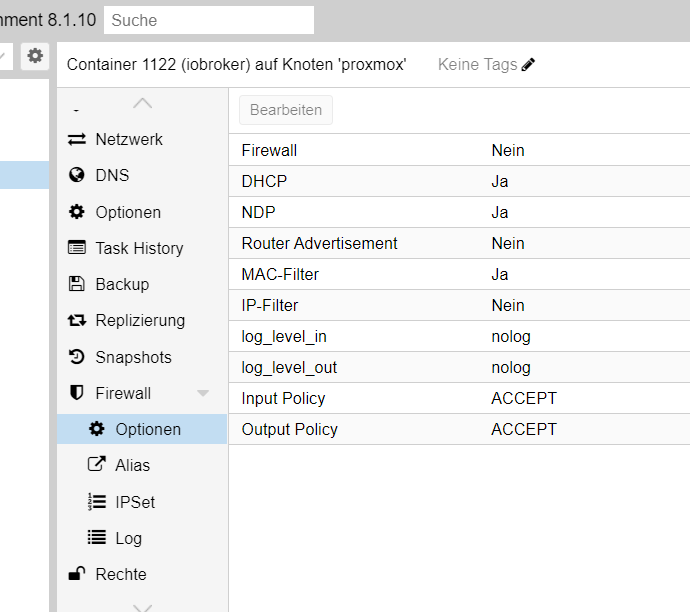
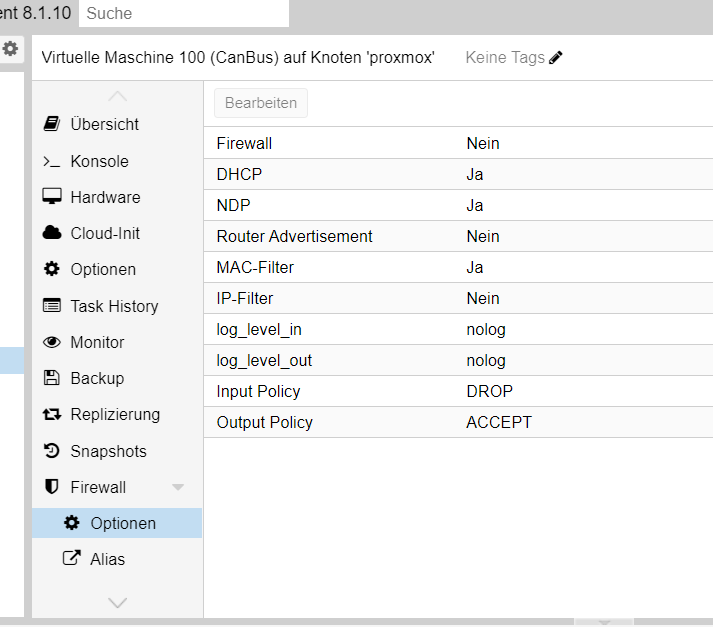
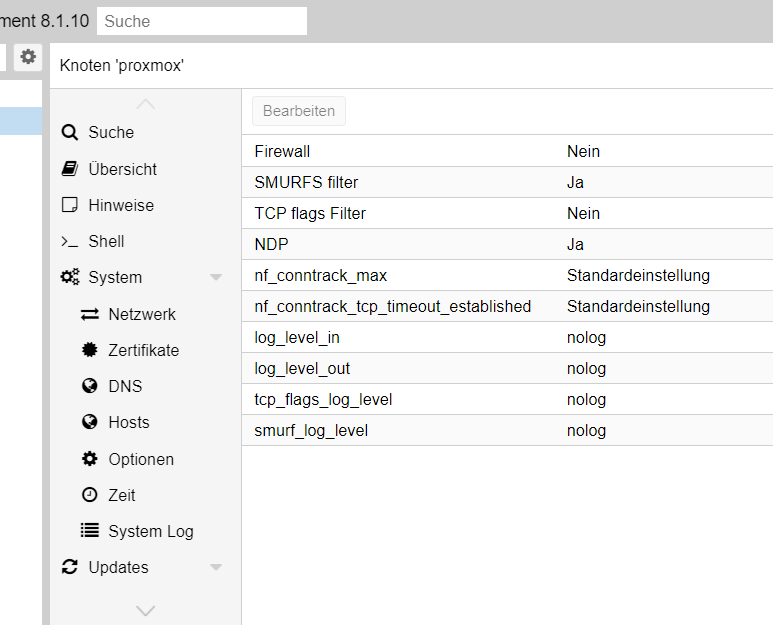

Hey! Du scheinst an dieser Unterhaltung interessiert zu sein, hast aber noch kein Konto.
Hast du es satt, bei jedem Besuch durch die gleichen Beiträge zu scrollen? Wenn du dich für ein Konto anmeldest, kommst du immer genau dorthin zurück, wo du zuvor warst, und kannst dich über neue Antworten benachrichtigen lassen (entweder per E-Mail oder Push-Benachrichtigung). Du kannst auch Lesezeichen speichern und Beiträge positiv bewerten, um anderen Community-Mitgliedern deine Wertschätzung zu zeigen.
Mit deinem Input könnte dieser Beitrag noch besser werden 💗
Registrieren Anmelden402
Online33.0k
Benutzende83.7k
Themen1.3m
Beiträge