




Speicherverbrauch durch im Admin UI aufgeblähte Objekte
-
@thomas_
Neben den von @Homoran erwähnten Grundlagen:
Läuft da exklusiv ioBroker drauf oder noch andere Dinge?top sagt schon das Gleiche wie diese Instanz-Übersicht.
Da laufen schon noch andere Sachen drauf. ne maria-db oder das misterhouse. Aber das alles fällt kaum auf...======================= SUMMARY ======================= v.2023-10-10 Static hostname: xs35v3l Icon name: computer-desktop Chassis: desktop 🖥️ Operating System: Debian GNU/Linux 12 (bookworm) Kernel: Linux 6.1.0-18-amd64 Architecture: x86-64 Hardware Vendor: Intel Corporation Hardware Model: NUC7CJYH Firmware Version: JYGLKCPX.86A.0071.2023.0825.1034 Installation: native Kernel: x86_64 Userland: amd64 Timezone: Europe/Berlin (CET, +0100) User-ID: 1000 X-Server: false Boot Target: graphical.target Pending OS-Updates: 0 Pending iob updates: 0 Nodejs-Installation: /usr/bin/nodejs v18.19.1 /usr/bin/node v18.19.1 /usr/bin/npm 10.2.4 /usr/bin/npx 10.2.4 /usr/bin/corepack 0.22.0 Recommended versions are nodejs 18.19.1 and npm 10.2.4 Your nodejs installation is correct MEMORY: total used free shared buff/cache available Mem: 3.7G 3.0G 544M 1.7M 408M 705M Swap: 4.3G 2.1G 2.2G Total: 8.0G 5.1G 2.7G Active iob-Instances: 8 Active repo(s): stable ioBroker Core: js-controller 5.0.19 admin 6.13.16 ioBroker Status: iobroker is running on this host. Objects type: jsonl States type: jsonl Status admin and web instance: + system.adapter.admin.0 : admin : xs35v3l - enabled, port: 8081, bind: 0.0.0.0 (SSL), run as: admin Objects: 1179 States: 673 Size of iob-Database: 97M /opt/iobroker/iobroker-data/objects.jsonl 740K /opt/iobroker/iobroker-data/states.jsonl =================== END OF SUMMARY ==================== -
top sagt schon das Gleiche wie diese Instanz-Übersicht.
Da laufen schon noch andere Sachen drauf. ne maria-db oder das misterhouse. Aber das alles fällt kaum auf...======================= SUMMARY ======================= v.2023-10-10 Static hostname: xs35v3l Icon name: computer-desktop Chassis: desktop 🖥️ Operating System: Debian GNU/Linux 12 (bookworm) Kernel: Linux 6.1.0-18-amd64 Architecture: x86-64 Hardware Vendor: Intel Corporation Hardware Model: NUC7CJYH Firmware Version: JYGLKCPX.86A.0071.2023.0825.1034 Installation: native Kernel: x86_64 Userland: amd64 Timezone: Europe/Berlin (CET, +0100) User-ID: 1000 X-Server: false Boot Target: graphical.target Pending OS-Updates: 0 Pending iob updates: 0 Nodejs-Installation: /usr/bin/nodejs v18.19.1 /usr/bin/node v18.19.1 /usr/bin/npm 10.2.4 /usr/bin/npx 10.2.4 /usr/bin/corepack 0.22.0 Recommended versions are nodejs 18.19.1 and npm 10.2.4 Your nodejs installation is correct MEMORY: total used free shared buff/cache available Mem: 3.7G 3.0G 544M 1.7M 408M 705M Swap: 4.3G 2.1G 2.2G Total: 8.0G 5.1G 2.7G Active iob-Instances: 8 Active repo(s): stable ioBroker Core: js-controller 5.0.19 admin 6.13.16 ioBroker Status: iobroker is running on this host. Objects type: jsonl States type: jsonl Status admin and web instance: + system.adapter.admin.0 : admin : xs35v3l - enabled, port: 8081, bind: 0.0.0.0 (SSL), run as: admin Objects: 1179 States: 673 Size of iob-Database: 97M /opt/iobroker/iobroker-data/objects.jsonl 740K /opt/iobroker/iobroker-data/states.jsonl =================== END OF SUMMARY ====================@thomas_ sagte in Hardware Voraussetzungen bzw. Speicherverbrauch iobroker:
top sagt schon das Gleiche wie diese Instanz-Übersicht.
bitte immer zeigen.
@thomas_ sagte in Hardware Voraussetzungen bzw. Speicherverbrauch iobroker:
SUMMARY
und hier bitte die Langfassung.
https://forum.iobroker.net/topic/51555/hinweise-für-gute-forenbeiträge/1
-
top sagt schon das Gleiche wie diese Instanz-Übersicht.
Da laufen schon noch andere Sachen drauf. ne maria-db oder das misterhouse. Aber das alles fällt kaum auf...======================= SUMMARY ======================= v.2023-10-10 Static hostname: xs35v3l Icon name: computer-desktop Chassis: desktop 🖥️ Operating System: Debian GNU/Linux 12 (bookworm) Kernel: Linux 6.1.0-18-amd64 Architecture: x86-64 Hardware Vendor: Intel Corporation Hardware Model: NUC7CJYH Firmware Version: JYGLKCPX.86A.0071.2023.0825.1034 Installation: native Kernel: x86_64 Userland: amd64 Timezone: Europe/Berlin (CET, +0100) User-ID: 1000 X-Server: false Boot Target: graphical.target Pending OS-Updates: 0 Pending iob updates: 0 Nodejs-Installation: /usr/bin/nodejs v18.19.1 /usr/bin/node v18.19.1 /usr/bin/npm 10.2.4 /usr/bin/npx 10.2.4 /usr/bin/corepack 0.22.0 Recommended versions are nodejs 18.19.1 and npm 10.2.4 Your nodejs installation is correct MEMORY: total used free shared buff/cache available Mem: 3.7G 3.0G 544M 1.7M 408M 705M Swap: 4.3G 2.1G 2.2G Total: 8.0G 5.1G 2.7G Active iob-Instances: 8 Active repo(s): stable ioBroker Core: js-controller 5.0.19 admin 6.13.16 ioBroker Status: iobroker is running on this host. Objects type: jsonl States type: jsonl Status admin and web instance: + system.adapter.admin.0 : admin : xs35v3l - enabled, port: 8081, bind: 0.0.0.0 (SSL), run as: admin Objects: 1179 States: 673 Size of iob-Database: 97M /opt/iobroker/iobroker-data/objects.jsonl 740K /opt/iobroker/iobroker-data/states.jsonl =================== END OF SUMMARY ====================@thomas_ sagte in Hardware Voraussetzungen bzw. Speicherverbrauch iobroker:
Hardware Model: NUC7CJYH
der ist natürlich kein Renner mit
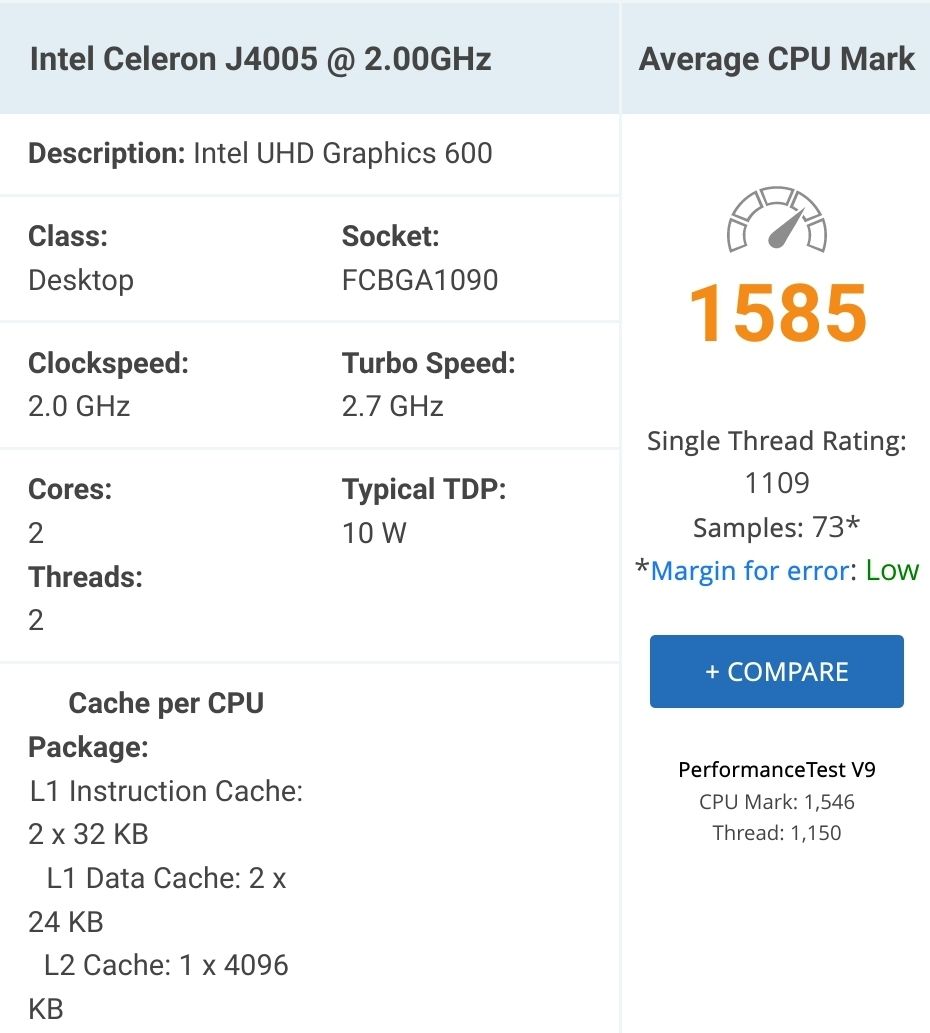
sollte aber durchaus reichen.
kein Support per PN! - Fragen im Forum stellen - Benutzt das Voting rechts unten im Beitrag wenn er euch geholfen hat.
Das Forum freut sich über eine Spende. Benutzt dazu den Spendenbutton oben rechts. Danke!
der Installationsfixer: curl -fsL https://iobroker.net/fix.sh | bash - -
@thomas_ sagte in Hardware Voraussetzungen bzw. Speicherverbrauch iobroker:
Hardware Model: NUC7CJYH
der ist natürlich kein Renner mit
sollte aber durchaus reichen.
-
@homoran klar reicht der! Es geht ja auch um die Speicherbelegung
@thomas_ sagte in Hardware Voraussetzungen bzw. Speicherverbrauch iobroker:
klar reicht der!
wieso?
Für ioBroker ja, aber nicht unbedingt für mehr anspruchsvolles.@thomas_ sagte in Hardware Voraussetzungen bzw. Speicherverbrauch iobroker:
Es geht ja auch um die Speicherbelegung
und die kennen wir nicht.
www.linuxatemyram.com ist doch nicht das Thema, oder? -
@thomas_ sagte in Hardware Voraussetzungen bzw. Speicherverbrauch iobroker:
klar reicht der!
wieso?
Für ioBroker ja, aber nicht unbedingt für mehr anspruchsvolles.@thomas_ sagte in Hardware Voraussetzungen bzw. Speicherverbrauch iobroker:
Es geht ja auch um die Speicherbelegung
und die kennen wir nicht.
www.linuxatemyram.com ist doch nicht das Thema, oder?Skript v.2023-10-10 *** BASE SYSTEM *** Static hostname: xs35v3l Icon name: computer-desktop Chassis: desktop 🖥️ Operating System: Debian GNU/Linux 12 (bookworm) Kernel: Linux 6.1.0-18-amd64 Architecture: x86-64 Hardware Vendor: Intel Corporation Hardware Model: NUC7CJYH Firmware Version: JYGLKCPX.86A.0071.2023.0825.1034 model name : Intel(R) Celeron(R) J4005 CPU @ 2.00GHz Docker : false Virtualization : none Kernel : x86_64 Userland : amd64 Systemuptime and Load: 20:48:21 up 1:14, 3 users, load average: 0.08, 0.13, 0.17 CPU threads: 2 *** Time and Time Zones *** Local time: Thu 2024-02-29 20:48:21 CET Universal time: Thu 2024-02-29 19:48:21 UTC RTC time: Thu 2024-02-29 19:48:21 Time zone: Europe/Berlin (CET, +0100) System clock synchronized: yes NTP service: n/a RTC in local TZ: no *** User and Groups *** thomas /home/thomas thomas cdrom floppy sudo audio dip video plugdev iobroker *** X-Server-Setup *** X-Server: false Desktop: Terminal: tty Boot Target: graphical.target *** MEMORY *** total used free shared buff/cache available Mem: 3.7G 3.3G 126M 1.9M 454M 382M Swap: 4.3G 2.1G 2.2G Total: 8.0G 5.4G 2.3G 3498 M total memory 3134 M used memory 1591 M active memory 1494 M inactive memory 121 M free memory 39 M buffer memory 393 M swap cache 4095 M total swap 2002 M used swap 2093 M free swap *** FAILED SERVICES *** UNIT LOAD ACTIVE SUB DESCRIPTION 0 loaded units listed. *** FILESYSTEM *** Filesystem Type Size Used Avail Use% Mounted on udev devtmpfs 1.7G 0 1.7G 0% /dev tmpfs tmpfs 350M 2.5M 348M 1% /run /dev/sda2 ext4 289G 61G 214G 22% / tmpfs tmpfs 1.8G 0 1.8G 0% /dev/shm tmpfs tmpfs 5.0M 0 5.0M 0% /run/lock /dev/sda1 vfat 487M 148K 486M 1% /boot/efi tmpfs tmpfs 350M 0 350M 0% /run/user/0 tmpfs tmpfs 350M 0 350M 0% /run/user/1000 Messages concerning ext4 filesystem in dmesg: [Thu Feb 29 19:34:17 2024] EXT4-fs (sda2): mounted filesystem with ordered data mode. Quota mode: none. [Thu Feb 29 19:34:18 2024] EXT4-fs (sda2): re-mounted. Quota mode: none. Show mounted filesystems \(real ones only\): TARGET SOURCE FSTYPE OPTIONS / /dev/sda2 ext4 rw,relatime,errors=remount-ro |-/boot/efi /dev/sda1 vfat rw,relatime,fmask=0022,dmask=0022,codepage=437,iocharset=ascii,shortname=mixed,utf8,errors=remount-ro Files in neuralgic directories: /var: 12G /var/ 5.4G /var/cache/apt 5.4G /var/cache 5.3G /var/cache/apt/archives 4.3G /var/log Hint: You are currently not seeing messages from other users and the system. Users in groups 'adm', 'systemd-journal' can see all messages. Pass -q to turn off this notice. Archived and active journals take up 153.3M in the file system. /opt/iobroker/backups: 7.7M /opt/iobroker/backups/ /opt/iobroker/iobroker-data: 243M /opt/iobroker/iobroker-data/ 102M /opt/iobroker/iobroker-data/files 57M /opt/iobroker/iobroker-data/files/javascript.admin 40M /opt/iobroker/iobroker-data/backup-objects 38M /opt/iobroker/iobroker-data/files/javascript.admin/static The five largest files in iobroker-data are: 101M /opt/iobroker/iobroker-data/objects.jsonl 22M /opt/iobroker/iobroker-data/files/modbus.admin/static/js/main.578d79d9.js.map 8.8M /opt/iobroker/iobroker-data/files/modbus.admin/static/js/main.578d79d9.js 7.0M /opt/iobroker/iobroker-data/files/javascript.admin/static/js/675.d0c8b930.chunk.js.map 6.3M /opt/iobroker/iobroker-data/files/admin.admin/custom/static/js/vendors-node_modules_iobroker_adapter-react-v5_assets_devices_parseNames_js-node_modules_iobr-99c23e.847b8ad9.chunk.js.map USB-Devices by-id: USB-Sticks - Avoid direct links to /dev/* in your adapter setups, please always prefer the links 'by-id': /dev/serial/by-id/usb-FTDI_FT232R_USB_UART_AI04GXWR-if00-port0 *** NodeJS-Installation *** /usr/bin/nodejs v18.19.1 /usr/bin/node v18.19.1 /usr/bin/npm 10.2.4 /usr/bin/npx 10.2.4 /usr/bin/corepack 0.22.0 nodejs: Installed: 18.19.1-1nodesource1 Candidate: 18.19.1-1nodesource1 Version table: *** 18.19.1-1nodesource1 1001 500 https://deb.nodesource.com/node_18.x nodistro/main amd64 Packages 100 /var/lib/dpkg/status 18.19.0+dfsg-6~deb12u1 500 500 http://deb.debian.org/debian-security stable-security/main amd64 Packages 18.19.0-1nodesource1 1001 500 https://deb.nodesource.com/node_18.x nodistro/main amd64 Packages 18.18.2-1nodesource1 1001 500 https://deb.nodesource.com/node_18.x nodistro/main amd64 Packages 18.18.1-1nodesource1 1001 500 https://deb.nodesource.com/node_18.x nodistro/main amd64 Packages 18.18.0-1nodesource1 1001 500 https://deb.nodesource.com/node_18.x nodistro/main amd64 Packages 18.17.1-1nodesource1 1001 500 https://deb.nodesource.com/node_18.x nodistro/main amd64 Packages 18.17.0-1nodesource1 1001 500 https://deb.nodesource.com/node_18.x nodistro/main amd64 Packages 18.16.1-1nodesource1 1001 500 https://deb.nodesource.com/node_18.x nodistro/main amd64 Packages 18.16.0-1nodesource1 1001 500 https://deb.nodesource.com/node_18.x nodistro/main amd64 Packages 18.15.0-1nodesource1 1001 500 https://deb.nodesource.com/node_18.x nodistro/main amd64 Packages 18.14.2-1nodesource1 1001 500 https://deb.nodesource.com/node_18.x nodistro/main amd64 Packages 18.14.1-1nodesource1 1001 500 https://deb.nodesource.com/node_18.x nodistro/main amd64 Packages 18.14.0-1nodesource1 1001 500 https://deb.nodesource.com/node_18.x nodistro/main amd64 Packages 18.13.0+dfsg1-1 500 500 http://deb.debian.org/debian stable/main amd64 Packages 18.13.0-1nodesource1 1001 500 https://deb.nodesource.com/node_18.x nodistro/main amd64 Packages 18.12.0-1nodesource1 1001 500 https://deb.nodesource.com/node_18.x nodistro/main amd64 Packages 18.11.0-1nodesource1 1001 500 https://deb.nodesource.com/node_18.x nodistro/main amd64 Packages 18.10.0-1nodesource1 1001 500 https://deb.nodesource.com/node_18.x nodistro/main amd64 Packages 18.9.1-1nodesource1 1001 500 https://deb.nodesource.com/node_18.x nodistro/main amd64 Packages 18.9.0-1nodesource1 1001 500 https://deb.nodesource.com/node_18.x nodistro/main amd64 Packages 18.8.0-1nodesource1 1001 500 https://deb.nodesource.com/node_18.x nodistro/main amd64 Packages 18.7.0-1nodesource1 1001 500 https://deb.nodesource.com/node_18.x nodistro/main amd64 Packages 18.6.0-1nodesource1 1001 500 https://deb.nodesource.com/node_18.x nodistro/main amd64 Packages 18.5.0-1nodesource1 1001 500 https://deb.nodesource.com/node_18.x nodistro/main amd64 Packages 18.4.0-1nodesource1 1001 500 https://deb.nodesource.com/node_18.x nodistro/main amd64 Packages 18.3.0-1nodesource1 1001 500 https://deb.nodesource.com/node_18.x nodistro/main amd64 Packages 18.2.0-1nodesource1 1001 500 https://deb.nodesource.com/node_18.x nodistro/main amd64 Packages 18.1.0-1nodesource1 1001 500 https://deb.nodesource.com/node_18.x nodistro/main amd64 Packages 18.0.0-1nodesource1 1001 500 https://deb.nodesource.com/node_18.x nodistro/main amd64 Packages Temp directories causing npm8 problem: 0 No problems detected Errors in npm tree: *** ioBroker-Installation *** ioBroker Status iobroker is running on this host. Objects type: jsonl States type: jsonl Core adapters versions js-controller: 5.0.19 admin: 6.13.16 javascript: 7.8.0 Adapters from github: 0 Adapter State + system.adapter.admin.0 : admin : xs35v3l - enabled, port: 8081, bind: 0.0.0.0 (SSL), run as: admin + system.adapter.backitup.0 : backitup : xs35v3l - enabled + system.adapter.discovery.0 : discovery : xs35v3l - enabled system.adapter.history.0 : history : xs35v3l - disabled + system.adapter.javascript.0 : javascript : xs35v3l - enabled system.adapter.modbus.0 : modbus : xs35v3l - disabled + system.adapter.openknx.0 : openknx : xs35v3l - enabled + system.adapter.rest-api.0 : rest-api : xs35v3l - enabled, port: 8093, bind: 0.0.0.0, run as: admin system.adapter.sql.0 : sql : xs35v3l - disabled, port: 3306 + system.adapter.tuya.0 : tuya : xs35v3l - enabled + instance is alive Enabled adapters with bindings + system.adapter.admin.0 : admin : xs35v3l - enabled, port: 8081, bind: 0.0.0.0 (SSL), run as: admin + system.adapter.rest-api.0 : rest-api : xs35v3l - enabled, port: 8093, bind: 0.0.0.0, run as: admin ioBroker-Repositories stable : http://download.iobroker.net/sources-dist.json beta : http://download.iobroker.net/sources-dist-latest.json Active repo(s): stable Installed ioBroker-Instances Used repository: stable Adapter "admin" : 6.13.16 , installed 6.13.16 Adapter "backitup" : 2.10.11 , installed 2.10.11 Adapter "discovery" : 4.2.0 , installed 4.2.0 Adapter "history" : 3.0.1 , installed 3.0.1 Adapter "javascript" : 7.8.0 , installed 7.8.0 Controller "js-controller": 5.0.19 , installed 5.0.19 Adapter "modbus" : 6.1.0 , installed 6.1.0 Adapter "openknx" : 0.6.3 , installed 0.6.3 Adapter "rest-api" : 1.1.0 , installed 1.1.0 Adapter "sql" : 2.2.0 , installed 2.2.0 Adapter "tuya" : 3.15.0 , installed 3.15.0 Objects and States Please stand by - This may take a while Objects: 1179 States: 673 *** OS-Repositories and Updates *** W: http://ppa.launchpad.net/linuxuprising/java/ubuntu/dists/bionic/InRelease: Key is stored in legacy trusted.gpg keyring (/etc/apt/trusted.gpg), see the DEPRECATION section in apt-key(8) for details. W: http://ppa.launchpad.net/webupd8team/java/ubuntu/dists/disco/InRelease: Key is stored in legacy trusted.gpg keyring (/etc/apt/trusted.gpg), see the DEPRECATION section in apt-key(8) for details. Hit:1 http://ppa.launchpad.net/linuxuprising/java/ubuntu bionic InRelease Hit:2 http://deb.debian.org/debian stable InRelease Hit:3 http://ppa.launchpad.net/webupd8team/java/ubuntu disco InRelease Hit:4 http://deb.debian.org/debian-security stable-security InRelease Hit:5 http://deb.debian.org/debian stable-updates InRelease Hit:6 https://deb.nodesource.com/node_18.x nodistro InRelease Reading package lists... W: http://ppa.launchpad.net/linuxuprising/java/ubuntu/dists/bionic/InRelease: Key is stored in legacy trusted.gpg keyring (/etc/apt/trusted.gpg), see the DEPRECATION section in apt-key(8) for details. W: http://ppa.launchpad.net/webupd8team/java/ubuntu/dists/disco/InRelease: Key is stored in legacy trusted.gpg keyring (/etc/apt/trusted.gpg), see the DEPRECATION section in apt-key(8) for details. Pending Updates: 0 *** Listening Ports *** Active Internet connections (only servers) Proto Recv-Q Send-Q Local Address Foreign Address State User Inode PID/Program name tcp 0 0 0.0.0.0:8084 0.0.0.0:* LISTEN 0 20283 782/perl tcp 0 0 0.0.0.0:38801 0.0.0.0:* LISTEN 0 19824 792/rpc.mountd tcp 0 0 0.0.0.0:8082 0.0.0.0:* LISTEN 0 20282 782/perl tcp 0 0 0.0.0.0:10000 0.0.0.0:* LISTEN 0 28808 1046/perl tcp 0 0 127.0.0.1:25 0.0.0.0:* LISTEN 0 47715 1510/exim4 tcp 0 0 0.0.0.0:3306 0.0.0.0:* LISTEN 106 18092 914/mariadbd tcp 0 0 0.0.0.0:1234 0.0.0.0:* LISTEN 0 20284 782/perl tcp 0 0 127.0.0.1:9000 0.0.0.0:* LISTEN 1002 46415 757/iobroker.js-con tcp 0 0 127.0.0.1:9001 0.0.0.0:* LISTEN 1002 47792 757/iobroker.js-con tcp 0 0 0.0.0.0:34177 0.0.0.0:* LISTEN 0 19805 792/rpc.mountd tcp 0 0 0.0.0.0:44335 0.0.0.0:* LISTEN 0 19913 - tcp 0 0 0.0.0.0:139 0.0.0.0:* LISTEN 0 45343 1090/smbd tcp 0 0 0.0.0.0:111 0.0.0.0:* LISTEN 0 2020 1/init tcp 0 0 127.0.0.1:1883 0.0.0.0:* LISTEN 114 17988 772/mosquitto tcp 0 0 0.0.0.0:22 0.0.0.0:* LISTEN 0 17999 801/sshd: /usr/sbin tcp 0 0 0.0.0.0:2049 0.0.0.0:* LISTEN 0 19895 - tcp 0 0 0.0.0.0:445 0.0.0.0:* LISTEN 0 45342 1090/smbd tcp 0 0 0.0.0.0:53597 0.0.0.0:* LISTEN 102 17973 795/rpc.statd tcp 0 0 0.0.0.0:35079 0.0.0.0:* LISTEN 0 19816 792/rpc.mountd tcp6 0 0 :::8081 :::* LISTEN 1002 46849 1544/io.admin.0 tcp6 0 0 :::8080 :::* LISTEN 0 47541 1262/apache2 tcp6 0 0 :::8093 :::* LISTEN 1002 47021 1687/io.rest-api.0 tcp6 0 0 :::53001 :::* LISTEN 0 19812 792/rpc.mountd tcp6 0 0 ::1:1883 :::* LISTEN 114 17989 772/mosquitto tcp6 0 0 :::35919 :::* LISTEN 0 19916 - tcp6 0 0 :::35881 :::* LISTEN 0 19828 792/rpc.mountd tcp6 0 0 :::58705 :::* LISTEN 0 19820 792/rpc.mountd tcp6 0 0 :::6720 :::* LISTEN 0 19491 1/init tcp6 0 0 ::1:25 :::* LISTEN 0 47716 1510/exim4 tcp6 0 0 :::139 :::* LISTEN 0 45341 1090/smbd tcp6 0 0 :::111 :::* LISTEN 0 2022 1/init tcp6 0 0 :::80 :::* LISTEN 0 47537 1262/apache2 tcp6 0 0 :::22 :::* LISTEN 0 18010 801/sshd: /usr/sbin tcp6 0 0 :::2049 :::* LISTEN 0 19905 - tcp6 0 0 :::445 :::* LISTEN 0 45340 1090/smbd tcp6 0 0 :::443 :::* LISTEN 0 47545 1262/apache2 tcp6 0 0 :::37181 :::* LISTEN 102 17979 795/rpc.statd udp 0 0 0.0.0.0:3671 0.0.0.0:* 113 46367 1513/knxd udp 0 0 192.168.2.189:44740 0.0.0.0:* 113 46370 1513/knxd udp 0 0 0.0.0.0:10000 0.0.0.0:* 0 28809 1046/perl udp 0 0 0.0.0.0:57161 0.0.0.0:* 0 19803 792/rpc.mountd udp 0 0 127.0.0.1:61340 0.0.0.0:* 0 45296 782/perl udp 0 0 0.0.0.0:68 0.0.0.0:* 0 17803 685/dhclient udp 0 0 0.0.0.0:111 0.0.0.0:* 0 2021 1/init udp 0 0 192.168.2.189:123 0.0.0.0:* 0 40808 1140/ntpd udp 0 0 127.0.0.1:123 0.0.0.0:* 0 40806 1140/ntpd udp 0 0 0.0.0.0:123 0.0.0.0:* 0 40802 1140/ntpd udp 0 0 192.168.2.255:137 0.0.0.0:* 0 40705 929/nmbd udp 0 0 192.168.2.189:137 0.0.0.0:* 0 40704 929/nmbd udp 0 0 0.0.0.0:137 0.0.0.0:* 0 20041 929/nmbd udp 0 0 192.168.2.255:138 0.0.0.0:* 0 40707 929/nmbd udp 0 0 192.168.2.189:138 0.0.0.0:* 0 40706 929/nmbd udp 0 0 0.0.0.0:138 0.0.0.0:* 0 20042 929/nmbd udp 0 0 0.0.0.0:32960 0.0.0.0:* 1002 48234 1634/io.openknx.0 udp 0 0 0.0.0.0:49352 0.0.0.0:* 0 45298 782/perl udp 0 0 0.0.0.0:55654 0.0.0.0:* 102 17970 795/rpc.statd udp 0 0 0.0.0.0:6666 0.0.0.0:* 1002 48273 1645/io.tuya.0 udp 0 0 0.0.0.0:6667 0.0.0.0:* 1002 48274 1645/io.tuya.0 udp 0 0 0.0.0.0:57913 0.0.0.0:* 0 19911 - udp 0 0 0.0.0.0:52054 0.0.0.0:* 0 19822 792/rpc.mountd udp 0 0 127.0.0.1:971 0.0.0.0:* 0 19851 795/rpc.statd udp 0 0 0.0.0.0:38168 0.0.0.0:* 0 19814 792/rpc.mountd udp6 0 0 :::40608 :::* 0 19807 792/rpc.mountd udp6 0 0 :::111 :::* 0 2023 1/init udp6 0 0 2003:ee:1f0c:8d00:9:123 :::* 116 46295 1140/ntpd udp6 0 0 fe80::96c6:91ff:fe1:123 :::* 0 40814 1140/ntpd udp6 0 0 ::1:123 :::* 0 40810 1140/ntpd udp6 0 0 :::123 :::* 0 40799 1140/ntpd udp6 0 0 :::35648 :::* 0 19818 792/rpc.mountd udp6 0 0 :::37778 :::* 0 19914 - udp6 0 0 :::40054 :::* 0 19826 792/rpc.mountd udp6 0 0 :::40329 :::* 102 17976 795/rpc.statd *** Log File - Last 25 Lines *** 2024-02-29 19:35:01.500 - info: openknx.0 (1634) Connected! 2024-02-29 19:35:01.728 - info: openknx.0 (1634) Found 802 valid KNX objects of 805 objects in adapter. 2024-02-29 19:35:02.097 - info: discovery.0 (1661) starting. Version 4.2.0 in /opt/iobroker/node_modules/iobroker.discovery, node: v18.19.1, js-controller: 5.0.19 2024-02-29 19:35:01.343 - info: tuya.0 (1645) Existing devices initialized 2024-02-29 19:35:01.362 - info: tuya.0 (1645) Try to sync devices from Cloud using stored cloud credentials 2024-02-29 19:35:02.318 - info: tuya.0 (1645) Listen for local Tuya devices on port 6666 2024-02-29 19:35:02.319 - info: tuya.0 (1645) Listen for encrypted local Tuya devices on port 6667 2024-02-29 19:35:02.762 - info: tuya.0 (1645) IOT Cloud ID/Secret not configured, disabling real time State updates from Cloud MQTT 2024-02-29 19:35:02.962 - warn: host.xs35v3l Your system has only 75 MB RAM left available and an additional adapter process is started. Please check your system, settings and active instances to prevent swapping and Out-Of-Memory situations! 2024-02-29 19:35:03.034 - info: host.xs35v3l instance system.adapter.rest-api.0 started with pid 1687 2024-02-29 19:35:03.497 - info: tuya.0 (1645) bffdb60b394a5e22davhuk: Connect locally to device 2024-02-29 19:35:06.888 - info: javascript.0 (1563) requesting all states 2024-02-29 19:35:06.906 - info: javascript.0 (1563) requesting all objects 2024-02-29 19:35:19.873 - info: rest-api.0 (1687) starting. Version 1.1.0 in /opt/iobroker/node_modules/iobroker.rest-api, node: v18.19.1, js-controller: 5.0.19 2024-02-29 19:35:20.488 - info: admin.0 (1544) Repository received successfully. 2024-02-29 19:35:21.629 - warn: rest-api.0 (1687) Information for Developer: Using the direct "Let's encrypt" module import is deprecated and will be removed in the next js-controller version, use @iobroker/webserver instead 2024-02-29 19:35:21.655 - info: rest-api.0 (1687) http server listening on port 8093 2024-02-29 19:35:28.711 - info: javascript.0 (1563) received all states 2024-02-29 19:35:38.795 - info: javascript.0 (1563) received all objects 2024-02-29 19:35:38.972 - info: javascript.0 (1563) script.js.externe_Parameter.openwb: compiling TypeScript source... 2024-02-29 19:35:39.052 - info: javascript.0 (1563) script.js.externe_Parameter.openwb: source code did not change, using cached compilation result... 2024-02-29 19:35:39.230 - info: javascript.0 (1563) script.js.externe_Parameter.openwb: registered 0 subscriptions, 1 schedule, 0 messages, 0 logs and 0 file subscriptions 2024-02-29 19:35:39.238 - info: javascript.0 (1563) script.js.externe_Parameter.Solaredge_Converter: compiling TypeScript source... 2024-02-29 19:35:39.247 - info: javascript.0 (1563) script.js.externe_Parameter.Solaredge_Converter: source code did not change, using cached compilation result... 2024-02-29 19:35:39.253 - info: javascript.0 (1563) script.js.externe_Parameter.Solaredge_Converter: registered 3 subscriptions, 0 schedules, 0 messages, 0 logs and 0 file subscriptions -
Skript v.2023-10-10 *** BASE SYSTEM *** Static hostname: xs35v3l Icon name: computer-desktop Chassis: desktop 🖥️ Operating System: Debian GNU/Linux 12 (bookworm) Kernel: Linux 6.1.0-18-amd64 Architecture: x86-64 Hardware Vendor: Intel Corporation Hardware Model: NUC7CJYH Firmware Version: JYGLKCPX.86A.0071.2023.0825.1034 model name : Intel(R) Celeron(R) J4005 CPU @ 2.00GHz Docker : false Virtualization : none Kernel : x86_64 Userland : amd64 Systemuptime and Load: 20:48:21 up 1:14, 3 users, load average: 0.08, 0.13, 0.17 CPU threads: 2 *** Time and Time Zones *** Local time: Thu 2024-02-29 20:48:21 CET Universal time: Thu 2024-02-29 19:48:21 UTC RTC time: Thu 2024-02-29 19:48:21 Time zone: Europe/Berlin (CET, +0100) System clock synchronized: yes NTP service: n/a RTC in local TZ: no *** User and Groups *** thomas /home/thomas thomas cdrom floppy sudo audio dip video plugdev iobroker *** X-Server-Setup *** X-Server: false Desktop: Terminal: tty Boot Target: graphical.target *** MEMORY *** total used free shared buff/cache available Mem: 3.7G 3.3G 126M 1.9M 454M 382M Swap: 4.3G 2.1G 2.2G Total: 8.0G 5.4G 2.3G 3498 M total memory 3134 M used memory 1591 M active memory 1494 M inactive memory 121 M free memory 39 M buffer memory 393 M swap cache 4095 M total swap 2002 M used swap 2093 M free swap *** FAILED SERVICES *** UNIT LOAD ACTIVE SUB DESCRIPTION 0 loaded units listed. *** FILESYSTEM *** Filesystem Type Size Used Avail Use% Mounted on udev devtmpfs 1.7G 0 1.7G 0% /dev tmpfs tmpfs 350M 2.5M 348M 1% /run /dev/sda2 ext4 289G 61G 214G 22% / tmpfs tmpfs 1.8G 0 1.8G 0% /dev/shm tmpfs tmpfs 5.0M 0 5.0M 0% /run/lock /dev/sda1 vfat 487M 148K 486M 1% /boot/efi tmpfs tmpfs 350M 0 350M 0% /run/user/0 tmpfs tmpfs 350M 0 350M 0% /run/user/1000 Messages concerning ext4 filesystem in dmesg: [Thu Feb 29 19:34:17 2024] EXT4-fs (sda2): mounted filesystem with ordered data mode. Quota mode: none. [Thu Feb 29 19:34:18 2024] EXT4-fs (sda2): re-mounted. Quota mode: none. Show mounted filesystems \(real ones only\): TARGET SOURCE FSTYPE OPTIONS / /dev/sda2 ext4 rw,relatime,errors=remount-ro |-/boot/efi /dev/sda1 vfat rw,relatime,fmask=0022,dmask=0022,codepage=437,iocharset=ascii,shortname=mixed,utf8,errors=remount-ro Files in neuralgic directories: /var: 12G /var/ 5.4G /var/cache/apt 5.4G /var/cache 5.3G /var/cache/apt/archives 4.3G /var/log Hint: You are currently not seeing messages from other users and the system. Users in groups 'adm', 'systemd-journal' can see all messages. Pass -q to turn off this notice. Archived and active journals take up 153.3M in the file system. /opt/iobroker/backups: 7.7M /opt/iobroker/backups/ /opt/iobroker/iobroker-data: 243M /opt/iobroker/iobroker-data/ 102M /opt/iobroker/iobroker-data/files 57M /opt/iobroker/iobroker-data/files/javascript.admin 40M /opt/iobroker/iobroker-data/backup-objects 38M /opt/iobroker/iobroker-data/files/javascript.admin/static The five largest files in iobroker-data are: 101M /opt/iobroker/iobroker-data/objects.jsonl 22M /opt/iobroker/iobroker-data/files/modbus.admin/static/js/main.578d79d9.js.map 8.8M /opt/iobroker/iobroker-data/files/modbus.admin/static/js/main.578d79d9.js 7.0M /opt/iobroker/iobroker-data/files/javascript.admin/static/js/675.d0c8b930.chunk.js.map 6.3M /opt/iobroker/iobroker-data/files/admin.admin/custom/static/js/vendors-node_modules_iobroker_adapter-react-v5_assets_devices_parseNames_js-node_modules_iobr-99c23e.847b8ad9.chunk.js.map USB-Devices by-id: USB-Sticks - Avoid direct links to /dev/* in your adapter setups, please always prefer the links 'by-id': /dev/serial/by-id/usb-FTDI_FT232R_USB_UART_AI04GXWR-if00-port0 *** NodeJS-Installation *** /usr/bin/nodejs v18.19.1 /usr/bin/node v18.19.1 /usr/bin/npm 10.2.4 /usr/bin/npx 10.2.4 /usr/bin/corepack 0.22.0 nodejs: Installed: 18.19.1-1nodesource1 Candidate: 18.19.1-1nodesource1 Version table: *** 18.19.1-1nodesource1 1001 500 https://deb.nodesource.com/node_18.x nodistro/main amd64 Packages 100 /var/lib/dpkg/status 18.19.0+dfsg-6~deb12u1 500 500 http://deb.debian.org/debian-security stable-security/main amd64 Packages 18.19.0-1nodesource1 1001 500 https://deb.nodesource.com/node_18.x nodistro/main amd64 Packages 18.18.2-1nodesource1 1001 500 https://deb.nodesource.com/node_18.x nodistro/main amd64 Packages 18.18.1-1nodesource1 1001 500 https://deb.nodesource.com/node_18.x nodistro/main amd64 Packages 18.18.0-1nodesource1 1001 500 https://deb.nodesource.com/node_18.x nodistro/main amd64 Packages 18.17.1-1nodesource1 1001 500 https://deb.nodesource.com/node_18.x nodistro/main amd64 Packages 18.17.0-1nodesource1 1001 500 https://deb.nodesource.com/node_18.x nodistro/main amd64 Packages 18.16.1-1nodesource1 1001 500 https://deb.nodesource.com/node_18.x nodistro/main amd64 Packages 18.16.0-1nodesource1 1001 500 https://deb.nodesource.com/node_18.x nodistro/main amd64 Packages 18.15.0-1nodesource1 1001 500 https://deb.nodesource.com/node_18.x nodistro/main amd64 Packages 18.14.2-1nodesource1 1001 500 https://deb.nodesource.com/node_18.x nodistro/main amd64 Packages 18.14.1-1nodesource1 1001 500 https://deb.nodesource.com/node_18.x nodistro/main amd64 Packages 18.14.0-1nodesource1 1001 500 https://deb.nodesource.com/node_18.x nodistro/main amd64 Packages 18.13.0+dfsg1-1 500 500 http://deb.debian.org/debian stable/main amd64 Packages 18.13.0-1nodesource1 1001 500 https://deb.nodesource.com/node_18.x nodistro/main amd64 Packages 18.12.0-1nodesource1 1001 500 https://deb.nodesource.com/node_18.x nodistro/main amd64 Packages 18.11.0-1nodesource1 1001 500 https://deb.nodesource.com/node_18.x nodistro/main amd64 Packages 18.10.0-1nodesource1 1001 500 https://deb.nodesource.com/node_18.x nodistro/main amd64 Packages 18.9.1-1nodesource1 1001 500 https://deb.nodesource.com/node_18.x nodistro/main amd64 Packages 18.9.0-1nodesource1 1001 500 https://deb.nodesource.com/node_18.x nodistro/main amd64 Packages 18.8.0-1nodesource1 1001 500 https://deb.nodesource.com/node_18.x nodistro/main amd64 Packages 18.7.0-1nodesource1 1001 500 https://deb.nodesource.com/node_18.x nodistro/main amd64 Packages 18.6.0-1nodesource1 1001 500 https://deb.nodesource.com/node_18.x nodistro/main amd64 Packages 18.5.0-1nodesource1 1001 500 https://deb.nodesource.com/node_18.x nodistro/main amd64 Packages 18.4.0-1nodesource1 1001 500 https://deb.nodesource.com/node_18.x nodistro/main amd64 Packages 18.3.0-1nodesource1 1001 500 https://deb.nodesource.com/node_18.x nodistro/main amd64 Packages 18.2.0-1nodesource1 1001 500 https://deb.nodesource.com/node_18.x nodistro/main amd64 Packages 18.1.0-1nodesource1 1001 500 https://deb.nodesource.com/node_18.x nodistro/main amd64 Packages 18.0.0-1nodesource1 1001 500 https://deb.nodesource.com/node_18.x nodistro/main amd64 Packages Temp directories causing npm8 problem: 0 No problems detected Errors in npm tree: *** ioBroker-Installation *** ioBroker Status iobroker is running on this host. Objects type: jsonl States type: jsonl Core adapters versions js-controller: 5.0.19 admin: 6.13.16 javascript: 7.8.0 Adapters from github: 0 Adapter State + system.adapter.admin.0 : admin : xs35v3l - enabled, port: 8081, bind: 0.0.0.0 (SSL), run as: admin + system.adapter.backitup.0 : backitup : xs35v3l - enabled + system.adapter.discovery.0 : discovery : xs35v3l - enabled system.adapter.history.0 : history : xs35v3l - disabled + system.adapter.javascript.0 : javascript : xs35v3l - enabled system.adapter.modbus.0 : modbus : xs35v3l - disabled + system.adapter.openknx.0 : openknx : xs35v3l - enabled + system.adapter.rest-api.0 : rest-api : xs35v3l - enabled, port: 8093, bind: 0.0.0.0, run as: admin system.adapter.sql.0 : sql : xs35v3l - disabled, port: 3306 + system.adapter.tuya.0 : tuya : xs35v3l - enabled + instance is alive Enabled adapters with bindings + system.adapter.admin.0 : admin : xs35v3l - enabled, port: 8081, bind: 0.0.0.0 (SSL), run as: admin + system.adapter.rest-api.0 : rest-api : xs35v3l - enabled, port: 8093, bind: 0.0.0.0, run as: admin ioBroker-Repositories stable : http://download.iobroker.net/sources-dist.json beta : http://download.iobroker.net/sources-dist-latest.json Active repo(s): stable Installed ioBroker-Instances Used repository: stable Adapter "admin" : 6.13.16 , installed 6.13.16 Adapter "backitup" : 2.10.11 , installed 2.10.11 Adapter "discovery" : 4.2.0 , installed 4.2.0 Adapter "history" : 3.0.1 , installed 3.0.1 Adapter "javascript" : 7.8.0 , installed 7.8.0 Controller "js-controller": 5.0.19 , installed 5.0.19 Adapter "modbus" : 6.1.0 , installed 6.1.0 Adapter "openknx" : 0.6.3 , installed 0.6.3 Adapter "rest-api" : 1.1.0 , installed 1.1.0 Adapter "sql" : 2.2.0 , installed 2.2.0 Adapter "tuya" : 3.15.0 , installed 3.15.0 Objects and States Please stand by - This may take a while Objects: 1179 States: 673 *** OS-Repositories and Updates *** W: http://ppa.launchpad.net/linuxuprising/java/ubuntu/dists/bionic/InRelease: Key is stored in legacy trusted.gpg keyring (/etc/apt/trusted.gpg), see the DEPRECATION section in apt-key(8) for details. W: http://ppa.launchpad.net/webupd8team/java/ubuntu/dists/disco/InRelease: Key is stored in legacy trusted.gpg keyring (/etc/apt/trusted.gpg), see the DEPRECATION section in apt-key(8) for details. Hit:1 http://ppa.launchpad.net/linuxuprising/java/ubuntu bionic InRelease Hit:2 http://deb.debian.org/debian stable InRelease Hit:3 http://ppa.launchpad.net/webupd8team/java/ubuntu disco InRelease Hit:4 http://deb.debian.org/debian-security stable-security InRelease Hit:5 http://deb.debian.org/debian stable-updates InRelease Hit:6 https://deb.nodesource.com/node_18.x nodistro InRelease Reading package lists... W: http://ppa.launchpad.net/linuxuprising/java/ubuntu/dists/bionic/InRelease: Key is stored in legacy trusted.gpg keyring (/etc/apt/trusted.gpg), see the DEPRECATION section in apt-key(8) for details. W: http://ppa.launchpad.net/webupd8team/java/ubuntu/dists/disco/InRelease: Key is stored in legacy trusted.gpg keyring (/etc/apt/trusted.gpg), see the DEPRECATION section in apt-key(8) for details. Pending Updates: 0 *** Listening Ports *** Active Internet connections (only servers) Proto Recv-Q Send-Q Local Address Foreign Address State User Inode PID/Program name tcp 0 0 0.0.0.0:8084 0.0.0.0:* LISTEN 0 20283 782/perl tcp 0 0 0.0.0.0:38801 0.0.0.0:* LISTEN 0 19824 792/rpc.mountd tcp 0 0 0.0.0.0:8082 0.0.0.0:* LISTEN 0 20282 782/perl tcp 0 0 0.0.0.0:10000 0.0.0.0:* LISTEN 0 28808 1046/perl tcp 0 0 127.0.0.1:25 0.0.0.0:* LISTEN 0 47715 1510/exim4 tcp 0 0 0.0.0.0:3306 0.0.0.0:* LISTEN 106 18092 914/mariadbd tcp 0 0 0.0.0.0:1234 0.0.0.0:* LISTEN 0 20284 782/perl tcp 0 0 127.0.0.1:9000 0.0.0.0:* LISTEN 1002 46415 757/iobroker.js-con tcp 0 0 127.0.0.1:9001 0.0.0.0:* LISTEN 1002 47792 757/iobroker.js-con tcp 0 0 0.0.0.0:34177 0.0.0.0:* LISTEN 0 19805 792/rpc.mountd tcp 0 0 0.0.0.0:44335 0.0.0.0:* LISTEN 0 19913 - tcp 0 0 0.0.0.0:139 0.0.0.0:* LISTEN 0 45343 1090/smbd tcp 0 0 0.0.0.0:111 0.0.0.0:* LISTEN 0 2020 1/init tcp 0 0 127.0.0.1:1883 0.0.0.0:* LISTEN 114 17988 772/mosquitto tcp 0 0 0.0.0.0:22 0.0.0.0:* LISTEN 0 17999 801/sshd: /usr/sbin tcp 0 0 0.0.0.0:2049 0.0.0.0:* LISTEN 0 19895 - tcp 0 0 0.0.0.0:445 0.0.0.0:* LISTEN 0 45342 1090/smbd tcp 0 0 0.0.0.0:53597 0.0.0.0:* LISTEN 102 17973 795/rpc.statd tcp 0 0 0.0.0.0:35079 0.0.0.0:* LISTEN 0 19816 792/rpc.mountd tcp6 0 0 :::8081 :::* LISTEN 1002 46849 1544/io.admin.0 tcp6 0 0 :::8080 :::* LISTEN 0 47541 1262/apache2 tcp6 0 0 :::8093 :::* LISTEN 1002 47021 1687/io.rest-api.0 tcp6 0 0 :::53001 :::* LISTEN 0 19812 792/rpc.mountd tcp6 0 0 ::1:1883 :::* LISTEN 114 17989 772/mosquitto tcp6 0 0 :::35919 :::* LISTEN 0 19916 - tcp6 0 0 :::35881 :::* LISTEN 0 19828 792/rpc.mountd tcp6 0 0 :::58705 :::* LISTEN 0 19820 792/rpc.mountd tcp6 0 0 :::6720 :::* LISTEN 0 19491 1/init tcp6 0 0 ::1:25 :::* LISTEN 0 47716 1510/exim4 tcp6 0 0 :::139 :::* LISTEN 0 45341 1090/smbd tcp6 0 0 :::111 :::* LISTEN 0 2022 1/init tcp6 0 0 :::80 :::* LISTEN 0 47537 1262/apache2 tcp6 0 0 :::22 :::* LISTEN 0 18010 801/sshd: /usr/sbin tcp6 0 0 :::2049 :::* LISTEN 0 19905 - tcp6 0 0 :::445 :::* LISTEN 0 45340 1090/smbd tcp6 0 0 :::443 :::* LISTEN 0 47545 1262/apache2 tcp6 0 0 :::37181 :::* LISTEN 102 17979 795/rpc.statd udp 0 0 0.0.0.0:3671 0.0.0.0:* 113 46367 1513/knxd udp 0 0 192.168.2.189:44740 0.0.0.0:* 113 46370 1513/knxd udp 0 0 0.0.0.0:10000 0.0.0.0:* 0 28809 1046/perl udp 0 0 0.0.0.0:57161 0.0.0.0:* 0 19803 792/rpc.mountd udp 0 0 127.0.0.1:61340 0.0.0.0:* 0 45296 782/perl udp 0 0 0.0.0.0:68 0.0.0.0:* 0 17803 685/dhclient udp 0 0 0.0.0.0:111 0.0.0.0:* 0 2021 1/init udp 0 0 192.168.2.189:123 0.0.0.0:* 0 40808 1140/ntpd udp 0 0 127.0.0.1:123 0.0.0.0:* 0 40806 1140/ntpd udp 0 0 0.0.0.0:123 0.0.0.0:* 0 40802 1140/ntpd udp 0 0 192.168.2.255:137 0.0.0.0:* 0 40705 929/nmbd udp 0 0 192.168.2.189:137 0.0.0.0:* 0 40704 929/nmbd udp 0 0 0.0.0.0:137 0.0.0.0:* 0 20041 929/nmbd udp 0 0 192.168.2.255:138 0.0.0.0:* 0 40707 929/nmbd udp 0 0 192.168.2.189:138 0.0.0.0:* 0 40706 929/nmbd udp 0 0 0.0.0.0:138 0.0.0.0:* 0 20042 929/nmbd udp 0 0 0.0.0.0:32960 0.0.0.0:* 1002 48234 1634/io.openknx.0 udp 0 0 0.0.0.0:49352 0.0.0.0:* 0 45298 782/perl udp 0 0 0.0.0.0:55654 0.0.0.0:* 102 17970 795/rpc.statd udp 0 0 0.0.0.0:6666 0.0.0.0:* 1002 48273 1645/io.tuya.0 udp 0 0 0.0.0.0:6667 0.0.0.0:* 1002 48274 1645/io.tuya.0 udp 0 0 0.0.0.0:57913 0.0.0.0:* 0 19911 - udp 0 0 0.0.0.0:52054 0.0.0.0:* 0 19822 792/rpc.mountd udp 0 0 127.0.0.1:971 0.0.0.0:* 0 19851 795/rpc.statd udp 0 0 0.0.0.0:38168 0.0.0.0:* 0 19814 792/rpc.mountd udp6 0 0 :::40608 :::* 0 19807 792/rpc.mountd udp6 0 0 :::111 :::* 0 2023 1/init udp6 0 0 2003:ee:1f0c:8d00:9:123 :::* 116 46295 1140/ntpd udp6 0 0 fe80::96c6:91ff:fe1:123 :::* 0 40814 1140/ntpd udp6 0 0 ::1:123 :::* 0 40810 1140/ntpd udp6 0 0 :::123 :::* 0 40799 1140/ntpd udp6 0 0 :::35648 :::* 0 19818 792/rpc.mountd udp6 0 0 :::37778 :::* 0 19914 - udp6 0 0 :::40054 :::* 0 19826 792/rpc.mountd udp6 0 0 :::40329 :::* 102 17976 795/rpc.statd *** Log File - Last 25 Lines *** 2024-02-29 19:35:01.500 - info: openknx.0 (1634) Connected! 2024-02-29 19:35:01.728 - info: openknx.0 (1634) Found 802 valid KNX objects of 805 objects in adapter. 2024-02-29 19:35:02.097 - info: discovery.0 (1661) starting. Version 4.2.0 in /opt/iobroker/node_modules/iobroker.discovery, node: v18.19.1, js-controller: 5.0.19 2024-02-29 19:35:01.343 - info: tuya.0 (1645) Existing devices initialized 2024-02-29 19:35:01.362 - info: tuya.0 (1645) Try to sync devices from Cloud using stored cloud credentials 2024-02-29 19:35:02.318 - info: tuya.0 (1645) Listen for local Tuya devices on port 6666 2024-02-29 19:35:02.319 - info: tuya.0 (1645) Listen for encrypted local Tuya devices on port 6667 2024-02-29 19:35:02.762 - info: tuya.0 (1645) IOT Cloud ID/Secret not configured, disabling real time State updates from Cloud MQTT 2024-02-29 19:35:02.962 - warn: host.xs35v3l Your system has only 75 MB RAM left available and an additional adapter process is started. Please check your system, settings and active instances to prevent swapping and Out-Of-Memory situations! 2024-02-29 19:35:03.034 - info: host.xs35v3l instance system.adapter.rest-api.0 started with pid 1687 2024-02-29 19:35:03.497 - info: tuya.0 (1645) bffdb60b394a5e22davhuk: Connect locally to device 2024-02-29 19:35:06.888 - info: javascript.0 (1563) requesting all states 2024-02-29 19:35:06.906 - info: javascript.0 (1563) requesting all objects 2024-02-29 19:35:19.873 - info: rest-api.0 (1687) starting. Version 1.1.0 in /opt/iobroker/node_modules/iobroker.rest-api, node: v18.19.1, js-controller: 5.0.19 2024-02-29 19:35:20.488 - info: admin.0 (1544) Repository received successfully. 2024-02-29 19:35:21.629 - warn: rest-api.0 (1687) Information for Developer: Using the direct "Let's encrypt" module import is deprecated and will be removed in the next js-controller version, use @iobroker/webserver instead 2024-02-29 19:35:21.655 - info: rest-api.0 (1687) http server listening on port 8093 2024-02-29 19:35:28.711 - info: javascript.0 (1563) received all states 2024-02-29 19:35:38.795 - info: javascript.0 (1563) received all objects 2024-02-29 19:35:38.972 - info: javascript.0 (1563) script.js.externe_Parameter.openwb: compiling TypeScript source... 2024-02-29 19:35:39.052 - info: javascript.0 (1563) script.js.externe_Parameter.openwb: source code did not change, using cached compilation result... 2024-02-29 19:35:39.230 - info: javascript.0 (1563) script.js.externe_Parameter.openwb: registered 0 subscriptions, 1 schedule, 0 messages, 0 logs and 0 file subscriptions 2024-02-29 19:35:39.238 - info: javascript.0 (1563) script.js.externe_Parameter.Solaredge_Converter: compiling TypeScript source... 2024-02-29 19:35:39.247 - info: javascript.0 (1563) script.js.externe_Parameter.Solaredge_Converter: source code did not change, using cached compilation result... 2024-02-29 19:35:39.253 - info: javascript.0 (1563) script.js.externe_Parameter.Solaredge_Converter: registered 3 subscriptions, 0 schedules, 0 messages, 0 logs and 0 file subscriptionshier die ersten Zeilen von TOP.
PID USER PR NI VIRT RES SHR S %CPU %MEM ZEIT+ BEFEHL 782 root 20 0 123008 45424 9100 S 3,7 1,3 1:57.81 perl 757 iobroker 20 0 11,9g 873700 18004 S 0,7 24,4 1:10.28 iobroker.js-con 365 root 20 0 0 0 0 I 0,3 0,0 0:05.54 kworker/1:2-events 1339 www-data 20 0 271196 15248 12372 S 0,3 0,4 0:00.26 apache2 1563 iobroker 20 0 1790840 762564 19208 S 0,3 21,3 0:50.54 io.javascript.0 3106 root 20 0 13840 6452 3992 R 0,3 0,2 0:00.05 top 1 root 20 0 168268 8636 6348 S 0,0 0,2 0:01.27 systemd -
@thomas_ sagte in Hardware Voraussetzungen bzw. Speicherverbrauch iobroker:
Hardware Model: NUC7CJYH
der ist natürlich kein Renner mit
sollte aber durchaus reichen.
@homoran sagte in Hardware Voraussetzungen bzw. Speicherverbrauch iobroker:
@thomas_ sagte in Hardware Voraussetzungen bzw. Speicherverbrauch iobroker:
Hardware Model: NUC7CJYH
So einer liegt hier auch noch rum. Den habe ich vor Jahren schon aussortiert.
-
Skript v.2023-10-10 *** BASE SYSTEM *** Static hostname: xs35v3l Icon name: computer-desktop Chassis: desktop 🖥️ Operating System: Debian GNU/Linux 12 (bookworm) Kernel: Linux 6.1.0-18-amd64 Architecture: x86-64 Hardware Vendor: Intel Corporation Hardware Model: NUC7CJYH Firmware Version: JYGLKCPX.86A.0071.2023.0825.1034 model name : Intel(R) Celeron(R) J4005 CPU @ 2.00GHz Docker : false Virtualization : none Kernel : x86_64 Userland : amd64 Systemuptime and Load: 20:48:21 up 1:14, 3 users, load average: 0.08, 0.13, 0.17 CPU threads: 2 *** Time and Time Zones *** Local time: Thu 2024-02-29 20:48:21 CET Universal time: Thu 2024-02-29 19:48:21 UTC RTC time: Thu 2024-02-29 19:48:21 Time zone: Europe/Berlin (CET, +0100) System clock synchronized: yes NTP service: n/a RTC in local TZ: no *** User and Groups *** thomas /home/thomas thomas cdrom floppy sudo audio dip video plugdev iobroker *** X-Server-Setup *** X-Server: false Desktop: Terminal: tty Boot Target: graphical.target *** MEMORY *** total used free shared buff/cache available Mem: 3.7G 3.3G 126M 1.9M 454M 382M Swap: 4.3G 2.1G 2.2G Total: 8.0G 5.4G 2.3G 3498 M total memory 3134 M used memory 1591 M active memory 1494 M inactive memory 121 M free memory 39 M buffer memory 393 M swap cache 4095 M total swap 2002 M used swap 2093 M free swap *** FAILED SERVICES *** UNIT LOAD ACTIVE SUB DESCRIPTION 0 loaded units listed. *** FILESYSTEM *** Filesystem Type Size Used Avail Use% Mounted on udev devtmpfs 1.7G 0 1.7G 0% /dev tmpfs tmpfs 350M 2.5M 348M 1% /run /dev/sda2 ext4 289G 61G 214G 22% / tmpfs tmpfs 1.8G 0 1.8G 0% /dev/shm tmpfs tmpfs 5.0M 0 5.0M 0% /run/lock /dev/sda1 vfat 487M 148K 486M 1% /boot/efi tmpfs tmpfs 350M 0 350M 0% /run/user/0 tmpfs tmpfs 350M 0 350M 0% /run/user/1000 Messages concerning ext4 filesystem in dmesg: [Thu Feb 29 19:34:17 2024] EXT4-fs (sda2): mounted filesystem with ordered data mode. Quota mode: none. [Thu Feb 29 19:34:18 2024] EXT4-fs (sda2): re-mounted. Quota mode: none. Show mounted filesystems \(real ones only\): TARGET SOURCE FSTYPE OPTIONS / /dev/sda2 ext4 rw,relatime,errors=remount-ro |-/boot/efi /dev/sda1 vfat rw,relatime,fmask=0022,dmask=0022,codepage=437,iocharset=ascii,shortname=mixed,utf8,errors=remount-ro Files in neuralgic directories: /var: 12G /var/ 5.4G /var/cache/apt 5.4G /var/cache 5.3G /var/cache/apt/archives 4.3G /var/log Hint: You are currently not seeing messages from other users and the system. Users in groups 'adm', 'systemd-journal' can see all messages. Pass -q to turn off this notice. Archived and active journals take up 153.3M in the file system. /opt/iobroker/backups: 7.7M /opt/iobroker/backups/ /opt/iobroker/iobroker-data: 243M /opt/iobroker/iobroker-data/ 102M /opt/iobroker/iobroker-data/files 57M /opt/iobroker/iobroker-data/files/javascript.admin 40M /opt/iobroker/iobroker-data/backup-objects 38M /opt/iobroker/iobroker-data/files/javascript.admin/static The five largest files in iobroker-data are: 101M /opt/iobroker/iobroker-data/objects.jsonl 22M /opt/iobroker/iobroker-data/files/modbus.admin/static/js/main.578d79d9.js.map 8.8M /opt/iobroker/iobroker-data/files/modbus.admin/static/js/main.578d79d9.js 7.0M /opt/iobroker/iobroker-data/files/javascript.admin/static/js/675.d0c8b930.chunk.js.map 6.3M /opt/iobroker/iobroker-data/files/admin.admin/custom/static/js/vendors-node_modules_iobroker_adapter-react-v5_assets_devices_parseNames_js-node_modules_iobr-99c23e.847b8ad9.chunk.js.map USB-Devices by-id: USB-Sticks - Avoid direct links to /dev/* in your adapter setups, please always prefer the links 'by-id': /dev/serial/by-id/usb-FTDI_FT232R_USB_UART_AI04GXWR-if00-port0 *** NodeJS-Installation *** /usr/bin/nodejs v18.19.1 /usr/bin/node v18.19.1 /usr/bin/npm 10.2.4 /usr/bin/npx 10.2.4 /usr/bin/corepack 0.22.0 nodejs: Installed: 18.19.1-1nodesource1 Candidate: 18.19.1-1nodesource1 Version table: *** 18.19.1-1nodesource1 1001 500 https://deb.nodesource.com/node_18.x nodistro/main amd64 Packages 100 /var/lib/dpkg/status 18.19.0+dfsg-6~deb12u1 500 500 http://deb.debian.org/debian-security stable-security/main amd64 Packages 18.19.0-1nodesource1 1001 500 https://deb.nodesource.com/node_18.x nodistro/main amd64 Packages 18.18.2-1nodesource1 1001 500 https://deb.nodesource.com/node_18.x nodistro/main amd64 Packages 18.18.1-1nodesource1 1001 500 https://deb.nodesource.com/node_18.x nodistro/main amd64 Packages 18.18.0-1nodesource1 1001 500 https://deb.nodesource.com/node_18.x nodistro/main amd64 Packages 18.17.1-1nodesource1 1001 500 https://deb.nodesource.com/node_18.x nodistro/main amd64 Packages 18.17.0-1nodesource1 1001 500 https://deb.nodesource.com/node_18.x nodistro/main amd64 Packages 18.16.1-1nodesource1 1001 500 https://deb.nodesource.com/node_18.x nodistro/main amd64 Packages 18.16.0-1nodesource1 1001 500 https://deb.nodesource.com/node_18.x nodistro/main amd64 Packages 18.15.0-1nodesource1 1001 500 https://deb.nodesource.com/node_18.x nodistro/main amd64 Packages 18.14.2-1nodesource1 1001 500 https://deb.nodesource.com/node_18.x nodistro/main amd64 Packages 18.14.1-1nodesource1 1001 500 https://deb.nodesource.com/node_18.x nodistro/main amd64 Packages 18.14.0-1nodesource1 1001 500 https://deb.nodesource.com/node_18.x nodistro/main amd64 Packages 18.13.0+dfsg1-1 500 500 http://deb.debian.org/debian stable/main amd64 Packages 18.13.0-1nodesource1 1001 500 https://deb.nodesource.com/node_18.x nodistro/main amd64 Packages 18.12.0-1nodesource1 1001 500 https://deb.nodesource.com/node_18.x nodistro/main amd64 Packages 18.11.0-1nodesource1 1001 500 https://deb.nodesource.com/node_18.x nodistro/main amd64 Packages 18.10.0-1nodesource1 1001 500 https://deb.nodesource.com/node_18.x nodistro/main amd64 Packages 18.9.1-1nodesource1 1001 500 https://deb.nodesource.com/node_18.x nodistro/main amd64 Packages 18.9.0-1nodesource1 1001 500 https://deb.nodesource.com/node_18.x nodistro/main amd64 Packages 18.8.0-1nodesource1 1001 500 https://deb.nodesource.com/node_18.x nodistro/main amd64 Packages 18.7.0-1nodesource1 1001 500 https://deb.nodesource.com/node_18.x nodistro/main amd64 Packages 18.6.0-1nodesource1 1001 500 https://deb.nodesource.com/node_18.x nodistro/main amd64 Packages 18.5.0-1nodesource1 1001 500 https://deb.nodesource.com/node_18.x nodistro/main amd64 Packages 18.4.0-1nodesource1 1001 500 https://deb.nodesource.com/node_18.x nodistro/main amd64 Packages 18.3.0-1nodesource1 1001 500 https://deb.nodesource.com/node_18.x nodistro/main amd64 Packages 18.2.0-1nodesource1 1001 500 https://deb.nodesource.com/node_18.x nodistro/main amd64 Packages 18.1.0-1nodesource1 1001 500 https://deb.nodesource.com/node_18.x nodistro/main amd64 Packages 18.0.0-1nodesource1 1001 500 https://deb.nodesource.com/node_18.x nodistro/main amd64 Packages Temp directories causing npm8 problem: 0 No problems detected Errors in npm tree: *** ioBroker-Installation *** ioBroker Status iobroker is running on this host. Objects type: jsonl States type: jsonl Core adapters versions js-controller: 5.0.19 admin: 6.13.16 javascript: 7.8.0 Adapters from github: 0 Adapter State + system.adapter.admin.0 : admin : xs35v3l - enabled, port: 8081, bind: 0.0.0.0 (SSL), run as: admin + system.adapter.backitup.0 : backitup : xs35v3l - enabled + system.adapter.discovery.0 : discovery : xs35v3l - enabled system.adapter.history.0 : history : xs35v3l - disabled + system.adapter.javascript.0 : javascript : xs35v3l - enabled system.adapter.modbus.0 : modbus : xs35v3l - disabled + system.adapter.openknx.0 : openknx : xs35v3l - enabled + system.adapter.rest-api.0 : rest-api : xs35v3l - enabled, port: 8093, bind: 0.0.0.0, run as: admin system.adapter.sql.0 : sql : xs35v3l - disabled, port: 3306 + system.adapter.tuya.0 : tuya : xs35v3l - enabled + instance is alive Enabled adapters with bindings + system.adapter.admin.0 : admin : xs35v3l - enabled, port: 8081, bind: 0.0.0.0 (SSL), run as: admin + system.adapter.rest-api.0 : rest-api : xs35v3l - enabled, port: 8093, bind: 0.0.0.0, run as: admin ioBroker-Repositories stable : http://download.iobroker.net/sources-dist.json beta : http://download.iobroker.net/sources-dist-latest.json Active repo(s): stable Installed ioBroker-Instances Used repository: stable Adapter "admin" : 6.13.16 , installed 6.13.16 Adapter "backitup" : 2.10.11 , installed 2.10.11 Adapter "discovery" : 4.2.0 , installed 4.2.0 Adapter "history" : 3.0.1 , installed 3.0.1 Adapter "javascript" : 7.8.0 , installed 7.8.0 Controller "js-controller": 5.0.19 , installed 5.0.19 Adapter "modbus" : 6.1.0 , installed 6.1.0 Adapter "openknx" : 0.6.3 , installed 0.6.3 Adapter "rest-api" : 1.1.0 , installed 1.1.0 Adapter "sql" : 2.2.0 , installed 2.2.0 Adapter "tuya" : 3.15.0 , installed 3.15.0 Objects and States Please stand by - This may take a while Objects: 1179 States: 673 *** OS-Repositories and Updates *** W: http://ppa.launchpad.net/linuxuprising/java/ubuntu/dists/bionic/InRelease: Key is stored in legacy trusted.gpg keyring (/etc/apt/trusted.gpg), see the DEPRECATION section in apt-key(8) for details. W: http://ppa.launchpad.net/webupd8team/java/ubuntu/dists/disco/InRelease: Key is stored in legacy trusted.gpg keyring (/etc/apt/trusted.gpg), see the DEPRECATION section in apt-key(8) for details. Hit:1 http://ppa.launchpad.net/linuxuprising/java/ubuntu bionic InRelease Hit:2 http://deb.debian.org/debian stable InRelease Hit:3 http://ppa.launchpad.net/webupd8team/java/ubuntu disco InRelease Hit:4 http://deb.debian.org/debian-security stable-security InRelease Hit:5 http://deb.debian.org/debian stable-updates InRelease Hit:6 https://deb.nodesource.com/node_18.x nodistro InRelease Reading package lists... W: http://ppa.launchpad.net/linuxuprising/java/ubuntu/dists/bionic/InRelease: Key is stored in legacy trusted.gpg keyring (/etc/apt/trusted.gpg), see the DEPRECATION section in apt-key(8) for details. W: http://ppa.launchpad.net/webupd8team/java/ubuntu/dists/disco/InRelease: Key is stored in legacy trusted.gpg keyring (/etc/apt/trusted.gpg), see the DEPRECATION section in apt-key(8) for details. Pending Updates: 0 *** Listening Ports *** Active Internet connections (only servers) Proto Recv-Q Send-Q Local Address Foreign Address State User Inode PID/Program name tcp 0 0 0.0.0.0:8084 0.0.0.0:* LISTEN 0 20283 782/perl tcp 0 0 0.0.0.0:38801 0.0.0.0:* LISTEN 0 19824 792/rpc.mountd tcp 0 0 0.0.0.0:8082 0.0.0.0:* LISTEN 0 20282 782/perl tcp 0 0 0.0.0.0:10000 0.0.0.0:* LISTEN 0 28808 1046/perl tcp 0 0 127.0.0.1:25 0.0.0.0:* LISTEN 0 47715 1510/exim4 tcp 0 0 0.0.0.0:3306 0.0.0.0:* LISTEN 106 18092 914/mariadbd tcp 0 0 0.0.0.0:1234 0.0.0.0:* LISTEN 0 20284 782/perl tcp 0 0 127.0.0.1:9000 0.0.0.0:* LISTEN 1002 46415 757/iobroker.js-con tcp 0 0 127.0.0.1:9001 0.0.0.0:* LISTEN 1002 47792 757/iobroker.js-con tcp 0 0 0.0.0.0:34177 0.0.0.0:* LISTEN 0 19805 792/rpc.mountd tcp 0 0 0.0.0.0:44335 0.0.0.0:* LISTEN 0 19913 - tcp 0 0 0.0.0.0:139 0.0.0.0:* LISTEN 0 45343 1090/smbd tcp 0 0 0.0.0.0:111 0.0.0.0:* LISTEN 0 2020 1/init tcp 0 0 127.0.0.1:1883 0.0.0.0:* LISTEN 114 17988 772/mosquitto tcp 0 0 0.0.0.0:22 0.0.0.0:* LISTEN 0 17999 801/sshd: /usr/sbin tcp 0 0 0.0.0.0:2049 0.0.0.0:* LISTEN 0 19895 - tcp 0 0 0.0.0.0:445 0.0.0.0:* LISTEN 0 45342 1090/smbd tcp 0 0 0.0.0.0:53597 0.0.0.0:* LISTEN 102 17973 795/rpc.statd tcp 0 0 0.0.0.0:35079 0.0.0.0:* LISTEN 0 19816 792/rpc.mountd tcp6 0 0 :::8081 :::* LISTEN 1002 46849 1544/io.admin.0 tcp6 0 0 :::8080 :::* LISTEN 0 47541 1262/apache2 tcp6 0 0 :::8093 :::* LISTEN 1002 47021 1687/io.rest-api.0 tcp6 0 0 :::53001 :::* LISTEN 0 19812 792/rpc.mountd tcp6 0 0 ::1:1883 :::* LISTEN 114 17989 772/mosquitto tcp6 0 0 :::35919 :::* LISTEN 0 19916 - tcp6 0 0 :::35881 :::* LISTEN 0 19828 792/rpc.mountd tcp6 0 0 :::58705 :::* LISTEN 0 19820 792/rpc.mountd tcp6 0 0 :::6720 :::* LISTEN 0 19491 1/init tcp6 0 0 ::1:25 :::* LISTEN 0 47716 1510/exim4 tcp6 0 0 :::139 :::* LISTEN 0 45341 1090/smbd tcp6 0 0 :::111 :::* LISTEN 0 2022 1/init tcp6 0 0 :::80 :::* LISTEN 0 47537 1262/apache2 tcp6 0 0 :::22 :::* LISTEN 0 18010 801/sshd: /usr/sbin tcp6 0 0 :::2049 :::* LISTEN 0 19905 - tcp6 0 0 :::445 :::* LISTEN 0 45340 1090/smbd tcp6 0 0 :::443 :::* LISTEN 0 47545 1262/apache2 tcp6 0 0 :::37181 :::* LISTEN 102 17979 795/rpc.statd udp 0 0 0.0.0.0:3671 0.0.0.0:* 113 46367 1513/knxd udp 0 0 192.168.2.189:44740 0.0.0.0:* 113 46370 1513/knxd udp 0 0 0.0.0.0:10000 0.0.0.0:* 0 28809 1046/perl udp 0 0 0.0.0.0:57161 0.0.0.0:* 0 19803 792/rpc.mountd udp 0 0 127.0.0.1:61340 0.0.0.0:* 0 45296 782/perl udp 0 0 0.0.0.0:68 0.0.0.0:* 0 17803 685/dhclient udp 0 0 0.0.0.0:111 0.0.0.0:* 0 2021 1/init udp 0 0 192.168.2.189:123 0.0.0.0:* 0 40808 1140/ntpd udp 0 0 127.0.0.1:123 0.0.0.0:* 0 40806 1140/ntpd udp 0 0 0.0.0.0:123 0.0.0.0:* 0 40802 1140/ntpd udp 0 0 192.168.2.255:137 0.0.0.0:* 0 40705 929/nmbd udp 0 0 192.168.2.189:137 0.0.0.0:* 0 40704 929/nmbd udp 0 0 0.0.0.0:137 0.0.0.0:* 0 20041 929/nmbd udp 0 0 192.168.2.255:138 0.0.0.0:* 0 40707 929/nmbd udp 0 0 192.168.2.189:138 0.0.0.0:* 0 40706 929/nmbd udp 0 0 0.0.0.0:138 0.0.0.0:* 0 20042 929/nmbd udp 0 0 0.0.0.0:32960 0.0.0.0:* 1002 48234 1634/io.openknx.0 udp 0 0 0.0.0.0:49352 0.0.0.0:* 0 45298 782/perl udp 0 0 0.0.0.0:55654 0.0.0.0:* 102 17970 795/rpc.statd udp 0 0 0.0.0.0:6666 0.0.0.0:* 1002 48273 1645/io.tuya.0 udp 0 0 0.0.0.0:6667 0.0.0.0:* 1002 48274 1645/io.tuya.0 udp 0 0 0.0.0.0:57913 0.0.0.0:* 0 19911 - udp 0 0 0.0.0.0:52054 0.0.0.0:* 0 19822 792/rpc.mountd udp 0 0 127.0.0.1:971 0.0.0.0:* 0 19851 795/rpc.statd udp 0 0 0.0.0.0:38168 0.0.0.0:* 0 19814 792/rpc.mountd udp6 0 0 :::40608 :::* 0 19807 792/rpc.mountd udp6 0 0 :::111 :::* 0 2023 1/init udp6 0 0 2003:ee:1f0c:8d00:9:123 :::* 116 46295 1140/ntpd udp6 0 0 fe80::96c6:91ff:fe1:123 :::* 0 40814 1140/ntpd udp6 0 0 ::1:123 :::* 0 40810 1140/ntpd udp6 0 0 :::123 :::* 0 40799 1140/ntpd udp6 0 0 :::35648 :::* 0 19818 792/rpc.mountd udp6 0 0 :::37778 :::* 0 19914 - udp6 0 0 :::40054 :::* 0 19826 792/rpc.mountd udp6 0 0 :::40329 :::* 102 17976 795/rpc.statd *** Log File - Last 25 Lines *** 2024-02-29 19:35:01.500 - info: openknx.0 (1634) Connected! 2024-02-29 19:35:01.728 - info: openknx.0 (1634) Found 802 valid KNX objects of 805 objects in adapter. 2024-02-29 19:35:02.097 - info: discovery.0 (1661) starting. Version 4.2.0 in /opt/iobroker/node_modules/iobroker.discovery, node: v18.19.1, js-controller: 5.0.19 2024-02-29 19:35:01.343 - info: tuya.0 (1645) Existing devices initialized 2024-02-29 19:35:01.362 - info: tuya.0 (1645) Try to sync devices from Cloud using stored cloud credentials 2024-02-29 19:35:02.318 - info: tuya.0 (1645) Listen for local Tuya devices on port 6666 2024-02-29 19:35:02.319 - info: tuya.0 (1645) Listen for encrypted local Tuya devices on port 6667 2024-02-29 19:35:02.762 - info: tuya.0 (1645) IOT Cloud ID/Secret not configured, disabling real time State updates from Cloud MQTT 2024-02-29 19:35:02.962 - warn: host.xs35v3l Your system has only 75 MB RAM left available and an additional adapter process is started. Please check your system, settings and active instances to prevent swapping and Out-Of-Memory situations! 2024-02-29 19:35:03.034 - info: host.xs35v3l instance system.adapter.rest-api.0 started with pid 1687 2024-02-29 19:35:03.497 - info: tuya.0 (1645) bffdb60b394a5e22davhuk: Connect locally to device 2024-02-29 19:35:06.888 - info: javascript.0 (1563) requesting all states 2024-02-29 19:35:06.906 - info: javascript.0 (1563) requesting all objects 2024-02-29 19:35:19.873 - info: rest-api.0 (1687) starting. Version 1.1.0 in /opt/iobroker/node_modules/iobroker.rest-api, node: v18.19.1, js-controller: 5.0.19 2024-02-29 19:35:20.488 - info: admin.0 (1544) Repository received successfully. 2024-02-29 19:35:21.629 - warn: rest-api.0 (1687) Information for Developer: Using the direct "Let's encrypt" module import is deprecated and will be removed in the next js-controller version, use @iobroker/webserver instead 2024-02-29 19:35:21.655 - info: rest-api.0 (1687) http server listening on port 8093 2024-02-29 19:35:28.711 - info: javascript.0 (1563) received all states 2024-02-29 19:35:38.795 - info: javascript.0 (1563) received all objects 2024-02-29 19:35:38.972 - info: javascript.0 (1563) script.js.externe_Parameter.openwb: compiling TypeScript source... 2024-02-29 19:35:39.052 - info: javascript.0 (1563) script.js.externe_Parameter.openwb: source code did not change, using cached compilation result... 2024-02-29 19:35:39.230 - info: javascript.0 (1563) script.js.externe_Parameter.openwb: registered 0 subscriptions, 1 schedule, 0 messages, 0 logs and 0 file subscriptions 2024-02-29 19:35:39.238 - info: javascript.0 (1563) script.js.externe_Parameter.Solaredge_Converter: compiling TypeScript source... 2024-02-29 19:35:39.247 - info: javascript.0 (1563) script.js.externe_Parameter.Solaredge_Converter: source code did not change, using cached compilation result... 2024-02-29 19:35:39.253 - info: javascript.0 (1563) script.js.externe_Parameter.Solaredge_Converter: registered 3 subscriptions, 0 schedules, 0 messages, 0 logs and 0 file subscriptions@thomas_ frisch gestartet?
und wirklich nichts mehr frei?
Da wäre top jetzt noch interessanter -
hier die ersten Zeilen von TOP.
PID USER PR NI VIRT RES SHR S %CPU %MEM ZEIT+ BEFEHL 782 root 20 0 123008 45424 9100 S 3,7 1,3 1:57.81 perl 757 iobroker 20 0 11,9g 873700 18004 S 0,7 24,4 1:10.28 iobroker.js-con 365 root 20 0 0 0 0 I 0,3 0,0 0:05.54 kworker/1:2-events 1339 www-data 20 0 271196 15248 12372 S 0,3 0,4 0:00.26 apache2 1563 iobroker 20 0 1790840 762564 19208 S 0,3 21,3 0:50.54 io.javascript.0 3106 root 20 0 13840 6452 3992 R 0,3 0,2 0:00.05 top 1 root 20 0 168268 8636 6348 S 0,0 0,2 0:01.27 systemd@thomas_ sagte in Hardware Voraussetzungen bzw. Speicherverbrauch iobroker:
hier die ersten Zeilen von TOP.
wenn's um Mem geht bitte auch danach sortieren
und vor allem den Header zeigen
-
@thomas_ frisch gestartet?
und wirklich nichts mehr frei?
Da wäre top jetzt noch interessanter@homoran das TOP ist von jetzt und er ist vor 2 Stunden neu gestartet. Das Bild ist immer das selbe.
Schau her:
thomas@xs35v3l:~$ free -m gesamt benutzt frei gemns. Puffer/Cache verfügbar Speicher: 3498 2628 664 1 441 869 Swap: 4095 2463 1632 thomas@xs35v3l:~$ iob stop thomas@xs35v3l:~$ free -m gesamt benutzt frei gemns. Puffer/Cache verfügbar Speicher: 3498 686 2605 1 442 2812 Swap: 4095 489 3606 thomas@xs35v3l:~$ iob start thomas@xs35v3l:~$ free -m gesamt benutzt frei gemns. Puffer/Cache verfügbar Speicher: 3498 1321 1866 1 545 2177 Swap: 4095 489 3606 thomas@xs35v3l:~$ free -m gesamt benutzt frei gemns. Puffer/Cache verfügbar Speicher: 3498 1581 1607 1 545 1917 Swap: 4095 489 3606 thomas@xs35v3l:~$ free -m gesamt benutzt frei gemns. Puffer/Cache verfügbar Speicher: 3498 1646 1538 1 548 1852 Swap: 4095 489 3606 thomas@xs35v3l:~$ free -m gesamt benutzt frei gemns. Puffer/Cache verfügbar Speicher: 3498 1727 1452 1 553 1770 Swap: 4095 489 3606 thomas@xs35v3l:~$ free -m gesamt benutzt frei gemns. Puffer/Cache verfügbar Speicher: 3498 2002 1177 1 553 1495 Swap: 4095 489 3606 thomas@xs35v3l:~$ free -m gesamt benutzt frei gemns. Puffer/Cache verfügbar Speicher: 3498 2129 1050 1 553 1369 Swap: 4095 489 3606 thomas@xs35v3l:~$ free -m gesamt benutzt frei gemns. Puffer/Cache verfügbar Speicher: 3498 2341 833 1 558 1157 Swap: 4095 489 3606 thomas@xs35v3l:~$ free -m gesamt benutzt frei gemns. Puffer/Cache verfügbar Speicher: 3498 2466 695 1 573 1032 Swap: 4095 489 3606 thomas@xs35v3l:~$ free -m gesamt benutzt frei gemns. Puffer/Cache verfügbar Speicher: 3498 2594 564 1 575 904 Swap: 4095 489 3606 thomas@xs35v3l:~$ free -m gesamt benutzt frei gemns. Puffer/Cache verfügbar Speicher: 3498 2698 458 1 578 800 Swap: 4095 489 3606 thomas@xs35v3l:~$ -
@homoran das TOP ist von jetzt und er ist vor 2 Stunden neu gestartet. Das Bild ist immer das selbe.
Schau her:
thomas@xs35v3l:~$ free -m gesamt benutzt frei gemns. Puffer/Cache verfügbar Speicher: 3498 2628 664 1 441 869 Swap: 4095 2463 1632 thomas@xs35v3l:~$ iob stop thomas@xs35v3l:~$ free -m gesamt benutzt frei gemns. Puffer/Cache verfügbar Speicher: 3498 686 2605 1 442 2812 Swap: 4095 489 3606 thomas@xs35v3l:~$ iob start thomas@xs35v3l:~$ free -m gesamt benutzt frei gemns. Puffer/Cache verfügbar Speicher: 3498 1321 1866 1 545 2177 Swap: 4095 489 3606 thomas@xs35v3l:~$ free -m gesamt benutzt frei gemns. Puffer/Cache verfügbar Speicher: 3498 1581 1607 1 545 1917 Swap: 4095 489 3606 thomas@xs35v3l:~$ free -m gesamt benutzt frei gemns. Puffer/Cache verfügbar Speicher: 3498 1646 1538 1 548 1852 Swap: 4095 489 3606 thomas@xs35v3l:~$ free -m gesamt benutzt frei gemns. Puffer/Cache verfügbar Speicher: 3498 1727 1452 1 553 1770 Swap: 4095 489 3606 thomas@xs35v3l:~$ free -m gesamt benutzt frei gemns. Puffer/Cache verfügbar Speicher: 3498 2002 1177 1 553 1495 Swap: 4095 489 3606 thomas@xs35v3l:~$ free -m gesamt benutzt frei gemns. Puffer/Cache verfügbar Speicher: 3498 2129 1050 1 553 1369 Swap: 4095 489 3606 thomas@xs35v3l:~$ free -m gesamt benutzt frei gemns. Puffer/Cache verfügbar Speicher: 3498 2341 833 1 558 1157 Swap: 4095 489 3606 thomas@xs35v3l:~$ free -m gesamt benutzt frei gemns. Puffer/Cache verfügbar Speicher: 3498 2466 695 1 573 1032 Swap: 4095 489 3606 thomas@xs35v3l:~$ free -m gesamt benutzt frei gemns. Puffer/Cache verfügbar Speicher: 3498 2594 564 1 575 904 Swap: 4095 489 3606 thomas@xs35v3l:~$ free -m gesamt benutzt frei gemns. Puffer/Cache verfügbar Speicher: 3498 2698 458 1 578 800 Swap: 4095 489 3606 thomas@xs35v3l:~$@thomas_ sagte in Hardware Voraussetzungen bzw. Speicherverbrauch iobroker:
Schau her:
das ist aber nicht der Header von
topund der RAM Verbrauch je Prozess ist da auch nicht zu sehen.
wenn sich schon controller + js adapter fast die Hälfte des RAM schnappen und auch der SWAP deutlich in Gebrauch ist, klemmt es
jetzt ist aber reichlich verfügbar in der diag waren es nur noch 3xxMB
-
Hallo zusammen,
ich habe schon seit langem, also seit über 10 Jahren, einen Mini PC im Einsatz, der - mit meinem KNX System verbunden - einige Dinge in meinem Haus und drum herum automatisiert - mit misterhouse als Backend.
Ich bin Diplom Informatiker und so habe ich mir alle Add-Ons, die das misterhouse nicht hergibt, im Laufe der Zeit selbst programmiert oder integriert. Modbus zum Beispiel oder Signal.Nun habe ich mir gedacht: Du könntest ja mal iobroker ausprobieren, denn da gibt es die meisten Sachen schon, die du auch brauchst und vielleicht das ein oder andere, für das du keine Zeit hast, es selber zu machen. (TUYA Adapter z.B.)
Als erstes habe ich nur meine KNX Verbindung eingerichtet, zum Test meine Modbus Verbindungen, die REST Api für meine UI und ein Javascript Modul mit vielleicht jetzt 100 Zeilen Code, das eigentlich noch gar nichts macht, denn die Events, auf die es wartet, kommen noch gar nicht.
Mein PC ist ein Intel NUC mit einem Intel Celeron J4005 und 4GB RAM und es läuft debian darauf.Recht schnell ist mir aufgefallen, dass der PC auf einmal nicht mehr adäquat reagiert, also habe ich mal umgesehen.
So sieht es aus:
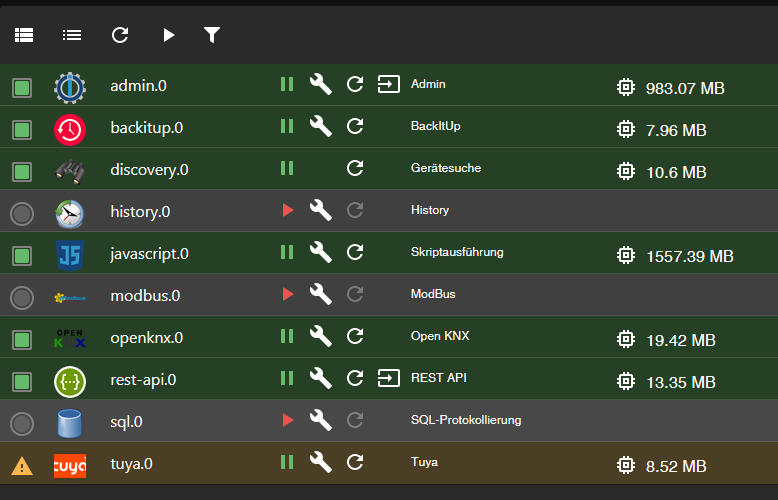
Benutze ich die REST API noch, stehen auch da schon mal schlanke 1GB Speicherverbrauch. Für eine 50kB JSON Antwort.
Nun kommt meine Frage:
Ist da was gewaltig verkehrt bei mir? Was kann es sein?
Das System ist ja noch leer - ich habe 1181 Objekte...Oder: Braucht das eigentlich nackte iobroker schon über 3GB RAM?!
Viele Grüße,
Thomas -
@thomas_ sagte: ich habe 1181 Objekte...
Über 1,5 GB für die Javascript-Instanz: Da läuft offenbar mind. ein Skript Amok.
Es hüpft jetzt auf einmal ständig hin und her.
1,5 GB admin, dann 600 MB
javascript 40 MB, dann 1,5GB.Die anderen sehen vernünftig aus.
Die Javascripte sind nur zwei:
Das erste liest alle 5 Minuten eine URL aus, die eine Zahl ausspuckt und schreibt die Zahl auf den KNX Bus
Das zweite hat 5 ON-Events drin, aus dem Modus und würde auch die ins KNX schreiben, aber der Modbus Adapter ist ja deaktiviert - das tut also gar nichtsedit: das funktioniert auch alles, ich habe die history der objekte geprüft. da kommt nichts an. nicht, dass ihr denkt, meine skripte schreiben halt alle 2 ms nen neuen wert oder sowas ^^
PID USER PR NI VIRT RES SHR S %CPU %MEM ZEIT+ BEFEHL 7463 iobroker 20 0 1916916 1,1g 14768 S 1,0 31,5 0:40.20 iobroker.js-con 7504 iobroker 20 0 1383092 719332 14380 R 127,8 20,1 0:17.72 io.javascript.0 914 mysql 20 0 1887640 227456 9096 S 0,0 6,3 5:30.09 mariadbd 7589 iobroker 20 0 10,7g 143904 19692 S 0,0 4,0 0:03.89 io.rest-api.0 7488 iobroker 20 0 1759200 143072 10928 S 0,0 4,0 0:10.89 io.admin.0 7549 iobroker 20 0 1009312 137884 11872 S 0,0 3,8 0:02.40 io.tuya.0 -
@thomas_ sagte: ich habe 1181 Objekte...
Über 1,5 GB für die Javascript-Instanz: Da läuft offenbar mind. ein Skript Amok.
jetzt hat es sich eingependelt
PID USER PR NI VIRT RES SHR S %CPU %MEM ZEIT+ BEFEHL 7488 iobroker 20 0 1723044 834036 22436 S 0,0 23,3 0:28.68 io.admin.0 7463 iobroker 20 0 1742872 822992 15616 S 0,7 23,0 0:52.81 iobroker.js-con 7504 iobroker 20 0 1744268 773680 19448 S 0,0 21,6 0:49.13 io.javascript.0 914 mysql 20 0 1822104 131300 11336 S 0,0 3,7 5:32.98 mariadbd 7549 iobroker 20 0 975860 61388 14352 S 0,0 1,7 0:03.06 io.tuya.0 7589 iobroker 20 0 10,7g 58580 12752 S 0,0 1,6 0:04.53 io.rest-api.0 7548 iobroker 20 0 690040 50564 15384 S 0,3 1,4 0:05.85 io.openknx.0 932 root 20 0 3538940 38364 12912 S 0,0 1,1 0:25.76 java 782 root 20 0 125268 37644 7940 S 4,0 1,1 3:47.61 perl 7570 iobroker 20 0 679596 34368 12472 S 0,0 1,0 0:01.87 io.discovery.0 -
jetzt hat es sich eingependelt
PID USER PR NI VIRT RES SHR S %CPU %MEM ZEIT+ BEFEHL 7488 iobroker 20 0 1723044 834036 22436 S 0,0 23,3 0:28.68 io.admin.0 7463 iobroker 20 0 1742872 822992 15616 S 0,7 23,0 0:52.81 iobroker.js-con 7504 iobroker 20 0 1744268 773680 19448 S 0,0 21,6 0:49.13 io.javascript.0 914 mysql 20 0 1822104 131300 11336 S 0,0 3,7 5:32.98 mariadbd 7549 iobroker 20 0 975860 61388 14352 S 0,0 1,7 0:03.06 io.tuya.0 7589 iobroker 20 0 10,7g 58580 12752 S 0,0 1,6 0:04.53 io.rest-api.0 7548 iobroker 20 0 690040 50564 15384 S 0,3 1,4 0:05.85 io.openknx.0 932 root 20 0 3538940 38364 12912 S 0,0 1,1 0:25.76 java 782 root 20 0 125268 37644 7940 S 4,0 1,1 3:47.61 perl 7570 iobroker 20 0 679596 34368 12472 S 0,0 1,0 0:01.87 io.discovery.0@thomas_ das sieht dann wirklich nach einem amoklaufenden Skript aus, dass wahrscheinlich zeitgesteuert startet
-
@thomas_ das sieht dann wirklich nach einem amoklaufenden Skript aus, dass wahrscheinlich zeitgesteuert startet
iobroker neu gestartet mit deaktivierten Skripten.
Ergebnis:PID USER PR NI VIRT RES SHR S %CPU %MEM ZEIT+ BEFEHL 7904 iobroker 20 0 1484584 878440 15504 S 0,0 24,5 0:10.88 io.javascript.0 7859 iobroker 20 0 1884872 846588 15236 D 30,5 23,6 0:29.92 iobroker.js-con 7882 iobroker 20 0 1766296 745928 15296 S 0,0 20,8 0:10.92 io.admin.0 7940 iobroker 20 0 1009412 154080 15332 S 0,0 4,3 0:02.13 io.tuya.0 7994 iobroker 20 0 10,7g 129052 23408 S 0,0 3,6 0:02.66 node -
iobroker neu gestartet mit deaktivierten Skripten.
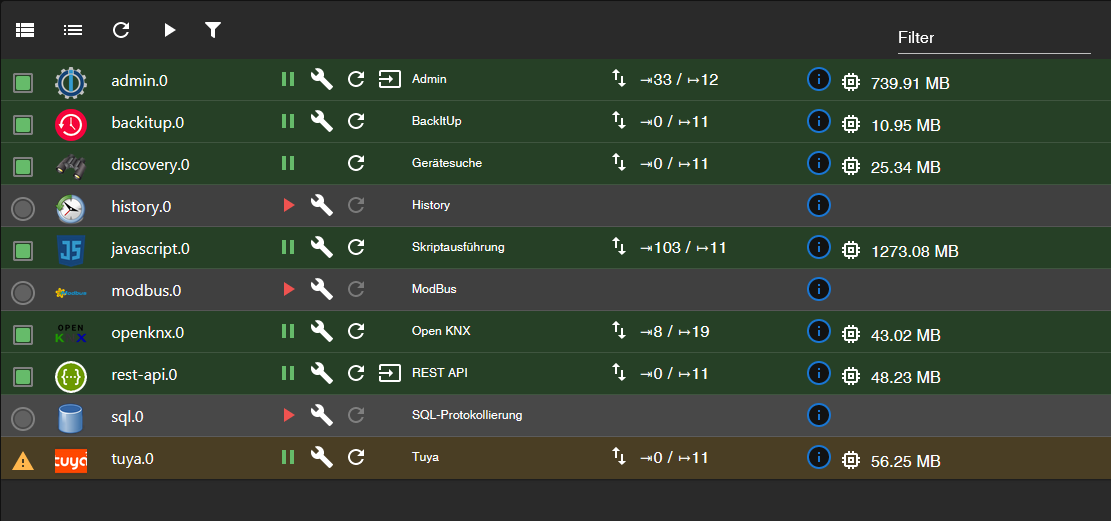
Ergebnis:PID USER PR NI VIRT RES SHR S %CPU %MEM ZEIT+ BEFEHL 7904 iobroker 20 0 1484584 878440 15504 S 0,0 24,5 0:10.88 io.javascript.0 7859 iobroker 20 0 1884872 846588 15236 D 30,5 23,6 0:29.92 iobroker.js-con 7882 iobroker 20 0 1766296 745928 15296 S 0,0 20,8 0:10.92 io.admin.0 7940 iobroker 20 0 1009412 154080 15332 S 0,0 4,3 0:02.13 io.tuya.0 7994 iobroker 20 0 10,7g 129052 23408 S 0,0 3,6 0:02.66 nodeWieso stehen denn da 103 Eingabewerte ganz ohne Skripte?
-
iobroker neu gestartet mit deaktivierten Skripten.
Ergebnis:PID USER PR NI VIRT RES SHR S %CPU %MEM ZEIT+ BEFEHL 7904 iobroker 20 0 1484584 878440 15504 S 0,0 24,5 0:10.88 io.javascript.0 7859 iobroker 20 0 1884872 846588 15236 D 30,5 23,6 0:29.92 iobroker.js-con 7882 iobroker 20 0 1766296 745928 15296 S 0,0 20,8 0:10.92 io.admin.0 7940 iobroker 20 0 1009412 154080 15332 S 0,0 4,3 0:02.13 io.tuya.0 7994 iobroker 20 0 10,7g 129052 23408 S 0,0 3,6 0:02.66 node@thomas_ sagte in Hardware Voraussetzungen bzw. Speicherverbrauch iobroker:
iobroker neu gestartet
passt!
in ein, zwei Minuten sollte es weniger sein. -
Wieso stehen denn da 103 Eingabewerte ganz ohne Skripte?
@thomas_ weil der Adapter gerade alle states abonniert
aber 1,3 GB RAM kommt mir etwas viel vor


Hey! Du scheinst an dieser Unterhaltung interessiert zu sein, hast aber noch kein Konto.
Hast du es satt, bei jedem Besuch durch die gleichen Beiträge zu scrollen? Wenn du dich für ein Konto anmeldest, kommst du immer genau dorthin zurück, wo du zuvor warst, und kannst dich über neue Antworten benachrichtigen lassen (entweder per E-Mail oder Push-Benachrichtigung). Du kannst auch Lesezeichen speichern und Beiträge positiv bewerten, um anderen Community-Mitgliedern deine Wertschätzung zu zeigen.
Mit deinem Input könnte dieser Beitrag noch besser werden 💗
Registrieren AnmeldenSupport us
376
Online33.0k
Benutzer83.5k
Themen1.3m
Beiträge