




Object ID Knoten nur in Blockly nicht verfügbar
-
Hallo,
ich bin auf ein eigenartiges Problem gestoßen.
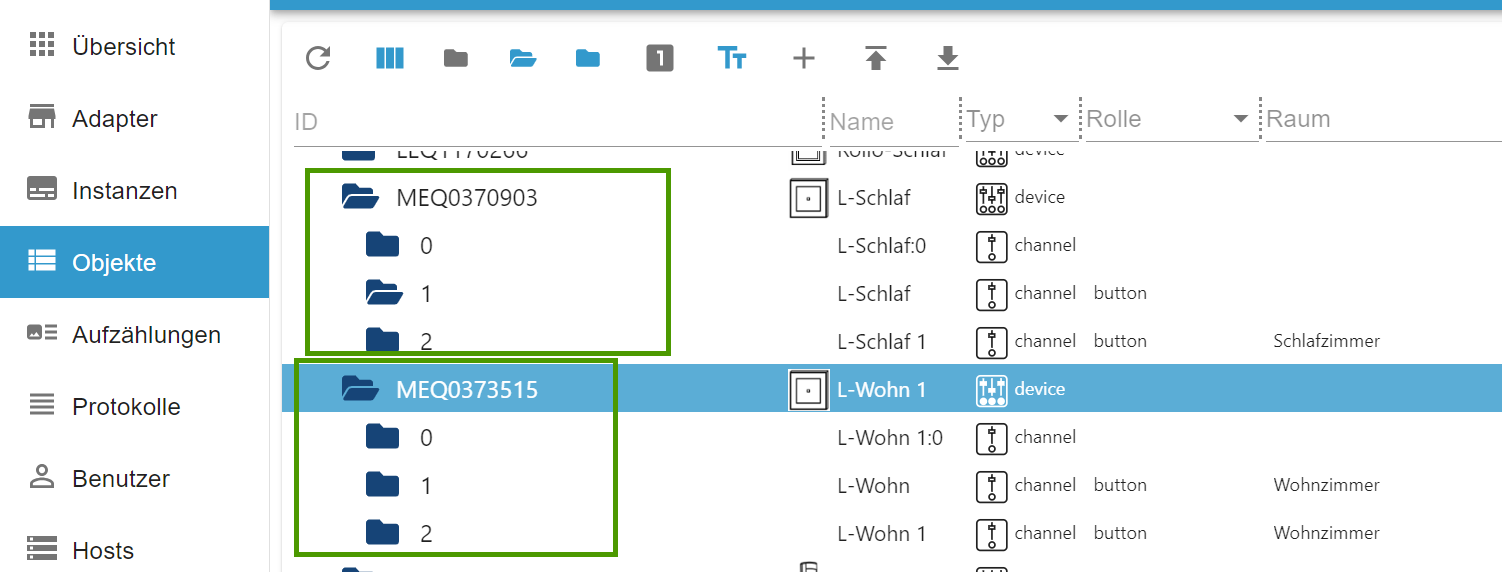
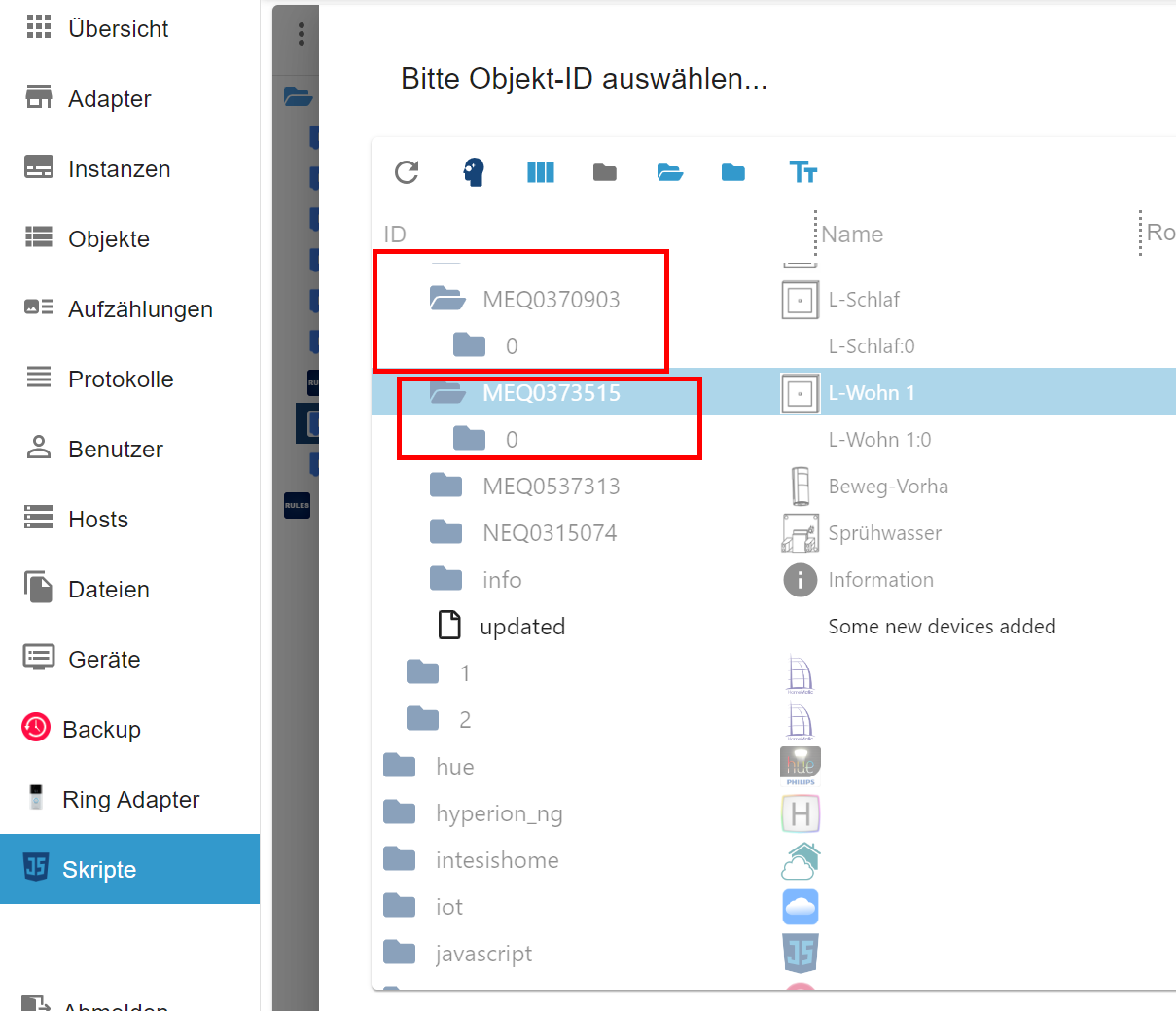
In der Objekt-ID Auswahl in Blockly sind zwei Knoten nicht verfügbar obwohl sie in der Objekt-Ansicht von IoBroker schon vorhanden sind.
Ist Euch das schon mal untergekommen bzw kennt das wer und ev. eine Lösung?Bin für jeden Tipp/Hinweis dankbar.
AndreasIn den Objekten sind die Knoten 1 und 2 vorhanden:
Im Auswahl-Dialog von Blockly aber nicht:
javascript: 7.8.0
======================= SUMMARY ======================= v.2023-10-10 Static hostname: RPI4 Icon name: computer Operating System: Raspbian GNU/Linux 10 (buster) Kernel: Linux 5.10.103-v7l+ Architecture: arm Installation: native Kernel: armv7l Userland: armhf Timezone: Europe/Vienna (CET, +0100) User-ID: 1000 X-Server: true Boot Target: graphical.target Pending OS-Updates: 22 Pending iob updates: 0 /home/iobroker/.diag.sh: line 486: nodejs: command not found Nodejs-Installation: /usr/local/bin/node v18.19.0 /usr/local/bin/npm 10.2.3 /usr/local/bin/npx 10.2.3 /usr/local/bin/corepack 0.22.0 Recommended versions are nodejs 18.19.0 and npm 10.2.3 *** nodejs is NOT correctly installed *** Wrong installation path detected. This needs to be fixed. Please check https://forum.iobroker.net/topic/35090/howto-nodejs-installation-und-upgrades-unter-debian for more information on how to fix these errors. MEMORY: total used free shared buff/cache available Mem: 3.7G 1.1G 699M 24M 1.8G 2.3G Swap: 99M 2.0M 97M Total: 3.8G 1.1G 796M Active iob-Instances: 23 Active repo(s): beta ioBroker Core: js-controller 5.0.19 admin 6.13.16 ioBroker Status: iobroker is running on this host. Objects type: jsonl States type: jsonl Status admin and web instance: + system.adapter.admin.0 : admin : RPI4 - enabled, port: 8081, bind: 0.0.0.0, run as: admin system.adapter.admin.1 : admin : RPI4 - disabled, port: 9081, bind: 0.0.0.0, run as: admin + system.adapter.web.0 : web : RPI4 - enabled, port: 8082, bind: 0.0.0.0, run as: admin Objects: 4266 States: 3372 Size of iob-Database: 23M /opt/iobroker/iobroker-data/objects.jsonl 4.0M /opt/iobroker/iobroker-data/states.jsonl =================== END OF SUMMARY ==================== -
Hallo,
ich bin auf ein eigenartiges Problem gestoßen.
In der Objekt-ID Auswahl in Blockly sind zwei Knoten nicht verfügbar obwohl sie in der Objekt-Ansicht von IoBroker schon vorhanden sind.
Ist Euch das schon mal untergekommen bzw kennt das wer und ev. eine Lösung?Bin für jeden Tipp/Hinweis dankbar.
AndreasIn den Objekten sind die Knoten 1 und 2 vorhanden:
Im Auswahl-Dialog von Blockly aber nicht:
javascript: 7.8.0
======================= SUMMARY ======================= v.2023-10-10 Static hostname: RPI4 Icon name: computer Operating System: Raspbian GNU/Linux 10 (buster) Kernel: Linux 5.10.103-v7l+ Architecture: arm Installation: native Kernel: armv7l Userland: armhf Timezone: Europe/Vienna (CET, +0100) User-ID: 1000 X-Server: true Boot Target: graphical.target Pending OS-Updates: 22 Pending iob updates: 0 /home/iobroker/.diag.sh: line 486: nodejs: command not found Nodejs-Installation: /usr/local/bin/node v18.19.0 /usr/local/bin/npm 10.2.3 /usr/local/bin/npx 10.2.3 /usr/local/bin/corepack 0.22.0 Recommended versions are nodejs 18.19.0 and npm 10.2.3 *** nodejs is NOT correctly installed *** Wrong installation path detected. This needs to be fixed. Please check https://forum.iobroker.net/topic/35090/howto-nodejs-installation-und-upgrades-unter-debian for more information on how to fix these errors. MEMORY: total used free shared buff/cache available Mem: 3.7G 1.1G 699M 24M 1.8G 2.3G Swap: 99M 2.0M 97M Total: 3.8G 1.1G 796M Active iob-Instances: 23 Active repo(s): beta ioBroker Core: js-controller 5.0.19 admin 6.13.16 ioBroker Status: iobroker is running on this host. Objects type: jsonl States type: jsonl Status admin and web instance: + system.adapter.admin.0 : admin : RPI4 - enabled, port: 8081, bind: 0.0.0.0, run as: admin system.adapter.admin.1 : admin : RPI4 - disabled, port: 9081, bind: 0.0.0.0, run as: admin + system.adapter.web.0 : web : RPI4 - enabled, port: 8082, bind: 0.0.0.0, run as: admin Objects: 4266 States: 3372 Size of iob-Database: 23M /opt/iobroker/iobroker-data/objects.jsonl 4.0M /opt/iobroker/iobroker-data/states.jsonl =================== END OF SUMMARY ====================@archie-headroom: Im Auswahl-Dialog von Blockly aber nicht:
Dann gibt es zu den Kanälen 1 und 2 keine Datenpunkte.
Konfiguration der hm-rpc-Instanz prüfen!
Firewall in der CCU? -
Hallo,
ich bin auf ein eigenartiges Problem gestoßen.
In der Objekt-ID Auswahl in Blockly sind zwei Knoten nicht verfügbar obwohl sie in der Objekt-Ansicht von IoBroker schon vorhanden sind.
Ist Euch das schon mal untergekommen bzw kennt das wer und ev. eine Lösung?Bin für jeden Tipp/Hinweis dankbar.
AndreasIn den Objekten sind die Knoten 1 und 2 vorhanden:
Im Auswahl-Dialog von Blockly aber nicht:
javascript: 7.8.0
======================= SUMMARY ======================= v.2023-10-10 Static hostname: RPI4 Icon name: computer Operating System: Raspbian GNU/Linux 10 (buster) Kernel: Linux 5.10.103-v7l+ Architecture: arm Installation: native Kernel: armv7l Userland: armhf Timezone: Europe/Vienna (CET, +0100) User-ID: 1000 X-Server: true Boot Target: graphical.target Pending OS-Updates: 22 Pending iob updates: 0 /home/iobroker/.diag.sh: line 486: nodejs: command not found Nodejs-Installation: /usr/local/bin/node v18.19.0 /usr/local/bin/npm 10.2.3 /usr/local/bin/npx 10.2.3 /usr/local/bin/corepack 0.22.0 Recommended versions are nodejs 18.19.0 and npm 10.2.3 *** nodejs is NOT correctly installed *** Wrong installation path detected. This needs to be fixed. Please check https://forum.iobroker.net/topic/35090/howto-nodejs-installation-und-upgrades-unter-debian for more information on how to fix these errors. MEMORY: total used free shared buff/cache available Mem: 3.7G 1.1G 699M 24M 1.8G 2.3G Swap: 99M 2.0M 97M Total: 3.8G 1.1G 796M Active iob-Instances: 23 Active repo(s): beta ioBroker Core: js-controller 5.0.19 admin 6.13.16 ioBroker Status: iobroker is running on this host. Objects type: jsonl States type: jsonl Status admin and web instance: + system.adapter.admin.0 : admin : RPI4 - enabled, port: 8081, bind: 0.0.0.0, run as: admin system.adapter.admin.1 : admin : RPI4 - disabled, port: 9081, bind: 0.0.0.0, run as: admin + system.adapter.web.0 : web : RPI4 - enabled, port: 8082, bind: 0.0.0.0, run as: admin Objects: 4266 States: 3372 Size of iob-Database: 23M /opt/iobroker/iobroker-data/objects.jsonl 4.0M /opt/iobroker/iobroker-data/states.jsonl =================== END OF SUMMARY ====================@archie-headroom
1.) Dein OS ist steinalt
2.) In dem steinalten System fehlen zusätzlich noch Updates
3.) Du hast den Desktop aktiv. Sowas hat auf 'nem Server nix zu suchen.
4.) Dein Node scheint nicht korrekt installiert zu sein.



Hey! Du scheinst an dieser Unterhaltung interessiert zu sein, hast aber noch kein Konto.
Hast du es satt, bei jedem Besuch durch die gleichen Beiträge zu scrollen? Wenn du dich für ein Konto anmeldest, kommst du immer genau dorthin zurück, wo du zuvor warst, und kannst dich über neue Antworten benachrichtigen lassen (entweder per E-Mail oder Push-Benachrichtigung). Du kannst auch Lesezeichen speichern und Beiträge positiv bewerten, um anderen Community-Mitgliedern deine Wertschätzung zu zeigen.
Mit deinem Input könnte dieser Beitrag noch besser werden 💗
Registrieren AnmeldenSupport us
399
Online33.0k
Benutzer83.5k
Themen1.3m
Beiträge