




Backup IOBroker but cannot find admin.js
-
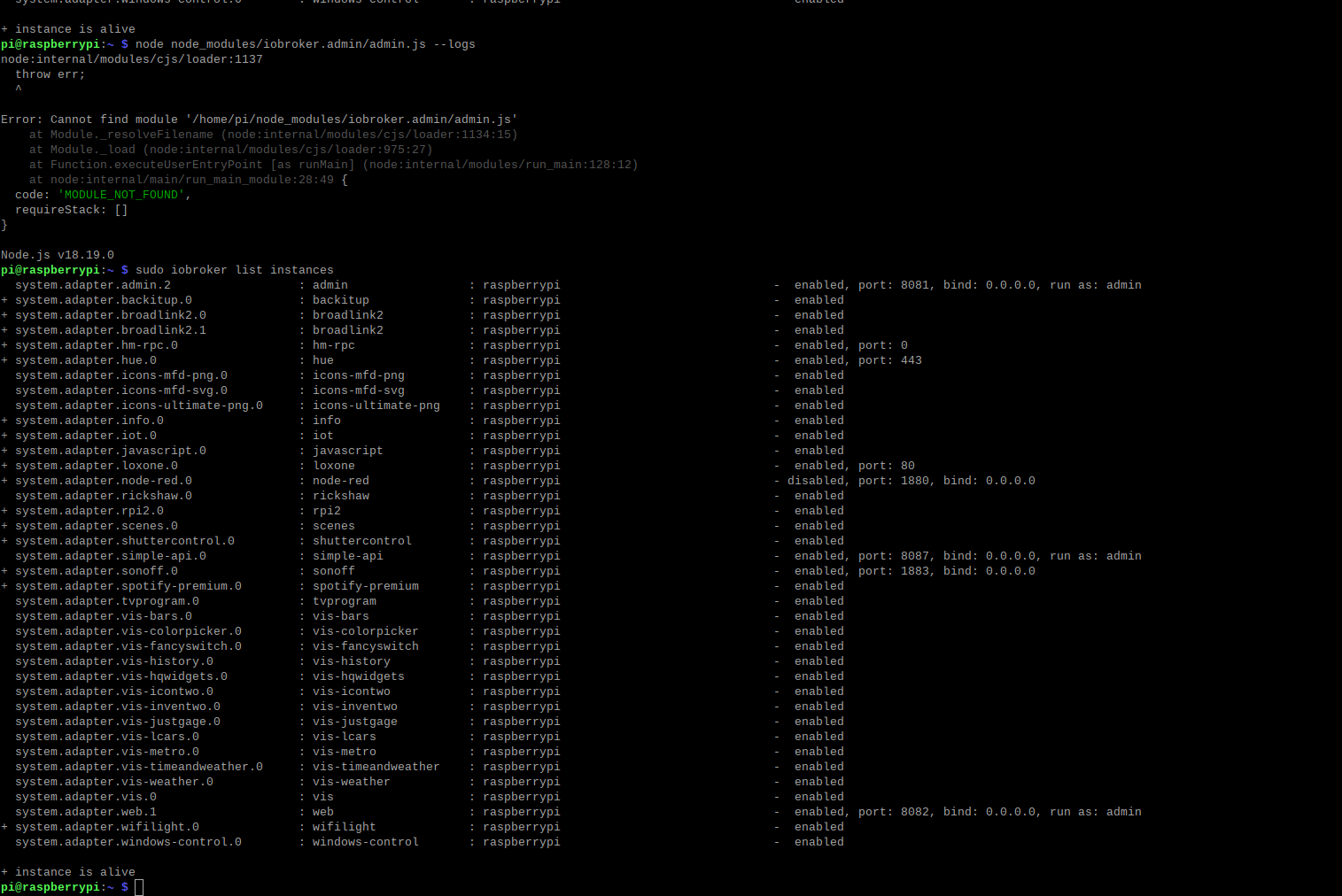
@marvin diese schwarze Briefmarke ist nur sehr schwer zu entziffern,.
Bitte als Text in code-tags posten!system.adapter.admin.2 : admin : raspberrypi - enabled, port: 8081, bind: 0.0.0.0, run as: admin + system.adapter.backitup.0 : backitup : raspberrypi - enabled + system.adapter.broadlink2.0 : broadlink2 : raspberrypi - enabled + system.adapter.broadlink2.1 : broadlink2 : raspberrypi - enabled + system.adapter.hm-rpc.0 : hm-rpc : raspberrypi - enabled, port: 0 + system.adapter.hue.0 : hue : raspberrypi - enabled, port: 443 system.adapter.icons-mfd-png.0 : icons-mfd-png : raspberrypi - enabled system.adapter.icons-mfd-svg.0 : icons-mfd-svg : raspberrypi - enabled system.adapter.icons-ultimate-png.0 : icons-ultimate-png : raspberrypi - enabled + system.adapter.info.0 : info : raspberrypi - enabled + system.adapter.iot.0 : iot : raspberrypi - enabled + system.adapter.javascript.0 : javascript : raspberrypi - enabled + system.adapter.loxone.0 : loxone : raspberrypi - enabled, port: 80 + system.adapter.node-red.0 : node-red : raspberrypi - disabled, port: 1880, bind: 0.0.0.0 system.adapter.rickshaw.0 : rickshaw : raspberrypi - enabled + system.adapter.rpi2.0 : rpi2 : raspberrypi - enabled + system.adapter.scenes.0 : scenes : raspberrypi - enabled + system.adapter.shuttercontrol.0 : shuttercontrol : raspberrypi - enabled system.adapter.simple-api.0 : simple-api : raspberrypi - enabled, port: 8087, bind: 0.0.0.0, run as: admin + system.adapter.sonoff.0 : sonoff : raspberrypi - enabled, port: 1883, bind: 0.0.0.0 + system.adapter.spotify-premium.0 : spotify-premium : raspberrypi - enabled + system.adapter.tvprogram.0 : tvprogram : raspberrypi - enabled system.adapter.vis-bars.0 : vis-bars : raspberrypi - enabled system.adapter.vis-colorpicker.0 : vis-colorpicker : raspberrypi - enabled system.adapter.vis-fancyswitch.0 : vis-fancyswitch : raspberrypi - enabled system.adapter.vis-history.0 : vis-history : raspberrypi - enabled system.adapter.vis-hqwidgets.0 : vis-hqwidgets : raspberrypi - enabled system.adapter.vis-icontwo.0 : vis-icontwo : raspberrypi - enabled + system.adapter.vis-inventwo.0 : vis-inventwo : raspberrypi - enabled system.adapter.vis-justgage.0 : vis-justgage : raspberrypi - enabled system.adapter.vis-lcars.0 : vis-lcars : raspberrypi - enabled system.adapter.vis-metro.0 : vis-metro : raspberrypi - enabled system.adapter.vis-timeandweather.0 : vis-timeandweather : raspberrypi - enabled system.adapter.vis-weather.0 : vis-weather : raspberrypi - enabled system.adapter.vis.0 : vis : raspberrypi - enabled system.adapter.web.1 : web : raspberrypi - enabled, port: 8082, bind: 0.0.0.0, run as: admin + system.adapter.wifilight.0 : wifilight : raspberrypi - enabled system.adapter.windows-control.0 : windows-control : raspberrypi - enabled + instance is alive pi@raspberrypi:~ $ node node_modules/iobroker.admin/admin.js --logs node:internal/modules/cjs/loader:1137 throw err; ^ Error: Cannot find module '/home/pi/node_modules/iobroker.admin/admin.js' at Module._resolveFilename (node:internal/modules/cjs/loader:1134:15) at Module._load (node:internal/modules/cjs/loader:975:27) at Function.executeUserEntryPoint [as runMain] (node:internal/modules/run_main:128:12) at node:internal/main/run_main_module:28:49 { code: 'MODULE_NOT_FOUND', requireStack: [] } Node.js v18.19.0 -
system.adapter.admin.2 : admin : raspberrypi - enabled, port: 8081, bind: 0.0.0.0, run as: admin + system.adapter.backitup.0 : backitup : raspberrypi - enabled + system.adapter.broadlink2.0 : broadlink2 : raspberrypi - enabled + system.adapter.broadlink2.1 : broadlink2 : raspberrypi - enabled + system.adapter.hm-rpc.0 : hm-rpc : raspberrypi - enabled, port: 0 + system.adapter.hue.0 : hue : raspberrypi - enabled, port: 443 system.adapter.icons-mfd-png.0 : icons-mfd-png : raspberrypi - enabled system.adapter.icons-mfd-svg.0 : icons-mfd-svg : raspberrypi - enabled system.adapter.icons-ultimate-png.0 : icons-ultimate-png : raspberrypi - enabled + system.adapter.info.0 : info : raspberrypi - enabled + system.adapter.iot.0 : iot : raspberrypi - enabled + system.adapter.javascript.0 : javascript : raspberrypi - enabled + system.adapter.loxone.0 : loxone : raspberrypi - enabled, port: 80 + system.adapter.node-red.0 : node-red : raspberrypi - disabled, port: 1880, bind: 0.0.0.0 system.adapter.rickshaw.0 : rickshaw : raspberrypi - enabled + system.adapter.rpi2.0 : rpi2 : raspberrypi - enabled + system.adapter.scenes.0 : scenes : raspberrypi - enabled + system.adapter.shuttercontrol.0 : shuttercontrol : raspberrypi - enabled system.adapter.simple-api.0 : simple-api : raspberrypi - enabled, port: 8087, bind: 0.0.0.0, run as: admin + system.adapter.sonoff.0 : sonoff : raspberrypi - enabled, port: 1883, bind: 0.0.0.0 + system.adapter.spotify-premium.0 : spotify-premium : raspberrypi - enabled + system.adapter.tvprogram.0 : tvprogram : raspberrypi - enabled system.adapter.vis-bars.0 : vis-bars : raspberrypi - enabled system.adapter.vis-colorpicker.0 : vis-colorpicker : raspberrypi - enabled system.adapter.vis-fancyswitch.0 : vis-fancyswitch : raspberrypi - enabled system.adapter.vis-history.0 : vis-history : raspberrypi - enabled system.adapter.vis-hqwidgets.0 : vis-hqwidgets : raspberrypi - enabled system.adapter.vis-icontwo.0 : vis-icontwo : raspberrypi - enabled + system.adapter.vis-inventwo.0 : vis-inventwo : raspberrypi - enabled system.adapter.vis-justgage.0 : vis-justgage : raspberrypi - enabled system.adapter.vis-lcars.0 : vis-lcars : raspberrypi - enabled system.adapter.vis-metro.0 : vis-metro : raspberrypi - enabled system.adapter.vis-timeandweather.0 : vis-timeandweather : raspberrypi - enabled system.adapter.vis-weather.0 : vis-weather : raspberrypi - enabled system.adapter.vis.0 : vis : raspberrypi - enabled system.adapter.web.1 : web : raspberrypi - enabled, port: 8082, bind: 0.0.0.0, run as: admin + system.adapter.wifilight.0 : wifilight : raspberrypi - enabled system.adapter.windows-control.0 : windows-control : raspberrypi - enabled + instance is alive pi@raspberrypi:~ $ node node_modules/iobroker.admin/admin.js --logs node:internal/modules/cjs/loader:1137 throw err; ^ Error: Cannot find module '/home/pi/node_modules/iobroker.admin/admin.js' at Module._resolveFilename (node:internal/modules/cjs/loader:1134:15) at Module._load (node:internal/modules/cjs/loader:975:27) at Function.executeUserEntryPoint [as runMain] (node:internal/modules/run_main:128:12) at node:internal/main/run_main_module:28:49 { code: 'MODULE_NOT_FOUND', requireStack: [] } Node.js v18.19.0i tried following but i didnt help:
cd /opt/iobroker npm i iobroker.admin --production iobroker upload admin iobroker restart admin.2 -
system.adapter.admin.2 : admin : raspberrypi - enabled, port: 8081, bind: 0.0.0.0, run as: admin + system.adapter.backitup.0 : backitup : raspberrypi - enabled + system.adapter.broadlink2.0 : broadlink2 : raspberrypi - enabled + system.adapter.broadlink2.1 : broadlink2 : raspberrypi - enabled + system.adapter.hm-rpc.0 : hm-rpc : raspberrypi - enabled, port: 0 + system.adapter.hue.0 : hue : raspberrypi - enabled, port: 443 system.adapter.icons-mfd-png.0 : icons-mfd-png : raspberrypi - enabled system.adapter.icons-mfd-svg.0 : icons-mfd-svg : raspberrypi - enabled system.adapter.icons-ultimate-png.0 : icons-ultimate-png : raspberrypi - enabled + system.adapter.info.0 : info : raspberrypi - enabled + system.adapter.iot.0 : iot : raspberrypi - enabled + system.adapter.javascript.0 : javascript : raspberrypi - enabled + system.adapter.loxone.0 : loxone : raspberrypi - enabled, port: 80 + system.adapter.node-red.0 : node-red : raspberrypi - disabled, port: 1880, bind: 0.0.0.0 system.adapter.rickshaw.0 : rickshaw : raspberrypi - enabled + system.adapter.rpi2.0 : rpi2 : raspberrypi - enabled + system.adapter.scenes.0 : scenes : raspberrypi - enabled + system.adapter.shuttercontrol.0 : shuttercontrol : raspberrypi - enabled system.adapter.simple-api.0 : simple-api : raspberrypi - enabled, port: 8087, bind: 0.0.0.0, run as: admin + system.adapter.sonoff.0 : sonoff : raspberrypi - enabled, port: 1883, bind: 0.0.0.0 + system.adapter.spotify-premium.0 : spotify-premium : raspberrypi - enabled + system.adapter.tvprogram.0 : tvprogram : raspberrypi - enabled system.adapter.vis-bars.0 : vis-bars : raspberrypi - enabled system.adapter.vis-colorpicker.0 : vis-colorpicker : raspberrypi - enabled system.adapter.vis-fancyswitch.0 : vis-fancyswitch : raspberrypi - enabled system.adapter.vis-history.0 : vis-history : raspberrypi - enabled system.adapter.vis-hqwidgets.0 : vis-hqwidgets : raspberrypi - enabled system.adapter.vis-icontwo.0 : vis-icontwo : raspberrypi - enabled + system.adapter.vis-inventwo.0 : vis-inventwo : raspberrypi - enabled system.adapter.vis-justgage.0 : vis-justgage : raspberrypi - enabled system.adapter.vis-lcars.0 : vis-lcars : raspberrypi - enabled system.adapter.vis-metro.0 : vis-metro : raspberrypi - enabled system.adapter.vis-timeandweather.0 : vis-timeandweather : raspberrypi - enabled system.adapter.vis-weather.0 : vis-weather : raspberrypi - enabled system.adapter.vis.0 : vis : raspberrypi - enabled system.adapter.web.1 : web : raspberrypi - enabled, port: 8082, bind: 0.0.0.0, run as: admin + system.adapter.wifilight.0 : wifilight : raspberrypi - enabled system.adapter.windows-control.0 : windows-control : raspberrypi - enabled + instance is alive pi@raspberrypi:~ $ node node_modules/iobroker.admin/admin.js --logs node:internal/modules/cjs/loader:1137 throw err; ^ Error: Cannot find module '/home/pi/node_modules/iobroker.admin/admin.js' at Module._resolveFilename (node:internal/modules/cjs/loader:1134:15) at Module._load (node:internal/modules/cjs/loader:975:27) at Function.executeUserEntryPoint [as runMain] (node:internal/modules/run_main:128:12) at node:internal/main/run_main_module:28:49 { code: 'MODULE_NOT_FOUND', requireStack: [] } Node.js v18.19.0 -
@marvin thanks!
don't use the
iobrokercommands withsudo! never!please try
iob start admin.2 --debugbut the full output of
iob diagshould reveal more infos@homoran said in Backup IOBroker but cannot find admin.js:
this is my iob diag output:
======================= SUMMARY ======================= v.2023-10-10 Static hostname: raspberrypi Icon name: computer Operating System: Debian GNU/Linux 12 (bookworm) Kernel: Linux 6.1.0-rpi7-rpi-v8 Architecture: arm64 Installation: native Kernel: aarch64 Userland: arm64 Timezone: Europe/Berlin (CET, +0100) User-ID: 1000 X-Server: true Boot Target: graphical.target Pending OS-Updates: 73 Pending iob updates: 28 Nodejs-Installation: /usr/bin/nodejs v18.19.0 /usr/bin/node v18.19.0 /usr/bin/npm 10.2.3 /usr/bin/npx 10.2.3 /usr/bin/corepack 0.22.0 Recommended versions are nodejs and npm Your nodejs installation is correct MEMORY: total used free shared buff/cache available Mem: 4.0G 2.2G 691M 161M 1.3G 1.8G Swap: 104M 4.2M 100M Total: 4.1G 2.2G 792M Active iob-Instances: 19 Active repo(s): stable ioBroker Core: js-controller 5.0.17 admin 6.2.20 ioBroker Status: iobroker is running on this host. Objects type: jsonl States type: jsonl Status admin and web instance: system.adapter.admin.2 : admin : raspberrypi - enabled, port: 8081, bind: 0.0.0.0, run as: admin system.adapter.web.1 : web : raspberrypi - enabled, port: 8082, bind: 0.0.0.0, run as: admin Objects: 7891 States: 6317 Size of iob-Database: 16M /opt/iobroker/iobroker-data/objects.jsonl 8.8M /opt/iobroker/iobroker-data/objects.json.migrated 8.8M /opt/iobroker/iobroker-data/objects.json.bak.migrated 12M /opt/iobroker/iobroker-data/states.jsonl 5.1M /opt/iobroker/iobroker-data/states.json.migrated 5.1M /opt/iobroker/iobroker-data/states.json.bak.migrated =================== END OF SUMMARY ==================== -
@homoran said in Backup IOBroker but cannot find admin.js:
this is my iob diag output:
======================= SUMMARY ======================= v.2023-10-10 Static hostname: raspberrypi Icon name: computer Operating System: Debian GNU/Linux 12 (bookworm) Kernel: Linux 6.1.0-rpi7-rpi-v8 Architecture: arm64 Installation: native Kernel: aarch64 Userland: arm64 Timezone: Europe/Berlin (CET, +0100) User-ID: 1000 X-Server: true Boot Target: graphical.target Pending OS-Updates: 73 Pending iob updates: 28 Nodejs-Installation: /usr/bin/nodejs v18.19.0 /usr/bin/node v18.19.0 /usr/bin/npm 10.2.3 /usr/bin/npx 10.2.3 /usr/bin/corepack 0.22.0 Recommended versions are nodejs and npm Your nodejs installation is correct MEMORY: total used free shared buff/cache available Mem: 4.0G 2.2G 691M 161M 1.3G 1.8G Swap: 104M 4.2M 100M Total: 4.1G 2.2G 792M Active iob-Instances: 19 Active repo(s): stable ioBroker Core: js-controller 5.0.17 admin 6.2.20 ioBroker Status: iobroker is running on this host. Objects type: jsonl States type: jsonl Status admin and web instance: system.adapter.admin.2 : admin : raspberrypi - enabled, port: 8081, bind: 0.0.0.0, run as: admin system.adapter.web.1 : web : raspberrypi - enabled, port: 8082, bind: 0.0.0.0, run as: admin Objects: 7891 States: 6317 Size of iob-Database: 16M /opt/iobroker/iobroker-data/objects.jsonl 8.8M /opt/iobroker/iobroker-data/objects.json.migrated 8.8M /opt/iobroker/iobroker-data/objects.json.bak.migrated 12M /opt/iobroker/iobroker-data/states.jsonl 5.1M /opt/iobroker/iobroker-data/states.json.migrated 5.1M /opt/iobroker/iobroker-data/states.json.bak.migrated =================== END OF SUMMARY ====================@marvin sagte in Backup IOBroker but cannot find admin.js:
this is my iob diag output:
unfortunately just the summary
-
@marvin sagte in Backup IOBroker but cannot find admin.js:
this is my iob diag output:
unfortunately just the summary
Skript v.2023-10-10 *** BASE SYSTEM *** Static hostname: raspberrypi Icon name: computer Operating System: Debian GNU/Linux 12 (bookworm) Kernel: Linux 6.1.0-rpi7-rpi-v8 Architecture: arm64 -
@homoran said in Backup IOBroker but cannot find admin.js:
this is my iob diag output:
======================= SUMMARY ======================= v.2023-10-10 Static hostname: raspberrypi Icon name: computer Operating System: Debian GNU/Linux 12 (bookworm) Kernel: Linux 6.1.0-rpi7-rpi-v8 Architecture: arm64 Installation: native Kernel: aarch64 Userland: arm64 Timezone: Europe/Berlin (CET, +0100) User-ID: 1000 X-Server: true Boot Target: graphical.target Pending OS-Updates: 73 Pending iob updates: 28 Nodejs-Installation: /usr/bin/nodejs v18.19.0 /usr/bin/node v18.19.0 /usr/bin/npm 10.2.3 /usr/bin/npx 10.2.3 /usr/bin/corepack 0.22.0 Recommended versions are nodejs and npm Your nodejs installation is correct MEMORY: total used free shared buff/cache available Mem: 4.0G 2.2G 691M 161M 1.3G 1.8G Swap: 104M 4.2M 100M Total: 4.1G 2.2G 792M Active iob-Instances: 19 Active repo(s): stable ioBroker Core: js-controller 5.0.17 admin 6.2.20 ioBroker Status: iobroker is running on this host. Objects type: jsonl States type: jsonl Status admin and web instance: system.adapter.admin.2 : admin : raspberrypi - enabled, port: 8081, bind: 0.0.0.0, run as: admin system.adapter.web.1 : web : raspberrypi - enabled, port: 8082, bind: 0.0.0.0, run as: admin Objects: 7891 States: 6317 Size of iob-Database: 16M /opt/iobroker/iobroker-data/objects.jsonl 8.8M /opt/iobroker/iobroker-data/objects.json.migrated 8.8M /opt/iobroker/iobroker-data/objects.json.bak.migrated 12M /opt/iobroker/iobroker-data/states.jsonl 5.1M /opt/iobroker/iobroker-data/states.json.migrated 5.1M /opt/iobroker/iobroker-data/states.json.bak.migrated =================== END OF SUMMARY ====================@marvin sagte in Backup IOBroker but cannot find admin.js:
Pending iob updates: 28
in combination with
@marvin sagte in Backup IOBroker but cannot find admin.js:
js-controller 5.0.17
leads me to me guess that you restored an old version with controller v4.
did you?
-
@marvin sagte in Backup IOBroker but cannot find admin.js:
Pending iob updates: 28
in combination with
@marvin sagte in Backup IOBroker but cannot find admin.js:
js-controller 5.0.17
leads me to me guess that you restored an old version with controller v4.
did you?
@homoran i dont know the exact version but not the newest for sure...
-
@homoran i dont know the exact version but not the newest for sure...
@marvin sagte in Backup IOBroker but cannot find admin.js:
@homoran i dont know the exact version but not the newest for sure...
you cannot restore a backup of v4 in a new installation with controller v5.
@thomas-braun tried this at another user
cd /opt/iobroker

sudo -H -u iobroker npm install iobroker.js-controller

iob update

iob upgrade all -y
I recommend to stop iob first
iob stopGood luck!
-
@homoran said in Backup IOBroker but cannot find admin.js:
this is my iob diag output:
======================= SUMMARY ======================= v.2023-10-10 Static hostname: raspberrypi Icon name: computer Operating System: Debian GNU/Linux 12 (bookworm) Kernel: Linux 6.1.0-rpi7-rpi-v8 Architecture: arm64 Installation: native Kernel: aarch64 Userland: arm64 Timezone: Europe/Berlin (CET, +0100) User-ID: 1000 X-Server: true Boot Target: graphical.target Pending OS-Updates: 73 Pending iob updates: 28 Nodejs-Installation: /usr/bin/nodejs v18.19.0 /usr/bin/node v18.19.0 /usr/bin/npm 10.2.3 /usr/bin/npx 10.2.3 /usr/bin/corepack 0.22.0 Recommended versions are nodejs and npm Your nodejs installation is correct MEMORY: total used free shared buff/cache available Mem: 4.0G 2.2G 691M 161M 1.3G 1.8G Swap: 104M 4.2M 100M Total: 4.1G 2.2G 792M Active iob-Instances: 19 Active repo(s): stable ioBroker Core: js-controller 5.0.17 admin 6.2.20 ioBroker Status: iobroker is running on this host. Objects type: jsonl States type: jsonl Status admin and web instance: system.adapter.admin.2 : admin : raspberrypi - enabled, port: 8081, bind: 0.0.0.0, run as: admin system.adapter.web.1 : web : raspberrypi - enabled, port: 8082, bind: 0.0.0.0, run as: admin Objects: 7891 States: 6317 Size of iob-Database: 16M /opt/iobroker/iobroker-data/objects.jsonl 8.8M /opt/iobroker/iobroker-data/objects.json.migrated 8.8M /opt/iobroker/iobroker-data/objects.json.bak.migrated 12M /opt/iobroker/iobroker-data/states.jsonl 5.1M /opt/iobroker/iobroker-data/states.json.migrated 5.1M /opt/iobroker/iobroker-data/states.json.bak.migrated =================== END OF SUMMARY ====================@marvin sagte in Backup IOBroker but cannot find admin.js:
Timezone: Europe/Berlin (CET, +0100)
Really ?
@marvin sagte in Backup IOBroker but cannot find admin.js:
X-Server: true
Desktop: LXDE-pi
Terminal: x11
Boot Target: graphical.target@marvin sagte in Backup IOBroker but cannot find admin.js:
Pending Updates: 73
-
@marvin sagte in Backup IOBroker but cannot find admin.js:
@homoran i dont know the exact version but not the newest for sure...
you cannot restore a backup of v4 in a new installation with controller v5.
@thomas-braun tried this at another user
cd /opt/iobroker

sudo -H -u iobroker npm install iobroker.js-controller

iob update

iob upgrade all -y
I recommend to stop iob first
iob stopGood luck!
-
@homoran thank you so much for your help and time. fixed it :)
@marvin sagte in Backup IOBroker but cannot find admin.js:
@homoran thank you so much for your help and time. fixed it :)
glad to hear!
but fix also all old stuff!And what already was said by @DJMarc75 :
a Server will not have an graphical interface!and do you really live in German time-zone?


Hey! Du scheinst an dieser Unterhaltung interessiert zu sein, hast aber noch kein Konto.
Hast du es satt, bei jedem Besuch durch die gleichen Beiträge zu scrollen? Wenn du dich für ein Konto anmeldest, kommst du immer genau dorthin zurück, wo du zuvor warst, und kannst dich über neue Antworten benachrichtigen lassen (entweder per E-Mail oder Push-Benachrichtigung). Du kannst auch Lesezeichen speichern und Beiträge positiv bewerten, um anderen Community-Mitgliedern deine Wertschätzung zu zeigen.
Mit deinem Input könnte dieser Beitrag noch besser werden 💗
Registrieren AnmeldenSupport us
480
Online33.0k
Benutzer83.6k
Themen1.3m
Beiträge