




Umzug ioBroker auf neuen raspi4
-
@krizz2023 sagte in Umzug ioBroker auf neuen raspi4:
War für mich plausibel das im Ordner des Benutzers anzulegen.
darf der Systemuser iobroker dort zugreifen?
eher nicht, oder?@krizz2023 sagte in Umzug ioBroker auf neuen raspi4:
Allerdings ist es überrascehnd klein mit etwas über 3 MB....
da stehen ja auch nur due Konfigurationen drin.
@krizz2023 sagte in Umzug ioBroker auf neuen raspi4:
das Adapter installiert werden etc, aber es passiert nix
was sagt denn zu dem Zeitpunkt
iob logs --watch?@homoran said in Umzug ioBroker auf neuen raspi4:
das Adapter installiert werden etc, aber es passiert nix
Wenn ich es richtig eingrenze dies hier:
2023-12-01 20:47:54.682 - info: host.pi "system.adapter.backitup.0" enabled 2023-12-01 20:47:54.746 - info: host.pi instance system.adapter.backitup.0 started with pid 5022 2023-12-01 20:47:56.578 - info: admin.0 (1981) ==> Connected system.user.admin from ::ffff:192.168.2.105 2023-12-01 20:47:56.690 - info: backitup.0 (5022) starting. Version 2.8.7 in /opt/iobroker/node_modules/iobroker.backitup, node: v18.17.1, js-controller: 5.0.16 2023-12-01 20:47:56.776 - info: backitup.0 (5022) [iobroker] backup will be activated at 02:40 every 1 day(s) -
@homoran said in Umzug ioBroker auf neuen raspi4:
das Adapter installiert werden etc, aber es passiert nix
Wenn ich es richtig eingrenze dies hier:
2023-12-01 20:47:54.682 - info: host.pi "system.adapter.backitup.0" enabled 2023-12-01 20:47:54.746 - info: host.pi instance system.adapter.backitup.0 started with pid 5022 2023-12-01 20:47:56.578 - info: admin.0 (1981) ==> Connected system.user.admin from ::ffff:192.168.2.105 2023-12-01 20:47:56.690 - info: backitup.0 (5022) starting. Version 2.8.7 in /opt/iobroker/node_modules/iobroker.backitup, node: v18.17.1, js-controller: 5.0.16 2023-12-01 20:47:56.776 - info: backitup.0 (5022) [iobroker] backup will be activated at 02:40 every 1 day(s)@krizz2023 das sieht nicht nach Installation aus.
@krizz2023 sagte in Umzug ioBroker auf neuen raspi4:
es passiert nix
heisst für dich was?
nach dem Logschnipsel läuft der admin und backitup.
Was erwartest du?um das ganze abzukürzen bitte die Langfassung von
iob diagin code-tags. -
@krizz2023 sagte in Umzug ioBroker auf neuen raspi4:
Im debug des bckp konnte ich aber sehen dass mkdir nicht ausgeführt werden konnte, wegen Rechten, was mich hoffentlich schon mal in die richtige Richtung schubst!?
Spiegel halt nicht in ein Verzeichnis, wo der user 'iobroker' nix darf, sondern in dessen /home/iobroker - Verzeichnis. Dort darf der dann natürlich auch alles.
weil ich beim Erstellen meines Sytems direkt im Imager nen Benutzer pi angelegt habe, mit neuem PW natürlich.
Der user sollte aber nicht mehr 'pi' genannt werden sondern einen anderen Namen haben. Wie wäre es mit 'krizz' in deinem Fall?
@thomas-braun Ich habe den Ordner mal im javascript.0 Adaper geändert.
So sieht mein debug ausm bckp Verlauf aus. Und beim Schreiben des javascript- Päckchens auf den FTP-Server läuft der Bckp-Adapter ins Leere. Also soll heißen die Datei (und wenn ich das richtig verstehen wird da eine Datei mit den Skripten separat angelegt) findet nie statt und das Fenster schließt auch nicht.
Started iobroker ...
[DEBUG] [iobroker] start with {"type":"creator","workDir":"/opt/iobroker/node_modules/iobroker.js-controller/iobroker.js","time":"02:40","debugging":true,"slaveBackup":"Single","everyXDays":"2","nameSuffix":"iobroker_bckp","deleteBackupAfter":0,"ftp":{"enabled":true,"type":"storage","source":"ftp","host":"192.168.2.155","debugging":true,"deleteOldBackup":true,"ownDir":false,"dir":"/Daten/SmartHome_bckp","dirMinimal":"/backupDir/iobroker","user":"papa","pass":"****","port":"21","secure":false,"signedCertificates":true,"ignoreErrors":false},"ignoreErrors":false,"dir":"/opt/iobroker","javascripts":{"enabled":true,"type":"creator","ftp":{"enabled":true,"type":"storage","source":"ftp","host":"192.168.2.155","debugging":true,"deleteOldBackup":true,"ownDir":false,"dir":"/Daten/SmartHome_bckp","dirMinimal":"/backupDir/iobroker","user":"papa","pass":"****","port":"21","secure":false,"signedCertificates":true,"ignoreErrors":false},"cifs":{"enabled":false,"mountType":"NFS","type":"storage","source":"ftp","mount":"192.168.2.155","debugging":true,"fileDir":"/opt/iobroker/iobroker-data/backitup","wakeOnLAN":false,"macAd":"20:DE:20:DE:20:DE","wolTime":"25","wolPort":"9","wolExtra":false,"smb":"vers=3.1.1","sudo":false,"cifsDomain":"","clientInodes":false,"deleteOldBackup":true,"ownDir":false,"dir":"Daten/SmartHome_bckp","dirMinimal":"sharename/backupDir","user":"papa","pass":"****","ignoreErrors":false},"dropbox":{"enabled":false,"type":"storage","source":"ftp","debugging":true,"deleteOldBackup":false,"accessToken":"****","dropboxAccessJson":"","dropboxTokenType":"custom","ownDir":false,"dir":"/backupDir","dirMinimal":"/backupDir/iobroker","ignoreErrors":false},"onedrive":{"enabled":false,"type":"storage","source":"ftp","debugging":true,"deleteOldBackup":false,"onedriveAccessJson":"****","ownDir":false,"dir":"backupDir","dirMinimal":"backupDir/iobroker","ignoreErrors":false},"webdav":{"enabled":false,"type":"storage","source":"ftp","debugging":true,"deleteOldBackup":false,"username":"username","pass":"****","url":"https://example.com/remote.php/dav/files/username/","ownDir":false,"dir":"/backupDir","dirMinimal":"/backupDir/iobroker","signedCertificates":true,"ignoreErrors":false},"googledrive":{"enabled":false,"type":"storage","source":"ftp","debugging":true,"deleteOldBackup":false,"accessJson":"****","newToken":false,"ownDir":false,"dir":"/backupDir","dirMinimal":"/backupDir/iobroker","ignoreErrors":false},"slaveSuffix":"","hostType":"Single","nameSuffix":"iobroker_bckp","ignoreErrors":false},"historyHTML":{"enabled":true,"type":"message","entriesNumber":"25","ignoreErrors":false,"systemLang":"de"},"historyJSON":{"enabled":true,"type":"message","entriesNumber":"25","ignoreErrors":false,"systemLang":"de"},"signal":{"enabled":false,"notificationsType":"Telegram","type":"message","instance":"","NoticeType":"longSignalNotice","onlyError":false,"signalWaiting":0,"hostName":"iobroker_bckp","ignoreErrors":false,"systemLang":"de"},"matrix":{"enabled":false,"notificationsType":"Telegram","type":"message","instance":"","NoticeType":"longMatrixNotice","onlyError":false,"matrixWaiting":0,"hostName":"iobroker_bckp","ignoreErrors":false,"systemLang":"de"},"backupDir":"/opt/iobroker/backups"}
[DEBUG] [iobroker] - host.pi 10957 states saved

[DEBUG] [iobroker] - host.pi 12504 objects saved

[DEBUG] [iobroker] - Backup created: /opt/iobroker/backups/iobroker_2023_12_02-00_33_38_iobroker_bckp_backupiobroker.tar.gz

[DEBUG] [iobroker] - This backup can only be restored with js-controller version up from 4.1

[DEBUG] [iobroker] - done
[DEBUG] [javascripts] - Created javascript_tmp directory: "/opt/iobroker/backups/tmpScripts"
[DEBUG] [javascripts] - found Script: Alarm_Countdown
[DEBUG] [javascripts] - found Script: Alarmzündung_zur_CCU
[DEBUG] [javascripts] - found Script: HeizungGruppeAutomatik
[DEBUG] [javascripts] - found Script: HeizungGruppeProgramm
[DEBUG] [javascripts] - found Script: HeizungGruppeTemperatur
[DEBUG] [javascripts] - found Script: HeizungGruppe_an_aus
[DEBUG] [javascripts] - found Script: Küchenzeile_Licht
[DEBUG] [javascripts] - found Script: Licht_KillSwitch
[DEBUG] [javascripts] - found Script: Regenmenge_zurücksetzen
[DEBUG] [javascripts] - found Script: Tablet_Flur_Ladung
[DEBUG] [javascripts] - found Script: Tablet_Küche_Ladung
[DEBUG] [javascripts] - found Script: Tablet_Schlafzimmer_Ladung
[DEBUG] [javascripts] - found Script: Tablet_Wohnzimmer_Ladung
[DEBUG] [javascripts] - found Script: Worx_Status_Skript
[DEBUG] [javascripts] - found Script: Worx_error_Skript
[DEBUG] [javascripts] - found Script: pin_pad_neu
[DEBUG] [javascripts] - found Script: pumpensteuerung
[DEBUG] [javascripts] - found Script: PIN_Pad
[DEBUG] [javascripts] - found Script: Sonos_Loopback
[DEBUG] [javascripts] - found Script: Sonos_schlazi_sleeptimer
[DEBUG] [javascripts] - found Script: Sonos_schlazi_favoritenliste
[DEBUG] [javascripts] - found Script: test
[DEBUG] [javascripts] - found Script: worktime_worx
[DEBUG] [javascripts] - found Script: bladetime_worx
[DEBUG] [javascripts] - Try deleting the Javascript tmp directory: "/opt/iobroker/backups/tmpScripts"
[DEBUG] [javascripts] - Javascript tmp directory "/opt/iobroker/backups/tmpScripts" successfully deleted
[DEBUG] [javascripts] - Backup created: /opt/iobroker/backups/javascripts_2023_12_02-00_33_49_iobroker_bckp_backupiobroker.tar.gz
[DEBUG] [javascripts] - done
[DEBUG] [ftp] - FTP connected.
[DEBUG] [ftp] - Send iobroker_2023_12_02-00_33_38_iobroker_bckp_backupiobroker.tar.gz
[DEBUG] [ftp] start with {"type":"storage","source":"ftp","host":"192.168.2.155","debugging":true,"deleteOldBackup":true,"ownDir":false,"dir":"/Daten/SmartHome_bckp","dirMinimal":"/backupDir/iobroker","user":"papa","pass":"****","port":"21","secure":false,"signedCertificates":true,"ignoreErrors":false,"deleteBackupAfter":0}
[DEBUG] [ftp] - Send javascripts_2023_12_02-00_33_49_iobroker_bckp_backupiobroker.tar.gz
Naja und wie gesagt will ich das Ganze auf nem völlig identisch aufgesetzten, paralell laufenden Pi wiederherstellen, läuft das zwar anstandslos und pfeilschnell durch, aber es taucht nicht ein Objekt auf, nicht ein Skript, nicht ein Adapter wird installiert.
Nicht pi weil Standarduser? Ja... hab ich tatsächlich nicht drüber nachgedacht.
Gut da nen anderen anzulegen sollte ich wohl hinbekommen.Hilft mir beim eigentlichen Problem aber erstmal nicht.
-
@krizz2023 das sieht nicht nach Installation aus.
@krizz2023 sagte in Umzug ioBroker auf neuen raspi4:
es passiert nix
heisst für dich was?
nach dem Logschnipsel läuft der admin und backitup.
Was erwartest du?um das ganze abzukürzen bitte die Langfassung von
iob diagin code-tags.@homoran said in Umzug ioBroker auf neuen raspi4:
iob diag
iob diag vom Quell-raspi:
======================= SUMMARY =======================
                        v.2023-10-10


   Static hostname: pi
         Icon name: computer
  Operating System: Raspbian GNU/Linux 11 (bullseye)
            Kernel: Linux 6.1.21-v8+
      Architecture: arm64

Installation:           native
Kernel:                 aarch64
Userland:               armhf
Timezone:               Europe/Berlin (CET, +0100)
User-ID:                1000
X-Server:               true
Boot Target:            graphical.target

Pending OS-Updates:     1
Pending iob updates:    0

Nodejs-Installation:    /usr/bin/nodejs         v18.17.1
                        /usr/bin/node           v18.17.1
                        /usr/bin/npm            9.6.7
                        /usr/bin/npx            9.6.7
                        /usr/bin/corepack       0.18.0

Recommended versions are nodejs 18.19.0 and npm 10.2.3
Your nodejs installation is correct

MEMORY:
               total        used        free      shared  buff/cache   available
Mem:            7.8G        583M        4.9G         35M        2.4G        7.1G
Swap:            99M          0B         99M
Total:          7.9G        583M        5.0G

Active iob-Instances:   3
Active repo(s): stable

ioBroker Core:          js-controller           5.0.16
                        admin                   6.12.0

ioBroker Status:        iobroker is running on this host.


Objects type: jsonl
States  type: jsonl

Status admin and web instance:
+ system.adapter.admin.0                  : admin                 : pi                                       -  enabled, port: 8081, bind: 192.168.2.90, run as: admin
  system.adapter.web.0                    : web                   : pi                                       - disabled, port: 8082, bind: 0.0.0.0, run as: admin

Objects:                12499
States:                 10957

Size of iob-Database:

23M     /opt/iobroker/iobroker-data/objects.jsonl
17M     /opt/iobroker/iobroker-data/states.jsonl


=================== END OF SUMMARY ====================
Und vom Ziel-raspi:
======================= SUMMARY =======================
                        v.2023-10-10


 Static hostname: pi
       Icon name: computer
Operating System: Debian GNU/Linux 12 (bookworm)
          Kernel: Linux 6.1.0-rpi6-rpi-v8
    Architecture: arm64

Installation:           native
Kernel:                 aarch64
Userland:               arm64
Timezone:               Europe/Berlin (CET, +0100)
User-ID:                1000
X-Server:               false
Boot Target:            graphical.target

Pending OS-Updates:     1
Pending iob updates:    0

/home/iobroker/.diag.sh: line 486: nodejs: command not found
Nodejs-Installation:
                        /usr/bin/node           v18.17.1
                        /usr/bin/npm            9.6.7
                        /usr/bin/npx            9.6.7
                        /usr/bin/corepack       0.18.0

Recommended versions are nodejs 18.19.0 and npm 10.2.3
**
*** nodejs is NOT correctly installed ***
Wrong installation path detected. This needs to be fixed.

Please check
https://forum.iobroker.net/topic/35090/howto-nodejs-installation-und-upgrades-unter-debian
for more information on how to fix these errors.**

MEMORY:
               total        used        free      shared  buff/cache   available
Mem:            8.2G        776M        6.5G         15M        1.1G        7.4G
Swap:           104M          0B        104M
Total:          8.3G        776M        6.6G

Active iob-Instances:   4
Active repo(s): stable

ioBroker Core:          js-controller           5.0.16
                        admin                   6.12.0

ioBroker Status:        iobroker is running on this host.


Objects type: jsonl
States  type: jsonl

Status admin and web instance:
+ system.adapter.admin.0                  : admin                 : pi                                       -  enabled, port: 8081, bind: 0.0.0.0, run as: admin

Objects:                144
States:                 103

Size of iob-Database:

7.6M    /opt/iobroker/iobroker-data/objects.jsonl
2.3M    /opt/iobroker/iobroker-data/states.jsonl


=================== END OF SUMMARY ====================
Grmpf...
denke das Problem lacht mich hier direkt an mit nem nicht korrekt installierten Nodejs...
Ich versuch mich mal daran das zu fixen und dann sehe ich weiter. -
@homoran said in Umzug ioBroker auf neuen raspi4:
iob diag
iob diag vom Quell-raspi:
======================= SUMMARY =======================
                        v.2023-10-10


   Static hostname: pi
         Icon name: computer
  Operating System: Raspbian GNU/Linux 11 (bullseye)
            Kernel: Linux 6.1.21-v8+
      Architecture: arm64

Installation:           native
Kernel:                 aarch64
Userland:               armhf
Timezone:               Europe/Berlin (CET, +0100)
User-ID:                1000
X-Server:               true
Boot Target:            graphical.target

Pending OS-Updates:     1
Pending iob updates:    0

Nodejs-Installation:    /usr/bin/nodejs         v18.17.1
                        /usr/bin/node           v18.17.1
                        /usr/bin/npm            9.6.7
                        /usr/bin/npx            9.6.7
                        /usr/bin/corepack       0.18.0

Recommended versions are nodejs 18.19.0 and npm 10.2.3
Your nodejs installation is correct

MEMORY:
               total        used        free      shared  buff/cache   available
Mem:            7.8G        583M        4.9G         35M        2.4G        7.1G
Swap:            99M          0B         99M
Total:          7.9G        583M        5.0G

Active iob-Instances:   3
Active repo(s): stable

ioBroker Core:          js-controller           5.0.16
                        admin                   6.12.0

ioBroker Status:        iobroker is running on this host.


Objects type: jsonl
States  type: jsonl

Status admin and web instance:
+ system.adapter.admin.0                  : admin                 : pi                                       -  enabled, port: 8081, bind: 192.168.2.90, run as: admin
  system.adapter.web.0                    : web                   : pi                                       - disabled, port: 8082, bind: 0.0.0.0, run as: admin

Objects:                12499
States:                 10957

Size of iob-Database:

23M     /opt/iobroker/iobroker-data/objects.jsonl
17M     /opt/iobroker/iobroker-data/states.jsonl


=================== END OF SUMMARY ====================
Und vom Ziel-raspi:
======================= SUMMARY =======================
                        v.2023-10-10


 Static hostname: pi
       Icon name: computer
Operating System: Debian GNU/Linux 12 (bookworm)
          Kernel: Linux 6.1.0-rpi6-rpi-v8
    Architecture: arm64

Installation:           native
Kernel:                 aarch64
Userland:               arm64
Timezone:               Europe/Berlin (CET, +0100)
User-ID:                1000
X-Server:               false
Boot Target:            graphical.target

Pending OS-Updates:     1
Pending iob updates:    0

/home/iobroker/.diag.sh: line 486: nodejs: command not found
Nodejs-Installation:
                        /usr/bin/node           v18.17.1
                        /usr/bin/npm            9.6.7
                        /usr/bin/npx            9.6.7
                        /usr/bin/corepack       0.18.0

Recommended versions are nodejs 18.19.0 and npm 10.2.3
**
*** nodejs is NOT correctly installed ***
Wrong installation path detected. This needs to be fixed.

Please check
https://forum.iobroker.net/topic/35090/howto-nodejs-installation-und-upgrades-unter-debian
for more information on how to fix these errors.**

MEMORY:
               total        used        free      shared  buff/cache   available
Mem:            8.2G        776M        6.5G         15M        1.1G        7.4G
Swap:           104M          0B        104M
Total:          8.3G        776M        6.6G

Active iob-Instances:   4
Active repo(s): stable

ioBroker Core:          js-controller           5.0.16
                        admin                   6.12.0

ioBroker Status:        iobroker is running on this host.


Objects type: jsonl
States  type: jsonl

Status admin and web instance:
+ system.adapter.admin.0                  : admin                 : pi                                       -  enabled, port: 8081, bind: 0.0.0.0, run as: admin

Objects:                144
States:                 103

Size of iob-Database:

7.6M    /opt/iobroker/iobroker-data/objects.jsonl
2.3M    /opt/iobroker/iobroker-data/states.jsonl


=================== END OF SUMMARY ====================
Grmpf...
denke das Problem lacht mich hier direkt an mit nem nicht korrekt installierten Nodejs...
Ich versuch mich mal daran das zu fixen und dann sehe ich weiter.@krizz2023 update:
Notejs entsprechend der Beschreibung im Link aus iob diag gefixed.
Das Verhalten der Wiederherstellung hat sich leider nicht geändert. Es wird nach dem Neustart des Ziel-Raspis nichts angelegt oder installiert.
Und das bei Erstellen des Bckps scheinbar alles soweit gut ist, zumindest was den iobroker teil betrifft, sagt die Dateigröße tatsächlich, denn ein Bckp vom noch nackten IOB Raspi ist nur die Hälfte groß.2023-12-02 01:01:11.508 - info: backitup.0 (5101) cleaned everything up... 2023-12-02 01:01:11.507 - info: admin.0 (1981) terminating http server on port 8081 2023-12-02 01:01:11.507 - info: host.pi received SIGTERM 2023-12-02 01:01:11.525 - info: host.pi stopInstance system.adapter.admin.0 (fo rce=false, process=true) 2023-12-02 01:01:11.526 - info: host.pi stopInstance system.adapter.discovery.0 (force=false, process=true) 2023-12-02 01:01:11.526 - info: host.pi stopInstance system.adapter.backitup.0 (force=false, process=true) 2023-12-02 01:01:11.545 - info: admin.0 (1981) Got terminate signal TERMINATE_Y OURSELF 2023-12-02 01:01:11.547 - info: backitup.0 (5101) Got terminate signal TERMINAT E_YOURSELF 2023-12-02 01:01:11.550 - info: admin.0 (1981) terminating 2023-12-02 01:01:11.550 - info: backitup.0 (5101) terminating 2023-12-02 01:01:11.551 - info: backitup.0 (5101) Terminated (NO_ERROR): Withou t reason 2023-12-02 01:01:11.552 - info: admin.0 (1981) Terminated (NO_ERROR): Without r eason 2023-12-02 01:01:11.552 - info: host.pi stopInstance system.adapter.admin.0 sen d kill signal 2023-12-02 01:01:11.554 - info: host.pi stopInstance system.adapter.discovery.0 send kill signal 2023-12-02 01:01:11.554 - info: host.pi stopInstance system.adapter.backitup.0 send kill signal 2023-12-02 01:01:11.546 - info: discovery.0 (1465) Got terminate signal TERMINA TE_YOURSELF 2023-12-02 01:01:11.564 - info: discovery.0 (1465) terminating 2023-12-02 01:01:11.566 - info: discovery.0 (1465) Terminated (NO_ERROR): Witho ut reason 2023-12-02 01:01:12.009 - info: discovery.0 (1465) terminating 2023-12-02 01:01:12.028 - info: admin.0 (1981) terminating 2023-12-02 01:01:12.028 - info: backitup.0 (5101) terminating 2023-12-02 01:01:12.146 - info: host.pi instance system.adapter.backitup.0 term inated with code 0 (NO_ERROR) 2023-12-02 01:01:12.153 - info: host.pi instance system.adapter.admin.0 termina ted with code 0 (NO_ERROR) 2023-12-02 01:01:12.193 - info: host.pi instance system.adapter.discovery.0 ter minated with code 0 (NO_ERROR) 2023-12-02 01:01:12.194 - info: host.pi All instances are stopped. 2023-12-02 01:01:12.357 - info: host.pi terminated 2023-12-02 01:07:36.297 - info: host.pi iobroker.js-controller version 5.0.16 j s-controller starting 2023-12-02 01:07:36.305 - info: host.pi Copyright (c) 2014-2023 bluefox, 2014 h obbyquaker 2023-12-02 01:07:36.307 - info: host.pi hostname: pi, node: v18.19.0 2023-12-02 01:07:36.308 - info: host.pi ip addresses: 192.168.2.99 fe80::c77e:7 71b:6028:b677 2023-12-02 01:07:37.941 - info: host.pi connected to Objects and States 2023-12-02 01:07:38.008 - info: host.pi added notifications configuration of ho st 2023-12-02 01:07:38.013 - info: host.pi Node.js version has changed from 18.17. 1 to 18.19.0 2023-12-02 01:07:38.124 - info: host.pi Successfully updated capabilities "cap_ net_admin, cap_net_bind_service, cap_net_raw" for /usr/bin/node 2023-12-02 01:07:39.148 - info: host.pi Delete state "system.host.pi.versions.n odeCurrent" 2023-12-02 01:07:39.187 - info: host.pi 3 instances found 2023-12-02 01:07:39.199 - info: host.pi starting 3 instances 2023-12-02 01:07:39.285 - info: host.pi Delete state "system.host.pi.versions.n odeNewest" 2023-12-02 01:07:39.297 - info: host.pi Delete state "system.host.pi.versions.n odeNewestNext" 2023-12-02 01:07:39.320 - info: host.pi instance system.adapter.admin.0 started with pid 1236 2023-12-02 01:07:39.345 - info: host.pi Delete state "system.host.pi.versions.n pmCurrent" 2023-12-02 01:07:39.358 - info: host.pi Delete state "system.host.pi.versions.n pmNewest" 2023-12-02 01:07:39.369 - info: host.pi Delete state "system.host.pi.versions.n pmNewestNext" 2023-12-02 01:07:39.379 - info: host.pi Some obsolete host states deleted. 2023-12-02 01:07:43.249 - info: host.pi instance system.adapter.discovery.0 sta rted with pid 1453 2023-12-02 01:07:43.438 - info: admin.0 (1236) starting. Version 6.12.0 in /opt /iobroker/node_modules/iobroker.admin, node: v18.19.0, js-controller: 5.0.16 2023-12-02 01:07:43.501 - info: admin.0 (1236) requesting all objects 2023-12-02 01:07:44.303 - info: admin.0 (1236) received all objects 2023-12-02 01:07:45.025 - info: admin.0 (1236) socket.io server listening on po rt 8081 2023-12-02 01:07:45.031 - info: admin.0 (1236) http server listening on port 80 81 2023-12-02 01:07:45.032 - info: admin.0 (1236) Use link "http://127.0.0.1:8081" to configure. 2023-12-02 01:07:46.491 - info: discovery.0 (1453) starting. Version 4.2.0 in / opt/iobroker/node_modules/iobroker.discovery, node: v18.19.0, js-controller: 5.0 .16 2023-12-02 01:07:47.231 - info: host.pi instance system.adapter.backitup.0 star ted with pid 1828 2023-12-02 01:07:49.484 - info: backitup.0 (1828) starting. Version 2.8.7 in /o pt/iobroker/node_modules/iobroker.backitup, node: v18.19.0, js-controller: 5.0.1 6 2023-12-02 01:07:49.577 - info: backitup.0 (1828) [iobroker] backup will be act ivated at 02:40 every 1 day(s)Das ist der iob log vom ziel Raspi während das letzten Wiederherstellversuch.
-
@homoran said in Umzug ioBroker auf neuen raspi4:
iob diag
iob diag vom Quell-raspi:
======================= SUMMARY =======================
                        v.2023-10-10


   Static hostname: pi
         Icon name: computer
  Operating System: Raspbian GNU/Linux 11 (bullseye)
            Kernel: Linux 6.1.21-v8+
      Architecture: arm64

Installation:           native
Kernel:                 aarch64
Userland:               armhf
Timezone:               Europe/Berlin (CET, +0100)
User-ID:                1000
X-Server:               true
Boot Target:            graphical.target

Pending OS-Updates:     1
Pending iob updates:    0

Nodejs-Installation:    /usr/bin/nodejs         v18.17.1
                        /usr/bin/node           v18.17.1
                        /usr/bin/npm            9.6.7
                        /usr/bin/npx            9.6.7
                        /usr/bin/corepack       0.18.0

Recommended versions are nodejs 18.19.0 and npm 10.2.3
Your nodejs installation is correct

MEMORY:
               total        used        free      shared  buff/cache   available
Mem:            7.8G        583M        4.9G         35M        2.4G        7.1G
Swap:            99M          0B         99M
Total:          7.9G        583M        5.0G

Active iob-Instances:   3
Active repo(s): stable

ioBroker Core:          js-controller           5.0.16
                        admin                   6.12.0

ioBroker Status:        iobroker is running on this host.


Objects type: jsonl
States  type: jsonl

Status admin and web instance:
+ system.adapter.admin.0                  : admin                 : pi                                       -  enabled, port: 8081, bind: 192.168.2.90, run as: admin
  system.adapter.web.0                    : web                   : pi                                       - disabled, port: 8082, bind: 0.0.0.0, run as: admin

Objects:                12499
States:                 10957

Size of iob-Database:

23M     /opt/iobroker/iobroker-data/objects.jsonl
17M     /opt/iobroker/iobroker-data/states.jsonl


=================== END OF SUMMARY ====================
Und vom Ziel-raspi:
======================= SUMMARY =======================
                        v.2023-10-10


 Static hostname: pi
       Icon name: computer
Operating System: Debian GNU/Linux 12 (bookworm)
          Kernel: Linux 6.1.0-rpi6-rpi-v8
    Architecture: arm64

Installation:           native
Kernel:                 aarch64
Userland:               arm64
Timezone:               Europe/Berlin (CET, +0100)
User-ID:                1000
X-Server:               false
Boot Target:            graphical.target

Pending OS-Updates:     1
Pending iob updates:    0

/home/iobroker/.diag.sh: line 486: nodejs: command not found
Nodejs-Installation:
                        /usr/bin/node           v18.17.1
                        /usr/bin/npm            9.6.7
                        /usr/bin/npx            9.6.7
                        /usr/bin/corepack       0.18.0

Recommended versions are nodejs 18.19.0 and npm 10.2.3
**
*** nodejs is NOT correctly installed ***
Wrong installation path detected. This needs to be fixed.

Please check
https://forum.iobroker.net/topic/35090/howto-nodejs-installation-und-upgrades-unter-debian
for more information on how to fix these errors.**

MEMORY:
               total        used        free      shared  buff/cache   available
Mem:            8.2G        776M        6.5G         15M        1.1G        7.4G
Swap:           104M          0B        104M
Total:          8.3G        776M        6.6G

Active iob-Instances:   4
Active repo(s): stable

ioBroker Core:          js-controller           5.0.16
                        admin                   6.12.0

ioBroker Status:        iobroker is running on this host.


Objects type: jsonl
States  type: jsonl

Status admin and web instance:
+ system.adapter.admin.0                  : admin                 : pi                                       -  enabled, port: 8081, bind: 0.0.0.0, run as: admin

Objects:                144
States:                 103

Size of iob-Database:

7.6M    /opt/iobroker/iobroker-data/objects.jsonl
2.3M    /opt/iobroker/iobroker-data/states.jsonl


=================== END OF SUMMARY ====================
Grmpf...
denke das Problem lacht mich hier direkt an mit nem nicht korrekt installierten Nodejs...
Ich versuch mich mal daran das zu fixen und dann sehe ich weiter.@krizz2023 sagte in Umzug ioBroker auf neuen raspi4:
Und vom Ziel-raspi:
@krizz2023 sagte in Umzug ioBroker auf neuen raspi4:
SUMMARY
ist nicht
@homoran sagte in Umzug ioBroker auf neuen raspi4:
die Langfassung
da fehlen die Informationen um helfen zu können
@krizz2023 sagte in Umzug ioBroker auf neuen raspi4:
*** nodejs is NOT correctly installed ***
iob stop
iob fix
iob start
warten
iob nodejs update -
@krizz2023 sagte in Umzug ioBroker auf neuen raspi4:
Und vom Ziel-raspi:
@krizz2023 sagte in Umzug ioBroker auf neuen raspi4:
SUMMARY
ist nicht
@homoran sagte in Umzug ioBroker auf neuen raspi4:
die Langfassung
da fehlen die Informationen um helfen zu können
@krizz2023 sagte in Umzug ioBroker auf neuen raspi4:
*** nodejs is NOT correctly installed ***
iob stop
iob fix
iob start
warten
iob nodejs update@homoran
nodejs habe ich ja zwischenzeitlich gefixed.
das ist auch gemäß iob diag alles fein.Das wiederherstellen funktionierte aber dennoch nicht, allerdings mit nem neuen Erscheinungsbild.
Von Ftp ging es nicht (automatisch) ,also habe ich mich mit FIlezilla mal auf dem Zielraspi umgeschaut und festgestellt dass die bckps in /iobroker/backup liegen, also vom ftp server dorthin kopiert wurden.
Also mal von lokal gestartet und siehe da es tut sich was.
Ich habe Fehlermeldung beim VIS ehalten und der admin war mit der IP des alten Raspis angemeldet...
Weiterhin komme ich und das ist das eigentliche neue Problem nicht mehr per Browser auf den iobroker.Skript v.2023-10-10 *** BASE SYSTEM *** Static hostname: pi Icon name: computer Operating System: Debian GNU/Linux 12 (bookworm) Kernel: Linux 6.1.0-rpi6-rpi-v8 Architecture: arm64 Model : Raspberry Pi 4 Model B Rev 1.5 Docker : false Virtualization : none Kernel : aarch64 Userland : arm64 Systemuptime and Load: 13:48:31 up 4 min, 4 users, load average: 0.24, 0.65, 0.35 CPU threads: 4 *** RASPBERRY THROTTLING *** Current issues: No throttling issues detected. Previously detected issues: No throttling issues detected. *** Time and Time Zones *** Local time: Sat 2023-12-02 13:48:31 CET Universal time: Sat 2023-12-02 12:48:31 UTC RTC time: n/a Time zone: Europe/Berlin (CET, +0100) System clock synchronized: yes NTP service: active RTC in local TZ: no *** User and Groups *** pi /home/pi pi adm dialout cdrom sudo audio video plugdev games users input render netdev lpadmin gpio i2c spi *** X-Server-Setup *** X-Server: false Desktop: Terminal: tty Boot Target: graphical.target *** MEMORY *** total used free shared buff/cache available Mem: 8.2G 751M 6.7G 15M 927M 7.4G Swap: 104M 0B 104M Total: 8.3G 751M 6.8G 7811 M total memory 717 M used memory 827 M active memory 454 M inactive memory 6346 M free memory 81 M buffer memory 802 M swap cache 99 M total swap 0 M used swap 99 M free swap Raspberry only: oom events: 0 lifetime oom required: 0 Mbytes total time in oom handler: 0 ms max time spent in oom handler: 0 ms *** FAILED SERVICES *** UNIT LOAD ACTIVE SUB DESCRIPTION 0 loaded units listed. *** FILESYSTEM *** Filesystem Type Size Used Avail Use% Mounted on udev devtmpfs 3.6G 0 3.6G 0% /dev tmpfs tmpfs 782M 1.3M 780M 1% /run /dev/mmcblk0p2 ext4 29G 6.9G 21G 26% / tmpfs tmpfs 3.9G 140K 3.9G 1% /dev/shm tmpfs tmpfs 5.0M 16K 5.0M 1% /run/lock /dev/mmcblk0p1 vfat 510M 73M 438M 15% /boot/firmware tmpfs tmpfs 782M 36K 782M 1% /run/user/1000 Messages concerning ext4 filesystem in dmesg: [Sat Dec 2 13:43:49 2023] Kernel command line: coherent_pool=1M 8250.nr_uarts=0 snd_bcm2835.enable_headphones=0 snd_bcm2835.enable_headphones=1 snd_bcm2835.enable_hdmi=1 snd_bcm2835.enable_hdmi=0 smsc95xx.macaddr=D8:3A:DD:91:87:5D vc_mem.mem_base=0x3ec00000 vc_mem.mem_size=0x40000000 console=ttyS0,115200 console=tty1 root=PARTUUID=7cc236cc-02 rootfstype=ext4 fsck.repair=yes rootwait quiet splash plymouth.ignore-serial-consoles [Sat Dec 2 13:43:52 2023] EXT4-fs (mmcblk0p2): mounted filesystem with ordered data mode. Quota mode: none. [Sat Dec 2 13:43:54 2023] EXT4-fs (mmcblk0p2): re-mounted. Quota mode: none. Show mounted filesystems \(real ones only\): TARGET SOURCE FSTYPE OPTIONS / /dev/mmcblk0p2 ext4 rw,noatime |-/run/user/1000/doc portal fuse.portal rw,nosuid,nodev,relatime,user_id=1000,group_id=1000 `-/boot/firmware /dev/mmcblk0p1 vfat rw,relatime,fmask=0022,dmask=0022,codepage=437,iocharset=ascii,shortname=mixed,errors=remount-ro Files in neuralgic directories: /var: 830M /var/ 470M /var/cache 463M /var/cache/apt 352M /var/cache/apt/archives 193M /var/lib Archived and active journals take up 63.9M in the file system. /opt/iobroker/backups: 11M /opt/iobroker/backups/ /opt/iobroker/iobroker-data: 389M /opt/iobroker/iobroker-data/ 312M /opt/iobroker/iobroker-data/files 78M /opt/iobroker/iobroker-data/files/icons-open-icon-library-png 67M /opt/iobroker/iobroker-data/files/javascript.admin 48M /opt/iobroker/iobroker-data/files/javascript.admin/static The five largest files in iobroker-data are: 29M /opt/iobroker/iobroker-data/objects.jsonl 21M /opt/iobroker/iobroker-data/files/web.admin/static/js/main.aaea95f8.js.map 9.0M /opt/iobroker/iobroker-data/states.jsonl 8.3M /opt/iobroker/iobroker-data/files/web.admin/static/js/main.aaea95f8.js 7.5M /opt/iobroker/iobroker-data/files/javascript.admin/static/js/691.26ff76ce.chunk.js.map USB-Devices by-id: USB-Sticks - Avoid direct links to /dev/* in your adapter setups, please always prefer the links 'by-id': find: '/dev/serial/by-id/': No such file or directory *** NodeJS-Installation *** /usr/bin/nodejs v18.19.0 /usr/bin/node v18.19.0 /usr/bin/npm 10.2.3 /usr/bin/npx 10.2.3 /usr/bin/corepack 0.22.0 nodejs: Installed: 18.19.0-1nodesource1 Candidate: 18.19.0-1nodesource1 Version table: *** 18.19.0-1nodesource1 500 500 https://deb.nodesource.com/node_18.x nodistro/main arm64 Packages 100 /var/lib/dpkg/status 18.18.2-1nodesource1 500 500 https://deb.nodesource.com/node_18.x nodistro/main arm64 Packages 18.18.1-1nodesource1 500 500 https://deb.nodesource.com/node_18.x nodistro/main arm64 Packages 18.18.0-1nodesource1 500 500 https://deb.nodesource.com/node_18.x nodistro/main arm64 Packages 18.17.1-1nodesource1 500 500 https://deb.nodesource.com/node_18.x nodistro/main arm64 Packages 18.17.0-1nodesource1 500 500 https://deb.nodesource.com/node_18.x nodistro/main arm64 Packages 18.16.1-1nodesource1 500 500 https://deb.nodesource.com/node_18.x nodistro/main arm64 Packages 18.16.0-1nodesource1 500 500 https://deb.nodesource.com/node_18.x nodistro/main arm64 Packages 18.15.0-1nodesource1 500 500 https://deb.nodesource.com/node_18.x nodistro/main arm64 Packages 18.14.2-1nodesource1 500 500 https://deb.nodesource.com/node_18.x nodistro/main arm64 Packages 18.14.1-1nodesource1 500 500 https://deb.nodesource.com/node_18.x nodistro/main arm64 Packages 18.14.0-1nodesource1 500 500 https://deb.nodesource.com/node_18.x nodistro/main arm64 Packages 18.13.0+dfsg1-1 500 500 http://deb.debian.org/debian bookworm/main arm64 Packages 18.13.0-1nodesource1 500 500 https://deb.nodesource.com/node_18.x nodistro/main arm64 Packages 18.12.0-1nodesource1 500 500 https://deb.nodesource.com/node_18.x nodistro/main arm64 Packages 18.11.0-1nodesource1 500 500 https://deb.nodesource.com/node_18.x nodistro/main arm64 Packages 18.10.0-1nodesource1 500 500 https://deb.nodesource.com/node_18.x nodistro/main arm64 Packages 18.9.1-1nodesource1 500 500 https://deb.nodesource.com/node_18.x nodistro/main arm64 Packages 18.9.0-1nodesource1 500 500 https://deb.nodesource.com/node_18.x nodistro/main arm64 Packages 18.8.0-1nodesource1 500 500 https://deb.nodesource.com/node_18.x nodistro/main arm64 Packages 18.7.0-1nodesource1 500 500 https://deb.nodesource.com/node_18.x nodistro/main arm64 Packages 18.6.0-1nodesource1 500 500 https://deb.nodesource.com/node_18.x nodistro/main arm64 Packages 18.5.0-1nodesource1 500 500 https://deb.nodesource.com/node_18.x nodistro/main arm64 Packages 18.4.0-1nodesource1 500 500 https://deb.nodesource.com/node_18.x nodistro/main arm64 Packages 18.3.0-1nodesource1 500 500 https://deb.nodesource.com/node_18.x nodistro/main arm64 Packages 18.2.0-1nodesource1 500 500 https://deb.nodesource.com/node_18.x nodistro/main arm64 Packages 18.1.0-1nodesource1 500 500 https://deb.nodesource.com/node_18.x nodistro/main arm64 Packages 18.0.0-1nodesource1 500 500 https://deb.nodesource.com/node_18.x nodistro/main arm64 Packages Temp directories causing npm8 problem: 0 No problems detected Errors in npm tree: *** ioBroker-Installation *** ioBroker Status iobroker is running on this host. Objects type: jsonl States type: jsonl Core adapters versions js-controller: 5.0.16 admin: 6.12.0 javascript: 7.1.6 Adapters from github: 0 Adapter State + system.adapter.admin.0 : admin : pi - enabled, port: 8081, bind: 192.168.2.90, run as: admin + system.adapter.backitup.0 : backitup : pi - enabled system.adapter.bring.0 : bring : pi - disabled system.adapter.daswetter.0 : daswetter : pi - disabled system.adapter.discovery.0 : discovery : pi - disabled system.adapter.fullybrowser.0 : fullybrowser : pi - disabled system.adapter.hm-rega.0 : hm-rega : pi - disabled system.adapter.hm-rpc.0 : hm-rpc : pi - disabled, port: 8085 system.adapter.ical.0 : ical : pi - disabled system.adapter.ical.1 : ical : pi - disabled system.adapter.icons-addictive-flavour-png.0: icons-addictive-flavour-png: pi - disabled system.adapter.icons-fatcow-hosting.0 : icons-fatcow-hosting : pi - disabled system.adapter.icons-icons8.0 : icons-icons8 : pi - disabled system.adapter.icons-material-png.0 : icons-material-png : pi - disabled system.adapter.icons-material-svg.0 : icons-material-svg : pi - disabled system.adapter.icons-mfd-png.0 : icons-mfd-png : pi - disabled system.adapter.icons-mfd-svg.0 : icons-mfd-svg : pi - disabled system.adapter.icons-open-icon-library-png.0: icons-open-icon-library-png: pi - disabled system.adapter.icons-ultimate-png.0 : icons-ultimate-png : pi - disabled system.adapter.javascript.0 : javascript : pi - disabled system.adapter.socketio.0 : socketio : pi - disabled, port: 8084, bind: 0.0.0.0, run as: admin system.adapter.sonos.0 : sonos : pi - disabled system.adapter.tankerkoenig.0 : tankerkoenig : pi - disabled system.adapter.telegram.0 : telegram : pi - disabled, port: 8443, bind: 0.0.0.0 system.adapter.trashschedule.0 : trashschedule : pi - disabled system.adapter.tvspielfilm.0 : tvspielfilm : pi - disabled system.adapter.vis-bars.0 : vis-bars : pi - disabled system.adapter.vis-canvas-gauges.0 : vis-canvas-gauges : pi - disabled system.adapter.vis-colorpicker.0 : vis-colorpicker : pi - disabled system.adapter.vis-fancyswitch.0 : vis-fancyswitch : pi - disabled system.adapter.vis-google-fonts.0 : vis-google-fonts : pi - disabled system.adapter.vis-history.0 : vis-history : pi - disabled system.adapter.vis-hqwidgets.0 : vis-hqwidgets : pi - disabled system.adapter.vis-icontwo.0 : vis-icontwo : pi - disabled system.adapter.vis-inventwo.0 : vis-inventwo : pi - disabled system.adapter.vis-jqui-mfd.0 : vis-jqui-mfd : pi - disabled system.adapter.vis-justgage.0 : vis-justgage : pi - disabled system.adapter.vis-keyboard.0 : vis-keyboard : pi - disabled system.adapter.vis-lcars.0 : vis-lcars : pi - disabled system.adapter.vis-material-advanced.0 : vis-material-advanced : pi - disabled system.adapter.vis-metro.0 : vis-metro : pi - disabled system.adapter.vis-players.0 : vis-players : pi - disabled system.adapter.vis-plumb.0 : vis-plumb : pi - disabled system.adapter.vis-rgraph.0 : vis-rgraph : pi - disabled system.adapter.vis-timeandweather.0 : vis-timeandweather : pi - disabled system.adapter.vis-weather.0 : vis-weather : pi - disabled system.adapter.vis.0 : vis : pi - disabled system.adapter.web.0 : web : pi - disabled, port: 8082, bind: 0.0.0.0, run as: admin system.adapter.worx.0 : worx : pi - disabled + instance is alive Enabled adapters with bindings + system.adapter.admin.0 : admin : pi - enabled, port: 8081, bind: 192.168.2.90, run as: admin ioBroker-Repositories stable : http://download.iobroker.net/sources-dist.json beta : http://download.iobroker.net/sources-dist-latest.json Active repo(s): stable Installed ioBroker-Instances Used repository: stable Adapter "admin" : 6.12.0 , installed 6.12.0 Adapter "backitup" : 2.8.7 , installed 2.8.7 Adapter "bring" : 1.8.4 , installed 1.8.4 Adapter "daswetter" : 3.1.10 , installed 3.1.10 Adapter "discovery" : 4.2.0 , installed 4.2.0 Adapter "fullybrowser" : 3.0.6 , installed 3.0.6 Adapter "hm-rega" : 4.0.0 , installed 4.0.0 Adapter "hm-rpc" : 1.15.19 , installed 1.15.19 Adapter "ical" : 1.13.3 , installed 1.13.3 Adapter "icons-addictive-flavour-png": 0.1.0, installed 0.1.0 Adapter "icons-fatcow-hosting": 0.1.0, installed 0.1.0 Adapter "icons-icons8" : 0.0.1 , installed 0.0.1 Adapter "icons-material-png": 0.1.0, installed 0.1.0 Adapter "icons-material-svg": 0.1.0, installed 0.1.0 Adapter "icons-mfd-png": 1.1.0 , installed 1.1.0 Adapter "icons-mfd-svg": 1.1.0 , installed 1.1.0 Adapter "icons-open-icon-library-png": 0.1.2, installed 0.1.2 Adapter "icons-ultimate-png": 1.0.1, installed 1.0.1 Adapter "javascript" : 7.1.6 , installed 7.1.6 Controller "js-controller": 5.0.16 , installed 5.0.16 Adapter "simple-api" : 2.7.2 , installed 2.7.2 Adapter "socketio" : 6.6.0 , installed 6.6.0 Adapter "sonos" : 3.0.0 , installed 3.0.0 Adapter "tankerkoenig" : 3.3.7 , installed 3.3.7 Adapter "telegram" : 2.0.1 , installed 2.0.1 Adapter "trashschedule": 2.3.0 , installed 2.3.0 Adapter "tvspielfilm" : 2.0.5 , installed 2.0.5 Adapter "vis-bars" : 0.1.4 , installed 0.1.4 Adapter "vis-canvas-gauges": 1.0.1, installed 1.0.1 Adapter "vis-colorpicker": 2.0.3 , installed 2.0.3 Adapter "vis-fancyswitch": 1.1.0 , installed 1.1.0 Adapter "vis-google-fonts": 1.0.4 , installed 1.0.4 Adapter "vis-history" : 1.0.0 , installed 1.0.0 Adapter "vis-hqwidgets": 1.4.0 , installed 1.4.0 Adapter "vis-icontwo" : 0.97.1 , installed 0.97.1 Adapter "vis-inventwo" : 3.3.3 , installed 3.3.3 Adapter "vis-jqui-mfd" : 1.0.12 , installed 1.0.12 Adapter "vis-justgage" : 2.0.2 , installed 2.0.2 Adapter "vis-keyboard" : 0.0.2 , installed 0.0.2 Adapter "vis-lcars" : 1.1.1 , installed 1.1.1 Adapter "vis-material-advanced": 1.7.4, installed 1.7.4 Adapter "vis-metro" : 1.2.0 , installed 1.2.0 Adapter "vis-players" : 0.1.6 , installed 0.1.6 Adapter "vis-plumb" : 1.0.2 , installed 1.0.2 Adapter "vis-rgraph" : 0.0.2 , installed 0.0.2 Adapter "vis-timeandweather": 1.2.2, installed 1.2.2 Adapter "vis-weather" : 2.5.6 , installed 2.5.6 Adapter "web" : 6.1.10 , installed 6.1.10 Adapter "worx" : 2.3.4 , installed 2.3.4 Adapter "ws" : 2.5.8 , installed 2.5.8 Objects and States Please stand by - This may take a while Objects: 12499 States: 10957 *** OS-Repositories and Updates *** Hit:1 http://deb.debian.org/debian bookworm InRelease Hit:2 http://deb.debian.org/debian-security bookworm-security InRelease Hit:3 http://archive.raspberrypi.com/debian bookworm InRelease Hit:4 http://deb.debian.org/debian bookworm-updates InRelease Hit:5 https://deb.nodesource.com/node_18.x nodistro InRelease Reading package lists... Pending Updates: 1 *** Listening Ports *** Active Internet connections (only servers) Proto Recv-Q Send-Q Local Address Foreign Address State User Inode PID/Program name tcp 0 0 127.0.0.1:631 0.0.0.0:* LISTEN 0 17835 704/cupsd tcp 0 0 127.0.0.1:9000 0.0.0.0:* LISTEN 1001 16228 706/iobroker.js-con tcp 0 0 127.0.0.1:9001 0.0.0.0:* LISTEN 1001 18264 706/iobroker.js-con tcp 0 0 0.0.0.0:22 0.0.0.0:* LISTEN 0 15792 763/sshd: /usr/sbin tcp6 0 0 :::22 :::* LISTEN 0 15794 763/sshd: /usr/sbin tcp6 0 0 ::1:631 :::* LISTEN 0 17834 704/cupsd udp 0 0 0.0.0.0:35926 0.0.0.0:* 104 15577 517/avahi-daemon: r udp 0 0 0.0.0.0:631 0.0.0.0:* 0 16085 1093/cups-browsed udp 0 0 0.0.0.0:5353 0.0.0.0:* 104 15575 517/avahi-daemon: r udp6 0 0 :::5353 :::* 104 15576 517/avahi-daemon: r udp6 0 0 :::59468 :::* 104 15578 517/avahi-daemon: r *** Log File - Last 25 Lines *** at process.processImmediate (node:internal/timers:478:21) 2023-12-02 13:45:14.987 - error: vis.0 (2069) Not exists 2023-12-02 13:45:15.494 - info: vis.0 (2069) terminating 2023-12-02 13:45:15.496 - warn: vis.0 (2069) Terminated (UNCAUGHT_EXCEPTION): Without reason 2023-12-02 13:45:16.436 - error: host.pi iobroker npm-install: npm ERR! code 6npm ERR! path /opt/iobroker/node_modules/iobroker.visnpm ERR! command failednpm ERR! command sh -c node main.js --installnpm ERR! A complete log of this run can be found in: /home/iobroker/.npm/_logs/2023-12-02T12_45_03_693Z-debug-0.loghost.pi Cannot install iobroker.vis@1.4.16: 6 2023-12-02 13:45:17.501 - info: host.pi iobroker npm-install: exit 25 2023-12-02 13:45:18.503 - warn: host.pi startInstance cannot find adapter "vis@1.4.16". Try to install it... 4 attempt 2023-12-02 13:45:18.504 - info: host.pi iobroker install vis@1.4.16 using installedVersion 2023-12-02 13:45:22.325 - info: host.pi iobroker npm-install: NPM version: 10.2.3 2023-12-02 13:45:22.327 - info: host.pi iobroker npm-install: Installing iobroker.vis@1.4.16... (System call) 2023-12-02 13:45:32.848 - info: vis.0 (2136) starting. Version 1.4.16 in /opt/iobroker/node_modules/iobroker.vis, node: v18.19.0, js-controller: 5.0.16 2023-12-02 13:45:33.115 - info: vis.0 (2136) vis license is OK. 2023-12-02 13:45:33.653 - error: vis.0 (2136) Unhandled promise rejection. This error originated either by throwing inside of an async function without a catch block, or by rejecting a promise which was not handled with .catch(). 2023-12-02 13:45:33.655 - error: vis.0 (2136) unhandled promise rejection: Not exists 2023-12-02 13:45:33.657 - error: vis.0 (2136) Error: Not exists at ObjectsInRedisClient._readFile (/opt/iobroker/node_modules/@iobroker/db-objects-redis/build/lib/objects/objectsInRedisClient.js:854:19) at Immediate.<anonymous> (/opt/iobroker/node_modules/@iobroker/db-objects-redis/build/lib/objects/objectsInRedisClient.js:891:59) at process.processImmediate (node:internal/timers:478:21) 2023-12-02 13:45:33.658 - error: vis.0 (2136) Not exists 2023-12-02 13:45:34.164 - info: vis.0 (2136) terminating 2023-12-02 13:45:34.165 - warn: vis.0 (2136) Terminated (UNCAUGHT_EXCEPTION): Without reason 2023-12-02 13:45:34.914 - error: host.pi iobroker npm-install: npm ERR! code 6npm ERR! path /opt/iobroker/node_modules/iobroker.visnpm ERR! command failednpm ERR! command sh -c node main.js --installnpm ERR! A complete log of this run can be found in: /home/iobroker/.npm/_logs/2023-12-02T12_45_23_160Z-debug-0.log 2023-12-02 13:45:34.915 - error: host.pi iobroker npm-install: host.pi Cannot install iobroker.vis@1.4.16: 6 2023-12-02 13:45:35.948 - info: host.pi iobroker npm-install: exit 25 2023-12-02 13:45:36.949 - error: host.pi Cannot download and install adapter "vis@1.4.16". To retry it disable/enable the adapter or restart host. Also check the error messages in the log!Sieht das diag besser aus? Mal abgesehen von den vis Fehlern...
-
@homoran
nodejs habe ich ja zwischenzeitlich gefixed.
das ist auch gemäß iob diag alles fein.Das wiederherstellen funktionierte aber dennoch nicht, allerdings mit nem neuen Erscheinungsbild.
Von Ftp ging es nicht (automatisch) ,also habe ich mich mit FIlezilla mal auf dem Zielraspi umgeschaut und festgestellt dass die bckps in /iobroker/backup liegen, also vom ftp server dorthin kopiert wurden.
Also mal von lokal gestartet und siehe da es tut sich was.
Ich habe Fehlermeldung beim VIS ehalten und der admin war mit der IP des alten Raspis angemeldet...
Weiterhin komme ich und das ist das eigentliche neue Problem nicht mehr per Browser auf den iobroker.Skript v.2023-10-10 *** BASE SYSTEM *** Static hostname: pi Icon name: computer Operating System: Debian GNU/Linux 12 (bookworm) Kernel: Linux 6.1.0-rpi6-rpi-v8 Architecture: arm64 Model : Raspberry Pi 4 Model B Rev 1.5 Docker : false Virtualization : none Kernel : aarch64 Userland : arm64 Systemuptime and Load: 13:48:31 up 4 min, 4 users, load average: 0.24, 0.65, 0.35 CPU threads: 4 *** RASPBERRY THROTTLING *** Current issues: No throttling issues detected. Previously detected issues: No throttling issues detected. *** Time and Time Zones *** Local time: Sat 2023-12-02 13:48:31 CET Universal time: Sat 2023-12-02 12:48:31 UTC RTC time: n/a Time zone: Europe/Berlin (CET, +0100) System clock synchronized: yes NTP service: active RTC in local TZ: no *** User and Groups *** pi /home/pi pi adm dialout cdrom sudo audio video plugdev games users input render netdev lpadmin gpio i2c spi *** X-Server-Setup *** X-Server: false Desktop: Terminal: tty Boot Target: graphical.target *** MEMORY *** total used free shared buff/cache available Mem: 8.2G 751M 6.7G 15M 927M 7.4G Swap: 104M 0B 104M Total: 8.3G 751M 6.8G 7811 M total memory 717 M used memory 827 M active memory 454 M inactive memory 6346 M free memory 81 M buffer memory 802 M swap cache 99 M total swap 0 M used swap 99 M free swap Raspberry only: oom events: 0 lifetime oom required: 0 Mbytes total time in oom handler: 0 ms max time spent in oom handler: 0 ms *** FAILED SERVICES *** UNIT LOAD ACTIVE SUB DESCRIPTION 0 loaded units listed. *** FILESYSTEM *** Filesystem Type Size Used Avail Use% Mounted on udev devtmpfs 3.6G 0 3.6G 0% /dev tmpfs tmpfs 782M 1.3M 780M 1% /run /dev/mmcblk0p2 ext4 29G 6.9G 21G 26% / tmpfs tmpfs 3.9G 140K 3.9G 1% /dev/shm tmpfs tmpfs 5.0M 16K 5.0M 1% /run/lock /dev/mmcblk0p1 vfat 510M 73M 438M 15% /boot/firmware tmpfs tmpfs 782M 36K 782M 1% /run/user/1000 Messages concerning ext4 filesystem in dmesg: [Sat Dec 2 13:43:49 2023] Kernel command line: coherent_pool=1M 8250.nr_uarts=0 snd_bcm2835.enable_headphones=0 snd_bcm2835.enable_headphones=1 snd_bcm2835.enable_hdmi=1 snd_bcm2835.enable_hdmi=0 smsc95xx.macaddr=D8:3A:DD:91:87:5D vc_mem.mem_base=0x3ec00000 vc_mem.mem_size=0x40000000 console=ttyS0,115200 console=tty1 root=PARTUUID=7cc236cc-02 rootfstype=ext4 fsck.repair=yes rootwait quiet splash plymouth.ignore-serial-consoles [Sat Dec 2 13:43:52 2023] EXT4-fs (mmcblk0p2): mounted filesystem with ordered data mode. Quota mode: none. [Sat Dec 2 13:43:54 2023] EXT4-fs (mmcblk0p2): re-mounted. Quota mode: none. Show mounted filesystems \(real ones only\): TARGET SOURCE FSTYPE OPTIONS / /dev/mmcblk0p2 ext4 rw,noatime |-/run/user/1000/doc portal fuse.portal rw,nosuid,nodev,relatime,user_id=1000,group_id=1000 `-/boot/firmware /dev/mmcblk0p1 vfat rw,relatime,fmask=0022,dmask=0022,codepage=437,iocharset=ascii,shortname=mixed,errors=remount-ro Files in neuralgic directories: /var: 830M /var/ 470M /var/cache 463M /var/cache/apt 352M /var/cache/apt/archives 193M /var/lib Archived and active journals take up 63.9M in the file system. /opt/iobroker/backups: 11M /opt/iobroker/backups/ /opt/iobroker/iobroker-data: 389M /opt/iobroker/iobroker-data/ 312M /opt/iobroker/iobroker-data/files 78M /opt/iobroker/iobroker-data/files/icons-open-icon-library-png 67M /opt/iobroker/iobroker-data/files/javascript.admin 48M /opt/iobroker/iobroker-data/files/javascript.admin/static The five largest files in iobroker-data are: 29M /opt/iobroker/iobroker-data/objects.jsonl 21M /opt/iobroker/iobroker-data/files/web.admin/static/js/main.aaea95f8.js.map 9.0M /opt/iobroker/iobroker-data/states.jsonl 8.3M /opt/iobroker/iobroker-data/files/web.admin/static/js/main.aaea95f8.js 7.5M /opt/iobroker/iobroker-data/files/javascript.admin/static/js/691.26ff76ce.chunk.js.map USB-Devices by-id: USB-Sticks - Avoid direct links to /dev/* in your adapter setups, please always prefer the links 'by-id': find: '/dev/serial/by-id/': No such file or directory *** NodeJS-Installation *** /usr/bin/nodejs v18.19.0 /usr/bin/node v18.19.0 /usr/bin/npm 10.2.3 /usr/bin/npx 10.2.3 /usr/bin/corepack 0.22.0 nodejs: Installed: 18.19.0-1nodesource1 Candidate: 18.19.0-1nodesource1 Version table: *** 18.19.0-1nodesource1 500 500 https://deb.nodesource.com/node_18.x nodistro/main arm64 Packages 100 /var/lib/dpkg/status 18.18.2-1nodesource1 500 500 https://deb.nodesource.com/node_18.x nodistro/main arm64 Packages 18.18.1-1nodesource1 500 500 https://deb.nodesource.com/node_18.x nodistro/main arm64 Packages 18.18.0-1nodesource1 500 500 https://deb.nodesource.com/node_18.x nodistro/main arm64 Packages 18.17.1-1nodesource1 500 500 https://deb.nodesource.com/node_18.x nodistro/main arm64 Packages 18.17.0-1nodesource1 500 500 https://deb.nodesource.com/node_18.x nodistro/main arm64 Packages 18.16.1-1nodesource1 500 500 https://deb.nodesource.com/node_18.x nodistro/main arm64 Packages 18.16.0-1nodesource1 500 500 https://deb.nodesource.com/node_18.x nodistro/main arm64 Packages 18.15.0-1nodesource1 500 500 https://deb.nodesource.com/node_18.x nodistro/main arm64 Packages 18.14.2-1nodesource1 500 500 https://deb.nodesource.com/node_18.x nodistro/main arm64 Packages 18.14.1-1nodesource1 500 500 https://deb.nodesource.com/node_18.x nodistro/main arm64 Packages 18.14.0-1nodesource1 500 500 https://deb.nodesource.com/node_18.x nodistro/main arm64 Packages 18.13.0+dfsg1-1 500 500 http://deb.debian.org/debian bookworm/main arm64 Packages 18.13.0-1nodesource1 500 500 https://deb.nodesource.com/node_18.x nodistro/main arm64 Packages 18.12.0-1nodesource1 500 500 https://deb.nodesource.com/node_18.x nodistro/main arm64 Packages 18.11.0-1nodesource1 500 500 https://deb.nodesource.com/node_18.x nodistro/main arm64 Packages 18.10.0-1nodesource1 500 500 https://deb.nodesource.com/node_18.x nodistro/main arm64 Packages 18.9.1-1nodesource1 500 500 https://deb.nodesource.com/node_18.x nodistro/main arm64 Packages 18.9.0-1nodesource1 500 500 https://deb.nodesource.com/node_18.x nodistro/main arm64 Packages 18.8.0-1nodesource1 500 500 https://deb.nodesource.com/node_18.x nodistro/main arm64 Packages 18.7.0-1nodesource1 500 500 https://deb.nodesource.com/node_18.x nodistro/main arm64 Packages 18.6.0-1nodesource1 500 500 https://deb.nodesource.com/node_18.x nodistro/main arm64 Packages 18.5.0-1nodesource1 500 500 https://deb.nodesource.com/node_18.x nodistro/main arm64 Packages 18.4.0-1nodesource1 500 500 https://deb.nodesource.com/node_18.x nodistro/main arm64 Packages 18.3.0-1nodesource1 500 500 https://deb.nodesource.com/node_18.x nodistro/main arm64 Packages 18.2.0-1nodesource1 500 500 https://deb.nodesource.com/node_18.x nodistro/main arm64 Packages 18.1.0-1nodesource1 500 500 https://deb.nodesource.com/node_18.x nodistro/main arm64 Packages 18.0.0-1nodesource1 500 500 https://deb.nodesource.com/node_18.x nodistro/main arm64 Packages Temp directories causing npm8 problem: 0 No problems detected Errors in npm tree: *** ioBroker-Installation *** ioBroker Status iobroker is running on this host. Objects type: jsonl States type: jsonl Core adapters versions js-controller: 5.0.16 admin: 6.12.0 javascript: 7.1.6 Adapters from github: 0 Adapter State + system.adapter.admin.0 : admin : pi - enabled, port: 8081, bind: 192.168.2.90, run as: admin + system.adapter.backitup.0 : backitup : pi - enabled system.adapter.bring.0 : bring : pi - disabled system.adapter.daswetter.0 : daswetter : pi - disabled system.adapter.discovery.0 : discovery : pi - disabled system.adapter.fullybrowser.0 : fullybrowser : pi - disabled system.adapter.hm-rega.0 : hm-rega : pi - disabled system.adapter.hm-rpc.0 : hm-rpc : pi - disabled, port: 8085 system.adapter.ical.0 : ical : pi - disabled system.adapter.ical.1 : ical : pi - disabled system.adapter.icons-addictive-flavour-png.0: icons-addictive-flavour-png: pi - disabled system.adapter.icons-fatcow-hosting.0 : icons-fatcow-hosting : pi - disabled system.adapter.icons-icons8.0 : icons-icons8 : pi - disabled system.adapter.icons-material-png.0 : icons-material-png : pi - disabled system.adapter.icons-material-svg.0 : icons-material-svg : pi - disabled system.adapter.icons-mfd-png.0 : icons-mfd-png : pi - disabled system.adapter.icons-mfd-svg.0 : icons-mfd-svg : pi - disabled system.adapter.icons-open-icon-library-png.0: icons-open-icon-library-png: pi - disabled system.adapter.icons-ultimate-png.0 : icons-ultimate-png : pi - disabled system.adapter.javascript.0 : javascript : pi - disabled system.adapter.socketio.0 : socketio : pi - disabled, port: 8084, bind: 0.0.0.0, run as: admin system.adapter.sonos.0 : sonos : pi - disabled system.adapter.tankerkoenig.0 : tankerkoenig : pi - disabled system.adapter.telegram.0 : telegram : pi - disabled, port: 8443, bind: 0.0.0.0 system.adapter.trashschedule.0 : trashschedule : pi - disabled system.adapter.tvspielfilm.0 : tvspielfilm : pi - disabled system.adapter.vis-bars.0 : vis-bars : pi - disabled system.adapter.vis-canvas-gauges.0 : vis-canvas-gauges : pi - disabled system.adapter.vis-colorpicker.0 : vis-colorpicker : pi - disabled system.adapter.vis-fancyswitch.0 : vis-fancyswitch : pi - disabled system.adapter.vis-google-fonts.0 : vis-google-fonts : pi - disabled system.adapter.vis-history.0 : vis-history : pi - disabled system.adapter.vis-hqwidgets.0 : vis-hqwidgets : pi - disabled system.adapter.vis-icontwo.0 : vis-icontwo : pi - disabled system.adapter.vis-inventwo.0 : vis-inventwo : pi - disabled system.adapter.vis-jqui-mfd.0 : vis-jqui-mfd : pi - disabled system.adapter.vis-justgage.0 : vis-justgage : pi - disabled system.adapter.vis-keyboard.0 : vis-keyboard : pi - disabled system.adapter.vis-lcars.0 : vis-lcars : pi - disabled system.adapter.vis-material-advanced.0 : vis-material-advanced : pi - disabled system.adapter.vis-metro.0 : vis-metro : pi - disabled system.adapter.vis-players.0 : vis-players : pi - disabled system.adapter.vis-plumb.0 : vis-plumb : pi - disabled system.adapter.vis-rgraph.0 : vis-rgraph : pi - disabled system.adapter.vis-timeandweather.0 : vis-timeandweather : pi - disabled system.adapter.vis-weather.0 : vis-weather : pi - disabled system.adapter.vis.0 : vis : pi - disabled system.adapter.web.0 : web : pi - disabled, port: 8082, bind: 0.0.0.0, run as: admin system.adapter.worx.0 : worx : pi - disabled + instance is alive Enabled adapters with bindings + system.adapter.admin.0 : admin : pi - enabled, port: 8081, bind: 192.168.2.90, run as: admin ioBroker-Repositories stable : http://download.iobroker.net/sources-dist.json beta : http://download.iobroker.net/sources-dist-latest.json Active repo(s): stable Installed ioBroker-Instances Used repository: stable Adapter "admin" : 6.12.0 , installed 6.12.0 Adapter "backitup" : 2.8.7 , installed 2.8.7 Adapter "bring" : 1.8.4 , installed 1.8.4 Adapter "daswetter" : 3.1.10 , installed 3.1.10 Adapter "discovery" : 4.2.0 , installed 4.2.0 Adapter "fullybrowser" : 3.0.6 , installed 3.0.6 Adapter "hm-rega" : 4.0.0 , installed 4.0.0 Adapter "hm-rpc" : 1.15.19 , installed 1.15.19 Adapter "ical" : 1.13.3 , installed 1.13.3 Adapter "icons-addictive-flavour-png": 0.1.0, installed 0.1.0 Adapter "icons-fatcow-hosting": 0.1.0, installed 0.1.0 Adapter "icons-icons8" : 0.0.1 , installed 0.0.1 Adapter "icons-material-png": 0.1.0, installed 0.1.0 Adapter "icons-material-svg": 0.1.0, installed 0.1.0 Adapter "icons-mfd-png": 1.1.0 , installed 1.1.0 Adapter "icons-mfd-svg": 1.1.0 , installed 1.1.0 Adapter "icons-open-icon-library-png": 0.1.2, installed 0.1.2 Adapter "icons-ultimate-png": 1.0.1, installed 1.0.1 Adapter "javascript" : 7.1.6 , installed 7.1.6 Controller "js-controller": 5.0.16 , installed 5.0.16 Adapter "simple-api" : 2.7.2 , installed 2.7.2 Adapter "socketio" : 6.6.0 , installed 6.6.0 Adapter "sonos" : 3.0.0 , installed 3.0.0 Adapter "tankerkoenig" : 3.3.7 , installed 3.3.7 Adapter "telegram" : 2.0.1 , installed 2.0.1 Adapter "trashschedule": 2.3.0 , installed 2.3.0 Adapter "tvspielfilm" : 2.0.5 , installed 2.0.5 Adapter "vis-bars" : 0.1.4 , installed 0.1.4 Adapter "vis-canvas-gauges": 1.0.1, installed 1.0.1 Adapter "vis-colorpicker": 2.0.3 , installed 2.0.3 Adapter "vis-fancyswitch": 1.1.0 , installed 1.1.0 Adapter "vis-google-fonts": 1.0.4 , installed 1.0.4 Adapter "vis-history" : 1.0.0 , installed 1.0.0 Adapter "vis-hqwidgets": 1.4.0 , installed 1.4.0 Adapter "vis-icontwo" : 0.97.1 , installed 0.97.1 Adapter "vis-inventwo" : 3.3.3 , installed 3.3.3 Adapter "vis-jqui-mfd" : 1.0.12 , installed 1.0.12 Adapter "vis-justgage" : 2.0.2 , installed 2.0.2 Adapter "vis-keyboard" : 0.0.2 , installed 0.0.2 Adapter "vis-lcars" : 1.1.1 , installed 1.1.1 Adapter "vis-material-advanced": 1.7.4, installed 1.7.4 Adapter "vis-metro" : 1.2.0 , installed 1.2.0 Adapter "vis-players" : 0.1.6 , installed 0.1.6 Adapter "vis-plumb" : 1.0.2 , installed 1.0.2 Adapter "vis-rgraph" : 0.0.2 , installed 0.0.2 Adapter "vis-timeandweather": 1.2.2, installed 1.2.2 Adapter "vis-weather" : 2.5.6 , installed 2.5.6 Adapter "web" : 6.1.10 , installed 6.1.10 Adapter "worx" : 2.3.4 , installed 2.3.4 Adapter "ws" : 2.5.8 , installed 2.5.8 Objects and States Please stand by - This may take a while Objects: 12499 States: 10957 *** OS-Repositories and Updates *** Hit:1 http://deb.debian.org/debian bookworm InRelease Hit:2 http://deb.debian.org/debian-security bookworm-security InRelease Hit:3 http://archive.raspberrypi.com/debian bookworm InRelease Hit:4 http://deb.debian.org/debian bookworm-updates InRelease Hit:5 https://deb.nodesource.com/node_18.x nodistro InRelease Reading package lists... Pending Updates: 1 *** Listening Ports *** Active Internet connections (only servers) Proto Recv-Q Send-Q Local Address Foreign Address State User Inode PID/Program name tcp 0 0 127.0.0.1:631 0.0.0.0:* LISTEN 0 17835 704/cupsd tcp 0 0 127.0.0.1:9000 0.0.0.0:* LISTEN 1001 16228 706/iobroker.js-con tcp 0 0 127.0.0.1:9001 0.0.0.0:* LISTEN 1001 18264 706/iobroker.js-con tcp 0 0 0.0.0.0:22 0.0.0.0:* LISTEN 0 15792 763/sshd: /usr/sbin tcp6 0 0 :::22 :::* LISTEN 0 15794 763/sshd: /usr/sbin tcp6 0 0 ::1:631 :::* LISTEN 0 17834 704/cupsd udp 0 0 0.0.0.0:35926 0.0.0.0:* 104 15577 517/avahi-daemon: r udp 0 0 0.0.0.0:631 0.0.0.0:* 0 16085 1093/cups-browsed udp 0 0 0.0.0.0:5353 0.0.0.0:* 104 15575 517/avahi-daemon: r udp6 0 0 :::5353 :::* 104 15576 517/avahi-daemon: r udp6 0 0 :::59468 :::* 104 15578 517/avahi-daemon: r *** Log File - Last 25 Lines *** at process.processImmediate (node:internal/timers:478:21) 2023-12-02 13:45:14.987 - error: vis.0 (2069) Not exists 2023-12-02 13:45:15.494 - info: vis.0 (2069) terminating 2023-12-02 13:45:15.496 - warn: vis.0 (2069) Terminated (UNCAUGHT_EXCEPTION): Without reason 2023-12-02 13:45:16.436 - error: host.pi iobroker npm-install: npm ERR! code 6npm ERR! path /opt/iobroker/node_modules/iobroker.visnpm ERR! command failednpm ERR! command sh -c node main.js --installnpm ERR! A complete log of this run can be found in: /home/iobroker/.npm/_logs/2023-12-02T12_45_03_693Z-debug-0.loghost.pi Cannot install iobroker.vis@1.4.16: 6 2023-12-02 13:45:17.501 - info: host.pi iobroker npm-install: exit 25 2023-12-02 13:45:18.503 - warn: host.pi startInstance cannot find adapter "vis@1.4.16". Try to install it... 4 attempt 2023-12-02 13:45:18.504 - info: host.pi iobroker install vis@1.4.16 using installedVersion 2023-12-02 13:45:22.325 - info: host.pi iobroker npm-install: NPM version: 10.2.3 2023-12-02 13:45:22.327 - info: host.pi iobroker npm-install: Installing iobroker.vis@1.4.16... (System call) 2023-12-02 13:45:32.848 - info: vis.0 (2136) starting. Version 1.4.16 in /opt/iobroker/node_modules/iobroker.vis, node: v18.19.0, js-controller: 5.0.16 2023-12-02 13:45:33.115 - info: vis.0 (2136) vis license is OK. 2023-12-02 13:45:33.653 - error: vis.0 (2136) Unhandled promise rejection. This error originated either by throwing inside of an async function without a catch block, or by rejecting a promise which was not handled with .catch(). 2023-12-02 13:45:33.655 - error: vis.0 (2136) unhandled promise rejection: Not exists 2023-12-02 13:45:33.657 - error: vis.0 (2136) Error: Not exists at ObjectsInRedisClient._readFile (/opt/iobroker/node_modules/@iobroker/db-objects-redis/build/lib/objects/objectsInRedisClient.js:854:19) at Immediate.<anonymous> (/opt/iobroker/node_modules/@iobroker/db-objects-redis/build/lib/objects/objectsInRedisClient.js:891:59) at process.processImmediate (node:internal/timers:478:21) 2023-12-02 13:45:33.658 - error: vis.0 (2136) Not exists 2023-12-02 13:45:34.164 - info: vis.0 (2136) terminating 2023-12-02 13:45:34.165 - warn: vis.0 (2136) Terminated (UNCAUGHT_EXCEPTION): Without reason 2023-12-02 13:45:34.914 - error: host.pi iobroker npm-install: npm ERR! code 6npm ERR! path /opt/iobroker/node_modules/iobroker.visnpm ERR! command failednpm ERR! command sh -c node main.js --installnpm ERR! A complete log of this run can be found in: /home/iobroker/.npm/_logs/2023-12-02T12_45_23_160Z-debug-0.log 2023-12-02 13:45:34.915 - error: host.pi iobroker npm-install: host.pi Cannot install iobroker.vis@1.4.16: 6 2023-12-02 13:45:35.948 - info: host.pi iobroker npm-install: exit 25 2023-12-02 13:45:36.949 - error: host.pi Cannot download and install adapter "vis@1.4.16". To retry it disable/enable the adapter or restart host. Also check the error messages in the log!Sieht das diag besser aus? Mal abgesehen von den vis Fehlern...
-
@thomas-braun Check!
Danke das wars dann final. Hab das Binding auf die korrekte IP umgestellt und jetzt flutscht es und sieh da es ist auch alles installiert.Danke.
Kann geschlossen werden.
Frohe Weihnachten@krizz2023 sagte in Umzug ioBroker auf neuen raspi4:
Hab das Binding auf die korrekte IP umgestellt
falsch!
da muss 0.0.0.0 rein, dann passiert so was auch nicht mehr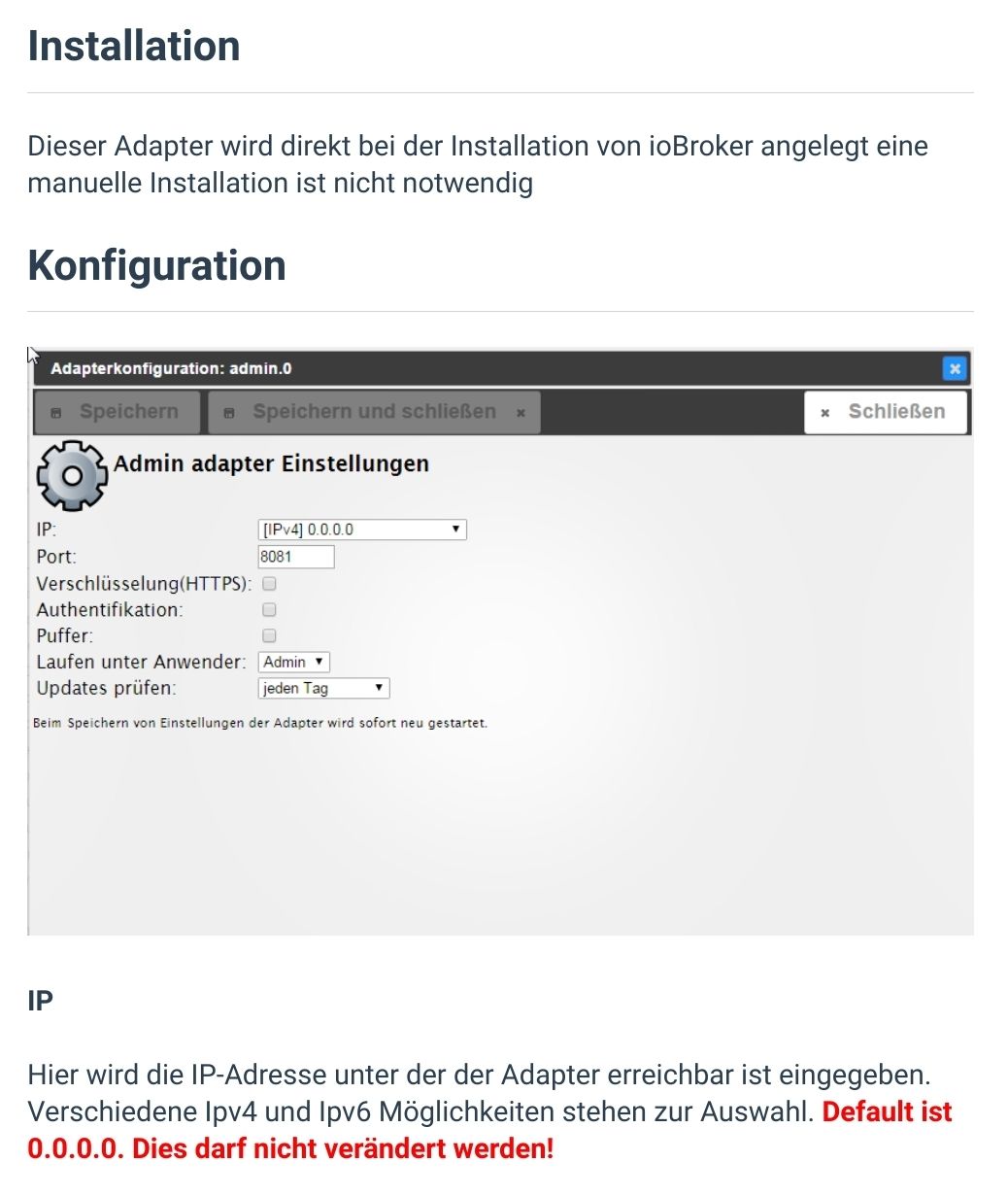
ist zwar alt, gilt aber nach wie vor

Hey! Du scheinst an dieser Unterhaltung interessiert zu sein, hast aber noch kein Konto.
Hast du es satt, bei jedem Besuch durch die gleichen Beiträge zu scrollen? Wenn du dich für ein Konto anmeldest, kommst du immer genau dorthin zurück, wo du zuvor warst, und kannst dich über neue Antworten benachrichtigen lassen (entweder per E-Mail oder Push-Benachrichtigung). Du kannst auch Lesezeichen speichern und Beiträge positiv bewerten, um anderen Community-Mitgliedern deine Wertschätzung zu zeigen.
Mit deinem Input könnte dieser Beitrag noch besser werden 💗
Registrieren AnmeldenSupport us
501
Online33.0k
Benutzer83.6k
Themen1.3m
Beiträge