




ioBroker wird nach Wochen immer langsamer.
-
@thomas-braun sagte in ioBroker wird nach Wochen immer langsamer.:
@tolkin sagte in ioBroker wird nach Wochen immer langsamer.:
load average: 19.99, 19.90, 19.91
Kein Wunder. Die Kiste ist komplett dicht. Bei dir wären Werte von 4 = 100% Auslastung.
Vermutlich ein schräges Skript.
Und was ist das für ein 'GitHub' iob-Repo da?
Active repo(s): Stable (default), Github
Error: unknown repository is active - "Github". Known: Stable (default), Beta (latest)
Wie kann ich das Repo sauber deinstallieren?
-
@thomas-braun sagte in ioBroker wird nach Wochen immer langsamer.:
@tolkin sagte in ioBroker wird nach Wochen immer langsamer.:
load average: 19.99, 19.90, 19.91
Kein Wunder. Die Kiste ist komplett dicht. Bei dir wären Werte von 4 = 100% Auslastung.
Vermutlich ein schräges Skript.
Und was ist das für ein 'GitHub' iob-Repo da?
Active repo(s): Stable (default), Github
Error: unknown repository is active - "Github". Known: Stable (default), Beta (latest)
Wie kann ich das Repo sauber deinstallieren?
@tolkin sagte in ioBroker wird nach Wochen immer langsamer.:
Wie kann ich das Repo sauber deinstallieren?
@dp20eic sagte in ioBroker wird nach Wochen immer langsamer.:
Schade, manchmal, wenn ein Bild mehr sagt als 1000 Worte, dann bekommt man leider die 1000 Worte
wie sieht denn deine Repo Liste im Admin aus?
-
@dp20eic sagte in ioBroker wird nach Wochen immer langsamer.:
@tolkin sagte in ioBroker wird nach Wochen immer langsamer.:
Die Übersicht der VM sagt,
Moin,
nein VM ist eine Virtuelle Maschine, aus dem
diaggeht aber hervor, dass Du LXC nutztVirtualization : lxcSchade, manchmal, wenn ein Bild mehr sagt als 1000 Worte, dann bekommt man leider die 1000 Worte ;)
Anhand des Load Average, kann man sehen, dass es einen Stau in der Abarbeitung innerhalb der Prozesse gibt
load average: 19.99, 19.90, 19.91Typische Fehlerquellen, sind, Amoklaufende Skripte, falsch eingestelltes
Redis.Toll, dass Dein User
userheißt, wie kann man das nur machen?*** User and Groups *** user /home/user user adm sudo iobrokerWarum Ubuntu?
WarumZFSIch nutze ZFS als Dateisystem unter Proxmox. Der ioBroker Container läuft ja sauber und stabil ;)
Wieso, wird mir hier ein
/dev/ttyACM0USB-Stick (Zigbee?) angezeigt, aber hier nicht?USB-Devices by-id: USB-Sticks - Avoid direct links to /dev/* in your adapter setups, please always prefer the links 'by-id': find: '/dev/serial/by-id/': No such file or directoryJa das stimmt, hat jemand eine Anleitung, wie ich den Zigbee Stick unter proxmox an den ioBroker durchreichen kann?
Du hast Fehler im `npm` Tree*** ioBroker-Installation ***
ioBroker Status
/opt/iobroker/node_modules/standard-as-callback/built/index.js:6
throw e;
^
...Wie kann ich den Fehler beheben?
Es fehlen 14 Updates im OS
Reading package lists...
Pending Updates: 14
Updates wurden eingespielt.
Wieso hat der
yahkaundffmpegAdapter so viele Ports offen?
Hast Du viele Kameras?Ja einige, die Kameras kommen aber nicht ins Internet. Also alles halb so wild ;)
Du hast
errorsimmodebusAdapterSchaue ich mir sofort mal an
VG
Bernd@tolkin sagte in ioBroker wird nach Wochen immer langsamer.:
Ich nutze ZFS als Dateisystem unter Proxmox. Der ioBroker Container läuft ja sauber und stabil
Moin,
na dann und ich dachte und deswegen hast Du doch diesen Thread aufgemacht, dass Du ein Problem hast, dass die Kiste immer langsamer wird!
Wenn ich Dir jetzt sage, dass ZFS, wenn man da nicht aufpasst und es falsch nutzt, zum Problem wird und das System dadurch ausbremst, ZFS ist ein Hochleistungs-Dateisystem und verlangt mehr Aufmerksamkeit, als andere Dateisysteme.
Um das zu relativieren, ich denke nicht, dass ZFS zum hohen Load, bei Dir führt, ich bin nur erschrocken, wie man etwas nutzt und das Unterstelle ich Dir jetzt einfach mal, ohne den nötigen Skill zu haben.@tolkin sagte in ioBroker wird nach Wochen immer langsamer.:
Ja das stimmt, hat jemand eine Anleitung, wie ich den Zigbee Stick unter proxmox an den ioBroker durchreichen kann?
Da musst Du erst einmal Klarheit schaffen, hast Du eine VM oder ist es ein LX Container?
Aber für beide Varianten, gibt es hier im Forum zig Anleitungen und dann natürlich auch die offizielle Dokumentation ⇒ https://www.iobroker.net/#de/documentation/install/proxmox.md@tolkin sagte in ioBroker wird nach Wochen immer langsamer.:
Ja einige, die Kameras kommen aber nicht ins Internet. Also alles halb so wild
Was ich damit eigentlich meinte, jeder der
ffmpegStreams verursacht auch Last auf dem System, verbraucht CPU und DISKI/O, Du kannst nachschauen, was da gerade so passiert, indem Du auf der Kommandozeile einen der beiden Befehle eingibst.# htop oder # topVG
Bernd -
@tolkin sagte in ioBroker wird nach Wochen immer langsamer.:
Ich nutze ZFS als Dateisystem unter Proxmox. Der ioBroker Container läuft ja sauber und stabil
Moin,
na dann und ich dachte und deswegen hast Du doch diesen Thread aufgemacht, dass Du ein Problem hast, dass die Kiste immer langsamer wird!
Wenn ich Dir jetzt sage, dass ZFS, wenn man da nicht aufpasst und es falsch nutzt, zum Problem wird und das System dadurch ausbremst, ZFS ist ein Hochleistungs-Dateisystem und verlangt mehr Aufmerksamkeit, als andere Dateisysteme.
Um das zu relativieren, ich denke nicht, dass ZFS zum hohen Load, bei Dir führt, ich bin nur erschrocken, wie man etwas nutzt und das Unterstelle ich Dir jetzt einfach mal, ohne den nötigen Skill zu haben.@tolkin sagte in ioBroker wird nach Wochen immer langsamer.:
Ja das stimmt, hat jemand eine Anleitung, wie ich den Zigbee Stick unter proxmox an den ioBroker durchreichen kann?
Da musst Du erst einmal Klarheit schaffen, hast Du eine VM oder ist es ein LX Container?
Aber für beide Varianten, gibt es hier im Forum zig Anleitungen und dann natürlich auch die offizielle Dokumentation ⇒ https://www.iobroker.net/#de/documentation/install/proxmox.md@tolkin sagte in ioBroker wird nach Wochen immer langsamer.:
Ja einige, die Kameras kommen aber nicht ins Internet. Also alles halb so wild
Was ich damit eigentlich meinte, jeder der
ffmpegStreams verursacht auch Last auf dem System, verbraucht CPU und DISKI/O, Du kannst nachschauen, was da gerade so passiert, indem Du auf der Kommandozeile einen der beiden Befehle eingibst.# htop oder # topVG
Bernd@dp20eic
Ok, danke für die Tipps ;) Ich habe ein Script für das NSPanel gefunden, was Mega groß ist und nicht sauber funktioniert, mal ausgeschaltet. Updates sind frisch und das Github Repo ist runter. Aktuell sieht es jetzt so aus und alles läuft wieder wie gewohnt stabil und schnell. Mal abwarten, wie es in 2-3 Wochen aussieht....
======== Start marking the full check here =========
Skript v.2023-10-10 *** BASE SYSTEM *** Static hostname: IOBroker Icon name: computer-container Chassis: container Virtualization: lxc Operating System: Ubuntu 20.04.6 LTS Kernel: Linux 5.15.126-1-pve Architecture: x86-64 model name : AMD Ryzen 5 PRO 4650G with Radeon Graphics Docker : false Virtualization : lxc Kernel : x86_64 Userland : amd64 Systemuptime and Load: 16:03:54 up 54 min, 2 users, load average: 1.29, 1.23, 1.20 CPU threads: 4 *** Time and Time Zones *** Local time: Fri 2023-11-10 16:03:54 CET Universal time: Fri 2023-11-10 15:03:54 UTC RTC time: n/a Time zone: Europe/Berlin (CET, +0100) System clock synchronized: yes NTP service: inactive RTC in local TZ: no *** User and Groups *** flokie /home/flokie flokie adm sudo iobroker *** X-Server-Setup *** X-Server: false Desktop: Terminal: tty Boot Target: graphical.target *** MEMORY *** total used free shared buff/cache available Mem: 8.2G 2.5G 5.6G 0.0K 95M 5.7G Swap: 0B 0B 0B Total: 8.2G 2.5G 5.6G 8192 M total memory 2499 M used memory 67 M active memory 2375 M inactive memory 5597 M free memory 0 M buffer memory 95 M swap cache 0 M total swap 0 M used swap 0 M free swap *** FAILED SERVICES *** UNIT LOAD ACTIVE SUB DESCRIPTION * apparmor.service loaded failed failed Load AppArmor profiles LOAD = Reflects whether the unit definition was properly loaded. ACTIVE = The high-level unit activation state, i.e. generalization of SUB. SUB = The low-level unit activation state, values depend on unit type. 1 loaded units listed. *** FILESYSTEM *** Filesystem Type Size Used Avail Use% Mounted on rpool/data/subvol-301-disk-1 zfs 32G 3.8G 29G 12% / none tmpfs 492K 4.0K 488K 1% /dev udev devtmpfs 16G 0 16G 0% /dev/ttyACM0 tmpfs tmpfs 16G 0 16G 0% /dev/shm tmpfs tmpfs 3.1G 136K 3.1G 1% /run tmpfs tmpfs 5.0M 0 5.0M 0% /run/lock tmpfs tmpfs 3.1G 0 3.1G 0% /run/user/0 tmpfs tmpfs 3.1G 0 3.1G 0% /run/user/1001 Messages concerning ext4 filesystem in dmesg: Show mounted filesystems \(real ones only\): TARGET SOURCE FSTYPE OPTIONS / rpool/data/subvol-301-disk-1 zfs rw,relatime,xattr,posixacl |-/proc/cpuinfo lxcfs[/proc/cpuinfo] fuse.lxcfs rw,nosuid,nodev,relatime,user_id=0,group_id=0,allow_other |-/proc/diskstats lxcfs[/proc/diskstats] fuse.lxcfs rw,nosuid,nodev,relatime,user_id=0,group_id=0,allow_other |-/proc/loadavg lxcfs[/proc/loadavg] fuse.lxcfs rw,nosuid,nodev,relatime,user_id=0,group_id=0,allow_other |-/proc/meminfo lxcfs[/proc/meminfo] fuse.lxcfs rw,nosuid,nodev,relatime,user_id=0,group_id=0,allow_other |-/proc/slabinfo lxcfs[/proc/slabinfo] fuse.lxcfs rw,nosuid,nodev,relatime,user_id=0,group_id=0,allow_other |-/proc/stat lxcfs[/proc/stat] fuse.lxcfs rw,nosuid,nodev,relatime,user_id=0,group_id=0,allow_other |-/proc/swaps lxcfs[/proc/swaps] fuse.lxcfs rw,nosuid,nodev,relatime,user_id=0,group_id=0,allow_other |-/proc/uptime lxcfs[/proc/uptime] fuse.lxcfs rw,nosuid,nodev,relatime,user_id=0,group_id=0,allow_other `-/sys/devices/system/cpu lxcfs[/sys/devices/system/cpu] fuse.lxcfs rw,nosuid,nodev,relatime,user_id=0,group_id=0,allow_other Files in neuralgic directories: /var: 1.1G /var/ 630M /var/log 629M /var/log/journal/00ce9495f0e241b5b8dd308da14042b1 629M /var/log/journal 308M /var/cache Archived and active journals take up 509.5M in the file system. /opt/iobroker/backups: 10M /opt/iobroker/backups/ /opt/iobroker/iobroker-data: 281M /opt/iobroker/iobroker-data/ 136M /opt/iobroker/iobroker-data/backup-objects 134M /opt/iobroker/iobroker-data/files 25M /opt/iobroker/iobroker-data/files/material 23M /opt/iobroker/iobroker-data/files/material/static The five largest files in iobroker-data are: 18M /opt/iobroker/iobroker-data/files/material/static/js/main.c5478f66.js.map 13M /opt/iobroker/iobroker-data/files/iot.admin/static/js/main.1797d034.js.map 9.8M /opt/iobroker/iobroker-data/objects.jsonl 6.7M /opt/iobroker/iobroker-data/files/web.admin/static/js/main.aaea95f8.js.map 5.7M /opt/iobroker/iobroker-data/files/text2command.admin/static/js/main.274a4d8d.js.map USB-Devices by-id: USB-Sticks - Avoid direct links to /dev/* in your adapter setups, please always prefer the links 'by-id': find: '/dev/serial/by-id/': No such file or directory *** NodeJS-Installation *** /usr/bin/nodejs v18.18.2 /usr/bin/node v18.18.2 /usr/bin/npm 9.8.1 /usr/bin/npx 9.8.1 /usr/bin/corepack 0.19.0 nodejs: Installed: 18.18.2-1nodesource1 Candidate: 18.18.2-1nodesource1 Version table: *** 18.18.2-1nodesource1 1001 500 https://deb.nodesource.com/node_18.x nodistro/main amd64 Packages 100 /var/lib/dpkg/status 18.18.1-1nodesource1 1001 500 https://deb.nodesource.com/node_18.x nodistro/main amd64 Packages 18.18.0-1nodesource1 1001 500 https://deb.nodesource.com/node_18.x nodistro/main amd64 Packages 18.17.1-1nodesource1 1001 500 https://deb.nodesource.com/node_18.x nodistro/main amd64 Packages 18.17.0-1nodesource1 1001 500 https://deb.nodesource.com/node_18.x nodistro/main amd64 Packages 18.16.1-1nodesource1 1001 500 https://deb.nodesource.com/node_18.x nodistro/main amd64 Packages 18.16.0-1nodesource1 1001 500 https://deb.nodesource.com/node_18.x nodistro/main amd64 Packages 18.15.0-1nodesource1 1001 500 https://deb.nodesource.com/node_18.x nodistro/main amd64 Packages 18.14.2-1nodesource1 1001 500 https://deb.nodesource.com/node_18.x nodistro/main amd64 Packages 18.14.1-1nodesource1 1001 500 https://deb.nodesource.com/node_18.x nodistro/main amd64 Packages 18.14.0-1nodesource1 1001 500 https://deb.nodesource.com/node_18.x nodistro/main amd64 Packages 18.13.0-1nodesource1 1001 500 https://deb.nodesource.com/node_18.x nodistro/main amd64 Packages 18.12.0-1nodesource1 1001 500 https://deb.nodesource.com/node_18.x nodistro/main amd64 Packages 18.11.0-1nodesource1 1001 500 https://deb.nodesource.com/node_18.x nodistro/main amd64 Packages 18.10.0-1nodesource1 1001 500 https://deb.nodesource.com/node_18.x nodistro/main amd64 Packages 18.9.1-1nodesource1 1001 500 https://deb.nodesource.com/node_18.x nodistro/main amd64 Packages 18.9.0-1nodesource1 1001 500 https://deb.nodesource.com/node_18.x nodistro/main amd64 Packages 18.8.0-1nodesource1 1001 500 https://deb.nodesource.com/node_18.x nodistro/main amd64 Packages 18.7.0-1nodesource1 1001 500 https://deb.nodesource.com/node_18.x nodistro/main amd64 Packages 18.6.0-1nodesource1 1001 500 https://deb.nodesource.com/node_18.x nodistro/main amd64 Packages 18.5.0-1nodesource1 1001 500 https://deb.nodesource.com/node_18.x nodistro/main amd64 Packages 18.4.0-1nodesource1 1001 500 https://deb.nodesource.com/node_18.x nodistro/main amd64 Packages 18.3.0-1nodesource1 1001 500 https://deb.nodesource.com/node_18.x nodistro/main amd64 Packages 18.2.0-1nodesource1 1001 500 https://deb.nodesource.com/node_18.x nodistro/main amd64 Packages 18.1.0-1nodesource1 1001 500 https://deb.nodesource.com/node_18.x nodistro/main amd64 Packages 18.0.0-1nodesource1 1001 500 https://deb.nodesource.com/node_18.x nodistro/main amd64 Packages 10.19.0~dfsg-3ubuntu1.2 500 500 http://archive.ubuntu.com/ubuntu focal-updates/universe amd64 Packages 500 http://archive.ubuntu.com/ubuntu focal-security/universe amd64 Packages 10.19.0~dfsg-3ubuntu1 500 500 http://archive.ubuntu.com/ubuntu focal/universe amd64 Packages Temp directories causing npm8 problem: 0 No problems detected Errors in npm tree: *** ioBroker-Installation *** ioBroker Status iobroker is running on this host. Objects type: jsonl States type: jsonl Core adapters versions js-controller: 5.0.12 admin: 6.12.0 javascript: 7.1.4 Adapters from github: 3 Adapter State + system.adapter.admin.0 : admin : IOBroker - enabled, port: 8081, bind: 0.0.0.0, run as: admin + system.adapter.alexa2.0 : alexa2 : IOBroker - enabled system.adapter.amtronwallbox.0 : amtronwallbox : IOBroker - disabled + system.adapter.apcups.0 : apcups : IOBroker - enabled + system.adapter.backitup.0 : backitup : IOBroker - enabled + system.adapter.cloud.0 : cloud : IOBroker - enabled system.adapter.daswetter.0 : daswetter : IOBroker - enabled + system.adapter.discovery.0 : discovery : IOBroker - enabled + system.adapter.energiefluss.0 : energiefluss : IOBroker - enabled system.adapter.feiertage.0 : feiertage : IOBroker - enabled + system.adapter.history.0 : history : IOBroker - enabled + system.adapter.hm-rega.0 : hm-rega : IOBroker - enabled + system.adapter.hm-rpc.0 : hm-rpc : IOBroker - enabled, port: 0 + system.adapter.hm-rpc.1 : hm-rpc : IOBroker - enabled, port: 0 + system.adapter.hm-rpc.2 : hm-rpc : IOBroker - enabled, port: 0 system.adapter.hmip.0 : hmip : IOBroker - disabled system.adapter.influxdb.0 : influxdb : IOBroker - disabled, port: 8086 + system.adapter.info.0 : info : IOBroker - enabled + system.adapter.iot.0 : iot : IOBroker - enabled + system.adapter.javascript.0 : javascript : IOBroker - enabled + system.adapter.modbus.0 : modbus : IOBroker - enabled system.adapter.mqtt.0 : mqtt : IOBroker - disabled, port: 1883, bind: 0.0.0.0 system.adapter.node-red.0 : node-red : IOBroker - disabled, port: 1880, bind: 192.168.178.34 (SSL) system.adapter.nut.0 : nut : IOBroker - disabled system.adapter.onvif.0 : onvif : IOBroker - disabled + system.adapter.ping.0 : ping : IOBroker - enabled + system.adapter.pushover.0 : pushover : IOBroker - enabled + system.adapter.pushover.1 : pushover : IOBroker - enabled + system.adapter.pushover.2 : pushover : IOBroker - enabled + system.adapter.pushover.3 : pushover : IOBroker - enabled + system.adapter.pushover.4 : pushover : IOBroker - enabled + system.adapter.pushover.5 : pushover : IOBroker - enabled + system.adapter.pushover.6 : pushover : IOBroker - enabled + system.adapter.pushover.7 : pushover : IOBroker - enabled + system.adapter.pushover.8 : pushover : IOBroker - enabled + system.adapter.shelly.0 : shelly : IOBroker - enabled, port: 1882, bind: 0.0.0.0 + system.adapter.shuttercontrol.0 : shuttercontrol : IOBroker - enabled + system.adapter.sma-em.0 : sma-em : IOBroker - enabled system.adapter.smartmeter.0 : smartmeter : IOBroker - disabled + system.adapter.sonoff.0 : sonoff : IOBroker - enabled, port: 1884, bind: 0.0.0.0 system.adapter.sourceanalytix.0 : sourceanalytix : IOBroker - disabled + system.adapter.synology.0 : synology : IOBroker - enabled, port: 5001 + system.adapter.telegram.0 : telegram : IOBroker - enabled, port: 8443, bind: 0.0.0.0 + system.adapter.text2command.0 : text2command : IOBroker - enabled + system.adapter.tibber.0 : tibber : IOBroker - enabled system.adapter.vis-material-webfont.0 : vis-material-webfont : IOBroker - enabled system.adapter.vis-materialdesign.0 : vis-materialdesign : IOBroker - enabled system.adapter.vis.0 : vis : IOBroker - disabled + system.adapter.vw-connect.0 : vw-connect : IOBroker - enabled + system.adapter.web.0 : web : IOBroker - enabled, port: 8082, bind: 0.0.0.0, run as: admin + system.adapter.worx.0 : worx : IOBroker - enabled + system.adapter.yahka.0 : yahka : IOBroker - enabled + system.adapter.zigbee.0 : zigbee : IOBroker - enabled, port: /dev/ttyACM0 + instance is alive Enabled adapters with bindings + system.adapter.admin.0 : admin : IOBroker - enabled, port: 8081, bind: 0.0.0.0, run as: admin + system.adapter.hm-rpc.0 : hm-rpc : IOBroker - enabled, port: 0 + system.adapter.hm-rpc.1 : hm-rpc : IOBroker - enabled, port: 0 + system.adapter.hm-rpc.2 : hm-rpc : IOBroker - enabled, port: 0 + system.adapter.shelly.0 : shelly : IOBroker - enabled, port: 1882, bind: 0.0.0.0 + system.adapter.sonoff.0 : sonoff : IOBroker - enabled, port: 1884, bind: 0.0.0.0 + system.adapter.synology.0 : synology : IOBroker - enabled, port: 5001 + system.adapter.telegram.0 : telegram : IOBroker - enabled, port: 8443, bind: 0.0.0.0 + system.adapter.web.0 : web : IOBroker - enabled, port: 8082, bind: 0.0.0.0, run as: admin + system.adapter.zigbee.0 : zigbee : IOBroker - enabled, port: /dev/ttyACM0 ioBroker-Repositories Stable (default): http://download.iobroker.net/sources-dist.json Beta (latest) : http://download.iobroker.net/sources-dist-latest.json Active repo(s): Stable (default) Installed ioBroker-Instances Used repository: Stable (default) Adapter "admin" : 6.12.0 , installed 6.12.0 Adapter "alexa2" : 3.25.2 , installed 3.25.5 Adapter "apcups" : 1.0.15 , installed 1.0.15 Adapter "backitup" : 2.8.7 , installed 2.8.7 Adapter "cloud" : 4.4.1 , installed 4.4.1 Adapter "daswetter" : 3.1.10 , installed 3.1.10 Adapter "discovery" : 3.1.0 , installed 3.1.0 Adapter "feiertage" : 1.1.4 , installed 1.1.4 Adapter "history" : 3.0.1 , installed 3.0.1 Adapter "hm-rega" : 4.0.0 , installed 4.0.0 Adapter "hm-rpc" : 1.15.19 , installed 1.15.19 Adapter "hmip" : 1.20.0 , installed 1.20.0 Adapter "influxdb" : 3.2.0 , installed 3.2.0 Adapter "info" : 2.0.0 , installed 2.0.0 Adapter "iot" : 2.0.11 , installed 2.0.11 Adapter "javascript" : 7.1.4 , installed 7.1.4 Controller "js-controller": 5.0.12 , installed 5.0.12 Adapter "material" : 1.3.1 , installed 1.3.1 Adapter "miele" : 0.1.5 , installed 0.1.5 Adapter "mielecloudservice": 6.5.4, installed 6.5.4 Adapter "modbus" : 5.0.11 , installed 5.0.11 Adapter "mqtt" : 5.1.0 , installed 5.1.0 Adapter "node-red" : 4.0.3 , installed 4.0.3 Adapter "nut" : 1.6.0 , installed 1.6.0 Adapter "onvif" : 1.0.5 , installed 1.0.5 Adapter "ping" : 1.6.2 , installed 1.6.2 Adapter "pushover" : 3.0.3 , installed 3.0.3 Adapter "shelly" : 6.6.1 , installed 6.6.1 Adapter "shuttercontrol": 1.6.2 , installed 1.6.2 Adapter "simple-api" : 2.7.2 , installed 2.7.2 Adapter "sma-em" : 1.0.0 , installed 1.0.0 Adapter "smartmeter" : 3.3.4 , installed 3.3.4 Adapter "socketio" : 6.5.5 , installed 6.5.5 Adapter "sonoff" : 3.0.3 , installed 3.0.3 Adapter "synology" : 3.0.1 , installed 3.0.1 Adapter "telegram" : 2.0.1 , installed 2.0.1 Adapter "text2command" : 3.0.2 , installed 3.0.2 Adapter "unifi" : 0.6.6 , installed 0.6.6 Adapter "vis" : 1.4.16 , installed 1.4.16 Adapter "vw-connect" : 0.0.67 , installed 0.0.67 Adapter "web" : 6.1.10 , installed 6.1.10 Adapter "worx" : 2.3.4 , installed 2.3.4 Adapter "ws" : 2.5.8 , installed 2.5.8 Adapter "yahka" : 1.0.3 , installed 1.0.3 Adapter "zigbee" : 1.8.24 , installed 1.8.24 Objects and States Please stand by - This may take a while Objects: 20767 States: 18021 *** OS-Repositories and Updates *** Hit:1 http://archive.ubuntu.com/ubuntu focal InRelease Hit:2 http://archive.ubuntu.com/ubuntu focal-updates InRelease Hit:3 http://archive.ubuntu.com/ubuntu focal-security InRelease Hit:4 https://deb.nodesource.com/node_18.x nodistro InRelease Reading package lists... Pending Updates: 14 *** Listening Ports *** Active Internet connections (only servers) Proto Recv-Q Send-Q Local Address Foreign Address State User Inode PID/Program name tcp 0 0 127.0.0.1:9001 0.0.0.0:* LISTEN 1000 88292 2498/iobroker.js-co tcp 0 0 127.0.0.1:9000 0.0.0.0:* LISTEN 1000 88299 2498/iobroker.js-co tcp 0 0 0.0.0.0:46089 0.0.0.0:* LISTEN 1000 95788 3529/io.yahka.0 tcp 0 0 192.168.178.34:8701 0.0.0.0:* LISTEN 1000 88670 2790/io.hm-rpc.2 tcp 0 0 192.168.178.34:42001 0.0.0.0:* LISTEN 1000 90549 2760/io.hm-rpc.0 tcp 0 0 192.168.178.34:42010 0.0.0.0:* LISTEN 1000 90574 2775/io.hm-rpc.1 tcp 0 0 0.0.0.0:42797 0.0.0.0:* LISTEN 1000 95784 3529/io.yahka.0 tcp 0 0 127.0.0.1:25 0.0.0.0:* LISTEN 0 47528 332/master tcp 0 0 127.0.0.1:36415 0.0.0.0:* LISTEN 1000 95806 3529/io.yahka.0 tcp 0 0 127.0.0.1:35019 0.0.0.0:* LISTEN 1000 95813 3529/io.yahka.0 tcp 0 0 127.0.0.1:38295 0.0.0.0:* LISTEN 1000 95799 3529/io.yahka.0 tcp 0 0 0.0.0.0:36297 0.0.0.0:* LISTEN 1000 95792 3529/io.yahka.0 tcp 0 0 0.0.0.0:1884 0.0.0.0:* LISTEN 1000 218243 5994/io.sonoff.0 tcp 0 0 0.0.0.0:1882 0.0.0.0:* LISTEN 1000 88805 2837/io.shelly.0 tcp 0 0 127.0.0.53:53 0.0.0.0:* LISTEN 106 45772 98/systemd-resolved tcp 0 0 0.0.0.0:111 0.0.0.0:* LISTEN 0 33721 1/init tcp6 0 0 ::1:25 :::* LISTEN 0 47529 332/master tcp6 0 0 :::8082 :::* LISTEN 1000 96913 3482/io.web.0 tcp6 0 0 :::8081 :::* LISTEN 1000 90241 2523/io.admin.0 tcp6 0 0 :::111 :::* LISTEN 0 33729 1/init tcp6 0 0 :::22 :::* LISTEN 0 45793 1/init udp 0 0 0.0.0.0:9522 0.0.0.0:* 1000 95577 3438/io.sma-em.0 udp 0 0 127.0.0.53:53 0.0.0.0:* 106 45771 98/systemd-resolved udp 0 0 0.0.0.0:111 0.0.0.0:* 0 33724 1/init udp 0 0 0.0.0.0:5353 0.0.0.0:* 1000 95789 3529/io.yahka.0 udp 0 0 0.0.0.0:5353 0.0.0.0:* 1000 95785 3529/io.yahka.0 udp 0 0 0.0.0.0:5353 0.0.0.0:* 1000 95781 3529/io.yahka.0 udp6 0 0 :::111 :::* 0 33734 1/init *** Log File - Last 25 Lines *** 2023-11-10 16:02:24.278 - info: admin.0 (2523) ==> Connected system.user.admin from ::ffff:10.14.2.1 2023-11-10 16:02:24.767 - info: admin.0 (2523) <== Disconnect system.user.admin from ::ffff:10.14.2.1 javascript 2023-11-10 16:04:23.029 - info: worx.0 (3504) Connection interrupted: Error: aws-c-io: AWS_IO_SOCKET_CLOSED, socket is closed. 2023-11-10 16:04:24.433 - info: worx.0 (3504) Resumed: rc: 0 existing session: true 2023-11-10 16:04:24.433 - info: worx.0 (3504) MQTT reconnect: 1 2023-11-10 16:04:24.434 - info: worx.0 (3504) Reconnect since adapter start: 1============ Mark until here for C&P =============
iob diag has finished.
MOD-EDIT: Code-tags korrigiert
-
@dp20eic
Ok, danke für die Tipps ;) Ich habe ein Script für das NSPanel gefunden, was Mega groß ist und nicht sauber funktioniert, mal ausgeschaltet. Updates sind frisch und das Github Repo ist runter. Aktuell sieht es jetzt so aus und alles läuft wieder wie gewohnt stabil und schnell. Mal abwarten, wie es in 2-3 Wochen aussieht....
======== Start marking the full check here =========
Skript v.2023-10-10 *** BASE SYSTEM *** Static hostname: IOBroker Icon name: computer-container Chassis: container Virtualization: lxc Operating System: Ubuntu 20.04.6 LTS Kernel: Linux 5.15.126-1-pve Architecture: x86-64 model name : AMD Ryzen 5 PRO 4650G with Radeon Graphics Docker : false Virtualization : lxc Kernel : x86_64 Userland : amd64 Systemuptime and Load: 16:03:54 up 54 min, 2 users, load average: 1.29, 1.23, 1.20 CPU threads: 4 *** Time and Time Zones *** Local time: Fri 2023-11-10 16:03:54 CET Universal time: Fri 2023-11-10 15:03:54 UTC RTC time: n/a Time zone: Europe/Berlin (CET, +0100) System clock synchronized: yes NTP service: inactive RTC in local TZ: no *** User and Groups *** flokie /home/flokie flokie adm sudo iobroker *** X-Server-Setup *** X-Server: false Desktop: Terminal: tty Boot Target: graphical.target *** MEMORY *** total used free shared buff/cache available Mem: 8.2G 2.5G 5.6G 0.0K 95M 5.7G Swap: 0B 0B 0B Total: 8.2G 2.5G 5.6G 8192 M total memory 2499 M used memory 67 M active memory 2375 M inactive memory 5597 M free memory 0 M buffer memory 95 M swap cache 0 M total swap 0 M used swap 0 M free swap *** FAILED SERVICES *** UNIT LOAD ACTIVE SUB DESCRIPTION * apparmor.service loaded failed failed Load AppArmor profiles LOAD = Reflects whether the unit definition was properly loaded. ACTIVE = The high-level unit activation state, i.e. generalization of SUB. SUB = The low-level unit activation state, values depend on unit type. 1 loaded units listed. *** FILESYSTEM *** Filesystem Type Size Used Avail Use% Mounted on rpool/data/subvol-301-disk-1 zfs 32G 3.8G 29G 12% / none tmpfs 492K 4.0K 488K 1% /dev udev devtmpfs 16G 0 16G 0% /dev/ttyACM0 tmpfs tmpfs 16G 0 16G 0% /dev/shm tmpfs tmpfs 3.1G 136K 3.1G 1% /run tmpfs tmpfs 5.0M 0 5.0M 0% /run/lock tmpfs tmpfs 3.1G 0 3.1G 0% /run/user/0 tmpfs tmpfs 3.1G 0 3.1G 0% /run/user/1001 Messages concerning ext4 filesystem in dmesg: Show mounted filesystems \(real ones only\): TARGET SOURCE FSTYPE OPTIONS / rpool/data/subvol-301-disk-1 zfs rw,relatime,xattr,posixacl |-/proc/cpuinfo lxcfs[/proc/cpuinfo] fuse.lxcfs rw,nosuid,nodev,relatime,user_id=0,group_id=0,allow_other |-/proc/diskstats lxcfs[/proc/diskstats] fuse.lxcfs rw,nosuid,nodev,relatime,user_id=0,group_id=0,allow_other |-/proc/loadavg lxcfs[/proc/loadavg] fuse.lxcfs rw,nosuid,nodev,relatime,user_id=0,group_id=0,allow_other |-/proc/meminfo lxcfs[/proc/meminfo] fuse.lxcfs rw,nosuid,nodev,relatime,user_id=0,group_id=0,allow_other |-/proc/slabinfo lxcfs[/proc/slabinfo] fuse.lxcfs rw,nosuid,nodev,relatime,user_id=0,group_id=0,allow_other |-/proc/stat lxcfs[/proc/stat] fuse.lxcfs rw,nosuid,nodev,relatime,user_id=0,group_id=0,allow_other |-/proc/swaps lxcfs[/proc/swaps] fuse.lxcfs rw,nosuid,nodev,relatime,user_id=0,group_id=0,allow_other |-/proc/uptime lxcfs[/proc/uptime] fuse.lxcfs rw,nosuid,nodev,relatime,user_id=0,group_id=0,allow_other `-/sys/devices/system/cpu lxcfs[/sys/devices/system/cpu] fuse.lxcfs rw,nosuid,nodev,relatime,user_id=0,group_id=0,allow_other Files in neuralgic directories: /var: 1.1G /var/ 630M /var/log 629M /var/log/journal/00ce9495f0e241b5b8dd308da14042b1 629M /var/log/journal 308M /var/cache Archived and active journals take up 509.5M in the file system. /opt/iobroker/backups: 10M /opt/iobroker/backups/ /opt/iobroker/iobroker-data: 281M /opt/iobroker/iobroker-data/ 136M /opt/iobroker/iobroker-data/backup-objects 134M /opt/iobroker/iobroker-data/files 25M /opt/iobroker/iobroker-data/files/material 23M /opt/iobroker/iobroker-data/files/material/static The five largest files in iobroker-data are: 18M /opt/iobroker/iobroker-data/files/material/static/js/main.c5478f66.js.map 13M /opt/iobroker/iobroker-data/files/iot.admin/static/js/main.1797d034.js.map 9.8M /opt/iobroker/iobroker-data/objects.jsonl 6.7M /opt/iobroker/iobroker-data/files/web.admin/static/js/main.aaea95f8.js.map 5.7M /opt/iobroker/iobroker-data/files/text2command.admin/static/js/main.274a4d8d.js.map USB-Devices by-id: USB-Sticks - Avoid direct links to /dev/* in your adapter setups, please always prefer the links 'by-id': find: '/dev/serial/by-id/': No such file or directory *** NodeJS-Installation *** /usr/bin/nodejs v18.18.2 /usr/bin/node v18.18.2 /usr/bin/npm 9.8.1 /usr/bin/npx 9.8.1 /usr/bin/corepack 0.19.0 nodejs: Installed: 18.18.2-1nodesource1 Candidate: 18.18.2-1nodesource1 Version table: *** 18.18.2-1nodesource1 1001 500 https://deb.nodesource.com/node_18.x nodistro/main amd64 Packages 100 /var/lib/dpkg/status 18.18.1-1nodesource1 1001 500 https://deb.nodesource.com/node_18.x nodistro/main amd64 Packages 18.18.0-1nodesource1 1001 500 https://deb.nodesource.com/node_18.x nodistro/main amd64 Packages 18.17.1-1nodesource1 1001 500 https://deb.nodesource.com/node_18.x nodistro/main amd64 Packages 18.17.0-1nodesource1 1001 500 https://deb.nodesource.com/node_18.x nodistro/main amd64 Packages 18.16.1-1nodesource1 1001 500 https://deb.nodesource.com/node_18.x nodistro/main amd64 Packages 18.16.0-1nodesource1 1001 500 https://deb.nodesource.com/node_18.x nodistro/main amd64 Packages 18.15.0-1nodesource1 1001 500 https://deb.nodesource.com/node_18.x nodistro/main amd64 Packages 18.14.2-1nodesource1 1001 500 https://deb.nodesource.com/node_18.x nodistro/main amd64 Packages 18.14.1-1nodesource1 1001 500 https://deb.nodesource.com/node_18.x nodistro/main amd64 Packages 18.14.0-1nodesource1 1001 500 https://deb.nodesource.com/node_18.x nodistro/main amd64 Packages 18.13.0-1nodesource1 1001 500 https://deb.nodesource.com/node_18.x nodistro/main amd64 Packages 18.12.0-1nodesource1 1001 500 https://deb.nodesource.com/node_18.x nodistro/main amd64 Packages 18.11.0-1nodesource1 1001 500 https://deb.nodesource.com/node_18.x nodistro/main amd64 Packages 18.10.0-1nodesource1 1001 500 https://deb.nodesource.com/node_18.x nodistro/main amd64 Packages 18.9.1-1nodesource1 1001 500 https://deb.nodesource.com/node_18.x nodistro/main amd64 Packages 18.9.0-1nodesource1 1001 500 https://deb.nodesource.com/node_18.x nodistro/main amd64 Packages 18.8.0-1nodesource1 1001 500 https://deb.nodesource.com/node_18.x nodistro/main amd64 Packages 18.7.0-1nodesource1 1001 500 https://deb.nodesource.com/node_18.x nodistro/main amd64 Packages 18.6.0-1nodesource1 1001 500 https://deb.nodesource.com/node_18.x nodistro/main amd64 Packages 18.5.0-1nodesource1 1001 500 https://deb.nodesource.com/node_18.x nodistro/main amd64 Packages 18.4.0-1nodesource1 1001 500 https://deb.nodesource.com/node_18.x nodistro/main amd64 Packages 18.3.0-1nodesource1 1001 500 https://deb.nodesource.com/node_18.x nodistro/main amd64 Packages 18.2.0-1nodesource1 1001 500 https://deb.nodesource.com/node_18.x nodistro/main amd64 Packages 18.1.0-1nodesource1 1001 500 https://deb.nodesource.com/node_18.x nodistro/main amd64 Packages 18.0.0-1nodesource1 1001 500 https://deb.nodesource.com/node_18.x nodistro/main amd64 Packages 10.19.0~dfsg-3ubuntu1.2 500 500 http://archive.ubuntu.com/ubuntu focal-updates/universe amd64 Packages 500 http://archive.ubuntu.com/ubuntu focal-security/universe amd64 Packages 10.19.0~dfsg-3ubuntu1 500 500 http://archive.ubuntu.com/ubuntu focal/universe amd64 Packages Temp directories causing npm8 problem: 0 No problems detected Errors in npm tree: *** ioBroker-Installation *** ioBroker Status iobroker is running on this host. Objects type: jsonl States type: jsonl Core adapters versions js-controller: 5.0.12 admin: 6.12.0 javascript: 7.1.4 Adapters from github: 3 Adapter State + system.adapter.admin.0 : admin : IOBroker - enabled, port: 8081, bind: 0.0.0.0, run as: admin + system.adapter.alexa2.0 : alexa2 : IOBroker - enabled system.adapter.amtronwallbox.0 : amtronwallbox : IOBroker - disabled + system.adapter.apcups.0 : apcups : IOBroker - enabled + system.adapter.backitup.0 : backitup : IOBroker - enabled + system.adapter.cloud.0 : cloud : IOBroker - enabled system.adapter.daswetter.0 : daswetter : IOBroker - enabled + system.adapter.discovery.0 : discovery : IOBroker - enabled + system.adapter.energiefluss.0 : energiefluss : IOBroker - enabled system.adapter.feiertage.0 : feiertage : IOBroker - enabled + system.adapter.history.0 : history : IOBroker - enabled + system.adapter.hm-rega.0 : hm-rega : IOBroker - enabled + system.adapter.hm-rpc.0 : hm-rpc : IOBroker - enabled, port: 0 + system.adapter.hm-rpc.1 : hm-rpc : IOBroker - enabled, port: 0 + system.adapter.hm-rpc.2 : hm-rpc : IOBroker - enabled, port: 0 system.adapter.hmip.0 : hmip : IOBroker - disabled system.adapter.influxdb.0 : influxdb : IOBroker - disabled, port: 8086 + system.adapter.info.0 : info : IOBroker - enabled + system.adapter.iot.0 : iot : IOBroker - enabled + system.adapter.javascript.0 : javascript : IOBroker - enabled + system.adapter.modbus.0 : modbus : IOBroker - enabled system.adapter.mqtt.0 : mqtt : IOBroker - disabled, port: 1883, bind: 0.0.0.0 system.adapter.node-red.0 : node-red : IOBroker - disabled, port: 1880, bind: 192.168.178.34 (SSL) system.adapter.nut.0 : nut : IOBroker - disabled system.adapter.onvif.0 : onvif : IOBroker - disabled + system.adapter.ping.0 : ping : IOBroker - enabled + system.adapter.pushover.0 : pushover : IOBroker - enabled + system.adapter.pushover.1 : pushover : IOBroker - enabled + system.adapter.pushover.2 : pushover : IOBroker - enabled + system.adapter.pushover.3 : pushover : IOBroker - enabled + system.adapter.pushover.4 : pushover : IOBroker - enabled + system.adapter.pushover.5 : pushover : IOBroker - enabled + system.adapter.pushover.6 : pushover : IOBroker - enabled + system.adapter.pushover.7 : pushover : IOBroker - enabled + system.adapter.pushover.8 : pushover : IOBroker - enabled + system.adapter.shelly.0 : shelly : IOBroker - enabled, port: 1882, bind: 0.0.0.0 + system.adapter.shuttercontrol.0 : shuttercontrol : IOBroker - enabled + system.adapter.sma-em.0 : sma-em : IOBroker - enabled system.adapter.smartmeter.0 : smartmeter : IOBroker - disabled + system.adapter.sonoff.0 : sonoff : IOBroker - enabled, port: 1884, bind: 0.0.0.0 system.adapter.sourceanalytix.0 : sourceanalytix : IOBroker - disabled + system.adapter.synology.0 : synology : IOBroker - enabled, port: 5001 + system.adapter.telegram.0 : telegram : IOBroker - enabled, port: 8443, bind: 0.0.0.0 + system.adapter.text2command.0 : text2command : IOBroker - enabled + system.adapter.tibber.0 : tibber : IOBroker - enabled system.adapter.vis-material-webfont.0 : vis-material-webfont : IOBroker - enabled system.adapter.vis-materialdesign.0 : vis-materialdesign : IOBroker - enabled system.adapter.vis.0 : vis : IOBroker - disabled + system.adapter.vw-connect.0 : vw-connect : IOBroker - enabled + system.adapter.web.0 : web : IOBroker - enabled, port: 8082, bind: 0.0.0.0, run as: admin + system.adapter.worx.0 : worx : IOBroker - enabled + system.adapter.yahka.0 : yahka : IOBroker - enabled + system.adapter.zigbee.0 : zigbee : IOBroker - enabled, port: /dev/ttyACM0 + instance is alive Enabled adapters with bindings + system.adapter.admin.0 : admin : IOBroker - enabled, port: 8081, bind: 0.0.0.0, run as: admin + system.adapter.hm-rpc.0 : hm-rpc : IOBroker - enabled, port: 0 + system.adapter.hm-rpc.1 : hm-rpc : IOBroker - enabled, port: 0 + system.adapter.hm-rpc.2 : hm-rpc : IOBroker - enabled, port: 0 + system.adapter.shelly.0 : shelly : IOBroker - enabled, port: 1882, bind: 0.0.0.0 + system.adapter.sonoff.0 : sonoff : IOBroker - enabled, port: 1884, bind: 0.0.0.0 + system.adapter.synology.0 : synology : IOBroker - enabled, port: 5001 + system.adapter.telegram.0 : telegram : IOBroker - enabled, port: 8443, bind: 0.0.0.0 + system.adapter.web.0 : web : IOBroker - enabled, port: 8082, bind: 0.0.0.0, run as: admin + system.adapter.zigbee.0 : zigbee : IOBroker - enabled, port: /dev/ttyACM0 ioBroker-Repositories Stable (default): http://download.iobroker.net/sources-dist.json Beta (latest) : http://download.iobroker.net/sources-dist-latest.json Active repo(s): Stable (default) Installed ioBroker-Instances Used repository: Stable (default) Adapter "admin" : 6.12.0 , installed 6.12.0 Adapter "alexa2" : 3.25.2 , installed 3.25.5 Adapter "apcups" : 1.0.15 , installed 1.0.15 Adapter "backitup" : 2.8.7 , installed 2.8.7 Adapter "cloud" : 4.4.1 , installed 4.4.1 Adapter "daswetter" : 3.1.10 , installed 3.1.10 Adapter "discovery" : 3.1.0 , installed 3.1.0 Adapter "feiertage" : 1.1.4 , installed 1.1.4 Adapter "history" : 3.0.1 , installed 3.0.1 Adapter "hm-rega" : 4.0.0 , installed 4.0.0 Adapter "hm-rpc" : 1.15.19 , installed 1.15.19 Adapter "hmip" : 1.20.0 , installed 1.20.0 Adapter "influxdb" : 3.2.0 , installed 3.2.0 Adapter "info" : 2.0.0 , installed 2.0.0 Adapter "iot" : 2.0.11 , installed 2.0.11 Adapter "javascript" : 7.1.4 , installed 7.1.4 Controller "js-controller": 5.0.12 , installed 5.0.12 Adapter "material" : 1.3.1 , installed 1.3.1 Adapter "miele" : 0.1.5 , installed 0.1.5 Adapter "mielecloudservice": 6.5.4, installed 6.5.4 Adapter "modbus" : 5.0.11 , installed 5.0.11 Adapter "mqtt" : 5.1.0 , installed 5.1.0 Adapter "node-red" : 4.0.3 , installed 4.0.3 Adapter "nut" : 1.6.0 , installed 1.6.0 Adapter "onvif" : 1.0.5 , installed 1.0.5 Adapter "ping" : 1.6.2 , installed 1.6.2 Adapter "pushover" : 3.0.3 , installed 3.0.3 Adapter "shelly" : 6.6.1 , installed 6.6.1 Adapter "shuttercontrol": 1.6.2 , installed 1.6.2 Adapter "simple-api" : 2.7.2 , installed 2.7.2 Adapter "sma-em" : 1.0.0 , installed 1.0.0 Adapter "smartmeter" : 3.3.4 , installed 3.3.4 Adapter "socketio" : 6.5.5 , installed 6.5.5 Adapter "sonoff" : 3.0.3 , installed 3.0.3 Adapter "synology" : 3.0.1 , installed 3.0.1 Adapter "telegram" : 2.0.1 , installed 2.0.1 Adapter "text2command" : 3.0.2 , installed 3.0.2 Adapter "unifi" : 0.6.6 , installed 0.6.6 Adapter "vis" : 1.4.16 , installed 1.4.16 Adapter "vw-connect" : 0.0.67 , installed 0.0.67 Adapter "web" : 6.1.10 , installed 6.1.10 Adapter "worx" : 2.3.4 , installed 2.3.4 Adapter "ws" : 2.5.8 , installed 2.5.8 Adapter "yahka" : 1.0.3 , installed 1.0.3 Adapter "zigbee" : 1.8.24 , installed 1.8.24 Objects and States Please stand by - This may take a while Objects: 20767 States: 18021 *** OS-Repositories and Updates *** Hit:1 http://archive.ubuntu.com/ubuntu focal InRelease Hit:2 http://archive.ubuntu.com/ubuntu focal-updates InRelease Hit:3 http://archive.ubuntu.com/ubuntu focal-security InRelease Hit:4 https://deb.nodesource.com/node_18.x nodistro InRelease Reading package lists... Pending Updates: 14 *** Listening Ports *** Active Internet connections (only servers) Proto Recv-Q Send-Q Local Address Foreign Address State User Inode PID/Program name tcp 0 0 127.0.0.1:9001 0.0.0.0:* LISTEN 1000 88292 2498/iobroker.js-co tcp 0 0 127.0.0.1:9000 0.0.0.0:* LISTEN 1000 88299 2498/iobroker.js-co tcp 0 0 0.0.0.0:46089 0.0.0.0:* LISTEN 1000 95788 3529/io.yahka.0 tcp 0 0 192.168.178.34:8701 0.0.0.0:* LISTEN 1000 88670 2790/io.hm-rpc.2 tcp 0 0 192.168.178.34:42001 0.0.0.0:* LISTEN 1000 90549 2760/io.hm-rpc.0 tcp 0 0 192.168.178.34:42010 0.0.0.0:* LISTEN 1000 90574 2775/io.hm-rpc.1 tcp 0 0 0.0.0.0:42797 0.0.0.0:* LISTEN 1000 95784 3529/io.yahka.0 tcp 0 0 127.0.0.1:25 0.0.0.0:* LISTEN 0 47528 332/master tcp 0 0 127.0.0.1:36415 0.0.0.0:* LISTEN 1000 95806 3529/io.yahka.0 tcp 0 0 127.0.0.1:35019 0.0.0.0:* LISTEN 1000 95813 3529/io.yahka.0 tcp 0 0 127.0.0.1:38295 0.0.0.0:* LISTEN 1000 95799 3529/io.yahka.0 tcp 0 0 0.0.0.0:36297 0.0.0.0:* LISTEN 1000 95792 3529/io.yahka.0 tcp 0 0 0.0.0.0:1884 0.0.0.0:* LISTEN 1000 218243 5994/io.sonoff.0 tcp 0 0 0.0.0.0:1882 0.0.0.0:* LISTEN 1000 88805 2837/io.shelly.0 tcp 0 0 127.0.0.53:53 0.0.0.0:* LISTEN 106 45772 98/systemd-resolved tcp 0 0 0.0.0.0:111 0.0.0.0:* LISTEN 0 33721 1/init tcp6 0 0 ::1:25 :::* LISTEN 0 47529 332/master tcp6 0 0 :::8082 :::* LISTEN 1000 96913 3482/io.web.0 tcp6 0 0 :::8081 :::* LISTEN 1000 90241 2523/io.admin.0 tcp6 0 0 :::111 :::* LISTEN 0 33729 1/init tcp6 0 0 :::22 :::* LISTEN 0 45793 1/init udp 0 0 0.0.0.0:9522 0.0.0.0:* 1000 95577 3438/io.sma-em.0 udp 0 0 127.0.0.53:53 0.0.0.0:* 106 45771 98/systemd-resolved udp 0 0 0.0.0.0:111 0.0.0.0:* 0 33724 1/init udp 0 0 0.0.0.0:5353 0.0.0.0:* 1000 95789 3529/io.yahka.0 udp 0 0 0.0.0.0:5353 0.0.0.0:* 1000 95785 3529/io.yahka.0 udp 0 0 0.0.0.0:5353 0.0.0.0:* 1000 95781 3529/io.yahka.0 udp6 0 0 :::111 :::* 0 33734 1/init *** Log File - Last 25 Lines *** 2023-11-10 16:02:24.278 - info: admin.0 (2523) ==> Connected system.user.admin from ::ffff:10.14.2.1 2023-11-10 16:02:24.767 - info: admin.0 (2523) <== Disconnect system.user.admin from ::ffff:10.14.2.1 javascript 2023-11-10 16:04:23.029 - info: worx.0 (3504) Connection interrupted: Error: aws-c-io: AWS_IO_SOCKET_CLOSED, socket is closed. 2023-11-10 16:04:24.433 - info: worx.0 (3504) Resumed: rc: 0 existing session: true 2023-11-10 16:04:24.433 - info: worx.0 (3504) MQTT reconnect: 1 2023-11-10 16:04:24.434 - info: worx.0 (3504) Reconnect since adapter start: 1============ Mark until here for C&P =============
iob diag has finished.
MOD-EDIT: Code-tags korrigiert
@tolkin sagte in ioBroker wird nach Wochen immer langsamer.:
Swap: 0B
Da würde ich etwas SWAP geben. Auch mit 8.2GB RAM.
Was ist mit dem apparmor los?
Pending Updates: 14
Updates einspielen.
-
@dp20eic
Ok, danke für die Tipps ;) Ich habe ein Script für das NSPanel gefunden, was Mega groß ist und nicht sauber funktioniert, mal ausgeschaltet. Updates sind frisch und das Github Repo ist runter. Aktuell sieht es jetzt so aus und alles läuft wieder wie gewohnt stabil und schnell. Mal abwarten, wie es in 2-3 Wochen aussieht....
======== Start marking the full check here =========
Skript v.2023-10-10 *** BASE SYSTEM *** Static hostname: IOBroker Icon name: computer-container Chassis: container Virtualization: lxc Operating System: Ubuntu 20.04.6 LTS Kernel: Linux 5.15.126-1-pve Architecture: x86-64 model name : AMD Ryzen 5 PRO 4650G with Radeon Graphics Docker : false Virtualization : lxc Kernel : x86_64 Userland : amd64 Systemuptime and Load: 16:03:54 up 54 min, 2 users, load average: 1.29, 1.23, 1.20 CPU threads: 4 *** Time and Time Zones *** Local time: Fri 2023-11-10 16:03:54 CET Universal time: Fri 2023-11-10 15:03:54 UTC RTC time: n/a Time zone: Europe/Berlin (CET, +0100) System clock synchronized: yes NTP service: inactive RTC in local TZ: no *** User and Groups *** flokie /home/flokie flokie adm sudo iobroker *** X-Server-Setup *** X-Server: false Desktop: Terminal: tty Boot Target: graphical.target *** MEMORY *** total used free shared buff/cache available Mem: 8.2G 2.5G 5.6G 0.0K 95M 5.7G Swap: 0B 0B 0B Total: 8.2G 2.5G 5.6G 8192 M total memory 2499 M used memory 67 M active memory 2375 M inactive memory 5597 M free memory 0 M buffer memory 95 M swap cache 0 M total swap 0 M used swap 0 M free swap *** FAILED SERVICES *** UNIT LOAD ACTIVE SUB DESCRIPTION * apparmor.service loaded failed failed Load AppArmor profiles LOAD = Reflects whether the unit definition was properly loaded. ACTIVE = The high-level unit activation state, i.e. generalization of SUB. SUB = The low-level unit activation state, values depend on unit type. 1 loaded units listed. *** FILESYSTEM *** Filesystem Type Size Used Avail Use% Mounted on rpool/data/subvol-301-disk-1 zfs 32G 3.8G 29G 12% / none tmpfs 492K 4.0K 488K 1% /dev udev devtmpfs 16G 0 16G 0% /dev/ttyACM0 tmpfs tmpfs 16G 0 16G 0% /dev/shm tmpfs tmpfs 3.1G 136K 3.1G 1% /run tmpfs tmpfs 5.0M 0 5.0M 0% /run/lock tmpfs tmpfs 3.1G 0 3.1G 0% /run/user/0 tmpfs tmpfs 3.1G 0 3.1G 0% /run/user/1001 Messages concerning ext4 filesystem in dmesg: Show mounted filesystems \(real ones only\): TARGET SOURCE FSTYPE OPTIONS / rpool/data/subvol-301-disk-1 zfs rw,relatime,xattr,posixacl |-/proc/cpuinfo lxcfs[/proc/cpuinfo] fuse.lxcfs rw,nosuid,nodev,relatime,user_id=0,group_id=0,allow_other |-/proc/diskstats lxcfs[/proc/diskstats] fuse.lxcfs rw,nosuid,nodev,relatime,user_id=0,group_id=0,allow_other |-/proc/loadavg lxcfs[/proc/loadavg] fuse.lxcfs rw,nosuid,nodev,relatime,user_id=0,group_id=0,allow_other |-/proc/meminfo lxcfs[/proc/meminfo] fuse.lxcfs rw,nosuid,nodev,relatime,user_id=0,group_id=0,allow_other |-/proc/slabinfo lxcfs[/proc/slabinfo] fuse.lxcfs rw,nosuid,nodev,relatime,user_id=0,group_id=0,allow_other |-/proc/stat lxcfs[/proc/stat] fuse.lxcfs rw,nosuid,nodev,relatime,user_id=0,group_id=0,allow_other |-/proc/swaps lxcfs[/proc/swaps] fuse.lxcfs rw,nosuid,nodev,relatime,user_id=0,group_id=0,allow_other |-/proc/uptime lxcfs[/proc/uptime] fuse.lxcfs rw,nosuid,nodev,relatime,user_id=0,group_id=0,allow_other `-/sys/devices/system/cpu lxcfs[/sys/devices/system/cpu] fuse.lxcfs rw,nosuid,nodev,relatime,user_id=0,group_id=0,allow_other Files in neuralgic directories: /var: 1.1G /var/ 630M /var/log 629M /var/log/journal/00ce9495f0e241b5b8dd308da14042b1 629M /var/log/journal 308M /var/cache Archived and active journals take up 509.5M in the file system. /opt/iobroker/backups: 10M /opt/iobroker/backups/ /opt/iobroker/iobroker-data: 281M /opt/iobroker/iobroker-data/ 136M /opt/iobroker/iobroker-data/backup-objects 134M /opt/iobroker/iobroker-data/files 25M /opt/iobroker/iobroker-data/files/material 23M /opt/iobroker/iobroker-data/files/material/static The five largest files in iobroker-data are: 18M /opt/iobroker/iobroker-data/files/material/static/js/main.c5478f66.js.map 13M /opt/iobroker/iobroker-data/files/iot.admin/static/js/main.1797d034.js.map 9.8M /opt/iobroker/iobroker-data/objects.jsonl 6.7M /opt/iobroker/iobroker-data/files/web.admin/static/js/main.aaea95f8.js.map 5.7M /opt/iobroker/iobroker-data/files/text2command.admin/static/js/main.274a4d8d.js.map USB-Devices by-id: USB-Sticks - Avoid direct links to /dev/* in your adapter setups, please always prefer the links 'by-id': find: '/dev/serial/by-id/': No such file or directory *** NodeJS-Installation *** /usr/bin/nodejs v18.18.2 /usr/bin/node v18.18.2 /usr/bin/npm 9.8.1 /usr/bin/npx 9.8.1 /usr/bin/corepack 0.19.0 nodejs: Installed: 18.18.2-1nodesource1 Candidate: 18.18.2-1nodesource1 Version table: *** 18.18.2-1nodesource1 1001 500 https://deb.nodesource.com/node_18.x nodistro/main amd64 Packages 100 /var/lib/dpkg/status 18.18.1-1nodesource1 1001 500 https://deb.nodesource.com/node_18.x nodistro/main amd64 Packages 18.18.0-1nodesource1 1001 500 https://deb.nodesource.com/node_18.x nodistro/main amd64 Packages 18.17.1-1nodesource1 1001 500 https://deb.nodesource.com/node_18.x nodistro/main amd64 Packages 18.17.0-1nodesource1 1001 500 https://deb.nodesource.com/node_18.x nodistro/main amd64 Packages 18.16.1-1nodesource1 1001 500 https://deb.nodesource.com/node_18.x nodistro/main amd64 Packages 18.16.0-1nodesource1 1001 500 https://deb.nodesource.com/node_18.x nodistro/main amd64 Packages 18.15.0-1nodesource1 1001 500 https://deb.nodesource.com/node_18.x nodistro/main amd64 Packages 18.14.2-1nodesource1 1001 500 https://deb.nodesource.com/node_18.x nodistro/main amd64 Packages 18.14.1-1nodesource1 1001 500 https://deb.nodesource.com/node_18.x nodistro/main amd64 Packages 18.14.0-1nodesource1 1001 500 https://deb.nodesource.com/node_18.x nodistro/main amd64 Packages 18.13.0-1nodesource1 1001 500 https://deb.nodesource.com/node_18.x nodistro/main amd64 Packages 18.12.0-1nodesource1 1001 500 https://deb.nodesource.com/node_18.x nodistro/main amd64 Packages 18.11.0-1nodesource1 1001 500 https://deb.nodesource.com/node_18.x nodistro/main amd64 Packages 18.10.0-1nodesource1 1001 500 https://deb.nodesource.com/node_18.x nodistro/main amd64 Packages 18.9.1-1nodesource1 1001 500 https://deb.nodesource.com/node_18.x nodistro/main amd64 Packages 18.9.0-1nodesource1 1001 500 https://deb.nodesource.com/node_18.x nodistro/main amd64 Packages 18.8.0-1nodesource1 1001 500 https://deb.nodesource.com/node_18.x nodistro/main amd64 Packages 18.7.0-1nodesource1 1001 500 https://deb.nodesource.com/node_18.x nodistro/main amd64 Packages 18.6.0-1nodesource1 1001 500 https://deb.nodesource.com/node_18.x nodistro/main amd64 Packages 18.5.0-1nodesource1 1001 500 https://deb.nodesource.com/node_18.x nodistro/main amd64 Packages 18.4.0-1nodesource1 1001 500 https://deb.nodesource.com/node_18.x nodistro/main amd64 Packages 18.3.0-1nodesource1 1001 500 https://deb.nodesource.com/node_18.x nodistro/main amd64 Packages 18.2.0-1nodesource1 1001 500 https://deb.nodesource.com/node_18.x nodistro/main amd64 Packages 18.1.0-1nodesource1 1001 500 https://deb.nodesource.com/node_18.x nodistro/main amd64 Packages 18.0.0-1nodesource1 1001 500 https://deb.nodesource.com/node_18.x nodistro/main amd64 Packages 10.19.0~dfsg-3ubuntu1.2 500 500 http://archive.ubuntu.com/ubuntu focal-updates/universe amd64 Packages 500 http://archive.ubuntu.com/ubuntu focal-security/universe amd64 Packages 10.19.0~dfsg-3ubuntu1 500 500 http://archive.ubuntu.com/ubuntu focal/universe amd64 Packages Temp directories causing npm8 problem: 0 No problems detected Errors in npm tree: *** ioBroker-Installation *** ioBroker Status iobroker is running on this host. Objects type: jsonl States type: jsonl Core adapters versions js-controller: 5.0.12 admin: 6.12.0 javascript: 7.1.4 Adapters from github: 3 Adapter State + system.adapter.admin.0 : admin : IOBroker - enabled, port: 8081, bind: 0.0.0.0, run as: admin + system.adapter.alexa2.0 : alexa2 : IOBroker - enabled system.adapter.amtronwallbox.0 : amtronwallbox : IOBroker - disabled + system.adapter.apcups.0 : apcups : IOBroker - enabled + system.adapter.backitup.0 : backitup : IOBroker - enabled + system.adapter.cloud.0 : cloud : IOBroker - enabled system.adapter.daswetter.0 : daswetter : IOBroker - enabled + system.adapter.discovery.0 : discovery : IOBroker - enabled + system.adapter.energiefluss.0 : energiefluss : IOBroker - enabled system.adapter.feiertage.0 : feiertage : IOBroker - enabled + system.adapter.history.0 : history : IOBroker - enabled + system.adapter.hm-rega.0 : hm-rega : IOBroker - enabled + system.adapter.hm-rpc.0 : hm-rpc : IOBroker - enabled, port: 0 + system.adapter.hm-rpc.1 : hm-rpc : IOBroker - enabled, port: 0 + system.adapter.hm-rpc.2 : hm-rpc : IOBroker - enabled, port: 0 system.adapter.hmip.0 : hmip : IOBroker - disabled system.adapter.influxdb.0 : influxdb : IOBroker - disabled, port: 8086 + system.adapter.info.0 : info : IOBroker - enabled + system.adapter.iot.0 : iot : IOBroker - enabled + system.adapter.javascript.0 : javascript : IOBroker - enabled + system.adapter.modbus.0 : modbus : IOBroker - enabled system.adapter.mqtt.0 : mqtt : IOBroker - disabled, port: 1883, bind: 0.0.0.0 system.adapter.node-red.0 : node-red : IOBroker - disabled, port: 1880, bind: 192.168.178.34 (SSL) system.adapter.nut.0 : nut : IOBroker - disabled system.adapter.onvif.0 : onvif : IOBroker - disabled + system.adapter.ping.0 : ping : IOBroker - enabled + system.adapter.pushover.0 : pushover : IOBroker - enabled + system.adapter.pushover.1 : pushover : IOBroker - enabled + system.adapter.pushover.2 : pushover : IOBroker - enabled + system.adapter.pushover.3 : pushover : IOBroker - enabled + system.adapter.pushover.4 : pushover : IOBroker - enabled + system.adapter.pushover.5 : pushover : IOBroker - enabled + system.adapter.pushover.6 : pushover : IOBroker - enabled + system.adapter.pushover.7 : pushover : IOBroker - enabled + system.adapter.pushover.8 : pushover : IOBroker - enabled + system.adapter.shelly.0 : shelly : IOBroker - enabled, port: 1882, bind: 0.0.0.0 + system.adapter.shuttercontrol.0 : shuttercontrol : IOBroker - enabled + system.adapter.sma-em.0 : sma-em : IOBroker - enabled system.adapter.smartmeter.0 : smartmeter : IOBroker - disabled + system.adapter.sonoff.0 : sonoff : IOBroker - enabled, port: 1884, bind: 0.0.0.0 system.adapter.sourceanalytix.0 : sourceanalytix : IOBroker - disabled + system.adapter.synology.0 : synology : IOBroker - enabled, port: 5001 + system.adapter.telegram.0 : telegram : IOBroker - enabled, port: 8443, bind: 0.0.0.0 + system.adapter.text2command.0 : text2command : IOBroker - enabled + system.adapter.tibber.0 : tibber : IOBroker - enabled system.adapter.vis-material-webfont.0 : vis-material-webfont : IOBroker - enabled system.adapter.vis-materialdesign.0 : vis-materialdesign : IOBroker - enabled system.adapter.vis.0 : vis : IOBroker - disabled + system.adapter.vw-connect.0 : vw-connect : IOBroker - enabled + system.adapter.web.0 : web : IOBroker - enabled, port: 8082, bind: 0.0.0.0, run as: admin + system.adapter.worx.0 : worx : IOBroker - enabled + system.adapter.yahka.0 : yahka : IOBroker - enabled + system.adapter.zigbee.0 : zigbee : IOBroker - enabled, port: /dev/ttyACM0 + instance is alive Enabled adapters with bindings + system.adapter.admin.0 : admin : IOBroker - enabled, port: 8081, bind: 0.0.0.0, run as: admin + system.adapter.hm-rpc.0 : hm-rpc : IOBroker - enabled, port: 0 + system.adapter.hm-rpc.1 : hm-rpc : IOBroker - enabled, port: 0 + system.adapter.hm-rpc.2 : hm-rpc : IOBroker - enabled, port: 0 + system.adapter.shelly.0 : shelly : IOBroker - enabled, port: 1882, bind: 0.0.0.0 + system.adapter.sonoff.0 : sonoff : IOBroker - enabled, port: 1884, bind: 0.0.0.0 + system.adapter.synology.0 : synology : IOBroker - enabled, port: 5001 + system.adapter.telegram.0 : telegram : IOBroker - enabled, port: 8443, bind: 0.0.0.0 + system.adapter.web.0 : web : IOBroker - enabled, port: 8082, bind: 0.0.0.0, run as: admin + system.adapter.zigbee.0 : zigbee : IOBroker - enabled, port: /dev/ttyACM0 ioBroker-Repositories Stable (default): http://download.iobroker.net/sources-dist.json Beta (latest) : http://download.iobroker.net/sources-dist-latest.json Active repo(s): Stable (default) Installed ioBroker-Instances Used repository: Stable (default) Adapter "admin" : 6.12.0 , installed 6.12.0 Adapter "alexa2" : 3.25.2 , installed 3.25.5 Adapter "apcups" : 1.0.15 , installed 1.0.15 Adapter "backitup" : 2.8.7 , installed 2.8.7 Adapter "cloud" : 4.4.1 , installed 4.4.1 Adapter "daswetter" : 3.1.10 , installed 3.1.10 Adapter "discovery" : 3.1.0 , installed 3.1.0 Adapter "feiertage" : 1.1.4 , installed 1.1.4 Adapter "history" : 3.0.1 , installed 3.0.1 Adapter "hm-rega" : 4.0.0 , installed 4.0.0 Adapter "hm-rpc" : 1.15.19 , installed 1.15.19 Adapter "hmip" : 1.20.0 , installed 1.20.0 Adapter "influxdb" : 3.2.0 , installed 3.2.0 Adapter "info" : 2.0.0 , installed 2.0.0 Adapter "iot" : 2.0.11 , installed 2.0.11 Adapter "javascript" : 7.1.4 , installed 7.1.4 Controller "js-controller": 5.0.12 , installed 5.0.12 Adapter "material" : 1.3.1 , installed 1.3.1 Adapter "miele" : 0.1.5 , installed 0.1.5 Adapter "mielecloudservice": 6.5.4, installed 6.5.4 Adapter "modbus" : 5.0.11 , installed 5.0.11 Adapter "mqtt" : 5.1.0 , installed 5.1.0 Adapter "node-red" : 4.0.3 , installed 4.0.3 Adapter "nut" : 1.6.0 , installed 1.6.0 Adapter "onvif" : 1.0.5 , installed 1.0.5 Adapter "ping" : 1.6.2 , installed 1.6.2 Adapter "pushover" : 3.0.3 , installed 3.0.3 Adapter "shelly" : 6.6.1 , installed 6.6.1 Adapter "shuttercontrol": 1.6.2 , installed 1.6.2 Adapter "simple-api" : 2.7.2 , installed 2.7.2 Adapter "sma-em" : 1.0.0 , installed 1.0.0 Adapter "smartmeter" : 3.3.4 , installed 3.3.4 Adapter "socketio" : 6.5.5 , installed 6.5.5 Adapter "sonoff" : 3.0.3 , installed 3.0.3 Adapter "synology" : 3.0.1 , installed 3.0.1 Adapter "telegram" : 2.0.1 , installed 2.0.1 Adapter "text2command" : 3.0.2 , installed 3.0.2 Adapter "unifi" : 0.6.6 , installed 0.6.6 Adapter "vis" : 1.4.16 , installed 1.4.16 Adapter "vw-connect" : 0.0.67 , installed 0.0.67 Adapter "web" : 6.1.10 , installed 6.1.10 Adapter "worx" : 2.3.4 , installed 2.3.4 Adapter "ws" : 2.5.8 , installed 2.5.8 Adapter "yahka" : 1.0.3 , installed 1.0.3 Adapter "zigbee" : 1.8.24 , installed 1.8.24 Objects and States Please stand by - This may take a while Objects: 20767 States: 18021 *** OS-Repositories and Updates *** Hit:1 http://archive.ubuntu.com/ubuntu focal InRelease Hit:2 http://archive.ubuntu.com/ubuntu focal-updates InRelease Hit:3 http://archive.ubuntu.com/ubuntu focal-security InRelease Hit:4 https://deb.nodesource.com/node_18.x nodistro InRelease Reading package lists... Pending Updates: 14 *** Listening Ports *** Active Internet connections (only servers) Proto Recv-Q Send-Q Local Address Foreign Address State User Inode PID/Program name tcp 0 0 127.0.0.1:9001 0.0.0.0:* LISTEN 1000 88292 2498/iobroker.js-co tcp 0 0 127.0.0.1:9000 0.0.0.0:* LISTEN 1000 88299 2498/iobroker.js-co tcp 0 0 0.0.0.0:46089 0.0.0.0:* LISTEN 1000 95788 3529/io.yahka.0 tcp 0 0 192.168.178.34:8701 0.0.0.0:* LISTEN 1000 88670 2790/io.hm-rpc.2 tcp 0 0 192.168.178.34:42001 0.0.0.0:* LISTEN 1000 90549 2760/io.hm-rpc.0 tcp 0 0 192.168.178.34:42010 0.0.0.0:* LISTEN 1000 90574 2775/io.hm-rpc.1 tcp 0 0 0.0.0.0:42797 0.0.0.0:* LISTEN 1000 95784 3529/io.yahka.0 tcp 0 0 127.0.0.1:25 0.0.0.0:* LISTEN 0 47528 332/master tcp 0 0 127.0.0.1:36415 0.0.0.0:* LISTEN 1000 95806 3529/io.yahka.0 tcp 0 0 127.0.0.1:35019 0.0.0.0:* LISTEN 1000 95813 3529/io.yahka.0 tcp 0 0 127.0.0.1:38295 0.0.0.0:* LISTEN 1000 95799 3529/io.yahka.0 tcp 0 0 0.0.0.0:36297 0.0.0.0:* LISTEN 1000 95792 3529/io.yahka.0 tcp 0 0 0.0.0.0:1884 0.0.0.0:* LISTEN 1000 218243 5994/io.sonoff.0 tcp 0 0 0.0.0.0:1882 0.0.0.0:* LISTEN 1000 88805 2837/io.shelly.0 tcp 0 0 127.0.0.53:53 0.0.0.0:* LISTEN 106 45772 98/systemd-resolved tcp 0 0 0.0.0.0:111 0.0.0.0:* LISTEN 0 33721 1/init tcp6 0 0 ::1:25 :::* LISTEN 0 47529 332/master tcp6 0 0 :::8082 :::* LISTEN 1000 96913 3482/io.web.0 tcp6 0 0 :::8081 :::* LISTEN 1000 90241 2523/io.admin.0 tcp6 0 0 :::111 :::* LISTEN 0 33729 1/init tcp6 0 0 :::22 :::* LISTEN 0 45793 1/init udp 0 0 0.0.0.0:9522 0.0.0.0:* 1000 95577 3438/io.sma-em.0 udp 0 0 127.0.0.53:53 0.0.0.0:* 106 45771 98/systemd-resolved udp 0 0 0.0.0.0:111 0.0.0.0:* 0 33724 1/init udp 0 0 0.0.0.0:5353 0.0.0.0:* 1000 95789 3529/io.yahka.0 udp 0 0 0.0.0.0:5353 0.0.0.0:* 1000 95785 3529/io.yahka.0 udp 0 0 0.0.0.0:5353 0.0.0.0:* 1000 95781 3529/io.yahka.0 udp6 0 0 :::111 :::* 0 33734 1/init *** Log File - Last 25 Lines *** 2023-11-10 16:02:24.278 - info: admin.0 (2523) ==> Connected system.user.admin from ::ffff:10.14.2.1 2023-11-10 16:02:24.767 - info: admin.0 (2523) <== Disconnect system.user.admin from ::ffff:10.14.2.1 javascript 2023-11-10 16:04:23.029 - info: worx.0 (3504) Connection interrupted: Error: aws-c-io: AWS_IO_SOCKET_CLOSED, socket is closed. 2023-11-10 16:04:24.433 - info: worx.0 (3504) Resumed: rc: 0 existing session: true 2023-11-10 16:04:24.433 - info: worx.0 (3504) MQTT reconnect: 1 2023-11-10 16:04:24.434 - info: worx.0 (3504) Reconnect since adapter start: 1============ Mark until here for C&P =============
iob diag has finished.
MOD-EDIT: Code-tags korrigiert
@tolkin sagte in ioBroker wird nach Wochen immer langsamer.:
Reading package lists...
Moin,
sagtest Du nicht, dass Du die Updates eingespielt hast?
Reading package lists...
Pending Updates: 14
VG
BerndP.S.: war doch jemand, wieder schneller :)
-
@tolkin sagte in ioBroker wird nach Wochen immer langsamer.:
Adapters from github: 3
muss das sein?
ich kenne nicht alles was du installiert hast, aber gibt es 3 Adapter davon wirklich nur via GitHub?kein Support per PN! - Fragen im Forum stellen -
Benutzt das Voting rechts unten im Beitrag wenn er euch geholfen hat.
Das Forum freut sich über eine Spende. Benutzt dazu den Spendenbutton oben rechts. Danke!
der Installationsfixer: curl -fsL https://iobroker.net/fix.sh | bash - -
@tolkin sagte in ioBroker wird nach Wochen immer langsamer.:
Adapters from github: 3
muss das sein?
ich kenne nicht alles was du installiert hast, aber gibt es 3 Adapter davon wirklich nur via GitHub?@homoran sagte in ioBroker wird nach Wochen immer langsamer.:
@tolkin sagte in ioBroker wird nach Wochen immer langsamer.:
Adapters from github: 3
muss das sein?
ich kenne nicht alles was du installiert hast, aber gibt es 3 Adapter davon wirklich nur via GitHub?Keine Ahnung wo der das her hat, ich habe nur Stable aktiv.
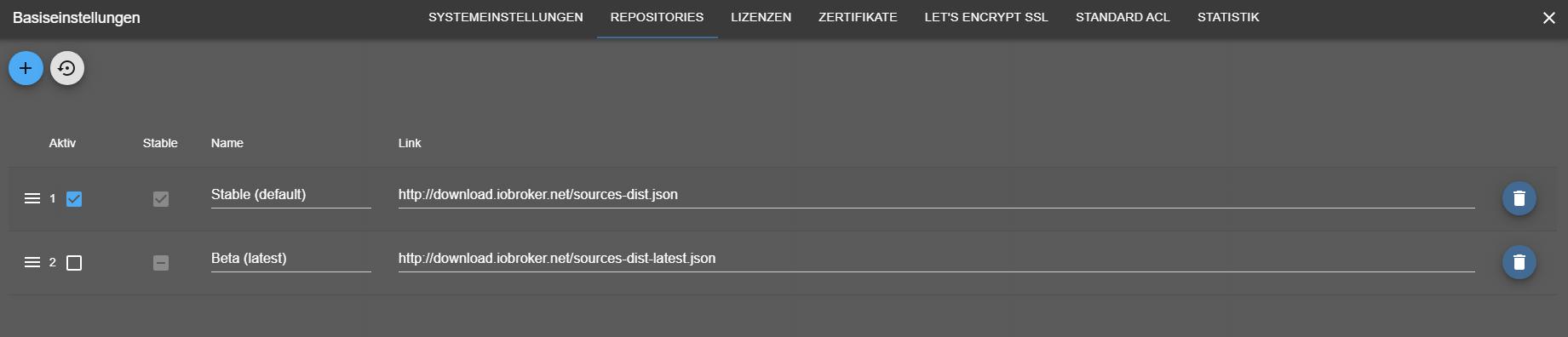
@dp20eic sagte in ioBroker wird nach Wochen immer langsamer.:
@tolkin sagte in ioBroker wird nach Wochen immer langsamer.:
Reading package lists...
Moin,
sagtest Du nicht, dass Du die Updates eingespielt hast?
Reading package lists...
Pending Updates: 14
VG
BerndP.S.: war doch jemand, wieder schneller :)
Jetzt habe ich Updates: 0 da stehen ;)
@thomas-braun sagte in ioBroker wird nach Wochen immer langsamer.:
@tolkin sagte in ioBroker wird nach Wochen immer langsamer.:
Swap: 0B
Da würde ich etwas SWAP geben. Auch mit 8.2GB RAM.
Was ist mit dem apparmor los?
Pending Updates: 14
Updates einspielen.
Wie kann ich den SWAP einstellen? Unter Proxmox hat der Container 4GB SWAP

-
@homoran sagte in ioBroker wird nach Wochen immer langsamer.:
@tolkin sagte in ioBroker wird nach Wochen immer langsamer.:
Adapters from github: 3
muss das sein?
ich kenne nicht alles was du installiert hast, aber gibt es 3 Adapter davon wirklich nur via GitHub?Keine Ahnung wo der das her hat, ich habe nur Stable aktiv.
@dp20eic sagte in ioBroker wird nach Wochen immer langsamer.:
@tolkin sagte in ioBroker wird nach Wochen immer langsamer.:
Reading package lists...
Moin,
sagtest Du nicht, dass Du die Updates eingespielt hast?
Reading package lists...
Pending Updates: 14
VG
BerndP.S.: war doch jemand, wieder schneller :)
Jetzt habe ich Updates: 0 da stehen ;)
@thomas-braun sagte in ioBroker wird nach Wochen immer langsamer.:
@tolkin sagte in ioBroker wird nach Wochen immer langsamer.:
Swap: 0B
Da würde ich etwas SWAP geben. Auch mit 8.2GB RAM.
Was ist mit dem apparmor los?
Pending Updates: 14
Updates einspielen.
Wie kann ich den SWAP einstellen? Unter Proxmox hat der Container 4GB SWAP
@tolkin sagte in ioBroker wird nach Wochen immer langsamer.:
Wie kann ich den SWAP einstellen?
Swap markieren und Bearbeiten klicken.
-
@homoran sagte in ioBroker wird nach Wochen immer langsamer.:
@tolkin sagte in ioBroker wird nach Wochen immer langsamer.:
Adapters from github: 3
muss das sein?
ich kenne nicht alles was du installiert hast, aber gibt es 3 Adapter davon wirklich nur via GitHub?Keine Ahnung wo der das her hat, ich habe nur Stable aktiv.
@dp20eic sagte in ioBroker wird nach Wochen immer langsamer.:
@tolkin sagte in ioBroker wird nach Wochen immer langsamer.:
Reading package lists...
Moin,
sagtest Du nicht, dass Du die Updates eingespielt hast?
Reading package lists...
Pending Updates: 14
VG
BerndP.S.: war doch jemand, wieder schneller :)
Jetzt habe ich Updates: 0 da stehen ;)
@thomas-braun sagte in ioBroker wird nach Wochen immer langsamer.:
@tolkin sagte in ioBroker wird nach Wochen immer langsamer.:
Swap: 0B
Da würde ich etwas SWAP geben. Auch mit 8.2GB RAM.
Was ist mit dem apparmor los?
Pending Updates: 14
Updates einspielen.
Wie kann ich den SWAP einstellen? Unter Proxmox hat der Container 4GB SWAP
@tolkin sagte in ioBroker wird nach Wochen immer langsamer.:
Keine Ahnung wo der das her hat, ich habe nur Stable aktiv.
auch unter stable kann man von github installieren...
-
@tolkin sagte in ioBroker wird nach Wochen immer langsamer.:
Wie kann ich den SWAP einstellen?
Swap markieren und Bearbeiten klicken.
@meister-mopper sagte in ioBroker wird nach Wochen immer langsamer.:
Swap markieren und Bearbeiten klicken.
Moin,
das meint der TE nicht, ich Denke er meint, wie schaltet man den
Swapim Container an oder aus!@tolkin sagte in ioBroker wird nach Wochen immer langsamer.:
Wie kann ich den SWAP einstellen? Unter Proxmox hat der Container 4GB SWAP
Ich verstehe, schon nicht, wie er, wenn Du ihn vorher beim Bau des LX Containers mit angegeben hast, aktuell nicht an ist.
Wie hast Du denn den LX Container erstellt, von Hand, oder hast Du da dieses Helferskript von dieser Seite -> https://tteck.github.io/Proxmox/ genutzt?Erst mal zeigen
# sudo swapon --show
# sudo cat /proc/sys/vm/swappiness
VG
Bernd




Hey! Du scheinst an dieser Unterhaltung interessiert zu sein, hast aber noch kein Konto.
Hast du es satt, bei jedem Besuch durch die gleichen Beiträge zu scrollen? Wenn du dich für ein Konto anmeldest, kommst du immer genau dorthin zurück, wo du zuvor warst, und kannst dich über neue Antworten benachrichtigen lassen (entweder per E-Mail oder Push-Benachrichtigung). Du kannst auch Lesezeichen speichern und Beiträge positiv bewerten, um anderen Community-Mitgliedern deine Wertschätzung zu zeigen.
Mit deinem Input könnte dieser Beitrag noch besser werden 💗
Registrieren Anmelden366
Online33.0k
Benutzer83.4k
Themen1.3m
Beiträge