




BWT Weichwasseranlage auslesen
-
Für die aktuelle VNC-basierte Firmware habe ich mal ein (sehr einfaches!) Skript geschrieben, welches sich per VNC auf der Anlage einloggt, die Passworteingabe simuliert und dann per OCR die beiden Werte "Durchfluss" und "Volumen" ausliest.
Die Werte werden dann per MQTT an einen Broker geschickt.Den Source-Code findet ihr hier:
https://github.com/d3m0nxxl/bwt_perla_smartmeterKann sicher noch verbessert werden, aber meiner Meinung nach zurzeit der einzige Weg an die lokalen Daten heranzukommen.
user@host:~$ mosquitto_sub -h 192.168.0.X -t "#" -v
/raspberrypi1/smartmeter/bwt/durchfluss 10
/raspberrypi1/smartmeter/bwt/durchfluss 3
/raspberrypi1/smartmeter/bwt/durchfluss 262
/raspberrypi1/smartmeter/bwt/durchfluss 475
/raspberrypi1/smartmeter/bwt/volumen 297
/raspberrypi1/smartmeter/bwt/durchfluss 482
/raspberrypi1/smartmeter/bwt/volumen 298
/raspberrypi1/smartmeter/bwt/volumen 299
/raspberrypi1/smartmeter/bwt/volumen 300
/raspberrypi1/smartmeter/bwt/durchfluss 475
/raspberrypi1/smartmeter/bwt/volumen 301
/raspberrypi1/smartmeter/bwt/durchfluss 410
/raspberrypi1/smartmeter/bwt/durchfluss 169
/raspberrypi1/smartmeter/bwt/durchfluss 14
/raspberrypi1/smartmeter/bwt/durchfluss 3
/raspberrypi1/smartmeter/bwt/durchfluss 0
Würde mich mal interessieren, ob es bei einem von euch auch funktioniert. Verbesserungsvorschläge nehme ich natürlich auch gerne an!
@demonxxl sagte in BWT Weichwasseranlage auslesen:
Für die aktuelle VNC-basierte Firmware habe ich mal ein (sehr einfaches!) Skript geschrieben, welches sich per VNC auf der Anlage einloggt, die Passworteingabe simuliert und dann per OCR die beiden Werte "Durchfluss" und "Volumen" ausliest.
Die Werte werden dann per MQTT an einen Broker geschickt.Den Source-Code findet ihr hier:
https://github.com/d3m0nxxl/bwt_perla_smartmeterWürde mich mal interessieren, ob es bei einem von euch auch funktioniert. Verbesserungsvorschläge nehme ich natürlich auch gerne an!
Thanks for your work! I just got the new firmware some days ago and searched for a new solution (not via cloud) coming from a similar script integrated into my openhab setup.
I've just forked your script, because my resolution seems to be different and I had to change most coordinates. I also re-factored the calls and made a function + added reading the remaining NaCl. Maybe it's also worth to add the consumption per month and year, I will have a look into that.
Currently my script is running in a detached screen (on a server, not a pi), any other opinion? -
@demonxxl Ich nutze dein Script, funktioniert tadellos. Zieht aber ziemlich Ressourcen am Raspi...
Falls es jemanden interessiert, so klappt es am Raspi:
1.) Script von demonxxl runterladen und auf dem Raspi speichern.
2.) tesseract via PIP3 installieren (Python3 muß schon laufen. Falls nicht, ebenfalls installieren, genauso PIP3).- sudo pip3 install pytesseract
- sudo apt install libtesseract-dev
- sudo apt install tesseract-ocr
3.) PAHO mqtt installieren - sudo pip3 install paho-mqtt
4.) libopenjpeg installieren - sudo apt-get install libopenjp2-7-dev
Script anpassen mit eigenen Login Daten, IP, MQTT Server. Dann läuft es.
Starten mit sudo python3 ./scriptname.py
Viel Spaß!
und Danke an @demonxxl
@demonxxl Vielen Dank für die Tolle Arbeit.
ich habe das ganze in eine Container gebracht. Läuft bei mir nun in der ContainerStation der QNAP Nas
https://github.com/sschnake/bwt_perla_smartmeter -
@demonxxl sagte in BWT Weichwasseranlage auslesen:
Für die aktuelle VNC-basierte Firmware habe ich mal ein (sehr einfaches!) Skript geschrieben, welches sich per VNC auf der Anlage einloggt, die Passworteingabe simuliert und dann per OCR die beiden Werte "Durchfluss" und "Volumen" ausliest.
Die Werte werden dann per MQTT an einen Broker geschickt.Den Source-Code findet ihr hier:
https://github.com/d3m0nxxl/bwt_perla_smartmeterWürde mich mal interessieren, ob es bei einem von euch auch funktioniert. Verbesserungsvorschläge nehme ich natürlich auch gerne an!
Thanks for your work! I just got the new firmware some days ago and searched for a new solution (not via cloud) coming from a similar script integrated into my openhab setup.
I've just forked your script, because my resolution seems to be different and I had to change most coordinates. I also re-factored the calls and made a function + added reading the remaining NaCl. Maybe it's also worth to add the consumption per month and year, I will have a look into that.
Currently my script is running in a detached screen (on a server, not a pi), any other opinion?Hallo @tombox
Frohes neues Jahr erstmal!
Hast du Kapazität und könntest dieses Skript in deinen Adapter integrieren? -
Hallo @tombox
Frohes neues Jahr erstmal!
Hast du Kapazität und könntest dieses Skript in deinen Adapter integrieren?@mbhomie007 schwierig mit OCR und vncclient
-
FYI - mittlerweile habe ich eine Lösung gefunden über die Cloud an die Daten zu kommen.
siehe https://bwt-real-smarthome-backend.azurewebsites.nethabe mir dazu ein Blockly geschrieben.
-
FYI - mittlerweile habe ich eine Lösung gefunden über die Cloud an die Daten zu kommen.
siehe https://bwt-real-smarthome-backend.azurewebsites.nethabe mir dazu ein Blockly geschrieben.
@gyle sagte in BWT Weichwasseranlage auslesen:
FYI - mittlerweile habe ich eine Lösung gefunden über die Cloud an die Daten zu kommen.
siehe https://bwt-real-smarthome-backend.azurewebsites.nethabe mir dazu ein Blockly geschrieben.
Das hört sich gut an !
Kannst du das Blockly teilen mit uns ?Besten Dank !
-
@gyle sagte in BWT Weichwasseranlage auslesen:
FYI - mittlerweile habe ich eine Lösung gefunden über die Cloud an die Daten zu kommen.
siehe https://bwt-real-smarthome-backend.azurewebsites.nethabe mir dazu ein Blockly geschrieben.
Das hört sich gut an !
Kannst du das Blockly teilen mit uns ?Besten Dank !
@qwertz
In der URL muss dann noch euer Produkt-code (SN) rein. und der API key
ich habe 3 Objekte angelegt (Wasserverbrauch_gestern, Füllstand_Salz und Status.
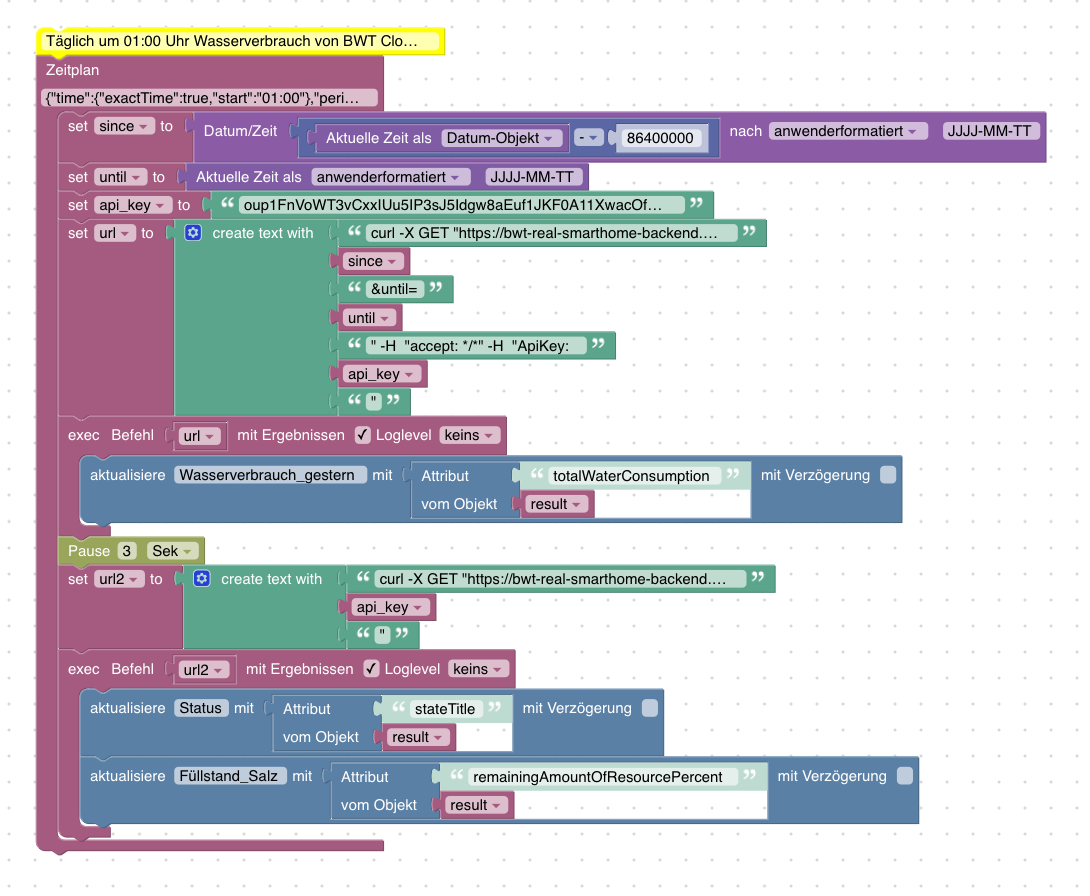
<xml xmlns="https://developers.google.com/blockly/xml"> <variables> <variable id="{^#@mm$`LvD2yq~bM==0">since</variable> <variable id="7Bf_zZ,|3JbY[Sr;;[ZR">until</variable> <variable id="5Y(p6$V4JW1Gwlj!afH?">api_key</variable> <variable id="]^02}el_a.}BLFPBoK_k">url</variable> <variable id="P/;-p8kU@!nRF.25:q!O">url2</variable> <variable id="_03`@CsFtd?`/XOE0Nea">result</variable> </variables> <block type="comment" id="|fyRu%!nNeRhQ}zs`{F/" x="438" y="-287"> <field name="COMMENT">Täglich um 01:00 Uhr Wasserverbrauch von BWT Cloud abfragen und in Datenpunkt schreiben.</field> <next> <block type="schedule" id="JBgcg*@gt/C~O$woUf[3"> <field name="SCHEDULE">{"time":{"exactTime":true,"start":"01:00"},"period":{"days":1}}</field> <statement name="STATEMENT"> <block type="variables_set" id=",RyccK|oIP$xxWMi6_[k"> <field name="VAR" id="{^#@mm$`LvD2yq~bM==0">since</field> <value name="VALUE"> <block type="convert_from_date" id="szqS727YvG6LLx(4l%jp"> <mutation xmlns="http://www.w3.org/1999/xhtml" format="true" language="false"></mutation> <field name="OPTION">custom</field> <field name="FORMAT">JJJJ-MM-TT</field> <value name="VALUE"> <block type="math_arithmetic" id="*yDP}]SGi#J+Sh9pUF0;"> <field name="OP">MINUS</field> <value name="A"> <shadow type="math_number" id="NN4{X6ay5+i~4},*Ag+9"> <field name="NUM">1</field> </shadow> <block type="time_get" id="8@Udbb~suvrC.Y.u2)a%"> <mutation xmlns="http://www.w3.org/1999/xhtml" format="false" language="false"></mutation> <field name="OPTION">object</field> </block> </value> <value name="B"> <shadow type="math_number" id="5wo)yDNCu4@kNq5~c2m6"> <field name="NUM">86400000</field> </shadow> </value> </block> </value> </block> </value> <next> <block type="variables_set" id="oZi#MCqD_bTw.JTc}v`b"> <field name="VAR" id="7Bf_zZ,|3JbY[Sr;;[ZR">until</field> <value name="VALUE"> <block type="time_get" id="-}l~_spdI+9fQqdI/Gt+"> <mutation xmlns="http://www.w3.org/1999/xhtml" format="true" language="false"></mutation> <field name="OPTION">custom</field> <field name="FORMAT">JJJJ-MM-TT</field> </block> </value> <next> <block type="variables_set" id=",=sk0Kd[/]VT!gM=)C/a"> <field name="VAR" id="5Y(p6$V4JW1Gwlj!afH?">api_key</field> <value name="VALUE"> <block type="text" id="00}3A!K}9C%*nt.op=7s"> <field name="TEXT">XYZ</field> </block> </value> <next> <block type="variables_set" id="R73J$#MIp8_Vp*g;I_Vd"> <field name="VAR" id="]^02}el_a.}BLFPBoK_k">url</field> <value name="VALUE"> <block type="text_join" id="8jU@k?nm1-!HF2EEhP2B" inline="false"> <mutation items="7"></mutation> <value name="ADD0"> <block type="text" id="(xi=zG)5zzu1VUWR5_yI"> <field name="TEXT">curl -X GET "https://bwt-real-smarthome-backend.azurewebsites.net/api/Perla/6CMR-TMTK/waterconsumption?since=</field> </block> </value> <value name="ADD1"> <block type="variables_get" id="7yOgrRt2~jH-)vR$lsZ,"> <field name="VAR" id="{^#@mm$`LvD2yq~bM==0">since</field> </block> </value> <value name="ADD2"> <block type="text" id="k]elWH-i.E_[)y^YWeUE"> <field name="TEXT">&until=</field> </block> </value> <value name="ADD3"> <block type="variables_get" id="gq[];Hf#m9^Bz:!)`nT4"> <field name="VAR" id="7Bf_zZ,|3JbY[Sr;;[ZR">until</field> </block> </value> <value name="ADD4"> <block type="text" id="!0y$S%JfGYrQB442Yb5f"> <field name="TEXT">" -H "accept: */*" -H "ApiKey: </field> </block> </value> <value name="ADD5"> <block type="variables_get" id="B`H*4,a1d0itb,;m}Ix{"> <field name="VAR" id="5Y(p6$V4JW1Gwlj!afH?">api_key</field> </block> </value> <value name="ADD6"> <block type="text" id="E;jumiRKduuVJ=ww_8}P"> <field name="TEXT">"</field> </block> </value> </block> </value> <next> <block type="exec" id="OMwQ%7n75x_$`{4hBZ!c" inline="true"> <mutation xmlns="http://www.w3.org/1999/xhtml" with_statement="true"></mutation> <field name="WITH_STATEMENT">TRUE</field> <field name="LOG"></field> <value name="COMMAND"> <shadow type="text" id="668`Wbm%~rygt2*$8vPg"> <field name="TEXT">curl -X GET "https://bwt-real-smarthome-backend.azurewebsites.net/api/Perla/6CMR-XXXX/waterconsumption?since=2023-07-29&until=2023-07-30" -H "accept: */*" -H "ApiKey: XYZ"</field> </shadow> <block type="variables_get" id="s37WFIreI,*m?KSv?{7h"> <field name="VAR" id="]^02}el_a.}BLFPBoK_k">url</field> </block> </value> <statement name="STATEMENT"> <block type="update" id="bXS}-9l{Q04f^ouV|u/i"> <mutation xmlns="http://www.w3.org/1999/xhtml" delay_input="false"></mutation> <field name="OID">0_userdata.0.Haus.BWT_Wasserverbrauch.Wasserverbrauch_gestern</field> <field name="WITH_DELAY">FALSE</field> <value name="VALUE"> <block type="get_attr" id="0`%?n_T;a$oH])PA@IhB" inline="false"> <value name="PATH"> <shadow type="text" id="~o2)oki8%/+OmD9nm1ad"> <field name="TEXT">totalWaterConsumption</field> </shadow> </value> <value name="OBJECT"> <block type="variables_get" id="%O.,ehBmQEuK?s!Sz}ks"> <field name="VAR" id="_03`@CsFtd?`/XOE0Nea">result</field> </block> </value> </block> </value> </block> </statement> <next> <block type="timeouts_wait" id="he_VhY{4Bs/h=F!k`FEM"> <field name="DELAY">3</field> <field name="UNIT">sec</field> <next> <block type="variables_set" id=":}K~wx+GVOiO]UlhIa^R"> <field name="VAR" id="P/;-p8kU@!nRF.25:q!O">url2</field> <value name="VALUE"> <block type="text_join" id="2+/;0PmeYpU-=jCb,TZi" inline="false"> <mutation items="3"></mutation> <value name="ADD0"> <block type="text" id="XCo+-{=9mqn(tN~VYPvS"> <field name="TEXT">curl -X GET "https://bwt-real-smarthome-backend.azurewebsites.net/api/Perla/6CMR-XXXX" -H "accept: */*" -H "ApiKey: </field> </block> </value> <value name="ADD1"> <block type="variables_get" id="W/tLT/OQc4|mcZvPv,P~"> <field name="VAR" id="5Y(p6$V4JW1Gwlj!afH?">api_key</field> </block> </value> <value name="ADD2"> <block type="text" id=";]{Di47#I~}@e0mu9^5#"> <field name="TEXT">"</field> </block> </value> </block> </value> <next> <block type="exec" id=",D4;}xBxu:2.@VB80*m}" inline="true"> <mutation xmlns="http://www.w3.org/1999/xhtml" with_statement="true"></mutation> <field name="WITH_STATEMENT">TRUE</field> <field name="LOG"></field> <value name="COMMAND"> <shadow type="text" id="668`Wbm%~rygt2*$8vPg"> <field name="TEXT">curl -X GET "https://bwt-real-smarthome-backend.azurewebsites.net/api/Perla/6CMR-XXXX/waterconsumption?since=2023-07-29&until=2023-07-30" -H "accept: */*" -H "ApiKey: XYZ"</field> </shadow> <block type="variables_get" id="`F5}U@#R,11]UOXBeG2%"> <field name="VAR" id="P/;-p8kU@!nRF.25:q!O">url2</field> </block> </value> <statement name="STATEMENT"> <block type="update" id="|dZkQqThvTcrd{,7_E,t"> <mutation xmlns="http://www.w3.org/1999/xhtml" delay_input="false"></mutation> <field name="OID">0_userdata.0.Haus.BWT_Wasserverbrauch.Status</field> <field name="WITH_DELAY">FALSE</field> <value name="VALUE"> <block type="get_attr" id="{XR{8H2IyR9J/@E3bgs5" inline="false"> <value name="PATH"> <shadow type="text" id="~Grdt4AVMiukVB0/:5$@"> <field name="TEXT">stateTitle</field> </shadow> </value> <value name="OBJECT"> <block type="variables_get" id="J8)w|Uk_Nt)P({Imf{3@"> <field name="VAR" id="_03`@CsFtd?`/XOE0Nea">result</field> </block> </value> </block> </value> <next> <block type="update" id="TSuYBjc-nU-qFlCn;OJH"> <mutation xmlns="http://www.w3.org/1999/xhtml" delay_input="false"></mutation> <field name="OID">0_userdata.0.Haus.BWT_Wasserverbrauch.Füllstand_Salz</field> <field name="WITH_DELAY">FALSE</field> <value name="VALUE"> <block type="get_attr" id=":d@o$#[iQs0r9kV8klX1" inline="false"> <value name="PATH"> <shadow type="text" id="WAg_YQ3hc0RSmM?)pe:;"> <field name="TEXT">remainingAmountOfResourcePercent</field> </shadow> </value> <value name="OBJECT"> <block type="variables_get" id="jbVuMm=HIS.:$Hsa8ao_"> <field name="VAR" id="_03`@CsFtd?`/XOE0Nea">result</field> </block> </value> </block> </value> </block> </next> </block> </statement> </block> </next> </block> </next> </block> </next> </block> </next> </block> </next> </block> </next> </block> </next> </block> </statement> </block> </next> </block> </xml>Für Optimierungsvorschläge bin ich offen
-
@qwertz
In der URL muss dann noch euer Produkt-code (SN) rein. und der API key
ich habe 3 Objekte angelegt (Wasserverbrauch_gestern, Füllstand_Salz und Status.
<xml xmlns="https://developers.google.com/blockly/xml"> <variables> <variable id="{^#@mm$`LvD2yq~bM==0">since</variable> <variable id="7Bf_zZ,|3JbY[Sr;;[ZR">until</variable> <variable id="5Y(p6$V4JW1Gwlj!afH?">api_key</variable> <variable id="]^02}el_a.}BLFPBoK_k">url</variable> <variable id="P/;-p8kU@!nRF.25:q!O">url2</variable> <variable id="_03`@CsFtd?`/XOE0Nea">result</variable> </variables> <block type="comment" id="|fyRu%!nNeRhQ}zs`{F/" x="438" y="-287"> <field name="COMMENT">Täglich um 01:00 Uhr Wasserverbrauch von BWT Cloud abfragen und in Datenpunkt schreiben.</field> <next> <block type="schedule" id="JBgcg*@gt/C~O$woUf[3"> <field name="SCHEDULE">{"time":{"exactTime":true,"start":"01:00"},"period":{"days":1}}</field> <statement name="STATEMENT"> <block type="variables_set" id=",RyccK|oIP$xxWMi6_[k"> <field name="VAR" id="{^#@mm$`LvD2yq~bM==0">since</field> <value name="VALUE"> <block type="convert_from_date" id="szqS727YvG6LLx(4l%jp"> <mutation xmlns="http://www.w3.org/1999/xhtml" format="true" language="false"></mutation> <field name="OPTION">custom</field> <field name="FORMAT">JJJJ-MM-TT</field> <value name="VALUE"> <block type="math_arithmetic" id="*yDP}]SGi#J+Sh9pUF0;"> <field name="OP">MINUS</field> <value name="A"> <shadow type="math_number" id="NN4{X6ay5+i~4},*Ag+9"> <field name="NUM">1</field> </shadow> <block type="time_get" id="8@Udbb~suvrC.Y.u2)a%"> <mutation xmlns="http://www.w3.org/1999/xhtml" format="false" language="false"></mutation> <field name="OPTION">object</field> </block> </value> <value name="B"> <shadow type="math_number" id="5wo)yDNCu4@kNq5~c2m6"> <field name="NUM">86400000</field> </shadow> </value> </block> </value> </block> </value> <next> <block type="variables_set" id="oZi#MCqD_bTw.JTc}v`b"> <field name="VAR" id="7Bf_zZ,|3JbY[Sr;;[ZR">until</field> <value name="VALUE"> <block type="time_get" id="-}l~_spdI+9fQqdI/Gt+"> <mutation xmlns="http://www.w3.org/1999/xhtml" format="true" language="false"></mutation> <field name="OPTION">custom</field> <field name="FORMAT">JJJJ-MM-TT</field> </block> </value> <next> <block type="variables_set" id=",=sk0Kd[/]VT!gM=)C/a"> <field name="VAR" id="5Y(p6$V4JW1Gwlj!afH?">api_key</field> <value name="VALUE"> <block type="text" id="00}3A!K}9C%*nt.op=7s"> <field name="TEXT">XYZ</field> </block> </value> <next> <block type="variables_set" id="R73J$#MIp8_Vp*g;I_Vd"> <field name="VAR" id="]^02}el_a.}BLFPBoK_k">url</field> <value name="VALUE"> <block type="text_join" id="8jU@k?nm1-!HF2EEhP2B" inline="false"> <mutation items="7"></mutation> <value name="ADD0"> <block type="text" id="(xi=zG)5zzu1VUWR5_yI"> <field name="TEXT">curl -X GET "https://bwt-real-smarthome-backend.azurewebsites.net/api/Perla/6CMR-TMTK/waterconsumption?since=</field> </block> </value> <value name="ADD1"> <block type="variables_get" id="7yOgrRt2~jH-)vR$lsZ,"> <field name="VAR" id="{^#@mm$`LvD2yq~bM==0">since</field> </block> </value> <value name="ADD2"> <block type="text" id="k]elWH-i.E_[)y^YWeUE"> <field name="TEXT">&until=</field> </block> </value> <value name="ADD3"> <block type="variables_get" id="gq[];Hf#m9^Bz:!)`nT4"> <field name="VAR" id="7Bf_zZ,|3JbY[Sr;;[ZR">until</field> </block> </value> <value name="ADD4"> <block type="text" id="!0y$S%JfGYrQB442Yb5f"> <field name="TEXT">" -H "accept: */*" -H "ApiKey: </field> </block> </value> <value name="ADD5"> <block type="variables_get" id="B`H*4,a1d0itb,;m}Ix{"> <field name="VAR" id="5Y(p6$V4JW1Gwlj!afH?">api_key</field> </block> </value> <value name="ADD6"> <block type="text" id="E;jumiRKduuVJ=ww_8}P"> <field name="TEXT">"</field> </block> </value> </block> </value> <next> <block type="exec" id="OMwQ%7n75x_$`{4hBZ!c" inline="true"> <mutation xmlns="http://www.w3.org/1999/xhtml" with_statement="true"></mutation> <field name="WITH_STATEMENT">TRUE</field> <field name="LOG"></field> <value name="COMMAND"> <shadow type="text" id="668`Wbm%~rygt2*$8vPg"> <field name="TEXT">curl -X GET "https://bwt-real-smarthome-backend.azurewebsites.net/api/Perla/6CMR-XXXX/waterconsumption?since=2023-07-29&until=2023-07-30" -H "accept: */*" -H "ApiKey: XYZ"</field> </shadow> <block type="variables_get" id="s37WFIreI,*m?KSv?{7h"> <field name="VAR" id="]^02}el_a.}BLFPBoK_k">url</field> </block> </value> <statement name="STATEMENT"> <block type="update" id="bXS}-9l{Q04f^ouV|u/i"> <mutation xmlns="http://www.w3.org/1999/xhtml" delay_input="false"></mutation> <field name="OID">0_userdata.0.Haus.BWT_Wasserverbrauch.Wasserverbrauch_gestern</field> <field name="WITH_DELAY">FALSE</field> <value name="VALUE"> <block type="get_attr" id="0`%?n_T;a$oH])PA@IhB" inline="false"> <value name="PATH"> <shadow type="text" id="~o2)oki8%/+OmD9nm1ad"> <field name="TEXT">totalWaterConsumption</field> </shadow> </value> <value name="OBJECT"> <block type="variables_get" id="%O.,ehBmQEuK?s!Sz}ks"> <field name="VAR" id="_03`@CsFtd?`/XOE0Nea">result</field> </block> </value> </block> </value> </block> </statement> <next> <block type="timeouts_wait" id="he_VhY{4Bs/h=F!k`FEM"> <field name="DELAY">3</field> <field name="UNIT">sec</field> <next> <block type="variables_set" id=":}K~wx+GVOiO]UlhIa^R"> <field name="VAR" id="P/;-p8kU@!nRF.25:q!O">url2</field> <value name="VALUE"> <block type="text_join" id="2+/;0PmeYpU-=jCb,TZi" inline="false"> <mutation items="3"></mutation> <value name="ADD0"> <block type="text" id="XCo+-{=9mqn(tN~VYPvS"> <field name="TEXT">curl -X GET "https://bwt-real-smarthome-backend.azurewebsites.net/api/Perla/6CMR-XXXX" -H "accept: */*" -H "ApiKey: </field> </block> </value> <value name="ADD1"> <block type="variables_get" id="W/tLT/OQc4|mcZvPv,P~"> <field name="VAR" id="5Y(p6$V4JW1Gwlj!afH?">api_key</field> </block> </value> <value name="ADD2"> <block type="text" id=";]{Di47#I~}@e0mu9^5#"> <field name="TEXT">"</field> </block> </value> </block> </value> <next> <block type="exec" id=",D4;}xBxu:2.@VB80*m}" inline="true"> <mutation xmlns="http://www.w3.org/1999/xhtml" with_statement="true"></mutation> <field name="WITH_STATEMENT">TRUE</field> <field name="LOG"></field> <value name="COMMAND"> <shadow type="text" id="668`Wbm%~rygt2*$8vPg"> <field name="TEXT">curl -X GET "https://bwt-real-smarthome-backend.azurewebsites.net/api/Perla/6CMR-XXXX/waterconsumption?since=2023-07-29&until=2023-07-30" -H "accept: */*" -H "ApiKey: XYZ"</field> </shadow> <block type="variables_get" id="`F5}U@#R,11]UOXBeG2%"> <field name="VAR" id="P/;-p8kU@!nRF.25:q!O">url2</field> </block> </value> <statement name="STATEMENT"> <block type="update" id="|dZkQqThvTcrd{,7_E,t"> <mutation xmlns="http://www.w3.org/1999/xhtml" delay_input="false"></mutation> <field name="OID">0_userdata.0.Haus.BWT_Wasserverbrauch.Status</field> <field name="WITH_DELAY">FALSE</field> <value name="VALUE"> <block type="get_attr" id="{XR{8H2IyR9J/@E3bgs5" inline="false"> <value name="PATH"> <shadow type="text" id="~Grdt4AVMiukVB0/:5$@"> <field name="TEXT">stateTitle</field> </shadow> </value> <value name="OBJECT"> <block type="variables_get" id="J8)w|Uk_Nt)P({Imf{3@"> <field name="VAR" id="_03`@CsFtd?`/XOE0Nea">result</field> </block> </value> </block> </value> <next> <block type="update" id="TSuYBjc-nU-qFlCn;OJH"> <mutation xmlns="http://www.w3.org/1999/xhtml" delay_input="false"></mutation> <field name="OID">0_userdata.0.Haus.BWT_Wasserverbrauch.Füllstand_Salz</field> <field name="WITH_DELAY">FALSE</field> <value name="VALUE"> <block type="get_attr" id=":d@o$#[iQs0r9kV8klX1" inline="false"> <value name="PATH"> <shadow type="text" id="WAg_YQ3hc0RSmM?)pe:;"> <field name="TEXT">remainingAmountOfResourcePercent</field> </shadow> </value> <value name="OBJECT"> <block type="variables_get" id="jbVuMm=HIS.:$Hsa8ao_"> <field name="VAR" id="_03`@CsFtd?`/XOE0Nea">result</field> </block> </value> </block> </value> </block> </next> </block> </statement> </block> </next> </block> </next> </block> </next> </block> </next> </block> </next> </block> </next> </block> </next> </block> </statement> </block> </next> </block> </xml>Für Optimierungsvorschläge bin ich offen
-
@gyle sagte in BWT Weichwasseranlage auslesen:
FYI - mittlerweile habe ich eine Lösung gefunden über die Cloud an die Daten zu kommen.
siehe https://bwt-real-smarthome-backend.azurewebsites.nethabe mir dazu ein Blockly geschrieben.
Das hört sich gut an !
Kannst du das Blockly teilen mit uns ?Besten Dank !
-
@gyle schick doch per pn oder mail tombox2020@gmail.com
-
@basti2022 wie gesagt brauche ein cloud Zugang via email
-
@basti2022 wie gesagt brauche ein cloud Zugang via email
-
@tombox
Hi tombox !siehe email von jetzt gerade.
Sag Bescheid, wenn du den Account nicht mehr brauchst, damit ich das Passwort wieder ändern kann.Besten Dank Gruß !
-
Aktuell geht bei mir der BWT Adapter V0.0.5 mit AppLogIn Daten. Das hat tombox netterweise auch nochmal geprüft.
Die Funktion mit diesem Adapter auch lokal über IP-Adresse Daten auszulesen funktioniert seit geraumer Zeit nicht mehr.
Leider liefert die AppSchnittstelle des Adapters weniger Daten. Z.B. fehlt mit persönlich der Gesamtwasserverbrauch.
Dies geht aktuell wohl nur über ein Script mit OCR.
-
@qwertz
In der URL muss dann noch euer Produkt-code (SN) rein. und der API key
ich habe 3 Objekte angelegt (Wasserverbrauch_gestern, Füllstand_Salz und Status.
<xml xmlns="https://developers.google.com/blockly/xml"> <variables> <variable id="{^#@mm$`LvD2yq~bM==0">since</variable> <variable id="7Bf_zZ,|3JbY[Sr;;[ZR">until</variable> <variable id="5Y(p6$V4JW1Gwlj!afH?">api_key</variable> <variable id="]^02}el_a.}BLFPBoK_k">url</variable> <variable id="P/;-p8kU@!nRF.25:q!O">url2</variable> <variable id="_03`@CsFtd?`/XOE0Nea">result</variable> </variables> <block type="comment" id="|fyRu%!nNeRhQ}zs`{F/" x="438" y="-287"> <field name="COMMENT">Täglich um 01:00 Uhr Wasserverbrauch von BWT Cloud abfragen und in Datenpunkt schreiben.</field> <next> <block type="schedule" id="JBgcg*@gt/C~O$woUf[3"> <field name="SCHEDULE">{"time":{"exactTime":true,"start":"01:00"},"period":{"days":1}}</field> <statement name="STATEMENT"> <block type="variables_set" id=",RyccK|oIP$xxWMi6_[k"> <field name="VAR" id="{^#@mm$`LvD2yq~bM==0">since</field> <value name="VALUE"> <block type="convert_from_date" id="szqS727YvG6LLx(4l%jp"> <mutation xmlns="http://www.w3.org/1999/xhtml" format="true" language="false"></mutation> <field name="OPTION">custom</field> <field name="FORMAT">JJJJ-MM-TT</field> <value name="VALUE"> <block type="math_arithmetic" id="*yDP}]SGi#J+Sh9pUF0;"> <field name="OP">MINUS</field> <value name="A"> <shadow type="math_number" id="NN4{X6ay5+i~4},*Ag+9"> <field name="NUM">1</field> </shadow> <block type="time_get" id="8@Udbb~suvrC.Y.u2)a%"> <mutation xmlns="http://www.w3.org/1999/xhtml" format="false" language="false"></mutation> <field name="OPTION">object</field> </block> </value> <value name="B"> <shadow type="math_number" id="5wo)yDNCu4@kNq5~c2m6"> <field name="NUM">86400000</field> </shadow> </value> </block> </value> </block> </value> <next> <block type="variables_set" id="oZi#MCqD_bTw.JTc}v`b"> <field name="VAR" id="7Bf_zZ,|3JbY[Sr;;[ZR">until</field> <value name="VALUE"> <block type="time_get" id="-}l~_spdI+9fQqdI/Gt+"> <mutation xmlns="http://www.w3.org/1999/xhtml" format="true" language="false"></mutation> <field name="OPTION">custom</field> <field name="FORMAT">JJJJ-MM-TT</field> </block> </value> <next> <block type="variables_set" id=",=sk0Kd[/]VT!gM=)C/a"> <field name="VAR" id="5Y(p6$V4JW1Gwlj!afH?">api_key</field> <value name="VALUE"> <block type="text" id="00}3A!K}9C%*nt.op=7s"> <field name="TEXT">XYZ</field> </block> </value> <next> <block type="variables_set" id="R73J$#MIp8_Vp*g;I_Vd"> <field name="VAR" id="]^02}el_a.}BLFPBoK_k">url</field> <value name="VALUE"> <block type="text_join" id="8jU@k?nm1-!HF2EEhP2B" inline="false"> <mutation items="7"></mutation> <value name="ADD0"> <block type="text" id="(xi=zG)5zzu1VUWR5_yI"> <field name="TEXT">curl -X GET "https://bwt-real-smarthome-backend.azurewebsites.net/api/Perla/6CMR-TMTK/waterconsumption?since=</field> </block> </value> <value name="ADD1"> <block type="variables_get" id="7yOgrRt2~jH-)vR$lsZ,"> <field name="VAR" id="{^#@mm$`LvD2yq~bM==0">since</field> </block> </value> <value name="ADD2"> <block type="text" id="k]elWH-i.E_[)y^YWeUE"> <field name="TEXT">&until=</field> </block> </value> <value name="ADD3"> <block type="variables_get" id="gq[];Hf#m9^Bz:!)`nT4"> <field name="VAR" id="7Bf_zZ,|3JbY[Sr;;[ZR">until</field> </block> </value> <value name="ADD4"> <block type="text" id="!0y$S%JfGYrQB442Yb5f"> <field name="TEXT">" -H "accept: */*" -H "ApiKey: </field> </block> </value> <value name="ADD5"> <block type="variables_get" id="B`H*4,a1d0itb,;m}Ix{"> <field name="VAR" id="5Y(p6$V4JW1Gwlj!afH?">api_key</field> </block> </value> <value name="ADD6"> <block type="text" id="E;jumiRKduuVJ=ww_8}P"> <field name="TEXT">"</field> </block> </value> </block> </value> <next> <block type="exec" id="OMwQ%7n75x_$`{4hBZ!c" inline="true"> <mutation xmlns="http://www.w3.org/1999/xhtml" with_statement="true"></mutation> <field name="WITH_STATEMENT">TRUE</field> <field name="LOG"></field> <value name="COMMAND"> <shadow type="text" id="668`Wbm%~rygt2*$8vPg"> <field name="TEXT">curl -X GET "https://bwt-real-smarthome-backend.azurewebsites.net/api/Perla/6CMR-XXXX/waterconsumption?since=2023-07-29&until=2023-07-30" -H "accept: */*" -H "ApiKey: XYZ"</field> </shadow> <block type="variables_get" id="s37WFIreI,*m?KSv?{7h"> <field name="VAR" id="]^02}el_a.}BLFPBoK_k">url</field> </block> </value> <statement name="STATEMENT"> <block type="update" id="bXS}-9l{Q04f^ouV|u/i"> <mutation xmlns="http://www.w3.org/1999/xhtml" delay_input="false"></mutation> <field name="OID">0_userdata.0.Haus.BWT_Wasserverbrauch.Wasserverbrauch_gestern</field> <field name="WITH_DELAY">FALSE</field> <value name="VALUE"> <block type="get_attr" id="0`%?n_T;a$oH])PA@IhB" inline="false"> <value name="PATH"> <shadow type="text" id="~o2)oki8%/+OmD9nm1ad"> <field name="TEXT">totalWaterConsumption</field> </shadow> </value> <value name="OBJECT"> <block type="variables_get" id="%O.,ehBmQEuK?s!Sz}ks"> <field name="VAR" id="_03`@CsFtd?`/XOE0Nea">result</field> </block> </value> </block> </value> </block> </statement> <next> <block type="timeouts_wait" id="he_VhY{4Bs/h=F!k`FEM"> <field name="DELAY">3</field> <field name="UNIT">sec</field> <next> <block type="variables_set" id=":}K~wx+GVOiO]UlhIa^R"> <field name="VAR" id="P/;-p8kU@!nRF.25:q!O">url2</field> <value name="VALUE"> <block type="text_join" id="2+/;0PmeYpU-=jCb,TZi" inline="false"> <mutation items="3"></mutation> <value name="ADD0"> <block type="text" id="XCo+-{=9mqn(tN~VYPvS"> <field name="TEXT">curl -X GET "https://bwt-real-smarthome-backend.azurewebsites.net/api/Perla/6CMR-XXXX" -H "accept: */*" -H "ApiKey: </field> </block> </value> <value name="ADD1"> <block type="variables_get" id="W/tLT/OQc4|mcZvPv,P~"> <field name="VAR" id="5Y(p6$V4JW1Gwlj!afH?">api_key</field> </block> </value> <value name="ADD2"> <block type="text" id=";]{Di47#I~}@e0mu9^5#"> <field name="TEXT">"</field> </block> </value> </block> </value> <next> <block type="exec" id=",D4;}xBxu:2.@VB80*m}" inline="true"> <mutation xmlns="http://www.w3.org/1999/xhtml" with_statement="true"></mutation> <field name="WITH_STATEMENT">TRUE</field> <field name="LOG"></field> <value name="COMMAND"> <shadow type="text" id="668`Wbm%~rygt2*$8vPg"> <field name="TEXT">curl -X GET "https://bwt-real-smarthome-backend.azurewebsites.net/api/Perla/6CMR-XXXX/waterconsumption?since=2023-07-29&until=2023-07-30" -H "accept: */*" -H "ApiKey: XYZ"</field> </shadow> <block type="variables_get" id="`F5}U@#R,11]UOXBeG2%"> <field name="VAR" id="P/;-p8kU@!nRF.25:q!O">url2</field> </block> </value> <statement name="STATEMENT"> <block type="update" id="|dZkQqThvTcrd{,7_E,t"> <mutation xmlns="http://www.w3.org/1999/xhtml" delay_input="false"></mutation> <field name="OID">0_userdata.0.Haus.BWT_Wasserverbrauch.Status</field> <field name="WITH_DELAY">FALSE</field> <value name="VALUE"> <block type="get_attr" id="{XR{8H2IyR9J/@E3bgs5" inline="false"> <value name="PATH"> <shadow type="text" id="~Grdt4AVMiukVB0/:5$@"> <field name="TEXT">stateTitle</field> </shadow> </value> <value name="OBJECT"> <block type="variables_get" id="J8)w|Uk_Nt)P({Imf{3@"> <field name="VAR" id="_03`@CsFtd?`/XOE0Nea">result</field> </block> </value> </block> </value> <next> <block type="update" id="TSuYBjc-nU-qFlCn;OJH"> <mutation xmlns="http://www.w3.org/1999/xhtml" delay_input="false"></mutation> <field name="OID">0_userdata.0.Haus.BWT_Wasserverbrauch.Füllstand_Salz</field> <field name="WITH_DELAY">FALSE</field> <value name="VALUE"> <block type="get_attr" id=":d@o$#[iQs0r9kV8klX1" inline="false"> <value name="PATH"> <shadow type="text" id="WAg_YQ3hc0RSmM?)pe:;"> <field name="TEXT">remainingAmountOfResourcePercent</field> </shadow> </value> <value name="OBJECT"> <block type="variables_get" id="jbVuMm=HIS.:$Hsa8ao_"> <field name="VAR" id="_03`@CsFtd?`/XOE0Nea">result</field> </block> </value> </block> </value> </block> </next> </block> </statement> </block> </next> </block> </next> </block> </next> </block> </next> </block> </next> </block> </next> </block> </next> </block> </statement> </block> </next> </block> </xml>Für Optimierungsvorschläge bin ich offen
@gyle
Welche Daten gibt den der Server https://bwt-real-smarthome-backend.azurewebsites.net/. ?Kannst du vielleicht mal alle Datenpunkte auflisten, die der Server anbietet ? Sind das mehr Daten als der BWT Adapter über App Login bietet ?
-
@gyle
Welche Daten gibt den der Server https://bwt-real-smarthome-backend.azurewebsites.net/. ?Kannst du vielleicht mal alle Datenpunkte auflisten, die der Server anbietet ? Sind das mehr Daten als der BWT Adapter über App Login bietet ?
-
Von BWT gibt es eine neue BetaFirmware die wieder eine lokale API öffnet.
Diese API kann ab Firmware V2.02xx am Gerät aktiviert werden unter Einstellungen > Allgemein > Verbindungen > API
Diese Beta-Firmware kann von BWT auf Anfrage übers Internet installiert werden: ProfilineAS@bwt.de
Man bekommt von denen dann auch eine PDF mit der Doku der lokalen API zugesendet.
Vorbildlich von BWT !
Im HomeAssistant ist die neue API schon integriert: https://github.com/dkarv/hacs-bwt-perla
-
Von BWT gibt es eine neue BetaFirmware die wieder eine lokale API öffnet.
Diese API kann ab Firmware V2.02xx am Gerät aktiviert werden unter Einstellungen > Allgemein > Verbindungen > API
Diese Beta-Firmware kann von BWT auf Anfrage übers Internet installiert werden: ProfilineAS@bwt.de
Man bekommt von denen dann auch eine PDF mit der Doku der lokalen API zugesendet.
Vorbildlich von BWT !
Im HomeAssistant ist die neue API schon integriert: https://github.com/dkarv/hacs-bwt-perla


Hey! Du scheinst an dieser Unterhaltung interessiert zu sein, hast aber noch kein Konto.
Hast du es satt, bei jedem Besuch durch die gleichen Beiträge zu scrollen? Wenn du dich für ein Konto anmeldest, kommst du immer genau dorthin zurück, wo du zuvor warst, und kannst dich über neue Antworten benachrichtigen lassen (entweder per E-Mail oder Push-Benachrichtigung). Du kannst auch Lesezeichen speichern und Beiträge positiv bewerten, um anderen Community-Mitgliedern deine Wertschätzung zu zeigen.
Mit deinem Input könnte dieser Beitrag noch besser werden 💗
Registrieren Anmelden423
Online33.0k
Benutzer83.7k
Themen1.3m
Beiträge