Skip to content
  • Home
  • Aktuell
  • Tags
  • 0 Ungelesen 0
  • Kategorien
  • Unreplied
  • Beliebt
  • GitHub
  • Docu
  • Hilfe
Skins
  • Light
  • Brite
  • Cerulean
  • Cosmo
  • Flatly
  • Journal
  • Litera
  • Lumen
  • Lux
  • Materia
  • Minty
  • Morph
  • Pulse
  • Sandstone
  • Simplex
  • Sketchy
  • Spacelab
  • United
  • Yeti
  • Zephyr
  • Dark
  • Cyborg
  • Darkly
  • Quartz
  • Slate
  • Solar
  • Superhero
  • Vapor

  • Standard: (Kein Skin)
  • Kein Skin
Einklappen
ioBroker Logo

Community Forum

donate donate
  1. ioBroker Community Home
  2. Deutsch
  3. Einsteigerfragen
  4. Installation
  5. RasPi 3b Iobroker nicht erreichbar

NEWS

  • Weihnachtsangebot 2025! 🎄
    BluefoxB
    Bluefox
    21
    1
    883

  • UPDATE 31.10.: Amazon Alexa - ioBroker Skill läuft aus ?
    apollon77A
    apollon77
    48
    3
    9.0k

  • Monatsrückblick – September 2025
    BluefoxB
    Bluefox
    13
    1
    2.4k

RasPi 3b Iobroker nicht erreichbar

Geplant Angeheftet Gesperrt Verschoben Installation
15 Beiträge 5 Kommentatoren 553 Aufrufe 4 Watching
  • Älteste zuerst
  • Neuste zuerst
  • Meiste Stimmen
Antworten
  • In einem neuen Thema antworten
Anmelden zum Antworten
Dieses Thema wurde gelöscht. Nur Nutzer mit entsprechenden Rechten können es sehen.
  • P Offline
    P Offline
    Pasido11
    schrieb am zuletzt editiert von
    #1

    Hallo, brauch mal Hilfe,
    ich habe hier einen alten RasPi 3 B+ V1. Ich bekomme den IoBroker nicht zum laufen.
    Die Version Raspberry Pi OS Lite 12 (bookworm) habe ich schon sicher 5 mal heruntergeladen und auf Karte geladen. danach mache ich die Updates und anschließend curl -sLf https://iobroker.net/install.sh | bash -
    Leider erreiche ich den IoBroker danach nie. http://IP: 8081 oder 8082

    Kann mir da mal jemand einen Tip geben.

    Thomas BraunT J 3 Antworten Letzte Antwort
    0
    • P Pasido11

      Hallo, brauch mal Hilfe,
      ich habe hier einen alten RasPi 3 B+ V1. Ich bekomme den IoBroker nicht zum laufen.
      Die Version Raspberry Pi OS Lite 12 (bookworm) habe ich schon sicher 5 mal heruntergeladen und auf Karte geladen. danach mache ich die Updates und anschließend curl -sLf https://iobroker.net/install.sh | bash -
      Leider erreiche ich den IoBroker danach nie. http://IP: 8081 oder 8082

      Kann mir da mal jemand einen Tip geben.

      Thomas BraunT Online
      Thomas BraunT Online
      Thomas Braun
      Most Active
      schrieb am zuletzt editiert von
      #2

      @pasido11

      iob diag
      

      sagt?

      Linux-Werkzeugkasten:
      https://forum.iobroker.net/topic/42952/der-kleine-iobroker-linux-werkzeugkasten
      NodeJS Fixer Skript:
      https://forum.iobroker.net/topic/68035/iob-node-fix-skript
      iob_diag: curl -sLf -o diag.sh https://iobroker.net/diag.sh && bash diag.sh

      P 1 Antwort Letzte Antwort
      0
      • P Pasido11

        Hallo, brauch mal Hilfe,
        ich habe hier einen alten RasPi 3 B+ V1. Ich bekomme den IoBroker nicht zum laufen.
        Die Version Raspberry Pi OS Lite 12 (bookworm) habe ich schon sicher 5 mal heruntergeladen und auf Karte geladen. danach mache ich die Updates und anschließend curl -sLf https://iobroker.net/install.sh | bash -
        Leider erreiche ich den IoBroker danach nie. http://IP: 8081 oder 8082

        Kann mir da mal jemand einen Tip geben.

        Thomas BraunT Online
        Thomas BraunT Online
        Thomas Braun
        Most Active
        schrieb am zuletzt editiert von
        #3

        @pasido11 sagte in RasPi 3b Iobroker nicht erreichbar:

        alten RasPi 3 B+ V1.

        Da kann die Installation allerdings G E R A U M E Zeit in Anspruch nehmen.
        Sicher das die Kiste damit fertig ist?

        Linux-Werkzeugkasten:
        https://forum.iobroker.net/topic/42952/der-kleine-iobroker-linux-werkzeugkasten
        NodeJS Fixer Skript:
        https://forum.iobroker.net/topic/68035/iob-node-fix-skript
        iob_diag: curl -sLf -o diag.sh https://iobroker.net/diag.sh && bash diag.sh

        1 Antwort Letzte Antwort
        0
        • P Pasido11

          Hallo, brauch mal Hilfe,
          ich habe hier einen alten RasPi 3 B+ V1. Ich bekomme den IoBroker nicht zum laufen.
          Die Version Raspberry Pi OS Lite 12 (bookworm) habe ich schon sicher 5 mal heruntergeladen und auf Karte geladen. danach mache ich die Updates und anschließend curl -sLf https://iobroker.net/install.sh | bash -
          Leider erreiche ich den IoBroker danach nie. http://IP: 8081 oder 8082

          Kann mir da mal jemand einen Tip geben.

          J Offline
          J Offline
          JohnnyBahama
          schrieb am zuletzt editiert von
          #4

          @pasido11 Ich häng mir die Kisten beim booten an den Fernseher, um zu sehen ob sich da was tut.

          1 Antwort Letzte Antwort
          0
          • Thomas BraunT Thomas Braun

            @pasido11

            iob diag
            

            sagt?

            P Offline
            P Offline
            Pasido11
            schrieb am zuletzt editiert von
            #5

            @thomas-braun

            Das ist das Ergebnis :-(

            Copy text starting here:

            ======================= SUMMARY =======================
                                    v.2023-10-10
            
            
             Static hostname: raspberrypi
                   Icon name: computer
            Operating System: Raspbian GNU/Linux 12 (bookworm)
                      Kernel: Linux 6.1.0-rpi4-rpi-v6
                Architecture: arm
            
            Installation:           native
            Kernel:                 armv6l
            Userland:               armhf
            Timezone:               Europe/Berlin (CEST, +0200)
            User-ID:                1000
            X-Server:               false
            Boot Target:            multi-user.target
            
            Pending OS-Updates:     0
            /usr/bin/iob: line 12:  2129 Illegal instruction     sudo -H -u iobroker node /opt/iobroker/node_modules/iobroker.js-controller/iobroker.js "$@"
            Pending iob updates:    0
            
            Nodejs-Installation:    /usr/bin/nodejs
                                    /usr/bin/node
                                    /usr/bin/npm
                                    /usr/bin/npx
                                    /usr/bin/corepack
            
            Recommended versions are nodejs  and npm
            Your nodejs installation is correct
            
            MEMORY:
                           total        used        free      shared  buff/cache   available
            Mem:            449M        106M        120M        774K        276M        342M
            Swap:           104M          0B        104M
            Total:          554M        106M        225M
            
            /usr/bin/iob: line 12:  2148 Illegal instruction     sudo -H -u iobroker node /opt/iobroker/node_modules/iobroker.js-controller/iobroker.js "$@"
            Active iob-Instances:   0
            /usr/bin/iob: line 12:  2153 Illegal instruction     sudo -H -u iobroker node /opt/iobroker/node_modules/iobroker.js-controller/iobroker.js "$@"
            
            /usr/bin/iob: line 12:  2158 Illegal instruction     sudo -H -u iobroker node /opt/iobroker/node_modules/iobroker.js-controller/iobroker.js "$@"
            ioBroker Core:          js-controller
            /usr/bin/iob: line 12:  2162 Illegal instruction     sudo -H -u iobroker node /opt/iobroker/node_modules/iobroker.js-controller/iobroker.js "$@"
                                    admin
            
            /usr/bin/iobroker: line 12:  2167 Illegal instruction     sudo -H -u iobroker node /opt/iobroker/node_modules/iobroker.js-controller/iobroker.js "$@"
            ioBroker Status:
            
            Status admin and web instance:
            /usr/bin/iobroker: line 12:  2172 Illegal instruction     sudo -H -u iobroker node /opt/iobroker/node_modules/iobroker.js-controller/iobroker.js "$@"
            
            Objects:                0
            States:                 0
            
            Size of iob-Database:
            
            find: '/opt/iobroker/iobroker-data': No such file or directory
            find: '/opt/iobroker/iobroker-data': No such file or directory


            =================== END OF SUMMARY ====================
            

            === Mark text until here for copying ===
            patrick@raspberrypi:~ $

            Thomas BraunT HomoranH 2 Antworten Letzte Antwort
            0
            • P Pasido11

              @thomas-braun

              Das ist das Ergebnis :-(

              Copy text starting here:

              ======================= SUMMARY =======================
                                      v.2023-10-10
              
              
               Static hostname: raspberrypi
                     Icon name: computer
              Operating System: Raspbian GNU/Linux 12 (bookworm)
                        Kernel: Linux 6.1.0-rpi4-rpi-v6
                  Architecture: arm
              
              Installation:           native
              Kernel:                 armv6l
              Userland:               armhf
              Timezone:               Europe/Berlin (CEST, +0200)
              User-ID:                1000
              X-Server:               false
              Boot Target:            multi-user.target
              
              Pending OS-Updates:     0
              /usr/bin/iob: line 12:  2129 Illegal instruction     sudo -H -u iobroker node /opt/iobroker/node_modules/iobroker.js-controller/iobroker.js "$@"
              Pending iob updates:    0
              
              Nodejs-Installation:    /usr/bin/nodejs
                                      /usr/bin/node
                                      /usr/bin/npm
                                      /usr/bin/npx
                                      /usr/bin/corepack
              
              Recommended versions are nodejs  and npm
              Your nodejs installation is correct
              
              MEMORY:
                             total        used        free      shared  buff/cache   available
              Mem:            449M        106M        120M        774K        276M        342M
              Swap:           104M          0B        104M
              Total:          554M        106M        225M
              
              /usr/bin/iob: line 12:  2148 Illegal instruction     sudo -H -u iobroker node /opt/iobroker/node_modules/iobroker.js-controller/iobroker.js "$@"
              Active iob-Instances:   0
              /usr/bin/iob: line 12:  2153 Illegal instruction     sudo -H -u iobroker node /opt/iobroker/node_modules/iobroker.js-controller/iobroker.js "$@"
              
              /usr/bin/iob: line 12:  2158 Illegal instruction     sudo -H -u iobroker node /opt/iobroker/node_modules/iobroker.js-controller/iobroker.js "$@"
              ioBroker Core:          js-controller
              /usr/bin/iob: line 12:  2162 Illegal instruction     sudo -H -u iobroker node /opt/iobroker/node_modules/iobroker.js-controller/iobroker.js "$@"
                                      admin
              
              /usr/bin/iobroker: line 12:  2167 Illegal instruction     sudo -H -u iobroker node /opt/iobroker/node_modules/iobroker.js-controller/iobroker.js "$@"
              ioBroker Status:
              
              Status admin and web instance:
              /usr/bin/iobroker: line 12:  2172 Illegal instruction     sudo -H -u iobroker node /opt/iobroker/node_modules/iobroker.js-controller/iobroker.js "$@"
              
              Objects:                0
              States:                 0
              
              Size of iob-Database:
              
              find: '/opt/iobroker/iobroker-data': No such file or directory
              find: '/opt/iobroker/iobroker-data': No such file or directory


              =================== END OF SUMMARY ====================
              

              === Mark text until here for copying ===
              patrick@raspberrypi:~ $

              Thomas BraunT Online
              Thomas BraunT Online
              Thomas Braun
              Most Active
              schrieb am zuletzt editiert von
              #6

              @pasido11

              Die Kiste ist zu alt und zu klein. Mit 512MB RAM reißt du gar nichts.

              Linux-Werkzeugkasten:
              https://forum.iobroker.net/topic/42952/der-kleine-iobroker-linux-werkzeugkasten
              NodeJS Fixer Skript:
              https://forum.iobroker.net/topic/68035/iob-node-fix-skript
              iob_diag: curl -sLf -o diag.sh https://iobroker.net/diag.sh && bash diag.sh

              P 1 Antwort Letzte Antwort
              0
              • P Pasido11

                @thomas-braun

                Das ist das Ergebnis :-(

                Copy text starting here:

                ======================= SUMMARY =======================
                                        v.2023-10-10
                
                
                 Static hostname: raspberrypi
                       Icon name: computer
                Operating System: Raspbian GNU/Linux 12 (bookworm)
                          Kernel: Linux 6.1.0-rpi4-rpi-v6
                    Architecture: arm
                
                Installation:           native
                Kernel:                 armv6l
                Userland:               armhf
                Timezone:               Europe/Berlin (CEST, +0200)
                User-ID:                1000
                X-Server:               false
                Boot Target:            multi-user.target
                
                Pending OS-Updates:     0
                /usr/bin/iob: line 12:  2129 Illegal instruction     sudo -H -u iobroker node /opt/iobroker/node_modules/iobroker.js-controller/iobroker.js "$@"
                Pending iob updates:    0
                
                Nodejs-Installation:    /usr/bin/nodejs
                                        /usr/bin/node
                                        /usr/bin/npm
                                        /usr/bin/npx
                                        /usr/bin/corepack
                
                Recommended versions are nodejs  and npm
                Your nodejs installation is correct
                
                MEMORY:
                               total        used        free      shared  buff/cache   available
                Mem:            449M        106M        120M        774K        276M        342M
                Swap:           104M          0B        104M
                Total:          554M        106M        225M
                
                /usr/bin/iob: line 12:  2148 Illegal instruction     sudo -H -u iobroker node /opt/iobroker/node_modules/iobroker.js-controller/iobroker.js "$@"
                Active iob-Instances:   0
                /usr/bin/iob: line 12:  2153 Illegal instruction     sudo -H -u iobroker node /opt/iobroker/node_modules/iobroker.js-controller/iobroker.js "$@"
                
                /usr/bin/iob: line 12:  2158 Illegal instruction     sudo -H -u iobroker node /opt/iobroker/node_modules/iobroker.js-controller/iobroker.js "$@"
                ioBroker Core:          js-controller
                /usr/bin/iob: line 12:  2162 Illegal instruction     sudo -H -u iobroker node /opt/iobroker/node_modules/iobroker.js-controller/iobroker.js "$@"
                                        admin
                
                /usr/bin/iobroker: line 12:  2167 Illegal instruction     sudo -H -u iobroker node /opt/iobroker/node_modules/iobroker.js-controller/iobroker.js "$@"
                ioBroker Status:
                
                Status admin and web instance:
                /usr/bin/iobroker: line 12:  2172 Illegal instruction     sudo -H -u iobroker node /opt/iobroker/node_modules/iobroker.js-controller/iobroker.js "$@"
                
                Objects:                0
                States:                 0
                
                Size of iob-Database:
                
                find: '/opt/iobroker/iobroker-data': No such file or directory
                find: '/opt/iobroker/iobroker-data': No such file or directory


                =================== END OF SUMMARY ====================
                

                === Mark text until here for copying ===
                patrick@raspberrypi:~ $

                HomoranH Nicht stören
                HomoranH Nicht stören
                Homoran
                Global Moderator Administrators
                schrieb am zuletzt editiert von
                #7

                @pasido11 sagte in RasPi 3b Iobroker nicht erreichbar:

                Kernel: armv6l

                das ist kein pi3!

                das ist ein Pi1!!

                kein Support per PN! - Fragen im Forum stellen - es gibt fast nichts, was nicht auch für andere interessant ist.

                Benutzt das Voting rechts unten im Beitrag wenn er euch geholfen hat.

                der Installationsfixer: curl -fsL https://iobroker.net/fix.sh | bash -

                P 1 Antwort Letzte Antwort
                0
                • HomoranH Homoran

                  @pasido11 sagte in RasPi 3b Iobroker nicht erreichbar:

                  Kernel: armv6l

                  das ist kein pi3!

                  das ist ein Pi1!!

                  P Offline
                  P Offline
                  Pasido11
                  schrieb am zuletzt editiert von
                  #8

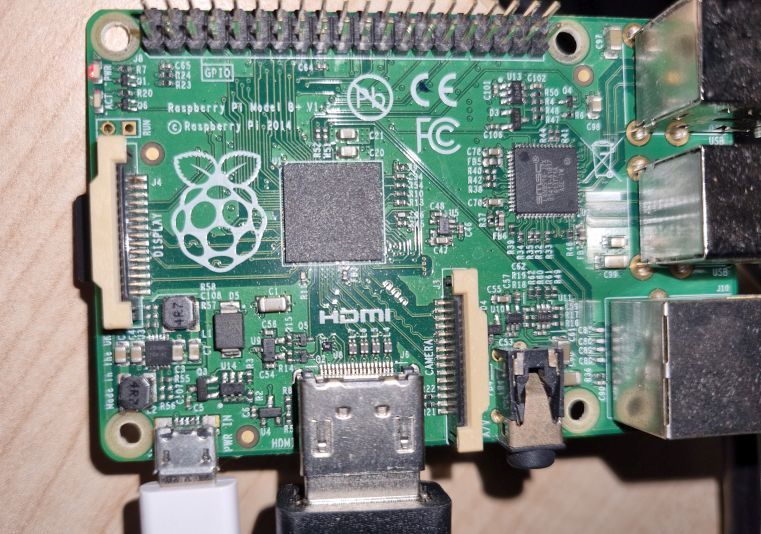
                  @homoran 2023-10-19 07.45.59.jpg

                  Bist du dir da sicher ?

                  Thomas BraunT HomoranH 2 Antworten Letzte Antwort
                  0
                  • Thomas BraunT Thomas Braun

                    @pasido11

                    Die Kiste ist zu alt und zu klein. Mit 512MB RAM reißt du gar nichts.

                    P Offline
                    P Offline
                    Pasido11
                    schrieb am zuletzt editiert von
                    #9

                    @thomas-braun said in RasPi 3b Iobroker nicht erreichbar:

                    @pasido11

                    Die Kiste ist zu alt und zu klein. Mit 512MB RAM reißt du gar nichts.

                    OK, aber sollte das Ding aber nicht mindestens laufen ? Ob langsam ist erst mal egal.

                    Thomas BraunT HomoranH 2 Antworten Letzte Antwort
                    0
                    • P Pasido11

                      @homoran 2023-10-19 07.45.59.jpg

                      Bist du dir da sicher ?

                      Thomas BraunT Online
                      Thomas BraunT Online
                      Thomas Braun
                      Most Active
                      schrieb am zuletzt editiert von Thomas Braun
                      #10

                      @pasido11
                      Ja, ist ein altes Modell.
                      Da läuft ein aktuelles nodejs nicht mehr ohne Klimmzüge drauf. Könnte man vielleicht aus den unofficial builds noch zaubern. Aber dann ist da kein RAM mehr zum hantieren übrig.

                      Das Ding ist zu schwach auf der Brust, da läuft der ioBroker nicht gescheit drauf.

                      Linux-Werkzeugkasten:
                      https://forum.iobroker.net/topic/42952/der-kleine-iobroker-linux-werkzeugkasten
                      NodeJS Fixer Skript:
                      https://forum.iobroker.net/topic/68035/iob-node-fix-skript
                      iob_diag: curl -sLf -o diag.sh https://iobroker.net/diag.sh && bash diag.sh

                      P 1 Antwort Letzte Antwort
                      0
                      • Thomas BraunT Thomas Braun

                        @pasido11
                        Ja, ist ein altes Modell.
                        Da läuft ein aktuelles nodejs nicht mehr ohne Klimmzüge drauf. Könnte man vielleicht aus den unofficial builds noch zaubern. Aber dann ist da kein RAM mehr zum hantieren übrig.

                        Das Ding ist zu schwach auf der Brust, da läuft der ioBroker nicht gescheit drauf.

                        P Offline
                        P Offline
                        Pasido11
                        schrieb am zuletzt editiert von
                        #11

                        @thomas-braun
                        OK, danke für die Info.
                        Aber dann ist es halt so. :-(

                        Werde mir dann wohl einen neuen kaufen.
                        Danke an alle

                        1 Antwort Letzte Antwort
                        0
                        • P Pasido11

                          @thomas-braun said in RasPi 3b Iobroker nicht erreichbar:

                          @pasido11

                          Die Kiste ist zu alt und zu klein. Mit 512MB RAM reißt du gar nichts.

                          OK, aber sollte das Ding aber nicht mindestens laufen ? Ob langsam ist erst mal egal.

                          Thomas BraunT Online
                          Thomas BraunT Online
                          Thomas Braun
                          Most Active
                          schrieb am zuletzt editiert von Thomas Braun
                          #12

                          @pasido11

                          Wenn du dich wirklich da durch quälen willst:
                          Es ist eine 'Sonderfall'-Installation erforderlich.
                          Findet sich hier, am Ende des ersten Postings:

                          https://forum.iobroker.net/topic/35090/howto-nodejs-installation-und-upgrades-unter-debian

                          Edith: Aktuell ist die v18.18.2 für den ioBroker vorgesehen.

                          Linux-Werkzeugkasten:
                          https://forum.iobroker.net/topic/42952/der-kleine-iobroker-linux-werkzeugkasten
                          NodeJS Fixer Skript:
                          https://forum.iobroker.net/topic/68035/iob-node-fix-skript
                          iob_diag: curl -sLf -o diag.sh https://iobroker.net/diag.sh && bash diag.sh

                          1 Antwort Letzte Antwort
                          0
                          • P Pasido11

                            @homoran 2023-10-19 07.45.59.jpg

                            Bist du dir da sicher ?

                            HomoranH Nicht stören
                            HomoranH Nicht stören
                            Homoran
                            Global Moderator Administrators
                            schrieb am zuletzt editiert von
                            #13

                            @pasido11 sagte in RasPi 3b Iobroker nicht erreichbar:

                            Bist du dir da sicher ?

                            Natürlich
                            arm v6 und 512MB RAM

                            auf deinem Screenshot steht 2014 und nur Raspberry pi model B+. nichts von 3

                            kein Support per PN! - Fragen im Forum stellen - es gibt fast nichts, was nicht auch für andere interessant ist.

                            Benutzt das Voting rechts unten im Beitrag wenn er euch geholfen hat.

                            der Installationsfixer: curl -fsL https://iobroker.net/fix.sh | bash -

                            1 Antwort Letzte Antwort
                            0
                            • P Pasido11

                              @thomas-braun said in RasPi 3b Iobroker nicht erreichbar:

                              @pasido11

                              Die Kiste ist zu alt und zu klein. Mit 512MB RAM reißt du gar nichts.

                              OK, aber sollte das Ding aber nicht mindestens laufen ? Ob langsam ist erst mal egal.

                              HomoranH Nicht stören
                              HomoranH Nicht stören
                              Homoran
                              Global Moderator Administrators
                              schrieb am zuletzt editiert von
                              #14

                              @pasido11 sagte in RasPi 3b Iobroker nicht erreichbar:

                              sollte das Ding aber nicht mindestens laufen ?

                              wenn es nicht wegen zu wenig RAM auf halber Strecke verreckt

                              kein Support per PN! - Fragen im Forum stellen - es gibt fast nichts, was nicht auch für andere interessant ist.

                              Benutzt das Voting rechts unten im Beitrag wenn er euch geholfen hat.

                              der Installationsfixer: curl -fsL https://iobroker.net/fix.sh | bash -

                              Meister MopperM 1 Antwort Letzte Antwort
                              0
                              • HomoranH Homoran

                                @pasido11 sagte in RasPi 3b Iobroker nicht erreichbar:

                                sollte das Ding aber nicht mindestens laufen ?

                                wenn es nicht wegen zu wenig RAM auf halber Strecke verreckt

                                Meister MopperM Online
                                Meister MopperM Online
                                Meister Mopper
                                schrieb am zuletzt editiert von
                                #15

                                @homoran sagte in RasPi 3b Iobroker nicht erreichbar:

                                wenn es nicht wegen zu wenig RAM auf halber Strecke verreckt

                                Und dann sollte man meines Wissens von einem toten Gaul auch zeitnah absteigen :sunglasses: .

                                Proxmox und HA

                                1 Antwort Letzte Antwort
                                0
                                Antworten
                                • In einem neuen Thema antworten
                                Anmelden zum Antworten
                                • Älteste zuerst
                                • Neuste zuerst
                                • Meiste Stimmen


                                Support us

                                ioBroker
                                Community Adapters
                                Donate

                                799

                                Online

                                32.5k

                                Benutzer

                                81.6k

                                Themen

                                1.3m

                                Beiträge
                                Community
                                Impressum | Datenschutz-Bestimmungen | Nutzungsbedingungen | Einwilligungseinstellungen
                                ioBroker Community 2014-2025
                                logo
                                • Anmelden

                                • Du hast noch kein Konto? Registrieren

                                • Anmelden oder registrieren, um zu suchen
                                • Erster Beitrag
                                  Letzter Beitrag
                                0
                                • Home
                                • Aktuell
                                • Tags
                                • Ungelesen 0
                                • Kategorien
                                • Unreplied
                                • Beliebt
                                • GitHub
                                • Docu
                                • Hilfe