




FLOT Grafik-URL in Image rendern und abspeichern
-
Hallo an Alle,
ich will die Grafiken aus FLOT als imagedatei speichern.
Den phantomJS hab ich nicht installieren können.Also habe ich probiert mit python und requests den URL zu rendern aber ich bekomme immer eine html-Datei zurück. Wenn ich diese aufrufe erscheint das "beschäftigt"-Symbol von FLOT, es passiert aber nichts weiter.
Kann hier jemand helfen?
Hier ist das skript:
import requestsimage_url = u'http://192.168.178.74:8082/flot/index.html?l[0][id]=hm-rega.0.4088&l[0][offset]=0&l[0][aggr ... border&window_bg=%23eee8e8&bg=0&height=330&titleSize=20&width=850'
response = requests.get(image_url)
print(response.status_code)
if response.status_code == 200:
with open("sample.html", 'wb') as f:
f.write(response.content)
print("Ende")Die sample.html ist hier: Sie enthält html-code.
sample.html
Vielen Dank schon mal für die Mühe! -
@andreas-9 sagte in FLOT Grafik-URL in Image rendern und abspeichern:
import requests
image_url = u'http://192.168.178.74:8082/flot/index.html?l[0][id]=hm-rega.0.4088&l[0][offset]=0&l[0][aggr ... border&window_bg=%23eee8e8&bg=0&height=330&titleSize=20&width=850'
response = requests.get(image_url)
print(response.status_code)
if response.status_code == 200:
with open("sample.html", 'wb') as f:
f.write(response.content)
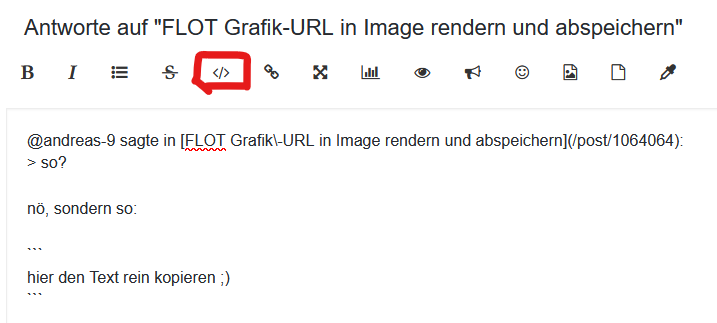
print("Ende")sowas in Codetags packen bitte !
@andreas-9 sagte in FLOT Grafik-URL in Image rendern und abspeichern:
sample.html
Nicht abrufbar !
Schau Dir mal den Adapter Puppeteer an.
Der könnte eine Lösung bringen ;) -
@andreas-9 sagte in FLOT Grafik-URL in Image rendern und abspeichern:
import requests
image_url = u'http://192.168.178.74:8082/flot/index.html?l[0][id]=hm-rega.0.4088&l[0][offset]=0&l[0][aggr ... border&window_bg=%23eee8e8&bg=0&height=330&titleSize=20&width=850'
response = requests.get(image_url)
print(response.status_code)
if response.status_code == 200:
with open("sample.html", 'wb') as f:
f.write(response.content)
print("Ende")sowas in Codetags packen bitte !
@andreas-9 sagte in FLOT Grafik-URL in Image rendern und abspeichern:
sample.html
Nicht abrufbar !
Schau Dir mal den Adapter Puppeteer an.
Der könnte eine Lösung bringen ;) -
@djmarc75 said in FLOT Grafik-URL in Image rendern und abspeichern:
sample.html
Nicht abrufbar !
Rechter Mausklick und speichern unter... dann klappts.
@andreas-9 sagte in FLOT Grafik-URL in Image rendern und abspeichern:
Rechter Mausklick und speichern unter... dann klappts.
Schön, den Rest meines Beitrags gelesen ? ;)
-
@andreas-9 sagte in FLOT Grafik-URL in Image rendern und abspeichern:
Rechter Mausklick und speichern unter... dann klappts.
Schön, den Rest meines Beitrags gelesen ? ;)
@djmarc75
Ja. Pupeteer habe ich auch schon früher ausprobiert. Da kam dann immer eine Fehlermeldung, irgendwas mit "headless"... Hab ich nicht kapiert.Homematic-Raspi auf Raspi 3+
IOBroker auf Raspi 4
Kostal PLENTICORE plus 4.2 mit Batterie; -
@andreas-9 sagte in FLOT Grafik-URL in Image rendern und abspeichern:
Rechter Mausklick und speichern unter... dann klappts.
Schön, den Rest meines Beitrags gelesen ? ;)
@djmarc75
Wenn ich das selbe wie in python in php versuche erhalte ich das selbe Ergebnis...
<?php
    $url = 'http://192.168.178.74:8082/flot/index.html?l% ... &noBorder=noborder&window_bg=%23eee8e8&bg=0&height=330&titleSize=20&width=850';

    $bild = '01.png';

    if (file_put_contents($bild, file_get_contents($url))) {
      echo "Bild gespeichert";}
?>
Einerseits gut - aber ich mache da wahrscheinlich einen Denkfehler.
in 01.png steht dann wieder der html-code wie in sample.html, das habe ich ja schon gepostet.
-
@djmarc75
Ja. Pupeteer habe ich auch schon früher ausprobiert. Da kam dann immer eine Fehlermeldung, irgendwas mit "headless"... Hab ich nicht kapiert.@andreas-9 sagte in FLOT Grafik-URL in Image rendern und abspeichern:
Da kam dann immer eine Fehlermeldung
bei mir kam da keine Fehlermeldung und der Adapter läuft spitze.
Vll mal Dein System "anzweifeln" ;)
Weiß ja niemand wie Du da so unterwegs bist.
Zeigen würde uU helfen -
@andreas-9 sagte in FLOT Grafik-URL in Image rendern und abspeichern:
Da kam dann immer eine Fehlermeldung
bei mir kam da keine Fehlermeldung und der Adapter läuft spitze.
Vll mal Dein System "anzweifeln" ;)
Weiß ja niemand wie Du da so unterwegs bist.
Zeigen würde uU helfen@djmarc75 said in FLOT Grafik-URL in Image rendern und abspeichern:
Ich werde es halt noch mal versuchen mit dem puppeteer...
Hab ja schliesslich das ganze system letzte Woche neu aufgesetzt.
Vlt klappts ja nun.
Vielen Dank erstmal!!!Homematic-Raspi auf Raspi 3+
IOBroker auf Raspi 4
Kostal PLENTICORE plus 4.2 mit Batterie; -
@djmarc75 said in FLOT Grafik-URL in Image rendern und abspeichern:
Ich werde es halt noch mal versuchen mit dem puppeteer...
Hab ja schliesslich das ganze system letzte Woche neu aufgesetzt.
Vlt klappts ja nun.
Vielen Dank erstmal!!!@andreas-9 sagte in FLOT Grafik-URL in Image rendern und abspeichern:
Hab ja schliesslich das ganze system letzte Woche neu aufgesetzt
Welches System und wie genau neu gemacht ?
Wäre interessant zu wissen ! -
@andreas-9 sagte in FLOT Grafik-URL in Image rendern und abspeichern:
Hab ja schliesslich das ganze system letzte Woche neu aufgesetzt
Welches System und wie genau neu gemacht ?
Wäre interessant zu wissen !@djmarc75 said in FLOT Grafik-URL in Image rendern und abspeichern:
Welches System und wie genau neu gemacht ?
Ich habe das raspi-image 'Debian Bookworm' mit dem Raspi-imager auf eine neue SD-Karte installiert und dann IObroker.
Dabei hab ich mich an diese Anleitung gehalten: https://technikkram.net/blog/2020/11/16/io-broker-auf-dem-raspberry-pi-installieren/
Dann hab ich folgende Adapter installiert: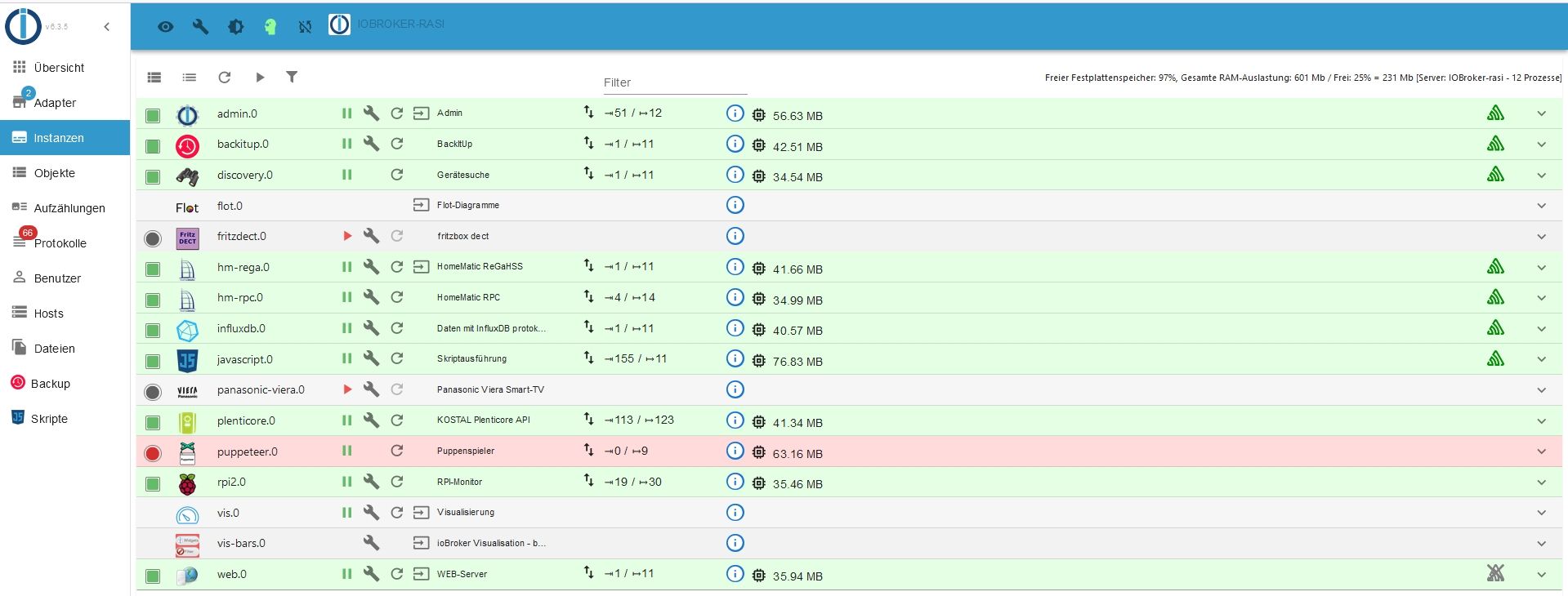
(Hier ist der puppeteer von heute schon dabei).
Hier ist das Installations-log vom Puppeteer:
puppeteer-log.txt
puppeteer-Test mit dem skript von @Marty56: https://forum.iobroker.net/topic/22413/websites-parsen-und-bedienen-mit-puppetteerIch bin kein Linux-Fachmann. Mit den Fehlermeldungen kann ich nicht viel anfangen.
Vielen Dank schon mal für die Zeit und die Hilfe!Homematic-Raspi auf Raspi 3+
IOBroker auf Raspi 4
Kostal PLENTICORE plus 4.2 mit Batterie; -
@djmarc75 said in FLOT Grafik-URL in Image rendern und abspeichern:
Welches System und wie genau neu gemacht ?
Ich habe das raspi-image 'Debian Bookworm' mit dem Raspi-imager auf eine neue SD-Karte installiert und dann IObroker.
Dabei hab ich mich an diese Anleitung gehalten: https://technikkram.net/blog/2020/11/16/io-broker-auf-dem-raspberry-pi-installieren/
Dann hab ich folgende Adapter installiert:
(Hier ist der puppeteer von heute schon dabei).
Hier ist das Installations-log vom Puppeteer:
puppeteer-log.txt
puppeteer-Test mit dem skript von @Marty56: https://forum.iobroker.net/topic/22413/websites-parsen-und-bedienen-mit-puppetteerIch bin kein Linux-Fachmann. Mit den Fehlermeldungen kann ich nicht viel anfangen.
Vielen Dank schon mal für die Zeit und die Hilfe!@andreas-9 sagte in FLOT Grafik-URL in Image rendern und abspeichern:
Dabei hab ich mich an diese Anleitung gehalten
Uralter Quatsch und auf Desktop basierend.
In dem LOG (welches man eigentlich in Codetags hier rein setzt) sehe ich zudem dass Node 18.13.0 installiert ist - quasi krumm.
Zeig mal bitte
iob diagLangfassung und auch bitte in Codetags ;)
-
@andreas-9 sagte in FLOT Grafik-URL in Image rendern und abspeichern:
Dabei hab ich mich an diese Anleitung gehalten
Uralter Quatsch und auf Desktop basierend.
In dem LOG (welches man eigentlich in Codetags hier rein setzt) sehe ich zudem dass Node 18.13.0 installiert ist - quasi krumm.
Zeig mal bitte
iob diagLangfassung und auch bitte in Codetags ;)
@djmarc75
so?Skript v.2023-10-10
*** BASE SYSTEM ***
Static hostname: IOBroker-rasi
Icon name: computer
Operating System: Raspbian GNU/Linux 12 (bookworm)
Kernel: Linux 6.1.0-rpi4-rpi-v7
Architecture: armModel : Raspberry Pi 3 Model B Plus Rev 1.3
Docker : false
Virtualization : none
Kernel : armv7l
Userland : armhfSystemuptime and Load:
14:11:27 up 7 min, 4 users, load average: 1.38, 1.75, 1.08
CPU threads: 4*** RASPBERRY THROTTLING ***
Current issues:
No throttling issues detected.Previously detected issues:
~ Under-voltage has occurred*** Time and Time Zones ***
Local time: Fri 2023-10-20 14:11:27 CEST
Universal time: Fri 2023-10-20 12:11:27 UTC
RTC time: n/a
Time zone: Europe/Berlin (CEST, +0200)
System clock synchronized: yes
NTP service: active
RTC in local TZ: no*** User and Groups ***
andi
/home/andi
andi adm dialout cdrom sudo audio video plugdev games users input render netdev lpadmin gpio i2c spi iobroker*** X-Server-Setup ***
X-Server: true
Desktop:
Terminal: tty
Boot Target: graphical.target*** MEMORY ***
total used free shared buff/cache available
Mem: 966M 798M 50M 9.9M 184M 168M
Swap: 104M 104M 69K
Total: 1.1G 903M 50M921 M total memory 761 M used memory 316 M active memory 476 M inactive memory 47 M free memory 3 M buffer memory 172 M swap cache 99 M total swap 99 M used swap 0 M free swapRaspberry only:
oom events: 0
lifetime oom required: 0 Mbytes
total time in oom handler: 0 ms
max time spent in oom handler: 0 ms*** FAILED SERVICES ***
UNIT LOAD ACTIVE SUB DESCRIPTION
0 loaded units listed.*** FILESYSTEM ***
Filesystem Type Size Used Avail Use% Mounted on
udev devtmpfs 325M 0 325M 0% /dev
tmpfs tmpfs 93M 912K 92M 1% /run
/dev/mmcblk0p2 ext4 235G 6.1G 217G 3% /
tmpfs tmpfs 461M 8.0K 461M 1% /dev/shm
tmpfs tmpfs 5.0M 12K 5.0M 1% /run/lock
/dev/mmcblk0p1 vfat 510M 113M 398M 23% /boot/firmware
tmpfs tmpfs 93M 36K 93M 1% /run/user/1000Messages concerning ext4 filesystem in dmesg:
[Fri Oct 20 14:03:45 2023] Kernel command line: coherent_pool=1M 8250.nr_uarts=0 snd_bcm2835.enable_headphones=0 snd_bcm2835.enable_headphones=1 snd_bcm2835.enable_hdmi=1 snd_bcm2835.enable_hdmi=0 vc_mem.mem_base=0x3ec00000 vc_mem.mem_size=0x40000000 console=ttyS0,115200 console=tty1 root=PARTUUID=3da5620d-02 rootfstype=ext4 fsck.repair=yes rootwait quiet splash plymouth.ignore-serial-consoles cfg80211.ieee80211_regdom=DE
[Fri Oct 20 14:03:52 2023] EXT4-fs (mmcblk0p2): mounted filesystem with ordered data mode. Quota mode: none.
[Fri Oct 20 14:03:55 2023] EXT4-fs (mmcblk0p2): re-mounted. Quota mode: none.Show mounted filesystems (real ones only):
TARGET SOURCE FSTYPE OPTIONS
/ /dev/mmcblk0p2 ext4 rw,noatime
`-/boot/firmware /dev/mmcblk0p1 vfat rw,relatime,fmask=0022,dmask=0022,codepage=437,iocharset=ascii,shortname=mixed,errors=remount-roFiles in neuralgic directories:
/var:
649M /var/
225M /var/log/journal/3d6b5879ff85490ca0b4d60fb921e0ca
225M /var/log/journal
225M /var/log
178M /var/libArchived and active journals take up 224.0M in the file system.
/opt/iobroker/backups:
29M /opt/iobroker/backups//opt/iobroker/iobroker-data:
175M /opt/iobroker/iobroker-data/
116M /opt/iobroker/iobroker-data/files
52M /opt/iobroker/iobroker-data/files/javascript.admin
34M /opt/iobroker/iobroker-data/files/javascript.admin/static
33M /opt/iobroker/iobroker-data/files/javascript.admin/static/jsThe five largest files in iobroker-data are:
21M /opt/iobroker/iobroker-data/files/web.admin/static/js/main.edf7552a.js.map
20M /opt/iobroker/iobroker-data/objects.jsonl
8.3M /opt/iobroker/iobroker-data/files/web.admin/static/js/main.edf7552a.js
7.2M /opt/iobroker/iobroker-data/states.jsonl
7.1M /opt/iobroker/iobroker-data/files/javascript.admin/static/js/610.f22de4ab.chunk.js.mapUSB-Devices by-id:
USB-Sticks - Avoid direct links to /dev/* in your adapter setups, please always prefer the links 'by-id':find: '/dev/serial/by-id/': No such file or directory
*** NodeJS-Installation ***
/usr/bin/nodejs v18.13.0
/usr/bin/node v18.13.0
/usr/bin/npm 9.2.0
/usr/bin/npx 9.2.0
/home/iobroker/.diag.sh: line 281: corepack: command not found*** nodejs is NOT correctly installed ***
nodejs:
Installed: 18.13.0+dfsg1-1+rpi1
Candidate: 18.13.0+dfsg1-1+rpi1
Version table:
*** 18.13.0+dfsg1-1+rpi1 500
500 http://raspbian.raspberrypi.com/raspbian bookworm/main armhf Packages
100 /var/lib/dpkg/statusTemp directories causing npm8 problem: 0
No problems detectedErrors in npm tree:
*** ioBroker-Installation ***
ioBroker Status
iobroker is running on this host.Objects type: jsonl
States type: jsonlCore adapters versions
js-controller: 5.0.12
admin: 6.3.5
javascript: 7.1.4Adapters from github: 0
Adapter State
-
system.adapter.admin.0 : admin : IOBroker-rasi - enabled, port: 8081, bind: 0.0.0.0 (SSL), run as: admin
-
system.adapter.backitup.0 : backitup : IOBroker-rasi - enabled
-
system.adapter.discovery.0 : discovery : IOBroker-rasi - enabled
system.adapter.flot.0 : flot : IOBroker-rasi - enabled
system.adapter.fritzdect.0 : fritzdect : IOBroker-rasi - disabled -
system.adapter.hm-rega.0 : hm-rega : IOBroker-rasi - enabled
-
system.adapter.hm-rpc.0 : hm-rpc : IOBroker-rasi - enabled, port: 0
-
system.adapter.influxdb.0 : influxdb : IOBroker-rasi - enabled, port: 8086
-
system.adapter.javascript.0 : javascript : IOBroker-rasi - enabled
system.adapter.panasonic-viera.0 : panasonic-viera : IOBroker-rasi - disabled -
system.adapter.plenticore.0 : plenticore : IOBroker-rasi - enabled, port: 80
system.adapter.puppeteer.0 : puppeteer : IOBroker-rasi - enabled -
system.adapter.rpi2.0 : rpi2 : IOBroker-rasi - enabled
system.adapter.vis-bars.0 : vis-bars : IOBroker-rasi - disabled
system.adapter.vis.0 : vis : IOBroker-rasi - enabled -
system.adapter.web.0 : web : IOBroker-rasi - enabled, port: 8082, bind: 0.0.0.0, run as: admin
-
instance is alive
Enabled adapters with bindings
- system.adapter.admin.0 : admin : IOBroker-rasi - enabled, port: 8081, bind: 0.0.0.0 (SSL), run as: admin
- system.adapter.hm-rpc.0 : hm-rpc : IOBroker-rasi - enabled, port: 0
- system.adapter.influxdb.0 : influxdb : IOBroker-rasi - enabled, port: 8086
- system.adapter.plenticore.0 : plenticore : IOBroker-rasi - enabled, port: 80
- system.adapter.web.0 : web : IOBroker-rasi - enabled, port: 8082, bind: 0.0.0.0, run as: admin
ioBroker-Repositories
stable : http://download.iobroker.net/sources-dist.json
beta : http://download.iobroker.net/sources-dist-latest.jsonActive repo(s): stable
Installed ioBroker-Instances
Used repository: stable
Adapter "admin" : 6.10.1 , installed 6.3.5 [Updatable]
Adapter "backitup" : 2.8.1 , installed 2.6.23 [Updatable]
Adapter "cul" : 2.2.0 , installed 2.2.0
Adapter "discovery" : 3.1.0 , installed 3.1.0
Adapter "flot" : 1.12.0 , installed 1.12.0
Adapter "fritzdect" : 2.3.1 , installed 2.3.1
Adapter "hm-rega" : 3.0.47 , installed 3.0.47
Adapter "hm-rpc" : 1.15.19 , installed 1.15.19
Adapter "influxdb" : 3.2.0 , installed 3.2.0
Adapter "javascript" : 7.1.4 , installed 7.1.4
Controller "js-controller": 5.0.12 , installed 5.0.12
Adapter "mediola-gateway": 1.0.1 , installed 1.0.1
Adapter "panasonic-viera": 2.0.0 , installed 2.0.0
Adapter "plenticore" : 2.2.0 , installed 2.2.0
Adapter "puppeteer" : 0.2.7 , installed 0.2.7
Adapter "rpi2" : 1.3.2 , installed 1.3.2
Adapter "simple-api" : 2.7.2 , installed 2.7.2
Adapter "socketio" : 6.5.5 , installed 6.5.5
Adapter "sql" : 2.2.0 , installed 2.2.0
Adapter "vis" : 1.4.16 , installed 1.4.16
Adapter "vis-bars" : 0.1.4 , installed 0.1.4
Adapter "web" : 6.1.2 , installed 6.1.2
Adapter "ws" : 2.5.5 , installed 2.5.5Objects and States
Please stand by - This may take a while
Objects: 1220
States: 896*** OS-Repositories and Updates ***
E: The repository 'https://repos.influxdata.com/debian bookworm Release' does not have a Release file.
W: http://raspbian.raspberrypi.com/raspbian/dists/bookworm/InRelease: Key is stored in legacy trusted.gpg keyring (/etc/apt/trusted.gpg), see the DEPRECATION section in apt-key(8) for details.
Pending Updates: 16*** Listening Ports ***
Active Internet connections (only servers)
Proto Recv-Q Send-Q Local Address Foreign Address State User Inode PID/Program name
tcp 0 0 127.0.0.1:9000 0.0.0.0:* LISTEN 1001 18807 688/iobroker.js-con
tcp 0 0 127.0.0.1:9001 0.0.0.0:* LISTEN 1001 15244 688/iobroker.js-con
tcp 0 0 127.0.0.1:41245 0.0.0.0:* LISTEN 1001 19310 1570/chromium-brows
tcp 0 0 0.0.0.0:22 0.0.0.0:* LISTEN 0 13884 706/sshd: /usr/sbin
tcp 0 0 0.0.0.0:42010 0.0.0.0:* LISTEN 1001 19726 1527/io.hm-rpc.0
tcp 0 0 127.0.0.1:8088 0.0.0.0:* LISTEN 112 16521 686/influxd
tcp 0 0 127.0.0.1:631 0.0.0.0:* LISTEN 0 16527 685/cupsd
tcp6 0 0 ::1:631 :::* LISTEN 0 16526 685/cupsd
tcp6 0 0 :::22 :::* LISTEN 0 13886 706/sshd: /usr/sbin
tcp6 0 0 :::8086 :::* LISTEN 112 15143 686/influxd
tcp6 0 0 :::8081 :::* LISTEN 1001 17990 1321/io.admin.0
tcp6 0 0 :::8082 :::* LISTEN 1001 21575 1733/io.web.0
udp 0 0 0.0.0.0:631 0.0.0.0:* 0 14139 857/cups-browsed
udp 0 0 0.0.0.0:39144 0.0.0.0:* 104 16120 519/avahi-daemon: r
udp 0 0 0.0.0.0:5353 0.0.0.0:* 104 16118 519/avahi-daemon: r
udp6 0 0 fe80::892c:24f9:e72:546 :::* 0 17461 622/NetworkManager
udp6 0 0 :::58962 :::* 104 16121 519/avahi-daemon: r
udp6 0 0 :::5353 :::* 104 16119 519/avahi-daemon: r*** Log File - Last 25 Lines ***
TROUBLESHOOTING: https://pptr.dev/troubleshooting
at ChildProcess.onClose (/opt/iobroker/node_modules/@puppeteer/browsers/lib/cjs/launch.js:262:24)
at ChildProcess.emit (node:events:525:35)
at ChildProcess._handle.onexit (node:internal/child_process:291:12)
2023-10-20 14:06:53.657 - error: puppeteer.0 (2039) Failed to launch the browser process! undefined
TROUBLESHOOTING: https://pptr.dev/troubleshooting
2023-10-20 14:06:53.690 - info: puppeteer.0 (2039) terminating
2023-10-20 14:06:53.693 - warn: puppeteer.0 (2039) Terminated (UNCAUGHT_EXCEPTION): Without reason
2023-10-20 14:06:54.200 - info: puppeteer.0 (2039) terminating
2023-10-20 14:06:54.326 - error: host.IOBroker-rasi Caught by controller[0]:
2023-10-20 14:06:54.328 - error: host.IOBroker-rasi Caught by controller[0]: Puppeteer old Headless deprecation warning:
2023-10-20 14:06:54.329 - error: host.IOBroker-rasi Caught by controller[0]: In the near featureheadless: truewill default to the new Headless mode
2023-10-20 14:06:54.331 - error: host.IOBroker-rasi Caught by controller[0]: for Chrome instead of the old Headless implementation. For more
2023-10-20 14:06:54.332 - error: host.IOBroker-rasi Caught by controller[0]: information, please see https://developer.chrome.com/articles/new-headless/.
2023-10-20 14:06:54.332 - error: host.IOBroker-rasi Caught by controller[0]: Consider opting in early by passingheadless: "new"topuppeteer.launch()
2023-10-20 14:06:54.333 - error: host.IOBroker-rasi Caught by controller[0]: If you encounter any bugs, please report them to https://github.com/puppeteer/puppeteer/issues/new/choose.
2023-10-20 14:06:54.334 - error: host.IOBroker-rasi instance system.adapter.puppeteer.0 terminated with code 6 (UNCAUGHT_EXCEPTION)
2023-10-20 14:06:54.335 - info: host.IOBroker-rasi Restart adapter system.adapter.puppeteer.0 because enabled
2023-10-20 14:06:54.336 - warn: host.IOBroker-rasi Do not restart adapter system.adapter.puppeteer.0 because restart loop detectedHomematic-Raspi auf Raspi 3+
IOBroker auf Raspi 4
Kostal PLENTICORE plus 4.2 mit Batterie; -
-
@djmarc75
so?Skript v.2023-10-10
*** BASE SYSTEM ***
Static hostname: IOBroker-rasi
Icon name: computer
Operating System: Raspbian GNU/Linux 12 (bookworm)
Kernel: Linux 6.1.0-rpi4-rpi-v7
Architecture: armModel : Raspberry Pi 3 Model B Plus Rev 1.3
Docker : false
Virtualization : none
Kernel : armv7l
Userland : armhfSystemuptime and Load:
14:11:27 up 7 min, 4 users, load average: 1.38, 1.75, 1.08
CPU threads: 4*** RASPBERRY THROTTLING ***
Current issues:
No throttling issues detected.Previously detected issues:
~ Under-voltage has occurred*** Time and Time Zones ***
Local time: Fri 2023-10-20 14:11:27 CEST
Universal time: Fri 2023-10-20 12:11:27 UTC
RTC time: n/a
Time zone: Europe/Berlin (CEST, +0200)
System clock synchronized: yes
NTP service: active
RTC in local TZ: no*** User and Groups ***
andi
/home/andi
andi adm dialout cdrom sudo audio video plugdev games users input render netdev lpadmin gpio i2c spi iobroker*** X-Server-Setup ***
X-Server: true
Desktop:
Terminal: tty
Boot Target: graphical.target*** MEMORY ***
total used free shared buff/cache available
Mem: 966M 798M 50M 9.9M 184M 168M
Swap: 104M 104M 69K
Total: 1.1G 903M 50M921 M total memory 761 M used memory 316 M active memory 476 M inactive memory 47 M free memory 3 M buffer memory 172 M swap cache 99 M total swap 99 M used swap 0 M free swapRaspberry only:
oom events: 0
lifetime oom required: 0 Mbytes
total time in oom handler: 0 ms
max time spent in oom handler: 0 ms*** FAILED SERVICES ***
UNIT LOAD ACTIVE SUB DESCRIPTION
0 loaded units listed.*** FILESYSTEM ***
Filesystem Type Size Used Avail Use% Mounted on
udev devtmpfs 325M 0 325M 0% /dev
tmpfs tmpfs 93M 912K 92M 1% /run
/dev/mmcblk0p2 ext4 235G 6.1G 217G 3% /
tmpfs tmpfs 461M 8.0K 461M 1% /dev/shm
tmpfs tmpfs 5.0M 12K 5.0M 1% /run/lock
/dev/mmcblk0p1 vfat 510M 113M 398M 23% /boot/firmware
tmpfs tmpfs 93M 36K 93M 1% /run/user/1000Messages concerning ext4 filesystem in dmesg:
[Fri Oct 20 14:03:45 2023] Kernel command line: coherent_pool=1M 8250.nr_uarts=0 snd_bcm2835.enable_headphones=0 snd_bcm2835.enable_headphones=1 snd_bcm2835.enable_hdmi=1 snd_bcm2835.enable_hdmi=0 vc_mem.mem_base=0x3ec00000 vc_mem.mem_size=0x40000000 console=ttyS0,115200 console=tty1 root=PARTUUID=3da5620d-02 rootfstype=ext4 fsck.repair=yes rootwait quiet splash plymouth.ignore-serial-consoles cfg80211.ieee80211_regdom=DE
[Fri Oct 20 14:03:52 2023] EXT4-fs (mmcblk0p2): mounted filesystem with ordered data mode. Quota mode: none.
[Fri Oct 20 14:03:55 2023] EXT4-fs (mmcblk0p2): re-mounted. Quota mode: none.Show mounted filesystems (real ones only):
TARGET SOURCE FSTYPE OPTIONS
/ /dev/mmcblk0p2 ext4 rw,noatime
`-/boot/firmware /dev/mmcblk0p1 vfat rw,relatime,fmask=0022,dmask=0022,codepage=437,iocharset=ascii,shortname=mixed,errors=remount-roFiles in neuralgic directories:
/var:
649M /var/
225M /var/log/journal/3d6b5879ff85490ca0b4d60fb921e0ca
225M /var/log/journal
225M /var/log
178M /var/libArchived and active journals take up 224.0M in the file system.
/opt/iobroker/backups:
29M /opt/iobroker/backups//opt/iobroker/iobroker-data:
175M /opt/iobroker/iobroker-data/
116M /opt/iobroker/iobroker-data/files
52M /opt/iobroker/iobroker-data/files/javascript.admin
34M /opt/iobroker/iobroker-data/files/javascript.admin/static
33M /opt/iobroker/iobroker-data/files/javascript.admin/static/jsThe five largest files in iobroker-data are:
21M /opt/iobroker/iobroker-data/files/web.admin/static/js/main.edf7552a.js.map
20M /opt/iobroker/iobroker-data/objects.jsonl
8.3M /opt/iobroker/iobroker-data/files/web.admin/static/js/main.edf7552a.js
7.2M /opt/iobroker/iobroker-data/states.jsonl
7.1M /opt/iobroker/iobroker-data/files/javascript.admin/static/js/610.f22de4ab.chunk.js.mapUSB-Devices by-id:
USB-Sticks - Avoid direct links to /dev/* in your adapter setups, please always prefer the links 'by-id':find: '/dev/serial/by-id/': No such file or directory
*** NodeJS-Installation ***
/usr/bin/nodejs v18.13.0
/usr/bin/node v18.13.0
/usr/bin/npm 9.2.0
/usr/bin/npx 9.2.0
/home/iobroker/.diag.sh: line 281: corepack: command not found*** nodejs is NOT correctly installed ***
nodejs:
Installed: 18.13.0+dfsg1-1+rpi1
Candidate: 18.13.0+dfsg1-1+rpi1
Version table:
*** 18.13.0+dfsg1-1+rpi1 500
500 http://raspbian.raspberrypi.com/raspbian bookworm/main armhf Packages
100 /var/lib/dpkg/statusTemp directories causing npm8 problem: 0
No problems detectedErrors in npm tree:
*** ioBroker-Installation ***
ioBroker Status
iobroker is running on this host.Objects type: jsonl
States type: jsonlCore adapters versions
js-controller: 5.0.12
admin: 6.3.5
javascript: 7.1.4Adapters from github: 0
Adapter State
-
system.adapter.admin.0 : admin : IOBroker-rasi - enabled, port: 8081, bind: 0.0.0.0 (SSL), run as: admin
-
system.adapter.backitup.0 : backitup : IOBroker-rasi - enabled
-
system.adapter.discovery.0 : discovery : IOBroker-rasi - enabled
system.adapter.flot.0 : flot : IOBroker-rasi - enabled
system.adapter.fritzdect.0 : fritzdect : IOBroker-rasi - disabled -
system.adapter.hm-rega.0 : hm-rega : IOBroker-rasi - enabled
-
system.adapter.hm-rpc.0 : hm-rpc : IOBroker-rasi - enabled, port: 0
-
system.adapter.influxdb.0 : influxdb : IOBroker-rasi - enabled, port: 8086
-
system.adapter.javascript.0 : javascript : IOBroker-rasi - enabled
system.adapter.panasonic-viera.0 : panasonic-viera : IOBroker-rasi - disabled -
system.adapter.plenticore.0 : plenticore : IOBroker-rasi - enabled, port: 80
system.adapter.puppeteer.0 : puppeteer : IOBroker-rasi - enabled -
system.adapter.rpi2.0 : rpi2 : IOBroker-rasi - enabled
system.adapter.vis-bars.0 : vis-bars : IOBroker-rasi - disabled
system.adapter.vis.0 : vis : IOBroker-rasi - enabled -
system.adapter.web.0 : web : IOBroker-rasi - enabled, port: 8082, bind: 0.0.0.0, run as: admin
-
instance is alive
Enabled adapters with bindings
- system.adapter.admin.0 : admin : IOBroker-rasi - enabled, port: 8081, bind: 0.0.0.0 (SSL), run as: admin
- system.adapter.hm-rpc.0 : hm-rpc : IOBroker-rasi - enabled, port: 0
- system.adapter.influxdb.0 : influxdb : IOBroker-rasi - enabled, port: 8086
- system.adapter.plenticore.0 : plenticore : IOBroker-rasi - enabled, port: 80
- system.adapter.web.0 : web : IOBroker-rasi - enabled, port: 8082, bind: 0.0.0.0, run as: admin
ioBroker-Repositories
stable : http://download.iobroker.net/sources-dist.json
beta : http://download.iobroker.net/sources-dist-latest.jsonActive repo(s): stable
Installed ioBroker-Instances
Used repository: stable
Adapter "admin" : 6.10.1 , installed 6.3.5 [Updatable]
Adapter "backitup" : 2.8.1 , installed 2.6.23 [Updatable]
Adapter "cul" : 2.2.0 , installed 2.2.0
Adapter "discovery" : 3.1.0 , installed 3.1.0
Adapter "flot" : 1.12.0 , installed 1.12.0
Adapter "fritzdect" : 2.3.1 , installed 2.3.1
Adapter "hm-rega" : 3.0.47 , installed 3.0.47
Adapter "hm-rpc" : 1.15.19 , installed 1.15.19
Adapter "influxdb" : 3.2.0 , installed 3.2.0
Adapter "javascript" : 7.1.4 , installed 7.1.4
Controller "js-controller": 5.0.12 , installed 5.0.12
Adapter "mediola-gateway": 1.0.1 , installed 1.0.1
Adapter "panasonic-viera": 2.0.0 , installed 2.0.0
Adapter "plenticore" : 2.2.0 , installed 2.2.0
Adapter "puppeteer" : 0.2.7 , installed 0.2.7
Adapter "rpi2" : 1.3.2 , installed 1.3.2
Adapter "simple-api" : 2.7.2 , installed 2.7.2
Adapter "socketio" : 6.5.5 , installed 6.5.5
Adapter "sql" : 2.2.0 , installed 2.2.0
Adapter "vis" : 1.4.16 , installed 1.4.16
Adapter "vis-bars" : 0.1.4 , installed 0.1.4
Adapter "web" : 6.1.2 , installed 6.1.2
Adapter "ws" : 2.5.5 , installed 2.5.5Objects and States
Please stand by - This may take a while
Objects: 1220
States: 896*** OS-Repositories and Updates ***
E: The repository 'https://repos.influxdata.com/debian bookworm Release' does not have a Release file.
W: http://raspbian.raspberrypi.com/raspbian/dists/bookworm/InRelease: Key is stored in legacy trusted.gpg keyring (/etc/apt/trusted.gpg), see the DEPRECATION section in apt-key(8) for details.
Pending Updates: 16*** Listening Ports ***
Active Internet connections (only servers)
Proto Recv-Q Send-Q Local Address Foreign Address State User Inode PID/Program name
tcp 0 0 127.0.0.1:9000 0.0.0.0:* LISTEN 1001 18807 688/iobroker.js-con
tcp 0 0 127.0.0.1:9001 0.0.0.0:* LISTEN 1001 15244 688/iobroker.js-con
tcp 0 0 127.0.0.1:41245 0.0.0.0:* LISTEN 1001 19310 1570/chromium-brows
tcp 0 0 0.0.0.0:22 0.0.0.0:* LISTEN 0 13884 706/sshd: /usr/sbin
tcp 0 0 0.0.0.0:42010 0.0.0.0:* LISTEN 1001 19726 1527/io.hm-rpc.0
tcp 0 0 127.0.0.1:8088 0.0.0.0:* LISTEN 112 16521 686/influxd
tcp 0 0 127.0.0.1:631 0.0.0.0:* LISTEN 0 16527 685/cupsd
tcp6 0 0 ::1:631 :::* LISTEN 0 16526 685/cupsd
tcp6 0 0 :::22 :::* LISTEN 0 13886 706/sshd: /usr/sbin
tcp6 0 0 :::8086 :::* LISTEN 112 15143 686/influxd
tcp6 0 0 :::8081 :::* LISTEN 1001 17990 1321/io.admin.0
tcp6 0 0 :::8082 :::* LISTEN 1001 21575 1733/io.web.0
udp 0 0 0.0.0.0:631 0.0.0.0:* 0 14139 857/cups-browsed
udp 0 0 0.0.0.0:39144 0.0.0.0:* 104 16120 519/avahi-daemon: r
udp 0 0 0.0.0.0:5353 0.0.0.0:* 104 16118 519/avahi-daemon: r
udp6 0 0 fe80::892c:24f9:e72:546 :::* 0 17461 622/NetworkManager
udp6 0 0 :::58962 :::* 104 16121 519/avahi-daemon: r
udp6 0 0 :::5353 :::* 104 16119 519/avahi-daemon: r*** Log File - Last 25 Lines ***
TROUBLESHOOTING: https://pptr.dev/troubleshooting
at ChildProcess.onClose (/opt/iobroker/node_modules/@puppeteer/browsers/lib/cjs/launch.js:262:24)
at ChildProcess.emit (node:events:525:35)
at ChildProcess._handle.onexit (node:internal/child_process:291:12)
2023-10-20 14:06:53.657 - error: puppeteer.0 (2039) Failed to launch the browser process! undefined
TROUBLESHOOTING: https://pptr.dev/troubleshooting
2023-10-20 14:06:53.690 - info: puppeteer.0 (2039) terminating
2023-10-20 14:06:53.693 - warn: puppeteer.0 (2039) Terminated (UNCAUGHT_EXCEPTION): Without reason
2023-10-20 14:06:54.200 - info: puppeteer.0 (2039) terminating
2023-10-20 14:06:54.326 - error: host.IOBroker-rasi Caught by controller[0]:
2023-10-20 14:06:54.328 - error: host.IOBroker-rasi Caught by controller[0]: Puppeteer old Headless deprecation warning:
2023-10-20 14:06:54.329 - error: host.IOBroker-rasi Caught by controller[0]: In the near featureheadless: truewill default to the new Headless mode
2023-10-20 14:06:54.331 - error: host.IOBroker-rasi Caught by controller[0]: for Chrome instead of the old Headless implementation. For more
2023-10-20 14:06:54.332 - error: host.IOBroker-rasi Caught by controller[0]: information, please see https://developer.chrome.com/articles/new-headless/.
2023-10-20 14:06:54.332 - error: host.IOBroker-rasi Caught by controller[0]: Consider opting in early by passingheadless: "new"topuppeteer.launch()
2023-10-20 14:06:54.333 - error: host.IOBroker-rasi Caught by controller[0]: If you encounter any bugs, please report them to https://github.com/puppeteer/puppeteer/issues/new/choose.
2023-10-20 14:06:54.334 - error: host.IOBroker-rasi instance system.adapter.puppeteer.0 terminated with code 6 (UNCAUGHT_EXCEPTION)
2023-10-20 14:06:54.335 - info: host.IOBroker-rasi Restart adapter system.adapter.puppeteer.0 because enabled
2023-10-20 14:06:54.336 - warn: host.IOBroker-rasi Do not restart adapter system.adapter.puppeteer.0 because restart loop detected -
-
-
@andreas-9 sagte in FLOT Grafik-URL in Image rendern und abspeichern:
na hab ich doch
naja ;)
unabhängig davon:
RPI3 hat nur 1 GB RAM - zu schwach auf der Brust
Desktop aktiv - weg damitdann
iob stop iob fix iob start warten !!! iob nodejs-update -
@andreas-9 sagte in FLOT Grafik-URL in Image rendern und abspeichern:
na hab ich doch
naja ;)
unabhängig davon:
RPI3 hat nur 1 GB RAM - zu schwach auf der Brust
Desktop aktiv - weg damitdann
iob stop iob fix iob start warten !!! iob nodejs-update -
@djmarc75
hat leider nichts gebracht. Im iob diag steht immer noch: *** nodejs is NOT correctly installed ***@andreas-9 sagte in FLOT Grafik-URL in Image rendern und abspeichern:
Im iob diag steht immer noch: *** nodejs is NOT correctly installed ***
bitte nichts nacherzählen sondern zeigen (Codetags) ;)
-
@andreas-9 sagte in FLOT Grafik-URL in Image rendern und abspeichern:
Im iob diag steht immer noch: *** nodejs is NOT correctly installed ***
bitte nichts nacherzählen sondern zeigen (Codetags) ;)
Skript v.2023-10-10

*** BASE SYSTEM ***
 Static hostname: IOBroker-rasi
       Icon name: computer
Operating System: Raspbian GNU/Linux 12 (bookworm)
          Kernel: Linux 6.1.0-rpi4-rpi-v7
    Architecture: arm

Model           : Raspberry Pi 3 Model B Plus Rev 1.3
Docker          : false
Virtualization  : none
Kernel          : armv7l
Userland        : armhf

Systemuptime and Load:
 15:20:29 up  1:16,  5 users,  load average: 1.99, 1.86, 1.23
CPU threads: 4


*** RASPBERRY THROTTLING ***
Current issues:
~ Under-voltage detected

Previously detected issues:
~ Under-voltage has occurred

*** Time and Time Zones ***
               Local time: Fri 2023-10-20 15:20:29 CEST
           Universal time: Fri 2023-10-20 13:20:29 UTC
                 RTC time: n/a
                Time zone: Europe/Berlin (CEST, +0200)
System clock synchronized: yes
              NTP service: active
          RTC in local TZ: no

*** User and Groups ***
andi
/home/andi
andi adm dialout cdrom sudo audio video plugdev games users input render netdev lpadmin gpio i2c spi iobroker

*** X-Server-Setup ***
X-Server:       true
Desktop:
Terminal:       tty
Boot Target:    graphical.target

*** MEMORY ***
               total        used        free      shared  buff/cache   available
Mem:            966M        769M         56M        245K        199M        197M
Swap:           104M        104M        155K
Total:          1.1G        874M         56M

          921 M total memory
          734 M used memory
          636 M active memory
          145 M inactive memory
           53 M free memory
            7 M buffer memory
          182 M swap cache
           99 M total swap
           99 M used swap
            0 M free swap

Raspberry only:
oom events: 0
lifetime oom required: 0 Mbytes
total time in oom handler: 0 ms
max time spent in oom handler: 0 ms

*** FAILED SERVICES ***

  UNIT LOAD ACTIVE SUB DESCRIPTION
0 loaded units listed.

*** FILESYSTEM ***
Filesystem     Type      Size  Used Avail Use% Mounted on
udev           devtmpfs  325M     0  325M   0% /dev
tmpfs          tmpfs      93M  920K   92M   1% /run
/dev/mmcblk0p2 ext4      235G  6.1G  217G   3% /
tmpfs          tmpfs     461M  8.0K  461M   1% /dev/shm
tmpfs          tmpfs     5.0M   12K  5.0M   1% /run/lock
/dev/mmcblk0p1 vfat      510M  113M  398M  23% /boot/firmware
tmpfs          tmpfs      93M   36K   93M   1% /run/user/1000

Messages concerning ext4 filesystem in dmesg:
[Fri Oct 20 14:03:45 2023] Kernel command line: coherent_pool=1M 8250.nr_uarts=0 snd_bcm2835.enable_headphones=0 snd_bcm2835.enable_headphones=1 snd_bcm2835.enable_hdmi=1 snd_bcm2835.enable_hdmi=0  vc_mem.mem_base=0x3ec00000 vc_mem.mem_size=0x40000000  console=ttyS0,115200 console=tty1 root=PARTUUID=3da5620d-02 rootfstype=ext4 fsck.repair=yes rootwait quiet splash plymouth.ignore-serial-consoles cfg80211.ieee80211_regdom=DE
[Fri Oct 20 14:03:52 2023] EXT4-fs (mmcblk0p2): mounted filesystem with ordered data mode. Quota mode: none.
[Fri Oct 20 14:03:55 2023] EXT4-fs (mmcblk0p2): re-mounted. Quota mode: none.

Show mounted filesystems \(real ones only\):
TARGET           SOURCE         FSTYPE OPTIONS
/                /dev/mmcblk0p2 ext4   rw,noatime
`-/boot/firmware /dev/mmcblk0p1 vfat   rw,relatime,fmask=0022,dmask=0022,codepage=437,iocharset=ascii,shortname=mixed,errors=remount-ro

Files in neuralgic directories:

/var:
655M    /var/
225M    /var/log/journal/3d6b5879ff85490ca0b4d60fb921e0ca
225M    /var/log/journal
225M    /var/log
183M    /var/lib

Archived and active journals take up 224.0M in the file system.

/opt/iobroker/backups:
29M     /opt/iobroker/backups/

/opt/iobroker/iobroker-data:
154M    /opt/iobroker/iobroker-data/
116M    /opt/iobroker/iobroker-data/files
52M     /opt/iobroker/iobroker-data/files/javascript.admin
34M     /opt/iobroker/iobroker-data/files/javascript.admin/static
33M     /opt/iobroker/iobroker-data/files/javascript.admin/static/js

The five largest files in iobroker-data are:
21M     /opt/iobroker/iobroker-data/files/web.admin/static/js/main.edf7552a.js.map
8.3M    /opt/iobroker/iobroker-data/files/web.admin/static/js/main.edf7552a.js
7.1M    /opt/iobroker/iobroker-data/files/javascript.admin/static/js/610.f22de4ab.chunk.js.map
6.3M    /opt/iobroker/iobroker-data/files/admin.admin/custom/static/js/vendors-node_modules_iobroker_adapter-react-v5_assets_devices_parseNames_js-node_modules_iobr-99c23e.847b8ad9.chunk.js.map
5.8M    /opt/iobroker/iobroker-data/files/javascript.admin/static/js/550.cfbef968.chunk.js.map

USB-Devices by-id:
USB-Sticks -  Avoid direct links to /dev/* in your adapter setups, please always prefer the links 'by-id':

find: '/dev/serial/by-id/': No such file or directory

*** NodeJS-Installation ***

/usr/bin/nodejs         v18.13.0
/usr/bin/node           v18.13.0
/usr/bin/npm            9.2.0
/usr/bin/npx            9.2.0
/home/iobroker/.diag.sh: line 281: corepack: command not found

*** nodejs is NOT correctly installed ***

nodejs:
  Installed: 18.13.0+dfsg1-1+rpi1
  Candidate: 18.18.2-1nodesource1
  Version table:
     18.18.2-1nodesource1 1001
        500 https://deb.nodesource.com/node_18.x nodistro/main armhf Packages
     18.18.1-1nodesource1 1001
        500 https://deb.nodesource.com/node_18.x nodistro/main armhf Packages
     18.18.0-1nodesource1 1001
        500 https://deb.nodesource.com/node_18.x nodistro/main armhf Packages
     18.17.1-1nodesource1 1001
        500 https://deb.nodesource.com/node_18.x nodistro/main armhf Packages
     18.17.0-1nodesource1 1001
        500 https://deb.nodesource.com/node_18.x nodistro/main armhf Packages
     18.16.1-1nodesource1 1001
        500 https://deb.nodesource.com/node_18.x nodistro/main armhf Packages
     18.16.0-1nodesource1 1001
        500 https://deb.nodesource.com/node_18.x nodistro/main armhf Packages
     18.15.0-1nodesource1 1001
        500 https://deb.nodesource.com/node_18.x nodistro/main armhf Packages
     18.14.2-1nodesource1 1001
        500 https://deb.nodesource.com/node_18.x nodistro/main armhf Packages
     18.14.1-1nodesource1 1001
        500 https://deb.nodesource.com/node_18.x nodistro/main armhf Packages
     18.14.0-1nodesource1 1001
        500 https://deb.nodesource.com/node_18.x nodistro/main armhf Packages
 *** 18.13.0+dfsg1-1+rpi1 500
        500 http://raspbian.raspberrypi.com/raspbian bookworm/main armhf Packages
        100 /var/lib/dpkg/status
     18.13.0-1nodesource1 1001
        500 https://deb.nodesource.com/node_18.x nodistro/main armhf Packages
     18.12.0-1nodesource1 1001
        500 https://deb.nodesource.com/node_18.x nodistro/main armhf Packages
     18.11.0-1nodesource1 1001
        500 https://deb.nodesource.com/node_18.x nodistro/main armhf Packages
     18.10.0-1nodesource1 1001
        500 https://deb.nodesource.com/node_18.x nodistro/main armhf Packages
     18.9.1-1nodesource1 1001
        500 https://deb.nodesource.com/node_18.x nodistro/main armhf Packages
     18.9.0-1nodesource1 1001
        500 https://deb.nodesource.com/node_18.x nodistro/main armhf Packages
     18.8.0-1nodesource1 1001
        500 https://deb.nodesource.com/node_18.x nodistro/main armhf Packages
     18.7.0-1nodesource1 1001
        500 https://deb.nodesource.com/node_18.x nodistro/main armhf Packages
     18.6.0-1nodesource1 1001
        500 https://deb.nodesource.com/node_18.x nodistro/main armhf Packages
     18.5.0-1nodesource1 1001
        500 https://deb.nodesource.com/node_18.x nodistro/main armhf Packages
     18.4.0-1nodesource1 1001
        500 https://deb.nodesource.com/node_18.x nodistro/main armhf Packages
     18.3.0-1nodesource1 1001
        500 https://deb.nodesource.com/node_18.x nodistro/main armhf Packages
     18.2.0-1nodesource1 1001
        500 https://deb.nodesource.com/node_18.x nodistro/main armhf Packages
     18.1.0-1nodesource1 1001
        500 https://deb.nodesource.com/node_18.x nodistro/main armhf Packages
     18.0.0-1nodesource1 1001
        500 https://deb.nodesource.com/node_18.x nodistro/main armhf Packages

Temp directories causing npm8 problem: 0
No problems detected

Errors in npm tree:

*** ioBroker-Installation ***

ioBroker Status
iobroker is running on this host.


Objects type: jsonl
States  type: jsonl

Core adapters versions
js-controller:  5.0.12
admin:          6.3.5
javascript:     7.1.4

Adapters from github:   0

Adapter State
+ system.adapter.admin.0                  : admin                 : IOBroker-rasi                            -  enabled, port: 8081, bind: 0.0.0.0 (SSL), run as: admin
+ system.adapter.backitup.0               : backitup              : IOBroker-rasi                            -  enabled
+ system.adapter.discovery.0              : discovery             : IOBroker-rasi                            -  enabled
  system.adapter.flot.0                   : flot                  : IOBroker-rasi                            -  enabled
  system.adapter.fritzdect.0              : fritzdect             : IOBroker-rasi                            - disabled
+ system.adapter.hm-rega.0                : hm-rega               : IOBroker-rasi                            -  enabled
+ system.adapter.hm-rpc.0                 : hm-rpc                : IOBroker-rasi                            -  enabled, port: 0
+ system.adapter.influxdb.0               : influxdb              : IOBroker-rasi                            -  enabled, port: 8086
+ system.adapter.javascript.0             : javascript            : IOBroker-rasi                            -  enabled
  system.adapter.panasonic-viera.0        : panasonic-viera       : IOBroker-rasi                            - disabled
+ system.adapter.plenticore.0             : plenticore            : IOBroker-rasi                            -  enabled, port: 80
  system.adapter.puppeteer.0              : puppeteer             : IOBroker-rasi                            -  enabled
+ system.adapter.rpi2.0                   : rpi2                  : IOBroker-rasi                            -  enabled
  system.adapter.vis-bars.0               : vis-bars              : IOBroker-rasi                            - disabled
  system.adapter.vis.0                    : vis                   : IOBroker-rasi                            -  enabled
+ system.adapter.web.0                    : web                   : IOBroker-rasi                            -  enabled, port: 8082, bind: 0.0.0.0, run as: admin

+ instance is alive

Enabled adapters with bindings
+ system.adapter.admin.0                  : admin                 : IOBroker-rasi                            -  enabled, port: 8081, bind: 0.0.0.0 (SSL), run as: admin
+ system.adapter.hm-rpc.0                 : hm-rpc                : IOBroker-rasi                            -  enabled, port: 0
+ system.adapter.influxdb.0               : influxdb              : IOBroker-rasi                            -  enabled, port: 8086
+ system.adapter.plenticore.0             : plenticore            : IOBroker-rasi                            -  enabled, port: 80
+ system.adapter.web.0                    : web                   : IOBroker-rasi                            -  enabled, port: 8082, bind: 0.0.0.0, run as: admin

ioBroker-Repositories
stable        : http://download.iobroker.net/sources-dist.json
beta          : http://download.iobroker.net/sources-dist-latest.json

Active repo(s): stable

Installed ioBroker-Instances
Used repository: stable
Adapter    "admin"        : 6.10.1   , installed 6.3.5  [Updatable]
Adapter    "backitup"     : 2.8.1    , installed 2.6.23 [Updatable]
Adapter    "cul"          : 2.2.0    , installed 2.2.0
Adapter    "discovery"    : 3.1.0    , installed 3.1.0
Adapter    "flot"         : 1.12.0   , installed 1.12.0
Adapter    "fritzdect"    : 2.3.1    , installed 2.3.1
Adapter    "hm-rega"      : 3.0.47   , installed 3.0.47
Adapter    "hm-rpc"       : 1.15.19  , installed 1.15.19
Adapter    "influxdb"     : 3.2.0    , installed 3.2.0
Adapter    "javascript"   : 7.1.4    , installed 7.1.4
Controller "js-controller": 5.0.12   , installed 5.0.12
Adapter    "mediola-gateway": 1.0.1  , installed 1.0.1
Adapter    "panasonic-viera": 2.0.0  , installed 2.0.0
Adapter    "plenticore"   : 2.2.0    , installed 2.2.0
Adapter    "puppeteer"    : 0.2.7    , installed 0.2.7
Adapter    "rpi2"         : 1.3.2    , installed 1.3.2
Adapter    "simple-api"   : 2.7.2    , installed 2.7.2
Adapter    "socketio"     : 6.5.5    , installed 6.5.5
Adapter    "sql"          : 2.2.0    , installed 2.2.0
Adapter    "vis"          : 1.4.16   , installed 1.4.16
Adapter    "vis-bars"     : 0.1.4    , installed 0.1.4
Adapter    "web"          : 6.1.2    , installed 6.1.2
Adapter    "ws"           : 2.5.5    , installed 2.5.5

Objects and States
Please stand by - This may take a while
Objects:        1221
States:         897

*** OS-Repositories and Updates ***
E: The repository 'https://repos.influxdata.com/debian bookworm Release' does not have a Release file.
W: http://raspbian.raspberrypi.com/raspbian/dists/bookworm/InRelease: Key is stored in legacy trusted.gpg keyring (/etc/apt/trusted.gpg), see the DEPRECATION section in apt-key(8) for details.
Pending Updates: 16

*** Listening Ports ***
Active Internet connections (only servers)
Proto Recv-Q Send-Q Local Address           Foreign Address         State       User       Inode      PID/Program name
tcp        0      0 127.0.0.1:9000          0.0.0.0:*               LISTEN      1001       69852      7563/iobroker.js-co
tcp        0      0 127.0.0.1:9001          0.0.0.0:*               LISTEN      1001       68817      7563/iobroker.js-co
tcp        0      0 0.0.0.0:22              0.0.0.0:*               LISTEN      0          13884      706/sshd: /usr/sbin
tcp        0      0 0.0.0.0:42010           0.0.0.0:*               LISTEN      1001       70060      7639/io.hm-rpc.0
tcp        0      0 127.0.0.1:8088          0.0.0.0:*               LISTEN      112        16521      686/influxd
tcp        0      0 127.0.0.1:631           0.0.0.0:*               LISTEN      0          16527      685/cupsd
tcp        0      0 127.0.0.1:35909         0.0.0.0:*               LISTEN      1001       68049      7681/chromium-brows
tcp6       0      0 ::1:631                 :::*                    LISTEN      0          16526      685/cupsd
tcp6       0      0 :::22                   :::*                    LISTEN      0          13886      706/sshd: /usr/sbin
tcp6       0      0 :::8086                 :::*                    LISTEN      112        15143      686/influxd
tcp6       0      0 :::8081                 :::*                    LISTEN      1001       69905      7581/io.admin.0
tcp6       0      0 :::8082                 :::*                    LISTEN      1001       69135      7865/io.web.0
udp        0      0 0.0.0.0:631             0.0.0.0:*                           0          14139      857/cups-browsed
udp        0      0 0.0.0.0:39144           0.0.0.0:*                           104        16120      519/avahi-daemon: r
udp        0      0 0.0.0.0:5353            0.0.0.0:*                           104        16118      519/avahi-daemon: r
udp6       0      0 fe80::892c:24f9:e72:546 :::*                                0          17461      622/NetworkManager
udp6       0      0 :::58962                :::*                                104        16121      519/avahi-daemon: r
udp6       0      0 :::5353                 :::*                                104        16119      519/avahi-daemon: r

*** Log File - Last 25 Lines ***

    at ChildProcess._handle.onexit (node:internal/child_process:291:12)
2023-10-20 15:20:43.342  - error: puppeteer.0 (8088) Failed to launch the browser process! undefined


TROUBLESHOOTING: https://pptr.dev/troubleshooting

2023-10-20 15:20:43.363  - info: puppeteer.0 (8088) terminating
2023-10-20 15:20:43.367  - warn: puppeteer.0 (8088) Terminated (UNCAUGHT_EXCEPTION): Without reason
2023-10-20 15:20:43.874  - info: puppeteer.0 (8088) terminating
2023-10-20 15:20:43.984  - error: host.IOBroker-rasi Caught by controller[0]:
2023-10-20 15:20:43.985  - error: host.IOBroker-rasi Caught by controller[0]:   Puppeteer old Headless deprecation warning:
2023-10-20 15:20:43.987  - error: host.IOBroker-rasi Caught by controller[0]:     In the near feature `headless: true` will default to the new Headless mode
2023-10-20 15:20:43.988  - error: host.IOBroker-rasi Caught by controller[0]:     for Chrome instead of the old Headless implementation. For more
2023-10-20 15:20:43.989  - error: host.IOBroker-rasi Caught by controller[0]:     information, please see https://developer.chrome.com/articles/new-headless/.
2023-10-20 15:20:43.989  - error: host.IOBroker-rasi Caught by controller[0]:     Consider opting in early by passing `headless: "new"` to `puppeteer.launch()`
2023-10-20 15:20:43.990  - error: host.IOBroker-rasi Caught by controller[0]:     If you encounter any bugs, please report them to https://github.com/puppeteer/puppeteer/issues/new/choose.
2023-10-20 15:20:43.990  - error: host.IOBroker-rasi instance system.adapter.puppeteer.0 terminated with code 6 (UNCAUGHT_EXCEPTION)
2023-10-20 15:20:43.991  - info: host.IOBroker-rasi Restart adapter system.adapter.puppeteer.0 because enabled
2023-10-20 15:20:43.992  - warn: host.IOBroker-rasi Do not restart adapter system.adapter.puppeteer.0 because restart loop detected
2023-10-20 15:21:12.465  - info: web.0 (7865) <== Disconnect system.user.admin from ::ffff:192.168.178.6 flot
2023-10-20 15:21:12.485  - info: web.0 (7865) <== Disconnect system.user.admin from ::ffff:192.168.178.6 vis.0
2023-10-20 15:21:12.489  - info: web.0 (7865) <== Disconnect system.user.admin from ::ffff:192.168.178.6 flot
2023-10-20 15:21:12.493  - info: web.0 (7865) <== Disconnect system.user.admin from ::ffff:192.168.178.6 flot
2023-10-20 15:21:12.496  - info: web.0 (7865) <== Disconnect system.user.admin from ::ffff:192.168.178.6 flot
2023-10-20 15:21:12.499  - info: web.0 (7865) <== Disconnect system.user.admin from ::ffff:192.168.178.6 flot
Homematic-Raspi auf Raspi 3+
IOBroker auf Raspi 4
Kostal PLENTICORE plus 4.2 mit Batterie; -
Skript v.2023-10-10 *** BASE SYSTEM *** Static hostname: IOBroker-rasi Icon name: computer Operating System: Raspbian GNU/Linux 12 (bookworm) Kernel: Linux 6.1.0-rpi4-rpi-v7 Architecture: arm Model : Raspberry Pi 3 Model B Plus Rev 1.3 Docker : false Virtualization : none Kernel : armv7l Userland : armhf Systemuptime and Load: 15:20:29 up 1:16, 5 users, load average: 1.99, 1.86, 1.23 CPU threads: 4 *** RASPBERRY THROTTLING *** Current issues: ~ Under-voltage detected Previously detected issues: ~ Under-voltage has occurred *** Time and Time Zones *** Local time: Fri 2023-10-20 15:20:29 CEST Universal time: Fri 2023-10-20 13:20:29 UTC RTC time: n/a Time zone: Europe/Berlin (CEST, +0200) System clock synchronized: yes NTP service: active RTC in local TZ: no *** User and Groups *** andi /home/andi andi adm dialout cdrom sudo audio video plugdev games users input render netdev lpadmin gpio i2c spi iobroker *** X-Server-Setup *** X-Server: true Desktop: Terminal: tty Boot Target: graphical.target *** MEMORY *** total used free shared buff/cache available Mem: 966M 769M 56M 245K 199M 197M Swap: 104M 104M 155K Total: 1.1G 874M 56M 921 M total memory 734 M used memory 636 M active memory 145 M inactive memory 53 M free memory 7 M buffer memory 182 M swap cache 99 M total swap 99 M used swap 0 M free swap Raspberry only: oom events: 0 lifetime oom required: 0 Mbytes total time in oom handler: 0 ms max time spent in oom handler: 0 ms *** FAILED SERVICES *** UNIT LOAD ACTIVE SUB DESCRIPTION 0 loaded units listed. *** FILESYSTEM *** Filesystem Type Size Used Avail Use% Mounted on udev devtmpfs 325M 0 325M 0% /dev tmpfs tmpfs 93M 920K 92M 1% /run /dev/mmcblk0p2 ext4 235G 6.1G 217G 3% / tmpfs tmpfs 461M 8.0K 461M 1% /dev/shm tmpfs tmpfs 5.0M 12K 5.0M 1% /run/lock /dev/mmcblk0p1 vfat 510M 113M 398M 23% /boot/firmware tmpfs tmpfs 93M 36K 93M 1% /run/user/1000 Messages concerning ext4 filesystem in dmesg: [Fri Oct 20 14:03:45 2023] Kernel command line: coherent_pool=1M 8250.nr_uarts=0 snd_bcm2835.enable_headphones=0 snd_bcm2835.enable_headphones=1 snd_bcm2835.enable_hdmi=1 snd_bcm2835.enable_hdmi=0 vc_mem.mem_base=0x3ec00000 vc_mem.mem_size=0x40000000 console=ttyS0,115200 console=tty1 root=PARTUUID=3da5620d-02 rootfstype=ext4 fsck.repair=yes rootwait quiet splash plymouth.ignore-serial-consoles cfg80211.ieee80211_regdom=DE [Fri Oct 20 14:03:52 2023] EXT4-fs (mmcblk0p2): mounted filesystem with ordered data mode. Quota mode: none. [Fri Oct 20 14:03:55 2023] EXT4-fs (mmcblk0p2): re-mounted. Quota mode: none. Show mounted filesystems \(real ones only\): TARGET SOURCE FSTYPE OPTIONS / /dev/mmcblk0p2 ext4 rw,noatime `-/boot/firmware /dev/mmcblk0p1 vfat rw,relatime,fmask=0022,dmask=0022,codepage=437,iocharset=ascii,shortname=mixed,errors=remount-ro Files in neuralgic directories: /var: 655M /var/ 225M /var/log/journal/3d6b5879ff85490ca0b4d60fb921e0ca 225M /var/log/journal 225M /var/log 183M /var/lib Archived and active journals take up 224.0M in the file system. /opt/iobroker/backups: 29M /opt/iobroker/backups/ /opt/iobroker/iobroker-data: 154M /opt/iobroker/iobroker-data/ 116M /opt/iobroker/iobroker-data/files 52M /opt/iobroker/iobroker-data/files/javascript.admin 34M /opt/iobroker/iobroker-data/files/javascript.admin/static 33M /opt/iobroker/iobroker-data/files/javascript.admin/static/js The five largest files in iobroker-data are: 21M /opt/iobroker/iobroker-data/files/web.admin/static/js/main.edf7552a.js.map 8.3M /opt/iobroker/iobroker-data/files/web.admin/static/js/main.edf7552a.js 7.1M /opt/iobroker/iobroker-data/files/javascript.admin/static/js/610.f22de4ab.chunk.js.map 6.3M /opt/iobroker/iobroker-data/files/admin.admin/custom/static/js/vendors-node_modules_iobroker_adapter-react-v5_assets_devices_parseNames_js-node_modules_iobr-99c23e.847b8ad9.chunk.js.map 5.8M /opt/iobroker/iobroker-data/files/javascript.admin/static/js/550.cfbef968.chunk.js.map USB-Devices by-id: USB-Sticks - Avoid direct links to /dev/* in your adapter setups, please always prefer the links 'by-id': find: '/dev/serial/by-id/': No such file or directory *** NodeJS-Installation *** /usr/bin/nodejs v18.13.0 /usr/bin/node v18.13.0 /usr/bin/npm 9.2.0 /usr/bin/npx 9.2.0 /home/iobroker/.diag.sh: line 281: corepack: command not found *** nodejs is NOT correctly installed *** nodejs: Installed: 18.13.0+dfsg1-1+rpi1 Candidate: 18.18.2-1nodesource1 Version table: 18.18.2-1nodesource1 1001 500 https://deb.nodesource.com/node_18.x nodistro/main armhf Packages 18.18.1-1nodesource1 1001 500 https://deb.nodesource.com/node_18.x nodistro/main armhf Packages 18.18.0-1nodesource1 1001 500 https://deb.nodesource.com/node_18.x nodistro/main armhf Packages 18.17.1-1nodesource1 1001 500 https://deb.nodesource.com/node_18.x nodistro/main armhf Packages 18.17.0-1nodesource1 1001 500 https://deb.nodesource.com/node_18.x nodistro/main armhf Packages 18.16.1-1nodesource1 1001 500 https://deb.nodesource.com/node_18.x nodistro/main armhf Packages 18.16.0-1nodesource1 1001 500 https://deb.nodesource.com/node_18.x nodistro/main armhf Packages 18.15.0-1nodesource1 1001 500 https://deb.nodesource.com/node_18.x nodistro/main armhf Packages 18.14.2-1nodesource1 1001 500 https://deb.nodesource.com/node_18.x nodistro/main armhf Packages 18.14.1-1nodesource1 1001 500 https://deb.nodesource.com/node_18.x nodistro/main armhf Packages 18.14.0-1nodesource1 1001 500 https://deb.nodesource.com/node_18.x nodistro/main armhf Packages *** 18.13.0+dfsg1-1+rpi1 500 500 http://raspbian.raspberrypi.com/raspbian bookworm/main armhf Packages 100 /var/lib/dpkg/status 18.13.0-1nodesource1 1001 500 https://deb.nodesource.com/node_18.x nodistro/main armhf Packages 18.12.0-1nodesource1 1001 500 https://deb.nodesource.com/node_18.x nodistro/main armhf Packages 18.11.0-1nodesource1 1001 500 https://deb.nodesource.com/node_18.x nodistro/main armhf Packages 18.10.0-1nodesource1 1001 500 https://deb.nodesource.com/node_18.x nodistro/main armhf Packages 18.9.1-1nodesource1 1001 500 https://deb.nodesource.com/node_18.x nodistro/main armhf Packages 18.9.0-1nodesource1 1001 500 https://deb.nodesource.com/node_18.x nodistro/main armhf Packages 18.8.0-1nodesource1 1001 500 https://deb.nodesource.com/node_18.x nodistro/main armhf Packages 18.7.0-1nodesource1 1001 500 https://deb.nodesource.com/node_18.x nodistro/main armhf Packages 18.6.0-1nodesource1 1001 500 https://deb.nodesource.com/node_18.x nodistro/main armhf Packages 18.5.0-1nodesource1 1001 500 https://deb.nodesource.com/node_18.x nodistro/main armhf Packages 18.4.0-1nodesource1 1001 500 https://deb.nodesource.com/node_18.x nodistro/main armhf Packages 18.3.0-1nodesource1 1001 500 https://deb.nodesource.com/node_18.x nodistro/main armhf Packages 18.2.0-1nodesource1 1001 500 https://deb.nodesource.com/node_18.x nodistro/main armhf Packages 18.1.0-1nodesource1 1001 500 https://deb.nodesource.com/node_18.x nodistro/main armhf Packages 18.0.0-1nodesource1 1001 500 https://deb.nodesource.com/node_18.x nodistro/main armhf Packages Temp directories causing npm8 problem: 0 No problems detected Errors in npm tree: *** ioBroker-Installation *** ioBroker Status iobroker is running on this host. Objects type: jsonl States type: jsonl Core adapters versions js-controller: 5.0.12 admin: 6.3.5 javascript: 7.1.4 Adapters from github: 0 Adapter State + system.adapter.admin.0 : admin : IOBroker-rasi - enabled, port: 8081, bind: 0.0.0.0 (SSL), run as: admin + system.adapter.backitup.0 : backitup : IOBroker-rasi - enabled + system.adapter.discovery.0 : discovery : IOBroker-rasi - enabled system.adapter.flot.0 : flot : IOBroker-rasi - enabled system.adapter.fritzdect.0 : fritzdect : IOBroker-rasi - disabled + system.adapter.hm-rega.0 : hm-rega : IOBroker-rasi - enabled + system.adapter.hm-rpc.0 : hm-rpc : IOBroker-rasi - enabled, port: 0 + system.adapter.influxdb.0 : influxdb : IOBroker-rasi - enabled, port: 8086 + system.adapter.javascript.0 : javascript : IOBroker-rasi - enabled system.adapter.panasonic-viera.0 : panasonic-viera : IOBroker-rasi - disabled + system.adapter.plenticore.0 : plenticore : IOBroker-rasi - enabled, port: 80 system.adapter.puppeteer.0 : puppeteer : IOBroker-rasi - enabled + system.adapter.rpi2.0 : rpi2 : IOBroker-rasi - enabled system.adapter.vis-bars.0 : vis-bars : IOBroker-rasi - disabled system.adapter.vis.0 : vis : IOBroker-rasi - enabled + system.adapter.web.0 : web : IOBroker-rasi - enabled, port: 8082, bind: 0.0.0.0, run as: admin + instance is alive Enabled adapters with bindings + system.adapter.admin.0 : admin : IOBroker-rasi - enabled, port: 8081, bind: 0.0.0.0 (SSL), run as: admin + system.adapter.hm-rpc.0 : hm-rpc : IOBroker-rasi - enabled, port: 0 + system.adapter.influxdb.0 : influxdb : IOBroker-rasi - enabled, port: 8086 + system.adapter.plenticore.0 : plenticore : IOBroker-rasi - enabled, port: 80 + system.adapter.web.0 : web : IOBroker-rasi - enabled, port: 8082, bind: 0.0.0.0, run as: admin ioBroker-Repositories stable : http://download.iobroker.net/sources-dist.json beta : http://download.iobroker.net/sources-dist-latest.json Active repo(s): stable Installed ioBroker-Instances Used repository: stable Adapter "admin" : 6.10.1 , installed 6.3.5 [Updatable] Adapter "backitup" : 2.8.1 , installed 2.6.23 [Updatable] Adapter "cul" : 2.2.0 , installed 2.2.0 Adapter "discovery" : 3.1.0 , installed 3.1.0 Adapter "flot" : 1.12.0 , installed 1.12.0 Adapter "fritzdect" : 2.3.1 , installed 2.3.1 Adapter "hm-rega" : 3.0.47 , installed 3.0.47 Adapter "hm-rpc" : 1.15.19 , installed 1.15.19 Adapter "influxdb" : 3.2.0 , installed 3.2.0 Adapter "javascript" : 7.1.4 , installed 7.1.4 Controller "js-controller": 5.0.12 , installed 5.0.12 Adapter "mediola-gateway": 1.0.1 , installed 1.0.1 Adapter "panasonic-viera": 2.0.0 , installed 2.0.0 Adapter "plenticore" : 2.2.0 , installed 2.2.0 Adapter "puppeteer" : 0.2.7 , installed 0.2.7 Adapter "rpi2" : 1.3.2 , installed 1.3.2 Adapter "simple-api" : 2.7.2 , installed 2.7.2 Adapter "socketio" : 6.5.5 , installed 6.5.5 Adapter "sql" : 2.2.0 , installed 2.2.0 Adapter "vis" : 1.4.16 , installed 1.4.16 Adapter "vis-bars" : 0.1.4 , installed 0.1.4 Adapter "web" : 6.1.2 , installed 6.1.2 Adapter "ws" : 2.5.5 , installed 2.5.5 Objects and States Please stand by - This may take a while Objects: 1221 States: 897 *** OS-Repositories and Updates *** E: The repository 'https://repos.influxdata.com/debian bookworm Release' does not have a Release file. W: http://raspbian.raspberrypi.com/raspbian/dists/bookworm/InRelease: Key is stored in legacy trusted.gpg keyring (/etc/apt/trusted.gpg), see the DEPRECATION section in apt-key(8) for details. Pending Updates: 16 *** Listening Ports *** Active Internet connections (only servers) Proto Recv-Q Send-Q Local Address Foreign Address State User Inode PID/Program name tcp 0 0 127.0.0.1:9000 0.0.0.0:* LISTEN 1001 69852 7563/iobroker.js-co tcp 0 0 127.0.0.1:9001 0.0.0.0:* LISTEN 1001 68817 7563/iobroker.js-co tcp 0 0 0.0.0.0:22 0.0.0.0:* LISTEN 0 13884 706/sshd: /usr/sbin tcp 0 0 0.0.0.0:42010 0.0.0.0:* LISTEN 1001 70060 7639/io.hm-rpc.0 tcp 0 0 127.0.0.1:8088 0.0.0.0:* LISTEN 112 16521 686/influxd tcp 0 0 127.0.0.1:631 0.0.0.0:* LISTEN 0 16527 685/cupsd tcp 0 0 127.0.0.1:35909 0.0.0.0:* LISTEN 1001 68049 7681/chromium-brows tcp6 0 0 ::1:631 :::* LISTEN 0 16526 685/cupsd tcp6 0 0 :::22 :::* LISTEN 0 13886 706/sshd: /usr/sbin tcp6 0 0 :::8086 :::* LISTEN 112 15143 686/influxd tcp6 0 0 :::8081 :::* LISTEN 1001 69905 7581/io.admin.0 tcp6 0 0 :::8082 :::* LISTEN 1001 69135 7865/io.web.0 udp 0 0 0.0.0.0:631 0.0.0.0:* 0 14139 857/cups-browsed udp 0 0 0.0.0.0:39144 0.0.0.0:* 104 16120 519/avahi-daemon: r udp 0 0 0.0.0.0:5353 0.0.0.0:* 104 16118 519/avahi-daemon: r udp6 0 0 fe80::892c:24f9:e72:546 :::* 0 17461 622/NetworkManager udp6 0 0 :::58962 :::* 104 16121 519/avahi-daemon: r udp6 0 0 :::5353 :::* 104 16119 519/avahi-daemon: r *** Log File - Last 25 Lines *** at ChildProcess._handle.onexit (node:internal/child_process:291:12) 2023-10-20 15:20:43.342 - error: puppeteer.0 (8088) Failed to launch the browser process! undefined TROUBLESHOOTING: https://pptr.dev/troubleshooting 2023-10-20 15:20:43.363 - info: puppeteer.0 (8088) terminating 2023-10-20 15:20:43.367 - warn: puppeteer.0 (8088) Terminated (UNCAUGHT_EXCEPTION): Without reason 2023-10-20 15:20:43.874 - info: puppeteer.0 (8088) terminating 2023-10-20 15:20:43.984 - error: host.IOBroker-rasi Caught by controller[0]: 2023-10-20 15:20:43.985 - error: host.IOBroker-rasi Caught by controller[0]: Puppeteer old Headless deprecation warning: 2023-10-20 15:20:43.987 - error: host.IOBroker-rasi Caught by controller[0]: In the near feature `headless: true` will default to the new Headless mode 2023-10-20 15:20:43.988 - error: host.IOBroker-rasi Caught by controller[0]: for Chrome instead of the old Headless implementation. For more 2023-10-20 15:20:43.989 - error: host.IOBroker-rasi Caught by controller[0]: information, please see https://developer.chrome.com/articles/new-headless/. 2023-10-20 15:20:43.989 - error: host.IOBroker-rasi Caught by controller[0]: Consider opting in early by passing `headless: "new"` to `puppeteer.launch()` 2023-10-20 15:20:43.990 - error: host.IOBroker-rasi Caught by controller[0]: If you encounter any bugs, please report them to https://github.com/puppeteer/puppeteer/issues/new/choose. 2023-10-20 15:20:43.990 - error: host.IOBroker-rasi instance system.adapter.puppeteer.0 terminated with code 6 (UNCAUGHT_EXCEPTION) 2023-10-20 15:20:43.991 - info: host.IOBroker-rasi Restart adapter system.adapter.puppeteer.0 because enabled 2023-10-20 15:20:43.992 - warn: host.IOBroker-rasi Do not restart adapter system.adapter.puppeteer.0 because restart loop detected 2023-10-20 15:21:12.465 - info: web.0 (7865) <== Disconnect system.user.admin from ::ffff:192.168.178.6 flot 2023-10-20 15:21:12.485 - info: web.0 (7865) <== Disconnect system.user.admin from ::ffff:192.168.178.6 vis.0 2023-10-20 15:21:12.489 - info: web.0 (7865) <== Disconnect system.user.admin from ::ffff:192.168.178.6 flot 2023-10-20 15:21:12.493 - info: web.0 (7865) <== Disconnect system.user.admin from ::ffff:192.168.178.6 flot 2023-10-20 15:21:12.496 - info: web.0 (7865) <== Disconnect system.user.admin from ::ffff:192.168.178.6 flot 2023-10-20 15:21:12.499 - info: web.0 (7865) <== Disconnect system.user.admin from ::ffff:192.168.178.6 flot@andreas-9
Zusammenfassend:- Nimm ein anderes Netzteil welches Deinen PI versorgt
- schalte den Desktop aus
- RPI3 ist mit 1 GB RAM zu schwach
- iob nodejs-update nochmals ausführen und beobachten !
- System IMMER aktuell halten (Pending Updates: 16)
-
@djmarc75 said in FLOT Grafik-URL in Image rendern und abspeichern:
Ich werde es halt noch mal versuchen mit dem puppeteer...
Hab ja schliesslich das ganze system letzte Woche neu aufgesetzt.
Vlt klappts ja nun.
Vielen Dank erstmal!!!@andreas-9 sagte in FLOT Grafik-URL in Image rendern und abspeichern:
Hab ja schliesslich das ganze system letzte Woche neu aufgesetzt.
Wie schafft man dann so eine krumme Installation?
Ich würd's nochmal machen. Diesmal ohne Desktop und mit dem iob-Installer, der zieht auch das richtige nodejs mit.



Hey! Du scheinst an dieser Unterhaltung interessiert zu sein, hast aber noch kein Konto.
Hast du es satt, bei jedem Besuch durch die gleichen Beiträge zu scrollen? Wenn du dich für ein Konto anmeldest, kommst du immer genau dorthin zurück, wo du zuvor warst, und kannst dich über neue Antworten benachrichtigen lassen (entweder per E-Mail oder Push-Benachrichtigung). Du kannst auch Lesezeichen speichern und Beiträge positiv bewerten, um anderen Community-Mitgliedern deine Wertschätzung zu zeigen.
Mit deinem Input könnte dieser Beitrag noch besser werden 💗
Registrieren AnmeldenSupport us
322
Online33.0k
Benutzer83.5k
Themen1.3m
Beiträge