




Doppelte Aktionen im iobroker!
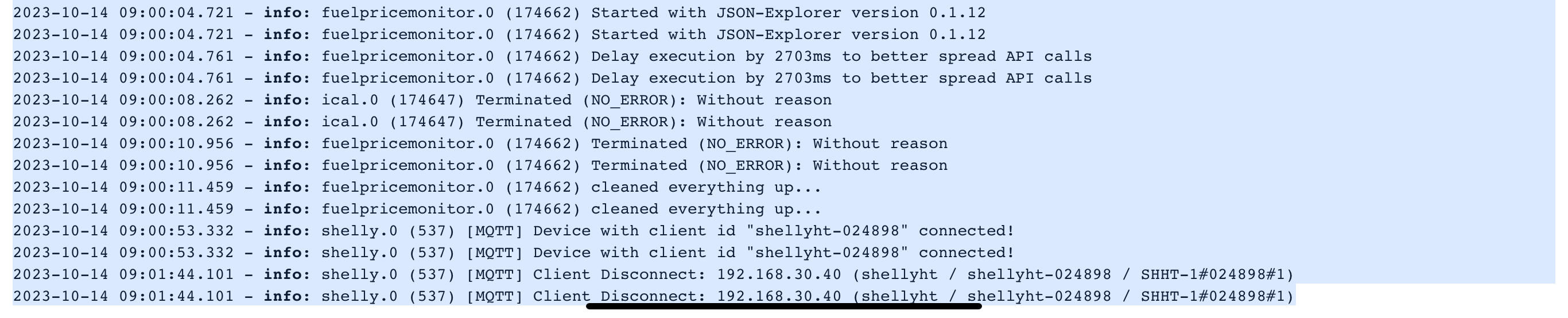
-
@mcwoolf sagte in Doppelte Aktionen im iobroker!:
Hat jemand eine Idee woran das liegen könnte?
Moin,
ja, liegt daran, dass Du uns soooo wenig über Deine Installation erzählst, Du bist der einzige, der davor sitzt und das Wissen hat. :)
Bitte einmal lesen und beherzigen ⇒ https://forum.iobroker.net/topic/51555/hinweise-für-gute-forenbeiträge
VG
Bernd@dp20eic
Hmm.
Also es ist ein Intel Nuc mit verschiedenen LXC-Containern, iobroker ist LXC, Grafanan und Influx ebenso, dann noch ein Pi-hole auf eigenem LXC und eine Windows Maschine.

Es ist alles auf dem neuesten Stand, updates werden regelmäßig gemacht, mindestens einmal pro Woche. Der Proxmox sowie auch die einzelnen Maschinen und Container.
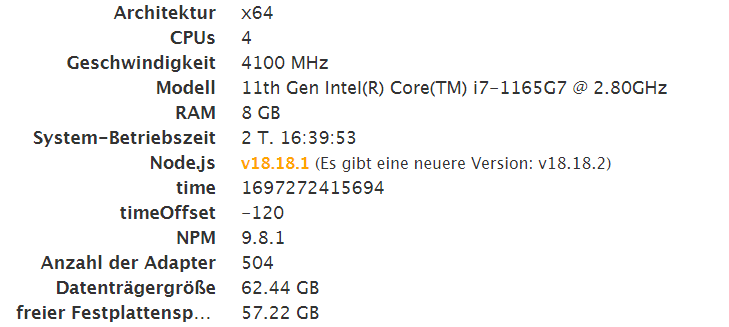
Lieben Dank an die Helfer hier.
GLG WolfiConfiguration:
Intel Nuc: 11th Gen Intel(R) Core(TM) i7-1165G7 @ 2.80GHz (1 Socket)
RAM: 8 GBJS-controler: 5.0.17
Node.js: 18.19.0
NPM: 10.2.3 -
@dp20eic
Hmm.
Also es ist ein Intel Nuc mit verschiedenen LXC-Containern, iobroker ist LXC, Grafanan und Influx ebenso, dann noch ein Pi-hole auf eigenem LXC und eine Windows Maschine.
Es ist alles auf dem neuesten Stand, updates werden regelmäßig gemacht, mindestens einmal pro Woche. Der Proxmox sowie auch die einzelnen Maschinen und Container.
@mcwoolf sagte in Doppelte Aktionen im iobroker!:
Es ist alles auf dem neuesten Stand, updates werden regelmäßig gemacht
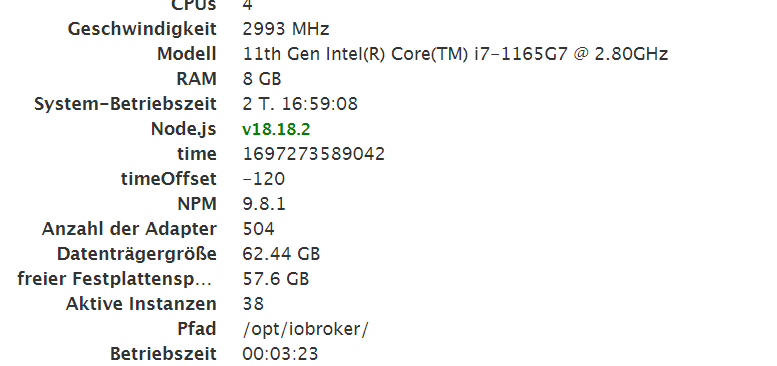
laut deinem Screenshot anscheinend nicht alles.
was sagtiob diagin der Langfassung.kein Support per PN! - Fragen im Forum stellen -
Benutzt das Voting rechts unten im Beitrag wenn er euch geholfen hat.
Das Forum freut sich über eine Spende. Benutzt dazu den Spendenbutton oben rechts. Danke!
der Installationsfixer: curl -fsL https://iobroker.net/fix.sh | bash - -
@mcwoolf sagte in Doppelte Aktionen im iobroker!:
Es ist alles auf dem neuesten Stand, updates werden regelmäßig gemacht
laut deinem Screenshot anscheinend nicht alles.
was sagtiob diagin der Langfassung.======================= SUMMARY ======================= v.2023-10-10 Static hostname: iobroker Icon name: computer-container Chassis: container ☐ Virtualization: lxc Operating System: Debian GNU/Linux 12 (bookworm) Kernel: Linux 6.2.16-15-pve Architecture: x86-64 Installation: lxc Kernel: x86_64 Userland: amd64 Timezone: Europe/Vienna (CEST, +0200) User-ID: 1000 X-Server: false Boot Target: graphical.target Pending OS-Updates: 0 Pending iob updates: 0 Nodejs-Installation: /usr/bin/nodejs v18.18.2 /usr/bin/node v18.18.2 /usr/bin/npm 9.8.1 /usr/bin/npx 9.8.1 /usr/bin/corepack 0.19.0 Recommended versions are nodejs 18.18.1 and npm 9.8.1 Your nodejs installation is correct MEMORY: total used free shared buff/cache available Mem: 8.6G 3.8G 3.7G 131K 1.1G 4.8G Swap: 0B 0B 0B Total: 8.6G 3.8G 3.7G Active iob-Instances: 39 Active repo(s): Stable (default) ioBroker Core: js-controller 5.0.12 admin 6.10.1 ioBroker Status: iobroker is running on this host. Objects type: jsonl States type: jsonl Status admin and web instance: + system.adapter.admin.0 : admin : iobroker - enabled, port: 8081, bind: 0.0.0.0, run as: admin + system.adapter.web.0 : web : iobroker - enabled, port: 8082, bind: 0.0.0.0, run as: admin Objects: 20309 States: 15853 Size of iob-Database: 30M /opt/iobroker/iobroker-data/objects.jsonl 18M /opt/iobroker/iobroker-data/states.jsonl =================== END OF SUMMARY ====================MOD-EDIT: Code in code-tags gesetzt!
Lieben Dank an die Helfer hier.
GLG WolfiConfiguration:
Intel Nuc: 11th Gen Intel(R) Core(TM) i7-1165G7 @ 2.80GHz (1 Socket)
RAM: 8 GBJS-controler: 5.0.17
Node.js: 18.19.0
NPM: 10.2.3 -
======================= SUMMARY =======================
                        v.2023-10-10


 Static hostname: iobroker
       Icon name: computer-container
         Chassis: container ☐
  Virtualization: lxc
Operating System: Debian GNU/Linux 12 (bookworm)
          Kernel: Linux 6.2.16-15-pve
    Architecture: x86-64

Installation:           lxc
Kernel:                 x86_64
Userland:               amd64
Timezone:               Europe/Vienna (CEST, +0200)
User-ID:                1000
X-Server:               false
Boot Target:            graphical.target

Pending OS-Updates:     0
Pending iob updates:    0

Nodejs-Installation:    /usr/bin/nodejs         v18.18.2
                        /usr/bin/node           v18.18.2
                        /usr/bin/npm            9.8.1
                        /usr/bin/npx            9.8.1
                        /usr/bin/corepack       0.19.0

Recommended versions are nodejs 18.18.1 and npm 9.8.1
Your nodejs installation is correct

MEMORY:
               total        used        free      shared  buff/cache   available
Mem:            8.6G        3.8G        3.7G        131K        1.1G        4.8G
Swap:             0B          0B          0B
Total:          8.6G        3.8G        3.7G

Active iob-Instances:   39
Active repo(s): Stable (default)

ioBroker Core:          js-controller           5.0.12
                        admin                   6.10.1

ioBroker Status:        iobroker is running on this host.


Objects type: jsonl
States  type: jsonl

Status admin and web instance:
+ system.adapter.admin.0                  : admin                 : iobroker                                 -  enabled, port: 8081, bind: 0.0.0.0, run as: admin
+ system.adapter.web.0                    : web                   : iobroker                                 -  enabled, port: 8082, bind: 0.0.0.0, run as: admin

Objects:                20309
States:                 15853

Size of iob-Database:

30M     /opt/iobroker/iobroker-data/objects.jsonl
18M     /opt/iobroker/iobroker-data/states.jsonl


=================== END OF SUMMARY ====================
MOD-EDIT: Code in code-tags gesetzt!
@mcwoolf sagte in Doppelte Aktionen im iobroker!:
== SUMMARY ===
das ist nicht
@homoran sagte in Doppelte Aktionen im iobroker!:
iob diag in der Langfassung
kein Support per PN! - Fragen im Forum stellen -
Benutzt das Voting rechts unten im Beitrag wenn er euch geholfen hat.
Das Forum freut sich über eine Spende. Benutzt dazu den Spendenbutton oben rechts. Danke!
der Installationsfixer: curl -fsL https://iobroker.net/fix.sh | bash - -
======================= SUMMARY =======================
                        v.2023-10-10


 Static hostname: iobroker
       Icon name: computer-container
         Chassis: container ☐
  Virtualization: lxc
Operating System: Debian GNU/Linux 12 (bookworm)
          Kernel: Linux 6.2.16-15-pve
    Architecture: x86-64

Installation:           lxc
Kernel:                 x86_64
Userland:               amd64
Timezone:               Europe/Vienna (CEST, +0200)
User-ID:                1000
X-Server:               false
Boot Target:            graphical.target

Pending OS-Updates:     0
Pending iob updates:    0

Nodejs-Installation:    /usr/bin/nodejs         v18.18.2
                        /usr/bin/node           v18.18.2
                        /usr/bin/npm            9.8.1
                        /usr/bin/npx            9.8.1
                        /usr/bin/corepack       0.19.0

Recommended versions are nodejs 18.18.1 and npm 9.8.1
Your nodejs installation is correct

MEMORY:
               total        used        free      shared  buff/cache   available
Mem:            8.6G        3.8G        3.7G        131K        1.1G        4.8G
Swap:             0B          0B          0B
Total:          8.6G        3.8G        3.7G

Active iob-Instances:   39
Active repo(s): Stable (default)

ioBroker Core:          js-controller           5.0.12
                        admin                   6.10.1

ioBroker Status:        iobroker is running on this host.


Objects type: jsonl
States  type: jsonl

Status admin and web instance:
+ system.adapter.admin.0                  : admin                 : iobroker                                 -  enabled, port: 8081, bind: 0.0.0.0, run as: admin
+ system.adapter.web.0                    : web                   : iobroker                                 -  enabled, port: 8082, bind: 0.0.0.0, run as: admin

Objects:                20309
States:                 15853

Size of iob-Database:

30M     /opt/iobroker/iobroker-data/objects.jsonl
18M     /opt/iobroker/iobroker-data/states.jsonl


=================== END OF SUMMARY ====================
MOD-EDIT: Code in code-tags gesetzt!
@mcwoolf sagte in Doppelte Aktionen im iobroker!:
Nodejs-Installation: /usr/bin/nodejs v18.18.2
das passt icht zu deinem Screenshot,.
da kann ich es leider nicht zitieren -
@mcwoolf sagte in Doppelte Aktionen im iobroker!:
== SUMMARY ===
das ist nicht
@homoran sagte in Doppelte Aktionen im iobroker!:
iob diag in der Langfassung
======== Start marking the full check here =========
Skript v.2023-10-10 *** BASE SYSTEM *** Static hostname: iobroker Icon name: computer-container Chassis: container ☐ Virtualization: lxc Operating System: Debian GNU/Linux 12 (bookworm) Kernel: Linux 6.2.16-15-pve Architecture: x86-64 model name : 11th Gen Intel(R) Core(TM) i7-1165G7 @ 2.80GHz Docker : false Virtualization : lxc Kernel : x86_64 Userland : amd64 Systemuptime and Load: 10:50:08 up 2 days, 16:55, 2 users, load average: 1.37, 1.17, 1.10 CPU threads: 4 *** Time and Time Zones *** Local time: Sat 2023-10-14 10:50:08 CEST Universal time: Sat 2023-10-14 08:50:08 UTC RTC time: n/a Time zone: Europe/Vienna (CEST, +0200) System clock synchronized: yes NTP service: inactive RTC in local TZ: no *** User and Groups *** mcwoolf /home/mcwoolf mcwoolf sudo users iobroker *** X-Server-Setup *** X-Server: false Desktop: Terminal: tty Boot Target: graphical.target *** MEMORY *** total used free shared buff/cache available Mem: 8.6G 1.1G 6.7G 131K 767M 7.5G Swap: 0B 0B 0B Total: 8.6G 1.1G 6.7G 8192 M total memory 1026 M used memory 387 M active memory 1152 M inactive memory 6433 M free memory 0 M buffer memory 731 M swap cache 0 M total swap 0 M used swap 0 M free swap *** FAILED SERVICES *** UNIT LOAD ACTIVE SUB DESCRIPTION * run-rpc_pipefs.mount loaded failed failed RPC Pipe File System LOAD = Reflects whether the unit definition was properly loaded. ACTIVE = The high-level unit activation state, i.e. generalization of SUB. SUB = The low-level unit activation state, values depend on unit type. 1 loaded units listed. *** FILESYSTEM *** Filesystem Type Size Used Avail Use% Mounted on /dev/mapper/pve-vm--200--disk--0 ext4 63G 4.9G 55G 9% / none tmpfs 492K 4.0K 488K 1% /dev udev devtmpfs 16G 0 16G 0% /dev/tty tmpfs tmpfs 16G 0 16G 0% /dev/shm tmpfs tmpfs 6.2G 124K 6.2G 1% /run tmpfs tmpfs 5.0M 0 5.0M 0% /run/lock tmpfs tmpfs 3.1G 0 3.1G 0% /run/user/1000 Messages concerning ext4 filesystem in dmesg: dmesg: read kernel buffer failed: Operation not permitted Show mounted filesystems \(real ones only\): TARGET SOURCE FSTYPE OPTIONS / /dev/mapper/pve-vm--200--disk--0 ext4 rw,relatime,stripe=16 Files in neuralgic directories: /var: 569M /var/ 334M /var/cache 331M /var/cache/apt 255M /var/cache/apt/archives 144M /var/lib Hint: You are currently not seeing messages from other users and the system. Users in groups 'adm', 'systemd-journal' can see all messages. Pass -q to turn off this notice. Archived and active journals take up 8.0M in the file system. /opt/iobroker/backups: 212M /opt/iobroker/backups/ /opt/iobroker/iobroker-data: 518M /opt/iobroker/iobroker-data/ 349M /opt/iobroker/iobroker-data/files 134M /opt/iobroker/iobroker-data/backup-objects 78M /opt/iobroker/iobroker-data/files/icons-open-icon-library-png 52M /opt/iobroker/iobroker-data/files/javascript.admin The five largest files in iobroker-data are: 35M /opt/iobroker/iobroker-data/files/devices.admin/static/js/main.24f2bb56.js.map 21M /opt/iobroker/iobroker-data/files/web.admin/static/js/main.edf7552a.js.map 20M /opt/iobroker/iobroker-data/objects.jsonl 19M /opt/iobroker/iobroker-data/files/iot.admin/static/js/main.2975a411.js.map 16M /opt/iobroker/iobroker-data/states.jsonl USB-Devices by-id: USB-Sticks - Avoid direct links to /dev/* in your adapter setups, please always prefer the links 'by-id': find: '/dev/serial/by-id/': No such file or directory *** NodeJS-Installation *** /usr/bin/nodejs v18.18.2 /usr/bin/node v18.18.2 /usr/bin/npm 9.8.1 /usr/bin/npx 9.8.1 /usr/bin/corepack 0.19.0 nodejs: Installed: 18.18.2-1nodesource1 Candidate: 18.18.2-1nodesource1 Version table: *** 18.18.2-1nodesource1 500 500 https://deb.nodesource.com/node_18.x nodistro/main amd64 Packages 100 /var/lib/dpkg/status 18.18.1-1nodesource1 500 500 https://deb.nodesource.com/node_18.x nodistro/main amd64 Packages 18.18.0-1nodesource1 500 500 https://deb.nodesource.com/node_18.x nodistro/main amd64 Packages 18.17.1-1nodesource1 500 500 https://deb.nodesource.com/node_18.x nodistro/main amd64 Packages 18.17.0-1nodesource1 500 500 https://deb.nodesource.com/node_18.x nodistro/main amd64 Packages 18.16.1-1nodesource1 500 500 https://deb.nodesource.com/node_18.x nodistro/main amd64 Packages 18.16.0-1nodesource1 500 500 https://deb.nodesource.com/node_18.x nodistro/main amd64 Packages 18.15.0-1nodesource1 500 500 https://deb.nodesource.com/node_18.x nodistro/main amd64 Packages 18.14.2-1nodesource1 500 500 https://deb.nodesource.com/node_18.x nodistro/main amd64 Packages 18.14.1-1nodesource1 500 500 https://deb.nodesource.com/node_18.x nodistro/main amd64 Packages 18.14.0-1nodesource1 500 500 https://deb.nodesource.com/node_18.x nodistro/main amd64 Packages 18.13.0+dfsg1-1 500 500 http://deb.debian.org/debian bookworm/main amd64 Packages 18.13.0-1nodesource1 500 500 https://deb.nodesource.com/node_18.x nodistro/main amd64 Packages 18.12.0-1nodesource1 500 500 https://deb.nodesource.com/node_18.x nodistro/main amd64 Packages 18.11.0-1nodesource1 500 500 https://deb.nodesource.com/node_18.x nodistro/main amd64 Packages 18.10.0-1nodesource1 500 500 https://deb.nodesource.com/node_18.x nodistro/main amd64 Packages 18.9.1-1nodesource1 500 500 https://deb.nodesource.com/node_18.x nodistro/main amd64 Packages 18.9.0-1nodesource1 500 500 https://deb.nodesource.com/node_18.x nodistro/main amd64 Packages 18.8.0-1nodesource1 500 500 https://deb.nodesource.com/node_18.x nodistro/main amd64 Packages 18.7.0-1nodesource1 500 500 https://deb.nodesource.com/node_18.x nodistro/main amd64 Packages 18.6.0-1nodesource1 500 500 https://deb.nodesource.com/node_18.x nodistro/main amd64 Packages 18.5.0-1nodesource1 500 500 https://deb.nodesource.com/node_18.x nodistro/main amd64 Packages 18.4.0-1nodesource1 500 500 https://deb.nodesource.com/node_18.x nodistro/main amd64 Packages 18.3.0-1nodesource1 500 500 https://deb.nodesource.com/node_18.x nodistro/main amd64 Packages 18.2.0-1nodesource1 500 500 https://deb.nodesource.com/node_18.x nodistro/main amd64 Packages 18.1.0-1nodesource1 500 500 https://deb.nodesource.com/node_18.x nodistro/main amd64 Packages 18.0.0-1nodesource1 500 500 https://deb.nodesource.com/node_18.x nodistro/main amd64 Packages Temp directories causing npm8 problem: 0 No problems detected Errors in npm tree: *** ioBroker-Installation *** ioBroker Status iobroker is running on this host. Objects type: jsonl States type: jsonl Core adapters versions js-controller: 5.0.12 admin: 6.10.1 javascript: 7.1.4 Adapters from github: 5 Adapter State + system.adapter.admin.0 : admin : iobroker - enabled, port: 8081, bind: 0.0.0.0, run as: admin system.adapter.alexa2.0 : alexa2 : iobroker - enabled system.adapter.alias-manager.0 : alias-manager : iobroker - enabled system.adapter.backitup.0 : backitup : iobroker - enabled system.adapter.bring.0 : bring : iobroker - enabled system.adapter.cloud.0 : cloud : iobroker - enabled system.adapter.device-reminder.0 : device-reminder : iobroker - enabled system.adapter.devices.0 : devices : iobroker - enabled system.adapter.discovery.0 : discovery : iobroker - enabled + system.adapter.email.0 : email : iobroker - enabled system.adapter.energiefluss.0 : energiefluss : iobroker - enabled system.adapter.fritzdect.0 : fritzdect : iobroker - enabled system.adapter.fuelpricemonitor.0 : fuelpricemonitor : iobroker - enabled system.adapter.fullybrowser.0 : fullybrowser : iobroker - enabled system.adapter.geofency.0 : geofency : iobroker - enabled, port: 7999, bind: 0.0.0.0 system.adapter.gruenbeck.0 : gruenbeck : iobroker - enabled system.adapter.heatingcontrol.0 : heatingcontrol : iobroker - enabled system.adapter.homeconnect.0 : homeconnect : iobroker - enabled system.adapter.hue.0 : hue : iobroker - enabled, port: 443 system.adapter.ical.0 : ical : iobroker - enabled system.adapter.icons-mfd-png.0 : icons-mfd-png : iobroker - enabled system.adapter.icons-mfd-svg.0 : icons-mfd-svg : iobroker - enabled system.adapter.icons-open-icon-library-png.0: icons-open-icon-library-png: iobroker - enabled + system.adapter.influxdb.0 : influxdb : iobroker - enabled, port: 8086 system.adapter.info.0 : info : iobroker - enabled system.adapter.iot.0 : iot : iobroker - enabled + system.adapter.javascript.0 : javascript : iobroker - enabled system.adapter.logparser.0 : logparser : iobroker - enabled system.adapter.modbus.0 : modbus : iobroker - enabled system.adapter.net-tools.0 : net-tools : iobroker - enabled system.adapter.ping.0 : ping : iobroker - enabled system.adapter.proxmox.0 : proxmox : iobroker - enabled, port: 8006 system.adapter.reolink.0 : reolink : iobroker - enabled system.adapter.ring.0 : ring : iobroker - enabled system.adapter.shelly.0 : shelly : iobroker - enabled, port: 1883, bind: 0.0.0.0 system.adapter.smartgarden.0 : smartgarden : iobroker - enabled system.adapter.solax.0 : solax : iobroker - enabled system.adapter.sureflap.0 : sureflap : iobroker - enabled + system.adapter.telegram.0 : telegram : iobroker - enabled, port: 8443, bind: 0.0.0.0 + system.adapter.telegram.1 : telegram : iobroker - enabled, port: 8443, bind: 0.0.0.0 system.adapter.unifi.0 : unifi : iobroker - enabled system.adapter.velux.0 : velux : iobroker - enabled system.adapter.vis-icontwo.0 : vis-icontwo : iobroker - enabled system.adapter.vis-inventwo.0 : vis-inventwo : iobroker - enabled system.adapter.vis-map.0 : vis-map : iobroker - enabled system.adapter.vis-material-advanced.0 : vis-material-advanced : iobroker - enabled system.adapter.vis-materialdesign.0 : vis-materialdesign : iobroker - enabled system.adapter.vis-rgraph.0 : vis-rgraph : iobroker - enabled system.adapter.vis-timeandweather.0 : vis-timeandweather : iobroker - enabled system.adapter.vis-weather.0 : vis-weather : iobroker - enabled system.adapter.vis.0 : vis : iobroker - enabled system.adapter.weatherunderground.0 : weatherunderground : iobroker - enabled system.adapter.web.0 : web : iobroker - enabled, port: 8082, bind: 0.0.0.0, run as: admin system.adapter.yahka.0 : yahka : iobroker - enabled + instance is alive Enabled adapters with bindings + system.adapter.admin.0 : admin : iobroker - enabled, port: 8081, bind: 0.0.0.0, run as: admin system.adapter.geofency.0 : geofency : iobroker - enabled, port: 7999, bind: 0.0.0.0 system.adapter.hue.0 : hue : iobroker - enabled, port: 443 + system.adapter.influxdb.0 : influxdb : iobroker - enabled, port: 8086 system.adapter.proxmox.0 : proxmox : iobroker - enabled, port: 8006 system.adapter.shelly.0 : shelly : iobroker - enabled, port: 1883, bind: 0.0.0.0 + system.adapter.telegram.0 : telegram : iobroker - enabled, port: 8443, bind: 0.0.0.0 + system.adapter.telegram.1 : telegram : iobroker - enabled, port: 8443, bind: 0.0.0.0 system.adapter.web.0 : web : iobroker - enabled, port: 8082, bind: 0.0.0.0, run as: admin ioBroker-Repositories Stable (default): http://download.iobroker.net/sources-dist.json Beta (latest) : http://download.iobroker.net/sources-dist-latest.json Active repo(s): Stable (default) Installed ioBroker-Instances Used repository: Stable (default) Adapter "admin" : 6.10.1 , installed 6.10.1 Adapter "alexa2" : 3.25.2 , installed 3.25.2 Adapter "alias-manager": 1.2.6 , installed 1.2.6 Adapter "backitup" : 2.8.1 , installed 2.8.1 Adapter "bring" : 1.8.4 , installed 1.8.4 Adapter "cloud" : 4.4.1 , installed 4.4.1 Adapter "device-reminder": 1.2.9 , installed 2.0.1 Adapter "devices" : 1.1.5 , installed 1.1.5 Adapter "discovery" : 3.1.0 , installed 3.1.0 Adapter "email" : 1.2.0 , installed 1.2.0 Adapter "fritzdect" : 2.3.1 , installed 2.3.1 Adapter "fuelpricemonitor": 0.3.6 , installed 0.3.6 Adapter "fullybrowser" : 2.1.2 , installed 2.1.2 Adapter "geofency" : 1.2.4 , installed 1.2.4 Adapter "gruenbeck" : 0.0.42 , installed 0.0.42 Adapter "heatingcontrol": 2.11.1 , installed 2.11.1 Adapter "homeconnect" : 1.1.1 , installed 1.1.1 Adapter "hue" : 3.10.0 , installed 3.10.0 Adapter "ical" : 1.13.3 , installed 1.13.3 Adapter "icons-mfd-png": 1.1.0 , installed 1.1.0 Adapter "icons-mfd-svg": 1.1.0 , installed 1.1.0 Adapter "icons-open-icon-library-png": 0.1.2, installed 0.1.3 Adapter "influxdb" : 3.2.0 , installed 3.2.0 Adapter "info" : 2.0.0 , installed 2.0.0 Adapter "iot" : 1.14.5 , installed 1.14.5 Adapter "javascript" : 7.1.4 , installed 7.1.4 Controller "js-controller": 5.0.12 , installed 5.0.12 Adapter "logparser" : 2.2.0 , installed 2.2.0 Adapter "modbus" : 5.0.11 , installed 5.0.11 Adapter "net-tools" : 0.2.0 , installed 0.2.0 Adapter "ping" : 1.6.2 , installed 1.6.2 Adapter "proxmox" : 1.3.5 , installed 1.3.5 Adapter "ring" : 3.2.2 , installed 3.2.2 Adapter "shelly" : 6.4.1 , installed 6.4.1 Adapter "simple-api" : 2.7.2 , installed 2.7.2 Adapter "smartgarden" : 2.0.0 , installed 2.0.0 Adapter "socketio" : 6.5.5 , installed 6.5.5 Adapter "solax" : 0.7.7 , installed 0.7.7 Adapter "sureflap" : 1.2.0 , installed 1.2.0 Adapter "telegram" : 1.16.0 , installed 1.16.0 Adapter "unifi" : 0.6.6 , installed 0.6.6 Adapter "velux" : 0.0.7 , installed 0.0.7 Adapter "vis" : 1.4.16 , installed 1.4.16 Adapter "vis-icontwo" : 0.96.0 , installed 0.96.0 Adapter "vis-inventwo" : 3.3.3 , installed 3.3.3 Adapter "vis-map" : 1.0.4 , installed 1.0.4 Adapter "vis-material-advanced": 1.7.4, installed 1.7.4 Adapter "vis-rgraph" : 0.0.2 , installed 0.0.2 Adapter "vis-timeandweather": 1.2.2, installed 1.2.2 Adapter "vis-weather" : 2.5.6 , installed 2.5.6 Adapter "weatherunderground": 3.6.0, installed 3.6.0 Adapter "web" : 6.1.2 , installed 6.1.2 Adapter "ws" : 2.5.5 , installed 2.5.5 Adapter "yahka" : 1.0.3 , installed 1.0.3 Objects and States Please stand by - This may take a while Objects: 20309 States: 15875 *** OS-Repositories and Updates *** Hit:1 http://security.debian.org bookworm-security InRelease Hit:2 http://deb.debian.org/debian bookworm InRelease Hit:3 http://deb.debian.org/debian bookworm-updates InRelease Hit:4 https://deb.nodesource.com/node_18.x nodistro InRelease Reading package lists... Pending Updates: 0 *** Listening Ports *** Active Internet connections (only servers) Proto Recv-Q Send-Q Local Address Foreign Address State User Inode PID/Program name tcp 0 0 127.0.0.1:25 0.0.0.0:* LISTEN 0 62332237 299/master tcp 0 0 127.0.0.1:9000 0.0.0.0:* LISTEN 1001 93425641 182048/iobroker.js- tcp 0 0 127.0.0.1:9001 0.0.0.0:* LISTEN 1001 93425634 182048/iobroker.js- tcp 0 0 0.0.0.0:111 0.0.0.0:* LISTEN 0 62309314 1/init tcp6 0 0 ::1:25 :::* LISTEN 0 62332238 299/master tcp6 0 0 :::7999 :::* LISTEN 1001 93436267 182475/io.geofency. tcp6 0 0 :::8081 :::* LISTEN 1001 93431007 182069/io.admin.0 tcp6 0 0 :::111 :::* LISTEN 0 62309316 1/init tcp6 0 0 :::22 :::* LISTEN 0 62328721 1/init udp 0 0 0.0.0.0:38063 0.0.0.0:* 1001 93433722 182385/io.telegram. udp 0 0 0.0.0.0:58847 0.0.0.0:* 1001 93427452 182096/io.email.0 udp 0 0 0.0.0.0:59448 0.0.0.0:* 1001 93436265 182475/io.geofency. udp 0 0 0.0.0.0:60057 0.0.0.0:* 1001 93431698 182171/io.javascrip udp 0 0 0.0.0.0:44598 0.0.0.0:* 1001 93427451 182096/io.email.0 udp 0 0 0.0.0.0:45144 0.0.0.0:* 1001 93436264 182475/io.geofency. udp 0 0 0.0.0.0:46010 0.0.0.0:* 1001 93427536 182145/io.influxdb. udp 0 0 0.0.0.0:46162 0.0.0.0:* 1001 93427537 182145/io.influxdb. udp 0 0 0.0.0.0:47378 0.0.0.0:* 1001 93431699 182171/io.javascrip udp 0 0 0.0.0.0:48676 0.0.0.0:* 1001 93435246 182336/io.telegram. udp 0 0 0.0.0.0:48677 0.0.0.0:* 1001 93434628 182529/io.hue.0 udp 0 0 0.0.0.0:111 0.0.0.0:* 0 62309315 1/init udp 0 0 0.0.0.0:32950 0.0.0.0:* 1001 93433723 182385/io.telegram. udp 0 0 0.0.0.0:49769 0.0.0.0:* 1001 93435245 182336/io.telegram. udp 0 0 0.0.0.0:36493 0.0.0.0:* 1001 93434629 182529/io.hue.0 udp6 0 0 :::111 :::* 0 62309317 1/init *** Log File - Last 25 Lines *** 2023-10-14 10:50:28.816 - info: hue.0 (182529) skip switch: Hue outdoor light sensor 1.alert 2023-10-14 10:50:28.817 - info: hue.0 (182529) skip switch: Hue outdoor light sensor 1.tholddark 2023-10-14 10:50:28.817 - info: hue.0 (182529) skip switch: Hue outdoor light sensor 1.tholdoffset 2023-10-14 10:50:28.817 - info: hue.0 (182529) skip switch: Hue outdoor light sensor 1.ledindication 2023-10-14 10:50:28.818 - info: hue.0 (182529) skip switch: Hue outdoor light sensor 1.usertest 2023-10-14 10:50:28.817 - info: hue.0 (182529) skip switch: Hue outdoor light sensor 1.tholddark 2023-10-14 10:50:28.817 - info: hue.0 (182529) skip switch: Hue outdoor light sensor 1.tholdoffset 2023-10-14 10:50:28.817 - info: hue.0 (182529) skip switch: Hue outdoor light sensor 1.ledindication 2023-10-14 10:50:28.818 - info: hue.0 (182529) skip switch: Hue outdoor light sensor 1.usertest 2023-10-14 10:50:28.827 - info: hue.0 (182529) skip switch: Hue outdoor temp. sensor 1.alert 2023-10-14 10:50:28.827 - info: hue.0 (182529) skip switch: Hue outdoor temp. sensor 1.alert 2023-10-14 10:50:28.828 - info: hue.0 (182529) skip switch: Hue outdoor temp. sensor 1.ledindication 2023-10-14 10:50:28.828 - info: hue.0 (182529) skip switch: Hue outdoor temp. sensor 1.usertest 2023-10-14 10:50:28.828 - info: hue.0 (182529) created/updated 4 sensor channels 2023-10-14 10:50:28.828 - info: hue.0 (182529) skip switch: Hue outdoor temp. sensor 1.ledindication 2023-10-14 10:50:28.828 - info: hue.0 (182529) skip switch: Hue outdoor temp. sensor 1.usertest 2023-10-14 10:50:28.828 - info: hue.0 (182529) created/updated 4 sensor channels 2023-10-14 10:50:28.832 - info: hue.0 (182529) created/updated 3 light channels 2023-10-14 10:50:28.832 - info: hue.0 (182529) created/updated 3 light channels 2023-10-14 10:50:28.833 - info: hue.0 (182529) created/updated 2 groups channels 2023-10-14 10:50:28.833 - info: hue.0 (182529) created/updated 2 groups channels 2023-10-14 10:50:28.834 - info: hue.0 (182529) created/updated 4 scenes 2023-10-14 10:50:28.834 - info: hue.0 (182529) creating/updating bridge device 2023-10-14 10:50:28.834 - info: hue.0 (182529) created/updated 4 scenes 2023-10-14 10:50:28.834 - info: hue.0 (182529) creating/updating bridge deviceLieben Dank an die Helfer hier.
GLG WolfiConfiguration:
Intel Nuc: 11th Gen Intel(R) Core(TM) i7-1165G7 @ 2.80GHz (1 Socket)
RAM: 8 GBJS-controler: 5.0.17
Node.js: 18.19.0
NPM: 10.2.3 -
======== Start marking the full check here =========
Skript v.2023-10-10 *** BASE SYSTEM *** Static hostname: iobroker Icon name: computer-container Chassis: container ☐ Virtualization: lxc Operating System: Debian GNU/Linux 12 (bookworm) Kernel: Linux 6.2.16-15-pve Architecture: x86-64 model name : 11th Gen Intel(R) Core(TM) i7-1165G7 @ 2.80GHz Docker : false Virtualization : lxc Kernel : x86_64 Userland : amd64 Systemuptime and Load: 10:50:08 up 2 days, 16:55, 2 users, load average: 1.37, 1.17, 1.10 CPU threads: 4 *** Time and Time Zones *** Local time: Sat 2023-10-14 10:50:08 CEST Universal time: Sat 2023-10-14 08:50:08 UTC RTC time: n/a Time zone: Europe/Vienna (CEST, +0200) System clock synchronized: yes NTP service: inactive RTC in local TZ: no *** User and Groups *** mcwoolf /home/mcwoolf mcwoolf sudo users iobroker *** X-Server-Setup *** X-Server: false Desktop: Terminal: tty Boot Target: graphical.target *** MEMORY *** total used free shared buff/cache available Mem: 8.6G 1.1G 6.7G 131K 767M 7.5G Swap: 0B 0B 0B Total: 8.6G 1.1G 6.7G 8192 M total memory 1026 M used memory 387 M active memory 1152 M inactive memory 6433 M free memory 0 M buffer memory 731 M swap cache 0 M total swap 0 M used swap 0 M free swap *** FAILED SERVICES *** UNIT LOAD ACTIVE SUB DESCRIPTION * run-rpc_pipefs.mount loaded failed failed RPC Pipe File System LOAD = Reflects whether the unit definition was properly loaded. ACTIVE = The high-level unit activation state, i.e. generalization of SUB. SUB = The low-level unit activation state, values depend on unit type. 1 loaded units listed. *** FILESYSTEM *** Filesystem Type Size Used Avail Use% Mounted on /dev/mapper/pve-vm--200--disk--0 ext4 63G 4.9G 55G 9% / none tmpfs 492K 4.0K 488K 1% /dev udev devtmpfs 16G 0 16G 0% /dev/tty tmpfs tmpfs 16G 0 16G 0% /dev/shm tmpfs tmpfs 6.2G 124K 6.2G 1% /run tmpfs tmpfs 5.0M 0 5.0M 0% /run/lock tmpfs tmpfs 3.1G 0 3.1G 0% /run/user/1000 Messages concerning ext4 filesystem in dmesg: dmesg: read kernel buffer failed: Operation not permitted Show mounted filesystems \(real ones only\): TARGET SOURCE FSTYPE OPTIONS / /dev/mapper/pve-vm--200--disk--0 ext4 rw,relatime,stripe=16 Files in neuralgic directories: /var: 569M /var/ 334M /var/cache 331M /var/cache/apt 255M /var/cache/apt/archives 144M /var/lib Hint: You are currently not seeing messages from other users and the system. Users in groups 'adm', 'systemd-journal' can see all messages. Pass -q to turn off this notice. Archived and active journals take up 8.0M in the file system. /opt/iobroker/backups: 212M /opt/iobroker/backups/ /opt/iobroker/iobroker-data: 518M /opt/iobroker/iobroker-data/ 349M /opt/iobroker/iobroker-data/files 134M /opt/iobroker/iobroker-data/backup-objects 78M /opt/iobroker/iobroker-data/files/icons-open-icon-library-png 52M /opt/iobroker/iobroker-data/files/javascript.admin The five largest files in iobroker-data are: 35M /opt/iobroker/iobroker-data/files/devices.admin/static/js/main.24f2bb56.js.map 21M /opt/iobroker/iobroker-data/files/web.admin/static/js/main.edf7552a.js.map 20M /opt/iobroker/iobroker-data/objects.jsonl 19M /opt/iobroker/iobroker-data/files/iot.admin/static/js/main.2975a411.js.map 16M /opt/iobroker/iobroker-data/states.jsonl USB-Devices by-id: USB-Sticks - Avoid direct links to /dev/* in your adapter setups, please always prefer the links 'by-id': find: '/dev/serial/by-id/': No such file or directory *** NodeJS-Installation *** /usr/bin/nodejs v18.18.2 /usr/bin/node v18.18.2 /usr/bin/npm 9.8.1 /usr/bin/npx 9.8.1 /usr/bin/corepack 0.19.0 nodejs: Installed: 18.18.2-1nodesource1 Candidate: 18.18.2-1nodesource1 Version table: *** 18.18.2-1nodesource1 500 500 https://deb.nodesource.com/node_18.x nodistro/main amd64 Packages 100 /var/lib/dpkg/status 18.18.1-1nodesource1 500 500 https://deb.nodesource.com/node_18.x nodistro/main amd64 Packages 18.18.0-1nodesource1 500 500 https://deb.nodesource.com/node_18.x nodistro/main amd64 Packages 18.17.1-1nodesource1 500 500 https://deb.nodesource.com/node_18.x nodistro/main amd64 Packages 18.17.0-1nodesource1 500 500 https://deb.nodesource.com/node_18.x nodistro/main amd64 Packages 18.16.1-1nodesource1 500 500 https://deb.nodesource.com/node_18.x nodistro/main amd64 Packages 18.16.0-1nodesource1 500 500 https://deb.nodesource.com/node_18.x nodistro/main amd64 Packages 18.15.0-1nodesource1 500 500 https://deb.nodesource.com/node_18.x nodistro/main amd64 Packages 18.14.2-1nodesource1 500 500 https://deb.nodesource.com/node_18.x nodistro/main amd64 Packages 18.14.1-1nodesource1 500 500 https://deb.nodesource.com/node_18.x nodistro/main amd64 Packages 18.14.0-1nodesource1 500 500 https://deb.nodesource.com/node_18.x nodistro/main amd64 Packages 18.13.0+dfsg1-1 500 500 http://deb.debian.org/debian bookworm/main amd64 Packages 18.13.0-1nodesource1 500 500 https://deb.nodesource.com/node_18.x nodistro/main amd64 Packages 18.12.0-1nodesource1 500 500 https://deb.nodesource.com/node_18.x nodistro/main amd64 Packages 18.11.0-1nodesource1 500 500 https://deb.nodesource.com/node_18.x nodistro/main amd64 Packages 18.10.0-1nodesource1 500 500 https://deb.nodesource.com/node_18.x nodistro/main amd64 Packages 18.9.1-1nodesource1 500 500 https://deb.nodesource.com/node_18.x nodistro/main amd64 Packages 18.9.0-1nodesource1 500 500 https://deb.nodesource.com/node_18.x nodistro/main amd64 Packages 18.8.0-1nodesource1 500 500 https://deb.nodesource.com/node_18.x nodistro/main amd64 Packages 18.7.0-1nodesource1 500 500 https://deb.nodesource.com/node_18.x nodistro/main amd64 Packages 18.6.0-1nodesource1 500 500 https://deb.nodesource.com/node_18.x nodistro/main amd64 Packages 18.5.0-1nodesource1 500 500 https://deb.nodesource.com/node_18.x nodistro/main amd64 Packages 18.4.0-1nodesource1 500 500 https://deb.nodesource.com/node_18.x nodistro/main amd64 Packages 18.3.0-1nodesource1 500 500 https://deb.nodesource.com/node_18.x nodistro/main amd64 Packages 18.2.0-1nodesource1 500 500 https://deb.nodesource.com/node_18.x nodistro/main amd64 Packages 18.1.0-1nodesource1 500 500 https://deb.nodesource.com/node_18.x nodistro/main amd64 Packages 18.0.0-1nodesource1 500 500 https://deb.nodesource.com/node_18.x nodistro/main amd64 Packages Temp directories causing npm8 problem: 0 No problems detected Errors in npm tree: *** ioBroker-Installation *** ioBroker Status iobroker is running on this host. Objects type: jsonl States type: jsonl Core adapters versions js-controller: 5.0.12 admin: 6.10.1 javascript: 7.1.4 Adapters from github: 5 Adapter State + system.adapter.admin.0 : admin : iobroker - enabled, port: 8081, bind: 0.0.0.0, run as: admin system.adapter.alexa2.0 : alexa2 : iobroker - enabled system.adapter.alias-manager.0 : alias-manager : iobroker - enabled system.adapter.backitup.0 : backitup : iobroker - enabled system.adapter.bring.0 : bring : iobroker - enabled system.adapter.cloud.0 : cloud : iobroker - enabled system.adapter.device-reminder.0 : device-reminder : iobroker - enabled system.adapter.devices.0 : devices : iobroker - enabled system.adapter.discovery.0 : discovery : iobroker - enabled + system.adapter.email.0 : email : iobroker - enabled system.adapter.energiefluss.0 : energiefluss : iobroker - enabled system.adapter.fritzdect.0 : fritzdect : iobroker - enabled system.adapter.fuelpricemonitor.0 : fuelpricemonitor : iobroker - enabled system.adapter.fullybrowser.0 : fullybrowser : iobroker - enabled system.adapter.geofency.0 : geofency : iobroker - enabled, port: 7999, bind: 0.0.0.0 system.adapter.gruenbeck.0 : gruenbeck : iobroker - enabled system.adapter.heatingcontrol.0 : heatingcontrol : iobroker - enabled system.adapter.homeconnect.0 : homeconnect : iobroker - enabled system.adapter.hue.0 : hue : iobroker - enabled, port: 443 system.adapter.ical.0 : ical : iobroker - enabled system.adapter.icons-mfd-png.0 : icons-mfd-png : iobroker - enabled system.adapter.icons-mfd-svg.0 : icons-mfd-svg : iobroker - enabled system.adapter.icons-open-icon-library-png.0: icons-open-icon-library-png: iobroker - enabled + system.adapter.influxdb.0 : influxdb : iobroker - enabled, port: 8086 system.adapter.info.0 : info : iobroker - enabled system.adapter.iot.0 : iot : iobroker - enabled + system.adapter.javascript.0 : javascript : iobroker - enabled system.adapter.logparser.0 : logparser : iobroker - enabled system.adapter.modbus.0 : modbus : iobroker - enabled system.adapter.net-tools.0 : net-tools : iobroker - enabled system.adapter.ping.0 : ping : iobroker - enabled system.adapter.proxmox.0 : proxmox : iobroker - enabled, port: 8006 system.adapter.reolink.0 : reolink : iobroker - enabled system.adapter.ring.0 : ring : iobroker - enabled system.adapter.shelly.0 : shelly : iobroker - enabled, port: 1883, bind: 0.0.0.0 system.adapter.smartgarden.0 : smartgarden : iobroker - enabled system.adapter.solax.0 : solax : iobroker - enabled system.adapter.sureflap.0 : sureflap : iobroker - enabled + system.adapter.telegram.0 : telegram : iobroker - enabled, port: 8443, bind: 0.0.0.0 + system.adapter.telegram.1 : telegram : iobroker - enabled, port: 8443, bind: 0.0.0.0 system.adapter.unifi.0 : unifi : iobroker - enabled system.adapter.velux.0 : velux : iobroker - enabled system.adapter.vis-icontwo.0 : vis-icontwo : iobroker - enabled system.adapter.vis-inventwo.0 : vis-inventwo : iobroker - enabled system.adapter.vis-map.0 : vis-map : iobroker - enabled system.adapter.vis-material-advanced.0 : vis-material-advanced : iobroker - enabled system.adapter.vis-materialdesign.0 : vis-materialdesign : iobroker - enabled system.adapter.vis-rgraph.0 : vis-rgraph : iobroker - enabled system.adapter.vis-timeandweather.0 : vis-timeandweather : iobroker - enabled system.adapter.vis-weather.0 : vis-weather : iobroker - enabled system.adapter.vis.0 : vis : iobroker - enabled system.adapter.weatherunderground.0 : weatherunderground : iobroker - enabled system.adapter.web.0 : web : iobroker - enabled, port: 8082, bind: 0.0.0.0, run as: admin system.adapter.yahka.0 : yahka : iobroker - enabled + instance is alive Enabled adapters with bindings + system.adapter.admin.0 : admin : iobroker - enabled, port: 8081, bind: 0.0.0.0, run as: admin system.adapter.geofency.0 : geofency : iobroker - enabled, port: 7999, bind: 0.0.0.0 system.adapter.hue.0 : hue : iobroker - enabled, port: 443 + system.adapter.influxdb.0 : influxdb : iobroker - enabled, port: 8086 system.adapter.proxmox.0 : proxmox : iobroker - enabled, port: 8006 system.adapter.shelly.0 : shelly : iobroker - enabled, port: 1883, bind: 0.0.0.0 + system.adapter.telegram.0 : telegram : iobroker - enabled, port: 8443, bind: 0.0.0.0 + system.adapter.telegram.1 : telegram : iobroker - enabled, port: 8443, bind: 0.0.0.0 system.adapter.web.0 : web : iobroker - enabled, port: 8082, bind: 0.0.0.0, run as: admin ioBroker-Repositories Stable (default): http://download.iobroker.net/sources-dist.json Beta (latest) : http://download.iobroker.net/sources-dist-latest.json Active repo(s): Stable (default) Installed ioBroker-Instances Used repository: Stable (default) Adapter "admin" : 6.10.1 , installed 6.10.1 Adapter "alexa2" : 3.25.2 , installed 3.25.2 Adapter "alias-manager": 1.2.6 , installed 1.2.6 Adapter "backitup" : 2.8.1 , installed 2.8.1 Adapter "bring" : 1.8.4 , installed 1.8.4 Adapter "cloud" : 4.4.1 , installed 4.4.1 Adapter "device-reminder": 1.2.9 , installed 2.0.1 Adapter "devices" : 1.1.5 , installed 1.1.5 Adapter "discovery" : 3.1.0 , installed 3.1.0 Adapter "email" : 1.2.0 , installed 1.2.0 Adapter "fritzdect" : 2.3.1 , installed 2.3.1 Adapter "fuelpricemonitor": 0.3.6 , installed 0.3.6 Adapter "fullybrowser" : 2.1.2 , installed 2.1.2 Adapter "geofency" : 1.2.4 , installed 1.2.4 Adapter "gruenbeck" : 0.0.42 , installed 0.0.42 Adapter "heatingcontrol": 2.11.1 , installed 2.11.1 Adapter "homeconnect" : 1.1.1 , installed 1.1.1 Adapter "hue" : 3.10.0 , installed 3.10.0 Adapter "ical" : 1.13.3 , installed 1.13.3 Adapter "icons-mfd-png": 1.1.0 , installed 1.1.0 Adapter "icons-mfd-svg": 1.1.0 , installed 1.1.0 Adapter "icons-open-icon-library-png": 0.1.2, installed 0.1.3 Adapter "influxdb" : 3.2.0 , installed 3.2.0 Adapter "info" : 2.0.0 , installed 2.0.0 Adapter "iot" : 1.14.5 , installed 1.14.5 Adapter "javascript" : 7.1.4 , installed 7.1.4 Controller "js-controller": 5.0.12 , installed 5.0.12 Adapter "logparser" : 2.2.0 , installed 2.2.0 Adapter "modbus" : 5.0.11 , installed 5.0.11 Adapter "net-tools" : 0.2.0 , installed 0.2.0 Adapter "ping" : 1.6.2 , installed 1.6.2 Adapter "proxmox" : 1.3.5 , installed 1.3.5 Adapter "ring" : 3.2.2 , installed 3.2.2 Adapter "shelly" : 6.4.1 , installed 6.4.1 Adapter "simple-api" : 2.7.2 , installed 2.7.2 Adapter "smartgarden" : 2.0.0 , installed 2.0.0 Adapter "socketio" : 6.5.5 , installed 6.5.5 Adapter "solax" : 0.7.7 , installed 0.7.7 Adapter "sureflap" : 1.2.0 , installed 1.2.0 Adapter "telegram" : 1.16.0 , installed 1.16.0 Adapter "unifi" : 0.6.6 , installed 0.6.6 Adapter "velux" : 0.0.7 , installed 0.0.7 Adapter "vis" : 1.4.16 , installed 1.4.16 Adapter "vis-icontwo" : 0.96.0 , installed 0.96.0 Adapter "vis-inventwo" : 3.3.3 , installed 3.3.3 Adapter "vis-map" : 1.0.4 , installed 1.0.4 Adapter "vis-material-advanced": 1.7.4, installed 1.7.4 Adapter "vis-rgraph" : 0.0.2 , installed 0.0.2 Adapter "vis-timeandweather": 1.2.2, installed 1.2.2 Adapter "vis-weather" : 2.5.6 , installed 2.5.6 Adapter "weatherunderground": 3.6.0, installed 3.6.0 Adapter "web" : 6.1.2 , installed 6.1.2 Adapter "ws" : 2.5.5 , installed 2.5.5 Adapter "yahka" : 1.0.3 , installed 1.0.3 Objects and States Please stand by - This may take a while Objects: 20309 States: 15875 *** OS-Repositories and Updates *** Hit:1 http://security.debian.org bookworm-security InRelease Hit:2 http://deb.debian.org/debian bookworm InRelease Hit:3 http://deb.debian.org/debian bookworm-updates InRelease Hit:4 https://deb.nodesource.com/node_18.x nodistro InRelease Reading package lists... Pending Updates: 0 *** Listening Ports *** Active Internet connections (only servers) Proto Recv-Q Send-Q Local Address Foreign Address State User Inode PID/Program name tcp 0 0 127.0.0.1:25 0.0.0.0:* LISTEN 0 62332237 299/master tcp 0 0 127.0.0.1:9000 0.0.0.0:* LISTEN 1001 93425641 182048/iobroker.js- tcp 0 0 127.0.0.1:9001 0.0.0.0:* LISTEN 1001 93425634 182048/iobroker.js- tcp 0 0 0.0.0.0:111 0.0.0.0:* LISTEN 0 62309314 1/init tcp6 0 0 ::1:25 :::* LISTEN 0 62332238 299/master tcp6 0 0 :::7999 :::* LISTEN 1001 93436267 182475/io.geofency. tcp6 0 0 :::8081 :::* LISTEN 1001 93431007 182069/io.admin.0 tcp6 0 0 :::111 :::* LISTEN 0 62309316 1/init tcp6 0 0 :::22 :::* LISTEN 0 62328721 1/init udp 0 0 0.0.0.0:38063 0.0.0.0:* 1001 93433722 182385/io.telegram. udp 0 0 0.0.0.0:58847 0.0.0.0:* 1001 93427452 182096/io.email.0 udp 0 0 0.0.0.0:59448 0.0.0.0:* 1001 93436265 182475/io.geofency. udp 0 0 0.0.0.0:60057 0.0.0.0:* 1001 93431698 182171/io.javascrip udp 0 0 0.0.0.0:44598 0.0.0.0:* 1001 93427451 182096/io.email.0 udp 0 0 0.0.0.0:45144 0.0.0.0:* 1001 93436264 182475/io.geofency. udp 0 0 0.0.0.0:46010 0.0.0.0:* 1001 93427536 182145/io.influxdb. udp 0 0 0.0.0.0:46162 0.0.0.0:* 1001 93427537 182145/io.influxdb. udp 0 0 0.0.0.0:47378 0.0.0.0:* 1001 93431699 182171/io.javascrip udp 0 0 0.0.0.0:48676 0.0.0.0:* 1001 93435246 182336/io.telegram. udp 0 0 0.0.0.0:48677 0.0.0.0:* 1001 93434628 182529/io.hue.0 udp 0 0 0.0.0.0:111 0.0.0.0:* 0 62309315 1/init udp 0 0 0.0.0.0:32950 0.0.0.0:* 1001 93433723 182385/io.telegram. udp 0 0 0.0.0.0:49769 0.0.0.0:* 1001 93435245 182336/io.telegram. udp 0 0 0.0.0.0:36493 0.0.0.0:* 1001 93434629 182529/io.hue.0 udp6 0 0 :::111 :::* 0 62309317 1/init *** Log File - Last 25 Lines *** 2023-10-14 10:50:28.816 - info: hue.0 (182529) skip switch: Hue outdoor light sensor 1.alert 2023-10-14 10:50:28.817 - info: hue.0 (182529) skip switch: Hue outdoor light sensor 1.tholddark 2023-10-14 10:50:28.817 - info: hue.0 (182529) skip switch: Hue outdoor light sensor 1.tholdoffset 2023-10-14 10:50:28.817 - info: hue.0 (182529) skip switch: Hue outdoor light sensor 1.ledindication 2023-10-14 10:50:28.818 - info: hue.0 (182529) skip switch: Hue outdoor light sensor 1.usertest 2023-10-14 10:50:28.817 - info: hue.0 (182529) skip switch: Hue outdoor light sensor 1.tholddark 2023-10-14 10:50:28.817 - info: hue.0 (182529) skip switch: Hue outdoor light sensor 1.tholdoffset 2023-10-14 10:50:28.817 - info: hue.0 (182529) skip switch: Hue outdoor light sensor 1.ledindication 2023-10-14 10:50:28.818 - info: hue.0 (182529) skip switch: Hue outdoor light sensor 1.usertest 2023-10-14 10:50:28.827 - info: hue.0 (182529) skip switch: Hue outdoor temp. sensor 1.alert 2023-10-14 10:50:28.827 - info: hue.0 (182529) skip switch: Hue outdoor temp. sensor 1.alert 2023-10-14 10:50:28.828 - info: hue.0 (182529) skip switch: Hue outdoor temp. sensor 1.ledindication 2023-10-14 10:50:28.828 - info: hue.0 (182529) skip switch: Hue outdoor temp. sensor 1.usertest 2023-10-14 10:50:28.828 - info: hue.0 (182529) created/updated 4 sensor channels 2023-10-14 10:50:28.828 - info: hue.0 (182529) skip switch: Hue outdoor temp. sensor 1.ledindication 2023-10-14 10:50:28.828 - info: hue.0 (182529) skip switch: Hue outdoor temp. sensor 1.usertest 2023-10-14 10:50:28.828 - info: hue.0 (182529) created/updated 4 sensor channels 2023-10-14 10:50:28.832 - info: hue.0 (182529) created/updated 3 light channels 2023-10-14 10:50:28.832 - info: hue.0 (182529) created/updated 3 light channels 2023-10-14 10:50:28.833 - info: hue.0 (182529) created/updated 2 groups channels 2023-10-14 10:50:28.833 - info: hue.0 (182529) created/updated 2 groups channels 2023-10-14 10:50:28.834 - info: hue.0 (182529) created/updated 4 scenes 2023-10-14 10:50:28.834 - info: hue.0 (182529) creating/updating bridge device 2023-10-14 10:50:28.834 - info: hue.0 (182529) created/updated 4 scenes 2023-10-14 10:50:28.834 - info: hue.0 (182529) creating/updating bridge device -
@mcwoolf sagte in Doppelte Aktionen im iobroker!:
Hier jetzt auch der passende screenshot.
was ist passiert?
hast du zwischenzeitlich etwas verändert?kein Support per PN! - Fragen im Forum stellen -
Benutzt das Voting rechts unten im Beitrag wenn er euch geholfen hat.
Das Forum freut sich über eine Spende. Benutzt dazu den Spendenbutton oben rechts. Danke!
der Installationsfixer: curl -fsL https://iobroker.net/fix.sh | bash - -
@mcwoolf sagte in Doppelte Aktionen im iobroker!:
Hier jetzt auch der passende screenshot.
was ist passiert?
hast du zwischenzeitlich etwas verändert?@homoran
nein nur den browsercache geleert, hatte ich nach dem update noch nicht gemacht.
deshalb stand da noch 18.18.1Lieben Dank an die Helfer hier.
GLG WolfiConfiguration:
Intel Nuc: 11th Gen Intel(R) Core(TM) i7-1165G7 @ 2.80GHz (1 Socket)
RAM: 8 GBJS-controler: 5.0.17
Node.js: 18.19.0
NPM: 10.2.3 -
@homoran
nein nur den browsercache geleert, hatte ich nach dem update noch nicht gemacht.
deshalb stand da noch 18.18.1@mcwoolf und der Fehler ist trotzdem noch da?
Uptime 3 Minuten?kein Support per PN! - Fragen im Forum stellen -
Benutzt das Voting rechts unten im Beitrag wenn er euch geholfen hat.
Das Forum freut sich über eine Spende. Benutzt dazu den Spendenbutton oben rechts. Danke!
der Installationsfixer: curl -fsL https://iobroker.net/fix.sh | bash - -
Ich weiss nicht ob es ein Fehler ist (denke aber schon)
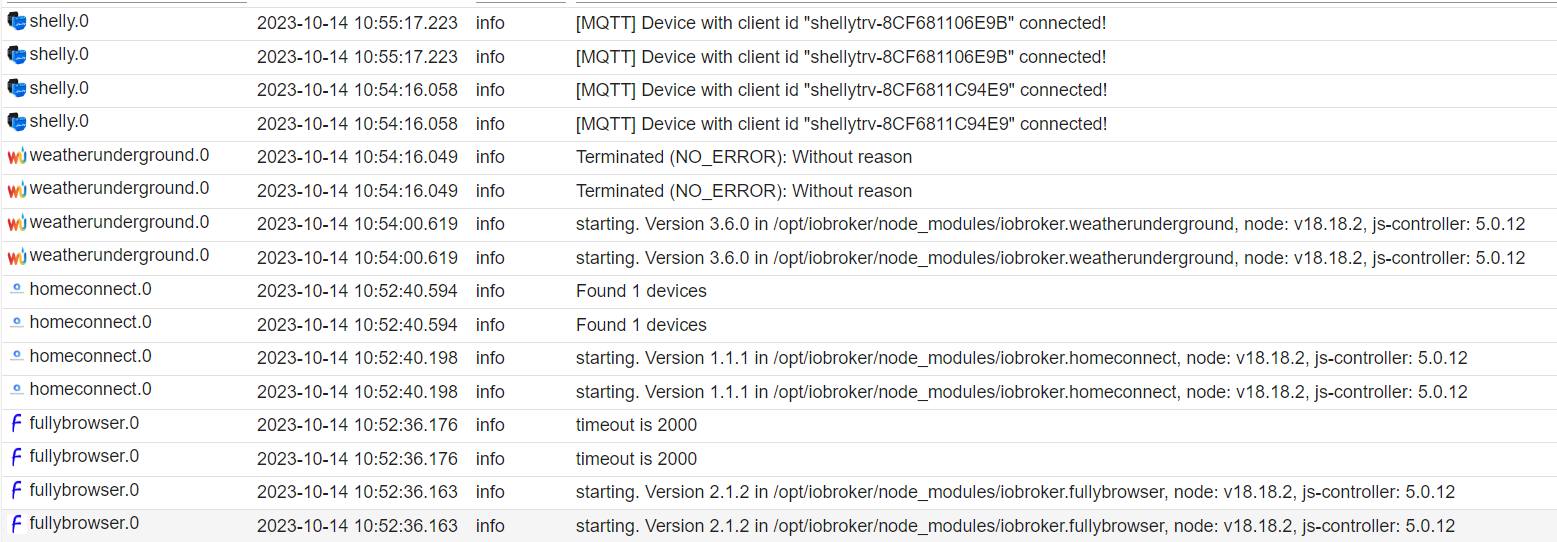
Doppelte Meldungen sind auf jeden Fall noch immer da.
Lieben Dank an die Helfer hier.
GLG WolfiConfiguration:
Intel Nuc: 11th Gen Intel(R) Core(TM) i7-1165G7 @ 2.80GHz (1 Socket)
RAM: 8 GBJS-controler: 5.0.17
Node.js: 18.19.0
NPM: 10.2.3 -
Ich weiss nicht ob es ein Fehler ist (denke aber schon)
Doppelte Meldungen sind auf jeden Fall noch immer da.
Klick mal auf 'Refresh'.
Dann sind die Doubletten weg. -
Klick mal auf 'Refresh'.
Dann sind die Doubletten weg.Was soll ich refreshen? die Logs? da ändert sich nix. Browser ebenso nicht.
Lieben Dank an die Helfer hier.
GLG WolfiConfiguration:
Intel Nuc: 11th Gen Intel(R) Core(TM) i7-1165G7 @ 2.80GHz (1 Socket)
RAM: 8 GBJS-controler: 5.0.17
Node.js: 18.19.0
NPM: 10.2.3 -
Was soll ich refreshen? die Logs? da ändert sich nix. Browser ebenso nicht.
-
@thomas-braun sagte in Doppelte Aktionen im iobroker!:
iob logs | uniq
tatsächlich hier ist auf dem ersten Blick nichts doppelt, also ist das nur ein Anzeigefehler in iobroker?
Dann bleibt nur die Frage, aus welchem Grund mir z.B. Alexa einen bevorstehenden Termin immer 2 mal ansagt und aus welchem Grund ich Meldungen in home (ios) auch doppelt bekomme? -
Hallo Comunity!
Ich habe seit geraumer Zeit das Phänomen im iobroker alles doppelt zu haben, egal ob Meldungen im Log, Ansagen von Alexa oder sogar Meldungen von Home (ios). Es kommt alles doppelt vor.
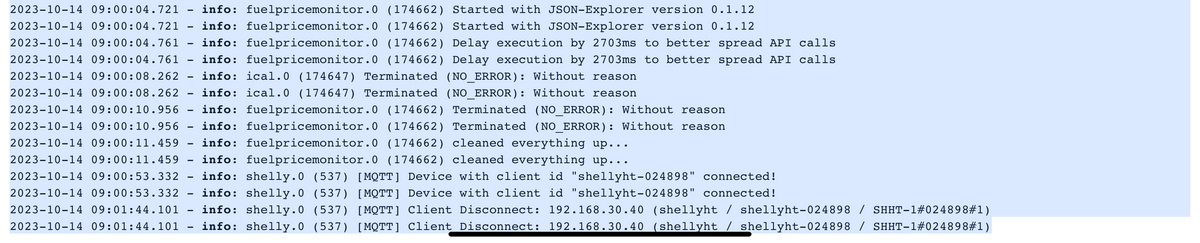
Hier nur ein kleiner Auszug aus meinem LOG-Buch.
Hat jemand eine Idee woran das liegen könnte?@mcwoolf sagte in Doppelte Aktionen im iobroker!:
Hier nur ein kleiner Auszug aus meinem LOG-Buch.
Hat jemand eine Idee woran das liegen könnte?Eine Idee wäre, dass du mehrere Log-Ausgaben konfiguriert hast, das ergäbe dann genau das Verhalten der doppelten Log-Einträge.
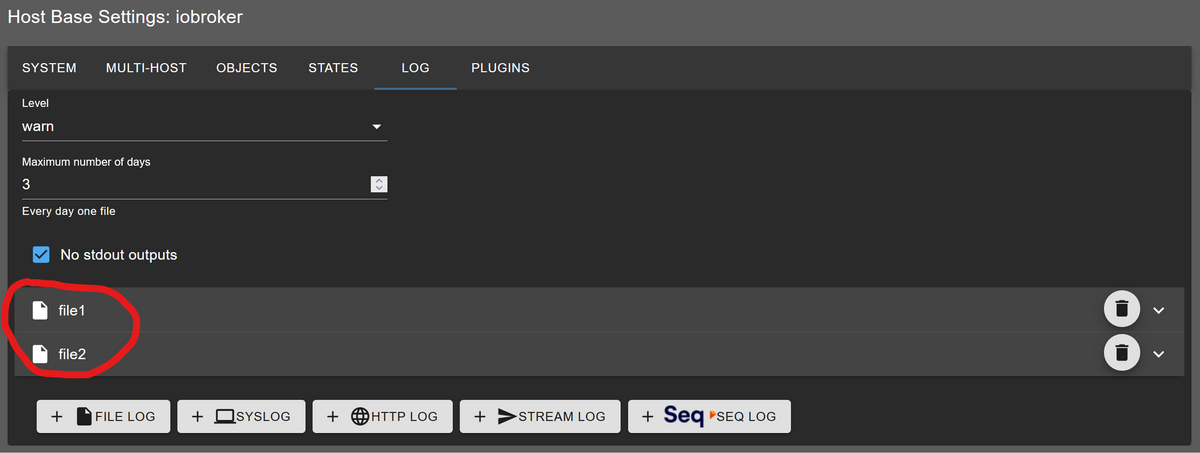
Das ist aber noch keine Erklärung für das Alexa-Verhalten ...
NUC10I3+Ubuntu+Docker+ioBroker+influxDB2+Node Red+EMQX+Grafana
Pi-hole, Traefik, Checkmk, Conbee II+Zigbee2MQTT, ESPSomfy-RTS, LoRaWAN
Benutzt das Voting im Beitrag, wenn er euch geholfen hat.
-
@mcwoolf sagte in Doppelte Aktionen im iobroker!:
Hier nur ein kleiner Auszug aus meinem LOG-Buch.
Hat jemand eine Idee woran das liegen könnte?Eine Idee wäre, dass du mehrere Log-Ausgaben konfiguriert hast, das ergäbe dann genau das Verhalten der doppelten Log-Einträge.
Das ist aber noch keine Erklärung für das Alexa-Verhalten ...
@marc-berg
Danke das erste Problem ist beseitigt, es waren tatsächlich 2 files erstellt. keine Ahnung aus welchem Grund, sollte ich das gewesen sein, dann nicht mit Absicht. -
@marc-berg
Danke das erste Problem ist beseitigt, es waren tatsächlich 2 files erstellt. keine Ahnung aus welchem Grund, sollte ich das gewesen sein, dann nicht mit Absicht.@mcwoolf
Erstelle ein Skript das dir die Ausgabe von zufallszahl ins log schreibt. Sind die Zahlen identisch?



Hey! Du scheinst an dieser Unterhaltung interessiert zu sein, hast aber noch kein Konto.
Hast du es satt, bei jedem Besuch durch die gleichen Beiträge zu scrollen? Wenn du dich für ein Konto anmeldest, kommst du immer genau dorthin zurück, wo du zuvor warst, und kannst dich über neue Antworten benachrichtigen lassen (entweder per E-Mail oder Push-Benachrichtigung). Du kannst auch Lesezeichen speichern und Beiträge positiv bewerten, um anderen Community-Mitgliedern deine Wertschätzung zu zeigen.
Mit deinem Input könnte dieser Beitrag noch besser werden 💗
Registrieren Anmelden413
Online33.0k
Benutzer83.4k
Themen1.3m
Beiträge