




Sonoff Zigbee3.0 USB in Proxmox LCX
-
Das ist eine super Anleitung! Eigentlich beschreibt sie exakt das was ich mir mittlerweile aus verschiedenen Quellen zusammengetragen habe.
Und sie hat mir einen Fehler offenbart: ich habe die chmod Rechtezuweisung im Container gemacht und nicht im Host. Arrghh ! Bin halt kein Linux-Profi.
Und jetzt kommt auch was im Iobroker an. Leider sagen mir die Logeinträge nicht viel. Wenn da vielleicht nochmal jemand draufschauen könnte:
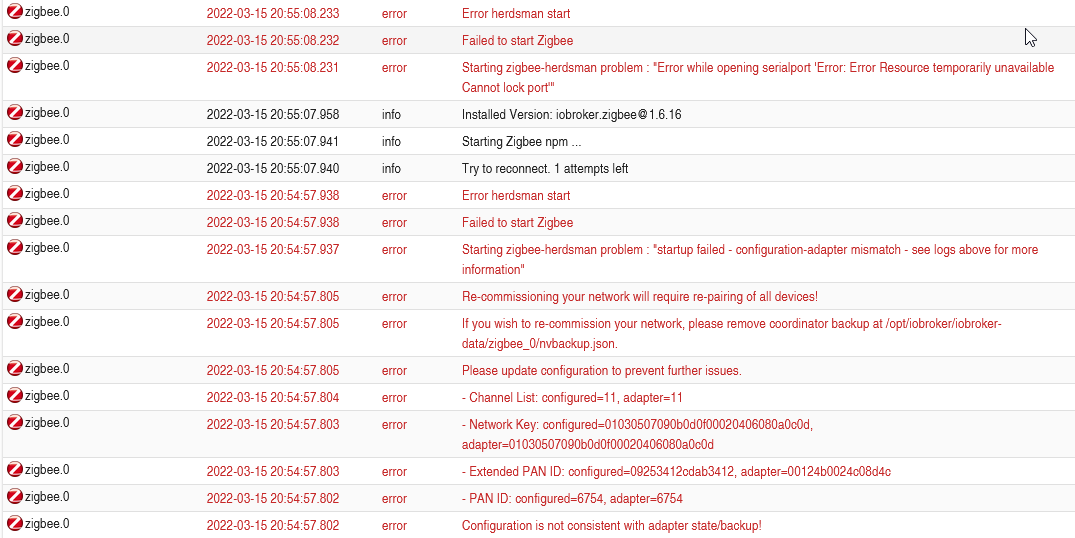
Aber für heute ist erstmal Schluss.
Vielen Dank für Eure Hilfe bis hierher ! -
Das ist eine super Anleitung! Eigentlich beschreibt sie exakt das was ich mir mittlerweile aus verschiedenen Quellen zusammengetragen habe.
Und sie hat mir einen Fehler offenbart: ich habe die chmod Rechtezuweisung im Container gemacht und nicht im Host. Arrghh ! Bin halt kein Linux-Profi.
Und jetzt kommt auch was im Iobroker an. Leider sagen mir die Logeinträge nicht viel. Wenn da vielleicht nochmal jemand draufschauen könnte:
Aber für heute ist erstmal Schluss.
Vielen Dank für Eure Hilfe bis hierher !@bernd-h
Die Extended PAN-Id muss übereinstimmen.
Und bitte keine Screenshots von LogFiles. Die kann man nicht zitieren.
-
Da bin ich im Moment selber draufgekommen !
Es funktioniert, der Adapter ist grün: keine Fehler oder Warnungen mehr im Log! Aber warum steht in der Kontexthilfe im Adapter "16 zufällige Hex-Zeichen" ?
Vielen Dank für Deine bzw. Eure Hilfe. Das Forum ist echt Klasse !
-
Aber jetzt noch zwei Fragen:
Wie kann ich die Logausgabe "zitierfähig" posten ? Copy-paste sieht nicht sehr gut aus.
Und wie kann ich diesen Thread als "gelöst" kennzeichnen ?@bernd-h
Text in CodeTags einbetten. Das </> Icon anklicken
-
Jetzt habe ich doch noch eine Verständnisfrage:
Wenn ich den Stick mit /dev/usb/xxx/xxx durchreiche, dann darf ich den physischen USB-Steckplatz vermutlich nicht ändern.
Wennn ich ihn mit /dev/serial/by-id/xyz durchreiche schon ?
-
@bernd-h Es kann sogar passieren, dass du den Stick rausziehst und wieder am selben Steckplatz einsteckst und er wird nicht mehr mit dev/usb/xxx durchgereicht, wenn sich die device-nummer ändert.
Ich hänge mich hier mal rein, weil ich exakt dasselbe Problem hab.
Sitze seit zwei Stunden vorm Rechner und bekomme den Stick einfach nicht integriert.
Ich bin Schritt für Schritt der Anleitung hier gefolgt:
https://www.iobroker.net/#de/documentation/install/proxmox.mdBissl runterscrollen. Da steht, wie die Einbindung von USB Geräten funktionieren soll.
So siehts bei mir in der Konsole vom LCX aus:
root@iobroker:~# ls -l /dev
total 0
crwx------ 1 root   tty     136, 0 Oct  2 21:55 console
lrwxrwxrwx 1 root   root        11 Oct  2 21:55 core -> /proc/kcore
lrwxrwxrwx 1 root   root        13 Oct  2 21:55 fd -> /proc/self/fd
crw-rw-rw- 1 nobody nogroup   1, 7 Oct  2 22:03 full
lrwxrwxrwx 1 root   root        12 Oct  2 21:55 initctl -> /run/initctl
lrwxrwxrwx 1 root   root        28 Oct  2 21:55 log -> /run/systemd/journal/dev-log
drwxrwxrwt 2 nobody nogroup     40 Oct  2 21:55 mqueue
crw-rw-rw- 1 nobody nogroup   1, 3 Oct  2 22:03 null
crw-rw-rw- 1 root   root      5, 2 Oct  2 22:09 ptmx
drwxr-xr-x 2 root   root         0 Oct  2 21:55 pts
crw-rw-rw- 1 nobody nogroup   1, 8 Oct  2 22:03 random
drwxr-xr-x 3 root   root        60 Oct  2 21:55 serial
drwxrwxrwt 2 root   root        40 Oct  2 21:55 shm
lrwxrwxrwx 1 root   root        15 Oct  2 21:55 stderr -> /proc/self/fd/2
lrwxrwxrwx 1 root   root        15 Oct  2 21:55 stdin -> /proc/self/fd/0
lrwxrwxrwx 1 root   root        15 Oct  2 21:55 stdout -> /proc/self/fd/1
crw-rw-rw- 1 nobody nogroup   5, 0 Oct  2 22:03 tty
crw------- 1 root   tty     136, 1 Oct  2 22:09 tty1
crw--w---- 1 root   tty     136, 2 Oct  2 21:55 tty2
crw-rw-rw- 1 nobody nogroup 188, 0 Oct  2 22:03 ttyUSB0
crw-rw-rw- 1 nobody nogroup   1, 9 Oct  2 22:03 urandom
crw-rw-rw- 1 nobody nogroup   1, 5 Oct  2 22:03 zero
root@iobroker:~#
und so sieht meine conf datei für den Container aus:
arch: amd64
cores: 4
features: nesting=1
hostname: iobroker
memory: 16384
net0: name=eth0,bridge=vmbr0,firewall=1,hwaddr=4A:67:03:5A:BE:88,ip=dhcp,ip6=dhcp,typ>
onboot: 1
ostype: ubuntu
rootfs: local-lvm:vm-200-disk-0,size=32G
swap: 512
unprivileged: 1
lxc.cgroup2.devices.allow: c 189:* rwm
lxc.mount.entry: usb-Silicon_Labs_Sonoff_Zigbee_3.0_USB_Dongle_Plus_0001-if00-port0 d>
lxc.cgroup2.devices.allow: c 188:* rwm
lxc.mount.entry: /dev/ttyUSB0 dev/ttyUSB0 none bind,optional,create=file
Die Rechte stimmen... alles sieht okay aus. Den Zigbee Adapter habe ich einmal mit /dev/ttyUSB0 probiert und einmal mit /dev/serial/by-id/usb-Silicon_Labs_Sonoff_Zigbee_3.0_USB_Dongle_Plus_0001-if00-port0
Kein Unterschied. Der Adapter bleibt "gelb".Die Meldung ausm Protokoll:
	2023-10-02 22:21:41.807	error	Error herdsman start

zigbee.0
2023-10-02 22:21:41.806	error	Failed to start Zigbee

zigbee.0
2023-10-02 22:21:41.806	error	Starting zigbee-herdsman problem : "Error while opening serialport 'Error: Error Resource temporarily unavailable Cannot lock port'"

zigbee.0
2023-10-02 22:21:41.685	info	Installed Version: iobroker.zigbee@1.8.23

zigbee.0
2023-10-02 22:21:41.677	info	Starting Zigbee npm ...

zigbee.0
2023-10-02 22:21:41.676	info	Try to reconnect. 1 attempts left

zigbee.0
2023-10-02 22:21:31.674	error	Error herdsman start

zigbee.0
2023-10-02 22:21:31.674	error	Failed to start Zigbee

zigbee.0
2023-10-02 22:21:31.674	error	Starting zigbee-herdsman problem : "startup failed - configuration-adapter mismatch - see logs above for more information"

zigbee.0
2023-10-02 22:21:31.625	error	Re-commissioning your network will require re-pairing of all devices!

zigbee.0
2023-10-02 22:21:31.625	error	If you wish to re-commission your network, please remove coordinator backup at /opt/iobroker/iobroker-data/zigbee_0/nvbackup.json.

zigbee.0
2023-10-02 22:21:31.625	error	Please update configuration to prevent further issues.

zigbee.0
2023-10-02 22:21:31.625	error	- Channel List: configured=11, adapter=11

zigbee.0
2023-10-02 22:21:31.624	error	- Network Key: configured=01030507090b0d0f00020406080a0c0d, adapter=01030507090b0d0f00020406080a0c0d

zigbee.0
2023-10-02 22:21:31.624	error	- Extended PAN ID: configured=00124b0029e8507c, adapter=00124b0029e8507c

zigbee.0
2023-10-02 22:21:31.624	error	- PAN ID: configured=6754, adapter=6700

zigbee.0
2023-10-02 22:21:31.624	error	Configuration is not consistent with adapter state/backup!
Wer kann mir helfen?
-
Ich hänge mich hier mal rein, weil ich exakt dasselbe Problem hab.
Sitze seit zwei Stunden vorm Rechner und bekomme den Stick einfach nicht integriert.
Ich bin Schritt für Schritt der Anleitung hier gefolgt:
https://www.iobroker.net/#de/documentation/install/proxmox.mdBissl runterscrollen. Da steht, wie die Einbindung von USB Geräten funktionieren soll.
So siehts bei mir in der Konsole vom LCX aus:
root@iobroker:~# ls -l /dev
total 0
crwx------ 1 root   tty     136, 0 Oct  2 21:55 console
lrwxrwxrwx 1 root   root        11 Oct  2 21:55 core -> /proc/kcore
lrwxrwxrwx 1 root   root        13 Oct  2 21:55 fd -> /proc/self/fd
crw-rw-rw- 1 nobody nogroup   1, 7 Oct  2 22:03 full
lrwxrwxrwx 1 root   root        12 Oct  2 21:55 initctl -> /run/initctl
lrwxrwxrwx 1 root   root        28 Oct  2 21:55 log -> /run/systemd/journal/dev-log
drwxrwxrwt 2 nobody nogroup     40 Oct  2 21:55 mqueue
crw-rw-rw- 1 nobody nogroup   1, 3 Oct  2 22:03 null
crw-rw-rw- 1 root   root      5, 2 Oct  2 22:09 ptmx
drwxr-xr-x 2 root   root         0 Oct  2 21:55 pts
crw-rw-rw- 1 nobody nogroup   1, 8 Oct  2 22:03 random
drwxr-xr-x 3 root   root        60 Oct  2 21:55 serial
drwxrwxrwt 2 root   root        40 Oct  2 21:55 shm
lrwxrwxrwx 1 root   root        15 Oct  2 21:55 stderr -> /proc/self/fd/2
lrwxrwxrwx 1 root   root        15 Oct  2 21:55 stdin -> /proc/self/fd/0
lrwxrwxrwx 1 root   root        15 Oct  2 21:55 stdout -> /proc/self/fd/1
crw-rw-rw- 1 nobody nogroup   5, 0 Oct  2 22:03 tty
crw------- 1 root   tty     136, 1 Oct  2 22:09 tty1
crw--w---- 1 root   tty     136, 2 Oct  2 21:55 tty2
crw-rw-rw- 1 nobody nogroup 188, 0 Oct  2 22:03 ttyUSB0
crw-rw-rw- 1 nobody nogroup   1, 9 Oct  2 22:03 urandom
crw-rw-rw- 1 nobody nogroup   1, 5 Oct  2 22:03 zero
root@iobroker:~#
und so sieht meine conf datei für den Container aus:
arch: amd64
cores: 4
features: nesting=1
hostname: iobroker
memory: 16384
net0: name=eth0,bridge=vmbr0,firewall=1,hwaddr=4A:67:03:5A:BE:88,ip=dhcp,ip6=dhcp,typ>
onboot: 1
ostype: ubuntu
rootfs: local-lvm:vm-200-disk-0,size=32G
swap: 512
unprivileged: 1
lxc.cgroup2.devices.allow: c 189:* rwm
lxc.mount.entry: usb-Silicon_Labs_Sonoff_Zigbee_3.0_USB_Dongle_Plus_0001-if00-port0 d>
lxc.cgroup2.devices.allow: c 188:* rwm
lxc.mount.entry: /dev/ttyUSB0 dev/ttyUSB0 none bind,optional,create=file
Die Rechte stimmen... alles sieht okay aus. Den Zigbee Adapter habe ich einmal mit /dev/ttyUSB0 probiert und einmal mit /dev/serial/by-id/usb-Silicon_Labs_Sonoff_Zigbee_3.0_USB_Dongle_Plus_0001-if00-port0
Kein Unterschied. Der Adapter bleibt "gelb".Die Meldung ausm Protokoll:
	2023-10-02 22:21:41.807	error	Error herdsman start

zigbee.0
2023-10-02 22:21:41.806	error	Failed to start Zigbee

zigbee.0
2023-10-02 22:21:41.806	error	Starting zigbee-herdsman problem : "Error while opening serialport 'Error: Error Resource temporarily unavailable Cannot lock port'"

zigbee.0
2023-10-02 22:21:41.685	info	Installed Version: iobroker.zigbee@1.8.23

zigbee.0
2023-10-02 22:21:41.677	info	Starting Zigbee npm ...

zigbee.0
2023-10-02 22:21:41.676	info	Try to reconnect. 1 attempts left

zigbee.0
2023-10-02 22:21:31.674	error	Error herdsman start

zigbee.0
2023-10-02 22:21:31.674	error	Failed to start Zigbee

zigbee.0
2023-10-02 22:21:31.674	error	Starting zigbee-herdsman problem : "startup failed - configuration-adapter mismatch - see logs above for more information"

zigbee.0
2023-10-02 22:21:31.625	error	Re-commissioning your network will require re-pairing of all devices!

zigbee.0
2023-10-02 22:21:31.625	error	If you wish to re-commission your network, please remove coordinator backup at /opt/iobroker/iobroker-data/zigbee_0/nvbackup.json.

zigbee.0
2023-10-02 22:21:31.625	error	Please update configuration to prevent further issues.

zigbee.0
2023-10-02 22:21:31.625	error	- Channel List: configured=11, adapter=11

zigbee.0
2023-10-02 22:21:31.624	error	- Network Key: configured=01030507090b0d0f00020406080a0c0d, adapter=01030507090b0d0f00020406080a0c0d

zigbee.0
2023-10-02 22:21:31.624	error	- Extended PAN ID: configured=00124b0029e8507c, adapter=00124b0029e8507c

zigbee.0
2023-10-02 22:21:31.624	error	- PAN ID: configured=6754, adapter=6700

zigbee.0
2023-10-02 22:21:31.624	error	Configuration is not consistent with adapter state/backup!
Wer kann mir helfen?
@christian88 sagte in Sonoff Zigbee3.0 USB in Proxmox LCX:
PAN ID: configured=6754, adapter=6700
Muss übereinstimmen.
Und in der Anleitung steht auch bestimmt drin, daß man einen User anlegt und den root in Ruh' lässt.
-
@christian88 sagte in Sonoff Zigbee3.0 USB in Proxmox LCX:
PAN ID: configured=6754, adapter=6700
Muss übereinstimmen.
Und in der Anleitung steht auch bestimmt drin, daß man einen User anlegt und den root in Ruh' lässt.
Manchmal sieht man den Wald vor lauter Bäumen...
Danke ! Läuft...
Und danke für den Tipp. Mach ich!


Hey! Du scheinst an dieser Unterhaltung interessiert zu sein, hast aber noch kein Konto.
Hast du es satt, bei jedem Besuch durch die gleichen Beiträge zu scrollen? Wenn du dich für ein Konto anmeldest, kommst du immer genau dorthin zurück, wo du zuvor warst, und kannst dich über neue Antworten benachrichtigen lassen (entweder per E-Mail oder Push-Benachrichtigung). Du kannst auch Lesezeichen speichern und Beiträge positiv bewerten, um anderen Community-Mitgliedern deine Wertschätzung zu zeigen.
Mit deinem Input könnte dieser Beitrag noch besser werden 💗
Registrieren AnmeldenSupport us
238
Online33.0k
Benutzer83.4k
Themen1.3m
Beiträge