




OpenWB - Ionroker - MQTT
-
Hallo, ich verzweifele and er Verbindung von OpenWB zum ioBroker. Früher hat mir die Verbdindung schon mal das ganze Ladeprofil ind er OpenWB zerhauen. Nachdem ich alles neu Installiert habe erhalte ich alle 10s die folgende Warnung ... bis irgendwann alles abstürzt.
Cannot parse "openWB/graph/alllivevaluesJson1": {"timestamp": 1695570741, "time": "17:52:21", "grid": 1.579, "house-power": 2.0, "charging-all": 0.0, "pv-all": 0.421, "cp8-power": 0.0, "ev0-soc": 79}{"timestamp": 1695570751, "time": "17:52:31", "grid": 1.572, "house-power": 2.0, "charging-all": 0.0, "pv-all": 0.428, "cp8-power": 0.0, "ev0-soc": 79}{"timestamp": 1695570760, "time": "17:52:40", "grid": 1.558, "house-power": 2.0, "charging-all": 0.0, "pv-all": 0.442, "cp8-power": 0.0, "ev0-soc": 79}{"timestamp": 1695570770, "time": "17:52:50", "grid": 1.58, "house-power": 2.0, "charging-all": 0.0, "pv-all": 0.42, "cp8-power": 0.0, "ev0-soc": 79}{"timestamp": 1695570780, "time": "17:53:00", "grid": 1.474, "house-power": 2.0, "charging-all": 0.0, "pv-all": 0.526, "cp8-power": 0.0, "ev0-soc": 79}{"timestamp": 1695570791, "time": "17:53:11", "grid": 1.581, "house-power": 2.0, "charging-all": 0.0, "pv-all": 0.419, "cp8-power": 0.0, "ev0-soc": 79}{"timestamp": 1695570800, "time": "17:53:20", "grid": 1.596, "house-power": 2.0, "charging-all": 0.0, "pv-all": 0.404, "cp8-power": 0.0, "ev0-soc": 79}{"timestamp": 1695570810, "time": "17:53:30", "grid": 1.603, "house-power": 2.0, "charging-all": 0.0, "pv-all": 0.397, "cp8-power": 0.0, "ev0-soc": 79}{"timestamp": 1695570821, "time": "17:53:41", "grid": 1.571, "house-power": 2.0, "charging-all": 0.0, "pv-all": 0.429, "cp8-power": 0.0, "ev0-soc": 79}{"timestamp": 1695570831, "time": "17:53:51", "grid": 1.591, "house-power": 2.0, "charging-all": 0.0, "pv-all": 0.409, "cp8-power": 0.0, "ev0-soc": 79}{"timestamp": 1695570840, "time": "17:54:00", "grid": 1.596, "house-power": 2.0, "charging-all": 0.0, "pv-all": 0.404, "cp8-power": 0.0, "ev0-soc": 79}{"timestamp": 1695570850, "time": "17:54:10", "grid": 1.561, "house-power": 2.0, "charging-all": 0.0, "pv-all": 0.439, "cp8-power": 0.0, "ev0-soc": 79}{"timestamp": 1695570861, "time": "17:54:21", "grid": 1.591, "house-power": 2.0, "charging-all": 0.0, "pv-all": 0.409, "cp8-power": 0.0, "ev0-soc": 79}{"timestamp": 1695570871, "time": "17:54:31", "grid": 1.497, "house-power": 2.0, "charging-all": 0.0, "pv-all": 0.503, "cp8-power": 0.0, "ev0-soc": 79}{"timestamp": 1695570880, "time": "17:54:40", "grid": 1.309, "house-power": 2.0, "charging-all": 0.0, "pv-all": 0.691, "cp8-power": 0.0, "ev0-soc": 79}{"timestamp": 1695570890, "time": "17:54:50", "grid": 1.284, "house-power": 2.0, "charging-all": 0.0, "pv-all": 0.716, "cp8-power": 0.0, "ev0-soc": 79}{"timestamp": 1695570901, "time": "17:55:01", "grid": 1.328, "house-power": 2.0, "charging-all": 0.0, "pv-all": 0.672, "cp8-power": 0.0, "ev0-soc": 79}{"timestamp": 1695570911, "time": "17:55:11", "grid": 1.313, "house-power": 2.0, "charging-all": 0.0, "pv-all": 0.687, "cp8-power": 0.0, "ev0-soc": 79}{"timestamp": 1695570920, "time": "17:55:20", "grid": 1.306, "house-power": 2.0, "charging-all": 0.0, "pv-all": 0.694, "cp8-power": 0.0, "ev0-soc": 79}{"timestamp": 1695570930, "time": "17:55:30", "grid": 1.337, "house-power": 2.0, "charging-all": 0.0, "pv-all": 0.663, "cp8-power": 0.0, "ev0-soc": 79}{"timestamp": 1695570941, "time": "17:55:41", "grid": 1.339, "house-power": 2.0, "charging-all": 0.0, "pv-all": 0.661, "cp8-power": 0.0, "ev0-soc": 79}{"timestamp": 1695570951, "time": "17:55:51", "grid": 1.343, "house-power": 2.0, "charging-all": 0.0, "pv-all": 0.657, "cp8-power": 0.0, "ev0-soc": 79}{"timestamp": 1695570961, "time": "17:56:01", "grid": 1.343, "house-power": 2.0, "charging-all": 0.0, "pv-all": 0.657, "cp8-power": 0.0, "ev0-soc": 79}{"timestamp": 1695570971, "time": "17:56:11", "grid": 1.394, "house-power": 2.0, "charging-all": 0.0, "pv-all": 0.606, "cp8-power": 0.0, "ev0-soc": 79}{"timestamp": 1695570980, "time": "17:56:20", "grid": 1.343, "house-power": 2.0, "charging-all": 0.0, "pv-all": 0.657, "cp8-power": 0.0, "ev0-soc": 79}{"timestamp": 1695570990, "time": "17:56:30", "grid": 1.329, "house-power": 2.0, "charging-all": 0.0, "pv-all": 0.671, "cp8-power": 0.0, "ev0-soc": 79}{"timestamp": 1695571001, "time": "17:56:41", "grid": 1.352, "house-power": 2.0, "charging-all": 0.0, "pv-all": 0.648, "cp8-power": 0.0, "ev0-soc": 79}{"timestamp": 1695571011, "time": "17:56:51", "grid": 1.346, "house-power": 2.0, "charging-all": 0.0, "pv-all": 0.654, "cp8-power": 0.0, "ev0-soc": 79}{"timestamp": 1695571020, "time": "17:57:00", "grid": 1.345, "house-power": 2.0, "charging-all": 0.0, "pv-all": 0.655, "cp8-power": 0.0, "ev0-soc": 79}{"timestamp": 1695571030, "time": "17:57:10", "grid": 1.38, "house-power": 2.0, "charging-all": 0.0, "pv-all": 0.62, "cp8-power": 0.0, "ev0-soc": 79}{"timestamp": 1695571041, "time": "17:57:21", "grid": 1.377, "house-power": 2.0, "charging-all": 0.0, "pv-all": 0.623, "cp8-power": 0.0, "ev0-soc": 79}{"timestamp": 1695571051, "time": "17:57:31", "grid": 1.379, "house-power": 2.0, "charging-all": 0.0, "pv-all": 0.621, "cp8-power": 0.0, "ev0-soc": 79}{"timestamp": 1695571061, "time": "17:57:41", "grid": 1.375, "house-power": 2.0, "charging-all": 0.0, "pv-all": 0.625, "cp8-power": 0.0, "ev0-soc": 79}{"timestamp": 1695571070, "time": "17:57:50", "grid": 1.406, "house-power": 2.0, "charging-all": 0.0, "pv-all": 0.594, "cp8-power": 0.0, "ev0-soc": 79}Meine Einstellungen:
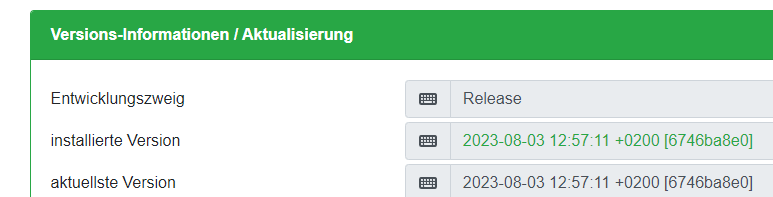
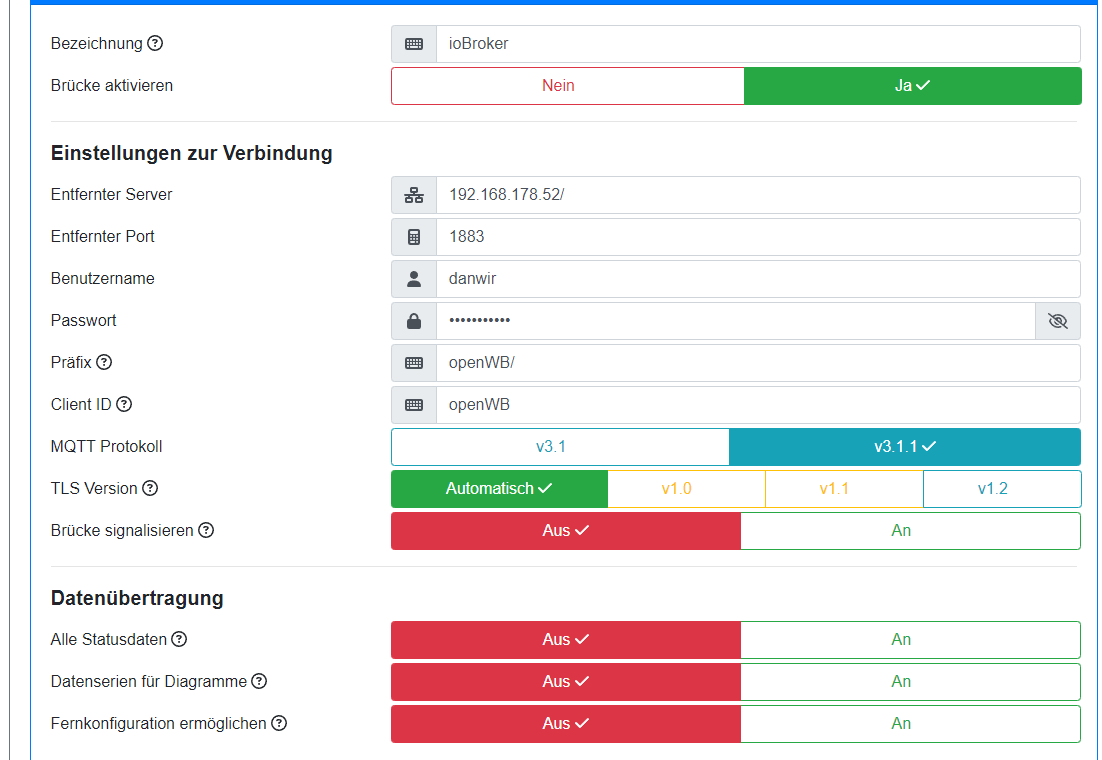
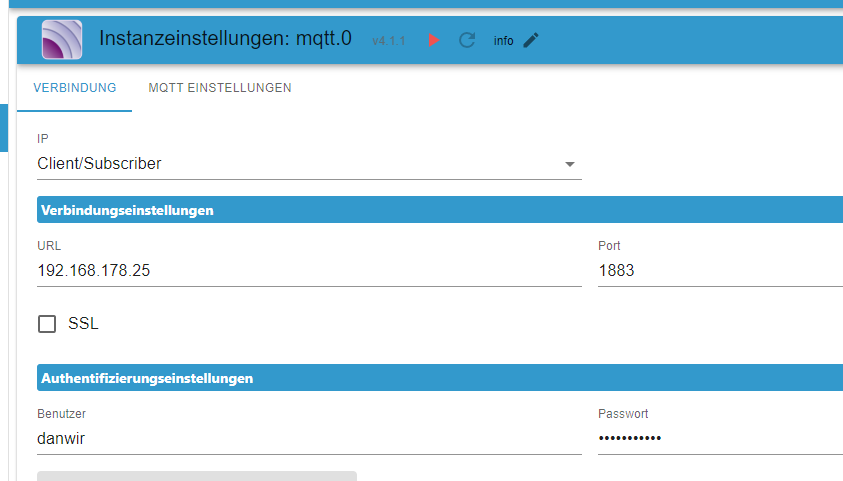
Alles original nichts geändert: ( Ergänzung auch die Präfix Anpassung auf openWB/ hat nichts gebracht
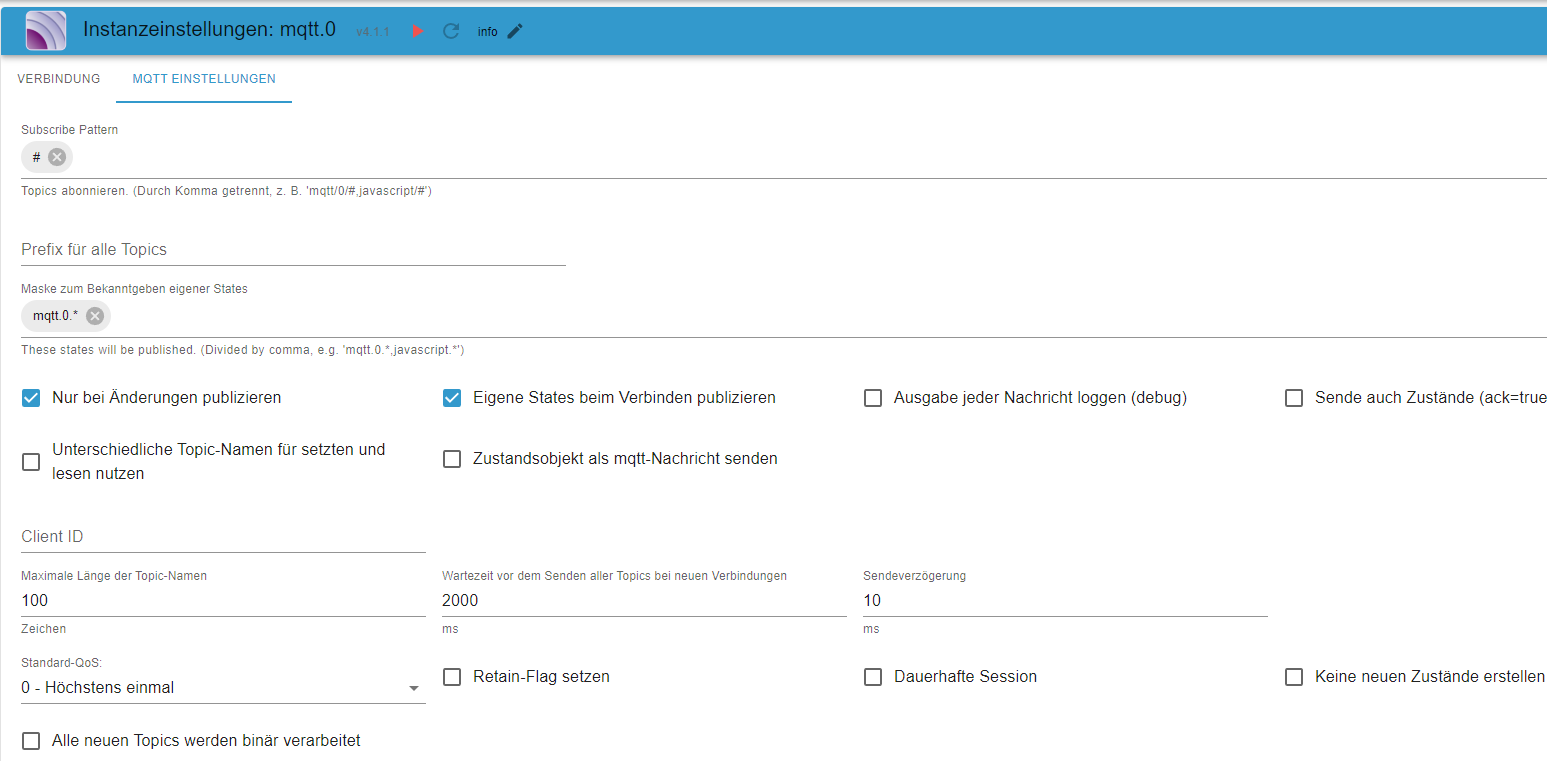
Ich hab keine Idee wie ich weiter kommen kann.. jemand von euch eine Idee ?
Vielleicht was vorweg gegriffen ... irgendwann würde ich gerne den IST Verbrauch aus dem ioBroker in die OpenWB einspielen .. dazu jemand eine Idee ? Aktuell habe ich nur einen Fix Wert von 2KW fürs Haus reserviert. Schöner wäre es natürlich Live daten zu senden ... zur Info .. ist alles im ioBroker vorhanden.
-
Hallo, ich verzweifele and er Verbindung von OpenWB zum ioBroker. Früher hat mir die Verbdindung schon mal das ganze Ladeprofil ind er OpenWB zerhauen. Nachdem ich alles neu Installiert habe erhalte ich alle 10s die folgende Warnung ... bis irgendwann alles abstürzt.
Cannot parse "openWB/graph/alllivevaluesJson1": {"timestamp": 1695570741, "time": "17:52:21", "grid": 1.579, "house-power": 2.0, "charging-all": 0.0, "pv-all": 0.421, "cp8-power": 0.0, "ev0-soc": 79}{"timestamp": 1695570751, "time": "17:52:31", "grid": 1.572, "house-power": 2.0, "charging-all": 0.0, "pv-all": 0.428, "cp8-power": 0.0, "ev0-soc": 79}{"timestamp": 1695570760, "time": "17:52:40", "grid": 1.558, "house-power": 2.0, "charging-all": 0.0, "pv-all": 0.442, "cp8-power": 0.0, "ev0-soc": 79}{"timestamp": 1695570770, "time": "17:52:50", "grid": 1.58, "house-power": 2.0, "charging-all": 0.0, "pv-all": 0.42, "cp8-power": 0.0, "ev0-soc": 79}{"timestamp": 1695570780, "time": "17:53:00", "grid": 1.474, "house-power": 2.0, "charging-all": 0.0, "pv-all": 0.526, "cp8-power": 0.0, "ev0-soc": 79}{"timestamp": 1695570791, "time": "17:53:11", "grid": 1.581, "house-power": 2.0, "charging-all": 0.0, "pv-all": 0.419, "cp8-power": 0.0, "ev0-soc": 79}{"timestamp": 1695570800, "time": "17:53:20", "grid": 1.596, "house-power": 2.0, "charging-all": 0.0, "pv-all": 0.404, "cp8-power": 0.0, "ev0-soc": 79}{"timestamp": 1695570810, "time": "17:53:30", "grid": 1.603, "house-power": 2.0, "charging-all": 0.0, "pv-all": 0.397, "cp8-power": 0.0, "ev0-soc": 79}{"timestamp": 1695570821, "time": "17:53:41", "grid": 1.571, "house-power": 2.0, "charging-all": 0.0, "pv-all": 0.429, "cp8-power": 0.0, "ev0-soc": 79}{"timestamp": 1695570831, "time": "17:53:51", "grid": 1.591, "house-power": 2.0, "charging-all": 0.0, "pv-all": 0.409, "cp8-power": 0.0, "ev0-soc": 79}{"timestamp": 1695570840, "time": "17:54:00", "grid": 1.596, "house-power": 2.0, "charging-all": 0.0, "pv-all": 0.404, "cp8-power": 0.0, "ev0-soc": 79}{"timestamp": 1695570850, "time": "17:54:10", "grid": 1.561, "house-power": 2.0, "charging-all": 0.0, "pv-all": 0.439, "cp8-power": 0.0, "ev0-soc": 79}{"timestamp": 1695570861, "time": "17:54:21", "grid": 1.591, "house-power": 2.0, "charging-all": 0.0, "pv-all": 0.409, "cp8-power": 0.0, "ev0-soc": 79}{"timestamp": 1695570871, "time": "17:54:31", "grid": 1.497, "house-power": 2.0, "charging-all": 0.0, "pv-all": 0.503, "cp8-power": 0.0, "ev0-soc": 79}{"timestamp": 1695570880, "time": "17:54:40", "grid": 1.309, "house-power": 2.0, "charging-all": 0.0, "pv-all": 0.691, "cp8-power": 0.0, "ev0-soc": 79}{"timestamp": 1695570890, "time": "17:54:50", "grid": 1.284, "house-power": 2.0, "charging-all": 0.0, "pv-all": 0.716, "cp8-power": 0.0, "ev0-soc": 79}{"timestamp": 1695570901, "time": "17:55:01", "grid": 1.328, "house-power": 2.0, "charging-all": 0.0, "pv-all": 0.672, "cp8-power": 0.0, "ev0-soc": 79}{"timestamp": 1695570911, "time": "17:55:11", "grid": 1.313, "house-power": 2.0, "charging-all": 0.0, "pv-all": 0.687, "cp8-power": 0.0, "ev0-soc": 79}{"timestamp": 1695570920, "time": "17:55:20", "grid": 1.306, "house-power": 2.0, "charging-all": 0.0, "pv-all": 0.694, "cp8-power": 0.0, "ev0-soc": 79}{"timestamp": 1695570930, "time": "17:55:30", "grid": 1.337, "house-power": 2.0, "charging-all": 0.0, "pv-all": 0.663, "cp8-power": 0.0, "ev0-soc": 79}{"timestamp": 1695570941, "time": "17:55:41", "grid": 1.339, "house-power": 2.0, "charging-all": 0.0, "pv-all": 0.661, "cp8-power": 0.0, "ev0-soc": 79}{"timestamp": 1695570951, "time": "17:55:51", "grid": 1.343, "house-power": 2.0, "charging-all": 0.0, "pv-all": 0.657, "cp8-power": 0.0, "ev0-soc": 79}{"timestamp": 1695570961, "time": "17:56:01", "grid": 1.343, "house-power": 2.0, "charging-all": 0.0, "pv-all": 0.657, "cp8-power": 0.0, "ev0-soc": 79}{"timestamp": 1695570971, "time": "17:56:11", "grid": 1.394, "house-power": 2.0, "charging-all": 0.0, "pv-all": 0.606, "cp8-power": 0.0, "ev0-soc": 79}{"timestamp": 1695570980, "time": "17:56:20", "grid": 1.343, "house-power": 2.0, "charging-all": 0.0, "pv-all": 0.657, "cp8-power": 0.0, "ev0-soc": 79}{"timestamp": 1695570990, "time": "17:56:30", "grid": 1.329, "house-power": 2.0, "charging-all": 0.0, "pv-all": 0.671, "cp8-power": 0.0, "ev0-soc": 79}{"timestamp": 1695571001, "time": "17:56:41", "grid": 1.352, "house-power": 2.0, "charging-all": 0.0, "pv-all": 0.648, "cp8-power": 0.0, "ev0-soc": 79}{"timestamp": 1695571011, "time": "17:56:51", "grid": 1.346, "house-power": 2.0, "charging-all": 0.0, "pv-all": 0.654, "cp8-power": 0.0, "ev0-soc": 79}{"timestamp": 1695571020, "time": "17:57:00", "grid": 1.345, "house-power": 2.0, "charging-all": 0.0, "pv-all": 0.655, "cp8-power": 0.0, "ev0-soc": 79}{"timestamp": 1695571030, "time": "17:57:10", "grid": 1.38, "house-power": 2.0, "charging-all": 0.0, "pv-all": 0.62, "cp8-power": 0.0, "ev0-soc": 79}{"timestamp": 1695571041, "time": "17:57:21", "grid": 1.377, "house-power": 2.0, "charging-all": 0.0, "pv-all": 0.623, "cp8-power": 0.0, "ev0-soc": 79}{"timestamp": 1695571051, "time": "17:57:31", "grid": 1.379, "house-power": 2.0, "charging-all": 0.0, "pv-all": 0.621, "cp8-power": 0.0, "ev0-soc": 79}{"timestamp": 1695571061, "time": "17:57:41", "grid": 1.375, "house-power": 2.0, "charging-all": 0.0, "pv-all": 0.625, "cp8-power": 0.0, "ev0-soc": 79}{"timestamp": 1695571070, "time": "17:57:50", "grid": 1.406, "house-power": 2.0, "charging-all": 0.0, "pv-all": 0.594, "cp8-power": 0.0, "ev0-soc": 79}Meine Einstellungen:
Alles original nichts geändert: ( Ergänzung auch die Präfix Anpassung auf openWB/ hat nichts gebracht
Ich hab keine Idee wie ich weiter kommen kann.. jemand von euch eine Idee ?
Vielleicht was vorweg gegriffen ... irgendwann würde ich gerne den IST Verbrauch aus dem ioBroker in die OpenWB einspielen .. dazu jemand eine Idee ? Aktuell habe ich nur einen Fix Wert von 2KW fürs Haus reserviert. Schöner wäre es natürlich Live daten zu senden ... zur Info .. ist alles im ioBroker vorhanden.
@danwir sagte in OpenWB - Ionroker - MQTT:
die folgende Warnung
bitte als Text in code-tags posten!
https://forum.iobroker.net/topic/51555/hinweise-für-gute-forenbeiträge/1
-
@danwir
Zu meinem Beitrag oben !!Habe kein OpenWB , deshalb meine Vermutung dazu das der Typ falsch war
, aber laut Forum ist dieser doch richtig ..Client/Subscriber
https://forum.iobroker.net/topic/43655/wallbox-pv-mit-openwb-in-iobroker-einbinden
https://forum.iobroker.net/topic/46453/mqtt-client-server-adapter-mit-openwb
-
@glasfaser said in OpenWB - Ionroker - MQTT:
js-controller 5.0.
ja der 5.02 ist drauf
hab auf Server/Broker gestell, dann will er eine vorgegebenen IP
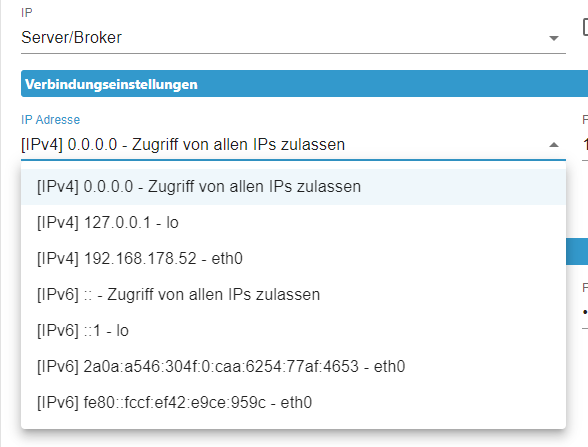
die IP von der OpenWB ist nicht dabei ...25
wenn ich IPv4 oder auch IPv6 für alle nehmen .. baut er keine Verbindung auf (gelbes Dreieck)
bei eth0 also mein Heimnetzwerk das gleiche -
@glasfaser said in OpenWB - Ionroker - MQTT:
js-controller 5.0.
ja der 5.02 ist drauf
hab auf Server/Broker gestell, dann will er eine vorgegebenen IP
die IP von der OpenWB ist nicht dabei ...25
wenn ich IPv4 oder auch IPv6 für alle nehmen .. baut er keine Verbindung auf (gelbes Dreieck)
bei eth0 also mein Heimnetzwerk das gleiche -
@danwir sagte in OpenWB - Ionroker - MQTT:
ja der 5.02 ist drauf
!?
Das ist eine alte BETAZeige mal
iob diagaber die Full Ausgabe
hab auf Server/Broker gestell
dazu habe ich schon oben was geschrieben !
======================= SUMMARY ======================= v.2023-06-20 Static hostname: raspberrypi Icon name: computer Machine ID: 6638176b61954ffc8042d2545b43fa3b Boot ID: 7a6738fa88034f6eb4e05073f6d7d36a Operating System: Debian GNU/Linux 11 (bullseye) Kernel: Linux 6.1.21-v8+ Architecture: arm64 Installation: native Kernel: aarch64 Userland: arm64 Timezone: Europe/London (BST, +0100) User-ID: 1000 X-Server: false Boot Target: multi-user.target Pending OS-Updates: 0 Pending iob updates: 0 Nodejs-Installation: /usr/bin/nodejs v18.17.1 /usr/bin/node v18.17.1 /usr/bin/npm 9.6.7 /usr/bin/npx 9.6.7 Recommended versions are nodejs 18.x.y and npm 9.x.y Your nodejs installation is correct MEMORY: total used free shared buff/cache available Mem: 3.8G 1.6G 809M 1.0M 1.4G 2.1G Swap: 99M 0B 99M Total: 3.9G 1.6G 909M Active iob-Instances: 18 Active repo(s): stable ioBroker Core: js-controller 5.0.12 admin 6.10.1 ioBroker Status: iobroker is running on this host. Objects type: jsonl States type: jsonl Status admin and web instance: + system.adapter.admin.0 : admin : raspberrypi - enabled, port: 8081, bind: 0.0.0.0, run as: admin Objects: 4011 States: 3052 Size of iob-Database: 11M /opt/iobroker/iobroker-data/objects.jsonl 54M /opt/iobroker/iobroker-data/states.jsonl =================== END OF SUMMARY ==================== -
======================= SUMMARY ======================= v.2023-06-20 Static hostname: raspberrypi Icon name: computer Machine ID: 6638176b61954ffc8042d2545b43fa3b Boot ID: 7a6738fa88034f6eb4e05073f6d7d36a Operating System: Debian GNU/Linux 11 (bullseye) Kernel: Linux 6.1.21-v8+ Architecture: arm64 Installation: native Kernel: aarch64 Userland: arm64 Timezone: Europe/London (BST, +0100) User-ID: 1000 X-Server: false Boot Target: multi-user.target Pending OS-Updates: 0 Pending iob updates: 0 Nodejs-Installation: /usr/bin/nodejs v18.17.1 /usr/bin/node v18.17.1 /usr/bin/npm 9.6.7 /usr/bin/npx 9.6.7 Recommended versions are nodejs 18.x.y and npm 9.x.y Your nodejs installation is correct MEMORY: total used free shared buff/cache available Mem: 3.8G 1.6G 809M 1.0M 1.4G 2.1G Swap: 99M 0B 99M Total: 3.9G 1.6G 909M Active iob-Instances: 18 Active repo(s): stable ioBroker Core: js-controller 5.0.12 admin 6.10.1 ioBroker Status: iobroker is running on this host. Objects type: jsonl States type: jsonl Status admin and web instance: + system.adapter.admin.0 : admin : raspberrypi - enabled, port: 8081, bind: 0.0.0.0, run as: admin Objects: 4011 States: 3052 Size of iob-Database: 11M /opt/iobroker/iobroker-data/objects.jsonl 54M /opt/iobroker/iobroker-data/states.jsonl =================== END OF SUMMARY ====================@danwir sagte in OpenWB - Ionroker - MQTT:
END OF SUMMARY
ist nicht
@glasfaser sagte in OpenWB - Ionroker - MQTT:
aber die Full Ausgabe
-
@glasfaser said in OpenWB - Ionroker - MQTT:
js-controller 5.0.
ja der 5.02 ist drauf
hab auf Server/Broker gestell, dann will er eine vorgegebenen IP
die IP von der OpenWB ist nicht dabei ...25
wenn ich IPv4 oder auch IPv6 für alle nehmen .. baut er keine Verbindung auf (gelbes Dreieck)
bei eth0 also mein Heimnetzwerk das gleiche -
@danwir sagte in OpenWB - Ionroker - MQTT:
ja der 5.02 ist drauf
OK alles gut , du hast den aktuellen Stable
js-controller 5.0.12@glasfaser ich hatte schon Panik wie ich das auf die schnelle aktualisiere .. bin da so der absolute Anfänger auf PI. Bin ja froh das es ioBroker gibt.
-
@glasfaser ich hatte schon Panik wie ich das auf die schnelle aktualisiere .. bin da so der absolute Anfänger auf PI. Bin ja froh das es ioBroker gibt.
ich habe gerad ein einem anderem Forum gelesen das, dass Problem ggf weg geht wenn man im MQTT Pattern "openWB/graph," eingeträgt. Aber irgendwie bin ich zu blöd dafür wenn ich was eintragen löscht er die Zeile immer:
Korrektur ... Einfach ENTER drücken .. man man man bin ich bekloppt
Das war wohl anscheinend auch die Lösung:
openWB/graph, mit ENTER in MQTT Pattern eintragenBis jetzt keine Fehler und Verbindung in GRÜN.
-
Wieso machst du überhaupt eine Brücke? Die openwb kommt doch schon als Broker.
Du kannst dich doch ganz einfach verbinden. In der MQTT Instanz die IP der openwb und fertig. -
ich habe gerad ein einem anderem Forum gelesen das, dass Problem ggf weg geht wenn man im MQTT Pattern "openWB/graph," eingeträgt. Aber irgendwie bin ich zu blöd dafür wenn ich was eintragen löscht er die Zeile immer:
Korrektur ... Einfach ENTER drücken .. man man man bin ich bekloppt
Das war wohl anscheinend auch die Lösung:
openWB/graph, mit ENTER in MQTT Pattern eintragenBis jetzt keine Fehler und Verbindung in GRÜN.
@danwir sagte in OpenWB - Ionroker - MQTT:
openWB/graph
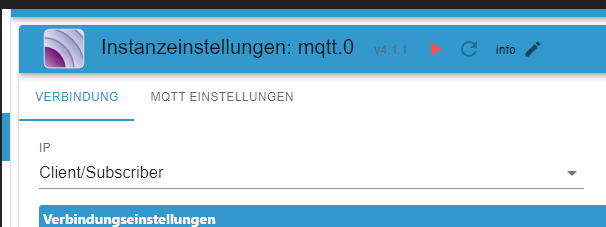
Hi, seit dem ich meine openWB auf die software 2.14 umgestellt habe bekomme ich keine Daten mehr von der
openWB Kannst du mir Helfen? Anbei 3 Bilder mit mit den Einstellungen auf ioBroker.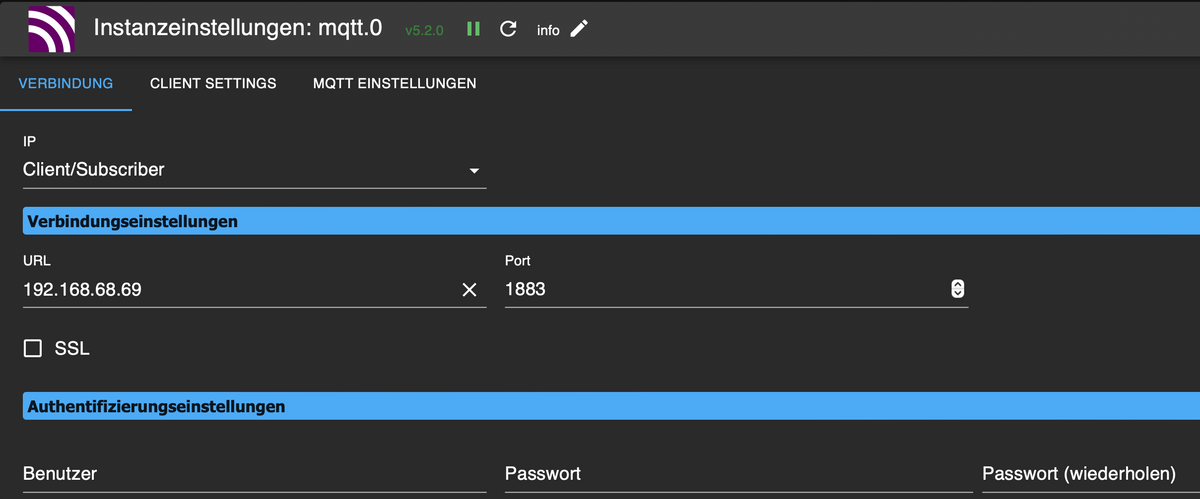
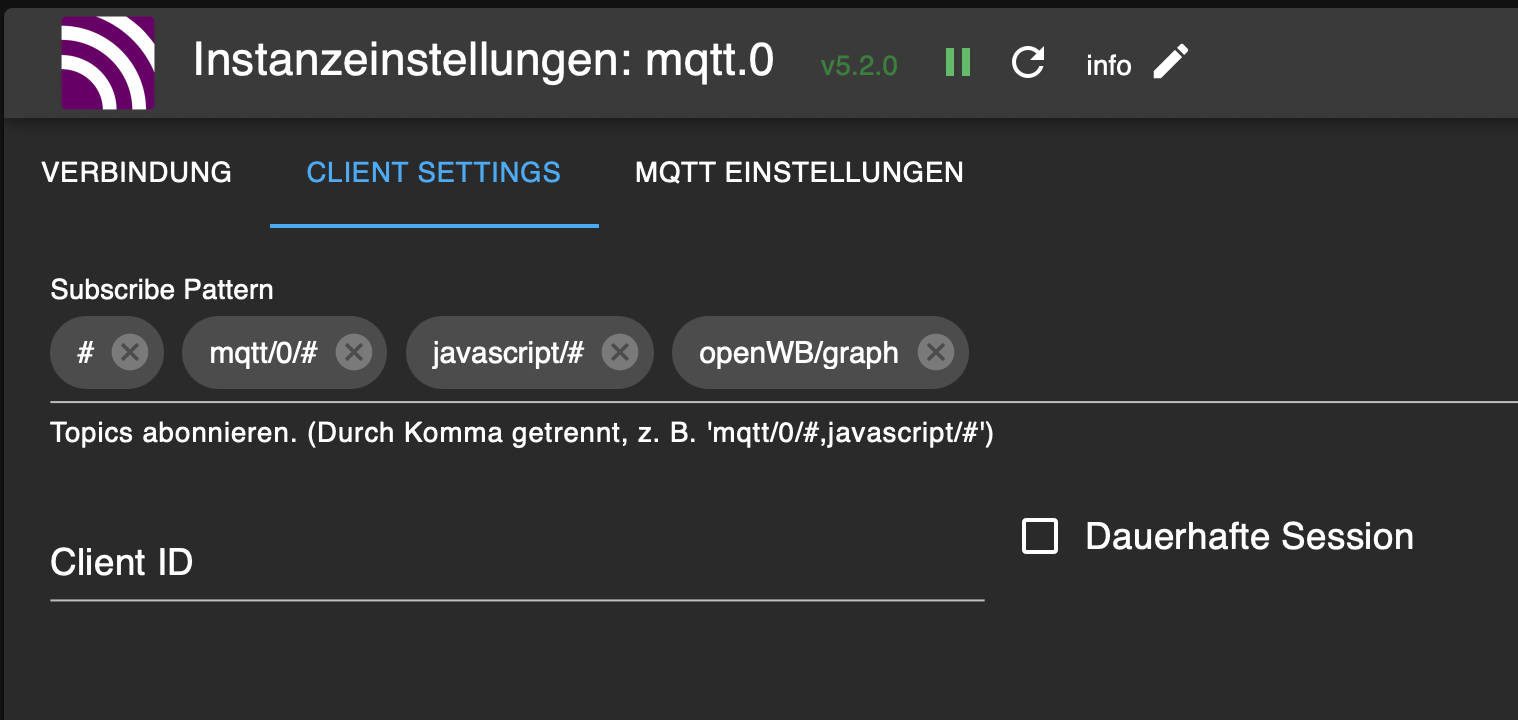
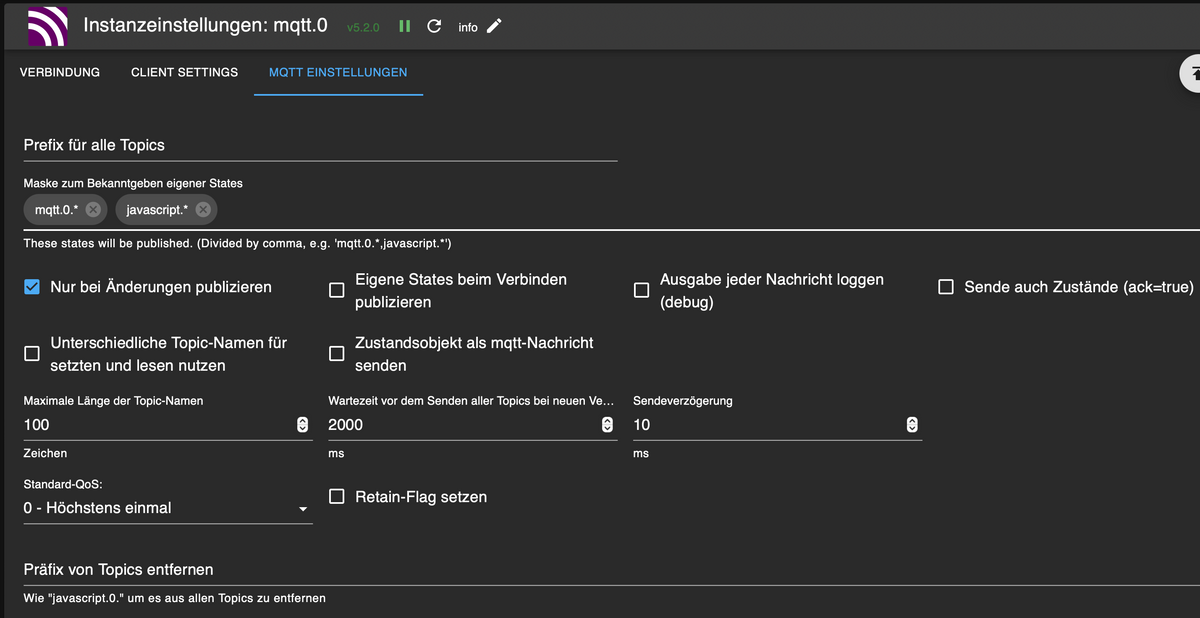
Danke schon mal im Voraus

Hey! Du scheinst an dieser Unterhaltung interessiert zu sein, hast aber noch kein Konto.
Hast du es satt, bei jedem Besuch durch die gleichen Beiträge zu scrollen? Wenn du dich für ein Konto anmeldest, kommst du immer genau dorthin zurück, wo du zuvor warst, und kannst dich über neue Antworten benachrichtigen lassen (entweder per E-Mail oder Push-Benachrichtigung). Du kannst auch Lesezeichen speichern und Beiträge positiv bewerten, um anderen Community-Mitgliedern deine Wertschätzung zu zeigen.
Mit deinem Input könnte dieser Beitrag noch besser werden 💗
Registrieren AnmeldenSupport us
364
Online33.0k
Benutzer83.4k
Themen1.3m
Beiträge