




Backup InfluxDB ioBroker
-
@marc-berg ich glaub ich hab ne Idee...
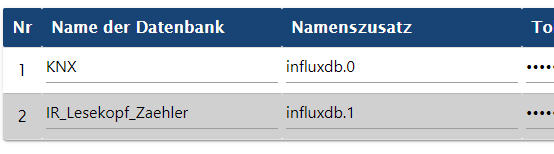
ggf falsch herum .. teste
korrektur .. war egal geht trotzdem nicht
@danwir sagte in Backup InfluxDB ioBroker:
ggf falsch herum .. teste
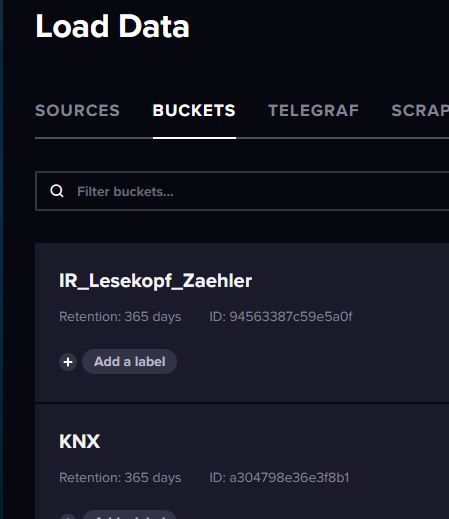
Heißen die Buckets in der InfluxDB so wie unter "Name der Datenbank" angegeben?
-
@danwir sagte in Backup InfluxDB ioBroker:
@marc-berg kann das der Fehler sein ? bisschen klein die Dateien oder ? dafür das da 3 Monate dutzende Daten reinlaufen.
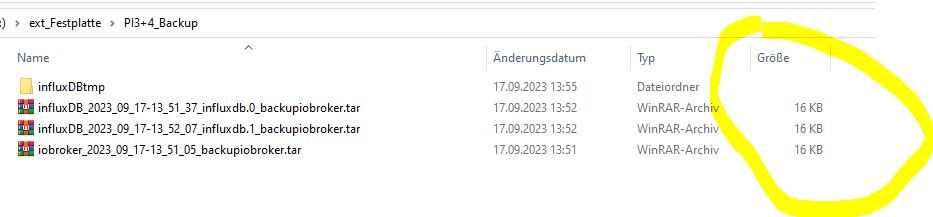
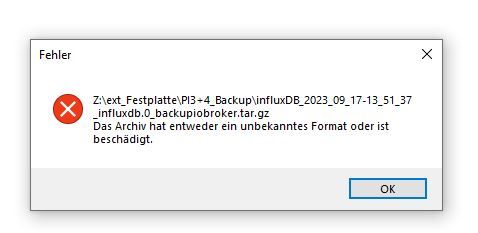
Ich habe dunkel in Erinnerung, dass auch @Thomas-Braun mit dem Mount auf der Fritzbox Probleme hatte. Vielleicht könnte er helfen? Da bin ich nicht fit genug, um sinnvoll helfen zu können. Aber zumindest haben wir die Ursache schon eingekreist.
@marc-berg sagte in Backup InfluxDB ioBroker:
Ich habe dunkel in Erinnerung, dass auch @Thomas-Braun mit dem Mount auf der Fritzbox Probleme hatte. Vielleicht könnte er helfen?
Richtig. Betrifft bei mir aber nur Backitup-Backups unter nodejs@20 auf einem per CIFS in /opt/iobroker/backup gemounteten ext4-Dateisystem eines FritzNAS. Alle anderen Konstellationen sind nicht betroffen.
-
@marc-berg sagte in Backup InfluxDB ioBroker:
Ich habe dunkel in Erinnerung, dass auch @Thomas-Braun mit dem Mount auf der Fritzbox Probleme hatte. Vielleicht könnte er helfen?
Richtig. Betrifft bei mir aber nur Backitup-Backups unter nodejs@20 auf einem per CIFS in /opt/iobroker/backup gemounteten ext4-Dateisystem eines FritzNAS. Alle anderen Konstellationen sind nicht betroffen.
@thomas-braun sagte in Backup InfluxDB ioBroker:
Richtig. Betrifft bei mir aber nur Backitup-Backups unter nodejs@20 auf einem per CIFS in /opt/iobroker/backup gemounteten ext4-Dateisystem eines FritzNAS. Alle anderen Konstellationen sind nicht betroffen
Okay, danke! Scheinbar haben wir es hier doch noch mit einem anderen Problem zu tun.
-
@thomas-braun sagte in Backup InfluxDB ioBroker:
Richtig. Betrifft bei mir aber nur Backitup-Backups unter nodejs@20 auf einem per CIFS in /opt/iobroker/backup gemounteten ext4-Dateisystem eines FritzNAS. Alle anderen Konstellationen sind nicht betroffen
Okay, danke! Scheinbar haben wir es hier doch noch mit einem anderen Problem zu tun.
@marc-berg ja Buckets heissen gleich
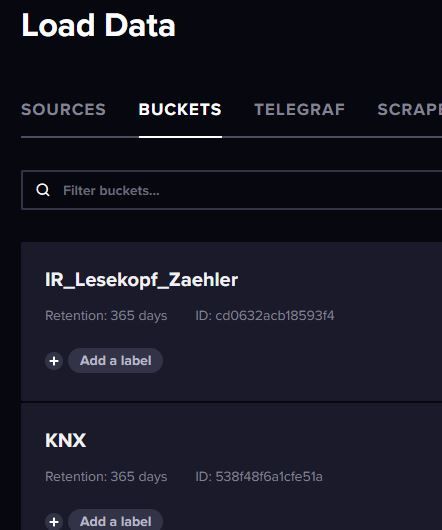
merkwürdig ist ja er macht ja das BAckup nur irgendwie ohne Inhalt. Das Backup läuft ja auch sauber im Log durch.
Started iobroker ... [DEBUG] [mount] - noserverino option: true [DEBUG] [mount] - cifs-mount command: "sudo mount -t cifs -o username=iobroker,password=****,noserverino,rw,uid=iobroker,gid=iobroker,file_mode=0777,dir_mode=0777,vers=3.0 //192.168.178.1/fritz.nas/ext_Festplatte/PI3+4_Backup /opt/iobroker/backups" [DEBUG] [mount] - mount successfully completed [DEBUG] [mount] - done [DEBUG] [iobroker] - host.raspberrypi 10290 states saved [DEBUG] [iobroker] - host.raspberrypi 10997 objects saved [DEBUG] [iobroker] - Backup created: /opt/iobroker/backups/iobroker_2023_09_17-14_13_39_backupiobroker.tar.gz [DEBUG] [iobroker] - done [DEBUG] [influxDB] - InfluxDB-Backup for KNX is started ... [DEBUG] [influxDB] - Start InfluxDB Backup ... [DEBUG] [influxDB] - InfluxDB Backup tmp directory created [DEBUG] [influxDB] - Backup created: /opt/iobroker/backups/influxDB_2023_09_17-14_13_57_KNX_backupiobroker.tar.gz [DEBUG] [influxDB] - Try deleting the InfluxDB tmp directory: "/opt/iobroker/backups/influxDB_2023_09_17-14_13_57_KNX_backupiobroker" [DEBUG] [influxDB] - InfluxDB tmp directory "/opt/iobroker/backups/influxDB_2023_09_17-14_13_57_KNX_backupiobroker" successfully deleted [DEBUG] [influxDB] - InfluxDB-Backup for KNX is finish [DEBUG] [influxDB] - InfluxDB-Backup for IR_Lesekopf_Zaehler is started ... [DEBUG] [influxDB] - Start InfluxDB Backup ... [DEBUG] [influxDB] - InfluxDB Backup tmp directory created [DEBUG] [influxDB] - Backup created: /opt/iobroker/backups/influxDB_2023_09_17-14_13_57_IR_Lesekopf_Zaehler_backupiobroker.tar.gz [DEBUG] [influxDB] - Try deleting the InfluxDB tmp directory: "/opt/iobroker/backups/influxDB_2023_09_17-14_13_57_IR_Lesekopf_Zaehler_backupiobroker" [DEBUG] [influxDB] - InfluxDB tmp directory "/opt/iobroker/backups/influxDB_2023_09_17-14_13_57_IR_Lesekopf_Zaehler_backupiobroker" successfully deleted [DEBUG] [influxDB] - InfluxDB-Backup for IR_Lesekopf_Zaehler is finish [DEBUG] [influxDB] - done [DEBUG] [cifs] - used copy path: /fritz.nas/ext_Festplatte/PI3+4_Backup [DEBUG] [cifs] - done [DEBUG] [clean] - No older backup files are deleted, because this backup was started manually [DEBUG] [clean] - done [DEBUG] [historyHTML] - new history html values created [DEBUG] [historyHTML] - done [DEBUG] [historyJSON] - new history json values created [DEBUG] [historyJSON] - done [DEBUG] [umount] - mount activ, umount is started ... [DEBUG] [umount] - umount successfully completed [DEBUG] [umount] - done [EXIT] 0 -
@marc-berg ja Buckets heissen gleich
merkwürdig ist ja er macht ja das BAckup nur irgendwie ohne Inhalt. Das Backup läuft ja auch sauber im Log durch.
Started iobroker ... [DEBUG] [mount] - noserverino option: true [DEBUG] [mount] - cifs-mount command: "sudo mount -t cifs -o username=iobroker,password=****,noserverino,rw,uid=iobroker,gid=iobroker,file_mode=0777,dir_mode=0777,vers=3.0 //192.168.178.1/fritz.nas/ext_Festplatte/PI3+4_Backup /opt/iobroker/backups" [DEBUG] [mount] - mount successfully completed [DEBUG] [mount] - done [DEBUG] [iobroker] - host.raspberrypi 10290 states saved [DEBUG] [iobroker] - host.raspberrypi 10997 objects saved [DEBUG] [iobroker] - Backup created: /opt/iobroker/backups/iobroker_2023_09_17-14_13_39_backupiobroker.tar.gz [DEBUG] [iobroker] - done [DEBUG] [influxDB] - InfluxDB-Backup for KNX is started ... [DEBUG] [influxDB] - Start InfluxDB Backup ... [DEBUG] [influxDB] - InfluxDB Backup tmp directory created [DEBUG] [influxDB] - Backup created: /opt/iobroker/backups/influxDB_2023_09_17-14_13_57_KNX_backupiobroker.tar.gz [DEBUG] [influxDB] - Try deleting the InfluxDB tmp directory: "/opt/iobroker/backups/influxDB_2023_09_17-14_13_57_KNX_backupiobroker" [DEBUG] [influxDB] - InfluxDB tmp directory "/opt/iobroker/backups/influxDB_2023_09_17-14_13_57_KNX_backupiobroker" successfully deleted [DEBUG] [influxDB] - InfluxDB-Backup for KNX is finish [DEBUG] [influxDB] - InfluxDB-Backup for IR_Lesekopf_Zaehler is started ... [DEBUG] [influxDB] - Start InfluxDB Backup ... [DEBUG] [influxDB] - InfluxDB Backup tmp directory created [DEBUG] [influxDB] - Backup created: /opt/iobroker/backups/influxDB_2023_09_17-14_13_57_IR_Lesekopf_Zaehler_backupiobroker.tar.gz [DEBUG] [influxDB] - Try deleting the InfluxDB tmp directory: "/opt/iobroker/backups/influxDB_2023_09_17-14_13_57_IR_Lesekopf_Zaehler_backupiobroker" [DEBUG] [influxDB] - InfluxDB tmp directory "/opt/iobroker/backups/influxDB_2023_09_17-14_13_57_IR_Lesekopf_Zaehler_backupiobroker" successfully deleted [DEBUG] [influxDB] - InfluxDB-Backup for IR_Lesekopf_Zaehler is finish [DEBUG] [influxDB] - done [DEBUG] [cifs] - used copy path: /fritz.nas/ext_Festplatte/PI3+4_Backup [DEBUG] [cifs] - done [DEBUG] [clean] - No older backup files are deleted, because this backup was started manually [DEBUG] [clean] - done [DEBUG] [historyHTML] - new history html values created [DEBUG] [historyHTML] - done [DEBUG] [historyJSON] - new history json values created [DEBUG] [historyJSON] - done [DEBUG] [umount] - mount activ, umount is started ... [DEBUG] [umount] - umount successfully completed [DEBUG] [umount] - done [EXIT] 0@danwir sagte in Backup InfluxDB ioBroker:
merkwürdig ist ja er macht ja das BAckup nur irgendwie ohne Inhalt. Das Backup läuft ja auch sauber im Log durch.
Ja, aber auch das eigentliche ioBroker Backup ist viel zu klein. Ich glaube weiterhin, dass da durch den Mount was verhunzt wird. Kannst du das Ganze mal ohne SMB Mount online bringen?
-
@danwir sagte in Backup InfluxDB ioBroker:
merkwürdig ist ja er macht ja das BAckup nur irgendwie ohne Inhalt. Das Backup läuft ja auch sauber im Log durch.
Ja, aber auch das eigentliche ioBroker Backup ist viel zu klein. Ich glaube weiterhin, dass da durch den Mount was verhunzt wird. Kannst du das Ganze mal ohne SMB Mount online bringen?
-
@marc-berg verrate mir wie ? was soll ich machen
@danwir sagte in Backup InfluxDB ioBroker:
verrate mir wie ? was soll ich machen
Im Backitup Adapter alle "Storage locations" abschalten. Dann wird das Backup lokal unter /opt/iobroker/backups abgelegt. Da mal schauen, wie die Größen aussehen.

-
@danwir sagte in Backup InfluxDB ioBroker:
verrate mir wie ? was soll ich machen
Im Backitup Adapter alle "Storage locations" abschalten. Dann wird das Backup lokal unter /opt/iobroker/backups abgelegt. Da mal schauen, wie die Größen aussehen.
-
@marc-berg okay interessant ..

ca 3MB groß ... man was für ein dreck
ahh moment influx vergessen mit zunhemen
ich krieg nen affen ...

auch nur 10KB groß
-
@marc-berg ja Buckets heissen gleich
merkwürdig ist ja er macht ja das BAckup nur irgendwie ohne Inhalt. Das Backup läuft ja auch sauber im Log durch.
Started iobroker ... [DEBUG] [mount] - noserverino option: true [DEBUG] [mount] - cifs-mount command: "sudo mount -t cifs -o username=iobroker,password=****,noserverino,rw,uid=iobroker,gid=iobroker,file_mode=0777,dir_mode=0777,vers=3.0 //192.168.178.1/fritz.nas/ext_Festplatte/PI3+4_Backup /opt/iobroker/backups" [DEBUG] [mount] - mount successfully completed [DEBUG] [mount] - done [DEBUG] [iobroker] - host.raspberrypi 10290 states saved [DEBUG] [iobroker] - host.raspberrypi 10997 objects saved [DEBUG] [iobroker] - Backup created: /opt/iobroker/backups/iobroker_2023_09_17-14_13_39_backupiobroker.tar.gz [DEBUG] [iobroker] - done [DEBUG] [influxDB] - InfluxDB-Backup for KNX is started ... [DEBUG] [influxDB] - Start InfluxDB Backup ... [DEBUG] [influxDB] - InfluxDB Backup tmp directory created [DEBUG] [influxDB] - Backup created: /opt/iobroker/backups/influxDB_2023_09_17-14_13_57_KNX_backupiobroker.tar.gz [DEBUG] [influxDB] - Try deleting the InfluxDB tmp directory: "/opt/iobroker/backups/influxDB_2023_09_17-14_13_57_KNX_backupiobroker" [DEBUG] [influxDB] - InfluxDB tmp directory "/opt/iobroker/backups/influxDB_2023_09_17-14_13_57_KNX_backupiobroker" successfully deleted [DEBUG] [influxDB] - InfluxDB-Backup for KNX is finish [DEBUG] [influxDB] - InfluxDB-Backup for IR_Lesekopf_Zaehler is started ... [DEBUG] [influxDB] - Start InfluxDB Backup ... [DEBUG] [influxDB] - InfluxDB Backup tmp directory created [DEBUG] [influxDB] - Backup created: /opt/iobroker/backups/influxDB_2023_09_17-14_13_57_IR_Lesekopf_Zaehler_backupiobroker.tar.gz [DEBUG] [influxDB] - Try deleting the InfluxDB tmp directory: "/opt/iobroker/backups/influxDB_2023_09_17-14_13_57_IR_Lesekopf_Zaehler_backupiobroker" [DEBUG] [influxDB] - InfluxDB tmp directory "/opt/iobroker/backups/influxDB_2023_09_17-14_13_57_IR_Lesekopf_Zaehler_backupiobroker" successfully deleted [DEBUG] [influxDB] - InfluxDB-Backup for IR_Lesekopf_Zaehler is finish [DEBUG] [influxDB] - done [DEBUG] [cifs] - used copy path: /fritz.nas/ext_Festplatte/PI3+4_Backup [DEBUG] [cifs] - done [DEBUG] [clean] - No older backup files are deleted, because this backup was started manually [DEBUG] [clean] - done [DEBUG] [historyHTML] - new history html values created [DEBUG] [historyHTML] - done [DEBUG] [historyJSON] - new history json values created [DEBUG] [historyJSON] - done [DEBUG] [umount] - mount activ, umount is started ... [DEBUG] [umount] - umount successfully completed [DEBUG] [umount] - done [EXIT] 0@danwir sagte in Backup InfluxDB ioBroker:
[DEBUG] [mount] - cifs-mount command: "sudo mount -t cifs -o username=iobroker,password=****,noserverino,rw,uid=iobroker,gid=iobroker,file_mode=0777,dir_mode=0777,vers=3.0 //192.168.178.1/fritz.nas/ext_Festplatte/PI3+4_Backup /opt/iobroker/backups"
Stelle bitte für die Fritzbox smb auf 3.1.1.
Sollte dies nicht funktionieren, erstelle erstmal ein lokales Backup, um zu schauen, ob es am Mount liegt.



Hey! Du scheinst an dieser Unterhaltung interessiert zu sein, hast aber noch kein Konto.
Hast du es satt, bei jedem Besuch durch die gleichen Beiträge zu scrollen? Wenn du dich für ein Konto anmeldest, kommst du immer genau dorthin zurück, wo du zuvor warst, und kannst dich über neue Antworten benachrichtigen lassen (entweder per E-Mail oder Push-Benachrichtigung). Du kannst auch Lesezeichen speichern und Beiträge positiv bewerten, um anderen Community-Mitgliedern deine Wertschätzung zu zeigen.
Mit deinem Input könnte dieser Beitrag noch besser werden 💗
Registrieren Anmelden253
Online33.0k
Benutzer83.5k
Themen1.3m
Beiträge