




Performance Probleme durch Shelly Adapter?
-
@schtallone sagte in Performance Probleme durch Shelly Adapter?:
Die App öffnet selber ein Terminal und zeigt dan dies...
Das habe ich nicht so ganz verstanden. Hast du iotop nicht über SSH gestartet?
@marc-berg ne, kann ich aber machen
moment -
@marc-berg ne, kann ich aber machen
moment[~] # iotop Total DISK READ: 0.00 B/s | Total DISK WRITE: 16.38 K/s TID PRIO USER DISK READ DISK WRITE SWAPIN IO> COMMAND 1 -/0 UNKNOWN 0.00 B/s 0.00 B/s 0.00 % 0.00 % init 2 -/4 UNKNOWN 0.00 B/s 0.00 B/s 0.00 % 0.00 % [kthread] 3 -/4 UNKNOWN 0.00 B/s 0.00 B/s 0.00 % 0.00 % [rcu_g] 4 -/4 UNKNOWN 0.00 B/s 0.00 B/s 0.00 % 0.00 % [rcu_par_g] 8 -/4 UNKNOWN 0.00 B/s 0.00 B/s 0.00 % 0.00 % [mm_percpu_w] 9 -/4 UNKNOWN 0.00 B/s 0.00 B/s 0.00 % 0.00 % [ksoftirqd/] 10 -/4 UNKNOWN 0.00 B/s 0.00 B/s 0.00 % 0.00 % [rcu_sche] 11 -/4 UNKNOWN 0.00 B/s 0.00 B/s 0.00 % 0.00 % [migration/] 13 -/4 UNKNOWN 0.00 B/s 0.00 B/s 0.00 % 0.00 % [cpuhp/] 14 -/4 UNKNOWN 0.00 B/s 0.00 B/s 0.00 % 0.00 % [cpuhp/] 15 -/4 UNKNOWN 0.00 B/s 0.00 B/s 0.00 % 0.00 % [migration/] 16 -/4 UNKNOWN 0.00 B/s 0.00 B/s 0.00 % 0.00 % [ksoftirqd/] 19 -/4 UNKNOWN 0.00 B/s 0.00 B/s 0.00 % 0.00 % [kdevtmpf] 20 -/4 UNKNOWN 0.00 B/s 0.00 B/s 0.00 % 0.00 % [netn] 25 -/4 UNKNOWN 0.00 B/s 0.00 B/s 0.00 % 0.00 % [kaudit] 441 -/0 UNKNOWN 0.00 B/s 0.00 B/s 0.00 % 0.00 % sshd: admin@pts/3 586 -/4 UNKNOWN 0.00 B/s 0.00 B/s 0.00 % 0.00 % [khungtask] 587 -/4 UNKNOWN 0.00 B/s 0.00 B/s 0.00 % 0.00 % [oom_reape] 588 -/4 UNKNOWN 0.00 B/s 0.00 B/s 0.00 % 0.00 % [writebac] 590 -/4 UNKNOWN 0.00 B/s 0.00 B/s 0.00 % 0.00 % [kcompactd] 591 -/4 UNKNOWN 0.00 B/s 0.00 B/s 0.00 % 0.00 % [ksm] 605 -/4 UNKNOWN 0.00 B/s 0.00 B/s 0.00 % 0.00 % [crypt] 632 -/4 UNKNOWN 0.00 B/s 0.00 B/s 0.00 % 0.00 % [kintegrity] 633 -/4 UNKNOWN 0.00 B/s 0.00 B/s 0.00 % 0.00 % [kblock] 634 -/4 UNKNOWN 0.00 B/s 0.00 B/s 0.00 % 0.00 % [blkcg_punt_bi] 760 -/0 UNKNOWN 0.00 B/s 0.00 B/s 0.00 % 0.00 % python /usr/local/network/nmd/nmd.pyc 775 -/4 UNKNOWN 0.00 B/s 0.00 B/s 0.00 % 0.00 % python /usr/local/network/nmd/nmd.pyc 780 -/4 UNKNOWN 0.00 B/s 0.00 B/s 0.00 % 0.00 % python /usr/local/network/nmd/nmd.pyc 817 -/0 UNKNOWN 0.00 B/s 0.00 B/s 0.00 % 0.00 % -sh 853 -/4 UNKNOWN 0.00 B/s 0.00 B/s 0.00 % 0.00 % [tif] 860 -/4 UNKNOWN 0.00 B/s 0.00 B/s 0.00 % 0.00 % [ata_sf] 880 -/0 UNKNOWN 0.00 B/s 0.00 B/s 0.00 % 0.00 % [m] 899 -/4 UNKNOWN 0.00 B/s 0.00 B/s 0.00 % 0.00 % [watchdog] 955 -/0 UNKNOWN 0.00 B/s 0.00 B/s 0.00 % 0.00 % ./Plex Media Server 1021 -/0 UNKNOWN 0.00 B/s 0.00 B/s 0.00 % 0.00 % ./Plex Media Server 1062 -/0 UNKNOWN 0.00 B/s 0.00 B/s 0.00 % 0.00 % ./Plex Media Server 1064 -/4 UNKNOWN 0.00 B/s 0.00 B/s 0.00 % 0.00 % ./Plex Media Server 1076 -/0 UNKNOWN 0.00 B/s 0.00 B/s 0.00 % 0.00 % ./Plex Media Server 1077 -/0 UNKNOWN 0.00 B/s 0.00 B/s 0.00 % 0.00 % ./Plex Media Server 1087 -/4 UNKNOWN 0.00 B/s 0.00 B/s 0.00 % 0.00 % ./Plex Media Server 1113 -/0 UNKNOWN 0.00 B/s 0.00 B/s 0.00 % 0.00 % ./Plex Media Server 1118 -/0 UNKNOWN 0.00 B/s 0.00 B/s 0.00 % 0.00 % ./Plex Media Server 1126 -/4 UNKNOWN 0.00 B/s 0.00 B/s 0.00 % 0.00 % ./Plex Media Server 3222 -/4 UNKNOWN 0.00 B/s 0.00 B/s 0.00 % 0.00 % ./Plex Media Server 3226 -/0 UNKNOWN 0.00 B/s 0.00 B/s 0.00 % 0.00 % ./Plex Media Server 3227 -/0 UNKNOWN 0.00 B/s 0.00 B/s 0.00 % 0.00 % ./Plex Media Server 3230 -/4 UNKNOWN 0.00 B/s 0.00 B/s 0.00 % 0.00 % ./Plex Media Server 3236 -/4 UNKNOWN 0.00 B/s 0.00 B/s 0.00 % 0.00 % ./Plex Media Server -
[~] # iotop Total DISK READ: 0.00 B/s | Total DISK WRITE: 16.38 K/s TID PRIO USER DISK READ DISK WRITE SWAPIN IO> COMMAND 1 -/0 UNKNOWN 0.00 B/s 0.00 B/s 0.00 % 0.00 % init 2 -/4 UNKNOWN 0.00 B/s 0.00 B/s 0.00 % 0.00 % [kthread] 3 -/4 UNKNOWN 0.00 B/s 0.00 B/s 0.00 % 0.00 % [rcu_g] 4 -/4 UNKNOWN 0.00 B/s 0.00 B/s 0.00 % 0.00 % [rcu_par_g] 8 -/4 UNKNOWN 0.00 B/s 0.00 B/s 0.00 % 0.00 % [mm_percpu_w] 9 -/4 UNKNOWN 0.00 B/s 0.00 B/s 0.00 % 0.00 % [ksoftirqd/] 10 -/4 UNKNOWN 0.00 B/s 0.00 B/s 0.00 % 0.00 % [rcu_sche] 11 -/4 UNKNOWN 0.00 B/s 0.00 B/s 0.00 % 0.00 % [migration/] 13 -/4 UNKNOWN 0.00 B/s 0.00 B/s 0.00 % 0.00 % [cpuhp/] 14 -/4 UNKNOWN 0.00 B/s 0.00 B/s 0.00 % 0.00 % [cpuhp/] 15 -/4 UNKNOWN 0.00 B/s 0.00 B/s 0.00 % 0.00 % [migration/] 16 -/4 UNKNOWN 0.00 B/s 0.00 B/s 0.00 % 0.00 % [ksoftirqd/] 19 -/4 UNKNOWN 0.00 B/s 0.00 B/s 0.00 % 0.00 % [kdevtmpf] 20 -/4 UNKNOWN 0.00 B/s 0.00 B/s 0.00 % 0.00 % [netn] 25 -/4 UNKNOWN 0.00 B/s 0.00 B/s 0.00 % 0.00 % [kaudit] 441 -/0 UNKNOWN 0.00 B/s 0.00 B/s 0.00 % 0.00 % sshd: admin@pts/3 586 -/4 UNKNOWN 0.00 B/s 0.00 B/s 0.00 % 0.00 % [khungtask] 587 -/4 UNKNOWN 0.00 B/s 0.00 B/s 0.00 % 0.00 % [oom_reape] 588 -/4 UNKNOWN 0.00 B/s 0.00 B/s 0.00 % 0.00 % [writebac] 590 -/4 UNKNOWN 0.00 B/s 0.00 B/s 0.00 % 0.00 % [kcompactd] 591 -/4 UNKNOWN 0.00 B/s 0.00 B/s 0.00 % 0.00 % [ksm] 605 -/4 UNKNOWN 0.00 B/s 0.00 B/s 0.00 % 0.00 % [crypt] 632 -/4 UNKNOWN 0.00 B/s 0.00 B/s 0.00 % 0.00 % [kintegrity] 633 -/4 UNKNOWN 0.00 B/s 0.00 B/s 0.00 % 0.00 % [kblock] 634 -/4 UNKNOWN 0.00 B/s 0.00 B/s 0.00 % 0.00 % [blkcg_punt_bi] 760 -/0 UNKNOWN 0.00 B/s 0.00 B/s 0.00 % 0.00 % python /usr/local/network/nmd/nmd.pyc 775 -/4 UNKNOWN 0.00 B/s 0.00 B/s 0.00 % 0.00 % python /usr/local/network/nmd/nmd.pyc 780 -/4 UNKNOWN 0.00 B/s 0.00 B/s 0.00 % 0.00 % python /usr/local/network/nmd/nmd.pyc 817 -/0 UNKNOWN 0.00 B/s 0.00 B/s 0.00 % 0.00 % -sh 853 -/4 UNKNOWN 0.00 B/s 0.00 B/s 0.00 % 0.00 % [tif] 860 -/4 UNKNOWN 0.00 B/s 0.00 B/s 0.00 % 0.00 % [ata_sf] 880 -/0 UNKNOWN 0.00 B/s 0.00 B/s 0.00 % 0.00 % [m] 899 -/4 UNKNOWN 0.00 B/s 0.00 B/s 0.00 % 0.00 % [watchdog] 955 -/0 UNKNOWN 0.00 B/s 0.00 B/s 0.00 % 0.00 % ./Plex Media Server 1021 -/0 UNKNOWN 0.00 B/s 0.00 B/s 0.00 % 0.00 % ./Plex Media Server 1062 -/0 UNKNOWN 0.00 B/s 0.00 B/s 0.00 % 0.00 % ./Plex Media Server 1064 -/4 UNKNOWN 0.00 B/s 0.00 B/s 0.00 % 0.00 % ./Plex Media Server 1076 -/0 UNKNOWN 0.00 B/s 0.00 B/s 0.00 % 0.00 % ./Plex Media Server 1077 -/0 UNKNOWN 0.00 B/s 0.00 B/s 0.00 % 0.00 % ./Plex Media Server 1087 -/4 UNKNOWN 0.00 B/s 0.00 B/s 0.00 % 0.00 % ./Plex Media Server 1113 -/0 UNKNOWN 0.00 B/s 0.00 B/s 0.00 % 0.00 % ./Plex Media Server 1118 -/0 UNKNOWN 0.00 B/s 0.00 B/s 0.00 % 0.00 % ./Plex Media Server 1126 -/4 UNKNOWN 0.00 B/s 0.00 B/s 0.00 % 0.00 % ./Plex Media Server 3222 -/4 UNKNOWN 0.00 B/s 0.00 B/s 0.00 % 0.00 % ./Plex Media Server 3226 -/0 UNKNOWN 0.00 B/s 0.00 B/s 0.00 % 0.00 % ./Plex Media Server 3227 -/0 UNKNOWN 0.00 B/s 0.00 B/s 0.00 % 0.00 % ./Plex Media Server 3230 -/4 UNKNOWN 0.00 B/s 0.00 B/s 0.00 % 0.00 % ./Plex Media Server 3236 -/4 UNKNOWN 0.00 B/s 0.00 B/s 0.00 % 0.00 % ./Plex Media Server@schtallone sagte in Performance Probleme durch Shelly Adapter?:
955 -/0 UNKNOWN 0.00 B/s 0.00 B/s 0.00 % 0.00 % ./Plex Media Server
Moin,
ich dachte da läuft keine Videostation, Plex ist aber eine!
VG
Bernd -
@schtallone sagte in Performance Probleme durch Shelly Adapter?:
955 -/0 UNKNOWN 0.00 B/s 0.00 B/s 0.00 % 0.00 % ./Plex Media Server
Moin,
ich dachte da läuft keine Videostation, Plex ist aber eine!
VG
Bernd@dp20eic sorry, ich dachte Kamera-Survialance Apps. Soll ich Plex einmal deaktivieren?
-
[~] # iotop Total DISK READ: 0.00 B/s | Total DISK WRITE: 16.38 K/s TID PRIO USER DISK READ DISK WRITE SWAPIN IO> COMMAND 1 -/0 UNKNOWN 0.00 B/s 0.00 B/s 0.00 % 0.00 % init 2 -/4 UNKNOWN 0.00 B/s 0.00 B/s 0.00 % 0.00 % [kthread] 3 -/4 UNKNOWN 0.00 B/s 0.00 B/s 0.00 % 0.00 % [rcu_g] 4 -/4 UNKNOWN 0.00 B/s 0.00 B/s 0.00 % 0.00 % [rcu_par_g] 8 -/4 UNKNOWN 0.00 B/s 0.00 B/s 0.00 % 0.00 % [mm_percpu_w] 9 -/4 UNKNOWN 0.00 B/s 0.00 B/s 0.00 % 0.00 % [ksoftirqd/] 10 -/4 UNKNOWN 0.00 B/s 0.00 B/s 0.00 % 0.00 % [rcu_sche] 11 -/4 UNKNOWN 0.00 B/s 0.00 B/s 0.00 % 0.00 % [migration/] 13 -/4 UNKNOWN 0.00 B/s 0.00 B/s 0.00 % 0.00 % [cpuhp/] 14 -/4 UNKNOWN 0.00 B/s 0.00 B/s 0.00 % 0.00 % [cpuhp/] 15 -/4 UNKNOWN 0.00 B/s 0.00 B/s 0.00 % 0.00 % [migration/] 16 -/4 UNKNOWN 0.00 B/s 0.00 B/s 0.00 % 0.00 % [ksoftirqd/] 19 -/4 UNKNOWN 0.00 B/s 0.00 B/s 0.00 % 0.00 % [kdevtmpf] 20 -/4 UNKNOWN 0.00 B/s 0.00 B/s 0.00 % 0.00 % [netn] 25 -/4 UNKNOWN 0.00 B/s 0.00 B/s 0.00 % 0.00 % [kaudit] 441 -/0 UNKNOWN 0.00 B/s 0.00 B/s 0.00 % 0.00 % sshd: admin@pts/3 586 -/4 UNKNOWN 0.00 B/s 0.00 B/s 0.00 % 0.00 % [khungtask] 587 -/4 UNKNOWN 0.00 B/s 0.00 B/s 0.00 % 0.00 % [oom_reape] 588 -/4 UNKNOWN 0.00 B/s 0.00 B/s 0.00 % 0.00 % [writebac] 590 -/4 UNKNOWN 0.00 B/s 0.00 B/s 0.00 % 0.00 % [kcompactd] 591 -/4 UNKNOWN 0.00 B/s 0.00 B/s 0.00 % 0.00 % [ksm] 605 -/4 UNKNOWN 0.00 B/s 0.00 B/s 0.00 % 0.00 % [crypt] 632 -/4 UNKNOWN 0.00 B/s 0.00 B/s 0.00 % 0.00 % [kintegrity] 633 -/4 UNKNOWN 0.00 B/s 0.00 B/s 0.00 % 0.00 % [kblock] 634 -/4 UNKNOWN 0.00 B/s 0.00 B/s 0.00 % 0.00 % [blkcg_punt_bi] 760 -/0 UNKNOWN 0.00 B/s 0.00 B/s 0.00 % 0.00 % python /usr/local/network/nmd/nmd.pyc 775 -/4 UNKNOWN 0.00 B/s 0.00 B/s 0.00 % 0.00 % python /usr/local/network/nmd/nmd.pyc 780 -/4 UNKNOWN 0.00 B/s 0.00 B/s 0.00 % 0.00 % python /usr/local/network/nmd/nmd.pyc 817 -/0 UNKNOWN 0.00 B/s 0.00 B/s 0.00 % 0.00 % -sh 853 -/4 UNKNOWN 0.00 B/s 0.00 B/s 0.00 % 0.00 % [tif] 860 -/4 UNKNOWN 0.00 B/s 0.00 B/s 0.00 % 0.00 % [ata_sf] 880 -/0 UNKNOWN 0.00 B/s 0.00 B/s 0.00 % 0.00 % [m] 899 -/4 UNKNOWN 0.00 B/s 0.00 B/s 0.00 % 0.00 % [watchdog] 955 -/0 UNKNOWN 0.00 B/s 0.00 B/s 0.00 % 0.00 % ./Plex Media Server 1021 -/0 UNKNOWN 0.00 B/s 0.00 B/s 0.00 % 0.00 % ./Plex Media Server 1062 -/0 UNKNOWN 0.00 B/s 0.00 B/s 0.00 % 0.00 % ./Plex Media Server 1064 -/4 UNKNOWN 0.00 B/s 0.00 B/s 0.00 % 0.00 % ./Plex Media Server 1076 -/0 UNKNOWN 0.00 B/s 0.00 B/s 0.00 % 0.00 % ./Plex Media Server 1077 -/0 UNKNOWN 0.00 B/s 0.00 B/s 0.00 % 0.00 % ./Plex Media Server 1087 -/4 UNKNOWN 0.00 B/s 0.00 B/s 0.00 % 0.00 % ./Plex Media Server 1113 -/0 UNKNOWN 0.00 B/s 0.00 B/s 0.00 % 0.00 % ./Plex Media Server 1118 -/0 UNKNOWN 0.00 B/s 0.00 B/s 0.00 % 0.00 % ./Plex Media Server 1126 -/4 UNKNOWN 0.00 B/s 0.00 B/s 0.00 % 0.00 % ./Plex Media Server 3222 -/4 UNKNOWN 0.00 B/s 0.00 B/s 0.00 % 0.00 % ./Plex Media Server 3226 -/0 UNKNOWN 0.00 B/s 0.00 B/s 0.00 % 0.00 % ./Plex Media Server 3227 -/0 UNKNOWN 0.00 B/s 0.00 B/s 0.00 % 0.00 % ./Plex Media Server 3230 -/4 UNKNOWN 0.00 B/s 0.00 B/s 0.00 % 0.00 % ./Plex Media Server 3236 -/4 UNKNOWN 0.00 B/s 0.00 B/s 0.00 % 0.00 % ./Plex Media Server@schtallone sagte in Performance Probleme durch Shelly Adapter?:
[~] # iotop
           Total DISK READ:    0.00 B/s | Total DISK WRITE:   16.38 K/s

             TID  PRIO     USER      DISK READ   DISK WRITE  SWAPIN      IO> >COMMAND
Hatte die Hoffnung, dass hier was zu sehen ist. Aber leider nicht. Nach 200 Posts ohne Lösung würde ich wahrscheinlich an deiner Stelle
den Schrott in die Tonne tretenalles komplett neu aufsetzen. -
@dp20eic sorry, ich dachte Kamera-Survialance Apps. Soll ich Plex einmal deaktivieren?
@schtallone sagte in Performance Probleme durch Shelly Adapter?:
Soll ich Plex einmal deaktivieren?
Moin,
wie ist denn die aktuelle Situation? Schaden kann es ja nicht.
Ich hatte vorhin auch mal SMB gesehen, greift da auch ein Win PC auf das NAS zu? Oder wird da irgendwas Synchronisiert, so als Backup eines Win PC auf das NAS?
Ich fische da jetzt auch nur noch im trüben Wasser, vielleicht hast Du auch Hitzeprobleme, bekomme auch keine neuen Ideen. Vielleicht noch mal in einem QNAP Forum auf die Suche, nach erhöhterload Avarrage, gehen.VG
Bernd -
@djmarc75
ne, ich habe nur eine Erwartung. Einen freundlichen unterton...@schtallone sagte in Performance Probleme durch Shelly Adapter?:
Einen freundlichen unterton...
Sind mir hier schon seit Langem zu viele wiederholte Satzzeichen "..." Viel Glück bei der Lösung Deines Problems "..."
-
@dp20eic sorry, ich dachte Kamera-Survialance Apps. Soll ich Plex einmal deaktivieren?
@schtallone sagte in Performance Probleme durch Shelly Adapter?:
Soll ich Plex einmal deaktivieren?
du solltest schon vor längerer Zeit einfach alles abschalten, nach mind. 10 Minuten die Load ansehen und das im 10 Minuten Rhythmus um jeweils eine Anwendung erhöhen, bis du den Übeltäter findest.
kein Support per PN! - Fragen im Forum stellen -
Benutzt das Voting rechts unten im Beitrag wenn er euch geholfen hat.
Das Forum freut sich über eine Spende. Benutzt dazu den Spendenbutton oben rechts. Danke!
der Installationsfixer: curl -fsL https://iobroker.net/fix.sh | bash - -
@schtallone sagte in Performance Probleme durch Shelly Adapter?:
Soll ich Plex einmal deaktivieren?
du solltest schon vor längerer Zeit einfach alles abschalten, nach mind. 10 Minuten die Load ansehen und das im 10 Minuten Rhythmus um jeweils eine Anwendung erhöhen, bis du den Übeltäter findest.
-
@schtallone sagte in Performance Probleme durch Shelly Adapter?:
Soll ich Plex einmal deaktivieren?
Moin,
wie ist denn die aktuelle Situation? Schaden kann es ja nicht.
Ich hatte vorhin auch mal SMB gesehen, greift da auch ein Win PC auf das NAS zu? Oder wird da irgendwas Synchronisiert, so als Backup eines Win PC auf das NAS?
Ich fische da jetzt auch nur noch im trüben Wasser, vielleicht hast Du auch Hitzeprobleme, bekomme auch keine neuen Ideen. Vielleicht noch mal in einem QNAP Forum auf die Suche, nach erhöhterload Avarrage, gehen.VG
Bernd@dp20eic
ja es greifen auch unter anderem ein PC, vor dem ich sitze auf das NAS zu. Ich glaube das ist auch der SInn der Sache.Aber was ist denn jetzt nun mit der einen Aussage, dass diue load Average nicht nur auf den iob, sondern auf das gesamte NAS bezogen ist?
Gruß
-
@66er Danke, was würde ich ohne Euch machen. ;-)
-
@schtallone sagte in Performance Probleme durch Shelly Adapter?:
Einen freundlichen unterton...
Sind mir hier schon seit Langem zu viele wiederholte Satzzeichen "..." Viel Glück bei der Lösung Deines Problems "..."
@djmarc75 said in Performance Probleme durch Shelly Adapter?:
@schtallone sagte in Performance Probleme durch Shelly Adapter?:
Einen freundlichen unterton...
Sind mir hier schon seit Langem zu viele wiederholte Satzzeichen "..." Viel Glück bei der Lösung Deines Problems "..."
Tja, schade aber so wirklich hiflreich warst Du, ohne Dir zu nahe treten zu wollen, mit Deinen 2-3 Post nicht. Da war mehr Salz als Hilfe. Sorry das zu sagen
-
@homoran ja im iob habe ich dies auch gemacht und in ca. 30 Min takt Adpater hinzugefügt. Bisher keine Auffälligkeiten bis auf, dass ich nie die average load Zahl von unter 1 erreicht habe, auch nicht als alle Adapter aus waren.
Ich mache aber jetzt nochmals alles auf dem NAS aus und poste dann aus SSH die load average. MAl sehen
-
@homoran ja im iob habe ich dies auch gemacht und in ca. 30 Min takt Adpater hinzugefügt. Bisher keine Auffälligkeiten bis auf, dass ich nie die average load Zahl von unter 1 erreicht habe, auch nicht als alle Adapter aus waren.
Ich mache aber jetzt nochmals alles auf dem NAS aus und poste dann aus SSH die load average. MAl sehen
@schtallone sagte in Performance Probleme durch Shelly Adapter?:
Ich mache aber jetzt nochmals alles auf dem NAS aus und poste dann aus SSH die load average
wo ist das denn von damals?
-
@schtallone sagte in Performance Probleme durch Shelly Adapter?:
Ich mache aber jetzt nochmals alles auf dem NAS aus und poste dann aus SSH die load average
wo ist das denn von damals?
-
@schtallone in beiden Links sehe ich nichts, das erkennen lässt, dass alles auf dem NAS deaktiviert ist.
im Gegenteil:
im ersten Link scheinen sogar noch alle Container zu laufen, der zweite scheint sich nur auf ioB zu beziehen -
@schtallone in beiden Links sehe ich nichts, das erkennen lässt, dass alles auf dem NAS deaktiviert ist.
im Gegenteil:
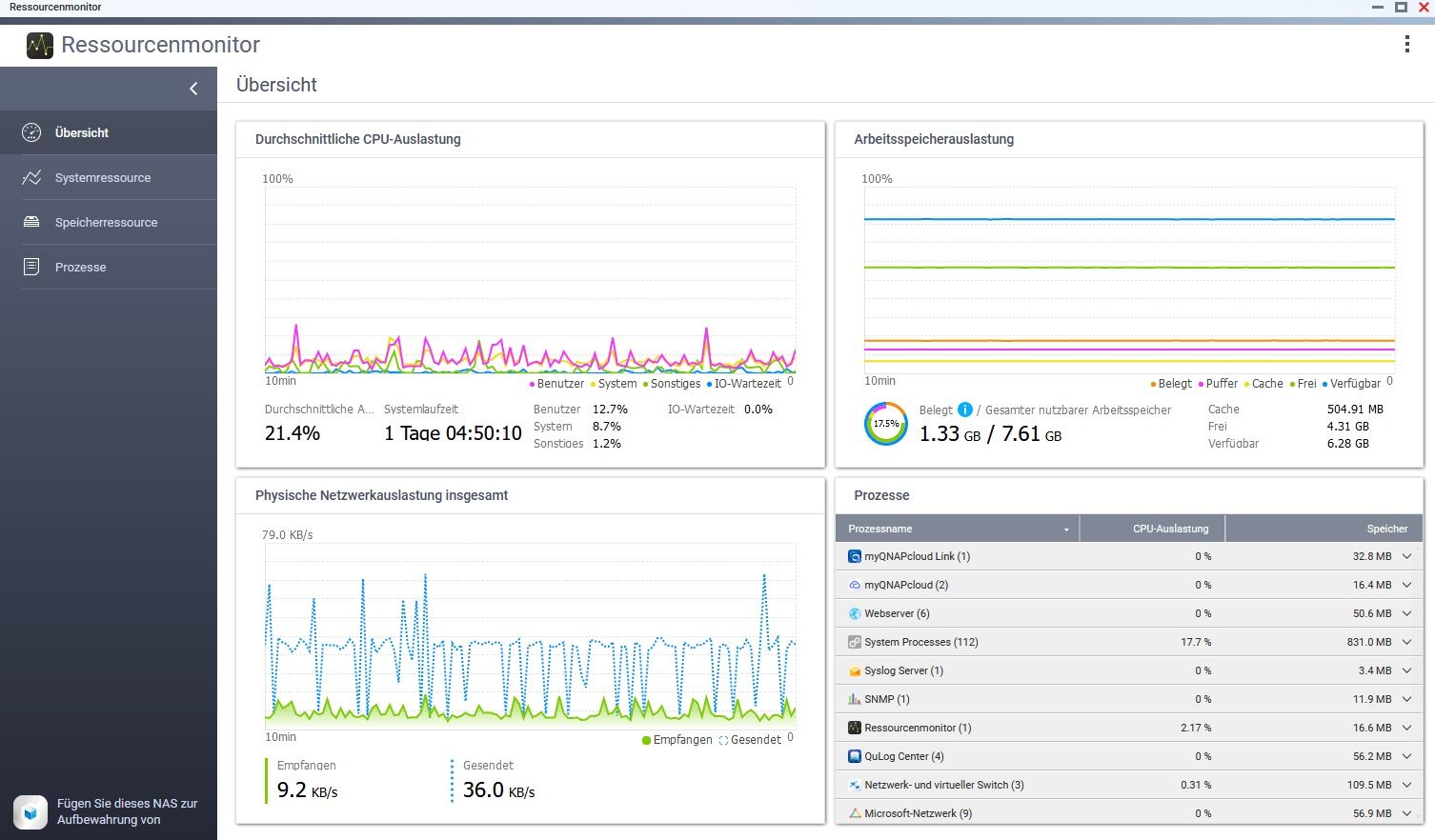
im ersten Link scheinen sogar noch alle Container zu laufen, der zweite scheint sich nur auf ioB zu beziehenso, ich habe alles auf dem NAS beendet (die APPS), die ich so ohne weiteres beenden konnte. Dies ist so 10 min her:
Mem: 3453636K used, 4525596K free, 396772K shrd, 1023860K buff, 516908K cached
CPU: 16.4% usr 13.9% sys  2.3% nic 66.8% idle  0.4% io  0.0% irq  0.0% sirq
Load average: 2.02 2.23 3.09 2/890 32404
  PID  PPID USER     STAT   VSZ %VSZ CPU %CPU COMMAND
 3441     1 admin    S    1326m 16.9   1  7.0 /sbin/hal_daemon -f
15096 14697 admin    S     1844  0.0   0  3.0 iotop
13927     2 admin    DW       0  0.0   0  0.5 [kworker/0:8+pm]
 9810 18618 admin    S <  2190m 28.0   0  0.2 /usr/local/apache/bin/apache_proxy -k start -f /etc/apache
 5479     2 admin    SW       0  0.0   0  0.2 [notify thread]
13926     2 admin    IW       0  0.0   0  0.2 [kworker/0:7-kac]
26094 25688 admin    S     857m 10.9   0  0.1 /usr/local/mariadb/bin/mysqld --defaults-file=/etc/qcoolie
 9830     1 admin    S     441m  5.6   1  0.1 /mnt/ext/opt/Python/bin/python /mnt/ext/opt/netmgr/api ser
10394     1 admin    S     222m  2.8   1  0.1 /mnt/ext/opt/Python/bin/python2 /sbin/wsd.py
 8551  8463 admin    S     148m  1.9   0  0.1 {acdd} python /usr/local/network/nmd/nmd.pyc
 8463     1 admin    S     147m  1.8   1  0.1 {nmd} python /usr/local/network/nmd/nmd.pyc
22075     1 admin    S     104m  1.3   1  0.1 /usr/local/bin/snmpd -c /etc/config/snmpd.conf -p 161
22664     1 admin    S    84952  1.0   0  0.1 /sbin/rfsd -i -f /etc/rfsd.conf
26469     1 admin    S    76980  0.9   0  0.1 /sbin/daemon_mgr
11884  9577 admin    R    16180  0.2   1  0.1 top
   10     2 admin    IW       0  0.0   0  0.1 [rcu_sched]
   16     2 admin    SW       0  0.0   1  0.1 [ksoftirqd/1]
 2831     2 admin    IW<      0  0.0   1  0.1 [kworker/1:2H-kb]
17255 16150 httpdusr S    2180m 27.8   1  0.0 /usr/local/apache/bin/apache -k start -c PidFile /var/lock
10741 20178 admin    S    1360m 17.4   0  0.0 /usr/local/apache/bin/apache_proxys -k start -f /etc/apach
14539 14537 admin    S    1212m 15.5   1  0.0 /usr/local/sbin/ncd
13710     1 admin    S    1196m 15.3   0  0.0 /usr/local/sbin/qulogdb --defaults-file=/mnt/ext/opt/QuLog
12222 11744 admin    S     882m 11.2   1  0.0 /usr/local/mariadb/bin/mysqld --defaults-file=/usr/local/m
 7559     1 admin    S     560m  7.1   0  0.0 /mnt/ext/opt/Python/bin/python ./manage.pyc runfcgi method
22489     1 admin    S     549m  7.0   1  0.0 /sbin/upnpd br0 br0
14499     1 admin    S     507m  6.5   0  0.0 /usr/local/sbin/ncdb --defaults-file=/mnt/ext/opt/Notifica
 1562     1 admin    S     409m  5.2   0  0.0 tunnelagent
 1368 17710 Peter Pa S     374m  4.7   1  0.0 /usr/local/samba/sbin/smbd -l /var/log -D -s /etc/config/s
 3293     1 admin    S     360m  4.6   1  0.0 {php-fpm-proxy} php-fpm: master process (/etc/php-fpm-sys-
 3298  3293 admin    S     360m  4.6   0  0.0 {php-fpm-proxy} php-fpm: pool www
 3299  3293 admin    S     360m  4.6   1  0.0 {php-fpm-proxy} php-fpm: pool www
16091     1 admin    S     360m  4.6   1  0.0 {php-fpm-qweb} php-fpm: master process (/etc/config/apache
16092 16091 httpdusr S     360m  4.6   1  0.0 {php-fpm-qweb} php-fpm: pool www
[~] # iotop Total DISK READ: 0.00 B/s | Total DISK WRITE: 4096.00 B/s TID PRIO USER DISK READ DISK WRITE SWAPIN IO> COMMAND 2494 -/0 UNKNOWN 0.00 B/s 4096.00 B/s 0.00 % 6.19 % /usr/sbin/rsyslogd -f /etc/rsyslog_on 3228 be/3 UNKNOWN 0.00 B/s 0.00 B/s 0.00 % 0.01 % [jbd2/md9-] 3 -/4 UNKNOWN 0.00 B/s 0.00 B/s 0.00 % 0.00 % [rcu_g] 4 -/4 UNKNOWN 0.00 B/s 0.00 B/s 0.00 % 0.00 % [rcu_par_g] 8 -/4 UNKNOWN 0.00 B/s 0.00 B/s 0.00 % 0.00 % [mm_percpu_w] 9 -/4 UNKNOWN 0.00 B/s 0.00 B/s 0.00 % 0.00 % [ksoftirqd/] 10 -/4 UNKNOWN 0.00 B/s 0.00 B/s 0.00 % 0.00 % [rcu_sche] 11 -/4 UNKNOWN 0.00 B/s 0.00 B/s 0.00 % 0.00 % [migration/] 13 -/4 UNKNOWN 0.00 B/s 0.00 B/s 0.00 % 0.00 % [cpuhp/] 14 -/4 UNKNOWN 0.00 B/s 0.00 B/s 0.00 % 0.00 % [cpuhp/] 15 -/4 UNKNOWN 0.00 B/s 0.00 B/s 0.00 % 0.00 % [migration/] 16 -/4 UNKNOWN 0.00 B/s 0.00 B/s 0.00 % 0.00 % [ksoftirqd/] 19 -/4 UNKNOWN 0.00 B/s 0.00 B/s 0.00 % 0.00 % [kdevtmpf] 20 -/4 UNKNOWN 0.00 B/s 0.00 B/s 0.00 % 0.00 % [netn] 25 -/4 UNKNOWN 0.00 B/s 0.00 B/s 0.00 % 0.00 % [kaudit] 586 -/4 UNKNOWN 0.00 B/s 0.00 B/s 0.00 % 0.00 % [khungtask] 587 -/4 UNKNOWN 0.00 B/s 0.00 B/s 0.00 % 0.00 % [oom_reape] 588 -/4 UNKNOWN 0.00 B/s 0.00 B/s 0.00 % 0.00 % [writebac] 590 -/4 UNKNOWN 0.00 B/s 0.00 B/s 0.00 % 0.00 % [kcompactd] 591 -/4 UNKNOWN 0.00 B/s 0.00 B/s 0.00 % 0.00 % [ksm] 605 -/4 UNKNOWN 0.00 B/s 0.00 B/s 0.00 % 0.00 % [crypt] 632 -/4 UNKNOWN 0.00 B/s 0.00 B/s 0.00 % 0.00 % [kintegrity] 633 -/4 UNKNOWN 0.00 B/s 0.00 B/s 0.00 % 0.00 % [kblock] 634 -/4 UNKNOWN 0.00 B/s 0.00 B/s 0.00 % 0.00 % [blkcg_punt_bi] 853 -/4 UNKNOWN 0.00 B/s 0.00 B/s 0.00 % 0.00 % [tif] 860 -/4 UNKNOWN 0.00 B/s 0.00 B/s 0.00 % 0.00 % [ata_sf] 880 -/0 UNKNOWN 0.00 B/s 0.00 B/s 0.00 % 0.00 % [m] 899 -/4 UNKNOWN 0.00 B/s 0.00 B/s 0.00 % 0.00 % [watchdog] 916 -/4 UNKNOWN 0.00 B/s 0.00 B/s 0.00 % 0.00 % [kworker/0:1H-kblock] 998 -/4 UNKNOWN 0.00 B/s 0.00 B/s 0.00 % 0.00 % [rpcio] 1000 -/4 UNKNOWN 0.00 B/s 0.00 B/s 0.00 % 0.00 % [xprtio] 1037 -/0 UNKNOWN 0.00 B/s 0.00 B/s 0.00 % 0.00 % [kswapd] 1038 -/4 UNKNOWN 0.00 B/s 0.00 B/s 0.00 % 0.00 % [ecryptfs-kthre] 1041 -/4 UNKNOWN 0.00 B/s 0.00 B/s 0.00 % 0.00 % [nfsio] 1042 -/4 UNKNOWN 0.00 B/s 0.00 B/s 0.00 % 0.00 % [cifsio]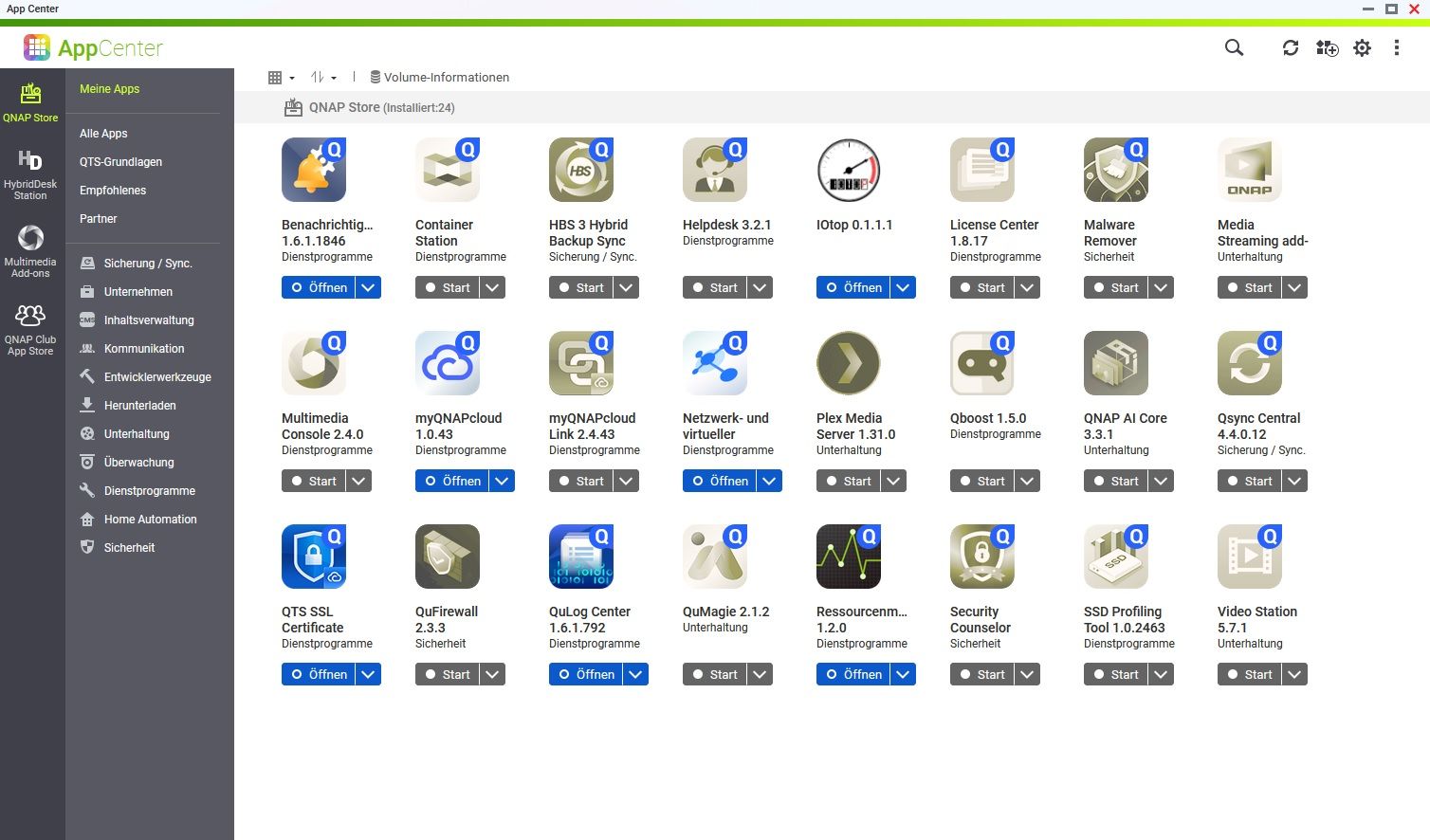
-
so, ich habe alles auf dem NAS beendet (die APPS), die ich so ohne weiteres beenden konnte. Dies ist so 10 min her:
Mem: 3453636K used, 4525596K free, 396772K shrd, 1023860K buff, 516908K cached
CPU: 16.4% usr 13.9% sys  2.3% nic 66.8% idle  0.4% io  0.0% irq  0.0% sirq
Load average: 2.02 2.23 3.09 2/890 32404
  PID  PPID USER     STAT   VSZ %VSZ CPU %CPU COMMAND
 3441     1 admin    S    1326m 16.9   1  7.0 /sbin/hal_daemon -f
15096 14697 admin    S     1844  0.0   0  3.0 iotop
13927     2 admin    DW       0  0.0   0  0.5 [kworker/0:8+pm]
 9810 18618 admin    S <  2190m 28.0   0  0.2 /usr/local/apache/bin/apache_proxy -k start -f /etc/apache
 5479     2 admin    SW       0  0.0   0  0.2 [notify thread]
13926     2 admin    IW       0  0.0   0  0.2 [kworker/0:7-kac]
26094 25688 admin    S     857m 10.9   0  0.1 /usr/local/mariadb/bin/mysqld --defaults-file=/etc/qcoolie
 9830     1 admin    S     441m  5.6   1  0.1 /mnt/ext/opt/Python/bin/python /mnt/ext/opt/netmgr/api ser
10394     1 admin    S     222m  2.8   1  0.1 /mnt/ext/opt/Python/bin/python2 /sbin/wsd.py
 8551  8463 admin    S     148m  1.9   0  0.1 {acdd} python /usr/local/network/nmd/nmd.pyc
 8463     1 admin    S     147m  1.8   1  0.1 {nmd} python /usr/local/network/nmd/nmd.pyc
22075     1 admin    S     104m  1.3   1  0.1 /usr/local/bin/snmpd -c /etc/config/snmpd.conf -p 161
22664     1 admin    S    84952  1.0   0  0.1 /sbin/rfsd -i -f /etc/rfsd.conf
26469     1 admin    S    76980  0.9   0  0.1 /sbin/daemon_mgr
11884  9577 admin    R    16180  0.2   1  0.1 top
   10     2 admin    IW       0  0.0   0  0.1 [rcu_sched]
   16     2 admin    SW       0  0.0   1  0.1 [ksoftirqd/1]
 2831     2 admin    IW<      0  0.0   1  0.1 [kworker/1:2H-kb]
17255 16150 httpdusr S    2180m 27.8   1  0.0 /usr/local/apache/bin/apache -k start -c PidFile /var/lock
10741 20178 admin    S    1360m 17.4   0  0.0 /usr/local/apache/bin/apache_proxys -k start -f /etc/apach
14539 14537 admin    S    1212m 15.5   1  0.0 /usr/local/sbin/ncd
13710     1 admin    S    1196m 15.3   0  0.0 /usr/local/sbin/qulogdb --defaults-file=/mnt/ext/opt/QuLog
12222 11744 admin    S     882m 11.2   1  0.0 /usr/local/mariadb/bin/mysqld --defaults-file=/usr/local/m
 7559     1 admin    S     560m  7.1   0  0.0 /mnt/ext/opt/Python/bin/python ./manage.pyc runfcgi method
22489     1 admin    S     549m  7.0   1  0.0 /sbin/upnpd br0 br0
14499     1 admin    S     507m  6.5   0  0.0 /usr/local/sbin/ncdb --defaults-file=/mnt/ext/opt/Notifica
 1562     1 admin    S     409m  5.2   0  0.0 tunnelagent
 1368 17710 Peter Pa S     374m  4.7   1  0.0 /usr/local/samba/sbin/smbd -l /var/log -D -s /etc/config/s
 3293     1 admin    S     360m  4.6   1  0.0 {php-fpm-proxy} php-fpm: master process (/etc/php-fpm-sys-
 3298  3293 admin    S     360m  4.6   0  0.0 {php-fpm-proxy} php-fpm: pool www
 3299  3293 admin    S     360m  4.6   1  0.0 {php-fpm-proxy} php-fpm: pool www
16091     1 admin    S     360m  4.6   1  0.0 {php-fpm-qweb} php-fpm: master process (/etc/config/apache
16092 16091 httpdusr S     360m  4.6   1  0.0 {php-fpm-qweb} php-fpm: pool www
[~] # iotop Total DISK READ: 0.00 B/s | Total DISK WRITE: 4096.00 B/s TID PRIO USER DISK READ DISK WRITE SWAPIN IO> COMMAND 2494 -/0 UNKNOWN 0.00 B/s 4096.00 B/s 0.00 % 6.19 % /usr/sbin/rsyslogd -f /etc/rsyslog_on 3228 be/3 UNKNOWN 0.00 B/s 0.00 B/s 0.00 % 0.01 % [jbd2/md9-] 3 -/4 UNKNOWN 0.00 B/s 0.00 B/s 0.00 % 0.00 % [rcu_g] 4 -/4 UNKNOWN 0.00 B/s 0.00 B/s 0.00 % 0.00 % [rcu_par_g] 8 -/4 UNKNOWN 0.00 B/s 0.00 B/s 0.00 % 0.00 % [mm_percpu_w] 9 -/4 UNKNOWN 0.00 B/s 0.00 B/s 0.00 % 0.00 % [ksoftirqd/] 10 -/4 UNKNOWN 0.00 B/s 0.00 B/s 0.00 % 0.00 % [rcu_sche] 11 -/4 UNKNOWN 0.00 B/s 0.00 B/s 0.00 % 0.00 % [migration/] 13 -/4 UNKNOWN 0.00 B/s 0.00 B/s 0.00 % 0.00 % [cpuhp/] 14 -/4 UNKNOWN 0.00 B/s 0.00 B/s 0.00 % 0.00 % [cpuhp/] 15 -/4 UNKNOWN 0.00 B/s 0.00 B/s 0.00 % 0.00 % [migration/] 16 -/4 UNKNOWN 0.00 B/s 0.00 B/s 0.00 % 0.00 % [ksoftirqd/] 19 -/4 UNKNOWN 0.00 B/s 0.00 B/s 0.00 % 0.00 % [kdevtmpf] 20 -/4 UNKNOWN 0.00 B/s 0.00 B/s 0.00 % 0.00 % [netn] 25 -/4 UNKNOWN 0.00 B/s 0.00 B/s 0.00 % 0.00 % [kaudit] 586 -/4 UNKNOWN 0.00 B/s 0.00 B/s 0.00 % 0.00 % [khungtask] 587 -/4 UNKNOWN 0.00 B/s 0.00 B/s 0.00 % 0.00 % [oom_reape] 588 -/4 UNKNOWN 0.00 B/s 0.00 B/s 0.00 % 0.00 % [writebac] 590 -/4 UNKNOWN 0.00 B/s 0.00 B/s 0.00 % 0.00 % [kcompactd] 591 -/4 UNKNOWN 0.00 B/s 0.00 B/s 0.00 % 0.00 % [ksm] 605 -/4 UNKNOWN 0.00 B/s 0.00 B/s 0.00 % 0.00 % [crypt] 632 -/4 UNKNOWN 0.00 B/s 0.00 B/s 0.00 % 0.00 % [kintegrity] 633 -/4 UNKNOWN 0.00 B/s 0.00 B/s 0.00 % 0.00 % [kblock] 634 -/4 UNKNOWN 0.00 B/s 0.00 B/s 0.00 % 0.00 % [blkcg_punt_bi] 853 -/4 UNKNOWN 0.00 B/s 0.00 B/s 0.00 % 0.00 % [tif] 860 -/4 UNKNOWN 0.00 B/s 0.00 B/s 0.00 % 0.00 % [ata_sf] 880 -/0 UNKNOWN 0.00 B/s 0.00 B/s 0.00 % 0.00 % [m] 899 -/4 UNKNOWN 0.00 B/s 0.00 B/s 0.00 % 0.00 % [watchdog] 916 -/4 UNKNOWN 0.00 B/s 0.00 B/s 0.00 % 0.00 % [kworker/0:1H-kblock] 998 -/4 UNKNOWN 0.00 B/s 0.00 B/s 0.00 % 0.00 % [rpcio] 1000 -/4 UNKNOWN 0.00 B/s 0.00 B/s 0.00 % 0.00 % [xprtio] 1037 -/0 UNKNOWN 0.00 B/s 0.00 B/s 0.00 % 0.00 % [kswapd] 1038 -/4 UNKNOWN 0.00 B/s 0.00 B/s 0.00 % 0.00 % [ecryptfs-kthre] 1041 -/4 UNKNOWN 0.00 B/s 0.00 B/s 0.00 % 0.00 % [nfsio] 1042 -/4 UNKNOWN 0.00 B/s 0.00 B/s 0.00 % 0.00 % [cifsio]@schtallone sagte in Performance Probleme durch Shelly Adapter?:
Dies ist so 10 min her:
eher weniger
@schtallone sagte in Performance Probleme durch Shelly Adapter?:
Load average: 2.02 2.23 3.09
der Load average 10min ist noch deutlich höher, der load average 5 Minuten noch leicht höher als der der ketzten Minute.
Wenn jetzt wirklich alles aus ist hast du ein echtes Problem.
Dein load average ist ohne Arbeit bereits "auf Kante". über 2 darf er nicht sein.
der swap ist hier leider nicht zu sehen.
-
@schtallone sagte in Performance Probleme durch Shelly Adapter?:
Dies ist so 10 min her:
eher weniger
@schtallone sagte in Performance Probleme durch Shelly Adapter?:
Load average: 2.02 2.23 3.09
der Load average 10min ist noch deutlich höher, der load average 5 Minuten noch leicht höher als der der ketzten Minute.
Wenn jetzt wirklich alles aus ist hast du ein echtes Problem.
Dein load average ist ohne Arbeit bereits "auf Kante". über 2 darf er nicht sein.
der swap ist hier leider nicht zu sehen.
CPU: 25.8% usr 14.8% sys  0.1% nic 58.9% idle  0.1% io  0.0% irq  0.1% sirq
Load average: 1.79 1.93 2.09 4/893 16071
  PID  PPID USER     STAT   VSZ %VSZ CPU %CPU COMMAND
 3441     1 admin    S    1326m 16.9   1  6.8 /sbin/hal_daemon -f
15096 14697 admin    S     1844  0.0   0  2.9 iotop
13927     2 admin    DW       0  0.0   0  0.5 [kworker/0:8+pm]
 9810 18618 admin    S <  2190m 28.0   0  0.3 /usr/local/apache/bin/apache_proxy -k start -f /etc/apache
10394     1 admin    S     222m  2.8   0  0.2 /mnt/ext/opt/Python/bin/python2 /sbin/wsd.py
 8493  8463 admin    S     219m  2.8   0  0.2 {ncaas} python /usr/local/network/nmd/nmd.pyc
 5479     2 admin    SW       0  0.0   1  0.2 [notify thread]
 3966     2 admin    IW       0  0.0   0  0.2 [kworker/0:1-kac]
12222 11744 admin    S     882m 11.2   1  0.1 /usr/local/mariadb/bin/mysqld --defaults-file=/usr/local/m
17751     1 admin    S     252m  3.2   0  0.1 /usr/local/samba/sbin/nmbd -l /var/log -D -s /etc/config/s
 8545  8463 admin    S     222m  2.8   0  0.1 {gwd} python /usr/local/network/nmd/nmd.pyc
20813     1 admin    S     162m  2.0   0  0.1 /usr/local/bin/hda_qmonitor -pid:24141 -reg:/mnt/HDA_ROOT
12510     1 admin    S     109m  1.4   0  0.1 /sbin/qpkgd -d0
18490     1 admin    S    90188  1.1   0  0.1 /usr/local/sbin/_thttpd_ -p 58080 -nor -nos -u admin -d /h
19118     1 httpdusr S    74864  0.9   0  0.1 /sbin/lpb_scheduler -d
11426     1 admin    S    74752  0.9   1  0.1 /sbin/vdd_control -d
   10     2 admin    IW       0  0.0   1  0.1 [rcu_sched]
    9     2 admin    SW       0  0.0   0  0.1 [ksoftirqd/0]
 1559     2 admin    IW       0  0.0   1  0.1 [kworker/1:5-eve]
17255 16150 httpdusr S    2180m 27.8   1  0.0 /usr/local/apache/bin/apache -k start -c PidFile /var/lock
10741 20178 admin    S    1360m 17.4   0  0.0 /usr/local/apache/bin/apache_proxys -k start -f /etc/apach
14539 14537 admin    S    1212m 15.5   1  0.0 /usr/local/sbin/ncd
13710     1 admin    S    1196m 15.3   0  0.0 /usr/local/sbin/qulogdb --defaults-file=/mnt/ext/opt/QuLog
26094 25688 admin    S     857m 10.9   0  0.0 /usr/local/mariadb/bin/mysqld --defaults-file=/etc/qcoolie
 7559     1 admin    S     560m  7.1   0  0.0 /mnt/ext/opt/Python/bin/python ./manage.pyc runfcgi method
22489     1 admin    S     549m  7.0   1  0.0 /sbin/upnpd br0 br0
14499     1 admin    S     507m  6.5   1  0.0 /usr/local/sbin/ncdb --defaults-file=/mnt/ext/opt/Notifica
 9830     1 admin    S     441m  5.6   0  0.0 /mnt/ext/opt/Python/bin/python /mnt/ext/opt/netmgr/api ser
 1562     1 admin    S     409m  5.2   0  0.0 tunnelagent
 1368 17710 Peter Pa S     374m  4.7   1  0.0 /usr/local/samba/sbin/smbd -l /var/log -D -s /etc/config/s
 3293     1 admin    S     360m  4.6   0  0.0 {php-fpm-proxy} php-fpm: master process (/etc/php-fpm-sys-
 3298  3293 admin    S     360m  4.6   0  0.0 {php-fpm-proxy} php-fpm: pool www
 3299  3293 admin    S     360m  4.6   1  0.0 {php-fpm-proxy} php-fpm: pool www
SwapIn über 0%, hatte vorher auch die Speicherbreinigung laufen gelassen.
[~] # iotop Total DISK READ: 0.00 B/s | Total DISK WRITE: 4096.00 B/s TID PRIO USER DISK READ DISK WRITE SWAPIN IO> COMMAND 2494 -/0 UNKNOWN 0.00 B/s 4096.00 B/s 0.00 % 6.19 % /usr/sbin/rsyslogd -f /etc/rsyslog_on 3228 be/3 UNKNOWN 0.00 B/s 0.00 B/s 0.00 % 0.01 % [jbd2/md9-] 3 -/4 UNKNOWN 0.00 B/s 0.00 B/s 0.00 % 0.00 % [rcu_g] 4 -/4 UNKNOWN 0.00 B/s 0.00 B/s 0.00 % 0.00 % [rcu_par_g] 8 -/4 UNKNOWN 0.00 B/s 0.00 B/s 0.00 % 0.00 % [mm_percpu_w] 9 -/4 UNKNOWN 0.00 B/s 0.00 B/s 0.00 % 0.00 % [ksoftirqd/] 10 -/4 UNKNOWN 0.00 B/s 0.00 B/s 0.00 % 0.00 % [rcu_sche] -
CPU: 25.8% usr 14.8% sys  0.1% nic 58.9% idle  0.1% io  0.0% irq  0.1% sirq
Load average: 1.79 1.93 2.09 4/893 16071
  PID  PPID USER     STAT   VSZ %VSZ CPU %CPU COMMAND
 3441     1 admin    S    1326m 16.9   1  6.8 /sbin/hal_daemon -f
15096 14697 admin    S     1844  0.0   0  2.9 iotop
13927     2 admin    DW       0  0.0   0  0.5 [kworker/0:8+pm]
 9810 18618 admin    S <  2190m 28.0   0  0.3 /usr/local/apache/bin/apache_proxy -k start -f /etc/apache
10394     1 admin    S     222m  2.8   0  0.2 /mnt/ext/opt/Python/bin/python2 /sbin/wsd.py
 8493  8463 admin    S     219m  2.8   0  0.2 {ncaas} python /usr/local/network/nmd/nmd.pyc
 5479     2 admin    SW       0  0.0   1  0.2 [notify thread]
 3966     2 admin    IW       0  0.0   0  0.2 [kworker/0:1-kac]
12222 11744 admin    S     882m 11.2   1  0.1 /usr/local/mariadb/bin/mysqld --defaults-file=/usr/local/m
17751     1 admin    S     252m  3.2   0  0.1 /usr/local/samba/sbin/nmbd -l /var/log -D -s /etc/config/s
 8545  8463 admin    S     222m  2.8   0  0.1 {gwd} python /usr/local/network/nmd/nmd.pyc
20813     1 admin    S     162m  2.0   0  0.1 /usr/local/bin/hda_qmonitor -pid:24141 -reg:/mnt/HDA_ROOT
12510     1 admin    S     109m  1.4   0  0.1 /sbin/qpkgd -d0
18490     1 admin    S    90188  1.1   0  0.1 /usr/local/sbin/_thttpd_ -p 58080 -nor -nos -u admin -d /h
19118     1 httpdusr S    74864  0.9   0  0.1 /sbin/lpb_scheduler -d
11426     1 admin    S    74752  0.9   1  0.1 /sbin/vdd_control -d
   10     2 admin    IW       0  0.0   1  0.1 [rcu_sched]
    9     2 admin    SW       0  0.0   0  0.1 [ksoftirqd/0]
 1559     2 admin    IW       0  0.0   1  0.1 [kworker/1:5-eve]
17255 16150 httpdusr S    2180m 27.8   1  0.0 /usr/local/apache/bin/apache -k start -c PidFile /var/lock
10741 20178 admin    S    1360m 17.4   0  0.0 /usr/local/apache/bin/apache_proxys -k start -f /etc/apach
14539 14537 admin    S    1212m 15.5   1  0.0 /usr/local/sbin/ncd
13710     1 admin    S    1196m 15.3   0  0.0 /usr/local/sbin/qulogdb --defaults-file=/mnt/ext/opt/QuLog
26094 25688 admin    S     857m 10.9   0  0.0 /usr/local/mariadb/bin/mysqld --defaults-file=/etc/qcoolie
 7559     1 admin    S     560m  7.1   0  0.0 /mnt/ext/opt/Python/bin/python ./manage.pyc runfcgi method
22489     1 admin    S     549m  7.0   1  0.0 /sbin/upnpd br0 br0
14499     1 admin    S     507m  6.5   1  0.0 /usr/local/sbin/ncdb --defaults-file=/mnt/ext/opt/Notifica
 9830     1 admin    S     441m  5.6   0  0.0 /mnt/ext/opt/Python/bin/python /mnt/ext/opt/netmgr/api ser
 1562     1 admin    S     409m  5.2   0  0.0 tunnelagent
 1368 17710 Peter Pa S     374m  4.7   1  0.0 /usr/local/samba/sbin/smbd -l /var/log -D -s /etc/config/s
 3293     1 admin    S     360m  4.6   0  0.0 {php-fpm-proxy} php-fpm: master process (/etc/php-fpm-sys-
 3298  3293 admin    S     360m  4.6   0  0.0 {php-fpm-proxy} php-fpm: pool www
 3299  3293 admin    S     360m  4.6   1  0.0 {php-fpm-proxy} php-fpm: pool www
SwapIn über 0%, hatte vorher auch die Speicherbreinigung laufen gelassen.
[~] # iotop Total DISK READ: 0.00 B/s | Total DISK WRITE: 4096.00 B/s TID PRIO USER DISK READ DISK WRITE SWAPIN IO> COMMAND 2494 -/0 UNKNOWN 0.00 B/s 4096.00 B/s 0.00 % 6.19 % /usr/sbin/rsyslogd -f /etc/rsyslog_on 3228 be/3 UNKNOWN 0.00 B/s 0.00 B/s 0.00 % 0.01 % [jbd2/md9-] 3 -/4 UNKNOWN 0.00 B/s 0.00 B/s 0.00 % 0.00 % [rcu_g] 4 -/4 UNKNOWN 0.00 B/s 0.00 B/s 0.00 % 0.00 % [rcu_par_g] 8 -/4 UNKNOWN 0.00 B/s 0.00 B/s 0.00 % 0.00 % [mm_percpu_w] 9 -/4 UNKNOWN 0.00 B/s 0.00 B/s 0.00 % 0.00 % [ksoftirqd/] 10 -/4 UNKNOWN 0.00 B/s 0.00 B/s 0.00 % 0.00 % [rcu_sche]@schtallone sagte in Performance Probleme durch Shelly Adapter?:
SwapIn über 0%,
???
@schtallone sagte in Performance Probleme durch Shelly Adapter?:
hatte vorher auch die Speicherbreinigung laufen gelassen.
das ist dann kontraproduktiv
vor dem Nachsehen, oder vor dem Abschalten?@schtallone sagte in Performance Probleme durch Shelly Adapter?:
Load average: 1.79 1.93 2.09 4/893 16071
da kommen wir kangsam aus dem roten Beteich!
Aber normal ist das nicht!hast du Meldungen im S.M.A.R.T?




Hey! Du scheinst an dieser Unterhaltung interessiert zu sein, hast aber noch kein Konto.
Hast du es satt, bei jedem Besuch durch die gleichen Beiträge zu scrollen? Wenn du dich für ein Konto anmeldest, kommst du immer genau dorthin zurück, wo du zuvor warst, und kannst dich über neue Antworten benachrichtigen lassen (entweder per E-Mail oder Push-Benachrichtigung). Du kannst auch Lesezeichen speichern und Beiträge positiv bewerten, um anderen Community-Mitgliedern deine Wertschätzung zu zeigen.
Mit deinem Input könnte dieser Beitrag noch besser werden 💗
Registrieren Anmelden381
Online33.0k
Benutzer83.5k
Themen1.3m
Beiträge