




Zigbee keine Verbindung zur Hardware
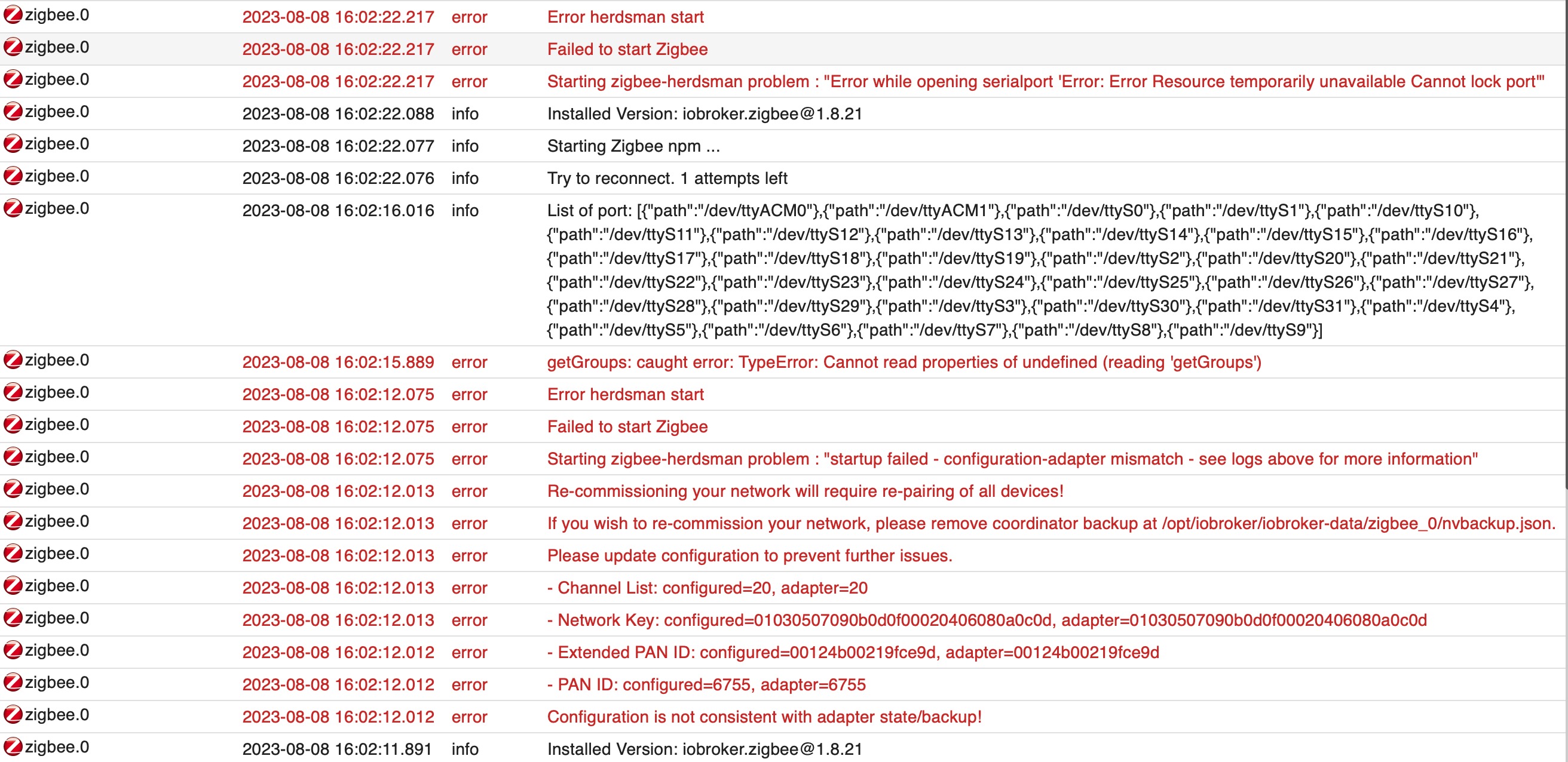
-
======================= SUMMARY ======================= v.2023-04-16 Operatingsystem: Ubuntu 20.04.5 LTS Kernel: 5.15.102-1-pve Installation: lxc Timezone: Europe/Berlin (CEST, +0200) User-ID: 0 X-Server: false Boot Target: graphical.target Pending OS-Updates: 158 Pending iob updates: 3 Nodejs-Installation: /usr/bin/nodejs v18.16.1 /usr/bin/node v18.16.1 /usr/bin/npm 9.8.1 /usr/bin/npx 9.8.1 Recommended versions are nodejs 18.x.y and npm 9.x.y Your nodejs installation is correct MEMORY: total used free shared buff/cache available Mem: 8.2G 3.2G 2.5G 0.0K 2.5G 5.0G Swap: 512M 0B 512M Total: 8.7G 3.2G 3.0G Active iob-Instances: 35 Active repo(s): Stable (default) ioBroker Core: js-controller 4.0.24 admin 6.3.5 ioBroker Status: iobroker is running on this host. Objects type: jsonl States type: jsonl Status admin and web instance: + system.adapter.admin.0 : admin : iobrokerProx - enabled, port: 8081, bind: 0.0.0.0, run as: admin + system.adapter.web.0 : web : iobrokerProx - enabled, port: 8082, bind: 0.0.0.0, run as: admin Objects: 14512 States: 11446 Size of iob-Database: 34M /opt/iobroker/iobroker-data/objects.jsonl 5.7M /opt/iobroker/iobroker-data/states.jsonl =================== END OF SUMMARY ==================== -
Skript v.2023-04-16 *** BASE SYSTEM *** Architecture : x86_64 Docker : false Virtualization : lxc Distributor ID: Ubuntu Description: Ubuntu 20.04.5 LTS Release: 20.04 Codename: focal NAME="Ubuntu" VERSION="20.04.5 LTS (Focal Fossa)" ID=ubuntu ID_LIKE=debian PRETTY_NAME="Ubuntu 20.04.5 LTS" VERSION_ID="20.04" HOME_URL="https://www.ubuntu.com/" SUPPORT_URL="https://help.ubuntu.com/" BUG_REPORT_URL="https://bugs.launchpad.net/ubuntu/" PRIVACY_POLICY_URL="https://www.ubuntu.com/legal/terms-and-policies/privacy-policy" VERSION_CODENAME=focal UBUNTU_CODENAME=focal Systemuptime and Load: 16:45:24 up 56 min, 1 user, load average: 1.99, 1.89, 1.75 CPU threads: 2 *** Time and Time Zones *** Local time: Tue 2023-08-08 16:45:24 CEST Universal time: Tue 2023-08-08 14:45:24 UTC RTC time: n/a Time zone: Europe/Berlin (CEST, +0200) System clock synchronized: yes NTP service: inactive RTC in local TZ: no *** User and Groups *** root /root root *** X-Server-Setup *** X-Server: false Desktop: Terminal: Boot Target: graphical.target *** MEMORY *** total used free shared buff/cache available Mem: 8.2G 3.0G 2.7G 0.0K 2.5G 5.2G Swap: 512M 0B 512M Total: 8.7G 3.0G 3.2 8192 M total memory 3033 M used memory 728 M active memory 4509 M inactive memory 2669 M free memory 0 M buffer memory 2488 M swap cache 512 M total swap 0 M used swap 512 M free swap *** FILESYSTEM *** Filesystem Type Size Used Avail Use% Mounted on /dev/mapper/pve-vm--200--disk--0 ext4 25G 7.1G 17G 31% / none tmpfs 492K 4.0K 488K 1% /dev udev devtmpfs 16G 0 16G 0% /dev/tty tmpfs tmpfs 16G 0 16G 0% /dev/shm tmpfs tmpfs 3.2G 108K 3.2G 1% /run tmpfs tmpfs 5.0M 0 5.0M 0% /run/lock Messages concerning ext4 filesystem in dmesg: dmesg: read kernel buffer failed: Operation not permitted Show mounted filesystems (real ones only): TARGET SOURCE FSTYPE OPTIONS / /dev/mapper/pve-vm--200--disk--0 ext4 rw,relatime,stripe=16 |-/proc/cpuinfo lxcfs[/proc/cpuinfo] fuse.lxcfs rw,nosuid,nodev,relatime,user_id=0,group_id=0,allow_other |-/proc/diskstats lxcfs[/proc/diskstats] fuse.lxcfs rw,nosuid,nodev,relatime,user_id=0,group_id=0,allow_other |-/proc/loadavg lxcfs[/proc/loadavg] fuse.lxcfs rw,nosuid,nodev,relatime,user_id=0,group_id=0,allow_other |-/proc/meminfo lxcfs[/proc/meminfo] fuse.lxcfs rw,nosuid,nodev,relatime,user_id=0,group_id=0,allow_other |-/proc/slabinfo lxcfs[/proc/slabinfo] fuse.lxcfs rw,nosuid,nodev,relatime,user_id=0,group_id=0,allow_other |-/proc/stat lxcfs[/proc/stat] fuse.lxcfs rw,nosuid,nodev,relatime,user_id=0,group_id=0,allow_other |-/proc/swaps lxcfs[/proc/swaps] fuse.lxcfs rw,nosuid,nodev,relatime,user_id=0,group_id=0,allow_other |-/proc/uptime lxcfs[/proc/uptime] fuse.lxcfs rw,nosuid,nodev,relatime,user_id=0,group_id=0,allow_other `-/sys/devices/system/cpu lxcfs[/sys/devices/system/cpu] fuse.lxcfs rw,nosuid,nodev,relatime,user_id=0,group_id=0,allow_other Files in neuralgic directories: /var: 3.0G /var/ 2.4G /var/log/journal/655c74f4e9064dfd889760bcc56d56fc 2.4G /var/log/journal 2.4G /var/log 315M /var/lib Archived and active journals take up 2.3G in the file system. /opt/iobroker/backups: 90M /opt/iobroker/backups/ /opt/iobroker/iobroker-data: 442M /opt/iobroker/iobroker-data/ 282M /opt/iobroker/iobroker-data/files 88M /opt/iobroker/iobroker-data/backup-objects 52M /opt/iobroker/iobroker-data/files/javascript.admin 48M /opt/iobroker/iobroker-data/files/telegram.admin The five largest files in iobroker-data are: 35M /opt/iobroker/iobroker-data/files/devices.admin/static/js/main.24f2bb56.js.map 34M /opt/iobroker/iobroker-data/objects.jsonl 19M /opt/iobroker/iobroker-data/files/iot.admin/static/js/main.2975a411.js.map 18M /opt/iobroker/iobroker-data/files/text2command.admin/static/js/main.274a4d8d.js.map 15M /opt/iobroker/iobroker-data/files/telegram.admin/rules/static/js/vendors-node_modules_iobroker_adapter-react-v5_assets_devices_parseNames_d_ts-node_modules_io-1d9f06.44fe4a3f.chunk.js.map *** NodeJS-Installation *** /usr/bin/nodejs v18.16.1 /usr/bin/node v18.16.1 /usr/bin/npm 9.8.1 /usr/bin/npx 9.8.1 nodejs: Installed: 18.16.1-deb-1nodesource1 Candidate: 18.17.0-deb-1nodesource1 Version table: 18.17.0-deb-1nodesource1 500 500 https://deb.nodesource.com/node_18.x focal/main amd64 Packages *** 18.16.1-deb-1nodesource1 100 100 /var/lib/dpkg/status 10.19.0~dfsg-3ubuntu1 500 500 http://archive.ubuntu.com/ubuntu focal/universe amd64 Packages Temp directories causing npm8 problem: 0 No problems detected *** ioBroker-Installation *** ioBroker Status iobroker is running on this host. Objects type: jsonl States type: jsonl MULTIHOSTSERVICE/enabled: false Core adapters versions js-controller: 4.0.24 admin: 6.3.5 javascript: 7.0.3 Adapters from github: 3 Adapter State system.adapter.accuweather.0 : accuweather : iobrokerProx - disabled system.adapter.adguard.0 : adguard : iobrokerProx - disabled + system.adapter.admin.0 : admin : iobrokerProx - enabled, port: 8081, bind: 0.0.0.0, run as: admin + system.adapter.alexa2.1 : alexa2 : iobrokerProx - enabled + system.adapter.backitup.0 : backitup : iobrokerProx - enabled + system.adapter.backitup.1 : backitup : raspberrypi - enabled + system.adapter.device-reminder.0 : device-reminder : iobrokerProx - enabled system.adapter.devices.0 : devices : iobrokerProx - disabled + system.adapter.discovery.0 : discovery : iobrokerProx - enabled + system.adapter.fritzdect.0 : fritzdect : iobrokerProx - enabled + system.adapter.fritzdect.1 : fritzdect : iobrokerProx - enabled + system.adapter.history.0 : history : iobrokerProx - enabled + system.adapter.hue.0 : hue : iobrokerProx - enabled, port: 443 system.adapter.ical.0 : ical : iobrokerProx - enabled system.adapter.icons-mfd-svg.0 : icons-mfd-svg : iobrokerProx - disabled system.adapter.influxdb.0 : influxdb : iobrokerProx - disabled, port: 8086 + system.adapter.info.0 : info : iobrokerProx - enabled + system.adapter.iot.0 : iot : iobrokerProx - enabled + system.adapter.javascript.0 : javascript : iobrokerProx - enabled + system.adapter.kostal-piko-ba.0 : kostal-piko-ba : iobrokerProx - enabled + system.adapter.lgtv.0 : lgtv : iobrokerProx - enabled system.adapter.linux-control.0 : linux-control : raspberrypi - disabled + system.adapter.lovelace.0 : lovelace : iobrokerProx - enabled, port: 8091, bind: 0.0.0.0, run as: admin + system.adapter.modbus.0 : modbus : iobrokerProx - enabled + system.adapter.mqtt.0 : mqtt : iobrokerProx - enabled, port: 1890, bind: 0.0.0.0 + system.adapter.panasonic-viera.0 : panasonic-viera : iobrokerProx - enabled + system.adapter.ping.0 : ping : iobrokerProx - enabled system.adapter.proxmox.0 : proxmox : iobrokerProx - disabled, port: 8006 system.adapter.repetierserver.0 : repetierserver : iobrokerProx - disabled + system.adapter.sainlogic.0 : sainlogic : iobrokerProx - enabled, port: 45000, bind: 0.0.0.0 system.adapter.sbfspot.0 : sbfspot : iobrokerProx - enabled + system.adapter.shelly.0 : shelly : iobrokerProx - enabled, port: 1885, bind: 0.0.0.0 system.adapter.shuttercontrol.0 : shuttercontrol : iobrokerProx - disabled + system.adapter.simple-api.0 : simple-api : iobrokerProx - enabled, port: 8087, bind: 0.0.0.0, run as: admin + system.adapter.smartmeter.0 : smartmeter : raspberrypi - enabled + system.adapter.sonoff.0 : sonoff : iobrokerProx - enabled, port: 1883, bind: 0.0.0.0 system.adapter.sourceanalytix.0 : sourceanalytix : iobrokerProx - disabled + system.adapter.telegram.0 : telegram : iobrokerProx - enabled, port: 8443, bind: 0.0.0.0 + system.adapter.text2command.0 : text2command : iobrokerProx - enabled + system.adapter.tr-064.0 : tr-064 : iobrokerProx - enabled + system.adapter.trashschedule.0 : trashschedule : iobrokerProx - enabled + system.adapter.upnp.0 : upnp : iobrokerProx - enabled system.adapter.vis.0 : vis : iobrokerProx - disabled system.adapter.weatherunderground.0 : weatherunderground : iobrokerProx - disabled + system.adapter.web.0 : web : iobrokerProx - enabled, port: 8082, bind: 0.0.0.0, run as: admin + system.adapter.wled.0 : wled : iobrokerProx - enabled + system.adapter.yahka.0 : yahka : iobrokerProx - enabled + system.adapter.zigbee.0 : zigbee : iobrokerProx - enabled, port: /dev/ttyACM0 + instance is alive Enabled adapters with bindings + system.adapter.admin.0 : admin : iobrokerProx - enabled, port: 8081, bind: 0.0.0.0, run as: admin + system.adapter.hue.0 : hue : iobrokerProx - enabled, port: 443 + system.adapter.lovelace.0 : lovelace : iobrokerProx - enabled, port: 8091, bind: 0.0.0.0, run as: admin + system.adapter.mqtt.0 : mqtt : iobrokerProx - enabled, port: 1890, bind: 0.0.0.0 + system.adapter.sainlogic.0 : sainlogic : iobrokerProx - enabled, port: 45000, bind: 0.0.0.0 + system.adapter.shelly.0 : shelly : iobrokerProx - enabled, port: 1885, bind: 0.0.0.0 + system.adapter.simple-api.0 : simple-api : iobrokerProx - enabled, port: 8087, bind: 0.0.0.0, run as: admin + system.adapter.sonoff.0 : sonoff : iobrokerProx - enabled, port: 1883, bind: 0.0.0.0 + system.adapter.telegram.0 : telegram : iobrokerProx - enabled, port: 8443, bind: 0.0.0.0 + system.adapter.web.0 : web : iobrokerProx - enabled, port: 8082, bind: 0.0.0.0, run as: admin + system.adapter.zigbee.0 : zigbee : iobrokerProx - enabled, port: /dev/ttyACM0 ioBroker-Repositories Stable (default): http://download.iobroker.net/sources-dist.json Beta (latest) : http://download.iobroker.net/sources-dist-latest.json Active repo(s): Stable (default) Installed ioBroker-Instances Used repository: Stable (default) Adapter "accuweather" : 1.2.4 , installed 1.2.4 Adapter "adguard" : 0.0.8 , installed 0.0.8 Adapter "admin" : 6.3.5 , installed 6.3.5 Adapter "alexa2" : 3.23.2 , installed 3.23.2 Adapter "backitup" : 2.6.23 , installed 2.6.23 Adapter "device-reminder": 1.2.9 , installed 1.2.9 Adapter "devices" : 1.1.5 , installed 1.1.5 Adapter "discovery" : 3.1.0 , installed 3.1.0 Adapter "fritzdect" : 2.3.1 , installed 2.3.1 Adapter "history" : 2.2.4 , installed 2.2.4 Adapter "hue" : 3.9.3 , installed 3.9.3 Adapter "ical" : 1.13.3 , installed 1.13.3 Adapter "icons-mfd-svg": 1.1.0 , installed 1.1.0 Adapter "influxdb" : 3.2.0 , installed 3.2.0 Adapter "info" : 1.9.26 , installed 1.9.26 Adapter "iot" : 1.14.5 , installed 1.14.5 Adapter "javascript" : 7.0.3 , installed 7.0.3 Controller "js-controller": 4.0.24 , installed 4.0.24 Adapter "kostal-piko-ba": 3.0.3 , installed 3.0.1 [Updatable] Adapter "lgtv" : 1.1.10 , installed 1.1.10 Adapter "lovelace" : 3.0.1 , installed 3.0.1 Adapter "modbus" : 5.0.11 , installed 5.0.11 Adapter "mqtt" : 4.1.1 , installed 4.1.1 Adapter "panasonic-viera": 2.0.0 , installed 2.0.0 Adapter "ping" : 1.5.3 , installed 1.5.3 Adapter "proxmox" : 1.3.5 , installed 1.3.5 Adapter "sainlogic" : 0.10.5 , installed 0.10.3 [Updatable] Adapter "sbfspot" : 4.1.6 , installed 4.1.4 [Updatable] Adapter "shelly" : 6.4.1 , installed 6.4.1 Adapter "shuttercontrol": 1.5.0 , installed 1.5.0 Adapter "simple-api" : 2.7.2 , installed 2.7.2 Adapter "socketio" : 4.2.0 , installed 4.2.0 Adapter "sonoff" : 2.5.3 , installed 2.5.3 Adapter "telegram" : 1.16.0 , installed 1.16.0 Adapter "text2command" : 3.0.2 , installed 3.0.2 Adapter "tr-064" : 4.2.18 , installed 4.2.18 Adapter "trashschedule": 2.2.0 , installed 2.2.0 Adapter "upnp" : 1.0.21 , installed 1.0.21 Adapter "vis" : 1.4.16 , installed 1.4.16 Adapter "weatherunderground": 3.4.2, installed 3.4.2 Adapter "web" : 4.3.0 , installed 4.3.0 Adapter "wled" : 0.6.7 , installed 0.6.7 Adapter "ws" : 1.3.0 , installed 1.3.0 Adapter "yahka" : 0.17.0 , installed 0.17.0 Adapter "zigbee" : 1.8.21 , installed 1.8.21 Objects and States Please stand by - This may take a while Objects: 14512 States: 11446 *** OS-Repositories and Updates *** Hit:1 https://deb.nodesource.com/node_18.x focal InRelease Hit:2 http://archive.ubuntu.com/ubuntu focal InRelease Hit:3 http://archive.ubuntu.com/ubuntu focal-updates InRelease Hit:4 http://archive.ubuntu.com/ubuntu focal-security InRelease Reading package lists... Pending Updates: 158 *** Listening Ports *** Active Internet connections (only servers) Proto Recv-Q Send-Q Local Address Foreign Address State User Inode PID/Program name tcp 0 0 0.0.0.0:42197 0.0.0.0:* LISTEN 1000 2721582 9315/io.yahka.0 tcp 0 0 0.0.0.0:9000 0.0.0.0:* LISTEN 1000 2696223 7398/iobroker.js-co tcp 0 0 0.0.0.0:9001 0.0.0.0:* LISTEN 1000 2696216 7398/iobroker.js-co tcp 0 0 0.0.0.0:45000 0.0.0.0:* LISTEN 1000 2724224 9501/io.sainlogic.0 tcp 0 0 0.0.0.0:1890 0.0.0.0:* LISTEN 1000 2725229 9563/io.mqtt.0 tcp 0 0 0.0.0.0:1885 0.0.0.0:* LISTEN 1000 2724166 9486/io.shelly.0 tcp 0 0 0.0.0.0:1883 0.0.0.0:* LISTEN 1000 2725013 9455/io.sonoff.0 tcp 0 0 127.0.0.1:37115 0.0.0.0:* LISTEN 1000 2723941 9315/io.yahka.0 tcp 0 0 0.0.0.0:111 0.0.0.0:* LISTEN 0 2577070 1/init tcp 0 0 127.0.0.53:53 0.0.0.0:* LISTEN 106 2578204 108/systemd-resolve tcp 0 0 127.0.0.1:25 0.0.0.0:* LISTEN 0 2579140 301/master tcp 0 0 127.0.0.1:3493 0.0.0.0:* LISTEN 0 2579599 129/upsd tcp6 0 0 :::111 :::* LISTEN 0 2577072 1/init tcp6 0 0 :::22 :::* LISTEN 0 2577734 1/init tcp6 0 0 ::1:3493 :::* LISTEN 0 2579600 129/upsd tcp6 0 0 ::1:25 :::* LISTEN 0 2579141 301/master tcp6 0 0 :::8087 :::* LISTEN 1000 2725028 9466/io.simple-api. tcp6 0 0 :::8081 :::* LISTEN 1000 2692744 7423/io.admin.0 tcp6 0 0 :::8082 :::* LISTEN 1000 2723960 9329/io.web.0 tcp6 0 0 :::8091 :::* LISTEN 1000 2724425 9589/io.lovelace.0 udp 0 0 127.0.0.53:53 0.0.0.0:* 106 2578203 108/systemd-resolve udp 0 0 192.168.1.222:68 0.0.0.0:* 105 2578608 93/systemd-networkd udp 0 0 0.0.0.0:111 0.0.0.0:* 0 2577071 1/init udp 0 0 0.0.0.0:1900 0.0.0.0:* 1000 2724402 9361/io.upnp.0 udp 0 0 192.168.1.222:5353 0.0.0.0:* 1000 2725102 9379/io.tr-064.0 udp 0 0 0.0.0.0:5353 0.0.0.0:* 1000 2721579 9315/io.yahka.0 udp 0 0 0.0.0.0:5353 0.0.0.0:* 1000 2723873 9322/io.wled.0 udp 0 0 0.0.0.0:57840 0.0.0.0:* 1000 2724026 9361/io.upnp.0 udp6 0 0 :::111 :::* 0 2577073 1/init *** Log File - Last 25 Lines *** 2023-08-08 16:45:45.024 - debug: shelly.0 (9486) [MQTT] Publish: 192.168.1.187 (shelly1 / shelly1-E8DB84A2206B / SHSW-1#E8DB84A2206B#1) - topic: shellies/shelly1-garage/input/0, qos: 0, payload: 0 2023-08-08 16:45:45.097 - debug: shelly.0 (9486) [httpIoBrokerState] State change 192.168.1.187 (shelly1 / shelly1-E8DB84A2206B / SHSW-1#E8DB84A2206B#1): state: SHSW-1#E8DB84A2206B#1.uptime, value: 8363449 2023-08-08 16:45:45.098 - debug: shelly.0 (9486) [httpIoBrokerState] State change 192.168.1.187 (shelly1 / shelly1-E8DB84A2206B / SHSW-1#E8DB84A2206B#1): state: SHSW-1#E8DB84A2206B#1.rssi, value: -52 2023-08-08 16:45:46.176 - debug: shelly.0 (9486) [httpIoBrokerState] State change 192.168.1.225 (shellyplug-s / shellyplug-s-885C36 / SHPLG-S#885C36#1): state: SHPLG-S#885C36#1.uptime, value: 7450700 2023-08-08 16:45:46.183 - debug: shelly.0 (9486) [httpIoBrokerState] State change 192.168.1.225 (shellyplug-s / shellyplug-s-885C36 / SHPLG-S#885C36#1): state: SHPLG-S#885C36#1.rssi, value: -42 2023-08-08 16:45:46.185 - debug: shelly.0 (9486) [httpIoBrokerState] State change 192.168.1.188 (shelly1pm / shelly1pm-E8DB84D234C9 / SHSW-PM#E8DB84D234C9#1): state: SHSW-PM#E8DB84D234C9#1.uptime, value: 8144624 2023-08-08 16:45:46.185 - debug: shelly.0 (9486) [httpIoBrokerState] State change 192.168.1.188 (shelly1pm / shelly1pm-E8DB84D234C9 / SHSW-PM#E8DB84D234C9#1): state: SHSW-PM#E8DB84D234C9#1.rssi, value: -66 2023-08-08 16:45:46.202 - debug: shelly.0 (9486) [httpIoBrokerState] State change 192.168.1.71 (shellyplug-s / shellyplug-s-87EB03 / SHPLG-S#87EB03#1): state: SHPLG-S#87EB03#1.uptime, value: 32390 2023-08-08 16:45:46.457 - debug: shelly.0 (9486) [httpIoBrokerState] State change 192.168.1.131 (shellyplug-s / shellyplug-s-7C87CEB4BA36 / SHPLG-S#7C87CEB4BA36#1): state: SHPLG-S#7C87CEB4BA36#1.uptime, value: 2419256 2023-08-08 16:45:46.589 - debug: shelly.0 (9486) [httpIoBrokerState] State change 192.168.1.183 (shellyplug-s / shellyplug-s-BB8720 / SHPLG-S#BB8720#1): state: SHPLG-S#BB8720#1.uptime, value: 352100 2023-08-08 16:45:47.171 - info: tr-064.0 (9379) forEachConfiguredDevice: in GetSpecificHostEntry 1(fritz.box/CC:CE:1E:3A:D1:64) device seems offline but we never saw it since adapter was started:Error: sendSOAPActionRequest Error action=GetSpecificHostEntry serviceType=urn:dslforum-org:service:Hosts:1: 500 - {"code":500} 2023-08-08 16:45:48.967 - debug: shelly.0 (9486) [httpIoBrokerState] State change 192.168.1.125 (shellyplug-s / shellyplug-s-BB43A5 / SHPLG-S#BB43A5#1): state: SHPLG-S#BB43A5#1.uptime, value: 352102 2023-08-08 16:45:50.303 - debug: shelly.0 (9486) [httpIoBrokerState] State change 192.168.1.187 (shelly1 / shelly1-E8DB84A2206B / SHSW-1#E8DB84A2206B#1): state: SHSW-1#E8DB84A2206B#1.uptime, value: 8363454 2023-08-08 16:45:50.303 - debug: shelly.0 (9486) [httpIoBrokerState] State change 192.168.1.187 (shelly1 / shelly1-E8DB84A2206B / SHSW-1#E8DB84A2206B#1): state: SHSW-1#E8DB84A2206B#1.rssi, value: -53 2023-08-08 16:45:51.258 - debug: shelly.0 (9486) [httpIoBrokerState] State change 192.168.1.225 (shellyplug-s / shellyplug-s-885C36 / SHPLG-S#885C36#1): state: SHPLG-S#885C36#1.uptime, value: 7450705 2023-08-08 16:45:51.258 - debug: shelly.0 (9486) [httpIoBrokerState] State change 192.168.1.225 (shellyplug-s / shellyplug-s-885C36 / SHPLG-S#885C36#1): state: SHPLG-S#885C36#1.rssi, value: -41 2023-08-08 16:45:51.349 - debug: shelly.0 (9486) [httpIoBrokerState] State change 192.168.1.71 (shellyplug-s / shellyplug-s-87EB03 / SHPLG-S#87EB03#1): state: SHPLG-S#87EB03#1.uptime, value: 32395 2023-08-08 16:45:51.349 - debug: shelly.0 (9486) [httpIoBrokerState] State change 192.168.1.71 (shellyplug-s / shellyplug-s-87EB03 / SHPLG-S#87EB03#1): state: SHPLG-S#87EB03#1.rssi, value: -76 2023-08-08 16:45:51.452 - debug: shelly.0 (9486) [httpIoBrokerState] State change 192.168.1.188 (shelly1pm / shelly1pm-E8DB84D234C9 / SHSW-PM#E8DB84D234C9#1): state: SHSW-PM#E8DB84D234C9#1.uptime, value: 8144630 2023-08-08 16:45:51.535 - debug: shelly.0 (9486) [httpIoBrokerState] State change 192.168.1.131 (shellyplug-s / shellyplug-s-7C87CEB4BA36 / SHPLG-S#7C87CEB4BA36#1): state: SHPLG-S#7C87CEB4BA36#1.uptime, value: 2419261 2023-08-08 16:45:51.536 - debug: shelly.0 (9486) [httpIoBrokerState] State change 192.168.1.131 (shellyplug-s / shellyplug-s-7C87CEB4BA36 / SHPLG-S#7C87CEB4BA36#1): state: SHPLG-S#7C87CEB4BA36#1.rssi, value: -41 2023-08-08 16:45:51.657 - debug: shelly.0 (9486) [httpIoBrokerState] State change 192.168.1.183 (shellyplug-s / shellyplug-s-BB8720 / SHPLG-S#BB8720#1): state: SHPLG-S#BB8720#1.uptime, value: 352105 2023-08-08 16:45:54.033 - debug: shelly.0 (9486) [httpIoBrokerState] State change 192.168.1.125 (shellyplug-s / shellyplug-s-BB43A5 / SHPLG-S#BB43A5#1): state: SHPLG-S#BB43A5#1.uptime, value: 352107 2023-08-08 16:45:55.543 - debug: shelly.0 (9486) [httpIoBrokerState] State change 192.168.1.187 (shelly1 / shelly1-E8DB84A2206B / SHSW-1#E8DB84A2206B#1): state: SHSW-1#E8DB84A2206B#1.uptime, value: 8363459 2023-08-08 16:45:55.543 - debug: shelly.0 (9486) [httpIoBrokerState] State change 192.168.1.187 (shelly1 / shelly1-E8DB84A2206B / SHSW-1#E8DB84A2206B#1): state: SHSW-1#E8DB84A2206B#1.rssi, value: -51 ============ Mark until here for C&P ============= iob diag has finished. -
Skript v.2023-04-16 *** BASE SYSTEM *** Architecture : x86_64 Docker : false Virtualization : lxc Distributor ID: Ubuntu Description: Ubuntu 20.04.5 LTS Release: 20.04 Codename: focal NAME="Ubuntu" VERSION="20.04.5 LTS (Focal Fossa)" ID=ubuntu ID_LIKE=debian PRETTY_NAME="Ubuntu 20.04.5 LTS" VERSION_ID="20.04" HOME_URL="https://www.ubuntu.com/" SUPPORT_URL="https://help.ubuntu.com/" BUG_REPORT_URL="https://bugs.launchpad.net/ubuntu/" PRIVACY_POLICY_URL="https://www.ubuntu.com/legal/terms-and-policies/privacy-policy" VERSION_CODENAME=focal UBUNTU_CODENAME=focal Systemuptime and Load: 16:45:24 up 56 min, 1 user, load average: 1.99, 1.89, 1.75 CPU threads: 2 *** Time and Time Zones *** Local time: Tue 2023-08-08 16:45:24 CEST Universal time: Tue 2023-08-08 14:45:24 UTC RTC time: n/a Time zone: Europe/Berlin (CEST, +0200) System clock synchronized: yes NTP service: inactive RTC in local TZ: no *** User and Groups *** root /root root *** X-Server-Setup *** X-Server: false Desktop: Terminal: Boot Target: graphical.target *** MEMORY *** total used free shared buff/cache available Mem: 8.2G 3.0G 2.7G 0.0K 2.5G 5.2G Swap: 512M 0B 512M Total: 8.7G 3.0G 3.2 8192 M total memory 3033 M used memory 728 M active memory 4509 M inactive memory 2669 M free memory 0 M buffer memory 2488 M swap cache 512 M total swap 0 M used swap 512 M free swap *** FILESYSTEM *** Filesystem Type Size Used Avail Use% Mounted on /dev/mapper/pve-vm--200--disk--0 ext4 25G 7.1G 17G 31% / none tmpfs 492K 4.0K 488K 1% /dev udev devtmpfs 16G 0 16G 0% /dev/tty tmpfs tmpfs 16G 0 16G 0% /dev/shm tmpfs tmpfs 3.2G 108K 3.2G 1% /run tmpfs tmpfs 5.0M 0 5.0M 0% /run/lock Messages concerning ext4 filesystem in dmesg: dmesg: read kernel buffer failed: Operation not permitted Show mounted filesystems (real ones only): TARGET SOURCE FSTYPE OPTIONS / /dev/mapper/pve-vm--200--disk--0 ext4 rw,relatime,stripe=16 |-/proc/cpuinfo lxcfs[/proc/cpuinfo] fuse.lxcfs rw,nosuid,nodev,relatime,user_id=0,group_id=0,allow_other |-/proc/diskstats lxcfs[/proc/diskstats] fuse.lxcfs rw,nosuid,nodev,relatime,user_id=0,group_id=0,allow_other |-/proc/loadavg lxcfs[/proc/loadavg] fuse.lxcfs rw,nosuid,nodev,relatime,user_id=0,group_id=0,allow_other |-/proc/meminfo lxcfs[/proc/meminfo] fuse.lxcfs rw,nosuid,nodev,relatime,user_id=0,group_id=0,allow_other |-/proc/slabinfo lxcfs[/proc/slabinfo] fuse.lxcfs rw,nosuid,nodev,relatime,user_id=0,group_id=0,allow_other |-/proc/stat lxcfs[/proc/stat] fuse.lxcfs rw,nosuid,nodev,relatime,user_id=0,group_id=0,allow_other |-/proc/swaps lxcfs[/proc/swaps] fuse.lxcfs rw,nosuid,nodev,relatime,user_id=0,group_id=0,allow_other |-/proc/uptime lxcfs[/proc/uptime] fuse.lxcfs rw,nosuid,nodev,relatime,user_id=0,group_id=0,allow_other `-/sys/devices/system/cpu lxcfs[/sys/devices/system/cpu] fuse.lxcfs rw,nosuid,nodev,relatime,user_id=0,group_id=0,allow_other Files in neuralgic directories: /var: 3.0G /var/ 2.4G /var/log/journal/655c74f4e9064dfd889760bcc56d56fc 2.4G /var/log/journal 2.4G /var/log 315M /var/lib Archived and active journals take up 2.3G in the file system. /opt/iobroker/backups: 90M /opt/iobroker/backups/ /opt/iobroker/iobroker-data: 442M /opt/iobroker/iobroker-data/ 282M /opt/iobroker/iobroker-data/files 88M /opt/iobroker/iobroker-data/backup-objects 52M /opt/iobroker/iobroker-data/files/javascript.admin 48M /opt/iobroker/iobroker-data/files/telegram.admin The five largest files in iobroker-data are: 35M /opt/iobroker/iobroker-data/files/devices.admin/static/js/main.24f2bb56.js.map 34M /opt/iobroker/iobroker-data/objects.jsonl 19M /opt/iobroker/iobroker-data/files/iot.admin/static/js/main.2975a411.js.map 18M /opt/iobroker/iobroker-data/files/text2command.admin/static/js/main.274a4d8d.js.map 15M /opt/iobroker/iobroker-data/files/telegram.admin/rules/static/js/vendors-node_modules_iobroker_adapter-react-v5_assets_devices_parseNames_d_ts-node_modules_io-1d9f06.44fe4a3f.chunk.js.map *** NodeJS-Installation *** /usr/bin/nodejs v18.16.1 /usr/bin/node v18.16.1 /usr/bin/npm 9.8.1 /usr/bin/npx 9.8.1 nodejs: Installed: 18.16.1-deb-1nodesource1 Candidate: 18.17.0-deb-1nodesource1 Version table: 18.17.0-deb-1nodesource1 500 500 https://deb.nodesource.com/node_18.x focal/main amd64 Packages *** 18.16.1-deb-1nodesource1 100 100 /var/lib/dpkg/status 10.19.0~dfsg-3ubuntu1 500 500 http://archive.ubuntu.com/ubuntu focal/universe amd64 Packages Temp directories causing npm8 problem: 0 No problems detected *** ioBroker-Installation *** ioBroker Status iobroker is running on this host. Objects type: jsonl States type: jsonl MULTIHOSTSERVICE/enabled: false Core adapters versions js-controller: 4.0.24 admin: 6.3.5 javascript: 7.0.3 Adapters from github: 3 Adapter State system.adapter.accuweather.0 : accuweather : iobrokerProx - disabled system.adapter.adguard.0 : adguard : iobrokerProx - disabled + system.adapter.admin.0 : admin : iobrokerProx - enabled, port: 8081, bind: 0.0.0.0, run as: admin + system.adapter.alexa2.1 : alexa2 : iobrokerProx - enabled + system.adapter.backitup.0 : backitup : iobrokerProx - enabled + system.adapter.backitup.1 : backitup : raspberrypi - enabled + system.adapter.device-reminder.0 : device-reminder : iobrokerProx - enabled system.adapter.devices.0 : devices : iobrokerProx - disabled + system.adapter.discovery.0 : discovery : iobrokerProx - enabled + system.adapter.fritzdect.0 : fritzdect : iobrokerProx - enabled + system.adapter.fritzdect.1 : fritzdect : iobrokerProx - enabled + system.adapter.history.0 : history : iobrokerProx - enabled + system.adapter.hue.0 : hue : iobrokerProx - enabled, port: 443 system.adapter.ical.0 : ical : iobrokerProx - enabled system.adapter.icons-mfd-svg.0 : icons-mfd-svg : iobrokerProx - disabled system.adapter.influxdb.0 : influxdb : iobrokerProx - disabled, port: 8086 + system.adapter.info.0 : info : iobrokerProx - enabled + system.adapter.iot.0 : iot : iobrokerProx - enabled + system.adapter.javascript.0 : javascript : iobrokerProx - enabled + system.adapter.kostal-piko-ba.0 : kostal-piko-ba : iobrokerProx - enabled + system.adapter.lgtv.0 : lgtv : iobrokerProx - enabled system.adapter.linux-control.0 : linux-control : raspberrypi - disabled + system.adapter.lovelace.0 : lovelace : iobrokerProx - enabled, port: 8091, bind: 0.0.0.0, run as: admin + system.adapter.modbus.0 : modbus : iobrokerProx - enabled + system.adapter.mqtt.0 : mqtt : iobrokerProx - enabled, port: 1890, bind: 0.0.0.0 + system.adapter.panasonic-viera.0 : panasonic-viera : iobrokerProx - enabled + system.adapter.ping.0 : ping : iobrokerProx - enabled system.adapter.proxmox.0 : proxmox : iobrokerProx - disabled, port: 8006 system.adapter.repetierserver.0 : repetierserver : iobrokerProx - disabled + system.adapter.sainlogic.0 : sainlogic : iobrokerProx - enabled, port: 45000, bind: 0.0.0.0 system.adapter.sbfspot.0 : sbfspot : iobrokerProx - enabled + system.adapter.shelly.0 : shelly : iobrokerProx - enabled, port: 1885, bind: 0.0.0.0 system.adapter.shuttercontrol.0 : shuttercontrol : iobrokerProx - disabled + system.adapter.simple-api.0 : simple-api : iobrokerProx - enabled, port: 8087, bind: 0.0.0.0, run as: admin + system.adapter.smartmeter.0 : smartmeter : raspberrypi - enabled + system.adapter.sonoff.0 : sonoff : iobrokerProx - enabled, port: 1883, bind: 0.0.0.0 system.adapter.sourceanalytix.0 : sourceanalytix : iobrokerProx - disabled + system.adapter.telegram.0 : telegram : iobrokerProx - enabled, port: 8443, bind: 0.0.0.0 + system.adapter.text2command.0 : text2command : iobrokerProx - enabled + system.adapter.tr-064.0 : tr-064 : iobrokerProx - enabled + system.adapter.trashschedule.0 : trashschedule : iobrokerProx - enabled + system.adapter.upnp.0 : upnp : iobrokerProx - enabled system.adapter.vis.0 : vis : iobrokerProx - disabled system.adapter.weatherunderground.0 : weatherunderground : iobrokerProx - disabled + system.adapter.web.0 : web : iobrokerProx - enabled, port: 8082, bind: 0.0.0.0, run as: admin + system.adapter.wled.0 : wled : iobrokerProx - enabled + system.adapter.yahka.0 : yahka : iobrokerProx - enabled + system.adapter.zigbee.0 : zigbee : iobrokerProx - enabled, port: /dev/ttyACM0 + instance is alive Enabled adapters with bindings + system.adapter.admin.0 : admin : iobrokerProx - enabled, port: 8081, bind: 0.0.0.0, run as: admin + system.adapter.hue.0 : hue : iobrokerProx - enabled, port: 443 + system.adapter.lovelace.0 : lovelace : iobrokerProx - enabled, port: 8091, bind: 0.0.0.0, run as: admin + system.adapter.mqtt.0 : mqtt : iobrokerProx - enabled, port: 1890, bind: 0.0.0.0 + system.adapter.sainlogic.0 : sainlogic : iobrokerProx - enabled, port: 45000, bind: 0.0.0.0 + system.adapter.shelly.0 : shelly : iobrokerProx - enabled, port: 1885, bind: 0.0.0.0 + system.adapter.simple-api.0 : simple-api : iobrokerProx - enabled, port: 8087, bind: 0.0.0.0, run as: admin + system.adapter.sonoff.0 : sonoff : iobrokerProx - enabled, port: 1883, bind: 0.0.0.0 + system.adapter.telegram.0 : telegram : iobrokerProx - enabled, port: 8443, bind: 0.0.0.0 + system.adapter.web.0 : web : iobrokerProx - enabled, port: 8082, bind: 0.0.0.0, run as: admin + system.adapter.zigbee.0 : zigbee : iobrokerProx - enabled, port: /dev/ttyACM0 ioBroker-Repositories Stable (default): http://download.iobroker.net/sources-dist.json Beta (latest) : http://download.iobroker.net/sources-dist-latest.json Active repo(s): Stable (default) Installed ioBroker-Instances Used repository: Stable (default) Adapter "accuweather" : 1.2.4 , installed 1.2.4 Adapter "adguard" : 0.0.8 , installed 0.0.8 Adapter "admin" : 6.3.5 , installed 6.3.5 Adapter "alexa2" : 3.23.2 , installed 3.23.2 Adapter "backitup" : 2.6.23 , installed 2.6.23 Adapter "device-reminder": 1.2.9 , installed 1.2.9 Adapter "devices" : 1.1.5 , installed 1.1.5 Adapter "discovery" : 3.1.0 , installed 3.1.0 Adapter "fritzdect" : 2.3.1 , installed 2.3.1 Adapter "history" : 2.2.4 , installed 2.2.4 Adapter "hue" : 3.9.3 , installed 3.9.3 Adapter "ical" : 1.13.3 , installed 1.13.3 Adapter "icons-mfd-svg": 1.1.0 , installed 1.1.0 Adapter "influxdb" : 3.2.0 , installed 3.2.0 Adapter "info" : 1.9.26 , installed 1.9.26 Adapter "iot" : 1.14.5 , installed 1.14.5 Adapter "javascript" : 7.0.3 , installed 7.0.3 Controller "js-controller": 4.0.24 , installed 4.0.24 Adapter "kostal-piko-ba": 3.0.3 , installed 3.0.1 [Updatable] Adapter "lgtv" : 1.1.10 , installed 1.1.10 Adapter "lovelace" : 3.0.1 , installed 3.0.1 Adapter "modbus" : 5.0.11 , installed 5.0.11 Adapter "mqtt" : 4.1.1 , installed 4.1.1 Adapter "panasonic-viera": 2.0.0 , installed 2.0.0 Adapter "ping" : 1.5.3 , installed 1.5.3 Adapter "proxmox" : 1.3.5 , installed 1.3.5 Adapter "sainlogic" : 0.10.5 , installed 0.10.3 [Updatable] Adapter "sbfspot" : 4.1.6 , installed 4.1.4 [Updatable] Adapter "shelly" : 6.4.1 , installed 6.4.1 Adapter "shuttercontrol": 1.5.0 , installed 1.5.0 Adapter "simple-api" : 2.7.2 , installed 2.7.2 Adapter "socketio" : 4.2.0 , installed 4.2.0 Adapter "sonoff" : 2.5.3 , installed 2.5.3 Adapter "telegram" : 1.16.0 , installed 1.16.0 Adapter "text2command" : 3.0.2 , installed 3.0.2 Adapter "tr-064" : 4.2.18 , installed 4.2.18 Adapter "trashschedule": 2.2.0 , installed 2.2.0 Adapter "upnp" : 1.0.21 , installed 1.0.21 Adapter "vis" : 1.4.16 , installed 1.4.16 Adapter "weatherunderground": 3.4.2, installed 3.4.2 Adapter "web" : 4.3.0 , installed 4.3.0 Adapter "wled" : 0.6.7 , installed 0.6.7 Adapter "ws" : 1.3.0 , installed 1.3.0 Adapter "yahka" : 0.17.0 , installed 0.17.0 Adapter "zigbee" : 1.8.21 , installed 1.8.21 Objects and States Please stand by - This may take a while Objects: 14512 States: 11446 *** OS-Repositories and Updates *** Hit:1 https://deb.nodesource.com/node_18.x focal InRelease Hit:2 http://archive.ubuntu.com/ubuntu focal InRelease Hit:3 http://archive.ubuntu.com/ubuntu focal-updates InRelease Hit:4 http://archive.ubuntu.com/ubuntu focal-security InRelease Reading package lists... Pending Updates: 158 *** Listening Ports *** Active Internet connections (only servers) Proto Recv-Q Send-Q Local Address Foreign Address State User Inode PID/Program name tcp 0 0 0.0.0.0:42197 0.0.0.0:* LISTEN 1000 2721582 9315/io.yahka.0 tcp 0 0 0.0.0.0:9000 0.0.0.0:* LISTEN 1000 2696223 7398/iobroker.js-co tcp 0 0 0.0.0.0:9001 0.0.0.0:* LISTEN 1000 2696216 7398/iobroker.js-co tcp 0 0 0.0.0.0:45000 0.0.0.0:* LISTEN 1000 2724224 9501/io.sainlogic.0 tcp 0 0 0.0.0.0:1890 0.0.0.0:* LISTEN 1000 2725229 9563/io.mqtt.0 tcp 0 0 0.0.0.0:1885 0.0.0.0:* LISTEN 1000 2724166 9486/io.shelly.0 tcp 0 0 0.0.0.0:1883 0.0.0.0:* LISTEN 1000 2725013 9455/io.sonoff.0 tcp 0 0 127.0.0.1:37115 0.0.0.0:* LISTEN 1000 2723941 9315/io.yahka.0 tcp 0 0 0.0.0.0:111 0.0.0.0:* LISTEN 0 2577070 1/init tcp 0 0 127.0.0.53:53 0.0.0.0:* LISTEN 106 2578204 108/systemd-resolve tcp 0 0 127.0.0.1:25 0.0.0.0:* LISTEN 0 2579140 301/master tcp 0 0 127.0.0.1:3493 0.0.0.0:* LISTEN 0 2579599 129/upsd tcp6 0 0 :::111 :::* LISTEN 0 2577072 1/init tcp6 0 0 :::22 :::* LISTEN 0 2577734 1/init tcp6 0 0 ::1:3493 :::* LISTEN 0 2579600 129/upsd tcp6 0 0 ::1:25 :::* LISTEN 0 2579141 301/master tcp6 0 0 :::8087 :::* LISTEN 1000 2725028 9466/io.simple-api. tcp6 0 0 :::8081 :::* LISTEN 1000 2692744 7423/io.admin.0 tcp6 0 0 :::8082 :::* LISTEN 1000 2723960 9329/io.web.0 tcp6 0 0 :::8091 :::* LISTEN 1000 2724425 9589/io.lovelace.0 udp 0 0 127.0.0.53:53 0.0.0.0:* 106 2578203 108/systemd-resolve udp 0 0 192.168.1.222:68 0.0.0.0:* 105 2578608 93/systemd-networkd udp 0 0 0.0.0.0:111 0.0.0.0:* 0 2577071 1/init udp 0 0 0.0.0.0:1900 0.0.0.0:* 1000 2724402 9361/io.upnp.0 udp 0 0 192.168.1.222:5353 0.0.0.0:* 1000 2725102 9379/io.tr-064.0 udp 0 0 0.0.0.0:5353 0.0.0.0:* 1000 2721579 9315/io.yahka.0 udp 0 0 0.0.0.0:5353 0.0.0.0:* 1000 2723873 9322/io.wled.0 udp 0 0 0.0.0.0:57840 0.0.0.0:* 1000 2724026 9361/io.upnp.0 udp6 0 0 :::111 :::* 0 2577073 1/init *** Log File - Last 25 Lines *** 2023-08-08 16:45:45.024 - debug: shelly.0 (9486) [MQTT] Publish: 192.168.1.187 (shelly1 / shelly1-E8DB84A2206B / SHSW-1#E8DB84A2206B#1) - topic: shellies/shelly1-garage/input/0, qos: 0, payload: 0 2023-08-08 16:45:45.097 - debug: shelly.0 (9486) [httpIoBrokerState] State change 192.168.1.187 (shelly1 / shelly1-E8DB84A2206B / SHSW-1#E8DB84A2206B#1): state: SHSW-1#E8DB84A2206B#1.uptime, value: 8363449 2023-08-08 16:45:45.098 - debug: shelly.0 (9486) [httpIoBrokerState] State change 192.168.1.187 (shelly1 / shelly1-E8DB84A2206B / SHSW-1#E8DB84A2206B#1): state: SHSW-1#E8DB84A2206B#1.rssi, value: -52 2023-08-08 16:45:46.176 - debug: shelly.0 (9486) [httpIoBrokerState] State change 192.168.1.225 (shellyplug-s / shellyplug-s-885C36 / SHPLG-S#885C36#1): state: SHPLG-S#885C36#1.uptime, value: 7450700 2023-08-08 16:45:46.183 - debug: shelly.0 (9486) [httpIoBrokerState] State change 192.168.1.225 (shellyplug-s / shellyplug-s-885C36 / SHPLG-S#885C36#1): state: SHPLG-S#885C36#1.rssi, value: -42 2023-08-08 16:45:46.185 - debug: shelly.0 (9486) [httpIoBrokerState] State change 192.168.1.188 (shelly1pm / shelly1pm-E8DB84D234C9 / SHSW-PM#E8DB84D234C9#1): state: SHSW-PM#E8DB84D234C9#1.uptime, value: 8144624 2023-08-08 16:45:46.185 - debug: shelly.0 (9486) [httpIoBrokerState] State change 192.168.1.188 (shelly1pm / shelly1pm-E8DB84D234C9 / SHSW-PM#E8DB84D234C9#1): state: SHSW-PM#E8DB84D234C9#1.rssi, value: -66 2023-08-08 16:45:46.202 - debug: shelly.0 (9486) [httpIoBrokerState] State change 192.168.1.71 (shellyplug-s / shellyplug-s-87EB03 / SHPLG-S#87EB03#1): state: SHPLG-S#87EB03#1.uptime, value: 32390 2023-08-08 16:45:46.457 - debug: shelly.0 (9486) [httpIoBrokerState] State change 192.168.1.131 (shellyplug-s / shellyplug-s-7C87CEB4BA36 / SHPLG-S#7C87CEB4BA36#1): state: SHPLG-S#7C87CEB4BA36#1.uptime, value: 2419256 2023-08-08 16:45:46.589 - debug: shelly.0 (9486) [httpIoBrokerState] State change 192.168.1.183 (shellyplug-s / shellyplug-s-BB8720 / SHPLG-S#BB8720#1): state: SHPLG-S#BB8720#1.uptime, value: 352100 2023-08-08 16:45:47.171 - info: tr-064.0 (9379) forEachConfiguredDevice: in GetSpecificHostEntry 1(fritz.box/CC:CE:1E:3A:D1:64) device seems offline but we never saw it since adapter was started:Error: sendSOAPActionRequest Error action=GetSpecificHostEntry serviceType=urn:dslforum-org:service:Hosts:1: 500 - {"code":500} 2023-08-08 16:45:48.967 - debug: shelly.0 (9486) [httpIoBrokerState] State change 192.168.1.125 (shellyplug-s / shellyplug-s-BB43A5 / SHPLG-S#BB43A5#1): state: SHPLG-S#BB43A5#1.uptime, value: 352102 2023-08-08 16:45:50.303 - debug: shelly.0 (9486) [httpIoBrokerState] State change 192.168.1.187 (shelly1 / shelly1-E8DB84A2206B / SHSW-1#E8DB84A2206B#1): state: SHSW-1#E8DB84A2206B#1.uptime, value: 8363454 2023-08-08 16:45:50.303 - debug: shelly.0 (9486) [httpIoBrokerState] State change 192.168.1.187 (shelly1 / shelly1-E8DB84A2206B / SHSW-1#E8DB84A2206B#1): state: SHSW-1#E8DB84A2206B#1.rssi, value: -53 2023-08-08 16:45:51.258 - debug: shelly.0 (9486) [httpIoBrokerState] State change 192.168.1.225 (shellyplug-s / shellyplug-s-885C36 / SHPLG-S#885C36#1): state: SHPLG-S#885C36#1.uptime, value: 7450705 2023-08-08 16:45:51.258 - debug: shelly.0 (9486) [httpIoBrokerState] State change 192.168.1.225 (shellyplug-s / shellyplug-s-885C36 / SHPLG-S#885C36#1): state: SHPLG-S#885C36#1.rssi, value: -41 2023-08-08 16:45:51.349 - debug: shelly.0 (9486) [httpIoBrokerState] State change 192.168.1.71 (shellyplug-s / shellyplug-s-87EB03 / SHPLG-S#87EB03#1): state: SHPLG-S#87EB03#1.uptime, value: 32395 2023-08-08 16:45:51.349 - debug: shelly.0 (9486) [httpIoBrokerState] State change 192.168.1.71 (shellyplug-s / shellyplug-s-87EB03 / SHPLG-S#87EB03#1): state: SHPLG-S#87EB03#1.rssi, value: -76 2023-08-08 16:45:51.452 - debug: shelly.0 (9486) [httpIoBrokerState] State change 192.168.1.188 (shelly1pm / shelly1pm-E8DB84D234C9 / SHSW-PM#E8DB84D234C9#1): state: SHSW-PM#E8DB84D234C9#1.uptime, value: 8144630 2023-08-08 16:45:51.535 - debug: shelly.0 (9486) [httpIoBrokerState] State change 192.168.1.131 (shellyplug-s / shellyplug-s-7C87CEB4BA36 / SHPLG-S#7C87CEB4BA36#1): state: SHPLG-S#7C87CEB4BA36#1.uptime, value: 2419261 2023-08-08 16:45:51.536 - debug: shelly.0 (9486) [httpIoBrokerState] State change 192.168.1.131 (shellyplug-s / shellyplug-s-7C87CEB4BA36 / SHPLG-S#7C87CEB4BA36#1): state: SHPLG-S#7C87CEB4BA36#1.rssi, value: -41 2023-08-08 16:45:51.657 - debug: shelly.0 (9486) [httpIoBrokerState] State change 192.168.1.183 (shellyplug-s / shellyplug-s-BB8720 / SHPLG-S#BB8720#1): state: SHPLG-S#BB8720#1.uptime, value: 352105 2023-08-08 16:45:54.033 - debug: shelly.0 (9486) [httpIoBrokerState] State change 192.168.1.125 (shellyplug-s / shellyplug-s-BB43A5 / SHPLG-S#BB43A5#1): state: SHPLG-S#BB43A5#1.uptime, value: 352107 2023-08-08 16:45:55.543 - debug: shelly.0 (9486) [httpIoBrokerState] State change 192.168.1.187 (shelly1 / shelly1-E8DB84A2206B / SHSW-1#E8DB84A2206B#1): state: SHSW-1#E8DB84A2206B#1.uptime, value: 8363459 2023-08-08 16:45:55.543 - debug: shelly.0 (9486) [httpIoBrokerState] State change 192.168.1.187 (shelly1 / shelly1-E8DB84A2206B / SHSW-1#E8DB84A2206B#1): state: SHSW-1#E8DB84A2206B#1.rssi, value: -51 ============ Mark until here for C&P ============= iob diag has finished.@michael_4358 bitte auch die Langfassung in Codetags packen.
-
Skript v.2023-04-16 *** BASE SYSTEM *** Architecture : x86_64 Docker : false Virtualization : lxc Distributor ID: Ubuntu Description: Ubuntu 20.04.5 LTS Release: 20.04 Codename: focal NAME="Ubuntu" VERSION="20.04.5 LTS (Focal Fossa)" ID=ubuntu ID_LIKE=debian PRETTY_NAME="Ubuntu 20.04.5 LTS" VERSION_ID="20.04" HOME_URL="https://www.ubuntu.com/" SUPPORT_URL="https://help.ubuntu.com/" BUG_REPORT_URL="https://bugs.launchpad.net/ubuntu/" PRIVACY_POLICY_URL="https://www.ubuntu.com/legal/terms-and-policies/privacy-policy" VERSION_CODENAME=focal UBUNTU_CODENAME=focal Systemuptime and Load: 16:45:24 up 56 min, 1 user, load average: 1.99, 1.89, 1.75 CPU threads: 2 *** Time and Time Zones *** Local time: Tue 2023-08-08 16:45:24 CEST Universal time: Tue 2023-08-08 14:45:24 UTC RTC time: n/a Time zone: Europe/Berlin (CEST, +0200) System clock synchronized: yes NTP service: inactive RTC in local TZ: no *** User and Groups *** root /root root *** X-Server-Setup *** X-Server: false Desktop: Terminal: Boot Target: graphical.target *** MEMORY *** total used free shared buff/cache available Mem: 8.2G 3.0G 2.7G 0.0K 2.5G 5.2G Swap: 512M 0B 512M Total: 8.7G 3.0G 3.2 8192 M total memory 3033 M used memory 728 M active memory 4509 M inactive memory 2669 M free memory 0 M buffer memory 2488 M swap cache 512 M total swap 0 M used swap 512 M free swap *** FILESYSTEM *** Filesystem Type Size Used Avail Use% Mounted on /dev/mapper/pve-vm--200--disk--0 ext4 25G 7.1G 17G 31% / none tmpfs 492K 4.0K 488K 1% /dev udev devtmpfs 16G 0 16G 0% /dev/tty tmpfs tmpfs 16G 0 16G 0% /dev/shm tmpfs tmpfs 3.2G 108K 3.2G 1% /run tmpfs tmpfs 5.0M 0 5.0M 0% /run/lock Messages concerning ext4 filesystem in dmesg: dmesg: read kernel buffer failed: Operation not permitted Show mounted filesystems (real ones only): TARGET SOURCE FSTYPE OPTIONS / /dev/mapper/pve-vm--200--disk--0 ext4 rw,relatime,stripe=16 |-/proc/cpuinfo lxcfs[/proc/cpuinfo] fuse.lxcfs rw,nosuid,nodev,relatime,user_id=0,group_id=0,allow_other |-/proc/diskstats lxcfs[/proc/diskstats] fuse.lxcfs rw,nosuid,nodev,relatime,user_id=0,group_id=0,allow_other |-/proc/loadavg lxcfs[/proc/loadavg] fuse.lxcfs rw,nosuid,nodev,relatime,user_id=0,group_id=0,allow_other |-/proc/meminfo lxcfs[/proc/meminfo] fuse.lxcfs rw,nosuid,nodev,relatime,user_id=0,group_id=0,allow_other |-/proc/slabinfo lxcfs[/proc/slabinfo] fuse.lxcfs rw,nosuid,nodev,relatime,user_id=0,group_id=0,allow_other |-/proc/stat lxcfs[/proc/stat] fuse.lxcfs rw,nosuid,nodev,relatime,user_id=0,group_id=0,allow_other |-/proc/swaps lxcfs[/proc/swaps] fuse.lxcfs rw,nosuid,nodev,relatime,user_id=0,group_id=0,allow_other |-/proc/uptime lxcfs[/proc/uptime] fuse.lxcfs rw,nosuid,nodev,relatime,user_id=0,group_id=0,allow_other `-/sys/devices/system/cpu lxcfs[/sys/devices/system/cpu] fuse.lxcfs rw,nosuid,nodev,relatime,user_id=0,group_id=0,allow_other Files in neuralgic directories: /var: 3.0G /var/ 2.4G /var/log/journal/655c74f4e9064dfd889760bcc56d56fc 2.4G /var/log/journal 2.4G /var/log 315M /var/lib Archived and active journals take up 2.3G in the file system. /opt/iobroker/backups: 90M /opt/iobroker/backups/ /opt/iobroker/iobroker-data: 442M /opt/iobroker/iobroker-data/ 282M /opt/iobroker/iobroker-data/files 88M /opt/iobroker/iobroker-data/backup-objects 52M /opt/iobroker/iobroker-data/files/javascript.admin 48M /opt/iobroker/iobroker-data/files/telegram.admin The five largest files in iobroker-data are: 35M /opt/iobroker/iobroker-data/files/devices.admin/static/js/main.24f2bb56.js.map 34M /opt/iobroker/iobroker-data/objects.jsonl 19M /opt/iobroker/iobroker-data/files/iot.admin/static/js/main.2975a411.js.map 18M /opt/iobroker/iobroker-data/files/text2command.admin/static/js/main.274a4d8d.js.map 15M /opt/iobroker/iobroker-data/files/telegram.admin/rules/static/js/vendors-node_modules_iobroker_adapter-react-v5_assets_devices_parseNames_d_ts-node_modules_io-1d9f06.44fe4a3f.chunk.js.map *** NodeJS-Installation *** /usr/bin/nodejs v18.16.1 /usr/bin/node v18.16.1 /usr/bin/npm 9.8.1 /usr/bin/npx 9.8.1 nodejs: Installed: 18.16.1-deb-1nodesource1 Candidate: 18.17.0-deb-1nodesource1 Version table: 18.17.0-deb-1nodesource1 500 500 https://deb.nodesource.com/node_18.x focal/main amd64 Packages *** 18.16.1-deb-1nodesource1 100 100 /var/lib/dpkg/status 10.19.0~dfsg-3ubuntu1 500 500 http://archive.ubuntu.com/ubuntu focal/universe amd64 Packages Temp directories causing npm8 problem: 0 No problems detected *** ioBroker-Installation *** ioBroker Status iobroker is running on this host. Objects type: jsonl States type: jsonl MULTIHOSTSERVICE/enabled: false Core adapters versions js-controller: 4.0.24 admin: 6.3.5 javascript: 7.0.3 Adapters from github: 3 Adapter State system.adapter.accuweather.0 : accuweather : iobrokerProx - disabled system.adapter.adguard.0 : adguard : iobrokerProx - disabled + system.adapter.admin.0 : admin : iobrokerProx - enabled, port: 8081, bind: 0.0.0.0, run as: admin + system.adapter.alexa2.1 : alexa2 : iobrokerProx - enabled + system.adapter.backitup.0 : backitup : iobrokerProx - enabled + system.adapter.backitup.1 : backitup : raspberrypi - enabled + system.adapter.device-reminder.0 : device-reminder : iobrokerProx - enabled system.adapter.devices.0 : devices : iobrokerProx - disabled + system.adapter.discovery.0 : discovery : iobrokerProx - enabled + system.adapter.fritzdect.0 : fritzdect : iobrokerProx - enabled + system.adapter.fritzdect.1 : fritzdect : iobrokerProx - enabled + system.adapter.history.0 : history : iobrokerProx - enabled + system.adapter.hue.0 : hue : iobrokerProx - enabled, port: 443 system.adapter.ical.0 : ical : iobrokerProx - enabled system.adapter.icons-mfd-svg.0 : icons-mfd-svg : iobrokerProx - disabled system.adapter.influxdb.0 : influxdb : iobrokerProx - disabled, port: 8086 + system.adapter.info.0 : info : iobrokerProx - enabled + system.adapter.iot.0 : iot : iobrokerProx - enabled + system.adapter.javascript.0 : javascript : iobrokerProx - enabled + system.adapter.kostal-piko-ba.0 : kostal-piko-ba : iobrokerProx - enabled + system.adapter.lgtv.0 : lgtv : iobrokerProx - enabled system.adapter.linux-control.0 : linux-control : raspberrypi - disabled + system.adapter.lovelace.0 : lovelace : iobrokerProx - enabled, port: 8091, bind: 0.0.0.0, run as: admin + system.adapter.modbus.0 : modbus : iobrokerProx - enabled + system.adapter.mqtt.0 : mqtt : iobrokerProx - enabled, port: 1890, bind: 0.0.0.0 + system.adapter.panasonic-viera.0 : panasonic-viera : iobrokerProx - enabled + system.adapter.ping.0 : ping : iobrokerProx - enabled system.adapter.proxmox.0 : proxmox : iobrokerProx - disabled, port: 8006 system.adapter.repetierserver.0 : repetierserver : iobrokerProx - disabled + system.adapter.sainlogic.0 : sainlogic : iobrokerProx - enabled, port: 45000, bind: 0.0.0.0 system.adapter.sbfspot.0 : sbfspot : iobrokerProx - enabled + system.adapter.shelly.0 : shelly : iobrokerProx - enabled, port: 1885, bind: 0.0.0.0 system.adapter.shuttercontrol.0 : shuttercontrol : iobrokerProx - disabled + system.adapter.simple-api.0 : simple-api : iobrokerProx - enabled, port: 8087, bind: 0.0.0.0, run as: admin + system.adapter.smartmeter.0 : smartmeter : raspberrypi - enabled + system.adapter.sonoff.0 : sonoff : iobrokerProx - enabled, port: 1883, bind: 0.0.0.0 system.adapter.sourceanalytix.0 : sourceanalytix : iobrokerProx - disabled + system.adapter.telegram.0 : telegram : iobrokerProx - enabled, port: 8443, bind: 0.0.0.0 + system.adapter.text2command.0 : text2command : iobrokerProx - enabled + system.adapter.tr-064.0 : tr-064 : iobrokerProx - enabled + system.adapter.trashschedule.0 : trashschedule : iobrokerProx - enabled + system.adapter.upnp.0 : upnp : iobrokerProx - enabled system.adapter.vis.0 : vis : iobrokerProx - disabled system.adapter.weatherunderground.0 : weatherunderground : iobrokerProx - disabled + system.adapter.web.0 : web : iobrokerProx - enabled, port: 8082, bind: 0.0.0.0, run as: admin + system.adapter.wled.0 : wled : iobrokerProx - enabled + system.adapter.yahka.0 : yahka : iobrokerProx - enabled + system.adapter.zigbee.0 : zigbee : iobrokerProx - enabled, port: /dev/ttyACM0 + instance is alive Enabled adapters with bindings + system.adapter.admin.0 : admin : iobrokerProx - enabled, port: 8081, bind: 0.0.0.0, run as: admin + system.adapter.hue.0 : hue : iobrokerProx - enabled, port: 443 + system.adapter.lovelace.0 : lovelace : iobrokerProx - enabled, port: 8091, bind: 0.0.0.0, run as: admin + system.adapter.mqtt.0 : mqtt : iobrokerProx - enabled, port: 1890, bind: 0.0.0.0 + system.adapter.sainlogic.0 : sainlogic : iobrokerProx - enabled, port: 45000, bind: 0.0.0.0 + system.adapter.shelly.0 : shelly : iobrokerProx - enabled, port: 1885, bind: 0.0.0.0 + system.adapter.simple-api.0 : simple-api : iobrokerProx - enabled, port: 8087, bind: 0.0.0.0, run as: admin + system.adapter.sonoff.0 : sonoff : iobrokerProx - enabled, port: 1883, bind: 0.0.0.0 + system.adapter.telegram.0 : telegram : iobrokerProx - enabled, port: 8443, bind: 0.0.0.0 + system.adapter.web.0 : web : iobrokerProx - enabled, port: 8082, bind: 0.0.0.0, run as: admin + system.adapter.zigbee.0 : zigbee : iobrokerProx - enabled, port: /dev/ttyACM0 ioBroker-Repositories Stable (default): http://download.iobroker.net/sources-dist.json Beta (latest) : http://download.iobroker.net/sources-dist-latest.json Active repo(s): Stable (default) Installed ioBroker-Instances Used repository: Stable (default) Adapter "accuweather" : 1.2.4 , installed 1.2.4 Adapter "adguard" : 0.0.8 , installed 0.0.8 Adapter "admin" : 6.3.5 , installed 6.3.5 Adapter "alexa2" : 3.23.2 , installed 3.23.2 Adapter "backitup" : 2.6.23 , installed 2.6.23 Adapter "device-reminder": 1.2.9 , installed 1.2.9 Adapter "devices" : 1.1.5 , installed 1.1.5 Adapter "discovery" : 3.1.0 , installed 3.1.0 Adapter "fritzdect" : 2.3.1 , installed 2.3.1 Adapter "history" : 2.2.4 , installed 2.2.4 Adapter "hue" : 3.9.3 , installed 3.9.3 Adapter "ical" : 1.13.3 , installed 1.13.3 Adapter "icons-mfd-svg": 1.1.0 , installed 1.1.0 Adapter "influxdb" : 3.2.0 , installed 3.2.0 Adapter "info" : 1.9.26 , installed 1.9.26 Adapter "iot" : 1.14.5 , installed 1.14.5 Adapter "javascript" : 7.0.3 , installed 7.0.3 Controller "js-controller": 4.0.24 , installed 4.0.24 Adapter "kostal-piko-ba": 3.0.3 , installed 3.0.1 [Updatable] Adapter "lgtv" : 1.1.10 , installed 1.1.10 Adapter "lovelace" : 3.0.1 , installed 3.0.1 Adapter "modbus" : 5.0.11 , installed 5.0.11 Adapter "mqtt" : 4.1.1 , installed 4.1.1 Adapter "panasonic-viera": 2.0.0 , installed 2.0.0 Adapter "ping" : 1.5.3 , installed 1.5.3 Adapter "proxmox" : 1.3.5 , installed 1.3.5 Adapter "sainlogic" : 0.10.5 , installed 0.10.3 [Updatable] Adapter "sbfspot" : 4.1.6 , installed 4.1.4 [Updatable] Adapter "shelly" : 6.4.1 , installed 6.4.1 Adapter "shuttercontrol": 1.5.0 , installed 1.5.0 Adapter "simple-api" : 2.7.2 , installed 2.7.2 Adapter "socketio" : 4.2.0 , installed 4.2.0 Adapter "sonoff" : 2.5.3 , installed 2.5.3 Adapter "telegram" : 1.16.0 , installed 1.16.0 Adapter "text2command" : 3.0.2 , installed 3.0.2 Adapter "tr-064" : 4.2.18 , installed 4.2.18 Adapter "trashschedule": 2.2.0 , installed 2.2.0 Adapter "upnp" : 1.0.21 , installed 1.0.21 Adapter "vis" : 1.4.16 , installed 1.4.16 Adapter "weatherunderground": 3.4.2, installed 3.4.2 Adapter "web" : 4.3.0 , installed 4.3.0 Adapter "wled" : 0.6.7 , installed 0.6.7 Adapter "ws" : 1.3.0 , installed 1.3.0 Adapter "yahka" : 0.17.0 , installed 0.17.0 Adapter "zigbee" : 1.8.21 , installed 1.8.21 Objects and States Please stand by - This may take a while Objects: 14512 States: 11446 *** OS-Repositories and Updates *** Hit:1 https://deb.nodesource.com/node_18.x focal InRelease Hit:2 http://archive.ubuntu.com/ubuntu focal InRelease Hit:3 http://archive.ubuntu.com/ubuntu focal-updates InRelease Hit:4 http://archive.ubuntu.com/ubuntu focal-security InRelease Reading package lists... Pending Updates: 158 *** Listening Ports *** Active Internet connections (only servers) Proto Recv-Q Send-Q Local Address Foreign Address State User Inode PID/Program name tcp 0 0 0.0.0.0:42197 0.0.0.0:* LISTEN 1000 2721582 9315/io.yahka.0 tcp 0 0 0.0.0.0:9000 0.0.0.0:* LISTEN 1000 2696223 7398/iobroker.js-co tcp 0 0 0.0.0.0:9001 0.0.0.0:* LISTEN 1000 2696216 7398/iobroker.js-co tcp 0 0 0.0.0.0:45000 0.0.0.0:* LISTEN 1000 2724224 9501/io.sainlogic.0 tcp 0 0 0.0.0.0:1890 0.0.0.0:* LISTEN 1000 2725229 9563/io.mqtt.0 tcp 0 0 0.0.0.0:1885 0.0.0.0:* LISTEN 1000 2724166 9486/io.shelly.0 tcp 0 0 0.0.0.0:1883 0.0.0.0:* LISTEN 1000 2725013 9455/io.sonoff.0 tcp 0 0 127.0.0.1:37115 0.0.0.0:* LISTEN 1000 2723941 9315/io.yahka.0 tcp 0 0 0.0.0.0:111 0.0.0.0:* LISTEN 0 2577070 1/init tcp 0 0 127.0.0.53:53 0.0.0.0:* LISTEN 106 2578204 108/systemd-resolve tcp 0 0 127.0.0.1:25 0.0.0.0:* LISTEN 0 2579140 301/master tcp 0 0 127.0.0.1:3493 0.0.0.0:* LISTEN 0 2579599 129/upsd tcp6 0 0 :::111 :::* LISTEN 0 2577072 1/init tcp6 0 0 :::22 :::* LISTEN 0 2577734 1/init tcp6 0 0 ::1:3493 :::* LISTEN 0 2579600 129/upsd tcp6 0 0 ::1:25 :::* LISTEN 0 2579141 301/master tcp6 0 0 :::8087 :::* LISTEN 1000 2725028 9466/io.simple-api. tcp6 0 0 :::8081 :::* LISTEN 1000 2692744 7423/io.admin.0 tcp6 0 0 :::8082 :::* LISTEN 1000 2723960 9329/io.web.0 tcp6 0 0 :::8091 :::* LISTEN 1000 2724425 9589/io.lovelace.0 udp 0 0 127.0.0.53:53 0.0.0.0:* 106 2578203 108/systemd-resolve udp 0 0 192.168.1.222:68 0.0.0.0:* 105 2578608 93/systemd-networkd udp 0 0 0.0.0.0:111 0.0.0.0:* 0 2577071 1/init udp 0 0 0.0.0.0:1900 0.0.0.0:* 1000 2724402 9361/io.upnp.0 udp 0 0 192.168.1.222:5353 0.0.0.0:* 1000 2725102 9379/io.tr-064.0 udp 0 0 0.0.0.0:5353 0.0.0.0:* 1000 2721579 9315/io.yahka.0 udp 0 0 0.0.0.0:5353 0.0.0.0:* 1000 2723873 9322/io.wled.0 udp 0 0 0.0.0.0:57840 0.0.0.0:* 1000 2724026 9361/io.upnp.0 udp6 0 0 :::111 :::* 0 2577073 1/init *** Log File - Last 25 Lines *** 2023-08-08 16:45:45.024 - debug: shelly.0 (9486) [MQTT] Publish: 192.168.1.187 (shelly1 / shelly1-E8DB84A2206B / SHSW-1#E8DB84A2206B#1) - topic: shellies/shelly1-garage/input/0, qos: 0, payload: 0 2023-08-08 16:45:45.097 - debug: shelly.0 (9486) [httpIoBrokerState] State change 192.168.1.187 (shelly1 / shelly1-E8DB84A2206B / SHSW-1#E8DB84A2206B#1): state: SHSW-1#E8DB84A2206B#1.uptime, value: 8363449 2023-08-08 16:45:45.098 - debug: shelly.0 (9486) [httpIoBrokerState] State change 192.168.1.187 (shelly1 / shelly1-E8DB84A2206B / SHSW-1#E8DB84A2206B#1): state: SHSW-1#E8DB84A2206B#1.rssi, value: -52 2023-08-08 16:45:46.176 - debug: shelly.0 (9486) [httpIoBrokerState] State change 192.168.1.225 (shellyplug-s / shellyplug-s-885C36 / SHPLG-S#885C36#1): state: SHPLG-S#885C36#1.uptime, value: 7450700 2023-08-08 16:45:46.183 - debug: shelly.0 (9486) [httpIoBrokerState] State change 192.168.1.225 (shellyplug-s / shellyplug-s-885C36 / SHPLG-S#885C36#1): state: SHPLG-S#885C36#1.rssi, value: -42 2023-08-08 16:45:46.185 - debug: shelly.0 (9486) [httpIoBrokerState] State change 192.168.1.188 (shelly1pm / shelly1pm-E8DB84D234C9 / SHSW-PM#E8DB84D234C9#1): state: SHSW-PM#E8DB84D234C9#1.uptime, value: 8144624 2023-08-08 16:45:46.185 - debug: shelly.0 (9486) [httpIoBrokerState] State change 192.168.1.188 (shelly1pm / shelly1pm-E8DB84D234C9 / SHSW-PM#E8DB84D234C9#1): state: SHSW-PM#E8DB84D234C9#1.rssi, value: -66 2023-08-08 16:45:46.202 - debug: shelly.0 (9486) [httpIoBrokerState] State change 192.168.1.71 (shellyplug-s / shellyplug-s-87EB03 / SHPLG-S#87EB03#1): state: SHPLG-S#87EB03#1.uptime, value: 32390 2023-08-08 16:45:46.457 - debug: shelly.0 (9486) [httpIoBrokerState] State change 192.168.1.131 (shellyplug-s / shellyplug-s-7C87CEB4BA36 / SHPLG-S#7C87CEB4BA36#1): state: SHPLG-S#7C87CEB4BA36#1.uptime, value: 2419256 2023-08-08 16:45:46.589 - debug: shelly.0 (9486) [httpIoBrokerState] State change 192.168.1.183 (shellyplug-s / shellyplug-s-BB8720 / SHPLG-S#BB8720#1): state: SHPLG-S#BB8720#1.uptime, value: 352100 2023-08-08 16:45:47.171 - info: tr-064.0 (9379) forEachConfiguredDevice: in GetSpecificHostEntry 1(fritz.box/CC:CE:1E:3A:D1:64) device seems offline but we never saw it since adapter was started:Error: sendSOAPActionRequest Error action=GetSpecificHostEntry serviceType=urn:dslforum-org:service:Hosts:1: 500 - {"code":500} 2023-08-08 16:45:48.967 - debug: shelly.0 (9486) [httpIoBrokerState] State change 192.168.1.125 (shellyplug-s / shellyplug-s-BB43A5 / SHPLG-S#BB43A5#1): state: SHPLG-S#BB43A5#1.uptime, value: 352102 2023-08-08 16:45:50.303 - debug: shelly.0 (9486) [httpIoBrokerState] State change 192.168.1.187 (shelly1 / shelly1-E8DB84A2206B / SHSW-1#E8DB84A2206B#1): state: SHSW-1#E8DB84A2206B#1.uptime, value: 8363454 2023-08-08 16:45:50.303 - debug: shelly.0 (9486) [httpIoBrokerState] State change 192.168.1.187 (shelly1 / shelly1-E8DB84A2206B / SHSW-1#E8DB84A2206B#1): state: SHSW-1#E8DB84A2206B#1.rssi, value: -53 2023-08-08 16:45:51.258 - debug: shelly.0 (9486) [httpIoBrokerState] State change 192.168.1.225 (shellyplug-s / shellyplug-s-885C36 / SHPLG-S#885C36#1): state: SHPLG-S#885C36#1.uptime, value: 7450705 2023-08-08 16:45:51.258 - debug: shelly.0 (9486) [httpIoBrokerState] State change 192.168.1.225 (shellyplug-s / shellyplug-s-885C36 / SHPLG-S#885C36#1): state: SHPLG-S#885C36#1.rssi, value: -41 2023-08-08 16:45:51.349 - debug: shelly.0 (9486) [httpIoBrokerState] State change 192.168.1.71 (shellyplug-s / shellyplug-s-87EB03 / SHPLG-S#87EB03#1): state: SHPLG-S#87EB03#1.uptime, value: 32395 2023-08-08 16:45:51.349 - debug: shelly.0 (9486) [httpIoBrokerState] State change 192.168.1.71 (shellyplug-s / shellyplug-s-87EB03 / SHPLG-S#87EB03#1): state: SHPLG-S#87EB03#1.rssi, value: -76 2023-08-08 16:45:51.452 - debug: shelly.0 (9486) [httpIoBrokerState] State change 192.168.1.188 (shelly1pm / shelly1pm-E8DB84D234C9 / SHSW-PM#E8DB84D234C9#1): state: SHSW-PM#E8DB84D234C9#1.uptime, value: 8144630 2023-08-08 16:45:51.535 - debug: shelly.0 (9486) [httpIoBrokerState] State change 192.168.1.131 (shellyplug-s / shellyplug-s-7C87CEB4BA36 / SHPLG-S#7C87CEB4BA36#1): state: SHPLG-S#7C87CEB4BA36#1.uptime, value: 2419261 2023-08-08 16:45:51.536 - debug: shelly.0 (9486) [httpIoBrokerState] State change 192.168.1.131 (shellyplug-s / shellyplug-s-7C87CEB4BA36 / SHPLG-S#7C87CEB4BA36#1): state: SHPLG-S#7C87CEB4BA36#1.rssi, value: -41 2023-08-08 16:45:51.657 - debug: shelly.0 (9486) [httpIoBrokerState] State change 192.168.1.183 (shellyplug-s / shellyplug-s-BB8720 / SHPLG-S#BB8720#1): state: SHPLG-S#BB8720#1.uptime, value: 352105 2023-08-08 16:45:54.033 - debug: shelly.0 (9486) [httpIoBrokerState] State change 192.168.1.125 (shellyplug-s / shellyplug-s-BB43A5 / SHPLG-S#BB43A5#1): state: SHPLG-S#BB43A5#1.uptime, value: 352107 2023-08-08 16:45:55.543 - debug: shelly.0 (9486) [httpIoBrokerState] State change 192.168.1.187 (shelly1 / shelly1-E8DB84A2206B / SHSW-1#E8DB84A2206B#1): state: SHSW-1#E8DB84A2206B#1.uptime, value: 8363459 2023-08-08 16:45:55.543 - debug: shelly.0 (9486) [httpIoBrokerState] State change 192.168.1.187 (shelly1 / shelly1-E8DB84A2206B / SHSW-1#E8DB84A2206B#1): state: SHSW-1#E8DB84A2206B#1.rssi, value: -51 ============ Mark until here for C&P ============= iob diag has finished.@michael_4358 sagte in Zigbee keine Verbindung zur Hardware:
Description: Ubuntu 20.04.5 LTS
leider nicht aktuell
@michael_4358 sagte in Zigbee keine Verbindung zur Hardware:
root
nicht gut
@michael_4358 sagte in Zigbee keine Verbindung zur Hardware:
/usr/bin/nodejs v18.16.1
/usr/bin/node v18.16.1
/usr/bin/npm 9.8.1
/usr/bin/npx 9.8.1krumm - wahrscheinlich manuell reingebügelt ;)
@michael_4358 sagte in Zigbee keine Verbindung zur Hardware:
load average: 1.99, 1.89, 1.75
ziemlich ausgelastet - ist das ein Dauerzustand oder nur eine Momentaufnahme ?
-
@michael_4358 sagte in Zigbee keine Verbindung zur Hardware:
Description: Ubuntu 20.04.5 LTS
leider nicht aktuell
@michael_4358 sagte in Zigbee keine Verbindung zur Hardware:
root
nicht gut
@michael_4358 sagte in Zigbee keine Verbindung zur Hardware:
/usr/bin/nodejs v18.16.1
/usr/bin/node v18.16.1
/usr/bin/npm 9.8.1
/usr/bin/npx 9.8.1krumm - wahrscheinlich manuell reingebügelt ;)
@michael_4358 sagte in Zigbee keine Verbindung zur Hardware:
load average: 1.99, 1.89, 1.75
ziemlich ausgelastet - ist das ein Dauerzustand oder nur eine Momentaufnahme ?
Root ist lediglich der Name ohne die rechte Vergabe. Bitte nicht verwirren lassen.
Seltsam is halt das alles gelaufen hat….
-
Root ist lediglich der Name ohne die rechte Vergabe. Bitte nicht verwirren lassen.
Seltsam is halt das alles gelaufen hat….
in Proxmox solltest Du das Ubuntu-Template aktualisieren.
Wie da ein Update auf die 22.4.x funktioniert weiss ich nicht weil ich Debian nutze.
Dann ist der User root niemals gut .
Erstelle dir einen User und arbeite mit sudo wenn es gebraucht wird.NodeJS wurde bestimmt von Dir mal manuell reingedrückt. Um das zu richten hat @Thomas-Braun in seiner Signatur eine Anleitung.
Zum Thema load average:
gib mal in der Konsole (nicht mit root ;) )
htopein und beobachte das mal.
-
in Proxmox solltest Du das Ubuntu-Template aktualisieren.
Wie da ein Update auf die 22.4.x funktioniert weiss ich nicht weil ich Debian nutze.
Dann ist der User root niemals gut .
Erstelle dir einen User und arbeite mit sudo wenn es gebraucht wird.NodeJS wurde bestimmt von Dir mal manuell reingedrückt. Um das zu richten hat @Thomas-Braun in seiner Signatur eine Anleitung.
Zum Thema load average:
gib mal in der Konsole (nicht mit root ;) )
htopein und beobachte das mal.
@djmarc75 said in Zigbee keine Verbindung zur Hardware:
in Proxmox solltest Du das Ubuntu-Template aktualisieren.
Wie da ein Update auf die 22.4.x funktioniert weiss ich nicht weil ich Debian nutze.
Dann ist der User root niemals gut .
Erstelle dir einen User und arbeite mit sudo wenn es gebraucht wird.NodeJS wurde bestimmt von Dir mal manuell reingedrückt. Um das zu richten hat @Thomas-Braun in seiner Signatur eine Anleitung.
Zum Thema load average:
gib mal in der Konsole (nicht mit root ;) )
htopein und beobachte das mal.
Bin nur ausweichend auf ubuntu gewechselt.. hatte Probleme mit debian ..
-
======================= SUMMARY ======================= v.2023-04-16 Operatingsystem: Ubuntu 20.04.5 LTS Kernel: 5.15.102-1-pve Installation: lxc Timezone: Europe/Berlin (CEST, +0200) User-ID: 0 X-Server: false Boot Target: graphical.target Pending OS-Updates: 158 Pending iob updates: 3 Nodejs-Installation: /usr/bin/nodejs v18.16.1 /usr/bin/node v18.16.1 /usr/bin/npm 9.8.1 /usr/bin/npx 9.8.1 Recommended versions are nodejs 18.x.y and npm 9.x.y Your nodejs installation is correct MEMORY: total used free shared buff/cache available Mem: 8.2G 3.2G 2.5G 0.0K 2.5G 5.0G Swap: 512M 0B 512M Total: 8.7G 3.2G 3.0G Active iob-Instances: 35 Active repo(s): Stable (default) ioBroker Core: js-controller 4.0.24 admin 6.3.5 ioBroker Status: iobroker is running on this host. Objects type: jsonl States type: jsonl Status admin and web instance: + system.adapter.admin.0 : admin : iobrokerProx - enabled, port: 8081, bind: 0.0.0.0, run as: admin + system.adapter.web.0 : web : iobrokerProx - enabled, port: 8082, bind: 0.0.0.0, run as: admin Objects: 14512 States: 11446 Size of iob-Database: 34M /opt/iobroker/iobroker-data/objects.jsonl 5.7M /opt/iobroker/iobroker-data/states.jsonl =================== END OF SUMMARY ====================Im LXC nicht als root herumhampeln, die 158 Updates für Ubuntu einspielen, die 3 Updates für ioBroker einspielen,
Root ist lediglich der Name ohne die rechte Vergabe.
Nee, ist klar... Kannste deiner Oma erzählen. UID=0... :-P
Bin nur ausweichend auf ubuntu gewechselt.. hatte Probleme mit debian ..
Und Ubuntu ist Debian auf afrikanisch.
-
Im LXC nicht als root herumhampeln, die 158 Updates für Ubuntu einspielen, die 3 Updates für ioBroker einspielen,
Root ist lediglich der Name ohne die rechte Vergabe.
Nee, ist klar... Kannste deiner Oma erzählen. UID=0... :-P
Bin nur ausweichend auf ubuntu gewechselt.. hatte Probleme mit debian ..
Und Ubuntu ist Debian auf afrikanisch.
-
@michael_4358 sagte in Zigbee keine Verbindung zur Hardware:
Denke dann wird es ggf einfacher sein das System neu auf zu setzten
Dann mach es diesmal richtig.
-
@michael_4358 sagte in Zigbee keine Verbindung zur Hardware:
Denke dann wird es ggf einfacher sein das System neu auf zu setzten
Dann mach es diesmal richtig.
@thomas-braun said in Zigbee keine Verbindung zur Hardware:
@michael_4358 sagte in Zigbee keine Verbindung zur Hardware:
Denke dann wird es ggf einfacher sein das System neu auf zu setzten
Dann mach es diesmal richtig.
Et gibbt nix gegen deine herrliche frische Art
-
@thomas-braun said in Zigbee keine Verbindung zur Hardware:
@michael_4358 sagte in Zigbee keine Verbindung zur Hardware:
Denke dann wird es ggf einfacher sein das System neu auf zu setzten
Dann mach es diesmal richtig.
Et gibbt nix gegen deine herrliche frische Art
Was soll man auch sonst auf so einen dämlichen Versuch jemanden zu verarschen machen?
-
Was soll man auch sonst auf so einen dämlichen Versuch jemanden zu verarschen machen?
-
Das is aber frech
Find ich auch frech von dir, stimmt.
-
Find ich auch frech von dir, stimmt.
Warum von mir❓
-
Root ist lediglich der Name ohne die rechte Vergabe. Bitte nicht verwirren lassen.
Seltsam is halt das alles gelaufen hat….
@michael_4358 sagte in Zigbee keine Verbindung zur Hardware:
Root ist lediglich der Name ohne die rechte Vergabe. Bitte nicht verwirren lassen.
*** User and Groups ***
root
/root
rootUser-ID: 0
Deswegen.
-
Wir wollen jetzt doch bitte zur eigentlichen Problemlösung zurück kommen

Lehrling seit 1975 !!!
Beitrag geholfen ? dann gerne ein upvote rechts unten im Beitrag klicken ;)
https://forum.iobroker.net/topic/51555/hinweise-f%C3%BCr-gute-forenbeitr%C3%A4ge -
@michael_4358 möchte ja seine Kiste neuaufsetzen, diesmal halt richtig.
-
Warum von mir❓
@michael_4358 sagte in Zigbee keine Verbindung zur Hardware:
Warum von mir❓
willst du ehrlich behaupten, du hättest dir einen neuen User mit Namen Root angelegt, der keine Rechte hat?
@michael_4358 sagte in Zigbee keine Verbindung zur Hardware:
Root ist lediglich der Name ohne die rechte Vergabe.
Da ich das sehr bezweifle und du wahrscheinlich due ganze Zeit mit diesem "User" gearbeitet hast, dürfte das Rechtegefüge mittlerweile sehr fragwürdig sein.
kein Support per PN! - Fragen im Forum stellen -
Benutzt das Voting rechts unten im Beitrag wenn er euch geholfen hat.
Das Forum freut sich über eine Spende. Benutzt dazu den Spendenbutton oben rechts. Danke!
der Installationsfixer: curl -fsL https://iobroker.net/fix.sh | bash - -
@michael_4358 sagte in Zigbee keine Verbindung zur Hardware:
Warum von mir❓
willst du ehrlich behaupten, du hättest dir einen neuen User mit Namen Root angelegt, der keine Rechte hat?
@michael_4358 sagte in Zigbee keine Verbindung zur Hardware:
Root ist lediglich der Name ohne die rechte Vergabe.
Da ich das sehr bezweifle und du wahrscheinlich due ganze Zeit mit diesem "User" gearbeitet hast, dürfte das Rechtegefüge mittlerweile sehr fragwürdig sein.
User-ID = 0 ist der volle root.
Davon ab kann man keinen bereits existierenden username an eine andere uid vergeben.


Hey! Du scheinst an dieser Unterhaltung interessiert zu sein, hast aber noch kein Konto.
Hast du es satt, bei jedem Besuch durch die gleichen Beiträge zu scrollen? Wenn du dich für ein Konto anmeldest, kommst du immer genau dorthin zurück, wo du zuvor warst, und kannst dich über neue Antworten benachrichtigen lassen (entweder per E-Mail oder Push-Benachrichtigung). Du kannst auch Lesezeichen speichern und Beiträge positiv bewerten, um anderen Community-Mitgliedern deine Wertschätzung zu zeigen.
Mit deinem Input könnte dieser Beitrag noch besser werden 💗
Registrieren Anmelden349
Online33.0k
Benutzer83.5k
Themen1.3m
Beiträge