




backitup Fehlermeldung
-
@maximinus sagte in backitup Fehlermeldung:
[ERROR] [grafana] - cannot found Grafana Backup files
Moin,
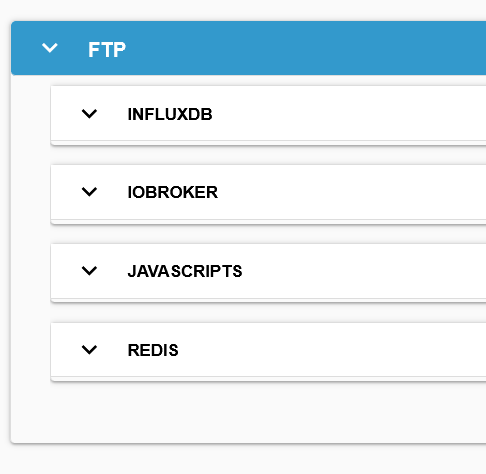
das Bild zeigt nur die Sicherungen der
influxDB, im Verzeichnis sollten eigentlich auch Dateien liegen, dieGrafanaim Namen haben.Zu den Log File Eintragungen
- BackitUp versucht zuerst ältere Dateien zu löschen, wenn im Verzeichnis keine da sind, dann kommt wohl diese Meldung, warum als
ERRORkeine Ahnung - Was dann die
some errorssind kann ich nicht sagen.
Kannst Du den BackitUp Adapter mal auf Debug stellen
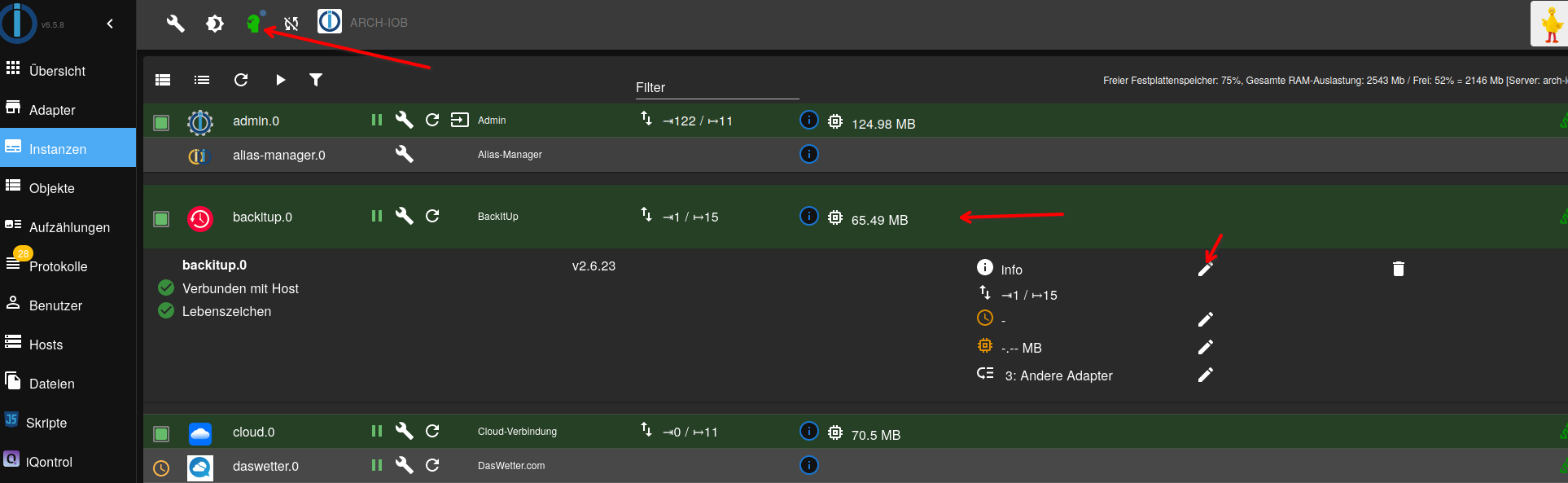
VG
BerndP.S.: Ich habe das gerade mal bei mir gemacht, das ist das Log
Started iobroker ...
[DEBUG] [iobroker] - host.arch-iob 6357 states saved

[DEBUG] [iobroker] - host.arch-iob 7276 objects saved

[DEBUG] [iobroker] - Backup created: /opt/iobroker/backups/iobroker_2023_06_14-17_19_42_backupiobroker.tar.gz

[DEBUG] [iobroker] - This backup can only be restored with js-controller version up from 4.1

[DEBUG] [iobroker] - done
[DEBUG] [grafana] - Start Grafana Backup ...
[DEBUG] [grafana] - Created grafana_tmp directory: "/opt/iobroker/backups/grafana_tmp"
[DEBUG] [grafana] - Created dashboard directory
[DEBUG] [grafana] - Created dashboards_manually_restore directory
[DEBUG] [grafana] - Created datasource directory
[DEBUG] [grafana] - start Grafana request ...
[DEBUG] [grafana] - Grafana is available ... Status: 200
[ERROR] [grafana] - Error on Grafana Datasource Request
[DEBUG] [grafana] - found Dashboard: ubersichten-raumklima
[DEBUG] [grafana] - found Dashboard: verbrauchubersicht-kaffeevollautomat
[DEBUG] [grafana] - found Dashboard: iobroker
[DEBUG] [grafana] - found Dashboard: zigbee-listen
[DEBUG] [grafana] - found Dashboard: logging-dashboard-via-loki
[DEBUG] [grafana] - found Dashboard: dashboards_by_dp20eic
[DEBUG] [grafana] - found Dashboard: verbrauchubersicht-gefrierschrank-new-alias
[DEBUG] [grafana] - found Dashboard: verbrauchubersicht-geschirrspuler-new-alias
[DEBUG] [grafana] - found Dashboard: verbrauchubersicht-waschmaschine-new-alias
[DEBUG] [grafana] - found Dashboard: internet-speed-test
[DEBUG] [grafana] - found Dashboard: verbrauchubersicht-waschetrokner-new-alias
[DEBUG] [grafana] - found Dashboard: spritpreise
[DEBUG] [grafana] - found Dashboard: logs-app
[DEBUG] [grafana] - found Dashboard: panel-library
[DEBUG] [grafana] - found Dashboard: linux-host-overview
[DEBUG] [grafana] - found Dashboard: loki-logs
[DEBUG] [grafana] - found Dashboard: proxmox-server
[DEBUG] [grafana] - found Dashboard: fritz-box-call-logs
[DEBUG] [grafana] - found Dashboard: verbrauchubersicht-garage-werkstatt-new-alias
[DEBUG] [grafana] - found Dashboard: lokiforlogs
[DEBUG] [grafana] - found Dashboard: test4forum
[DEBUG] [grafana] - found Dashboard: proxmox-flux
[DEBUG] [grafana] - found Dashboard: exchange-euro-thb
[DEBUG] [grafana] - found Dashboard: verbrauchubersicht-entertainment-new-alias
[DEBUG] [grafana] - found Dashboard: openweathermap
[DEBUG] [grafana] - found Dashboard: fritz-box-router-status
[DEBUG] [grafana] - found Dashboard: syslog
[DEBUG] [grafana] - found Dashboard: blutdruck
[DEBUG] [grafana] - found Dashboard: test
[DEBUG] [grafana] - found Dashboard: loki
[DEBUG] [grafana] - found Dashboard: synology
[DEBUG] [grafana] - found Dashboard: temperaturubersicht-am-heizungkorper
[DEBUG] [grafana] - found Dashboard: fritz-box-home-automation
[DEBUG] [grafana] - found Dashboard: synology-dashboard-new
[DEBUG] [grafana] - found Dashboard: fritz-box
[DEBUG] [grafana] - found Dashboard: loki-syslog-aio-all-in-one
[DEBUG] [grafana] - found Dashboard: synology-dashboard
[DEBUG] [grafana] - found Dashboard: connection-over-time
[DEBUG] [grafana] - found Dashboard: linux-rechner
[DEBUG] [grafana] - found Dashboard: fritz-box-router-logs
[DEBUG] [grafana] - found Dashboard: synology-metrics
[DEBUG] [grafana] - found Dashboard: connection-over-time-copy
[DEBUG] [grafana] - found Dashboard: aktuelle-e10-benzinpreise
[DEBUG] [grafana] - found Dashboard: synology_dashboard
[DEBUG] [grafana] - start Grafana backup compress ...
[DEBUG] [grafana] - Try deleting the Grafana tmp directory: "/opt/iobroker/backups/grafana_tmp"
[DEBUG] [grafana] - Grafana tmp directory "/opt/iobroker/backups/grafana_tmp" successfully deleted
[ERROR] [grafana] - cannot found Grafana Backup files
[DEBUG] [grafana] - done
[ERROR] [clean] - Backup files not deleted from /opt/iobroker/backups because some errors.
[DEBUG] [clean] - done
[DEBUG] [historyHTML] - new history html values created
[DEBUG] [historyHTML] - done
[DEBUG] [historyJSON] - new history json values created
[DEBUG] [historyJSON] - done
[EXIT] 0
P.P.S: also bei mir wird auch kein Backup erstellt, ich hab mal das Verzeichnis überwacht, schon das Anlegen des
grafana_tmpVerzeichnis geschieht nicht, wenn ich es von Hand anlege wird es gelöscht aber nicht erstellt.
Ich schaue mir das morgen noch mal an. - BackitUp versucht zuerst ältere Dateien zu löschen, wenn im Verzeichnis keine da sind, dann kommt wohl diese Meldung, warum als
-
@dp20eic
Die anderen Sicherungen habbe ich nicht gezeigt, sind aber alle da.
Adapter ist auf debug gestellt aber meiner ist in der Adapterliste auf v2.6.19, wo ist die v2.6.23 her?
Und jetzt nochmals sichern?
@maximinus sagte in backitup Fehlermeldung:
wo ist die v2.6.23 her?
Moin,
ich fahre Beta Software, Du Stable denke ich
VG
Bernd -
@maximinus sagte in backitup Fehlermeldung:
wo ist die v2.6.23 her?
Moin,
ich fahre Beta Software, Du Stable denke ich
VG
Bernd@dp20eic
Danke.
seit ich einmal ohne zu wissen die beta repository eingestellt und danach Probleme mit dem admin Adapter hatte bleibe ich liebe auf stable.
Würdest Du bitte meine Antwort an thomas-braun ansehen ob ich das so machen soll?
LG Gerhard
-
"Never touch a running system" aber vielleicht ist das falsch.
Zum Thema update hatte ich mir folgendes notiert.
sudo apt-get update
sudo apt-get upgrade

sudo apt-get --allow-releaseinfo-change update

sudo apt-get upgrade
Ja bestätigen
--->>> lange warten
sudo iobroker stop
npm -v

falls der js-controller als updateable angezeigt wird : iobroker stop iobroker upgrade self iobroker start
sudo iobroker upgrade -y

npm -v
node -v

sudo iobroker start

sudo iobroker stop && sudo apt update && apt upgrade -y && sudo iobroker update && iobroker upgrade -y && sudo iobroker update && iobroker upgrade self | curl -s https://deb.nodesource.com/gpgkey/nodesource.gpg.key | apt-key add - && sudo sh -c "echo deb https://deb.nodesource.com/node_12.x main \> /etc/apt/sources.list.d/nodesource.list" && sudo apt-get update && sudo apt-get install nodejs -y && iobroker start
Ist das so noch OK?
@maximinus sagte in backitup Fehlermeldung:
aber vielleicht ist das falsch.
Grundfalsch. Das ist ausgemachter Blödsinn.
-
"Never touch a running system" aber vielleicht ist das falsch.
Zum Thema update hatte ich mir folgendes notiert.
sudo apt-get update
sudo apt-get upgrade

sudo apt-get --allow-releaseinfo-change update

sudo apt-get upgrade
Ja bestätigen
--->>> lange warten
sudo iobroker stop
npm -v

falls der js-controller als updateable angezeigt wird : iobroker stop iobroker upgrade self iobroker start
sudo iobroker upgrade -y

npm -v
node -v

sudo iobroker start

sudo iobroker stop && sudo apt update && apt upgrade -y && sudo iobroker update && iobroker upgrade -y && sudo iobroker update && iobroker upgrade self | curl -s https://deb.nodesource.com/gpgkey/nodesource.gpg.key | apt-key add - && sudo sh -c "echo deb https://deb.nodesource.com/node_12.x main \> /etc/apt/sources.list.d/nodesource.list" && sudo apt-get update && sudo apt-get install nodejs -y && iobroker start
Ist das so noch OK?
@maximinus sagte in backitup Fehlermeldung:
Ist das so noch OK?
Nein, das ist genauso veraltet wie deine Installation.
Iobroker wird nie mit sudo angepackt.
sudo apt update
iob stop
sudo apt full-upgrade
sudo reboot
notieren. Und regelmäßig ausführen.
-
@maximinus sagte in backitup Fehlermeldung:
Ist das so noch OK?
Nein, das ist genauso veraltet wie deine Installation.
Iobroker wird nie mit sudo angepackt.
sudo apt update
iob stop
sudo apt full-upgrade
sudo reboot
notieren. Und regelmäßig ausführen.
Ich greife das Thema nocheinmal auf. Nach Befolgung deiner Hinweise zeigt die Telegram Nachricht über das nächtliche Backup immer noch die selben Warnungen, obwohl die Backups alle auber gespeichert werden. Im Zusammenhanfg mit einer Aktualisierung des am selben Raspberry laufenden evcc, bekomme ich nach sudo apt update diese Warnungen:
pi@raspberrypi:~ $ Warning: apt-key is deprecated. Manage keyring files in trusted.gpg.d instead (see apt-key(8)).
W: An error occurred during the signature verification. The repository is not up                                                                                                                                                             dated and the previous index files will be used. GPG error: https://repos.influx                                                                                                                                                             data.com/debian bullseye InRelease: The following signatures couldn't be verifie                                                                                                                                                             d because the public key is not available: NO_PUBKEY D8FF8E1F7DF8B07E
W: An error occurred during the signature verification. The repository is not up                                                                                                                                                             dated and the previous index files will be used. GPG error: https://packages.gra                                                                                                                                                             fana.com/oss/deb stable InRelease: The following signatures couldn't be verified                                                                                                                                                              because the public key is not available: NO_PUBKEY 9E439B102CF3C0C6
W: Failed to fetch https://packages.grafana.com/oss/deb/dists/stable/InRelease                                                                                                                                                               The following signatures couldn't be verified because the public key is not avai                                                                                                                                                             lable: NO_PUBKEY 9E439B102CF3C0C6
W: Failed to fetch https://repos.influxdata.com/debian/dists/bullseye/InRelease
Nach Studium dieses Links scheint mir deren Behebeung als Linux Neuling zu kompliziert (gefährlich)
https://itsfoss.com/apt-key-deprecated/
sudo apt keylist bringt diese Ausgabe
pi@raspberrypi:~ $ sudo apt-key list
Warning: apt-key is deprecated. Manage keyring files in trusted.gpg.d instead (see apt-key(8)).
/etc/apt/trusted.gpg
--------------------
pub   rsa2048 2012-04-01 [SC]
      A0DA 38D0 D76E 8B5D 6388  7281 9165 938D 90FD DD2E
uid           [ unknown] Mike Thompson (Raspberry Pi Debian armhf ARMv6+VFP) <mpthompson@gmail.com>
sub   rsa2048 2012-04-01 [E]

pub   rsa4096 2015-09-28 [SC]
      05CE 1508 5FC0 9D18 E99E  FB22 684A 14CF 2582 E0C5
uid           [ unknown] InfluxDB Packaging Service <support@influxdb.com>
sub   rsa4096 2015-09-28 [E]

/etc/apt/trusted.gpg.d/raspberrypi-archive-stable.gpg
-----------------------------------------------------
pub   rsa2048 2012-06-17 [SC]
      CF8A 1AF5 02A2 AA2D 763B  AE7E 82B1 2992 7FA3 303E
uid           [ unknown] Raspberry Pi Archive Signing Key
sub   rsa2048 2012-06-17 [E]
Gibt es eine einfachere Möglichkeit diese Warnungen zu beseitigen oder soll man das so lassen?
Vielleicht hat das auch etwas mit den nicht endenden Fehlermeldungen des backitup adapters zu tun.LG Gerhard
RasPi 4 4GB bookworm
nodejs v20.19.4
npm 10.8.2
Objects type: jsonl
States type: redis
js-controller: 7.0.6
admin: 7.6.17
javascript: 8.9.2 -
Ich greife das Thema nocheinmal auf. Nach Befolgung deiner Hinweise zeigt die Telegram Nachricht über das nächtliche Backup immer noch die selben Warnungen, obwohl die Backups alle auber gespeichert werden. Im Zusammenhanfg mit einer Aktualisierung des am selben Raspberry laufenden evcc, bekomme ich nach sudo apt update diese Warnungen:
pi@raspberrypi:~ $ Warning: apt-key is deprecated. Manage keyring files in trusted.gpg.d instead (see apt-key(8)).
W: An error occurred during the signature verification. The repository is not up                                                                                                                                                             dated and the previous index files will be used. GPG error: https://repos.influx                                                                                                                                                             data.com/debian bullseye InRelease: The following signatures couldn't be verifie                                                                                                                                                             d because the public key is not available: NO_PUBKEY D8FF8E1F7DF8B07E
W: An error occurred during the signature verification. The repository is not up                                                                                                                                                             dated and the previous index files will be used. GPG error: https://packages.gra                                                                                                                                                             fana.com/oss/deb stable InRelease: The following signatures couldn't be verified                                                                                                                                                              because the public key is not available: NO_PUBKEY 9E439B102CF3C0C6
W: Failed to fetch https://packages.grafana.com/oss/deb/dists/stable/InRelease                                                                                                                                                               The following signatures couldn't be verified because the public key is not avai                                                                                                                                                             lable: NO_PUBKEY 9E439B102CF3C0C6
W: Failed to fetch https://repos.influxdata.com/debian/dists/bullseye/InRelease
Nach Studium dieses Links scheint mir deren Behebeung als Linux Neuling zu kompliziert (gefährlich)
https://itsfoss.com/apt-key-deprecated/
sudo apt keylist bringt diese Ausgabe
pi@raspberrypi:~ $ sudo apt-key list
Warning: apt-key is deprecated. Manage keyring files in trusted.gpg.d instead (see apt-key(8)).
/etc/apt/trusted.gpg
--------------------
pub   rsa2048 2012-04-01 [SC]
      A0DA 38D0 D76E 8B5D 6388  7281 9165 938D 90FD DD2E
uid           [ unknown] Mike Thompson (Raspberry Pi Debian armhf ARMv6+VFP) <mpthompson@gmail.com>
sub   rsa2048 2012-04-01 [E]

pub   rsa4096 2015-09-28 [SC]
      05CE 1508 5FC0 9D18 E99E  FB22 684A 14CF 2582 E0C5
uid           [ unknown] InfluxDB Packaging Service <support@influxdb.com>
sub   rsa4096 2015-09-28 [E]

/etc/apt/trusted.gpg.d/raspberrypi-archive-stable.gpg
-----------------------------------------------------
pub   rsa2048 2012-06-17 [SC]
      CF8A 1AF5 02A2 AA2D 763B  AE7E 82B1 2992 7FA3 303E
uid           [ unknown] Raspberry Pi Archive Signing Key
sub   rsa2048 2012-06-17 [E]
Gibt es eine einfachere Möglichkeit diese Warnungen zu beseitigen oder soll man das so lassen?
Vielleicht hat das auch etwas mit den nicht endenden Fehlermeldungen des backitup adapters zu tun.LG Gerhard
-
Danke habe ich alles gemacht. da kommt aber jetzt das:
pi@raspberrypi:~ $ sudo apt update
Hit:1 http://archive.raspberrypi.org/debian bullseye InRelease
Hit:2 http://raspbian.raspberrypi.org/raspbian bullseye InRelease
Hit:3 https://apt.grafana.com stable InRelease
Hit:4 https://deb.nodesource.com/node_16.x bullseye InRelease
Get:5 https://dl.cloudsmith.io/public/evcc/stable/deb/raspbian bullseye InRelease [5,127 B]
Ign:6 https://repos.influxdata.com/raspbian bullseye InRelease
Err:7 https://repos.influxdata.com/raspbian bullseye Release
  404  Not Found [IP: 18.66.26.28 443]
Reading package lists... Done
E: The repository 'https://repos.influxdata.com/raspbian bullseye Release' does not have a Release file.
N: Updating from such a repository can't be done securely, and is therefore disabled by default.
N: See apt-secure(8) manpage for repository creation and user configuration details.
pi@raspberrypi:~ $
Hast Du dafür auch eine Lösung?
RasPi 4 4GB bookworm
nodejs v20.19.4
npm 10.8.2
Objects type: jsonl
States type: redis
js-controller: 7.0.6
admin: 7.6.17
javascript: 8.9.2 -
Danke habe ich alles gemacht. da kommt aber jetzt das:
pi@raspberrypi:~ $ sudo apt update
Hit:1 http://archive.raspberrypi.org/debian bullseye InRelease
Hit:2 http://raspbian.raspberrypi.org/raspbian bullseye InRelease
Hit:3 https://apt.grafana.com stable InRelease
Hit:4 https://deb.nodesource.com/node_16.x bullseye InRelease
Get:5 https://dl.cloudsmith.io/public/evcc/stable/deb/raspbian bullseye InRelease [5,127 B]
Ign:6 https://repos.influxdata.com/raspbian bullseye InRelease
Err:7 https://repos.influxdata.com/raspbian bullseye Release
  404  Not Found [IP: 18.66.26.28 443]
Reading package lists... Done
E: The repository 'https://repos.influxdata.com/raspbian bullseye Release' does not have a Release file.
N: Updating from such a repository can't be done securely, and is therefore disabled by default.
N: See apt-secure(8) manpage for repository creation and user configuration details.
pi@raspberrypi:~ $
Hast Du dafür auch eine Lösung?
Ähnliche Übung für das influx-Repository.
Steht in dem Thread etwas später drin. -
Ähnliche Übung für das influx-Repository.
Steht in dem Thread etwas später drin.Ich habe alles gelesen aber leider kapier ichs nicht
mach ich das:
sudo apt-key del 05CE15085FC09D18E99EFB22684A14CF2582E0C5kommt:
pi@raspberrypi:~ $ sudo apt-key del 05CE15085FC09D18E99EFB22684A14CF2582E0C5
Warning: apt-key is deprecated. Manage keyring files in trusted.gpg.d instead (see apt-key(8)).
OK
pi@raspberrypi:~ $
rm /etc/apt/sources.list.d/influxdata.list
da kommt das:
pi@raspberrypi:~ $ rm /etc/apt/sources.list.d/influxdata.list
rm: cannot remove '/etc/apt/sources.list.d/influxdata.list': No such file or directory
pi@raspberrypi:~ $
dann:
wget -q -O - https://repos.influxdata.com/influxdb.key | sudo gpg --dearmor -o /usr/share/keyrings/influxdb.gpg

export DISTRIB_ID=$(lsb_release -si); export DISTRIB_CODENAME=$(lsb_release -sc)

echo "deb [signed-by=/usr/share/keyrings/influxdb.gpg] https://repos.influxdata.com/${DISTRIB_ID,,} ${DISTRIB_CODENAME} stable" | sudo tee /etc/apt/sources.list.d/influxdb.list > /dev/null
File '/usr/share/keyrings/influxdb.gpg' exists. Overwrite? (y/N) y
da kommt nichts und dann immer noch der gleiche Fehler:
pi@raspberrypi:~ $ sudo apt update
Hit:1 http://raspbian.raspberrypi.org/raspbian bullseye InRelease
Hit:2 http://archive.raspberrypi.org/debian bullseye InRelease
Hit:3 https://deb.nodesource.com/node_16.x bullseye InRelease
Hit:4 https://apt.grafana.com stable InRelease
Ign:5 https://repos.influxdata.com/raspbian bullseye InRelease
Get:6 https://dl.cloudsmith.io/public/evcc/stable/deb/raspbian bullseye InRelease [5,127 B]
Err:7 https://repos.influxdata.com/raspbian bullseye Release
  404  Not Found [IP: 18.66.26.28 443]
Reading package lists... Done
E: The repository 'https://repos.influxdata.com/raspbian bullseye Release' does not have a Release file.
N: Updating from such a repository can't be done securely, and is therefore disabled by default.
N: See apt-secure(8) manpage for repository creation and user configuration details.
pi@raspberrypi:~ $
dann:
pi@raspberrypi:~ $ wget -q https://repos.influxdata.com/influxdata-archive_compat.key
pi@raspberrypi:~ $ gpg --with-fingerprint  --show-keys ./inluxdata-archive_compat.key
gpg: directory '/home/pi/.gnupg' created
gpg: keybox '/home/pi/.gnupg/pubring.kbx' created
gpg: can't open './inluxdata-archive_compat.key': No such file or directory
pi@raspberrypi:~ $ cat /etc/apt/sources.list.d/influx*
deb [signed-by=/usr/share/keyrings/influxdb.gpg] https://repos.influxdata.com/raspbian bullseye stable
pi@raspberrypi:~ $ cat /etc/apt/trusted.gpg.d/influxdata-archive_compat.gpg
cat: /etc/apt/trusted.gpg.d/influxdata-archive_compat.gpg: No such file or directory
pi@raspberrypi:~ $ wget -q https://repos.influxdata.com/influxdata-archive_compat.key
pi@raspberrypi:~ $ gpg --with-fingerprint --show-keys ./influxdata-archive_compat.key
pub   rsa4096 2023-01-18 [SC] [expires: 2026-01-17]
      9D53 9D90 D332 8DC7 D6C8  D3B9 D8FF 8E1F 7DF8 B07E
uid                      InfluxData Package Signing Key <support@influxdata.com>
Ich denke das sieht nicht schlecht aus aber nach neu booten kommt nach sudo apt update die gleiche Meldung wie bisher. Irgend etwas muss ich übersehen haben.
Eben merke ich da ist ein Schreibfehler "inlux" satt "influx". Aber auch bei richtiger Schreibweise bleibt der Fehler
LG Gerhard
RasPi 4 4GB bookworm
nodejs v20.19.4
npm 10.8.2
Objects type: jsonl
States type: redis
js-controller: 7.0.6
admin: 7.6.17
javascript: 8.9.2 -
Ich habe alles gelesen aber leider kapier ichs nicht
mach ich das:
sudo apt-key del 05CE15085FC09D18E99EFB22684A14CF2582E0C5kommt:
pi@raspberrypi:~ $ sudo apt-key del 05CE15085FC09D18E99EFB22684A14CF2582E0C5
Warning: apt-key is deprecated. Manage keyring files in trusted.gpg.d instead (see apt-key(8)).
OK
pi@raspberrypi:~ $
rm /etc/apt/sources.list.d/influxdata.list
da kommt das:
pi@raspberrypi:~ $ rm /etc/apt/sources.list.d/influxdata.list
rm: cannot remove '/etc/apt/sources.list.d/influxdata.list': No such file or directory
pi@raspberrypi:~ $
dann:
wget -q -O - https://repos.influxdata.com/influxdb.key | sudo gpg --dearmor -o /usr/share/keyrings/influxdb.gpg

export DISTRIB_ID=$(lsb_release -si); export DISTRIB_CODENAME=$(lsb_release -sc)

echo "deb [signed-by=/usr/share/keyrings/influxdb.gpg] https://repos.influxdata.com/${DISTRIB_ID,,} ${DISTRIB_CODENAME} stable" | sudo tee /etc/apt/sources.list.d/influxdb.list > /dev/null
File '/usr/share/keyrings/influxdb.gpg' exists. Overwrite? (y/N) y
da kommt nichts und dann immer noch der gleiche Fehler:
pi@raspberrypi:~ $ sudo apt update
Hit:1 http://raspbian.raspberrypi.org/raspbian bullseye InRelease
Hit:2 http://archive.raspberrypi.org/debian bullseye InRelease
Hit:3 https://deb.nodesource.com/node_16.x bullseye InRelease
Hit:4 https://apt.grafana.com stable InRelease
Ign:5 https://repos.influxdata.com/raspbian bullseye InRelease
Get:6 https://dl.cloudsmith.io/public/evcc/stable/deb/raspbian bullseye InRelease [5,127 B]
Err:7 https://repos.influxdata.com/raspbian bullseye Release
  404  Not Found [IP: 18.66.26.28 443]
Reading package lists... Done
E: The repository 'https://repos.influxdata.com/raspbian bullseye Release' does not have a Release file.
N: Updating from such a repository can't be done securely, and is therefore disabled by default.
N: See apt-secure(8) manpage for repository creation and user configuration details.
pi@raspberrypi:~ $
dann:
pi@raspberrypi:~ $ wget -q https://repos.influxdata.com/influxdata-archive_compat.key
pi@raspberrypi:~ $ gpg --with-fingerprint  --show-keys ./inluxdata-archive_compat.key
gpg: directory '/home/pi/.gnupg' created
gpg: keybox '/home/pi/.gnupg/pubring.kbx' created
gpg: can't open './inluxdata-archive_compat.key': No such file or directory
pi@raspberrypi:~ $ cat /etc/apt/sources.list.d/influx*
deb [signed-by=/usr/share/keyrings/influxdb.gpg] https://repos.influxdata.com/raspbian bullseye stable
pi@raspberrypi:~ $ cat /etc/apt/trusted.gpg.d/influxdata-archive_compat.gpg
cat: /etc/apt/trusted.gpg.d/influxdata-archive_compat.gpg: No such file or directory
pi@raspberrypi:~ $ wget -q https://repos.influxdata.com/influxdata-archive_compat.key
pi@raspberrypi:~ $ gpg --with-fingerprint --show-keys ./influxdata-archive_compat.key
pub   rsa4096 2023-01-18 [SC] [expires: 2026-01-17]
      9D53 9D90 D332 8DC7 D6C8  D3B9 D8FF 8E1F 7DF8 B07E
uid                      InfluxData Package Signing Key <support@influxdata.com>
Ich denke das sieht nicht schlecht aus aber nach neu booten kommt nach sudo apt update die gleiche Meldung wie bisher. Irgend etwas muss ich übersehen haben.
Eben merke ich da ist ein Schreibfehler "inlux" satt "influx". Aber auch bei richtiger Schreibweise bleibt der Fehler
LG Gerhard
-
pi@raspberrypi:~ $ ls -lah /etc/apt/sources.list.d/
apt-key list | grep -i influx
total 28K
drwxr-xr-x 2 root root 4.0K Jun 20 13:25 .
drwxr-xr-x 8 root root 4.0K Jul 23 11:43 ..
-rw-r--r-- 1 root root  418 Jun 20 13:25 evcc-stable.list
-rw-r--r-- 1 root root   84 Jul 23 11:37 grafana.list
-rw-r--r-- 1 root root  103 Jul 23 18:08 influxdb.list
-rw-r--r-- 1 root root  208 Aug 23  2022 nodesource.list
-rw-r--r-- 1 root root  191 Apr  4  2022 raspi.list
Warning: apt-key is deprecated. Manage keyring files in trusted.gpg.d instead (see apt-key(8)).
pi@raspberrypi:~ $
RasPi 4 4GB bookworm
nodejs v20.19.4
npm 10.8.2
Objects type: jsonl
States type: redis
js-controller: 7.0.6
admin: 7.6.17
javascript: 8.9.2 -
pi@raspberrypi:~ $ ls -lah /etc/apt/sources.list.d/ apt-key list | grep -i influx total 28K drwxr-xr-x 2 root root 4.0K Jun 20 13:25 . drwxr-xr-x 8 root root 4.0K Jul 23 11:43 .. -rw-r--r-- 1 root root 418 Jun 20 13:25 evcc-stable.list -rw-r--r-- 1 root root 84 Jul 23 11:37 grafana.list -rw-r--r-- 1 root root 103 Jul 23 18:08 influxdb.list -rw-r--r-- 1 root root 208 Aug 23 2022 nodesource.list -rw-r--r-- 1 root root 191 Apr 4 2022 raspi.list Warning: apt-key is deprecated. Manage keyring files in trusted.gpg.d instead (see apt-key(8)). pi@raspberrypi:~ $sudo rm /etc/apt/sources.list.d/influxdb.list wget -q https://repos.influxdata.com/influxdata-archive_compat.key echo '393e8779c89ac8d958f81f942f9ad7fb82a25e133faddaf92e15b16e6ac9ce4c influxdata-archive_compat.key' | sha256sum -c && cat influxdata-archive_compat.key | gpg --dearmor | sudo tee /usr/share/keyrings/influxdata-archive_compat.gpg > /dev/null echo 'deb [signed-by=/usr/share/keyrings/influxdata-archive_compat.gpg] https://repos.influxdata.com/debian stable main' | sudo tee /etc/apt/sources.list.d/influxdata.list rm influxdata-archive_compat.key -
Danke Thomas das wars
pi@raspberrypi:~ $ apt list --upgradable
Listing... Done
grafana/stable 10.0.2 armhf [upgradable from: 9.1.3]
N: There are 237 additional versions. Please use the '-a' switch to see them.
pi@raspberrypi:~ $
Ist es ratsam auf 10.0.2 zu wechseln? ich bin bei influxdb noch auf version1.x
-
Danke Thomas das wars
pi@raspberrypi:~ $ apt list --upgradable
Listing... Done
grafana/stable 10.0.2 armhf [upgradable from: 9.1.3]
N: There are 237 additional versions. Please use the '-a' switch to see them.
pi@raspberrypi:~ $
Ist es ratsam auf 10.0.2 zu wechseln? ich bin bei influxdb noch auf version1.x
@maximinus sagte in backitup Fehlermeldung:
Ist es ratsam auf 10.0.2 zu wechseln? ich bin bei influxdb noch auf version1.x
Moin,
verwechselst Du da was?
Grafana ≠ influxVG
Bernd -
@maximinus sagte in backitup Fehlermeldung:
Ist es ratsam auf 10.0.2 zu wechseln? ich bin bei influxdb noch auf version1.x
Moin,
verwechselst Du da was?
Grafana ≠ influxVG
Bernd@dp20eic
Grafana verarbeitet doch die Daten aus der influxdb. Es wäre ja möglich dass eine neue Version von Grafana auch eine neue Version von influxdb bedingt. Da ich bisher aber nichts vermisse würde ich lieber alles so lassen wie es ist. Es sei denn es wäre dringend angeraten doch upzugraden. Das war gemeint.
LG Gerhard
RasPi 4 4GB bookworm
nodejs v20.19.4
npm 10.8.2
Objects type: jsonl
States type: redis
js-controller: 7.0.6
admin: 7.6.17
javascript: 8.9.2 -
@dp20eic
Grafana verarbeitet doch die Daten aus der influxdb. Es wäre ja möglich dass eine neue Version von Grafana auch eine neue Version von influxdb bedingt. Da ich bisher aber nichts vermisse würde ich lieber alles so lassen wie es ist. Es sei denn es wäre dringend angeraten doch upzugraden. Das war gemeint.
LG Gerhard
Updates sind zeitnah einzuspielen.
-
@dp20eic
Grafana verarbeitet doch die Daten aus der influxdb. Es wäre ja möglich dass eine neue Version von Grafana auch eine neue Version von influxdb bedingt. Da ich bisher aber nichts vermisse würde ich lieber alles so lassen wie es ist. Es sei denn es wäre dringend angeraten doch upzugraden. Das war gemeint.
LG Gerhard
-
pi@raspberrypi:~ $ sudo apt update
Hit:1 http://raspbian.raspberrypi.org/raspbian bullseye InRelease
Hit:2 http://archive.raspberrypi.org/debian bullseye InRelease
Hit:3 https://repos.influxdata.com/debian stable InRelease
Hit:4 https://apt.grafana.com stable InRelease
Hit:5 https://deb.nodesource.com/node_16.x bullseye InRelease
Get:6 https://dl.cloudsmith.io/public/evcc/stable/deb/raspbian bullseye InRelease [5,127 B]
Fetched 5,127 B in 2s (3,290 B/s)
Reading package lists... Done
Building dependency tree... Done
Reading state information... Done
1 package can be upgraded. Run 'apt list --upgradable' to see it.
pi@raspberrypi:~ $
Daher die Frage.
RasPi 4 4GB bookworm
nodejs v20.19.4
npm 10.8.2
Objects type: jsonl
States type: redis
js-controller: 7.0.6
admin: 7.6.17
javascript: 8.9.2 -
pi@raspberrypi:~ $ sudo apt update
Hit:1 http://raspbian.raspberrypi.org/raspbian bullseye InRelease
Hit:2 http://archive.raspberrypi.org/debian bullseye InRelease
Hit:3 https://repos.influxdata.com/debian stable InRelease
Hit:4 https://apt.grafana.com stable InRelease
Hit:5 https://deb.nodesource.com/node_16.x bullseye InRelease
Get:6 https://dl.cloudsmith.io/public/evcc/stable/deb/raspbian bullseye InRelease [5,127 B]
Fetched 5,127 B in 2s (3,290 B/s)
Reading package lists... Done
Building dependency tree... Done
Reading state information... Done
1 package can be upgraded. Run 'apt list --upgradable' to see it.
pi@raspberrypi:~ $
Daher die Frage.
Ja, zieh die Version auf den letzten Stand.

Hey! Du scheinst an dieser Unterhaltung interessiert zu sein, hast aber noch kein Konto.
Hast du es satt, bei jedem Besuch durch die gleichen Beiträge zu scrollen? Wenn du dich für ein Konto anmeldest, kommst du immer genau dorthin zurück, wo du zuvor warst, und kannst dich über neue Antworten benachrichtigen lassen (entweder per E-Mail oder Push-Benachrichtigung). Du kannst auch Lesezeichen speichern und Beiträge positiv bewerten, um anderen Community-Mitgliedern deine Wertschätzung zu zeigen.
Mit deinem Input könnte dieser Beitrag noch besser werden 💗
Registrieren Anmelden291
Online33.0k
Benutzer83.6k
Themen1.3m
Beiträge