




hm-rega down nach Umzug
-
Hallo zusammen,
erstmal ein großes Dankeschön an die diversen gut dokumentierten Fragestellungen anderer Threads, die mir sehr weitergeholfen haben! Nun komme ich leider an meine Grenzen...
Mein Setup: IObroker auf Pi4 mit Homematic-Funkmodul HM-MOD-RPI-PCB, pivCCU3, Adapter hm-rega und hm-rpc, Steuerung (geplant) via NodeRed und IObroker-Objekte der Homematic-IP-Geräte
Das System habe ich gerade neu aufgesetzt. Vorher lief es auf einem Pi3, muste aber wegen zu wenig RAM auf den Pi4 umziehen. Nach Einspielen des Backups über Backitup geht zwar hm-rpc, aber hm-rega meldet "error -- ReGaHSS 192.168.100.6 down" (Instanz ist gelb). Wie bekomme ich das gelöst?
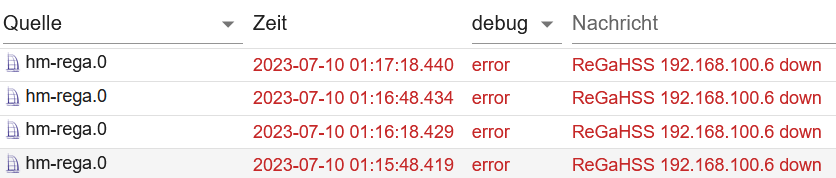
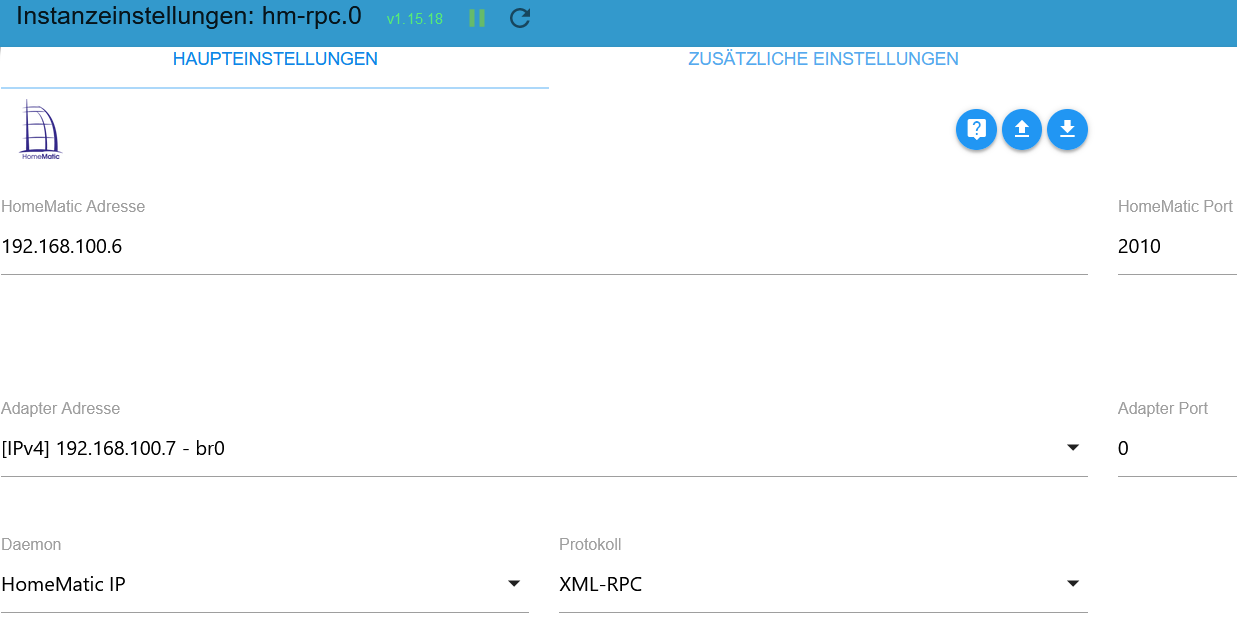
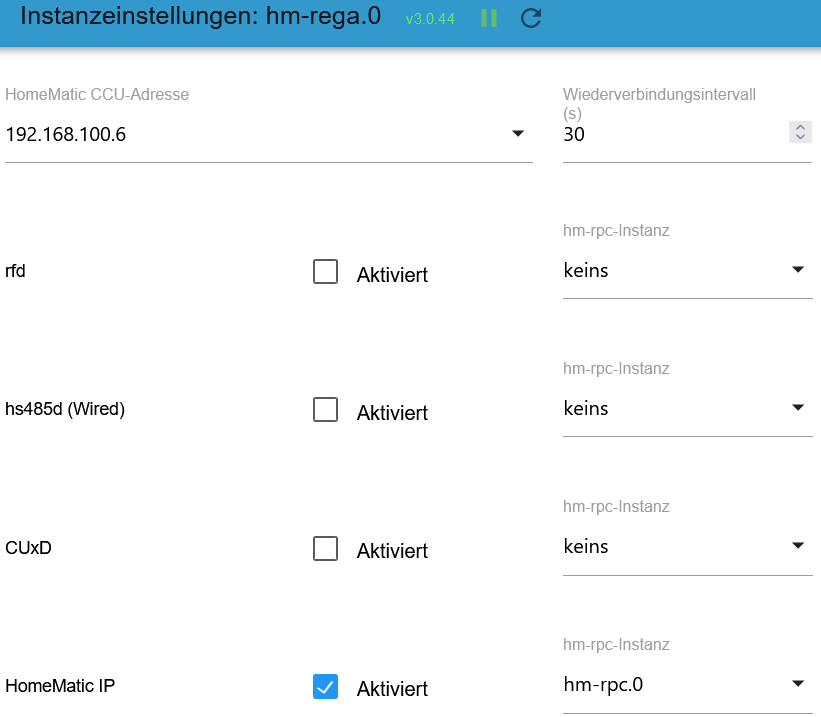
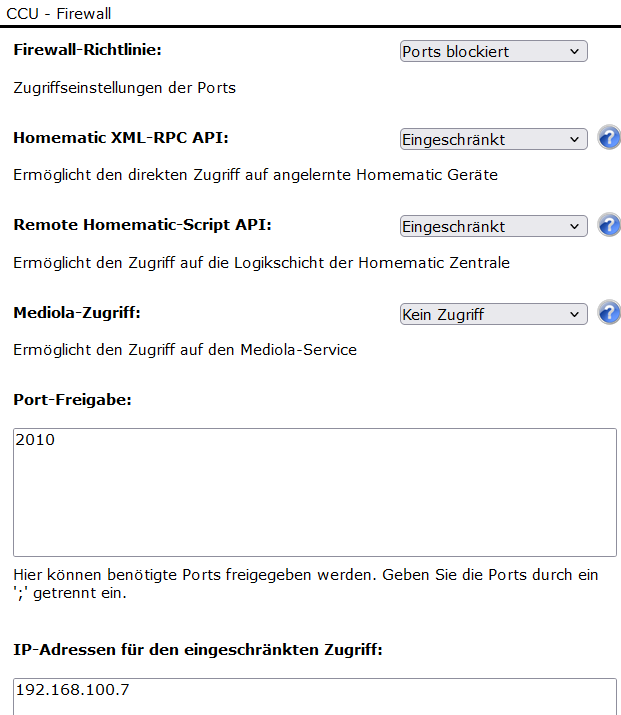
Die Weboberfläche der CCU ist über die obige IP erreichbar und die verbundenen Geräte lassen sich darüber manuell ansprechen. Der Pi/IObroker hat die IP 192.168.100.7. Den ReGa-Adapter habe ich versuchsweise gelöscht und neu installiert. Die Adapter-Einstellungen habe ich geprüft, ebenso die Firewall der CCU (da bin mir aber nicht 100% sicher). Kann mir jemand bei der weiteren Fehlersuche helfen?
Grüße
@oscool90 sagte in hm-rega down nach Umzug:
Das System habe ich gerade neu aufgesetzt.
@oscool90 sagte in hm-rega down nach Umzug:
Node 20.4.0, NPM 9.7.2
Node 20.x ist noch lange nicht empfohlen sondern 18.x ;)
Zeig mal was
iob diagauswirft
-
======== Start marking the full check here ========= Skript v.2023-04-16 *** BASE SYSTEM *** Model : Raspberry Pi 4 Model B Rev 1.5 Architecture : aarch64 Docker : false Virtualization : none Distributor ID: Debian Description: Debian GNU/Linux 11 (bullseye) Release: 11 Codename: bullseye PRETTY_NAME="Debian GNU/Linux 11 (bullseye)" NAME="Debian GNU/Linux" VERSION_ID="11" VERSION="11 (bullseye)" VERSION_CODENAME=bullseye ID=debian HOME_URL="https://www.debian.org/" SUPPORT_URL="https://www.debian.org/support" BUG_REPORT_URL="https://bugs.debian.org/" Systemuptime and Load: 06:54:26 up 8:20, 3 users, load average: 0.19, 0.23, 0.21 CPU threads: 4 Raspberry only: throttled=0x0 Other values than 0x0 hint to temperature/voltage problems temp=44.8'C volt=0.9360V *** Time and Time Zones *** Local time: Mon 2023-07-10 06:54:26 BST Universal time: Mon 2023-07-10 05:54:26 UTC RTC time: n/a Time zone: Europe/London (BST, +0100) System clock synchronized: yes NTP service: active RTC in local TZ: no *** User and Groups *** pi /home/pi pi adm dialout cdrom sudo audio video plugdev games users input render netdev lp admin gpio i2c spi iobroker *** X-Server-Setup *** X-Server: true Desktop: Terminal: tty Boot Target: graphical.target *** MEMORY *** total used free shared buff/cache available Mem: 3.8G 1.1G 1.7G 35M 1.1G 2.6G Swap: 99M 0B 99M Total: 3.9G 1.1G 1.8G 3794 M total memory 1064 M used memory 1272 M active memory 610 M inactive memory 1651 M free memory 133 M buffer memory 944 M swap cache 99 M total swap 0 M used swap 99 M free swap Raspberry only: oom events: 0 lifetime oom required: 0 Mbytes total time in oom handler: 0 ms max time spent in oom handler: 0 ms *** FILESYSTEM *** Filesystem Type Size Used Avail Use% Mounted on /dev/root ext4 59G 5.8G 51G 11% / devtmpfs devtmpfs 1.7G 0 1.7G 0% /dev tmpfs tmpfs 1.9G 0 1.9G 0% /dev/shm tmpfs tmpfs 759M 1.2M 758M 1% /run tmpfs tmpfs 5.0M 4.0K 5.0M 1% /run/lock /dev/mmcblk0p1 vfat 255M 31M 225M 13% /boot tmpfs tmpfs 380M 20K 380M 1% /run/user/1000 Messages concerning ext4 filesystem in dmesg: [Sun Jul 9 22:33:48 2023] Kernel command line: coherent_pool=1M 8250.nr_uarts=1 snd_bcm2835.enable_headphones=0 snd_bcm2835.enable_headphones=1 snd_bcm2835.ena ble_hdmi=1 snd_bcm2835.enable_hdmi=0 smsc95xx.macaddr=E4:5F:01:FE:1C:C9 vc_mem. mem_base=0x3ec00000 vc_mem.mem_size=0x40000000 console=tty1 root=PARTUUID=99a74 072-02 rootfstype=ext4 fsck.repair=yes rootwait quiet splash plymouth.ignore-ser ial-consoles [Sun Jul 9 22:33:49 2023] EXT4-fs (mmcblk0p2): mounted filesystem with ordered data mode. Quota mode: none. [Sun Jul 9 22:33:49 2023] VFS: Mounted root (ext4 filesystem) readonly on devic e 179:2. [Sun Jul 9 22:33:51 2023] EXT4-fs (mmcblk0p2): re-mounted. Quota mode: none. Show mounted filesystems (real ones only): TARGET SOURCE FSTYPE OPTIONS / /dev/mmcblk0p2 ext4 rw,noatime `-/boot /dev/mmcblk0p1 vfat rw,relatime,fmask=0022,dmask=0022,codepage=437,ioc harset=ascii,shortname=mixed,errors=remount-ro Files in neuralgic directories: /var: du: cannot access '/var/lib/lxcfs/cgroup': Input/output error 1.4G /var/ 783M /var/lib 599M /var/lib/piVCCU3 545M /var/lib/piVCCU3/rootfs 332M /var/cache Archived and active journals take up 136.0M in the file system. /opt/iobroker/backups: 11M /opt/iobroker/backups/ /opt/iobroker/iobroker-data: 132M /opt/iobroker/iobroker-data/ 100M /opt/iobroker/iobroker-data/files 51M /opt/iobroker/iobroker-data/files/javascript.admin 32M /opt/iobroker/iobroker-data/files/javascript.admin/static/js 32M /opt/iobroker/iobroker-data/files/javascript.admin/static The five largest files in iobroker-data are: 18M /opt/iobroker/iobroker-data/objects.jsonl 6.9M /opt/iobroker/iobroker-data/files/javascript.admin/static/js/610.de0231c 9.chunk.js.map 6.3M /opt/iobroker/iobroker-data/files/admin.admin/custom/static/js/vendors-n ode_modules_iobroker_adapter-react-v5_assets_devices_parseNames_js-node_modules_ iobr-99c23e.847b8ad9.chunk.js.map 5.4M /opt/iobroker/iobroker-data/files/jarvis/js/index-566ba00e.js 4.9M /opt/iobroker/iobroker-data/files/javascript.admin/static/js/848.7424922 d.chunk.js.map *** NodeJS-Installation *** /usr/bin/nodejs v20.4.0 /usr/bin/node v20.4.0 /usr/bin/npm 9.7.2 /usr/bin/npx 9.7.2 nodejs: Installed: 20.4.0-deb-1nodesource1 Candidate: 20.4.0-deb-1nodesource1 Version table: *** 20.4.0-deb-1nodesource1 500 500 https://deb.nodesource.com/node_20.x bullseye/main arm64 Packages 100 /var/lib/dpkg/status 12.22.12~dfsg-1~deb11u4 500 500 http://security.debian.org/debian-security bullseye-security/main arm64 Packages 12.22.12~dfsg-1~deb11u3 500 500 http://deb.debian.org/debian bullseye/main arm64 Packages Temp directories causing npm8 problem: 0 No problems detected *** ioBroker-Installation *** ioBroker Status iobroker is running on this host. Objects type: jsonl States type: jsonl MULTIHOSTSERVICE/enabled: false Core adapters versions js-controller: 4.0.24 admin: 6.3.5 javascript: 6.1.4 Adapters from github: 2 Adapter State + system.adapter.admin.0 : admin : raspberrypi - enabled, port: 8081, bind: 0.0.0.0, run as: admin + system.adapter.backitup.0 : backitup : raspberrypi - enabled system.adapter.discovery.0 : discovery : raspberrypi - disabled system.adapter.history.0 : history : raspberrypi - disabled + system.adapter.hm-rega.0 : hm-rega : raspberrypi - enabled + system.adapter.hm-rpc.0 : hm-rpc : raspberrypi - enabled, port: 0 system.adapter.influxdb.0 : influxdb : raspberrypi - disabled, port: 8086 + system.adapter.jarvis.0 : jarvis : raspberrypi - enabled system.adapter.javascript.0 : javascript : raspberrypi - disabled + system.adapter.node-red.0 : node-red : raspberrypi - enabled, port: 1880, bind: 0.0.0.0 + system.adapter.pollenflug.0 : pollenflug : raspberrypi - enabled + system.adapter.rpi2.0 : rpi2 : raspberrypi - enabled + system.adapter.sonoff.0 : sonoff : raspberrypi - enabled, port: 1883, bind: 0.0.0.0 system.adapter.web.0 : web : raspberrypi - disabled, port: 8082, bind: 0.0.0.0, run as: admin + instance is alive Enabled adapters with bindings + system.adapter.admin.0 : admin : raspberrypi - enabled, port: 8081, bind: 0.0.0.0, run as: admin + system.adapter.hm-rpc.0 : hm-rpc : raspberrypi - enabled, port: 0 + system.adapter.node-red.0 : node-red : raspberrypi - enabled, port: 1880, bind: 0.0.0.0 + system.adapter.sonoff.0 : sonoff : raspberrypi - enabled, port: 1883, bind: 0.0.0.0 ioBroker-Repositories stable : http://download.iobroker.net/sources-dist.json beta : http://download.iobroker.net/sources-dist-latest.json Active repo(s): stable Installed ioBroker-Instances Used repository: stable Adapter "admin" : 6.3.5 , installed 6.3.5 Adapter "backitup" : 2.6.23 , installed 2.6.23 Adapter "discovery" : 3.1.0 , installed 3.1.0 Adapter "history" : 2.2.4 , installed 2.2.4 Adapter "hm-rega" : 3.0.46 , installed 3.0.44 [Updatable] Adapter "hm-rpc" : 1.15.18 , installed 1.15.18 Adapter "influxdb" : 3.2.0 , installed 3.2.0 Adapter "jarvis" : 3.1.2 , installed 3.1.9-beta.2 Adapter "javascript" : 7.0.3 , installed 6.1.4 [Updatable] Controller "js-controller": 4.0.24 , installed 4.0.24 Adapter "node-red" : 4.0.3 , installed 4.0.3 Adapter "pollenflug" : 1.0.6 , installed 1.0.6 Adapter "rpi2" : 1.3.2 , installed 1.3.2 Adapter "simple-api" : 2.7.2 , installed 2.7.2 Adapter "socketio" : 4.2.0 , installed 4.2.0 Adapter "sonoff" : 2.5.3 , installed 2.5.3 Adapter "vis" : 1.4.16 , installed 1.4.15 [Updatable] Adapter "web" : 4.3.0 , installed 4.3.0 Adapter "ws" : 1.3.0 , installed 1.3.0 Objects and States Please stand by - This may take a while Objects: 1319 States: 1034 *** OS-Repositories and Updates *** Hit:1 http://deb.debian.org/debian bullseye InRelease Hit:2 http://deb.debian.org/debian bullseye-updates InRelease Hit:3 http://security.debian.org/debian-security bullseye-security InRelease Hit:4 http://archive.raspberrypi.org/debian bullseye InRelease Hit:5 https://deb.nodesource.com/node_20.x bullseye InRelease Hit:6 https://apt.pivccu.de/piVCCU stable InRelease Reading package lists... Pending Updates: 0 *** Listening Ports *** Active Internet connections (only servers) Proto Recv-Q Send-Q Local Address Foreign Address State User Inode PID/Program name tcp 0 0 127.0.0.1:9001 0.0.0.0:* LISTEN 1001 15776 832/iobroker.js-con tcp 0 0 127.0.0.1:9000 0.0.0.0:* LISTEN 1001 16735 832/iobroker.js-con tcp 0 0 10.0.3.1:53 0.0.0.0:* LISTEN 0 13268 910/dnsmasq tcp 0 0 0.0.0.0:8400 0.0.0.0:* LISTEN 1001 21288 3769/io.jarvis.0 tcp 0 0 127.0.0.1:631 0.0.0.0:* LISTEN 0 49552 8937/cupsd tcp 0 0 0.0.0.0:22 0.0.0.0:* LISTEN 0 15502 888/sshd: /usr/sbin tcp 0 0 0.0.0.0:1883 0.0.0.0:* LISTEN 1001 19124 2644/io.sonoff.0 tcp 0 0 0.0.0.0:1880 0.0.0.0:* LISTEN 1001 18234 2376/node-red tcp 0 0 192.168.100.7:2010 0.0.0.0:* LISTEN 1001 49163 8644/io.hm-rpc.0 tcp6 0 0 :::22 :::* LISTEN 0 15504 888/sshd: /usr/sbin tcp6 0 0 :::8081 :::* LISTEN 1001 18119 1798/io.admin.0 tcp6 0 0 ::1:631 :::* LISTEN 0 49551 8937/cupsd udp 0 0 10.0.3.1:53 0.0.0.0:* 0 13267 910/dnsmasq udp 0 0 0.0.0.0:67 0.0.0.0:* 0 13264 910/dnsmasq udp 0 0 0.0.0.0:53578 0.0.0.0:* 108 13904 379/avahi-daemon: r udp 0 0 0.0.0.0:631 0.0.0.0:* 0 51286 8940/cups-browsed udp 0 0 0.0.0.0:5353 0.0.0.0:* 108 13902 379/avahi-daemon: r udp6 0 0 :::35405 :::* 108 13905 379/avahi-daemon: r udp6 0 0 :::5353 :::* 108 13903 379/avahi-daemon: r *** Log File - Last 25 Lines *** 2023-07-10 06:42:55.281 - error: hm-rega.0 (8605) ReGaHSS 192.168.100.6 down 2023-07-10 06:43:25.286 - error: hm-rega.0 (8605) ReGaHSS 192.168.100.6 down 2023-07-10 06:43:55.292 - error: hm-rega.0 (8605) ReGaHSS 192.168.100.6 down 2023-07-10 06:44:25.297 - error: hm-rega.0 (8605) ReGaHSS 192.168.100.6 down 2023-07-10 06:44:55.302 - error: hm-rega.0 (8605) ReGaHSS 192.168.100.6 down 2023-07-10 06:45:25.307 - error: hm-rega.0 (8605) ReGaHSS 192.168.100.6 down 2023-07-10 06:45:55.312 - error: hm-rega.0 (8605) ReGaHSS 192.168.100.6 down 2023-07-10 06:46:25.317 - error: hm-rega.0 (8605) ReGaHSS 192.168.100.6 down 2023-07-10 06:46:55.323 - error: hm-rega.0 (8605) ReGaHSS 192.168.100.6 down 2023-07-10 06:47:25.327 - error: hm-rega.0 (8605) ReGaHSS 192.168.100.6 down 2023-07-10 06:47:55.335 - error: hm-rega.0 (8605) ReGaHSS 192.168.100.6 down 2023-07-10 06:48:25.362 - error: hm-rega.0 (8605) ReGaHSS 192.168.100.6 down 2023-07-10 06:48:55.375 - error: hm-rega.0 (8605) ReGaHSS 192.168.100.6 down 2023-07-10 06:49:25.383 - error: hm-rega.0 (8605) ReGaHSS 192.168.100.6 down 2023-07-10 06:49:55.388 - error: hm-rega.0 (8605) ReGaHSS 192.168.100.6 down 2023-07-10 06:50:25.394 - error: hm-rega.0 (8605) ReGaHSS 192.168.100.6 down 2023-07-10 06:50:55.408 - error: hm-rega.0 (8605) ReGaHSS 192.168.100.6 down 2023-07-10 06:51:25.414 - error: hm-rega.0 (8605) ReGaHSS 192.168.100.6 down 2023-07-10 06:51:55.420 - error: hm-rega.0 (8605) ReGaHSS 192.168.100.6 down 2023-07-10 06:52:25.428 - error: hm-rega.0 (8605) ReGaHSS 192.168.100.6 down 2023-07-10 06:52:55.433 - error: hm-rega.0 (8605) ReGaHSS 192.168.100.6 down 2023-07-10 06:53:25.439 - error: hm-rega.0 (8605) ReGaHSS 192.168.100.6 down 2023-07-10 06:53:55.443 - error: hm-rega.0 (8605) ReGaHSS 192.168.100.6 down 2023-07-10 06:54:25.449 - error: hm-rega.0 (8605) ReGaHSS 192.168.100.6 down 2023-07-10 06:54:55.456 - error: hm-rega.0 (8605) ReGaHSS 192.168.100.6 down ============ Mark until here for C&P ============= -
-
Danke für eure Hilfe! Habe versucht, node mit nvm zurückzudrehen. Laut Konsole hat das wohl auch geklappt. Habe vorher den iobroker gestoppt.
pi@raspberrypi:~ $ node -v
v18.16.1
pi@raspberrypi:~ $ npm -v
9.5.1
Nach Start des iobroker wird in der Weboberfläche aber immer noch node 20.4.0 angezeigt; hm-rega funktioniert noch nicht (gleich Meldung wie oben). Kann ich prüfen, ob zwei Versionen von node gleichzeitig laufen?! Wie kann ich das korrigieren?
-
Danke für eure Hilfe! Habe versucht, node mit nvm zurückzudrehen. Laut Konsole hat das wohl auch geklappt. Habe vorher den iobroker gestoppt.
pi@raspberrypi:~ $ node -v
v18.16.1
pi@raspberrypi:~ $ npm -v
9.5.1
Nach Start des iobroker wird in der Weboberfläche aber immer noch node 20.4.0 angezeigt; hm-rega funktioniert noch nicht (gleich Meldung wie oben). Kann ich prüfen, ob zwei Versionen von node gleichzeitig laufen?! Wie kann ich das korrigieren?
@oscool90 sagte in hm-rega down nach Umzug:
Kann ich prüfen, ob zwei Versionen von node gleichzeitig laufen?! Wie kann ich das korrigieren?
Das ist Bestandteil von
iob diagStell die Zeitzone richtig, schalt den Desktop-Krempel aus.
Und was ist da kaputt?du: cannot access '/var/lib/lxcfs/cgroup': Input/output error
Bring die Adapter auf Stand.
-
Hallo Thomas,
dann auf ein Neues:
======== Start marking the full check here =========

Skript v.2023-04-16

*** BASE SYSTEM ***
Model           : Raspberry Pi 4 Model B Rev 1.5
Architecture    : aarch64
Docker          : false
Virtualization  : none
Distributor ID: Debian
Description:    Debian GNU/Linux 11 (bullseye)
Release:        11
Codename:       bullseye

PRETTY_NAME="Debian GNU/Linux 11 (bullseye)"
NAME="Debian GNU/Linux"
VERSION_ID="11"
VERSION="11 (bullseye)"
VERSION_CODENAME=bullseye
ID=debian
HOME_URL="https://www.debian.org/"
SUPPORT_URL="https://www.debian.org/support"
BUG_REPORT_URL="https://bugs.debian.org/"

Systemuptime and Load:
 08:31:29 up  9:57,  3 users,  load average: 0.07, 0.38, 0.34
CPU threads: 4

Raspberry only:
throttled=0x0
Other values than 0x0 hint to temperature/voltage problems
temp=45.2'C
volt=0.9360V

*** Time and Time Zones ***
               Local time: Mon 2023-07-10 08:31:30 BST
           Universal time: Mon 2023-07-10 07:31:30 UTC
                 RTC time: n/a
                Time zone: Europe/London (BST, +0100)
System clock synchronized: yes
              NTP service: active
          RTC in local TZ: no

*** User and Groups ***
pi
/home/pi
pi adm dialout cdrom sudo audio video plugdev games users input render netdev lpadmin gpio i2c spi iobroker

*** X-Server-Setup ***
X-Server:       true
Desktop:
Terminal:       tty
Boot Target:    graphical.target

*** MEMORY ***
               total        used        free      shared  buff/cache   available
Mem:            3.8G        952M        1.6G         35M        1.3G        2.7G
Swap:            99M          0B         99M
Total:          3.9G        952M        1.7G

         3794 M total memory
          952 M used memory
         1162 M active memory
          804 M inactive memory
         1552 M free memory
          143 M buffer memory
         1145 M swap cache
           99 M total swap
            0 M used swap
           99 M free swap

Raspberry only:
oom events: 0
lifetime oom required: 0 Mbytes
total time in oom handler: 0 ms
max time spent in oom handler: 0 ms

*** FILESYSTEM ***
Filesystem     Type      Size  Used Avail Use% Mounted on
/dev/root      ext4       59G  6.0G   50G  11% /
devtmpfs       devtmpfs  1.7G     0  1.7G   0% /dev
tmpfs          tmpfs     1.9G     0  1.9G   0% /dev/shm
tmpfs          tmpfs     759M  1.2M  758M   1% /run
tmpfs          tmpfs     5.0M  4.0K  5.0M   1% /run/lock
/dev/mmcblk0p1 vfat      255M   31M  225M  13% /boot
tmpfs          tmpfs     380M   20K  380M   1% /run/user/1000

Messages concerning ext4 filesystem in dmesg:
[Sun Jul  9 22:33:48 2023] Kernel command line: coherent_pool=1M 8250.nr_uarts=1 snd_bcm2835.enable_headphones=0 snd_bcm2835.enable_headphones=1 snd_bcm2835.enable_hdmi=1 snd_bcm2835.enable_hdmi=0  smsc95xx.macaddr=E4:5F:01:FE:1C:C9 vc_mem.mem_base=0x3ec00000 vc_mem.mem_size=0x40000000  console=tty1 root=PARTUUID=99a74072-02 rootfstype=ext4 fsck.repair=yes rootwait quiet splash plymouth.ignore-serial-consoles
[Sun Jul  9 22:33:49 2023] EXT4-fs (mmcblk0p2): mounted filesystem with ordered data mode. Quota mode: none.
[Sun Jul  9 22:33:49 2023] VFS: Mounted root (ext4 filesystem) readonly on device 179:2.
[Sun Jul  9 22:33:51 2023] EXT4-fs (mmcblk0p2): re-mounted. Quota mode: none.

Show mounted filesystems (real ones only):
TARGET  SOURCE         FSTYPE OPTIONS
/       /dev/mmcblk0p2 ext4   rw,noatime
`-/boot /dev/mmcblk0p1 vfat   rw,relatime,fmask=0022,dmask=0022,codepage=437,iocharset=ascii,shortname=mixed,errors=remount-ro

Files in neuralgic directories:

/var:
du: cannot access '/var/lib/lxcfs/cgroup': Input/output error
1.4G    /var/
783M    /var/lib
599M    /var/lib/piVCCU3
545M    /var/lib/piVCCU3/rootfs
332M    /var/cache

Archived and active journals take up 136.0M in the file system.

/opt/iobroker/backups:
11M     /opt/iobroker/backups/

/opt/iobroker/iobroker-data:
135M    /opt/iobroker/iobroker-data/
100M    /opt/iobroker/iobroker-data/files
51M     /opt/iobroker/iobroker-data/files/javascript.admin
32M     /opt/iobroker/iobroker-data/files/javascript.admin/static/js
32M     /opt/iobroker/iobroker-data/files/javascript.admin/static

The five largest files in iobroker-data are:
18M     /opt/iobroker/iobroker-data/objects.jsonl
6.9M    /opt/iobroker/iobroker-data/files/javascript.admin/static/js/610.de0231c9.chunk.js.map
6.3M    /opt/iobroker/iobroker-data/files/admin.admin/custom/static/js/vendors-node_modules_iobroker_adapter-react-v5_assets_devices_parseNames_js-node_modules_iobr-99c23e.847b8ad9.chunk.js.map
5.4M    /opt/iobroker/iobroker-data/files/jarvis/js/index-566ba00e.js
4.9M    /opt/iobroker/iobroker-data/files/javascript.admin/static/js/848.7424922d.chunk.js.map

*** NodeJS-Installation ***

/usr/bin/nodejs         v20.4.0
/home/pi/.nvm/versions/node/v18.16.1/bin/node           v18.16.1
/home/pi/.nvm/versions/node/v18.16.1/bin/npm            9.5.1
/home/pi/.nvm/versions/node/v18.16.1/bin/npx            9.5.1
*** nodejs is NOT correctly installed ***

nodejs:
  Installed: 20.4.0-deb-1nodesource1
  Candidate: 20.4.0-deb-1nodesource1
  Version table:
 *** 20.4.0-deb-1nodesource1 500
        500 https://deb.nodesource.com/node_20.x bullseye/main arm64 Packages
        100 /var/lib/dpkg/status
     12.22.12~dfsg-1~deb11u4 500
        500 http://security.debian.org/debian-security bullseye-security/main arm64 Packages
     12.22.12~dfsg-1~deb11u3 500
        500 http://deb.debian.org/debian bullseye/main arm64 Packages

Temp directories causing npm8 problem: 0
No problems detected

*** ioBroker-Installation ***

ioBroker Status
iobroker is running on this host.


Objects type: jsonl
States  type: jsonl

MULTIHOSTSERVICE/enabled: false

Core adapters versions
js-controller:  4.0.24
admin:          6.3.5
javascript:     6.1.4

Adapters from github:   2

Adapter State
+ system.adapter.admin.0                  : admin                 : raspberrypi                              -  enabled, port: 8081, bind: 0.0.0.0, run as: admin
+ system.adapter.backitup.0               : backitup              : raspberrypi                              -  enabled
  system.adapter.discovery.0              : discovery             : raspberrypi                              - disabled
  system.adapter.history.0                : history               : raspberrypi                              - disabled
+ system.adapter.hm-rega.0                : hm-rega               : raspberrypi                              -  enabled
+ system.adapter.hm-rpc.0                 : hm-rpc                : raspberrypi                              -  enabled, port: 0
  system.adapter.influxdb.0               : influxdb              : raspberrypi                              - disabled, port: 8086
+ system.adapter.jarvis.0                 : jarvis                : raspberrypi                              -  enabled
  system.adapter.javascript.0             : javascript            : raspberrypi                              - disabled
+ system.adapter.node-red.0               : node-red              : raspberrypi                              -  enabled, port: 1880, bind: 0.0.0.0
+ system.adapter.pollenflug.0             : pollenflug            : raspberrypi                              -  enabled
+ system.adapter.rpi2.0                   : rpi2                  : raspberrypi                              -  enabled
+ system.adapter.sonoff.0                 : sonoff                : raspberrypi                              -  enabled, port: 1883, bind: 0.0.0.0
  system.adapter.web.0                    : web                   : raspberrypi                              - disabled, port: 8082, bind: 0.0.0.0, run as: admin

+ instance is alive

Enabled adapters with bindings
+ system.adapter.admin.0                  : admin                 : raspberrypi                              -  enabled, port: 8081, bind: 0.0.0.0, run as: admin
+ system.adapter.hm-rpc.0                 : hm-rpc                : raspberrypi                              -  enabled, port: 0
+ system.adapter.node-red.0               : node-red              : raspberrypi                              -  enabled, port: 1880, bind: 0.0.0.0
+ system.adapter.sonoff.0                 : sonoff                : raspberrypi                              -  enabled, port: 1883, bind: 0.0.0.0

ioBroker-Repositories
stable        : http://download.iobroker.net/sources-dist.json
beta          : http://download.iobroker.net/sources-dist-latest.json

Active repo(s): stable

Installed ioBroker-Instances
Used repository: stable
Adapter    "admin"        : 6.3.5    , installed 6.3.5
Adapter    "backitup"     : 2.6.23   , installed 2.6.23
Adapter    "discovery"    : 3.1.0    , installed 3.1.0
Adapter    "history"      : 2.2.4    , installed 2.2.4
Adapter    "hm-rega"      : 3.0.46   , installed 3.0.46
Adapter    "hm-rpc"       : 1.15.18  , installed 1.15.18
Adapter    "influxdb"     : 3.2.0    , installed 3.2.0
Adapter    "jarvis"       : 3.1.2    , installed 3.1.9-beta.2
Adapter    "javascript"   : 7.0.3    , installed 6.1.4  [Updatable]
Controller "js-controller": 4.0.24   , installed 4.0.24
Adapter    "node-red"     : 4.0.3    , installed 4.0.3
Adapter    "pollenflug"   : 1.0.6    , installed 1.0.6
Adapter    "rpi2"         : 1.3.2    , installed 1.3.2
Adapter    "simple-api"   : 2.7.2    , installed 2.7.2
Adapter    "socketio"     : 4.2.0    , installed 4.2.0
Adapter    "sonoff"       : 2.5.3    , installed 2.5.3
Adapter    "vis"          : 1.4.16   , installed 1.4.15 [Updatable]
Adapter    "web"          : 4.3.0    , installed 4.3.0
Adapter    "ws"           : 1.3.0    , installed 1.3.0

Objects and States
Please stand by - This may take a while
Objects:        1319
States:         1034

*** OS-Repositories and Updates ***
Hit:1 http://security.debian.org/debian-security bullseye-security InRelease
Hit:2 http://deb.debian.org/debian bullseye InRelease
Hit:3 http://deb.debian.org/debian bullseye-updates InRelease
Hit:4 http://archive.raspberrypi.org/debian bullseye InRelease
Hit:5 https://deb.nodesource.com/node_20.x bullseye InRelease
Hit:6 https://apt.pivccu.de/piVCCU stable InRelease
Reading package lists...
Pending Updates: 0

*** Listening Ports ***
Active Internet connections (only servers)
Proto Recv-Q Send-Q Local Address           Foreign Address         State       User       Inode      PID/Program name
tcp        0      0 127.0.0.1:9001          0.0.0.0:*               LISTEN      1001       204254     41977/iobroker.js-c
tcp        0      0 127.0.0.1:9000          0.0.0.0:*               LISTEN      1001       204259     41977/iobroker.js-c
tcp        0      0 10.0.3.1:53             0.0.0.0:*               LISTEN      0          13268      910/dnsmasq
tcp        0      0 0.0.0.0:8400            0.0.0.0:*               LISTEN      1001       204550     42183/io.jarvis.0
tcp        0      0 127.0.0.1:631           0.0.0.0:*               LISTEN      0          49552      8937/cupsd
tcp        0      0 0.0.0.0:22              0.0.0.0:*               LISTEN      0          15502      888/sshd: /usr/sbin
tcp        0      0 0.0.0.0:1883            0.0.0.0:*               LISTEN      1001       204531     42143/io.sonoff.0
tcp        0      0 0.0.0.0:1880            0.0.0.0:*               LISTEN      1001       205283     42059/node-red
tcp        0      0 192.168.100.7:2010      0.0.0.0:*               LISTEN      1001       204397     42094/io.hm-rpc.0
tcp6       0      0 :::22                   :::*                    LISTEN      0          15504      888/sshd: /usr/sbin
tcp6       0      0 :::8081                 :::*                    LISTEN      1001       205227     42004/io.admin.0
tcp6       0      0 ::1:631                 :::*                    LISTEN      0          49551      8937/cupsd
udp        0      0 10.0.3.1:53             0.0.0.0:*                           0          13267      910/dnsmasq
udp        0      0 0.0.0.0:67              0.0.0.0:*                           0          13264      910/dnsmasq
udp        0      0 0.0.0.0:53578           0.0.0.0:*                           108        13904      379/avahi-daemon: r
udp        0      0 0.0.0.0:631             0.0.0.0:*                           0          51286      8940/cups-browsed
udp        0      0 0.0.0.0:5353            0.0.0.0:*                           108        13902      379/avahi-daemon: r
udp6       0      0 :::35405                :::*                                108        13905      379/avahi-daemon: r
udp6       0      0 :::5353                 :::*                                108        13903      379/avahi-daemon: r

*** Log File - Last 25 Lines ***

2023-07-10 08:27:15.924  - info: host.raspberrypi iobroker upload [7] hm-rega.admin /opt/iobroker/node_modules/iobroker.hm-rega/admin/i18n/nl/translations.json i18n/nl/translations.json application/json
2023-07-10 08:27:15.934  - info: host.raspberrypi iobroker upload [6] hm-rega.admin /opt/iobroker/node_modules/iobroker.hm-rega/admin/i18n/pl/translations.json i18n/pl/translations.json application/json
2023-07-10 08:27:15.944  - info: host.raspberrypi iobroker upload [5] hm-rega.admin /opt/iobroker/node_modules/iobroker.hm-rega/admin/i18n/pt/translations.json i18n/pt/translations.json application/json
2023-07-10 08:27:15.956  - info: host.raspberrypi iobroker upload [4] hm-rega.admin /opt/iobroker/node_modules/iobroker.hm-rega/admin/i18n/ru/translations.json i18n/ru/translations.json application/json
2023-07-10 08:27:15.976  - info: host.raspberrypi iobroker upload [3] hm-rega.admin /opt/iobroker/node_modules/iobroker.hm-rega/admin/i18n/zh-cn/translations.json i18n/zh-cn/translations.json application/json
2023-07-10 08:27:15.986  - info: host.raspberrypi iobroker upload [2] hm-rega.admin /opt/iobroker/node_modules/iobroker.hm-rega/admin/index.html index.html text/html
2023-07-10 08:27:15.996  - info: host.raspberrypi iobroker upload [1] hm-rega.admin /opt/iobroker/node_modules/iobroker.hm-rega/admin/index_m.html index_m.html text/html
2023-07-10 08:27:16.006  - info: host.raspberrypi iobroker upload [0] hm-rega.admin /opt/iobroker/node_modules/iobroker.hm-rega/admin/words.js words.js application/javascript
2023-07-10 08:27:16.362  - info: host.raspberrypi instance system.adapter.hm-rega.0 terminated with code 11 (ADAPTER_REQUESTED_TERMINATION)
2023-07-10 08:27:17.078  - info: host.raspberrypi iobroker exit 0
2023-07-10 08:27:18.858  - info: host.raspberrypi instance system.adapter.hm-rega.0 started with pid 42423
2023-07-10 08:27:21.170  - info: hm-rega.0 (42423) starting. Version 3.0.46 in /opt/iobroker/node_modules/iobroker.hm-rega, node: v20.4.0, js-controller: 4.0.24
2023-07-10 08:27:21.306  - info: hm-rega.0 (42423) [REGASCRIPTS] Successfully updated datapoints.fn
2023-07-10 08:27:21.345  - info: hm-rega.0 (42423) subscribe .BidCoS-RF.50.PRESS_SHORT
2023-07-10 08:27:21.387  - error: hm-rega.0 (42423) ReGaHSS 192.168.100.6 down
2023-07-10 08:27:51.409  - error: hm-rega.0 (42423) ReGaHSS 192.168.100.6 down
2023-07-10 08:28:21.429  - error: hm-rega.0 (42423) ReGaHSS 192.168.100.6 down
2023-07-10 08:28:51.446  - error: hm-rega.0 (42423) ReGaHSS 192.168.100.6 down
2023-07-10 08:29:21.464  - error: hm-rega.0 (42423) ReGaHSS 192.168.100.6 down
2023-07-10 08:29:51.481  - error: hm-rega.0 (42423) ReGaHSS 192.168.100.6 down
2023-07-10 08:30:21.505  - error: hm-rega.0 (42423) ReGaHSS 192.168.100.6 down
2023-07-10 08:30:51.523  - error: hm-rega.0 (42423) ReGaHSS 192.168.100.6 down
2023-07-10 08:31:21.535  - error: hm-rega.0 (42423) ReGaHSS 192.168.100.6 down
2023-07-10 08:31:51.545  - error: hm-rega.0 (42423) ReGaHSS 192.168.100.6 down
2023-07-10 08:32:21.554  - error: hm-rega.0 (42423) ReGaHSS 192.168.100.6 down

============ Mark until here for C&P =============
Ich sehe zwar
*** nodejs is NOT correctly installed ***mir fehlen aber die Kenntnisse zur Reparatur. Welche Schritte sind hier notwendig?
Ich nutze die Desktop-Oberfläche des Pi ohnehin nicht. Wie kann ich sie ausschalten?
Wie prüfe ich die Zeit? Zumindest augenscheinlich passt die Systemzeit.
Was meinst du mit "Adapter auf Stand bringen"?
-
Hallo Thomas,
dann auf ein Neues:
======== Start marking the full check here =========

Skript v.2023-04-16

*** BASE SYSTEM ***
Model           : Raspberry Pi 4 Model B Rev 1.5
Architecture    : aarch64
Docker          : false
Virtualization  : none
Distributor ID: Debian
Description:    Debian GNU/Linux 11 (bullseye)
Release:        11
Codename:       bullseye

PRETTY_NAME="Debian GNU/Linux 11 (bullseye)"
NAME="Debian GNU/Linux"
VERSION_ID="11"
VERSION="11 (bullseye)"
VERSION_CODENAME=bullseye
ID=debian
HOME_URL="https://www.debian.org/"
SUPPORT_URL="https://www.debian.org/support"
BUG_REPORT_URL="https://bugs.debian.org/"

Systemuptime and Load:
 08:31:29 up  9:57,  3 users,  load average: 0.07, 0.38, 0.34
CPU threads: 4

Raspberry only:
throttled=0x0
Other values than 0x0 hint to temperature/voltage problems
temp=45.2'C
volt=0.9360V

*** Time and Time Zones ***
               Local time: Mon 2023-07-10 08:31:30 BST
           Universal time: Mon 2023-07-10 07:31:30 UTC
                 RTC time: n/a
                Time zone: Europe/London (BST, +0100)
System clock synchronized: yes
              NTP service: active
          RTC in local TZ: no

*** User and Groups ***
pi
/home/pi
pi adm dialout cdrom sudo audio video plugdev games users input render netdev lpadmin gpio i2c spi iobroker

*** X-Server-Setup ***
X-Server:       true
Desktop:
Terminal:       tty
Boot Target:    graphical.target

*** MEMORY ***
               total        used        free      shared  buff/cache   available
Mem:            3.8G        952M        1.6G         35M        1.3G        2.7G
Swap:            99M          0B         99M
Total:          3.9G        952M        1.7G

         3794 M total memory
          952 M used memory
         1162 M active memory
          804 M inactive memory
         1552 M free memory
          143 M buffer memory
         1145 M swap cache
           99 M total swap
            0 M used swap
           99 M free swap

Raspberry only:
oom events: 0
lifetime oom required: 0 Mbytes
total time in oom handler: 0 ms
max time spent in oom handler: 0 ms

*** FILESYSTEM ***
Filesystem     Type      Size  Used Avail Use% Mounted on
/dev/root      ext4       59G  6.0G   50G  11% /
devtmpfs       devtmpfs  1.7G     0  1.7G   0% /dev
tmpfs          tmpfs     1.9G     0  1.9G   0% /dev/shm
tmpfs          tmpfs     759M  1.2M  758M   1% /run
tmpfs          tmpfs     5.0M  4.0K  5.0M   1% /run/lock
/dev/mmcblk0p1 vfat      255M   31M  225M  13% /boot
tmpfs          tmpfs     380M   20K  380M   1% /run/user/1000

Messages concerning ext4 filesystem in dmesg:
[Sun Jul  9 22:33:48 2023] Kernel command line: coherent_pool=1M 8250.nr_uarts=1 snd_bcm2835.enable_headphones=0 snd_bcm2835.enable_headphones=1 snd_bcm2835.enable_hdmi=1 snd_bcm2835.enable_hdmi=0  smsc95xx.macaddr=E4:5F:01:FE:1C:C9 vc_mem.mem_base=0x3ec00000 vc_mem.mem_size=0x40000000  console=tty1 root=PARTUUID=99a74072-02 rootfstype=ext4 fsck.repair=yes rootwait quiet splash plymouth.ignore-serial-consoles
[Sun Jul  9 22:33:49 2023] EXT4-fs (mmcblk0p2): mounted filesystem with ordered data mode. Quota mode: none.
[Sun Jul  9 22:33:49 2023] VFS: Mounted root (ext4 filesystem) readonly on device 179:2.
[Sun Jul  9 22:33:51 2023] EXT4-fs (mmcblk0p2): re-mounted. Quota mode: none.

Show mounted filesystems (real ones only):
TARGET  SOURCE         FSTYPE OPTIONS
/       /dev/mmcblk0p2 ext4   rw,noatime
`-/boot /dev/mmcblk0p1 vfat   rw,relatime,fmask=0022,dmask=0022,codepage=437,iocharset=ascii,shortname=mixed,errors=remount-ro

Files in neuralgic directories:

/var:
du: cannot access '/var/lib/lxcfs/cgroup': Input/output error
1.4G    /var/
783M    /var/lib
599M    /var/lib/piVCCU3
545M    /var/lib/piVCCU3/rootfs
332M    /var/cache

Archived and active journals take up 136.0M in the file system.

/opt/iobroker/backups:
11M     /opt/iobroker/backups/

/opt/iobroker/iobroker-data:
135M    /opt/iobroker/iobroker-data/
100M    /opt/iobroker/iobroker-data/files
51M     /opt/iobroker/iobroker-data/files/javascript.admin
32M     /opt/iobroker/iobroker-data/files/javascript.admin/static/js
32M     /opt/iobroker/iobroker-data/files/javascript.admin/static

The five largest files in iobroker-data are:
18M     /opt/iobroker/iobroker-data/objects.jsonl
6.9M    /opt/iobroker/iobroker-data/files/javascript.admin/static/js/610.de0231c9.chunk.js.map
6.3M    /opt/iobroker/iobroker-data/files/admin.admin/custom/static/js/vendors-node_modules_iobroker_adapter-react-v5_assets_devices_parseNames_js-node_modules_iobr-99c23e.847b8ad9.chunk.js.map
5.4M    /opt/iobroker/iobroker-data/files/jarvis/js/index-566ba00e.js
4.9M    /opt/iobroker/iobroker-data/files/javascript.admin/static/js/848.7424922d.chunk.js.map

*** NodeJS-Installation ***

/usr/bin/nodejs         v20.4.0
/home/pi/.nvm/versions/node/v18.16.1/bin/node           v18.16.1
/home/pi/.nvm/versions/node/v18.16.1/bin/npm            9.5.1
/home/pi/.nvm/versions/node/v18.16.1/bin/npx            9.5.1
*** nodejs is NOT correctly installed ***

nodejs:
  Installed: 20.4.0-deb-1nodesource1
  Candidate: 20.4.0-deb-1nodesource1
  Version table:
 *** 20.4.0-deb-1nodesource1 500
        500 https://deb.nodesource.com/node_20.x bullseye/main arm64 Packages
        100 /var/lib/dpkg/status
     12.22.12~dfsg-1~deb11u4 500
        500 http://security.debian.org/debian-security bullseye-security/main arm64 Packages
     12.22.12~dfsg-1~deb11u3 500
        500 http://deb.debian.org/debian bullseye/main arm64 Packages

Temp directories causing npm8 problem: 0
No problems detected

*** ioBroker-Installation ***

ioBroker Status
iobroker is running on this host.


Objects type: jsonl
States  type: jsonl

MULTIHOSTSERVICE/enabled: false

Core adapters versions
js-controller:  4.0.24
admin:          6.3.5
javascript:     6.1.4

Adapters from github:   2

Adapter State
+ system.adapter.admin.0                  : admin                 : raspberrypi                              -  enabled, port: 8081, bind: 0.0.0.0, run as: admin
+ system.adapter.backitup.0               : backitup              : raspberrypi                              -  enabled
  system.adapter.discovery.0              : discovery             : raspberrypi                              - disabled
  system.adapter.history.0                : history               : raspberrypi                              - disabled
+ system.adapter.hm-rega.0                : hm-rega               : raspberrypi                              -  enabled
+ system.adapter.hm-rpc.0                 : hm-rpc                : raspberrypi                              -  enabled, port: 0
  system.adapter.influxdb.0               : influxdb              : raspberrypi                              - disabled, port: 8086
+ system.adapter.jarvis.0                 : jarvis                : raspberrypi                              -  enabled
  system.adapter.javascript.0             : javascript            : raspberrypi                              - disabled
+ system.adapter.node-red.0               : node-red              : raspberrypi                              -  enabled, port: 1880, bind: 0.0.0.0
+ system.adapter.pollenflug.0             : pollenflug            : raspberrypi                              -  enabled
+ system.adapter.rpi2.0                   : rpi2                  : raspberrypi                              -  enabled
+ system.adapter.sonoff.0                 : sonoff                : raspberrypi                              -  enabled, port: 1883, bind: 0.0.0.0
  system.adapter.web.0                    : web                   : raspberrypi                              - disabled, port: 8082, bind: 0.0.0.0, run as: admin

+ instance is alive

Enabled adapters with bindings
+ system.adapter.admin.0                  : admin                 : raspberrypi                              -  enabled, port: 8081, bind: 0.0.0.0, run as: admin
+ system.adapter.hm-rpc.0                 : hm-rpc                : raspberrypi                              -  enabled, port: 0
+ system.adapter.node-red.0               : node-red              : raspberrypi                              -  enabled, port: 1880, bind: 0.0.0.0
+ system.adapter.sonoff.0                 : sonoff                : raspberrypi                              -  enabled, port: 1883, bind: 0.0.0.0

ioBroker-Repositories
stable        : http://download.iobroker.net/sources-dist.json
beta          : http://download.iobroker.net/sources-dist-latest.json

Active repo(s): stable

Installed ioBroker-Instances
Used repository: stable
Adapter    "admin"        : 6.3.5    , installed 6.3.5
Adapter    "backitup"     : 2.6.23   , installed 2.6.23
Adapter    "discovery"    : 3.1.0    , installed 3.1.0
Adapter    "history"      : 2.2.4    , installed 2.2.4
Adapter    "hm-rega"      : 3.0.46   , installed 3.0.46
Adapter    "hm-rpc"       : 1.15.18  , installed 1.15.18
Adapter    "influxdb"     : 3.2.0    , installed 3.2.0
Adapter    "jarvis"       : 3.1.2    , installed 3.1.9-beta.2
Adapter    "javascript"   : 7.0.3    , installed 6.1.4  [Updatable]
Controller "js-controller": 4.0.24   , installed 4.0.24
Adapter    "node-red"     : 4.0.3    , installed 4.0.3
Adapter    "pollenflug"   : 1.0.6    , installed 1.0.6
Adapter    "rpi2"         : 1.3.2    , installed 1.3.2
Adapter    "simple-api"   : 2.7.2    , installed 2.7.2
Adapter    "socketio"     : 4.2.0    , installed 4.2.0
Adapter    "sonoff"       : 2.5.3    , installed 2.5.3
Adapter    "vis"          : 1.4.16   , installed 1.4.15 [Updatable]
Adapter    "web"          : 4.3.0    , installed 4.3.0
Adapter    "ws"           : 1.3.0    , installed 1.3.0

Objects and States
Please stand by - This may take a while
Objects:        1319
States:         1034

*** OS-Repositories and Updates ***
Hit:1 http://security.debian.org/debian-security bullseye-security InRelease
Hit:2 http://deb.debian.org/debian bullseye InRelease
Hit:3 http://deb.debian.org/debian bullseye-updates InRelease
Hit:4 http://archive.raspberrypi.org/debian bullseye InRelease
Hit:5 https://deb.nodesource.com/node_20.x bullseye InRelease
Hit:6 https://apt.pivccu.de/piVCCU stable InRelease
Reading package lists...
Pending Updates: 0

*** Listening Ports ***
Active Internet connections (only servers)
Proto Recv-Q Send-Q Local Address           Foreign Address         State       User       Inode      PID/Program name
tcp        0      0 127.0.0.1:9001          0.0.0.0:*               LISTEN      1001       204254     41977/iobroker.js-c
tcp        0      0 127.0.0.1:9000          0.0.0.0:*               LISTEN      1001       204259     41977/iobroker.js-c
tcp        0      0 10.0.3.1:53             0.0.0.0:*               LISTEN      0          13268      910/dnsmasq
tcp        0      0 0.0.0.0:8400            0.0.0.0:*               LISTEN      1001       204550     42183/io.jarvis.0
tcp        0      0 127.0.0.1:631           0.0.0.0:*               LISTEN      0          49552      8937/cupsd
tcp        0      0 0.0.0.0:22              0.0.0.0:*               LISTEN      0          15502      888/sshd: /usr/sbin
tcp        0      0 0.0.0.0:1883            0.0.0.0:*               LISTEN      1001       204531     42143/io.sonoff.0
tcp        0      0 0.0.0.0:1880            0.0.0.0:*               LISTEN      1001       205283     42059/node-red
tcp        0      0 192.168.100.7:2010      0.0.0.0:*               LISTEN      1001       204397     42094/io.hm-rpc.0
tcp6       0      0 :::22                   :::*                    LISTEN      0          15504      888/sshd: /usr/sbin
tcp6       0      0 :::8081                 :::*                    LISTEN      1001       205227     42004/io.admin.0
tcp6       0      0 ::1:631                 :::*                    LISTEN      0          49551      8937/cupsd
udp        0      0 10.0.3.1:53             0.0.0.0:*                           0          13267      910/dnsmasq
udp        0      0 0.0.0.0:67              0.0.0.0:*                           0          13264      910/dnsmasq
udp        0      0 0.0.0.0:53578           0.0.0.0:*                           108        13904      379/avahi-daemon: r
udp        0      0 0.0.0.0:631             0.0.0.0:*                           0          51286      8940/cups-browsed
udp        0      0 0.0.0.0:5353            0.0.0.0:*                           108        13902      379/avahi-daemon: r
udp6       0      0 :::35405                :::*                                108        13905      379/avahi-daemon: r
udp6       0      0 :::5353                 :::*                                108        13903      379/avahi-daemon: r

*** Log File - Last 25 Lines ***

2023-07-10 08:27:15.924  - info: host.raspberrypi iobroker upload [7] hm-rega.admin /opt/iobroker/node_modules/iobroker.hm-rega/admin/i18n/nl/translations.json i18n/nl/translations.json application/json
2023-07-10 08:27:15.934  - info: host.raspberrypi iobroker upload [6] hm-rega.admin /opt/iobroker/node_modules/iobroker.hm-rega/admin/i18n/pl/translations.json i18n/pl/translations.json application/json
2023-07-10 08:27:15.944  - info: host.raspberrypi iobroker upload [5] hm-rega.admin /opt/iobroker/node_modules/iobroker.hm-rega/admin/i18n/pt/translations.json i18n/pt/translations.json application/json
2023-07-10 08:27:15.956  - info: host.raspberrypi iobroker upload [4] hm-rega.admin /opt/iobroker/node_modules/iobroker.hm-rega/admin/i18n/ru/translations.json i18n/ru/translations.json application/json
2023-07-10 08:27:15.976  - info: host.raspberrypi iobroker upload [3] hm-rega.admin /opt/iobroker/node_modules/iobroker.hm-rega/admin/i18n/zh-cn/translations.json i18n/zh-cn/translations.json application/json
2023-07-10 08:27:15.986  - info: host.raspberrypi iobroker upload [2] hm-rega.admin /opt/iobroker/node_modules/iobroker.hm-rega/admin/index.html index.html text/html
2023-07-10 08:27:15.996  - info: host.raspberrypi iobroker upload [1] hm-rega.admin /opt/iobroker/node_modules/iobroker.hm-rega/admin/index_m.html index_m.html text/html
2023-07-10 08:27:16.006  - info: host.raspberrypi iobroker upload [0] hm-rega.admin /opt/iobroker/node_modules/iobroker.hm-rega/admin/words.js words.js application/javascript
2023-07-10 08:27:16.362  - info: host.raspberrypi instance system.adapter.hm-rega.0 terminated with code 11 (ADAPTER_REQUESTED_TERMINATION)
2023-07-10 08:27:17.078  - info: host.raspberrypi iobroker exit 0
2023-07-10 08:27:18.858  - info: host.raspberrypi instance system.adapter.hm-rega.0 started with pid 42423
2023-07-10 08:27:21.170  - info: hm-rega.0 (42423) starting. Version 3.0.46 in /opt/iobroker/node_modules/iobroker.hm-rega, node: v20.4.0, js-controller: 4.0.24
2023-07-10 08:27:21.306  - info: hm-rega.0 (42423) [REGASCRIPTS] Successfully updated datapoints.fn
2023-07-10 08:27:21.345  - info: hm-rega.0 (42423) subscribe .BidCoS-RF.50.PRESS_SHORT
2023-07-10 08:27:21.387  - error: hm-rega.0 (42423) ReGaHSS 192.168.100.6 down
2023-07-10 08:27:51.409  - error: hm-rega.0 (42423) ReGaHSS 192.168.100.6 down
2023-07-10 08:28:21.429  - error: hm-rega.0 (42423) ReGaHSS 192.168.100.6 down
2023-07-10 08:28:51.446  - error: hm-rega.0 (42423) ReGaHSS 192.168.100.6 down
2023-07-10 08:29:21.464  - error: hm-rega.0 (42423) ReGaHSS 192.168.100.6 down
2023-07-10 08:29:51.481  - error: hm-rega.0 (42423) ReGaHSS 192.168.100.6 down
2023-07-10 08:30:21.505  - error: hm-rega.0 (42423) ReGaHSS 192.168.100.6 down
2023-07-10 08:30:51.523  - error: hm-rega.0 (42423) ReGaHSS 192.168.100.6 down
2023-07-10 08:31:21.535  - error: hm-rega.0 (42423) ReGaHSS 192.168.100.6 down
2023-07-10 08:31:51.545  - error: hm-rega.0 (42423) ReGaHSS 192.168.100.6 down
2023-07-10 08:32:21.554  - error: hm-rega.0 (42423) ReGaHSS 192.168.100.6 down

============ Mark until here for C&P =============
Ich sehe zwar
*** nodejs is NOT correctly installed ***mir fehlen aber die Kenntnisse zur Reparatur. Welche Schritte sind hier notwendig?
Ich nutze die Desktop-Oberfläche des Pi ohnehin nicht. Wie kann ich sie ausschalten?
Wie prüfe ich die Zeit? Zumindest augenscheinlich passt die Systemzeit.
Was meinst du mit "Adapter auf Stand bringen"?
@oscool90 sagte in hm-rega down nach Umzug:
Time zone: Europe/London (BST, +0100)Ich gehe mal davon aus, das du nicht in London wohnst.
Stell es insudo raspi-configein. Irgendwo unter 'Localization'.
Dort kann man auch den Desktop ausstellen. Unter 'Boot Options' auf 'CLI with login' umstellen.ls -lah /var/lib/lxcfs/cgroupsagt?
Und bitte bitte nodejs NIEMALS mit nvm oder ähnlichen Tools anpacken.
Schau in meiner Signatur wie man das richtig über den Paketmanager macht.Wenn das alles gerade gezogen wurde:
Adapter    "javascript"   : 7.0.3    , installed 6.1.4  [Updatable]
Adapter    "vis"          : 1.4.16   , installed 1.4.15 [Updatable]
aktualisieren.
-
Hallo Thomas,
danke für deine ausführliche Antwort.
Localization steht jetzt auf Berlin.
Grafische Oberfläche ausschalten:
 Dürfte bereits aus sein, wenn ich es richtig verstehe.
Den Befehl ls -lah /var/lib/lxcfs/cgroup verstehe ich nicht, sorry. Bei LXC handelt es sich wohl um ein eigenes System(?), in dem ich mit meinen bescheidenen Kenntnissen nicht allein herumwühlen möchte.
Das mit NVM habe ich vorher geahnt... Konnte es nun deinstallieren und node v18 aufsetzen.
Vis und JavaScript sind auch aktualisiert. Ich nutze Jarvis/Grafana. Ist ein aktuelles Vis notwendig, damit die anderen Adapter korrekt arbeiten?
Und siehe da: Der ReGa-Adapter läuft jetzt.
 Werde später ans Testen gehen. Falls ich mich nicht mehr melde, läuft alles und ich darf mich vielmals bedanken!
Grüße
-
Hallo Thomas,
danke für deine ausführliche Antwort.
Localization steht jetzt auf Berlin.
Grafische Oberfläche ausschalten:
Dürfte bereits aus sein, wenn ich es richtig verstehe.Den Befehl ls -lah /var/lib/lxcfs/cgroup verstehe ich nicht, sorry. Bei LXC handelt es sich wohl um ein eigenes System(?), in dem ich mit meinen bescheidenen Kenntnissen nicht allein herumwühlen möchte.
Das mit NVM habe ich vorher geahnt... Konnte es nun deinstallieren und node v18 aufsetzen.
Vis und JavaScript sind auch aktualisiert. Ich nutze Jarvis/Grafana. Ist ein aktuelles Vis notwendig, damit die anderen Adapter korrekt arbeiten?
Und siehe da: Der ReGa-Adapter läuft jetzt.
Werde später ans Testen gehen. Falls ich mich nicht mehr melde, läuft alles und ich darf mich vielmals bedanken!Grüße
@oscool90 sagte in hm-rega down nach Umzug:
Dürfte bereits aus sein, wenn ich es richtig verstehe.
Du musst diesen Punkt bestätigen. Dann einen Neustart, wenn es nicht ohnehin von raspi-config beim Verlassen vorgeschlagen wird.
Zeig mal die Ausgabe von
iob diagnun.Mit
ls -lah /var/lib/lxcfs/cgroupschaut man, welche Rechte da erforderlich sein könnten. Ich vermute, das ist irgendwas von pivCCU.
-
*** BASE SYSTEM *** Model : Raspberry Pi 4 Model B Rev 1.5 Architecture : aarch64 Docker : false Virtualization : none Distributor ID: Debian Description: Debian GNU/Linux 11 (bullseye) Release: 11 Codename: bullseye PRETTY_NAME="Debian GNU/Linux 11 (bullseye)" NAME="Debian GNU/Linux" VERSION_ID="11" VERSION="11 (bullseye)" VERSION_CODENAME=bullseye ID=debian HOME_URL="https://www.debian.org/" SUPPORT_URL="https://www.debian.org/support" BUG_REPORT_URL="https://bugs.debian.org/" Systemuptime and Load: 10:45:18 up 6 min, 1 user, load average: 0.70, 0.73, 0.39 CPU threads: 4 Raspberry only: throttled=0x0 Other values than 0x0 hint to temperature/voltage problems temp=47.7'C volt=0.9360V *** Time and Time Zones *** Local time: Mon 2023-07-10 10:45:18 CEST Universal time: Mon 2023-07-10 08:45:18 UTC RTC time: n/a Time zone: Europe/Berlin (CEST, +0200) System clock synchronized: yes NTP service: active RTC in local TZ: no *** User and Groups *** pi /home/pi pi adm dialout cdrom sudo audio video plugdev games users input render netdev lp admin gpio i2c spi iobroker *** X-Server-Setup *** X-Server: false Desktop: Terminal: tty Boot Target: multi-user.target *** MEMORY *** total used free shared buff/cache available Mem: 3.8G 877M 2.0G 1.0M 891M 2.8G Swap: 99M 0B 99M Total: 3.9G 877M 2.1G 3794 M total memory 877 M used memory 986 M active memory 585 M inactive memory 2025 M free memory 86 M buffer memory 804 M swap cache 99 M total swap 0 M used swap 99 M free swap Raspberry only: oom events: 0 lifetime oom required: 0 Mbytes total time in oom handler: 0 ms max time spent in oom handler: 0 ms *** FILESYSTEM *** Filesystem Type Size Used Avail Use% Mounted on /dev/root ext4 59G 5.9G 50G 11% / devtmpfs devtmpfs 1.7G 0 1.7G 0% /dev tmpfs tmpfs 1.9G 0 1.9G 0% /dev/shm tmpfs tmpfs 759M 1.2M 758M 1% /run tmpfs tmpfs 5.0M 4.0K 5.0M 1% /run/lock /dev/mmcblk0p1 vfat 255M 31M 225M 13% /boot tmpfs tmpfs 380M 16K 380M 1% /run/user/1000 Messages concerning ext4 filesystem in dmesg: [Mon Jul 10 10:39:08 2023] Kernel command line: coherent_pool=1M 8250.nr_uarts=1 snd_bcm2835.enable_headphones=0 snd_bcm2835.enable_headphones=1 snd_bcm2835.ena ble_hdmi=1 snd_bcm2835.enable_hdmi=0 smsc95xx.macaddr=E4:5F:01:FE:1C:C9 vc_mem. mem_base=0x3ec00000 vc_mem.mem_size=0x40000000 console=tty1 root=PARTUUID=99a74 072-02 rootfstype=ext4 fsck.repair=yes rootwait quiet splash plymouth.ignore-ser ial-consoles [Mon Jul 10 10:39:09 2023] EXT4-fs (mmcblk0p2): mounted filesystem with ordered data mode. Quota mode: none. [Mon Jul 10 10:39:09 2023] VFS: Mounted root (ext4 filesystem) readonly on devic e 179:2. [Mon Jul 10 10:39:11 2023] EXT4-fs (mmcblk0p2): re-mounted. Quota mode: none. Show mounted filesystems (real ones only): TARGET SOURCE FSTYPE OPTIONS / /dev/mmcblk0p2 ext4 rw,noatime `-/boot /dev/mmcblk0p1 vfat rw,relatime,fmask=0022,dmask=0022,codepage=437,ioc harset=ascii,shortname=mixed,errors=remount-ro Files in neuralgic directories: /var: du: cannot access '/var/lib/lxcfs/cgroup': Input/output error 1.4G /var/ 783M /var/lib 599M /var/lib/piVCCU3 545M /var/lib/piVCCU3/rootfs 332M /var/cache Archived and active journals take up 168.0M in the file system. /opt/iobroker/backups: 11M /opt/iobroker/backups/ /opt/iobroker/iobroker-data: 119M /opt/iobroker/iobroker-data/ 103M /opt/iobroker/iobroker-data/files 52M /opt/iobroker/iobroker-data/files/javascript.admin 34M /opt/iobroker/iobroker-data/files/javascript.admin/static 33M /opt/iobroker/iobroker-data/files/javascript.admin/static/js The five largest files in iobroker-data are: 6.9M /opt/iobroker/iobroker-data/files/javascript.admin/static/js/610.312d98a 8.chunk.js.map 6.3M /opt/iobroker/iobroker-data/files/admin.admin/custom/static/js/vendors-n ode_modules_iobroker_adapter-react-v5_assets_devices_parseNames_js-node_modules_ iobr-99c23e.847b8ad9.chunk.js.map 5.9M /opt/iobroker/iobroker-data/files/javascript.admin/static/js/44.59b48e42 .chunk.js.map 5.4M /opt/iobroker/iobroker-data/files/jarvis/js/index-566ba00e.js 4.6M /opt/iobroker/iobroker-data/files/javascript.admin/vs/language/typescrip t/tsWorker.js *** NodeJS-Installation *** /usr/bin/nodejs v18.16.1 /usr/bin/node v18.16.1 /usr/bin/npm 9.5.1 /usr/bin/npx 9.5.1 nodejs: Installed: 18.16.1-deb-1nodesource1 Candidate: 18.16.1-deb-1nodesource1 Version table: *** 18.16.1-deb-1nodesource1 500 500 https://deb.nodesource.com/node_18.x bullseye/main arm64 Packages 100 /var/lib/dpkg/status 12.22.12~dfsg-1~deb11u4 500 500 http://security.debian.org/debian-security bullseye-security/main ar m64 Packages 12.22.12~dfsg-1~deb11u3 500 500 http://deb.debian.org/debian bullseye/main arm64 Packages Temp directories causing npm8 problem: 0 No problems detected *** ioBroker-Installation *** ioBroker Status iobroker is running on this host. Objects type: jsonl States type: jsonl MULTIHOSTSERVICE/enabled: false Core adapters versions js-controller: 4.0.24 admin: 6.3.5 javascript: 7.0.3 Adapters from github: 2 Adapter State + system.adapter.admin.0 : admin : raspberrypi - enabled, port: 8081, bind: 0.0.0.0, run as: admi n + system.adapter.backitup.0 : backitup : raspberrypi - enabled system.adapter.discovery.0 : discovery : raspberrypi - disabled system.adapter.history.0 : history : raspberrypi - disabled + system.adapter.hm-rega.0 : hm-rega : raspberrypi - enabled + system.adapter.hm-rpc.0 : hm-rpc : raspberrypi - enabled, port: 0 system.adapter.influxdb.0 : influxdb : raspberrypi - disabled, port: 8086 + system.adapter.jarvis.0 : jarvis : raspberrypi - enabled system.adapter.javascript.0 : javascript : raspberrypi - disabled + system.adapter.node-red.0 : node-red : raspberrypi - enabled, port: 1880, bind: 0.0.0.0 + system.adapter.pollenflug.0 : pollenflug : raspberrypi - enabled + system.adapter.rpi2.0 : rpi2 : raspberrypi - enabled + system.adapter.sonoff.0 : sonoff : raspberrypi - enabled, port: 1883, bind: 0.0.0.0 system.adapter.web.0 : web : raspberrypi - disabled, port: 8082, bind: 0.0.0.0, run as: admi n + instance is alive Enabled adapters with bindings + system.adapter.admin.0 : admin : raspberrypi - enabled, port: 8081, bind: 0.0.0.0, run as: admi n + system.adapter.hm-rpc.0 : hm-rpc : raspberrypi - enabled, port: 0 + system.adapter.node-red.0 : node-red : raspberrypi - enabled, port: 1880, bind: 0.0.0.0 + system.adapter.sonoff.0 : sonoff : raspberrypi - enabled, port: 1883, bind: 0.0.0.0 ioBroker-Repositories stable : http://download.iobroker.net/sources-dist.json beta : http://download.iobroker.net/sources-dist-latest.json Active repo(s): stable Installed ioBroker-Instances Used repository: stable Adapter "admin" : 6.3.5 , installed 6.3.5 Adapter "backitup" : 2.6.23 , installed 2.6.23 Adapter "discovery" : 3.1.0 , installed 3.1.0 Adapter "history" : 2.2.4 , installed 2.2.4 Adapter "hm-rega" : 3.0.46 , installed 3.0.46 Adapter "hm-rpc" : 1.15.18 , installed 1.15.18 Adapter "influxdb" : 3.2.0 , installed 3.2.0 Adapter "jarvis" : 3.1.2 , installed 3.1.9-beta.2 Adapter "javascript" : 7.0.3 , installed 7.0.3 Controller "js-controller": 4.0.24 , installed 4.0.24 Adapter "node-red" : 4.0.3 , installed 4.0.3 Adapter "pollenflug" : 1.0.6 , installed 1.0.6 Adapter "rpi2" : 1.3.2 , installed 1.3.2 Adapter "simple-api" : 2.7.2 , installed 2.7.2 Adapter "socketio" : 4.2.0 , installed 4.2.0 Adapter "sonoff" : 2.5.3 , installed 2.5.3 Adapter "vis" : 1.4.16 , installed 1.4.16 Adapter "web" : 4.3.0 , installed 4.3.0 Adapter "ws" : 1.3.0 , installed 1.3.0 Objects and States Please stand by - This may take a while Objects: 1324 States: 1040 *** OS-Repositories and Updates *** Hit:1 http://security.debian.org/debian-security bullseye-security InRelease Hit:2 http://deb.debian.org/debian bullseye InRelease Hit:3 http://deb.debian.org/debian bullseye-updates InRelease Hit:4 http://archive.raspberrypi.org/debian bullseye InRelease Hit:5 https://deb.nodesource.com/node_18.x bullseye InRelease Hit:6 https://apt.pivccu.de/piVCCU stable InRelease Reading package lists... Pending Updates: 0 *** Listening Ports *** Active Internet connections (only servers) Proto Recv-Q Send-Q Local Address Foreign Address State User Inode PID/Program name tcp 0 0 0.0.0.0:8400 0.0.0.0:* LISTEN 1001 21460 4380/io.jarvis.0 tcp 0 0 0.0.0.0:22 0.0.0.0:* LISTEN 0 14745 859/sshd: /usr/sbin tcp 0 0 10.0.3.1:53 0.0.0.0:* LISTEN 0 15475 888/dnsmasq tcp 0 0 0.0.0.0:1880 0.0.0.0:* LISTEN 1001 25807 4262/node-red tcp 0 0 0.0.0.0:1883 0.0.0.0:* LISTEN 1001 21433 4348/io.sonoff.0 tcp 0 0 192.168.100.7:2010 0.0.0.0:* LISTEN 1001 25827 4290/io.hm-rpc.0 tcp 0 0 127.0.0.1:9000 0.0.0.0:* LISTEN 1001 25740 4200/iobroker.js-co tcp 0 0 127.0.0.1:9001 0.0.0.0:* LISTEN 1001 23884 4200/iobroker.js-co tcp 0 0 127.0.0.1:631 0.0.0.0:* LISTEN 0 1635 817/cupsd tcp6 0 0 :::22 :::* LISTEN 0 15456 859/sshd: /usr/sbin tcp6 0 0 :::8081 :::* LISTEN 1001 23929 4219/io.admin.0 tcp6 0 0 ::1:631 :::* LISTEN 0 1634 817/cupsd udp 0 0 10.0.3.1:53 0.0.0.0:* 0 15474 888/dnsmasq udp 0 0 0.0.0.0:67 0.0.0.0:* 0 15471 888/dnsmasq udp 0 0 0.0.0.0:631 0.0.0.0:* 0 15501 891/cups-browsed udp 0 0 0.0.0.0:5353 0.0.0.0:* 108 14595 365/avahi-daemon: r udp 0 0 0.0.0.0:44409 0.0.0.0:* 108 14597 365/avahi-daemon: r udp6 0 0 :::42084 :::* 108 14598 365/avahi-daemon: r udp6 0 0 :::5353 :::* 108 14596 365/avahi-daemon: r *** Log File - Last 25 Lines *** 2023-07-10 10:44:44.373 - info: host.raspberrypi iobroker upload [19] vis /opt/ iobroker/node_modules/iobroker.vis/www/widgets/swipe/img/noSwipe.jpg widgets/swi pe/img/noSwipe.jpg image/jpeg 2023-07-10 10:44:44.387 - info: host.raspberrypi iobroker upload [18] vis /opt/ iobroker/node_modules/iobroker.vis/www/widgets/swipe/js/jquery.roundabout-shapes .js widgets/swipe/js/jquery.roundabout-shapes.js application/javascript 2023-07-10 10:44:44.406 - info: host.raspberrypi iobroker upload [17] vis /opt/ iobroker/node_modules/iobroker.vis/www/widgets/swipe/js/jquery.roundabout.min.js widgets/swipe/js/jquery.roundabout.min.js application/javascript 2023-07-10 10:44:44.425 - info: host.raspberrypi iobroker upload [16] vis /opt/ iobroker/node_modules/iobroker.vis/www/widgets/swipe/js/jquery.touchSwipe.min.js widgets/swipe/js/jquery.touchSwipe.min.js application/javascript 2023-07-10 10:44:44.445 - info: host.raspberrypi iobroker upload [15] vis /opt/ iobroker/node_modules/iobroker.vis/www/widgets/swipe.html widgets/swipe.html tex t/html 2023-07-10 10:44:44.473 - info: host.raspberrypi iobroker upload [14] vis /opt/ iobroker/node_modules/iobroker.vis/www/widgets/tabs/jquery.sliderTabs.js widgets /tabs/jquery.sliderTabs.js application/javascript 2023-07-10 10:44:44.489 - info: host.raspberrypi iobroker upload [13] vis /opt/ iobroker/node_modules/iobroker.vis/www/widgets/tabs/styles/images/indicator.png widgets/tabs/styles/images/indicator.png image/png 2023-07-10 10:44:44.508 - info: host.raspberrypi iobroker upload [12] vis /opt/ iobroker/node_modules/iobroker.vis/www/widgets/tabs/styles/images/indicatorActiv e.png widgets/tabs/styles/images/indicatorActive.png image/png 2023-07-10 10:44:44.528 - info: host.raspberrypi iobroker upload [11] vis /opt/ iobroker/node_modules/iobroker.vis/www/widgets/tabs/styles/images/leftArrow.png widgets/tabs/styles/images/leftArrow.png image/png 2023-07-10 10:44:44.550 - info: host.raspberrypi iobroker upload [10] vis /opt/ iobroker/node_modules/iobroker.vis/www/widgets/tabs/styles/images/leftPanelArrow .png widgets/tabs/styles/images/leftPanelArrow.png image/png 2023-07-10 10:44:44.573 - info: host.raspberrypi iobroker upload [9] vis /opt/i obroker/node_modules/iobroker.vis/www/widgets/tabs/styles/images/rightArrow.png widgets/tabs/styles/images/rightArrow.png image/png 2023-07-10 10:44:44.589 - info: host.raspberrypi iobroker upload [8] vis /opt/i obroker/node_modules/iobroker.vis/www/widgets/tabs/styles/images/rightPanelArrow .png widgets/tabs/styles/images/rightPanelArrow.png image/png 2023-07-10 10:44:44.611 - info: host.raspberrypi iobroker upload [7] vis /opt/i obroker/node_modules/iobroker.vis/www/widgets/tabs/styles/jquery.sliderTabs.css widgets/tabs/styles/jquery.sliderTabs.css text/css 2023-07-10 10:44:44.629 - info: host.raspberrypi iobroker upload [6] vis /opt/i obroker/node_modules/iobroker.vis/www/widgets/tabs/styles/jquery.sliderTabs.css. orig widgets/tabs/styles/jquery.sliderTabs.css.orig null 2023-07-10 10:44:44.652 - info: host.raspberrypi iobroker upload [5] vis /opt/i obroker/node_modules/iobroker.vis/www/widgets/tabs/styles/jquery.sliderTabs.min. css widgets/tabs/styles/jquery.sliderTabs.min.css text/css 2023-07-10 10:44:44.678 - info: host.raspberrypi iobroker upload [4] vis /opt/i obroker/node_modules/iobroker.vis/www/widgets/tabs.html widgets/tabs.html text/h tml 2023-07-10 10:44:44.694 - info: host.raspberrypi iobroker upload [3] vis /opt/i obroker/node_modules/iobroker.vis/www/widgets/todo/dev.html widgets/todo/dev.htm l text/html 2023-07-10 10:44:44.711 - info: host.raspberrypi iobroker upload [2] vis /opt/i obroker/node_modules/iobroker.vis/www/widgets/todo/homematic.html widgets/todo/h omematic.html text/html 2023-07-10 10:44:44.738 - info: host.raspberrypi iobroker upload [1] vis /opt/i obroker/node_modules/iobroker.vis/www/widgets/todo/special.html widgets/todo/spe cial.html text/html 2023-07-10 10:44:44.757 - info: host.raspberrypi iobroker upload [0] vis /opt/i obroker/node_modules/iobroker.vis/www/widgets/todo/weather.html widgets/todo/wea ther.html text/html 2023-07-10 10:44:44.848 - info: host.raspberrypi iobroker upload [3] vis.admin /opt/iobroker/node_modules/iobroker.vis/admin/index.html index.html text/html 2023-07-10 10:44:44.858 - info: host.raspberrypi iobroker upload [2] vis.admin /opt/iobroker/node_modules/iobroker.vis/admin/index_m.html index_m.html text/htm l 2023-07-10 10:44:44.872 - info: host.raspberrypi iobroker upload [1] vis.admin /opt/iobroker/node_modules/iobroker.vis/admin/vis.png vis.png image/png 2023-07-10 10:44:44.880 - info: host.raspberrypi iobroker upload [0] vis.admin /opt/iobroker/node_modules/iobroker.vis/admin/words.js words.js application/java script 2023-07-10 10:44:45.976 - info: host.raspberrypi iobroker exit 0



Hey! Du scheinst an dieser Unterhaltung interessiert zu sein, hast aber noch kein Konto.
Hast du es satt, bei jedem Besuch durch die gleichen Beiträge zu scrollen? Wenn du dich für ein Konto anmeldest, kommst du immer genau dorthin zurück, wo du zuvor warst, und kannst dich über neue Antworten benachrichtigen lassen (entweder per E-Mail oder Push-Benachrichtigung). Du kannst auch Lesezeichen speichern und Beiträge positiv bewerten, um anderen Community-Mitgliedern deine Wertschätzung zu zeigen.
Mit deinem Input könnte dieser Beitrag noch besser werden 💗
Registrieren AnmeldenSupport us
354
Online33.0k
Benutzer83.6k
Themen1.3m
Beiträge