Skip to content
  • Home
  • Recent
  • Tags
  • 0 Unread 0
  • Categories
  • Unreplied
  • Popular
  • GitHub
  • Docu
  • Hilfe
Skins
  • Light
  • Brite
  • Cerulean
  • Cosmo
  • Flatly
  • Journal
  • Litera
  • Lumen
  • Lux
  • Materia
  • Minty
  • Morph
  • Pulse
  • Sandstone
  • Simplex
  • Sketchy
  • Spacelab
  • United
  • Yeti
  • Zephyr
  • Dark
  • Cyborg
  • Darkly
  • Quartz
  • Slate
  • Solar
  • Superhero
  • Vapor

  • Default (No Skin)
  • No Skin
Collapse
ioBroker Logo

Community Forum

donate donate
  1. ioBroker Community Home
  2. Deutsch
  3. Visualisierung
  4. Aufklappmenü nach oben

NEWS

  • Jahresrückblick 2025 – unser neuer Blogbeitrag ist online! ✨
    BluefoxB
    Bluefox
    17
    1
    3.2k

  • Neuer Blogbeitrag: Monatsrückblick - Dezember 2025 🎄
    BluefoxB
    Bluefox
    13
    1
    1.1k

  • Weihnachtsangebot 2025! 🎄
    BluefoxB
    Bluefox
    25
    1
    2.4k

Aufklappmenü nach oben

Scheduled Pinned Locked Moved Visualisierung
6 Posts 2 Posters 1.5k Views
  • Oldest to Newest
  • Newest to Oldest
  • Most Votes
Reply
  • Reply as topic
Log in to reply
This topic has been deleted. Only users with topic management privileges can see it.
  • C Offline
    C Offline
    Communicate
    wrote on last edited by
    #1

    Hallo zusammen,

    ich würde gerne ein aufklapp Menü nach oben realisieren - habe aber keine Ahnung, wie ich auch nur Anfang könnte (also welches Widget dafür am geeignetsten wäre, etc.).

    Zur Verdeutlichung hier mal zwei Bilder:

    1. Menü zugeklappt:

    515_bildschirmfoto_2015-08-04_um_07.35.58.png

    2. dann klickt man darauf und es klappt sich nach oben die volle Darstellung auf:
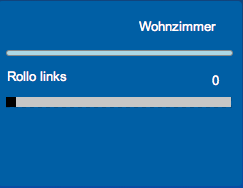
    515_bildschirmfoto_2015-08-04_um_07.36.22.png

    P.S.: Auch wenn man es auf den Bilder aussieht, als würde das Menü nach unten aufgehen, so würde ich es doch tatsächlich nach oben aufgehen lassen wollen.

    Hat jemand eine Idee, wie man so etwas realisieren könnte?

    Grüße

    Dominic

    1 Reply Last reply
    0
    • ruhr70R Offline
      ruhr70R Offline
      ruhr70
      wrote on last edited by
      #2

      wenn Du keine Animation benötigst, ein View darüber legen.

      Die Sichtbarkeit mit dem Button steuern und mit einem 2. Button im View

      Gesendet von iPhone mit Tapatalk

      Adapter: Fritzbox, Unify Circuit
      Skripte: dynamic hue, Bluetooth Scan, Multi-Ereignisliste

      1 Reply Last reply
      0
      • C Offline
        C Offline
        Communicate
        wrote on last edited by
        #3

        Danke, das klingt schonmal gut - aber animiert ist natürlich noch schicker - das ist eine gute Idee von Dir. Hast du da auch noch einen Tipp für mich?

        1 Reply Last reply
        0
        • ruhr70R Offline
          ruhr70R Offline
          ruhr70
          wrote on last edited by
          #4

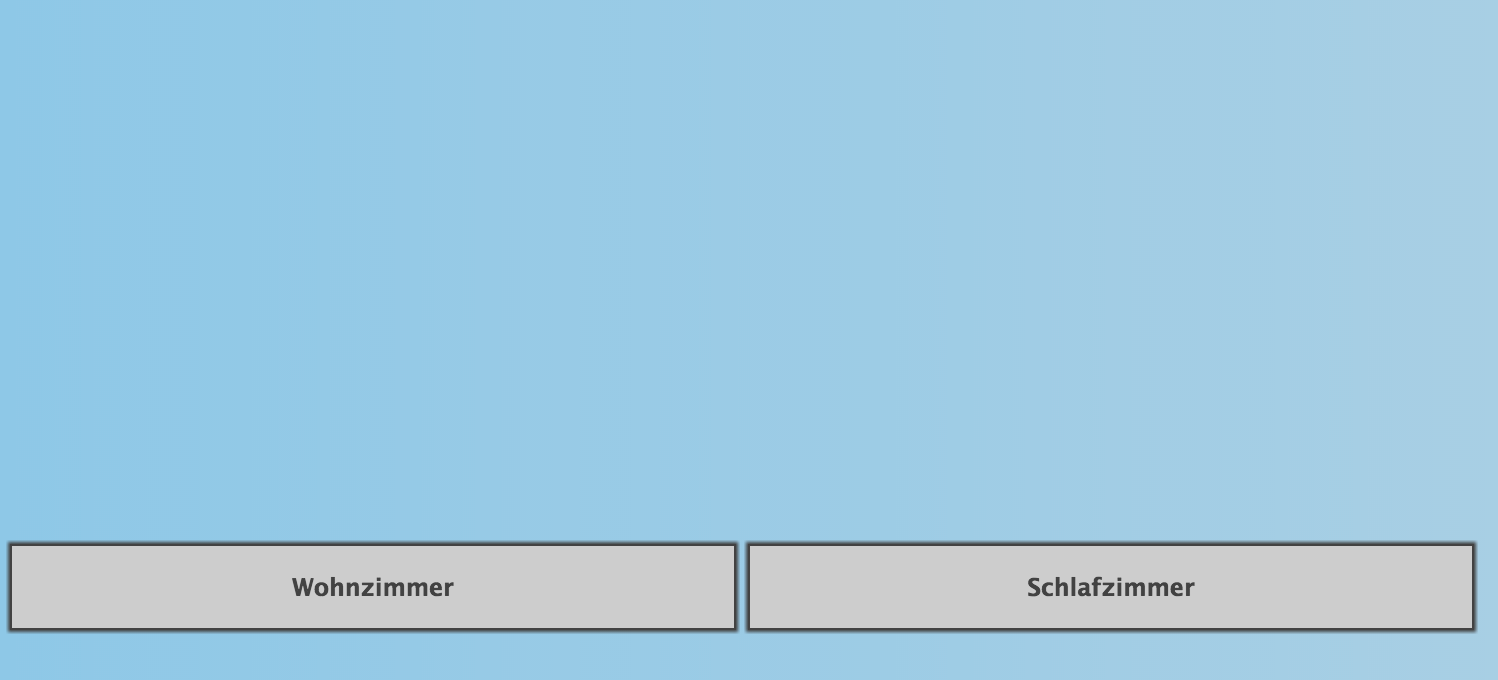
          327_buttons_geschlossen.png

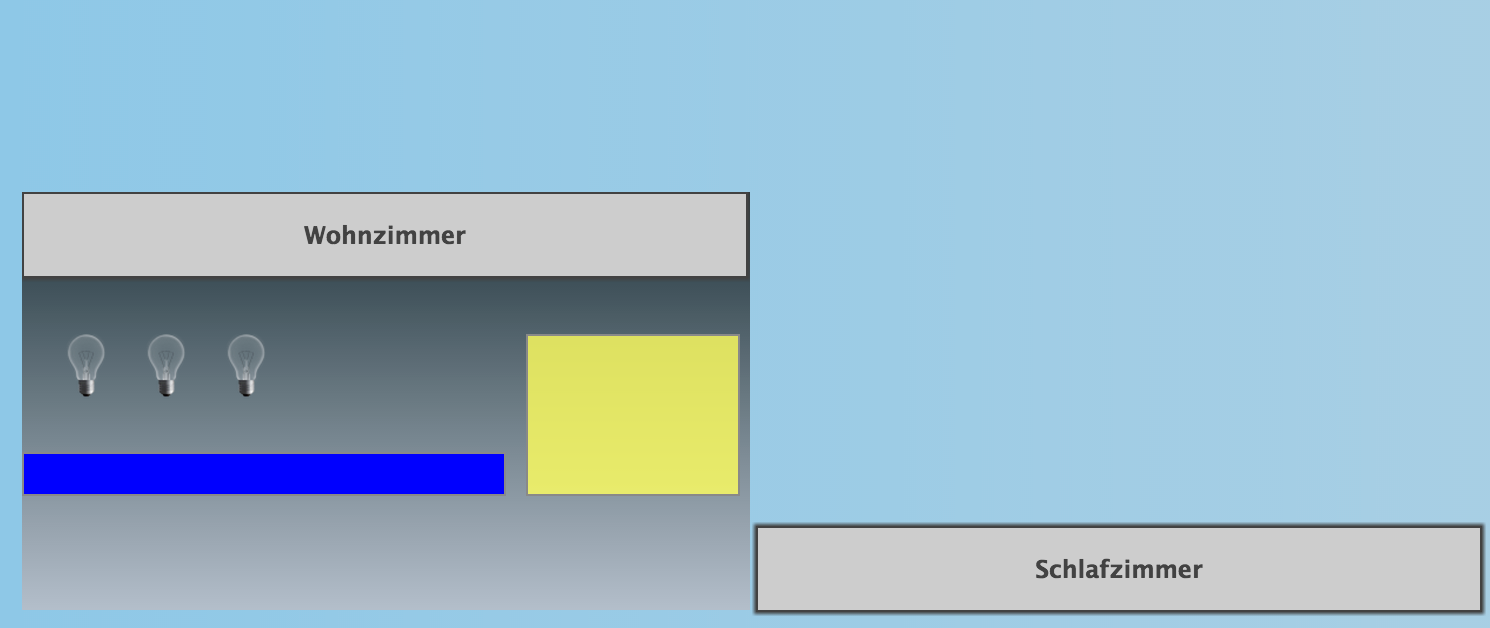
          327_button_wohzimmer_nach_oben_ge_ffnet.png

          Ein Javascript, dass nur eine Variable anlegt:

          createState('test.test6', 0);
          

          Testview mit dem Button (Viewname: Test6)

          {
            "settings": {
              "style": {
                "background_class": "hq-background-radial-blue",
                "background": ""
              },
              "theme": "redmond",
              "sizex": "",
              "sizey": "",
              "hideDescription": false,
              "gridSize": ""
            },
            "widgets": {
              "e00001": {
                "tpl": "tplBasicState",
                "data": {
                  "oid": "javascript.0.test.test6",
                  "visibility-cond": "==",
                  "visibility-val": "0",
                  "value": "1",
                  "html": "
          Wohnzimmer",
                  "visibility-oid": "javascript.0.test.test6",
                  "name": "",
                  "comment": ""
                },
                "style": {
                  "left": "17px",
                  "top": "296px",
                  "background": "rgb(204, 204, 204) none repeat scroll 0% 0% / auto padding-box border-box",
                  "width": "361px",
                  "height": "41px",
                  "z-index": "10",
                  "color": "rgb(68, 68, 68)",
                  "text-align": "center",
                  "text-shadow": "none",
                  "font-family": "'Lucida Grande', 'Lucida Sans', Arial, sans-serif",
                  "font-style": "normal",
                  "font-variant": "normal",
                  "font-weight": "bold",
                  "font-size": "12px",
                  "line-height": "14px",
                  "letter-spacing": "0",
                  "word-spacing": "0px",
                  "background-position": "0% 0%",
                  "background-size": "auto",
                  "background-clip": "",
                  "background-origin": "",
                  "padding": "",
                  "box-shadow": "0px 0px 1px 1px",
                  "border-style": "solid",
                  "border-radius": "",
                  "border-width": "1px"
                },
                "widgetSet": "basic"
              },
              "e00002": {
                "tpl": "tplContainerView",
                "data": {
                  "visibility-cond": "==",
                  "visibility-val": 1,
                  "contains_view": "Test5",
                  "visibility-oid": "javascript.0.test.test6"
                },
                "style": {
                  "left": "19px",
                  "top": "129px",
                  "width": "364px",
                  "height": "209px"
                },
                "widgetSet": "basic"
              },
              "e00003": {
                "tpl": "tplBasicState",
                "data": {
                  "oid": "",
                  "visibility-cond": "==",
                  "visibility-val": "0",
                  "value": "1",
                  "html": "
          Schlafzimmer",
                  "visibility-oid": "",
                  "name": "",
                  "comment": ""
                },
                "style": {
                  "left": "386px",
                  "top": "296px",
                  "background": "rgb(204, 204, 204) none repeat scroll 0% 0% / auto padding-box border-box",
                  "width": "361px",
                  "height": "41px",
                  "z-index": "10",
                  "color": "rgb(68, 68, 68)",
                  "text-align": "center",
                  "text-shadow": "none",
                  "font-family": "'Lucida Grande', 'Lucida Sans', Arial, sans-serif",
                  "font-style": "normal",
                  "font-variant": "normal",
                  "font-weight": "bold",
                  "font-size": "12px",
                  "line-height": "14px",
                  "letter-spacing": "0",
                  "word-spacing": "0px",
                  "background-position": "0% 0%",
                  "background-size": "auto",
                  "background-clip": "",
                  "background-origin": "",
                  "padding": "",
                  "box-shadow": "0px 0px 1px 1px",
                  "border-style": "solid",
                  "border-radius": "",
                  "border-width": "1px"
                },
                "widgetSet": "basic"
              }
            },
            "name": "Test6",
            "rerender": false,
            "filterList": []
          }
          

          View mit dem Inhalt, wenn der Button sich nach oben öffnet (Viewname: Test 5):

          {
            "settings": {
              "style": {
                "background_class": "hq-background-h-gradient-black-3",
                "background": ""
              },
              "theme": "redmond",
              "sizex": "",
              "sizey": "",
              "hideDescription": false,
              "gridSize": "10",
              "snapType": "2"
            },
            "widgets": {
              "e00001": {
                "tpl": "tplBasicState",
                "data": {
                  "oid": "javascript.0.test.test6",
                  "visibility-cond": "==",
                  "visibility-val": "1",
                  "value": "0",
                  "html": "
          Wohnzimmer",
                  "visibility-oid": "javascript.0.test.test6",
                  "name": "",
                  "comment": ""
                },
                "style": {
                  "left": "0",
                  "top": "0",
                  "background": "rgb(204, 204, 204) none repeat scroll 0% 0% / auto padding-box border-box",
                  "width": "361px",
                  "height": "41px",
                  "z-index": "10",
                  "color": "rgb(68, 68, 68)",
                  "text-align": "center",
                  "text-shadow": "none",
                  "font-family": "'Lucida Grande', 'Lucida Sans', Arial, sans-serif",
                  "font-style": "normal",
                  "font-variant": "normal",
                  "font-weight": "bold",
                  "font-size": "12px",
                  "line-height": "14px",
                  "letter-spacing": "0",
                  "word-spacing": "0px",
                  "background-position": "0% 0%",
                  "background-size": "auto",
                  "background-clip": "",
                  "background-origin": "",
                  "padding": "",
                  "box-shadow": "0px 0px 1px 1px",
                  "border-style": "solid",
                  "border-radius": "",
                  "border-width": "1px"
                },
                "widgetSet": "basic"
              },
              "e00002": {
                "tpl": "tplBulbOnOffCtrl",
                "data": {
                  "oid": "nothing_selected",
                  "visibility-cond": "==",
                  "visibility-val": 1
                },
                "style": {
                  "left": "10px",
                  "top": "60px"
                },
                "widgetSet": "basic"
              },
              "e00003": {
                "tpl": "tplBulbOnOffCtrl",
                "data": {
                  "oid": "nothing_selected",
                  "visibility-cond": "==",
                  "visibility-val": 1
                },
                "style": {
                  "left": "50px",
                  "top": "60px"
                },
                "widgetSet": "basic"
              },
              "e00004": {
                "tpl": "tplBulbOnOffCtrl",
                "data": {
                  "oid": "nothing_selected",
                  "visibility-cond": "==",
                  "visibility-val": 1
                },
                "style": {
                  "left": "90px",
                  "top": "60px"
                },
                "widgetSet": "basic"
              },
              "e00005": {
                "tpl": "tplValueFloatBar",
                "data": {
                  "oid": "nothing_selected",
                  "visibility-cond": "==",
                  "visibility-val": 1,
                  "factor": "1",
                  "color": "blue"
                },
                "style": {
                  "left": "0px",
                  "top": "130px"
                },
                "widgetSet": "basic"
              },
              "e00006": {
                "tpl": "tplNote",
                "data": {
                  "oid": "nothing_selected",
                  "visibility-cond": "==",
                  "visibility-val": 1,
                  "max_width": "300"
                },
                "style": {
                  "left": "252px",
                  "top": "71px",
                  "width": "105px",
                  "height": "79px"
                },
                "widgetSet": "basic"
              }
            },
            "name": "Test5",
            "rerender": false,
            "filterList": []
          }
          

          Adapter: Fritzbox, Unify Circuit
          Skripte: dynamic hue, Bluetooth Scan, Multi-Ereignisliste

          1 Reply Last reply
          0
          • C Offline
            C Offline
            Communicate
            wrote on last edited by
            #5

            Hallo ruhr70,

            vielen lieben Dank, dass hilft mir sehr!

            Gruss, Dominic

            1 Reply Last reply
            0
            • ruhr70R Offline
              ruhr70R Offline
              ruhr70
              wrote on last edited by
              #6

              Wenn Du fertig bist, poste mal bitte einen Screenshot.

              Ich finde die Idee ganz interessant.

              Adapter: Fritzbox, Unify Circuit
              Skripte: dynamic hue, Bluetooth Scan, Multi-Ereignisliste

              1 Reply Last reply
              0
              Reply
              • Reply as topic
              Log in to reply
              • Oldest to Newest
              • Newest to Oldest
              • Most Votes


              Support us

              ioBroker
              Community Adapters
              Donate

              290

              Online

              32.7k

              Users

              82.3k

              Topics

              1.3m

              Posts
              Community
              Impressum | Datenschutz-Bestimmungen | Nutzungsbedingungen | Einwilligungseinstellungen
              ioBroker Community 2014-2025
              logo
              • Login

              • Don't have an account? Register

              • Login or register to search.
              • First post
                Last post
              0
              • Home
              • Recent
              • Tags
              • Unread 0
              • Categories
              • Unreplied
              • Popular
              • GitHub
              • Docu
              • Hilfe