




Upgrade-Check pve8to9 --full
-
Was sagen mir diese Warnungen
INFO: Check for dkms modules...
WARN: dkms modules found, this might cause issues during upgrade.
Soll man das DEINSTALLIEREN ("modules found") vor dem Upgrade? Es geht wohl eher um Kernel - Module, die vom DKMS installiert wurden...
... sowie ....
INFO: Checking if matching CPU microcode package is installed.
WARN: The matching CPU microcode package 'intel-microcode' could not be found! Consider installing it to receive the latest security and bug fixes for your CPU.
        Ensure you enable the 'non-free-firmware' component in the apt sources and run:
        apt install intel-microcode
Für Letzteres müsste ich mir wohl erstmal das passende Repository einbinden...
Auf der anderen Seite ist meine N3000 CPU schon so lahm genug, Wenn dann noch Microcode-Patches gegen Spectre und Konsorten die CPU ausbremsen ...
-
Schritt eins ist
erledigtim Werden ... PVE ist upgedated auf 9.1.5aber ... (man achte auf das Datum)
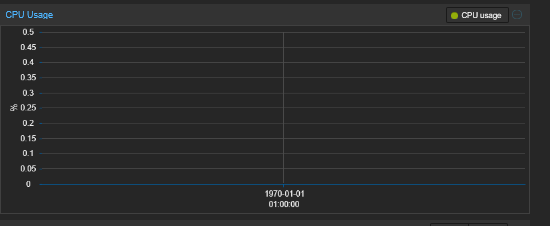
In der Konsole ist das Datum korrekt ...
root@pve:~# date
Sun Feb  8 06:56:38 PM CET 2026
root@pve:~#
Edit - einmal von "Woche" auf "Tag" im Zeitraum-Selektor umschalten, und das Datum passt ...
-
Doch noch Ärger ...
Hatte eigentlich die "no-subscription" sourcen eingetrage, warum es jetzt auf einmal wieder die enterprise sind ...
root@pve:~# apt update
Hit:1 http://security.debian.org trixie-security InRelease
Hit:2 http://ftp.de.debian.org/debian trixie InRelease
Hit:3 http://ftp.de.debian.org/debian trixie-updates InRelease
Hit:4 http://download.proxmox.com/debian/pve trixie InRelease
Err:5 https://enterprise.proxmox.com/debian/pve trixie InRelease
  401  Unauthorized [IP: 185.219.221.167 443]
Hit:6 https://packages.cloud.google.com/apt coral-edgetpu-stable InRelease
Error: Failed to fetch https://enterprise.proxmox.com/debian/pve/dists/trixie/InRelease  401  Unauthorized [IP: 185.219.221.167 443]
Error: The repository 'https://enterprise.proxmox.com/debian/pve trixie InRelease' is not signed.
Notice: Updating from such a repository can't be done securely, and is therefore disabled by default.
Notice: See apt-secure(8) manpage for repository creation and user configuration details.
root@pve:~# Debian GNU/Linux comes with ABSOLUTELY NO WARRANTY, to the extent
permitted by applicable law.
Last login: Sun Feb  8 18:08:32 2026 from 192.168.2.53
Intel(R) Celeron(R) CPU N3000 @1.04GHz 8G RAM 480G SSD * Virtualization : unprivileged lxc container on Proxmox * 6 GByte RAM für den iobroker Container * Remote-Access über Wireguard meiner Fritzbox
-
Der LXC Container mit iobroker ist bisher nicht auf Trixie.
Vor dem PVE Upgrade gestoppt.
Nach dem Upgrade und Neustart des PVE ist der LXC wieder gestartet.Heute Morgen ist ein CRON Zeitplan in einem Blockly nicht ausgeführt worden.
Habe erstmal das entsprechende Script neu gestartet.
-
Doch noch Ärger ...
Hatte eigentlich die "no-subscription" sourcen eingetrage, warum es jetzt auf einmal wieder die enterprise sind ...
root@pve:~# apt update Hit:1 http://security.debian.org trixie-security InRelease Hit:2 http://ftp.de.debian.org/debian trixie InRelease Hit:3 http://ftp.de.debian.org/debian trixie-updates InRelease Hit:4 http://download.proxmox.com/debian/pve trixie InRelease Err:5 https://enterprise.proxmox.com/debian/pve trixie InRelease 401 Unauthorized [IP: 185.219.221.167 443] Hit:6 https://packages.cloud.google.com/apt coral-edgetpu-stable InRelease Error: Failed to fetch https://enterprise.proxmox.com/debian/pve/dists/trixie/InRelease 401 Unauthorized [IP: 185.219.221.167 443] Error: The repository 'https://enterprise.proxmox.com/debian/pve trixie InRelease' is not signed. Notice: Updating from such a repository can't be done securely, and is therefore disabled by default. Notice: See apt-secure(8) manpage for repository creation and user configuration details. root@pve:~# Debian GNU/Linux comes with ABSOLUTELY NO WARRANTY, to the extent permitted by applicable law. Last login: Sun Feb 8 18:08:32 2026 from 192.168.2.53@MartinP sagte in Upgrade-Check pve8to9 --full:
Hatte eigentlich die "no-subscription" sourcen eingetrage, warum es jetzt auf einmal wieder die enterprise sind
Hast du 'pve-enterprise' deaktiviert?


Hey! Du scheinst an dieser Unterhaltung interessiert zu sein, hast aber noch kein Konto.
Hast du es satt, bei jedem Besuch durch die gleichen Beiträge zu scrollen? Wenn du dich für ein Konto anmeldest, kommst du immer genau dorthin zurück, wo du zuvor warst, und kannst dich über neue Antworten benachrichtigen lassen (entweder per E-Mail oder Push-Benachrichtigung). Du kannst auch Lesezeichen speichern und Beiträge positiv bewerten, um anderen Community-Mitgliedern deine Wertschätzung zu zeigen.
Mit deinem Input könnte dieser Beitrag noch besser werden 💗
Registrieren AnmeldenSupport us
450
Online33.0k
Benutzer83.6k
Themen1.3m
Beiträge