



Leider wieder Fehler beim sudo apt update && sudo apt.....
-
Hallo @thomas-braun hallo iob Freunde,
bei meinem Wöchentlichen Update hat mich wieder eine Warnung ereilt mit der ich nichts anfangen kann. Ausserdem wurde mir vom System Empfohlen ein Auto remove zu machen.
Hier einmal die Ausgaben als Bild und darunter als Text:
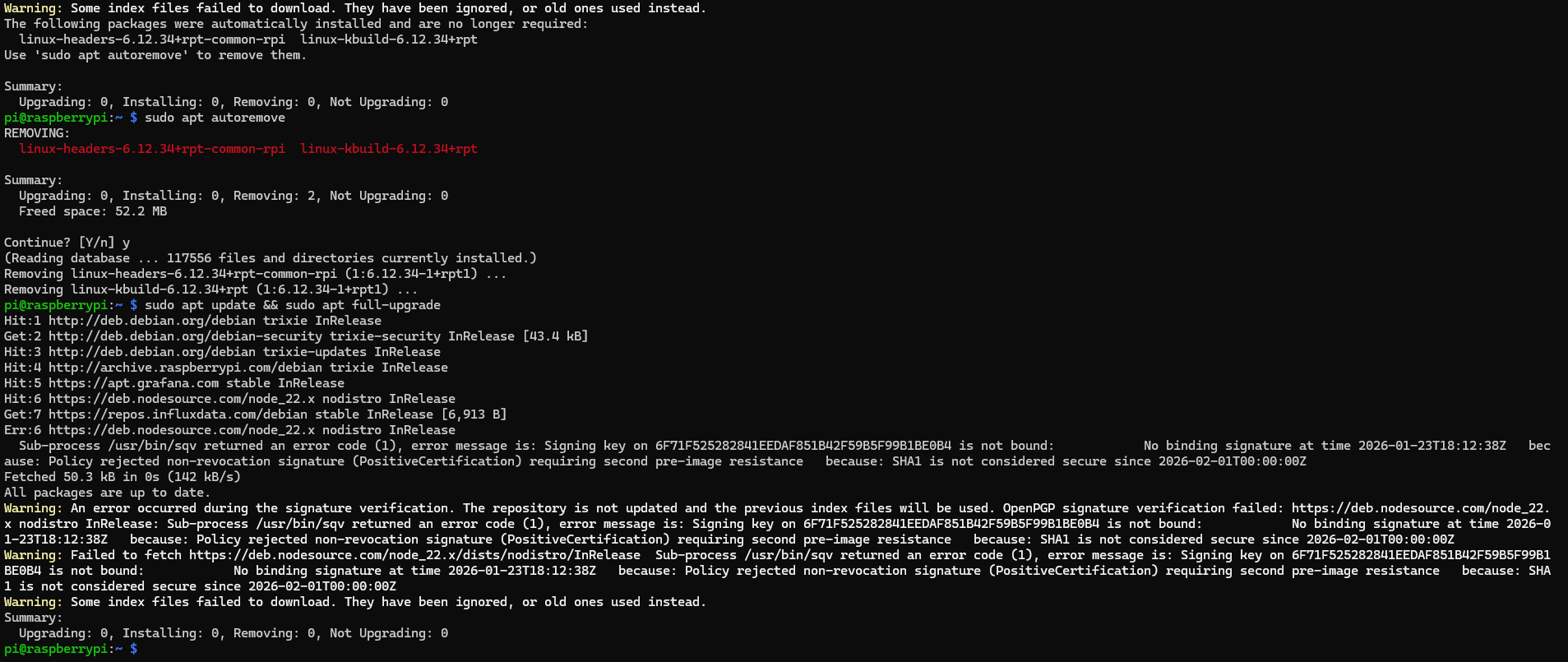
Warning: Some index files failed to download. They have been ignored, or old ones used instead.
The following packages were automatically installed and are no longer required:
  linux-headers-6.12.34+rpt-common-rpi  linux-kbuild-6.12.34+rpt
Use 'sudo apt autoremove' to remove them.

Summary:
  Upgrading: 0, Installing: 0, Removing: 0, Not Upgrading: 0
pi@raspberrypi:~ $ sudo apt autoremove
REMOVING:
  linux-headers-6.12.34+rpt-common-rpi  linux-kbuild-6.12.34+rpt

Summary:
  Upgrading: 0, Installing: 0, Removing: 2, Not Upgrading: 0
  Freed space: 52.2 MB

Continue? [Y/n] y
(Reading database ... 117556 files and directories currently installed.)
Removing linux-headers-6.12.34+rpt-common-rpi (1:6.12.34-1+rpt1) ...
Removing linux-kbuild-6.12.34+rpt (1:6.12.34-1+rpt1) ...
pi@raspberrypi:~ $ sudo apt update && sudo apt full-upgrade
Hit:1 http://deb.debian.org/debian trixie InRelease
Get:2 http://deb.debian.org/debian-security trixie-security InRelease [43.4 kB]
Hit:3 http://deb.debian.org/debian trixie-updates InRelease
Hit:4 http://archive.raspberrypi.com/debian trixie InRelease
Hit:5 https://apt.grafana.com stable InRelease
Hit:6 https://deb.nodesource.com/node_22.x nodistro InRelease
Get:7 https://repos.influxdata.com/debian stable InRelease [6,913 B]
Err:6 https://deb.nodesource.com/node_22.x nodistro InRelease
  Sub-process /usr/bin/sqv returned an error code (1), error message is: Signing key on 6F71F525282841EEDAF851B42F59B5F99B1BE0B4 is not bound:            No binding signature at time 2026-01-23T18:12:38Z   because: Policy rejected non-revocation signature (PositiveCertification) requiring second pre-image resistance   because: SHA1 is not considered secure since 2026-02-01T00:00:00Z
Fetched 50.3 kB in 0s (142 kB/s)
All packages are up to date.
Warning: An error occurred during the signature verification. The repository is not updated and the previous index files will be used. OpenPGP signature verification failed: https://deb.nodesource.com/node_22.x nodistro InRelease: Sub-process /usr/bin/sqv returned an error code (1), error message is: Signing key on 6F71F525282841EEDAF851B42F59B5F99B1BE0B4 is not bound:            No binding signature at time 2026-01-23T18:12:38Z   because: Policy rejected non-revocation signature (PositiveCertification) requiring second pre-image resistance   because: SHA1 is not considered secure since 2026-02-01T00:00:00Z
Warning: Failed to fetch https://deb.nodesource.com/node_22.x/dists/nodistro/InRelease  Sub-process /usr/bin/sqv returned an error code (1), error message is: Signing key on 6F71F525282841EEDAF851B42F59B5F99B1BE0B4 is not bound:            No binding signature at time 2026-01-23T18:12:38Z   because: Policy rejected non-revocation signature (PositiveCertification) requiring second pre-image resistance   because: SHA1 is not considered secure since 2026-02-01T00:00:00Z
Warning: Some index files failed to download. They have been ignored, or old ones used instead.
Summary:
  Upgrading: 0, Installing: 0, Removing: 0, Not Upgrading: 0
pi@raspberrypi:~ $
Kann mir bitte jemand sagen was ich nun tun muss?
LG Duffy
Nix besonderes; iob auf Respberry pi 4 (8GB) mit 32 GB SSD
Node.js: v22.23.1
NPM: 10.9.4
js-controller 7.1.2
Linux: Trixie -
Hallo @thomas-braun hallo iob Freunde,
bei meinem Wöchentlichen Update hat mich wieder eine Warnung ereilt mit der ich nichts anfangen kann. Ausserdem wurde mir vom System Empfohlen ein Auto remove zu machen.
Hier einmal die Ausgaben als Bild und darunter als Text:
Warning: Some index files failed to download. They have been ignored, or old ones used instead.
The following packages were automatically installed and are no longer required:
  linux-headers-6.12.34+rpt-common-rpi  linux-kbuild-6.12.34+rpt
Use 'sudo apt autoremove' to remove them.

Summary:
  Upgrading: 0, Installing: 0, Removing: 0, Not Upgrading: 0
pi@raspberrypi:~ $ sudo apt autoremove
REMOVING:
  linux-headers-6.12.34+rpt-common-rpi  linux-kbuild-6.12.34+rpt

Summary:
  Upgrading: 0, Installing: 0, Removing: 2, Not Upgrading: 0
  Freed space: 52.2 MB

Continue? [Y/n] y
(Reading database ... 117556 files and directories currently installed.)
Removing linux-headers-6.12.34+rpt-common-rpi (1:6.12.34-1+rpt1) ...
Removing linux-kbuild-6.12.34+rpt (1:6.12.34-1+rpt1) ...
pi@raspberrypi:~ $ sudo apt update && sudo apt full-upgrade
Hit:1 http://deb.debian.org/debian trixie InRelease
Get:2 http://deb.debian.org/debian-security trixie-security InRelease [43.4 kB]
Hit:3 http://deb.debian.org/debian trixie-updates InRelease
Hit:4 http://archive.raspberrypi.com/debian trixie InRelease
Hit:5 https://apt.grafana.com stable InRelease
Hit:6 https://deb.nodesource.com/node_22.x nodistro InRelease
Get:7 https://repos.influxdata.com/debian stable InRelease [6,913 B]
Err:6 https://deb.nodesource.com/node_22.x nodistro InRelease
  Sub-process /usr/bin/sqv returned an error code (1), error message is: Signing key on 6F71F525282841EEDAF851B42F59B5F99B1BE0B4 is not bound:            No binding signature at time 2026-01-23T18:12:38Z   because: Policy rejected non-revocation signature (PositiveCertification) requiring second pre-image resistance   because: SHA1 is not considered secure since 2026-02-01T00:00:00Z
Fetched 50.3 kB in 0s (142 kB/s)
All packages are up to date.
Warning: An error occurred during the signature verification. The repository is not updated and the previous index files will be used. OpenPGP signature verification failed: https://deb.nodesource.com/node_22.x nodistro InRelease: Sub-process /usr/bin/sqv returned an error code (1), error message is: Signing key on 6F71F525282841EEDAF851B42F59B5F99B1BE0B4 is not bound:            No binding signature at time 2026-01-23T18:12:38Z   because: Policy rejected non-revocation signature (PositiveCertification) requiring second pre-image resistance   because: SHA1 is not considered secure since 2026-02-01T00:00:00Z
Warning: Failed to fetch https://deb.nodesource.com/node_22.x/dists/nodistro/InRelease  Sub-process /usr/bin/sqv returned an error code (1), error message is: Signing key on 6F71F525282841EEDAF851B42F59B5F99B1BE0B4 is not bound:            No binding signature at time 2026-01-23T18:12:38Z   because: Policy rejected non-revocation signature (PositiveCertification) requiring second pre-image resistance   because: SHA1 is not considered secure since 2026-02-01T00:00:00Z
Warning: Some index files failed to download. They have been ignored, or old ones used instead.
Summary:
  Upgrading: 0, Installing: 0, Removing: 0, Not Upgrading: 0
pi@raspberrypi:~ $
Kann mir bitte jemand sagen was ich nun tun muss?
LG Duffy
@Duffy kein Fehler
https://forum.iobroker.net/post/1324258 -
OK, danke.
Heisst das für mich das die Warnungen jetzt immer kommen?
War es ein Fehler mit "sudo apt autoremove"
linux-headers-6.12.34+rpt-common-rpi linux-kbuild-6.12.34+rptzu deinstallieren?
Ich vertraue den Anwesiungenvon Linux mehr als meinen nicht vorhanden Kenntnissen :-(
Gruß Duffy
Nix besonderes; iob auf Respberry pi 4 (8GB) mit 32 GB SSD
Node.js: v22.23.1
NPM: 10.9.4
js-controller 7.1.2
Linux: Trixie -
OK, danke.
Heisst das für mich das die Warnungen jetzt immer kommen?
War es ein Fehler mit "sudo apt autoremove"
linux-headers-6.12.34+rpt-common-rpi linux-kbuild-6.12.34+rptzu deinstallieren?
Ich vertraue den Anwesiungenvon Linux mehr als meinen nicht vorhanden Kenntnissen :-(
Gruß Duffy
@Duffy sagte in Leider wieder Fehler beim sudo apt update && sudo apt.....:
Heisst das für mich das die Warnungen jetzt immer kommen?
nein!
nicht wenn du tust, was im verlinkten Thread steht
ich mach hier mal zu!
-
 H Homoran sperrte dieses Thema am

Hey! Du scheinst an dieser Unterhaltung interessiert zu sein, hast aber noch kein Konto.
Hast du es satt, bei jedem Besuch durch die gleichen Beiträge zu scrollen? Wenn du dich für ein Konto anmeldest, kommst du immer genau dorthin zurück, wo du zuvor warst, und kannst dich über neue Antworten benachrichtigen lassen (entweder per E-Mail oder Push-Benachrichtigung). Du kannst auch Lesezeichen speichern und Beiträge positiv bewerten, um anderen Community-Mitgliedern deine Wertschätzung zu zeigen.
Mit deinem Input könnte dieser Beitrag noch besser werden 💗
Registrieren AnmeldenSupport us
415
Online33.0k
Benutzer83.5k
Themen1.3m
Beiträge