




Tasmota H801 Matter Controller Bridge
-
Hallo, ich habe ein kleines Problem.
Ich habe eine H801 Controller mit Tasmota geflasht.
Alles soweit in Ordnung.
Nun habe ich Ihn mit dem Matter Adapter für Alexa in die Bridge genommen.
Wird komplett als Hue auch erkannt und in Alexa aktiviert.
Farben gehen.
Nun das Problem
Ein/Aus geht nicht richtig.
Wenn der Controller aus ist, dann kann ich Ihn mit Alexa Einschalten.
Nur Ausschalten geht nicht. :-(In den Objekten kann ich Ihn mit Power an und aus machen manuell.
Also muss das irgendwo an derÜbrtragung vom Matter Adapter schief laufen.
In der Alexa App, das selbe Problem. An geht es, aber AUS nicht mehr.Jemand eine Idee?
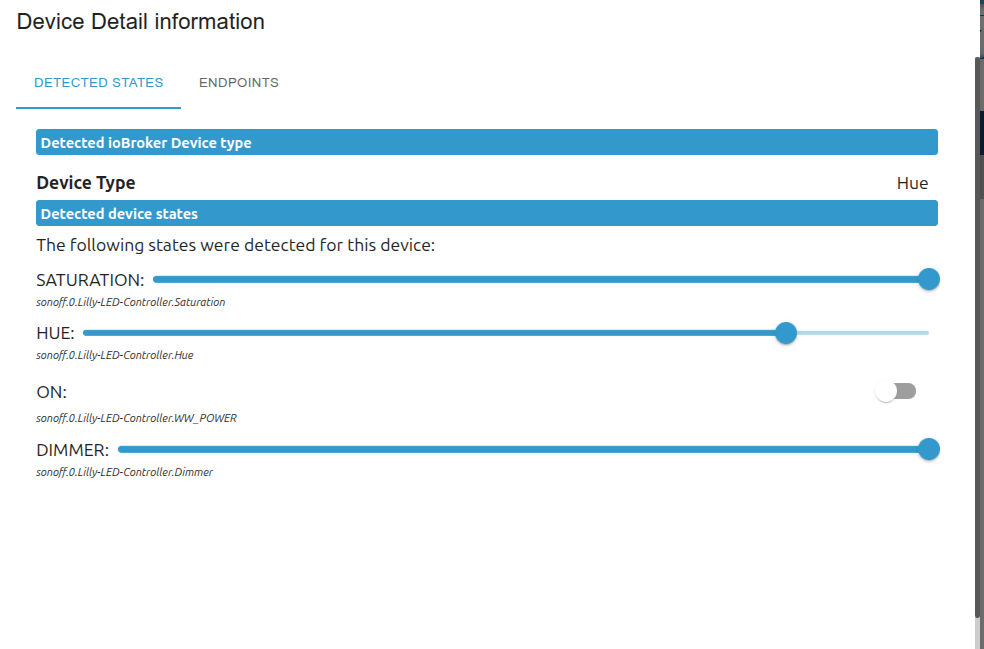
Auch im Matter Adapter hier On, geht nur AN nicht mehr aus. Vielleicht hier noch ein Problem.
 Endpoint 97 (ExtendedColorLight / 76753878-25de-4e5f-86e5-84b867551b50):
    Cluster-Servers:
      Cluster-Server "identify" (0x3)
        Global-Attributes:
          "clusterRevision" (0xfffd): value = 5
          "featureMap" (0xfffc): value = {}
          "attributeList" (0xfffb): value = [ 0, 1, 65533, 65532, 65531, 65529, 65528 ]
          "acceptedCommandList" (0xfff9): value = [ 0, 64 ]
          "generatedCommandList" (0xfff8): value = []
        Attributes:
          "identifyTime" (0x0): value = 0
          "identifyType" (0x1): value = 1
        Commands:
          "identify" (0x0)
          "triggerEffect" (0x40)
        Events:

      Cluster-Server "groups" (0x4) (Features: groupNames)
        Global-Attributes:
          "clusterRevision" (0xfffd): value = 4
          "featureMap" (0xfffc): value = { groupNames: true }
          "attributeList" (0xfffb): value = [ 0, 65533, 65532, 65531, 65529, 65528 ]
          "acceptedCommandList" (0xfff9): value = [ 0, 1, 2, 3, 4, 5 ]
          "generatedCommandList" (0xfff8): value = [ 0, 1, 2, 3 ]
        Attributes:
          "nameSupport" (0x0): value = { nameSupport: false, groupNames: true }
        Commands:
          "addGroup" (0x0/0x0)
          "viewGroup" (0x1/0x1)
          "getGroupMembership" (0x2/0x2)
          "removeGroup" (0x3/0x3)
          "removeAllGroups" (0x4)
          "addGroupIfIdentifying" (0x5)
        Events:

      Cluster-Server "onOff" (0x6) (Features: lighting)
        Global-Attributes:
          "clusterRevision" (0xfffd): value = 6
          "featureMap" (0xfffc): value = { lighting: true, deadFrontBehavior: false, offOnly: false }
          "attributeList" (0xfffb): value = [ 0, 65533, 65532, 65531, 65529, 65528, 16384, 16385, 16386, 16387 ]
          "acceptedCommandList" (0xfff9): value = [ 0, 64, 65, 66, 1, 2 ]
          "generatedCommandList" (0xfff8): value = []
        Attributes:
          "onOff" (0x0): value = false
          "globalSceneControl" (0x4000): value = true
          "onTime" (0x4001): value = 0
          "offWaitTime" (0x4002): value = 0
          "startUpOnOff" (0x4003): value = null
        Commands:
          "off" (0x0)
          "offWithEffect" (0x40)
          "onWithRecallGlobalScene" (0x41)
          "onWithTimedOff" (0x42)
          "on" (0x1)
          "toggle" (0x2)
        Events:

      Cluster-Server "levelControl" (0x8) (Features: onOff, lighting)
        Global-Attributes:
          "clusterRevision" (0xfffd): value = 6
          "featureMap" (0xfffc): value = { onOff: true, lighting: true, frequency: false }
          "attributeList" (0xfffb): value = [ 0, 15, 17, 65533, 65532, 65531, 65529, 65528, 1, 16384 ]
          "acceptedCommandList" (0xfff9): value = [ 0, 1, 2, 3, 4, 5, 6, 7 ]
          "generatedCommandList" (0xfff8): value = []
        Attributes:
          "currentLevel" (0x0): value = 254
          "options" (0xf): value = { executeIfOff: false, coupleColorTempToLevel: false }
          "onLevel" (0x11): value = null
          "remainingTime" (0x1): value = 0
          "startUpCurrentLevel" (0x4000): value = null
        Commands:
          "moveToLevel" (0x0)
          "move" (0x1)
          "step" (0x2)
          "stop" (0x3)
          "moveToLevelWithOnOff" (0x4)
          "moveWithOnOff" (0x5)
          "stepWithOnOff" (0x6)
          "stopWithOnOff" (0x7)
        Events:

      Cluster-Server "colorControl" (0x300) (Features: hueSaturation, xy, colorTemperature)
        Global-Attributes:
          "clusterRevision" (0xfffd): value = 7
          "featureMap" (0xfffc): value = { hueSaturation: true, enhancedHue: false, colorLoop: false, xy: true, colorTemperature: true }
          "attributeList" (0xfffb): value = [ 2, 8, 15, 16, 16385, 16394, 65533, 65532, 65531, 65529, 65528, 0, 1, 3, 4, 7, 16395, 16396, 16397, 16400 ]
          "acceptedCommandList" (0xfff9): value = [ 0, 1, 2, 3, 4, 5, 6, 7, 8, 9, 10, 75, 76, 71 ]
          "generatedCommandList" (0xfff8): value = []
        Attributes:
          "remainingTime" (0x2): value = 0
          "colorMode" (0x8): value = 0
          "options" (0xf): value = { executeIfOff: false }
          "numberOfPrimaries" (0x10): value = null
          "enhancedColorMode" (0x4001): value = 0
          "colorCapabilities" (0x400a): value = { hueSaturation: true, enhancedHue: false, colorLoop: false, xy: true, colorTemperature: true }
          "currentHue" (0x0): value = 211
          "currentSaturation" (0x1): value = 114
          "currentX" (0x3): value = 24939
          "currentY" (0x4): value = 24701
          "colorTemperatureMireds" (0x7): value = 500
          "colorTempPhysicalMinMireds" (0x400b): value = 153
          "colorTempPhysicalMaxMireds" (0x400c): value = 500
          "coupleColorTempToLevelMinMireds" (0x400d): value = 153
          "startUpColorTemperatureMireds" (0x4010): value = null
        Commands:
          "moveToHue" (0x0)
          "moveHue" (0x1)
          "stepHue" (0x2)
          "moveToSaturation" (0x3)
          "moveSaturation" (0x4)
          "stepSaturation" (0x5)
          "moveToHueAndSaturation" (0x6)
          "moveToColor" (0x7)
          "moveColor" (0x8)
          "stepColor" (0x9)
          "moveToColorTemperature" (0xa)
          "moveColorTemperature" (0x4b)
          "stepColorTemperature" (0x4c)
          "stopMoveStep" (0x47)
        Events:

      Cluster-Server "bridgedDeviceBasicInformation" (0x39)
        Global-Attributes:
          "clusterRevision" (0xfffd): value = 4
          "featureMap" (0xfffc): value = { bridgedIcdSupport: false }
          "attributeList" (0xfffb): value = [ 3, 5, 14, 15, 17, 18, 65533, 65532, 65531, 65529, 65528 ]
          "acceptedCommandList" (0xfff9): value = []
          "generatedCommandList" (0xfff8): value = []
        Attributes:
          "productName" (0x3): value = "baum"
          "nodeLabel" (0x5): value = "baum"
          "productLabel" (0xe): value = "baum"
          "serialNumber" (0xf): value = "7675387825de4e5f86e584b867551b50"
          "reachable" (0x11): value = true
          "uniqueId" (0x12): value = "e9ccdf69eac84ebe7516d30e834dea87"
        Commands:

        Events:
          "reachableChanged" (0x3)
      Cluster-Server "descriptor" (0x1d)
        Global-Attributes:
          "clusterRevision" (0xfffd): value = 2
          "featureMap" (0xfffc): value = { tagList: false }
          "attributeList" (0xfffb): value = [ 0, 1, 2, 3, 65533, 65532, 65531, 65529, 65528 ]
          "acceptedCommandList" (0xfff9): value = []
          "generatedCommandList" (0xfff8): value = []
        Attributes:
          "deviceTypeList" (0x0): value = [ { deviceType: 269, revision: 4 }, { deviceType: 19, revision: 3 } ]
          "serverList" (0x1): value = [ 3, 4, 6, 8, 768, 57, 29 ]
          "clientList" (0x2): value = []
          "partsList" (0x3): value = []
        Commands:

        Events:

    Child-Endpoints:
cu Deta
-
Hallo, ich habe ein kleines Problem.
Ich habe eine H801 Controller mit Tasmota geflasht.
Alles soweit in Ordnung.
Nun habe ich Ihn mit dem Matter Adapter für Alexa in die Bridge genommen.
Wird komplett als Hue auch erkannt und in Alexa aktiviert.
Farben gehen.
Nun das Problem
Ein/Aus geht nicht richtig.
Wenn der Controller aus ist, dann kann ich Ihn mit Alexa Einschalten.
Nur Ausschalten geht nicht. :-(In den Objekten kann ich Ihn mit Power an und aus machen manuell.
Also muss das irgendwo an derÜbrtragung vom Matter Adapter schief laufen.
In der Alexa App, das selbe Problem. An geht es, aber AUS nicht mehr.Jemand eine Idee?
Auch im Matter Adapter hier On, geht nur AN nicht mehr aus. Vielleicht hier noch ein Problem.
 Endpoint 97 (ExtendedColorLight / 76753878-25de-4e5f-86e5-84b867551b50):
    Cluster-Servers:
      Cluster-Server "identify" (0x3)
        Global-Attributes:
          "clusterRevision" (0xfffd): value = 5
          "featureMap" (0xfffc): value = {}
          "attributeList" (0xfffb): value = [ 0, 1, 65533, 65532, 65531, 65529, 65528 ]
          "acceptedCommandList" (0xfff9): value = [ 0, 64 ]
          "generatedCommandList" (0xfff8): value = []
        Attributes:
          "identifyTime" (0x0): value = 0
          "identifyType" (0x1): value = 1
        Commands:
          "identify" (0x0)
          "triggerEffect" (0x40)
        Events:

      Cluster-Server "groups" (0x4) (Features: groupNames)
        Global-Attributes:
          "clusterRevision" (0xfffd): value = 4
          "featureMap" (0xfffc): value = { groupNames: true }
          "attributeList" (0xfffb): value = [ 0, 65533, 65532, 65531, 65529, 65528 ]
          "acceptedCommandList" (0xfff9): value = [ 0, 1, 2, 3, 4, 5 ]
          "generatedCommandList" (0xfff8): value = [ 0, 1, 2, 3 ]
        Attributes:
          "nameSupport" (0x0): value = { nameSupport: false, groupNames: true }
        Commands:
          "addGroup" (0x0/0x0)
          "viewGroup" (0x1/0x1)
          "getGroupMembership" (0x2/0x2)
          "removeGroup" (0x3/0x3)
          "removeAllGroups" (0x4)
          "addGroupIfIdentifying" (0x5)
        Events:

      Cluster-Server "onOff" (0x6) (Features: lighting)
        Global-Attributes:
          "clusterRevision" (0xfffd): value = 6
          "featureMap" (0xfffc): value = { lighting: true, deadFrontBehavior: false, offOnly: false }
          "attributeList" (0xfffb): value = [ 0, 65533, 65532, 65531, 65529, 65528, 16384, 16385, 16386, 16387 ]
          "acceptedCommandList" (0xfff9): value = [ 0, 64, 65, 66, 1, 2 ]
          "generatedCommandList" (0xfff8): value = []
        Attributes:
          "onOff" (0x0): value = false
          "globalSceneControl" (0x4000): value = true
          "onTime" (0x4001): value = 0
          "offWaitTime" (0x4002): value = 0
          "startUpOnOff" (0x4003): value = null
        Commands:
          "off" (0x0)
          "offWithEffect" (0x40)
          "onWithRecallGlobalScene" (0x41)
          "onWithTimedOff" (0x42)
          "on" (0x1)
          "toggle" (0x2)
        Events:

      Cluster-Server "levelControl" (0x8) (Features: onOff, lighting)
        Global-Attributes:
          "clusterRevision" (0xfffd): value = 6
          "featureMap" (0xfffc): value = { onOff: true, lighting: true, frequency: false }
          "attributeList" (0xfffb): value = [ 0, 15, 17, 65533, 65532, 65531, 65529, 65528, 1, 16384 ]
          "acceptedCommandList" (0xfff9): value = [ 0, 1, 2, 3, 4, 5, 6, 7 ]
          "generatedCommandList" (0xfff8): value = []
        Attributes:
          "currentLevel" (0x0): value = 254
          "options" (0xf): value = { executeIfOff: false, coupleColorTempToLevel: false }
          "onLevel" (0x11): value = null
          "remainingTime" (0x1): value = 0
          "startUpCurrentLevel" (0x4000): value = null
        Commands:
          "moveToLevel" (0x0)
          "move" (0x1)
          "step" (0x2)
          "stop" (0x3)
          "moveToLevelWithOnOff" (0x4)
          "moveWithOnOff" (0x5)
          "stepWithOnOff" (0x6)
          "stopWithOnOff" (0x7)
        Events:

      Cluster-Server "colorControl" (0x300) (Features: hueSaturation, xy, colorTemperature)
        Global-Attributes:
          "clusterRevision" (0xfffd): value = 7
          "featureMap" (0xfffc): value = { hueSaturation: true, enhancedHue: false, colorLoop: false, xy: true, colorTemperature: true }
          "attributeList" (0xfffb): value = [ 2, 8, 15, 16, 16385, 16394, 65533, 65532, 65531, 65529, 65528, 0, 1, 3, 4, 7, 16395, 16396, 16397, 16400 ]
          "acceptedCommandList" (0xfff9): value = [ 0, 1, 2, 3, 4, 5, 6, 7, 8, 9, 10, 75, 76, 71 ]
          "generatedCommandList" (0xfff8): value = []
        Attributes:
          "remainingTime" (0x2): value = 0
          "colorMode" (0x8): value = 0
          "options" (0xf): value = { executeIfOff: false }
          "numberOfPrimaries" (0x10): value = null
          "enhancedColorMode" (0x4001): value = 0
          "colorCapabilities" (0x400a): value = { hueSaturation: true, enhancedHue: false, colorLoop: false, xy: true, colorTemperature: true }
          "currentHue" (0x0): value = 211
          "currentSaturation" (0x1): value = 114
          "currentX" (0x3): value = 24939
          "currentY" (0x4): value = 24701
          "colorTemperatureMireds" (0x7): value = 500
          "colorTempPhysicalMinMireds" (0x400b): value = 153
          "colorTempPhysicalMaxMireds" (0x400c): value = 500
          "coupleColorTempToLevelMinMireds" (0x400d): value = 153
          "startUpColorTemperatureMireds" (0x4010): value = null
        Commands:
          "moveToHue" (0x0)
          "moveHue" (0x1)
          "stepHue" (0x2)
          "moveToSaturation" (0x3)
          "moveSaturation" (0x4)
          "stepSaturation" (0x5)
          "moveToHueAndSaturation" (0x6)
          "moveToColor" (0x7)
          "moveColor" (0x8)
          "stepColor" (0x9)
          "moveToColorTemperature" (0xa)
          "moveColorTemperature" (0x4b)
          "stepColorTemperature" (0x4c)
          "stopMoveStep" (0x47)
        Events:

      Cluster-Server "bridgedDeviceBasicInformation" (0x39)
        Global-Attributes:
          "clusterRevision" (0xfffd): value = 4
          "featureMap" (0xfffc): value = { bridgedIcdSupport: false }
          "attributeList" (0xfffb): value = [ 3, 5, 14, 15, 17, 18, 65533, 65532, 65531, 65529, 65528 ]
          "acceptedCommandList" (0xfff9): value = []
          "generatedCommandList" (0xfff8): value = []
        Attributes:
          "productName" (0x3): value = "baum"
          "nodeLabel" (0x5): value = "baum"
          "productLabel" (0xe): value = "baum"
          "serialNumber" (0xf): value = "7675387825de4e5f86e584b867551b50"
          "reachable" (0x11): value = true
          "uniqueId" (0x12): value = "e9ccdf69eac84ebe7516d30e834dea87"
        Commands:

        Events:
          "reachableChanged" (0x3)
      Cluster-Server "descriptor" (0x1d)
        Global-Attributes:
          "clusterRevision" (0xfffd): value = 2
          "featureMap" (0xfffc): value = { tagList: false }
          "attributeList" (0xfffb): value = [ 0, 1, 2, 3, 65533, 65532, 65531, 65529, 65528 ]
          "acceptedCommandList" (0xfff9): value = []
          "generatedCommandList" (0xfff8): value = []
        Attributes:
          "deviceTypeList" (0x0): value = [ { deviceType: 269, revision: 4 }, { deviceType: 19, revision: 3 } ]
          "serverList" (0x1): value = [ 3, 4, 6, 8, 768, 57, 29 ]
          "clientList" (0x2): value = []
          "partsList" (0x3): value = []
        Commands:

        Events:

    Child-Endpoints:
cu Deta
@apollon77 Hast du vielleicht eine Idee? Denke noch ein Bug im Matter Adapter.
-
Matter Adapter debug log inklusive dem erweiterten Log, dann/damit Adapter neu starten. Dann Uhrzeit notieren, Mit Alexa Dinge tun und aufschreiben wann was war und dann Debug lkog in GitHub issue packen. Dann schaue ich gern
@apollon77 sagte in Tasmota H801 Matter Controller Bridge:
Matter Adapter debug log inklusive dem erweiterten Log, dann/damit Adapter neu starten. Dann Uhrzeit notieren, Mit Alexa Dinge tun und aufschreiben wann was war und dann Debug lkog in GitHub issue packen. Dann schaue ich gern
Erweiteres Log, was meinst du damit? Debug ist klar. Meinst du Silly dazu?
-
@apollon77 sagte in Tasmota H801 Matter Controller Bridge:
Matter Adapter debug log inklusive dem erweiterten Log, dann/damit Adapter neu starten. Dann Uhrzeit notieren, Mit Alexa Dinge tun und aufschreiben wann was war und dann Debug lkog in GitHub issue packen. Dann schaue ich gern
Erweiteres Log, was meinst du damit? Debug ist klar. Meinst du Silly dazu?
-
@deta Nein kein Silly bitte. Admin - instanzen - matter.0 - Schrubenschlüssel - erster Tab unten ist eine Einstellung für erweitertes Matter Logging
@apollon77 Issues erstellt. Hoffe das Log ist richtig.

Hey! Du scheinst an dieser Unterhaltung interessiert zu sein, hast aber noch kein Konto.
Hast du es satt, bei jedem Besuch durch die gleichen Beiträge zu scrollen? Wenn du dich für ein Konto anmeldest, kommst du immer genau dorthin zurück, wo du zuvor warst, und kannst dich über neue Antworten benachrichtigen lassen (entweder per E-Mail oder Push-Benachrichtigung). Du kannst auch Lesezeichen speichern und Beiträge positiv bewerten, um anderen Community-Mitgliedern deine Wertschätzung zu zeigen.
Mit deinem Input könnte dieser Beitrag noch besser werden 💗
Registrieren Anmelden278
Online33.0k
Benutzer83.6k
Themen1.3m
Beiträge