




ioBroker Master Slave funktioniert nicht
-
Hallo, ich habe einen ioBroker auf einem Raspi als Master konfiguriert:
bernd@raspberrypi:~ $ iobroker multihost enable
Please check the binding of the configured jsonl server to allow remote connections.
No configuration change needed.


Multihost discovery server: enabled
Discovery authentication:   enabled
Persistent activation:      disabled
Objects:                    jsonl on 0.0.0.0
States:                     jsonl on 0.0.0.0
bernd@raspberrypi:~ $ sudo ufw status
Status: active

To                         Action      From
--                         ------      ----
...
9000                       ALLOW       Anywhere
9001                       ALLOW       Anywhere
...
9000 (v6)                  ALLOW       Anywhere (v6)
9001 (v6)                  ALLOW       Anywhere (v6)
Auf meinem zweiten Raspi, der über WLAN ans Heimnetzwerk angebunden ist, versuche ich mich zu verbinden:
bernd@raspberrypi-wb:~ $ iobroker multihost connect
No Multihost server found. Make sure iobroker is running on the host where you enabled multihost discovery (and it is not this host)!
bernd@raspberrypi-wb:~ $ sudo ufw status
Status: active

To                         Action      From
--                         ------      ----
...
9000                       ALLOW       Anywhere
9001                       ALLOW       Anywhere
...
9000 (v6)                  ALLOW       Anywhere (v6)
9001 (v6)                  ALLOW       Anywhere (v6)
Was könnte hier das Problem darstellen?
-
Hallo, ich habe einen ioBroker auf einem Raspi als Master konfiguriert:
bernd@raspberrypi:~ $ iobroker multihost enable
Please check the binding of the configured jsonl server to allow remote connections.
No configuration change needed.


Multihost discovery server: enabled
Discovery authentication:   enabled
Persistent activation:      disabled
Objects:                    jsonl on 0.0.0.0
States:                     jsonl on 0.0.0.0
bernd@raspberrypi:~ $ sudo ufw status
Status: active

To                         Action      From
--                         ------      ----
...
9000                       ALLOW       Anywhere
9001                       ALLOW       Anywhere
...
9000 (v6)                  ALLOW       Anywhere (v6)
9001 (v6)                  ALLOW       Anywhere (v6)
Auf meinem zweiten Raspi, der über WLAN ans Heimnetzwerk angebunden ist, versuche ich mich zu verbinden:
bernd@raspberrypi-wb:~ $ iobroker multihost connect
No Multihost server found. Make sure iobroker is running on the host where you enabled multihost discovery (and it is not this host)!
bernd@raspberrypi-wb:~ $ sudo ufw status
Status: active

To                         Action      From
--                         ------      ----
...
9000                       ALLOW       Anywhere
9001                       ALLOW       Anywhere
...
9000 (v6)                  ALLOW       Anywhere (v6)
9001 (v6)                  ALLOW       Anywhere (v6)
Was könnte hier das Problem darstellen?
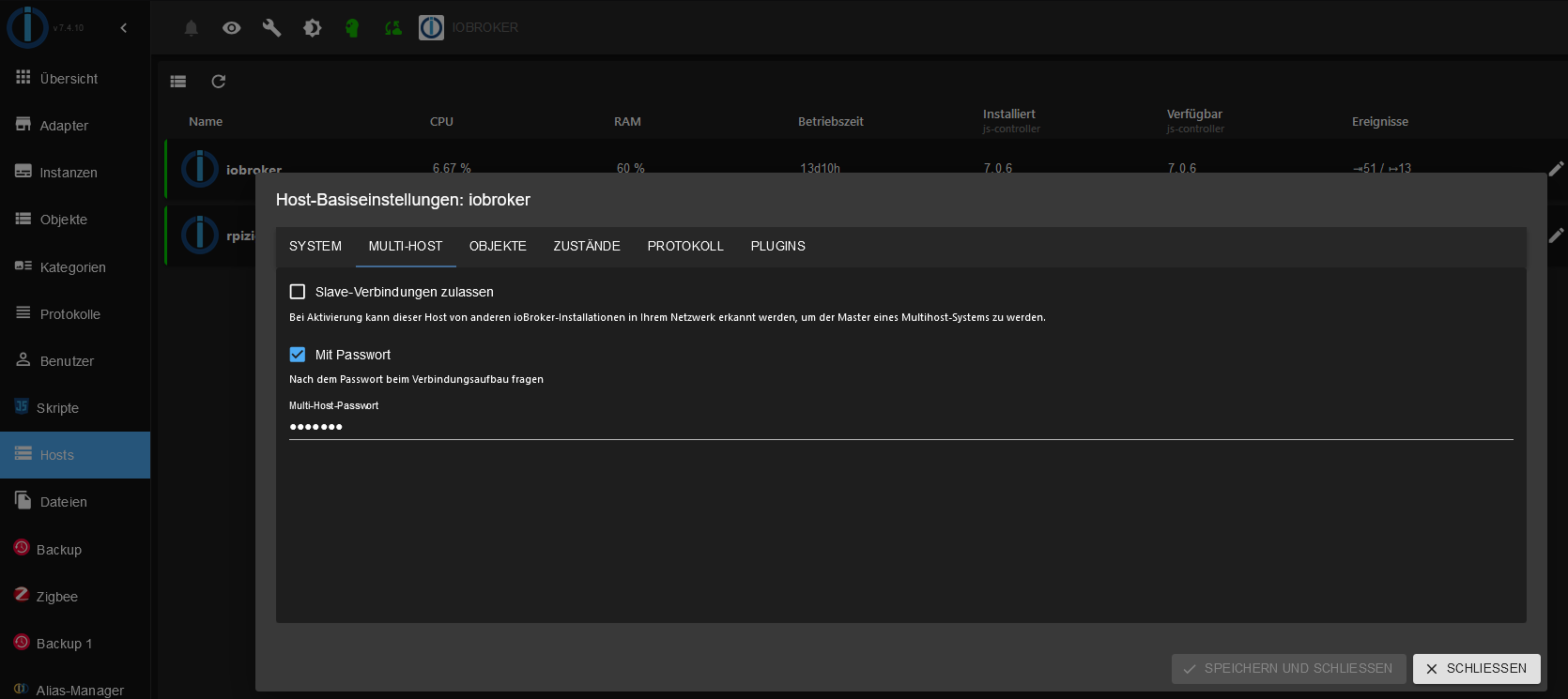
@iobrokerin mach es zu Fuß via
iob setup customauf dem Slave -
Hallo, ich habe einen ioBroker auf einem Raspi als Master konfiguriert:
bernd@raspberrypi:~ $ iobroker multihost enable
Please check the binding of the configured jsonl server to allow remote connections.
No configuration change needed.


Multihost discovery server: enabled
Discovery authentication:   enabled
Persistent activation:      disabled
Objects:                    jsonl on 0.0.0.0
States:                     jsonl on 0.0.0.0
bernd@raspberrypi:~ $ sudo ufw status
Status: active

To                         Action      From
--                         ------      ----
...
9000                       ALLOW       Anywhere
9001                       ALLOW       Anywhere
...
9000 (v6)                  ALLOW       Anywhere (v6)
9001 (v6)                  ALLOW       Anywhere (v6)
Auf meinem zweiten Raspi, der über WLAN ans Heimnetzwerk angebunden ist, versuche ich mich zu verbinden:
bernd@raspberrypi-wb:~ $ iobroker multihost connect
No Multihost server found. Make sure iobroker is running on the host where you enabled multihost discovery (and it is not this host)!
bernd@raspberrypi-wb:~ $ sudo ufw status
Status: active

To                         Action      From
--                         ------      ----
...
9000                       ALLOW       Anywhere
9001                       ALLOW       Anywhere
...
9000 (v6)                  ALLOW       Anywhere (v6)
9001 (v6)                  ALLOW       Anywhere (v6)
Was könnte hier das Problem darstellen?
-
@meister-mopper kann es erst morgen wieder versuchen. Aber genau so ein Passwort musste ich ja setzen auf dem master via Kommandozeile
-
@meister-mopper kann es erst morgen wieder versuchen. Aber genau so ein Passwort musste ich ja setzen auf dem master via Kommandozeile
@iobrokerin Ich kriege das einfach nicht zum Laufen. Was klappt jetzt: ich habe beide Firewalls temporär deaktiviert, dann hat der Slave den Master gefunden. Der ist nun korrekt eingetragen. Sobald ich die Firewalls aktiviere -> Kommunikation zum Slave geht auf rot. Wenn ich wieder die ufw temporär des Masters deaktiviere, sofort auf grün.
Master:
bernd@raspberrypi:~ $ sudo ufw status
Status: active

To                         Action      From
--                         ------      ----
5354/tcp                   ALLOW       192.168.178.0/24
80/tcp                     ALLOW       Anywhere
443/tcp                    ALLOW       Anywhere
53/udp                     ALLOW       192.168.178.0/24
8081/tcp                   ALLOW       192.168.178.0/24
8082/tcp                   ALLOW       192.168.178.0/24
1882/tcp                   ALLOW       192.168.178.0/24
180/tcp                    ALLOW       192.168.178.0/24
8090/tcp                   ALLOW       192.168.178.0/24
8444/tcp                   ALLOW       192.168.178.0/24
1880/tcp                   ALLOW       192.168.178.0/24
8008/tcp                   ALLOW       192.168.178.0/24
3306/tcp                   ALLOW       192.168.178.0/24
993/tcp                    ALLOW       192.168.178.0/24
587/tcp                    ALLOW       192.168.178.0/24
22/tcp                     DENY        Anywhere
53/tcp                     ALLOW       192.168.178.0/24
80/tcp (v6)                ALLOW       Anywhere (v6)
443/tcp (v6)               ALLOW       Anywhere (v6)
22/tcp (v6)                DENY        Anywhere (v6)
53/udp                     ALLOW       fd00::/64
1882/tcp                   ALLOW       fd00::/64
3306/tcp                   ALLOW       fd00::/64
993/tcp                    ALLOW       fd00::/64
587/tcp                    ALLOW       fd00::/64
53/tcp                     ALLOW       fd00::/64

192.168.178.17 9000/udp    ALLOW OUT   Anywhere
192.168.178.17 9001/udp    ALLOW OUT   Anywhere
xxxx::xxx:xxx:xxx:xxx 9000/udp ALLOW OUT   Anywhere (v6)
xxxx::xxx:xxx:xxx:xxx 9001/udp ALLOW OUT   Anywhere (v6)
Slave:
bernd@DietPi:~$ sudo ufw status
Status: active

To                         Action      From
--                         ------      ----
127.0.0.1                  ALLOW       127.0.0.1
9000/udp                   ALLOW       192.168.178.19
9001/udp                   ALLOW       192.168.178.19
5354/tcp                   ALLOW       192.168.178.0/24
6379/tcp                   ALLOW       127.0.0.1
1883/tcp                   ALLOW       192.168.178.20
6379/tcp                   ALLOW       ::1
9000/udp                   ALLOW       xxxx::xxx:xxx:xxx:xxx
9001/udp                   ALLOW       xxxx::xxx:xxx:xxx:xxx
Wenn euch nicht nochwas auffällt, ich sehe es nicht.
-
@iobrokerin Ich kriege das einfach nicht zum Laufen. Was klappt jetzt: ich habe beide Firewalls temporär deaktiviert, dann hat der Slave den Master gefunden. Der ist nun korrekt eingetragen. Sobald ich die Firewalls aktiviere -> Kommunikation zum Slave geht auf rot. Wenn ich wieder die ufw temporär des Masters deaktiviere, sofort auf grün.
Master:
bernd@raspberrypi:~ $ sudo ufw status
Status: active

To                         Action      From
--                         ------      ----
5354/tcp                   ALLOW       192.168.178.0/24
80/tcp                     ALLOW       Anywhere
443/tcp                    ALLOW       Anywhere
53/udp                     ALLOW       192.168.178.0/24
8081/tcp                   ALLOW       192.168.178.0/24
8082/tcp                   ALLOW       192.168.178.0/24
1882/tcp                   ALLOW       192.168.178.0/24
180/tcp                    ALLOW       192.168.178.0/24
8090/tcp                   ALLOW       192.168.178.0/24
8444/tcp                   ALLOW       192.168.178.0/24
1880/tcp                   ALLOW       192.168.178.0/24
8008/tcp                   ALLOW       192.168.178.0/24
3306/tcp                   ALLOW       192.168.178.0/24
993/tcp                    ALLOW       192.168.178.0/24
587/tcp                    ALLOW       192.168.178.0/24
22/tcp                     DENY        Anywhere
53/tcp                     ALLOW       192.168.178.0/24
80/tcp (v6)                ALLOW       Anywhere (v6)
443/tcp (v6)               ALLOW       Anywhere (v6)
22/tcp (v6)                DENY        Anywhere (v6)
53/udp                     ALLOW       fd00::/64
1882/tcp                   ALLOW       fd00::/64
3306/tcp                   ALLOW       fd00::/64
993/tcp                    ALLOW       fd00::/64
587/tcp                    ALLOW       fd00::/64
53/tcp                     ALLOW       fd00::/64

192.168.178.17 9000/udp    ALLOW OUT   Anywhere
192.168.178.17 9001/udp    ALLOW OUT   Anywhere
xxxx::xxx:xxx:xxx:xxx 9000/udp ALLOW OUT   Anywhere (v6)
xxxx::xxx:xxx:xxx:xxx 9001/udp ALLOW OUT   Anywhere (v6)
Slave:
bernd@DietPi:~$ sudo ufw status
Status: active

To                         Action      From
--                         ------      ----
127.0.0.1                  ALLOW       127.0.0.1
9000/udp                   ALLOW       192.168.178.19
9001/udp                   ALLOW       192.168.178.19
5354/tcp                   ALLOW       192.168.178.0/24
6379/tcp                   ALLOW       127.0.0.1
1883/tcp                   ALLOW       192.168.178.20
6379/tcp                   ALLOW       ::1
9000/udp                   ALLOW       xxxx::xxx:xxx:xxx:xxx
9001/udp                   ALLOW       xxxx::xxx:xxx:xxx:xxx
Wenn euch nicht nochwas auffällt, ich sehe es nicht.
@iobrokerin sagte in ioBroker Master Slave funktioniert nicht:
192.168.178.17 9000/udp ALLOW OUT Anywhere
Müsste da nicht
allowstehen anstattallow out?Proxmox und HA ...
Ich schreibe den Code nicht mehr selbst – ich schimpfe mit der KI, bis es funktioniert. -
@iobrokerin sagte in ioBroker Master Slave funktioniert nicht:
192.168.178.17 9000/udp ALLOW OUT Anywhere
Müsste da nicht
allowstehen anstattallow out?@meister-mopper sagte in ioBroker Master Slave funktioniert nicht:
Müsste da nicht allow stehen anstatt allow out ?
Genau. Außerdem läuft die Kommunikation über tcp, nicht udp.
-
@meister-mopper sagte in ioBroker Master Slave funktioniert nicht:
Müsste da nicht allow stehen anstatt allow out ?
Genau. Außerdem läuft die Kommunikation über tcp, nicht udp.
@marc-berg tcp? Wenn ich dieses Kommando absetze:
bernd@raspberrypi:~ $  iobroker multihost enable
Multihost discovery server activated on this host. If iobroker is currently not running please start befeore trying to discover this host.
Important: Multihost discovery works with **UDP** packets. Make sure they are routed correctly in your network. If you use Docker you also need to configure this correctly.
Multihost discovery will be automatically deactivated after 15 minutes. If you want to activate it permanently use the --persist flag
dann steht doch da, dass es über UDP geht oder ist hier nur der Discovery gemeint und nicht normal operation? D. h. Ich müsste beides öffnen, tcp und udp, auf dem slave ja dann auch. Wie gesagt, funktioniert die Kommunikation, wenn ich die Firewall auf dem Master temporär deaktiviere. Aber ich habe auch niccht andere Kommunikation geprüft...
Edit: ich habe nun kurzerhand beides aufgenommen (tcp und udp). Und von nach Allow alles gesetzt. Jetzt ist die Verbindung da. Danke für eure Hilfe.
-
@marc-berg tcp? Wenn ich dieses Kommando absetze:
bernd@raspberrypi:~ $  iobroker multihost enable
Multihost discovery server activated on this host. If iobroker is currently not running please start befeore trying to discover this host.
Important: Multihost discovery works with **UDP** packets. Make sure they are routed correctly in your network. If you use Docker you also need to configure this correctly.
Multihost discovery will be automatically deactivated after 15 minutes. If you want to activate it permanently use the --persist flag
dann steht doch da, dass es über UDP geht oder ist hier nur der Discovery gemeint und nicht normal operation? D. h. Ich müsste beides öffnen, tcp und udp, auf dem slave ja dann auch. Wie gesagt, funktioniert die Kommunikation, wenn ich die Firewall auf dem Master temporär deaktiviere. Aber ich habe auch niccht andere Kommunikation geprüft...
Edit: ich habe nun kurzerhand beides aufgenommen (tcp und udp). Und von nach Allow alles gesetzt. Jetzt ist die Verbindung da. Danke für eure Hilfe.
@iobrokerin Ja, UDP für die Discovery, TCP für den normalen Verkehr. Ist so aber bei vielen Adaptern, die mit Discovery arbeiten. Das läuft dann via UDP bis die Verbindung mal steht.
Gruss, Jürgen



Hey! Du scheinst an dieser Unterhaltung interessiert zu sein, hast aber noch kein Konto.
Hast du es satt, bei jedem Besuch durch die gleichen Beiträge zu scrollen? Wenn du dich für ein Konto anmeldest, kommst du immer genau dorthin zurück, wo du zuvor warst, und kannst dich über neue Antworten benachrichtigen lassen (entweder per E-Mail oder Push-Benachrichtigung). Du kannst auch Lesezeichen speichern und Beiträge positiv bewerten, um anderen Community-Mitgliedern deine Wertschätzung zu zeigen.
Mit deinem Input könnte dieser Beitrag noch besser werden 💗
Registrieren Anmelden444
Online33.0k
Benutzer83.7k
Themen1.3m
Beiträge